cd-browser 0.2.4__tar.gz → 0.2.6__tar.gz
This diff represents the content of publicly available package versions that have been released to one of the supported registries. The information contained in this diff is provided for informational purposes only and reflects changes between package versions as they appear in their respective public registries.
- {cd_browser-0.2.4 → cd_browser-0.2.6}/PKG-INFO +68 -8
- cd_browser-0.2.6/README.md +200 -0
- {cd_browser-0.2.4 → cd_browser-0.2.6}/pyproject.toml +1 -1
- {cd_browser-0.2.4 → cd_browser-0.2.6}/src/app/filesystem.py +39 -5
- {cd_browser-0.2.4 → cd_browser-0.2.6}/src/app/navigator.py +27 -8
- cd_browser-0.2.6/src/app/opener.py +189 -0
- cd_browser-0.2.6/src/app/ui.py +756 -0
- {cd_browser-0.2.4 → cd_browser-0.2.6}/src/cd_browser.egg-info/PKG-INFO +68 -8
- {cd_browser-0.2.4 → cd_browser-0.2.6}/src/cd_browser.egg-info/SOURCES.txt +2 -0
- {cd_browser-0.2.4 → cd_browser-0.2.6}/tests/test_filesystem.py +29 -1
- {cd_browser-0.2.4 → cd_browser-0.2.6}/tests/test_navigator.py +18 -0
- cd_browser-0.2.6/tests/test_opener.py +147 -0
- {cd_browser-0.2.4 → cd_browser-0.2.6}/tests/test_ui.py +119 -0
- cd_browser-0.2.4/README.md +0 -140
- cd_browser-0.2.4/src/app/ui.py +0 -344
- {cd_browser-0.2.4 → cd_browser-0.2.6}/LICENSE +0 -0
- {cd_browser-0.2.4 → cd_browser-0.2.6}/setup.cfg +0 -0
- {cd_browser-0.2.4 → cd_browser-0.2.6}/src/app/__init__.py +0 -0
- {cd_browser-0.2.4 → cd_browser-0.2.6}/src/app/cli.py +0 -0
- {cd_browser-0.2.4 → cd_browser-0.2.6}/src/app/config.py +0 -0
- {cd_browser-0.2.4 → cd_browser-0.2.6}/src/app/domain/__init__.py +0 -0
- {cd_browser-0.2.4 → cd_browser-0.2.6}/src/app/history.py +0 -0
- {cd_browser-0.2.4 → cd_browser-0.2.6}/src/app/infrastructure/__init__.py +0 -0
- {cd_browser-0.2.4 → cd_browser-0.2.6}/src/app/logging_config.py +0 -0
- {cd_browser-0.2.4 → cd_browser-0.2.6}/src/app/main.py +0 -0
- {cd_browser-0.2.4 → cd_browser-0.2.6}/src/app/services/__init__.py +0 -0
- {cd_browser-0.2.4 → cd_browser-0.2.6}/src/app/utils/__init__.py +0 -0
- {cd_browser-0.2.4 → cd_browser-0.2.6}/src/cd_browser.egg-info/dependency_links.txt +0 -0
- {cd_browser-0.2.4 → cd_browser-0.2.6}/src/cd_browser.egg-info/entry_points.txt +0 -0
- {cd_browser-0.2.4 → cd_browser-0.2.6}/src/cd_browser.egg-info/requires.txt +0 -0
- {cd_browser-0.2.4 → cd_browser-0.2.6}/src/cd_browser.egg-info/top_level.txt +0 -0
- {cd_browser-0.2.4 → cd_browser-0.2.6}/src/cd_browser_post_install.py +0 -0
- {cd_browser-0.2.4 → cd_browser-0.2.6}/tests/test_cli.py +0 -0
- {cd_browser-0.2.4 → cd_browser-0.2.6}/tests/test_history.py +0 -0
- {cd_browser-0.2.4 → cd_browser-0.2.6}/tests/test_post_install.py +0 -0
- {cd_browser-0.2.4 → cd_browser-0.2.6}/tests/test_smoke.py +0 -0
|
@@ -1,6 +1,6 @@
|
|
|
1
1
|
Metadata-Version: 2.4
|
|
2
2
|
Name: cd-browser
|
|
3
|
-
Version: 0.2.
|
|
3
|
+
Version: 0.2.6
|
|
4
4
|
Summary: A fast keyboard-driven directory navigator for the terminal.
|
|
5
5
|
Author: Saky
|
|
6
6
|
Classifier: Development Status :: 3 - Alpha
|
|
@@ -34,6 +34,8 @@ It lets you explore directory trees visually and jump to any folder instantly.
|
|
|
34
34
|
|
|
35
35
|
|
|
36
36
|
|
|
37
|
+
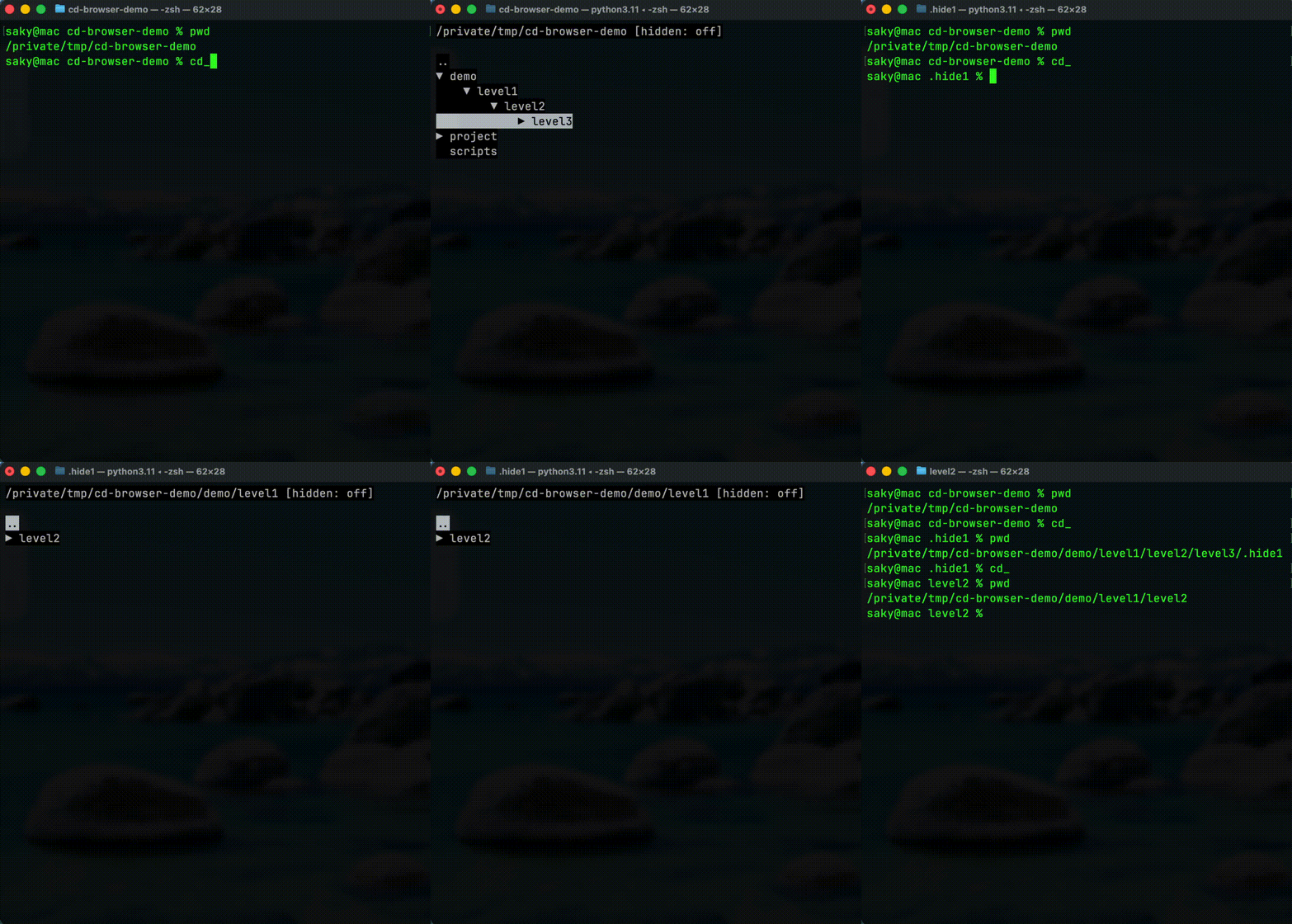
Repository (full demo + docs): https://gitea.sakydogalo.es/saky/cd-browser
|
|
38
|
+
|
|
37
39
|
## Why cd-browser?
|
|
38
40
|
|
|
39
41
|
Working in the terminal often means:
|
|
@@ -46,14 +48,65 @@ Working in the terminal often means:
|
|
|
46
48
|
|
|
47
49
|
## Features
|
|
48
50
|
|
|
49
|
-
-
|
|
50
|
-
-
|
|
51
|
-
-
|
|
52
|
-
-
|
|
51
|
+
- ⌨️ Fully keyboard-driven workflow (`↑` / `↓` / `←` / `→`)
|
|
52
|
+
- 🌲 Expand and collapse directories (`→` to expand/enter, `←` to collapse/back)
|
|
53
|
+
- 📜 Navigation history inside the session (`h` history mode, `b` back, `f` forward)
|
|
54
|
+
- 🔎 Incremental filter mode (`/`, type to filter, `Backspace`, `Esc`)
|
|
55
|
+
- 📄 Toggle file visibility (`a`) to switch between directories-only and mixed view
|
|
56
|
+
- ⚡ Fast jumps in large lists (`PgUp`/`PgDn`, `Home`/`End`, `g`/`G` in normal mode)
|
|
57
|
+
- 🚀 Contextual `open with` menu (`o`) with app detection based on your environment
|
|
58
|
+
- 🔁 Blocking terminal editors restore the UI state when they exit (`nvim`, `nano`, `less`, `bat`)
|
|
59
|
+
- 👀 Toggle hidden entries with `.`
|
|
53
60
|
- 🖥 Native terminal interface
|
|
54
61
|
- 🔁 Works with Bash, Zsh and other shells
|
|
55
|
-
- ⚡ Returns the selected path to the shell
|
|
56
|
-
|
|
62
|
+
- ⚡ Returns the selected path to the shell (`Enter` to confirm, `Esc` to cancel)
|
|
63
|
+
|
|
64
|
+
## Controls
|
|
65
|
+
|
|
66
|
+
Normal mode:
|
|
67
|
+
|
|
68
|
+
- `↑` / `↓`: Move selection
|
|
69
|
+
- `→`: Expand directory, or enter when already expanded
|
|
70
|
+
- `←`: Collapse directory, or go to parent
|
|
71
|
+
- `Enter`: Confirm selected path and exit
|
|
72
|
+
- `Esc`: Cancel and return the original path
|
|
73
|
+
- `h`: Toggle history mode
|
|
74
|
+
- `b` / `f`: Back / forward in navigation history
|
|
75
|
+
- `.`: Toggle hidden entries
|
|
76
|
+
- `a`: Toggle file visibility
|
|
77
|
+
- `/`: Enter filter mode
|
|
78
|
+
- `o`: Open selected entry with an app
|
|
79
|
+
- `PgUp` / `PgDn`: Page jump
|
|
80
|
+
- `Home` / `End`: Jump to first/last entry
|
|
81
|
+
- `g` / `G`: Jump to first/last entry
|
|
82
|
+
|
|
83
|
+
Filter mode:
|
|
84
|
+
|
|
85
|
+
- Type text: Filter visible entries in real time (case-insensitive)
|
|
86
|
+
- `↑` / `↓`: Move inside filtered results
|
|
87
|
+
- `Enter`: Apply filter and perform contextual action:
|
|
88
|
+
- Directory: navigate into it without exiting `cd_`
|
|
89
|
+
- File: open app selection menu
|
|
90
|
+
- `Esc`: Exit filter mode and clear query
|
|
91
|
+
- `Backspace`: Remove last filter character
|
|
92
|
+
|
|
93
|
+
History mode:
|
|
94
|
+
|
|
95
|
+
- `↑` / `↓`: Move through history entries
|
|
96
|
+
- `Enter`: Jump to selected history path
|
|
97
|
+
- `Esc` or `h`: Exit history mode
|
|
98
|
+
- `PgUp` / `PgDn`, `Home` / `End`: Fast history navigation
|
|
99
|
+
|
|
100
|
+
Open with menu (`o`):
|
|
101
|
+
|
|
102
|
+
- `↑` / `↓`: Move between app options
|
|
103
|
+
- `Enter`: Launch selected app
|
|
104
|
+
- `Esc`: Cancel
|
|
105
|
+
|
|
106
|
+
The menu only shows apps available in your system (`PATH`) and context:
|
|
107
|
+
|
|
108
|
+
- GUI options (when GUI is available): `code`, system `open`/`xdg-open`
|
|
109
|
+
- Terminal options: `antigravity`, `nvim`, `nano`, `less`, `bat` (as applicable)
|
|
57
110
|
|
|
58
111
|
## Quick Demo
|
|
59
112
|
|
|
@@ -124,7 +177,14 @@ Then use:
|
|
|
124
177
|
cd_
|
|
125
178
|
```
|
|
126
179
|
|
|
127
|
-
-
|
|
180
|
+
- Inside `cd_browser`, press `.` to toggle hidden entries.
|
|
181
|
+
|
|
182
|
+
## Platform Compatibility
|
|
183
|
+
|
|
184
|
+
Practical conclusion:
|
|
185
|
+
|
|
186
|
+
- Best current support: **macOS and Linux**
|
|
187
|
+
- **Windows is partially supported**, but still needs real-world validation in Windows terminal environments before being considered fully supported
|
|
128
188
|
|
|
129
189
|
## Uninstall
|
|
130
190
|
|
|
@@ -0,0 +1,200 @@
|
|
|
1
|
+
# cd-browser
|
|
2
|
+
|
|
3
|
+
**Stop typing paths. Browse them.**
|
|
4
|
+
|
|
5
|
+
`cd-browser` is a fast keyboard-driven directory navigator for the terminal.
|
|
6
|
+
It lets you explore directory trees visually and jump to any folder instantly.
|
|
7
|
+
|
|
8
|
+

|
|
9
|
+
|
|
10
|
+
Repository (full demo + docs): https://gitea.sakydogalo.es/saky/cd-browser
|
|
11
|
+
|
|
12
|
+
## Why cd-browser?
|
|
13
|
+
|
|
14
|
+
Working in the terminal often means:
|
|
15
|
+
|
|
16
|
+
- typing long directory paths
|
|
17
|
+
- navigating deep folder trees
|
|
18
|
+
- repeating `cd ..` multiple times
|
|
19
|
+
|
|
20
|
+
`cd-browser` provides an **interactive terminal UI** that allows you to browse directories with the keyboard and return the selected path directly to your shell.
|
|
21
|
+
|
|
22
|
+
## Features
|
|
23
|
+
|
|
24
|
+
- ⌨️ Fully keyboard-driven workflow (`↑` / `↓` / `←` / `→`)
|
|
25
|
+
- 🌲 Expand and collapse directories (`→` to expand/enter, `←` to collapse/back)
|
|
26
|
+
- 📜 Navigation history inside the session (`h` history mode, `b` back, `f` forward)
|
|
27
|
+
- 🔎 Incremental filter mode (`/`, type to filter, `Backspace`, `Esc`)
|
|
28
|
+
- 📄 Toggle file visibility (`a`) to switch between directories-only and mixed view
|
|
29
|
+
- ⚡ Fast jumps in large lists (`PgUp`/`PgDn`, `Home`/`End`, `g`/`G` in normal mode)
|
|
30
|
+
- 🚀 Contextual `open with` menu (`o`) with app detection based on your environment
|
|
31
|
+
- 🔁 Blocking terminal editors restore the UI state when they exit (`nvim`, `nano`, `less`, `bat`)
|
|
32
|
+
- 👀 Toggle hidden entries with `.`
|
|
33
|
+
- 🖥 Native terminal interface
|
|
34
|
+
- 🔁 Works with Bash, Zsh and other shells
|
|
35
|
+
- ⚡ Returns the selected path to the shell (`Enter` to confirm, `Esc` to cancel)
|
|
36
|
+
|
|
37
|
+
## Controls
|
|
38
|
+
|
|
39
|
+
Normal mode:
|
|
40
|
+
|
|
41
|
+
- `↑` / `↓`: Move selection
|
|
42
|
+
- `→`: Expand directory, or enter when already expanded
|
|
43
|
+
- `←`: Collapse directory, or go to parent
|
|
44
|
+
- `Enter`: Confirm selected path and exit
|
|
45
|
+
- `Esc`: Cancel and return the original path
|
|
46
|
+
- `h`: Toggle history mode
|
|
47
|
+
- `b` / `f`: Back / forward in navigation history
|
|
48
|
+
- `.`: Toggle hidden entries
|
|
49
|
+
- `a`: Toggle file visibility
|
|
50
|
+
- `/`: Enter filter mode
|
|
51
|
+
- `o`: Open selected entry with an app
|
|
52
|
+
- `PgUp` / `PgDn`: Page jump
|
|
53
|
+
- `Home` / `End`: Jump to first/last entry
|
|
54
|
+
- `g` / `G`: Jump to first/last entry
|
|
55
|
+
|
|
56
|
+
Filter mode:
|
|
57
|
+
|
|
58
|
+
- Type text: Filter visible entries in real time (case-insensitive)
|
|
59
|
+
- `↑` / `↓`: Move inside filtered results
|
|
60
|
+
- `Enter`: Apply filter and perform contextual action:
|
|
61
|
+
- Directory: navigate into it without exiting `cd_`
|
|
62
|
+
- File: open app selection menu
|
|
63
|
+
- `Esc`: Exit filter mode and clear query
|
|
64
|
+
- `Backspace`: Remove last filter character
|
|
65
|
+
|
|
66
|
+
History mode:
|
|
67
|
+
|
|
68
|
+
- `↑` / `↓`: Move through history entries
|
|
69
|
+
- `Enter`: Jump to selected history path
|
|
70
|
+
- `Esc` or `h`: Exit history mode
|
|
71
|
+
- `PgUp` / `PgDn`, `Home` / `End`: Fast history navigation
|
|
72
|
+
|
|
73
|
+
Open with menu (`o`):
|
|
74
|
+
|
|
75
|
+
- `↑` / `↓`: Move between app options
|
|
76
|
+
- `Enter`: Launch selected app
|
|
77
|
+
- `Esc`: Cancel
|
|
78
|
+
|
|
79
|
+
The menu only shows apps available in your system (`PATH`) and context:
|
|
80
|
+
|
|
81
|
+
- GUI options (when GUI is available): `code`, system `open`/`xdg-open`
|
|
82
|
+
- Terminal options: `antigravity`, `nvim`, `nano`, `less`, `bat` (as applicable)
|
|
83
|
+
|
|
84
|
+
## Quick Demo
|
|
85
|
+
|
|
86
|
+
Run:
|
|
87
|
+
|
|
88
|
+
```bash
|
|
89
|
+
cd_
|
|
90
|
+
```
|
|
91
|
+
|
|
92
|
+
Browse directories using the arrow keys and press **Enter** to jump directly to the selected folder.
|
|
93
|
+
|
|
94
|
+
## Documentation
|
|
95
|
+
|
|
96
|
+
See the documentation index:
|
|
97
|
+
|
|
98
|
+
```
|
|
99
|
+
docs/index.md
|
|
100
|
+
```
|
|
101
|
+
|
|
102
|
+
## Installation
|
|
103
|
+
|
|
104
|
+
Install the project in user mode:
|
|
105
|
+
|
|
106
|
+
```bash
|
|
107
|
+
pip install cd-browser
|
|
108
|
+
```
|
|
109
|
+
|
|
110
|
+
**Important**: After installation, run this to set up the `cd_` command:
|
|
111
|
+
|
|
112
|
+
```bash
|
|
113
|
+
cd_browser_post_install
|
|
114
|
+
```
|
|
115
|
+
|
|
116
|
+
This interactive script will guide you through enabling `cd_` in your shell.
|
|
117
|
+
|
|
118
|
+
## Shell Integration For `cd_`
|
|
119
|
+
|
|
120
|
+
Because a Python subprocess cannot directly change the parent shell directory, use a shell wrapper that captures the final path printed by `cd_browser`.
|
|
121
|
+
|
|
122
|
+
Bash or Zsh example:
|
|
123
|
+
|
|
124
|
+
```bash
|
|
125
|
+
cd_() {
|
|
126
|
+
local target
|
|
127
|
+
target="$(cd_browser)" || return
|
|
128
|
+
|
|
129
|
+
if [ -n "$target" ] && [ -d "$target" ]; then
|
|
130
|
+
cd "$target"
|
|
131
|
+
fi
|
|
132
|
+
}
|
|
133
|
+
```
|
|
134
|
+
|
|
135
|
+
After adding the function to your shell profile, reload it:
|
|
136
|
+
|
|
137
|
+
```bash
|
|
138
|
+
source ~/.bashrc
|
|
139
|
+
```
|
|
140
|
+
|
|
141
|
+
Or:
|
|
142
|
+
|
|
143
|
+
```bash
|
|
144
|
+
source ~/.zshrc
|
|
145
|
+
```
|
|
146
|
+
|
|
147
|
+
Then use:
|
|
148
|
+
|
|
149
|
+
```bash
|
|
150
|
+
cd_
|
|
151
|
+
```
|
|
152
|
+
|
|
153
|
+
- Inside `cd_browser`, press `.` to toggle hidden entries.
|
|
154
|
+
|
|
155
|
+
## Platform Compatibility
|
|
156
|
+
|
|
157
|
+
Practical conclusion:
|
|
158
|
+
|
|
159
|
+
- Best current support: **macOS and Linux**
|
|
160
|
+
- **Windows is partially supported**, but still needs real-world validation in Windows terminal environments before being considered fully supported
|
|
161
|
+
|
|
162
|
+
## Uninstall
|
|
163
|
+
|
|
164
|
+
If the project was installed with `pip`, remove it with:
|
|
165
|
+
|
|
166
|
+
```bash
|
|
167
|
+
pip uninstall cd-browser
|
|
168
|
+
```
|
|
169
|
+
|
|
170
|
+
**Important**: After uninstalling, remove the `cd_()` function from your shell profile (~/.bashrc or ~/.zshrc) to clean up completely.
|
|
171
|
+
|
|
172
|
+
## Developer Setup
|
|
173
|
+
|
|
174
|
+
Recommended setup:
|
|
175
|
+
|
|
176
|
+
```bash
|
|
177
|
+
make dev
|
|
178
|
+
```
|
|
179
|
+
|
|
180
|
+
Run the application in development mode:
|
|
181
|
+
|
|
182
|
+
```bash
|
|
183
|
+
python -m app.main
|
|
184
|
+
```
|
|
185
|
+
|
|
186
|
+
Useful development commands:
|
|
187
|
+
|
|
188
|
+
```bash
|
|
189
|
+
make fix
|
|
190
|
+
make quality
|
|
191
|
+
make run
|
|
192
|
+
```
|
|
193
|
+
|
|
194
|
+
## Template Origin
|
|
195
|
+
|
|
196
|
+
This project was created from the Python AI Dev Template.
|
|
197
|
+
|
|
198
|
+
The original template documentation has been preserved in `README_TEMPLATE.md` so the project-specific README can focus on `cd-browser` usage and development.
|
|
199
|
+
|
|
200
|
+
For the original template setup, conventions, and generic workflow notes, see `README_TEMPLATE.md`.
|
|
@@ -13,11 +13,37 @@ class DirectoryEntry:
|
|
|
13
13
|
has_children: bool
|
|
14
14
|
|
|
15
15
|
|
|
16
|
+
@dataclass(frozen=True, slots=True)
|
|
17
|
+
class FileSystemEntry:
|
|
18
|
+
"""Filesystem entry metadata for tree rendering."""
|
|
19
|
+
|
|
20
|
+
name: str
|
|
21
|
+
path: Path
|
|
22
|
+
is_directory: bool
|
|
23
|
+
has_children: bool
|
|
24
|
+
|
|
25
|
+
|
|
16
26
|
def list_directories(path: Path, show_hidden: bool = False) -> list[DirectoryEntry]:
|
|
17
27
|
"""Return direct child directories sorted by name."""
|
|
18
28
|
|
|
29
|
+
entries = list_entries(path, show_hidden=show_hidden, include_files=False)
|
|
30
|
+
return [
|
|
31
|
+
DirectoryEntry(
|
|
32
|
+
name=entry.name,
|
|
33
|
+
path=entry.path,
|
|
34
|
+
has_children=entry.has_children,
|
|
35
|
+
)
|
|
36
|
+
for entry in entries
|
|
37
|
+
]
|
|
38
|
+
|
|
39
|
+
|
|
40
|
+
def list_entries(
|
|
41
|
+
path: Path, show_hidden: bool = False, include_files: bool = False
|
|
42
|
+
) -> list[FileSystemEntry]:
|
|
43
|
+
"""Return direct child entries sorted by type and name."""
|
|
44
|
+
|
|
19
45
|
directory_path = path.expanduser().resolve()
|
|
20
|
-
entries: list[
|
|
46
|
+
entries: list[FileSystemEntry] = []
|
|
21
47
|
|
|
22
48
|
try:
|
|
23
49
|
children = list(directory_path.iterdir())
|
|
@@ -30,20 +56,28 @@ def list_directories(path: Path, show_hidden: bool = False) -> list[DirectoryEnt
|
|
|
30
56
|
except OSError:
|
|
31
57
|
continue
|
|
32
58
|
|
|
33
|
-
if not is_directory:
|
|
59
|
+
if not is_directory and not include_files:
|
|
34
60
|
continue
|
|
35
61
|
if not show_hidden and child.name.startswith("."):
|
|
36
62
|
continue
|
|
37
63
|
|
|
38
64
|
entries.append(
|
|
39
|
-
|
|
65
|
+
FileSystemEntry(
|
|
40
66
|
name=child.name,
|
|
41
67
|
path=child,
|
|
42
|
-
|
|
68
|
+
is_directory=is_directory,
|
|
69
|
+
has_children=(
|
|
70
|
+
has_subdirectories(child, show_hidden=show_hidden)
|
|
71
|
+
if is_directory
|
|
72
|
+
else False
|
|
73
|
+
),
|
|
43
74
|
)
|
|
44
75
|
)
|
|
45
76
|
|
|
46
|
-
return sorted(
|
|
77
|
+
return sorted(
|
|
78
|
+
entries,
|
|
79
|
+
key=lambda entry: (not entry.is_directory, entry.name.casefold()),
|
|
80
|
+
)
|
|
47
81
|
|
|
48
82
|
|
|
49
83
|
def has_subdirectories(path: Path, show_hidden: bool = False) -> bool:
|
|
@@ -3,13 +3,13 @@ from __future__ import annotations
|
|
|
3
3
|
from dataclasses import dataclass, field
|
|
4
4
|
from pathlib import Path
|
|
5
5
|
|
|
6
|
-
from app.filesystem import
|
|
6
|
+
from app.filesystem import list_entries
|
|
7
7
|
from app.history import SessionHistory
|
|
8
8
|
|
|
9
9
|
|
|
10
10
|
@dataclass(frozen=True, slots=True)
|
|
11
11
|
class VisibleEntry:
|
|
12
|
-
"""A
|
|
12
|
+
"""A row visible in the navigator tree."""
|
|
13
13
|
|
|
14
14
|
name: str
|
|
15
15
|
path: Path
|
|
@@ -17,6 +17,7 @@ class VisibleEntry:
|
|
|
17
17
|
has_children: bool
|
|
18
18
|
is_expanded: bool
|
|
19
19
|
is_parent: bool = False
|
|
20
|
+
is_file: bool = False
|
|
20
21
|
|
|
21
22
|
|
|
22
23
|
@dataclass(slots=True)
|
|
@@ -29,6 +30,7 @@ class Navigator:
|
|
|
29
30
|
selected_index: int = field(init=False, default=0)
|
|
30
31
|
_expanded_paths: set[Path] = field(init=False, default_factory=set)
|
|
31
32
|
show_hidden: bool = False
|
|
33
|
+
show_files: bool = False
|
|
32
34
|
|
|
33
35
|
def __post_init__(self) -> None:
|
|
34
36
|
self.current_path = self.start_path.expanduser().resolve()
|
|
@@ -69,6 +71,9 @@ class Navigator:
|
|
|
69
71
|
def enter_selected_directory(self) -> Path:
|
|
70
72
|
"""Enter the currently selected directory and record it in history."""
|
|
71
73
|
|
|
74
|
+
if self.selected_entry.is_file:
|
|
75
|
+
return self.current_path
|
|
76
|
+
|
|
72
77
|
return self._change_directory(self.selected_entry.path)
|
|
73
78
|
|
|
74
79
|
def go_to_parent_directory(self) -> Path:
|
|
@@ -149,6 +154,15 @@ class Navigator:
|
|
|
149
154
|
"""Toggle showing/hiding hidden directory entries."""
|
|
150
155
|
|
|
151
156
|
self.show_hidden = not self.show_hidden
|
|
157
|
+
self._reset_view_state()
|
|
158
|
+
|
|
159
|
+
def toggle_files(self) -> None:
|
|
160
|
+
"""Toggle showing/hiding file entries."""
|
|
161
|
+
|
|
162
|
+
self.show_files = not self.show_files
|
|
163
|
+
self._reset_view_state()
|
|
164
|
+
|
|
165
|
+
def _reset_view_state(self) -> None:
|
|
152
166
|
self.selected_index = 0
|
|
153
167
|
self._expanded_paths.clear()
|
|
154
168
|
|
|
@@ -162,20 +176,25 @@ class Navigator:
|
|
|
162
176
|
def _build_entries(self, path: Path, depth: int) -> list[VisibleEntry]:
|
|
163
177
|
entries: list[VisibleEntry] = []
|
|
164
178
|
|
|
165
|
-
for
|
|
166
|
-
|
|
179
|
+
for item in list_entries(
|
|
180
|
+
path, show_hidden=self.show_hidden, include_files=self.show_files
|
|
181
|
+
):
|
|
182
|
+
is_expanded = (
|
|
183
|
+
item.path in self._expanded_paths if item.is_directory else False
|
|
184
|
+
)
|
|
167
185
|
entries.append(
|
|
168
186
|
VisibleEntry(
|
|
169
|
-
name=
|
|
170
|
-
path=
|
|
187
|
+
name=item.name,
|
|
188
|
+
path=item.path,
|
|
171
189
|
depth=depth,
|
|
172
|
-
has_children=
|
|
190
|
+
has_children=item.has_children,
|
|
173
191
|
is_expanded=is_expanded,
|
|
192
|
+
is_file=not item.is_directory,
|
|
174
193
|
)
|
|
175
194
|
)
|
|
176
195
|
|
|
177
196
|
if is_expanded:
|
|
178
|
-
entries.extend(self._build_entries(
|
|
197
|
+
entries.extend(self._build_entries(item.path, depth=depth + 1))
|
|
179
198
|
|
|
180
199
|
return entries
|
|
181
200
|
|
|
@@ -0,0 +1,189 @@
|
|
|
1
|
+
from __future__ import annotations
|
|
2
|
+
|
|
3
|
+
import os
|
|
4
|
+
import shlex
|
|
5
|
+
import shutil
|
|
6
|
+
import subprocess
|
|
7
|
+
import sys
|
|
8
|
+
from dataclasses import dataclass
|
|
9
|
+
from pathlib import Path
|
|
10
|
+
from typing import Literal
|
|
11
|
+
|
|
12
|
+
LaunchMode = Literal["background", "blocking"]
|
|
13
|
+
|
|
14
|
+
|
|
15
|
+
@dataclass(frozen=True, slots=True)
|
|
16
|
+
class OpenWithOption:
|
|
17
|
+
"""Candidate application command for opening a path."""
|
|
18
|
+
|
|
19
|
+
label: str
|
|
20
|
+
command_template: str
|
|
21
|
+
executable: str
|
|
22
|
+
launch_mode: LaunchMode
|
|
23
|
+
requires_gui: bool = False
|
|
24
|
+
supports_files: bool = True
|
|
25
|
+
supports_directories: bool = True
|
|
26
|
+
|
|
27
|
+
|
|
28
|
+
def available_openers(path: Path) -> list[OpenWithOption]:
|
|
29
|
+
"""Return available open-with options for a file or directory path."""
|
|
30
|
+
|
|
31
|
+
is_directory = path.is_dir()
|
|
32
|
+
has_gui = _has_gui_session()
|
|
33
|
+
options: list[OpenWithOption] = []
|
|
34
|
+
|
|
35
|
+
for option in _default_options():
|
|
36
|
+
if is_directory and not option.supports_directories:
|
|
37
|
+
continue
|
|
38
|
+
if not is_directory and not option.supports_files:
|
|
39
|
+
continue
|
|
40
|
+
if option.requires_gui and not has_gui:
|
|
41
|
+
continue
|
|
42
|
+
if not shutil.which(option.executable):
|
|
43
|
+
continue
|
|
44
|
+
|
|
45
|
+
options.append(option)
|
|
46
|
+
|
|
47
|
+
return options
|
|
48
|
+
|
|
49
|
+
|
|
50
|
+
def launch_background_option(path: Path, option: OpenWithOption) -> tuple[bool, str]:
|
|
51
|
+
"""Launch a non-blocking option and return status/message."""
|
|
52
|
+
|
|
53
|
+
command = _command_parts(option.command_template, path)
|
|
54
|
+
if not command:
|
|
55
|
+
return False, "Invalid open command"
|
|
56
|
+
|
|
57
|
+
try:
|
|
58
|
+
subprocess.Popen(command, stdout=subprocess.DEVNULL, stderr=subprocess.DEVNULL)
|
|
59
|
+
except OSError as error:
|
|
60
|
+
return False, f"Open failed: {error}"
|
|
61
|
+
|
|
62
|
+
return True, f"Opened with {option.label}"
|
|
63
|
+
|
|
64
|
+
|
|
65
|
+
def launch_blocking_option(path: Path, option: OpenWithOption) -> tuple[bool, str]:
|
|
66
|
+
"""Launch a blocking terminal option and return status/message."""
|
|
67
|
+
|
|
68
|
+
command = _command_parts(option.command_template, path)
|
|
69
|
+
if not command:
|
|
70
|
+
return False, "Invalid open command"
|
|
71
|
+
|
|
72
|
+
try:
|
|
73
|
+
result = subprocess.run(command, check=False)
|
|
74
|
+
except OSError as error:
|
|
75
|
+
return False, f"Open failed: {error}"
|
|
76
|
+
|
|
77
|
+
if result.returncode != 0:
|
|
78
|
+
return (
|
|
79
|
+
False,
|
|
80
|
+
f"Open failed: {option.label} exited with code {result.returncode}",
|
|
81
|
+
)
|
|
82
|
+
|
|
83
|
+
return True, f"Opened with {option.label}"
|
|
84
|
+
|
|
85
|
+
|
|
86
|
+
def is_blocking_option(option: OpenWithOption) -> bool:
|
|
87
|
+
"""Return whether the option should block the current terminal session."""
|
|
88
|
+
|
|
89
|
+
return option.launch_mode == "blocking"
|
|
90
|
+
|
|
91
|
+
|
|
92
|
+
def _default_options() -> tuple[OpenWithOption, ...]:
|
|
93
|
+
return (
|
|
94
|
+
OpenWithOption(
|
|
95
|
+
label="VS Code",
|
|
96
|
+
command_template="code {path}",
|
|
97
|
+
executable="code",
|
|
98
|
+
launch_mode="background",
|
|
99
|
+
requires_gui=True,
|
|
100
|
+
),
|
|
101
|
+
OpenWithOption(
|
|
102
|
+
label="Open (system)",
|
|
103
|
+
command_template=_system_open_template(),
|
|
104
|
+
executable=_system_open_executable(),
|
|
105
|
+
launch_mode="background",
|
|
106
|
+
requires_gui=True,
|
|
107
|
+
supports_directories=False,
|
|
108
|
+
),
|
|
109
|
+
OpenWithOption(
|
|
110
|
+
label="Antigravity",
|
|
111
|
+
command_template="antigravity {path}",
|
|
112
|
+
executable="antigravity",
|
|
113
|
+
launch_mode="background",
|
|
114
|
+
),
|
|
115
|
+
OpenWithOption(
|
|
116
|
+
label="Neovim",
|
|
117
|
+
command_template="nvim {path}",
|
|
118
|
+
executable="nvim",
|
|
119
|
+
launch_mode="blocking",
|
|
120
|
+
),
|
|
121
|
+
OpenWithOption(
|
|
122
|
+
label="Nano",
|
|
123
|
+
command_template="nano {path}",
|
|
124
|
+
executable="nano",
|
|
125
|
+
launch_mode="blocking",
|
|
126
|
+
supports_directories=False,
|
|
127
|
+
),
|
|
128
|
+
OpenWithOption(
|
|
129
|
+
label="Less",
|
|
130
|
+
command_template="less {path}",
|
|
131
|
+
executable="less",
|
|
132
|
+
launch_mode="blocking",
|
|
133
|
+
supports_directories=False,
|
|
134
|
+
),
|
|
135
|
+
OpenWithOption(
|
|
136
|
+
label="Bat",
|
|
137
|
+
command_template="bat {path}",
|
|
138
|
+
executable="bat",
|
|
139
|
+
launch_mode="blocking",
|
|
140
|
+
supports_directories=False,
|
|
141
|
+
),
|
|
142
|
+
)
|
|
143
|
+
|
|
144
|
+
|
|
145
|
+
def _has_gui_session() -> bool:
|
|
146
|
+
if os.environ.get("SSH_CONNECTION") or os.environ.get("SSH_TTY"):
|
|
147
|
+
return False
|
|
148
|
+
|
|
149
|
+
if sys.platform == "darwin":
|
|
150
|
+
return True
|
|
151
|
+
|
|
152
|
+
if sys.platform.startswith("linux"):
|
|
153
|
+
return bool(os.environ.get("DISPLAY") or os.environ.get("WAYLAND_DISPLAY"))
|
|
154
|
+
|
|
155
|
+
if sys.platform.startswith("win"):
|
|
156
|
+
return True
|
|
157
|
+
|
|
158
|
+
return False
|
|
159
|
+
|
|
160
|
+
|
|
161
|
+
def _system_open_template() -> str:
|
|
162
|
+
if sys.platform == "darwin":
|
|
163
|
+
return "open {path}"
|
|
164
|
+
|
|
165
|
+
if sys.platform.startswith("linux"):
|
|
166
|
+
return "xdg-open {path}"
|
|
167
|
+
|
|
168
|
+
if sys.platform.startswith("win"):
|
|
169
|
+
return 'cmd /c start "" {path}'
|
|
170
|
+
|
|
171
|
+
return "open {path}"
|
|
172
|
+
|
|
173
|
+
|
|
174
|
+
def _system_open_executable() -> str:
|
|
175
|
+
if sys.platform == "darwin":
|
|
176
|
+
return "open"
|
|
177
|
+
|
|
178
|
+
if sys.platform.startswith("linux"):
|
|
179
|
+
return "xdg-open"
|
|
180
|
+
|
|
181
|
+
if sys.platform.startswith("win"):
|
|
182
|
+
return "cmd"
|
|
183
|
+
|
|
184
|
+
return "open"
|
|
185
|
+
|
|
186
|
+
|
|
187
|
+
def _command_parts(command_template: str, path: Path) -> list[str]:
|
|
188
|
+
rendered = command_template.format(path=shlex.quote(str(path)))
|
|
189
|
+
return shlex.split(rendered)
|