cd-browser 0.2.4__tar.gz → 0.2.5__tar.gz
This diff represents the content of publicly available package versions that have been released to one of the supported registries. The information contained in this diff is provided for informational purposes only and reflects changes between package versions as they appear in their respective public registries.
- {cd_browser-0.2.4 → cd_browser-0.2.5}/PKG-INFO +9 -7
- {cd_browser-0.2.4 → cd_browser-0.2.5}/README.md +8 -6
- {cd_browser-0.2.4 → cd_browser-0.2.5}/pyproject.toml +1 -1
- {cd_browser-0.2.4 → cd_browser-0.2.5}/src/cd_browser.egg-info/PKG-INFO +9 -7
- {cd_browser-0.2.4 → cd_browser-0.2.5}/LICENSE +0 -0
- {cd_browser-0.2.4 → cd_browser-0.2.5}/setup.cfg +0 -0
- {cd_browser-0.2.4 → cd_browser-0.2.5}/src/app/__init__.py +0 -0
- {cd_browser-0.2.4 → cd_browser-0.2.5}/src/app/cli.py +0 -0
- {cd_browser-0.2.4 → cd_browser-0.2.5}/src/app/config.py +0 -0
- {cd_browser-0.2.4 → cd_browser-0.2.5}/src/app/domain/__init__.py +0 -0
- {cd_browser-0.2.4 → cd_browser-0.2.5}/src/app/filesystem.py +0 -0
- {cd_browser-0.2.4 → cd_browser-0.2.5}/src/app/history.py +0 -0
- {cd_browser-0.2.4 → cd_browser-0.2.5}/src/app/infrastructure/__init__.py +0 -0
- {cd_browser-0.2.4 → cd_browser-0.2.5}/src/app/logging_config.py +0 -0
- {cd_browser-0.2.4 → cd_browser-0.2.5}/src/app/main.py +0 -0
- {cd_browser-0.2.4 → cd_browser-0.2.5}/src/app/navigator.py +0 -0
- {cd_browser-0.2.4 → cd_browser-0.2.5}/src/app/services/__init__.py +0 -0
- {cd_browser-0.2.4 → cd_browser-0.2.5}/src/app/ui.py +0 -0
- {cd_browser-0.2.4 → cd_browser-0.2.5}/src/app/utils/__init__.py +0 -0
- {cd_browser-0.2.4 → cd_browser-0.2.5}/src/cd_browser.egg-info/SOURCES.txt +0 -0
- {cd_browser-0.2.4 → cd_browser-0.2.5}/src/cd_browser.egg-info/dependency_links.txt +0 -0
- {cd_browser-0.2.4 → cd_browser-0.2.5}/src/cd_browser.egg-info/entry_points.txt +0 -0
- {cd_browser-0.2.4 → cd_browser-0.2.5}/src/cd_browser.egg-info/requires.txt +0 -0
- {cd_browser-0.2.4 → cd_browser-0.2.5}/src/cd_browser.egg-info/top_level.txt +0 -0
- {cd_browser-0.2.4 → cd_browser-0.2.5}/src/cd_browser_post_install.py +0 -0
- {cd_browser-0.2.4 → cd_browser-0.2.5}/tests/test_cli.py +0 -0
- {cd_browser-0.2.4 → cd_browser-0.2.5}/tests/test_filesystem.py +0 -0
- {cd_browser-0.2.4 → cd_browser-0.2.5}/tests/test_history.py +0 -0
- {cd_browser-0.2.4 → cd_browser-0.2.5}/tests/test_navigator.py +0 -0
- {cd_browser-0.2.4 → cd_browser-0.2.5}/tests/test_post_install.py +0 -0
- {cd_browser-0.2.4 → cd_browser-0.2.5}/tests/test_smoke.py +0 -0
- {cd_browser-0.2.4 → cd_browser-0.2.5}/tests/test_ui.py +0 -0
|
@@ -1,6 +1,6 @@
|
|
|
1
1
|
Metadata-Version: 2.4
|
|
2
2
|
Name: cd-browser
|
|
3
|
-
Version: 0.2.
|
|
3
|
+
Version: 0.2.5
|
|
4
4
|
Summary: A fast keyboard-driven directory navigator for the terminal.
|
|
5
5
|
Author: Saky
|
|
6
6
|
Classifier: Development Status :: 3 - Alpha
|
|
@@ -34,6 +34,8 @@ It lets you explore directory trees visually and jump to any folder instantly.
|
|
|
34
34
|
|
|
35
35
|
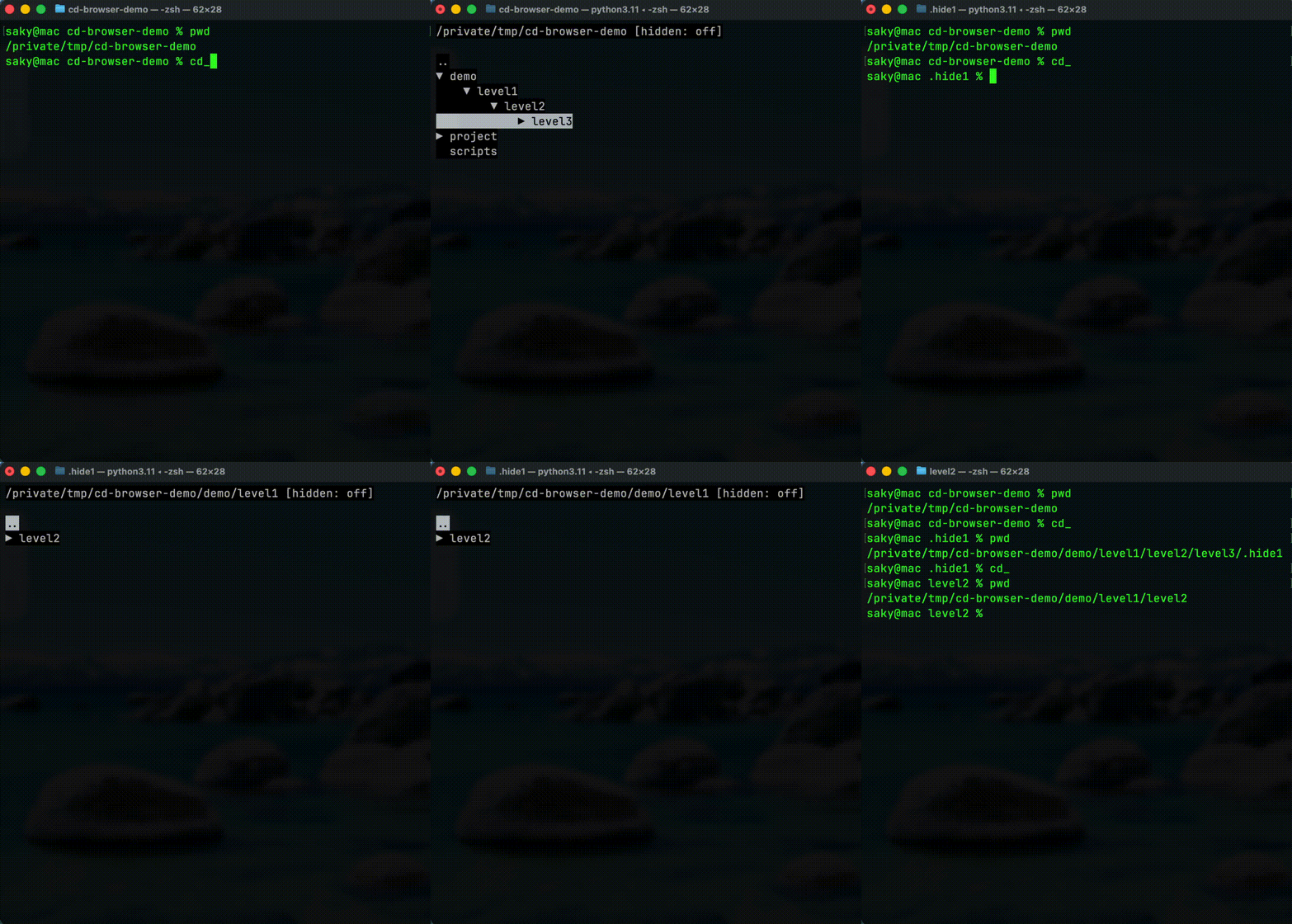
|
|
36
36
|
|
|
37
|
+
Repository (full demo + docs): https://gitea.sakydogalo.es/saky/cd-browser
|
|
38
|
+
|
|
37
39
|
## Why cd-browser?
|
|
38
40
|
|
|
39
41
|
Working in the terminal often means:
|
|
@@ -46,14 +48,14 @@ Working in the terminal often means:
|
|
|
46
48
|
|
|
47
49
|
## Features
|
|
48
50
|
|
|
49
|
-
-
|
|
50
|
-
-
|
|
51
|
-
-
|
|
52
|
-
-
|
|
51
|
+
- ⌨️ Fully keyboard-driven workflow (`↑` / `↓` / `←` / `→`)
|
|
52
|
+
- 🌲 Expand and collapse directories (`→` to expand/enter, `←` to collapse/back)
|
|
53
|
+
- 📜 Navigation history inside the session (`h` history mode, `b` back, `f` forward)
|
|
54
|
+
- ⚡ Returns the selected path to the shell (`Enter` to confirm, `Esc` to cancel)
|
|
55
|
+
- 🔎 Press `.` to toggle hidden directories
|
|
53
56
|
- 🖥 Native terminal interface
|
|
54
57
|
- 🔁 Works with Bash, Zsh and other shells
|
|
55
|
-
-
|
|
56
|
-
- 🔎 Press `.` to toggle hidden directories
|
|
58
|
+
- 🚀 Fast visual navigation of directory trees
|
|
57
59
|
|
|
58
60
|
## Quick Demo
|
|
59
61
|
|
|
@@ -7,6 +7,8 @@ It lets you explore directory trees visually and jump to any folder instantly.
|
|
|
7
7
|
|
|
8
8
|

|
|
9
9
|
|
|
10
|
+
Repository (full demo + docs): https://gitea.sakydogalo.es/saky/cd-browser
|
|
11
|
+
|
|
10
12
|
## Why cd-browser?
|
|
11
13
|
|
|
12
14
|
Working in the terminal often means:
|
|
@@ -19,14 +21,14 @@ Working in the terminal often means:
|
|
|
19
21
|
|
|
20
22
|
## Features
|
|
21
23
|
|
|
22
|
-
-
|
|
23
|
-
-
|
|
24
|
-
-
|
|
25
|
-
-
|
|
24
|
+
- ⌨️ Fully keyboard-driven workflow (`↑` / `↓` / `←` / `→`)
|
|
25
|
+
- 🌲 Expand and collapse directories (`→` to expand/enter, `←` to collapse/back)
|
|
26
|
+
- 📜 Navigation history inside the session (`h` history mode, `b` back, `f` forward)
|
|
27
|
+
- ⚡ Returns the selected path to the shell (`Enter` to confirm, `Esc` to cancel)
|
|
28
|
+
- 🔎 Press `.` to toggle hidden directories
|
|
26
29
|
- 🖥 Native terminal interface
|
|
27
30
|
- 🔁 Works with Bash, Zsh and other shells
|
|
28
|
-
-
|
|
29
|
-
- 🔎 Press `.` to toggle hidden directories
|
|
31
|
+
- 🚀 Fast visual navigation of directory trees
|
|
30
32
|
|
|
31
33
|
## Quick Demo
|
|
32
34
|
|
|
@@ -1,6 +1,6 @@
|
|
|
1
1
|
Metadata-Version: 2.4
|
|
2
2
|
Name: cd-browser
|
|
3
|
-
Version: 0.2.
|
|
3
|
+
Version: 0.2.5
|
|
4
4
|
Summary: A fast keyboard-driven directory navigator for the terminal.
|
|
5
5
|
Author: Saky
|
|
6
6
|
Classifier: Development Status :: 3 - Alpha
|
|
@@ -34,6 +34,8 @@ It lets you explore directory trees visually and jump to any folder instantly.
|
|
|
34
34
|
|
|
35
35
|

|
|
36
36
|
|
|
37
|
+
Repository (full demo + docs): https://gitea.sakydogalo.es/saky/cd-browser
|
|
38
|
+
|
|
37
39
|
## Why cd-browser?
|
|
38
40
|
|
|
39
41
|
Working in the terminal often means:
|
|
@@ -46,14 +48,14 @@ Working in the terminal often means:
|
|
|
46
48
|
|
|
47
49
|
## Features
|
|
48
50
|
|
|
49
|
-
-
|
|
50
|
-
-
|
|
51
|
-
-
|
|
52
|
-
-
|
|
51
|
+
- ⌨️ Fully keyboard-driven workflow (`↑` / `↓` / `←` / `→`)
|
|
52
|
+
- 🌲 Expand and collapse directories (`→` to expand/enter, `←` to collapse/back)
|
|
53
|
+
- 📜 Navigation history inside the session (`h` history mode, `b` back, `f` forward)
|
|
54
|
+
- ⚡ Returns the selected path to the shell (`Enter` to confirm, `Esc` to cancel)
|
|
55
|
+
- 🔎 Press `.` to toggle hidden directories
|
|
53
56
|
- 🖥 Native terminal interface
|
|
54
57
|
- 🔁 Works with Bash, Zsh and other shells
|
|
55
|
-
-
|
|
56
|
-
- 🔎 Press `.` to toggle hidden directories
|
|
58
|
+
- 🚀 Fast visual navigation of directory trees
|
|
57
59
|
|
|
58
60
|
## Quick Demo
|
|
59
61
|
|
|
File without changes
|
|
File without changes
|
|
File without changes
|
|
File without changes
|
|
File without changes
|
|
File without changes
|
|
File without changes
|
|
File without changes
|
|
File without changes
|
|
File without changes
|
|
File without changes
|
|
File without changes
|
|
File without changes
|
|
File without changes
|
|
File without changes
|
|
File without changes
|
|
File without changes
|
|
File without changes
|
|
File without changes
|
|
File without changes
|
|
File without changes
|
|
File without changes
|
|
File without changes
|
|
File without changes
|
|
File without changes
|
|
File without changes
|
|
File without changes
|
|
File without changes
|