canopen-lens 0.4.1__tar.gz
This diff represents the content of publicly available package versions that have been released to one of the supported registries. The information contained in this diff is provided for informational purposes only and reflects changes between package versions as they appear in their respective public registries.
- canopen_lens-0.4.1/.github/workflows/ci.yml +28 -0
- canopen_lens-0.4.1/.github/workflows/release.yml +150 -0
- canopen_lens-0.4.1/.gitignore +11 -0
- canopen_lens-0.4.1/CMakeLists.txt +22 -0
- canopen_lens-0.4.1/LICENSE +21 -0
- canopen_lens-0.4.1/PKG-INFO +203 -0
- canopen_lens-0.4.1/README.ko.md +290 -0
- canopen_lens-0.4.1/README.md +171 -0
- canopen_lens-0.4.1/RELEASING.md +68 -0
- canopen_lens-0.4.1/docs/bytes_ko.png +0 -0
- canopen_lens-0.4.1/docs/frames_ko.png +0 -0
- canopen_lens-0.4.1/docs/glossary_ko.png +0 -0
- canopen_lens-0.4.1/docs/live_ko.png +0 -0
- canopen_lens-0.4.1/docs/overview_en.png +0 -0
- canopen_lens-0.4.1/docs/overview_ko.png +0 -0
- canopen_lens-0.4.1/docs/timeline_ko.png +0 -0
- canopen_lens-0.4.1/packaging/app_entry.py +8 -0
- canopen_lens-0.4.1/packaging/canopen-lens.spec +44 -0
- canopen_lens-0.4.1/pyproject.toml +57 -0
- canopen_lens-0.4.1/src/canopen_lens/__init__.py +58 -0
- canopen_lens-0.4.1/src/canopen_lens/__main__.py +3 -0
- canopen_lens-0.4.1/src/canopen_lens/_core.pyi +988 -0
- canopen_lens-0.4.1/src/canopen_lens/cli.py +139 -0
- canopen_lens-0.4.1/src/canopen_lens/describe.py +909 -0
- canopen_lens-0.4.1/src/canopen_lens/eds.py +159 -0
- canopen_lens-0.4.1/src/canopen_lens/examples/sample_amr_2wheel.log +14714 -0
- canopen_lens-0.4.1/src/canopen_lens/examples/sample_cia402.log +5304 -0
- canopen_lens-0.4.1/src/canopen_lens/explain.py +596 -0
- canopen_lens-0.4.1/src/canopen_lens/export.py +111 -0
- canopen_lens-0.4.1/src/canopen_lens/gui/__init__.py +11 -0
- canopen_lens-0.4.1/src/canopen_lens/gui/app.py +885 -0
- canopen_lens-0.4.1/src/canopen_lens/gui/dialogs.py +48 -0
- canopen_lens-0.4.1/src/canopen_lens/gui/i18n.py +203 -0
- canopen_lens-0.4.1/src/canopen_lens/gui/live_page.py +746 -0
- canopen_lens-0.4.1/src/canopen_lens/gui/models.py +160 -0
- canopen_lens-0.4.1/src/canopen_lens/gui/overview.py +202 -0
- canopen_lens-0.4.1/src/canopen_lens/gui/timeline.py +262 -0
- canopen_lens-0.4.1/src/canopen_lens/live.py +224 -0
- canopen_lens-0.4.1/src/canopen_lens/log.py +207 -0
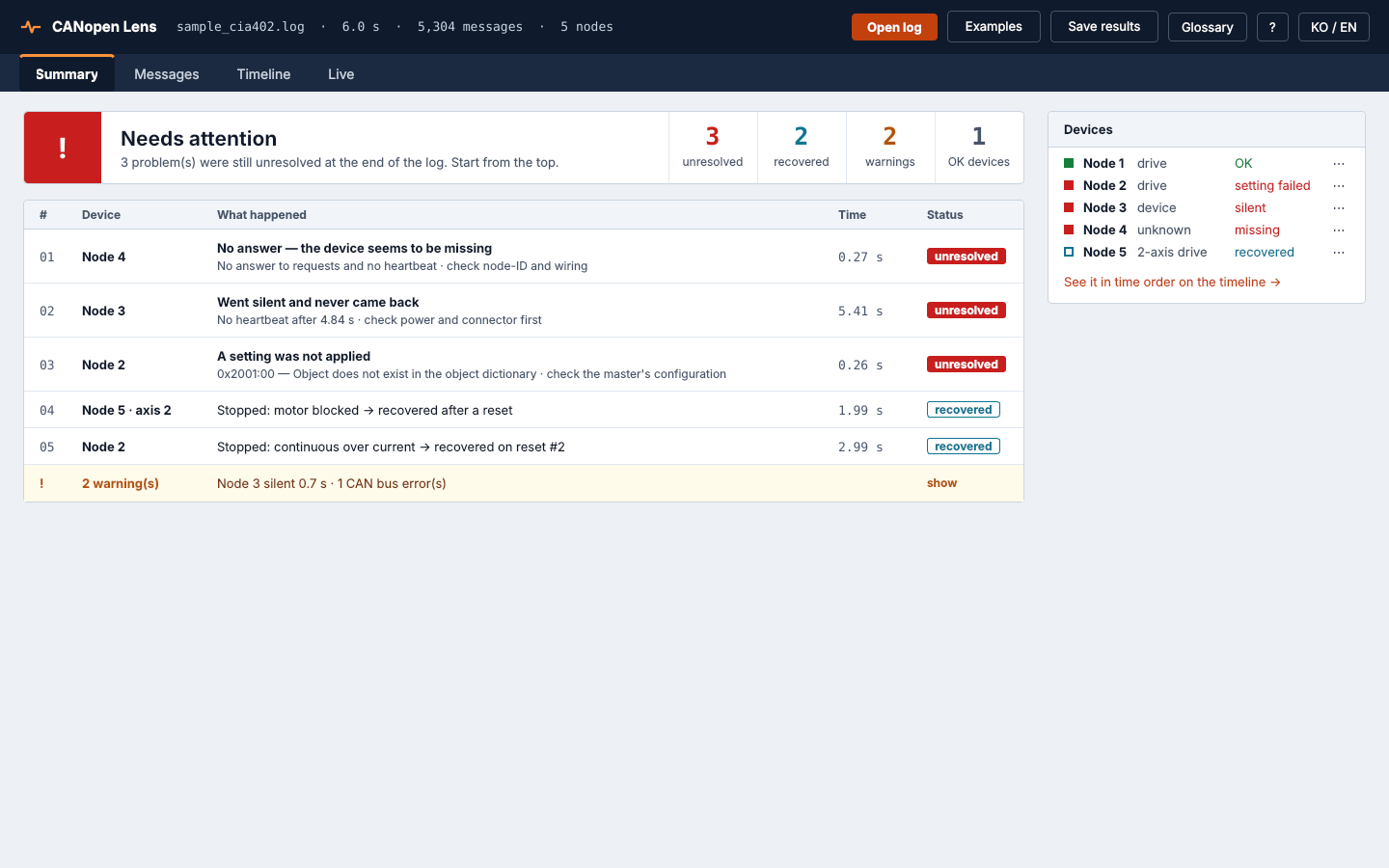
- canopen_lens-0.4.1/src/canopen_lens/objects.py +218 -0
- canopen_lens-0.4.1/src/canopen_lens/py.typed +0 -0
- canopen_lens-0.4.1/src/core/analyzer.cpp +807 -0
- canopen_lens-0.4.1/src/core/analyzer.hpp +77 -0
- canopen_lens-0.4.1/src/core/bindings.cpp +341 -0
- canopen_lens-0.4.1/src/core/parser.cpp +259 -0
- canopen_lens-0.4.1/src/core/parser.hpp +29 -0
- canopen_lens-0.4.1/src/core/trace.cpp +237 -0
- canopen_lens-0.4.1/src/core/trace.hpp +116 -0
- canopen_lens-0.4.1/src/core/types.hpp +251 -0
- canopen_lens-0.4.1/tests/data/sample_drive.eds +76 -0
- canopen_lens-0.4.1/tests/make_amr_sample.py +278 -0
- canopen_lens-0.4.1/tests/make_sample.py +233 -0
- canopen_lens-0.4.1/tests/test_amr_example.py +81 -0
- canopen_lens-0.4.1/tests/test_api.py +223 -0
- canopen_lens-0.4.1/tests/test_core.py +417 -0
- canopen_lens-0.4.1/tests/test_gui.py +106 -0
|
@@ -0,0 +1,28 @@
|
|
|
1
|
+
name: CI
|
|
2
|
+
|
|
3
|
+
on:
|
|
4
|
+
push:
|
|
5
|
+
branches: [main]
|
|
6
|
+
pull_request:
|
|
7
|
+
|
|
8
|
+
jobs:
|
|
9
|
+
test:
|
|
10
|
+
name: test (${{ matrix.os }}, py${{ matrix.python }})
|
|
11
|
+
runs-on: ${{ matrix.os }}
|
|
12
|
+
strategy:
|
|
13
|
+
fail-fast: false
|
|
14
|
+
matrix:
|
|
15
|
+
os: [ubuntu-latest, ubuntu-24.04-arm, windows-latest]
|
|
16
|
+
python: ["3.9", "3.13"]
|
|
17
|
+
steps:
|
|
18
|
+
- uses: actions/checkout@v4
|
|
19
|
+
- uses: actions/setup-python@v5
|
|
20
|
+
with:
|
|
21
|
+
python-version: ${{ matrix.python }}
|
|
22
|
+
- name: Install Qt runtime libraries (Linux)
|
|
23
|
+
if: runner.os == 'Linux'
|
|
24
|
+
run: sudo apt-get update && sudo apt-get install -y libegl1 libxkbcommon0 libfontconfig1 libdbus-1-3 libxcb-cursor0
|
|
25
|
+
- run: pip install ".[gui,test,pandas,live]"
|
|
26
|
+
- run: pytest -q
|
|
27
|
+
env:
|
|
28
|
+
QT_QPA_PLATFORM: offscreen
|
|
@@ -0,0 +1,150 @@
|
|
|
1
|
+
name: Release
|
|
2
|
+
|
|
3
|
+
# On a tag like v0.3.0 this builds
|
|
4
|
+
# * Python wheels (Linux x86_64 / aarch64, Windows x64) + sdist -> PyPI
|
|
5
|
+
# * a standalone app that needs no Python at all (Windows, Linux x86_64, Linux aarch64)
|
|
6
|
+
# -> GitHub Release
|
|
7
|
+
# PyPI publishing uses "trusted publishing", so no token is stored in the repository
|
|
8
|
+
# (see RELEASING.md). "Run workflow" without a tag only builds and keeps the files
|
|
9
|
+
# as workflow artifacts; ticking "testpypi" also uploads them to test.pypi.org.
|
|
10
|
+
|
|
11
|
+
on:
|
|
12
|
+
push:
|
|
13
|
+
tags: ["v*"]
|
|
14
|
+
workflow_dispatch:
|
|
15
|
+
inputs:
|
|
16
|
+
testpypi:
|
|
17
|
+
description: "Also upload the wheels to TestPyPI (rehearsal; the real PyPI is only used for tags)"
|
|
18
|
+
type: boolean
|
|
19
|
+
default: false
|
|
20
|
+
|
|
21
|
+
jobs:
|
|
22
|
+
wheels:
|
|
23
|
+
name: wheels (${{ matrix.os }})
|
|
24
|
+
runs-on: ${{ matrix.os }}
|
|
25
|
+
strategy:
|
|
26
|
+
fail-fast: false
|
|
27
|
+
matrix:
|
|
28
|
+
os: [ubuntu-latest, ubuntu-24.04-arm, windows-latest]
|
|
29
|
+
steps:
|
|
30
|
+
- uses: actions/checkout@v4
|
|
31
|
+
- uses: actions/setup-python@v5
|
|
32
|
+
with:
|
|
33
|
+
python-version: "3.12"
|
|
34
|
+
- run: python -m pip install cibuildwheel==4.3.1
|
|
35
|
+
- run: python -m cibuildwheel --output-dir wheelhouse
|
|
36
|
+
env:
|
|
37
|
+
CIBW_ARCHS_LINUX: auto
|
|
38
|
+
CIBW_ARCHS_WINDOWS: AMD64
|
|
39
|
+
- uses: actions/upload-artifact@v4
|
|
40
|
+
with:
|
|
41
|
+
name: wheels-${{ matrix.os }}
|
|
42
|
+
path: wheelhouse/*.whl
|
|
43
|
+
|
|
44
|
+
sdist:
|
|
45
|
+
runs-on: ubuntu-latest
|
|
46
|
+
steps:
|
|
47
|
+
- uses: actions/checkout@v4
|
|
48
|
+
- uses: actions/setup-python@v5
|
|
49
|
+
with:
|
|
50
|
+
python-version: "3.12"
|
|
51
|
+
- run: python -m pip install build && python -m build --sdist
|
|
52
|
+
- uses: actions/upload-artifact@v4
|
|
53
|
+
with:
|
|
54
|
+
name: sdist
|
|
55
|
+
path: dist/*.tar.gz
|
|
56
|
+
|
|
57
|
+
app:
|
|
58
|
+
name: app (${{ matrix.name }})
|
|
59
|
+
runs-on: ${{ matrix.os }}
|
|
60
|
+
strategy:
|
|
61
|
+
fail-fast: false
|
|
62
|
+
matrix:
|
|
63
|
+
include:
|
|
64
|
+
- { os: windows-latest, name: windows-x64 }
|
|
65
|
+
# 22.04 so the app also runs on older distributions (glibc 2.35+)
|
|
66
|
+
- { os: ubuntu-22.04, name: linux-x86_64 }
|
|
67
|
+
- { os: ubuntu-22.04-arm, name: linux-aarch64 }
|
|
68
|
+
steps:
|
|
69
|
+
- uses: actions/checkout@v4
|
|
70
|
+
- uses: actions/setup-python@v5
|
|
71
|
+
with:
|
|
72
|
+
python-version: "3.12"
|
|
73
|
+
- name: Qt runtime libraries
|
|
74
|
+
if: runner.os == 'Linux'
|
|
75
|
+
run: sudo apt-get update && sudo apt-get install -y libegl1 libxkbcommon0 libfontconfig1 libdbus-1-3 libxcb-cursor0
|
|
76
|
+
- run: python -m pip install ".[gui]" pyinstaller
|
|
77
|
+
- run: pyinstaller packaging/canopen-lens.spec --noconfirm
|
|
78
|
+
- name: Self-test (Windows)
|
|
79
|
+
if: runner.os == 'Windows'
|
|
80
|
+
shell: pwsh
|
|
81
|
+
run: |
|
|
82
|
+
$env:QT_QPA_PLATFORM = "offscreen"
|
|
83
|
+
$p = Start-Process dist/CANopenLens/CANopenLens.exe -ArgumentList "--self-test" -Wait -PassThru
|
|
84
|
+
if ($p.ExitCode -ne 0) { throw "self-test failed: $($p.ExitCode)" }
|
|
85
|
+
Compress-Archive -Path dist/CANopenLens -DestinationPath CANopenLens-${{ github.ref_name }}-${{ matrix.name }}.zip
|
|
86
|
+
- name: Self-test (Linux)
|
|
87
|
+
if: runner.os == 'Linux'
|
|
88
|
+
run: |
|
|
89
|
+
QT_QPA_PLATFORM=offscreen dist/CANopenLens/CANopenLens --self-test
|
|
90
|
+
tar -C dist -czf CANopenLens-${{ github.ref_name }}-${{ matrix.name }}.tar.gz CANopenLens
|
|
91
|
+
- uses: actions/upload-artifact@v4
|
|
92
|
+
with:
|
|
93
|
+
name: app-${{ matrix.name }}
|
|
94
|
+
path: CANopenLens-*
|
|
95
|
+
|
|
96
|
+
publish-pypi:
|
|
97
|
+
needs: [wheels, sdist, app]
|
|
98
|
+
if: startsWith(github.ref, 'refs/tags/v')
|
|
99
|
+
runs-on: ubuntu-latest
|
|
100
|
+
environment: pypi
|
|
101
|
+
permissions:
|
|
102
|
+
id-token: write
|
|
103
|
+
steps:
|
|
104
|
+
- uses: actions/download-artifact@v4
|
|
105
|
+
with:
|
|
106
|
+
pattern: wheels-*
|
|
107
|
+
path: dist
|
|
108
|
+
merge-multiple: true
|
|
109
|
+
- uses: actions/download-artifact@v4
|
|
110
|
+
with:
|
|
111
|
+
name: sdist
|
|
112
|
+
path: dist
|
|
113
|
+
- uses: pypa/gh-action-pypi-publish@release/v1
|
|
114
|
+
|
|
115
|
+
publish-testpypi:
|
|
116
|
+
needs: [wheels, sdist]
|
|
117
|
+
if: github.event_name == 'workflow_dispatch' && inputs.testpypi
|
|
118
|
+
runs-on: ubuntu-latest
|
|
119
|
+
environment: testpypi
|
|
120
|
+
permissions:
|
|
121
|
+
id-token: write
|
|
122
|
+
steps:
|
|
123
|
+
- uses: actions/download-artifact@v4
|
|
124
|
+
with:
|
|
125
|
+
pattern: wheels-*
|
|
126
|
+
path: dist
|
|
127
|
+
merge-multiple: true
|
|
128
|
+
- uses: actions/download-artifact@v4
|
|
129
|
+
with:
|
|
130
|
+
name: sdist
|
|
131
|
+
path: dist
|
|
132
|
+
- uses: pypa/gh-action-pypi-publish@release/v1
|
|
133
|
+
with:
|
|
134
|
+
repository-url: https://test.pypi.org/legacy/
|
|
135
|
+
|
|
136
|
+
github-release:
|
|
137
|
+
needs: [wheels, sdist, app]
|
|
138
|
+
if: startsWith(github.ref, 'refs/tags/v')
|
|
139
|
+
runs-on: ubuntu-latest
|
|
140
|
+
permissions:
|
|
141
|
+
contents: write
|
|
142
|
+
steps:
|
|
143
|
+
- uses: actions/download-artifact@v4
|
|
144
|
+
with:
|
|
145
|
+
path: release
|
|
146
|
+
merge-multiple: true
|
|
147
|
+
- uses: softprops/action-gh-release@v2
|
|
148
|
+
with:
|
|
149
|
+
files: release/*
|
|
150
|
+
generate_release_notes: true
|
|
@@ -0,0 +1,22 @@
|
|
|
1
|
+
cmake_minimum_required(VERSION 3.15...3.29)
|
|
2
|
+
project(${SKBUILD_PROJECT_NAME} VERSION ${SKBUILD_PROJECT_VERSION} LANGUAGES CXX)
|
|
3
|
+
|
|
4
|
+
set(CMAKE_CXX_STANDARD 17)
|
|
5
|
+
set(CMAKE_CXX_STANDARD_REQUIRED ON)
|
|
6
|
+
|
|
7
|
+
find_package(Python REQUIRED COMPONENTS Interpreter Development.Module)
|
|
8
|
+
find_package(pybind11 CONFIG REQUIRED)
|
|
9
|
+
|
|
10
|
+
pybind11_add_module(_core
|
|
11
|
+
src/core/parser.cpp
|
|
12
|
+
src/core/analyzer.cpp
|
|
13
|
+
src/core/trace.cpp
|
|
14
|
+
src/core/bindings.cpp)
|
|
15
|
+
target_include_directories(_core PRIVATE src/core)
|
|
16
|
+
if(MSVC)
|
|
17
|
+
target_compile_options(_core PRIVATE /W4 /utf-8)
|
|
18
|
+
else()
|
|
19
|
+
target_compile_options(_core PRIVATE -Wall -Wextra)
|
|
20
|
+
endif()
|
|
21
|
+
|
|
22
|
+
install(TARGETS _core DESTINATION canopen_lens)
|
|
@@ -0,0 +1,21 @@
|
|
|
1
|
+
MIT License
|
|
2
|
+
|
|
3
|
+
Copyright (c) 2026 Chunghyeon Lee
|
|
4
|
+
|
|
5
|
+
Permission is hereby granted, free of charge, to any person obtaining a copy
|
|
6
|
+
of this software and associated documentation files (the "Software"), to deal
|
|
7
|
+
in the Software without restriction, including without limitation the rights
|
|
8
|
+
to use, copy, modify, merge, publish, distribute, sublicense, and/or sell
|
|
9
|
+
copies of the Software, and to permit persons to whom the Software is
|
|
10
|
+
furnished to do so, subject to the following conditions:
|
|
11
|
+
|
|
12
|
+
The above copyright notice and this permission notice shall be included in all
|
|
13
|
+
copies or substantial portions of the Software.
|
|
14
|
+
|
|
15
|
+
THE SOFTWARE IS PROVIDED "AS IS", WITHOUT WARRANTY OF ANY KIND, EXPRESS OR
|
|
16
|
+
IMPLIED, INCLUDING BUT NOT LIMITED TO THE WARRANTIES OF MERCHANTABILITY,
|
|
17
|
+
FITNESS FOR A PARTICULAR PURPOSE AND NONINFRINGEMENT. IN NO EVENT SHALL THE
|
|
18
|
+
AUTHORS OR COPYRIGHT HOLDERS BE LIABLE FOR ANY CLAIM, DAMAGES OR OTHER
|
|
19
|
+
LIABILITY, WHETHER IN AN ACTION OF CONTRACT, TORT OR OTHERWISE, ARISING FROM,
|
|
20
|
+
OUT OF OR IN CONNECTION WITH THE SOFTWARE OR THE USE OR OTHER DEALINGS IN THE
|
|
21
|
+
SOFTWARE.
|
|
@@ -0,0 +1,203 @@
|
|
|
1
|
+
Metadata-Version: 2.4
|
|
2
|
+
Name: canopen-lens
|
|
3
|
+
Version: 0.4.1
|
|
4
|
+
Summary: Beginner-friendly CANopen log viewer: open a candump log and see what every frame means
|
|
5
|
+
Keywords: canopen,can,candump,cia402,socketcan,debugging,robotics
|
|
6
|
+
Author: Chunghyeon Lee
|
|
7
|
+
License-Expression: MIT
|
|
8
|
+
License-File: LICENSE
|
|
9
|
+
Classifier: Development Status :: 3 - Alpha
|
|
10
|
+
Classifier: Intended Audience :: Developers
|
|
11
|
+
Classifier: Intended Audience :: Manufacturing
|
|
12
|
+
Classifier: Operating System :: POSIX :: Linux
|
|
13
|
+
Classifier: Operating System :: Microsoft :: Windows
|
|
14
|
+
Classifier: Programming Language :: C++
|
|
15
|
+
Classifier: Programming Language :: Python :: 3
|
|
16
|
+
Classifier: Programming Language :: Python :: 3 :: Only
|
|
17
|
+
Classifier: Topic :: Scientific/Engineering
|
|
18
|
+
Classifier: Topic :: System :: Hardware
|
|
19
|
+
Project-URL: Homepage, https://github.com/lch-98/canopen-lens
|
|
20
|
+
Project-URL: Issues, https://github.com/lch-98/canopen-lens/issues
|
|
21
|
+
Requires-Python: >=3.9
|
|
22
|
+
Provides-Extra: gui
|
|
23
|
+
Requires-Dist: PySide6>=6.5; extra == "gui"
|
|
24
|
+
Requires-Dist: python-can>=4.0; extra == "gui"
|
|
25
|
+
Provides-Extra: pandas
|
|
26
|
+
Requires-Dist: pandas>=1.3; extra == "pandas"
|
|
27
|
+
Provides-Extra: live
|
|
28
|
+
Requires-Dist: python-can>=4.0; extra == "live"
|
|
29
|
+
Provides-Extra: test
|
|
30
|
+
Requires-Dist: pytest>=7; extra == "test"
|
|
31
|
+
Description-Content-Type: text/markdown
|
|
32
|
+
|
|
33
|
+
# CANopen Lens
|
|
34
|
+
|
|
35
|
+
**Give it a `candump` log and it tells you, in plain words, what happened on your CANopen network and what to check — as a desktop app and as a Python library.**
|
|
36
|
+
|
|
37
|
+
[한국어 설명서 (Korean)](README.ko.md)
|
|
38
|
+
|
|
39
|
+
|
|
40
|
+
|
|
41
|
+
Made so that someone new to CANopen can find a root cause from a single log, without knowing CAN IDs or bytes:
|
|
42
|
+
|
|
43
|
+
- **A verdict** – "Problems found – 3 kinds of error, 1 kind of warning"
|
|
44
|
+
- **The status of every device** – "Node 5 (CiA 402 drive): had problems but recovered · Axis 2: faulted 1 time but recovered to Enabled"
|
|
45
|
+
- **What to check first** – every problem explained as *What happened? / Why does it matter? / How to check*
|
|
46
|
+
|
|
47
|
+
The UI and all explanations are available in **English and Korean**.
|
|
48
|
+
|
|
49
|
+
---
|
|
50
|
+
|
|
51
|
+
## Install
|
|
52
|
+
|
|
53
|
+
### 1. Download the app (no Python needed)
|
|
54
|
+
|
|
55
|
+
Get the file for your computer from [Releases](https://github.com/lch-98/canopen-lens/releases), unpack it and run it.
|
|
56
|
+
|
|
57
|
+
| System | File | Run |
|
|
58
|
+
|---|---|---|
|
|
59
|
+
| Windows 10/11 | `CANopenLens-…-windows-x64.zip` | double-click `CANopenLens\CANopenLens.exe` |
|
|
60
|
+
| Linux (Ubuntu 22.04+ and similar) | `CANopenLens-…-linux-x86_64.tar.gz` | `CANopenLens/CANopenLens` |
|
|
61
|
+
| Raspberry Pi 4/5 (64-bit OS) | `CANopenLens-…-linux-aarch64.tar.gz` | `CANopenLens/CANopenLens` |
|
|
62
|
+
|
|
63
|
+
### 2. pip (Python 3.9+)
|
|
64
|
+
|
|
65
|
+
```bash
|
|
66
|
+
pip install "canopen-lens[gui]" # app + library
|
|
67
|
+
pip install canopen-lens # library and command line only (servers, headless Pi)
|
|
68
|
+
```
|
|
69
|
+
|
|
70
|
+
Prebuilt wheels are published for Windows x64, Linux x86_64 and Linux aarch64, so no C++ compiler is needed.
|
|
71
|
+
Run `canopen-lens` to open the window.
|
|
72
|
+
|
|
73
|
+
---
|
|
74
|
+
|
|
75
|
+
## Five-minute guide
|
|
76
|
+
|
|
77
|
+
1. **Record a log** on the Linux PC or Raspberry Pi attached to the machine: `candump -l can0`, reproduce the problem, stop with `Ctrl+C`. (Saved console output such as `candump -t a can0 > log.txt` works too.)
|
|
78
|
+
2. **Open it** – drop the file on the window. No log yet? Pick an example under **Try the sample log**: a mixed network with many problems, or a two-wheel AMR (ros2_canopen master + STM32 two-axis drive) from boot-time PDO configuration to an E-stop and recovery.
|
|
79
|
+
3. **Read the overview** – the colour at the top is the verdict; below it are the status of each device and the problems to check first, most important first. Repeats of the same problem are shown once with a count.
|
|
80
|
+
4. **Dig deeper** – **Show the messages** jumps to the moment of a problem, with every message explained in one line.
|
|
81
|
+
5. **Live monitor** – the **Live monitor** tab connects to a USB-CAN adapter or SocketCAN and shows messages and problems as they happen (`socketcan`, `pcan`, `kvaser`, `ixxat`, `vector`, `slcan`, `gs_usb`). No hardware? Pick **Demo** to replay the sample log in real time. Everything received is recorded and can be saved as a candump file or opened in log analysis with one click.
|
|
82
|
+
6. **State timeline** – how each device and motor axis changed state over time. Red is a fault, a gap means the device went silent. Click a bar to jump there.
|
|
83
|
+
|
|
84
|
+
Unknown words are explained under **Glossary**. **Save results** writes a readable report (.txt), JSON or an Excel-friendly CSV.
|
|
85
|
+
|
|
86
|
+
---
|
|
87
|
+
|
|
88
|
+
## What it finds
|
|
89
|
+
|
|
90
|
+
| Finding | In plain words |
|
|
91
|
+
|---|---|
|
|
92
|
+
| SDO failed | The device refused a setting; the abort code is explained together with where to look |
|
|
93
|
+
| No SDO answer | The device did not reply; check node-ID, power and wiring in that order |
|
|
94
|
+
| Emergency (EMCY) | The device reported an error; the code is turned into readable text |
|
|
95
|
+
| Heartbeat gap / stopped | The device went quiet for longer than its normal period, or never came back |
|
|
96
|
+
| Unexpected restart | The device rebooted without a reset command (power dip, watchdog, …) |
|
|
97
|
+
| Drive fault | A motor drive stopped with a fault; the EMCY at the same moment is linked as the likely cause |
|
|
98
|
+
| Enable did not work | Enable operation was sent but the drive never turned on (wrong order, motor power, STO) |
|
|
99
|
+
| Fault reset did not work | A reset was sent but the fault stayed (its cause is still there) |
|
|
100
|
+
| Quick stop | The drive entered quick stop |
|
|
101
|
+
| CAN bus errors | Corrupted traffic on the wires (termination, bit rate, cabling) |
|
|
102
|
+
|
|
103
|
+
Verdicts: **✔ OK** – nothing went wrong · **▲ recovered** – something went wrong but was fine again at the end of the log · **✖ needs attention** – still wrong at the end (fault, silent device) or a setting was not applied.
|
|
104
|
+
|
|
105
|
+
---
|
|
106
|
+
|
|
107
|
+
## How a log is analysed
|
|
108
|
+
|
|
109
|
+
```
|
|
110
|
+
(1760500002.000250) can0 185#3702180220030000
|
|
111
|
+
└ time └ port └ ID └ data bytes
|
|
112
|
+
```
|
|
113
|
+
|
|
114
|
+
1. **Who sent what.** CANopen IDs are "message type + node-ID": `0x185` = `0x180` (TPDO1, real-time data from a device) + node 5.
|
|
115
|
+
2. **Where the values are.** Which values sit where inside a PDO (the PDO mapping) is taken from, in this order: SDO configuration found earlier in the log → the EDS you attach → the CiA 402 default (assumed, axis 1 only).
|
|
116
|
+
3. **Values into words.** Here: axis 1 statusword + axis 2 statusword + axis 1 actual velocity →
|
|
117
|
+
`TPDO1: Axis 1 state: Enabled (SW 0x0237), Axis 2 state: Fault (SW 0x0218), Axis 1 Velocity actual value=800`.
|
|
118
|
+
4. **Following the story.** SDO questions are paired with answers; each node's heartbeat period is learned and late heartbeats are flagged; every CiA 402 axis gets its own state machine, commands are checked against the state that follows, and EMCY messages around a fault are linked to it.
|
|
119
|
+
5. **Grouping.** Identical findings are collapsed and sorted by importance.
|
|
120
|
+
|
|
121
|
+
Clicking a message shows a **byte-by-byte** breakdown. For `582#4300100092010200`: `43` = command byte (binary `010 0 00 1 1`: read reply, value inside the frame, 4 bytes), `00 10` = index `0x1000` read back to front (CANopen sends the least significant byte first), `00` = sub-index, `92 01 02 00` = `0x00020192`: profile `0x0192` = 402 (drive), additional info `0x0002` = servo drive.
|
|
122
|
+
|
|
123
|
+
**Not CANopen?** `candump` records every frame regardless of protocol. If a log has no heartbeat/NMT/SDO/EMCY/SYNC at all, or mostly 29-bit IDs (J1939, vendor protocols), the overview says so instead of pretending, and shows a protocol-independent **traffic by ID** table (count, period, largest gap, DLC).
|
|
124
|
+
|
|
125
|
+
Decoding runs in C++; a two-million-frame log opens in one to two seconds on an ordinary PC, and only the rows on screen are turned into text, so large logs stay responsive.
|
|
126
|
+
|
|
127
|
+
---
|
|
128
|
+
|
|
129
|
+
## Using it from Python
|
|
130
|
+
|
|
131
|
+
```python
|
|
132
|
+
from canopen_lens import open_log, Kind
|
|
133
|
+
|
|
134
|
+
log = open_log("robot.log", eds={1: "drive.eds"}) # EDS optional
|
|
135
|
+
|
|
136
|
+
print(log.report("en")) # the whole readable report
|
|
137
|
+
|
|
138
|
+
h = log.health("en") # verdict, per-node status, grouped findings
|
|
139
|
+
for group in log.grouped_issues():
|
|
140
|
+
ex = log.explain(group.first, "en")
|
|
141
|
+
print(ex.title, group.count, ex.steps)
|
|
142
|
+
|
|
143
|
+
df = log.to_dataframe("en") # pandas (pip install pandas)
|
|
144
|
+
log.to_csv("frames.csv") # UTF-8 with BOM, opens cleanly in Excel
|
|
145
|
+
log.to_json("result.json")
|
|
146
|
+
|
|
147
|
+
for row in log.trace.filter(kinds=[Kind.EMCY], node=2):
|
|
148
|
+
print(log.summary(int(row), "en"))
|
|
149
|
+
for p in log.trace.axis_timeline(5, axis=1): # node 5, axis 2
|
|
150
|
+
print(p.t, p.state)
|
|
151
|
+
```
|
|
152
|
+
|
|
153
|
+
### Live bus (python-can)
|
|
154
|
+
|
|
155
|
+
```python
|
|
156
|
+
import can
|
|
157
|
+
from canopen_lens import LiveDecoder
|
|
158
|
+
|
|
159
|
+
dec = LiveDecoder(eds={1: "drive.eds"})
|
|
160
|
+
with can.Bus(interface="socketcan", channel="can0") as bus:
|
|
161
|
+
dec.run(bus, lang="en") # prints findings the moment they happen
|
|
162
|
+
```
|
|
163
|
+
|
|
164
|
+
Or push frames yourself with `dec.feed(t, can_id, data)`. Only the newest frame is kept, so memory stays flat however long it runs.
|
|
165
|
+
|
|
166
|
+
### Command line / CI
|
|
167
|
+
|
|
168
|
+
```bash
|
|
169
|
+
canopen-lens report robot.log # readable report
|
|
170
|
+
canopen-lens report robot.log --brief --fail-on-error # exit code 1 on errors
|
|
171
|
+
canopen-lens report robot.log --format json -o result.json
|
|
172
|
+
canopen-lens report robot.log --format csv -o frames.csv
|
|
173
|
+
canopen-lens live --channel can0 -v # pip install "canopen-lens[live]"
|
|
174
|
+
```
|
|
175
|
+
|
|
176
|
+
Type hints are included for IDE completion.
|
|
177
|
+
|
|
178
|
+
---
|
|
179
|
+
|
|
180
|
+
## Limitations
|
|
181
|
+
|
|
182
|
+
- Log files must be in `candump` format; PCAN `.trc` is next (the live monitor can use PCAN adapters directly).
|
|
183
|
+
- PDOs are assumed to use the default COB-IDs (`0x180 + node`, …); COB-IDs changed through `0x1400`/`0x1800` are not followed yet.
|
|
184
|
+
- Axes 2–8 of multi-axis drives are decoded when the EDS or the log provides their PDO mapping.
|
|
185
|
+
- Findings are guidance based on what the log shows; the device manual has the final word.
|
|
186
|
+
- The Python API may still change before 1.0.
|
|
187
|
+
|
|
188
|
+
## Development
|
|
189
|
+
|
|
190
|
+
```bash
|
|
191
|
+
git clone https://github.com/lch-98/canopen-lens
|
|
192
|
+
cd canopen-lens
|
|
193
|
+
pip install -e ".[gui,test,pandas,live]"
|
|
194
|
+
pytest
|
|
195
|
+
python tests/make_sample.py # regenerate the mixed-network example
|
|
196
|
+
python tests/make_amr_sample.py # regenerate the two-wheel AMR example
|
|
197
|
+
```
|
|
198
|
+
|
|
199
|
+
Releases: see [RELEASING.md](RELEASING.md).
|
|
200
|
+
|
|
201
|
+
## License
|
|
202
|
+
|
|
203
|
+
MIT
|