bluer-options 5.292.1__tar.gz
This diff represents the content of publicly available package versions that have been released to one of the supported registries. The information contained in this diff is provided for informational purposes only and reflects changes between package versions as they appear in their respective public registries.
- bluer_options-5.292.1/LICENSE +121 -0
- bluer_options-5.292.1/MANIFEST.in +1 -0
- bluer_options-5.292.1/PKG-INFO +169 -0
- bluer_options-5.292.1/README.md +138 -0
- bluer_options-5.292.1/bluer_options/.bash/alias.sh +54 -0
- bluer_options-5.292.1/bluer_options/.bash/assert.sh +67 -0
- bluer_options-5.292.1/bluer_options/.bash/bluer_options.sh +55 -0
- bluer_options-5.292.1/bluer_options/.bash/bool.sh +9 -0
- bluer_options-5.292.1/bluer_options/.bash/browse.sh +22 -0
- bluer_options-5.292.1/bluer_options/.bash/code.sh +13 -0
- bluer_options-5.292.1/bluer_options/.bash/env/backup.sh +41 -0
- bluer_options-5.292.1/bluer_options/.bash/env/dot/cat.sh +47 -0
- bluer_options-5.292.1/bluer_options/.bash/env/dot/cp.sh +26 -0
- bluer_options-5.292.1/bluer_options/.bash/env/dot/edit.sh +31 -0
- bluer_options-5.292.1/bluer_options/.bash/env/dot/load.sh +46 -0
- bluer_options-5.292.1/bluer_options/.bash/env/dot/seed.sh +32 -0
- bluer_options-5.292.1/bluer_options/.bash/env/dot.sh +36 -0
- bluer_options-5.292.1/bluer_options/.bash/env.sh +24 -0
- bluer_options-5.292.1/bluer_options/.bash/eval.sh +48 -0
- bluer_options-5.292.1/bluer_options/.bash/generic_task.sh +46 -0
- bluer_options-5.292.1/bluer_options/.bash/help.sh +26 -0
- bluer_options-5.292.1/bluer_options/.bash/install.sh +26 -0
- bluer_options-5.292.1/bluer_options/.bash/list.sh +100 -0
- bluer_options-5.292.1/bluer_options/.bash/logging.sh +73 -0
- bluer_options-5.292.1/bluer_options/.bash/open.sh +28 -0
- bluer_options-5.292.1/bluer_options/.bash/options.sh +29 -0
- bluer_options-5.292.1/bluer_options/.bash/pause.sh +14 -0
- bluer_options-5.292.1/bluer_options/.bash/plugins.sh +34 -0
- bluer_options-5.292.1/bluer_options/.bash/pylint.sh +39 -0
- bluer_options-5.292.1/bluer_options/.bash/pytest.sh +28 -0
- bluer_options-5.292.1/bluer_options/.bash/repeat.sh +12 -0
- bluer_options-5.292.1/bluer_options/.bash/seed.sh +212 -0
- bluer_options-5.292.1/bluer_options/.bash/sleep.sh +9 -0
- bluer_options-5.292.1/bluer_options/.bash/source.sh +39 -0
- bluer_options-5.292.1/bluer_options/.bash/string.sh +45 -0
- bluer_options-5.292.1/bluer_options/.bash/terminal.sh +68 -0
- bluer_options-5.292.1/bluer_options/.bash/test.sh +52 -0
- bluer_options-5.292.1/bluer_options/.bash/wait.sh +26 -0
- bluer_options-5.292.1/bluer_options/.bash/watch.sh +14 -0
- bluer_options-5.292.1/bluer_options/__init__.py +17 -0
- bluer_options-5.292.1/bluer_options/__main__.py +11 -0
- bluer_options-5.292.1/bluer_options/assets/example1.sh +28 -0
- bluer_options-5.292.1/bluer_options/config.env +2 -0
- bluer_options-5.292.1/bluer_options/env/__init__.py +46 -0
- bluer_options-5.292.1/bluer_options/env/functions.py +66 -0
- bluer_options-5.292.1/bluer_options/help/__init__.py +0 -0
- bluer_options-5.292.1/bluer_options/help/__main__.py +34 -0
- bluer_options-5.292.1/bluer_options/help/functions.py +81 -0
- bluer_options-5.292.1/bluer_options/help/parsing.py +57 -0
- bluer_options-5.292.1/bluer_options/host/__init__.py +19 -0
- bluer_options-5.292.1/bluer_options/host/__main__.py +41 -0
- bluer_options-5.292.1/bluer_options/host/functions.py +182 -0
- bluer_options-5.292.1/bluer_options/list/__init__.py +0 -0
- bluer_options-5.292.1/bluer_options/list/__main__.py +161 -0
- bluer_options-5.292.1/bluer_options/logger/__init__.py +10 -0
- bluer_options-5.292.1/bluer_options/logger/__main__.py +32 -0
- bluer_options-5.292.1/bluer_options/logger/config.py +159 -0
- bluer_options-5.292.1/bluer_options/logger/watch.py +19 -0
- bluer_options-5.292.1/bluer_options/options/__init__.py +1 -0
- bluer_options-5.292.1/bluer_options/options/__main__.py +74 -0
- bluer_options-5.292.1/bluer_options/options/classes.py +80 -0
- bluer_options-5.292.1/bluer_options/string/__init__.py +27 -0
- bluer_options-5.292.1/bluer_options/string/__main__.py +100 -0
- bluer_options-5.292.1/bluer_options/string/constants.py +10 -0
- bluer_options-5.292.1/bluer_options/string/functions.py +346 -0
- bluer_options-5.292.1/bluer_options/terminal/__init__.py +1 -0
- bluer_options-5.292.1/bluer_options/terminal/__main__.py +52 -0
- bluer_options-5.292.1/bluer_options/terminal/functions.py +84 -0
- bluer_options-5.292.1/bluer_options/testing.py +97 -0
- bluer_options-5.292.1/bluer_options/timer.py +93 -0
- bluer_options-5.292.1/bluer_options/timing/__init__.py +4 -0
- bluer_options-5.292.1/bluer_options/timing/classes.py +135 -0
- bluer_options-5.292.1/bluer_options/timing/elapsed_timer.py +42 -0
- bluer_options-5.292.1/bluer_options/urls.py +3 -0
- bluer_options-5.292.1/bluer_options/web/__init__.py +1 -0
- bluer_options-5.292.1/bluer_options/web/__main__.py +45 -0
- bluer_options-5.292.1/bluer_options/web/access.py +36 -0
- bluer_options-5.292.1/bluer_options.egg-info/PKG-INFO +169 -0
- bluer_options-5.292.1/bluer_options.egg-info/SOURCES.txt +84 -0
- bluer_options-5.292.1/bluer_options.egg-info/dependency_links.txt +1 -0
- bluer_options-5.292.1/bluer_options.egg-info/requires.txt +5 -0
- bluer_options-5.292.1/bluer_options.egg-info/top_level.txt +1 -0
- bluer_options-5.292.1/pyproject.toml +6 -0
- bluer_options-5.292.1/requirements.txt +6 -0
- bluer_options-5.292.1/setup.cfg +4 -0
- bluer_options-5.292.1/setup.py +33 -0
|
@@ -0,0 +1,121 @@
|
|
|
1
|
+
Creative Commons Legal Code
|
|
2
|
+
|
|
3
|
+
CC0 1.0 Universal
|
|
4
|
+
|
|
5
|
+
CREATIVE COMMONS CORPORATION IS NOT A LAW FIRM AND DOES NOT PROVIDE
|
|
6
|
+
LEGAL SERVICES. DISTRIBUTION OF THIS DOCUMENT DOES NOT CREATE AN
|
|
7
|
+
ATTORNEY-CLIENT RELATIONSHIP. CREATIVE COMMONS PROVIDES THIS
|
|
8
|
+
INFORMATION ON AN "AS-IS" BASIS. CREATIVE COMMONS MAKES NO WARRANTIES
|
|
9
|
+
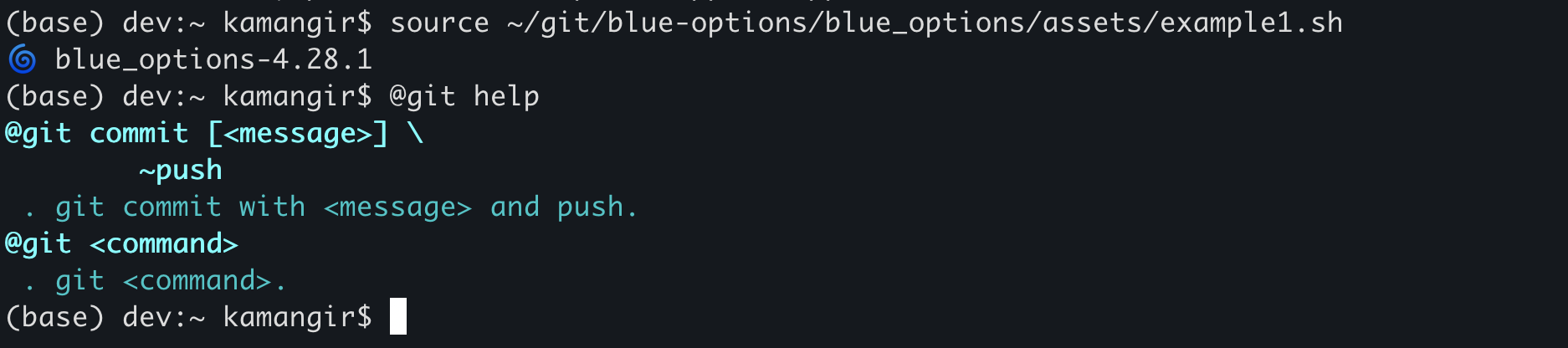
REGARDING THE USE OF THIS DOCUMENT OR THE INFORMATION OR WORKS
|
|
10
|
+
PROVIDED HEREUNDER, AND DISCLAIMS LIABILITY FOR DAMAGES RESULTING FROM
|
|
11
|
+
THE USE OF THIS DOCUMENT OR THE INFORMATION OR WORKS PROVIDED
|
|
12
|
+
HEREUNDER.
|
|
13
|
+
|
|
14
|
+
Statement of Purpose
|
|
15
|
+
|
|
16
|
+
The laws of most jurisdictions throughout the world automatically confer
|
|
17
|
+
exclusive Copyright and Related Rights (defined below) upon the creator
|
|
18
|
+
and subsequent owner(s) (each and all, an "owner") of an original work of
|
|
19
|
+
authorship and/or a database (each, a "Work").
|
|
20
|
+
|
|
21
|
+
Certain owners wish to permanently relinquish those rights to a Work for
|
|
22
|
+
the purpose of contributing to a commons of creative, cultural and
|
|
23
|
+
scientific works ("Commons") that the public can reliably and without fear
|
|
24
|
+
of later claims of infringement build upon, modify, incorporate in other
|
|
25
|
+
works, reuse and redistribute as freely as possible in any form whatsoever
|
|
26
|
+
and for any purposes, including without limitation commercial purposes.
|
|
27
|
+
These owners may contribute to the Commons to promote the ideal of a free
|
|
28
|
+
culture and the further production of creative, cultural and scientific
|
|
29
|
+
works, or to gain reputation or greater distribution for their Work in
|
|
30
|
+
part through the use and efforts of others.
|
|
31
|
+
|
|
32
|
+
For these and/or other purposes and motivations, and without any
|
|
33
|
+
expectation of additional consideration or compensation, the person
|
|
34
|
+
associating CC0 with a Work (the "Affirmer"), to the extent that he or she
|
|
35
|
+
is an owner of Copyright and Related Rights in the Work, voluntarily
|
|
36
|
+
elects to apply CC0 to the Work and publicly distribute the Work under its
|
|
37
|
+
terms, with knowledge of his or her Copyright and Related Rights in the
|
|
38
|
+
Work and the meaning and intended legal effect of CC0 on those rights.
|
|
39
|
+
|
|
40
|
+
1. Copyright and Related Rights. A Work made available under CC0 may be
|
|
41
|
+
protected by copyright and related or neighboring rights ("Copyright and
|
|
42
|
+
Related Rights"). Copyright and Related Rights include, but are not
|
|
43
|
+
limited to, the following:
|
|
44
|
+
|
|
45
|
+
i. the right to reproduce, adapt, distribute, perform, display,
|
|
46
|
+
communicate, and translate a Work;
|
|
47
|
+
ii. moral rights retained by the original author(s) and/or performer(s);
|
|
48
|
+
iii. publicity and privacy rights pertaining to a person's image or
|
|
49
|
+
likeness depicted in a Work;
|
|
50
|
+
iv. rights protecting against unfair competition in regards to a Work,
|
|
51
|
+
subject to the limitations in paragraph 4(a), below;
|
|
52
|
+
v. rights protecting the extraction, dissemination, use and reuse of data
|
|
53
|
+
in a Work;
|
|
54
|
+
vi. database rights (such as those arising under Directive 96/9/EC of the
|
|
55
|
+
European Parliament and of the Council of 11 March 1996 on the legal
|
|
56
|
+
protection of databases, and under any national implementation
|
|
57
|
+
thereof, including any amended or successor version of such
|
|
58
|
+
directive); and
|
|
59
|
+
vii. other similar, equivalent or corresponding rights throughout the
|
|
60
|
+
world based on applicable law or treaty, and any national
|
|
61
|
+
implementations thereof.
|
|
62
|
+
|
|
63
|
+
2. Waiver. To the greatest extent permitted by, but not in contravention
|
|
64
|
+
of, applicable law, Affirmer hereby overtly, fully, permanently,
|
|
65
|
+
irrevocably and unconditionally waives, abandons, and surrenders all of
|
|
66
|
+
Affirmer's Copyright and Related Rights and associated claims and causes
|
|
67
|
+
of action, whether now known or unknown (including existing as well as
|
|
68
|
+
future claims and causes of action), in the Work (i) in all territories
|
|
69
|
+
worldwide, (ii) for the maximum duration provided by applicable law or
|
|
70
|
+
treaty (including future time extensions), (iii) in any current or future
|
|
71
|
+
medium and for any number of copies, and (iv) for any purpose whatsoever,
|
|
72
|
+
including without limitation commercial, advertising or promotional
|
|
73
|
+
purposes (the "Waiver"). Affirmer makes the Waiver for the benefit of each
|
|
74
|
+
member of the public at large and to the detriment of Affirmer's heirs and
|
|
75
|
+
successors, fully intending that such Waiver shall not be subject to
|
|
76
|
+
revocation, rescission, cancellation, termination, or any other legal or
|
|
77
|
+
equitable action to disrupt the quiet enjoyment of the Work by the public
|
|
78
|
+
as contemplated by Affirmer's express Statement of Purpose.
|
|
79
|
+
|
|
80
|
+
3. Public License Fallback. Should any part of the Waiver for any reason
|
|
81
|
+
be judged legally invalid or ineffective under applicable law, then the
|
|
82
|
+
Waiver shall be preserved to the maximum extent permitted taking into
|
|
83
|
+
account Affirmer's express Statement of Purpose. In addition, to the
|
|
84
|
+
extent the Waiver is so judged Affirmer hereby grants to each affected
|
|
85
|
+
person a royalty-free, non transferable, non sublicensable, non exclusive,
|
|
86
|
+
irrevocable and unconditional license to exercise Affirmer's Copyright and
|
|
87
|
+
Related Rights in the Work (i) in all territories worldwide, (ii) for the
|
|
88
|
+
maximum duration provided by applicable law or treaty (including future
|
|
89
|
+
time extensions), (iii) in any current or future medium and for any number
|
|
90
|
+
of copies, and (iv) for any purpose whatsoever, including without
|
|
91
|
+
limitation commercial, advertising or promotional purposes (the
|
|
92
|
+
"License"). The License shall be deemed effective as of the date CC0 was
|
|
93
|
+
applied by Affirmer to the Work. Should any part of the License for any
|
|
94
|
+
reason be judged legally invalid or ineffective under applicable law, such
|
|
95
|
+
partial invalidity or ineffectiveness shall not invalidate the remainder
|
|
96
|
+
of the License, and in such case Affirmer hereby affirms that he or she
|
|
97
|
+
will not (i) exercise any of his or her remaining Copyright and Related
|
|
98
|
+
Rights in the Work or (ii) assert any associated claims and causes of
|
|
99
|
+
action with respect to the Work, in either case contrary to Affirmer's
|
|
100
|
+
express Statement of Purpose.
|
|
101
|
+
|
|
102
|
+
4. Limitations and Disclaimers.
|
|
103
|
+
|
|
104
|
+
a. No trademark or patent rights held by Affirmer are waived, abandoned,
|
|
105
|
+
surrendered, licensed or otherwise affected by this document.
|
|
106
|
+
b. Affirmer offers the Work as-is and makes no representations or
|
|
107
|
+
warranties of any kind concerning the Work, express, implied,
|
|
108
|
+
statutory or otherwise, including without limitation warranties of
|
|
109
|
+
title, merchantability, fitness for a particular purpose, non
|
|
110
|
+
infringement, or the absence of latent or other defects, accuracy, or
|
|
111
|
+
the present or absence of errors, whether or not discoverable, all to
|
|
112
|
+
the greatest extent permissible under applicable law.
|
|
113
|
+
c. Affirmer disclaims responsibility for clearing rights of other persons
|
|
114
|
+
that may apply to the Work or any use thereof, including without
|
|
115
|
+
limitation any person's Copyright and Related Rights in the Work.
|
|
116
|
+
Further, Affirmer disclaims responsibility for obtaining any necessary
|
|
117
|
+
consents, permissions or other rights required for any use of the
|
|
118
|
+
Work.
|
|
119
|
+
d. Affirmer understands and acknowledges that Creative Commons is not a
|
|
120
|
+
party to this document and has no duty or obligation with respect to
|
|
121
|
+
this CC0 or use of the Work.
|
|
@@ -0,0 +1 @@
|
|
|
1
|
+
include requirements.txt
|
|
@@ -0,0 +1,169 @@
|
|
|
1
|
+
Metadata-Version: 2.4
|
|
2
|
+
Name: bluer_options
|
|
3
|
+
Version: 5.292.1
|
|
4
|
+
Summary: 🌀 Options for Bash.
|
|
5
|
+
Home-page: https://github.com/kamangir/bluer-options
|
|
6
|
+
Author: Arash Abadpour (Kamangir)
|
|
7
|
+
Author-email: arash.abadpour@gmail.com
|
|
8
|
+
License: CC0-1.0
|
|
9
|
+
Classifier: Programming Language :: Python :: 3
|
|
10
|
+
Classifier: Programming Language :: Unix Shell
|
|
11
|
+
Classifier: Operating System :: OS Independent
|
|
12
|
+
Description-Content-Type: text/markdown
|
|
13
|
+
License-File: LICENSE
|
|
14
|
+
Requires-Dist: blueness
|
|
15
|
+
Requires-Dist: matplotlib
|
|
16
|
+
Requires-Dist: numpy
|
|
17
|
+
Requires-Dist: pymysql
|
|
18
|
+
Requires-Dist: python-dotenv[cli]
|
|
19
|
+
Dynamic: author
|
|
20
|
+
Dynamic: author-email
|
|
21
|
+
Dynamic: classifier
|
|
22
|
+
Dynamic: description
|
|
23
|
+
Dynamic: description-content-type
|
|
24
|
+
Dynamic: home-page
|
|
25
|
+
Dynamic: license
|
|
26
|
+
Dynamic: license-file
|
|
27
|
+
Dynamic: requires-dist
|
|
28
|
+
Dynamic: summary
|
|
29
|
+
|
|
30
|
+
# 🌀 bluer-options
|
|
31
|
+
|
|
32
|
+
🌀 `bluer_options` implements an `options` argument for Bash.
|
|
33
|
+
|
|
34
|
+
## installation
|
|
35
|
+
|
|
36
|
+
```bash
|
|
37
|
+
pip install bluer_options
|
|
38
|
+
```
|
|
39
|
+
|
|
40
|
+
if using outside the [`bluer-ai`](https://github.com/kamangir/bluer-ai) ecosystem, add this line to `~/.bash_profile` or `~/.bashrc`,
|
|
41
|
+
|
|
42
|
+
```bash
|
|
43
|
+
source $(python3 -m bluer_options locate)/.bash/bluer_options.sh
|
|
44
|
+
```
|
|
45
|
+
|
|
46
|
+
for more refer to 🔻 [giza](https://github.com/kamangir/giza).
|
|
47
|
+
|
|
48
|
+
## usage
|
|
49
|
+
|
|
50
|
+
let the function receive one or more `options` arguments (example below) then parse them with `bluer_ai_option`, `bluer_ai_option_int`, and `bluer_ai_option_choice`.
|
|
51
|
+
|
|
52
|
+
```bash
|
|
53
|
+
function func() {
|
|
54
|
+
local options=$1
|
|
55
|
+
|
|
56
|
+
local var=$(bluer_ai_option "$options" var default)
|
|
57
|
+
local key=$(bluer_ai_option_int "$options" key 0)
|
|
58
|
+
local choice=$(bluer_ai_option_choice "$options" value_1,value_2,value_3 default)
|
|
59
|
+
|
|
60
|
+
:
|
|
61
|
+
}
|
|
62
|
+
```
|
|
63
|
+
|
|
64
|
+
this enables the user to call `func` as,
|
|
65
|
+
|
|
66
|
+
```bash
|
|
67
|
+
func var=12,~key,value_1
|
|
68
|
+
```
|
|
69
|
+
|
|
70
|
+
all options have defaults and order doesn't matter.
|
|
71
|
+
|
|
72
|
+
<details>
|
|
73
|
+
<summary>example 1</summary>
|
|
74
|
+
|
|
75
|
+
here is an example use of an `options` in the [vancouver-watching 🌈](https://github.com/kamangir/vancouver-watching) ingest command:
|
|
76
|
+
|
|
77
|
+
|
|
78
|
+
```bash
|
|
79
|
+
> @help vanwatch ingest
|
|
80
|
+
```
|
|
81
|
+
```bash
|
|
82
|
+
vanwatch \
|
|
83
|
+
ingest \
|
|
84
|
+
[area=<area>,count=<-1>,~download,dryrun,~upload] \
|
|
85
|
+
[-|<object-name>] \
|
|
86
|
+
[process,count=<-1>,~download,dryrun,gif,model=<model-id>,publish,~upload] \
|
|
87
|
+
[--detect_objects 0] \
|
|
88
|
+
[--overwrite 1] \
|
|
89
|
+
[--verbose 1]
|
|
90
|
+
```
|
|
91
|
+
|
|
92
|
+
this command takes in an `options`, an `object`, and `args`. an `options` is a string representation of a dictionary, such as,
|
|
93
|
+
|
|
94
|
+
```bash
|
|
95
|
+
area=<vancouver>,~batch,count=<-1>,dryrun,gif,model=<model-id>,~process,publish,~upload
|
|
96
|
+
```
|
|
97
|
+
|
|
98
|
+
which is equivalent, in json notation, to,
|
|
99
|
+
|
|
100
|
+
```json
|
|
101
|
+
{
|
|
102
|
+
"area": "vancouver",
|
|
103
|
+
"batch": false,
|
|
104
|
+
"count": -1,
|
|
105
|
+
"dryrun": true,
|
|
106
|
+
"gif": true,
|
|
107
|
+
"model": "<model-id>",
|
|
108
|
+
"process": false,
|
|
109
|
+
"publish": true,
|
|
110
|
+
"upload": false,
|
|
111
|
+
}
|
|
112
|
+
```
|
|
113
|
+
|
|
114
|
+
</details>
|
|
115
|
+
|
|
116
|
+
<details>
|
|
117
|
+
<summary>example 2</summary>
|
|
118
|
+
|
|
119
|
+
from [reddit](https://www.reddit.com/r/bash/comments/1duw6ac/how_can_i_automate_these_tree_commands_i/)
|
|
120
|
+
|
|
121
|
+
> How can I automate these tree commands I frequently need to type out?
|
|
122
|
+
I would like to run:
|
|
123
|
+
```bash
|
|
124
|
+
git add .
|
|
125
|
+
git commit -m "Initial "commit"
|
|
126
|
+
git push
|
|
127
|
+
```
|
|
128
|
+
> I got bored of typing them out each time. Can I make an alias or something like "gc" (for git commit). The commit message is always the same "Initial commit".
|
|
129
|
+
|
|
130
|
+
first, install `bluer-options`. this will also install [`blueness`](https://github.com/kamangir/blueness).
|
|
131
|
+
|
|
132
|
+
```bash
|
|
133
|
+
pip install bluer_options
|
|
134
|
+
```
|
|
135
|
+
|
|
136
|
+
then, copy [`example1.sh`](https://github.com/kamangir/bluer-options/blob/main/bluer_options/assets/example1.sh) to your machine and add this line to the end of your `bash_profile`,
|
|
137
|
+
|
|
138
|
+
```bash
|
|
139
|
+
source <path/to/example1.sh>
|
|
140
|
+
```
|
|
141
|
+
|
|
142
|
+
now, you have access to the `@git` super command. here is how it works.
|
|
143
|
+
|
|
144
|
+
1. `@git help` shows usage instructions (see below).
|
|
145
|
+
1. `@git commit` runs the three commands. you can customize the message by running `@git commit <message>`. you can also avoid the push by running `@git commit <message> ~push`.
|
|
146
|
+
1. for any `<task>` other than `commit`, `@git <task> <args>` runs `git <task> <args>`.
|
|
147
|
+
|
|
148
|
+
```
|
|
149
|
+
> @git help
|
|
150
|
+
@git commit [<message>] \
|
|
151
|
+
~push
|
|
152
|
+
. git commit with <message> and push.
|
|
153
|
+
@git <command>
|
|
154
|
+
. git <command>.
|
|
155
|
+
```
|
|
156
|
+
|
|
157
|
+
|
|
158
|
+
|
|
159
|
+
</details>
|
|
160
|
+
|
|
161
|
+
---
|
|
162
|
+
|
|
163
|
+
> 🌀 [`blue-options`](https://github.com/kamangir/blue-options) for the [Global South](https://github.com/kamangir/bluer-south).
|
|
164
|
+
|
|
165
|
+
---
|
|
166
|
+
|
|
167
|
+
[](https://github.com/kamangir/bluer-options/actions/workflows/pylint.yml) [](https://github.com/kamangir/bluer-options/actions/workflows/pytest.yml) [](https://pypi.org/project/bluer-options/) [](https://pypistats.org/packages/bluer-options)
|
|
168
|
+
|
|
169
|
+
built by 🌀 [`blueness-3.118.1`](https://github.com/kamangir/blueness).
|
|
@@ -0,0 +1,138 @@
|
|
|
1
|
+
# 🌀 bluer-options
|
|
2
|
+
|
|
3
|
+
🌀 `bluer_options` implements an `options` argument for Bash.
|
|
4
|
+
|
|
5
|
+
## installation
|
|
6
|
+
|
|
7
|
+
```bash
|
|
8
|
+
pip install bluer_options
|
|
9
|
+
```
|
|
10
|
+
|
|
11
|
+
if using outside the [`bluer-ai`](https://github.com/kamangir/bluer-ai) ecosystem, add this line to `~/.bash_profile` or `~/.bashrc`,
|
|
12
|
+
|
|
13
|
+
```bash
|
|
14
|
+
source $(python3 -m bluer_options locate)/.bash/bluer_options.sh
|
|
15
|
+
```
|
|
16
|
+
|
|
17
|
+
for more refer to 🔻 [giza](https://github.com/kamangir/giza).
|
|
18
|
+
|
|
19
|
+
## usage
|
|
20
|
+
|
|
21
|
+
let the function receive one or more `options` arguments (example below) then parse them with `bluer_ai_option`, `bluer_ai_option_int`, and `bluer_ai_option_choice`.
|
|
22
|
+
|
|
23
|
+
```bash
|
|
24
|
+
function func() {
|
|
25
|
+
local options=$1
|
|
26
|
+
|
|
27
|
+
local var=$(bluer_ai_option "$options" var default)
|
|
28
|
+
local key=$(bluer_ai_option_int "$options" key 0)
|
|
29
|
+
local choice=$(bluer_ai_option_choice "$options" value_1,value_2,value_3 default)
|
|
30
|
+
|
|
31
|
+
:
|
|
32
|
+
}
|
|
33
|
+
```
|
|
34
|
+
|
|
35
|
+
this enables the user to call `func` as,
|
|
36
|
+
|
|
37
|
+
```bash
|
|
38
|
+
func var=12,~key,value_1
|
|
39
|
+
```
|
|
40
|
+
|
|
41
|
+
all options have defaults and order doesn't matter.
|
|
42
|
+
|
|
43
|
+
<details>
|
|
44
|
+
<summary>example 1</summary>
|
|
45
|
+
|
|
46
|
+
here is an example use of an `options` in the [vancouver-watching 🌈](https://github.com/kamangir/vancouver-watching) ingest command:
|
|
47
|
+
|
|
48
|
+
|
|
49
|
+
```bash
|
|
50
|
+
> @help vanwatch ingest
|
|
51
|
+
```
|
|
52
|
+
```bash
|
|
53
|
+
vanwatch \
|
|
54
|
+
ingest \
|
|
55
|
+
[area=<area>,count=<-1>,~download,dryrun,~upload] \
|
|
56
|
+
[-|<object-name>] \
|
|
57
|
+
[process,count=<-1>,~download,dryrun,gif,model=<model-id>,publish,~upload] \
|
|
58
|
+
[--detect_objects 0] \
|
|
59
|
+
[--overwrite 1] \
|
|
60
|
+
[--verbose 1]
|
|
61
|
+
```
|
|
62
|
+
|
|
63
|
+
this command takes in an `options`, an `object`, and `args`. an `options` is a string representation of a dictionary, such as,
|
|
64
|
+
|
|
65
|
+
```bash
|
|
66
|
+
area=<vancouver>,~batch,count=<-1>,dryrun,gif,model=<model-id>,~process,publish,~upload
|
|
67
|
+
```
|
|
68
|
+
|
|
69
|
+
which is equivalent, in json notation, to,
|
|
70
|
+
|
|
71
|
+
```json
|
|
72
|
+
{
|
|
73
|
+
"area": "vancouver",
|
|
74
|
+
"batch": false,
|
|
75
|
+
"count": -1,
|
|
76
|
+
"dryrun": true,
|
|
77
|
+
"gif": true,
|
|
78
|
+
"model": "<model-id>",
|
|
79
|
+
"process": false,
|
|
80
|
+
"publish": true,
|
|
81
|
+
"upload": false,
|
|
82
|
+
}
|
|
83
|
+
```
|
|
84
|
+
|
|
85
|
+
</details>
|
|
86
|
+
|
|
87
|
+
<details>
|
|
88
|
+
<summary>example 2</summary>
|
|
89
|
+
|
|
90
|
+
from [reddit](https://www.reddit.com/r/bash/comments/1duw6ac/how_can_i_automate_these_tree_commands_i/)
|
|
91
|
+
|
|
92
|
+
> How can I automate these tree commands I frequently need to type out?
|
|
93
|
+
I would like to run:
|
|
94
|
+
```bash
|
|
95
|
+
git add .
|
|
96
|
+
git commit -m "Initial "commit"
|
|
97
|
+
git push
|
|
98
|
+
```
|
|
99
|
+
> I got bored of typing them out each time. Can I make an alias or something like "gc" (for git commit). The commit message is always the same "Initial commit".
|
|
100
|
+
|
|
101
|
+
first, install `bluer-options`. this will also install [`blueness`](https://github.com/kamangir/blueness).
|
|
102
|
+
|
|
103
|
+
```bash
|
|
104
|
+
pip install bluer_options
|
|
105
|
+
```
|
|
106
|
+
|
|
107
|
+
then, copy [`example1.sh`](./bluer_options/assets/example1.sh) to your machine and add this line to the end of your `bash_profile`,
|
|
108
|
+
|
|
109
|
+
```bash
|
|
110
|
+
source <path/to/example1.sh>
|
|
111
|
+
```
|
|
112
|
+
|
|
113
|
+
now, you have access to the `@git` super command. here is how it works.
|
|
114
|
+
|
|
115
|
+
1. `@git help` shows usage instructions (see below).
|
|
116
|
+
1. `@git commit` runs the three commands. you can customize the message by running `@git commit <message>`. you can also avoid the push by running `@git commit <message> ~push`.
|
|
117
|
+
1. for any `<task>` other than `commit`, `@git <task> <args>` runs `git <task> <args>`.
|
|
118
|
+
|
|
119
|
+
```
|
|
120
|
+
> @git help
|
|
121
|
+
@git commit [<message>] \
|
|
122
|
+
~push
|
|
123
|
+
. git commit with <message> and push.
|
|
124
|
+
@git <command>
|
|
125
|
+
. git <command>.
|
|
126
|
+
```
|
|
127
|
+
|
|
128
|
+

|
|
129
|
+
|
|
130
|
+
</details>
|
|
131
|
+
|
|
132
|
+
---
|
|
133
|
+
|
|
134
|
+
> 🌀 [`blue-options`](https://github.com/kamangir/blue-options) for the [Global South](https://github.com/kamangir/bluer-south).
|
|
135
|
+
|
|
136
|
+
---
|
|
137
|
+
|
|
138
|
+
[](https://github.com/kamangir/bluer-options/actions/workflows/pylint.yml) [](https://github.com/kamangir/bluer-options/actions/workflows/pytest.yml) [](https://pypi.org/project/bluer-options/) [](https://pypistats.org/packages/bluer-options)
|
|
@@ -0,0 +1,54 @@
|
|
|
1
|
+
#! /usr/bin/env bash
|
|
2
|
+
|
|
3
|
+
alias @assert=bluer_ai_assert
|
|
4
|
+
|
|
5
|
+
alias @badge=bluer_ai_badge
|
|
6
|
+
|
|
7
|
+
alias @browse=bluer_ai_browse
|
|
8
|
+
|
|
9
|
+
alias @cat=bluer_ai_cat
|
|
10
|
+
|
|
11
|
+
alias @code=bluer_ai_code
|
|
12
|
+
|
|
13
|
+
alias @env=bluer_ai_env
|
|
14
|
+
|
|
15
|
+
alias @eval=bluer_ai_eval
|
|
16
|
+
|
|
17
|
+
alias @help=bluer_ai_help
|
|
18
|
+
|
|
19
|
+
alias @hr=bluer_ai_hr
|
|
20
|
+
|
|
21
|
+
alias @list=bluer_ai_list
|
|
22
|
+
|
|
23
|
+
alias @log::list=bluer_ai_log_list
|
|
24
|
+
|
|
25
|
+
alias @not=bluer_ai_not
|
|
26
|
+
|
|
27
|
+
alias @open=bluer_ai_open
|
|
28
|
+
|
|
29
|
+
alias @option=bluer_ai_option
|
|
30
|
+
alias @option::int=bluer_ai_option_int
|
|
31
|
+
alias @option::choice=bluer_ai_option_choice
|
|
32
|
+
|
|
33
|
+
alias @options=bluer_options
|
|
34
|
+
|
|
35
|
+
alias @pause=bluer_ai_pause
|
|
36
|
+
|
|
37
|
+
alias @pylint=bluer_ai_pylint
|
|
38
|
+
|
|
39
|
+
alias @pytest=bluer_ai_pytest
|
|
40
|
+
|
|
41
|
+
alias @repeat=bluer_ai_repeat
|
|
42
|
+
|
|
43
|
+
alias @sleep=bluer_ai_sleep
|
|
44
|
+
|
|
45
|
+
alias @test=bluer_ai_test
|
|
46
|
+
|
|
47
|
+
alias @timestamp=bluer_ai_string_timestamp
|
|
48
|
+
alias @@timestamp=bluer_ai_string_timestamp_short
|
|
49
|
+
|
|
50
|
+
alias @today=bluer_ai_string_today
|
|
51
|
+
|
|
52
|
+
alias @wait=bluer_ai_wait
|
|
53
|
+
|
|
54
|
+
alias @watch=bluer_ai_watch
|
|
@@ -0,0 +1,67 @@
|
|
|
1
|
+
#! /usr/bin/env bash
|
|
2
|
+
|
|
3
|
+
function bluer_ai_assert() {
|
|
4
|
+
local value=$1
|
|
5
|
+
local expected_value=$2
|
|
6
|
+
local sign=${3:-yes}
|
|
7
|
+
|
|
8
|
+
local function_name="${FUNCNAME[1]}"
|
|
9
|
+
|
|
10
|
+
if [[ "$sign" == "empty" ]]; then
|
|
11
|
+
if [[ -z "$value" ]]; then
|
|
12
|
+
bluer_ai_log "✅ $function_name: $value is empty."
|
|
13
|
+
return
|
|
14
|
+
fi
|
|
15
|
+
|
|
16
|
+
bluer_ai_log_error "$function_name: non-empty value."
|
|
17
|
+
return 1
|
|
18
|
+
fi
|
|
19
|
+
|
|
20
|
+
if [[ "$sign" == "non-empty" ]]; then
|
|
21
|
+
if [[ ! -z "$value" ]]; then
|
|
22
|
+
bluer_ai_log "✅ $function_name: $value is non-empty."
|
|
23
|
+
return
|
|
24
|
+
fi
|
|
25
|
+
|
|
26
|
+
bluer_ai_log_error "$function_name: empty value."
|
|
27
|
+
return 1
|
|
28
|
+
fi
|
|
29
|
+
|
|
30
|
+
if [[ "$sign" == "yes" ]]; then
|
|
31
|
+
if [[ "$value" == "$expected_value" ]]; then
|
|
32
|
+
bluer_ai_log "✅ $function_name: $value == $expected_value."
|
|
33
|
+
return
|
|
34
|
+
fi
|
|
35
|
+
|
|
36
|
+
bluer_ai_log_error "$function_name: $value != $expected_value"
|
|
37
|
+
return 1
|
|
38
|
+
else
|
|
39
|
+
if [[ "$value" != "$expected_value" ]]; then
|
|
40
|
+
bluer_ai_log "✅ $function_name: $value != $expected_value."
|
|
41
|
+
return
|
|
42
|
+
fi
|
|
43
|
+
|
|
44
|
+
bluer_ai_log_error "$function_name: $value == $expected_value"
|
|
45
|
+
return 1
|
|
46
|
+
fi
|
|
47
|
+
}
|
|
48
|
+
|
|
49
|
+
function bluer_ai_assert_file_exists() {
|
|
50
|
+
local filename=$1
|
|
51
|
+
|
|
52
|
+
local function_name="${FUNCNAME[1]}"
|
|
53
|
+
|
|
54
|
+
if [[ -f "$filename" ]]; then
|
|
55
|
+
bluer_ai_log "✅ $function_name: $filename - file exists."
|
|
56
|
+
return 0
|
|
57
|
+
fi
|
|
58
|
+
|
|
59
|
+
bluer_ai_log_error "$function_name: $filename - file not found."
|
|
60
|
+
return 1
|
|
61
|
+
}
|
|
62
|
+
|
|
63
|
+
function bluer_ai_assert_list() {
|
|
64
|
+
bluer_ai_assert \
|
|
65
|
+
$(bluer_ai_list_sort "$1") \
|
|
66
|
+
$(bluer_ai_list_sort "$2")
|
|
67
|
+
}
|
|
@@ -0,0 +1,55 @@
|
|
|
1
|
+
#! /usr/bin/env bash
|
|
2
|
+
|
|
3
|
+
function bluer_options() {
|
|
4
|
+
local task=$1
|
|
5
|
+
|
|
6
|
+
bluer_ai_generic_task \
|
|
7
|
+
plugin=bluer_options,task=$task \
|
|
8
|
+
"${@:2}"
|
|
9
|
+
}
|
|
10
|
+
|
|
11
|
+
function bluer_options_action_git_before_push() {
|
|
12
|
+
[[ "$(bluer_ai_git get_branch)" != "main" ]] &&
|
|
13
|
+
return 0
|
|
14
|
+
|
|
15
|
+
bluer_options pypi build
|
|
16
|
+
}
|
|
17
|
+
|
|
18
|
+
python3 -m bluer_options version \
|
|
19
|
+
--show_icon 1
|
|
20
|
+
|
|
21
|
+
function bluer_options_source_dependencies() {
|
|
22
|
+
local path=$1
|
|
23
|
+
|
|
24
|
+
source $path/options.sh
|
|
25
|
+
source $path/source.sh
|
|
26
|
+
|
|
27
|
+
source $path/assert.sh
|
|
28
|
+
source $path/bool.sh
|
|
29
|
+
source $path/browse.sh
|
|
30
|
+
source $path/code.sh
|
|
31
|
+
source $path/env.sh
|
|
32
|
+
source $path/eval.sh
|
|
33
|
+
source $path/generic_task.sh
|
|
34
|
+
source $path/help.sh
|
|
35
|
+
source $path/install.sh
|
|
36
|
+
source $path/list.sh
|
|
37
|
+
source $path/logging.sh
|
|
38
|
+
source $path/open.sh
|
|
39
|
+
source $path/pause.sh
|
|
40
|
+
source $path/plugins.sh
|
|
41
|
+
source $path/pylint.sh
|
|
42
|
+
source $path/pytest.sh
|
|
43
|
+
source $path/repeat.sh
|
|
44
|
+
source $path/seed.sh
|
|
45
|
+
source $path/sleep.sh
|
|
46
|
+
source $path/string.sh
|
|
47
|
+
source $path/terminal.sh
|
|
48
|
+
source $path/test.sh
|
|
49
|
+
source $path/wait.sh
|
|
50
|
+
source $path/watch.sh
|
|
51
|
+
|
|
52
|
+
source $path/alias.sh
|
|
53
|
+
}
|
|
54
|
+
|
|
55
|
+
bluer_options_source_dependencies $(dirname "$(realpath "${BASH_SOURCE[0]}")")
|
|
@@ -0,0 +1,22 @@
|
|
|
1
|
+
#! /usr/bin/env bash
|
|
2
|
+
|
|
3
|
+
function bluer_ai_browse() {
|
|
4
|
+
local url=$1
|
|
5
|
+
|
|
6
|
+
local description=$2
|
|
7
|
+
[[ ! -z "$description" ]] &&
|
|
8
|
+
bluer_ai_log "$description"
|
|
9
|
+
|
|
10
|
+
[[ -z "$url" ]] && return 0
|
|
11
|
+
|
|
12
|
+
bluer_ai_log "🔗 $url"
|
|
13
|
+
if [ "$abcli_is_mac" == true ]; then
|
|
14
|
+
open "$url"
|
|
15
|
+
elif [ "$abcli_is_ec2" == true ]; then
|
|
16
|
+
firefox "$url"
|
|
17
|
+
elif [ "$abcli_is_rpi" == true ]; then
|
|
18
|
+
DISPLAY=:0 chromium-browser -kiosk --no-sandbox "$url"
|
|
19
|
+
else
|
|
20
|
+
bluer_ai_log_warning "@browse: $url: skipped."
|
|
21
|
+
fi
|
|
22
|
+
}
|
|
@@ -0,0 +1,13 @@
|
|
|
1
|
+
#! /usr/bin/env bash
|
|
2
|
+
|
|
3
|
+
function bluer_ai_code() {
|
|
4
|
+
bluer_ai_log "editing $@"
|
|
5
|
+
|
|
6
|
+
if [[ "$abcli_is_mac" == true ]]; then
|
|
7
|
+
/Applications/Visual\ Studio\ Code.app/Contents/Resources/app/bin/code "$@"
|
|
8
|
+
elif [[ "$abcli_is_github_workflow" == true ]]; then
|
|
9
|
+
bluer_ai_log_warning "@code: $@: skipped."
|
|
10
|
+
else
|
|
11
|
+
nano "$@"
|
|
12
|
+
fi
|
|
13
|
+
}
|