blackvuesync 2.0__tar.gz
This diff represents the content of publicly available package versions that have been released to one of the supported registries. The information contained in this diff is provided for informational purposes only and reflects changes between package versions as they appear in their respective public registries.
- blackvuesync-2.0/COPYING +14 -0
- blackvuesync-2.0/PKG-INFO +275 -0
- blackvuesync-2.0/README.md +238 -0
- blackvuesync-2.0/blackvuesync.egg-info/PKG-INFO +275 -0
- blackvuesync-2.0/blackvuesync.egg-info/SOURCES.txt +10 -0
- blackvuesync-2.0/blackvuesync.egg-info/dependency_links.txt +1 -0
- blackvuesync-2.0/blackvuesync.egg-info/entry_points.txt +2 -0
- blackvuesync-2.0/blackvuesync.egg-info/requires.txt +13 -0
- blackvuesync-2.0/blackvuesync.egg-info/top_level.txt +1 -0
- blackvuesync-2.0/blackvuesync.py +912 -0
- blackvuesync-2.0/pyproject.toml +139 -0
- blackvuesync-2.0/setup.cfg +4 -0
blackvuesync-2.0/COPYING
ADDED
|
@@ -0,0 +1,14 @@
|
|
|
1
|
+
Copyright 2018 Alessandro Colomba (https://github.com/acolomba)
|
|
2
|
+
|
|
3
|
+
Permission is hereby granted, free of charge, to any person obtaining a copy of this software and associated
|
|
4
|
+
documentation files (the "Software"), to deal in the Software without restriction, including without limitation the
|
|
5
|
+
rights to use, copy, modify, merge, publish, distribute, sublicense, and/or sell copies of the Software, and to permit
|
|
6
|
+
persons to whom the Software is furnished to do so, subject to the following conditions:
|
|
7
|
+
|
|
8
|
+
The above copyright notice and this permission notice shall be included in all copies or substantial portions of the
|
|
9
|
+
Software.
|
|
10
|
+
|
|
11
|
+
THE SOFTWARE IS PROVIDED "AS IS", WITHOUT WARRANTY OF ANY KIND, EXPRESS OR IMPLIED, INCLUDING BUT NOT LIMITED TO THE
|
|
12
|
+
WARRANTIES OF MERCHANTABILITY, FITNESS FOR A PARTICULAR PURPOSE AND NONINFRINGEMENT. IN NO EVENT SHALL THE AUTHORS OR
|
|
13
|
+
COPYRIGHT HOLDERS BE LIABLE FOR ANY CLAIM, DAMAGES OR OTHER LIABILITY, WHETHER IN AN ACTION OF CONTRACT, TORT OR
|
|
14
|
+
OTHERWISE, ARISING FROM, OUT OF OR IN CONNECTION WITH THE SOFTWARE OR THE USE OR OTHER DEALINGS IN THE SOFTWARE.
|
|
@@ -0,0 +1,275 @@
|
|
|
1
|
+
Metadata-Version: 2.4
|
|
2
|
+
Name: blackvuesync
|
|
3
|
+
Version: 2.0
|
|
4
|
+
Summary: Synchronize recordings from BlackVue dashcams to a local directory
|
|
5
|
+
Author-email: Alessandro Colomba <angelo@colomba.org>
|
|
6
|
+
License-Expression: MIT
|
|
7
|
+
Project-URL: Homepage, https://github.com/acolomba/blackvuesync
|
|
8
|
+
Project-URL: Repository, https://github.com/acolomba/blackvuesync
|
|
9
|
+
Project-URL: Issues, https://github.com/acolomba/blackvuesync/issues
|
|
10
|
+
Keywords: blackvue,dashcam,sync,backup
|
|
11
|
+
Classifier: Development Status :: 5 - Production/Stable
|
|
12
|
+
Classifier: Environment :: Console
|
|
13
|
+
Classifier: Intended Audience :: End Users/Desktop
|
|
14
|
+
Classifier: Operating System :: OS Independent
|
|
15
|
+
Classifier: Programming Language :: Python :: 3
|
|
16
|
+
Classifier: Programming Language :: Python :: 3 :: Only
|
|
17
|
+
Classifier: Programming Language :: Python :: 3.9
|
|
18
|
+
Classifier: Topic :: System :: Archiving :: Backup
|
|
19
|
+
Classifier: Topic :: Utilities
|
|
20
|
+
Classifier: Typing :: Typed
|
|
21
|
+
Requires-Python: >=3.9
|
|
22
|
+
Description-Content-Type: text/markdown
|
|
23
|
+
License-File: COPYING
|
|
24
|
+
Provides-Extra: dev
|
|
25
|
+
Requires-Dist: behave~=1.2; extra == "dev"
|
|
26
|
+
Requires-Dist: black~=25.11; extra == "dev"
|
|
27
|
+
Requires-Dist: Flask~=3.1; extra == "dev"
|
|
28
|
+
Requires-Dist: mypy~=1.14; extra == "dev"
|
|
29
|
+
Requires-Dist: pre-commit~=4.3; extra == "dev"
|
|
30
|
+
Requires-Dist: PyHamcrest~=2.1; extra == "dev"
|
|
31
|
+
Requires-Dist: pytest~=8.3; extra == "dev"
|
|
32
|
+
Requires-Dist: pytest-cov~=7.0; extra == "dev"
|
|
33
|
+
Requires-Dist: python-lsp-server~=1.14; extra == "dev"
|
|
34
|
+
Requires-Dist: requests~=2.32; extra == "dev"
|
|
35
|
+
Requires-Dist: ruff~=0.9; extra == "dev"
|
|
36
|
+
Dynamic: license-file
|
|
37
|
+
|
|
38
|
+
# BlackVue Sync
|
|
39
|
+
|
|
40
|
+
[](https://github.com/acolomba/blackvuesync/actions/workflows/ci.yml)
|
|
41
|
+
[](https://github.com/acolomba/blackvuesync/actions/workflows/docker-build.yml)
|
|
42
|
+
[](https://sonarcloud.io/summary/overall?id=acolomba_blackvuesync)
|
|
43
|
+
[](https://sonarcloud.io/summary/overall?id=acolomba_blackvuesync)
|
|
44
|
+
[](https://sonarcloud.io/summary/overall?id=acolomba_blackvuesync)
|
|
45
|
+
[](https://sonarcloud.io/summary/overall?id=acolomba_blackvuesync)
|
|
46
|
+
[](https://sonarcloud.io/summary/overall?id=acolomba_blackvuesync)
|
|
47
|
+
[](https://sonarcloud.io/summary/overall?id=acolomba_blackvuesync)
|
|
48
|
+
[](https://sonarcloud.io/summary/overall?id=acolomba_blackvuesync)
|
|
49
|
+
|
|
50
|
+
Synchronizes recordings from a BlackVue dashcam with a local directory over a LAN.
|
|
51
|
+
|
|
52
|
+
BlackVue dashcams expose an HTTP server that can be used to download all recordings. This project downloads only recordings that are not already downloaded, optionally limiting downloads in a local directory to a date range.
|
|
53
|
+
|
|
54
|
+
A typical setup would be a periodic cron job or a Docker container running on a local server.
|
|
55
|
+
|
|
56
|
+
## Features
|
|
57
|
+
|
|
58
|
+
* **Portable runtimes:**
|
|
59
|
+
* A [single, self-contained Python script](https://github.com/acolomba/blackvuesync/blob/master/blackvuesync.py) with no third-party dependencies. It can be copied and run anywhere, either [manually](#manual-usage) or [periodically](#unattended-usage).
|
|
60
|
+
* A [docker image](#docker) that runs periodically via an internal cron job. Supports amd64 (Intel), arm64 (Apple Silicon, Raspberry Pi 4+) and armv7 (Raspberry Pi 2/3).
|
|
61
|
+
* **Smart**: Only downloads recordings that haven't already been downloaded.
|
|
62
|
+
* **Resilient**: If a download interrupts for whatever reason, the script resumes where it left off the next time it runs. This is especially useful for possibly unreliable Wi-Fi connections from a garage.
|
|
63
|
+
* **Hands-off**: Optionally retains recordings for a set amount of time. Outdated recordings are automatically removed.
|
|
64
|
+
* **Cron-friendly**: Only one process is allowed to run at any given time for a specific download destination.
|
|
65
|
+
* **Safe**: Stops executing if the destination disk is almost full.
|
|
66
|
+
* **Friendly error reporting**: Communicates a range of known error conditions with sensible verbosity.
|
|
67
|
+
|
|
68
|
+
## Prerequisites
|
|
69
|
+
|
|
70
|
+
### Software
|
|
71
|
+
|
|
72
|
+
* [Python](https://www.python.org/) 3.9+ or [Docker](https://docs.docker.com/).
|
|
73
|
+
* Sufficient disk space on a file system local to the script. Plan for about 5GB/hr per camera.
|
|
74
|
+
* [BlackVue Viewer](https://blackvue.com/kr/download/) or a media player to view the recordings.
|
|
75
|
+
|
|
76
|
+
### Hardware
|
|
77
|
+
|
|
78
|
+
A cloud-enabled [BlackVue](https://www.blackvue.com/) dashcam must be connected via Wi-Fi to the local network with a *static* IP address.
|
|
79
|
+
|
|
80
|
+
The dashcam must be kept powered for some time after the vehicle is turned off. BlackVue offers [hardwiring kits](https://blackvue.com/product-tag/battery/) and [batteries](https://blackvue.com/product-tag/battery/).
|
|
81
|
+
|
|
82
|
+
The camera should stay active for a period sufficiently long for recordings to be downloaded. Consult the dashcam manual for the bit rate for your chosen image quality, and compare it with the download speed reported by BlackVue Sync.
|
|
83
|
+
|
|
84
|
+
Example with a DR750S-2CH recording with two cameras at the highest quality setting and a good but conservative download speed:
|
|
85
|
+
|
|
86
|
+
```calca
|
|
87
|
+
# dashcam bitrates
|
|
88
|
+
dashcam_bitrate_front = 12Mbps
|
|
89
|
+
dashcam_bitrate_back = 10Mbps
|
|
90
|
+
dashcam_bitrate = dashcam_bitrate_front + dashcam_bitrate_back
|
|
91
|
+
|
|
92
|
+
download_speed = 20Mbps
|
|
93
|
+
|
|
94
|
+
# hours on the timer for every hour of recording
|
|
95
|
+
ratio = dashcam_bitrate / download_speed => 1.1
|
|
96
|
+
```
|
|
97
|
+
|
|
98
|
+
### Verifying Connectivity
|
|
99
|
+
|
|
100
|
+
For illustration purposes, all examples assume that the camera is reachable at the `dashcam.example.net` address. A static numeric IP address works just as well.
|
|
101
|
+
|
|
102
|
+
A quick way to verify that the dashcam is online is by using `curl`.
|
|
103
|
+
|
|
104
|
+
```sh
|
|
105
|
+
$ curl http://dashcam.example.net/blackvue_vod.cgi
|
|
106
|
+
v:1.00
|
|
107
|
+
n:/Record/20181026_135003_PF.mp4,s:1000000
|
|
108
|
+
n:/Record/20181026_140658_PF.mp4,s:1000000
|
|
109
|
+
n:/Record/20181026_140953_PF.mp4,s:1000000
|
|
110
|
+
...
|
|
111
|
+
$
|
|
112
|
+
```
|
|
113
|
+
|
|
114
|
+
Another way is by browsing to: `http://dashcam.example.net/blackvue_vod.cgi`.
|
|
115
|
+
|
|
116
|
+
## Usage
|
|
117
|
+
|
|
118
|
+
### Installation
|
|
119
|
+
|
|
120
|
+
BlackVue Sync is a single script, and can be obtained in a number of ways:
|
|
121
|
+
|
|
122
|
+
* **[uv](https://docs.astral.sh/uv/)**: Run with `uvx blackvuesync <args>`, or install with `uv tool install blackvuesync` and run with `blackvuesync <args>`.
|
|
123
|
+
* **[Pip](https://pypi.org/project/pip/):** Install with `pip install blackvuesync` and run with `blackvuesync <args>`.
|
|
124
|
+
* **Direct:** [Download from GitHub](https://raw.githubusercontent.com/acolomba/blackvuesync/refs/heads/main/blackvuesync.py), save to the desired location, and either run it with `python3 blackvuesync.py <args>`, or mark it executable and run it with `blackvuesync.py <args>`.
|
|
125
|
+
|
|
126
|
+
The interactive instructions assume a uv or Pip installation.
|
|
127
|
+
|
|
128
|
+
### Manual Usage
|
|
129
|
+
|
|
130
|
+
The dashcam address is the only required parameter. The `--dry-run` option makes it so that the script communicates what it would do without actually doing anything. Example:
|
|
131
|
+
|
|
132
|
+
```sh
|
|
133
|
+
blackvuesync dashcam.example.net --dry-run
|
|
134
|
+
```
|
|
135
|
+
|
|
136
|
+
It's also possible to specify a destination directory other than the current directory with `--destination`:
|
|
137
|
+
|
|
138
|
+
```sh
|
|
139
|
+
blackvuesync dashcam.example.net --destination /data/dashcam --dry-run
|
|
140
|
+
```
|
|
141
|
+
|
|
142
|
+
A retention period can be indicated with the `--keep` option. Recordings prior to the retention period will be removed from the destination directory. Accepted units are `d` for days and `w` for weeks. If no unit is indicated, days are assumed.
|
|
143
|
+
|
|
144
|
+
```sh
|
|
145
|
+
blackvuesync dashcam.example.net --destination /data/dashcam --keep 2w --dry-run
|
|
146
|
+
```
|
|
147
|
+
|
|
148
|
+
A typical invocation would be:
|
|
149
|
+
|
|
150
|
+
```sh
|
|
151
|
+
blackvuesync dashcam.example.net --destination /data/dashcam --keep 2w
|
|
152
|
+
```
|
|
153
|
+
|
|
154
|
+
Other options:
|
|
155
|
+
|
|
156
|
+
* `--grouping`: Groups downloaded recordings in directories according to different schemes. Grouping speeds up loading recordings in the BlackVue Viewer app. The supported groupings are:
|
|
157
|
+
* `daily`: By day, e.g. 2018-10-26;
|
|
158
|
+
* `weekly`: By week, with the directory indicating the date of that week's monday, e.g. 2018-10-22;
|
|
159
|
+
* `monthly`: By month, e.g. 2018-10;
|
|
160
|
+
* `yearly`: By year, e.g. 2018;
|
|
161
|
+
* `none`: No grouping, the default.
|
|
162
|
+
* `--priority`: Downloads recordings with different priorities: `date` downloads oldest to newest; `rdate` downloads newest to oldest; `type` downloads manual, event (all types), normal and (non-event) parking recordings in that order. Defaults to `date`.
|
|
163
|
+
* `--max-used-disk`: Downloads stop once the specified used disk percentage threshold is reached. Defaults to `90` (i.e. 90%.)
|
|
164
|
+
* `--timeout`: Sets a timeout for establishing a connection to the dashcam, in seconds. Defaults to `10.0` seconds.
|
|
165
|
+
* `--quiet`: Quiets down output messages, except for unexpected errors. Takes precedence over `--verbose`.
|
|
166
|
+
* `--verbose`: Increases verbosity. Can be specified multiple times to indicate additional verbosity.
|
|
167
|
+
|
|
168
|
+
### Unattended Usage
|
|
169
|
+
|
|
170
|
+
#### Plain cron
|
|
171
|
+
|
|
172
|
+
The script can run periodically by setting up a [cron](https://en.wikipedia.org/wiki/Cron) job on UNIX systems.
|
|
173
|
+
|
|
174
|
+
Simple example with crontab for a hypothetical `media` user:
|
|
175
|
+
|
|
176
|
+
```crontab
|
|
177
|
+
*/15 * * * * /home/media/bin/blackvuesync.py dashcam.example.net --keep 2w --destination /data/dashcam --cron
|
|
178
|
+
```
|
|
179
|
+
|
|
180
|
+
The `--cron` option changes the logging level with the assumption that the output may be emailed. When this option is enabled, the script only produces logs when it downloads recordings and when it encounters unexpected errors. One would typically see an email only after driving or when something goes wrong.
|
|
181
|
+
|
|
182
|
+
Note that if the dashcam is unreachable for whatever reason, in `--cron` mode no output is generated, since this is an expected condition whenever the dashcam is away from the local network.
|
|
183
|
+
|
|
184
|
+
If cron jobs overlap, the script recognizes that another instance is currently running via a lock file on the destination directory. For the lock to work correctly, the destination directory must be on a local filesystem relative to the script.
|
|
185
|
+
|
|
186
|
+
#### NAS
|
|
187
|
+
|
|
188
|
+
Many NAS systems allow running commands periodically at set intervals.
|
|
189
|
+
|
|
190
|
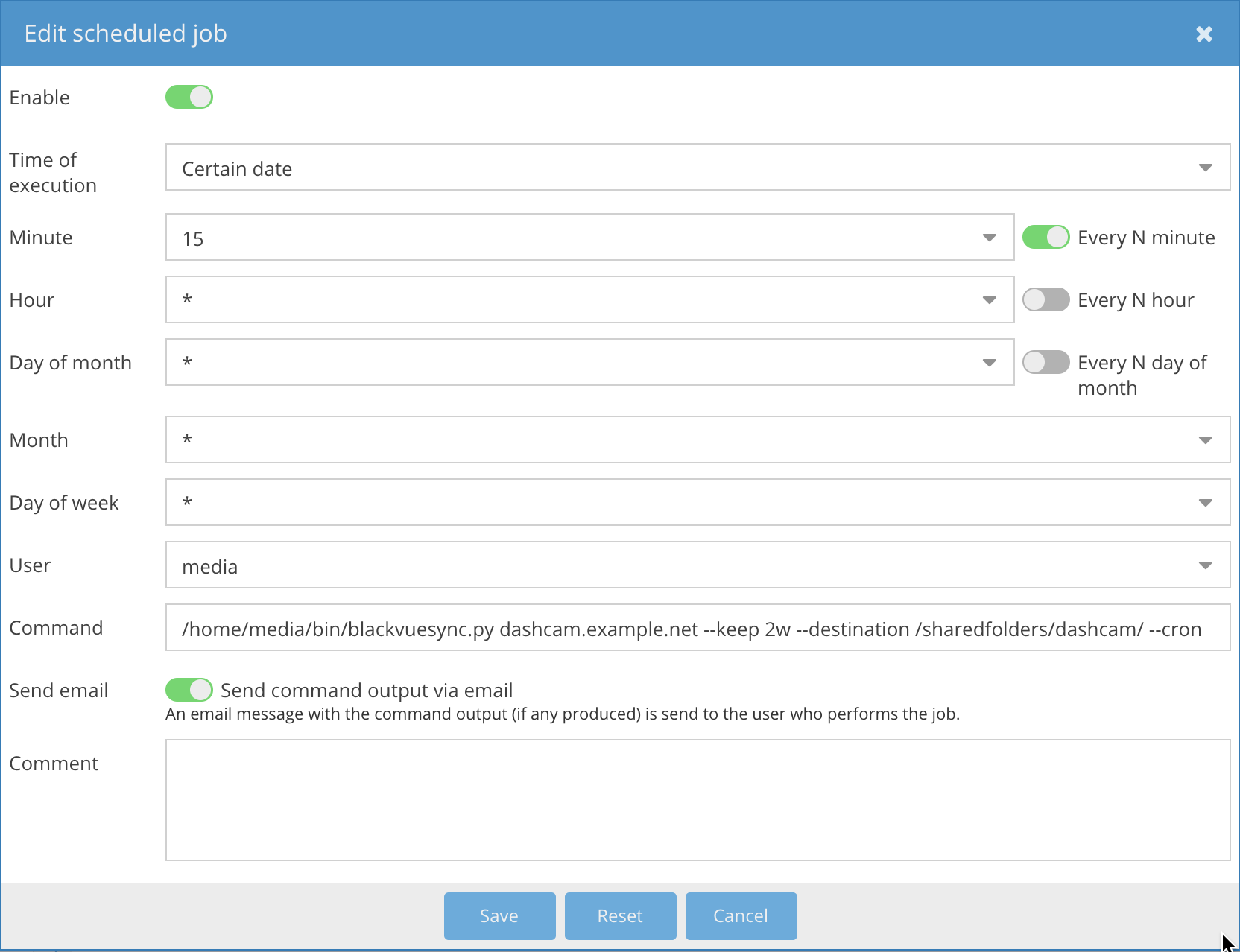
+
##### openmediavault
|
|
191
|
+
|
|
192
|
+
The [openmediavault](http://www.openmediavault.org/) NAS solution allows running [scheduled jobs](https://openmediavault.readthedocs.io/en/latest/administration/general/cron.html) with support for mail notifications.
|
|
193
|
+
|
|
194
|
+
Example:
|
|
195
|
+
|
|
196
|
+
|
|
197
|
+
|
|
198
|
+
#### Docker
|
|
199
|
+
|
|
200
|
+
##### Overview
|
|
201
|
+
|
|
202
|
+
The [acolomba/blackvuesync](https://hub.docker.com/r/acolomba/blackvuesync/) docker image sets up a cron job internal to the container that runs the synchronization operation every 15 minutes.
|
|
203
|
+
|
|
204
|
+
##### Quick Start
|
|
205
|
+
|
|
206
|
+
It's a good idea to do a single, interactive dry run first with verbose logging:
|
|
207
|
+
|
|
208
|
+
```sh
|
|
209
|
+
docker run -it --rm \
|
|
210
|
+
-e ADDRESS=dashcam.example.net \
|
|
211
|
+
-v $PWD:/recordings \
|
|
212
|
+
-e DRY_RUN=1 \
|
|
213
|
+
-e VERBOSE=1 \
|
|
214
|
+
-e RUN_ONCE=1 \
|
|
215
|
+
--name blackvuesync \
|
|
216
|
+
acolomba/blackvuesync
|
|
217
|
+
```
|
|
218
|
+
|
|
219
|
+
Once that works, a typical invocation would be similar to:
|
|
220
|
+
|
|
221
|
+
```sh
|
|
222
|
+
docker run -d --restart unless-stopped \
|
|
223
|
+
-v /data/dashcam:/recordings \
|
|
224
|
+
-e ADDRESS=dashcam.example.net \
|
|
225
|
+
-e PUID=$(id -u) \
|
|
226
|
+
-e PGID=$(id -g) \
|
|
227
|
+
-e TZ="America/New_York" \
|
|
228
|
+
-e KEEP=2w \
|
|
229
|
+
--name blackvuesync \
|
|
230
|
+
acolomba/blackvuesync
|
|
231
|
+
```
|
|
232
|
+
|
|
233
|
+
##### Docker Compose
|
|
234
|
+
|
|
235
|
+
[Docker Compose](https://docs.docker.com/compose/) may offer an easier, more repeatable and extensible option for running a BlackVueSync Docker container.
|
|
236
|
+
|
|
237
|
+
After downloading the Docker [Compose file](https://raw.githubusercontent.com/acolomba/blackvuesync/main/docker-compose.yml) and editing its values as desired, BlackVueSync can be started with:
|
|
238
|
+
|
|
239
|
+
```sh
|
|
240
|
+
docker-compose up -d
|
|
241
|
+
```
|
|
242
|
+
|
|
243
|
+
OR, depending on the Docker version:
|
|
244
|
+
|
|
245
|
+
```sh
|
|
246
|
+
docker compose up -d
|
|
247
|
+
```
|
|
248
|
+
|
|
249
|
+
##### Reference
|
|
250
|
+
|
|
251
|
+
These options are required for the docker image to operate correctly:
|
|
252
|
+
|
|
253
|
+
* The `/recordings` volume mapped to the desired destination of the downloaded recordings.
|
|
254
|
+
* The `ADDRESS` parameter set to the dashcam address.
|
|
255
|
+
* The `PUID` and `PGID` parameters set to the desired destination directory's user id and group id.
|
|
256
|
+
* The `TZ` parameter set to the same [timezone](https://en.wikipedia.org/wiki/List_of_tz_database_time_zones) as the dashcam. Note that BlackVue dashcams do not respect Daylight Savings Time, so their clock needs to be adjusted periodically.
|
|
257
|
+
|
|
258
|
+
Other parameters:
|
|
259
|
+
|
|
260
|
+
* `GROUPING`: Groups downloaded recordings in directories, `daily`, `weekly`, `monthly`, `yearly` and `none` are supported. (Default: `none`.)
|
|
261
|
+
* `KEEP`: Sets the retention period of downloaded recordings. Recordings prior to the retention period will be removed from the destination. Accepted units are `d` for days and `w` for weeks. If no unit is indicated, days are assumed. (Default: empty, meaning recordings are kept forever.)
|
|
262
|
+
* `PRIORITY`: Sets the priority to download recordings. Pick `date` to download from oldest to newest; pick `rdate` to download from newset to oldest; pick `type` to download manual, event (all types), normal and (non-event) parking recordings in that order. Defaults to `date`.
|
|
263
|
+
* `MAX_USED_DISK`: If set to a percentage value, stops downloading if the amount of used disk space exceeds the indicated percentage value. (Default: `90`, i.e. 90%.)
|
|
264
|
+
* `TIMEOUT`: If set to a float value, sets the timeout in seconds for connecting to the dashcam. (Default: `10.0` seconds.)
|
|
265
|
+
* `VERBOSE`: If set to a number greater than zero, increases logging verbosity. (Default: `0`.)
|
|
266
|
+
* `QUIET`: If set to any value, quiets down logs: only unexpected errors will be logged. (Default: empty.)
|
|
267
|
+
* `CRON`: Set by default, makes it so downloads of normal recordings and unexpected error conditions are logged. Can be set to `""` to disable.
|
|
268
|
+
* `DRY_RUN`: If set to any value, makes it so that the script communicates what it would do without actually doing anything. (Default: empty.)
|
|
269
|
+
* `RUN_ONCE`: If set to any value, the docker image runs the sync operation once and exits without setting up the cron job. (Default: empty. Not supported in Docker Compose.)
|
|
270
|
+
|
|
271
|
+
## License
|
|
272
|
+
|
|
273
|
+
This project is licensed under the MIT License - see the [COPYING](COPYING) file for details
|
|
274
|
+
|
|
275
|
+
Copyright 2018-2026 [Alessandro Colomba](https://github.com/acolomba)
|
|
@@ -0,0 +1,238 @@
|
|
|
1
|
+
# BlackVue Sync
|
|
2
|
+
|
|
3
|
+
[](https://github.com/acolomba/blackvuesync/actions/workflows/ci.yml)
|
|
4
|
+
[](https://github.com/acolomba/blackvuesync/actions/workflows/docker-build.yml)
|
|
5
|
+
[](https://sonarcloud.io/summary/overall?id=acolomba_blackvuesync)
|
|
6
|
+
[](https://sonarcloud.io/summary/overall?id=acolomba_blackvuesync)
|
|
7
|
+
[](https://sonarcloud.io/summary/overall?id=acolomba_blackvuesync)
|
|
8
|
+
[](https://sonarcloud.io/summary/overall?id=acolomba_blackvuesync)
|
|
9
|
+
[](https://sonarcloud.io/summary/overall?id=acolomba_blackvuesync)
|
|
10
|
+
[](https://sonarcloud.io/summary/overall?id=acolomba_blackvuesync)
|
|
11
|
+
[](https://sonarcloud.io/summary/overall?id=acolomba_blackvuesync)
|
|
12
|
+
|
|
13
|
+
Synchronizes recordings from a BlackVue dashcam with a local directory over a LAN.
|
|
14
|
+
|
|
15
|
+
BlackVue dashcams expose an HTTP server that can be used to download all recordings. This project downloads only recordings that are not already downloaded, optionally limiting downloads in a local directory to a date range.
|
|
16
|
+
|
|
17
|
+
A typical setup would be a periodic cron job or a Docker container running on a local server.
|
|
18
|
+
|
|
19
|
+
## Features
|
|
20
|
+
|
|
21
|
+
* **Portable runtimes:**
|
|
22
|
+
* A [single, self-contained Python script](https://github.com/acolomba/blackvuesync/blob/master/blackvuesync.py) with no third-party dependencies. It can be copied and run anywhere, either [manually](#manual-usage) or [periodically](#unattended-usage).
|
|
23
|
+
* A [docker image](#docker) that runs periodically via an internal cron job. Supports amd64 (Intel), arm64 (Apple Silicon, Raspberry Pi 4+) and armv7 (Raspberry Pi 2/3).
|
|
24
|
+
* **Smart**: Only downloads recordings that haven't already been downloaded.
|
|
25
|
+
* **Resilient**: If a download interrupts for whatever reason, the script resumes where it left off the next time it runs. This is especially useful for possibly unreliable Wi-Fi connections from a garage.
|
|
26
|
+
* **Hands-off**: Optionally retains recordings for a set amount of time. Outdated recordings are automatically removed.
|
|
27
|
+
* **Cron-friendly**: Only one process is allowed to run at any given time for a specific download destination.
|
|
28
|
+
* **Safe**: Stops executing if the destination disk is almost full.
|
|
29
|
+
* **Friendly error reporting**: Communicates a range of known error conditions with sensible verbosity.
|
|
30
|
+
|
|
31
|
+
## Prerequisites
|
|
32
|
+
|
|
33
|
+
### Software
|
|
34
|
+
|
|
35
|
+
* [Python](https://www.python.org/) 3.9+ or [Docker](https://docs.docker.com/).
|
|
36
|
+
* Sufficient disk space on a file system local to the script. Plan for about 5GB/hr per camera.
|
|
37
|
+
* [BlackVue Viewer](https://blackvue.com/kr/download/) or a media player to view the recordings.
|
|
38
|
+
|
|
39
|
+
### Hardware
|
|
40
|
+
|
|
41
|
+
A cloud-enabled [BlackVue](https://www.blackvue.com/) dashcam must be connected via Wi-Fi to the local network with a *static* IP address.
|
|
42
|
+
|
|
43
|
+
The dashcam must be kept powered for some time after the vehicle is turned off. BlackVue offers [hardwiring kits](https://blackvue.com/product-tag/battery/) and [batteries](https://blackvue.com/product-tag/battery/).
|
|
44
|
+
|
|
45
|
+
The camera should stay active for a period sufficiently long for recordings to be downloaded. Consult the dashcam manual for the bit rate for your chosen image quality, and compare it with the download speed reported by BlackVue Sync.
|
|
46
|
+
|
|
47
|
+
Example with a DR750S-2CH recording with two cameras at the highest quality setting and a good but conservative download speed:
|
|
48
|
+
|
|
49
|
+
```calca
|
|
50
|
+
# dashcam bitrates
|
|
51
|
+
dashcam_bitrate_front = 12Mbps
|
|
52
|
+
dashcam_bitrate_back = 10Mbps
|
|
53
|
+
dashcam_bitrate = dashcam_bitrate_front + dashcam_bitrate_back
|
|
54
|
+
|
|
55
|
+
download_speed = 20Mbps
|
|
56
|
+
|
|
57
|
+
# hours on the timer for every hour of recording
|
|
58
|
+
ratio = dashcam_bitrate / download_speed => 1.1
|
|
59
|
+
```
|
|
60
|
+
|
|
61
|
+
### Verifying Connectivity
|
|
62
|
+
|
|
63
|
+
For illustration purposes, all examples assume that the camera is reachable at the `dashcam.example.net` address. A static numeric IP address works just as well.
|
|
64
|
+
|
|
65
|
+
A quick way to verify that the dashcam is online is by using `curl`.
|
|
66
|
+
|
|
67
|
+
```sh
|
|
68
|
+
$ curl http://dashcam.example.net/blackvue_vod.cgi
|
|
69
|
+
v:1.00
|
|
70
|
+
n:/Record/20181026_135003_PF.mp4,s:1000000
|
|
71
|
+
n:/Record/20181026_140658_PF.mp4,s:1000000
|
|
72
|
+
n:/Record/20181026_140953_PF.mp4,s:1000000
|
|
73
|
+
...
|
|
74
|
+
$
|
|
75
|
+
```
|
|
76
|
+
|
|
77
|
+
Another way is by browsing to: `http://dashcam.example.net/blackvue_vod.cgi`.
|
|
78
|
+
|
|
79
|
+
## Usage
|
|
80
|
+
|
|
81
|
+
### Installation
|
|
82
|
+
|
|
83
|
+
BlackVue Sync is a single script, and can be obtained in a number of ways:
|
|
84
|
+
|
|
85
|
+
* **[uv](https://docs.astral.sh/uv/)**: Run with `uvx blackvuesync <args>`, or install with `uv tool install blackvuesync` and run with `blackvuesync <args>`.
|
|
86
|
+
* **[Pip](https://pypi.org/project/pip/):** Install with `pip install blackvuesync` and run with `blackvuesync <args>`.
|
|
87
|
+
* **Direct:** [Download from GitHub](https://raw.githubusercontent.com/acolomba/blackvuesync/refs/heads/main/blackvuesync.py), save to the desired location, and either run it with `python3 blackvuesync.py <args>`, or mark it executable and run it with `blackvuesync.py <args>`.
|
|
88
|
+
|
|
89
|
+
The interactive instructions assume a uv or Pip installation.
|
|
90
|
+
|
|
91
|
+
### Manual Usage
|
|
92
|
+
|
|
93
|
+
The dashcam address is the only required parameter. The `--dry-run` option makes it so that the script communicates what it would do without actually doing anything. Example:
|
|
94
|
+
|
|
95
|
+
```sh
|
|
96
|
+
blackvuesync dashcam.example.net --dry-run
|
|
97
|
+
```
|
|
98
|
+
|
|
99
|
+
It's also possible to specify a destination directory other than the current directory with `--destination`:
|
|
100
|
+
|
|
101
|
+
```sh
|
|
102
|
+
blackvuesync dashcam.example.net --destination /data/dashcam --dry-run
|
|
103
|
+
```
|
|
104
|
+
|
|
105
|
+
A retention period can be indicated with the `--keep` option. Recordings prior to the retention period will be removed from the destination directory. Accepted units are `d` for days and `w` for weeks. If no unit is indicated, days are assumed.
|
|
106
|
+
|
|
107
|
+
```sh
|
|
108
|
+
blackvuesync dashcam.example.net --destination /data/dashcam --keep 2w --dry-run
|
|
109
|
+
```
|
|
110
|
+
|
|
111
|
+
A typical invocation would be:
|
|
112
|
+
|
|
113
|
+
```sh
|
|
114
|
+
blackvuesync dashcam.example.net --destination /data/dashcam --keep 2w
|
|
115
|
+
```
|
|
116
|
+
|
|
117
|
+
Other options:
|
|
118
|
+
|
|
119
|
+
* `--grouping`: Groups downloaded recordings in directories according to different schemes. Grouping speeds up loading recordings in the BlackVue Viewer app. The supported groupings are:
|
|
120
|
+
* `daily`: By day, e.g. 2018-10-26;
|
|
121
|
+
* `weekly`: By week, with the directory indicating the date of that week's monday, e.g. 2018-10-22;
|
|
122
|
+
* `monthly`: By month, e.g. 2018-10;
|
|
123
|
+
* `yearly`: By year, e.g. 2018;
|
|
124
|
+
* `none`: No grouping, the default.
|
|
125
|
+
* `--priority`: Downloads recordings with different priorities: `date` downloads oldest to newest; `rdate` downloads newest to oldest; `type` downloads manual, event (all types), normal and (non-event) parking recordings in that order. Defaults to `date`.
|
|
126
|
+
* `--max-used-disk`: Downloads stop once the specified used disk percentage threshold is reached. Defaults to `90` (i.e. 90%.)
|
|
127
|
+
* `--timeout`: Sets a timeout for establishing a connection to the dashcam, in seconds. Defaults to `10.0` seconds.
|
|
128
|
+
* `--quiet`: Quiets down output messages, except for unexpected errors. Takes precedence over `--verbose`.
|
|
129
|
+
* `--verbose`: Increases verbosity. Can be specified multiple times to indicate additional verbosity.
|
|
130
|
+
|
|
131
|
+
### Unattended Usage
|
|
132
|
+
|
|
133
|
+
#### Plain cron
|
|
134
|
+
|
|
135
|
+
The script can run periodically by setting up a [cron](https://en.wikipedia.org/wiki/Cron) job on UNIX systems.
|
|
136
|
+
|
|
137
|
+
Simple example with crontab for a hypothetical `media` user:
|
|
138
|
+
|
|
139
|
+
```crontab
|
|
140
|
+
*/15 * * * * /home/media/bin/blackvuesync.py dashcam.example.net --keep 2w --destination /data/dashcam --cron
|
|
141
|
+
```
|
|
142
|
+
|
|
143
|
+
The `--cron` option changes the logging level with the assumption that the output may be emailed. When this option is enabled, the script only produces logs when it downloads recordings and when it encounters unexpected errors. One would typically see an email only after driving or when something goes wrong.
|
|
144
|
+
|
|
145
|
+
Note that if the dashcam is unreachable for whatever reason, in `--cron` mode no output is generated, since this is an expected condition whenever the dashcam is away from the local network.
|
|
146
|
+
|
|
147
|
+
If cron jobs overlap, the script recognizes that another instance is currently running via a lock file on the destination directory. For the lock to work correctly, the destination directory must be on a local filesystem relative to the script.
|
|
148
|
+
|
|
149
|
+
#### NAS
|
|
150
|
+
|
|
151
|
+
Many NAS systems allow running commands periodically at set intervals.
|
|
152
|
+
|
|
153
|
+
##### openmediavault
|
|
154
|
+
|
|
155
|
+
The [openmediavault](http://www.openmediavault.org/) NAS solution allows running [scheduled jobs](https://openmediavault.readthedocs.io/en/latest/administration/general/cron.html) with support for mail notifications.
|
|
156
|
+
|
|
157
|
+
Example:
|
|
158
|
+
|
|
159
|
+

|
|
160
|
+
|
|
161
|
+
#### Docker
|
|
162
|
+
|
|
163
|
+
##### Overview
|
|
164
|
+
|
|
165
|
+
The [acolomba/blackvuesync](https://hub.docker.com/r/acolomba/blackvuesync/) docker image sets up a cron job internal to the container that runs the synchronization operation every 15 minutes.
|
|
166
|
+
|
|
167
|
+
##### Quick Start
|
|
168
|
+
|
|
169
|
+
It's a good idea to do a single, interactive dry run first with verbose logging:
|
|
170
|
+
|
|
171
|
+
```sh
|
|
172
|
+
docker run -it --rm \
|
|
173
|
+
-e ADDRESS=dashcam.example.net \
|
|
174
|
+
-v $PWD:/recordings \
|
|
175
|
+
-e DRY_RUN=1 \
|
|
176
|
+
-e VERBOSE=1 \
|
|
177
|
+
-e RUN_ONCE=1 \
|
|
178
|
+
--name blackvuesync \
|
|
179
|
+
acolomba/blackvuesync
|
|
180
|
+
```
|
|
181
|
+
|
|
182
|
+
Once that works, a typical invocation would be similar to:
|
|
183
|
+
|
|
184
|
+
```sh
|
|
185
|
+
docker run -d --restart unless-stopped \
|
|
186
|
+
-v /data/dashcam:/recordings \
|
|
187
|
+
-e ADDRESS=dashcam.example.net \
|
|
188
|
+
-e PUID=$(id -u) \
|
|
189
|
+
-e PGID=$(id -g) \
|
|
190
|
+
-e TZ="America/New_York" \
|
|
191
|
+
-e KEEP=2w \
|
|
192
|
+
--name blackvuesync \
|
|
193
|
+
acolomba/blackvuesync
|
|
194
|
+
```
|
|
195
|
+
|
|
196
|
+
##### Docker Compose
|
|
197
|
+
|
|
198
|
+
[Docker Compose](https://docs.docker.com/compose/) may offer an easier, more repeatable and extensible option for running a BlackVueSync Docker container.
|
|
199
|
+
|
|
200
|
+
After downloading the Docker [Compose file](https://raw.githubusercontent.com/acolomba/blackvuesync/main/docker-compose.yml) and editing its values as desired, BlackVueSync can be started with:
|
|
201
|
+
|
|
202
|
+
```sh
|
|
203
|
+
docker-compose up -d
|
|
204
|
+
```
|
|
205
|
+
|
|
206
|
+
OR, depending on the Docker version:
|
|
207
|
+
|
|
208
|
+
```sh
|
|
209
|
+
docker compose up -d
|
|
210
|
+
```
|
|
211
|
+
|
|
212
|
+
##### Reference
|
|
213
|
+
|
|
214
|
+
These options are required for the docker image to operate correctly:
|
|
215
|
+
|
|
216
|
+
* The `/recordings` volume mapped to the desired destination of the downloaded recordings.
|
|
217
|
+
* The `ADDRESS` parameter set to the dashcam address.
|
|
218
|
+
* The `PUID` and `PGID` parameters set to the desired destination directory's user id and group id.
|
|
219
|
+
* The `TZ` parameter set to the same [timezone](https://en.wikipedia.org/wiki/List_of_tz_database_time_zones) as the dashcam. Note that BlackVue dashcams do not respect Daylight Savings Time, so their clock needs to be adjusted periodically.
|
|
220
|
+
|
|
221
|
+
Other parameters:
|
|
222
|
+
|
|
223
|
+
* `GROUPING`: Groups downloaded recordings in directories, `daily`, `weekly`, `monthly`, `yearly` and `none` are supported. (Default: `none`.)
|
|
224
|
+
* `KEEP`: Sets the retention period of downloaded recordings. Recordings prior to the retention period will be removed from the destination. Accepted units are `d` for days and `w` for weeks. If no unit is indicated, days are assumed. (Default: empty, meaning recordings are kept forever.)
|
|
225
|
+
* `PRIORITY`: Sets the priority to download recordings. Pick `date` to download from oldest to newest; pick `rdate` to download from newset to oldest; pick `type` to download manual, event (all types), normal and (non-event) parking recordings in that order. Defaults to `date`.
|
|
226
|
+
* `MAX_USED_DISK`: If set to a percentage value, stops downloading if the amount of used disk space exceeds the indicated percentage value. (Default: `90`, i.e. 90%.)
|
|
227
|
+
* `TIMEOUT`: If set to a float value, sets the timeout in seconds for connecting to the dashcam. (Default: `10.0` seconds.)
|
|
228
|
+
* `VERBOSE`: If set to a number greater than zero, increases logging verbosity. (Default: `0`.)
|
|
229
|
+
* `QUIET`: If set to any value, quiets down logs: only unexpected errors will be logged. (Default: empty.)
|
|
230
|
+
* `CRON`: Set by default, makes it so downloads of normal recordings and unexpected error conditions are logged. Can be set to `""` to disable.
|
|
231
|
+
* `DRY_RUN`: If set to any value, makes it so that the script communicates what it would do without actually doing anything. (Default: empty.)
|
|
232
|
+
* `RUN_ONCE`: If set to any value, the docker image runs the sync operation once and exits without setting up the cron job. (Default: empty. Not supported in Docker Compose.)
|
|
233
|
+
|
|
234
|
+
## License
|
|
235
|
+
|
|
236
|
+
This project is licensed under the MIT License - see the [COPYING](COPYING) file for details
|
|
237
|
+
|
|
238
|
+
Copyright 2018-2026 [Alessandro Colomba](https://github.com/acolomba)
|