bitmapist 3.117__tar.gz → 3.119__tar.gz
This diff represents the content of publicly available package versions that have been released to one of the supported registries. The information contained in this diff is provided for informational purposes only and reflects changes between package versions as they appear in their respective public registries.
- {bitmapist-3.117 → bitmapist-3.119}/.gitignore +2 -1
- {bitmapist-3.117 → bitmapist-3.119}/PKG-INFO +111 -60
- {bitmapist-3.117 → bitmapist-3.119}/README.md +110 -59
- {bitmapist-3.117 → bitmapist-3.119}/bitmapist/__init__.py +5 -2
- {bitmapist-3.117 → bitmapist-3.119}/bitmapist/cohort/__init__.py +2 -1
- {bitmapist-3.117 → bitmapist-3.119}/pyproject.toml +1 -1
- {bitmapist-3.117 → bitmapist-3.119}/AUTHORS +0 -0
- {bitmapist-3.117 → bitmapist-3.119}/LICENSE +0 -0
- {bitmapist-3.117 → bitmapist-3.119}/bitmapist/cohort/tmpl/form_data.mako +0 -0
- {bitmapist-3.117 → bitmapist-3.119}/bitmapist/cohort/tmpl/table_data.mako +0 -0
- {bitmapist-3.117 → bitmapist-3.119}/bitmapist/cohort/tmpl/table_data_csv.mako +0 -0
- {bitmapist-3.117 → bitmapist-3.119}/bitmapist/py.typed +0 -0
- {bitmapist-3.117 → bitmapist-3.119}/static/bitmapist.png +0 -0
- {bitmapist-3.117 → bitmapist-3.119}/static/bitmapist.svg +0 -0
|
@@ -1,6 +1,6 @@
|
|
|
1
1
|
Metadata-Version: 2.4
|
|
2
2
|
Name: bitmapist
|
|
3
|
-
Version: 3.
|
|
3
|
+
Version: 3.119
|
|
4
4
|
Summary: Implements a powerful analytics library using Redis bitmaps.
|
|
5
5
|
Project-URL: Repository, https://github.com/Doist/bitmapist
|
|
6
6
|
Author-email: Amir Salihefendic <dev@doist.com>, Doist Developers <dev@doist.com>
|
|
@@ -27,44 +27,43 @@ Description-Content-Type: text/markdown
|
|
|
27
27
|
|
|
28
28
|

|
|
29
29
|
|
|
30
|
-
|
|
31
30
|
[](https://travis-ci.org/Doist/bitmapist)
|
|
32
31
|
|
|
33
|
-
|
|
32
|
+
# Bitmapist: a powerful analytics library for Redis
|
|
34
33
|
|
|
35
|
-
|
|
34
|
+
Bitmapist makes it possible to implement real-time, highly scalable analytics. The library is very easy to use, enabling you to create reports easily.
|
|
36
35
|
|
|
37
|
-
|
|
36
|
+
Leveraging Redis bitmaps, you can store events for millions of users using a very little amount of memory (megabytes).
|
|
38
37
|
|
|
39
|
-
|
|
40
|
-
|
|
41
|
-
|
|
42
|
-
|
|
43
|
-
* How many % of users that were active last week are still active?
|
|
44
|
-
* How many % of users that were active last month are still active this month?
|
|
45
|
-
* What users performed action "X"?
|
|
38
|
+
> [!TIP]
|
|
39
|
+
> Instead of Redis as a backing store, consider using [bitmapist-server](https://github.com/Doist/bitmapist-server).
|
|
40
|
+
>
|
|
41
|
+
> It is our custom data store that exposes a (partial) Redis-compatible API, fully compatible with Bitmapist. It is 443x more memory efficient for this particular use case, improving scalability and cost-effectiveness.
|
|
46
42
|
|
|
47
|
-
|
|
43
|
+
## Use cases
|
|
48
44
|
|
|
49
|
-
|
|
50
|
-
You should be careful about using huge ids as this could require larger amounts of memory. Ids should be in range [0, 2^32).
|
|
45
|
+
Bitmapist can answer questions like:
|
|
51
46
|
|
|
52
|
-
|
|
53
|
-
|
|
54
|
-
|
|
55
|
-
|
|
56
|
-
|
|
47
|
+
- Has user 123 been online today? This week? This month?
|
|
48
|
+
- Has user 123 performed action "X"?
|
|
49
|
+
- How many users have been active this month? This hour?
|
|
50
|
+
- How many unique users have performed action "X" this week?
|
|
51
|
+
- How many % of users that were active last week are still active?
|
|
52
|
+
- How many % of users that were active last month are still active this month?
|
|
53
|
+
- What users performed action "X"?
|
|
57
54
|
|
|
58
|
-
|
|
55
|
+
Additionally, it can generate cohort graphs that can do following:
|
|
59
56
|
|
|
60
|
-
|
|
61
|
-
|
|
62
|
-
|
|
63
|
-
|
|
57
|
+
- Cohort over user retention
|
|
58
|
+
- How many % of users that were active last [days, weeks, months] are still active?
|
|
59
|
+
- How many % of users that performed action X also performed action Y (and this over time)
|
|
60
|
+
- And a lot of other things!
|
|
64
61
|
|
|
62
|
+
### Caveat: Avoid large IDs
|
|
65
63
|
|
|
64
|
+
You should be careful about using large IDs as this will require larger amounts of memory. IDs should be in range `[0, 2^32)`.
|
|
66
65
|
|
|
67
|
-
|
|
66
|
+
## Installation
|
|
68
67
|
|
|
69
68
|
Can be installed very easily via:
|
|
70
69
|
|
|
@@ -74,13 +73,7 @@ Or, if you use `uv`:
|
|
|
74
73
|
|
|
75
74
|
$ uv add bitmapist
|
|
76
75
|
|
|
77
|
-
|
|
78
|
-
# Ports
|
|
79
|
-
|
|
80
|
-
* PHP port: https://github.com/jeremyFreeAgent/Bitter
|
|
81
|
-
|
|
82
|
-
|
|
83
|
-
# Examples
|
|
76
|
+
## Usage and examples
|
|
84
77
|
|
|
85
78
|
Setting things up:
|
|
86
79
|
|
|
@@ -109,11 +102,11 @@ assert 123 in MonthEvents('song:played', now.year, now.month)
|
|
|
109
102
|
assert MonthEvents('active', now.year, now.month).has_events_marked() == True
|
|
110
103
|
```
|
|
111
104
|
|
|
112
|
-
|
|
113
105
|
How many users have been active this week?:
|
|
114
106
|
|
|
115
107
|
```python
|
|
116
|
-
|
|
108
|
+
iso_year, iso_week, _ = now.isocalendar()
|
|
109
|
+
print(len(WeekEvents('active', iso_year, iso_week)))
|
|
117
110
|
```
|
|
118
111
|
|
|
119
112
|
Iterate over all users active this week:
|
|
@@ -123,7 +116,6 @@ for uid in WeekEvents('active'):
|
|
|
123
116
|
print(uid)
|
|
124
117
|
```
|
|
125
118
|
|
|
126
|
-
|
|
127
119
|
If you're interested in "current events", you can omit extra `now.whatever`
|
|
128
120
|
arguments. Events will be populated with current time automatically.
|
|
129
121
|
|
|
@@ -147,7 +139,8 @@ MonthEvents('active').from_date(now) == MonthEvents('active', now.year, now.mont
|
|
|
147
139
|
Get the list of these users (user ids):
|
|
148
140
|
|
|
149
141
|
```python
|
|
150
|
-
|
|
142
|
+
iso_year, iso_week, _ = now.isocalendar()
|
|
143
|
+
print(list(WeekEvents('active', iso_year, iso_week)))
|
|
151
144
|
```
|
|
152
145
|
|
|
153
146
|
There are special methods `prev` and `next` returning "sibling" events and
|
|
@@ -177,7 +170,6 @@ if ev.period_end() < now:
|
|
|
177
170
|
|
|
178
171
|
```
|
|
179
172
|
|
|
180
|
-
|
|
181
173
|
As something new tracking hourly is disabled (to save memory!) To enable it as default do::
|
|
182
174
|
|
|
183
175
|
```python
|
|
@@ -191,7 +183,6 @@ Additionally you can supply an extra argument to `mark_event` to bypass the defa
|
|
|
191
183
|
mark_event('active', 123, track_hourly=False)
|
|
192
184
|
```
|
|
193
185
|
|
|
194
|
-
|
|
195
186
|
### Unique events
|
|
196
187
|
|
|
197
188
|
Sometimes the date of the event makes little or no sense, for example,
|
|
@@ -240,7 +231,6 @@ for uid in premium & active_today:
|
|
|
240
231
|
To get the best of two worlds you can mark unique event and regular
|
|
241
232
|
bitmapist events at the same time.
|
|
242
233
|
|
|
243
|
-
|
|
244
234
|
```python
|
|
245
235
|
def premium_up(uid):
|
|
246
236
|
# called when user promoted to premium
|
|
@@ -249,7 +239,6 @@ def premium_up(uid):
|
|
|
249
239
|
|
|
250
240
|
```
|
|
251
241
|
|
|
252
|
-
|
|
253
242
|
### Perform bit operations
|
|
254
243
|
|
|
255
244
|
How many users that have been active last month are still active this month?
|
|
@@ -267,12 +256,12 @@ assert 123 in active_2_months
|
|
|
267
256
|
|
|
268
257
|
Alternatively, you can use standard Python syntax for bitwise operations.
|
|
269
258
|
|
|
270
|
-
|
|
271
259
|
```python
|
|
272
260
|
last_month_event = MonthEvents('active', last_month.year, last_month.month)
|
|
273
261
|
this_month_event = MonthEvents('active', now.year, now.month)
|
|
274
262
|
active_two_months = last_month_event & this_month_event
|
|
275
263
|
```
|
|
264
|
+
|
|
276
265
|
Operators `&`, `|`, `^` and `~` supported.
|
|
277
266
|
|
|
278
267
|
Work with nested bit operations (imagine what you can do with this ;-))!
|
|
@@ -292,21 +281,23 @@ assert 123 in active_2_months
|
|
|
292
281
|
active_2_months.delete()
|
|
293
282
|
```
|
|
294
283
|
|
|
295
|
-
|
|
296
284
|
### Deleting
|
|
297
285
|
|
|
298
286
|
If you want to permanently remove marked events for any time period you can use the `delete()` method:
|
|
287
|
+
|
|
299
288
|
```python
|
|
300
289
|
last_month_event = MonthEvents('active', last_month.year, last_month.month)
|
|
301
290
|
last_month_event.delete()
|
|
302
291
|
```
|
|
303
292
|
|
|
304
293
|
If you want to remove all bitmapist events use:
|
|
294
|
+
|
|
305
295
|
```python
|
|
306
296
|
bitmapist.delete_all_events()
|
|
307
297
|
```
|
|
308
298
|
|
|
309
299
|
When using Bit Operations (ie `BitOpAnd`) you can (and probably should) delete the results unless you want them cached. There are different ways to go about this:
|
|
300
|
+
|
|
310
301
|
```python
|
|
311
302
|
active_2_months = BitOpAnd(
|
|
312
303
|
MonthEvents('active', last_month.year, last_month.month),
|
|
@@ -322,12 +313,12 @@ bitmapist.delete_runtime_bitop_keys()
|
|
|
322
313
|
bitmapist.delete_temporary_bitop_keys()
|
|
323
314
|
```
|
|
324
315
|
|
|
325
|
-
|
|
326
|
-
# bitmapist cohort
|
|
316
|
+
## Cohorts
|
|
327
317
|
|
|
328
318
|
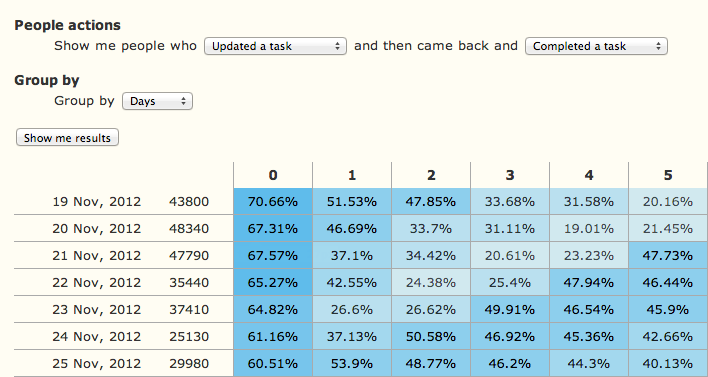
With bitmapist cohort you can get a form and a table rendering of the data you keep in bitmapist. If this sounds confusing [please look at Mixpanel](https://mixpanel.com/retention/).
|
|
329
319
|
|
|
330
320
|
Here's a simple example of how to generate a form and a rendering of the data you have inside bitmapist:
|
|
321
|
+
|
|
331
322
|
```python
|
|
332
323
|
from bitmapist import cohort
|
|
333
324
|
|
|
@@ -355,6 +346,14 @@ This will render something similar to this:
|
|
|
355
346
|
|
|
356
347
|
|
|
357
348
|
|
|
349
|
+
## References
|
|
350
|
+
|
|
351
|
+
If you want to read more about bitmaps please read following:
|
|
352
|
+
|
|
353
|
+
- http://blog.getspool.com/2011/11/29/fast-easy-realtime-metrics-using-redis-bitmaps/
|
|
354
|
+
- http://redis.io/commands/setbit
|
|
355
|
+
- http://en.wikipedia.org/wiki/Bit_array
|
|
356
|
+
- http://www.slideshare.net/crashlytics/crashlytics-on-redis-analytics
|
|
358
357
|
|
|
359
358
|
## Contributing
|
|
360
359
|
|
|
@@ -362,7 +361,7 @@ Please see our guide [here](./CONTRIBUTING.md)
|
|
|
362
361
|
|
|
363
362
|
## Local Development
|
|
364
363
|
|
|
365
|
-
We use `uv` for dependency management & packaging.
|
|
364
|
+
We use `uv` for dependency management & packaging. Please see [here for setup instructions](https://docs.astral.sh/uv/getting-started/).
|
|
366
365
|
|
|
367
366
|
Once you have `uv` installed, you can run the following to install the dependencies in a virtual environment:
|
|
368
367
|
|
|
@@ -372,34 +371,86 @@ uv sync
|
|
|
372
371
|
|
|
373
372
|
## Testing
|
|
374
373
|
|
|
375
|
-
|
|
374
|
+
### Quick Start with Docker (Recommended)
|
|
376
375
|
|
|
377
|
-
|
|
376
|
+
The easiest way to run tests locally is with Docker:
|
|
378
377
|
|
|
379
|
-
|
|
380
|
-
|
|
378
|
+
```bash
|
|
379
|
+
# Start both backend servers
|
|
380
|
+
docker compose up -d
|
|
381
|
+
|
|
382
|
+
# Run tests
|
|
383
|
+
uv run pytest
|
|
384
|
+
|
|
385
|
+
# Stop servers when done
|
|
386
|
+
docker compose down
|
|
387
|
+
```
|
|
388
|
+
|
|
389
|
+
This runs tests against both Redis and bitmapist-server backends automatically.
|
|
381
390
|
|
|
382
|
-
|
|
391
|
+
### Alternative: Native Binaries
|
|
383
392
|
|
|
393
|
+
To run tests with native binaries, you'll need at least one backend server installed:
|
|
394
|
+
|
|
395
|
+
**Redis:**
|
|
396
|
+
- Install `redis-server` using your package manager
|
|
397
|
+
- Ensure it's in your `PATH`, or set `BITMAPIST_REDIS_SERVER_PATH`
|
|
398
|
+
|
|
399
|
+
**Bitmapist-server:**
|
|
400
|
+
- Download from the [releases page](https://github.com/Doist/bitmapist-server/releases)
|
|
401
|
+
- Ensure it's in your PATH, or set `BITMAPIST_SERVER_PATH`
|
|
402
|
+
|
|
403
|
+
Then run:
|
|
384
404
|
```bash
|
|
385
405
|
uv run pytest
|
|
386
406
|
```
|
|
387
407
|
|
|
408
|
+
The test suite auto-detects available backends and runs accordingly:
|
|
409
|
+
- **Docker containers running?** Uses them
|
|
410
|
+
- **Native binaries available?** Starts them automatically
|
|
411
|
+
- **Nothing available?** Shows error
|
|
412
|
+
|
|
413
|
+
### Configuration
|
|
414
|
+
|
|
415
|
+
#### Environment Variables
|
|
416
|
+
|
|
417
|
+
Customize backend locations and ports if needed:
|
|
418
|
+
|
|
419
|
+
```bash
|
|
420
|
+
# Backend binary paths (optional - auto-detected from PATH by default)
|
|
421
|
+
export BITMAPIST_REDIS_SERVER_PATH=/custom/path/to/redis-server
|
|
422
|
+
export BITMAPIST_SERVER_PATH=/custom/path/to/bitmapist-server
|
|
423
|
+
|
|
424
|
+
# Backend ports (optional - defaults shown)
|
|
425
|
+
export BITMAPIST_REDIS_PORT=6399
|
|
426
|
+
export BITMAPIST_SERVER_PORT=6400
|
|
427
|
+
```
|
|
428
|
+
|
|
429
|
+
#### Testing Specific Backends
|
|
430
|
+
|
|
431
|
+
```bash
|
|
432
|
+
# Test only Redis
|
|
433
|
+
uv run pytest -k redis
|
|
434
|
+
|
|
435
|
+
# Test only bitmapist-server
|
|
436
|
+
uv run pytest -k bitmapist-server
|
|
437
|
+
```
|
|
438
|
+
|
|
388
439
|
## Releasing new versions
|
|
389
440
|
|
|
390
441
|
1. Bump version in `pyproject.toml` (or use `uv version`)
|
|
391
|
-
|
|
392
|
-
|
|
393
|
-
|
|
442
|
+
```sh
|
|
443
|
+
uv version --bump minor
|
|
444
|
+
```
|
|
394
445
|
1. Update the CHANGELOG
|
|
395
446
|
1. Commit the changes with a commit message "Version X.X.X"
|
|
396
|
-
|
|
397
|
-
|
|
398
|
-
|
|
447
|
+
```sh
|
|
448
|
+
git commit -m "Version $(uv version --short)"
|
|
449
|
+
```
|
|
399
450
|
1. Tag the current commit with `vX.X.X`
|
|
400
|
-
|
|
401
|
-
|
|
402
|
-
|
|
451
|
+
```sh
|
|
452
|
+
git tag -a -m "Release $(uv version --short)" "v$(uv version --short)"
|
|
453
|
+
```
|
|
403
454
|
1. Create a new release on GitHub named `vX.X.X`
|
|
404
455
|
1. GitHub Actions will publish the new version to PyPI for you
|
|
405
456
|
|
|
@@ -1,43 +1,42 @@
|
|
|
1
1
|

|
|
2
2
|
|
|
3
|
-
|
|
4
3
|
[](https://travis-ci.org/Doist/bitmapist)
|
|
5
4
|
|
|
6
|
-
|
|
5
|
+
# Bitmapist: a powerful analytics library for Redis
|
|
7
6
|
|
|
8
|
-
|
|
7
|
+
Bitmapist makes it possible to implement real-time, highly scalable analytics. The library is very easy to use, enabling you to create reports easily.
|
|
9
8
|
|
|
10
|
-
|
|
9
|
+
Leveraging Redis bitmaps, you can store events for millions of users using a very little amount of memory (megabytes).
|
|
11
10
|
|
|
12
|
-
|
|
13
|
-
|
|
14
|
-
|
|
15
|
-
|
|
16
|
-
* How many % of users that were active last week are still active?
|
|
17
|
-
* How many % of users that were active last month are still active this month?
|
|
18
|
-
* What users performed action "X"?
|
|
11
|
+
> [!TIP]
|
|
12
|
+
> Instead of Redis as a backing store, consider using [bitmapist-server](https://github.com/Doist/bitmapist-server).
|
|
13
|
+
>
|
|
14
|
+
> It is our custom data store that exposes a (partial) Redis-compatible API, fully compatible with Bitmapist. It is 443x more memory efficient for this particular use case, improving scalability and cost-effectiveness.
|
|
19
15
|
|
|
20
|
-
|
|
16
|
+
## Use cases
|
|
21
17
|
|
|
22
|
-
|
|
23
|
-
You should be careful about using huge ids as this could require larger amounts of memory. Ids should be in range [0, 2^32).
|
|
18
|
+
Bitmapist can answer questions like:
|
|
24
19
|
|
|
25
|
-
|
|
26
|
-
|
|
27
|
-
|
|
28
|
-
|
|
29
|
-
|
|
20
|
+
- Has user 123 been online today? This week? This month?
|
|
21
|
+
- Has user 123 performed action "X"?
|
|
22
|
+
- How many users have been active this month? This hour?
|
|
23
|
+
- How many unique users have performed action "X" this week?
|
|
24
|
+
- How many % of users that were active last week are still active?
|
|
25
|
+
- How many % of users that were active last month are still active this month?
|
|
26
|
+
- What users performed action "X"?
|
|
30
27
|
|
|
31
|
-
|
|
28
|
+
Additionally, it can generate cohort graphs that can do following:
|
|
32
29
|
|
|
33
|
-
|
|
34
|
-
|
|
35
|
-
|
|
36
|
-
|
|
30
|
+
- Cohort over user retention
|
|
31
|
+
- How many % of users that were active last [days, weeks, months] are still active?
|
|
32
|
+
- How many % of users that performed action X also performed action Y (and this over time)
|
|
33
|
+
- And a lot of other things!
|
|
37
34
|
|
|
35
|
+
### Caveat: Avoid large IDs
|
|
38
36
|
|
|
37
|
+
You should be careful about using large IDs as this will require larger amounts of memory. IDs should be in range `[0, 2^32)`.
|
|
39
38
|
|
|
40
|
-
|
|
39
|
+
## Installation
|
|
41
40
|
|
|
42
41
|
Can be installed very easily via:
|
|
43
42
|
|
|
@@ -47,13 +46,7 @@ Or, if you use `uv`:
|
|
|
47
46
|
|
|
48
47
|
$ uv add bitmapist
|
|
49
48
|
|
|
50
|
-
|
|
51
|
-
# Ports
|
|
52
|
-
|
|
53
|
-
* PHP port: https://github.com/jeremyFreeAgent/Bitter
|
|
54
|
-
|
|
55
|
-
|
|
56
|
-
# Examples
|
|
49
|
+
## Usage and examples
|
|
57
50
|
|
|
58
51
|
Setting things up:
|
|
59
52
|
|
|
@@ -82,11 +75,11 @@ assert 123 in MonthEvents('song:played', now.year, now.month)
|
|
|
82
75
|
assert MonthEvents('active', now.year, now.month).has_events_marked() == True
|
|
83
76
|
```
|
|
84
77
|
|
|
85
|
-
|
|
86
78
|
How many users have been active this week?:
|
|
87
79
|
|
|
88
80
|
```python
|
|
89
|
-
|
|
81
|
+
iso_year, iso_week, _ = now.isocalendar()
|
|
82
|
+
print(len(WeekEvents('active', iso_year, iso_week)))
|
|
90
83
|
```
|
|
91
84
|
|
|
92
85
|
Iterate over all users active this week:
|
|
@@ -96,7 +89,6 @@ for uid in WeekEvents('active'):
|
|
|
96
89
|
print(uid)
|
|
97
90
|
```
|
|
98
91
|
|
|
99
|
-
|
|
100
92
|
If you're interested in "current events", you can omit extra `now.whatever`
|
|
101
93
|
arguments. Events will be populated with current time automatically.
|
|
102
94
|
|
|
@@ -120,7 +112,8 @@ MonthEvents('active').from_date(now) == MonthEvents('active', now.year, now.mont
|
|
|
120
112
|
Get the list of these users (user ids):
|
|
121
113
|
|
|
122
114
|
```python
|
|
123
|
-
|
|
115
|
+
iso_year, iso_week, _ = now.isocalendar()
|
|
116
|
+
print(list(WeekEvents('active', iso_year, iso_week)))
|
|
124
117
|
```
|
|
125
118
|
|
|
126
119
|
There are special methods `prev` and `next` returning "sibling" events and
|
|
@@ -150,7 +143,6 @@ if ev.period_end() < now:
|
|
|
150
143
|
|
|
151
144
|
```
|
|
152
145
|
|
|
153
|
-
|
|
154
146
|
As something new tracking hourly is disabled (to save memory!) To enable it as default do::
|
|
155
147
|
|
|
156
148
|
```python
|
|
@@ -164,7 +156,6 @@ Additionally you can supply an extra argument to `mark_event` to bypass the defa
|
|
|
164
156
|
mark_event('active', 123, track_hourly=False)
|
|
165
157
|
```
|
|
166
158
|
|
|
167
|
-
|
|
168
159
|
### Unique events
|
|
169
160
|
|
|
170
161
|
Sometimes the date of the event makes little or no sense, for example,
|
|
@@ -213,7 +204,6 @@ for uid in premium & active_today:
|
|
|
213
204
|
To get the best of two worlds you can mark unique event and regular
|
|
214
205
|
bitmapist events at the same time.
|
|
215
206
|
|
|
216
|
-
|
|
217
207
|
```python
|
|
218
208
|
def premium_up(uid):
|
|
219
209
|
# called when user promoted to premium
|
|
@@ -222,7 +212,6 @@ def premium_up(uid):
|
|
|
222
212
|
|
|
223
213
|
```
|
|
224
214
|
|
|
225
|
-
|
|
226
215
|
### Perform bit operations
|
|
227
216
|
|
|
228
217
|
How many users that have been active last month are still active this month?
|
|
@@ -240,12 +229,12 @@ assert 123 in active_2_months
|
|
|
240
229
|
|
|
241
230
|
Alternatively, you can use standard Python syntax for bitwise operations.
|
|
242
231
|
|
|
243
|
-
|
|
244
232
|
```python
|
|
245
233
|
last_month_event = MonthEvents('active', last_month.year, last_month.month)
|
|
246
234
|
this_month_event = MonthEvents('active', now.year, now.month)
|
|
247
235
|
active_two_months = last_month_event & this_month_event
|
|
248
236
|
```
|
|
237
|
+
|
|
249
238
|
Operators `&`, `|`, `^` and `~` supported.
|
|
250
239
|
|
|
251
240
|
Work with nested bit operations (imagine what you can do with this ;-))!
|
|
@@ -265,21 +254,23 @@ assert 123 in active_2_months
|
|
|
265
254
|
active_2_months.delete()
|
|
266
255
|
```
|
|
267
256
|
|
|
268
|
-
|
|
269
257
|
### Deleting
|
|
270
258
|
|
|
271
259
|
If you want to permanently remove marked events for any time period you can use the `delete()` method:
|
|
260
|
+
|
|
272
261
|
```python
|
|
273
262
|
last_month_event = MonthEvents('active', last_month.year, last_month.month)
|
|
274
263
|
last_month_event.delete()
|
|
275
264
|
```
|
|
276
265
|
|
|
277
266
|
If you want to remove all bitmapist events use:
|
|
267
|
+
|
|
278
268
|
```python
|
|
279
269
|
bitmapist.delete_all_events()
|
|
280
270
|
```
|
|
281
271
|
|
|
282
272
|
When using Bit Operations (ie `BitOpAnd`) you can (and probably should) delete the results unless you want them cached. There are different ways to go about this:
|
|
273
|
+
|
|
283
274
|
```python
|
|
284
275
|
active_2_months = BitOpAnd(
|
|
285
276
|
MonthEvents('active', last_month.year, last_month.month),
|
|
@@ -295,12 +286,12 @@ bitmapist.delete_runtime_bitop_keys()
|
|
|
295
286
|
bitmapist.delete_temporary_bitop_keys()
|
|
296
287
|
```
|
|
297
288
|
|
|
298
|
-
|
|
299
|
-
# bitmapist cohort
|
|
289
|
+
## Cohorts
|
|
300
290
|
|
|
301
291
|
With bitmapist cohort you can get a form and a table rendering of the data you keep in bitmapist. If this sounds confusing [please look at Mixpanel](https://mixpanel.com/retention/).
|
|
302
292
|
|
|
303
293
|
Here's a simple example of how to generate a form and a rendering of the data you have inside bitmapist:
|
|
294
|
+
|
|
304
295
|
```python
|
|
305
296
|
from bitmapist import cohort
|
|
306
297
|
|
|
@@ -328,6 +319,14 @@ This will render something similar to this:
|
|
|
328
319
|
|
|
329
320
|

|
|
330
321
|
|
|
322
|
+
## References
|
|
323
|
+
|
|
324
|
+
If you want to read more about bitmaps please read following:
|
|
325
|
+
|
|
326
|
+
- http://blog.getspool.com/2011/11/29/fast-easy-realtime-metrics-using-redis-bitmaps/
|
|
327
|
+
- http://redis.io/commands/setbit
|
|
328
|
+
- http://en.wikipedia.org/wiki/Bit_array
|
|
329
|
+
- http://www.slideshare.net/crashlytics/crashlytics-on-redis-analytics
|
|
331
330
|
|
|
332
331
|
## Contributing
|
|
333
332
|
|
|
@@ -335,7 +334,7 @@ Please see our guide [here](./CONTRIBUTING.md)
|
|
|
335
334
|
|
|
336
335
|
## Local Development
|
|
337
336
|
|
|
338
|
-
We use `uv` for dependency management & packaging.
|
|
337
|
+
We use `uv` for dependency management & packaging. Please see [here for setup instructions](https://docs.astral.sh/uv/getting-started/).
|
|
339
338
|
|
|
340
339
|
Once you have `uv` installed, you can run the following to install the dependencies in a virtual environment:
|
|
341
340
|
|
|
@@ -345,34 +344,86 @@ uv sync
|
|
|
345
344
|
|
|
346
345
|
## Testing
|
|
347
346
|
|
|
348
|
-
|
|
347
|
+
### Quick Start with Docker (Recommended)
|
|
349
348
|
|
|
350
|
-
|
|
349
|
+
The easiest way to run tests locally is with Docker:
|
|
351
350
|
|
|
352
|
-
|
|
353
|
-
|
|
351
|
+
```bash
|
|
352
|
+
# Start both backend servers
|
|
353
|
+
docker compose up -d
|
|
354
|
+
|
|
355
|
+
# Run tests
|
|
356
|
+
uv run pytest
|
|
357
|
+
|
|
358
|
+
# Stop servers when done
|
|
359
|
+
docker compose down
|
|
360
|
+
```
|
|
361
|
+
|
|
362
|
+
This runs tests against both Redis and bitmapist-server backends automatically.
|
|
354
363
|
|
|
355
|
-
|
|
364
|
+
### Alternative: Native Binaries
|
|
356
365
|
|
|
366
|
+
To run tests with native binaries, you'll need at least one backend server installed:
|
|
367
|
+
|
|
368
|
+
**Redis:**
|
|
369
|
+
- Install `redis-server` using your package manager
|
|
370
|
+
- Ensure it's in your `PATH`, or set `BITMAPIST_REDIS_SERVER_PATH`
|
|
371
|
+
|
|
372
|
+
**Bitmapist-server:**
|
|
373
|
+
- Download from the [releases page](https://github.com/Doist/bitmapist-server/releases)
|
|
374
|
+
- Ensure it's in your PATH, or set `BITMAPIST_SERVER_PATH`
|
|
375
|
+
|
|
376
|
+
Then run:
|
|
357
377
|
```bash
|
|
358
378
|
uv run pytest
|
|
359
379
|
```
|
|
360
380
|
|
|
381
|
+
The test suite auto-detects available backends and runs accordingly:
|
|
382
|
+
- **Docker containers running?** Uses them
|
|
383
|
+
- **Native binaries available?** Starts them automatically
|
|
384
|
+
- **Nothing available?** Shows error
|
|
385
|
+
|
|
386
|
+
### Configuration
|
|
387
|
+
|
|
388
|
+
#### Environment Variables
|
|
389
|
+
|
|
390
|
+
Customize backend locations and ports if needed:
|
|
391
|
+
|
|
392
|
+
```bash
|
|
393
|
+
# Backend binary paths (optional - auto-detected from PATH by default)
|
|
394
|
+
export BITMAPIST_REDIS_SERVER_PATH=/custom/path/to/redis-server
|
|
395
|
+
export BITMAPIST_SERVER_PATH=/custom/path/to/bitmapist-server
|
|
396
|
+
|
|
397
|
+
# Backend ports (optional - defaults shown)
|
|
398
|
+
export BITMAPIST_REDIS_PORT=6399
|
|
399
|
+
export BITMAPIST_SERVER_PORT=6400
|
|
400
|
+
```
|
|
401
|
+
|
|
402
|
+
#### Testing Specific Backends
|
|
403
|
+
|
|
404
|
+
```bash
|
|
405
|
+
# Test only Redis
|
|
406
|
+
uv run pytest -k redis
|
|
407
|
+
|
|
408
|
+
# Test only bitmapist-server
|
|
409
|
+
uv run pytest -k bitmapist-server
|
|
410
|
+
```
|
|
411
|
+
|
|
361
412
|
## Releasing new versions
|
|
362
413
|
|
|
363
414
|
1. Bump version in `pyproject.toml` (or use `uv version`)
|
|
364
|
-
|
|
365
|
-
|
|
366
|
-
|
|
415
|
+
```sh
|
|
416
|
+
uv version --bump minor
|
|
417
|
+
```
|
|
367
418
|
1. Update the CHANGELOG
|
|
368
419
|
1. Commit the changes with a commit message "Version X.X.X"
|
|
369
|
-
|
|
370
|
-
|
|
371
|
-
|
|
420
|
+
```sh
|
|
421
|
+
git commit -m "Version $(uv version --short)"
|
|
422
|
+
```
|
|
372
423
|
1. Tag the current commit with `vX.X.X`
|
|
373
|
-
|
|
374
|
-
|
|
375
|
-
|
|
424
|
+
```sh
|
|
425
|
+
git tag -a -m "Release $(uv version --short)" "v$(uv version --short)"
|
|
426
|
+
```
|
|
376
427
|
1. Create a new release on GitHub named `vX.X.X`
|
|
377
428
|
1. GitHub Actions will publish the new version to PyPI for you
|
|
378
429
|
|
|
@@ -46,7 +46,8 @@ Answer if user 123 has been active this month::
|
|
|
46
46
|
|
|
47
47
|
How many users have been active this week?::
|
|
48
48
|
|
|
49
|
-
|
|
49
|
+
iso_year, iso_week, _ = now.isocalendar()
|
|
50
|
+
print len(WeekEvents('active', iso_year, iso_week))
|
|
50
51
|
|
|
51
52
|
Perform bit operations. Which users that have been active last month are still active this month?::
|
|
52
53
|
|
|
@@ -389,7 +390,9 @@ class MixinEventsMisc:
|
|
|
389
390
|
|
|
390
391
|
def has_events_marked(self):
|
|
391
392
|
cli = get_redis(self.system)
|
|
392
|
-
|
|
393
|
+
# Note: bitcount() returns 0 if the key doesn't exist
|
|
394
|
+
# https://redis.io/docs/latest/commands/bitcount/
|
|
395
|
+
return cli.bitcount(self.redis_key) > 0
|
|
393
396
|
|
|
394
397
|
def delete(self):
|
|
395
398
|
cli = get_redis(self.system)
|
|
@@ -384,7 +384,8 @@ def _day_events_fn(key: str, date: date, system: str):
|
|
|
384
384
|
|
|
385
385
|
def _weeks_events_fn(key: str, date: date, system: str):
|
|
386
386
|
cls = WeekEvents
|
|
387
|
-
|
|
387
|
+
iso_year, iso_week, _ = date.isocalendar()
|
|
388
|
+
cls_args = (iso_year, iso_week, system)
|
|
388
389
|
return _dispatch(key, cls, cls_args)
|
|
389
390
|
|
|
390
391
|
|
|
File without changes
|
|
File without changes
|
|
File without changes
|
|
File without changes
|
|
File without changes
|
|
File without changes
|
|
File without changes
|
|
File without changes
|