bearcli 1.6.3__tar.gz → 1.7.1__tar.gz
This diff represents the content of publicly available package versions that have been released to one of the supported registries. The information contained in this diff is provided for informational purposes only and reflects changes between package versions as they appear in their respective public registries.
- {bearcli-1.6.3 → bearcli-1.7.1}/PKG-INFO +69 -50
- {bearcli-1.6.3 → bearcli-1.7.1}/README.md +65 -47
- {bearcli-1.6.3 → bearcli-1.7.1}/pyproject.toml +4 -3
- {bearcli-1.6.3 → bearcli-1.7.1}/src/bearcli/cli/__init__.py +4 -1
- {bearcli-1.6.3 → bearcli-1.7.1}/src/bearcli/cli/common.py +41 -3
- {bearcli-1.6.3 → bearcli-1.7.1}/src/bearcli/cli/export.py +1 -1
- bearcli-1.7.1/src/bearcli/cli/mcp.py +171 -0
- {bearcli-1.6.3 → bearcli-1.7.1}/src/bearcli/cli/misc.py +2 -2
- {bearcli-1.6.3 → bearcli-1.7.1}/src/bearcli/cli/notes.py +13 -13
- bearcli-1.7.1/src/bearcli/cli/skills.py +67 -0
- bearcli-1.7.1/src/bearcli/mcpserver.py +160 -0
- bearcli-1.7.1/src/bearcli/skills/bear-notes/SKILL.md +89 -0
- {bearcli-1.6.3 → bearcli-1.7.1}/LICENSE +0 -0
- {bearcli-1.6.3 → bearcli-1.7.1}/src/bearcli/__init__.py +0 -0
- {bearcli-1.6.3 → bearcli-1.7.1}/src/bearcli/cli/tags.py +0 -0
- {bearcli-1.6.3 → bearcli-1.7.1}/src/bearcli/export.py +0 -0
- {bearcli-1.6.3 → bearcli-1.7.1}/src/bearcli/gitsync.py +0 -0
- {bearcli-1.6.3 → bearcli-1.7.1}/src/bearcli/py.typed +0 -0
- {bearcli-1.6.3 → bearcli-1.7.1}/src/bearcli/tui.py +0 -0
|
@@ -1,7 +1,7 @@
|
|
|
1
1
|
Metadata-Version: 2.4
|
|
2
2
|
Name: bearcli
|
|
3
|
-
Version: 1.
|
|
4
|
-
Summary: The missing CLI for Bear notes
|
|
3
|
+
Version: 1.7.1
|
|
4
|
+
Summary: The missing open-source CLI for Bear notes - read, search, export, and manage your notes from the terminal
|
|
5
5
|
Keywords: bear,notes,cli,markdown,macos
|
|
6
6
|
Author: Michel Tricot
|
|
7
7
|
Author-email: Michel Tricot <michel.tricot@gmail.com>
|
|
@@ -12,7 +12,8 @@ Classifier: Environment :: Console
|
|
|
12
12
|
Classifier: Operating System :: MacOS
|
|
13
13
|
Classifier: Programming Language :: Python :: 3.13
|
|
14
14
|
Classifier: Topic :: Utilities
|
|
15
|
-
Requires-Dist: bearkit==1.
|
|
15
|
+
Requires-Dist: bearkit==1.7.1
|
|
16
|
+
Requires-Dist: fastmcp>=3.4.5
|
|
16
17
|
Requires-Dist: textual>=8.2.8
|
|
17
18
|
Requires-Dist: typer>=0.27.0
|
|
18
19
|
Requires-Python: >=3.13
|
|
@@ -25,8 +26,8 @@ Description-Content-Type: text/markdown
|
|
|
25
26
|
|
|
26
27
|
# 🐻 `bearcli`
|
|
27
28
|
|
|
28
|
-
**The missing CLI for [Bear](https://bear.app) notes
|
|
29
|
-
manage your notes from the terminal.
|
|
29
|
+
**The missing open-source CLI for [Bear](https://bear.app) notes.**
|
|
30
|
+
Read, search, export, and manage your notes from the terminal.
|
|
30
31
|
|
|
31
32
|
[](https://github.com/michel-tricot/bearcli/actions/workflows/ci.yml)
|
|
32
33
|
[](LICENSE)
|
|
@@ -41,6 +42,14 @@ manage your notes from the terminal.
|
|
|
41
42
|
|
|
42
43
|
---
|
|
43
44
|
|
|
45
|
+
- ✨ **Agent-ready** - bundled Claude skill and MCP server (`bearcli mcp install`)
|
|
46
|
+
- **Search & browse** - fuzzy or exact, filters for tags, dates, and status
|
|
47
|
+
- **Write** - create, append, tag, archive, straight from the terminal
|
|
48
|
+
- **Terminal UI** - a full Bear client in your shell
|
|
49
|
+
- **Export & git mirror** - self-contained markdown folders, never-stuck `--push`
|
|
50
|
+
- **Secret protection** - offline credential scanning and redaction
|
|
51
|
+
- **Scriptable** - JSON/TSV output everywhere; Python API via [`bearkit`](https://pypi.org/project/bearkit/)
|
|
52
|
+
|
|
44
53
|
## Install
|
|
45
54
|
|
|
46
55
|
```sh
|
|
@@ -62,53 +71,42 @@ bearcli ui # full Bear client in the terminal
|
|
|
62
71
|
|
|
63
72
|
## Commands
|
|
64
73
|
|
|
65
|
-
Commands are grouped under `note` and `tag
|
|
66
|
-
`search`, `get`, `open`, `create`) also work directly as shortcuts.
|
|
74
|
+
Commands are grouped under `note` and `tag`.
|
|
67
75
|
|
|
68
76
|
### Browse & read
|
|
69
77
|
|
|
70
78
|
```sh
|
|
71
79
|
bearcli note list # 20 most recently modified
|
|
80
|
+
bearcli list # shortcut for `note list`
|
|
72
81
|
bearcli note list --limit 5 --tag work # filters: tag (incl. nested), dates...
|
|
73
82
|
bearcli note list --modified-after 2026-07-01
|
|
74
83
|
bearcli note list --only pinned # or: encrypted, trashed, archived
|
|
75
84
|
bearcli note list --all --trashed --archived
|
|
76
85
|
bearcli note list --ids # only identifiers, one per line
|
|
77
86
|
|
|
78
|
-
bearcli get C44D09DC # a unique id prefix (4+ chars) works everywhere
|
|
87
|
+
bearcli get C44D09DC # shortcut for `note get`; a unique id prefix (4+ chars) works everywhere
|
|
79
88
|
bearcli get C44D09DC-... --meta # with YAML-style frontmatter
|
|
80
89
|
bearcli get C44D09DC-... -r # rewrite attachment refs to absolute paths
|
|
81
90
|
bearcli get C44D09DC-... --redact-secrets # secrets replaced by placeholders
|
|
82
|
-
bearcli open C44D09DC-... # open in the Bear app
|
|
91
|
+
bearcli open C44D09DC-... # open in the Bear app (shortcut for `note open`)
|
|
83
92
|
bearcli ui # Bear in the terminal: search, edit, tag
|
|
84
93
|
bearcli stats # counts, words, top tags, notes per year
|
|
85
94
|
```
|
|
86
95
|
|
|
87
|
-
### Terminal UI
|
|
88
|
-
|
|
89
|
-
`bearcli ui` is a full Bear client in the terminal: the note list with live
|
|
90
|
-
filtering on the left, markdown preview and inline editor on the right.
|
|
91
|
-
`/` search - `enter`/`e` edit (`ctrl+s` saves, with an unsaved-changes
|
|
92
|
-
guard) - `n`/`c` new note - `t`/`T` tag/untag - `o` open in Bear - `a`
|
|
93
|
-
archive - `d` trash - `1`/`2`/`3` notes/archive/trash views - `j`/`k`
|
|
94
|
-
navigation - `?` shows the full key map. Notes with detected secrets get a
|
|
95
|
-
red title, a 🚨 badge, and the secret values highlighted in the preview and
|
|
96
|
-
editor; encrypted notes show 🔒 and keep their content in Bear.
|
|
97
|
-
|
|
98
96
|
### Search
|
|
99
97
|
|
|
100
98
|
```sh
|
|
101
|
-
bearcli search "invoice" --tag work -n 5 # case-insensitive substring
|
|
99
|
+
bearcli search "invoice" --tag work -n 5 # case-insensitive substring (shortcut for `note search`)
|
|
102
100
|
bearcli search "quarterly planing" --fuzzy # typo-tolerant, ranked by score
|
|
103
101
|
```
|
|
104
102
|
|
|
105
103
|
### Write
|
|
106
104
|
|
|
107
|
-
Writes go through the Bear app
|
|
108
|
-
|
|
105
|
+
Writes go through the Bear app and are verified before the command reports
|
|
106
|
+
success.
|
|
109
107
|
|
|
110
108
|
```sh
|
|
111
|
-
bearcli create "Meeting notes" --text "agenda..." --tag work
|
|
109
|
+
bearcli create "Meeting notes" --text "agenda..." --tag work # shortcut for `note create`
|
|
112
110
|
echo "follow-up item" | bearcli note append C44D09DC-...
|
|
113
111
|
bearcli note rename C44D09DC-... "New title"
|
|
114
112
|
bearcli get C44D09DC-... | sed 's/foo/bar/' | bearcli note replace C44D09DC-...
|
|
@@ -129,34 +127,35 @@ bearcli tag delete old-name # across all notes (asks first)
|
|
|
129
127
|
|
|
130
128
|
### Export
|
|
131
129
|
|
|
132
|
-
Every note becomes a
|
|
133
|
-
|
|
134
|
-
browsable tree.
|
|
130
|
+
Every note becomes a directory: `<slug>/README.md` plus attachments. A
|
|
131
|
+
generated index makes the export browsable on GitHub.
|
|
135
132
|
|
|
136
|
-
|
|
137
|
-
|
|
138
|
-
|
|
139
|
-
|
|
140
|
-
with a `[redacted: <rule>]` placeholder - notes in Bear are untouched).
|
|
133
|
+
Notes are scanned for secrets before anything is written. Findings block
|
|
134
|
+
the export. Use `--redact-secrets` to export with `[redacted: <rule>]`
|
|
135
|
+
placeholders or `--allow-secrets` to export as-is. Notes in Bear are never
|
|
136
|
+
modified.
|
|
141
137
|
|
|
142
|
-
> **⚠️ Warning
|
|
143
|
-
>
|
|
144
|
-
>
|
|
145
|
-
> password manager, or at least Bear's encrypted notes, which never leave
|
|
146
|
-
> the app.
|
|
138
|
+
> **⚠️ Warning**: detection is best-effort. A secret that reads like
|
|
139
|
+
> ordinary text will not be caught. Better: keep secrets in a password
|
|
140
|
+
> manager or in Bear's encrypted notes.
|
|
147
141
|
|
|
148
142
|
```sh
|
|
149
143
|
bearcli export ~/bear-backup
|
|
150
144
|
bearcli export ~/bear-backup --sync # only rewrite notes that changed
|
|
151
145
|
bearcli export ~/bear-backup --redact-secrets # secrets become [redacted: <rule>]
|
|
152
146
|
|
|
153
|
-
# Mirror to a git
|
|
154
|
-
#
|
|
155
|
-
# git history but overwritten in HEAD. Never force-pushes, never gets stuck.
|
|
147
|
+
# Mirror to a private git repo (clone it first). Bear is the source of truth:
|
|
148
|
+
# manual edits stay in history but HEAD always matches Bear. Never gets stuck.
|
|
156
149
|
git clone git@github.com:you/bear-notes.git ~/bear-notes
|
|
157
150
|
bearcli export ~/bear-notes --sync --push
|
|
158
151
|
```
|
|
159
152
|
|
|
153
|
+
### Terminal UI
|
|
154
|
+
|
|
155
|
+
`bearcli ui` is a full Bear client in the terminal. Press `?` for the key map.
|
|
156
|
+
|
|
157
|
+
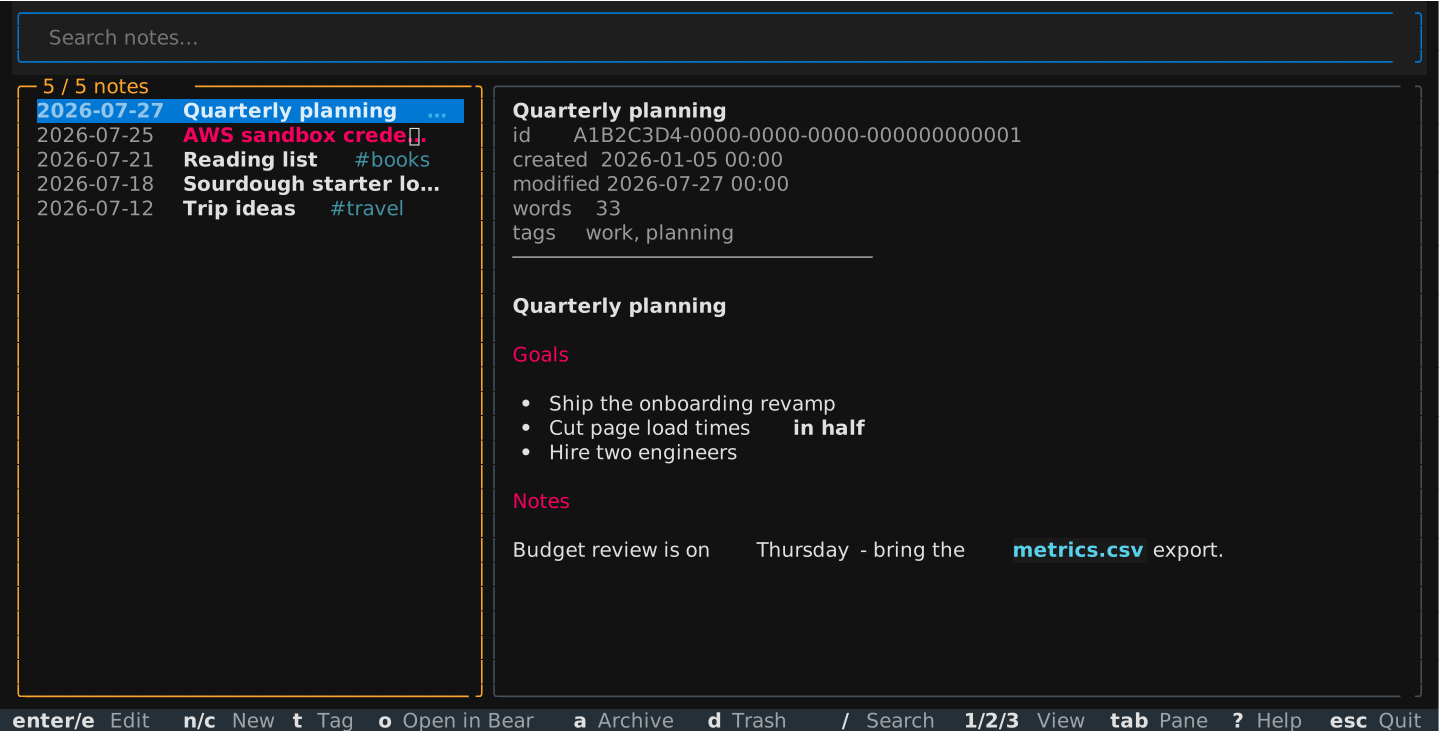
|
|
158
|
+
|
|
160
159
|
## Scripting
|
|
161
160
|
|
|
162
161
|
Every listing takes `--format` / `-f`: `table` (default), `json`, or
|
|
@@ -167,26 +166,46 @@ bearcli list -f json | jq -r '.[].title'
|
|
|
167
166
|
bearcli list -f text | cut -f1 # text is: id, modified, tags, status, title
|
|
168
167
|
```
|
|
169
168
|
|
|
170
|
-
Dates
|
|
171
|
-
|
|
172
|
-
|
|
173
|
-
content cannot be read.
|
|
169
|
+
Dates are ISO (`2026-07-01` or `2026-07-01T14:30`). Override the database
|
|
170
|
+
path with `--db` or `BEAR_DB_PATH`. Encrypted notes are listed but
|
|
171
|
+
unreadable. `bearcli --version` prints the version.
|
|
174
172
|
|
|
175
173
|
## Agent skill
|
|
176
174
|
|
|
177
175
|
An [Agent Skill](https://docs.claude.com/en/docs/agents-and-tools/agent-skills)
|
|
178
|
-
|
|
179
|
-
[
|
|
176
|
+
for Claude Code and other agents ships inside the package
|
|
177
|
+
([source](src/bearcli/skills/bear-notes/SKILL.md)):
|
|
180
178
|
|
|
181
179
|
```sh
|
|
182
|
-
|
|
180
|
+
bearcli skills install # into ~/.claude/skills/
|
|
181
|
+
bearcli skills install --dir .claude/skills # into a project
|
|
182
|
+
bearcli skills list # bundled skills
|
|
183
|
+
bearcli skills show bear-notes # print the skill
|
|
183
184
|
```
|
|
184
185
|
|
|
186
|
+
Reinstall after upgrading so agents always match the installed CLI.
|
|
187
|
+
|
|
188
|
+
## MCP server
|
|
189
|
+
|
|
190
|
+
`bearcli mcp run` serves your notes to AI apps over MCP (stdio): list,
|
|
191
|
+
read, search, create, edit, tag, archive, open in Bear. Note content is
|
|
192
|
+
secret-redacted by default.
|
|
193
|
+
|
|
194
|
+
`bearcli mcp install` configures your client:
|
|
195
|
+
|
|
196
|
+
```sh
|
|
197
|
+
bearcli mcp install # choose from a list
|
|
198
|
+
bearcli mcp install claude-desktop # or: claude-code, cursor, vscode,
|
|
199
|
+
# windsurf, gemini-cli, zed, codex
|
|
200
|
+
```
|
|
201
|
+
|
|
202
|
+
JSON configs are updated in place with a `.bak`. Other clients get exact
|
|
203
|
+
instructions. Restart the client afterwards.
|
|
204
|
+
|
|
185
205
|
## Use as a library
|
|
186
206
|
|
|
187
|
-
The
|
|
188
|
-
|
|
189
|
-
dependencies (`pip install bearkit`):
|
|
207
|
+
The engine ships separately on PyPI as `bearkit`: reading, search, writes,
|
|
208
|
+
and secret detection. No CLI or TUI dependencies.
|
|
190
209
|
|
|
191
210
|
```python
|
|
192
211
|
from bearkit import Bear, BearWriteError
|
|
@@ -2,8 +2,8 @@
|
|
|
2
2
|
|
|
3
3
|
# 🐻 `bearcli`
|
|
4
4
|
|
|
5
|
-
**The missing CLI for [Bear](https://bear.app) notes
|
|
6
|
-
manage your notes from the terminal.
|
|
5
|
+
**The missing open-source CLI for [Bear](https://bear.app) notes.**
|
|
6
|
+
Read, search, export, and manage your notes from the terminal.
|
|
7
7
|
|
|
8
8
|
[](https://github.com/michel-tricot/bearcli/actions/workflows/ci.yml)
|
|
9
9
|
[](LICENSE)
|
|
@@ -18,6 +18,14 @@ manage your notes from the terminal.
|
|
|
18
18
|
|
|
19
19
|
---
|
|
20
20
|
|
|
21
|
+
- ✨ **Agent-ready** - bundled Claude skill and MCP server (`bearcli mcp install`)
|
|
22
|
+
- **Search & browse** - fuzzy or exact, filters for tags, dates, and status
|
|
23
|
+
- **Write** - create, append, tag, archive, straight from the terminal
|
|
24
|
+
- **Terminal UI** - a full Bear client in your shell
|
|
25
|
+
- **Export & git mirror** - self-contained markdown folders, never-stuck `--push`
|
|
26
|
+
- **Secret protection** - offline credential scanning and redaction
|
|
27
|
+
- **Scriptable** - JSON/TSV output everywhere; Python API via [`bearkit`](https://pypi.org/project/bearkit/)
|
|
28
|
+
|
|
21
29
|
## Install
|
|
22
30
|
|
|
23
31
|
```sh
|
|
@@ -39,53 +47,42 @@ bearcli ui # full Bear client in the terminal
|
|
|
39
47
|
|
|
40
48
|
## Commands
|
|
41
49
|
|
|
42
|
-
Commands are grouped under `note` and `tag
|
|
43
|
-
`search`, `get`, `open`, `create`) also work directly as shortcuts.
|
|
50
|
+
Commands are grouped under `note` and `tag`.
|
|
44
51
|
|
|
45
52
|
### Browse & read
|
|
46
53
|
|
|
47
54
|
```sh
|
|
48
55
|
bearcli note list # 20 most recently modified
|
|
56
|
+
bearcli list # shortcut for `note list`
|
|
49
57
|
bearcli note list --limit 5 --tag work # filters: tag (incl. nested), dates...
|
|
50
58
|
bearcli note list --modified-after 2026-07-01
|
|
51
59
|
bearcli note list --only pinned # or: encrypted, trashed, archived
|
|
52
60
|
bearcli note list --all --trashed --archived
|
|
53
61
|
bearcli note list --ids # only identifiers, one per line
|
|
54
62
|
|
|
55
|
-
bearcli get C44D09DC # a unique id prefix (4+ chars) works everywhere
|
|
63
|
+
bearcli get C44D09DC # shortcut for `note get`; a unique id prefix (4+ chars) works everywhere
|
|
56
64
|
bearcli get C44D09DC-... --meta # with YAML-style frontmatter
|
|
57
65
|
bearcli get C44D09DC-... -r # rewrite attachment refs to absolute paths
|
|
58
66
|
bearcli get C44D09DC-... --redact-secrets # secrets replaced by placeholders
|
|
59
|
-
bearcli open C44D09DC-... # open in the Bear app
|
|
67
|
+
bearcli open C44D09DC-... # open in the Bear app (shortcut for `note open`)
|
|
60
68
|
bearcli ui # Bear in the terminal: search, edit, tag
|
|
61
69
|
bearcli stats # counts, words, top tags, notes per year
|
|
62
70
|
```
|
|
63
71
|
|
|
64
|
-
### Terminal UI
|
|
65
|
-
|
|
66
|
-
`bearcli ui` is a full Bear client in the terminal: the note list with live
|
|
67
|
-
filtering on the left, markdown preview and inline editor on the right.
|
|
68
|
-
`/` search - `enter`/`e` edit (`ctrl+s` saves, with an unsaved-changes
|
|
69
|
-
guard) - `n`/`c` new note - `t`/`T` tag/untag - `o` open in Bear - `a`
|
|
70
|
-
archive - `d` trash - `1`/`2`/`3` notes/archive/trash views - `j`/`k`
|
|
71
|
-
navigation - `?` shows the full key map. Notes with detected secrets get a
|
|
72
|
-
red title, a 🚨 badge, and the secret values highlighted in the preview and
|
|
73
|
-
editor; encrypted notes show 🔒 and keep their content in Bear.
|
|
74
|
-
|
|
75
72
|
### Search
|
|
76
73
|
|
|
77
74
|
```sh
|
|
78
|
-
bearcli search "invoice" --tag work -n 5 # case-insensitive substring
|
|
75
|
+
bearcli search "invoice" --tag work -n 5 # case-insensitive substring (shortcut for `note search`)
|
|
79
76
|
bearcli search "quarterly planing" --fuzzy # typo-tolerant, ranked by score
|
|
80
77
|
```
|
|
81
78
|
|
|
82
79
|
### Write
|
|
83
80
|
|
|
84
|
-
Writes go through the Bear app
|
|
85
|
-
|
|
81
|
+
Writes go through the Bear app and are verified before the command reports
|
|
82
|
+
success.
|
|
86
83
|
|
|
87
84
|
```sh
|
|
88
|
-
bearcli create "Meeting notes" --text "agenda..." --tag work
|
|
85
|
+
bearcli create "Meeting notes" --text "agenda..." --tag work # shortcut for `note create`
|
|
89
86
|
echo "follow-up item" | bearcli note append C44D09DC-...
|
|
90
87
|
bearcli note rename C44D09DC-... "New title"
|
|
91
88
|
bearcli get C44D09DC-... | sed 's/foo/bar/' | bearcli note replace C44D09DC-...
|
|
@@ -106,34 +103,35 @@ bearcli tag delete old-name # across all notes (asks first)
|
|
|
106
103
|
|
|
107
104
|
### Export
|
|
108
105
|
|
|
109
|
-
Every note becomes a
|
|
110
|
-
|
|
111
|
-
browsable tree.
|
|
106
|
+
Every note becomes a directory: `<slug>/README.md` plus attachments. A
|
|
107
|
+
generated index makes the export browsable on GitHub.
|
|
112
108
|
|
|
113
|
-
|
|
114
|
-
|
|
115
|
-
|
|
116
|
-
|
|
117
|
-
with a `[redacted: <rule>]` placeholder - notes in Bear are untouched).
|
|
109
|
+
Notes are scanned for secrets before anything is written. Findings block
|
|
110
|
+
the export. Use `--redact-secrets` to export with `[redacted: <rule>]`
|
|
111
|
+
placeholders or `--allow-secrets` to export as-is. Notes in Bear are never
|
|
112
|
+
modified.
|
|
118
113
|
|
|
119
|
-
> **⚠️ Warning
|
|
120
|
-
>
|
|
121
|
-
>
|
|
122
|
-
> password manager, or at least Bear's encrypted notes, which never leave
|
|
123
|
-
> the app.
|
|
114
|
+
> **⚠️ Warning**: detection is best-effort. A secret that reads like
|
|
115
|
+
> ordinary text will not be caught. Better: keep secrets in a password
|
|
116
|
+
> manager or in Bear's encrypted notes.
|
|
124
117
|
|
|
125
118
|
```sh
|
|
126
119
|
bearcli export ~/bear-backup
|
|
127
120
|
bearcli export ~/bear-backup --sync # only rewrite notes that changed
|
|
128
121
|
bearcli export ~/bear-backup --redact-secrets # secrets become [redacted: <rule>]
|
|
129
122
|
|
|
130
|
-
# Mirror to a git
|
|
131
|
-
#
|
|
132
|
-
# git history but overwritten in HEAD. Never force-pushes, never gets stuck.
|
|
123
|
+
# Mirror to a private git repo (clone it first). Bear is the source of truth:
|
|
124
|
+
# manual edits stay in history but HEAD always matches Bear. Never gets stuck.
|
|
133
125
|
git clone git@github.com:you/bear-notes.git ~/bear-notes
|
|
134
126
|
bearcli export ~/bear-notes --sync --push
|
|
135
127
|
```
|
|
136
128
|
|
|
129
|
+
### Terminal UI
|
|
130
|
+
|
|
131
|
+
`bearcli ui` is a full Bear client in the terminal. Press `?` for the key map.
|
|
132
|
+
|
|
133
|
+

|
|
134
|
+
|
|
137
135
|
## Scripting
|
|
138
136
|
|
|
139
137
|
Every listing takes `--format` / `-f`: `table` (default), `json`, or
|
|
@@ -144,26 +142,46 @@ bearcli list -f json | jq -r '.[].title'
|
|
|
144
142
|
bearcli list -f text | cut -f1 # text is: id, modified, tags, status, title
|
|
145
143
|
```
|
|
146
144
|
|
|
147
|
-
Dates
|
|
148
|
-
|
|
149
|
-
|
|
150
|
-
content cannot be read.
|
|
145
|
+
Dates are ISO (`2026-07-01` or `2026-07-01T14:30`). Override the database
|
|
146
|
+
path with `--db` or `BEAR_DB_PATH`. Encrypted notes are listed but
|
|
147
|
+
unreadable. `bearcli --version` prints the version.
|
|
151
148
|
|
|
152
149
|
## Agent skill
|
|
153
150
|
|
|
154
151
|
An [Agent Skill](https://docs.claude.com/en/docs/agents-and-tools/agent-skills)
|
|
155
|
-
|
|
156
|
-
[
|
|
152
|
+
for Claude Code and other agents ships inside the package
|
|
153
|
+
([source](src/bearcli/skills/bear-notes/SKILL.md)):
|
|
157
154
|
|
|
158
155
|
```sh
|
|
159
|
-
|
|
156
|
+
bearcli skills install # into ~/.claude/skills/
|
|
157
|
+
bearcli skills install --dir .claude/skills # into a project
|
|
158
|
+
bearcli skills list # bundled skills
|
|
159
|
+
bearcli skills show bear-notes # print the skill
|
|
160
160
|
```
|
|
161
161
|
|
|
162
|
+
Reinstall after upgrading so agents always match the installed CLI.
|
|
163
|
+
|
|
164
|
+
## MCP server
|
|
165
|
+
|
|
166
|
+
`bearcli mcp run` serves your notes to AI apps over MCP (stdio): list,
|
|
167
|
+
read, search, create, edit, tag, archive, open in Bear. Note content is
|
|
168
|
+
secret-redacted by default.
|
|
169
|
+
|
|
170
|
+
`bearcli mcp install` configures your client:
|
|
171
|
+
|
|
172
|
+
```sh
|
|
173
|
+
bearcli mcp install # choose from a list
|
|
174
|
+
bearcli mcp install claude-desktop # or: claude-code, cursor, vscode,
|
|
175
|
+
# windsurf, gemini-cli, zed, codex
|
|
176
|
+
```
|
|
177
|
+
|
|
178
|
+
JSON configs are updated in place with a `.bak`. Other clients get exact
|
|
179
|
+
instructions. Restart the client afterwards.
|
|
180
|
+
|
|
162
181
|
## Use as a library
|
|
163
182
|
|
|
164
|
-
The
|
|
165
|
-
|
|
166
|
-
dependencies (`pip install bearkit`):
|
|
183
|
+
The engine ships separately on PyPI as `bearkit`: reading, search, writes,
|
|
184
|
+
and secret detection. No CLI or TUI dependencies.
|
|
167
185
|
|
|
168
186
|
```python
|
|
169
187
|
from bearkit import Bear, BearWriteError
|
|
@@ -1,7 +1,7 @@
|
|
|
1
1
|
[project]
|
|
2
2
|
name = "bearcli"
|
|
3
|
-
version = "1.
|
|
4
|
-
description = "The missing CLI for Bear notes
|
|
3
|
+
version = "1.7.1"
|
|
4
|
+
description = "The missing open-source CLI for Bear notes - read, search, export, and manage your notes from the terminal"
|
|
5
5
|
readme = "README.md"
|
|
6
6
|
keywords = ["bear", "notes", "cli", "markdown", "macos"]
|
|
7
7
|
classifiers = [
|
|
@@ -18,7 +18,8 @@ license = "MIT"
|
|
|
18
18
|
license-files = ["LICENSE"]
|
|
19
19
|
requires-python = ">=3.13"
|
|
20
20
|
dependencies = [
|
|
21
|
-
"bearkit==1.
|
|
21
|
+
"bearkit==1.7.1",
|
|
22
|
+
"fastmcp>=3.4.5",
|
|
22
23
|
"textual>=8.2.8",
|
|
23
24
|
"typer>=0.27.0",
|
|
24
25
|
]
|
|
@@ -2,7 +2,6 @@
|
|
|
2
2
|
|
|
3
3
|
from collections.abc import Callable
|
|
4
4
|
|
|
5
|
-
from bearcli.cli import export, misc, notes, tags # noqa: F401 # command registration
|
|
6
5
|
from bearcli.cli.common import app
|
|
7
6
|
from bearcli.cli.notes import create, get, list_notes, open_note, search
|
|
8
7
|
|
|
@@ -22,4 +21,8 @@ _alias("open", "note open", open_note)
|
|
|
22
21
|
|
|
23
22
|
_alias("create", "note create", create)
|
|
24
23
|
|
|
24
|
+
# Imported after the aliases: help panels render in registration order, and
|
|
25
|
+
# Shortcuts should lead the top-level help.
|
|
26
|
+
from bearcli.cli import export, mcp, misc, skills, tags # noqa: E402, F401 # command registration
|
|
27
|
+
|
|
25
28
|
__all__ = ["app"]
|
|
@@ -5,24 +5,62 @@ from __future__ import annotations
|
|
|
5
5
|
import sys
|
|
6
6
|
from datetime import datetime
|
|
7
7
|
from enum import StrEnum
|
|
8
|
+
from importlib.metadata import version
|
|
8
9
|
from pathlib import Path
|
|
9
10
|
from typing import Annotated
|
|
10
11
|
|
|
11
12
|
import typer
|
|
12
13
|
from rich.console import Console
|
|
14
|
+
from typer.core import TyperGroup
|
|
13
15
|
|
|
14
16
|
from bearkit import Bear
|
|
15
17
|
from bearkit.db import AmbiguousNoteId, Note, NoteFilter
|
|
16
18
|
|
|
17
|
-
|
|
19
|
+
|
|
20
|
+
class _GoodiesLast(TyperGroup):
|
|
21
|
+
"""Help panels render in command order; sort Goodies to the end."""
|
|
22
|
+
|
|
23
|
+
def list_commands(self, ctx):
|
|
24
|
+
names = super().list_commands(ctx)
|
|
25
|
+
return sorted(names, key=lambda n: getattr(self.commands[n], "rich_help_panel", "") == "Goodies")
|
|
26
|
+
|
|
27
|
+
|
|
28
|
+
app = typer.Typer(
|
|
29
|
+
cls=_GoodiesLast, help="Read notes from the Bear note app.", no_args_is_help=True, add_completion=False
|
|
30
|
+
)
|
|
31
|
+
|
|
32
|
+
|
|
33
|
+
def _print_version(value: bool) -> None:
|
|
34
|
+
if value:
|
|
35
|
+
print(f"bearcli {version('bearcli')} (bearkit {version('bearkit')})")
|
|
36
|
+
raise typer.Exit()
|
|
37
|
+
|
|
38
|
+
|
|
39
|
+
@app.callback()
|
|
40
|
+
def _main(
|
|
41
|
+
show_version: Annotated[
|
|
42
|
+
bool,
|
|
43
|
+
typer.Option("--version", callback=_print_version, is_eager=True, help="Print the version and exit."),
|
|
44
|
+
] = False,
|
|
45
|
+
) -> None:
|
|
46
|
+
pass
|
|
47
|
+
|
|
18
48
|
|
|
19
49
|
note_app = typer.Typer(help="Create, read, and modify notes.", no_args_is_help=True)
|
|
20
50
|
|
|
21
51
|
tag_app = typer.Typer(help="List and manage tags.", no_args_is_help=True)
|
|
22
52
|
|
|
23
|
-
|
|
53
|
+
skills_app = typer.Typer(help="Agent skills bundled with bearcli.", no_args_is_help=True)
|
|
54
|
+
|
|
55
|
+
mcp_app = typer.Typer(help="MCP server for AI apps (Claude Desktop, Claude Code, ...).", no_args_is_help=True)
|
|
56
|
+
|
|
57
|
+
app.add_typer(note_app, name="note", rich_help_panel="Notes & tags")
|
|
58
|
+
|
|
59
|
+
app.add_typer(tag_app, name="tag", rich_help_panel="Notes & tags")
|
|
60
|
+
|
|
61
|
+
app.add_typer(skills_app, name="skills", rich_help_panel="Agents")
|
|
24
62
|
|
|
25
|
-
app.add_typer(
|
|
63
|
+
app.add_typer(mcp_app, name="mcp", rich_help_panel="Agents")
|
|
26
64
|
|
|
27
65
|
console = Console()
|
|
28
66
|
|
|
@@ -40,7 +40,7 @@ def _report_secrets(findings: list[SecretFinding]) -> None:
|
|
|
40
40
|
)
|
|
41
41
|
|
|
42
42
|
|
|
43
|
-
@app.command()
|
|
43
|
+
@app.command(rich_help_panel="Notes & tags")
|
|
44
44
|
def export(
|
|
45
45
|
dest: Annotated[Path, typer.Argument(help="Destination directory for the markdown files.")],
|
|
46
46
|
sync: Annotated[
|
|
@@ -0,0 +1,171 @@
|
|
|
1
|
+
"""MCP commands (the `mcp` group): run the server, install it into clients."""
|
|
2
|
+
|
|
3
|
+
from __future__ import annotations
|
|
4
|
+
|
|
5
|
+
import json
|
|
6
|
+
import shutil
|
|
7
|
+
import subprocess
|
|
8
|
+
import sys
|
|
9
|
+
from dataclasses import dataclass
|
|
10
|
+
from pathlib import Path
|
|
11
|
+
from typing import Annotated
|
|
12
|
+
|
|
13
|
+
import typer
|
|
14
|
+
|
|
15
|
+
from bearcli.cli.common import DbPathOption, _open_bear, console, mcp_app
|
|
16
|
+
from bearkit.db import DEFAULT_DB_PATH
|
|
17
|
+
|
|
18
|
+
|
|
19
|
+
@mcp_app.command()
|
|
20
|
+
def run(
|
|
21
|
+
db_path: DbPathOption = DEFAULT_DB_PATH,
|
|
22
|
+
) -> None:
|
|
23
|
+
"""Serve notes to AI apps over MCP (stdio only). Started by the client, not by hand."""
|
|
24
|
+
from bearcli.mcpserver import run as run_server
|
|
25
|
+
|
|
26
|
+
_open_bear(db_path).close() # fail fast with a clear message if the db is missing
|
|
27
|
+
run_server(db_path)
|
|
28
|
+
|
|
29
|
+
|
|
30
|
+
def _bearcli_command() -> str:
|
|
31
|
+
return shutil.which("bearcli") or sys.argv[0] or "bearcli"
|
|
32
|
+
|
|
33
|
+
|
|
34
|
+
@dataclass(frozen=True)
|
|
35
|
+
class Client:
|
|
36
|
+
key: str
|
|
37
|
+
label: str
|
|
38
|
+
config_path: str | None = None # JSON config to update (relative to home); None: no file edit
|
|
39
|
+
servers_key: str = "mcpServers"
|
|
40
|
+
entry_extra: tuple[tuple[str, str], ...] = () # extra fields some clients want
|
|
41
|
+
manual: str | None = None # instructions when we cannot (or should not) edit config
|
|
42
|
+
|
|
43
|
+
|
|
44
|
+
def _clients() -> list[Client]:
|
|
45
|
+
command = _bearcli_command()
|
|
46
|
+
return [
|
|
47
|
+
Client(
|
|
48
|
+
key="claude-code",
|
|
49
|
+
label="Claude Code",
|
|
50
|
+
manual=f"claude mcp add --scope user bear -- {command} mcp run",
|
|
51
|
+
),
|
|
52
|
+
Client(
|
|
53
|
+
key="claude-desktop",
|
|
54
|
+
label="Claude Desktop",
|
|
55
|
+
config_path="Library/Application Support/Claude/claude_desktop_config.json",
|
|
56
|
+
),
|
|
57
|
+
Client(key="cursor", label="Cursor", config_path=".cursor/mcp.json"),
|
|
58
|
+
Client(
|
|
59
|
+
key="vscode",
|
|
60
|
+
label="VS Code (Copilot)",
|
|
61
|
+
config_path="Library/Application Support/Code/User/mcp.json",
|
|
62
|
+
servers_key="servers",
|
|
63
|
+
entry_extra=(("type", "stdio"),),
|
|
64
|
+
),
|
|
65
|
+
Client(key="windsurf", label="Windsurf", config_path=".codeium/windsurf/mcp_config.json"),
|
|
66
|
+
Client(key="gemini-cli", label="Gemini CLI", config_path=".gemini/settings.json"),
|
|
67
|
+
Client(
|
|
68
|
+
key="zed",
|
|
69
|
+
label="Zed",
|
|
70
|
+
manual=(
|
|
71
|
+
"Add to ~/.config/zed/settings.json:\n"
|
|
72
|
+
f' "context_servers": {{\n'
|
|
73
|
+
f' "bear": {{ "command": {{ "path": "{command}", "args": ["mcp", "run"] }} }}\n'
|
|
74
|
+
f" }}"
|
|
75
|
+
),
|
|
76
|
+
),
|
|
77
|
+
Client(
|
|
78
|
+
key="codex",
|
|
79
|
+
label="Codex CLI",
|
|
80
|
+
manual=(
|
|
81
|
+
f'Add to ~/.codex/config.toml:\n [mcp_servers.bear]\n command = "{command}"\n args = ["mcp", "run"]'
|
|
82
|
+
),
|
|
83
|
+
),
|
|
84
|
+
]
|
|
85
|
+
|
|
86
|
+
|
|
87
|
+
def _entry(client: Client) -> dict:
|
|
88
|
+
return dict(client.entry_extra) | {"command": _bearcli_command(), "args": ["mcp", "run"]}
|
|
89
|
+
|
|
90
|
+
|
|
91
|
+
def _install_into_json(client: Client) -> None:
|
|
92
|
+
path = Path.home() / str(client.config_path)
|
|
93
|
+
config: dict = {}
|
|
94
|
+
if path.exists():
|
|
95
|
+
try:
|
|
96
|
+
config = json.loads(path.read_text() or "{}")
|
|
97
|
+
except json.JSONDecodeError as exc:
|
|
98
|
+
console.print(f"[red]Error:[/red] could not parse {path} ({exc}); add this entry manually:")
|
|
99
|
+
print(json.dumps({client.servers_key: {"bear": _entry(client)}}, indent=2))
|
|
100
|
+
raise typer.Exit(1) from None
|
|
101
|
+
shutil.copy2(path, path.with_name(path.name + ".bak"))
|
|
102
|
+
path.parent.mkdir(parents=True, exist_ok=True)
|
|
103
|
+
config.setdefault(client.servers_key, {})["bear"] = _entry(client)
|
|
104
|
+
path.write_text(json.dumps(config, indent=2) + "\n")
|
|
105
|
+
console.print(f"Added the 'bear' MCP server to {client.label}: {path}")
|
|
106
|
+
console.print(f"Restart {client.label} to pick it up.")
|
|
107
|
+
|
|
108
|
+
|
|
109
|
+
def _run_claude_code(client: Client) -> None:
|
|
110
|
+
command = _bearcli_command()
|
|
111
|
+
if shutil.which("claude") is None:
|
|
112
|
+
console.print("Claude Code's `claude` CLI is not on PATH; run this once it is:")
|
|
113
|
+
print(client.manual)
|
|
114
|
+
return
|
|
115
|
+
result = subprocess.run(
|
|
116
|
+
["claude", "mcp", "add", "--scope", "user", "bear", "--", command, "mcp", "run"],
|
|
117
|
+
capture_output=True,
|
|
118
|
+
text=True,
|
|
119
|
+
)
|
|
120
|
+
if result.returncode != 0:
|
|
121
|
+
console.print(f"[red]Error:[/red] `claude mcp add` failed:\n{result.stderr.strip()}")
|
|
122
|
+
raise typer.Exit(1)
|
|
123
|
+
console.print("Added the 'bear' MCP server to Claude Code (user scope).")
|
|
124
|
+
|
|
125
|
+
|
|
126
|
+
def _pick_client(clients: list[Client]) -> Client:
|
|
127
|
+
console.print("Which MCP client should use bearcli?\n")
|
|
128
|
+
for i, c in enumerate(clients, start=1):
|
|
129
|
+
console.print(f" {i}. {c.label}")
|
|
130
|
+
console.print()
|
|
131
|
+
choice = typer.prompt("Number")
|
|
132
|
+
try:
|
|
133
|
+
return clients[int(choice) - 1]
|
|
134
|
+
except (ValueError, IndexError):
|
|
135
|
+
console.print(f"[red]Error:[/red] pick a number between 1 and {len(clients)}")
|
|
136
|
+
raise typer.Exit(2) from None
|
|
137
|
+
|
|
138
|
+
|
|
139
|
+
@mcp_app.command()
|
|
140
|
+
def install(
|
|
141
|
+
client_key: Annotated[
|
|
142
|
+
str | None,
|
|
143
|
+
typer.Argument(
|
|
144
|
+
help="MCP client to configure (claude-code, claude-desktop, cursor, vscode, "
|
|
145
|
+
"windsurf, gemini-cli, zed, codex). Omit to choose interactively."
|
|
146
|
+
),
|
|
147
|
+
] = None,
|
|
148
|
+
) -> None:
|
|
149
|
+
"""Configure an MCP client to use bearcli (updates its config, or shows how)."""
|
|
150
|
+
clients = _clients()
|
|
151
|
+
if client_key is None:
|
|
152
|
+
if not sys.stdin.isatty():
|
|
153
|
+
console.print("[red]Error:[/red] no terminal to ask in; pass a client, e.g. `bearcli mcp install cursor`")
|
|
154
|
+
raise typer.Exit(2)
|
|
155
|
+
client = _pick_client(clients)
|
|
156
|
+
else:
|
|
157
|
+
match = next((c for c in clients if c.key == client_key.lower()), None)
|
|
158
|
+
if match is None:
|
|
159
|
+
console.print(
|
|
160
|
+
f"[red]Error:[/red] unknown client {client_key!r}; one of: {', '.join(c.key for c in clients)}"
|
|
161
|
+
)
|
|
162
|
+
raise typer.Exit(2)
|
|
163
|
+
client = match
|
|
164
|
+
|
|
165
|
+
if client.key == "claude-code":
|
|
166
|
+
_run_claude_code(client)
|
|
167
|
+
elif client.config_path is not None:
|
|
168
|
+
_install_into_json(client)
|
|
169
|
+
else:
|
|
170
|
+
console.print(f"To wire bearcli into {client.label}:\n")
|
|
171
|
+
print(client.manual)
|
|
@@ -19,7 +19,7 @@ from bearcli.cli.common import (
|
|
|
19
19
|
from bearkit.db import DEFAULT_DB_PATH
|
|
20
20
|
|
|
21
21
|
|
|
22
|
-
@app.command()
|
|
22
|
+
@app.command(rich_help_panel="Goodies")
|
|
23
23
|
def stats(
|
|
24
24
|
fmt: Annotated[
|
|
25
25
|
OutputFormat,
|
|
@@ -92,7 +92,7 @@ def stats(
|
|
|
92
92
|
console.print(year_table)
|
|
93
93
|
|
|
94
94
|
|
|
95
|
-
@app.command()
|
|
95
|
+
@app.command(rich_help_panel="Goodies")
|
|
96
96
|
def ui(
|
|
97
97
|
fuzzy: Annotated[bool, typer.Option("--fuzzy", help="Typo-tolerant ranked filtering.")] = False,
|
|
98
98
|
tag_filter: Annotated[str | None, typer.Option("--tag", "-t", help="Restrict to notes with this tag.")] = None,
|
|
@@ -35,7 +35,7 @@ def _resolve_attachments(note: Note) -> str:
|
|
|
35
35
|
return rewrite_attachment_refs(note, lambda att: str(att.path))
|
|
36
36
|
|
|
37
37
|
|
|
38
|
-
@note_app.command("list")
|
|
38
|
+
@note_app.command("list", rich_help_panel="Read")
|
|
39
39
|
def list_notes(
|
|
40
40
|
limit: Annotated[int, typer.Option("--limit", "-n", help="Maximum number of notes.")] = 20,
|
|
41
41
|
tag: Annotated[
|
|
@@ -122,7 +122,7 @@ def list_notes(
|
|
|
122
122
|
console.print(table)
|
|
123
123
|
|
|
124
124
|
|
|
125
|
-
@note_app.command()
|
|
125
|
+
@note_app.command(rich_help_panel="Read")
|
|
126
126
|
def get(
|
|
127
127
|
note_id: Annotated[str, typer.Argument(help="Note identifier (UUID from `bearcli list`).")],
|
|
128
128
|
meta: Annotated[bool, typer.Option("--meta", help="Print metadata frontmatter before the content.")] = False,
|
|
@@ -222,7 +222,7 @@ def _create_and_perform(bear: Bear, title: str, text: str | None, tags: list[str
|
|
|
222
222
|
console.print(f"Created note {created.id}")
|
|
223
223
|
|
|
224
224
|
|
|
225
|
-
@note_app.command()
|
|
225
|
+
@note_app.command(rich_help_panel="Write")
|
|
226
226
|
def create(
|
|
227
227
|
title: Annotated[str, typer.Argument(help="Title of the new note.")],
|
|
228
228
|
text: Annotated[str | None, typer.Option("--text", help="Note body (reads stdin if piped).")] = None,
|
|
@@ -237,7 +237,7 @@ def create(
|
|
|
237
237
|
bear.close()
|
|
238
238
|
|
|
239
239
|
|
|
240
|
-
@note_app.command()
|
|
240
|
+
@note_app.command(rich_help_panel="Write")
|
|
241
241
|
def append(
|
|
242
242
|
note_id: Annotated[str, typer.Argument(help="Note identifier.")],
|
|
243
243
|
text: Annotated[str | None, typer.Option("--text", help="Text to add (reads stdin if piped).")] = None,
|
|
@@ -261,7 +261,7 @@ def append(
|
|
|
261
261
|
bear.close()
|
|
262
262
|
|
|
263
263
|
|
|
264
|
-
@note_app.command()
|
|
264
|
+
@note_app.command(rich_help_panel="Organize")
|
|
265
265
|
def trash(
|
|
266
266
|
note_id: Annotated[str, typer.Argument(help="Note identifier.")],
|
|
267
267
|
db_path: DbPathOption = DEFAULT_DB_PATH,
|
|
@@ -278,7 +278,7 @@ def trash(
|
|
|
278
278
|
bear.close()
|
|
279
279
|
|
|
280
280
|
|
|
281
|
-
@note_app.command()
|
|
281
|
+
@note_app.command(rich_help_panel="Organize")
|
|
282
282
|
def archive(
|
|
283
283
|
note_id: Annotated[str, typer.Argument(help="Note identifier.")],
|
|
284
284
|
db_path: DbPathOption = DEFAULT_DB_PATH,
|
|
@@ -295,7 +295,7 @@ def archive(
|
|
|
295
295
|
bear.close()
|
|
296
296
|
|
|
297
297
|
|
|
298
|
-
@note_app.command()
|
|
298
|
+
@note_app.command(rich_help_panel="Organize")
|
|
299
299
|
def tag(
|
|
300
300
|
note_id: Annotated[str, typer.Argument(help="Note identifier.")],
|
|
301
301
|
name: Annotated[str, typer.Argument(help="Tag to add (without the leading #).")],
|
|
@@ -317,7 +317,7 @@ def tag(
|
|
|
317
317
|
bear.close()
|
|
318
318
|
|
|
319
319
|
|
|
320
|
-
@note_app.command()
|
|
320
|
+
@note_app.command(rich_help_panel="Organize")
|
|
321
321
|
def untag(
|
|
322
322
|
note_id: Annotated[str, typer.Argument(help="Note identifier.")],
|
|
323
323
|
name: Annotated[str, typer.Argument(help="Tag to remove (without the leading #).")],
|
|
@@ -345,7 +345,7 @@ def untag(
|
|
|
345
345
|
bear.close()
|
|
346
346
|
|
|
347
347
|
|
|
348
|
-
@note_app.command("open")
|
|
348
|
+
@note_app.command("open", rich_help_panel="Read")
|
|
349
349
|
def open_note(
|
|
350
350
|
note_id: Annotated[str, typer.Argument(help="Note identifier.")],
|
|
351
351
|
new_window: Annotated[bool, typer.Option("--new-window", "-w", help="Open in a separate window.")] = False,
|
|
@@ -364,7 +364,7 @@ def open_note(
|
|
|
364
364
|
MAX_ATTACH_BYTES = 500_000 # the file travels base64-encoded inside a URL; macOS caps arg size at ~1 MB
|
|
365
365
|
|
|
366
366
|
|
|
367
|
-
@note_app.command()
|
|
367
|
+
@note_app.command(rich_help_panel="Write")
|
|
368
368
|
def attach(
|
|
369
369
|
note_id: Annotated[str, typer.Argument(help="Note identifier.")],
|
|
370
370
|
file: Annotated[Path, typer.Argument(help="File to attach (appended at the end of the note).")],
|
|
@@ -393,7 +393,7 @@ def attach(
|
|
|
393
393
|
bear.close()
|
|
394
394
|
|
|
395
395
|
|
|
396
|
-
@note_app.command()
|
|
396
|
+
@note_app.command(rich_help_panel="Write")
|
|
397
397
|
def rename(
|
|
398
398
|
note_id: Annotated[str, typer.Argument(help="Note identifier.")],
|
|
399
399
|
new_title: Annotated[str, typer.Argument(help="New title for the note.")],
|
|
@@ -415,7 +415,7 @@ def rename(
|
|
|
415
415
|
bear.close()
|
|
416
416
|
|
|
417
417
|
|
|
418
|
-
@note_app.command()
|
|
418
|
+
@note_app.command(rich_help_panel="Write")
|
|
419
419
|
def replace(
|
|
420
420
|
note_id: Annotated[str, typer.Argument(help="Note identifier.")],
|
|
421
421
|
text: Annotated[str | None, typer.Option("--text", help="New body (reads stdin if piped).")] = None,
|
|
@@ -438,7 +438,7 @@ def replace(
|
|
|
438
438
|
bear.close()
|
|
439
439
|
|
|
440
440
|
|
|
441
|
-
@note_app.command()
|
|
441
|
+
@note_app.command(rich_help_panel="Read")
|
|
442
442
|
def search(
|
|
443
443
|
query: Annotated[str, typer.Argument(help="Search terms, matched against titles, tags, and text.")],
|
|
444
444
|
fuzzy: Annotated[bool, typer.Option("--fuzzy", help="Typo-tolerant matching, ranked by score.")] = False,
|
|
@@ -0,0 +1,67 @@
|
|
|
1
|
+
"""Agent-skill commands (the `skills` group)."""
|
|
2
|
+
|
|
3
|
+
from __future__ import annotations
|
|
4
|
+
|
|
5
|
+
import shutil
|
|
6
|
+
from importlib.resources import files
|
|
7
|
+
from pathlib import Path
|
|
8
|
+
from typing import Annotated
|
|
9
|
+
|
|
10
|
+
import typer
|
|
11
|
+
|
|
12
|
+
from bearcli.cli.common import console, skills_app
|
|
13
|
+
|
|
14
|
+
DEFAULT_SKILLS_DIR = Path.home() / ".claude" / "skills"
|
|
15
|
+
|
|
16
|
+
|
|
17
|
+
def _skill_dirs() -> dict[str, Path]:
|
|
18
|
+
root = Path(str(files("bearcli") / "skills"))
|
|
19
|
+
return {d.name: d for d in sorted(root.iterdir()) if (d / "SKILL.md").is_file()}
|
|
20
|
+
|
|
21
|
+
|
|
22
|
+
def _description(skill_dir: Path) -> str:
|
|
23
|
+
for line in (skill_dir / "SKILL.md").read_text().splitlines():
|
|
24
|
+
if line.startswith("description:"):
|
|
25
|
+
return line.removeprefix("description:").strip()
|
|
26
|
+
return ""
|
|
27
|
+
|
|
28
|
+
|
|
29
|
+
def _resolve(name: str | None) -> Path:
|
|
30
|
+
skills = _skill_dirs()
|
|
31
|
+
if name is None and len(skills) == 1:
|
|
32
|
+
return next(iter(skills.values()))
|
|
33
|
+
if name in skills:
|
|
34
|
+
return skills[name]
|
|
35
|
+
console.print(f"[red]Error:[/red] unknown skill {name!r}; available: {', '.join(skills)}")
|
|
36
|
+
raise typer.Exit(1)
|
|
37
|
+
|
|
38
|
+
|
|
39
|
+
@skills_app.command("list")
|
|
40
|
+
def list_skills() -> None:
|
|
41
|
+
"""List the agent skills bundled with bearcli."""
|
|
42
|
+
for name, skill_dir in _skill_dirs().items():
|
|
43
|
+
print(f"{name}\t{_description(skill_dir)}")
|
|
44
|
+
|
|
45
|
+
|
|
46
|
+
@skills_app.command()
|
|
47
|
+
def show(
|
|
48
|
+
name: Annotated[str | None, typer.Argument(help="Skill name (optional when only one ships).")] = None,
|
|
49
|
+
) -> None:
|
|
50
|
+
"""Print a skill's SKILL.md to stdout."""
|
|
51
|
+
print((_resolve(name) / "SKILL.md").read_text(), end="")
|
|
52
|
+
|
|
53
|
+
|
|
54
|
+
@skills_app.command()
|
|
55
|
+
def install(
|
|
56
|
+
name: Annotated[str | None, typer.Argument(help="Skill name (optional when only one ships).")] = None,
|
|
57
|
+
directory: Annotated[
|
|
58
|
+
Path,
|
|
59
|
+
typer.Option("--dir", help="Skills directory to install into (e.g. a project's .claude/skills)."),
|
|
60
|
+
] = DEFAULT_SKILLS_DIR,
|
|
61
|
+
) -> None:
|
|
62
|
+
"""Install a skill into an agent's skills directory (overwrites an older copy)."""
|
|
63
|
+
source = _resolve(name)
|
|
64
|
+
target = directory / source.name
|
|
65
|
+
target.parent.mkdir(parents=True, exist_ok=True)
|
|
66
|
+
shutil.copytree(source, target, dirs_exist_ok=True)
|
|
67
|
+
console.print(f"Installed skill {source.name!r} to {target}")
|
|
@@ -0,0 +1,160 @@
|
|
|
1
|
+
"""FastMCP server exposing Bear notes to AI apps (the `mcp` command). Stdio only.
|
|
2
|
+
|
|
3
|
+
Every tool opens a fresh connection so long-running sessions always see
|
|
4
|
+
current data. Note text returned to the model is secret-redacted by default:
|
|
5
|
+
MCP clients ship tool results to their model provider, so raw credentials
|
|
6
|
+
must not travel unless the user explicitly turns redaction off.
|
|
7
|
+
"""
|
|
8
|
+
|
|
9
|
+
from __future__ import annotations
|
|
10
|
+
|
|
11
|
+
from pathlib import Path
|
|
12
|
+
|
|
13
|
+
from fastmcp import FastMCP
|
|
14
|
+
|
|
15
|
+
from bearkit import Bear, TextMode, scan_notes
|
|
16
|
+
from bearkit.db import DEFAULT_DB_PATH, Note
|
|
17
|
+
|
|
18
|
+
|
|
19
|
+
def _summary(note: Note) -> dict:
|
|
20
|
+
return note.to_dict()
|
|
21
|
+
|
|
22
|
+
|
|
23
|
+
def _redacted_text(note: Note, redact: bool) -> str | None:
|
|
24
|
+
if note.text is None:
|
|
25
|
+
return None
|
|
26
|
+
return scan_notes([note]).redact_text(note.text) if redact else note.text
|
|
27
|
+
|
|
28
|
+
|
|
29
|
+
def _require(bear: Bear, note_id: str) -> Note:
|
|
30
|
+
note = bear.get_note(note_id)
|
|
31
|
+
if note is None:
|
|
32
|
+
raise ValueError(f"no note with id {note_id!r}")
|
|
33
|
+
return note
|
|
34
|
+
|
|
35
|
+
|
|
36
|
+
def build_server(db_path: Path = DEFAULT_DB_PATH) -> FastMCP:
|
|
37
|
+
server = FastMCP(
|
|
38
|
+
name="bearcli",
|
|
39
|
+
instructions=(
|
|
40
|
+
"Read, search, and manage the user's Bear notes. Note ids accept unique "
|
|
41
|
+
"prefixes of 4+ characters. Writes go through the Bear app and are "
|
|
42
|
+
"verified; they fail if Bear cannot run. Encrypted notes have no "
|
|
43
|
+
"readable text."
|
|
44
|
+
),
|
|
45
|
+
)
|
|
46
|
+
|
|
47
|
+
@server.tool
|
|
48
|
+
def list_notes(
|
|
49
|
+
limit: int = 20,
|
|
50
|
+
tag: str | None = None,
|
|
51
|
+
only: str | None = None,
|
|
52
|
+
include_trashed: bool = False,
|
|
53
|
+
include_archived: bool = False,
|
|
54
|
+
) -> list[dict]:
|
|
55
|
+
"""List notes (metadata only), most recently modified first.
|
|
56
|
+
|
|
57
|
+
`tag` includes nested sub-tags; `only` filters to one status:
|
|
58
|
+
pinned, encrypted, trashed, or archived.
|
|
59
|
+
"""
|
|
60
|
+
with Bear(db_path) as bear:
|
|
61
|
+
return [
|
|
62
|
+
_summary(n)
|
|
63
|
+
for n in bear.list_notes(
|
|
64
|
+
limit=limit,
|
|
65
|
+
tag=tag,
|
|
66
|
+
only=only,
|
|
67
|
+
include_trashed=include_trashed,
|
|
68
|
+
include_archived=include_archived,
|
|
69
|
+
)
|
|
70
|
+
]
|
|
71
|
+
|
|
72
|
+
@server.tool
|
|
73
|
+
def get_note(note_id: str, redact_secrets: bool = True) -> dict:
|
|
74
|
+
"""Fetch one note: metadata plus its markdown text.
|
|
75
|
+
|
|
76
|
+
Detected secrets are replaced with [redacted: <rule>] placeholders
|
|
77
|
+
unless redact_secrets is false (only disable when the user explicitly
|
|
78
|
+
wants raw credential values).
|
|
79
|
+
"""
|
|
80
|
+
with Bear(db_path) as bear:
|
|
81
|
+
note = _require(bear, note_id)
|
|
82
|
+
return {**_summary(note), "text": _redacted_text(note, redact_secrets)}
|
|
83
|
+
|
|
84
|
+
@server.tool
|
|
85
|
+
def search_notes(query: str, fuzzy: bool = False, tag: str | None = None, limit: int = 10) -> list[dict]:
|
|
86
|
+
"""Search titles, tags, and content; fuzzy is typo-tolerant and adds a score."""
|
|
87
|
+
with Bear(db_path) as bear:
|
|
88
|
+
results = bear.search(query, fuzzy=fuzzy, tag=tag)[:limit]
|
|
89
|
+
return [
|
|
90
|
+
{**_summary(r.note), "snippet": r.snippet} | ({"score": r.score} if r.score is not None else {})
|
|
91
|
+
for r in results
|
|
92
|
+
]
|
|
93
|
+
|
|
94
|
+
@server.tool
|
|
95
|
+
def list_tags() -> list[dict]:
|
|
96
|
+
"""All tags with their note counts."""
|
|
97
|
+
with Bear(db_path) as bear:
|
|
98
|
+
return [{"tag": t, "notes": c} for t, c in bear.list_tags()]
|
|
99
|
+
|
|
100
|
+
@server.tool
|
|
101
|
+
def create_note(title: str, text: str | None = None, tags: list[str] | None = None) -> dict:
|
|
102
|
+
"""Create a note; returns it (with its new id) once Bear confirms."""
|
|
103
|
+
with Bear(db_path) as bear:
|
|
104
|
+
return _summary(bear.create_note(title, text, tags))
|
|
105
|
+
|
|
106
|
+
@server.tool
|
|
107
|
+
def append_to_note(note_id: str, text: str, prepend: bool = False) -> dict:
|
|
108
|
+
"""Append (or prepend) text to a note; returns the updated note."""
|
|
109
|
+
with Bear(db_path) as bear:
|
|
110
|
+
note = _require(bear, note_id)
|
|
111
|
+
mode = TextMode.PREPEND if prepend else TextMode.APPEND
|
|
112
|
+
return _summary(bear.add_text(note, text, mode=mode))
|
|
113
|
+
|
|
114
|
+
@server.tool
|
|
115
|
+
def rename_note(note_id: str, new_title: str) -> dict:
|
|
116
|
+
"""Change a note's title, keeping the body."""
|
|
117
|
+
with Bear(db_path) as bear:
|
|
118
|
+
return _summary(bear.rename(_require(bear, note_id), new_title))
|
|
119
|
+
|
|
120
|
+
@server.tool
|
|
121
|
+
def add_tag(note_id: str, tag: str) -> dict:
|
|
122
|
+
"""Add a tag to a note (no leading #)."""
|
|
123
|
+
with Bear(db_path) as bear:
|
|
124
|
+
return _summary(bear.add_tag(_require(bear, note_id), tag))
|
|
125
|
+
|
|
126
|
+
@server.tool
|
|
127
|
+
def remove_tag(note_id: str, tag: str) -> dict:
|
|
128
|
+
"""Remove a tag from a note."""
|
|
129
|
+
with Bear(db_path) as bear:
|
|
130
|
+
return _summary(bear.remove_tag(_require(bear, note_id), tag))
|
|
131
|
+
|
|
132
|
+
@server.tool
|
|
133
|
+
def trash_note(note_id: str) -> dict:
|
|
134
|
+
"""Move a note to Bear's trash. One-way: restoring requires Bear's UI."""
|
|
135
|
+
with Bear(db_path) as bear:
|
|
136
|
+
return _summary(bear.trash(_require(bear, note_id)))
|
|
137
|
+
|
|
138
|
+
@server.tool
|
|
139
|
+
def archive_note(note_id: str) -> dict:
|
|
140
|
+
"""Archive a note. One-way: unarchiving requires Bear's UI."""
|
|
141
|
+
with Bear(db_path) as bear:
|
|
142
|
+
return _summary(bear.archive(_require(bear, note_id)))
|
|
143
|
+
|
|
144
|
+
@server.tool
|
|
145
|
+
def open_note_in_bear(note_id: str) -> str:
|
|
146
|
+
"""Bring a note up in the Bear app on the user's screen."""
|
|
147
|
+
with Bear(db_path) as bear:
|
|
148
|
+
note = _require(bear, note_id)
|
|
149
|
+
bear.open(note)
|
|
150
|
+
return f"Opened {note.title!r} in Bear"
|
|
151
|
+
|
|
152
|
+
return server
|
|
153
|
+
|
|
154
|
+
|
|
155
|
+
def run(db_path: Path = DEFAULT_DB_PATH) -> None:
|
|
156
|
+
"""Serve over stdio (the only supported transport)."""
|
|
157
|
+
build_server(db_path).run(transport="stdio", show_banner=False)
|
|
158
|
+
|
|
159
|
+
|
|
160
|
+
__all__ = ["build_server", "run"]
|
|
@@ -0,0 +1,89 @@
|
|
|
1
|
+
---
|
|
2
|
+
name: bear-notes
|
|
3
|
+
description: Read, search, create, and manage the user's Bear notes with the bearcli CLI. Use when the user asks anything about their Bear notes — finding, reading, or summarizing notes, creating or editing notes, tags, archiving/trashing, or exporting their library.
|
|
4
|
+
---
|
|
5
|
+
|
|
6
|
+
# Working with Bear notes via bearcli
|
|
7
|
+
|
|
8
|
+
bearcli reads notes directly and performs writes through the Bear app,
|
|
9
|
+
verifying each change. Requires macOS with Bear installed. If `bearcli` is
|
|
10
|
+
not on PATH (command not found), install it — ask the user first:
|
|
11
|
+
`brew install michel-tricot/tap/bearcli` (or `uv tool install bearcli`, or
|
|
12
|
+
`pipx install bearcli`).
|
|
13
|
+
|
|
14
|
+
## Reading and searching
|
|
15
|
+
|
|
16
|
+
Always use machine-readable output instead of parsing tables:
|
|
17
|
+
|
|
18
|
+
- `bearcli note list -f json` — notes as JSON (id, title, tags, dates, status
|
|
19
|
+
booleans). `-f text` is TSV: id, modified, tags, status, title.
|
|
20
|
+
- `bearcli note list --ids` — bare ids, one per line.
|
|
21
|
+
- Filters compose: `--tag work` (includes nested `work/ideas`), `-n 50` /
|
|
22
|
+
`--all`, `--modified-after 2026-07-01`, `--only pinned|encrypted|trashed|archived`,
|
|
23
|
+
`--trashed` / `--archived` to include those notes.
|
|
24
|
+
- `bearcli search "query" -f json` — case-insensitive substring over titles,
|
|
25
|
+
tags, and content, with a `snippet` per hit. Add `--fuzzy` for typo-tolerant
|
|
26
|
+
ranked matching (adds a `score`).
|
|
27
|
+
- `bearcli get <id>` — full markdown content. `-f json` adds metadata and
|
|
28
|
+
attachment paths; `-r` rewrites attachment references to absolute file paths.
|
|
29
|
+
- Note ids accept unique prefixes of 4+ chars (`bearcli get c44d09dc`); an
|
|
30
|
+
ambiguous prefix errors and lists the candidates.
|
|
31
|
+
- `bearcli tag list -f text` — all tags with note counts (count<TAB>tag).
|
|
32
|
+
- `bearcli stats -f json` — library totals: note/tag/attachment counts, words,
|
|
33
|
+
notes per year, top tags.
|
|
34
|
+
|
|
35
|
+
## Writing (launches the Bear app if needed)
|
|
36
|
+
|
|
37
|
+
Every write is verified and reports success or failure — trust the exit
|
|
38
|
+
code.
|
|
39
|
+
|
|
40
|
+
- `bearcli create "Title" --text "..." --tag work` — prints the new note's id.
|
|
41
|
+
Body can also be piped on stdin.
|
|
42
|
+
- `bearcli note append <id> --text "..."` (`--prepend` for the top; stdin works).
|
|
43
|
+
- `bearcli note rename <id> "New title"`.
|
|
44
|
+
- `bearcli note replace <id>` — replaces the body from `--text`/stdin,
|
|
45
|
+
keeping the title. **Destructive**: confirm with the user before replacing
|
|
46
|
+
content you did not just read.
|
|
47
|
+
- `bearcli note attach <id> file.png` — files up to 500 KB.
|
|
48
|
+
- `bearcli note tag <id> name` / `bearcli note untag <id> name`.
|
|
49
|
+
- `bearcli note trash <id>` / `bearcli note archive <id>` — reversible only
|
|
50
|
+
in Bear's UI; there is no untrash/unarchive command.
|
|
51
|
+
- `bearcli tag rename old new` / `bearcli tag delete name` — affect ALL notes;
|
|
52
|
+
`tag delete` prompts (use `-y` only when the user asked for the deletion).
|
|
53
|
+
- `bearcli open <id>` — brings the note up in the Bear app.
|
|
54
|
+
|
|
55
|
+
## Secrets — important
|
|
56
|
+
|
|
57
|
+
Note content can contain credentials. When sending note content anywhere
|
|
58
|
+
outside the user's machine (messages, issues, commits, emails), fetch it with
|
|
59
|
+
`bearcli get <id> --redact-secrets` so detected secrets become
|
|
60
|
+
`[redacted: <rule>]` placeholders. Detection is best-effort; still eyeball
|
|
61
|
+
the content.
|
|
62
|
+
|
|
63
|
+
`bearcli export` scans all notes first and **blocks** if potential secrets
|
|
64
|
+
are found. Prefer re-running with `--redact-secrets`; only use
|
|
65
|
+
`--allow-secrets` if the user explicitly says to export secrets as-is.
|
|
66
|
+
|
|
67
|
+
## Export
|
|
68
|
+
|
|
69
|
+
- `bearcli export DIR` — every note becomes `DIR/<slug>-<shortid>/README.md`
|
|
70
|
+
plus an `attachments/` folder; the root `README.md`/`index.json` are a
|
|
71
|
+
generated catalog. `--sync` rewrites only changed notes and removes deleted
|
|
72
|
+
ones (never touches files it doesn't own).
|
|
73
|
+
- `bearcli export DIR --sync --redact-secrets --push` — mirror to a git clone
|
|
74
|
+
(commit + push, self-converging). The repo should be private and dedicated.
|
|
75
|
+
|
|
76
|
+
## Limits
|
|
77
|
+
|
|
78
|
+
- Encrypted notes are listed but their content cannot be read.
|
|
79
|
+
- All commands accept `--db PATH` (env `BEAR_DB_PATH`) to use a database copy.
|
|
80
|
+
- `bearcli ui` is a full-screen interactive app for humans — never launch it
|
|
81
|
+
from an agent; use the commands above instead.
|
|
82
|
+
- `bearcli --version` prints the installed version if you need to check it.
|
|
83
|
+
- `bearcli mcp run` is an MCP server (stdio) for AI apps like Claude
|
|
84
|
+
Desktop; `bearcli mcp install <client>` configures a client to use it.
|
|
85
|
+
Neither is something to launch from a shell task.
|
|
86
|
+
- This skill ships with the CLI: `bearcli skills install` refreshes the copy
|
|
87
|
+
in `~/.claude/skills/` after an upgrade; `bearcli skills list` and
|
|
88
|
+
`bearcli skills show bear-notes` inspect it. If commands here disagree
|
|
89
|
+
with the installed CLI, trust `--help`.
|
|
File without changes
|
|
File without changes
|
|
File without changes
|
|
File without changes
|
|
File without changes
|
|
File without changes
|
|
File without changes
|