awsnav 0.1.0__tar.gz
This diff represents the content of publicly available package versions that have been released to one of the supported registries. The information contained in this diff is provided for informational purposes only and reflects changes between package versions as they appear in their respective public registries.
- awsnav-0.1.0/LICENSE +21 -0
- awsnav-0.1.0/PKG-INFO +307 -0
- awsnav-0.1.0/README.md +271 -0
- awsnav-0.1.0/awsnav/__init__.py +3 -0
- awsnav-0.1.0/awsnav/__main__.py +4 -0
- awsnav-0.1.0/awsnav/catalog.py +623 -0
- awsnav-0.1.0/awsnav/cli.py +138 -0
- awsnav-0.1.0/awsnav/formatting.py +141 -0
- awsnav-0.1.0/awsnav/scanner.py +745 -0
- awsnav-0.1.0/awsnav/session.py +179 -0
- awsnav-0.1.0/awsnav/ui/__init__.py +0 -0
- awsnav-0.1.0/awsnav/ui/actions.py +66 -0
- awsnav-0.1.0/awsnav/ui/app.py +202 -0
- awsnav-0.1.0/awsnav/ui/bedrock.py +169 -0
- awsnav-0.1.0/awsnav/ui/common.py +481 -0
- awsnav-0.1.0/awsnav/ui/s3.py +177 -0
- awsnav-0.1.0/awsnav/ui/scan.py +364 -0
- awsnav-0.1.0/awsnav/ui/screens.py +645 -0
- awsnav-0.1.0/awsnav.egg-info/PKG-INFO +307 -0
- awsnav-0.1.0/awsnav.egg-info/SOURCES.txt +30 -0
- awsnav-0.1.0/awsnav.egg-info/dependency_links.txt +1 -0
- awsnav-0.1.0/awsnav.egg-info/entry_points.txt +2 -0
- awsnav-0.1.0/awsnav.egg-info/requires.txt +7 -0
- awsnav-0.1.0/awsnav.egg-info/top_level.txt +1 -0
- awsnav-0.1.0/pyproject.toml +61 -0
- awsnav-0.1.0/setup.cfg +4 -0
- awsnav-0.1.0/tests/test_app.py +309 -0
- awsnav-0.1.0/tests/test_catalog.py +132 -0
- awsnav-0.1.0/tests/test_cli.py +31 -0
- awsnav-0.1.0/tests/test_formatting.py +41 -0
- awsnav-0.1.0/tests/test_scanner.py +242 -0
- awsnav-0.1.0/tests/test_session.py +55 -0
awsnav-0.1.0/LICENSE
ADDED
|
@@ -0,0 +1,21 @@
|
|
|
1
|
+
MIT License
|
|
2
|
+
|
|
3
|
+
Copyright (c) 2026 Red Asgard
|
|
4
|
+
|
|
5
|
+
Permission is hereby granted, free of charge, to any person obtaining a copy
|
|
6
|
+
of this software and associated documentation files (the "Software"), to deal
|
|
7
|
+
in the Software without restriction, including without limitation the rights
|
|
8
|
+
to use, copy, modify, merge, publish, distribute, sublicense, and/or sell
|
|
9
|
+
copies of the Software, and to permit persons to whom the Software is
|
|
10
|
+
furnished to do so, subject to the following conditions:
|
|
11
|
+
|
|
12
|
+
The above copyright notice and this permission notice shall be included in all
|
|
13
|
+
copies or substantial portions of the Software.
|
|
14
|
+
|
|
15
|
+
THE SOFTWARE IS PROVIDED "AS IS", WITHOUT WARRANTY OF ANY KIND, EXPRESS OR
|
|
16
|
+
IMPLIED, INCLUDING BUT NOT LIMITED TO THE WARRANTIES OF MERCHANTABILITY,
|
|
17
|
+
FITNESS FOR A PARTICULAR PURPOSE AND NONINFRINGEMENT. IN NO EVENT SHALL THE
|
|
18
|
+
AUTHORS OR COPYRIGHT HOLDERS BE LIABLE FOR ANY CLAIM, DAMAGES OR OTHER
|
|
19
|
+
LIABILITY, WHETHER IN AN ACTION OF CONTRACT, TORT OR OTHERWISE, ARISING FROM,
|
|
20
|
+
OUT OF OR IN CONNECTION WITH THE SOFTWARE OR THE USE OR OTHER DEALINGS IN THE
|
|
21
|
+
SOFTWARE.
|
awsnav-0.1.0/PKG-INFO
ADDED
|
@@ -0,0 +1,307 @@
|
|
|
1
|
+
Metadata-Version: 2.4
|
|
2
|
+
Name: awsnav
|
|
3
|
+
Version: 0.1.0
|
|
4
|
+
Summary: Every AWS service in your terminal: browse EC2, S3, Bedrock and 430+ services, and scan every region for what is running
|
|
5
|
+
Author: Red Asgard
|
|
6
|
+
License: MIT
|
|
7
|
+
Project-URL: Homepage, https://github.com/redasgard/awsnav
|
|
8
|
+
Project-URL: Repository, https://github.com/redasgard/awsnav
|
|
9
|
+
Project-URL: Issues, https://github.com/redasgard/awsnav/issues
|
|
10
|
+
Project-URL: Changelog, https://github.com/redasgard/awsnav/blob/main/CHANGELOG.md
|
|
11
|
+
Project-URL: Security, https://github.com/redasgard/awsnav/security/policy
|
|
12
|
+
Keywords: aws,tui,terminal,boto3,textual,cloud,inventory,bedrock,s3,ec2,devops
|
|
13
|
+
Classifier: Development Status :: 4 - Beta
|
|
14
|
+
Classifier: Environment :: Console
|
|
15
|
+
Classifier: Intended Audience :: Developers
|
|
16
|
+
Classifier: Intended Audience :: System Administrators
|
|
17
|
+
Classifier: License :: OSI Approved :: MIT License
|
|
18
|
+
Classifier: Operating System :: OS Independent
|
|
19
|
+
Classifier: Programming Language :: Python :: 3
|
|
20
|
+
Classifier: Programming Language :: Python :: 3.10
|
|
21
|
+
Classifier: Programming Language :: Python :: 3.11
|
|
22
|
+
Classifier: Programming Language :: Python :: 3.12
|
|
23
|
+
Classifier: Programming Language :: Python :: 3.13
|
|
24
|
+
Classifier: Topic :: System :: Systems Administration
|
|
25
|
+
Classifier: Topic :: Utilities
|
|
26
|
+
Requires-Python: >=3.10
|
|
27
|
+
Description-Content-Type: text/markdown
|
|
28
|
+
License-File: LICENSE
|
|
29
|
+
Requires-Dist: boto3>=1.35
|
|
30
|
+
Requires-Dist: textual>=1.0
|
|
31
|
+
Provides-Extra: dev
|
|
32
|
+
Requires-Dist: pytest>=8; extra == "dev"
|
|
33
|
+
Requires-Dist: pytest-asyncio>=0.23; extra == "dev"
|
|
34
|
+
Requires-Dist: moto[all]>=5; extra == "dev"
|
|
35
|
+
Dynamic: license-file
|
|
36
|
+
|
|
37
|
+
<p align="center">
|
|
38
|
+
<img src="https://raw.githubusercontent.com/redasgard/awsnav/main/assets/awsnav.svg" width="104" alt="awsnav icon">
|
|
39
|
+
</p>
|
|
40
|
+
|
|
41
|
+
<h1 align="center">awsnav</h1>
|
|
42
|
+
|
|
43
|
+
<p align="center">
|
|
44
|
+
<b>Every AWS service in your terminal.</b><br>
|
|
45
|
+
Browse EC2, S3, Bedrock and 430+ other services from the keyboard, scan every region
|
|
46
|
+
for what is actually running, and drill from any resource into the calls that explain it.
|
|
47
|
+
</p>
|
|
48
|
+
|
|
49
|
+
<p align="center">
|
|
50
|
+
<a href="https://github.com/redasgard/awsnav/actions/workflows/ci.yml"><img alt="CI" src="https://github.com/redasgard/awsnav/actions/workflows/ci.yml/badge.svg"></a>
|
|
51
|
+
<img alt="Python 3.10 to 3.13" src="https://img.shields.io/badge/python-3.10%20%E2%80%93%203.13-3776ab">
|
|
52
|
+
<img alt="Read-only by default" src="https://img.shields.io/badge/read--only-by%20default-3fb950">
|
|
53
|
+
<a href="https://github.com/redasgard/awsnav/blob/main/LICENSE"><img alt="MIT license" src="https://img.shields.io/badge/license-MIT-blue"></a>
|
|
54
|
+
</p>
|
|
55
|
+
|
|
56
|
+
<p align="center">
|
|
57
|
+
<a href="#quick-start">Quick start</a> ·
|
|
58
|
+
<a href="#features">Features</a> ·
|
|
59
|
+
<a href="#scan-every-region">Region scan</a> ·
|
|
60
|
+
<a href="#install">Install</a> ·
|
|
61
|
+
<a href="#keys">Keys</a> ·
|
|
62
|
+
<a href="#how-it-works">How it works</a>
|
|
63
|
+
</p>
|
|
64
|
+
|
|
65
|
+
|
|
66
|
+
|
|
67
|
+
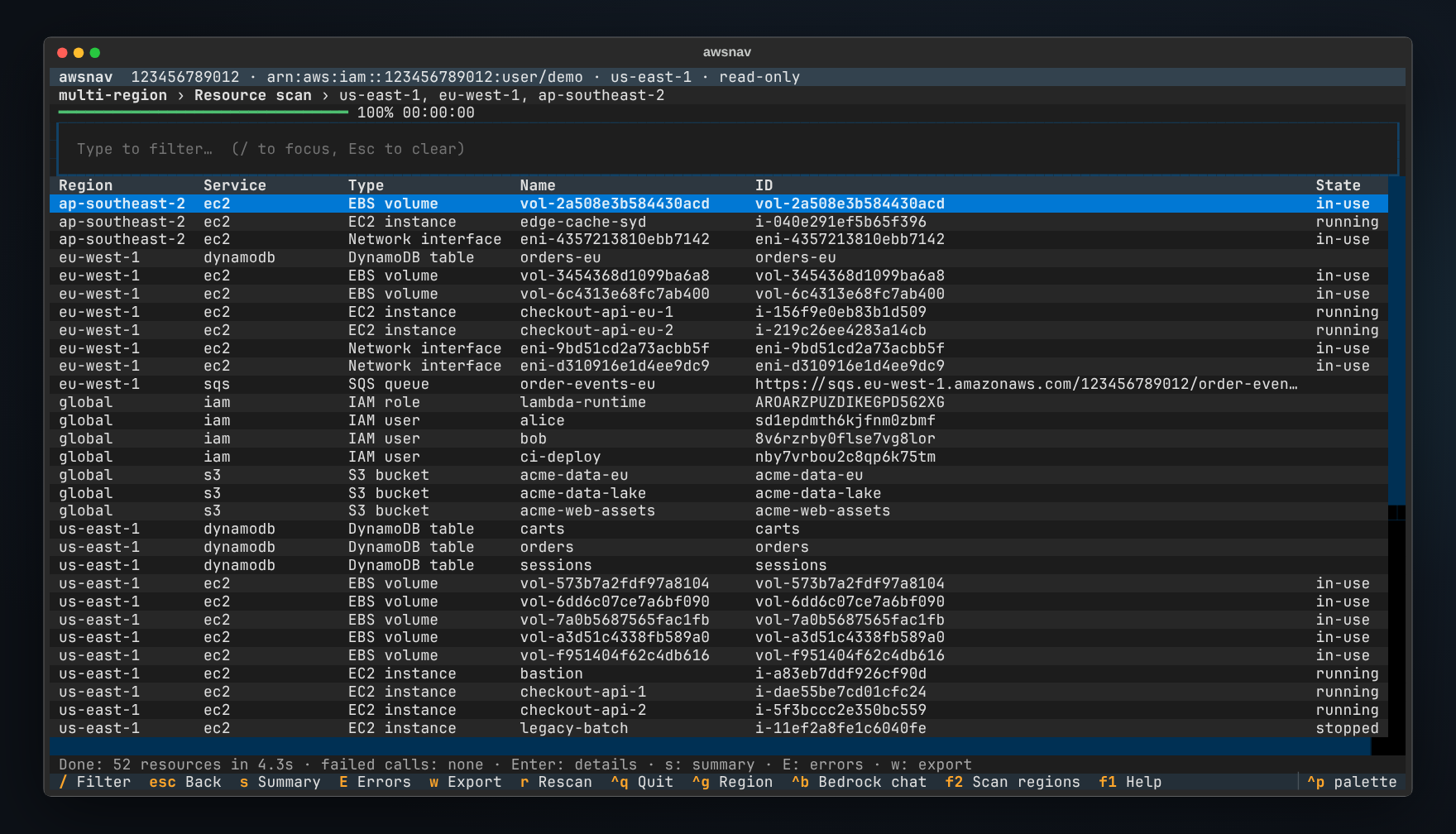
awsnav reads the API models that ship inside boto3, so it knows every AWS
|
|
68
|
+
service the moment boto3 does. EC2 and S3 work the same way as Bedrock,
|
|
69
|
+
AgentCore, and whatever AWS launches next week. No plugins, no per-service
|
|
70
|
+
code, no command syntax to remember. If boto3 can call it, awsnav can browse it.
|
|
71
|
+
|
|
72
|
+
## Quick start
|
|
73
|
+
|
|
74
|
+
```sh
|
|
75
|
+
pipx install awsnav
|
|
76
|
+
awsnav
|
|
77
|
+
```
|
|
78
|
+
|
|
79
|
+
Enter an access key and secret, or just press Enter to use your usual AWS
|
|
80
|
+
profile, SSO session or environment variables. Type to find a service, `Enter`
|
|
81
|
+
to open it, `F2` to scan every region. `F1` shows all keys.
|
|
82
|
+
|
|
83
|
+
## Features
|
|
84
|
+
|
|
85
|
+
- **Every service, automatically.** 436 services today, from EC2 and S3 to
|
|
86
|
+
Bedrock, Bedrock Agents and AgentCore. Each one opens on its resource types,
|
|
87
|
+
such as Instances, Buckets, Foundation Models or Agents. Upgrading boto3 adds
|
|
88
|
+
new services and API calls with no awsnav release.
|
|
89
|
+
- **Scan every region at once.** `F2` finds active resources across all
|
|
90
|
+
regions, or the ones you pick, and streams them into one table. AWS-created
|
|
91
|
+
defaults are left out, so you see what *you* run. Export to JSON or CSV, or
|
|
92
|
+
run the same scan from scripts with `awsnav --scan`.
|
|
93
|
+
- **Drill down without reading docs.** Open any resource and awsnav lists the
|
|
94
|
+
read-only calls that its fields can fill in. A bucket leads to its policy,
|
|
95
|
+
versioning and objects. An instance leads to its console output, status, image
|
|
96
|
+
and subnet. A Bedrock agent leads to its versions and aliases.
|
|
97
|
+
- **Bedrock built in.** List foundation models, custom models, guardrails,
|
|
98
|
+
agents and knowledge bases, then chat with any text model or inference
|
|
99
|
+
profile straight from its detail screen (`Ctrl+B` anywhere).
|
|
100
|
+
- **S3 like a file manager.** Browse buckets as folders, preview an object's
|
|
101
|
+
first 64 KiB with syntax highlighting, and download it.
|
|
102
|
+
- **Any API call when you need it.** The operation runner calls any of the
|
|
103
|
+
thousands of AWS operations with JSON parameters. It is prefilled from the
|
|
104
|
+
resource you are on, with the AWS documentation shown alongside.
|
|
105
|
+
- **Safe by default.** Browsing and scanning only ever call read-only
|
|
106
|
+
operations. Write calls need `--allow-write` *and* a confirmation that shows
|
|
107
|
+
exactly what will run. Credentials stay in memory and are never written to
|
|
108
|
+
disk.
|
|
109
|
+
- **Region-aware.** `Ctrl+G` switches region. Anything opened from a scan
|
|
110
|
+
result keeps working in that resource's own region, wherever you are.
|
|
111
|
+
- **Works anywhere a terminal does.** Over SSH, in tmux, on a jump host,
|
|
112
|
+
against LocalStack (`--endpoint-url`). Light on dependencies: boto3 and
|
|
113
|
+
Textual.
|
|
114
|
+
|
|
115
|
+
### In motion
|
|
116
|
+
|
|
117
|
+
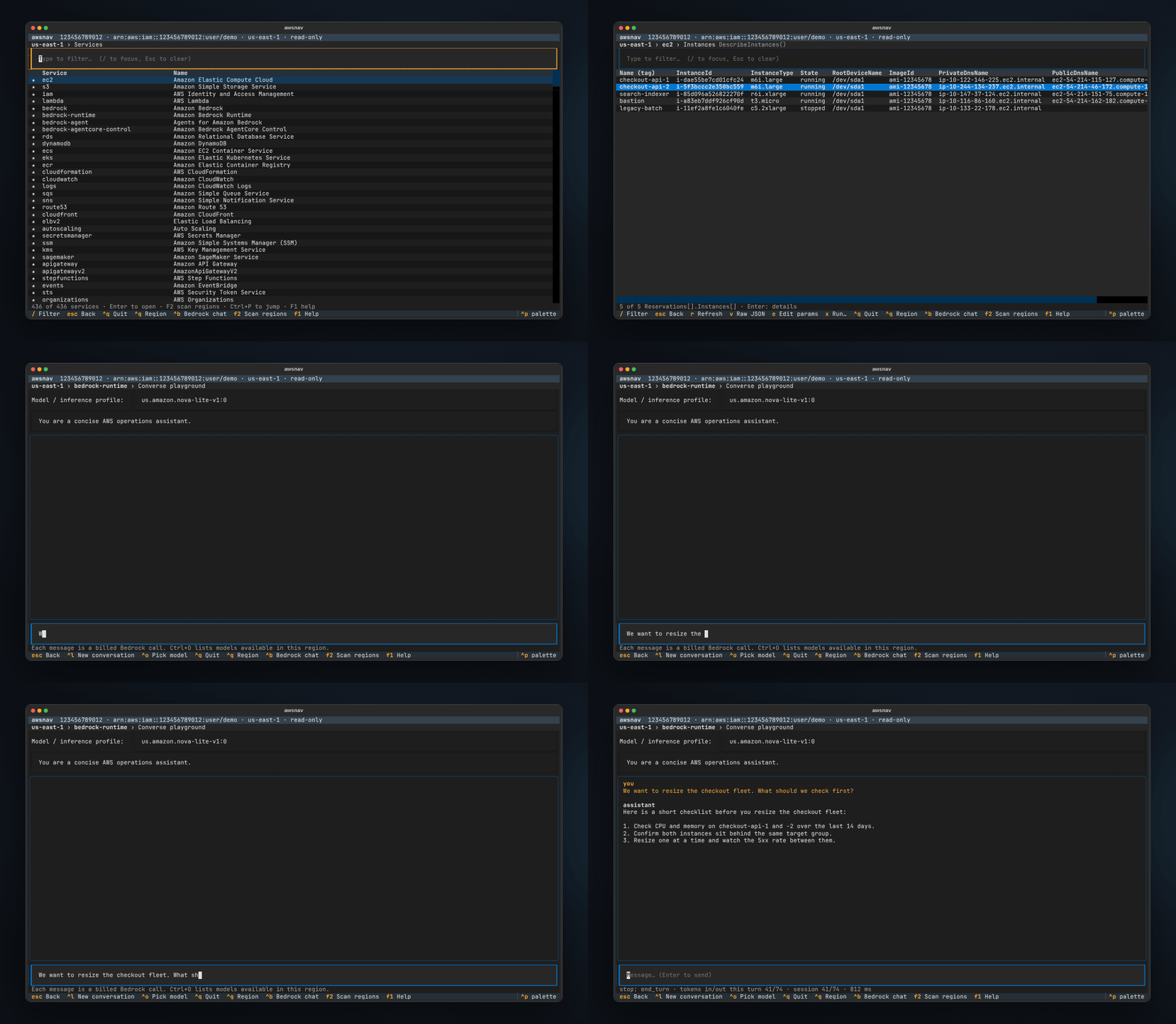
Find EC2, open the instances, look at one, then scan three regions and filter
|
|
118
|
+
the results. Afterwards, ask a Bedrock model a question without leaving the
|
|
119
|
+
terminal.
|
|
120
|
+
|
|
121
|
+
|
|
122
|
+
|
|
123
|
+
### Scan every region
|
|
124
|
+
|
|
125
|
+
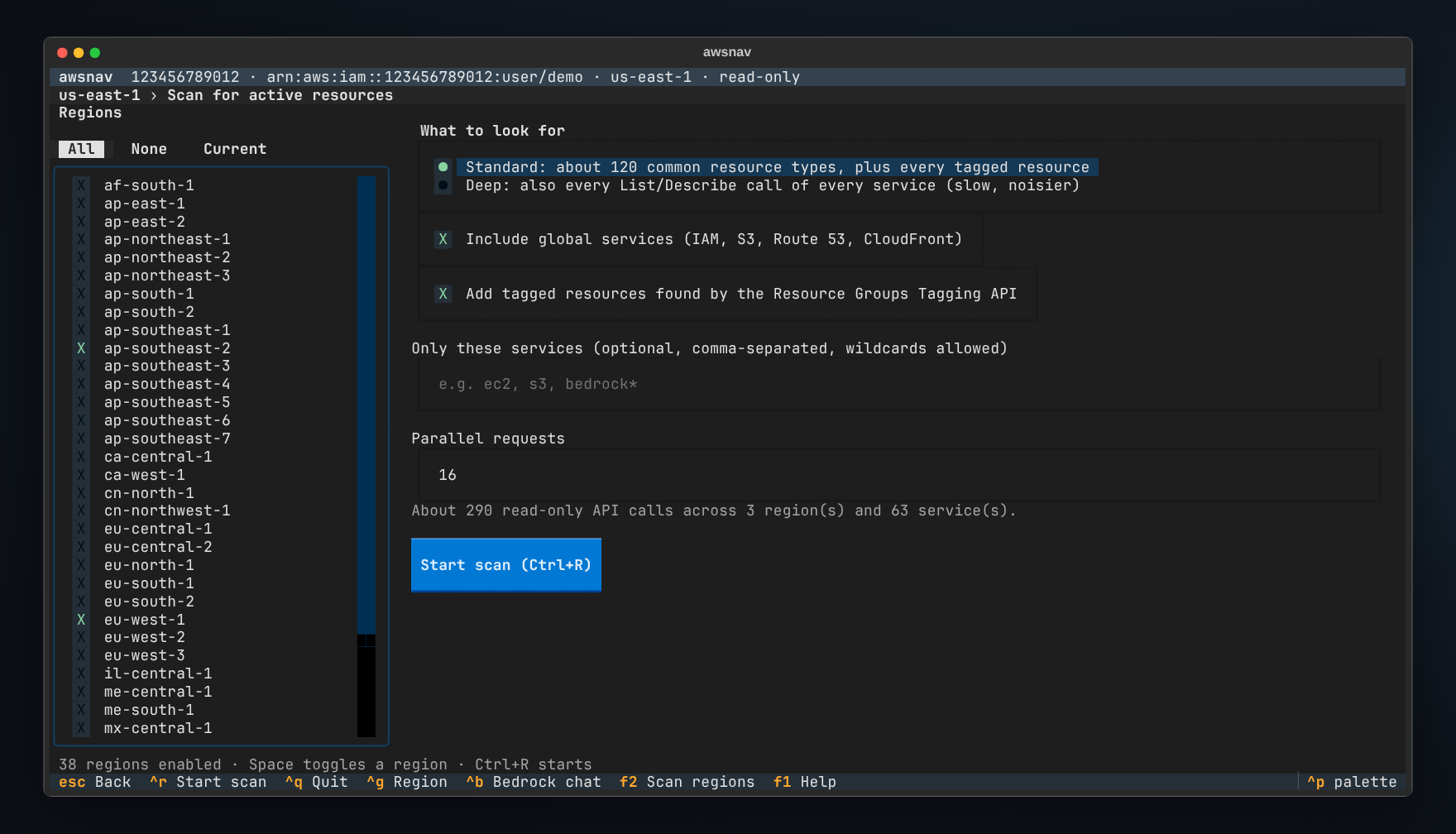
Pick regions and press `Ctrl+R`. The estimate tells you how many read-only
|
|
126
|
+
calls the scan will make before you start.
|
|
127
|
+
|
|
128
|
+
|
|
129
|
+
|
|
130
|
+
The standard scan covers about 120 resource types across compute, networking,
|
|
131
|
+
storage, databases, analytics, AI/ML, security and developer tools, plus every
|
|
132
|
+
resource the Resource Groups Tagging API knows about. AWS-created defaults are
|
|
133
|
+
skipped: default VPCs and their subnets and security groups, AWS-managed keys,
|
|
134
|
+
service-linked roles, managed EventBridge rules, terminated instances and
|
|
135
|
+
deleted stacks. **Deep mode** adds every parameterless List and Describe call
|
|
136
|
+
of every service, except catalogue lookups such as instance types, for when
|
|
137
|
+
"about 120 types" is not enough.
|
|
138
|
+
|
|
139
|
+
Global services such as IAM, Route 53 and CloudFront are scanned once, and S3
|
|
140
|
+
buckets land in their own region. Calls that fail are grouped as missing
|
|
141
|
+
permission, not offered in that region, or other error (`E`), so a partial
|
|
142
|
+
result is never silent.
|
|
143
|
+
|
|
144
|
+
```sh
|
|
145
|
+
awsnav --scan # all enabled regions, table on stdout
|
|
146
|
+
awsnav --scan --scan-regions us-east-1,eu-west-1 -o inventory.csv
|
|
147
|
+
awsnav --scan --services 'ec2,rds,bedrock*' -o inventory.json
|
|
148
|
+
awsnav --scan --deep --workers 32 -o everything.json
|
|
149
|
+
```
|
|
150
|
+
|
|
151
|
+
### Resources and details
|
|
152
|
+
|
|
153
|
+
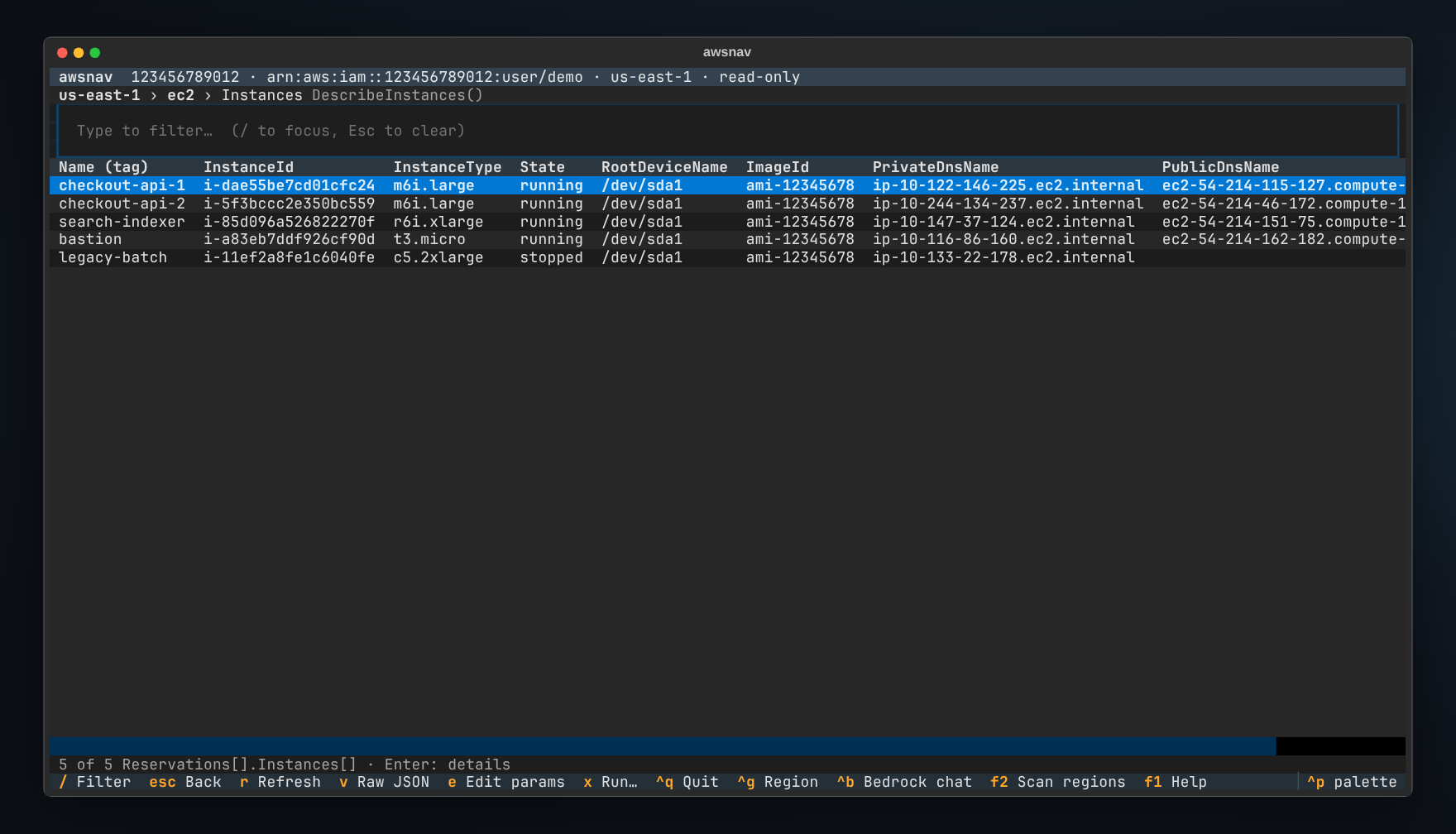
Resource lists pick their own columns: names from `Name` tags, IDs, states,
|
|
154
|
+
types and dates first; ARNs and URLs last. `/` filters as you type.
|
|
155
|
+
|
|
156
|
+
|
|
157
|
+
|
|
158
|
+
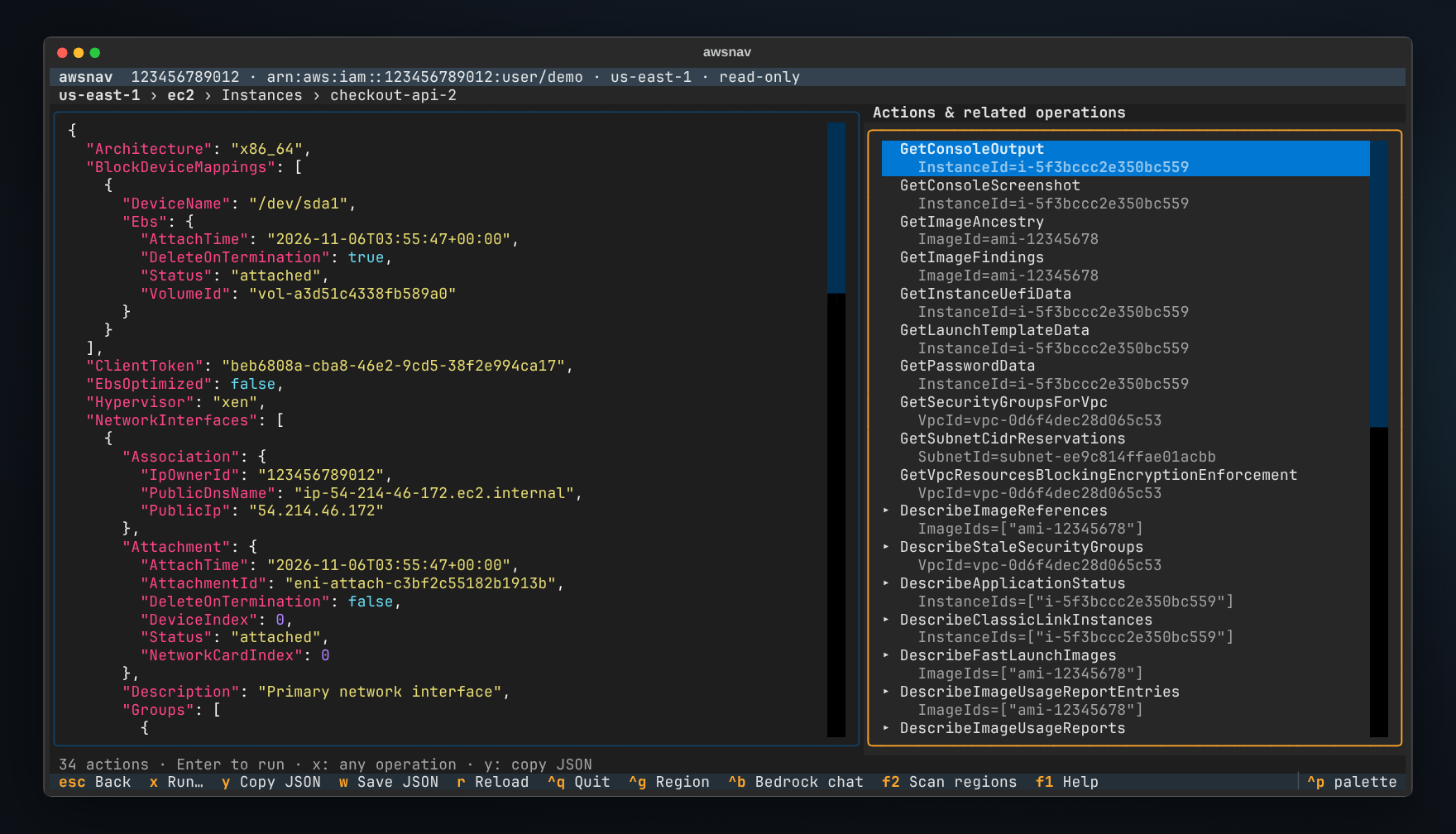
A resource's details show its full JSON next to everything you can do with it.
|
|
159
|
+
Calls marked `▸` lead to more resources, and they chain: bucket, object, object
|
|
160
|
+
tags.
|
|
161
|
+
|
|
162
|
+
|
|
163
|
+
|
|
164
|
+
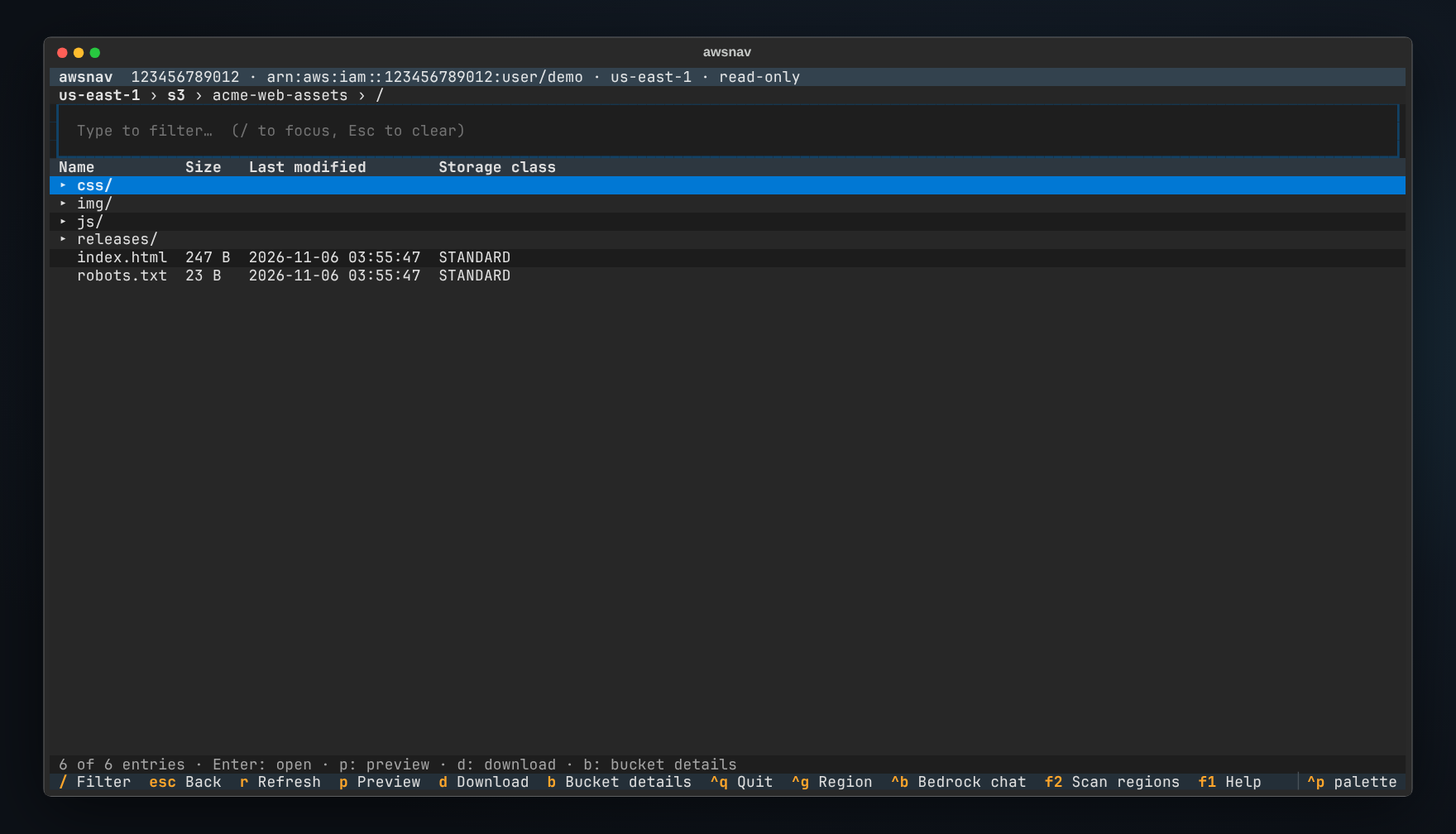
### S3
|
|
165
|
+
|
|
166
|
+
|
|
167
|
+
|
|
168
|
+
### Bedrock
|
|
169
|
+
|
|
170
|
+
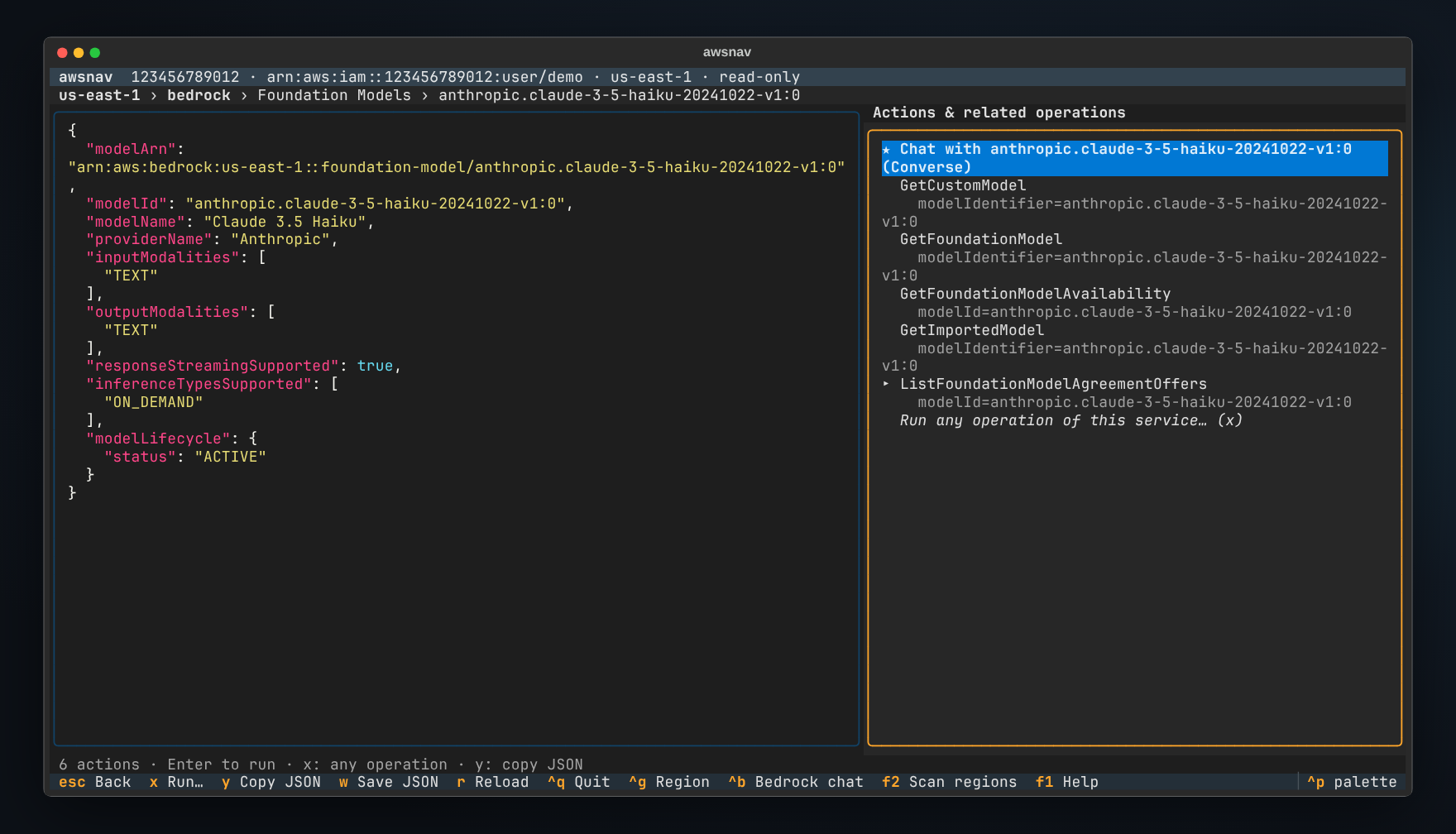
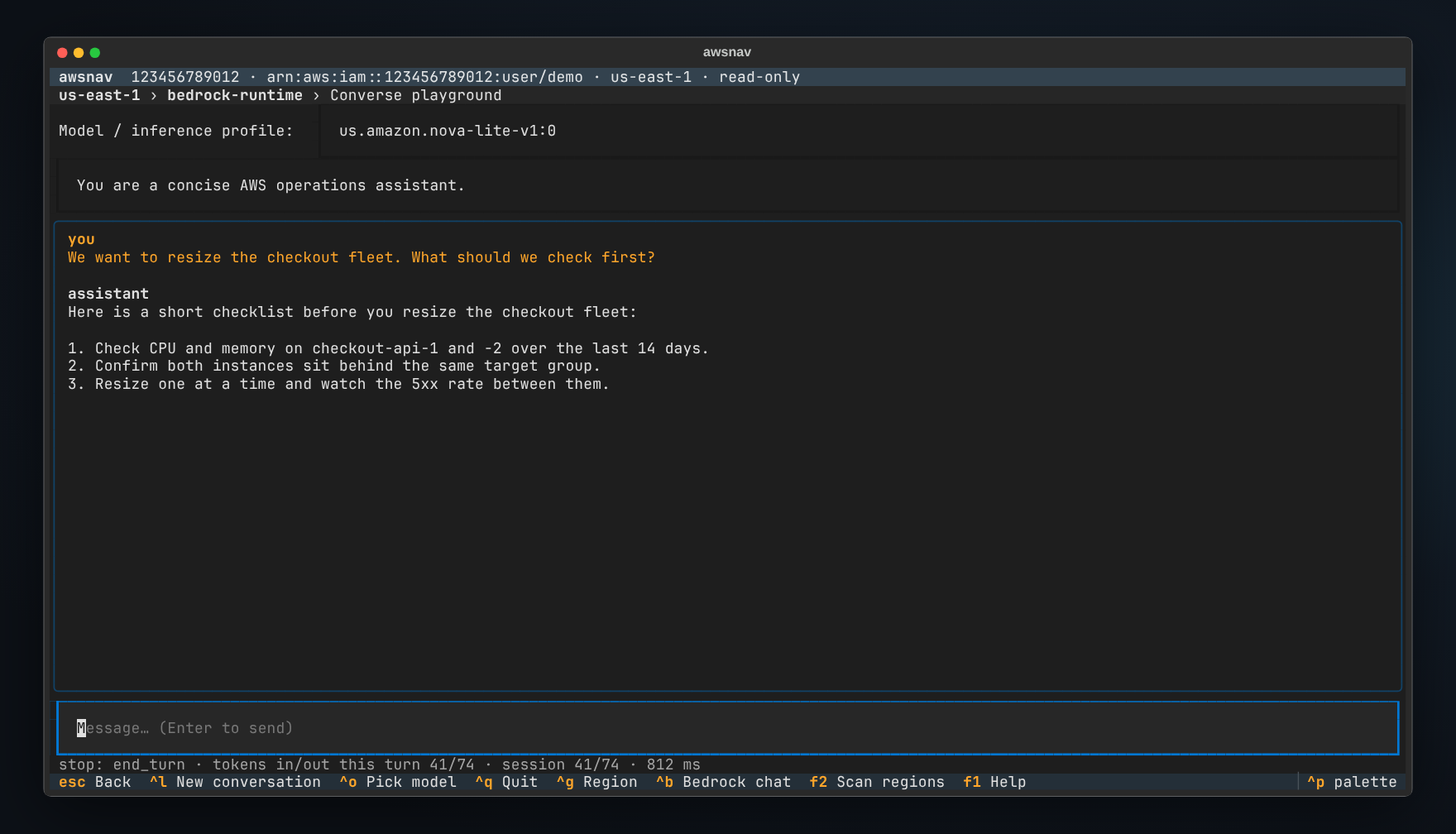
Models, profiles, agents, knowledge bases, guardrails and AgentCore runtimes
|
|
171
|
+
are all browsable. Any text model is one keypress away from a chat.
|
|
172
|
+
|
|
173
|
+
|
|
174
|
+
|
|
175
|
+
|
|
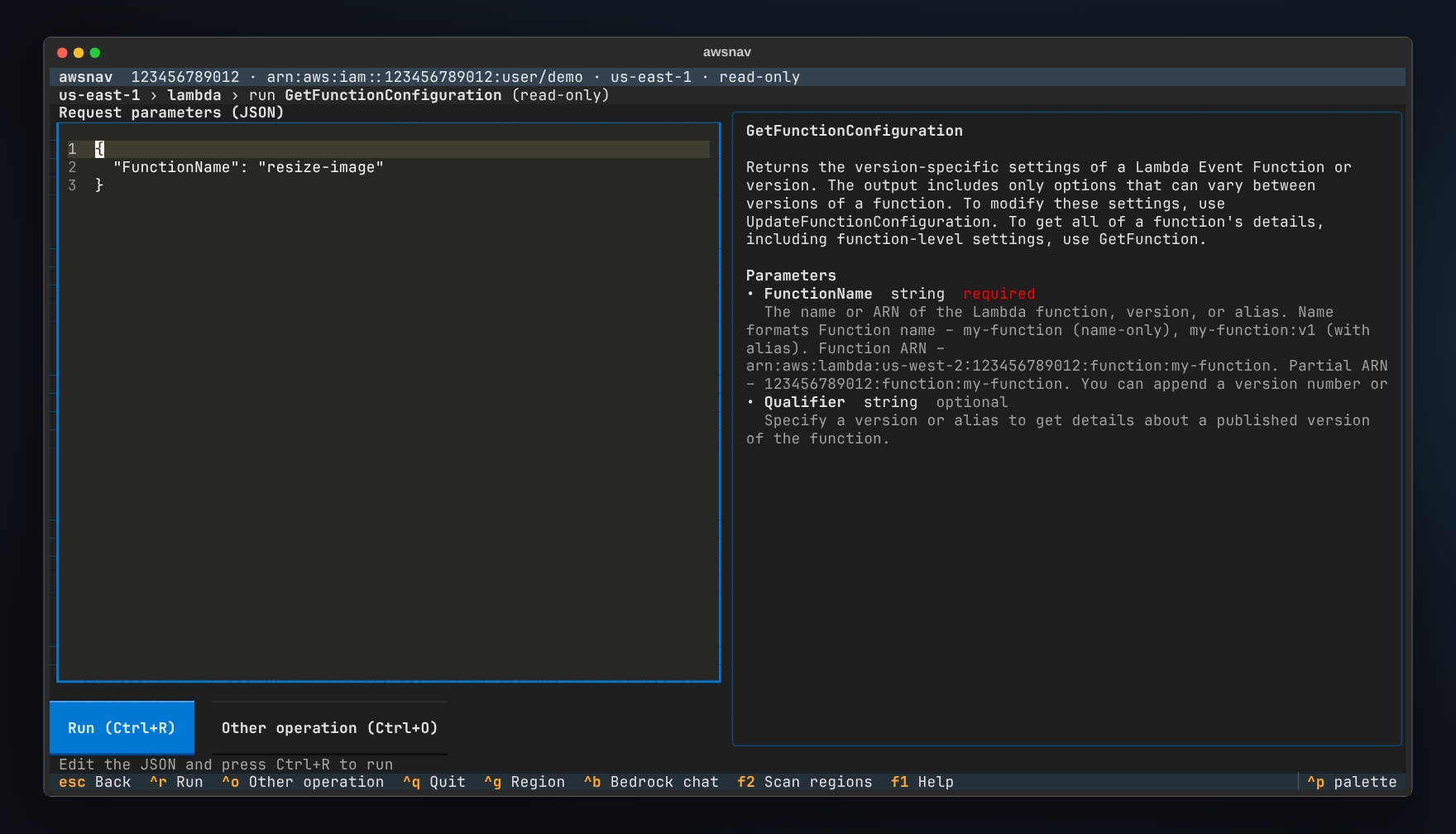
176
|
+
|
|
177
|
+
### Operation runner
|
|
178
|
+
|
|
179
|
+
Any operation, any parameters. Required fields are templated, values are
|
|
180
|
+
prefilled from where you came from, and the AWS documentation for every
|
|
181
|
+
parameter sits on the right.
|
|
182
|
+
|
|
183
|
+
|
|
184
|
+
|
|
185
|
+
<sub>Screenshots show a demo account served by [moto](https://github.com/getmoto/moto), a local AWS mock;
|
|
186
|
+
Bedrock replies are stubbed. They are regenerated from the real app with `scripts/` (see
|
|
187
|
+
[docs/RELEASING.md](https://github.com/redasgard/awsnav/blob/main/docs/RELEASING.md)).</sub>
|
|
188
|
+
|
|
189
|
+
## Install
|
|
190
|
+
|
|
191
|
+
awsnav is on [PyPI](https://pypi.org/project/awsnav/). With
|
|
192
|
+
[pipx](https://pipx.pypa.io/) (recommended; keeps awsnav in its own environment):
|
|
193
|
+
|
|
194
|
+
```sh
|
|
195
|
+
pipx install awsnav
|
|
196
|
+
pipx upgrade awsnav # later, for new versions
|
|
197
|
+
```
|
|
198
|
+
|
|
199
|
+
Or with pip, into a virtual environment:
|
|
200
|
+
|
|
201
|
+
```sh
|
|
202
|
+
python -m venv .venv && . .venv/bin/activate
|
|
203
|
+
pip install awsnav
|
|
204
|
+
```
|
|
205
|
+
|
|
206
|
+
To run the latest unreleased code from `main`:
|
|
207
|
+
`pipx install git+https://github.com/redasgard/awsnav`.
|
|
208
|
+
|
|
209
|
+
Release wheels are built by CI with signed SLSA provenance; see
|
|
210
|
+
[docs/RELEASING.md](https://github.com/redasgard/awsnav/blob/main/docs/RELEASING.md) to verify one. To get services AWS has
|
|
211
|
+
just launched, upgrade boto3: `pipx runpip awsnav install -U boto3`.
|
|
212
|
+
|
|
213
|
+
Requirements: Python 3.10 or newer and a terminal with 256 colours. awsnav runs
|
|
214
|
+
wherever [Textual](https://textual.textualize.io/) does: Linux, macOS and
|
|
215
|
+
Windows terminals.
|
|
216
|
+
|
|
217
|
+
## Credentials and permissions
|
|
218
|
+
|
|
219
|
+
awsnav uses the same credentials as the AWS CLI:
|
|
220
|
+
|
|
221
|
+
- **Keys** from `--access-key`, `--secret-key` and `--session-token`, or typed
|
|
222
|
+
into the login form. Without them, the `AWS_ACCESS_KEY_ID`,
|
|
223
|
+
`AWS_SECRET_ACCESS_KEY` and `AWS_SESSION_TOKEN` variables fill the form.
|
|
224
|
+
- **A profile** with `--profile NAME`, which takes precedence over key variables.
|
|
225
|
+
- **The default chain** (`~/.aws`, SSO, instance roles) when the form is left
|
|
226
|
+
empty.
|
|
227
|
+
|
|
228
|
+
The identity is checked with STS on connect and shown in the top bar. For
|
|
229
|
+
browsing and scanning, the AWS managed `ReadOnlyAccess` policy covers almost
|
|
230
|
+
everything; anything it does not cover shows up as a clear permission error,
|
|
231
|
+
not a crash. See [SECURITY.md](https://github.com/redasgard/awsnav/blob/main/SECURITY.md) for exactly what awsnav does with
|
|
232
|
+
your keys.
|
|
233
|
+
|
|
234
|
+
| Option | Meaning |
|
|
235
|
+
| --- | --- |
|
|
236
|
+
| `--region` | Starting region (`$AWS_REGION`, then `us-east-1`). Switch any time with `Ctrl+G`. |
|
|
237
|
+
| `--profile` | Use a named profile instead of keys. |
|
|
238
|
+
| `--endpoint-url` | Send every call to another endpoint, such as LocalStack at `http://localhost:4566`. |
|
|
239
|
+
| `--max-items` | Items fetched per list call. Default 500. |
|
|
240
|
+
| `--allow-write` | Let the operation runner call write operations, each after confirmation. |
|
|
241
|
+
| `--no-login` | Skip the login form and connect with the default credential chain. |
|
|
242
|
+
| `--scan` | Headless region scan, tuned with `--scan-regions`, `--deep`, `--services`, `--no-global`, `--no-tagged`, `--workers` and `-o`. |
|
|
243
|
+
|
|
244
|
+
## Keys
|
|
245
|
+
|
|
246
|
+
| Key | Action |
|
|
247
|
+
| --- | --- |
|
|
248
|
+
| type, then `Enter` | filter the list and open the selection |
|
|
249
|
+
| `Esc` | clear the filter, then go back one level |
|
|
250
|
+
| `/` | filter the current list (every word must match) |
|
|
251
|
+
| `Ctrl+P` | jump to any service by name |
|
|
252
|
+
| `Ctrl+G` | change region |
|
|
253
|
+
| `F2` | scan regions for active resources |
|
|
254
|
+
| `Ctrl+B` | Bedrock chat |
|
|
255
|
+
| `F1` or `?` | all keys |
|
|
256
|
+
| `a` | in a service: show every API operation, not only resource lists |
|
|
257
|
+
| `x` | run any operation, prefilled from the current resource |
|
|
258
|
+
| `r` / `v` / `e` | in a list: refresh / raw JSON / edit parameters and run again |
|
|
259
|
+
| `y` / `w` | in details: copy JSON / save JSON to a file |
|
|
260
|
+
| `p` / `d` / `b` | in S3: preview / download / bucket details |
|
|
261
|
+
| `s` / `E` / `w` | in scan results: summary / failed calls / export |
|
|
262
|
+
| `Ctrl+R` | run the operation, or start the scan |
|
|
263
|
+
| `Ctrl+Q` | quit |
|
|
264
|
+
|
|
265
|
+
## How it works
|
|
266
|
+
|
|
267
|
+
```
|
|
268
|
+
awsnav/
|
|
269
|
+
catalog.py reads botocore's API models: services, operations, parameters,
|
|
270
|
+
where the resource list sits in each response, and which
|
|
271
|
+
operations a resource's fields can fill in
|
|
272
|
+
session.py credentials, per-region clients, paginated calls
|
|
273
|
+
scanner.py multi-region scan: curated inventory, tagging pass, deep mode
|
|
274
|
+
formatting.py column choice and cell rendering for any response shape
|
|
275
|
+
ui/ Textual screens: services, resources, details, runner,
|
|
276
|
+
S3 browser, Bedrock chat, scan setup and results
|
|
277
|
+
```
|
|
278
|
+
|
|
279
|
+
Nothing is hard-coded per service. A resource type is any `List`, `Describe`
|
|
280
|
+
or `Get` call that needs no parameters. A drill-down is any read-only call
|
|
281
|
+
whose required parameters can be matched to a resource's fields, for example
|
|
282
|
+
`Bucket` from a bucket's `Name`, or `modelIdentifier` from a model's `modelId`.
|
|
283
|
+
A handful of curated defaults keep the noisy cases sane, such as listing only
|
|
284
|
+
your own AMIs instead of every public one.
|
|
285
|
+
|
|
286
|
+
## Development
|
|
287
|
+
|
|
288
|
+
```sh
|
|
289
|
+
git clone https://github.com/redasgard/awsnav && cd awsnav
|
|
290
|
+
python -m venv .venv && . .venv/bin/activate
|
|
291
|
+
pip install -e '.[dev]' ruff
|
|
292
|
+
pytest -q
|
|
293
|
+
```
|
|
294
|
+
|
|
295
|
+
The tests never touch AWS. They run against moto and botocore stubs, drive the
|
|
296
|
+
real app headlessly through EC2, S3, IAM, SQS, Bedrock and the region scan, and
|
|
297
|
+
check that every operation of every bundled service can be described and
|
|
298
|
+
templated. See [CONTRIBUTING.md](https://github.com/redasgard/awsnav/blob/main/CONTRIBUTING.md), including how to add a
|
|
299
|
+
resource type to the scan.
|
|
300
|
+
|
|
301
|
+
## License
|
|
302
|
+
|
|
303
|
+
MIT, see [LICENSE](https://github.com/redasgard/awsnav/blob/main/LICENSE). Made by [Red Asgard](https://github.com/redasgard).
|
|
304
|
+
|
|
305
|
+
<sub>awsnav is an independent open-source project. It is not affiliated with,
|
|
306
|
+
endorsed by or sponsored by Amazon Web Services. AWS and the names of AWS
|
|
307
|
+
services are trademarks of Amazon.com, Inc. or its affiliates.</sub>
|
awsnav-0.1.0/README.md
ADDED
|
@@ -0,0 +1,271 @@
|
|
|
1
|
+
<p align="center">
|
|
2
|
+
<img src="https://raw.githubusercontent.com/redasgard/awsnav/main/assets/awsnav.svg" width="104" alt="awsnav icon">
|
|
3
|
+
</p>
|
|
4
|
+
|
|
5
|
+
<h1 align="center">awsnav</h1>
|
|
6
|
+
|
|
7
|
+
<p align="center">
|
|
8
|
+
<b>Every AWS service in your terminal.</b><br>
|
|
9
|
+
Browse EC2, S3, Bedrock and 430+ other services from the keyboard, scan every region
|
|
10
|
+
for what is actually running, and drill from any resource into the calls that explain it.
|
|
11
|
+
</p>
|
|
12
|
+
|
|
13
|
+
<p align="center">
|
|
14
|
+
<a href="https://github.com/redasgard/awsnav/actions/workflows/ci.yml"><img alt="CI" src="https://github.com/redasgard/awsnav/actions/workflows/ci.yml/badge.svg"></a>
|
|
15
|
+
<img alt="Python 3.10 to 3.13" src="https://img.shields.io/badge/python-3.10%20%E2%80%93%203.13-3776ab">
|
|
16
|
+
<img alt="Read-only by default" src="https://img.shields.io/badge/read--only-by%20default-3fb950">
|
|
17
|
+
<a href="https://github.com/redasgard/awsnav/blob/main/LICENSE"><img alt="MIT license" src="https://img.shields.io/badge/license-MIT-blue"></a>
|
|
18
|
+
</p>
|
|
19
|
+
|
|
20
|
+
<p align="center">
|
|
21
|
+
<a href="#quick-start">Quick start</a> ·
|
|
22
|
+
<a href="#features">Features</a> ·
|
|
23
|
+
<a href="#scan-every-region">Region scan</a> ·
|
|
24
|
+
<a href="#install">Install</a> ·
|
|
25
|
+
<a href="#keys">Keys</a> ·
|
|
26
|
+
<a href="#how-it-works">How it works</a>
|
|
27
|
+
</p>
|
|
28
|
+
|
|
29
|
+

|
|
30
|
+
|
|
31
|
+
awsnav reads the API models that ship inside boto3, so it knows every AWS
|
|
32
|
+
service the moment boto3 does. EC2 and S3 work the same way as Bedrock,
|
|
33
|
+
AgentCore, and whatever AWS launches next week. No plugins, no per-service
|
|
34
|
+
code, no command syntax to remember. If boto3 can call it, awsnav can browse it.
|
|
35
|
+
|
|
36
|
+
## Quick start
|
|
37
|
+
|
|
38
|
+
```sh
|
|
39
|
+
pipx install awsnav
|
|
40
|
+
awsnav
|
|
41
|
+
```
|
|
42
|
+
|
|
43
|
+
Enter an access key and secret, or just press Enter to use your usual AWS
|
|
44
|
+
profile, SSO session or environment variables. Type to find a service, `Enter`
|
|
45
|
+
to open it, `F2` to scan every region. `F1` shows all keys.
|
|
46
|
+
|
|
47
|
+
## Features
|
|
48
|
+
|
|
49
|
+
- **Every service, automatically.** 436 services today, from EC2 and S3 to
|
|
50
|
+
Bedrock, Bedrock Agents and AgentCore. Each one opens on its resource types,
|
|
51
|
+
such as Instances, Buckets, Foundation Models or Agents. Upgrading boto3 adds
|
|
52
|
+
new services and API calls with no awsnav release.
|
|
53
|
+
- **Scan every region at once.** `F2` finds active resources across all
|
|
54
|
+
regions, or the ones you pick, and streams them into one table. AWS-created
|
|
55
|
+
defaults are left out, so you see what *you* run. Export to JSON or CSV, or
|
|
56
|
+
run the same scan from scripts with `awsnav --scan`.
|
|
57
|
+
- **Drill down without reading docs.** Open any resource and awsnav lists the
|
|
58
|
+
read-only calls that its fields can fill in. A bucket leads to its policy,
|
|
59
|
+
versioning and objects. An instance leads to its console output, status, image
|
|
60
|
+
and subnet. A Bedrock agent leads to its versions and aliases.
|
|
61
|
+
- **Bedrock built in.** List foundation models, custom models, guardrails,
|
|
62
|
+
agents and knowledge bases, then chat with any text model or inference
|
|
63
|
+
profile straight from its detail screen (`Ctrl+B` anywhere).
|
|
64
|
+
- **S3 like a file manager.** Browse buckets as folders, preview an object's
|
|
65
|
+
first 64 KiB with syntax highlighting, and download it.
|
|
66
|
+
- **Any API call when you need it.** The operation runner calls any of the
|
|
67
|
+
thousands of AWS operations with JSON parameters. It is prefilled from the
|
|
68
|
+
resource you are on, with the AWS documentation shown alongside.
|
|
69
|
+
- **Safe by default.** Browsing and scanning only ever call read-only
|
|
70
|
+
operations. Write calls need `--allow-write` *and* a confirmation that shows
|
|
71
|
+
exactly what will run. Credentials stay in memory and are never written to
|
|
72
|
+
disk.
|
|
73
|
+
- **Region-aware.** `Ctrl+G` switches region. Anything opened from a scan
|
|
74
|
+
result keeps working in that resource's own region, wherever you are.
|
|
75
|
+
- **Works anywhere a terminal does.** Over SSH, in tmux, on a jump host,
|
|
76
|
+
against LocalStack (`--endpoint-url`). Light on dependencies: boto3 and
|
|
77
|
+
Textual.
|
|
78
|
+
|
|
79
|
+
### In motion
|
|
80
|
+
|
|
81
|
+
Find EC2, open the instances, look at one, then scan three regions and filter
|
|
82
|
+
the results. Afterwards, ask a Bedrock model a question without leaving the
|
|
83
|
+
terminal.
|
|
84
|
+
|
|
85
|
+

|
|
86
|
+
|
|
87
|
+
### Scan every region
|
|
88
|
+
|
|
89
|
+
Pick regions and press `Ctrl+R`. The estimate tells you how many read-only
|
|
90
|
+
calls the scan will make before you start.
|
|
91
|
+
|
|
92
|
+

|
|
93
|
+
|
|
94
|
+
The standard scan covers about 120 resource types across compute, networking,
|
|
95
|
+
storage, databases, analytics, AI/ML, security and developer tools, plus every
|
|
96
|
+
resource the Resource Groups Tagging API knows about. AWS-created defaults are
|
|
97
|
+
skipped: default VPCs and their subnets and security groups, AWS-managed keys,
|
|
98
|
+
service-linked roles, managed EventBridge rules, terminated instances and
|
|
99
|
+
deleted stacks. **Deep mode** adds every parameterless List and Describe call
|
|
100
|
+
of every service, except catalogue lookups such as instance types, for when
|
|
101
|
+
"about 120 types" is not enough.
|
|
102
|
+
|
|
103
|
+
Global services such as IAM, Route 53 and CloudFront are scanned once, and S3
|
|
104
|
+
buckets land in their own region. Calls that fail are grouped as missing
|
|
105
|
+
permission, not offered in that region, or other error (`E`), so a partial
|
|
106
|
+
result is never silent.
|
|
107
|
+
|
|
108
|
+
```sh
|
|
109
|
+
awsnav --scan # all enabled regions, table on stdout
|
|
110
|
+
awsnav --scan --scan-regions us-east-1,eu-west-1 -o inventory.csv
|
|
111
|
+
awsnav --scan --services 'ec2,rds,bedrock*' -o inventory.json
|
|
112
|
+
awsnav --scan --deep --workers 32 -o everything.json
|
|
113
|
+
```
|
|
114
|
+
|
|
115
|
+
### Resources and details
|
|
116
|
+
|
|
117
|
+
Resource lists pick their own columns: names from `Name` tags, IDs, states,
|
|
118
|
+
types and dates first; ARNs and URLs last. `/` filters as you type.
|
|
119
|
+
|
|
120
|
+

|
|
121
|
+
|
|
122
|
+
A resource's details show its full JSON next to everything you can do with it.
|
|
123
|
+
Calls marked `▸` lead to more resources, and they chain: bucket, object, object
|
|
124
|
+
tags.
|
|
125
|
+
|
|
126
|
+

|
|
127
|
+
|
|
128
|
+
### S3
|
|
129
|
+
|
|
130
|
+

|
|
131
|
+
|
|
132
|
+
### Bedrock
|
|
133
|
+
|
|
134
|
+
Models, profiles, agents, knowledge bases, guardrails and AgentCore runtimes
|
|
135
|
+
are all browsable. Any text model is one keypress away from a chat.
|
|
136
|
+
|
|
137
|
+

|
|
138
|
+
|
|
139
|
+

|
|
140
|
+
|
|
141
|
+
### Operation runner
|
|
142
|
+
|
|
143
|
+
Any operation, any parameters. Required fields are templated, values are
|
|
144
|
+
prefilled from where you came from, and the AWS documentation for every
|
|
145
|
+
parameter sits on the right.
|
|
146
|
+
|
|
147
|
+

|
|
148
|
+
|
|
149
|
+
<sub>Screenshots show a demo account served by [moto](https://github.com/getmoto/moto), a local AWS mock;
|
|
150
|
+
Bedrock replies are stubbed. They are regenerated from the real app with `scripts/` (see
|
|
151
|
+
[docs/RELEASING.md](https://github.com/redasgard/awsnav/blob/main/docs/RELEASING.md)).</sub>
|
|
152
|
+
|
|
153
|
+
## Install
|
|
154
|
+
|
|
155
|
+
awsnav is on [PyPI](https://pypi.org/project/awsnav/). With
|
|
156
|
+
[pipx](https://pipx.pypa.io/) (recommended; keeps awsnav in its own environment):
|
|
157
|
+
|
|
158
|
+
```sh
|
|
159
|
+
pipx install awsnav
|
|
160
|
+
pipx upgrade awsnav # later, for new versions
|
|
161
|
+
```
|
|
162
|
+
|
|
163
|
+
Or with pip, into a virtual environment:
|
|
164
|
+
|
|
165
|
+
```sh
|
|
166
|
+
python -m venv .venv && . .venv/bin/activate
|
|
167
|
+
pip install awsnav
|
|
168
|
+
```
|
|
169
|
+
|
|
170
|
+
To run the latest unreleased code from `main`:
|
|
171
|
+
`pipx install git+https://github.com/redasgard/awsnav`.
|
|
172
|
+
|
|
173
|
+
Release wheels are built by CI with signed SLSA provenance; see
|
|
174
|
+
[docs/RELEASING.md](https://github.com/redasgard/awsnav/blob/main/docs/RELEASING.md) to verify one. To get services AWS has
|
|
175
|
+
just launched, upgrade boto3: `pipx runpip awsnav install -U boto3`.
|
|
176
|
+
|
|
177
|
+
Requirements: Python 3.10 or newer and a terminal with 256 colours. awsnav runs
|
|
178
|
+
wherever [Textual](https://textual.textualize.io/) does: Linux, macOS and
|
|
179
|
+
Windows terminals.
|
|
180
|
+
|
|
181
|
+
## Credentials and permissions
|
|
182
|
+
|
|
183
|
+
awsnav uses the same credentials as the AWS CLI:
|
|
184
|
+
|
|
185
|
+
- **Keys** from `--access-key`, `--secret-key` and `--session-token`, or typed
|
|
186
|
+
into the login form. Without them, the `AWS_ACCESS_KEY_ID`,
|
|
187
|
+
`AWS_SECRET_ACCESS_KEY` and `AWS_SESSION_TOKEN` variables fill the form.
|
|
188
|
+
- **A profile** with `--profile NAME`, which takes precedence over key variables.
|
|
189
|
+
- **The default chain** (`~/.aws`, SSO, instance roles) when the form is left
|
|
190
|
+
empty.
|
|
191
|
+
|
|
192
|
+
The identity is checked with STS on connect and shown in the top bar. For
|
|
193
|
+
browsing and scanning, the AWS managed `ReadOnlyAccess` policy covers almost
|
|
194
|
+
everything; anything it does not cover shows up as a clear permission error,
|
|
195
|
+
not a crash. See [SECURITY.md](https://github.com/redasgard/awsnav/blob/main/SECURITY.md) for exactly what awsnav does with
|
|
196
|
+
your keys.
|
|
197
|
+
|
|
198
|
+
| Option | Meaning |
|
|
199
|
+
| --- | --- |
|
|
200
|
+
| `--region` | Starting region (`$AWS_REGION`, then `us-east-1`). Switch any time with `Ctrl+G`. |
|
|
201
|
+
| `--profile` | Use a named profile instead of keys. |
|
|
202
|
+
| `--endpoint-url` | Send every call to another endpoint, such as LocalStack at `http://localhost:4566`. |
|
|
203
|
+
| `--max-items` | Items fetched per list call. Default 500. |
|
|
204
|
+
| `--allow-write` | Let the operation runner call write operations, each after confirmation. |
|
|
205
|
+
| `--no-login` | Skip the login form and connect with the default credential chain. |
|
|
206
|
+
| `--scan` | Headless region scan, tuned with `--scan-regions`, `--deep`, `--services`, `--no-global`, `--no-tagged`, `--workers` and `-o`. |
|
|
207
|
+
|
|
208
|
+
## Keys
|
|
209
|
+
|
|
210
|
+
| Key | Action |
|
|
211
|
+
| --- | --- |
|
|
212
|
+
| type, then `Enter` | filter the list and open the selection |
|
|
213
|
+
| `Esc` | clear the filter, then go back one level |
|
|
214
|
+
| `/` | filter the current list (every word must match) |
|
|
215
|
+
| `Ctrl+P` | jump to any service by name |
|
|
216
|
+
| `Ctrl+G` | change region |
|
|
217
|
+
| `F2` | scan regions for active resources |
|
|
218
|
+
| `Ctrl+B` | Bedrock chat |
|
|
219
|
+
| `F1` or `?` | all keys |
|
|
220
|
+
| `a` | in a service: show every API operation, not only resource lists |
|
|
221
|
+
| `x` | run any operation, prefilled from the current resource |
|
|
222
|
+
| `r` / `v` / `e` | in a list: refresh / raw JSON / edit parameters and run again |
|
|
223
|
+
| `y` / `w` | in details: copy JSON / save JSON to a file |
|
|
224
|
+
| `p` / `d` / `b` | in S3: preview / download / bucket details |
|
|
225
|
+
| `s` / `E` / `w` | in scan results: summary / failed calls / export |
|
|
226
|
+
| `Ctrl+R` | run the operation, or start the scan |
|
|
227
|
+
| `Ctrl+Q` | quit |
|
|
228
|
+
|
|
229
|
+
## How it works
|
|
230
|
+
|
|
231
|
+
```
|
|
232
|
+
awsnav/
|
|
233
|
+
catalog.py reads botocore's API models: services, operations, parameters,
|
|
234
|
+
where the resource list sits in each response, and which
|
|
235
|
+
operations a resource's fields can fill in
|
|
236
|
+
session.py credentials, per-region clients, paginated calls
|
|
237
|
+
scanner.py multi-region scan: curated inventory, tagging pass, deep mode
|
|
238
|
+
formatting.py column choice and cell rendering for any response shape
|
|
239
|
+
ui/ Textual screens: services, resources, details, runner,
|
|
240
|
+
S3 browser, Bedrock chat, scan setup and results
|
|
241
|
+
```
|
|
242
|
+
|
|
243
|
+
Nothing is hard-coded per service. A resource type is any `List`, `Describe`
|
|
244
|
+
or `Get` call that needs no parameters. A drill-down is any read-only call
|
|
245
|
+
whose required parameters can be matched to a resource's fields, for example
|
|
246
|
+
`Bucket` from a bucket's `Name`, or `modelIdentifier` from a model's `modelId`.
|
|
247
|
+
A handful of curated defaults keep the noisy cases sane, such as listing only
|
|
248
|
+
your own AMIs instead of every public one.
|
|
249
|
+
|
|
250
|
+
## Development
|
|
251
|
+
|
|
252
|
+
```sh
|
|
253
|
+
git clone https://github.com/redasgard/awsnav && cd awsnav
|
|
254
|
+
python -m venv .venv && . .venv/bin/activate
|
|
255
|
+
pip install -e '.[dev]' ruff
|
|
256
|
+
pytest -q
|
|
257
|
+
```
|
|
258
|
+
|
|
259
|
+
The tests never touch AWS. They run against moto and botocore stubs, drive the
|
|
260
|
+
real app headlessly through EC2, S3, IAM, SQS, Bedrock and the region scan, and
|
|
261
|
+
check that every operation of every bundled service can be described and
|
|
262
|
+
templated. See [CONTRIBUTING.md](https://github.com/redasgard/awsnav/blob/main/CONTRIBUTING.md), including how to add a
|
|
263
|
+
resource type to the scan.
|
|
264
|
+
|
|
265
|
+
## License
|
|
266
|
+
|
|
267
|
+
MIT, see [LICENSE](https://github.com/redasgard/awsnav/blob/main/LICENSE). Made by [Red Asgard](https://github.com/redasgard).
|
|
268
|
+
|
|
269
|
+
<sub>awsnav is an independent open-source project. It is not affiliated with,
|
|
270
|
+
endorsed by or sponsored by Amazon Web Services. AWS and the names of AWS
|
|
271
|
+
services are trademarks of Amazon.com, Inc. or its affiliates.</sub>
|