asp-studio 0.2.2__tar.gz → 0.2.4__tar.gz
This diff represents the content of publicly available package versions that have been released to one of the supported registries. The information contained in this diff is provided for informational purposes only and reflects changes between package versions as they appear in their respective public registries.
- {asp_studio-0.2.2/src/asp_studio.egg-info → asp_studio-0.2.4}/PKG-INFO +32 -6
- {asp_studio-0.2.2 → asp_studio-0.2.4}/README.md +31 -5
- {asp_studio-0.2.2 → asp_studio-0.2.4}/pyproject.toml +1 -1
- {asp_studio-0.2.2 → asp_studio-0.2.4}/src/asp_studio/__init__.py +1 -1
- {asp_studio-0.2.2 → asp_studio-0.2.4}/src/asp_studio/__main__.py +19 -5
- asp_studio-0.2.4/src/asp_studio/_args.py +26 -0
- {asp_studio-0.2.2 → asp_studio-0.2.4}/src/asp_studio/magic.py +2 -1
- {asp_studio-0.2.2 → asp_studio-0.2.4}/src/asp_studio/solver.py +10 -5
- {asp_studio-0.2.2 → asp_studio-0.2.4}/src/asp_studio/static/engine.js +1 -1
- asp_studio-0.2.4/src/asp_studio/static/themes.css +49 -0
- {asp_studio-0.2.2 → asp_studio-0.2.4}/src/asp_studio/static/webview.css +27 -26
- {asp_studio-0.2.2 → asp_studio-0.2.4/src/asp_studio.egg-info}/PKG-INFO +32 -6
- {asp_studio-0.2.2 → asp_studio-0.2.4}/src/asp_studio.egg-info/SOURCES.txt +1 -0
- {asp_studio-0.2.2 → asp_studio-0.2.4}/tests/test_cli.py +42 -0
- {asp_studio-0.2.2 → asp_studio-0.2.4}/tests/test_magic.py +7 -0
- {asp_studio-0.2.2 → asp_studio-0.2.4}/tests/test_solver.py +6 -0
- asp_studio-0.2.2/src/asp_studio/static/themes.css +0 -100
- {asp_studio-0.2.2 → asp_studio-0.2.4}/LICENSE +0 -0
- {asp_studio-0.2.2 → asp_studio-0.2.4}/setup.cfg +0 -0
- {asp_studio-0.2.2 → asp_studio-0.2.4}/src/asp_studio/render.py +0 -0
- {asp_studio-0.2.2 → asp_studio-0.2.4}/src/asp_studio/static/bootstrap.js +0 -0
- {asp_studio-0.2.2 → asp_studio-0.2.4}/src/asp_studio/static/webview.js +0 -0
- {asp_studio-0.2.2 → asp_studio-0.2.4}/src/asp_studio.egg-info/dependency_links.txt +0 -0
- {asp_studio-0.2.2 → asp_studio-0.2.4}/src/asp_studio.egg-info/entry_points.txt +0 -0
- {asp_studio-0.2.2 → asp_studio-0.2.4}/src/asp_studio.egg-info/requires.txt +0 -0
- {asp_studio-0.2.2 → asp_studio-0.2.4}/src/asp_studio.egg-info/top_level.txt +0 -0
- {asp_studio-0.2.2 → asp_studio-0.2.4}/tests/test_render.py +0 -0
- {asp_studio-0.2.2 → asp_studio-0.2.4}/tests/test_static_sync.py +0 -0
|
@@ -1,6 +1,6 @@
|
|
|
1
1
|
Metadata-Version: 2.4
|
|
2
2
|
Name: asp-studio
|
|
3
|
-
Version: 0.2.
|
|
3
|
+
Version: 0.2.4
|
|
4
4
|
Summary: Answer sets, a graph and a step-by-step animator for Answer Set Programming, in Jupyter, VS Code notebooks and the command line.
|
|
5
5
|
Author: yakupbulbul
|
|
6
6
|
License: MIT
|
|
@@ -29,9 +29,15 @@ Dynamic: license-file
|
|
|
29
29
|
|
|
30
30
|
# ASP Studio for Python
|
|
31
31
|
|
|
32
|
+
[](https://pypi.org/project/asp-studio/)
|
|
33
|
+
[](https://pypi.org/project/asp-studio/)
|
|
34
|
+
[](https://github.com/yakupbulbul/asp-vscode/blob/main/LICENSE)
|
|
35
|
+
|
|
32
36
|
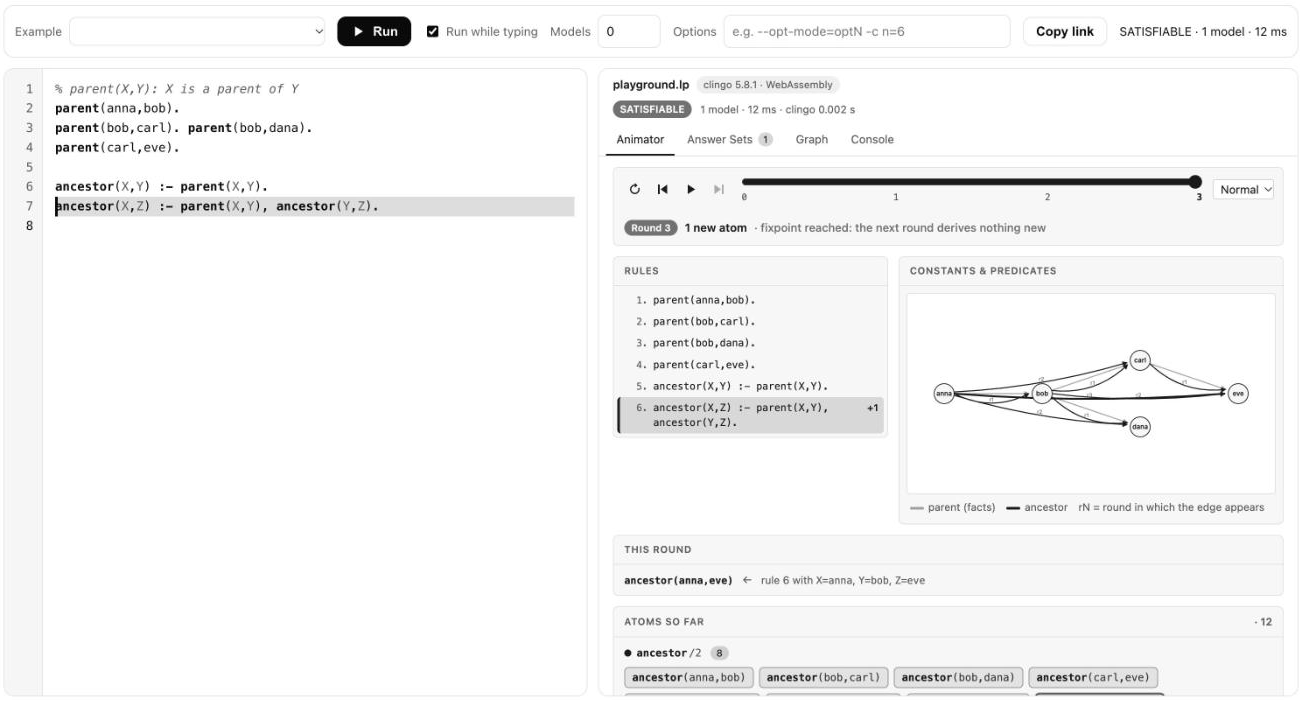
ASP Studio shows the answer sets of an [Answer Set Programming](https://potassco.org/) program, draws them as a graph, and steps through how a recursive program reaches its result. It works in Jupyter, in VS Code notebooks and from the command line. It uses the clingo Python API and shares its visualizer with the [ASP Studio VS Code extension](https://github.com/yakupbulbul/asp-vscode).
|
|
33
37
|
|
|
34
|
-
|
|
38
|
+
[Playground](https://yakupbulbul.github.io/asp-vscode/playground.html) · [Documentation](https://yakupbulbul.github.io/asp-vscode/docs.html) · [Source](https://github.com/yakupbulbul/asp-vscode) · [Issues](https://github.com/yakupbulbul/asp-vscode/issues)
|
|
39
|
+
|
|
40
|
+
|
|
35
41
|
|
|
36
42
|
```bash
|
|
37
43
|
pip install "asp-studio[notebook]" # Python 3.9 or newer
|
|
@@ -59,7 +65,7 @@ Cell options:
|
|
|
59
65
|
| Option | Meaning |
|
|
60
66
|
|---|---|
|
|
61
67
|
| `-n 5`, `--models 5` | At most 5 answer sets (0 means all). |
|
|
62
|
-
| `-o "--opt-mode=optN -c n=6"` | Extra clingo options. |
|
|
68
|
+
| `-o "--opt-mode=optN -c n=6"` | Extra clingo options. A value that starts with a dash is fine. |
|
|
63
69
|
| `-t 20` | Timeout in seconds. The default is 10. |
|
|
64
70
|
| `--tab answers` | First tab to show: `animator`, `answers`, `graph` or `console`. |
|
|
65
71
|
| `--theme dark` | `auto` (default), `light` or `dark`. Inside VS Code the editor theme is used. |
|
|
@@ -79,17 +85,37 @@ res # as the last line of a cell: shows the visualizer
|
|
|
79
85
|
asp.show(res, tab="graph")
|
|
80
86
|
```
|
|
81
87
|
|
|
82
|
-
`solve` takes ASP text, a `pathlib.Path`, or a list of those, which are joined in order. A broken program does not raise: check `res.ok` and `res.error`. With `#minimize` or `#maximize` and a finished search, only the optimal models are kept, and their costs are in `res.costs`.
|
|
88
|
+
`solve` takes ASP text, a `pathlib.Path`, a `(name, text)` pair, or a list of those, which are joined in order. A broken program does not raise: check `res.ok` and `res.error`. Diagnostics carry the name of the file they came from. With `#minimize` or `#maximize` and a finished search, only the optimal models are kept, and their costs are in `res.costs`.
|
|
89
|
+
|
|
90
|
+
| Attribute | Meaning |
|
|
91
|
+
|---|---|
|
|
92
|
+
| `res.ok`, `res.error` | Whether the program ran, and why not. |
|
|
93
|
+
| `res.result` | `SATISFIABLE`, `UNSATISFIABLE`, `OPTIMUM FOUND` or `UNKNOWN`. |
|
|
94
|
+
| `res.models`, `res.costs` | The answer sets as lists of atom strings, and their costs. |
|
|
95
|
+
| `res.more` | True if you limited the models and more exist. |
|
|
96
|
+
| `res.diagnostics` | `Diagnostic(file, line, col, severity, message)` entries. |
|
|
97
|
+
| `res.ms`, `res.time` | Wall-clock milliseconds, and clingo's own total time. |
|
|
83
98
|
|
|
84
99
|
## Command line
|
|
85
100
|
|
|
86
101
|
```bash
|
|
87
102
|
asp-studio program.lp --open # writes program.html and opens it
|
|
88
103
|
asp-studio instance.lp encoding.lp -n 3 # several files are joined in order
|
|
89
|
-
|
|
104
|
+
cat program.lp | asp-studio - --out report.html # read standard input
|
|
105
|
+
asp-studio program.lp -o --opt-mode=optN # extra clingo options
|
|
106
|
+
asp-studio --version
|
|
90
107
|
```
|
|
91
108
|
|
|
92
|
-
|
|
109
|
+
| Option | Meaning |
|
|
110
|
+
|---|---|
|
|
111
|
+
| `-n`, `--models` | At most this many answer sets (0 means all). |
|
|
112
|
+
| `-o`, `--options` | Extra clingo options. |
|
|
113
|
+
| `-t`, `--timeout` | Timeout in seconds. The default is 10. |
|
|
114
|
+
| `--out` | Output file, or a directory. The default is `<first file>.html`. |
|
|
115
|
+
| `--tab`, `--theme` | First tab and color theme of the report. |
|
|
116
|
+
| `--open` | Open the report in your browser. |
|
|
117
|
+
|
|
118
|
+
The exit code is 0 when the program ran, 1 when it has an error (positions print as `file:line:col`) and 2 for bad arguments or unreadable input. `python -m asp_studio` does the same without the script on `PATH`.
|
|
93
119
|
|
|
94
120
|
## Notes
|
|
95
121
|
|
|
@@ -1,8 +1,14 @@
|
|
|
1
1
|
# ASP Studio for Python
|
|
2
2
|
|
|
3
|
+
[](https://pypi.org/project/asp-studio/)
|
|
4
|
+
[](https://pypi.org/project/asp-studio/)
|
|
5
|
+
[](https://github.com/yakupbulbul/asp-vscode/blob/main/LICENSE)
|
|
6
|
+
|
|
3
7
|
ASP Studio shows the answer sets of an [Answer Set Programming](https://potassco.org/) program, draws them as a graph, and steps through how a recursive program reaches its result. It works in Jupyter, in VS Code notebooks and from the command line. It uses the clingo Python API and shares its visualizer with the [ASP Studio VS Code extension](https://github.com/yakupbulbul/asp-vscode).
|
|
4
8
|
|
|
5
|
-
|
|
9
|
+
[Playground](https://yakupbulbul.github.io/asp-vscode/playground.html) · [Documentation](https://yakupbulbul.github.io/asp-vscode/docs.html) · [Source](https://github.com/yakupbulbul/asp-vscode) · [Issues](https://github.com/yakupbulbul/asp-vscode/issues)
|
|
10
|
+
|
|
11
|
+

|
|
6
12
|
|
|
7
13
|
```bash
|
|
8
14
|
pip install "asp-studio[notebook]" # Python 3.9 or newer
|
|
@@ -30,7 +36,7 @@ Cell options:
|
|
|
30
36
|
| Option | Meaning |
|
|
31
37
|
|---|---|
|
|
32
38
|
| `-n 5`, `--models 5` | At most 5 answer sets (0 means all). |
|
|
33
|
-
| `-o "--opt-mode=optN -c n=6"` | Extra clingo options. |
|
|
39
|
+
| `-o "--opt-mode=optN -c n=6"` | Extra clingo options. A value that starts with a dash is fine. |
|
|
34
40
|
| `-t 20` | Timeout in seconds. The default is 10. |
|
|
35
41
|
| `--tab answers` | First tab to show: `animator`, `answers`, `graph` or `console`. |
|
|
36
42
|
| `--theme dark` | `auto` (default), `light` or `dark`. Inside VS Code the editor theme is used. |
|
|
@@ -50,17 +56,37 @@ res # as the last line of a cell: shows the visualizer
|
|
|
50
56
|
asp.show(res, tab="graph")
|
|
51
57
|
```
|
|
52
58
|
|
|
53
|
-
`solve` takes ASP text, a `pathlib.Path`, or a list of those, which are joined in order. A broken program does not raise: check `res.ok` and `res.error`. With `#minimize` or `#maximize` and a finished search, only the optimal models are kept, and their costs are in `res.costs`.
|
|
59
|
+
`solve` takes ASP text, a `pathlib.Path`, a `(name, text)` pair, or a list of those, which are joined in order. A broken program does not raise: check `res.ok` and `res.error`. Diagnostics carry the name of the file they came from. With `#minimize` or `#maximize` and a finished search, only the optimal models are kept, and their costs are in `res.costs`.
|
|
60
|
+
|
|
61
|
+
| Attribute | Meaning |
|
|
62
|
+
|---|---|
|
|
63
|
+
| `res.ok`, `res.error` | Whether the program ran, and why not. |
|
|
64
|
+
| `res.result` | `SATISFIABLE`, `UNSATISFIABLE`, `OPTIMUM FOUND` or `UNKNOWN`. |
|
|
65
|
+
| `res.models`, `res.costs` | The answer sets as lists of atom strings, and their costs. |
|
|
66
|
+
| `res.more` | True if you limited the models and more exist. |
|
|
67
|
+
| `res.diagnostics` | `Diagnostic(file, line, col, severity, message)` entries. |
|
|
68
|
+
| `res.ms`, `res.time` | Wall-clock milliseconds, and clingo's own total time. |
|
|
54
69
|
|
|
55
70
|
## Command line
|
|
56
71
|
|
|
57
72
|
```bash
|
|
58
73
|
asp-studio program.lp --open # writes program.html and opens it
|
|
59
74
|
asp-studio instance.lp encoding.lp -n 3 # several files are joined in order
|
|
60
|
-
|
|
75
|
+
cat program.lp | asp-studio - --out report.html # read standard input
|
|
76
|
+
asp-studio program.lp -o --opt-mode=optN # extra clingo options
|
|
77
|
+
asp-studio --version
|
|
61
78
|
```
|
|
62
79
|
|
|
63
|
-
|
|
80
|
+
| Option | Meaning |
|
|
81
|
+
|---|---|
|
|
82
|
+
| `-n`, `--models` | At most this many answer sets (0 means all). |
|
|
83
|
+
| `-o`, `--options` | Extra clingo options. |
|
|
84
|
+
| `-t`, `--timeout` | Timeout in seconds. The default is 10. |
|
|
85
|
+
| `--out` | Output file, or a directory. The default is `<first file>.html`. |
|
|
86
|
+
| `--tab`, `--theme` | First tab and color theme of the report. |
|
|
87
|
+
| `--open` | Open the report in your browser. |
|
|
88
|
+
|
|
89
|
+
The exit code is 0 when the program ran, 1 when it has an error (positions print as `file:line:col`) and 2 for bad arguments or unreadable input. `python -m asp_studio` does the same without the script on `PATH`.
|
|
64
90
|
|
|
65
91
|
## Notes
|
|
66
92
|
|
|
@@ -4,7 +4,7 @@ build-backend = "setuptools.build_meta"
|
|
|
4
4
|
|
|
5
5
|
[project]
|
|
6
6
|
name = "asp-studio"
|
|
7
|
-
version = "0.2.
|
|
7
|
+
version = "0.2.4"
|
|
8
8
|
description = "Answer sets, a graph and a step-by-step animator for Answer Set Programming, in Jupyter, VS Code notebooks and the command line."
|
|
9
9
|
readme = "README.md"
|
|
10
10
|
license = { text = "MIT" }
|
|
@@ -9,7 +9,7 @@ In a notebook: ``%load_ext asp_studio`` and start a cell with ``%%asp``.
|
|
|
9
9
|
from .solver import Diagnostic, Result, solve
|
|
10
10
|
from .render import iframe, page, show
|
|
11
11
|
|
|
12
|
-
__version__ = "0.2.
|
|
12
|
+
__version__ = "0.2.4"
|
|
13
13
|
__all__ = ["solve", "show", "Result", "Diagnostic", "page", "iframe", "load_ipython_extension", "__version__"]
|
|
14
14
|
|
|
15
15
|
|
|
@@ -7,6 +7,10 @@ import sys
|
|
|
7
7
|
import webbrowser
|
|
8
8
|
from typing import List, Optional
|
|
9
9
|
|
|
10
|
+
import clingo
|
|
11
|
+
|
|
12
|
+
from . import __version__
|
|
13
|
+
from ._args import join_option_values
|
|
10
14
|
from .render import page
|
|
11
15
|
from .solver import solve
|
|
12
16
|
|
|
@@ -18,7 +22,8 @@ def _fail(message: str, code: int = 2) -> int:
|
|
|
18
22
|
|
|
19
23
|
def main(argv: Optional[List[str]] = None) -> int:
|
|
20
24
|
ap = argparse.ArgumentParser(prog="asp-studio", description="Solve ASP files and write an interactive HTML report.")
|
|
21
|
-
ap.add_argument("
|
|
25
|
+
ap.add_argument("--version", action="version", version=f"asp-studio {__version__} (clingo {clingo.__version__})")
|
|
26
|
+
ap.add_argument("files", nargs="+", type=pathlib.Path, help=".lp files (joined in order), or - to read the program from standard input")
|
|
22
27
|
ap.add_argument("-n", "--models", type=int, default=0, help="max answer sets (0 = all)")
|
|
23
28
|
ap.add_argument("-o", "--options", default="", help='extra clingo options, e.g. "--opt-mode=optN"')
|
|
24
29
|
ap.add_argument("-t", "--timeout", type=float, default=10.0, help="seconds (default 10)")
|
|
@@ -26,13 +31,17 @@ def main(argv: Optional[List[str]] = None) -> int:
|
|
|
26
31
|
ap.add_argument("--tab", default="animator", choices=["animator", "answers", "graph", "console"])
|
|
27
32
|
ap.add_argument("--theme", default="auto", choices=["auto", "light", "dark"])
|
|
28
33
|
ap.add_argument("--open", action="store_true", help="open the report in the browser")
|
|
29
|
-
a = ap.parse_args(argv)
|
|
34
|
+
a = ap.parse_args(join_option_values(sys.argv[1:] if argv is None else list(argv)))
|
|
30
35
|
|
|
31
36
|
if a.models < 0:
|
|
32
37
|
return _fail("--models must be 0 or greater")
|
|
33
38
|
if a.timeout <= 0:
|
|
34
39
|
return _fail("--timeout must be greater than 0")
|
|
40
|
+
programs: list = []
|
|
35
41
|
for f in a.files:
|
|
42
|
+
if str(f) == "-":
|
|
43
|
+
programs.append(("stdin", sys.stdin.read()))
|
|
44
|
+
continue
|
|
36
45
|
if f.is_dir():
|
|
37
46
|
return _fail(f"{f} is a directory, not a file")
|
|
38
47
|
if not f.is_file():
|
|
@@ -43,12 +52,17 @@ def main(argv: Optional[List[str]] = None) -> int:
|
|
|
43
52
|
return _fail(f"{f} is not UTF-8 text ({e.reason} at byte {e.start}); is it an ASP file?")
|
|
44
53
|
except OSError as e:
|
|
45
54
|
return _fail(f"cannot read {f}: {e.strerror or e}")
|
|
46
|
-
|
|
55
|
+
programs.append(f)
|
|
56
|
+
res = solve(programs, models=a.models, options=a.options, timeout=a.timeout)
|
|
47
57
|
|
|
48
|
-
|
|
58
|
+
first = a.files[0]
|
|
59
|
+
default = pathlib.Path("asp-studio.html") if str(first) == "-" else first.with_suffix(".html")
|
|
60
|
+
out = a.out or default
|
|
61
|
+
if out.is_dir():
|
|
62
|
+
out = out / default.name
|
|
49
63
|
try:
|
|
50
64
|
out.parent.mkdir(parents=True, exist_ok=True)
|
|
51
|
-
out.write_text(page(res, tab=a.tab, theme=a.theme, max_height=100000, title=
|
|
65
|
+
out.write_text(page(res, tab=a.tab, theme=a.theme, max_height=100000, title="stdin" if str(first) == "-" else first.name), encoding="utf-8")
|
|
52
66
|
except OSError as e:
|
|
53
67
|
return _fail(f"cannot write {out}: {e.strerror or e}", 1)
|
|
54
68
|
|
|
@@ -0,0 +1,26 @@
|
|
|
1
|
+
"""Small helper shared by the command line and the %%asp magic."""
|
|
2
|
+
from __future__ import annotations
|
|
3
|
+
|
|
4
|
+
from typing import List, Sequence
|
|
5
|
+
|
|
6
|
+
# Flags of both parsers. A value that looks like one of these is never taken as the argument of -o.
|
|
7
|
+
_KNOWN = {"-n", "--models", "-t", "--timeout", "--out", "--tab", "--theme", "--height", "--open", "--version", "-h", "--help", "-o", "--options"}
|
|
8
|
+
|
|
9
|
+
|
|
10
|
+
def join_option_values(argv: Sequence[str]) -> List[str]:
|
|
11
|
+
"""Let ``-o --opt-mode=optN`` work: argparse refuses a value that starts with a dash.
|
|
12
|
+
|
|
13
|
+
``-o VALUE`` and ``--options VALUE`` become ``--options=VALUE`` unless VALUE is one of our own flags.
|
|
14
|
+
"""
|
|
15
|
+
out: List[str] = []
|
|
16
|
+
i = 0
|
|
17
|
+
while i < len(argv):
|
|
18
|
+
a = argv[i]
|
|
19
|
+
nxt = argv[i + 1] if i + 1 < len(argv) else None
|
|
20
|
+
if a in ("-o", "--options") and nxt is not None and nxt.startswith("-") and nxt.split("=", 1)[0] not in _KNOWN:
|
|
21
|
+
out.append("--options=" + nxt)
|
|
22
|
+
i += 2
|
|
23
|
+
continue
|
|
24
|
+
out.append(a)
|
|
25
|
+
i += 1
|
|
26
|
+
return out
|
|
@@ -7,6 +7,7 @@ from typing import Any
|
|
|
7
7
|
|
|
8
8
|
from IPython.core.magic import Magics, cell_magic, magics_class
|
|
9
9
|
|
|
10
|
+
from ._args import join_option_values
|
|
10
11
|
from .render import show
|
|
11
12
|
from .solver import solve
|
|
12
13
|
|
|
@@ -33,7 +34,7 @@ class AspMagics(Magics):
|
|
|
33
34
|
[--theme auto|light|dark] [--height PX] [--out NAME]
|
|
34
35
|
"""
|
|
35
36
|
try:
|
|
36
|
-
a = _parser().parse_args(shlex.split(line))
|
|
37
|
+
a = _parser().parse_args(join_option_values(shlex.split(line)))
|
|
37
38
|
except SystemExit:
|
|
38
39
|
print(self.asp.__doc__)
|
|
39
40
|
return None
|
|
@@ -9,7 +9,7 @@ from typing import Any, Dict, Iterable, List, Optional, Sequence, Tuple, Union
|
|
|
9
9
|
|
|
10
10
|
import clingo
|
|
11
11
|
|
|
12
|
-
Program = Union[str, Path]
|
|
12
|
+
Program = Union[str, Path, Tuple[str, str]]
|
|
13
13
|
|
|
14
14
|
_DIAG = re.compile(
|
|
15
15
|
r"^(?:<block>|<string>|-):(\d+):(\d+)(?:-(\d+))?(?::(\d+)(?:-(\d+))?)?: (error|warning|info): (.*)$"
|
|
@@ -103,13 +103,18 @@ class Result:
|
|
|
103
103
|
|
|
104
104
|
def _read(programs: Union[Program, Sequence[Program]]) -> Tuple[str, List[Tuple[str, int]]]:
|
|
105
105
|
"""Join the programs; also return (name, line count) per part so messages can be mapped back to their file."""
|
|
106
|
-
items: Iterable[Program] = [programs] if isinstance(programs, (str, Path)) else programs
|
|
106
|
+
items: Iterable[Program] = [programs] if isinstance(programs, (str, Path, tuple)) else programs
|
|
107
107
|
parts: List[str] = []
|
|
108
108
|
sources: List[Tuple[str, int]] = []
|
|
109
109
|
for p in items:
|
|
110
|
-
|
|
110
|
+
if isinstance(p, tuple): # (name, text)
|
|
111
|
+
name, text = p
|
|
112
|
+
elif isinstance(p, Path):
|
|
113
|
+
name, text = p.name, p.read_text(encoding="utf-8")
|
|
114
|
+
else:
|
|
115
|
+
name, text = "program", p
|
|
111
116
|
parts.append(text)
|
|
112
|
-
sources.append((
|
|
117
|
+
sources.append((name, len(text.split("\n"))))
|
|
113
118
|
return "\n".join(parts) + "\n", sources
|
|
114
119
|
|
|
115
120
|
|
|
@@ -152,7 +157,7 @@ def solve(
|
|
|
152
157
|
) -> Result:
|
|
153
158
|
"""Solve ``program`` and return a :class:`Result`.
|
|
154
159
|
|
|
155
|
-
``program`` is ASP text, a :class:`pathlib.Path`, or a list of those (joined in order).
|
|
160
|
+
``program`` is ASP text, a :class:`pathlib.Path`, a ``(name, text)`` pair, or a list of those (joined in order).
|
|
156
161
|
``models`` limits the number of answer sets (0 = all). ``options`` are extra clingo options,
|
|
157
162
|
either a list or one string such as ``"--opt-mode=optN -c n=6"``. ``timeout`` is in seconds.
|
|
158
163
|
With optimisation statements and a finished search only the optimal models are kept.
|
|
@@ -174,7 +174,7 @@
|
|
|
174
174
|
try {
|
|
175
175
|
const rules = parseProgram(text), rounds = evaluate(rules);
|
|
176
176
|
return {
|
|
177
|
-
rules: rules.map(r => ({ text: r.text, file, line: r.line + 1, fact: !r.body.length })),
|
|
177
|
+
rules: rules.map(r => ({ text: r.text, file, line: r.line + 1, endLine: r.endLine + 1, fact: !r.body.length })),
|
|
178
178
|
rounds: rounds.map(rd => rd.map(f => ({ pred: f.atom.pred, args: f.atom.args, atom: key(f.atom), rule: f.rule, subst: f.subst }))),
|
|
179
179
|
incomplete: rules.incomplete || "",
|
|
180
180
|
};
|
|
@@ -0,0 +1,49 @@
|
|
|
1
|
+
/* Fallback theme for hosts that do not provide --vscode-* variables (Jupyter, browsers). Black and white only.
|
|
2
|
+
Inside VS Code the real variables are used instead. Choose with <html data-theme="light|dark">; default follows the OS. */
|
|
3
|
+
:root, :root[data-theme="light"] {
|
|
4
|
+
--vscode-foreground: #1a1a1a;
|
|
5
|
+
--vscode-descriptionForeground: #5c5c5c;
|
|
6
|
+
--vscode-editor-background: #ffffff;
|
|
7
|
+
--vscode-editorWidget-background: #f7f7f7;
|
|
8
|
+
--vscode-widget-border: #e2e2e2;
|
|
9
|
+
--vscode-dropdown-background: #ffffff;
|
|
10
|
+
--vscode-dropdown-foreground: #1a1a1a;
|
|
11
|
+
--vscode-dropdown-border: #d4d4d4;
|
|
12
|
+
--vscode-font-family: -apple-system, BlinkMacSystemFont, "Segoe UI", Roboto, sans-serif;
|
|
13
|
+
--vscode-font-size: 13px;
|
|
14
|
+
--vscode-editor-font-family: ui-monospace, "SF Mono", Menlo, Consolas, monospace;
|
|
15
|
+
--vscode-editor-font-size: 12px;
|
|
16
|
+
color-scheme: light;
|
|
17
|
+
}
|
|
18
|
+
@media (prefers-color-scheme: dark) {
|
|
19
|
+
:root:not([data-theme="light"]) {
|
|
20
|
+
--vscode-foreground: #e8e8e8;
|
|
21
|
+
--vscode-descriptionForeground: #a0a0a0;
|
|
22
|
+
--vscode-editor-background: #0a0a0a;
|
|
23
|
+
--vscode-editorWidget-background: #121212;
|
|
24
|
+
--vscode-widget-border: #272727;
|
|
25
|
+
--vscode-dropdown-background: #151515;
|
|
26
|
+
--vscode-dropdown-foreground: #e8e8e8;
|
|
27
|
+
--vscode-dropdown-border: #2f2f2f;
|
|
28
|
+
--vscode-font-family: -apple-system, BlinkMacSystemFont, "Segoe UI", Roboto, sans-serif;
|
|
29
|
+
--vscode-font-size: 13px;
|
|
30
|
+
--vscode-editor-font-family: ui-monospace, "SF Mono", Menlo, Consolas, monospace;
|
|
31
|
+
--vscode-editor-font-size: 12px;
|
|
32
|
+
color-scheme: dark;
|
|
33
|
+
}
|
|
34
|
+
}
|
|
35
|
+
:root[data-theme="dark"] {
|
|
36
|
+
--vscode-foreground: #e8e8e8;
|
|
37
|
+
--vscode-descriptionForeground: #a0a0a0;
|
|
38
|
+
--vscode-editor-background: #0a0a0a;
|
|
39
|
+
--vscode-editorWidget-background: #121212;
|
|
40
|
+
--vscode-widget-border: #272727;
|
|
41
|
+
--vscode-dropdown-background: #151515;
|
|
42
|
+
--vscode-dropdown-foreground: #e8e8e8;
|
|
43
|
+
--vscode-dropdown-border: #2f2f2f;
|
|
44
|
+
--vscode-font-family: -apple-system, BlinkMacSystemFont, "Segoe UI", Roboto, sans-serif;
|
|
45
|
+
--vscode-font-size: 13px;
|
|
46
|
+
--vscode-editor-font-family: ui-monospace, "SF Mono", Menlo, Consolas, monospace;
|
|
47
|
+
--vscode-editor-font-size: 12px;
|
|
48
|
+
color-scheme: dark;
|
|
49
|
+
}
|
|
@@ -5,27 +5,27 @@
|
|
|
5
5
|
--card: var(--vscode-editorWidget-background, var(--vscode-sideBar-background, #252526));
|
|
6
6
|
--soft: color-mix(in srgb, var(--fg) 7%, transparent);
|
|
7
7
|
--border: var(--vscode-widget-border, var(--vscode-panel-border, color-mix(in srgb, var(--fg) 18%, transparent)));
|
|
8
|
-
--accent: var(--
|
|
9
|
-
--ok: var(--
|
|
10
|
-
--bad: var(--
|
|
11
|
-
--warn: var(--
|
|
12
|
-
--new: var(--
|
|
8
|
+
--accent: var(--fg);
|
|
9
|
+
--ok: color-mix(in srgb, var(--fg) 62%, var(--bg));
|
|
10
|
+
--bad: var(--fg);
|
|
11
|
+
--warn: color-mix(in srgb, var(--fg) 72%, var(--bg));
|
|
12
|
+
--new: var(--fg);
|
|
13
13
|
--base: color-mix(in srgb, var(--fg) 40%, transparent);
|
|
14
14
|
--mono: var(--vscode-editor-font-family, ui-monospace, Menlo, Consolas, monospace);
|
|
15
|
-
--c0: var(--
|
|
16
|
-
--c1: var(--
|
|
17
|
-
--c2: var(--
|
|
18
|
-
--c3: var(--
|
|
19
|
-
--c4: var(--
|
|
20
|
-
--c5: var(--
|
|
15
|
+
--c0: var(--fg);
|
|
16
|
+
--c1: color-mix(in srgb, var(--fg) 58%, var(--bg));
|
|
17
|
+
--c2: color-mix(in srgb, var(--fg) 80%, var(--bg));
|
|
18
|
+
--c3: color-mix(in srgb, var(--fg) 40%, var(--bg));
|
|
19
|
+
--c4: color-mix(in srgb, var(--fg) 68%, var(--bg));
|
|
20
|
+
--c5: color-mix(in srgb, var(--fg) 50%, var(--bg));
|
|
21
21
|
--radius: 6px;
|
|
22
22
|
}
|
|
23
23
|
* { box-sizing: border-box; }
|
|
24
24
|
html, body { margin: 0; height: 100%; }
|
|
25
25
|
body { font-family: var(--vscode-font-family, system-ui, sans-serif); font-size: var(--vscode-font-size, 13px); color: var(--fg); background: var(--bg); line-height: 1.45; }
|
|
26
26
|
button, select, input { font: inherit; color: inherit; }
|
|
27
|
-
a { color: var(--
|
|
28
|
-
a:hover {
|
|
27
|
+
a { color: var(--fg); text-underline-offset: 2px; }
|
|
28
|
+
a:hover { text-decoration-thickness: 2px; }
|
|
29
29
|
code, pre, .mono { font-family: var(--mono); font-size: calc(var(--vscode-editor-font-size, 13px) - 0.5px); }
|
|
30
30
|
:focus-visible { outline: 1px solid var(--accent); outline-offset: 1px; }
|
|
31
31
|
|
|
@@ -39,17 +39,18 @@ code, pre, .mono { font-family: var(--mono); font-size: calc(var(--vscode-editor
|
|
|
39
39
|
.chip, .pill { display: inline-flex; align-items: center; gap: 5px; border-radius: 10px; padding: 1px 8px; font-size: 11.5px; line-height: 18px; white-space: nowrap; }
|
|
40
40
|
.chip { background: var(--soft); color: var(--muted); }
|
|
41
41
|
.chip.link { cursor: pointer; text-decoration: underline dotted; }
|
|
42
|
-
.pill { font-weight: 600; color:
|
|
43
|
-
.pill.sat { background:
|
|
44
|
-
.pill.unsat
|
|
45
|
-
.pill.
|
|
42
|
+
.pill { font-weight: 600; color: var(--bg); background: var(--muted); }
|
|
43
|
+
.pill.sat { background: var(--ok); }
|
|
44
|
+
.pill.unsat { background: transparent; color: var(--fg); box-shadow: inset 0 0 0 1.5px var(--fg); }
|
|
45
|
+
.pill.err { background: var(--fg); }
|
|
46
|
+
.pill.unk, .pill.busy { background: color-mix(in srgb, var(--fg) 35%, var(--bg)); color: var(--fg); }
|
|
46
47
|
.spacer { flex: 1; }
|
|
47
48
|
|
|
48
|
-
.btn { display: inline-flex; align-items: center; gap: 6px; border: 1px solid var(--
|
|
49
|
-
background: var(--
|
|
50
|
-
.btn:hover:not(:disabled) { background:
|
|
51
|
-
.btn.primary { background: var(--
|
|
52
|
-
.btn.primary:hover:not(:disabled) { background: var(--
|
|
49
|
+
.btn { display: inline-flex; align-items: center; gap: 6px; border: 1px solid var(--border); border-radius: 3px; padding: 3px 11px; cursor: pointer;
|
|
50
|
+
background: var(--soft); color: var(--fg); }
|
|
51
|
+
.btn:hover:not(:disabled) { background: color-mix(in srgb, var(--fg) 14%, transparent); }
|
|
52
|
+
.btn.primary { background: var(--fg); border-color: var(--fg); color: var(--bg); }
|
|
53
|
+
.btn.primary:hover:not(:disabled) { background: color-mix(in srgb, var(--fg) 85%, var(--bg)); }
|
|
53
54
|
.btn:disabled { opacity: .45; cursor: default; }
|
|
54
55
|
.icon-btn { display: inline-flex; align-items: center; justify-content: center; width: 28px; height: 28px; border: 0; border-radius: 4px; background: transparent; cursor: pointer; color: var(--fg); }
|
|
55
56
|
.icon-btn:hover:not(:disabled) { background: var(--vscode-toolbar-hoverBackground, var(--soft)); }
|
|
@@ -62,7 +63,7 @@ svg.i { width: 16px; height: 16px; fill: currentColor; flex: none; }
|
|
|
62
63
|
.tab { border: 0; background: transparent; padding: 7px 12px; cursor: pointer; color: var(--muted); border-bottom: 2px solid transparent; white-space: nowrap; display: inline-flex; gap: 6px; align-items: center; }
|
|
63
64
|
.tab:hover { color: var(--fg); }
|
|
64
65
|
.tab[aria-selected=true] { color: var(--fg); border-bottom-color: var(--accent); }
|
|
65
|
-
.count { background:
|
|
66
|
+
.count { background: color-mix(in srgb, var(--fg) 18%, transparent); color: var(--fg); border-radius: 9px; padding: 0 6px; font-size: 11px; line-height: 16px; }
|
|
66
67
|
|
|
67
68
|
/* ---------- content ---------- */
|
|
68
69
|
main { padding: 16px; flex: 1; }
|
|
@@ -89,8 +90,8 @@ main { padding: 16px; flex: 1; }
|
|
|
89
90
|
.ticks span.cur { color: var(--fg); font-weight: 600; }
|
|
90
91
|
.transport select { background: var(--vscode-dropdown-background, var(--card)); color: var(--vscode-dropdown-foreground, var(--fg)); border: 1px solid var(--vscode-dropdown-border, var(--border)); border-radius: 3px; padding: 2px 4px; }
|
|
91
92
|
.status-line { display: flex; align-items: center; gap: 8px; padding: 10px 12px; font-weight: 600; flex-wrap: wrap; }
|
|
92
|
-
.tag { font-size: 11px; font-weight: 600; background: var(--
|
|
93
|
-
.tag.done { background:
|
|
93
|
+
.tag { font-size: 11px; font-weight: 600; background: var(--fg); color: var(--bg); border-radius: 9px; padding: 0 8px; line-height: 18px; }
|
|
94
|
+
.tag.done { background: var(--ok); }
|
|
94
95
|
.fix { color: var(--ok); font-weight: 500; }
|
|
95
96
|
|
|
96
97
|
/* ---------- rules list ---------- */
|
|
@@ -115,7 +116,7 @@ main { padding: 16px; flex: 1; }
|
|
|
115
116
|
.predgroup .dot { width: 8px; height: 8px; border-radius: 50%; background: var(--pc); flex: none; }
|
|
116
117
|
.predgroup .pname { font: 600 12px var(--mono); color: var(--fg); }
|
|
117
118
|
.predgroup .parity { font: 12px var(--mono); color: var(--muted); margin-left: -4px; }
|
|
118
|
-
.predgroup .pcount { margin-left: 4px; background:
|
|
119
|
+
.predgroup .pcount { margin-left: 4px; background: color-mix(in srgb, var(--fg) 18%, transparent); color: var(--fg); border-radius: 9px; padding: 0 7px; font-size: 11px; line-height: 16px; }
|
|
119
120
|
.chips { display: flex; flex-wrap: wrap; gap: 6px; }
|
|
120
121
|
.dot { width: 9px; height: 9px; border-radius: 50%; display: inline-block; }
|
|
121
122
|
.atom-chip { display: inline-flex; align-items: baseline; font: 12px/20px var(--mono); border: 1px solid color-mix(in srgb, var(--pc, var(--accent)) 38%, transparent);
|
|
@@ -1,6 +1,6 @@
|
|
|
1
1
|
Metadata-Version: 2.4
|
|
2
2
|
Name: asp-studio
|
|
3
|
-
Version: 0.2.
|
|
3
|
+
Version: 0.2.4
|
|
4
4
|
Summary: Answer sets, a graph and a step-by-step animator for Answer Set Programming, in Jupyter, VS Code notebooks and the command line.
|
|
5
5
|
Author: yakupbulbul
|
|
6
6
|
License: MIT
|
|
@@ -29,9 +29,15 @@ Dynamic: license-file
|
|
|
29
29
|
|
|
30
30
|
# ASP Studio for Python
|
|
31
31
|
|
|
32
|
+
[](https://pypi.org/project/asp-studio/)
|
|
33
|
+
[](https://pypi.org/project/asp-studio/)
|
|
34
|
+
[](https://github.com/yakupbulbul/asp-vscode/blob/main/LICENSE)
|
|
35
|
+
|
|
32
36
|
ASP Studio shows the answer sets of an [Answer Set Programming](https://potassco.org/) program, draws them as a graph, and steps through how a recursive program reaches its result. It works in Jupyter, in VS Code notebooks and from the command line. It uses the clingo Python API and shares its visualizer with the [ASP Studio VS Code extension](https://github.com/yakupbulbul/asp-vscode).
|
|
33
37
|
|
|
34
|
-
|
|
38
|
+
[Playground](https://yakupbulbul.github.io/asp-vscode/playground.html) · [Documentation](https://yakupbulbul.github.io/asp-vscode/docs.html) · [Source](https://github.com/yakupbulbul/asp-vscode) · [Issues](https://github.com/yakupbulbul/asp-vscode/issues)
|
|
39
|
+
|
|
40
|
+

|
|
35
41
|
|
|
36
42
|
```bash
|
|
37
43
|
pip install "asp-studio[notebook]" # Python 3.9 or newer
|
|
@@ -59,7 +65,7 @@ Cell options:
|
|
|
59
65
|
| Option | Meaning |
|
|
60
66
|
|---|---|
|
|
61
67
|
| `-n 5`, `--models 5` | At most 5 answer sets (0 means all). |
|
|
62
|
-
| `-o "--opt-mode=optN -c n=6"` | Extra clingo options. |
|
|
68
|
+
| `-o "--opt-mode=optN -c n=6"` | Extra clingo options. A value that starts with a dash is fine. |
|
|
63
69
|
| `-t 20` | Timeout in seconds. The default is 10. |
|
|
64
70
|
| `--tab answers` | First tab to show: `animator`, `answers`, `graph` or `console`. |
|
|
65
71
|
| `--theme dark` | `auto` (default), `light` or `dark`. Inside VS Code the editor theme is used. |
|
|
@@ -79,17 +85,37 @@ res # as the last line of a cell: shows the visualizer
|
|
|
79
85
|
asp.show(res, tab="graph")
|
|
80
86
|
```
|
|
81
87
|
|
|
82
|
-
`solve` takes ASP text, a `pathlib.Path`, or a list of those, which are joined in order. A broken program does not raise: check `res.ok` and `res.error`. With `#minimize` or `#maximize` and a finished search, only the optimal models are kept, and their costs are in `res.costs`.
|
|
88
|
+
`solve` takes ASP text, a `pathlib.Path`, a `(name, text)` pair, or a list of those, which are joined in order. A broken program does not raise: check `res.ok` and `res.error`. Diagnostics carry the name of the file they came from. With `#minimize` or `#maximize` and a finished search, only the optimal models are kept, and their costs are in `res.costs`.
|
|
89
|
+
|
|
90
|
+
| Attribute | Meaning |
|
|
91
|
+
|---|---|
|
|
92
|
+
| `res.ok`, `res.error` | Whether the program ran, and why not. |
|
|
93
|
+
| `res.result` | `SATISFIABLE`, `UNSATISFIABLE`, `OPTIMUM FOUND` or `UNKNOWN`. |
|
|
94
|
+
| `res.models`, `res.costs` | The answer sets as lists of atom strings, and their costs. |
|
|
95
|
+
| `res.more` | True if you limited the models and more exist. |
|
|
96
|
+
| `res.diagnostics` | `Diagnostic(file, line, col, severity, message)` entries. |
|
|
97
|
+
| `res.ms`, `res.time` | Wall-clock milliseconds, and clingo's own total time. |
|
|
83
98
|
|
|
84
99
|
## Command line
|
|
85
100
|
|
|
86
101
|
```bash
|
|
87
102
|
asp-studio program.lp --open # writes program.html and opens it
|
|
88
103
|
asp-studio instance.lp encoding.lp -n 3 # several files are joined in order
|
|
89
|
-
|
|
104
|
+
cat program.lp | asp-studio - --out report.html # read standard input
|
|
105
|
+
asp-studio program.lp -o --opt-mode=optN # extra clingo options
|
|
106
|
+
asp-studio --version
|
|
90
107
|
```
|
|
91
108
|
|
|
92
|
-
|
|
109
|
+
| Option | Meaning |
|
|
110
|
+
|---|---|
|
|
111
|
+
| `-n`, `--models` | At most this many answer sets (0 means all). |
|
|
112
|
+
| `-o`, `--options` | Extra clingo options. |
|
|
113
|
+
| `-t`, `--timeout` | Timeout in seconds. The default is 10. |
|
|
114
|
+
| `--out` | Output file, or a directory. The default is `<first file>.html`. |
|
|
115
|
+
| `--tab`, `--theme` | First tab and color theme of the report. |
|
|
116
|
+
| `--open` | Open the report in your browser. |
|
|
117
|
+
|
|
118
|
+
The exit code is 0 when the program ran, 1 when it has an error (positions print as `file:line:col`) and 2 for bad arguments or unreadable input. `python -m asp_studio` does the same without the script on `PATH`.
|
|
93
119
|
|
|
94
120
|
## Notes
|
|
95
121
|
|
|
@@ -54,3 +54,45 @@ def test_cli_unwritable_output(tmp_path, capsys):
|
|
|
54
54
|
blocker.write_text("x")
|
|
55
55
|
assert main([str(lp), "--out", str(blocker / "o.html")]) == 1
|
|
56
56
|
assert "cannot write" in capsys.readouterr().err
|
|
57
|
+
|
|
58
|
+
|
|
59
|
+
def test_cli_option_value_may_start_with_dashes(tmp_path):
|
|
60
|
+
lp = tmp_path / "p.lp"
|
|
61
|
+
lp.write_text("{a}.\n#minimize { 1,a : a }.\n")
|
|
62
|
+
assert main([str(lp), "-o", "--opt-mode=optN", "-n", "1"]) == 0
|
|
63
|
+
assert main([str(lp), "--options", "--opt-mode=optN"]) == 0
|
|
64
|
+
assert main([str(lp), "-o", "--opt-mode=optN -c n=2"]) == 0
|
|
65
|
+
|
|
66
|
+
|
|
67
|
+
def test_cli_version(capsys):
|
|
68
|
+
import pytest
|
|
69
|
+
with pytest.raises(SystemExit) as e:
|
|
70
|
+
main(["--version"])
|
|
71
|
+
assert e.value.code == 0
|
|
72
|
+
assert "asp-studio" in capsys.readouterr().out
|
|
73
|
+
|
|
74
|
+
|
|
75
|
+
def test_cli_reads_standard_input(tmp_path, monkeypatch, capsys):
|
|
76
|
+
import io
|
|
77
|
+
monkeypatch.chdir(tmp_path)
|
|
78
|
+
monkeypatch.setattr("sys.stdin", io.StringIO("a :- not b.\nb :- not a.\n"))
|
|
79
|
+
assert main(["-"]) == 0
|
|
80
|
+
assert (tmp_path / "asp-studio.html").exists()
|
|
81
|
+
assert "2 model" in capsys.readouterr().out
|
|
82
|
+
|
|
83
|
+
|
|
84
|
+
def test_cli_reports_errors_in_stdin_by_name(monkeypatch, tmp_path, capsys):
|
|
85
|
+
import io
|
|
86
|
+
monkeypatch.chdir(tmp_path)
|
|
87
|
+
monkeypatch.setattr("sys.stdin", io.StringIO("b :- c(.\n"))
|
|
88
|
+
assert main(["-"]) == 1
|
|
89
|
+
assert "stdin:1:" in capsys.readouterr().err
|
|
90
|
+
|
|
91
|
+
|
|
92
|
+
def test_cli_out_may_be_a_directory(tmp_path):
|
|
93
|
+
lp = tmp_path / "p.lp"
|
|
94
|
+
lp.write_text("a.")
|
|
95
|
+
out = tmp_path / "reports"
|
|
96
|
+
out.mkdir()
|
|
97
|
+
assert main([str(lp), "--out", str(out)]) == 0
|
|
98
|
+
assert (out / "p.html").exists()
|
|
@@ -29,3 +29,10 @@ def test_cell_magic_reports_errors_inside_the_visualizer(ip):
|
|
|
29
29
|
def test_bad_arguments_print_usage(ip, capsys):
|
|
30
30
|
ip.run_cell_magic("asp", "--no-such-flag", "a.")
|
|
31
31
|
assert "%%asp" in capsys.readouterr().out
|
|
32
|
+
|
|
33
|
+
|
|
34
|
+
def test_magic_option_value_may_start_with_dashes(ip):
|
|
35
|
+
with capture_output() as cap:
|
|
36
|
+
ip.run_cell_magic("asp", '-o "--opt-mode=optN" --out opt', "{a}.\n#minimize { 1,a : a }.")
|
|
37
|
+
assert "<iframe" in cap.outputs[0].data["text/html"]
|
|
38
|
+
assert ip.user_ns["opt"].ok
|
|
@@ -87,3 +87,9 @@ def test_multi_file_diagnostics_point_at_the_right_file(tmp_path):
|
|
|
87
87
|
d = r.diagnostics[0]
|
|
88
88
|
assert (d.file, d.line, d.severity) == ("encoding.lp", 3, "error")
|
|
89
89
|
assert r.to_state()["diagnostics"][0]["file"] == "encoding.lp"
|
|
90
|
+
|
|
91
|
+
|
|
92
|
+
def test_name_text_pairs_name_their_diagnostics():
|
|
93
|
+
r = asp.solve([("instance.lp", "a.\n"), ("encoding.lp", "b :- c(.\n")])
|
|
94
|
+
assert (r.diagnostics[0].file, r.diagnostics[0].line) == ("encoding.lp", 1)
|
|
95
|
+
assert asp.solve(("one.lp", "a.")).ok
|
|
@@ -1,100 +0,0 @@
|
|
|
1
|
-
/* Fallback theme for hosts that do not provide --vscode-* variables (Jupyter, browsers).
|
|
2
|
-
Inside VS Code the real variables are used instead. Choose with <html data-theme="light|dark">; default follows the OS. */
|
|
3
|
-
:root, :root[data-theme="light"] {
|
|
4
|
-
--vscode-foreground:#3b3b3b;
|
|
5
|
-
--vscode-descriptionForeground:#717171;
|
|
6
|
-
--vscode-editor-background:#ffffff;
|
|
7
|
-
--vscode-editorWidget-background:#f8f8f8;
|
|
8
|
-
--vscode-widget-border:#c8c8c8;
|
|
9
|
-
--vscode-focusBorder:#005fb8;
|
|
10
|
-
--vscode-button-background:#005fb8;
|
|
11
|
-
--vscode-button-foreground:#fff;
|
|
12
|
-
--vscode-button-hoverBackground:#0258a8;
|
|
13
|
-
--vscode-button-secondaryBackground:#e5e5e5;
|
|
14
|
-
--vscode-button-secondaryForeground:#3b3b3b;
|
|
15
|
-
--vscode-badge-background:#cccccc;
|
|
16
|
-
--vscode-badge-foreground:#3b3b3b;
|
|
17
|
-
--vscode-charts-blue:#1a85ff;
|
|
18
|
-
--vscode-charts-orange:#d18616;
|
|
19
|
-
--vscode-charts-green:#388a34;
|
|
20
|
-
--vscode-charts-purple:#652d90;
|
|
21
|
-
--vscode-charts-red:#e51400;
|
|
22
|
-
--vscode-charts-yellow:#bf8803;
|
|
23
|
-
--vscode-testing-iconPassed:#388a34;
|
|
24
|
-
--vscode-testing-iconFailed:#f14c4c;
|
|
25
|
-
--vscode-editorWarning-foreground:#bf8803;
|
|
26
|
-
--vscode-dropdown-background:#fff;
|
|
27
|
-
--vscode-dropdown-foreground:#3b3b3b;
|
|
28
|
-
--vscode-dropdown-border:#cecece;
|
|
29
|
-
--vscode-font-family:-apple-system,BlinkMacSystemFont,'Segoe UI',sans-serif;
|
|
30
|
-
--vscode-font-size:13px;
|
|
31
|
-
--vscode-editor-font-family:Menlo,Monaco,monospace;
|
|
32
|
-
--vscode-editor-font-size:12px;
|
|
33
|
-
color-scheme: light;
|
|
34
|
-
}
|
|
35
|
-
@media (prefers-color-scheme: dark) {
|
|
36
|
-
:root:not([data-theme="light"]) {
|
|
37
|
-
--vscode-foreground:#cccccc;
|
|
38
|
-
--vscode-descriptionForeground:#9d9d9d;
|
|
39
|
-
--vscode-editor-background:#1f1f1f;
|
|
40
|
-
--vscode-editorWidget-background:#202020;
|
|
41
|
-
--vscode-widget-border:#2b2b2b;
|
|
42
|
-
--vscode-focusBorder:#0078d4;
|
|
43
|
-
--vscode-button-background:#0078d4;
|
|
44
|
-
--vscode-button-foreground:#fff;
|
|
45
|
-
--vscode-button-hoverBackground:#026ec1;
|
|
46
|
-
--vscode-button-secondaryBackground:#313131;
|
|
47
|
-
--vscode-button-secondaryForeground:#cccccc;
|
|
48
|
-
--vscode-badge-background:#616161;
|
|
49
|
-
--vscode-badge-foreground:#f8f8f8;
|
|
50
|
-
--vscode-charts-blue:#3794ff;
|
|
51
|
-
--vscode-charts-orange:#d18616;
|
|
52
|
-
--vscode-charts-green:#89d185;
|
|
53
|
-
--vscode-charts-purple:#b180d7;
|
|
54
|
-
--vscode-charts-red:#f14c4c;
|
|
55
|
-
--vscode-charts-yellow:#cca700;
|
|
56
|
-
--vscode-testing-iconPassed:#73c991;
|
|
57
|
-
--vscode-testing-iconFailed:#f14c4c;
|
|
58
|
-
--vscode-editorWarning-foreground:#cca700;
|
|
59
|
-
--vscode-dropdown-background:#313131;
|
|
60
|
-
--vscode-dropdown-foreground:#ccc;
|
|
61
|
-
--vscode-dropdown-border:#3c3c3c;
|
|
62
|
-
--vscode-font-family:-apple-system,BlinkMacSystemFont,'Segoe UI',sans-serif;
|
|
63
|
-
--vscode-font-size:13px;
|
|
64
|
-
--vscode-editor-font-family:Menlo,Monaco,monospace;
|
|
65
|
-
--vscode-editor-font-size:12px;
|
|
66
|
-
color-scheme: dark;
|
|
67
|
-
}
|
|
68
|
-
}
|
|
69
|
-
:root[data-theme="dark"] {
|
|
70
|
-
--vscode-foreground:#cccccc;
|
|
71
|
-
--vscode-descriptionForeground:#9d9d9d;
|
|
72
|
-
--vscode-editor-background:#1f1f1f;
|
|
73
|
-
--vscode-editorWidget-background:#202020;
|
|
74
|
-
--vscode-widget-border:#2b2b2b;
|
|
75
|
-
--vscode-focusBorder:#0078d4;
|
|
76
|
-
--vscode-button-background:#0078d4;
|
|
77
|
-
--vscode-button-foreground:#fff;
|
|
78
|
-
--vscode-button-hoverBackground:#026ec1;
|
|
79
|
-
--vscode-button-secondaryBackground:#313131;
|
|
80
|
-
--vscode-button-secondaryForeground:#cccccc;
|
|
81
|
-
--vscode-badge-background:#616161;
|
|
82
|
-
--vscode-badge-foreground:#f8f8f8;
|
|
83
|
-
--vscode-charts-blue:#3794ff;
|
|
84
|
-
--vscode-charts-orange:#d18616;
|
|
85
|
-
--vscode-charts-green:#89d185;
|
|
86
|
-
--vscode-charts-purple:#b180d7;
|
|
87
|
-
--vscode-charts-red:#f14c4c;
|
|
88
|
-
--vscode-charts-yellow:#cca700;
|
|
89
|
-
--vscode-testing-iconPassed:#73c991;
|
|
90
|
-
--vscode-testing-iconFailed:#f14c4c;
|
|
91
|
-
--vscode-editorWarning-foreground:#cca700;
|
|
92
|
-
--vscode-dropdown-background:#313131;
|
|
93
|
-
--vscode-dropdown-foreground:#ccc;
|
|
94
|
-
--vscode-dropdown-border:#3c3c3c;
|
|
95
|
-
--vscode-font-family:-apple-system,BlinkMacSystemFont,'Segoe UI',sans-serif;
|
|
96
|
-
--vscode-font-size:13px;
|
|
97
|
-
--vscode-editor-font-family:Menlo,Monaco,monospace;
|
|
98
|
-
--vscode-editor-font-size:12px;
|
|
99
|
-
color-scheme: dark;
|
|
100
|
-
}
|
|
File without changes
|
|
File without changes
|
|
File without changes
|
|
File without changes
|
|
File without changes
|
|
File without changes
|
|
File without changes
|
|
File without changes
|
|
File without changes
|
|
File without changes
|
|
File without changes
|