articutapi 1.0.6__tar.gz
This diff represents the content of publicly available package versions that have been released to one of the supported registries. The information contained in this diff is provided for informational purposes only and reflects changes between package versions as they appear in their respective public registries.
- ArticutAPI-1.0.6/ArticutAPI.egg-info/PKG-INFO +422 -0
- ArticutAPI-1.0.6/ArticutAPI.egg-info/SOURCES.txt +12 -0
- ArticutAPI-1.0.6/ArticutAPI.egg-info/dependency_links.txt +1 -0
- ArticutAPI-1.0.6/ArticutAPI.egg-info/requires.txt +1 -0
- ArticutAPI-1.0.6/ArticutAPI.egg-info/top_level.txt +1 -0
- ArticutAPI-1.0.6/MANIFEST.in +1 -0
- ArticutAPI-1.0.6/PKG-INFO +422 -0
- ArticutAPI-1.0.6/README.md +391 -0
- ArticutAPI-1.0.6/setup.cfg +4 -0
- ArticutAPI-1.0.6/setup.py +42 -0
- ArticutAPI-1.0.6/src/ArticutAPI.py +498 -0
- ArticutAPI-1.0.6/src/MP_ArticutAPI.py +387 -0
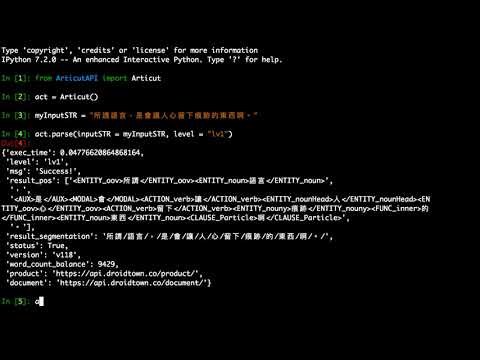
- ArticutAPI-1.0.6/src/WS_ArticutAPI.py +393 -0
- ArticutAPI-1.0.6/src/__init__.py +3 -0
|
@@ -0,0 +1,422 @@
|
|
|
1
|
+
Metadata-Version: 2.1
|
|
2
|
+
Name: ArticutAPI
|
|
3
|
+
Version: 1.0.6
|
|
4
|
+
Summary: Articut NLP system provides not only finest results on Chinese word segmentaion (CWS), Part-of-Speech tagging (POS) and Named Entity Recogintion tagging (NER), but also the fastest online API service in the NLP industry.
|
|
5
|
+
Home-page: https://github.com/Droidtown/ArticutAPI
|
|
6
|
+
Author: Droidtown Linguistic Tech. Co. Ltd.
|
|
7
|
+
Author-email: info@droidtown.co
|
|
8
|
+
License: UNKNOWN
|
|
9
|
+
Description: # Articut 中文斷詞暨詞性標記服務
|
|
10
|
+
## [依語法結構計算,而非統計方法的中文斷詞。]
|
|
11
|
+
|
|
12
|
+
### [Articut API Website](https://api.droidtown.co/)
|
|
13
|
+
### [Document](https://api.droidtown.co/ArticutAPI/document/)
|
|
14
|
+
### [](https://youtu.be/AnvdKmVLlcA "Articut Demo")
|
|
15
|
+
|
|
16
|
+
## Benchmark
|
|
17
|
+
### 設計目標
|
|
18
|
+
名稱 | ArticutAPI | MP_ArticutAPI | WS_ArticutAPI |
|
|
19
|
+
:----------:|:-------------------:|:-------------------:|:------------------:|
|
|
20
|
+
產品 | Online / Docker | Docker | Docker |
|
|
21
|
+
技術 | HTTP Request | MultiProcessing | WebSocket |
|
|
22
|
+
特色 | 簡單易用 | 批次處理 | 即時處理 |
|
|
23
|
+
適用情景 | 任何 | 文本分析 | 聊天機器人 |
|
|
24
|
+
|
|
25
|
+
### 處理速度
|
|
26
|
+
名稱 | ArticutAPI | MP_ArticutAPI | WS_ArticutAPI |
|
|
27
|
+
:----------:|-------------:|-------------------:|-------------------:|
|
|
28
|
+
時間 | 0.1252 秒 | 0.1206 秒 | 0.0677 秒 |
|
|
29
|
+
|
|
30
|
+
### 大量文本
|
|
31
|
+
句數 | ArticutAPI | MP_ArticutAPI | WS_ArticutAPI |
|
|
32
|
+
:----------:|--------------:|-------------------:|------------------:|
|
|
33
|
+
方法 | parse() | bulk_parse(20) | parse() |
|
|
34
|
+
1K | 155 秒 | 8 秒 | 18 秒 |
|
|
35
|
+
2K | 306 秒 | 14 秒 | 35 秒 |
|
|
36
|
+
3K | 455 秒 | 17 秒 | 43 秒 |
|
|
37
|
+
|
|
38
|
+
- 測試平台爲 4 核心 CPU 並使用 4 個 Process。
|
|
39
|
+
- `MP_ArticutAPI`使用 bulk_parse(bulkSize=20) 方法。
|
|
40
|
+
- `WS_ArticutAPI`使用 parse() 方法。
|
|
41
|
+
|
|
42
|
+
----------------------
|
|
43
|
+
|
|
44
|
+
# ArticutAPI
|
|
45
|
+
|
|
46
|
+
## 安裝方法
|
|
47
|
+
```sh
|
|
48
|
+
pip3 install ArticutAPI
|
|
49
|
+
```
|
|
50
|
+
|
|
51
|
+
## 說明文件
|
|
52
|
+
函數說明請參閱 Docs/index.html
|
|
53
|
+
|
|
54
|
+
## 使用方法
|
|
55
|
+
### Articut CWS (Chinese word segmentation)
|
|
56
|
+
```
|
|
57
|
+
from ArticutAPI import Articut
|
|
58
|
+
from pprint import pprint
|
|
59
|
+
|
|
60
|
+
articut = Articut()
|
|
61
|
+
inputSTR = "會被大家盯上,才證明你有實力。"
|
|
62
|
+
result = articut.parse(inputSTR)
|
|
63
|
+
pprint(result)
|
|
64
|
+
```
|
|
65
|
+
### 回傳結果
|
|
66
|
+
```
|
|
67
|
+
{"exec_time": 0.06723856925964355,
|
|
68
|
+
"level": "lv2",
|
|
69
|
+
"msg": "Success!",
|
|
70
|
+
|
|
71
|
+
"result_pos": ["<MODAL>會</MODAL><ACTION_lightVerb>被</ACTION_lightVerb><ENTITY_nouny>大家</ENTITY_nouny><ACTION_verb>盯上</ACTION_verb>",
|
|
72
|
+
",",
|
|
73
|
+
"<MODAL>才</MODAL><ACTION_verb>證明</ACTION_verb><ENTITY_pronoun>你</ENTITY_pronoun><ACTION_verb>有</ACTION_verb><ENTITY_noun>實力</ENTITY_noun>",
|
|
74
|
+
"。"],
|
|
75
|
+
"result_segmentation": "會/被/大家/盯上/,/才/證明/你/有/實力/。/",
|
|
76
|
+
"status": True,
|
|
77
|
+
"version": "v118",
|
|
78
|
+
"word_count_balance": 9985,
|
|
79
|
+
"product": "https://api.droidtown.co/product/",
|
|
80
|
+
"document": "https://api.droidtown.co/document/"
|
|
81
|
+
}
|
|
82
|
+
```
|
|
83
|
+
|
|
84
|
+
### 列出斷詞結果所有詞性標記的內容詞 ###
|
|
85
|
+
可以依需求找出「名詞」、「動詞」或是「形容詞」…等詞彙語意本身已經完整的詞彙。
|
|
86
|
+
```
|
|
87
|
+
inputSTR = "你計劃過地球人類補完計劃"
|
|
88
|
+
result = articut.parse(inputSTR, level="lv1")
|
|
89
|
+
pprint(result["result_pos"])
|
|
90
|
+
|
|
91
|
+
#列出所有的 content word.
|
|
92
|
+
contentWordLIST = articut.getContentWordLIST(result)
|
|
93
|
+
pprint(contentWordLIST)
|
|
94
|
+
|
|
95
|
+
#列出所有的 verb word. (動詞)
|
|
96
|
+
verbStemLIST = articut.getVerbStemLIST(result)
|
|
97
|
+
pprint(verbStemLIST)
|
|
98
|
+
|
|
99
|
+
#列出所有的 noun word. (名詞)
|
|
100
|
+
nounStemLIST = articut.getNounStemLIST(result)
|
|
101
|
+
pprint(nounStemLIST)
|
|
102
|
+
|
|
103
|
+
#列出所有的 location word. (地方名稱)
|
|
104
|
+
locationStemLIST = articut.getLocationStemLIST(result)
|
|
105
|
+
pprint(locationStemLIST)
|
|
106
|
+
```
|
|
107
|
+
|
|
108
|
+
### 回傳結果 ###
|
|
109
|
+
```
|
|
110
|
+
#result["result_pos"]
|
|
111
|
+
["<ENTITY_pronoun>你</ENTITY_pronoun><ACTION_verb>計劃</ACTION_verb><ASPECT>過</ASPECT><LOCATION>地球</LOCATION><ENTITY_oov>人類</ENTITY_oov><ACTION_verb>補完</ACTION_verb><ENTITY_nounHead>計劃</ENTITY_nounHead>"]
|
|
112
|
+
|
|
113
|
+
#列出所有的 content word.
|
|
114
|
+
[[(177, 179, "計劃"), (144, 146, "補完"), (116, 118, "人類"), (47, 49, "計劃")]]
|
|
115
|
+
|
|
116
|
+
#列出所有的 verb word. (動詞)
|
|
117
|
+
[[(144, 146, "補完"), (47, 49, "計劃")]]
|
|
118
|
+
|
|
119
|
+
#列出所有的 noun word. (名詞)
|
|
120
|
+
[[(177, 179, "計劃"), (116, 118, "人類")]]
|
|
121
|
+
|
|
122
|
+
#列出所有的 location word. (地方名稱)
|
|
123
|
+
[[(91, 93, "地球")]]
|
|
124
|
+
```
|
|
125
|
+
|
|
126
|
+
### 取得 Articut 版本列表
|
|
127
|
+
```
|
|
128
|
+
result = articut.versions()
|
|
129
|
+
pprint(result)
|
|
130
|
+
```
|
|
131
|
+
### 回傳結果
|
|
132
|
+
```
|
|
133
|
+
{"msg": "Success!",
|
|
134
|
+
"status": True,
|
|
135
|
+
"versions": [{"level": ["lv1", "lv2"],
|
|
136
|
+
"release_date": "2019-04-25",
|
|
137
|
+
"version": "latest"},
|
|
138
|
+
{"level": ["lv1", "lv2"],
|
|
139
|
+
"release_date": "2019-04-25",
|
|
140
|
+
"version": "v118"},
|
|
141
|
+
{"level": ["lv1", "lv2"],
|
|
142
|
+
"release_date": "2019-04-24",
|
|
143
|
+
"version": "v117"},...
|
|
144
|
+
}
|
|
145
|
+
```
|
|
146
|
+
|
|
147
|
+
----------------------
|
|
148
|
+
|
|
149
|
+
## 進階用法
|
|
150
|
+
### 進階用法01 >> Articut Level :斷詞的深度。數字愈小,切得愈細 (預設: lv2)。
|
|
151
|
+
```
|
|
152
|
+
inputSTR = "小紅帽"
|
|
153
|
+
result = articut.parse(inputSTR, level="lv1")
|
|
154
|
+
pprint(result)
|
|
155
|
+
```
|
|
156
|
+
### 回傳結果 lv1
|
|
157
|
+
極致斷詞,適合 NLU 或機器自動翻譯使用。呈現結果將句子中的每個元素都儘量細分出來。
|
|
158
|
+
```
|
|
159
|
+
{"exec_time": 0.04814624786376953,
|
|
160
|
+
"level": "lv1",
|
|
161
|
+
"msg": "Success!",
|
|
162
|
+
"result_pos": ["<MODIFIER>小</MODIFIER><MODIFIER_color>紅</MODIFIER_color><ENTITY_nounHead>帽</ENTITY_nounHead>"],
|
|
163
|
+
"result_segmentation": "小/紅/帽/",
|
|
164
|
+
"status": True,
|
|
165
|
+
"version": "v118",
|
|
166
|
+
"word_count_balance": 9997,...}
|
|
167
|
+
```
|
|
168
|
+
|
|
169
|
+
### 回傳結果 lv2
|
|
170
|
+
詞組斷詞,適合文本分析、特徵值計算、關鍵字擷取…等應用。呈現結果將以具意義的最小單位呈現。
|
|
171
|
+
```
|
|
172
|
+
{"exec_time": 0.04195523262023926,
|
|
173
|
+
"level": "lv2",
|
|
174
|
+
"msg": "Success!",
|
|
175
|
+
"result_pos": ["<ENTITY_nouny>小紅帽</ENTITY_nouny>"],
|
|
176
|
+
"result_segmentation": "小紅帽/",
|
|
177
|
+
"status": True,
|
|
178
|
+
"version": "v118",
|
|
179
|
+
"word_count_balance": 9997,...}
|
|
180
|
+
```
|
|
181
|
+
|
|
182
|
+
----------------------
|
|
183
|
+
### 進階用法 02 >> UserDefinedDictFile :使用者自定詞典。
|
|
184
|
+
[](https://youtu.be/fOyyQyVkZ2k "Articut UserDefined Demo")
|
|
185
|
+
|
|
186
|
+
因為 Articut 只處理「語言知識」而不處理「百科知識」。
|
|
187
|
+
我們提供「使用者自定義」詞彙表的功能,使用 Dictionary 格式,請自行編寫。
|
|
188
|
+
|
|
189
|
+
UserDefinedFile.json
|
|
190
|
+
```
|
|
191
|
+
{"雷姆":["小老婆"],
|
|
192
|
+
"艾蜜莉亞":["大老婆"],
|
|
193
|
+
"初音未來": ["初音", "只是個軟體"],
|
|
194
|
+
"李敏鎬": ["全民歐巴", "歐巴"]}
|
|
195
|
+
```
|
|
196
|
+
|
|
197
|
+
runArticut.py
|
|
198
|
+
```
|
|
199
|
+
from ArticutAPI import Articut
|
|
200
|
+
from pprint import pprint
|
|
201
|
+
|
|
202
|
+
articut = Articut()
|
|
203
|
+
userDefined = "./UserDefinedFile.json"
|
|
204
|
+
inputSTR = "我的最愛是小老婆,不是初音未來。"
|
|
205
|
+
|
|
206
|
+
# 使用自定義詞典
|
|
207
|
+
result = articut.parse(inputSTR, userDefinedDictFILE=userDefined)
|
|
208
|
+
pprint(result)
|
|
209
|
+
|
|
210
|
+
# 未使用自定義詞典
|
|
211
|
+
result = articut.parse(inputSTR)
|
|
212
|
+
pprint(result)
|
|
213
|
+
```
|
|
214
|
+
|
|
215
|
+
### 回傳結果
|
|
216
|
+
```
|
|
217
|
+
# 使用自定義詞典
|
|
218
|
+
{"result_pos": ["<ENTITY_pronoun>我</ENTITY_pronoun><FUNC_inner>的</FUNC_inner><ACTION_verb>最愛</ACTION_verb><AUX>是</AUX><UserDefined>小老婆</UserDefined>",
|
|
219
|
+
",",
|
|
220
|
+
"<FUNC_negation>不</FUNC_negation><AUX>是</AUX><UserDefined>初音未來</UserDefined>",
|
|
221
|
+
"。"],
|
|
222
|
+
"result_segmentation": "我/的/最愛/是/小老婆/,/不/是/初音未來/。/",...}
|
|
223
|
+
|
|
224
|
+
# 未使用自定義詞典
|
|
225
|
+
{"result_pos": ["<ENTITY_pronoun>我</ENTITY_pronoun><FUNC_inner>的</FUNC_inner><ACTION_verb>最愛</ACTION_verb><AUX>是</AUX><ENTITY_nouny>小老婆</ENTITY_nouny>",
|
|
226
|
+
",",
|
|
227
|
+
"<FUNC_negation>不</FUNC_negation><AUX>是</AUX><ENTITY_nouny>初音</ENTITY_nouny><TIME_justtime>未來</TIME_justtime>",
|
|
228
|
+
"。"],
|
|
229
|
+
"result_segmentation": "我/的/最愛/是/小老婆/,/不/是/初音/未來/。/",...}
|
|
230
|
+
```
|
|
231
|
+
----------------------
|
|
232
|
+
### 進階用法 03 - 調用資料觀光資訊資料庫
|
|
233
|
+
政府開放平台中存有「交通部觀光局蒐集各政府機關所發佈空間化觀光資訊」。Articut 可取用其中的資訊,並標記為 \<KNOWLEDGE_place>
|
|
234
|
+
|
|
235
|
+
**上傳內容 (JSON 格式)**
|
|
236
|
+
```
|
|
237
|
+
{
|
|
238
|
+
"username": "test@email.com",
|
|
239
|
+
"api_key": "anapikeyfordocthatdoesnwork@all",
|
|
240
|
+
"input_str": "花蓮的原野牧場有一間餐廳",
|
|
241
|
+
"version": "v137",
|
|
242
|
+
"level": "lv1",
|
|
243
|
+
"opendata_place": true
|
|
244
|
+
}
|
|
245
|
+
```
|
|
246
|
+
|
|
247
|
+
**回傳內容 (JSON 格式)**
|
|
248
|
+
```
|
|
249
|
+
{
|
|
250
|
+
"exec_time": 0.013453006744384766,
|
|
251
|
+
"level": "lv1",
|
|
252
|
+
"msg": "Success!",
|
|
253
|
+
"result_pos": ["<LOCATION>花蓮</LOCATION><FUNC_inner>的</FUNC_inner><KNOWLEDGE_place>原野牧場</KNOWLEDGE_place><ACTION_verb>有</ACTION_verb><ENTITY_classifier>一間</ENTITY_classifier><ENTITY_noun>餐廳</ENTITY_noun>"],
|
|
254
|
+
"result_segmentation": "花蓮/的/原野牧場/有/一間/餐廳/",
|
|
255
|
+
"status": True,
|
|
256
|
+
"version": "v137",
|
|
257
|
+
"word_count_balance": 99987
|
|
258
|
+
}
|
|
259
|
+
```
|
|
260
|
+
----------------------
|
|
261
|
+
|
|
262
|
+
### 進階用法 04 - 基於 TF-IDF 算法的關鍵詞抽取
|
|
263
|
+
|
|
264
|
+
* articut.analyse.extract_tags(sentence, topK=20, withWeight=False, allowPOS=())
|
|
265
|
+
* sentence 為要提取關鍵詞的文本
|
|
266
|
+
* topK 為提取幾個 TF-IDF 的關鍵詞,預設值為 20
|
|
267
|
+
* withWeight 為是否返回關鍵詞權重值,預設值為 False
|
|
268
|
+
* allowPOS 僅抽取指定詞性的詞,預設值為空,亦即全部抽取
|
|
269
|
+
* articut.analyse.TFIDF(idf\_path=None) 新建 TFIDF 物件,idf_path 為 IDF 語料庫路徑
|
|
270
|
+
|
|
271
|
+
使用範例:
|
|
272
|
+
<https://github.com/Droidtown/ArticutAPI/blob/master/ArticutAPI.py#L624>
|
|
273
|
+
|
|
274
|
+
---
|
|
275
|
+
|
|
276
|
+
### 進階用法 05 - 基於 TextRank 算法的關鍵詞抽取
|
|
277
|
+
|
|
278
|
+
* articut.analyse.textrank(sentence, topK=20, withWeight=False, allowPOS=())
|
|
279
|
+
* sentence 為要提取關鍵詞的文本
|
|
280
|
+
* topK 為提取幾個 TF-IDF 的關鍵詞,預設值為 20
|
|
281
|
+
* withWeight 為是否返回關鍵詞權重值,預設值為 False
|
|
282
|
+
* allowPOS 僅抽取指定詞性的詞,預設值為空,亦即全部抽取
|
|
283
|
+
* articut.analyse.TextRank() 新建 TextRank 物件
|
|
284
|
+
|
|
285
|
+
算法論文:[TextRank: Bringing Order into Texts](http://web.eecs.umich.edu/~mihalcea/papers/mihalcea.emnlp04.pdf)
|
|
286
|
+
|
|
287
|
+
### 基本思想:
|
|
288
|
+
|
|
289
|
+
1. 將待抽取關鍵詞的文本斷詞
|
|
290
|
+
2. 以固定的窗格大小 (預設值為 5,通過 span 屬性調整),詞之間的共現關係,建構出不帶權圖
|
|
291
|
+
3. 計算途中節點的 PageRank
|
|
292
|
+
|
|
293
|
+
使用範例:
|
|
294
|
+
<https://github.com/Droidtown/ArticutAPI/blob/master/ArticutAPI.py#L629>
|
|
295
|
+
|
|
296
|
+
---
|
|
297
|
+
|
|
298
|
+
### 進階用法 06 - 使用 GraphQL 查詢斷詞結果
|
|
299
|
+
[](https://youtu.be/0Ubx08WJ7rU)
|
|
300
|
+
|
|
301
|
+
### 使用 GraphiQL 工具
|
|
302
|
+
|
|
303
|
+
**環境需求**
|
|
304
|
+
|
|
305
|
+
```
|
|
306
|
+
Python 3.6.1
|
|
307
|
+
$ pip install graphene
|
|
308
|
+
$ pip install starlette
|
|
309
|
+
$ pip install jinja2
|
|
310
|
+
$ pip install uvicorn
|
|
311
|
+
```
|
|
312
|
+
|
|
313
|
+
執行 ArticutGraphQL.py 帶入 Articut 斷詞結果檔案路徑,並開啟瀏覽器輸入網址 http://0.0.0.0:8000/
|
|
314
|
+
|
|
315
|
+
```
|
|
316
|
+
$ python ArticutGraphQL.py articutResult.json
|
|
317
|
+
```
|
|
318
|
+
|
|
319
|
+
### 使用範例 01
|
|
320
|
+

|
|
321
|
+
|
|
322
|
+
### 使用範例 02
|
|
323
|
+

|
|
324
|
+
|
|
325
|
+
### 使用 Articut-GraphQL
|
|
326
|
+
|
|
327
|
+
安裝 graphene 模組
|
|
328
|
+
|
|
329
|
+
```
|
|
330
|
+
$ pip install graphene
|
|
331
|
+
```
|
|
332
|
+
### 使用範例 01
|
|
333
|
+
```
|
|
334
|
+
inputSTR = "地址:宜蘭縣宜蘭市縣政北七路六段55巷1號2樓"
|
|
335
|
+
result = articut.parse(inputSTR)
|
|
336
|
+
with open("articutResult.json", "w", encoding="utf-8") as resultFile:
|
|
337
|
+
json.dump(result, resultFile, ensure_ascii=False)
|
|
338
|
+
|
|
339
|
+
graphQLResult = articut.graphQL.query(
|
|
340
|
+
filePath="articutResult.json",
|
|
341
|
+
query="""
|
|
342
|
+
{
|
|
343
|
+
meta {
|
|
344
|
+
lang
|
|
345
|
+
description
|
|
346
|
+
}
|
|
347
|
+
doc {
|
|
348
|
+
text
|
|
349
|
+
tokens {
|
|
350
|
+
text
|
|
351
|
+
pos_
|
|
352
|
+
tag_
|
|
353
|
+
isStop
|
|
354
|
+
isEntity
|
|
355
|
+
isVerb
|
|
356
|
+
isTime
|
|
357
|
+
isClause
|
|
358
|
+
isKnowledge
|
|
359
|
+
}
|
|
360
|
+
}
|
|
361
|
+
}""")
|
|
362
|
+
pprint(graphQLResult)
|
|
363
|
+
```
|
|
364
|
+
|
|
365
|
+
### 回傳結果
|
|
366
|
+

|
|
367
|
+
|
|
368
|
+
### 使用範例 02
|
|
369
|
+
```
|
|
370
|
+
inputSTR = "劉克襄在本次活動當中,分享了台北中山北路一日遊路線。他表示當初自己領著柯文哲一同探索了雙連市場與中山捷運站的小吃與商圈,還有商圈內的文創商店與日系雜物店鋪,都令柯文哲留下深刻的印象。劉克襄也認為,雙連市場內的魯肉飯、圓仔湯與切仔麵,還有九條通的日式店家、居酒屋等特色,也能讓人感受到台北舊城區不一樣的魅力。"
|
|
371
|
+
result = articut.parse(inputSTR)
|
|
372
|
+
with open("articutResult.json", "w", encoding="utf-8") as resultFile:
|
|
373
|
+
json.dump(result, resultFile, ensure_ascii=False)
|
|
374
|
+
|
|
375
|
+
graphQLResult = articut.graphQL.query(
|
|
376
|
+
filePath="articutResult.json",
|
|
377
|
+
query="""
|
|
378
|
+
{
|
|
379
|
+
meta {
|
|
380
|
+
lang
|
|
381
|
+
description
|
|
382
|
+
}
|
|
383
|
+
doc {
|
|
384
|
+
text
|
|
385
|
+
ents {
|
|
386
|
+
persons {
|
|
387
|
+
text
|
|
388
|
+
pos_
|
|
389
|
+
tag_
|
|
390
|
+
}
|
|
391
|
+
}
|
|
392
|
+
}
|
|
393
|
+
}""")
|
|
394
|
+
pprint(graphQLResult)
|
|
395
|
+
```
|
|
396
|
+
|
|
397
|
+
### 回傳結果
|
|
398
|
+

|
|
399
|
+
|
|
400
|
+
|
|
401
|
+
Platform: UNKNOWN
|
|
402
|
+
Classifier: Programming Language :: Python :: 3
|
|
403
|
+
Classifier: Programming Language :: Python :: 3 :: Only
|
|
404
|
+
Classifier: Programming Language :: Python :: 3.6
|
|
405
|
+
Classifier: Programming Language :: Python :: 3.7
|
|
406
|
+
Classifier: Programming Language :: Python :: 3.8
|
|
407
|
+
Classifier: Programming Language :: Python :: 3.9
|
|
408
|
+
Classifier: License :: OSI Approved :: MIT License
|
|
409
|
+
Classifier: Operating System :: OS Independent
|
|
410
|
+
Classifier: Development Status :: 5 - Production/Stable
|
|
411
|
+
Classifier: Intended Audience :: Developers
|
|
412
|
+
Classifier: Intended Audience :: Customer Service
|
|
413
|
+
Classifier: Intended Audience :: Information Technology
|
|
414
|
+
Classifier: Natural Language :: Chinese (Traditional)
|
|
415
|
+
Classifier: Topic :: Software Development :: Libraries :: Python Modules
|
|
416
|
+
Classifier: Topic :: Text Processing
|
|
417
|
+
Classifier: Topic :: Text Processing :: Linguistic
|
|
418
|
+
Classifier: Topic :: Text Processing :: Markup :: XML
|
|
419
|
+
Classifier: Topic :: Text Processing :: Filters
|
|
420
|
+
Classifier: Topic :: Utilities
|
|
421
|
+
Requires-Python: >=3.6.1
|
|
422
|
+
Description-Content-Type: text/markdown
|
|
@@ -0,0 +1,12 @@
|
|
|
1
|
+
MANIFEST.in
|
|
2
|
+
README.md
|
|
3
|
+
setup.py
|
|
4
|
+
ArticutAPI.egg-info/PKG-INFO
|
|
5
|
+
ArticutAPI.egg-info/SOURCES.txt
|
|
6
|
+
ArticutAPI.egg-info/dependency_links.txt
|
|
7
|
+
ArticutAPI.egg-info/requires.txt
|
|
8
|
+
ArticutAPI.egg-info/top_level.txt
|
|
9
|
+
src/ArticutAPI.py
|
|
10
|
+
src/MP_ArticutAPI.py
|
|
11
|
+
src/WS_ArticutAPI.py
|
|
12
|
+
src/__init__.py
|
|
@@ -0,0 +1 @@
|
|
|
1
|
+
|
|
@@ -0,0 +1 @@
|
|
|
1
|
+
requests>=2.25.1
|
|
@@ -0,0 +1 @@
|
|
|
1
|
+
src
|
|
@@ -0,0 +1 @@
|
|
|
1
|
+
include ArticutAPI/Toolkit/data/*json
|