arabic-layout-fixer 0.5.1__tar.gz
This diff represents the content of publicly available package versions that have been released to one of the supported registries. The information contained in this diff is provided for informational purposes only and reflects changes between package versions as they appear in their respective public registries.
- arabic_layout_fixer-0.5.1/LICENSE +21 -0
- arabic_layout_fixer-0.5.1/PKG-INFO +137 -0
- arabic_layout_fixer-0.5.1/README.md +105 -0
- arabic_layout_fixer-0.5.1/arabic_layout_fixer.egg-info/PKG-INFO +137 -0
- arabic_layout_fixer-0.5.1/arabic_layout_fixer.egg-info/SOURCES.txt +34 -0
- arabic_layout_fixer-0.5.1/arabic_layout_fixer.egg-info/dependency_links.txt +1 -0
- arabic_layout_fixer-0.5.1/arabic_layout_fixer.egg-info/entry_points.txt +5 -0
- arabic_layout_fixer-0.5.1/arabic_layout_fixer.egg-info/requires.txt +4 -0
- arabic_layout_fixer-0.5.1/arabic_layout_fixer.egg-info/top_level.txt +1 -0
- arabic_layout_fixer-0.5.1/layoutfix/__init__.py +1 -0
- arabic_layout_fixer-0.5.1/layoutfix/__main__.py +3 -0
- arabic_layout_fixer-0.5.1/layoutfix/app.py +156 -0
- arabic_layout_fixer-0.5.1/layoutfix/autostart.py +86 -0
- arabic_layout_fixer-0.5.1/layoutfix/clipboard.py +301 -0
- arabic_layout_fixer-0.5.1/layoutfix/config.py +86 -0
- arabic_layout_fixer-0.5.1/layoutfix/core.py +61 -0
- arabic_layout_fixer-0.5.1/layoutfix/history.py +44 -0
- arabic_layout_fixer-0.5.1/layoutfix/hotkey.py +147 -0
- arabic_layout_fixer-0.5.1/layoutfix/icon.py +16 -0
- arabic_layout_fixer-0.5.1/layoutfix/instance.py +79 -0
- arabic_layout_fixer-0.5.1/layoutfix/log.py +86 -0
- arabic_layout_fixer-0.5.1/layoutfix/safety.py +24 -0
- arabic_layout_fixer-0.5.1/layoutfix/settings.py +83 -0
- arabic_layout_fixer-0.5.1/layoutfix/system.py +357 -0
- arabic_layout_fixer-0.5.1/layoutfix/x11sel.py +441 -0
- arabic_layout_fixer-0.5.1/pyproject.toml +47 -0
- arabic_layout_fixer-0.5.1/setup.cfg +4 -0
- arabic_layout_fixer-0.5.1/tests/test_clipboard_native.py +207 -0
- arabic_layout_fixer-0.5.1/tests/test_config.py +65 -0
- arabic_layout_fixer-0.5.1/tests/test_core.py +45 -0
- arabic_layout_fixer-0.5.1/tests/test_hotkey.py +188 -0
- arabic_layout_fixer-0.5.1/tests/test_safety_autostart_misc.py +76 -0
- arabic_layout_fixer-0.5.1/tests/test_selftest.py +21 -0
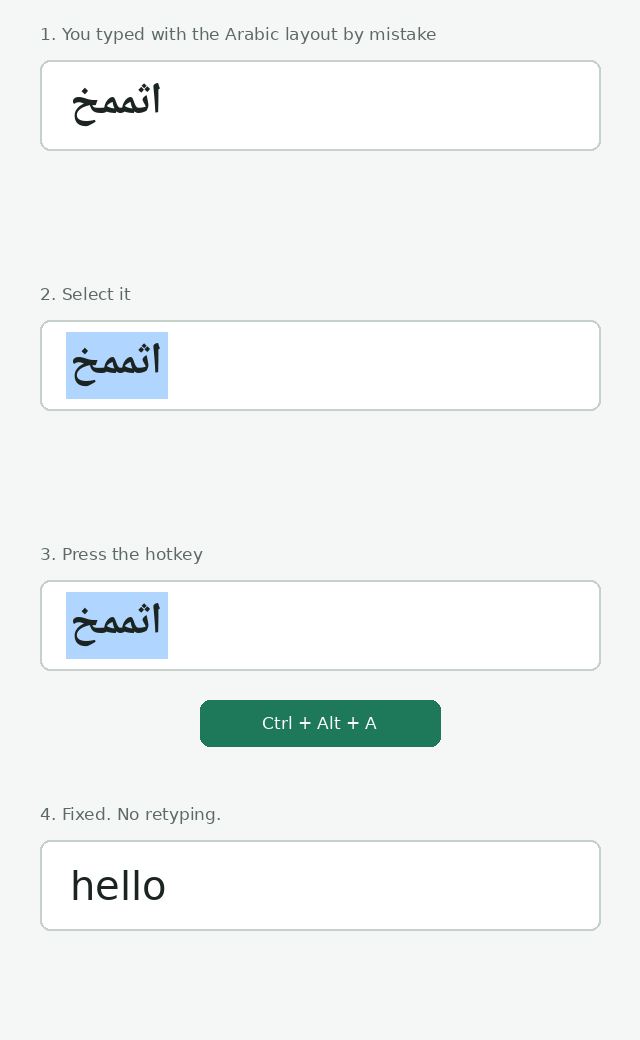
- arabic_layout_fixer-0.5.1/tests/test_system_desktop.py +133 -0
- arabic_layout_fixer-0.5.1/tests/test_system_flow.py +217 -0
- arabic_layout_fixer-0.5.1/tests/test_x11sel.py +190 -0
|
@@ -0,0 +1,21 @@
|
|
|
1
|
+
MIT License
|
|
2
|
+
|
|
3
|
+
Copyright (c) 2026 Abdulrahman Elassal
|
|
4
|
+
|
|
5
|
+
Permission is hereby granted, free of charge, to any person obtaining a copy
|
|
6
|
+
of this software and associated documentation files (the "Software"), to deal
|
|
7
|
+
in the Software without restriction, including without limitation the rights
|
|
8
|
+
to use, copy, modify, merge, publish, distribute, sublicense, and/or sell
|
|
9
|
+
copies of the Software, and to permit persons to whom the Software is
|
|
10
|
+
furnished to do so, subject to the following conditions:
|
|
11
|
+
|
|
12
|
+
The above copyright notice and this permission notice shall be included in all
|
|
13
|
+
copies or substantial portions of the Software.
|
|
14
|
+
|
|
15
|
+
THE SOFTWARE IS PROVIDED "AS IS", WITHOUT WARRANTY OF ANY KIND, EXPRESS OR
|
|
16
|
+
IMPLIED, INCLUDING BUT NOT LIMITED TO THE WARRANTIES OF MERCHANTABILITY,
|
|
17
|
+
FITNESS FOR A PARTICULAR PURPOSE AND NONINFRINGEMENT. IN NO EVENT SHALL THE
|
|
18
|
+
AUTHORS OR COPYRIGHT HOLDERS BE LIABLE FOR ANY CLAIM, DAMAGES OR OTHER
|
|
19
|
+
LIABILITY, WHETHER IN AN ACTION OF CONTRACT, TORT OR OTHERWISE, ARISING FROM,
|
|
20
|
+
OUT OF OR IN CONNECTION WITH THE SOFTWARE OR THE USE OR OTHER DEALINGS IN THE
|
|
21
|
+
SOFTWARE.
|
|
@@ -0,0 +1,137 @@
|
|
|
1
|
+
Metadata-Version: 2.4
|
|
2
|
+
Name: arabic-layout-fixer
|
|
3
|
+
Version: 0.5.1
|
|
4
|
+
Summary: Fix text typed on the wrong keyboard layout (Arabic <-> English) with one hotkey.
|
|
5
|
+
Author: Abdulrahman Elassal
|
|
6
|
+
License: MIT
|
|
7
|
+
Project-URL: Homepage, https://github.com/Aelassal/arabic_english_layout_fixer
|
|
8
|
+
Project-URL: Source, https://github.com/Aelassal/arabic_english_layout_fixer
|
|
9
|
+
Project-URL: Issues, https://github.com/Aelassal/arabic_english_layout_fixer/issues
|
|
10
|
+
Project-URL: Releases, https://github.com/Aelassal/arabic_english_layout_fixer/releases
|
|
11
|
+
Keywords: arabic,keyboard-layout,wrong-layout,hotkey,tray,productivity,clipboard
|
|
12
|
+
Classifier: Development Status :: 4 - Beta
|
|
13
|
+
Classifier: Environment :: X11 Applications
|
|
14
|
+
Classifier: Environment :: MacOS X
|
|
15
|
+
Classifier: Environment :: Win32 (MS Windows)
|
|
16
|
+
Classifier: Intended Audience :: End Users/Desktop
|
|
17
|
+
Classifier: License :: OSI Approved :: MIT License
|
|
18
|
+
Classifier: Natural Language :: Arabic
|
|
19
|
+
Classifier: Operating System :: Microsoft :: Windows
|
|
20
|
+
Classifier: Operating System :: MacOS
|
|
21
|
+
Classifier: Operating System :: POSIX :: Linux
|
|
22
|
+
Classifier: Programming Language :: Python :: 3
|
|
23
|
+
Classifier: Topic :: Utilities
|
|
24
|
+
Requires-Python: >=3.9
|
|
25
|
+
Description-Content-Type: text/markdown
|
|
26
|
+
License-File: LICENSE
|
|
27
|
+
Requires-Dist: pynput>=1.7.7
|
|
28
|
+
Requires-Dist: pyperclip>=1.8.2
|
|
29
|
+
Requires-Dist: pystray>=0.19.5
|
|
30
|
+
Requires-Dist: Pillow>=10
|
|
31
|
+
Dynamic: license-file
|
|
32
|
+
|
|
33
|
+
# Arabic Layout Fixer
|
|
34
|
+
|
|
35
|
+
Typed in Arabic by mistake (or English with the Arabic layout on)? Select the text, press
|
|
36
|
+
**Ctrl + Alt + A** (changeable in Settings), and it is replaced with what you meant to type.
|
|
37
|
+
Works in both directions and picks the direction automatically. Free and open source.
|
|
38
|
+
|
|
39
|
+
|
|
40
|
+
|
|
41
|
+
`اثممخ` → `hello` · `hello` → `اثممخ`
|
|
42
|
+
|
|
43
|
+
Press the hotkey again on the converted text (within 10 minutes) to **undo** it.
|
|
44
|
+
|
|
45
|
+
## Install
|
|
46
|
+
|
|
47
|
+
**One line** (installs for your user only, no admin rights, and checks the download against the published
|
|
48
|
+
SHA256 checksum before installing):
|
|
49
|
+
|
|
50
|
+
| System | Paste this |
|
|
51
|
+
|---|---|
|
|
52
|
+
| Windows (PowerShell) | `irm https://raw.githubusercontent.com/Aelassal/arabic_english_layout_fixer/main/install.ps1 \| iex` |
|
|
53
|
+
| macOS (Terminal) | `curl -fsSL https://raw.githubusercontent.com/Aelassal/arabic_english_layout_fixer/main/install.sh \| sh` |
|
|
54
|
+
| Linux (terminal) | `curl -fsSL https://raw.githubusercontent.com/Aelassal/arabic_english_layout_fixer/main/install.sh \| sh` |
|
|
55
|
+
|
|
56
|
+
The scripts are short, so you can read [install.sh](https://github.com/Aelassal/arabic_english_layout_fixer/blob/main/install.sh) and [install.ps1](https://github.com/Aelassal/arabic_english_layout_fixer/blob/main/install.ps1) first.
|
|
57
|
+
To remove the app, run the same line with `--uninstall` (macOS/Linux: `... \| sh -s -- --uninstall`) or, on
|
|
58
|
+
Windows, `$env:LAYOUTFIX_UNINSTALL=1` before it.
|
|
59
|
+
|
|
60
|
+
**Or with Python** (a tiny download from PyPI, the same on all three systems; also avoids the
|
|
61
|
+
"unknown publisher" prompt, because nothing unsigned is run):
|
|
62
|
+
```
|
|
63
|
+
pipx install arabic-layout-fixer # or: pip install arabic-layout-fixer
|
|
64
|
+
arabic-layout-fixer-tray # starts the tray app (no console window on Windows)
|
|
65
|
+
```
|
|
66
|
+
On Linux the Settings window needs Tk: `sudo apt install python3-tk` (Debian/Ubuntu) or `sudo dnf install python3-tkinter`.
|
|
67
|
+
|
|
68
|
+
**Or download by hand** from **Releases**. Each release also lists SHA256 checksums (`SHA256SUMS.txt`).
|
|
69
|
+
|
|
70
|
+
- **Windows:** run `ArabicLayoutFixer-Windows.exe` (one file, about 11 MB; `ArabicLayoutFixer-Windows.zip` is the same app as a folder, which starts faster). SmartScreen may warn "unknown publisher" because the
|
|
71
|
+
app is not code-signed: click *More info → Run anyway*.
|
|
72
|
+
- **macOS:** open the `.dmg` (Apple Silicon or Intel), drag the app to *Applications* and open it. The first
|
|
73
|
+
time macOS blocks it: open *System Settings → Privacy & Security* and click **Open Anyway**. Then allow it under
|
|
74
|
+
*Privacy & Security → Accessibility* and *Input Monitoring*. Because the app is not notarized, macOS may ask
|
|
75
|
+
again after an update. Default hotkey on Mac: **Ctrl + Shift + A**.
|
|
76
|
+
- **Linux (X11):** run `ArabicLayoutFixer-Linux` (one file, about 12 MB; `ArabicLayoutFixer-Linux.tar.gz` is the same app as a folder, which starts faster). Nothing else is needed (`xclip` is only used as a fallback).
|
|
77
|
+
- **Linux (Wayland, e.g. GNOME):** the desktop blocks global hotkeys, so use a system shortcut instead. Install
|
|
78
|
+
`ydotool` (the `ydotoold` service must be running), then add a custom shortcut
|
|
79
|
+
(GNOME: Settings → Keyboard → Custom Shortcuts) that runs `ArabicLayoutFixer-Linux --once`.
|
|
80
|
+
(The one-line installer adds the GNOME shortcut Ctrl+Alt+A for you.)
|
|
81
|
+
The clipboard is handled through XWayland (on by default in GNOME; `DISPLAY` must be set for the shortcut),
|
|
82
|
+
so no helper programs run and no window ever opens. If XWayland is disabled, `wl-clipboard` is used as a
|
|
83
|
+
fallback; note that on GNOME each `wl-copy`/`wl-paste` call opens a tiny window to get focus, which makes
|
|
84
|
+
the dock flicker.
|
|
85
|
+
|
|
86
|
+
A green swap-arrows icon appears in the tray / menu bar. Click it for **Settings...** and **Start with computer**.
|
|
87
|
+
On GNOME the tray icon needs the AppIndicator extension; the hotkey works without it.
|
|
88
|
+
|
|
89
|
+
## How it behaves
|
|
90
|
+
- It converts the **highlighted** text and pastes the result over it. On Windows and macOS it copies with
|
|
91
|
+
Ctrl/Cmd+C (Ctrl+Insert on Windows) and pastes with Ctrl/Cmd+V (Shift+Insert on Windows).
|
|
92
|
+
Linux reads the highlighted text directly and pastes with Shift+Insert.
|
|
93
|
+
- **Your clipboard is put back** afterwards. If the clipboard holds an image or files, Linux restores them;
|
|
94
|
+
on Windows and macOS the app refuses to run and tells you, so nothing is lost.
|
|
95
|
+
- In a terminal the fixed text is pasted at the cursor (a terminal cannot replace highlighted output).
|
|
96
|
+
- On Linux the paste key goes out about 0.25 s after the hotkey press (so the hotkey is released first) and the
|
|
97
|
+
clipboard is put back as soon as the app has read the text. If no app has read the text after 0.6 s (the paste
|
|
98
|
+
key was swallowed, e.g. because a hotkey key was still held), the text is offered again and the paste key is
|
|
99
|
+
sent once more; it is never sent again once the app has read the text, so nothing is pasted twice. A small
|
|
100
|
+
background process keeps serving the restored clipboard until you copy something else, like `wl-copy` would.
|
|
101
|
+
- Nothing is sent anywhere. The app has no network code. It does not log or store what you type, except the
|
|
102
|
+
last conversion (kept for 10 minutes, in your settings folder) so the hotkey can undo it.
|
|
103
|
+
- Problems are written to a log file in the settings folder (`%APPDATA%\ArabicLayoutFixer`,
|
|
104
|
+
`~/Library/Application Support/ArabicLayoutFixer` or `~/.config/arabic-layout-fixer`). On Linux each fix
|
|
105
|
+
logs a timeline from the hotkey press (process start) to the clipboard restore: lengths, timings and which
|
|
106
|
+
window asked for the text (an X11 window id), never the text itself.
|
|
107
|
+
|
|
108
|
+
## Change the hotkey
|
|
109
|
+
Tray icon → **Settings...**, tick the modifier keys (Ctrl, Alt, Win/Cmd; Shift alone is not allowed),
|
|
110
|
+
pick a key, press **Save**. It takes effect immediately.
|
|
111
|
+
|
|
112
|
+
The fix starts when you **let go** of the hotkey, not when you press it. The app then sends its own keys
|
|
113
|
+
(copy, paste) with none of your hotkey's keys still held down, which is what makes it work reliably in browsers,
|
|
114
|
+
Electron apps and chat boxes. If you keep holding the keys, it simply waits.
|
|
115
|
+
|
|
116
|
+
A **function key on its own** (F1-F12) also works as a hotkey, for example **F9**. It has no modifier that can be
|
|
117
|
+
held down at all. Apps still see that key too, so pick one you don't use.
|
|
118
|
+
On Linux with Wayland (GNOME) you set the key in *Settings → Keyboard → Custom Shortcuts* instead.
|
|
119
|
+
|
|
120
|
+
<img src="https://raw.githubusercontent.com/Aelassal/arabic_english_layout_fixer/main/assets/settings.png" width="328" alt="Settings window">
|
|
121
|
+
|
|
122
|
+
## Run from source
|
|
123
|
+
```
|
|
124
|
+
pip install .
|
|
125
|
+
arabic-layout-fixer # tray app (or: python -m layoutfix)
|
|
126
|
+
python -m layoutfix --once # fix the current selection once (for custom shortcuts)
|
|
127
|
+
python -m unittest discover -s tests
|
|
128
|
+
```
|
|
129
|
+
|
|
130
|
+
## Limitations
|
|
131
|
+
- Assumes the standard Arabic 101 layout.
|
|
132
|
+
- The key that types `لا` is read as `b`; a real `g` then `h` is ambiguous.
|
|
133
|
+
- Plain-symbol results such as `][/` cannot be converted back, since nothing marks them as Arabic.
|
|
134
|
+
- If nothing is highlighted on Linux, an older highlight may still be the "current selection".
|
|
135
|
+
- Rich formatting (bold, links) is not kept in the converted text, and may be lost from the clipboard
|
|
136
|
+
on Windows/macOS when it held formatted text.
|
|
137
|
+
- Not code-signed or notarized yet.
|
|
@@ -0,0 +1,105 @@
|
|
|
1
|
+
# Arabic Layout Fixer
|
|
2
|
+
|
|
3
|
+
Typed in Arabic by mistake (or English with the Arabic layout on)? Select the text, press
|
|
4
|
+
**Ctrl + Alt + A** (changeable in Settings), and it is replaced with what you meant to type.
|
|
5
|
+
Works in both directions and picks the direction automatically. Free and open source.
|
|
6
|
+
|
|
7
|
+

|
|
8
|
+
|
|
9
|
+
`اثممخ` → `hello` · `hello` → `اثممخ`
|
|
10
|
+
|
|
11
|
+
Press the hotkey again on the converted text (within 10 minutes) to **undo** it.
|
|
12
|
+
|
|
13
|
+
## Install
|
|
14
|
+
|
|
15
|
+
**One line** (installs for your user only, no admin rights, and checks the download against the published
|
|
16
|
+
SHA256 checksum before installing):
|
|
17
|
+
|
|
18
|
+
| System | Paste this |
|
|
19
|
+
|---|---|
|
|
20
|
+
| Windows (PowerShell) | `irm https://raw.githubusercontent.com/Aelassal/arabic_english_layout_fixer/main/install.ps1 \| iex` |
|
|
21
|
+
| macOS (Terminal) | `curl -fsSL https://raw.githubusercontent.com/Aelassal/arabic_english_layout_fixer/main/install.sh \| sh` |
|
|
22
|
+
| Linux (terminal) | `curl -fsSL https://raw.githubusercontent.com/Aelassal/arabic_english_layout_fixer/main/install.sh \| sh` |
|
|
23
|
+
|
|
24
|
+
The scripts are short, so you can read [install.sh](https://github.com/Aelassal/arabic_english_layout_fixer/blob/main/install.sh) and [install.ps1](https://github.com/Aelassal/arabic_english_layout_fixer/blob/main/install.ps1) first.
|
|
25
|
+
To remove the app, run the same line with `--uninstall` (macOS/Linux: `... \| sh -s -- --uninstall`) or, on
|
|
26
|
+
Windows, `$env:LAYOUTFIX_UNINSTALL=1` before it.
|
|
27
|
+
|
|
28
|
+
**Or with Python** (a tiny download from PyPI, the same on all three systems; also avoids the
|
|
29
|
+
"unknown publisher" prompt, because nothing unsigned is run):
|
|
30
|
+
```
|
|
31
|
+
pipx install arabic-layout-fixer # or: pip install arabic-layout-fixer
|
|
32
|
+
arabic-layout-fixer-tray # starts the tray app (no console window on Windows)
|
|
33
|
+
```
|
|
34
|
+
On Linux the Settings window needs Tk: `sudo apt install python3-tk` (Debian/Ubuntu) or `sudo dnf install python3-tkinter`.
|
|
35
|
+
|
|
36
|
+
**Or download by hand** from **Releases**. Each release also lists SHA256 checksums (`SHA256SUMS.txt`).
|
|
37
|
+
|
|
38
|
+
- **Windows:** run `ArabicLayoutFixer-Windows.exe` (one file, about 11 MB; `ArabicLayoutFixer-Windows.zip` is the same app as a folder, which starts faster). SmartScreen may warn "unknown publisher" because the
|
|
39
|
+
app is not code-signed: click *More info → Run anyway*.
|
|
40
|
+
- **macOS:** open the `.dmg` (Apple Silicon or Intel), drag the app to *Applications* and open it. The first
|
|
41
|
+
time macOS blocks it: open *System Settings → Privacy & Security* and click **Open Anyway**. Then allow it under
|
|
42
|
+
*Privacy & Security → Accessibility* and *Input Monitoring*. Because the app is not notarized, macOS may ask
|
|
43
|
+
again after an update. Default hotkey on Mac: **Ctrl + Shift + A**.
|
|
44
|
+
- **Linux (X11):** run `ArabicLayoutFixer-Linux` (one file, about 12 MB; `ArabicLayoutFixer-Linux.tar.gz` is the same app as a folder, which starts faster). Nothing else is needed (`xclip` is only used as a fallback).
|
|
45
|
+
- **Linux (Wayland, e.g. GNOME):** the desktop blocks global hotkeys, so use a system shortcut instead. Install
|
|
46
|
+
`ydotool` (the `ydotoold` service must be running), then add a custom shortcut
|
|
47
|
+
(GNOME: Settings → Keyboard → Custom Shortcuts) that runs `ArabicLayoutFixer-Linux --once`.
|
|
48
|
+
(The one-line installer adds the GNOME shortcut Ctrl+Alt+A for you.)
|
|
49
|
+
The clipboard is handled through XWayland (on by default in GNOME; `DISPLAY` must be set for the shortcut),
|
|
50
|
+
so no helper programs run and no window ever opens. If XWayland is disabled, `wl-clipboard` is used as a
|
|
51
|
+
fallback; note that on GNOME each `wl-copy`/`wl-paste` call opens a tiny window to get focus, which makes
|
|
52
|
+
the dock flicker.
|
|
53
|
+
|
|
54
|
+
A green swap-arrows icon appears in the tray / menu bar. Click it for **Settings...** and **Start with computer**.
|
|
55
|
+
On GNOME the tray icon needs the AppIndicator extension; the hotkey works without it.
|
|
56
|
+
|
|
57
|
+
## How it behaves
|
|
58
|
+
- It converts the **highlighted** text and pastes the result over it. On Windows and macOS it copies with
|
|
59
|
+
Ctrl/Cmd+C (Ctrl+Insert on Windows) and pastes with Ctrl/Cmd+V (Shift+Insert on Windows).
|
|
60
|
+
Linux reads the highlighted text directly and pastes with Shift+Insert.
|
|
61
|
+
- **Your clipboard is put back** afterwards. If the clipboard holds an image or files, Linux restores them;
|
|
62
|
+
on Windows and macOS the app refuses to run and tells you, so nothing is lost.
|
|
63
|
+
- In a terminal the fixed text is pasted at the cursor (a terminal cannot replace highlighted output).
|
|
64
|
+
- On Linux the paste key goes out about 0.25 s after the hotkey press (so the hotkey is released first) and the
|
|
65
|
+
clipboard is put back as soon as the app has read the text. If no app has read the text after 0.6 s (the paste
|
|
66
|
+
key was swallowed, e.g. because a hotkey key was still held), the text is offered again and the paste key is
|
|
67
|
+
sent once more; it is never sent again once the app has read the text, so nothing is pasted twice. A small
|
|
68
|
+
background process keeps serving the restored clipboard until you copy something else, like `wl-copy` would.
|
|
69
|
+
- Nothing is sent anywhere. The app has no network code. It does not log or store what you type, except the
|
|
70
|
+
last conversion (kept for 10 minutes, in your settings folder) so the hotkey can undo it.
|
|
71
|
+
- Problems are written to a log file in the settings folder (`%APPDATA%\ArabicLayoutFixer`,
|
|
72
|
+
`~/Library/Application Support/ArabicLayoutFixer` or `~/.config/arabic-layout-fixer`). On Linux each fix
|
|
73
|
+
logs a timeline from the hotkey press (process start) to the clipboard restore: lengths, timings and which
|
|
74
|
+
window asked for the text (an X11 window id), never the text itself.
|
|
75
|
+
|
|
76
|
+
## Change the hotkey
|
|
77
|
+
Tray icon → **Settings...**, tick the modifier keys (Ctrl, Alt, Win/Cmd; Shift alone is not allowed),
|
|
78
|
+
pick a key, press **Save**. It takes effect immediately.
|
|
79
|
+
|
|
80
|
+
The fix starts when you **let go** of the hotkey, not when you press it. The app then sends its own keys
|
|
81
|
+
(copy, paste) with none of your hotkey's keys still held down, which is what makes it work reliably in browsers,
|
|
82
|
+
Electron apps and chat boxes. If you keep holding the keys, it simply waits.
|
|
83
|
+
|
|
84
|
+
A **function key on its own** (F1-F12) also works as a hotkey, for example **F9**. It has no modifier that can be
|
|
85
|
+
held down at all. Apps still see that key too, so pick one you don't use.
|
|
86
|
+
On Linux with Wayland (GNOME) you set the key in *Settings → Keyboard → Custom Shortcuts* instead.
|
|
87
|
+
|
|
88
|
+
<img src="https://raw.githubusercontent.com/Aelassal/arabic_english_layout_fixer/main/assets/settings.png" width="328" alt="Settings window">
|
|
89
|
+
|
|
90
|
+
## Run from source
|
|
91
|
+
```
|
|
92
|
+
pip install .
|
|
93
|
+
arabic-layout-fixer # tray app (or: python -m layoutfix)
|
|
94
|
+
python -m layoutfix --once # fix the current selection once (for custom shortcuts)
|
|
95
|
+
python -m unittest discover -s tests
|
|
96
|
+
```
|
|
97
|
+
|
|
98
|
+
## Limitations
|
|
99
|
+
- Assumes the standard Arabic 101 layout.
|
|
100
|
+
- The key that types `لا` is read as `b`; a real `g` then `h` is ambiguous.
|
|
101
|
+
- Plain-symbol results such as `][/` cannot be converted back, since nothing marks them as Arabic.
|
|
102
|
+
- If nothing is highlighted on Linux, an older highlight may still be the "current selection".
|
|
103
|
+
- Rich formatting (bold, links) is not kept in the converted text, and may be lost from the clipboard
|
|
104
|
+
on Windows/macOS when it held formatted text.
|
|
105
|
+
- Not code-signed or notarized yet.
|
|
@@ -0,0 +1,137 @@
|
|
|
1
|
+
Metadata-Version: 2.4
|
|
2
|
+
Name: arabic-layout-fixer
|
|
3
|
+
Version: 0.5.1
|
|
4
|
+
Summary: Fix text typed on the wrong keyboard layout (Arabic <-> English) with one hotkey.
|
|
5
|
+
Author: Abdulrahman Elassal
|
|
6
|
+
License: MIT
|
|
7
|
+
Project-URL: Homepage, https://github.com/Aelassal/arabic_english_layout_fixer
|
|
8
|
+
Project-URL: Source, https://github.com/Aelassal/arabic_english_layout_fixer
|
|
9
|
+
Project-URL: Issues, https://github.com/Aelassal/arabic_english_layout_fixer/issues
|
|
10
|
+
Project-URL: Releases, https://github.com/Aelassal/arabic_english_layout_fixer/releases
|
|
11
|
+
Keywords: arabic,keyboard-layout,wrong-layout,hotkey,tray,productivity,clipboard
|
|
12
|
+
Classifier: Development Status :: 4 - Beta
|
|
13
|
+
Classifier: Environment :: X11 Applications
|
|
14
|
+
Classifier: Environment :: MacOS X
|
|
15
|
+
Classifier: Environment :: Win32 (MS Windows)
|
|
16
|
+
Classifier: Intended Audience :: End Users/Desktop
|
|
17
|
+
Classifier: License :: OSI Approved :: MIT License
|
|
18
|
+
Classifier: Natural Language :: Arabic
|
|
19
|
+
Classifier: Operating System :: Microsoft :: Windows
|
|
20
|
+
Classifier: Operating System :: MacOS
|
|
21
|
+
Classifier: Operating System :: POSIX :: Linux
|
|
22
|
+
Classifier: Programming Language :: Python :: 3
|
|
23
|
+
Classifier: Topic :: Utilities
|
|
24
|
+
Requires-Python: >=3.9
|
|
25
|
+
Description-Content-Type: text/markdown
|
|
26
|
+
License-File: LICENSE
|
|
27
|
+
Requires-Dist: pynput>=1.7.7
|
|
28
|
+
Requires-Dist: pyperclip>=1.8.2
|
|
29
|
+
Requires-Dist: pystray>=0.19.5
|
|
30
|
+
Requires-Dist: Pillow>=10
|
|
31
|
+
Dynamic: license-file
|
|
32
|
+
|
|
33
|
+
# Arabic Layout Fixer
|
|
34
|
+
|
|
35
|
+
Typed in Arabic by mistake (or English with the Arabic layout on)? Select the text, press
|
|
36
|
+
**Ctrl + Alt + A** (changeable in Settings), and it is replaced with what you meant to type.
|
|
37
|
+
Works in both directions and picks the direction automatically. Free and open source.
|
|
38
|
+
|
|
39
|
+

|
|
40
|
+
|
|
41
|
+
`اثممخ` → `hello` · `hello` → `اثممخ`
|
|
42
|
+
|
|
43
|
+
Press the hotkey again on the converted text (within 10 minutes) to **undo** it.
|
|
44
|
+
|
|
45
|
+
## Install
|
|
46
|
+
|
|
47
|
+
**One line** (installs for your user only, no admin rights, and checks the download against the published
|
|
48
|
+
SHA256 checksum before installing):
|
|
49
|
+
|
|
50
|
+
| System | Paste this |
|
|
51
|
+
|---|---|
|
|
52
|
+
| Windows (PowerShell) | `irm https://raw.githubusercontent.com/Aelassal/arabic_english_layout_fixer/main/install.ps1 \| iex` |
|
|
53
|
+
| macOS (Terminal) | `curl -fsSL https://raw.githubusercontent.com/Aelassal/arabic_english_layout_fixer/main/install.sh \| sh` |
|
|
54
|
+
| Linux (terminal) | `curl -fsSL https://raw.githubusercontent.com/Aelassal/arabic_english_layout_fixer/main/install.sh \| sh` |
|
|
55
|
+
|
|
56
|
+
The scripts are short, so you can read [install.sh](https://github.com/Aelassal/arabic_english_layout_fixer/blob/main/install.sh) and [install.ps1](https://github.com/Aelassal/arabic_english_layout_fixer/blob/main/install.ps1) first.
|
|
57
|
+
To remove the app, run the same line with `--uninstall` (macOS/Linux: `... \| sh -s -- --uninstall`) or, on
|
|
58
|
+
Windows, `$env:LAYOUTFIX_UNINSTALL=1` before it.
|
|
59
|
+
|
|
60
|
+
**Or with Python** (a tiny download from PyPI, the same on all three systems; also avoids the
|
|
61
|
+
"unknown publisher" prompt, because nothing unsigned is run):
|
|
62
|
+
```
|
|
63
|
+
pipx install arabic-layout-fixer # or: pip install arabic-layout-fixer
|
|
64
|
+
arabic-layout-fixer-tray # starts the tray app (no console window on Windows)
|
|
65
|
+
```
|
|
66
|
+
On Linux the Settings window needs Tk: `sudo apt install python3-tk` (Debian/Ubuntu) or `sudo dnf install python3-tkinter`.
|
|
67
|
+
|
|
68
|
+
**Or download by hand** from **Releases**. Each release also lists SHA256 checksums (`SHA256SUMS.txt`).
|
|
69
|
+
|
|
70
|
+
- **Windows:** run `ArabicLayoutFixer-Windows.exe` (one file, about 11 MB; `ArabicLayoutFixer-Windows.zip` is the same app as a folder, which starts faster). SmartScreen may warn "unknown publisher" because the
|
|
71
|
+
app is not code-signed: click *More info → Run anyway*.
|
|
72
|
+
- **macOS:** open the `.dmg` (Apple Silicon or Intel), drag the app to *Applications* and open it. The first
|
|
73
|
+
time macOS blocks it: open *System Settings → Privacy & Security* and click **Open Anyway**. Then allow it under
|
|
74
|
+
*Privacy & Security → Accessibility* and *Input Monitoring*. Because the app is not notarized, macOS may ask
|
|
75
|
+
again after an update. Default hotkey on Mac: **Ctrl + Shift + A**.
|
|
76
|
+
- **Linux (X11):** run `ArabicLayoutFixer-Linux` (one file, about 12 MB; `ArabicLayoutFixer-Linux.tar.gz` is the same app as a folder, which starts faster). Nothing else is needed (`xclip` is only used as a fallback).
|
|
77
|
+
- **Linux (Wayland, e.g. GNOME):** the desktop blocks global hotkeys, so use a system shortcut instead. Install
|
|
78
|
+
`ydotool` (the `ydotoold` service must be running), then add a custom shortcut
|
|
79
|
+
(GNOME: Settings → Keyboard → Custom Shortcuts) that runs `ArabicLayoutFixer-Linux --once`.
|
|
80
|
+
(The one-line installer adds the GNOME shortcut Ctrl+Alt+A for you.)
|
|
81
|
+
The clipboard is handled through XWayland (on by default in GNOME; `DISPLAY` must be set for the shortcut),
|
|
82
|
+
so no helper programs run and no window ever opens. If XWayland is disabled, `wl-clipboard` is used as a
|
|
83
|
+
fallback; note that on GNOME each `wl-copy`/`wl-paste` call opens a tiny window to get focus, which makes
|
|
84
|
+
the dock flicker.
|
|
85
|
+
|
|
86
|
+
A green swap-arrows icon appears in the tray / menu bar. Click it for **Settings...** and **Start with computer**.
|
|
87
|
+
On GNOME the tray icon needs the AppIndicator extension; the hotkey works without it.
|
|
88
|
+
|
|
89
|
+
## How it behaves
|
|
90
|
+
- It converts the **highlighted** text and pastes the result over it. On Windows and macOS it copies with
|
|
91
|
+
Ctrl/Cmd+C (Ctrl+Insert on Windows) and pastes with Ctrl/Cmd+V (Shift+Insert on Windows).
|
|
92
|
+
Linux reads the highlighted text directly and pastes with Shift+Insert.
|
|
93
|
+
- **Your clipboard is put back** afterwards. If the clipboard holds an image or files, Linux restores them;
|
|
94
|
+
on Windows and macOS the app refuses to run and tells you, so nothing is lost.
|
|
95
|
+
- In a terminal the fixed text is pasted at the cursor (a terminal cannot replace highlighted output).
|
|
96
|
+
- On Linux the paste key goes out about 0.25 s after the hotkey press (so the hotkey is released first) and the
|
|
97
|
+
clipboard is put back as soon as the app has read the text. If no app has read the text after 0.6 s (the paste
|
|
98
|
+
key was swallowed, e.g. because a hotkey key was still held), the text is offered again and the paste key is
|
|
99
|
+
sent once more; it is never sent again once the app has read the text, so nothing is pasted twice. A small
|
|
100
|
+
background process keeps serving the restored clipboard until you copy something else, like `wl-copy` would.
|
|
101
|
+
- Nothing is sent anywhere. The app has no network code. It does not log or store what you type, except the
|
|
102
|
+
last conversion (kept for 10 minutes, in your settings folder) so the hotkey can undo it.
|
|
103
|
+
- Problems are written to a log file in the settings folder (`%APPDATA%\ArabicLayoutFixer`,
|
|
104
|
+
`~/Library/Application Support/ArabicLayoutFixer` or `~/.config/arabic-layout-fixer`). On Linux each fix
|
|
105
|
+
logs a timeline from the hotkey press (process start) to the clipboard restore: lengths, timings and which
|
|
106
|
+
window asked for the text (an X11 window id), never the text itself.
|
|
107
|
+
|
|
108
|
+
## Change the hotkey
|
|
109
|
+
Tray icon → **Settings...**, tick the modifier keys (Ctrl, Alt, Win/Cmd; Shift alone is not allowed),
|
|
110
|
+
pick a key, press **Save**. It takes effect immediately.
|
|
111
|
+
|
|
112
|
+
The fix starts when you **let go** of the hotkey, not when you press it. The app then sends its own keys
|
|
113
|
+
(copy, paste) with none of your hotkey's keys still held down, which is what makes it work reliably in browsers,
|
|
114
|
+
Electron apps and chat boxes. If you keep holding the keys, it simply waits.
|
|
115
|
+
|
|
116
|
+
A **function key on its own** (F1-F12) also works as a hotkey, for example **F9**. It has no modifier that can be
|
|
117
|
+
held down at all. Apps still see that key too, so pick one you don't use.
|
|
118
|
+
On Linux with Wayland (GNOME) you set the key in *Settings → Keyboard → Custom Shortcuts* instead.
|
|
119
|
+
|
|
120
|
+
<img src="https://raw.githubusercontent.com/Aelassal/arabic_english_layout_fixer/main/assets/settings.png" width="328" alt="Settings window">
|
|
121
|
+
|
|
122
|
+
## Run from source
|
|
123
|
+
```
|
|
124
|
+
pip install .
|
|
125
|
+
arabic-layout-fixer # tray app (or: python -m layoutfix)
|
|
126
|
+
python -m layoutfix --once # fix the current selection once (for custom shortcuts)
|
|
127
|
+
python -m unittest discover -s tests
|
|
128
|
+
```
|
|
129
|
+
|
|
130
|
+
## Limitations
|
|
131
|
+
- Assumes the standard Arabic 101 layout.
|
|
132
|
+
- The key that types `لا` is read as `b`; a real `g` then `h` is ambiguous.
|
|
133
|
+
- Plain-symbol results such as `][/` cannot be converted back, since nothing marks them as Arabic.
|
|
134
|
+
- If nothing is highlighted on Linux, an older highlight may still be the "current selection".
|
|
135
|
+
- Rich formatting (bold, links) is not kept in the converted text, and may be lost from the clipboard
|
|
136
|
+
on Windows/macOS when it held formatted text.
|
|
137
|
+
- Not code-signed or notarized yet.
|
|
@@ -0,0 +1,34 @@
|
|
|
1
|
+
LICENSE
|
|
2
|
+
README.md
|
|
3
|
+
pyproject.toml
|
|
4
|
+
arabic_layout_fixer.egg-info/PKG-INFO
|
|
5
|
+
arabic_layout_fixer.egg-info/SOURCES.txt
|
|
6
|
+
arabic_layout_fixer.egg-info/dependency_links.txt
|
|
7
|
+
arabic_layout_fixer.egg-info/entry_points.txt
|
|
8
|
+
arabic_layout_fixer.egg-info/requires.txt
|
|
9
|
+
arabic_layout_fixer.egg-info/top_level.txt
|
|
10
|
+
layoutfix/__init__.py
|
|
11
|
+
layoutfix/__main__.py
|
|
12
|
+
layoutfix/app.py
|
|
13
|
+
layoutfix/autostart.py
|
|
14
|
+
layoutfix/clipboard.py
|
|
15
|
+
layoutfix/config.py
|
|
16
|
+
layoutfix/core.py
|
|
17
|
+
layoutfix/history.py
|
|
18
|
+
layoutfix/hotkey.py
|
|
19
|
+
layoutfix/icon.py
|
|
20
|
+
layoutfix/instance.py
|
|
21
|
+
layoutfix/log.py
|
|
22
|
+
layoutfix/safety.py
|
|
23
|
+
layoutfix/settings.py
|
|
24
|
+
layoutfix/system.py
|
|
25
|
+
layoutfix/x11sel.py
|
|
26
|
+
tests/test_clipboard_native.py
|
|
27
|
+
tests/test_config.py
|
|
28
|
+
tests/test_core.py
|
|
29
|
+
tests/test_hotkey.py
|
|
30
|
+
tests/test_safety_autostart_misc.py
|
|
31
|
+
tests/test_selftest.py
|
|
32
|
+
tests/test_system_desktop.py
|
|
33
|
+
tests/test_system_flow.py
|
|
34
|
+
tests/test_x11sel.py
|
|
@@ -0,0 +1 @@
|
|
|
1
|
+
|
|
@@ -0,0 +1 @@
|
|
|
1
|
+
layoutfix
|
|
@@ -0,0 +1 @@
|
|
|
1
|
+
__version__ = "0.5.1"
|
|
@@ -0,0 +1,156 @@
|
|
|
1
|
+
"""Tray icon + global hotkey."""
|
|
2
|
+
import os
|
|
3
|
+
import shutil
|
|
4
|
+
import subprocess
|
|
5
|
+
import sys
|
|
6
|
+
import threading
|
|
7
|
+
import time
|
|
8
|
+
|
|
9
|
+
from . import autostart, config, history, instance, log, system
|
|
10
|
+
from .hotkey import HotkeyListener
|
|
11
|
+
|
|
12
|
+
|
|
13
|
+
def run_fix():
|
|
14
|
+
try:
|
|
15
|
+
system.fix_selection(history.convert)
|
|
16
|
+
except Exception:
|
|
17
|
+
log.get().exception("fix failed")
|
|
18
|
+
log.notify("Something went wrong. Nothing was changed. Details are in the log file.")
|
|
19
|
+
|
|
20
|
+
|
|
21
|
+
def _in_thread(fn):
|
|
22
|
+
return lambda *a: threading.Thread(target=fn, daemon=True).start()
|
|
23
|
+
|
|
24
|
+
|
|
25
|
+
class Hotkey:
|
|
26
|
+
"""Owns the hotkey listener and swaps it when the setting changes."""
|
|
27
|
+
|
|
28
|
+
def __init__(self):
|
|
29
|
+
self.listener = None
|
|
30
|
+
|
|
31
|
+
def apply(self, hotkey):
|
|
32
|
+
if self.listener:
|
|
33
|
+
self.listener.stop()
|
|
34
|
+
self.listener = None
|
|
35
|
+
if system.WAYLAND:
|
|
36
|
+
return
|
|
37
|
+
try:
|
|
38
|
+
probe = system._held_modifiers if system.WIN or system.MAC else None # real key state, to drop stale ones
|
|
39
|
+
self.listener = HotkeyListener(hotkey, _in_thread(run_fix), probe)
|
|
40
|
+
self.listener.start()
|
|
41
|
+
except Exception:
|
|
42
|
+
log.get().exception("could not register %r", hotkey)
|
|
43
|
+
if hotkey != config.default_hotkey():
|
|
44
|
+
self.apply(config.default_hotkey())
|
|
45
|
+
|
|
46
|
+
|
|
47
|
+
def open_settings():
|
|
48
|
+
cmd = [sys.executable] if getattr(sys, "frozen", False) else [sys.executable, "-m", "layoutfix"]
|
|
49
|
+
subprocess.Popen(cmd + ["--settings"])
|
|
50
|
+
|
|
51
|
+
|
|
52
|
+
def _import_pystray():
|
|
53
|
+
"""pystray picks a Linux backend at import time and can crash when the tray library is missing."""
|
|
54
|
+
try:
|
|
55
|
+
import pystray
|
|
56
|
+
return pystray
|
|
57
|
+
except Exception:
|
|
58
|
+
if sys.platform.startswith("linux"):
|
|
59
|
+
os.environ["PYSTRAY_BACKEND"] = "xorg"
|
|
60
|
+
try:
|
|
61
|
+
import pystray
|
|
62
|
+
return pystray
|
|
63
|
+
except Exception:
|
|
64
|
+
pass
|
|
65
|
+
log.get().exception("no tray icon available")
|
|
66
|
+
return None
|
|
67
|
+
|
|
68
|
+
|
|
69
|
+
def _selftest() -> int:
|
|
70
|
+
"""Import everything the app needs and run a tiny conversion. Used by CI on the *built* app,
|
|
71
|
+
because a packaged app can crash at start-up on a missing module even when the tests pass."""
|
|
72
|
+
import importlib
|
|
73
|
+
from . import core
|
|
74
|
+
modules = ["layoutfix.autostart", "layoutfix.clipboard", "layoutfix.hotkey", "layoutfix.icon",
|
|
75
|
+
"layoutfix.settings", "layoutfix.system", "layoutfix.x11sel", "PIL.Image", "pyperclip"]
|
|
76
|
+
if not sys.platform.startswith("linux") or os.environ.get("DISPLAY"):
|
|
77
|
+
modules += ["pynput.keyboard", "pystray"] # these need a display on Linux
|
|
78
|
+
failed = []
|
|
79
|
+
for name in modules:
|
|
80
|
+
try:
|
|
81
|
+
importlib.import_module(name)
|
|
82
|
+
except Exception as exc:
|
|
83
|
+
failed.append(f"{name}: {exc!r}")
|
|
84
|
+
if core.fix("اثممخ") != "hello":
|
|
85
|
+
failed.append("core.fix gave a wrong result")
|
|
86
|
+
if sys.platform.startswith("win") or sys.platform == "darwin":
|
|
87
|
+
from . import system
|
|
88
|
+
if system._held_modifiers() is None: # the real Windows/macOS key-state call must work
|
|
89
|
+
failed.append("cannot read the modifier key state")
|
|
90
|
+
from .icon import make_icon
|
|
91
|
+
if make_icon(64).size != (64, 64):
|
|
92
|
+
failed.append("icon has the wrong size")
|
|
93
|
+
for line in failed:
|
|
94
|
+
log.get().error("selftest FAILED %s", line)
|
|
95
|
+
log.get().info("selftest %s (%d modules checked)", "FAILED" if failed else "ok", len(modules))
|
|
96
|
+
return 1 if failed else 0
|
|
97
|
+
|
|
98
|
+
|
|
99
|
+
def main():
|
|
100
|
+
log.setup()
|
|
101
|
+
if "--selftest" in sys.argv:
|
|
102
|
+
sys.exit(_selftest())
|
|
103
|
+
if "--once" in sys.argv: # for Wayland / custom shortcuts
|
|
104
|
+
if shutil.which("notify-send"):
|
|
105
|
+
log.set_notifier(lambda m: subprocess.run(["notify-send", "Arabic Layout Fixer", m], timeout=5))
|
|
106
|
+
run_fix()
|
|
107
|
+
return
|
|
108
|
+
if "--settings" in sys.argv:
|
|
109
|
+
from . import settings
|
|
110
|
+
settings.main()
|
|
111
|
+
return
|
|
112
|
+
|
|
113
|
+
app_lock = instance.try_lock("app")
|
|
114
|
+
if app_lock is None:
|
|
115
|
+
log.get().info("Arabic Layout Fixer is already running.")
|
|
116
|
+
return
|
|
117
|
+
|
|
118
|
+
hotkey = Hotkey()
|
|
119
|
+
hotkey.apply(config.load_hotkey())
|
|
120
|
+
if system.WAYLAND:
|
|
121
|
+
log.get().warning("Wayland blocks global hotkeys: bind a system shortcut to `ArabicLayoutFixer --once`.")
|
|
122
|
+
|
|
123
|
+
pystray = _import_pystray()
|
|
124
|
+
if pystray is None: # no tray: keep the hotkey working in the background
|
|
125
|
+
threading.Event().wait()
|
|
126
|
+
return
|
|
127
|
+
|
|
128
|
+
def toggle_autostart(icon, item):
|
|
129
|
+
try:
|
|
130
|
+
autostart.set_enabled(not autostart.is_enabled())
|
|
131
|
+
except (ValueError, OSError) as exc:
|
|
132
|
+
log.notify(str(exc))
|
|
133
|
+
|
|
134
|
+
menu = pystray.Menu(
|
|
135
|
+
pystray.MenuItem(lambda item: f"Select text, then press {config.pretty(config.load_hotkey())}",
|
|
136
|
+
None, enabled=False),
|
|
137
|
+
pystray.MenuItem("Settings...", lambda icon, item: open_settings()),
|
|
138
|
+
pystray.MenuItem("Start with computer", toggle_autostart, checked=lambda item: autostart.is_enabled()),
|
|
139
|
+
pystray.MenuItem("Quit", lambda icon, item: icon.stop()),
|
|
140
|
+
)
|
|
141
|
+
from .icon import make_icon # imports Pillow: only the tray needs it
|
|
142
|
+
icon = pystray.Icon("layoutfix", make_icon(64), "Arabic Layout Fixer", menu)
|
|
143
|
+
log.set_notifier(lambda message: icon.notify(message, "Arabic Layout Fixer"))
|
|
144
|
+
|
|
145
|
+
def watch_config(): # pick up changes made in the settings window
|
|
146
|
+
seen = config.last_changed()
|
|
147
|
+
while True:
|
|
148
|
+
time.sleep(1)
|
|
149
|
+
now = config.last_changed()
|
|
150
|
+
if now != seen:
|
|
151
|
+
seen = now
|
|
152
|
+
hotkey.apply(config.load_hotkey())
|
|
153
|
+
icon.update_menu()
|
|
154
|
+
|
|
155
|
+
threading.Thread(target=watch_config, daemon=True).start()
|
|
156
|
+
icon.run()
|