appkit-assistant 0.7.3__tar.gz → 0.7.5__tar.gz
This diff represents the content of publicly available package versions that have been released to one of the supported registries. The information contained in this diff is provided for informational purposes only and reflects changes between package versions as they appear in their respective public registries.
- appkit_assistant-0.7.5/PKG-INFO +345 -0
- appkit_assistant-0.7.5/README.md +320 -0
- appkit_assistant-0.7.5/docs/assistant.png +0 -0
- appkit_assistant-0.7.5/pyproject.toml +49 -0
- {appkit_assistant-0.7.3 → appkit_assistant-0.7.5}/src/appkit_assistant/components/mcp_server_dialogs.py +1 -4
- appkit_assistant-0.7.3/PKG-INFO +0 -8
- appkit_assistant-0.7.3/README.md +0 -0
- appkit_assistant-0.7.3/docs/ideas.md +0 -67
- appkit_assistant-0.7.3/pyproject.toml +0 -24
- {appkit_assistant-0.7.3 → appkit_assistant-0.7.5}/.gitignore +0 -0
- {appkit_assistant-0.7.3 → appkit_assistant-0.7.5}/src/appkit_assistant/backend/model_manager.py +0 -0
- {appkit_assistant-0.7.3 → appkit_assistant-0.7.5}/src/appkit_assistant/backend/models.py +0 -0
- {appkit_assistant-0.7.3 → appkit_assistant-0.7.5}/src/appkit_assistant/backend/processor.py +0 -0
- {appkit_assistant-0.7.3 → appkit_assistant-0.7.5}/src/appkit_assistant/backend/processors/ai_models.py +0 -0
- {appkit_assistant-0.7.3 → appkit_assistant-0.7.5}/src/appkit_assistant/backend/processors/knowledgeai_processor.py +0 -0
- {appkit_assistant-0.7.3 → appkit_assistant-0.7.5}/src/appkit_assistant/backend/processors/lorem_ipsum_processor.py +0 -0
- {appkit_assistant-0.7.3 → appkit_assistant-0.7.5}/src/appkit_assistant/backend/processors/openai_base.py +0 -0
- {appkit_assistant-0.7.3 → appkit_assistant-0.7.5}/src/appkit_assistant/backend/processors/openai_chat_completion_processor.py +0 -0
- {appkit_assistant-0.7.3 → appkit_assistant-0.7.5}/src/appkit_assistant/backend/processors/openai_responses_processor.py +0 -0
- {appkit_assistant-0.7.3 → appkit_assistant-0.7.5}/src/appkit_assistant/backend/processors/perplexity_processor.py +0 -0
- {appkit_assistant-0.7.3 → appkit_assistant-0.7.5}/src/appkit_assistant/backend/repositories.py +0 -0
- {appkit_assistant-0.7.3 → appkit_assistant-0.7.5}/src/appkit_assistant/backend/system_prompt.py +0 -0
- {appkit_assistant-0.7.3 → appkit_assistant-0.7.5}/src/appkit_assistant/components/__init__.py +0 -0
- {appkit_assistant-0.7.3 → appkit_assistant-0.7.5}/src/appkit_assistant/components/composer.py +0 -0
- {appkit_assistant-0.7.3 → appkit_assistant-0.7.5}/src/appkit_assistant/components/composer_key_handler.py +0 -0
- {appkit_assistant-0.7.3 → appkit_assistant-0.7.5}/src/appkit_assistant/components/mcp_server_table.py +0 -0
- {appkit_assistant-0.7.3 → appkit_assistant-0.7.5}/src/appkit_assistant/components/message.py +0 -0
- {appkit_assistant-0.7.3 → appkit_assistant-0.7.5}/src/appkit_assistant/components/thread.py +0 -0
- {appkit_assistant-0.7.3 → appkit_assistant-0.7.5}/src/appkit_assistant/components/threadlist.py +0 -0
- {appkit_assistant-0.7.3 → appkit_assistant-0.7.5}/src/appkit_assistant/components/tools_modal.py +0 -0
- {appkit_assistant-0.7.3 → appkit_assistant-0.7.5}/src/appkit_assistant/configuration.py +0 -0
- {appkit_assistant-0.7.3 → appkit_assistant-0.7.5}/src/appkit_assistant/state/mcp_server_state.py +0 -0
- {appkit_assistant-0.7.3 → appkit_assistant-0.7.5}/src/appkit_assistant/state/thread_state.py +0 -0
|
@@ -0,0 +1,345 @@
|
|
|
1
|
+
Metadata-Version: 2.4
|
|
2
|
+
Name: appkit-assistant
|
|
3
|
+
Version: 0.7.5
|
|
4
|
+
Summary: Add your description here
|
|
5
|
+
Project-URL: Homepage, https://github.com/jenreh/appkit
|
|
6
|
+
Project-URL: Documentation, https://github.com/jenreh/appkit/tree/main/docs
|
|
7
|
+
Project-URL: Repository, https://github.com/jenreh/appkit
|
|
8
|
+
Project-URL: Issues, https://github.com/jenreh/appkit/issues
|
|
9
|
+
Author: Jens Rehpöhler
|
|
10
|
+
License: MIT
|
|
11
|
+
Keywords: components,mantine,reflex,ui,web
|
|
12
|
+
Classifier: Intended Audience :: Developers
|
|
13
|
+
Classifier: License :: OSI Approved :: MIT License
|
|
14
|
+
Classifier: Programming Language :: Python :: 3
|
|
15
|
+
Classifier: Programming Language :: Python :: 3.13
|
|
16
|
+
Classifier: Topic :: Software Development :: Libraries :: Python Modules
|
|
17
|
+
Classifier: Topic :: Software Development :: User Interfaces
|
|
18
|
+
Requires-Python: >=3.13
|
|
19
|
+
Requires-Dist: appkit-commons
|
|
20
|
+
Requires-Dist: appkit-mantine
|
|
21
|
+
Requires-Dist: appkit-ui
|
|
22
|
+
Requires-Dist: openai>=2.3.0
|
|
23
|
+
Requires-Dist: reflex>=0.8.20
|
|
24
|
+
Description-Content-Type: text/markdown
|
|
25
|
+
|
|
26
|
+
# appkit-assistant
|
|
27
|
+
|
|
28
|
+
[](https://www.python.org/downloads/)
|
|
29
|
+
[](https://opensource.org/licenses/MIT)
|
|
30
|
+
|
|
31
|
+
**AI assistant component for Reflex applications with MCP server integration.**
|
|
32
|
+
|
|
33
|
+
appkit-assistant provides a complete conversational AI interface built on Reflex, featuring OpenAI and Perplexity integrations, Model Context Protocol (MCP) server management, and secure credential handling. It includes both backend processing services and ready-to-use UI components for building AI-powered applications.
|
|
34
|
+
|
|
35
|
+
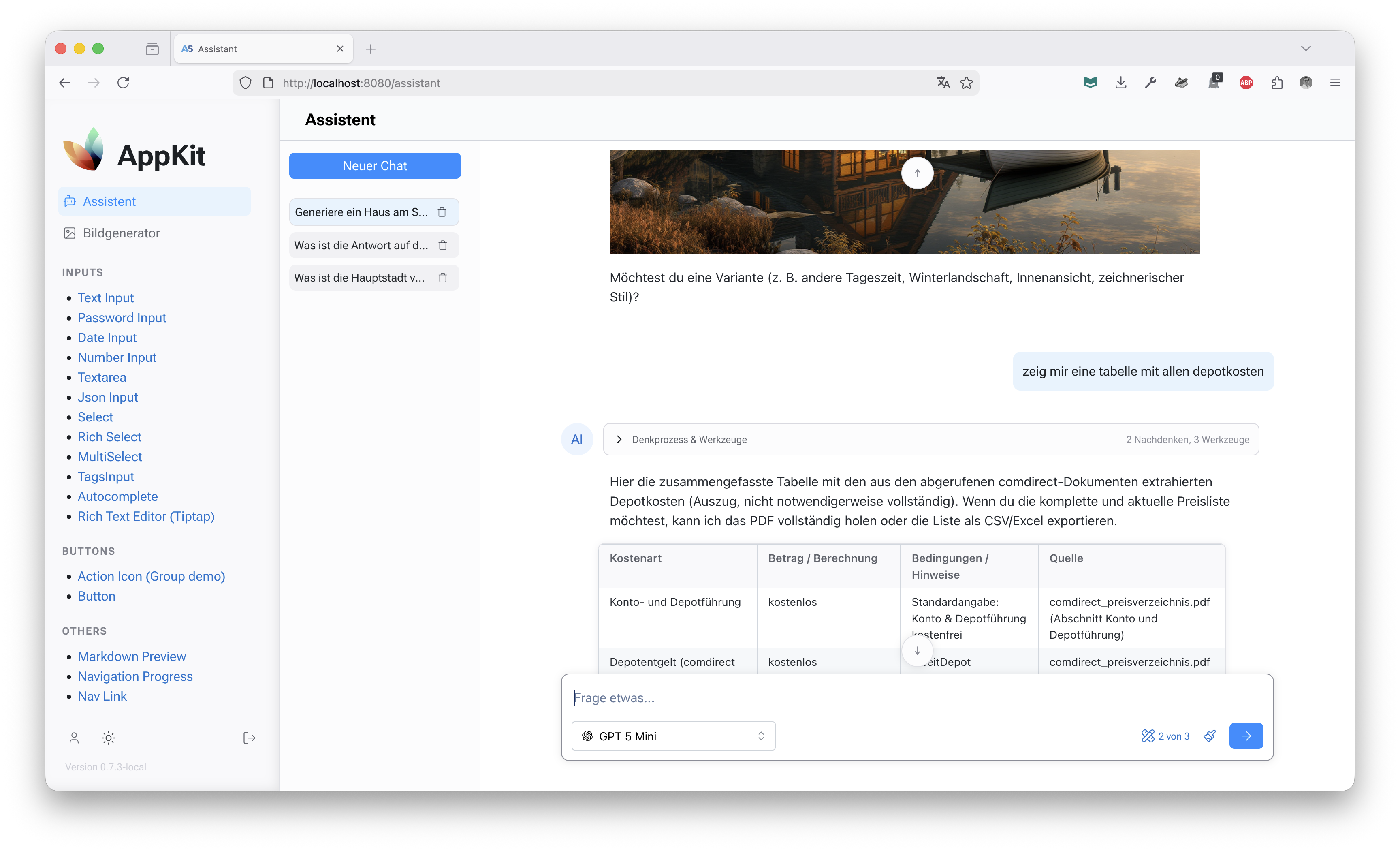
|
|
36
|
+
|
|
37
|
+
---
|
|
38
|
+
|
|
39
|
+
## ✨ Features
|
|
40
|
+
|
|
41
|
+
- **Multi-Model Support** - OpenAI Chat Completions, OpenAI Responses API, Perplexity, and fallback Lorem Ipsum processor
|
|
42
|
+
- **MCP Server Integration** - Manage and connect to Model Context Protocol servers as tools
|
|
43
|
+
- **Secure Credential Management** - Encrypted storage and handling of API keys and server credentials
|
|
44
|
+
- **Reflex UI Components** - Pre-built assistant interface with composer, thread management, and message display
|
|
45
|
+
- **Streaming Responses** - Real-time streaming of AI responses with chunked content
|
|
46
|
+
- **Thread Management** - Persistent conversation threads with state management
|
|
47
|
+
|
|
48
|
+
---
|
|
49
|
+
|
|
50
|
+
## 🚀 Installation
|
|
51
|
+
|
|
52
|
+
### As Part of AppKit Workspace
|
|
53
|
+
|
|
54
|
+
If you're using the full AppKit workspace:
|
|
55
|
+
|
|
56
|
+
```bash
|
|
57
|
+
git clone https://github.com/jenreh/appkit.git
|
|
58
|
+
cd appkit
|
|
59
|
+
uv sync
|
|
60
|
+
```
|
|
61
|
+
|
|
62
|
+
### Standalone Installation
|
|
63
|
+
|
|
64
|
+
Install from PyPI:
|
|
65
|
+
|
|
66
|
+
```bash
|
|
67
|
+
pip install appkit-assistant
|
|
68
|
+
```
|
|
69
|
+
|
|
70
|
+
Or with uv:
|
|
71
|
+
|
|
72
|
+
```bash
|
|
73
|
+
uv add appkit-assistant
|
|
74
|
+
```
|
|
75
|
+
|
|
76
|
+
### Dependencies
|
|
77
|
+
|
|
78
|
+
- `appkit-commons` (shared utilities)
|
|
79
|
+
- `openai>=2.3.0` (OpenAI API client)
|
|
80
|
+
|
|
81
|
+
---
|
|
82
|
+
|
|
83
|
+
## 🏁 Quick Start
|
|
84
|
+
|
|
85
|
+
### Basic Setup
|
|
86
|
+
|
|
87
|
+
1. Configure your API keys in your application's configuration:
|
|
88
|
+
|
|
89
|
+
```python
|
|
90
|
+
from appkit_assistant.configuration import AssistantConfig
|
|
91
|
+
|
|
92
|
+
# In your app configuration
|
|
93
|
+
assistant_config = AssistantConfig(
|
|
94
|
+
openai_api_key="your-openai-key",
|
|
95
|
+
perplexity_api_key="your-perplexity-key",
|
|
96
|
+
# Optional: custom OpenAI base URL
|
|
97
|
+
openai_base_url="https://api.openai.com/v1"
|
|
98
|
+
)
|
|
99
|
+
```
|
|
100
|
+
|
|
101
|
+
2. Register processors with the ModelManager:
|
|
102
|
+
|
|
103
|
+
```python
|
|
104
|
+
from appkit_assistant.backend.model_manager import ModelManager
|
|
105
|
+
from appkit_assistant.backend.processors.openai_chat_completion_processor import OpenAIChatCompletionProcessor
|
|
106
|
+
from appkit_assistant.backend.processors.perplexity_processor import PerplexityProcessor
|
|
107
|
+
|
|
108
|
+
manager = ModelManager()
|
|
109
|
+
manager.register_processor("openai", OpenAIChatCompletionProcessor(assistant_config))
|
|
110
|
+
manager.register_processor("perplexity", PerplexityProcessor(assistant_config))
|
|
111
|
+
```
|
|
112
|
+
|
|
113
|
+
3. Use the assistant component in your Reflex app:
|
|
114
|
+
|
|
115
|
+
```python
|
|
116
|
+
import reflex as rx
|
|
117
|
+
import appkit_assistant as assistant
|
|
118
|
+
|
|
119
|
+
def assistant_page():
|
|
120
|
+
return rx.container(
|
|
121
|
+
assistant.Assistant(),
|
|
122
|
+
height="100vh"
|
|
123
|
+
)
|
|
124
|
+
```
|
|
125
|
+
|
|
126
|
+
---
|
|
127
|
+
|
|
128
|
+
## 📖 Usage
|
|
129
|
+
|
|
130
|
+
### Model Management
|
|
131
|
+
|
|
132
|
+
The `ModelManager` singleton handles all AI processors and models:
|
|
133
|
+
|
|
134
|
+
```python
|
|
135
|
+
from appkit_assistant.backend.model_manager import ModelManager
|
|
136
|
+
|
|
137
|
+
manager = ModelManager()
|
|
138
|
+
|
|
139
|
+
# Get all available models
|
|
140
|
+
models = manager.get_all_models()
|
|
141
|
+
|
|
142
|
+
# Get a specific model
|
|
143
|
+
model = manager.get_model("gpt-4")
|
|
144
|
+
|
|
145
|
+
# Set default model
|
|
146
|
+
manager.set_default_model("gpt-4")
|
|
147
|
+
```
|
|
148
|
+
|
|
149
|
+
### Processing Messages
|
|
150
|
+
|
|
151
|
+
Process conversations using the registered processors:
|
|
152
|
+
|
|
153
|
+
```python
|
|
154
|
+
from appkit_assistant.backend.models import Message, MessageType
|
|
155
|
+
|
|
156
|
+
messages = [
|
|
157
|
+
Message(role="user", content="Hello, how are you?", type=MessageType.TEXT)
|
|
158
|
+
]
|
|
159
|
+
|
|
160
|
+
async for chunk in manager.get_processor_for_model("gpt-4").process(messages, "gpt-4"):
|
|
161
|
+
print(f"Received: {chunk.content}")
|
|
162
|
+
```
|
|
163
|
+
|
|
164
|
+
### MCP Server Management
|
|
165
|
+
|
|
166
|
+
Manage MCP servers for tool integration:
|
|
167
|
+
|
|
168
|
+
```python
|
|
169
|
+
from appkit_assistant.backend.models import MCPServer
|
|
170
|
+
|
|
171
|
+
mcp_server = MCPServer(
|
|
172
|
+
name="my-server",
|
|
173
|
+
command="python",
|
|
174
|
+
args=["-m", "my_mcp_server"],
|
|
175
|
+
headers={"Authorization": "Bearer token"}
|
|
176
|
+
)
|
|
177
|
+
|
|
178
|
+
# Use in processing
|
|
179
|
+
async for chunk in processor.process(messages, "gpt-4", mcp_servers=[mcp_server]):
|
|
180
|
+
# Handle response with MCP tools
|
|
181
|
+
pass
|
|
182
|
+
```
|
|
183
|
+
|
|
184
|
+
### UI Components
|
|
185
|
+
|
|
186
|
+
#### Assistant Interface
|
|
187
|
+
|
|
188
|
+
The main `Assistant` component provides a complete chat interface:
|
|
189
|
+
|
|
190
|
+
```python
|
|
191
|
+
import appkit_assistant as assistant
|
|
192
|
+
|
|
193
|
+
def chat_page():
|
|
194
|
+
return assistant.Assistant()
|
|
195
|
+
```
|
|
196
|
+
|
|
197
|
+
#### Individual Components
|
|
198
|
+
|
|
199
|
+
Use individual components for custom layouts:
|
|
200
|
+
|
|
201
|
+
```python
|
|
202
|
+
import appkit_assistant as assistant
|
|
203
|
+
|
|
204
|
+
def custom_assistant():
|
|
205
|
+
return rx.vstack(
|
|
206
|
+
assistant.ThreadList(),
|
|
207
|
+
assistant.composer(),
|
|
208
|
+
spacing="4"
|
|
209
|
+
)
|
|
210
|
+
```
|
|
211
|
+
|
|
212
|
+
#### MCP Server Management UI
|
|
213
|
+
|
|
214
|
+
Display and manage MCP servers:
|
|
215
|
+
|
|
216
|
+
```python
|
|
217
|
+
def servers_page():
|
|
218
|
+
return assistant.mcp_servers_table()
|
|
219
|
+
```
|
|
220
|
+
|
|
221
|
+
---
|
|
222
|
+
|
|
223
|
+
## 🔧 Configuration
|
|
224
|
+
|
|
225
|
+
### AssistantConfig
|
|
226
|
+
|
|
227
|
+
Configure API keys and settings:
|
|
228
|
+
|
|
229
|
+
```python
|
|
230
|
+
from appkit_assistant.configuration import AssistantConfig
|
|
231
|
+
|
|
232
|
+
config = AssistantConfig(
|
|
233
|
+
openai_api_key="sk-...",
|
|
234
|
+
openai_base_url="https://custom.openai.endpoint/v1",
|
|
235
|
+
perplexity_api_key="pplx-...",
|
|
236
|
+
google_api_key="AIza..." # For future Google integrations
|
|
237
|
+
)
|
|
238
|
+
```
|
|
239
|
+
|
|
240
|
+
### Processor Registration
|
|
241
|
+
|
|
242
|
+
Register processors based on available credentials:
|
|
243
|
+
|
|
244
|
+
```python
|
|
245
|
+
from appkit_assistant.backend.processors import (
|
|
246
|
+
OpenAIChatCompletionProcessor,
|
|
247
|
+
PerplexityProcessor,
|
|
248
|
+
LoremIpsumProcessor
|
|
249
|
+
)
|
|
250
|
+
|
|
251
|
+
manager = ModelManager()
|
|
252
|
+
|
|
253
|
+
if config.openai_api_key:
|
|
254
|
+
manager.register_processor("openai", OpenAIChatCompletionProcessor(config))
|
|
255
|
+
|
|
256
|
+
if config.perplexity_api_key:
|
|
257
|
+
manager.register_processor("perplexity", PerplexityProcessor(config))
|
|
258
|
+
|
|
259
|
+
# Always available fallback
|
|
260
|
+
manager.register_processor("lorem", LoremIpsumProcessor())
|
|
261
|
+
```
|
|
262
|
+
|
|
263
|
+
---
|
|
264
|
+
|
|
265
|
+
## 📋 API Reference
|
|
266
|
+
|
|
267
|
+
### Core Classes
|
|
268
|
+
|
|
269
|
+
- `ModelManager` - Singleton model and processor registry
|
|
270
|
+
- `Processor` - Abstract base for AI processors
|
|
271
|
+
- `AIModel` - Model metadata and configuration
|
|
272
|
+
- `Message` - Conversation message structure
|
|
273
|
+
- `MCPServer` - MCP server configuration
|
|
274
|
+
|
|
275
|
+
### Component API
|
|
276
|
+
|
|
277
|
+
- `Assistant` - Complete assistant interface
|
|
278
|
+
- `composer` - Message input component
|
|
279
|
+
- `ThreadList` - Conversation thread list
|
|
280
|
+
- `MessageComponent` - Individual message display
|
|
281
|
+
- `mcp_servers_table` - MCP server management table
|
|
282
|
+
|
|
283
|
+
### State Management
|
|
284
|
+
|
|
285
|
+
- `ThreadState` - Individual thread state
|
|
286
|
+
- `ThreadListState` - Thread list management
|
|
287
|
+
|
|
288
|
+
---
|
|
289
|
+
|
|
290
|
+
## 🔒 Security
|
|
291
|
+
|
|
292
|
+
> [!IMPORTANT]
|
|
293
|
+
> API keys and MCP server credentials are handled securely using the appkit-commons configuration system. Never hardcode secrets in your code.
|
|
294
|
+
|
|
295
|
+
- Use `SecretStr` for sensitive configuration values
|
|
296
|
+
- Credentials are encrypted at rest when stored in the database
|
|
297
|
+
- MCP server headers support encrypted storage
|
|
298
|
+
|
|
299
|
+
---
|
|
300
|
+
|
|
301
|
+
## 🤝 Integration Examples
|
|
302
|
+
|
|
303
|
+
### With AppKit User Management
|
|
304
|
+
|
|
305
|
+
Combine with appkit-user for authenticated assistants:
|
|
306
|
+
|
|
307
|
+
```python
|
|
308
|
+
from appkit_user import authenticated, requires_role
|
|
309
|
+
|
|
310
|
+
@authenticated()
|
|
311
|
+
@requires_role("assistant_user")
|
|
312
|
+
def protected_assistant_page():
|
|
313
|
+
return assistant.Assistant()
|
|
314
|
+
```
|
|
315
|
+
|
|
316
|
+
### Custom Processor Implementation
|
|
317
|
+
|
|
318
|
+
Implement your own AI processor:
|
|
319
|
+
|
|
320
|
+
```python
|
|
321
|
+
from appkit_assistant.backend.processor import Processor
|
|
322
|
+
from appkit_assistant.backend.models import AIModel, Chunk, Message
|
|
323
|
+
|
|
324
|
+
class CustomProcessor(Processor):
|
|
325
|
+
def get_supported_models(self):
|
|
326
|
+
return {
|
|
327
|
+
"custom-model": AIModel(
|
|
328
|
+
id="custom-model",
|
|
329
|
+
text="Custom AI Model",
|
|
330
|
+
icon="🤖"
|
|
331
|
+
)
|
|
332
|
+
}
|
|
333
|
+
|
|
334
|
+
async def process(self, messages, model_id, files=None, mcp_servers=None):
|
|
335
|
+
# Your AI processing logic here
|
|
336
|
+
yield Chunk(content="Response from custom model", type="text")
|
|
337
|
+
```
|
|
338
|
+
|
|
339
|
+
---
|
|
340
|
+
|
|
341
|
+
## 📚 Related Components
|
|
342
|
+
|
|
343
|
+
- **[appkit-mantine](./../appkit-mantine)** - UI components used in the assistant interface
|
|
344
|
+
- **[appkit-user](./../appkit-user)** - User authentication and authorization
|
|
345
|
+
- **[appkit-commons](./../appkit-commons)** - Shared utilities and configuration
|
|
@@ -0,0 +1,320 @@
|
|
|
1
|
+
# appkit-assistant
|
|
2
|
+
|
|
3
|
+
[](https://www.python.org/downloads/)
|
|
4
|
+
[](https://opensource.org/licenses/MIT)
|
|
5
|
+
|
|
6
|
+
**AI assistant component for Reflex applications with MCP server integration.**
|
|
7
|
+
|
|
8
|
+
appkit-assistant provides a complete conversational AI interface built on Reflex, featuring OpenAI and Perplexity integrations, Model Context Protocol (MCP) server management, and secure credential handling. It includes both backend processing services and ready-to-use UI components for building AI-powered applications.
|
|
9
|
+
|
|
10
|
+

|
|
11
|
+
|
|
12
|
+
---
|
|
13
|
+
|
|
14
|
+
## ✨ Features
|
|
15
|
+
|
|
16
|
+
- **Multi-Model Support** - OpenAI Chat Completions, OpenAI Responses API, Perplexity, and fallback Lorem Ipsum processor
|
|
17
|
+
- **MCP Server Integration** - Manage and connect to Model Context Protocol servers as tools
|
|
18
|
+
- **Secure Credential Management** - Encrypted storage and handling of API keys and server credentials
|
|
19
|
+
- **Reflex UI Components** - Pre-built assistant interface with composer, thread management, and message display
|
|
20
|
+
- **Streaming Responses** - Real-time streaming of AI responses with chunked content
|
|
21
|
+
- **Thread Management** - Persistent conversation threads with state management
|
|
22
|
+
|
|
23
|
+
---
|
|
24
|
+
|
|
25
|
+
## 🚀 Installation
|
|
26
|
+
|
|
27
|
+
### As Part of AppKit Workspace
|
|
28
|
+
|
|
29
|
+
If you're using the full AppKit workspace:
|
|
30
|
+
|
|
31
|
+
```bash
|
|
32
|
+
git clone https://github.com/jenreh/appkit.git
|
|
33
|
+
cd appkit
|
|
34
|
+
uv sync
|
|
35
|
+
```
|
|
36
|
+
|
|
37
|
+
### Standalone Installation
|
|
38
|
+
|
|
39
|
+
Install from PyPI:
|
|
40
|
+
|
|
41
|
+
```bash
|
|
42
|
+
pip install appkit-assistant
|
|
43
|
+
```
|
|
44
|
+
|
|
45
|
+
Or with uv:
|
|
46
|
+
|
|
47
|
+
```bash
|
|
48
|
+
uv add appkit-assistant
|
|
49
|
+
```
|
|
50
|
+
|
|
51
|
+
### Dependencies
|
|
52
|
+
|
|
53
|
+
- `appkit-commons` (shared utilities)
|
|
54
|
+
- `openai>=2.3.0` (OpenAI API client)
|
|
55
|
+
|
|
56
|
+
---
|
|
57
|
+
|
|
58
|
+
## 🏁 Quick Start
|
|
59
|
+
|
|
60
|
+
### Basic Setup
|
|
61
|
+
|
|
62
|
+
1. Configure your API keys in your application's configuration:
|
|
63
|
+
|
|
64
|
+
```python
|
|
65
|
+
from appkit_assistant.configuration import AssistantConfig
|
|
66
|
+
|
|
67
|
+
# In your app configuration
|
|
68
|
+
assistant_config = AssistantConfig(
|
|
69
|
+
openai_api_key="your-openai-key",
|
|
70
|
+
perplexity_api_key="your-perplexity-key",
|
|
71
|
+
# Optional: custom OpenAI base URL
|
|
72
|
+
openai_base_url="https://api.openai.com/v1"
|
|
73
|
+
)
|
|
74
|
+
```
|
|
75
|
+
|
|
76
|
+
2. Register processors with the ModelManager:
|
|
77
|
+
|
|
78
|
+
```python
|
|
79
|
+
from appkit_assistant.backend.model_manager import ModelManager
|
|
80
|
+
from appkit_assistant.backend.processors.openai_chat_completion_processor import OpenAIChatCompletionProcessor
|
|
81
|
+
from appkit_assistant.backend.processors.perplexity_processor import PerplexityProcessor
|
|
82
|
+
|
|
83
|
+
manager = ModelManager()
|
|
84
|
+
manager.register_processor("openai", OpenAIChatCompletionProcessor(assistant_config))
|
|
85
|
+
manager.register_processor("perplexity", PerplexityProcessor(assistant_config))
|
|
86
|
+
```
|
|
87
|
+
|
|
88
|
+
3. Use the assistant component in your Reflex app:
|
|
89
|
+
|
|
90
|
+
```python
|
|
91
|
+
import reflex as rx
|
|
92
|
+
import appkit_assistant as assistant
|
|
93
|
+
|
|
94
|
+
def assistant_page():
|
|
95
|
+
return rx.container(
|
|
96
|
+
assistant.Assistant(),
|
|
97
|
+
height="100vh"
|
|
98
|
+
)
|
|
99
|
+
```
|
|
100
|
+
|
|
101
|
+
---
|
|
102
|
+
|
|
103
|
+
## 📖 Usage
|
|
104
|
+
|
|
105
|
+
### Model Management
|
|
106
|
+
|
|
107
|
+
The `ModelManager` singleton handles all AI processors and models:
|
|
108
|
+
|
|
109
|
+
```python
|
|
110
|
+
from appkit_assistant.backend.model_manager import ModelManager
|
|
111
|
+
|
|
112
|
+
manager = ModelManager()
|
|
113
|
+
|
|
114
|
+
# Get all available models
|
|
115
|
+
models = manager.get_all_models()
|
|
116
|
+
|
|
117
|
+
# Get a specific model
|
|
118
|
+
model = manager.get_model("gpt-4")
|
|
119
|
+
|
|
120
|
+
# Set default model
|
|
121
|
+
manager.set_default_model("gpt-4")
|
|
122
|
+
```
|
|
123
|
+
|
|
124
|
+
### Processing Messages
|
|
125
|
+
|
|
126
|
+
Process conversations using the registered processors:
|
|
127
|
+
|
|
128
|
+
```python
|
|
129
|
+
from appkit_assistant.backend.models import Message, MessageType
|
|
130
|
+
|
|
131
|
+
messages = [
|
|
132
|
+
Message(role="user", content="Hello, how are you?", type=MessageType.TEXT)
|
|
133
|
+
]
|
|
134
|
+
|
|
135
|
+
async for chunk in manager.get_processor_for_model("gpt-4").process(messages, "gpt-4"):
|
|
136
|
+
print(f"Received: {chunk.content}")
|
|
137
|
+
```
|
|
138
|
+
|
|
139
|
+
### MCP Server Management
|
|
140
|
+
|
|
141
|
+
Manage MCP servers for tool integration:
|
|
142
|
+
|
|
143
|
+
```python
|
|
144
|
+
from appkit_assistant.backend.models import MCPServer
|
|
145
|
+
|
|
146
|
+
mcp_server = MCPServer(
|
|
147
|
+
name="my-server",
|
|
148
|
+
command="python",
|
|
149
|
+
args=["-m", "my_mcp_server"],
|
|
150
|
+
headers={"Authorization": "Bearer token"}
|
|
151
|
+
)
|
|
152
|
+
|
|
153
|
+
# Use in processing
|
|
154
|
+
async for chunk in processor.process(messages, "gpt-4", mcp_servers=[mcp_server]):
|
|
155
|
+
# Handle response with MCP tools
|
|
156
|
+
pass
|
|
157
|
+
```
|
|
158
|
+
|
|
159
|
+
### UI Components
|
|
160
|
+
|
|
161
|
+
#### Assistant Interface
|
|
162
|
+
|
|
163
|
+
The main `Assistant` component provides a complete chat interface:
|
|
164
|
+
|
|
165
|
+
```python
|
|
166
|
+
import appkit_assistant as assistant
|
|
167
|
+
|
|
168
|
+
def chat_page():
|
|
169
|
+
return assistant.Assistant()
|
|
170
|
+
```
|
|
171
|
+
|
|
172
|
+
#### Individual Components
|
|
173
|
+
|
|
174
|
+
Use individual components for custom layouts:
|
|
175
|
+
|
|
176
|
+
```python
|
|
177
|
+
import appkit_assistant as assistant
|
|
178
|
+
|
|
179
|
+
def custom_assistant():
|
|
180
|
+
return rx.vstack(
|
|
181
|
+
assistant.ThreadList(),
|
|
182
|
+
assistant.composer(),
|
|
183
|
+
spacing="4"
|
|
184
|
+
)
|
|
185
|
+
```
|
|
186
|
+
|
|
187
|
+
#### MCP Server Management UI
|
|
188
|
+
|
|
189
|
+
Display and manage MCP servers:
|
|
190
|
+
|
|
191
|
+
```python
|
|
192
|
+
def servers_page():
|
|
193
|
+
return assistant.mcp_servers_table()
|
|
194
|
+
```
|
|
195
|
+
|
|
196
|
+
---
|
|
197
|
+
|
|
198
|
+
## 🔧 Configuration
|
|
199
|
+
|
|
200
|
+
### AssistantConfig
|
|
201
|
+
|
|
202
|
+
Configure API keys and settings:
|
|
203
|
+
|
|
204
|
+
```python
|
|
205
|
+
from appkit_assistant.configuration import AssistantConfig
|
|
206
|
+
|
|
207
|
+
config = AssistantConfig(
|
|
208
|
+
openai_api_key="sk-...",
|
|
209
|
+
openai_base_url="https://custom.openai.endpoint/v1",
|
|
210
|
+
perplexity_api_key="pplx-...",
|
|
211
|
+
google_api_key="AIza..." # For future Google integrations
|
|
212
|
+
)
|
|
213
|
+
```
|
|
214
|
+
|
|
215
|
+
### Processor Registration
|
|
216
|
+
|
|
217
|
+
Register processors based on available credentials:
|
|
218
|
+
|
|
219
|
+
```python
|
|
220
|
+
from appkit_assistant.backend.processors import (
|
|
221
|
+
OpenAIChatCompletionProcessor,
|
|
222
|
+
PerplexityProcessor,
|
|
223
|
+
LoremIpsumProcessor
|
|
224
|
+
)
|
|
225
|
+
|
|
226
|
+
manager = ModelManager()
|
|
227
|
+
|
|
228
|
+
if config.openai_api_key:
|
|
229
|
+
manager.register_processor("openai", OpenAIChatCompletionProcessor(config))
|
|
230
|
+
|
|
231
|
+
if config.perplexity_api_key:
|
|
232
|
+
manager.register_processor("perplexity", PerplexityProcessor(config))
|
|
233
|
+
|
|
234
|
+
# Always available fallback
|
|
235
|
+
manager.register_processor("lorem", LoremIpsumProcessor())
|
|
236
|
+
```
|
|
237
|
+
|
|
238
|
+
---
|
|
239
|
+
|
|
240
|
+
## 📋 API Reference
|
|
241
|
+
|
|
242
|
+
### Core Classes
|
|
243
|
+
|
|
244
|
+
- `ModelManager` - Singleton model and processor registry
|
|
245
|
+
- `Processor` - Abstract base for AI processors
|
|
246
|
+
- `AIModel` - Model metadata and configuration
|
|
247
|
+
- `Message` - Conversation message structure
|
|
248
|
+
- `MCPServer` - MCP server configuration
|
|
249
|
+
|
|
250
|
+
### Component API
|
|
251
|
+
|
|
252
|
+
- `Assistant` - Complete assistant interface
|
|
253
|
+
- `composer` - Message input component
|
|
254
|
+
- `ThreadList` - Conversation thread list
|
|
255
|
+
- `MessageComponent` - Individual message display
|
|
256
|
+
- `mcp_servers_table` - MCP server management table
|
|
257
|
+
|
|
258
|
+
### State Management
|
|
259
|
+
|
|
260
|
+
- `ThreadState` - Individual thread state
|
|
261
|
+
- `ThreadListState` - Thread list management
|
|
262
|
+
|
|
263
|
+
---
|
|
264
|
+
|
|
265
|
+
## 🔒 Security
|
|
266
|
+
|
|
267
|
+
> [!IMPORTANT]
|
|
268
|
+
> API keys and MCP server credentials are handled securely using the appkit-commons configuration system. Never hardcode secrets in your code.
|
|
269
|
+
|
|
270
|
+
- Use `SecretStr` for sensitive configuration values
|
|
271
|
+
- Credentials are encrypted at rest when stored in the database
|
|
272
|
+
- MCP server headers support encrypted storage
|
|
273
|
+
|
|
274
|
+
---
|
|
275
|
+
|
|
276
|
+
## 🤝 Integration Examples
|
|
277
|
+
|
|
278
|
+
### With AppKit User Management
|
|
279
|
+
|
|
280
|
+
Combine with appkit-user for authenticated assistants:
|
|
281
|
+
|
|
282
|
+
```python
|
|
283
|
+
from appkit_user import authenticated, requires_role
|
|
284
|
+
|
|
285
|
+
@authenticated()
|
|
286
|
+
@requires_role("assistant_user")
|
|
287
|
+
def protected_assistant_page():
|
|
288
|
+
return assistant.Assistant()
|
|
289
|
+
```
|
|
290
|
+
|
|
291
|
+
### Custom Processor Implementation
|
|
292
|
+
|
|
293
|
+
Implement your own AI processor:
|
|
294
|
+
|
|
295
|
+
```python
|
|
296
|
+
from appkit_assistant.backend.processor import Processor
|
|
297
|
+
from appkit_assistant.backend.models import AIModel, Chunk, Message
|
|
298
|
+
|
|
299
|
+
class CustomProcessor(Processor):
|
|
300
|
+
def get_supported_models(self):
|
|
301
|
+
return {
|
|
302
|
+
"custom-model": AIModel(
|
|
303
|
+
id="custom-model",
|
|
304
|
+
text="Custom AI Model",
|
|
305
|
+
icon="🤖"
|
|
306
|
+
)
|
|
307
|
+
}
|
|
308
|
+
|
|
309
|
+
async def process(self, messages, model_id, files=None, mcp_servers=None):
|
|
310
|
+
# Your AI processing logic here
|
|
311
|
+
yield Chunk(content="Response from custom model", type="text")
|
|
312
|
+
```
|
|
313
|
+
|
|
314
|
+
---
|
|
315
|
+
|
|
316
|
+
## 📚 Related Components
|
|
317
|
+
|
|
318
|
+
- **[appkit-mantine](./../appkit-mantine)** - UI components used in the assistant interface
|
|
319
|
+
- **[appkit-user](./../appkit-user)** - User authentication and authorization
|
|
320
|
+
- **[appkit-commons](./../appkit-commons)** - Shared utilities and configuration
|
|
Binary file
|
|
@@ -0,0 +1,49 @@
|
|
|
1
|
+
[project]
|
|
2
|
+
name = "appkit-assistant"
|
|
3
|
+
version = "0.7.5"
|
|
4
|
+
description = "Add your description here"
|
|
5
|
+
readme = "README.md"
|
|
6
|
+
authors = [{ name = "Jens Rehpöhler" }]
|
|
7
|
+
requires-python = ">=3.13"
|
|
8
|
+
license = { text = "MIT" }
|
|
9
|
+
keywords = [
|
|
10
|
+
"reflex",
|
|
11
|
+
"mantine",
|
|
12
|
+
"ui",
|
|
13
|
+
"components",
|
|
14
|
+
"web",
|
|
15
|
+
]
|
|
16
|
+
classifiers = [
|
|
17
|
+
"Intended Audience :: Developers",
|
|
18
|
+
"License :: OSI Approved :: MIT License",
|
|
19
|
+
"Programming Language :: Python :: 3",
|
|
20
|
+
"Programming Language :: Python :: 3.13",
|
|
21
|
+
"Topic :: Software Development :: Libraries :: Python Modules",
|
|
22
|
+
"Topic :: Software Development :: User Interfaces",
|
|
23
|
+
]
|
|
24
|
+
dependencies = [
|
|
25
|
+
"appkit-commons",
|
|
26
|
+
"appkit-mantine",
|
|
27
|
+
"appkit-ui",
|
|
28
|
+
"openai>=2.3.0",
|
|
29
|
+
"reflex>=0.8.20",
|
|
30
|
+
]
|
|
31
|
+
|
|
32
|
+
[project.urls]
|
|
33
|
+
Homepage = "https://github.com/jenreh/appkit"
|
|
34
|
+
Documentation = "https://github.com/jenreh/appkit/tree/main/docs"
|
|
35
|
+
Repository = "https://github.com/jenreh/appkit"
|
|
36
|
+
Issues = "https://github.com/jenreh/appkit/issues"
|
|
37
|
+
|
|
38
|
+
[tool.setuptools.packages.find]
|
|
39
|
+
where = ["src"]
|
|
40
|
+
|
|
41
|
+
[tool.uv.sources]
|
|
42
|
+
appkit-commons = { workspace = true }
|
|
43
|
+
|
|
44
|
+
[tool.hatch.build.targets.wheel]
|
|
45
|
+
packages = ["src/appkit_assistant"]
|
|
46
|
+
|
|
47
|
+
[build-system]
|
|
48
|
+
requires = ["hatchling"]
|
|
49
|
+
build-backend = "hatchling.build"
|
|
@@ -94,16 +94,13 @@ class ValidationState(rx.State):
|
|
|
94
94
|
@rx.var
|
|
95
95
|
def has_errors(self) -> bool:
|
|
96
96
|
"""Check if the form can be submitted."""
|
|
97
|
-
|
|
97
|
+
return bool(
|
|
98
98
|
self.url_error
|
|
99
99
|
or self.name_error
|
|
100
100
|
or self.description_error
|
|
101
101
|
or self.prompt_error
|
|
102
102
|
)
|
|
103
103
|
|
|
104
|
-
logger.debug("Has validation errors: %s", errors)
|
|
105
|
-
return errors
|
|
106
|
-
|
|
107
104
|
@rx.var
|
|
108
105
|
def prompt_remaining(self) -> int:
|
|
109
106
|
"""Calculate remaining characters for prompt field."""
|
appkit_assistant-0.7.3/PKG-INFO
DELETED
appkit_assistant-0.7.3/README.md
DELETED
|
File without changes
|
|
@@ -1,67 +0,0 @@
|
|
|
1
|
-
# Render information with a dedicated UI
|
|
2
|
-
|
|
3
|
-
"Action" classes, e.g. something like
|
|
4
|
-
|
|
5
|
-
```python
|
|
6
|
-
class Calender(AssitantAction):
|
|
7
|
-
name: str
|
|
8
|
-
description: str
|
|
9
|
-
parameters: list[dict]
|
|
10
|
-
|
|
11
|
-
def __init__(self):
|
|
12
|
-
name = "showCalendarMeeting"
|
|
13
|
-
description = "Displays calendar meeting information"
|
|
14
|
-
parameters = [
|
|
15
|
-
{
|
|
16
|
-
name: "date",
|
|
17
|
-
type: "string",
|
|
18
|
-
description: "Meeting date (YYYY-MM-DD)",
|
|
19
|
-
required: true
|
|
20
|
-
},
|
|
21
|
-
{
|
|
22
|
-
name: "time",
|
|
23
|
-
type: "string",
|
|
24
|
-
description: "Meeting time (HH:mm)",
|
|
25
|
-
required: true
|
|
26
|
-
},
|
|
27
|
-
{
|
|
28
|
-
name: "meetingName",
|
|
29
|
-
type: "string",
|
|
30
|
-
description: "Name of the meeting",
|
|
31
|
-
required: false
|
|
32
|
-
}
|
|
33
|
-
]
|
|
34
|
-
|
|
35
|
-
def render(status, **kwargs):
|
|
36
|
-
if status == Status.LOADING:
|
|
37
|
-
return loading_view()
|
|
38
|
-
else:
|
|
39
|
-
return calendar_entry(**kwargs)
|
|
40
|
-
```
|
|
41
|
-
|
|
42
|
-
## Next Actions
|
|
43
|
-
|
|
44
|
-
```python
|
|
45
|
-
class Suggestion(AssitantAction):
|
|
46
|
-
name: str
|
|
47
|
-
description: str
|
|
48
|
-
parameters: list[dict]
|
|
49
|
-
|
|
50
|
-
def __init__(self):
|
|
51
|
-
name = "showSuggestion"
|
|
52
|
-
description = "Displays suggestions"
|
|
53
|
-
parameters = [
|
|
54
|
-
{
|
|
55
|
-
name: "suggestion",
|
|
56
|
-
type: "string",
|
|
57
|
-
description: "Suggestion what how to continue or what to ask next",
|
|
58
|
-
required: false
|
|
59
|
-
}
|
|
60
|
-
]
|
|
61
|
-
|
|
62
|
-
def render(status, **kwargs):
|
|
63
|
-
if status == Status.LOADING:
|
|
64
|
-
return loading_view()
|
|
65
|
-
else:
|
|
66
|
-
return render_suggestion(**kwargs)
|
|
67
|
-
```
|
|
@@ -1,24 +0,0 @@
|
|
|
1
|
-
[project]
|
|
2
|
-
name = "appkit-assistant"
|
|
3
|
-
version = "0.7.3"
|
|
4
|
-
description = "Add your description here"
|
|
5
|
-
readme = "README.md"
|
|
6
|
-
authors = [{ name = "Jens Rehpöhler" }]
|
|
7
|
-
requires-python = ">=3.13"
|
|
8
|
-
dependencies = [
|
|
9
|
-
"appkit-commons",
|
|
10
|
-
"openai>=2.3.0",
|
|
11
|
-
]
|
|
12
|
-
|
|
13
|
-
[tool.setuptools.packages.find]
|
|
14
|
-
where = ["src"]
|
|
15
|
-
|
|
16
|
-
[tool.uv.sources]
|
|
17
|
-
appkit-commons = { workspace = true }
|
|
18
|
-
|
|
19
|
-
[tool.hatch.build.targets.wheel]
|
|
20
|
-
packages = ["src/appkit_assistant"]
|
|
21
|
-
|
|
22
|
-
[build-system]
|
|
23
|
-
requires = ["hatchling"]
|
|
24
|
-
build-backend = "hatchling.build"
|
|
File without changes
|
{appkit_assistant-0.7.3 → appkit_assistant-0.7.5}/src/appkit_assistant/backend/model_manager.py
RENAMED
|
File without changes
|
|
File without changes
|
|
File without changes
|
|
File without changes
|
|
File without changes
|
|
File without changes
|
|
File without changes
|
|
File without changes
|
|
File without changes
|
|
File without changes
|
{appkit_assistant-0.7.3 → appkit_assistant-0.7.5}/src/appkit_assistant/backend/repositories.py
RENAMED
|
File without changes
|
{appkit_assistant-0.7.3 → appkit_assistant-0.7.5}/src/appkit_assistant/backend/system_prompt.py
RENAMED
|
File without changes
|
{appkit_assistant-0.7.3 → appkit_assistant-0.7.5}/src/appkit_assistant/components/__init__.py
RENAMED
|
File without changes
|
{appkit_assistant-0.7.3 → appkit_assistant-0.7.5}/src/appkit_assistant/components/composer.py
RENAMED
|
File without changes
|
|
File without changes
|
|
File without changes
|
{appkit_assistant-0.7.3 → appkit_assistant-0.7.5}/src/appkit_assistant/components/message.py
RENAMED
|
File without changes
|
|
File without changes
|
{appkit_assistant-0.7.3 → appkit_assistant-0.7.5}/src/appkit_assistant/components/threadlist.py
RENAMED
|
File without changes
|
{appkit_assistant-0.7.3 → appkit_assistant-0.7.5}/src/appkit_assistant/components/tools_modal.py
RENAMED
|
File without changes
|
|
File without changes
|
{appkit_assistant-0.7.3 → appkit_assistant-0.7.5}/src/appkit_assistant/state/mcp_server_state.py
RENAMED
|
File without changes
|
{appkit_assistant-0.7.3 → appkit_assistant-0.7.5}/src/appkit_assistant/state/thread_state.py
RENAMED
|
File without changes
|