antplus-recorder 0.1.0__tar.gz
This diff represents the content of publicly available package versions that have been released to one of the supported registries. The information contained in this diff is provided for informational purposes only and reflects changes between package versions as they appear in their respective public registries.
- antplus_recorder-0.1.0/.gitignore +20 -0
- antplus_recorder-0.1.0/LICENSE +21 -0
- antplus_recorder-0.1.0/PKG-INFO +194 -0
- antplus_recorder-0.1.0/README.md +165 -0
- antplus_recorder-0.1.0/pyproject.toml +92 -0
- antplus_recorder-0.1.0/src/antplus_recorder/__init__.py +93 -0
- antplus_recorder-0.1.0/src/antplus_recorder/app.py +525 -0
- antplus_recorder-0.1.0/src/antplus_recorder/comparison.py +39 -0
- antplus_recorder-0.1.0/src/antplus_recorder/receiver.py +141 -0
- antplus_recorder-0.1.0/src/antplus_recorder/recording.py +220 -0
- antplus_recorder-0.1.0/src/antplus_recorder/registry.py +114 -0
- antplus_recorder-0.1.0/src/antplus_recorder/sensors.py +238 -0
|
@@ -0,0 +1,20 @@
|
|
|
1
|
+
# Python-generated files
|
|
2
|
+
__pycache__/
|
|
3
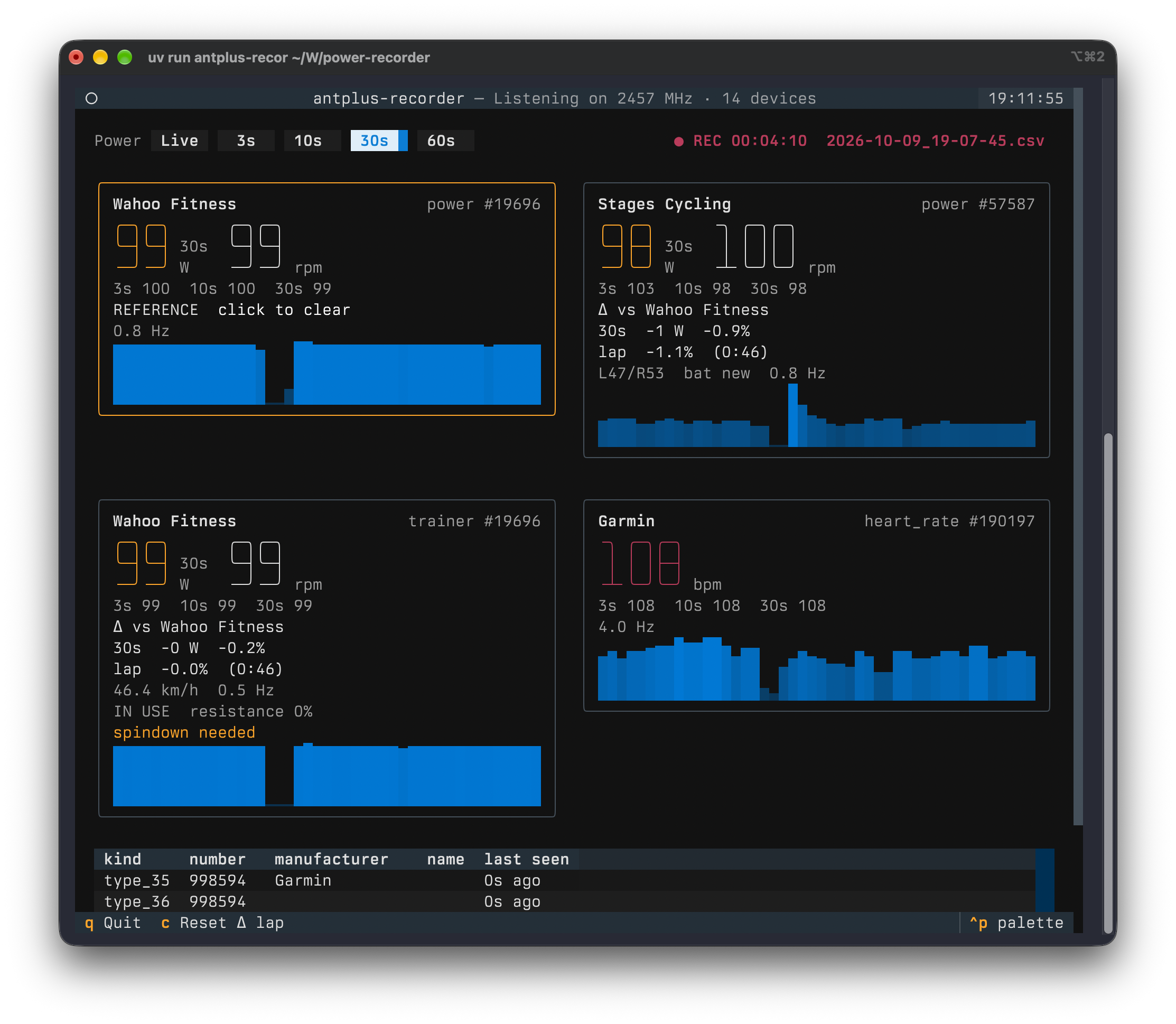
|
+
*.py[oc]
|
|
4
|
+
build/
|
|
5
|
+
dist/
|
|
6
|
+
wheels/
|
|
7
|
+
*.egg-info
|
|
8
|
+
|
|
9
|
+
# Virtual environments
|
|
10
|
+
.venv
|
|
11
|
+
|
|
12
|
+
# Recordings and the device list, written to the directory the app runs in
|
|
13
|
+
*.csv
|
|
14
|
+
*.fit
|
|
15
|
+
devices.toml
|
|
16
|
+
|
|
17
|
+
# Build and tool caches
|
|
18
|
+
.pytest_cache/
|
|
19
|
+
.ruff_cache/
|
|
20
|
+
.DS_Store
|
|
@@ -0,0 +1,21 @@
|
|
|
1
|
+
MIT License
|
|
2
|
+
|
|
3
|
+
Copyright (c) 2026 Martin Mahner
|
|
4
|
+
|
|
5
|
+
Permission is hereby granted, free of charge, to any person obtaining a copy
|
|
6
|
+
of this software and associated documentation files (the "Software"), to deal
|
|
7
|
+
in the Software without restriction, including without limitation the rights
|
|
8
|
+
to use, copy, modify, merge, publish, distribute, sublicense, and/or sell
|
|
9
|
+
copies of the Software, and to permit persons to whom the Software is
|
|
10
|
+
furnished to do so, subject to the following conditions:
|
|
11
|
+
|
|
12
|
+
The above copyright notice and this permission notice shall be included in all
|
|
13
|
+
copies or substantial portions of the Software.
|
|
14
|
+
|
|
15
|
+
THE SOFTWARE IS PROVIDED "AS IS", WITHOUT WARRANTY OF ANY KIND, EXPRESS OR
|
|
16
|
+
IMPLIED, INCLUDING BUT NOT LIMITED TO THE WARRANTIES OF MERCHANTABILITY,
|
|
17
|
+
FITNESS FOR A PARTICULAR PURPOSE AND NONINFRINGEMENT. IN NO EVENT SHALL THE
|
|
18
|
+
AUTHORS OR COPYRIGHT HOLDERS BE LIABLE FOR ANY CLAIM, DAMAGES OR OTHER
|
|
19
|
+
LIABILITY, WHETHER IN AN ACTION OF CONTRACT, TORT OR OTHERWISE, ARISING FROM,
|
|
20
|
+
OUT OF OR IN CONNECTION WITH THE SOFTWARE OR THE USE OR OTHER DEALINGS IN THE
|
|
21
|
+
SOFTWARE.
|
|
@@ -0,0 +1,194 @@
|
|
|
1
|
+
Metadata-Version: 2.5
|
|
2
|
+
Name: antplus-recorder
|
|
3
|
+
Version: 0.1.0
|
|
4
|
+
Summary: Record and display every ANT+ sensor in range: power meters, smart trainers and heart rate straps
|
|
5
|
+
Project-URL: Homepage, https://github.com/bartTC/antplus-recorder
|
|
6
|
+
Project-URL: Issues, https://github.com/bartTC/antplus-recorder/issues
|
|
7
|
+
Author-email: Martin Mahner <martin@mahner.org>
|
|
8
|
+
License-Expression: MIT
|
|
9
|
+
License-File: LICENSE
|
|
10
|
+
Keywords: ant+,antplus,cycling,fit,power meter,smart trainer,tui
|
|
11
|
+
Classifier: Development Status :: 4 - Beta
|
|
12
|
+
Classifier: Environment :: Console
|
|
13
|
+
Classifier: Intended Audience :: End Users/Desktop
|
|
14
|
+
Classifier: Operating System :: MacOS
|
|
15
|
+
Classifier: Operating System :: POSIX :: Linux
|
|
16
|
+
Classifier: Programming Language :: Python :: 3
|
|
17
|
+
Classifier: Programming Language :: Python :: 3.11
|
|
18
|
+
Classifier: Programming Language :: Python :: 3.12
|
|
19
|
+
Classifier: Programming Language :: Python :: 3.13
|
|
20
|
+
Classifier: Programming Language :: Python :: 3.14
|
|
21
|
+
Classifier: Topic :: Scientific/Engineering
|
|
22
|
+
Requires-Python: >=3.11
|
|
23
|
+
Requires-Dist: garmin-fit-sdk>=21.218.0
|
|
24
|
+
Requires-Dist: libusb-package>=1.0.30.0
|
|
25
|
+
Requires-Dist: openant>=1.3.4
|
|
26
|
+
Requires-Dist: textual>=8.2.8
|
|
27
|
+
Requires-Dist: tomlkit>=0.15.1
|
|
28
|
+
Description-Content-Type: text/markdown
|
|
29
|
+
|
|
30
|
+
# antplus-recorder
|
|
31
|
+
|
|
32
|
+
Shows and records every ANT+ sensor in range: power meters, smart trainers and heart rate straps, side by side in the terminal. Built to compare power meters against each other, for example a smart trainer against crank or pedal power meters. One power meter is the reference, and every other one shows how far it is off, in watts and percent. Every ride is written to a CSV file and to one FIT file per power meter.
|
|
33
|
+
|
|
34
|
+
There is no pairing. The ANT+ USB stick listens to the whole ANT+ frequency, and every sensor that sends shows up on its own.
|
|
35
|
+
|
|
36
|
+
|
|
37
|
+
|
|
38
|
+
*The Kickr in ERG mode at 100 W is the reference. Its power and trainer channels agree, the Stages crank reads 1.1% lower over the lap.*
|
|
39
|
+
|
|
40
|
+
## Install
|
|
41
|
+
|
|
42
|
+
Python ≥ 3.11 and an ANT+ USB stick (ANT USB2 or ANT USB-m, the usual Garmin/Dynastream ones).
|
|
43
|
+
|
|
44
|
+
```sh
|
|
45
|
+
uvx antplus-recorder # run without installing
|
|
46
|
+
uv tool install antplus-recorder
|
|
47
|
+
pipx install antplus-recorder
|
|
48
|
+
```
|
|
49
|
+
|
|
50
|
+
libusb comes along with the `libusb-package` dependency, so a Mac needs nothing from Homebrew. If libusb is installed on the system, that one is used.
|
|
51
|
+
|
|
52
|
+
- **macOS:** Plug the stick in and allow the accessory to connect when macOS asks.
|
|
53
|
+
- **Linux:** The stick needs read/write access for your user. Untested, but this udev rule in `/etc/udev/rules.d/42-ant-usb-sticks.rules` should do it, followed by `sudo udevadm control --reload-rules` and replugging the stick:
|
|
54
|
+
|
|
55
|
+
```
|
|
56
|
+
SUBSYSTEM=="usb", ATTRS{idVendor}=="0fcf", ATTRS{idProduct}=="1008", MODE="0666"
|
|
57
|
+
SUBSYSTEM=="usb", ATTRS{idVendor}=="0fcf", ATTRS{idProduct}=="1009", MODE="0666"
|
|
58
|
+
```
|
|
59
|
+
|
|
60
|
+
## Usage
|
|
61
|
+
|
|
62
|
+
```sh
|
|
63
|
+
antplus-recorder # show and record everything in range
|
|
64
|
+
antplus-recorder --no-record # only show
|
|
65
|
+
antplus-recorder -o ~/Rides # record somewhere else
|
|
66
|
+
antplus-recorder -d 57587 -d 19696 # only these device numbers
|
|
67
|
+
antplus-recorder --fit-from 2026-10-09_18-57-53.csv
|
|
68
|
+
```
|
|
69
|
+
|
|
70
|
+
Recording starts right away, so it can't be forgotten. Files go to the folder you start the command in, named after the start time, and are never overwritten.
|
|
71
|
+
|
|
72
|
+
| Option | Default | Effect |
|
|
73
|
+
|---|---|---|
|
|
74
|
+
| `-o`, `--output-dir DIR` | current folder | Where recordings go. |
|
|
75
|
+
| `--no-record` | off | Only show, write no files. |
|
|
76
|
+
| `-d`, `--device NUMBER` | all | Only show and record this ANT+ device number. Repeat for more. Useful when other people's sensors are in range. |
|
|
77
|
+
| `--devices FILE` | `devices.toml` | The device list, see [Naming devices](#naming-devices). |
|
|
78
|
+
| `--fit-from CSV` | | Build the FIT files for a recorded CSV, e.g. after a crash, then exit. |
|
|
79
|
+
|
|
80
|
+
### Keys
|
|
81
|
+
|
|
82
|
+
| Key | Effect |
|
|
83
|
+
|---|---|
|
|
84
|
+
| `1`–`5` or the buttons | Big power numbers, L/R balance and the difference show Live, 3 s, 10 s, 30 s or 60 s averages. |
|
|
85
|
+
| click a power tile | Make it the reference for comparing, click again to clear. |
|
|
86
|
+
| `c` | Start a new lap for the comparison. |
|
|
87
|
+
| `q` | Quit. Writes the FIT files. |
|
|
88
|
+
|
|
89
|
+
### What a tile shows
|
|
90
|
+
|
|
91
|
+
- Power and cadence. Power is the average over the selected window, cadence is live.
|
|
92
|
+
- 3 s, 10 s and 30 s averages, always.
|
|
93
|
+
- The difference to the reference meter, see below.
|
|
94
|
+
- L/R balance for dual-sided meters, power-weighted over the selected window, battery and how often a new power value arrives (Hz).
|
|
95
|
+
- Smart trainers (FE-C): state (ready, in use, paused), resistance level, incline if sent, and warnings such as `spindown needed` or `ERG: speed too low`.
|
|
96
|
+
- A trend line of the last two minutes, starting at 0 W.
|
|
97
|
+
|
|
98
|
+
Heart rate straps get a tile with bpm. Every other ANT+ device in range (watches, footpods, radars …) is listed in a table below.
|
|
99
|
+
|
|
100
|
+
## Comparing power meters
|
|
101
|
+
|
|
102
|
+
Click the power meter you trust, for example the pedals or the crank. It gets an orange border and `REFERENCE`. Every other power tile then shows:
|
|
103
|
+
|
|
104
|
+
```
|
|
105
|
+
Δ vs Stages Cycling
|
|
106
|
+
30s -7 W -6.5%
|
|
107
|
+
lap -6.8% (4:12)
|
|
108
|
+
```
|
|
109
|
+
|
|
110
|
+
- The middle line compares the averages over the selected window. In Live mode it uses 30 s, because two meters never measure at the same instant and single readings make the difference jump.
|
|
111
|
+
- **lap** compares the work of both meters since the last `c`. Seconds in which the reference is below 20 W (coasting) or one of the meters sends nothing don't count, and the time in brackets is only the counted seconds. Because it sums energy, a minute at 300 W weighs three times as much as a minute at 100 W. Press `c` at the start of every power level.
|
|
112
|
+
- Changing the reference starts a new lap. The reference is saved in `devices.toml`.
|
|
113
|
+
|
|
114
|
+
Use the lap, not the 30 s value, for corrections: over a few seconds, the reference's own noise shows up as a difference.
|
|
115
|
+
|
|
116
|
+
**Example:** With the crank as reference, a smart trainer shows `-6.5%`, so it reads 6.5% low. To really ride 200 W in ERG mode, set it to 200 × (1 − 0.065) ≈ 187 W.
|
|
117
|
+
|
|
118
|
+
For a clean number, warm up for 10 minutes, then do the trainer's spindown and the zero offset of the other meters, and ride a few minutes at each of several levels (100, 200, 300 W). That also shows whether the difference is a constant percentage or a fixed number of watts: 7 W are 7% at 100 W but only 2–3% at 300 W.
|
|
119
|
+
|
|
120
|
+
## Files
|
|
121
|
+
|
|
122
|
+
### CSV
|
|
123
|
+
|
|
124
|
+
`2026-10-09_18-57-53.csv`, one row per sensor and second, appended and flushed every second, so a crash loses at most the last second.
|
|
125
|
+
|
|
126
|
+
| Column | Content |
|
|
127
|
+
|---|---|
|
|
128
|
+
| `time` | Local time with UTC offset, ISO 8601. |
|
|
129
|
+
| `kind` | `power`, `trainer` or `heart_rate`. |
|
|
130
|
+
| `number` | ANT+ device number. |
|
|
131
|
+
| `name` | Name from `devices.toml`, else the manufacturer. |
|
|
132
|
+
| `value` | Watts or bpm, the mean of that second. |
|
|
133
|
+
| `unit` | `W` or `bpm`. |
|
|
134
|
+
| `cadence` | rpm. |
|
|
135
|
+
| `right_balance` | Right leg's share in %, dual-sided meters only. |
|
|
136
|
+
| `speed` | km/h, smart trainers only. |
|
|
137
|
+
|
|
138
|
+
A device that joins mid-ride (pedals woken up later) simply starts appearing in the rows. With pandas: `df.pivot_table(index="time", columns=["kind", "number"], values="value")`.
|
|
139
|
+
|
|
140
|
+
### FIT
|
|
141
|
+
|
|
142
|
+
When you quit, there is one FIT file per power source, e.g. `2026-10-09_18-57-53_power-57587_stages-cycling.fit`, with power, cadence, L/R balance and the heart rate of the first strap, plus speed and distance for a smart trainer. Each file is a complete cycling activity (indoor cycling) with lap and session summary, so it can be uploaded anywhere and compared with tools like the [DC Rainmaker Analyzer](https://analyzer.dcrainmaker.com), which expect one file per power meter. A FIT file is only valid when complete, so it is built from the CSV at the end. After a crash, `--fit-from` builds it.
|
|
143
|
+
|
|
144
|
+
### Naming devices
|
|
145
|
+
|
|
146
|
+
`devices.toml` in the current folder lists every device ever seen, filled in automatically:
|
|
147
|
+
|
|
148
|
+
```toml
|
|
149
|
+
[power.57587]
|
|
150
|
+
name = ""
|
|
151
|
+
manufacturer = "Stages Cycling"
|
|
152
|
+
model = 3
|
|
153
|
+
serial = 40618248
|
|
154
|
+
reference = true
|
|
155
|
+
```
|
|
156
|
+
|
|
157
|
+
Set `name` and the tile shows it right away, no restart needed. Names also go into the CSV and the FIT file names. A Kickr shows up twice, as `power` and as `trainer`: smart trainers send both profiles, so plain power meter displays can read them too.
|
|
158
|
+
|
|
159
|
+
## How it works
|
|
160
|
+
|
|
161
|
+
- **Scan mode:** The stick runs in ANT continuous scan mode. It listens 100% of the time on 2457 MHz and receives every sensor, with no pairing and no limit of 8 channels. The same sensor can still be paired with a bike computer or Zwift at the same time, because ANT+ sensors broadcast. The flip side: scan mode only receives, so the app can't control a trainer. Use the trainer's own app for ERG.
|
|
162
|
+
- **Power between pages:** Torque-based meters send the page with the power value only every few messages. The app computes the average from the accumulated power and the event counter, so the power of every pedal stroke counts, not just the latest one.
|
|
163
|
+
- **Coasting:** A meter keeps repeating its last value while the cranks stand still. If the event counter hasn't moved for 3 s, the app shows 0 W, like head units do.
|
|
164
|
+
- **Recording:** If a second gets no new power value, the last one is held while the sensor is still sending, again like head units with 1 s recording.
|
|
165
|
+
|
|
166
|
+
## Troubleshooting
|
|
167
|
+
|
|
168
|
+
- **No ANT+ USB stick found:** Check that the system sees it (macOS: allow the accessory; Linux: udev rule above).
|
|
169
|
+
- **Stick is used by another app:** Only one program can use the stick. Close Zwift, Garmin Express or another `antplus-recorder`.
|
|
170
|
+
- **Stick didn't answer, resetting it:** After a crash or kill the stick can hang once. The app resets it on its own, which takes about 3 s.
|
|
171
|
+
- **No sensors found:** Sensors sleep until they move. Pedal a few turns, put on the heart rate strap.
|
|
172
|
+
- **Two scrollbars at the right edge in iTerm2:** iTerm2 extends the last column into the window margin. Settings → Advanced → "Extend background color into margins in alternate screen mode?" → No ([textual#6230](https://github.com/Textualize/textual/issues/6230)).
|
|
173
|
+
|
|
174
|
+
## Limitations
|
|
175
|
+
|
|
176
|
+
- Receives only, no trainer control (see scan mode above).
|
|
177
|
+
- Tested on macOS with an ANT USB2 stick, a Wahoo Kickr, a Stages crank and a Garmin heart rate strap. Linux is untested.
|
|
178
|
+
- A Kickr sends the power page on its trainer channel only rarely, sometimes more than 10 s apart, so its `trainer` tile reacts slowly. Its `power` tile updates about once per second and is the better one to compare.
|
|
179
|
+
- Many sensors on one frequency collide more often. Untested beyond a handful of real sensors; the display itself was tested with 40 simulated ones.
|
|
180
|
+
|
|
181
|
+
## Development
|
|
182
|
+
|
|
183
|
+
```sh
|
|
184
|
+
just run # run the dashboard from the repo
|
|
185
|
+
just test # pytest
|
|
186
|
+
just lint # ruff with all rules (config in pyproject.toml)
|
|
187
|
+
just build # sdist and wheel into dist/
|
|
188
|
+
```
|
|
189
|
+
|
|
190
|
+
Releases go out through GitHub Actions: `git tag v0.2.0 && git push --tags` runs ruff and the tests and publishes to PyPI with Trusted Publishing. The tag has to match the version in `pyproject.toml`.
|
|
191
|
+
|
|
192
|
+
## License
|
|
193
|
+
|
|
194
|
+
MIT
|
|
@@ -0,0 +1,165 @@
|
|
|
1
|
+
# antplus-recorder
|
|
2
|
+
|
|
3
|
+
Shows and records every ANT+ sensor in range: power meters, smart trainers and heart rate straps, side by side in the terminal. Built to compare power meters against each other, for example a smart trainer against crank or pedal power meters. One power meter is the reference, and every other one shows how far it is off, in watts and percent. Every ride is written to a CSV file and to one FIT file per power meter.
|
|
4
|
+
|
|
5
|
+
There is no pairing. The ANT+ USB stick listens to the whole ANT+ frequency, and every sensor that sends shows up on its own.
|
|
6
|
+
|
|
7
|
+

|
|
8
|
+
|
|
9
|
+
*The Kickr in ERG mode at 100 W is the reference. Its power and trainer channels agree, the Stages crank reads 1.1% lower over the lap.*
|
|
10
|
+
|
|
11
|
+
## Install
|
|
12
|
+
|
|
13
|
+
Python ≥ 3.11 and an ANT+ USB stick (ANT USB2 or ANT USB-m, the usual Garmin/Dynastream ones).
|
|
14
|
+
|
|
15
|
+
```sh
|
|
16
|
+
uvx antplus-recorder # run without installing
|
|
17
|
+
uv tool install antplus-recorder
|
|
18
|
+
pipx install antplus-recorder
|
|
19
|
+
```
|
|
20
|
+
|
|
21
|
+
libusb comes along with the `libusb-package` dependency, so a Mac needs nothing from Homebrew. If libusb is installed on the system, that one is used.
|
|
22
|
+
|
|
23
|
+
- **macOS:** Plug the stick in and allow the accessory to connect when macOS asks.
|
|
24
|
+
- **Linux:** The stick needs read/write access for your user. Untested, but this udev rule in `/etc/udev/rules.d/42-ant-usb-sticks.rules` should do it, followed by `sudo udevadm control --reload-rules` and replugging the stick:
|
|
25
|
+
|
|
26
|
+
```
|
|
27
|
+
SUBSYSTEM=="usb", ATTRS{idVendor}=="0fcf", ATTRS{idProduct}=="1008", MODE="0666"
|
|
28
|
+
SUBSYSTEM=="usb", ATTRS{idVendor}=="0fcf", ATTRS{idProduct}=="1009", MODE="0666"
|
|
29
|
+
```
|
|
30
|
+
|
|
31
|
+
## Usage
|
|
32
|
+
|
|
33
|
+
```sh
|
|
34
|
+
antplus-recorder # show and record everything in range
|
|
35
|
+
antplus-recorder --no-record # only show
|
|
36
|
+
antplus-recorder -o ~/Rides # record somewhere else
|
|
37
|
+
antplus-recorder -d 57587 -d 19696 # only these device numbers
|
|
38
|
+
antplus-recorder --fit-from 2026-10-09_18-57-53.csv
|
|
39
|
+
```
|
|
40
|
+
|
|
41
|
+
Recording starts right away, so it can't be forgotten. Files go to the folder you start the command in, named after the start time, and are never overwritten.
|
|
42
|
+
|
|
43
|
+
| Option | Default | Effect |
|
|
44
|
+
|---|---|---|
|
|
45
|
+
| `-o`, `--output-dir DIR` | current folder | Where recordings go. |
|
|
46
|
+
| `--no-record` | off | Only show, write no files. |
|
|
47
|
+
| `-d`, `--device NUMBER` | all | Only show and record this ANT+ device number. Repeat for more. Useful when other people's sensors are in range. |
|
|
48
|
+
| `--devices FILE` | `devices.toml` | The device list, see [Naming devices](#naming-devices). |
|
|
49
|
+
| `--fit-from CSV` | | Build the FIT files for a recorded CSV, e.g. after a crash, then exit. |
|
|
50
|
+
|
|
51
|
+
### Keys
|
|
52
|
+
|
|
53
|
+
| Key | Effect |
|
|
54
|
+
|---|---|
|
|
55
|
+
| `1`–`5` or the buttons | Big power numbers, L/R balance and the difference show Live, 3 s, 10 s, 30 s or 60 s averages. |
|
|
56
|
+
| click a power tile | Make it the reference for comparing, click again to clear. |
|
|
57
|
+
| `c` | Start a new lap for the comparison. |
|
|
58
|
+
| `q` | Quit. Writes the FIT files. |
|
|
59
|
+
|
|
60
|
+
### What a tile shows
|
|
61
|
+
|
|
62
|
+
- Power and cadence. Power is the average over the selected window, cadence is live.
|
|
63
|
+
- 3 s, 10 s and 30 s averages, always.
|
|
64
|
+
- The difference to the reference meter, see below.
|
|
65
|
+
- L/R balance for dual-sided meters, power-weighted over the selected window, battery and how often a new power value arrives (Hz).
|
|
66
|
+
- Smart trainers (FE-C): state (ready, in use, paused), resistance level, incline if sent, and warnings such as `spindown needed` or `ERG: speed too low`.
|
|
67
|
+
- A trend line of the last two minutes, starting at 0 W.
|
|
68
|
+
|
|
69
|
+
Heart rate straps get a tile with bpm. Every other ANT+ device in range (watches, footpods, radars …) is listed in a table below.
|
|
70
|
+
|
|
71
|
+
## Comparing power meters
|
|
72
|
+
|
|
73
|
+
Click the power meter you trust, for example the pedals or the crank. It gets an orange border and `REFERENCE`. Every other power tile then shows:
|
|
74
|
+
|
|
75
|
+
```
|
|
76
|
+
Δ vs Stages Cycling
|
|
77
|
+
30s -7 W -6.5%
|
|
78
|
+
lap -6.8% (4:12)
|
|
79
|
+
```
|
|
80
|
+
|
|
81
|
+
- The middle line compares the averages over the selected window. In Live mode it uses 30 s, because two meters never measure at the same instant and single readings make the difference jump.
|
|
82
|
+
- **lap** compares the work of both meters since the last `c`. Seconds in which the reference is below 20 W (coasting) or one of the meters sends nothing don't count, and the time in brackets is only the counted seconds. Because it sums energy, a minute at 300 W weighs three times as much as a minute at 100 W. Press `c` at the start of every power level.
|
|
83
|
+
- Changing the reference starts a new lap. The reference is saved in `devices.toml`.
|
|
84
|
+
|
|
85
|
+
Use the lap, not the 30 s value, for corrections: over a few seconds, the reference's own noise shows up as a difference.
|
|
86
|
+
|
|
87
|
+
**Example:** With the crank as reference, a smart trainer shows `-6.5%`, so it reads 6.5% low. To really ride 200 W in ERG mode, set it to 200 × (1 − 0.065) ≈ 187 W.
|
|
88
|
+
|
|
89
|
+
For a clean number, warm up for 10 minutes, then do the trainer's spindown and the zero offset of the other meters, and ride a few minutes at each of several levels (100, 200, 300 W). That also shows whether the difference is a constant percentage or a fixed number of watts: 7 W are 7% at 100 W but only 2–3% at 300 W.
|
|
90
|
+
|
|
91
|
+
## Files
|
|
92
|
+
|
|
93
|
+
### CSV
|
|
94
|
+
|
|
95
|
+
`2026-10-09_18-57-53.csv`, one row per sensor and second, appended and flushed every second, so a crash loses at most the last second.
|
|
96
|
+
|
|
97
|
+
| Column | Content |
|
|
98
|
+
|---|---|
|
|
99
|
+
| `time` | Local time with UTC offset, ISO 8601. |
|
|
100
|
+
| `kind` | `power`, `trainer` or `heart_rate`. |
|
|
101
|
+
| `number` | ANT+ device number. |
|
|
102
|
+
| `name` | Name from `devices.toml`, else the manufacturer. |
|
|
103
|
+
| `value` | Watts or bpm, the mean of that second. |
|
|
104
|
+
| `unit` | `W` or `bpm`. |
|
|
105
|
+
| `cadence` | rpm. |
|
|
106
|
+
| `right_balance` | Right leg's share in %, dual-sided meters only. |
|
|
107
|
+
| `speed` | km/h, smart trainers only. |
|
|
108
|
+
|
|
109
|
+
A device that joins mid-ride (pedals woken up later) simply starts appearing in the rows. With pandas: `df.pivot_table(index="time", columns=["kind", "number"], values="value")`.
|
|
110
|
+
|
|
111
|
+
### FIT
|
|
112
|
+
|
|
113
|
+
When you quit, there is one FIT file per power source, e.g. `2026-10-09_18-57-53_power-57587_stages-cycling.fit`, with power, cadence, L/R balance and the heart rate of the first strap, plus speed and distance for a smart trainer. Each file is a complete cycling activity (indoor cycling) with lap and session summary, so it can be uploaded anywhere and compared with tools like the [DC Rainmaker Analyzer](https://analyzer.dcrainmaker.com), which expect one file per power meter. A FIT file is only valid when complete, so it is built from the CSV at the end. After a crash, `--fit-from` builds it.
|
|
114
|
+
|
|
115
|
+
### Naming devices
|
|
116
|
+
|
|
117
|
+
`devices.toml` in the current folder lists every device ever seen, filled in automatically:
|
|
118
|
+
|
|
119
|
+
```toml
|
|
120
|
+
[power.57587]
|
|
121
|
+
name = ""
|
|
122
|
+
manufacturer = "Stages Cycling"
|
|
123
|
+
model = 3
|
|
124
|
+
serial = 40618248
|
|
125
|
+
reference = true
|
|
126
|
+
```
|
|
127
|
+
|
|
128
|
+
Set `name` and the tile shows it right away, no restart needed. Names also go into the CSV and the FIT file names. A Kickr shows up twice, as `power` and as `trainer`: smart trainers send both profiles, so plain power meter displays can read them too.
|
|
129
|
+
|
|
130
|
+
## How it works
|
|
131
|
+
|
|
132
|
+
- **Scan mode:** The stick runs in ANT continuous scan mode. It listens 100% of the time on 2457 MHz and receives every sensor, with no pairing and no limit of 8 channels. The same sensor can still be paired with a bike computer or Zwift at the same time, because ANT+ sensors broadcast. The flip side: scan mode only receives, so the app can't control a trainer. Use the trainer's own app for ERG.
|
|
133
|
+
- **Power between pages:** Torque-based meters send the page with the power value only every few messages. The app computes the average from the accumulated power and the event counter, so the power of every pedal stroke counts, not just the latest one.
|
|
134
|
+
- **Coasting:** A meter keeps repeating its last value while the cranks stand still. If the event counter hasn't moved for 3 s, the app shows 0 W, like head units do.
|
|
135
|
+
- **Recording:** If a second gets no new power value, the last one is held while the sensor is still sending, again like head units with 1 s recording.
|
|
136
|
+
|
|
137
|
+
## Troubleshooting
|
|
138
|
+
|
|
139
|
+
- **No ANT+ USB stick found:** Check that the system sees it (macOS: allow the accessory; Linux: udev rule above).
|
|
140
|
+
- **Stick is used by another app:** Only one program can use the stick. Close Zwift, Garmin Express or another `antplus-recorder`.
|
|
141
|
+
- **Stick didn't answer, resetting it:** After a crash or kill the stick can hang once. The app resets it on its own, which takes about 3 s.
|
|
142
|
+
- **No sensors found:** Sensors sleep until they move. Pedal a few turns, put on the heart rate strap.
|
|
143
|
+
- **Two scrollbars at the right edge in iTerm2:** iTerm2 extends the last column into the window margin. Settings → Advanced → "Extend background color into margins in alternate screen mode?" → No ([textual#6230](https://github.com/Textualize/textual/issues/6230)).
|
|
144
|
+
|
|
145
|
+
## Limitations
|
|
146
|
+
|
|
147
|
+
- Receives only, no trainer control (see scan mode above).
|
|
148
|
+
- Tested on macOS with an ANT USB2 stick, a Wahoo Kickr, a Stages crank and a Garmin heart rate strap. Linux is untested.
|
|
149
|
+
- A Kickr sends the power page on its trainer channel only rarely, sometimes more than 10 s apart, so its `trainer` tile reacts slowly. Its `power` tile updates about once per second and is the better one to compare.
|
|
150
|
+
- Many sensors on one frequency collide more often. Untested beyond a handful of real sensors; the display itself was tested with 40 simulated ones.
|
|
151
|
+
|
|
152
|
+
## Development
|
|
153
|
+
|
|
154
|
+
```sh
|
|
155
|
+
just run # run the dashboard from the repo
|
|
156
|
+
just test # pytest
|
|
157
|
+
just lint # ruff with all rules (config in pyproject.toml)
|
|
158
|
+
just build # sdist and wheel into dist/
|
|
159
|
+
```
|
|
160
|
+
|
|
161
|
+
Releases go out through GitHub Actions: `git tag v0.2.0 && git push --tags` runs ruff and the tests and publishes to PyPI with Trusted Publishing. The tag has to match the version in `pyproject.toml`.
|
|
162
|
+
|
|
163
|
+
## License
|
|
164
|
+
|
|
165
|
+
MIT
|
|
@@ -0,0 +1,92 @@
|
|
|
1
|
+
[project]
|
|
2
|
+
name = "antplus-recorder"
|
|
3
|
+
version = "0.1.0"
|
|
4
|
+
description = "Record and display every ANT+ sensor in range: power meters, smart trainers and heart rate straps"
|
|
5
|
+
readme = "README.md"
|
|
6
|
+
license = "MIT"
|
|
7
|
+
license-files = ["LICENSE"]
|
|
8
|
+
authors = [
|
|
9
|
+
{ name = "Martin Mahner", email = "martin@mahner.org" }
|
|
10
|
+
]
|
|
11
|
+
keywords = ["ant+", "antplus", "power meter", "smart trainer", "cycling", "fit", "tui"]
|
|
12
|
+
classifiers = [
|
|
13
|
+
"Development Status :: 4 - Beta",
|
|
14
|
+
"Environment :: Console",
|
|
15
|
+
"Intended Audience :: End Users/Desktop",
|
|
16
|
+
"Operating System :: MacOS",
|
|
17
|
+
"Operating System :: POSIX :: Linux",
|
|
18
|
+
"Programming Language :: Python :: 3",
|
|
19
|
+
"Programming Language :: Python :: 3.11",
|
|
20
|
+
"Programming Language :: Python :: 3.12",
|
|
21
|
+
"Programming Language :: Python :: 3.13",
|
|
22
|
+
"Programming Language :: Python :: 3.14",
|
|
23
|
+
"Topic :: Scientific/Engineering",
|
|
24
|
+
]
|
|
25
|
+
requires-python = ">=3.11"
|
|
26
|
+
dependencies = [
|
|
27
|
+
"garmin-fit-sdk>=21.218.0",
|
|
28
|
+
"libusb-package>=1.0.30.0",
|
|
29
|
+
"openant>=1.3.4",
|
|
30
|
+
"textual>=8.2.8",
|
|
31
|
+
"tomlkit>=0.15.1",
|
|
32
|
+
]
|
|
33
|
+
|
|
34
|
+
[project.scripts]
|
|
35
|
+
antplus-recorder = "antplus_recorder:main"
|
|
36
|
+
|
|
37
|
+
[project.urls]
|
|
38
|
+
Homepage = "https://github.com/bartTC/antplus-recorder"
|
|
39
|
+
Issues = "https://github.com/bartTC/antplus-recorder/issues"
|
|
40
|
+
|
|
41
|
+
[dependency-groups]
|
|
42
|
+
dev = [
|
|
43
|
+
"pytest>=8",
|
|
44
|
+
"ruff>=0.16",
|
|
45
|
+
]
|
|
46
|
+
|
|
47
|
+
[tool.pytest.ini_options]
|
|
48
|
+
testpaths = ["tests"]
|
|
49
|
+
|
|
50
|
+
[build-system]
|
|
51
|
+
requires = ["hatchling>=1.27"]
|
|
52
|
+
build-backend = "hatchling.build"
|
|
53
|
+
|
|
54
|
+
[tool.hatch.build.targets.sdist]
|
|
55
|
+
include = ["src", "README.md", "LICENSE"]
|
|
56
|
+
|
|
57
|
+
[tool.ruff]
|
|
58
|
+
target-version = "py311" # keep in sync with requires-python
|
|
59
|
+
lint.select = ["ALL"]
|
|
60
|
+
lint.ignore = [
|
|
61
|
+
# Valid exclusions.
|
|
62
|
+
"COM812", # Conflicts with ruff format
|
|
63
|
+
"E501", # Line too long (>88)
|
|
64
|
+
"D203", # incorrect-blank-line-before-class (conflicts with D211)
|
|
65
|
+
"D212", # Don't require summary on first line
|
|
66
|
+
"ERA001", # Found commented-out code
|
|
67
|
+
"FBT", # Flake Boolean Trap (don't use arg=True in functions)
|
|
68
|
+
"D", # docstrings are written where they help, not on every function
|
|
69
|
+
"CPY001", # the license is in LICENSE, no header in every file
|
|
70
|
+
"RUF001", "RUF002", "RUF003", # typographic characters (Δ · ●) in the interface are intended
|
|
71
|
+
"PLR2004", # ANT+ page numbers and byte offsets are the protocol, not magic numbers
|
|
72
|
+
"PLR0913", "PLR0917", # a tile's comparison takes many inputs — not a smell here
|
|
73
|
+
]
|
|
74
|
+
|
|
75
|
+
[tool.ruff.lint.mccabe]
|
|
76
|
+
max-complexity = 15 # page decoding and the dashboard refresh branch a lot
|
|
77
|
+
|
|
78
|
+
[tool.ruff.lint.pylint]
|
|
79
|
+
max-branches = 15
|
|
80
|
+
|
|
81
|
+
[tool.ruff.lint.extend-per-file-ignores]
|
|
82
|
+
"tests/test_*.py" = [
|
|
83
|
+
"S101", # Use of `assert` detected
|
|
84
|
+
"D", # Tests don't need docstrings on every class/method
|
|
85
|
+
"ANN", # Fake objects and inline helpers don't need full type annotations
|
|
86
|
+
"SLF001", # Tests routinely reach into implementation internals
|
|
87
|
+
]
|
|
88
|
+
"tests/conftest.py" = ["D", "ANN"]
|
|
89
|
+
"src/antplus_recorder/__init__.py" = [
|
|
90
|
+
"T201", # the command prints the files it wrote
|
|
91
|
+
]
|
|
92
|
+
"tests/__init__.py" = ["D104"]
|
|
@@ -0,0 +1,93 @@
|
|
|
1
|
+
"""Record and display every ANT+ sensor in range."""
|
|
2
|
+
|
|
3
|
+
import argparse
|
|
4
|
+
import logging
|
|
5
|
+
import sys
|
|
6
|
+
import time
|
|
7
|
+
from datetime import datetime
|
|
8
|
+
from pathlib import Path
|
|
9
|
+
|
|
10
|
+
from textual.logging import TextualHandler
|
|
11
|
+
|
|
12
|
+
from .app import RecorderApp
|
|
13
|
+
from .receiver import Receiver
|
|
14
|
+
from .recording import Recorder, write_fit_files
|
|
15
|
+
from .registry import Registry
|
|
16
|
+
|
|
17
|
+
|
|
18
|
+
def main() -> None:
|
|
19
|
+
parser = argparse.ArgumentParser(prog="antplus-recorder", description=__doc__)
|
|
20
|
+
parser.add_argument(
|
|
21
|
+
"-o",
|
|
22
|
+
"--output-dir",
|
|
23
|
+
type=Path,
|
|
24
|
+
default=Path(),
|
|
25
|
+
help="where recordings go, named by start time (default: current directory)",
|
|
26
|
+
)
|
|
27
|
+
parser.add_argument(
|
|
28
|
+
"--no-record", action="store_true", help="only display, don't write any files"
|
|
29
|
+
)
|
|
30
|
+
parser.add_argument(
|
|
31
|
+
"-d",
|
|
32
|
+
"--device",
|
|
33
|
+
type=int,
|
|
34
|
+
action="append",
|
|
35
|
+
metavar="NUMBER",
|
|
36
|
+
help="only show and record this ANT+ device number; repeat for more (default: all)",
|
|
37
|
+
)
|
|
38
|
+
parser.add_argument(
|
|
39
|
+
"--devices",
|
|
40
|
+
type=Path,
|
|
41
|
+
default=Path("devices.toml"),
|
|
42
|
+
help="file listing seen devices and their names (default: %(default)s)",
|
|
43
|
+
)
|
|
44
|
+
parser.add_argument(
|
|
45
|
+
"--fit-from",
|
|
46
|
+
type=Path,
|
|
47
|
+
metavar="CSV",
|
|
48
|
+
help="build the FIT files for a recorded CSV, e.g. after a crash, then exit",
|
|
49
|
+
)
|
|
50
|
+
args = parser.parse_args()
|
|
51
|
+
|
|
52
|
+
if args.fit_from:
|
|
53
|
+
write_fits(args.fit_from)
|
|
54
|
+
return
|
|
55
|
+
|
|
56
|
+
# openant logs USB hiccups as warnings, which would garble the terminal UI
|
|
57
|
+
logging.basicConfig(level=logging.WARNING, handlers=[TextualHandler()])
|
|
58
|
+
|
|
59
|
+
receiver = Receiver(set(args.device) if args.device else None)
|
|
60
|
+
recorder = None
|
|
61
|
+
if not args.no_record:
|
|
62
|
+
args.output_dir.mkdir(parents=True, exist_ok=True)
|
|
63
|
+
path = args.output_dir / f"{datetime.now().astimezone():%Y-%m-%d_%H-%M-%S}.csv"
|
|
64
|
+
recorder = Recorder(path, time.monotonic())
|
|
65
|
+
|
|
66
|
+
app = RecorderApp(receiver, Registry(args.devices), recorder)
|
|
67
|
+
try:
|
|
68
|
+
app.run()
|
|
69
|
+
finally:
|
|
70
|
+
receiver.stop()
|
|
71
|
+
if recorder:
|
|
72
|
+
recorder.close()
|
|
73
|
+
|
|
74
|
+
if recorder:
|
|
75
|
+
if recorder.rows:
|
|
76
|
+
print(f"Recorded {recorder.path}")
|
|
77
|
+
write_fits(recorder.path)
|
|
78
|
+
else:
|
|
79
|
+
recorder.path.unlink()
|
|
80
|
+
if not app.error:
|
|
81
|
+
print("Nothing recorded, no files written.")
|
|
82
|
+
if app.error:
|
|
83
|
+
sys.exit(app.error)
|
|
84
|
+
|
|
85
|
+
|
|
86
|
+
def write_fits(csv_path: Path) -> None:
|
|
87
|
+
written, skipped = write_fit_files(csv_path)
|
|
88
|
+
for path in written:
|
|
89
|
+
print(f"Wrote {path}")
|
|
90
|
+
for path in skipped:
|
|
91
|
+
print(f"Skipped {path}, it already exists")
|
|
92
|
+
if not written and not skipped:
|
|
93
|
+
print(f"No power data in {csv_path}, no FIT files written.")
|