android-widgets 0.1.0__tar.gz
This diff represents the content of publicly available package versions that have been released to one of the supported registries. The information contained in this diff is provided for informational purposes only and reflects changes between package versions as they appear in their respective public registries.
- android_widgets-0.1.0/PKG-INFO +153 -0
- android_widgets-0.1.0/README.md +132 -0
- android_widgets-0.1.0/android-widgets/__init__.py +5 -0
- android_widgets-0.1.0/android_widgets.egg-info/PKG-INFO +153 -0
- android_widgets-0.1.0/android_widgets.egg-info/SOURCES.txt +8 -0
- android_widgets-0.1.0/android_widgets.egg-info/dependency_links.txt +1 -0
- android_widgets-0.1.0/android_widgets.egg-info/requires.txt +1 -0
- android_widgets-0.1.0/android_widgets.egg-info/top_level.txt +3 -0
- android_widgets-0.1.0/pyproject.toml +41 -0
- android_widgets-0.1.0/setup.cfg +4 -0
|
@@ -0,0 +1,153 @@
|
|
|
1
|
+
Metadata-Version: 2.4
|
|
2
|
+
Name: android-widgets
|
|
3
|
+
Version: 0.1.0
|
|
4
|
+
Summary: A simple hello world package for Kivy Android widgets.
|
|
5
|
+
Author-email: Fabian <fector101@yahoo.com>
|
|
6
|
+
License: MIT
|
|
7
|
+
Project-URL: Homepage, https://github.com/yourusername/kivy-androidwidgets
|
|
8
|
+
Project-URL: Documentation, https://github.com/yourusername/kivy-androidwidgets
|
|
9
|
+
Project-URL: Source, https://github.com/yourusername/kivy-androidwidgets
|
|
10
|
+
Project-URL: Tracker, https://github.com/yourusername/kivy-androidwidgets/issues
|
|
11
|
+
Keywords: kivy,android,widgets,hello-world,python-package
|
|
12
|
+
Classifier: Programming Language :: Python :: 3
|
|
13
|
+
Classifier: License :: OSI Approved :: MIT License
|
|
14
|
+
Classifier: Operating System :: Android
|
|
15
|
+
Classifier: Development Status :: 3 - Alpha
|
|
16
|
+
Classifier: Intended Audience :: Developers
|
|
17
|
+
Classifier: Topic :: Software Development :: Libraries :: Python Modules
|
|
18
|
+
Requires-Python: >=3.7
|
|
19
|
+
Description-Content-Type: text/markdown
|
|
20
|
+
Requires-Dist: kivy>=2.0.0
|
|
21
|
+
|
|
22
|
+
Kivy-androidwidgets
|
|
23
|
+
---
|
|
24
|
+
This repo contains how to create An Android Widget.
|
|
25
|
+
Complete Sample: [working app](https://github.com/Fector101/wallpaper-carousel)
|
|
26
|
+
|
|
27
|
+
5 Steps For a simple widget
|
|
28
|
+
---
|
|
29
|
+
|
|
30
|
+
step 1: First you Design How you want the Widget to Look [it's Layout].
|
|
31
|
+
Store it in: `res/layout/simple_widget.xml`
|
|
32
|
+
This a simple widget with a text
|
|
33
|
+
```xml
|
|
34
|
+
<?xml version="1.0" encoding="utf-8"?>
|
|
35
|
+
<LinearLayout xmlns:android="http://schemas.android.com/apk/res/android"
|
|
36
|
+
android:orientation="vertical"
|
|
37
|
+
android:padding="10dp"
|
|
38
|
+
android:background="#FFFFFF"
|
|
39
|
+
android:gravity="center"
|
|
40
|
+
android:layout_width="wrap_content"
|
|
41
|
+
android:layout_height="wrap_content">
|
|
42
|
+
|
|
43
|
+
<TextView
|
|
44
|
+
android:id="@+id/widget_text"
|
|
45
|
+
android:text="Loading..."
|
|
46
|
+
android:textSize="18sp"
|
|
47
|
+
android:textColor="#000"
|
|
48
|
+
android:layout_width="wrap_content"
|
|
49
|
+
android:layout_height="wrap_content"/>
|
|
50
|
+
|
|
51
|
+
</LinearLayout>
|
|
52
|
+
```
|
|
53
|
+
step 2: Create an xml containing the info about the widget.
|
|
54
|
+
Like: size, preview icon and others
|
|
55
|
+
path: `res/xml/widgetproviderinfo.xml`
|
|
56
|
+
```xml
|
|
57
|
+
<appwidget-provider xmlns:android="http://schemas.android.com/apk/res/android"
|
|
58
|
+
android:minWidth="120dp"
|
|
59
|
+
android:minHeight="60dp"
|
|
60
|
+
android:updatePeriodMillis="1800000"
|
|
61
|
+
android:initialLayout="@layout/simple_widget"
|
|
62
|
+
android:previewImage="@drawable/ic_launcher_foreground"
|
|
63
|
+
android:resizeMode="horizontal|vertical"
|
|
64
|
+
android:widgetCategory="home_screen">
|
|
65
|
+
</appwidget-provider>
|
|
66
|
+
```
|
|
67
|
+
Create preview image png in right path`res/drawable/ic_launcher_foreground.png`
|
|
68
|
+
|
|
69
|
+
step 3: Create a `AppWidgetProvider` it's used to receive events for widget.
|
|
70
|
+
path: `src/SimpleWidget.java`.
|
|
71
|
+
This will receive an event when widget is add to change it's text
|
|
72
|
+
|
|
73
|
+
```java
|
|
74
|
+
package org.wally.waller; // Change here from buildozer.spec package.domain+package.name
|
|
75
|
+
|
|
76
|
+
import android.appwidget.AppWidgetManager;
|
|
77
|
+
import android.appwidget.AppWidgetProvider;
|
|
78
|
+
import android.content.Context;
|
|
79
|
+
import android.widget.RemoteViews;
|
|
80
|
+
|
|
81
|
+
import org.wally.waller.R; // Change here from buildozer.spec package.domain+package.name
|
|
82
|
+
import android.app.PendingIntent;
|
|
83
|
+
import android.content.Intent;
|
|
84
|
+
|
|
85
|
+
public class SimpleWidget extends AppWidgetProvider {
|
|
86
|
+
|
|
87
|
+
@Override
|
|
88
|
+
public void onUpdate(Context context, AppWidgetManager appWidgetManager, int[] appWidgetIds) {
|
|
89
|
+
for (int appWidgetId : appWidgetIds) {
|
|
90
|
+
|
|
91
|
+
RemoteViews views = new RemoteViews(context.getPackageName(), R.layout.simple_widget);
|
|
92
|
+
|
|
93
|
+
// Example: Set text
|
|
94
|
+
views.setTextViewText(R.id.widget_text, "Hello Widget!");
|
|
95
|
+
|
|
96
|
+
// Update widget
|
|
97
|
+
appWidgetManager.updateAppWidget(appWidgetId, views);
|
|
98
|
+
}
|
|
99
|
+
}
|
|
100
|
+
}
|
|
101
|
+
```
|
|
102
|
+
Step 4: Automate injecting Receiver in XML
|
|
103
|
+
|
|
104
|
+
path:`p4a/hook.py`
|
|
105
|
+
|
|
106
|
+
```py
|
|
107
|
+
from pathlib import Path
|
|
108
|
+
from pythonforandroid.toolchain import ToolchainCL
|
|
109
|
+
|
|
110
|
+
|
|
111
|
+
def after_apk_build(toolchain: ToolchainCL):
|
|
112
|
+
manifest_file = Path(toolchain._dist.dist_dir) / "src" / "main" / "AndroidManifest.xml"
|
|
113
|
+
text = manifest_file.read_text(encoding="utf-8")
|
|
114
|
+
|
|
115
|
+
package = "org.wally.waller"
|
|
116
|
+
receiver_xml = f'''
|
|
117
|
+
<receiver android:name="{package}.SimpleWidget"
|
|
118
|
+
android:enabled="true"
|
|
119
|
+
android:exported="false">
|
|
120
|
+
<intent-filter>
|
|
121
|
+
<action android:name="android.appwidget.action.APPWIDGET_UPDATE" />
|
|
122
|
+
</intent-filter>
|
|
123
|
+
<meta-data android:name="android.appwidget.provider"
|
|
124
|
+
android:resource="@xml/widgetproviderinfo" />
|
|
125
|
+
</receiver>
|
|
126
|
+
'''
|
|
127
|
+
|
|
128
|
+
if receiver_xml.strip() not in text:
|
|
129
|
+
if "</application>" in text:
|
|
130
|
+
text = text.replace("</application>", f"{receiver_xml}\n</application>")
|
|
131
|
+
print("Receiver added")
|
|
132
|
+
else:
|
|
133
|
+
print("Could not find </application> to insert receiver")
|
|
134
|
+
else:
|
|
135
|
+
print("Receiver already exists in manifest")
|
|
136
|
+
|
|
137
|
+
manifest_file.write_text(text, encoding="utf-8")
|
|
138
|
+
print("Successfully_101: Manifest update completed successfully!")
|
|
139
|
+
|
|
140
|
+
```
|
|
141
|
+
Step 5: From `buildozer.spec` tell it you want to add resources, src and p4a hook
|
|
142
|
+
```ini
|
|
143
|
+
android.add_resources = res
|
|
144
|
+
android.add_src = src
|
|
145
|
+
p4a.hook = p4a/hook.py
|
|
146
|
+
```
|
|
147
|
+
|
|
148
|
+
For More widget customisation check: [How to Customise.md](how-to-customise.md)
|
|
149
|
+
---
|
|
150
|
+
|
|
151
|
+
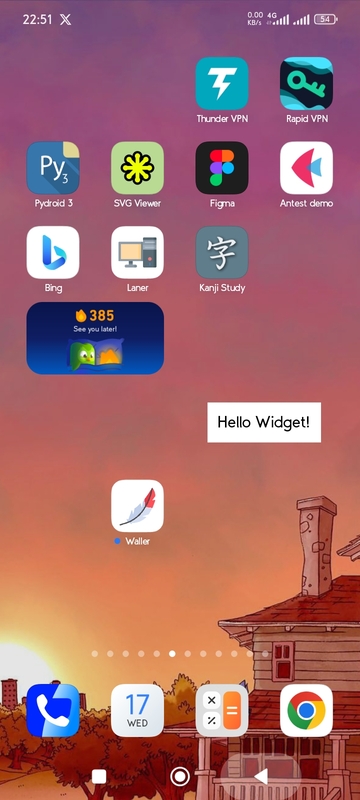
Sample Image:
|
|
152
|
+
|
|
153
|
+
|
|
@@ -0,0 +1,132 @@
|
|
|
1
|
+
Kivy-androidwidgets
|
|
2
|
+
---
|
|
3
|
+
This repo contains how to create An Android Widget.
|
|
4
|
+
Complete Sample: [working app](https://github.com/Fector101/wallpaper-carousel)
|
|
5
|
+
|
|
6
|
+
5 Steps For a simple widget
|
|
7
|
+
---
|
|
8
|
+
|
|
9
|
+
step 1: First you Design How you want the Widget to Look [it's Layout].
|
|
10
|
+
Store it in: `res/layout/simple_widget.xml`
|
|
11
|
+
This a simple widget with a text
|
|
12
|
+
```xml
|
|
13
|
+
<?xml version="1.0" encoding="utf-8"?>
|
|
14
|
+
<LinearLayout xmlns:android="http://schemas.android.com/apk/res/android"
|
|
15
|
+
android:orientation="vertical"
|
|
16
|
+
android:padding="10dp"
|
|
17
|
+
android:background="#FFFFFF"
|
|
18
|
+
android:gravity="center"
|
|
19
|
+
android:layout_width="wrap_content"
|
|
20
|
+
android:layout_height="wrap_content">
|
|
21
|
+
|
|
22
|
+
<TextView
|
|
23
|
+
android:id="@+id/widget_text"
|
|
24
|
+
android:text="Loading..."
|
|
25
|
+
android:textSize="18sp"
|
|
26
|
+
android:textColor="#000"
|
|
27
|
+
android:layout_width="wrap_content"
|
|
28
|
+
android:layout_height="wrap_content"/>
|
|
29
|
+
|
|
30
|
+
</LinearLayout>
|
|
31
|
+
```
|
|
32
|
+
step 2: Create an xml containing the info about the widget.
|
|
33
|
+
Like: size, preview icon and others
|
|
34
|
+
path: `res/xml/widgetproviderinfo.xml`
|
|
35
|
+
```xml
|
|
36
|
+
<appwidget-provider xmlns:android="http://schemas.android.com/apk/res/android"
|
|
37
|
+
android:minWidth="120dp"
|
|
38
|
+
android:minHeight="60dp"
|
|
39
|
+
android:updatePeriodMillis="1800000"
|
|
40
|
+
android:initialLayout="@layout/simple_widget"
|
|
41
|
+
android:previewImage="@drawable/ic_launcher_foreground"
|
|
42
|
+
android:resizeMode="horizontal|vertical"
|
|
43
|
+
android:widgetCategory="home_screen">
|
|
44
|
+
</appwidget-provider>
|
|
45
|
+
```
|
|
46
|
+
Create preview image png in right path`res/drawable/ic_launcher_foreground.png`
|
|
47
|
+
|
|
48
|
+
step 3: Create a `AppWidgetProvider` it's used to receive events for widget.
|
|
49
|
+
path: `src/SimpleWidget.java`.
|
|
50
|
+
This will receive an event when widget is add to change it's text
|
|
51
|
+
|
|
52
|
+
```java
|
|
53
|
+
package org.wally.waller; // Change here from buildozer.spec package.domain+package.name
|
|
54
|
+
|
|
55
|
+
import android.appwidget.AppWidgetManager;
|
|
56
|
+
import android.appwidget.AppWidgetProvider;
|
|
57
|
+
import android.content.Context;
|
|
58
|
+
import android.widget.RemoteViews;
|
|
59
|
+
|
|
60
|
+
import org.wally.waller.R; // Change here from buildozer.spec package.domain+package.name
|
|
61
|
+
import android.app.PendingIntent;
|
|
62
|
+
import android.content.Intent;
|
|
63
|
+
|
|
64
|
+
public class SimpleWidget extends AppWidgetProvider {
|
|
65
|
+
|
|
66
|
+
@Override
|
|
67
|
+
public void onUpdate(Context context, AppWidgetManager appWidgetManager, int[] appWidgetIds) {
|
|
68
|
+
for (int appWidgetId : appWidgetIds) {
|
|
69
|
+
|
|
70
|
+
RemoteViews views = new RemoteViews(context.getPackageName(), R.layout.simple_widget);
|
|
71
|
+
|
|
72
|
+
// Example: Set text
|
|
73
|
+
views.setTextViewText(R.id.widget_text, "Hello Widget!");
|
|
74
|
+
|
|
75
|
+
// Update widget
|
|
76
|
+
appWidgetManager.updateAppWidget(appWidgetId, views);
|
|
77
|
+
}
|
|
78
|
+
}
|
|
79
|
+
}
|
|
80
|
+
```
|
|
81
|
+
Step 4: Automate injecting Receiver in XML
|
|
82
|
+
|
|
83
|
+
path:`p4a/hook.py`
|
|
84
|
+
|
|
85
|
+
```py
|
|
86
|
+
from pathlib import Path
|
|
87
|
+
from pythonforandroid.toolchain import ToolchainCL
|
|
88
|
+
|
|
89
|
+
|
|
90
|
+
def after_apk_build(toolchain: ToolchainCL):
|
|
91
|
+
manifest_file = Path(toolchain._dist.dist_dir) / "src" / "main" / "AndroidManifest.xml"
|
|
92
|
+
text = manifest_file.read_text(encoding="utf-8")
|
|
93
|
+
|
|
94
|
+
package = "org.wally.waller"
|
|
95
|
+
receiver_xml = f'''
|
|
96
|
+
<receiver android:name="{package}.SimpleWidget"
|
|
97
|
+
android:enabled="true"
|
|
98
|
+
android:exported="false">
|
|
99
|
+
<intent-filter>
|
|
100
|
+
<action android:name="android.appwidget.action.APPWIDGET_UPDATE" />
|
|
101
|
+
</intent-filter>
|
|
102
|
+
<meta-data android:name="android.appwidget.provider"
|
|
103
|
+
android:resource="@xml/widgetproviderinfo" />
|
|
104
|
+
</receiver>
|
|
105
|
+
'''
|
|
106
|
+
|
|
107
|
+
if receiver_xml.strip() not in text:
|
|
108
|
+
if "</application>" in text:
|
|
109
|
+
text = text.replace("</application>", f"{receiver_xml}\n</application>")
|
|
110
|
+
print("Receiver added")
|
|
111
|
+
else:
|
|
112
|
+
print("Could not find </application> to insert receiver")
|
|
113
|
+
else:
|
|
114
|
+
print("Receiver already exists in manifest")
|
|
115
|
+
|
|
116
|
+
manifest_file.write_text(text, encoding="utf-8")
|
|
117
|
+
print("Successfully_101: Manifest update completed successfully!")
|
|
118
|
+
|
|
119
|
+
```
|
|
120
|
+
Step 5: From `buildozer.spec` tell it you want to add resources, src and p4a hook
|
|
121
|
+
```ini
|
|
122
|
+
android.add_resources = res
|
|
123
|
+
android.add_src = src
|
|
124
|
+
p4a.hook = p4a/hook.py
|
|
125
|
+
```
|
|
126
|
+
|
|
127
|
+
For More widget customisation check: [How to Customise.md](how-to-customise.md)
|
|
128
|
+
---
|
|
129
|
+
|
|
130
|
+
Sample Image:
|
|
131
|
+
|
|
132
|
+

|
|
@@ -0,0 +1,153 @@
|
|
|
1
|
+
Metadata-Version: 2.4
|
|
2
|
+
Name: android-widgets
|
|
3
|
+
Version: 0.1.0
|
|
4
|
+
Summary: A simple hello world package for Kivy Android widgets.
|
|
5
|
+
Author-email: Fabian <fector101@yahoo.com>
|
|
6
|
+
License: MIT
|
|
7
|
+
Project-URL: Homepage, https://github.com/yourusername/kivy-androidwidgets
|
|
8
|
+
Project-URL: Documentation, https://github.com/yourusername/kivy-androidwidgets
|
|
9
|
+
Project-URL: Source, https://github.com/yourusername/kivy-androidwidgets
|
|
10
|
+
Project-URL: Tracker, https://github.com/yourusername/kivy-androidwidgets/issues
|
|
11
|
+
Keywords: kivy,android,widgets,hello-world,python-package
|
|
12
|
+
Classifier: Programming Language :: Python :: 3
|
|
13
|
+
Classifier: License :: OSI Approved :: MIT License
|
|
14
|
+
Classifier: Operating System :: Android
|
|
15
|
+
Classifier: Development Status :: 3 - Alpha
|
|
16
|
+
Classifier: Intended Audience :: Developers
|
|
17
|
+
Classifier: Topic :: Software Development :: Libraries :: Python Modules
|
|
18
|
+
Requires-Python: >=3.7
|
|
19
|
+
Description-Content-Type: text/markdown
|
|
20
|
+
Requires-Dist: kivy>=2.0.0
|
|
21
|
+
|
|
22
|
+
Kivy-androidwidgets
|
|
23
|
+
---
|
|
24
|
+
This repo contains how to create An Android Widget.
|
|
25
|
+
Complete Sample: [working app](https://github.com/Fector101/wallpaper-carousel)
|
|
26
|
+
|
|
27
|
+
5 Steps For a simple widget
|
|
28
|
+
---
|
|
29
|
+
|
|
30
|
+
step 1: First you Design How you want the Widget to Look [it's Layout].
|
|
31
|
+
Store it in: `res/layout/simple_widget.xml`
|
|
32
|
+
This a simple widget with a text
|
|
33
|
+
```xml
|
|
34
|
+
<?xml version="1.0" encoding="utf-8"?>
|
|
35
|
+
<LinearLayout xmlns:android="http://schemas.android.com/apk/res/android"
|
|
36
|
+
android:orientation="vertical"
|
|
37
|
+
android:padding="10dp"
|
|
38
|
+
android:background="#FFFFFF"
|
|
39
|
+
android:gravity="center"
|
|
40
|
+
android:layout_width="wrap_content"
|
|
41
|
+
android:layout_height="wrap_content">
|
|
42
|
+
|
|
43
|
+
<TextView
|
|
44
|
+
android:id="@+id/widget_text"
|
|
45
|
+
android:text="Loading..."
|
|
46
|
+
android:textSize="18sp"
|
|
47
|
+
android:textColor="#000"
|
|
48
|
+
android:layout_width="wrap_content"
|
|
49
|
+
android:layout_height="wrap_content"/>
|
|
50
|
+
|
|
51
|
+
</LinearLayout>
|
|
52
|
+
```
|
|
53
|
+
step 2: Create an xml containing the info about the widget.
|
|
54
|
+
Like: size, preview icon and others
|
|
55
|
+
path: `res/xml/widgetproviderinfo.xml`
|
|
56
|
+
```xml
|
|
57
|
+
<appwidget-provider xmlns:android="http://schemas.android.com/apk/res/android"
|
|
58
|
+
android:minWidth="120dp"
|
|
59
|
+
android:minHeight="60dp"
|
|
60
|
+
android:updatePeriodMillis="1800000"
|
|
61
|
+
android:initialLayout="@layout/simple_widget"
|
|
62
|
+
android:previewImage="@drawable/ic_launcher_foreground"
|
|
63
|
+
android:resizeMode="horizontal|vertical"
|
|
64
|
+
android:widgetCategory="home_screen">
|
|
65
|
+
</appwidget-provider>
|
|
66
|
+
```
|
|
67
|
+
Create preview image png in right path`res/drawable/ic_launcher_foreground.png`
|
|
68
|
+
|
|
69
|
+
step 3: Create a `AppWidgetProvider` it's used to receive events for widget.
|
|
70
|
+
path: `src/SimpleWidget.java`.
|
|
71
|
+
This will receive an event when widget is add to change it's text
|
|
72
|
+
|
|
73
|
+
```java
|
|
74
|
+
package org.wally.waller; // Change here from buildozer.spec package.domain+package.name
|
|
75
|
+
|
|
76
|
+
import android.appwidget.AppWidgetManager;
|
|
77
|
+
import android.appwidget.AppWidgetProvider;
|
|
78
|
+
import android.content.Context;
|
|
79
|
+
import android.widget.RemoteViews;
|
|
80
|
+
|
|
81
|
+
import org.wally.waller.R; // Change here from buildozer.spec package.domain+package.name
|
|
82
|
+
import android.app.PendingIntent;
|
|
83
|
+
import android.content.Intent;
|
|
84
|
+
|
|
85
|
+
public class SimpleWidget extends AppWidgetProvider {
|
|
86
|
+
|
|
87
|
+
@Override
|
|
88
|
+
public void onUpdate(Context context, AppWidgetManager appWidgetManager, int[] appWidgetIds) {
|
|
89
|
+
for (int appWidgetId : appWidgetIds) {
|
|
90
|
+
|
|
91
|
+
RemoteViews views = new RemoteViews(context.getPackageName(), R.layout.simple_widget);
|
|
92
|
+
|
|
93
|
+
// Example: Set text
|
|
94
|
+
views.setTextViewText(R.id.widget_text, "Hello Widget!");
|
|
95
|
+
|
|
96
|
+
// Update widget
|
|
97
|
+
appWidgetManager.updateAppWidget(appWidgetId, views);
|
|
98
|
+
}
|
|
99
|
+
}
|
|
100
|
+
}
|
|
101
|
+
```
|
|
102
|
+
Step 4: Automate injecting Receiver in XML
|
|
103
|
+
|
|
104
|
+
path:`p4a/hook.py`
|
|
105
|
+
|
|
106
|
+
```py
|
|
107
|
+
from pathlib import Path
|
|
108
|
+
from pythonforandroid.toolchain import ToolchainCL
|
|
109
|
+
|
|
110
|
+
|
|
111
|
+
def after_apk_build(toolchain: ToolchainCL):
|
|
112
|
+
manifest_file = Path(toolchain._dist.dist_dir) / "src" / "main" / "AndroidManifest.xml"
|
|
113
|
+
text = manifest_file.read_text(encoding="utf-8")
|
|
114
|
+
|
|
115
|
+
package = "org.wally.waller"
|
|
116
|
+
receiver_xml = f'''
|
|
117
|
+
<receiver android:name="{package}.SimpleWidget"
|
|
118
|
+
android:enabled="true"
|
|
119
|
+
android:exported="false">
|
|
120
|
+
<intent-filter>
|
|
121
|
+
<action android:name="android.appwidget.action.APPWIDGET_UPDATE" />
|
|
122
|
+
</intent-filter>
|
|
123
|
+
<meta-data android:name="android.appwidget.provider"
|
|
124
|
+
android:resource="@xml/widgetproviderinfo" />
|
|
125
|
+
</receiver>
|
|
126
|
+
'''
|
|
127
|
+
|
|
128
|
+
if receiver_xml.strip() not in text:
|
|
129
|
+
if "</application>" in text:
|
|
130
|
+
text = text.replace("</application>", f"{receiver_xml}\n</application>")
|
|
131
|
+
print("Receiver added")
|
|
132
|
+
else:
|
|
133
|
+
print("Could not find </application> to insert receiver")
|
|
134
|
+
else:
|
|
135
|
+
print("Receiver already exists in manifest")
|
|
136
|
+
|
|
137
|
+
manifest_file.write_text(text, encoding="utf-8")
|
|
138
|
+
print("Successfully_101: Manifest update completed successfully!")
|
|
139
|
+
|
|
140
|
+
```
|
|
141
|
+
Step 5: From `buildozer.spec` tell it you want to add resources, src and p4a hook
|
|
142
|
+
```ini
|
|
143
|
+
android.add_resources = res
|
|
144
|
+
android.add_src = src
|
|
145
|
+
p4a.hook = p4a/hook.py
|
|
146
|
+
```
|
|
147
|
+
|
|
148
|
+
For More widget customisation check: [How to Customise.md](how-to-customise.md)
|
|
149
|
+
---
|
|
150
|
+
|
|
151
|
+
Sample Image:
|
|
152
|
+
|
|
153
|
+

|
|
@@ -0,0 +1 @@
|
|
|
1
|
+
|
|
@@ -0,0 +1 @@
|
|
|
1
|
+
kivy>=2.0.0
|
|
@@ -0,0 +1,41 @@
|
|
|
1
|
+
[build-system]
|
|
2
|
+
requires = ["setuptools>=77.0.0", "wheel"]
|
|
3
|
+
build-backend = "setuptools.build_meta"
|
|
4
|
+
|
|
5
|
+
[project]
|
|
6
|
+
name = "android-widgets"
|
|
7
|
+
version = "0.1.0"
|
|
8
|
+
description = "A simple hello world package for Kivy Android widgets."
|
|
9
|
+
readme = { file = "README.md", content-type = "text/markdown" }
|
|
10
|
+
authors = [
|
|
11
|
+
{ name = "Fabian", email = "fector101@yahoo.com" }
|
|
12
|
+
]
|
|
13
|
+
license = { text = "MIT" }
|
|
14
|
+
requires-python = ">=3.7"
|
|
15
|
+
dependencies = [
|
|
16
|
+
"kivy>=2.0.0"
|
|
17
|
+
]
|
|
18
|
+
keywords = [
|
|
19
|
+
"kivy",
|
|
20
|
+
"android",
|
|
21
|
+
"widgets",
|
|
22
|
+
"hello-world",
|
|
23
|
+
"python-package"
|
|
24
|
+
]
|
|
25
|
+
classifiers = [
|
|
26
|
+
"Programming Language :: Python :: 3",
|
|
27
|
+
"License :: OSI Approved :: MIT License",
|
|
28
|
+
"Operating System :: Android",
|
|
29
|
+
"Development Status :: 3 - Alpha",
|
|
30
|
+
"Intended Audience :: Developers",
|
|
31
|
+
"Topic :: Software Development :: Libraries :: Python Modules"
|
|
32
|
+
]
|
|
33
|
+
|
|
34
|
+
[project.urls]
|
|
35
|
+
Homepage = "https://github.com/yourusername/kivy-androidwidgets"
|
|
36
|
+
Documentation = "https://github.com/yourusername/kivy-androidwidgets"
|
|
37
|
+
Source = "https://github.com/yourusername/kivy-androidwidgets"
|
|
38
|
+
Tracker = "https://github.com/yourusername/kivy-androidwidgets/issues"
|
|
39
|
+
|
|
40
|
+
[tool.setuptools.packages.find]
|
|
41
|
+
where = ["."]
|