android-notify 1.61.3.dev0__tar.gz → 1.61.5__tar.gz
This diff represents the content of publicly available package versions that have been released to one of the supported registries. The information contained in this diff is provided for informational purposes only and reflects changes between package versions as they appear in their respective public registries.
- {android_notify-1.61.3.dev0 → android_notify-1.61.5}/PKG-INFO +151 -59
- {android_notify-1.61.3.dev0 → android_notify-1.61.5}/README.md +150 -57
- android_notify-1.61.5/android_notify/__main__.py +75 -0
- {android_notify-1.61.3.dev0 → android_notify-1.61.5}/android_notify/config.py +33 -4
- {android_notify-1.61.3.dev0 → android_notify-1.61.5}/android_notify/core.py +6 -9
- {android_notify-1.61.3.dev0 → android_notify-1.61.5}/android_notify/internal/channels.py +1 -1
- {android_notify-1.61.3.dev0 → android_notify-1.61.5}/android_notify/internal/facade.py +2 -4
- {android_notify-1.61.3.dev0 → android_notify-1.61.5}/android_notify/internal/helper.py +0 -4
- android_notify-1.61.5/android_notify/internal/java_classes.py +85 -0
- {android_notify-1.61.3.dev0 → android_notify-1.61.5}/android_notify/internal/permissions.py +46 -15
- {android_notify-1.61.3.dev0 → android_notify-1.61.5}/android_notify/tests/flet/basic/src/core.py +2 -2
- {android_notify-1.61.3.dev0 → android_notify-1.61.5}/android_notify/tests/flet/flet-working/src/core.py +2 -2
- {android_notify-1.61.3.dev0 → android_notify-1.61.5}/android_notify/tests/main.py +1 -1
- {android_notify-1.61.3.dev0 → android_notify-1.61.5}/android_notify/widgets/images.py +4 -5
- {android_notify-1.61.3.dev0 → android_notify-1.61.5}/android_notify/widgets/texts.py +1 -5
- {android_notify-1.61.3.dev0 → android_notify-1.61.5}/android_notify.egg-info/PKG-INFO +151 -59
- {android_notify-1.61.3.dev0 → android_notify-1.61.5}/android_notify.egg-info/requires.txt +0 -1
- {android_notify-1.61.3.dev0 → android_notify-1.61.5}/pyproject.toml +2 -3
- android_notify-1.61.3.dev0/android_notify/__main__.py +0 -24
- android_notify-1.61.3.dev0/android_notify/internal/java_classes.py +0 -69
- {android_notify-1.61.3.dev0 → android_notify-1.61.5}/android_notify/__init__.py +0 -0
- {android_notify-1.61.3.dev0 → android_notify-1.61.5}/android_notify/base.py +0 -0
- {android_notify-1.61.3.dev0 → android_notify-1.61.5}/android_notify/fallback-icons/flet-appicon.png +0 -0
- {android_notify-1.61.3.dev0 → android_notify-1.61.5}/android_notify/fallback-icons/pydroid3-appicon.png +0 -0
- {android_notify-1.61.3.dev0 → android_notify-1.61.5}/android_notify/internal/an_types.py +0 -0
- {android_notify-1.61.3.dev0 → android_notify-1.61.5}/android_notify/internal/android.py +0 -0
- {android_notify-1.61.3.dev0 → android_notify-1.61.5}/android_notify/internal/intents.py +0 -0
- {android_notify-1.61.3.dev0 → android_notify-1.61.5}/android_notify/internal/logger.py +0 -0
- {android_notify-1.61.3.dev0 → android_notify-1.61.5}/android_notify/styles.py +0 -0
- {android_notify-1.61.3.dev0 → android_notify-1.61.5}/android_notify/sword.py +0 -0
- {android_notify-1.61.3.dev0 → android_notify-1.61.5}/android_notify/tests/__init__.py +0 -0
- {android_notify-1.61.3.dev0 → android_notify-1.61.5}/android_notify/tests/android_notify_test.py +0 -0
- {android_notify-1.61.3.dev0 → android_notify-1.61.5}/android_notify/tests/base_test.py +0 -0
- {android_notify-1.61.3.dev0 → android_notify-1.61.5}/android_notify/tests/flet/adv/main.py +0 -0
- {android_notify-1.61.3.dev0 → android_notify-1.61.5}/android_notify/tests/flet/adv/tests/__init__.py +0 -0
- {android_notify-1.61.3.dev0 → android_notify-1.61.5}/android_notify/tests/flet/adv/tests/test_android_notify_full.py +0 -0
- {android_notify-1.61.3.dev0 → android_notify-1.61.5}/android_notify/tests/flet/basic/src/main.py +0 -0
- {android_notify-1.61.3.dev0 → android_notify-1.61.5}/android_notify/tests/flet/flet-working/src/main.py +0 -0
- {android_notify-1.61.3.dev0 → android_notify-1.61.5}/android_notify/tests/p4a/hook.py +0 -0
- {android_notify-1.61.3.dev0 → android_notify-1.61.5}/android_notify/tests/serivces/wallpaper.py +0 -0
- {android_notify-1.61.3.dev0 → android_notify-1.61.5}/android_notify/tests/test_basic_notifications.py +0 -0
- {android_notify-1.61.3.dev0 → android_notify-1.61.5}/android_notify/tests/test_notification_actions.py +0 -0
- {android_notify-1.61.3.dev0 → android_notify-1.61.5}/android_notify/tests/test_notification_appearance.py +0 -0
- {android_notify-1.61.3.dev0 → android_notify-1.61.5}/android_notify/tests/test_notification_behavior.py +0 -0
- {android_notify-1.61.3.dev0 → android_notify-1.61.5}/android_notify/tests/test_notification_channels.py +0 -0
- {android_notify-1.61.3.dev0 → android_notify-1.61.5}/android_notify/tests/test_notification_clear.py +0 -0
- {android_notify-1.61.3.dev0 → android_notify-1.61.5}/android_notify/tests/test_notification_permission.py +0 -0
- {android_notify-1.61.3.dev0 → android_notify-1.61.5}/android_notify/tests/test_notification_progress.py +0 -0
- {android_notify-1.61.3.dev0 → android_notify-1.61.5}/android_notify/tests/test_notification_sound.py +0 -0
- {android_notify-1.61.3.dev0 → android_notify-1.61.5}/android_notify/tests/test_notification_styles.py +0 -0
- {android_notify-1.61.3.dev0 → android_notify-1.61.5}/android_notify.egg-info/SOURCES.txt +0 -0
- {android_notify-1.61.3.dev0 → android_notify-1.61.5}/android_notify.egg-info/dependency_links.txt +0 -0
- {android_notify-1.61.3.dev0 → android_notify-1.61.5}/android_notify.egg-info/entry_points.txt +0 -0
- {android_notify-1.61.3.dev0 → android_notify-1.61.5}/android_notify.egg-info/top_level.txt +0 -0
- {android_notify-1.61.3.dev0 → android_notify-1.61.5}/setup.cfg +0 -0
|
@@ -1,6 +1,6 @@
|
|
|
1
1
|
Metadata-Version: 2.4
|
|
2
2
|
Name: android-notify
|
|
3
|
-
Version: 1.61.
|
|
3
|
+
Version: 1.61.5
|
|
4
4
|
Summary: A Python package that simplifies creating Android notifications in Kivy and Flet apps.
|
|
5
5
|
Author-email: Fabian <fector101@yahoo.com>
|
|
6
6
|
License-Expression: MIT
|
|
@@ -16,7 +16,6 @@ Classifier: Development Status :: 5 - Production/Stable
|
|
|
16
16
|
Classifier: Intended Audience :: Developers
|
|
17
17
|
Classifier: Topic :: Software Development :: Libraries :: Python Modules
|
|
18
18
|
Description-Content-Type: text/markdown
|
|
19
|
-
Requires-Dist: pyjnius
|
|
20
19
|
Provides-Extra: dev
|
|
21
20
|
Requires-Dist: kivy; extra == "dev"
|
|
22
21
|
|
|
@@ -28,6 +27,9 @@ Requires-Dist: kivy; extra == "dev"
|
|
|
28
27
|
<!-- <br> -->
|
|
29
28
|
<!-- <img src="https://raw.githubusercontent.com/Fector101/android_notify/main/docs/imgs/democollage.jpg"> -->
|
|
30
29
|
</div>
|
|
30
|
+
|
|
31
|
+
[](https://badge.fury.io/py/android-notify)
|
|
32
|
+
|
|
31
33
|
<!-- Channel [CRUD]
|
|
32
34
|
The Android Notify package provides a simple yet comprehensive way to create and manage rich notifications on Android devices directly from your Python code. This library bridges the gap between Python and Android's notification system, giving you full control over notifications with a clean, Pythonic API. -->
|
|
33
35
|
|
|
@@ -45,7 +47,7 @@ The Android Notify package provides a simple yet comprehensive way to create and
|
|
|
45
47
|
- Colored texts and Icons
|
|
46
48
|
|
|
47
49
|
- **Rich Functionality**:
|
|
48
|
-
- Add action
|
|
50
|
+
- Add action Buttons with custom callbacks - [Buttons section](https://android-notify.vercel.app/components#buttons)
|
|
49
51
|
- [Update notification](https://android-notify.vercel.app/advanced-methods#updating-notification) content dynamically
|
|
50
52
|
- Manage progress bars with fine-grained control
|
|
51
53
|
- [Custom notification channels](https://android-notify.vercel.app/advanced-methods#channel-management) for Android 8.0+ (Creating and Deleting)
|
|
@@ -53,6 +55,8 @@ The Android Notify package provides a simple yet comprehensive way to create and
|
|
|
53
55
|
- Persistent notifications
|
|
54
56
|
- Click handlers and callbacks
|
|
55
57
|
- Cancel Notifications
|
|
58
|
+
- Use [Custom Sound](https://android-notify.vercel.app/advanced-methods#custom-sound)
|
|
59
|
+
- Vibration [section](https://android-notify.vercel.app/advanced-methods#vibration)
|
|
56
60
|
|
|
57
61
|
## Quick Start
|
|
58
62
|
|
|
@@ -79,15 +83,14 @@ Notification(
|
|
|
79
83
|
In your **`buildozer.spec`** file, ensure you include the following:
|
|
80
84
|
|
|
81
85
|
```ini
|
|
82
|
-
# Add
|
|
83
|
-
requirements = python3, kivy, pyjnius, android-notify
|
|
86
|
+
# Add requirements list
|
|
87
|
+
requirements = python3, kivy, pyjnius, android-notify
|
|
84
88
|
# Add permission for notifications
|
|
85
89
|
android.permissions = POST_NOTIFICATIONS
|
|
86
90
|
```
|
|
87
91
|
|
|
88
92
|
</details>
|
|
89
93
|
|
|
90
|
-
|
|
91
94
|
<details>
|
|
92
95
|
<summary><b>Flet apps:</b></summary>
|
|
93
96
|
<br/>
|
|
@@ -98,7 +101,7 @@ In your `pyproject.toml` file, ensure you include the following:
|
|
|
98
101
|
```toml
|
|
99
102
|
[tool.flet.android]
|
|
100
103
|
dependencies = [
|
|
101
|
-
"pyjnius","android-notify
|
|
104
|
+
"pyjnius", "android-notify"
|
|
102
105
|
]
|
|
103
106
|
|
|
104
107
|
[tool.flet.android.permission]
|
|
@@ -108,23 +111,19 @@ dependencies = [
|
|
|
108
111
|
|
|
109
112
|
</details>
|
|
110
113
|
|
|
111
|
-
|
|
112
|
-
|
|
113
114
|
<details>
|
|
114
115
|
|
|
115
116
|
<summary><b>On Pydroid 3</b></summary>
|
|
116
117
|
<br/>
|
|
117
118
|
|
|
118
119
|
On the [pydroid 3](https://play.google.com/store/apps/details?id=ru.iiec.pydroid3) mobile app for running python code you can test some features.
|
|
119
|
-
- In pip section where you're asked to insert `Libary name` paste `android-notify
|
|
120
|
+
- In pip section where you're asked to insert `Libary name` paste `android-notify`
|
|
120
121
|
- Minimal working example
|
|
121
122
|
```py
|
|
122
|
-
# Testing with `android-notify==1.61.3.dev0` on pydroid
|
|
123
123
|
from kivy.app import App
|
|
124
124
|
from kivy.uix.boxlayout import BoxLayout
|
|
125
125
|
from kivy.uix.button import Button
|
|
126
|
-
from android_notify import Notification
|
|
127
|
-
from android_notify.core import asks_permission_if_needed
|
|
126
|
+
from android_notify import Notification, NotificationHandler
|
|
128
127
|
|
|
129
128
|
|
|
130
129
|
class AndroidNotifyDemoApp(App):
|
|
@@ -141,14 +140,12 @@ class AndroidNotifyDemoApp(App):
|
|
|
141
140
|
return layout
|
|
142
141
|
|
|
143
142
|
def request_permission(self, *args):
|
|
144
|
-
|
|
143
|
+
NotificationHandler.asks_permission()
|
|
145
144
|
|
|
146
145
|
def send_notification(self, *args):
|
|
147
146
|
Notification(
|
|
148
147
|
title="Hello from Android Notify",
|
|
149
|
-
message="This is a basic notification."
|
|
150
|
-
channel_id="android_notify_demo",
|
|
151
|
-
channel_name="Android Notify Demo"
|
|
148
|
+
message="This is a basic notification."
|
|
152
149
|
).send()
|
|
153
150
|
|
|
154
151
|
|
|
@@ -172,38 +169,116 @@ android-notify -v
|
|
|
172
169
|
```
|
|
173
170
|
</details>
|
|
174
171
|
|
|
175
|
-
##
|
|
176
|
-
For
|
|
177
|
-
|
|
178
|
-
|
|
172
|
+
## Common Methods
|
|
173
|
+
For full visit [documentation](https://android-notify.vercel.app) for more examples and advanced usage.
|
|
174
|
+
### For Images
|
|
175
|
+
Source can be local file paths or complete URLs execpt `setSmallIcon` which only accepts local `png` files.
|
|
176
|
+
|
|
177
|
+
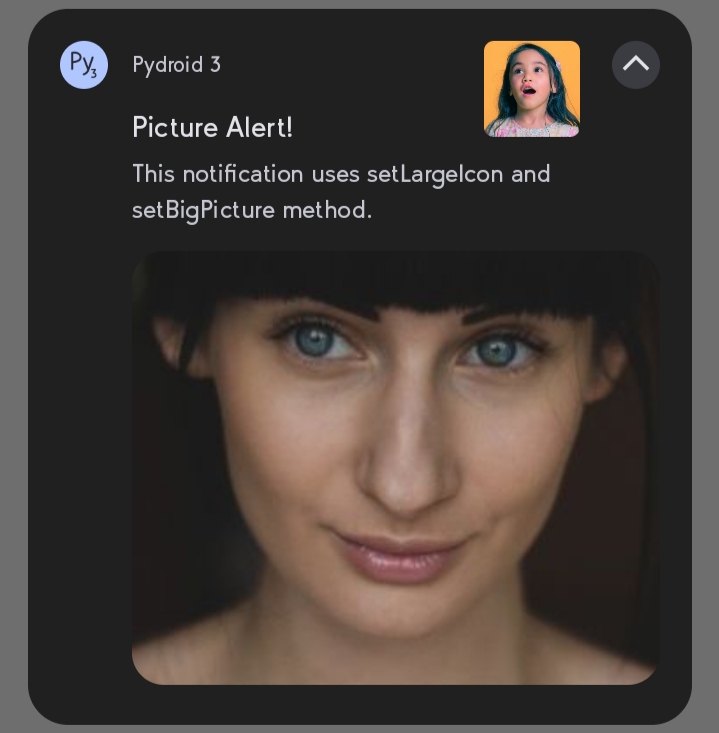
- `setBigPicture` - shows below when user clicks drop button
|
|
178
|
+
- `setLargeIcon` - appears at right side of notification content
|
|
179
|
+
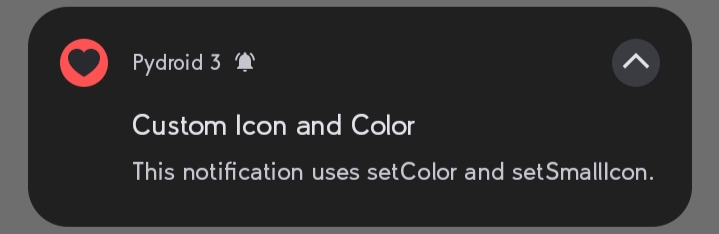
- `setSmallIcon` - changes app icon to a custom `png`
|
|
180
|
+
- `setColor` - changes app icon backgroud Color
|
|
181
|
+
|
|
182
|
+
For online images URL should with `https://` and you need internet permission `android.permissions = INTERNET` in `buildozer.spec` or `pyproject.toml`
|
|
183
|
+
|
|
184
|
+
```python
|
|
185
|
+
from android_notify import Notification
|
|
186
|
+
|
|
187
|
+
notification = Notification(
|
|
188
|
+
title='Picture Alert!',
|
|
189
|
+
message='This notification uses setLargelcon and setBig Picture method.'
|
|
190
|
+
)
|
|
191
|
+
notification.setBigPicture("imgs/photo.png")
|
|
192
|
+
notification.setLargeIcon("imgs/profile.png")
|
|
193
|
+
notification.send()
|
|
179
194
|
```
|
|
180
195
|
|
|
181
|
-
|
|
182
|
-
|
|
196
|
+
**Sample Image:**
|
|
197
|
+
|
|
183
198
|
|
|
184
|
-
- Make things happen without being in your app
|
|
185
199
|
```python
|
|
186
200
|
from android_notify import Notification
|
|
187
|
-
|
|
188
|
-
notification
|
|
189
|
-
|
|
201
|
+
|
|
202
|
+
notification = Notification(
|
|
203
|
+
title='Custom Icon and Color',
|
|
204
|
+
message='This notification uses setColor and setSmallIcon.'
|
|
205
|
+
)
|
|
206
|
+
notification.setColor("red")
|
|
207
|
+
notification.setSmallIcon("love.png")
|
|
208
|
+
notification.send()
|
|
190
209
|
```
|
|
191
|
-
You can use this [wiki](https://github.com/Fector101/android_notify/wiki/How-to-Use-with-Broadcast-Listener) as a guide create a broadcast listener
|
|
192
|
-
</details>
|
|
193
210
|
|
|
194
|
-
|
|
195
|
-
|
|
211
|
+
**Sample Image:**
|
|
212
|
+
|
|
213
|
+
|
|
196
214
|
|
|
197
|
-
|
|
198
|
-
|
|
199
|
-
|
|
215
|
+
### For ProgressBar
|
|
216
|
+
|
|
217
|
+
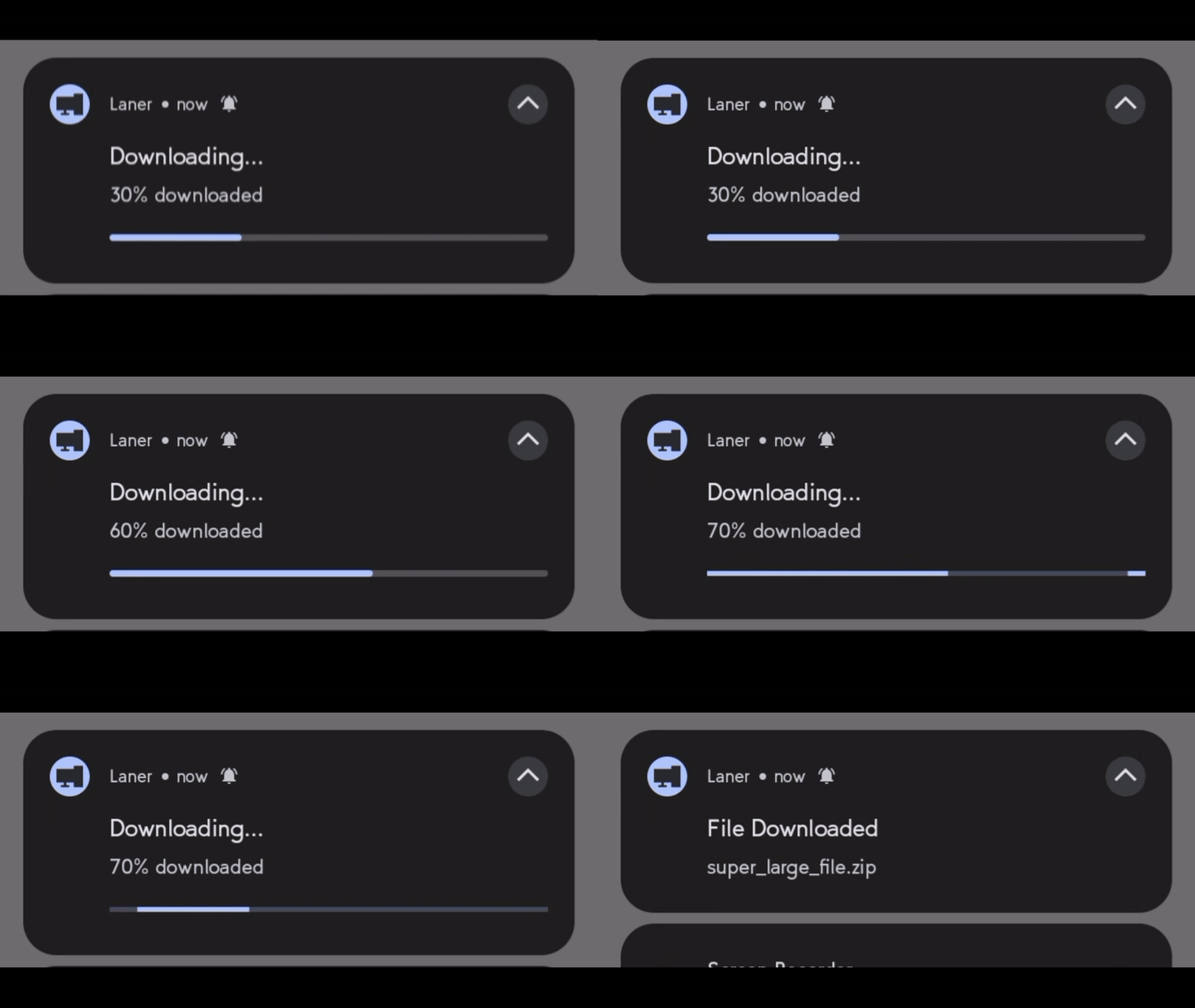
- `updateProgressBar(current_value, message, title)` - update progress in real-time
|
|
218
|
+
- `showInfiniteProgressBar` - shows an infinite progress animation.
|
|
219
|
+
- `removeProgressBar(message, show_on_update=True, title)` - Cleanly remove the progress bar.
|
|
200
220
|
```python
|
|
201
|
-
|
|
202
|
-
|
|
203
|
-
|
|
221
|
+
from android_notify import Notification
|
|
222
|
+
from kivy.clock import Clock
|
|
223
|
+
|
|
224
|
+
progress = 0
|
|
225
|
+
|
|
226
|
+
notification = Notification(
|
|
227
|
+
title="Downloading...", message="0% downloaded",
|
|
228
|
+
progress_current_value=0, progress_max_value=100
|
|
229
|
+
)
|
|
230
|
+
notification.send()
|
|
231
|
+
|
|
232
|
+
def update_progress(dt):
|
|
233
|
+
global progress
|
|
234
|
+
progress = min(progress + 10, 100)
|
|
235
|
+
|
|
236
|
+
if progress==100:
|
|
237
|
+
notification.removeProgressBar(title="File Downloaded", message="super_large_file.zip")
|
|
238
|
+
elif progress >= 80:
|
|
239
|
+
notification.showInfiniteProgressBar()
|
|
240
|
+
else:
|
|
241
|
+
notification.updateProgressBar(progress, f"{progress}% downloaded")
|
|
242
|
+
|
|
243
|
+
return progress < 100 # Ends loop when reaching 100%
|
|
244
|
+
|
|
245
|
+
Clock.schedule_interval(update_progress, 3)
|
|
204
246
|
```
|
|
247
|
+
|
|
205
248
|
|
|
206
|
-
|
|
249
|
+
|
|
250
|
+
### For texts
|
|
251
|
+
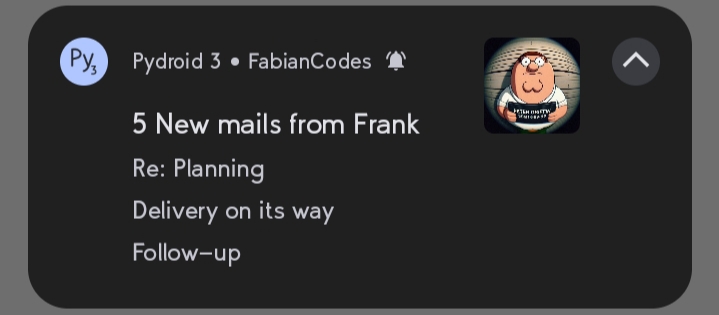
- `addLine` - adds a line to the notification, useful for inbox style
|
|
252
|
+
- `setSubText` - sets a smaller text that appears at the side of app name
|
|
253
|
+
- `setBigText` - sets a longer text that appears when the notification is expanded
|
|
254
|
+
- `updateTitle` - updates the title text of the notification
|
|
255
|
+
- `updateMessage` - updates the main message text of the notification
|
|
256
|
+
```python
|
|
257
|
+
from android_notify import Notification
|
|
258
|
+
|
|
259
|
+
notification = Notification(
|
|
260
|
+
title="5 New mails from Frank",
|
|
261
|
+
message="Check them out",
|
|
262
|
+
)
|
|
263
|
+
notification.setSubText("FabianCodes")
|
|
264
|
+
notification.setLargeIcon("imgs/profile.png")
|
|
265
|
+
notification.addLine("Re: Planning")
|
|
266
|
+
notification.addLine("Delivery on its way")
|
|
267
|
+
notification.addLine("Follow-up")
|
|
268
|
+
notification.send()
|
|
269
|
+
```
|
|
270
|
+
|
|
271
|
+
|
|
272
|
+
## Documentation
|
|
273
|
+
### For full documentation, examples, and advanced usage, API reference visit the [documentation](https://android-notify.vercel.app)
|
|
274
|
+
---
|
|
275
|
+
|
|
276
|
+
For Dev Version usage
|
|
277
|
+
```ini
|
|
278
|
+
requirements = python3, kivy, pyjnius, https://github.com/Fector101/android_notify/archive/main.zip
|
|
279
|
+
```
|
|
280
|
+
|
|
281
|
+
### Dev Features docs
|
|
207
282
|
|
|
208
283
|
<details>
|
|
209
284
|
<summary> <b>To use Custom Sounds </b> </summary>
|
|
@@ -267,26 +342,6 @@ Private files (e.g., in app's `data/` directory) are automatically copied to ext
|
|
|
267
342
|
</details>
|
|
268
343
|
|
|
269
344
|
|
|
270
|
-
<details>
|
|
271
|
-
<summary> <b> Vibrate feature</b> </summary>
|
|
272
|
-
|
|
273
|
-
```ini
|
|
274
|
-
# buildozer.spec
|
|
275
|
-
android.permissions = VIBRATE
|
|
276
|
-
```
|
|
277
|
-
|
|
278
|
-
```python
|
|
279
|
-
Notification.createChannel(id='shake', name="Shake Passage", vibrate=True)
|
|
280
|
-
|
|
281
|
-
n=Notification(title='Vibrate',channel_id='shake')
|
|
282
|
-
n.setVibrate() # for less than android 8
|
|
283
|
-
n.fVibrate() # To Force Vibrate (when user turned off in settings)
|
|
284
|
-
n.send()
|
|
285
|
-
```
|
|
286
|
-
|
|
287
|
-
</details>
|
|
288
|
-
|
|
289
|
-
|
|
290
345
|
<details>
|
|
291
346
|
<summary> <b> Add Data to Notification</b> </summary>
|
|
292
347
|
|
|
@@ -314,7 +369,31 @@ from android_notify import Notification, NotificationHandler
|
|
|
314
369
|
</details>
|
|
315
370
|
|
|
316
371
|
|
|
317
|
-
|
|
372
|
+
<details>
|
|
373
|
+
<summary> <b>How to control popups</b> </summary>
|
|
374
|
+
|
|
375
|
+
```python
|
|
376
|
+
from android_notify import Notification
|
|
377
|
+
import time
|
|
378
|
+
|
|
379
|
+
notification = Notification(
|
|
380
|
+
title="Processing...",
|
|
381
|
+
message="Starting task"
|
|
382
|
+
)
|
|
383
|
+
|
|
384
|
+
notification.send()
|
|
385
|
+
time.sleep(10)
|
|
386
|
+
|
|
387
|
+
# show heads-up when updated
|
|
388
|
+
notification.setOnlyAlertOnce(False)
|
|
389
|
+
|
|
390
|
+
notification.updateTitle("Processing Complete!")
|
|
391
|
+
notification.updateMessage("Task finished successfully")
|
|
392
|
+
```
|
|
393
|
+
|
|
394
|
+
</details>
|
|
395
|
+
|
|
396
|
+
|
|
318
397
|
|
|
319
398
|
## ☕ Support the Project
|
|
320
399
|
|
|
@@ -324,3 +403,16 @@ Or Giving it a star on 🌟 [GitHub](https://github.com/Fector101/android_notify
|
|
|
324
403
|
<a href="https://www.buymeacoffee.com/fector101" target="_blank">
|
|
325
404
|
<img src="https://cdn.buymeacoffee.com/buttons/v2/default-yellow.png" alt="Buy Me A Coffee" height="60">
|
|
326
405
|
</a>
|
|
406
|
+
|
|
407
|
+
## Bug Reports & Feature Requests
|
|
408
|
+
|
|
409
|
+
Found a bug or have an idea for a new feature?
|
|
410
|
+
Feel free to open an issue [here](https://github.com/Fector101/android_notify/issues)
|
|
411
|
+
|
|
412
|
+
When reporting a bug, try to include:
|
|
413
|
+
- Device name
|
|
414
|
+
- Android version
|
|
415
|
+
- Steps to reproduce the issue
|
|
416
|
+
- Screenshots or logs (if possible)
|
|
417
|
+
|
|
418
|
+
Feature suggestions are also welcome.
|
|
@@ -6,6 +6,9 @@
|
|
|
6
6
|
<!-- <br> -->
|
|
7
7
|
<!-- <img src="https://raw.githubusercontent.com/Fector101/android_notify/main/docs/imgs/democollage.jpg"> -->
|
|
8
8
|
</div>
|
|
9
|
+
|
|
10
|
+
[](https://badge.fury.io/py/android-notify)
|
|
11
|
+
|
|
9
12
|
<!-- Channel [CRUD]
|
|
10
13
|
The Android Notify package provides a simple yet comprehensive way to create and manage rich notifications on Android devices directly from your Python code. This library bridges the gap between Python and Android's notification system, giving you full control over notifications with a clean, Pythonic API. -->
|
|
11
14
|
|
|
@@ -23,7 +26,7 @@ The Android Notify package provides a simple yet comprehensive way to create and
|
|
|
23
26
|
- Colored texts and Icons
|
|
24
27
|
|
|
25
28
|
- **Rich Functionality**:
|
|
26
|
-
- Add action
|
|
29
|
+
- Add action Buttons with custom callbacks - [Buttons section](https://android-notify.vercel.app/components#buttons)
|
|
27
30
|
- [Update notification](https://android-notify.vercel.app/advanced-methods#updating-notification) content dynamically
|
|
28
31
|
- Manage progress bars with fine-grained control
|
|
29
32
|
- [Custom notification channels](https://android-notify.vercel.app/advanced-methods#channel-management) for Android 8.0+ (Creating and Deleting)
|
|
@@ -31,6 +34,8 @@ The Android Notify package provides a simple yet comprehensive way to create and
|
|
|
31
34
|
- Persistent notifications
|
|
32
35
|
- Click handlers and callbacks
|
|
33
36
|
- Cancel Notifications
|
|
37
|
+
- Use [Custom Sound](https://android-notify.vercel.app/advanced-methods#custom-sound)
|
|
38
|
+
- Vibration [section](https://android-notify.vercel.app/advanced-methods#vibration)
|
|
34
39
|
|
|
35
40
|
## Quick Start
|
|
36
41
|
|
|
@@ -57,15 +62,14 @@ Notification(
|
|
|
57
62
|
In your **`buildozer.spec`** file, ensure you include the following:
|
|
58
63
|
|
|
59
64
|
```ini
|
|
60
|
-
# Add
|
|
61
|
-
requirements = python3, kivy, pyjnius, android-notify
|
|
65
|
+
# Add requirements list
|
|
66
|
+
requirements = python3, kivy, pyjnius, android-notify
|
|
62
67
|
# Add permission for notifications
|
|
63
68
|
android.permissions = POST_NOTIFICATIONS
|
|
64
69
|
```
|
|
65
70
|
|
|
66
71
|
</details>
|
|
67
72
|
|
|
68
|
-
|
|
69
73
|
<details>
|
|
70
74
|
<summary><b>Flet apps:</b></summary>
|
|
71
75
|
<br/>
|
|
@@ -76,7 +80,7 @@ In your `pyproject.toml` file, ensure you include the following:
|
|
|
76
80
|
```toml
|
|
77
81
|
[tool.flet.android]
|
|
78
82
|
dependencies = [
|
|
79
|
-
"pyjnius","android-notify
|
|
83
|
+
"pyjnius", "android-notify"
|
|
80
84
|
]
|
|
81
85
|
|
|
82
86
|
[tool.flet.android.permission]
|
|
@@ -86,23 +90,19 @@ dependencies = [
|
|
|
86
90
|
|
|
87
91
|
</details>
|
|
88
92
|
|
|
89
|
-
|
|
90
|
-
|
|
91
93
|
<details>
|
|
92
94
|
|
|
93
95
|
<summary><b>On Pydroid 3</b></summary>
|
|
94
96
|
<br/>
|
|
95
97
|
|
|
96
98
|
On the [pydroid 3](https://play.google.com/store/apps/details?id=ru.iiec.pydroid3) mobile app for running python code you can test some features.
|
|
97
|
-
- In pip section where you're asked to insert `Libary name` paste `android-notify
|
|
99
|
+
- In pip section where you're asked to insert `Libary name` paste `android-notify`
|
|
98
100
|
- Minimal working example
|
|
99
101
|
```py
|
|
100
|
-
# Testing with `android-notify==1.61.3.dev0` on pydroid
|
|
101
102
|
from kivy.app import App
|
|
102
103
|
from kivy.uix.boxlayout import BoxLayout
|
|
103
104
|
from kivy.uix.button import Button
|
|
104
|
-
from android_notify import Notification
|
|
105
|
-
from android_notify.core import asks_permission_if_needed
|
|
105
|
+
from android_notify import Notification, NotificationHandler
|
|
106
106
|
|
|
107
107
|
|
|
108
108
|
class AndroidNotifyDemoApp(App):
|
|
@@ -119,14 +119,12 @@ class AndroidNotifyDemoApp(App):
|
|
|
119
119
|
return layout
|
|
120
120
|
|
|
121
121
|
def request_permission(self, *args):
|
|
122
|
-
|
|
122
|
+
NotificationHandler.asks_permission()
|
|
123
123
|
|
|
124
124
|
def send_notification(self, *args):
|
|
125
125
|
Notification(
|
|
126
126
|
title="Hello from Android Notify",
|
|
127
|
-
message="This is a basic notification."
|
|
128
|
-
channel_id="android_notify_demo",
|
|
129
|
-
channel_name="Android Notify Demo"
|
|
127
|
+
message="This is a basic notification."
|
|
130
128
|
).send()
|
|
131
129
|
|
|
132
130
|
|
|
@@ -150,38 +148,116 @@ android-notify -v
|
|
|
150
148
|
```
|
|
151
149
|
</details>
|
|
152
150
|
|
|
153
|
-
##
|
|
154
|
-
For
|
|
155
|
-
|
|
156
|
-
|
|
151
|
+
## Common Methods
|
|
152
|
+
For full visit [documentation](https://android-notify.vercel.app) for more examples and advanced usage.
|
|
153
|
+
### For Images
|
|
154
|
+
Source can be local file paths or complete URLs execpt `setSmallIcon` which only accepts local `png` files.
|
|
155
|
+
|
|
156
|
+
- `setBigPicture` - shows below when user clicks drop button
|
|
157
|
+
- `setLargeIcon` - appears at right side of notification content
|
|
158
|
+
- `setSmallIcon` - changes app icon to a custom `png`
|
|
159
|
+
- `setColor` - changes app icon backgroud Color
|
|
160
|
+
|
|
161
|
+
For online images URL should with `https://` and you need internet permission `android.permissions = INTERNET` in `buildozer.spec` or `pyproject.toml`
|
|
162
|
+
|
|
163
|
+
```python
|
|
164
|
+
from android_notify import Notification
|
|
165
|
+
|
|
166
|
+
notification = Notification(
|
|
167
|
+
title='Picture Alert!',
|
|
168
|
+
message='This notification uses setLargelcon and setBig Picture method.'
|
|
169
|
+
)
|
|
170
|
+
notification.setBigPicture("imgs/photo.png")
|
|
171
|
+
notification.setLargeIcon("imgs/profile.png")
|
|
172
|
+
notification.send()
|
|
157
173
|
```
|
|
158
174
|
|
|
159
|
-
|
|
160
|
-
|
|
175
|
+
**Sample Image:**
|
|
176
|
+

|
|
161
177
|
|
|
162
|
-
- Make things happen without being in your app
|
|
163
178
|
```python
|
|
164
179
|
from android_notify import Notification
|
|
165
|
-
|
|
166
|
-
notification
|
|
167
|
-
|
|
180
|
+
|
|
181
|
+
notification = Notification(
|
|
182
|
+
title='Custom Icon and Color',
|
|
183
|
+
message='This notification uses setColor and setSmallIcon.'
|
|
184
|
+
)
|
|
185
|
+
notification.setColor("red")
|
|
186
|
+
notification.setSmallIcon("love.png")
|
|
187
|
+
notification.send()
|
|
168
188
|
```
|
|
169
|
-
You can use this [wiki](https://github.com/Fector101/android_notify/wiki/How-to-Use-with-Broadcast-Listener) as a guide create a broadcast listener
|
|
170
|
-
</details>
|
|
171
189
|
|
|
172
|
-
|
|
173
|
-
|
|
190
|
+
**Sample Image:**
|
|
191
|
+

|
|
192
|
+
|
|
174
193
|
|
|
175
|
-
|
|
176
|
-
|
|
177
|
-
|
|
194
|
+
### For ProgressBar
|
|
195
|
+
|
|
196
|
+
- `updateProgressBar(current_value, message, title)` - update progress in real-time
|
|
197
|
+
- `showInfiniteProgressBar` - shows an infinite progress animation.
|
|
198
|
+
- `removeProgressBar(message, show_on_update=True, title)` - Cleanly remove the progress bar.
|
|
178
199
|
```python
|
|
179
|
-
|
|
180
|
-
|
|
181
|
-
|
|
200
|
+
from android_notify import Notification
|
|
201
|
+
from kivy.clock import Clock
|
|
202
|
+
|
|
203
|
+
progress = 0
|
|
204
|
+
|
|
205
|
+
notification = Notification(
|
|
206
|
+
title="Downloading...", message="0% downloaded",
|
|
207
|
+
progress_current_value=0, progress_max_value=100
|
|
208
|
+
)
|
|
209
|
+
notification.send()
|
|
210
|
+
|
|
211
|
+
def update_progress(dt):
|
|
212
|
+
global progress
|
|
213
|
+
progress = min(progress + 10, 100)
|
|
214
|
+
|
|
215
|
+
if progress==100:
|
|
216
|
+
notification.removeProgressBar(title="File Downloaded", message="super_large_file.zip")
|
|
217
|
+
elif progress >= 80:
|
|
218
|
+
notification.showInfiniteProgressBar()
|
|
219
|
+
else:
|
|
220
|
+
notification.updateProgressBar(progress, f"{progress}% downloaded")
|
|
221
|
+
|
|
222
|
+
return progress < 100 # Ends loop when reaching 100%
|
|
223
|
+
|
|
224
|
+
Clock.schedule_interval(update_progress, 3)
|
|
182
225
|
```
|
|
226
|
+

|
|
183
227
|
|
|
184
|
-
|
|
228
|
+
|
|
229
|
+
### For texts
|
|
230
|
+
- `addLine` - adds a line to the notification, useful for inbox style
|
|
231
|
+
- `setSubText` - sets a smaller text that appears at the side of app name
|
|
232
|
+
- `setBigText` - sets a longer text that appears when the notification is expanded
|
|
233
|
+
- `updateTitle` - updates the title text of the notification
|
|
234
|
+
- `updateMessage` - updates the main message text of the notification
|
|
235
|
+
```python
|
|
236
|
+
from android_notify import Notification
|
|
237
|
+
|
|
238
|
+
notification = Notification(
|
|
239
|
+
title="5 New mails from Frank",
|
|
240
|
+
message="Check them out",
|
|
241
|
+
)
|
|
242
|
+
notification.setSubText("FabianCodes")
|
|
243
|
+
notification.setLargeIcon("imgs/profile.png")
|
|
244
|
+
notification.addLine("Re: Planning")
|
|
245
|
+
notification.addLine("Delivery on its way")
|
|
246
|
+
notification.addLine("Follow-up")
|
|
247
|
+
notification.send()
|
|
248
|
+
```
|
|
249
|
+

|
|
250
|
+
|
|
251
|
+
## Documentation
|
|
252
|
+
### For full documentation, examples, and advanced usage, API reference visit the [documentation](https://android-notify.vercel.app)
|
|
253
|
+
---
|
|
254
|
+
|
|
255
|
+
For Dev Version usage
|
|
256
|
+
```ini
|
|
257
|
+
requirements = python3, kivy, pyjnius, https://github.com/Fector101/android_notify/archive/main.zip
|
|
258
|
+
```
|
|
259
|
+
|
|
260
|
+
### Dev Features docs
|
|
185
261
|
|
|
186
262
|
<details>
|
|
187
263
|
<summary> <b>To use Custom Sounds </b> </summary>
|
|
@@ -245,26 +321,6 @@ Private files (e.g., in app's `data/` directory) are automatically copied to ext
|
|
|
245
321
|
</details>
|
|
246
322
|
|
|
247
323
|
|
|
248
|
-
<details>
|
|
249
|
-
<summary> <b> Vibrate feature</b> </summary>
|
|
250
|
-
|
|
251
|
-
```ini
|
|
252
|
-
# buildozer.spec
|
|
253
|
-
android.permissions = VIBRATE
|
|
254
|
-
```
|
|
255
|
-
|
|
256
|
-
```python
|
|
257
|
-
Notification.createChannel(id='shake', name="Shake Passage", vibrate=True)
|
|
258
|
-
|
|
259
|
-
n=Notification(title='Vibrate',channel_id='shake')
|
|
260
|
-
n.setVibrate() # for less than android 8
|
|
261
|
-
n.fVibrate() # To Force Vibrate (when user turned off in settings)
|
|
262
|
-
n.send()
|
|
263
|
-
```
|
|
264
|
-
|
|
265
|
-
</details>
|
|
266
|
-
|
|
267
|
-
|
|
268
324
|
<details>
|
|
269
325
|
<summary> <b> Add Data to Notification</b> </summary>
|
|
270
326
|
|
|
@@ -292,7 +348,31 @@ from android_notify import Notification, NotificationHandler
|
|
|
292
348
|
</details>
|
|
293
349
|
|
|
294
350
|
|
|
295
|
-
|
|
351
|
+
<details>
|
|
352
|
+
<summary> <b>How to control popups</b> </summary>
|
|
353
|
+
|
|
354
|
+
```python
|
|
355
|
+
from android_notify import Notification
|
|
356
|
+
import time
|
|
357
|
+
|
|
358
|
+
notification = Notification(
|
|
359
|
+
title="Processing...",
|
|
360
|
+
message="Starting task"
|
|
361
|
+
)
|
|
362
|
+
|
|
363
|
+
notification.send()
|
|
364
|
+
time.sleep(10)
|
|
365
|
+
|
|
366
|
+
# show heads-up when updated
|
|
367
|
+
notification.setOnlyAlertOnce(False)
|
|
368
|
+
|
|
369
|
+
notification.updateTitle("Processing Complete!")
|
|
370
|
+
notification.updateMessage("Task finished successfully")
|
|
371
|
+
```
|
|
372
|
+
|
|
373
|
+
</details>
|
|
374
|
+
|
|
375
|
+
|
|
296
376
|
|
|
297
377
|
## ☕ Support the Project
|
|
298
378
|
|
|
@@ -302,3 +382,16 @@ Or Giving it a star on 🌟 [GitHub](https://github.com/Fector101/android_notify
|
|
|
302
382
|
<a href="https://www.buymeacoffee.com/fector101" target="_blank">
|
|
303
383
|
<img src="https://cdn.buymeacoffee.com/buttons/v2/default-yellow.png" alt="Buy Me A Coffee" height="60">
|
|
304
384
|
</a>
|
|
385
|
+
|
|
386
|
+
## Bug Reports & Feature Requests
|
|
387
|
+
|
|
388
|
+
Found a bug or have an idea for a new feature?
|
|
389
|
+
Feel free to open an issue [here](https://github.com/Fector101/android_notify/issues)
|
|
390
|
+
|
|
391
|
+
When reporting a bug, try to include:
|
|
392
|
+
- Device name
|
|
393
|
+
- Android version
|
|
394
|
+
- Steps to reproduce the issue
|
|
395
|
+
- Screenshots or logs (if possible)
|
|
396
|
+
|
|
397
|
+
Feature suggestions are also welcome.
|