android-notify 1.52__tar.gz → 1.52.2__tar.gz
This diff represents the content of publicly available package versions that have been released to one of the supported registries. The information contained in this diff is provided for informational purposes only and reflects changes between package versions as they appear in their respective public registries.
Potentially problematic release.
This version of android-notify might be problematic. Click here for more details.
- {android_notify-1.52 → android_notify-1.52.2}/PKG-INFO +32 -24
- {android_notify-1.52 → android_notify-1.52.2}/README.md +31 -23
- {android_notify-1.52 → android_notify-1.52.2}/android_notify/sword.py +19 -24
- {android_notify-1.52 → android_notify-1.52.2}/android_notify.egg-info/PKG-INFO +32 -24
- {android_notify-1.52 → android_notify-1.52.2}/setup.py +1 -1
- {android_notify-1.52 → android_notify-1.52.2}/android_notify/__init__.py +0 -0
- {android_notify-1.52 → android_notify-1.52.2}/android_notify/__main__.py +0 -0
- {android_notify-1.52 → android_notify-1.52.2}/android_notify/core.py +0 -0
- {android_notify-1.52 → android_notify-1.52.2}/android_notify/styles.py +0 -0
- {android_notify-1.52 → android_notify-1.52.2}/android_notify.egg-info/SOURCES.txt +0 -0
- {android_notify-1.52 → android_notify-1.52.2}/android_notify.egg-info/dependency_links.txt +0 -0
- {android_notify-1.52 → android_notify-1.52.2}/android_notify.egg-info/requires.txt +0 -0
- {android_notify-1.52 → android_notify-1.52.2}/android_notify.egg-info/top_level.txt +0 -0
- {android_notify-1.52 → android_notify-1.52.2}/setup.cfg +0 -0
|
@@ -1,6 +1,6 @@
|
|
|
1
1
|
Metadata-Version: 2.2
|
|
2
2
|
Name: android-notify
|
|
3
|
-
Version: 1.52
|
|
3
|
+
Version: 1.52.2
|
|
4
4
|
Summary: A Python package that simpilfies creating Android notifications in Kivy apps.
|
|
5
5
|
Home-page: https://github.com/fector101/android-notify
|
|
6
6
|
Author: Fabian
|
|
@@ -116,11 +116,11 @@ The library supports multiple notification styles:
|
|
|
116
116
|
|
|
117
117
|
1. `simple` - Basic notification with title and message
|
|
118
118
|
2. `progress` - Shows a progress bar
|
|
119
|
-
3. `
|
|
120
|
-
4. `
|
|
121
|
-
5. `
|
|
122
|
-
6. `
|
|
123
|
-
7. `
|
|
119
|
+
3. `big_picture` - Notification with a large image
|
|
120
|
+
4. `large_icon` - Notification with a custom icon
|
|
121
|
+
5. `both_imgs` - Combines big picture and large icon
|
|
122
|
+
6. `inbox` - List-style notification
|
|
123
|
+
7. `big_text` - Expandable notification with long text
|
|
124
124
|
8. `custom` - For custom notification styles
|
|
125
125
|
|
|
126
126
|
### Style Examples
|
|
@@ -138,7 +138,7 @@ notification = Notification(
|
|
|
138
138
|
progress_current_value=0
|
|
139
139
|
)
|
|
140
140
|
notification.send()
|
|
141
|
-
Clock.
|
|
141
|
+
Clock.schedule_interval(lambda dt: notification.updateProgressBar(dt, f"{dt}% downloaded"), 30)
|
|
142
142
|
```
|
|
143
143
|
|
|
144
144
|
**Sample Image:**
|
|
@@ -223,11 +223,13 @@ notification.send()
|
|
|
223
223
|
|
|
224
224
|
#### Big text notification
|
|
225
225
|
|
|
226
|
+
When using `big_text` style `message` acts as sub-title, Then when notification drop down button is pressed `body` is revealed
|
|
227
|
+
|
|
226
228
|
```python
|
|
227
229
|
notification = Notification(
|
|
228
230
|
title="Article",
|
|
229
|
-
|
|
230
|
-
|
|
231
|
+
message="Histroy of Loerm Ipsuim",
|
|
232
|
+
body="Lorem Ipsum is simply dummy text of the printing and ...",
|
|
231
233
|
style="big_text"
|
|
232
234
|
)
|
|
233
235
|
```
|
|
@@ -256,6 +258,8 @@ notification = Notification(
|
|
|
256
258
|
title="Download..",
|
|
257
259
|
style="progress"
|
|
258
260
|
)
|
|
261
|
+
# send notification
|
|
262
|
+
notification.send()
|
|
259
263
|
|
|
260
264
|
# Update progress
|
|
261
265
|
notification.updateProgressBar(30, "30% downloaded")
|
|
@@ -264,22 +268,9 @@ notification.updateProgressBar(30, "30% downloaded")
|
|
|
264
268
|
notification.removeProgressBar("Download Complete")
|
|
265
269
|
```
|
|
266
270
|
|
|
267
|
-
###
|
|
268
|
-
|
|
269
|
-
Notifications are organized into channels. You can customize the channel name and ID:
|
|
270
|
-
|
|
271
|
-
- Custom Channel Name's Gives User ability to turn on/off specific
|
|
272
|
-
|
|
273
|
-
```python
|
|
274
|
-
notification = Notification(
|
|
275
|
-
title="Download finished",
|
|
276
|
-
message="How to Catch a Fish.mp4",
|
|
277
|
-
channel_name="Download Notifications", # Will create User-visible name "Download Notifications"
|
|
278
|
-
channel_id="downloads_notifications" # Optional: specify custom channel ID
|
|
279
|
-
)
|
|
280
|
-
```
|
|
271
|
+
### Adding Style even when already sent
|
|
281
272
|
|
|
282
|
-
|
|
273
|
+
This is how you add a new style to notification, If already sent or not
|
|
283
274
|
|
|
284
275
|
```python
|
|
285
276
|
from android_notify import NotificationStyles
|
|
@@ -292,11 +283,28 @@ notification.send()
|
|
|
292
283
|
|
|
293
284
|
notification.updateTitle("Download Completed")
|
|
294
285
|
notification.removeProgressBar()
|
|
286
|
+
|
|
287
|
+
# Add New Style
|
|
295
288
|
notification.large_icon_path="users/imgs/profile1234.png"
|
|
296
289
|
notification.addNotificationStyle(NotificationStyles.LARGE_ICON,already_sent=True)
|
|
297
290
|
|
|
298
291
|
```
|
|
299
292
|
|
|
293
|
+
### Channel Management
|
|
294
|
+
|
|
295
|
+
Notifications are organized into channels. You can customize the channel name and ID:
|
|
296
|
+
|
|
297
|
+
- Custom Channel Name's Gives User ability to turn on/off specific notifications
|
|
298
|
+
|
|
299
|
+
```python
|
|
300
|
+
notification = Notification(
|
|
301
|
+
title="Download finished",
|
|
302
|
+
message="How to Catch a Fish.mp4",
|
|
303
|
+
channel_name="Download Notifications", # Will create User-visible name "Download Notifications"
|
|
304
|
+
channel_id="downloads_notifications" # Optional: specify custom channel ID
|
|
305
|
+
)
|
|
306
|
+
```
|
|
307
|
+
|
|
300
308
|
**Sample Image:**
|
|
301
309
|
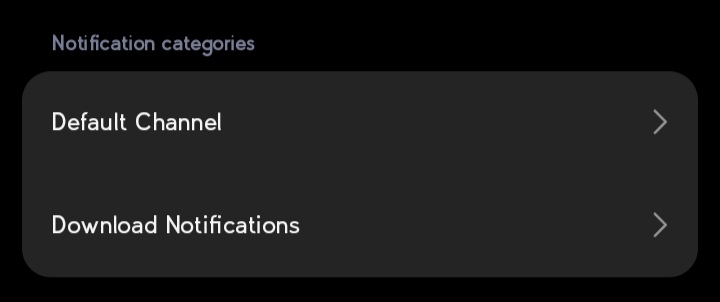
|
|
302
310
|
|
|
@@ -80,11 +80,11 @@ The library supports multiple notification styles:
|
|
|
80
80
|
|
|
81
81
|
1. `simple` - Basic notification with title and message
|
|
82
82
|
2. `progress` - Shows a progress bar
|
|
83
|
-
3. `
|
|
84
|
-
4. `
|
|
85
|
-
5. `
|
|
86
|
-
6. `
|
|
87
|
-
7. `
|
|
83
|
+
3. `big_picture` - Notification with a large image
|
|
84
|
+
4. `large_icon` - Notification with a custom icon
|
|
85
|
+
5. `both_imgs` - Combines big picture and large icon
|
|
86
|
+
6. `inbox` - List-style notification
|
|
87
|
+
7. `big_text` - Expandable notification with long text
|
|
88
88
|
8. `custom` - For custom notification styles
|
|
89
89
|
|
|
90
90
|
### Style Examples
|
|
@@ -102,7 +102,7 @@ notification = Notification(
|
|
|
102
102
|
progress_current_value=0
|
|
103
103
|
)
|
|
104
104
|
notification.send()
|
|
105
|
-
Clock.
|
|
105
|
+
Clock.schedule_interval(lambda dt: notification.updateProgressBar(dt, f"{dt}% downloaded"), 30)
|
|
106
106
|
```
|
|
107
107
|
|
|
108
108
|
**Sample Image:**
|
|
@@ -187,11 +187,13 @@ notification.send()
|
|
|
187
187
|
|
|
188
188
|
#### Big text notification
|
|
189
189
|
|
|
190
|
+
When using `big_text` style `message` acts as sub-title, Then when notification drop down button is pressed `body` is revealed
|
|
191
|
+
|
|
190
192
|
```python
|
|
191
193
|
notification = Notification(
|
|
192
194
|
title="Article",
|
|
193
|
-
|
|
194
|
-
|
|
195
|
+
message="Histroy of Loerm Ipsuim",
|
|
196
|
+
body="Lorem Ipsum is simply dummy text of the printing and ...",
|
|
195
197
|
style="big_text"
|
|
196
198
|
)
|
|
197
199
|
```
|
|
@@ -220,6 +222,8 @@ notification = Notification(
|
|
|
220
222
|
title="Download..",
|
|
221
223
|
style="progress"
|
|
222
224
|
)
|
|
225
|
+
# send notification
|
|
226
|
+
notification.send()
|
|
223
227
|
|
|
224
228
|
# Update progress
|
|
225
229
|
notification.updateProgressBar(30, "30% downloaded")
|
|
@@ -228,22 +232,9 @@ notification.updateProgressBar(30, "30% downloaded")
|
|
|
228
232
|
notification.removeProgressBar("Download Complete")
|
|
229
233
|
```
|
|
230
234
|
|
|
231
|
-
###
|
|
232
|
-
|
|
233
|
-
Notifications are organized into channels. You can customize the channel name and ID:
|
|
234
|
-
|
|
235
|
-
- Custom Channel Name's Gives User ability to turn on/off specific
|
|
236
|
-
|
|
237
|
-
```python
|
|
238
|
-
notification = Notification(
|
|
239
|
-
title="Download finished",
|
|
240
|
-
message="How to Catch a Fish.mp4",
|
|
241
|
-
channel_name="Download Notifications", # Will create User-visible name "Download Notifications"
|
|
242
|
-
channel_id="downloads_notifications" # Optional: specify custom channel ID
|
|
243
|
-
)
|
|
244
|
-
```
|
|
235
|
+
### Adding Style even when already sent
|
|
245
236
|
|
|
246
|
-
|
|
237
|
+
This is how you add a new style to notification, If already sent or not
|
|
247
238
|
|
|
248
239
|
```python
|
|
249
240
|
from android_notify import NotificationStyles
|
|
@@ -256,11 +247,28 @@ notification.send()
|
|
|
256
247
|
|
|
257
248
|
notification.updateTitle("Download Completed")
|
|
258
249
|
notification.removeProgressBar()
|
|
250
|
+
|
|
251
|
+
# Add New Style
|
|
259
252
|
notification.large_icon_path="users/imgs/profile1234.png"
|
|
260
253
|
notification.addNotificationStyle(NotificationStyles.LARGE_ICON,already_sent=True)
|
|
261
254
|
|
|
262
255
|
```
|
|
263
256
|
|
|
257
|
+
### Channel Management
|
|
258
|
+
|
|
259
|
+
Notifications are organized into channels. You can customize the channel name and ID:
|
|
260
|
+
|
|
261
|
+
- Custom Channel Name's Gives User ability to turn on/off specific notifications
|
|
262
|
+
|
|
263
|
+
```python
|
|
264
|
+
notification = Notification(
|
|
265
|
+
title="Download finished",
|
|
266
|
+
message="How to Catch a Fish.mp4",
|
|
267
|
+
channel_name="Download Notifications", # Will create User-visible name "Download Notifications"
|
|
268
|
+
channel_id="downloads_notifications" # Optional: specify custom channel ID
|
|
269
|
+
)
|
|
270
|
+
```
|
|
271
|
+
|
|
264
272
|
**Sample Image:**
|
|
265
273
|

|
|
266
274
|
|
|
@@ -76,7 +76,7 @@ class Notification:
|
|
|
76
76
|
:param large_icon_path: Relative Path to the image resource.
|
|
77
77
|
:param progress_current_value: interger To set progress bar current value.
|
|
78
78
|
:param progress_max_value: interger To set Max range for progress bar.
|
|
79
|
-
:param
|
|
79
|
+
:param body: large text For `big_Text` style, while `message` acts as sub-title.
|
|
80
80
|
---
|
|
81
81
|
(Advance Options)
|
|
82
82
|
:param callback: Function for notification Click.
|
|
@@ -105,7 +105,7 @@ class Notification:
|
|
|
105
105
|
'large_icon_path':'',
|
|
106
106
|
'progress_max_value': 0,
|
|
107
107
|
'progress_current_value': 0,
|
|
108
|
-
'
|
|
108
|
+
'body':'',
|
|
109
109
|
'channel_name':'Default Channel',
|
|
110
110
|
'channel_id':'default_channel',
|
|
111
111
|
'logs':True,
|
|
@@ -116,6 +116,7 @@ class Notification:
|
|
|
116
116
|
# if key not in non_string_keys: value = str(value) to fix
|
|
117
117
|
#non_string_keys=['progress_max_value','progress_current_value','callback','logs']
|
|
118
118
|
# TODO using default values to check types
|
|
119
|
+
|
|
119
120
|
# During Development (When running on PC)
|
|
120
121
|
logs=not ON_ANDROID
|
|
121
122
|
def __init__(self,**kwargs):
|
|
@@ -128,7 +129,7 @@ class Notification:
|
|
|
128
129
|
self.big_picture_path=''
|
|
129
130
|
self.progress_current_value=0
|
|
130
131
|
self.progress_max_value=0
|
|
131
|
-
self.
|
|
132
|
+
self.body= ''
|
|
132
133
|
|
|
133
134
|
# For Nofitication Functions
|
|
134
135
|
self.identifer=''
|
|
@@ -139,9 +140,6 @@ class Notification:
|
|
|
139
140
|
self.channel_id='default_channel'
|
|
140
141
|
self.silent=False
|
|
141
142
|
|
|
142
|
-
# During Dev on PC
|
|
143
|
-
self.logs=self.logs
|
|
144
|
-
|
|
145
143
|
# Private (Don't Touch)
|
|
146
144
|
self.__id = self.__getUniqueID()
|
|
147
145
|
self.__setArgs(kwargs)
|
|
@@ -160,6 +158,8 @@ class Notification:
|
|
|
160
158
|
new_title (str): New Notification Title
|
|
161
159
|
"""
|
|
162
160
|
self.title=new_title
|
|
161
|
+
if self.logs:
|
|
162
|
+
print(f'new notification title: {new_title}')
|
|
163
163
|
if ON_ANDROID:
|
|
164
164
|
self.__builder.setContentTitle(new_title)
|
|
165
165
|
|
|
@@ -170,11 +170,11 @@ class Notification:
|
|
|
170
170
|
new_message (str): New Notification Message
|
|
171
171
|
"""
|
|
172
172
|
self.message=new_message
|
|
173
|
+
if self.logs:
|
|
174
|
+
print(f'new notification message: {new_message}')
|
|
173
175
|
if ON_ANDROID:
|
|
174
176
|
self.__builder.setContentText(new_message)
|
|
175
|
-
|
|
176
|
-
return True
|
|
177
|
-
return 'Updated'
|
|
177
|
+
|
|
178
178
|
def updateProgressBar(self,current_value,message:str=''):
|
|
179
179
|
"""current_value is the value to set progressbar, message defaults to last message"""
|
|
180
180
|
|
|
@@ -193,7 +193,7 @@ class Notification:
|
|
|
193
193
|
"""message defaults to last message"""
|
|
194
194
|
|
|
195
195
|
if self.logs:
|
|
196
|
-
print('removed')
|
|
196
|
+
print(f'removed progress bar with message: {self.message}')
|
|
197
197
|
|
|
198
198
|
if not ON_ANDROID:
|
|
199
199
|
return True
|
|
@@ -218,7 +218,7 @@ class Notification:
|
|
|
218
218
|
string_to_display=''
|
|
219
219
|
print("\n Sent Notification!!!")
|
|
220
220
|
for name,value in vars(self).items():
|
|
221
|
-
if value and name in ["title", "message", "style", "
|
|
221
|
+
if value and name in ["title", "message", "style", "body", "large_icon_path", "big_picture_path", "progress_current_value", "progress_max_value", "channel_name"]:
|
|
222
222
|
string_to_display += f'\n {name}: {value}'
|
|
223
223
|
string_to_display +="\n (Won't Print Logs When Complied,except if selected `Notification.logs=True`)"
|
|
224
224
|
print(string_to_display)
|
|
@@ -291,10 +291,7 @@ class Notification:
|
|
|
291
291
|
# str() This is to prevent Error When user does Notification.title='blah' instead of Notification(title='blah'
|
|
292
292
|
# TODO fix this by creating a on_Title method in other versions
|
|
293
293
|
self.__builder.setContentTitle(str(self.title))
|
|
294
|
-
|
|
295
|
-
self.__builder.setContentText(str(self.subject))
|
|
296
|
-
else:
|
|
297
|
-
self.__builder.setContentText(str(self.message))
|
|
294
|
+
self.__builder.setContentText(str(self.message))
|
|
298
295
|
self.__builder.setSmallIcon(context.getApplicationInfo().icon)
|
|
299
296
|
self.__builder.setDefaults(NotificationCompat.DEFAULT_ALL) # pylint: disable=E0606
|
|
300
297
|
self.__builder.setPriority(NotificationCompat.PRIORITY_DEFAULT if self.silent else NotificationCompat.PRIORITY_HIGH)
|
|
@@ -303,7 +300,7 @@ class Notification:
|
|
|
303
300
|
@run_on_ui_thread
|
|
304
301
|
def addNotificationStyle(self,style:str,already_sent=False):
|
|
305
302
|
"""Adds Style to Notification
|
|
306
|
-
Version 1.51.2+
|
|
303
|
+
Version 1.51.2+ Exposes method to Users (Note): Always try to Call On UI Thread
|
|
307
304
|
|
|
308
305
|
Args:
|
|
309
306
|
style (str): required style
|
|
@@ -315,20 +312,18 @@ class Notification:
|
|
|
315
312
|
|
|
316
313
|
if style == NotificationStyles.BIG_TEXT:
|
|
317
314
|
big_text_style = NotificationCompatBigTextStyle() # pylint: disable=E0606
|
|
318
|
-
big_text_style.bigText(self.
|
|
315
|
+
big_text_style.bigText(str(self.body))
|
|
319
316
|
self.__builder.setStyle(big_text_style)
|
|
320
317
|
|
|
321
318
|
elif style == NotificationStyles.INBOX:
|
|
322
319
|
inbox_style = NotificationCompatInboxStyle() # pylint: disable=E0606
|
|
323
320
|
for line in self.message.split("\n"):
|
|
324
|
-
inbox_style.addLine(line)
|
|
321
|
+
inbox_style.addLine(str(line))
|
|
325
322
|
self.__builder.setStyle(inbox_style)
|
|
326
323
|
|
|
327
|
-
elif style == NotificationStyles.BIG_PICTURE and self.big_picture_path:
|
|
328
|
-
self.
|
|
329
|
-
|
|
330
|
-
elif style == NotificationStyles.LARGE_ICON and self.large_icon_path:
|
|
331
|
-
self.__buildImg(self.large_icon_path, style)
|
|
324
|
+
elif (style == NotificationStyles.LARGE_ICON and self.large_icon_path) or (style == NotificationStyles.BIG_PICTURE and self.big_picture_path):
|
|
325
|
+
img = self.large_icon_path if style == NotificationStyles.LARGE_ICON else self.big_picture_path
|
|
326
|
+
self.__buildImg(img, style)
|
|
332
327
|
|
|
333
328
|
elif style == NotificationStyles.BOTH_IMGS and (self.big_picture_path or self.large_icon_path):
|
|
334
329
|
if self.big_picture_path:
|
|
@@ -336,7 +331,7 @@ class Notification:
|
|
|
336
331
|
if self.large_icon_path:
|
|
337
332
|
self.__buildImg(self.large_icon_path, NotificationStyles.LARGE_ICON)
|
|
338
333
|
|
|
339
|
-
elif style ==
|
|
334
|
+
elif style == NotificationStyles.PROGRESS:
|
|
340
335
|
self.__builder.setContentTitle(String(self.title))
|
|
341
336
|
self.__builder.setContentText(String(self.message))
|
|
342
337
|
self.__builder.setProgress(self.progress_max_value, self.progress_current_value, False)
|
|
@@ -1,6 +1,6 @@
|
|
|
1
1
|
Metadata-Version: 2.2
|
|
2
2
|
Name: android-notify
|
|
3
|
-
Version: 1.52
|
|
3
|
+
Version: 1.52.2
|
|
4
4
|
Summary: A Python package that simpilfies creating Android notifications in Kivy apps.
|
|
5
5
|
Home-page: https://github.com/fector101/android-notify
|
|
6
6
|
Author: Fabian
|
|
@@ -116,11 +116,11 @@ The library supports multiple notification styles:
|
|
|
116
116
|
|
|
117
117
|
1. `simple` - Basic notification with title and message
|
|
118
118
|
2. `progress` - Shows a progress bar
|
|
119
|
-
3. `
|
|
120
|
-
4. `
|
|
121
|
-
5. `
|
|
122
|
-
6. `
|
|
123
|
-
7. `
|
|
119
|
+
3. `big_picture` - Notification with a large image
|
|
120
|
+
4. `large_icon` - Notification with a custom icon
|
|
121
|
+
5. `both_imgs` - Combines big picture and large icon
|
|
122
|
+
6. `inbox` - List-style notification
|
|
123
|
+
7. `big_text` - Expandable notification with long text
|
|
124
124
|
8. `custom` - For custom notification styles
|
|
125
125
|
|
|
126
126
|
### Style Examples
|
|
@@ -138,7 +138,7 @@ notification = Notification(
|
|
|
138
138
|
progress_current_value=0
|
|
139
139
|
)
|
|
140
140
|
notification.send()
|
|
141
|
-
Clock.
|
|
141
|
+
Clock.schedule_interval(lambda dt: notification.updateProgressBar(dt, f"{dt}% downloaded"), 30)
|
|
142
142
|
```
|
|
143
143
|
|
|
144
144
|
**Sample Image:**
|
|
@@ -223,11 +223,13 @@ notification.send()
|
|
|
223
223
|
|
|
224
224
|
#### Big text notification
|
|
225
225
|
|
|
226
|
+
When using `big_text` style `message` acts as sub-title, Then when notification drop down button is pressed `body` is revealed
|
|
227
|
+
|
|
226
228
|
```python
|
|
227
229
|
notification = Notification(
|
|
228
230
|
title="Article",
|
|
229
|
-
|
|
230
|
-
|
|
231
|
+
message="Histroy of Loerm Ipsuim",
|
|
232
|
+
body="Lorem Ipsum is simply dummy text of the printing and ...",
|
|
231
233
|
style="big_text"
|
|
232
234
|
)
|
|
233
235
|
```
|
|
@@ -256,6 +258,8 @@ notification = Notification(
|
|
|
256
258
|
title="Download..",
|
|
257
259
|
style="progress"
|
|
258
260
|
)
|
|
261
|
+
# send notification
|
|
262
|
+
notification.send()
|
|
259
263
|
|
|
260
264
|
# Update progress
|
|
261
265
|
notification.updateProgressBar(30, "30% downloaded")
|
|
@@ -264,22 +268,9 @@ notification.updateProgressBar(30, "30% downloaded")
|
|
|
264
268
|
notification.removeProgressBar("Download Complete")
|
|
265
269
|
```
|
|
266
270
|
|
|
267
|
-
###
|
|
268
|
-
|
|
269
|
-
Notifications are organized into channels. You can customize the channel name and ID:
|
|
270
|
-
|
|
271
|
-
- Custom Channel Name's Gives User ability to turn on/off specific
|
|
272
|
-
|
|
273
|
-
```python
|
|
274
|
-
notification = Notification(
|
|
275
|
-
title="Download finished",
|
|
276
|
-
message="How to Catch a Fish.mp4",
|
|
277
|
-
channel_name="Download Notifications", # Will create User-visible name "Download Notifications"
|
|
278
|
-
channel_id="downloads_notifications" # Optional: specify custom channel ID
|
|
279
|
-
)
|
|
280
|
-
```
|
|
271
|
+
### Adding Style even when already sent
|
|
281
272
|
|
|
282
|
-
|
|
273
|
+
This is how you add a new style to notification, If already sent or not
|
|
283
274
|
|
|
284
275
|
```python
|
|
285
276
|
from android_notify import NotificationStyles
|
|
@@ -292,11 +283,28 @@ notification.send()
|
|
|
292
283
|
|
|
293
284
|
notification.updateTitle("Download Completed")
|
|
294
285
|
notification.removeProgressBar()
|
|
286
|
+
|
|
287
|
+
# Add New Style
|
|
295
288
|
notification.large_icon_path="users/imgs/profile1234.png"
|
|
296
289
|
notification.addNotificationStyle(NotificationStyles.LARGE_ICON,already_sent=True)
|
|
297
290
|
|
|
298
291
|
```
|
|
299
292
|
|
|
293
|
+
### Channel Management
|
|
294
|
+
|
|
295
|
+
Notifications are organized into channels. You can customize the channel name and ID:
|
|
296
|
+
|
|
297
|
+
- Custom Channel Name's Gives User ability to turn on/off specific notifications
|
|
298
|
+
|
|
299
|
+
```python
|
|
300
|
+
notification = Notification(
|
|
301
|
+
title="Download finished",
|
|
302
|
+
message="How to Catch a Fish.mp4",
|
|
303
|
+
channel_name="Download Notifications", # Will create User-visible name "Download Notifications"
|
|
304
|
+
channel_id="downloads_notifications" # Optional: specify custom channel ID
|
|
305
|
+
)
|
|
306
|
+
```
|
|
307
|
+
|
|
300
308
|
**Sample Image:**
|
|
301
309
|

|
|
302
310
|
|
|
@@ -6,7 +6,7 @@ with open("README.md", "r", encoding="utf-8") as readme_data:
|
|
|
6
6
|
|
|
7
7
|
setup(
|
|
8
8
|
name="android-notify",
|
|
9
|
-
version="1.52",
|
|
9
|
+
version="1.52.2",
|
|
10
10
|
author="Fabian",
|
|
11
11
|
author_email='fector101@yahoo.com',
|
|
12
12
|
description="A Python package that simpilfies creating Android notifications in Kivy apps.",
|
|
File without changes
|
|
File without changes
|
|
File without changes
|
|
File without changes
|
|
File without changes
|
|
File without changes
|
|
File without changes
|
|
File without changes
|
|
File without changes
|