android-notify 1.52__tar.gz → 1.52.1__tar.gz
This diff represents the content of publicly available package versions that have been released to one of the supported registries. The information contained in this diff is provided for informational purposes only and reflects changes between package versions as they appear in their respective public registries.
Potentially problematic release.
This version of android-notify might be problematic. Click here for more details.
- {android_notify-1.52 → android_notify-1.52.1}/PKG-INFO +20 -16
- {android_notify-1.52 → android_notify-1.52.1}/README.md +19 -15
- {android_notify-1.52 → android_notify-1.52.1}/android_notify.egg-info/PKG-INFO +20 -16
- {android_notify-1.52 → android_notify-1.52.1}/setup.py +1 -1
- {android_notify-1.52 → android_notify-1.52.1}/android_notify/__init__.py +0 -0
- {android_notify-1.52 → android_notify-1.52.1}/android_notify/__main__.py +0 -0
- {android_notify-1.52 → android_notify-1.52.1}/android_notify/core.py +0 -0
- {android_notify-1.52 → android_notify-1.52.1}/android_notify/styles.py +0 -0
- {android_notify-1.52 → android_notify-1.52.1}/android_notify/sword.py +0 -0
- {android_notify-1.52 → android_notify-1.52.1}/android_notify.egg-info/SOURCES.txt +0 -0
- {android_notify-1.52 → android_notify-1.52.1}/android_notify.egg-info/dependency_links.txt +0 -0
- {android_notify-1.52 → android_notify-1.52.1}/android_notify.egg-info/requires.txt +0 -0
- {android_notify-1.52 → android_notify-1.52.1}/android_notify.egg-info/top_level.txt +0 -0
- {android_notify-1.52 → android_notify-1.52.1}/setup.cfg +0 -0
|
@@ -1,6 +1,6 @@
|
|
|
1
1
|
Metadata-Version: 2.2
|
|
2
2
|
Name: android-notify
|
|
3
|
-
Version: 1.52
|
|
3
|
+
Version: 1.52.1
|
|
4
4
|
Summary: A Python package that simpilfies creating Android notifications in Kivy apps.
|
|
5
5
|
Home-page: https://github.com/fector101/android-notify
|
|
6
6
|
Author: Fabian
|
|
@@ -256,6 +256,8 @@ notification = Notification(
|
|
|
256
256
|
title="Download..",
|
|
257
257
|
style="progress"
|
|
258
258
|
)
|
|
259
|
+
# send notification
|
|
260
|
+
notification.send()
|
|
259
261
|
|
|
260
262
|
# Update progress
|
|
261
263
|
notification.updateProgressBar(30, "30% downloaded")
|
|
@@ -264,21 +266,6 @@ notification.updateProgressBar(30, "30% downloaded")
|
|
|
264
266
|
notification.removeProgressBar("Download Complete")
|
|
265
267
|
```
|
|
266
268
|
|
|
267
|
-
### Channel Management
|
|
268
|
-
|
|
269
|
-
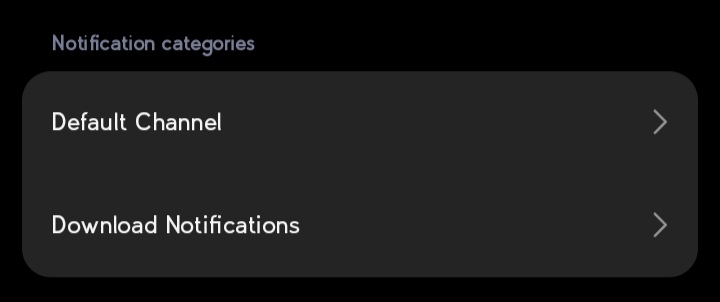
Notifications are organized into channels. You can customize the channel name and ID:
|
|
270
|
-
|
|
271
|
-
- Custom Channel Name's Gives User ability to turn on/off specific
|
|
272
|
-
|
|
273
|
-
```python
|
|
274
|
-
notification = Notification(
|
|
275
|
-
title="Download finished",
|
|
276
|
-
message="How to Catch a Fish.mp4",
|
|
277
|
-
channel_name="Download Notifications", # Will create User-visible name "Download Notifications"
|
|
278
|
-
channel_id="downloads_notifications" # Optional: specify custom channel ID
|
|
279
|
-
)
|
|
280
|
-
```
|
|
281
|
-
|
|
282
269
|
### Changing Style When Already Sent
|
|
283
270
|
|
|
284
271
|
```python
|
|
@@ -292,11 +279,28 @@ notification.send()
|
|
|
292
279
|
|
|
293
280
|
notification.updateTitle("Download Completed")
|
|
294
281
|
notification.removeProgressBar()
|
|
282
|
+
|
|
283
|
+
# Change Notification Style
|
|
295
284
|
notification.large_icon_path="users/imgs/profile1234.png"
|
|
296
285
|
notification.addNotificationStyle(NotificationStyles.LARGE_ICON,already_sent=True)
|
|
297
286
|
|
|
298
287
|
```
|
|
299
288
|
|
|
289
|
+
### Channel Management
|
|
290
|
+
|
|
291
|
+
Notifications are organized into channels. You can customize the channel name and ID:
|
|
292
|
+
|
|
293
|
+
- Custom Channel Name's Gives User ability to turn on/off specific
|
|
294
|
+
|
|
295
|
+
```python
|
|
296
|
+
notification = Notification(
|
|
297
|
+
title="Download finished",
|
|
298
|
+
message="How to Catch a Fish.mp4",
|
|
299
|
+
channel_name="Download Notifications", # Will create User-visible name "Download Notifications"
|
|
300
|
+
channel_id="downloads_notifications" # Optional: specify custom channel ID
|
|
301
|
+
)
|
|
302
|
+
```
|
|
303
|
+
|
|
300
304
|
**Sample Image:**
|
|
301
305
|
|
|
302
306
|
|
|
@@ -220,6 +220,8 @@ notification = Notification(
|
|
|
220
220
|
title="Download..",
|
|
221
221
|
style="progress"
|
|
222
222
|
)
|
|
223
|
+
# send notification
|
|
224
|
+
notification.send()
|
|
223
225
|
|
|
224
226
|
# Update progress
|
|
225
227
|
notification.updateProgressBar(30, "30% downloaded")
|
|
@@ -228,21 +230,6 @@ notification.updateProgressBar(30, "30% downloaded")
|
|
|
228
230
|
notification.removeProgressBar("Download Complete")
|
|
229
231
|
```
|
|
230
232
|
|
|
231
|
-
### Channel Management
|
|
232
|
-
|
|
233
|
-
Notifications are organized into channels. You can customize the channel name and ID:
|
|
234
|
-
|
|
235
|
-
- Custom Channel Name's Gives User ability to turn on/off specific
|
|
236
|
-
|
|
237
|
-
```python
|
|
238
|
-
notification = Notification(
|
|
239
|
-
title="Download finished",
|
|
240
|
-
message="How to Catch a Fish.mp4",
|
|
241
|
-
channel_name="Download Notifications", # Will create User-visible name "Download Notifications"
|
|
242
|
-
channel_id="downloads_notifications" # Optional: specify custom channel ID
|
|
243
|
-
)
|
|
244
|
-
```
|
|
245
|
-
|
|
246
233
|
### Changing Style When Already Sent
|
|
247
234
|
|
|
248
235
|
```python
|
|
@@ -256,11 +243,28 @@ notification.send()
|
|
|
256
243
|
|
|
257
244
|
notification.updateTitle("Download Completed")
|
|
258
245
|
notification.removeProgressBar()
|
|
246
|
+
|
|
247
|
+
# Change Notification Style
|
|
259
248
|
notification.large_icon_path="users/imgs/profile1234.png"
|
|
260
249
|
notification.addNotificationStyle(NotificationStyles.LARGE_ICON,already_sent=True)
|
|
261
250
|
|
|
262
251
|
```
|
|
263
252
|
|
|
253
|
+
### Channel Management
|
|
254
|
+
|
|
255
|
+
Notifications are organized into channels. You can customize the channel name and ID:
|
|
256
|
+
|
|
257
|
+
- Custom Channel Name's Gives User ability to turn on/off specific
|
|
258
|
+
|
|
259
|
+
```python
|
|
260
|
+
notification = Notification(
|
|
261
|
+
title="Download finished",
|
|
262
|
+
message="How to Catch a Fish.mp4",
|
|
263
|
+
channel_name="Download Notifications", # Will create User-visible name "Download Notifications"
|
|
264
|
+
channel_id="downloads_notifications" # Optional: specify custom channel ID
|
|
265
|
+
)
|
|
266
|
+
```
|
|
267
|
+
|
|
264
268
|
**Sample Image:**
|
|
265
269
|

|
|
266
270
|
|
|
@@ -1,6 +1,6 @@
|
|
|
1
1
|
Metadata-Version: 2.2
|
|
2
2
|
Name: android-notify
|
|
3
|
-
Version: 1.52
|
|
3
|
+
Version: 1.52.1
|
|
4
4
|
Summary: A Python package that simpilfies creating Android notifications in Kivy apps.
|
|
5
5
|
Home-page: https://github.com/fector101/android-notify
|
|
6
6
|
Author: Fabian
|
|
@@ -256,6 +256,8 @@ notification = Notification(
|
|
|
256
256
|
title="Download..",
|
|
257
257
|
style="progress"
|
|
258
258
|
)
|
|
259
|
+
# send notification
|
|
260
|
+
notification.send()
|
|
259
261
|
|
|
260
262
|
# Update progress
|
|
261
263
|
notification.updateProgressBar(30, "30% downloaded")
|
|
@@ -264,21 +266,6 @@ notification.updateProgressBar(30, "30% downloaded")
|
|
|
264
266
|
notification.removeProgressBar("Download Complete")
|
|
265
267
|
```
|
|
266
268
|
|
|
267
|
-
### Channel Management
|
|
268
|
-
|
|
269
|
-
Notifications are organized into channels. You can customize the channel name and ID:
|
|
270
|
-
|
|
271
|
-
- Custom Channel Name's Gives User ability to turn on/off specific
|
|
272
|
-
|
|
273
|
-
```python
|
|
274
|
-
notification = Notification(
|
|
275
|
-
title="Download finished",
|
|
276
|
-
message="How to Catch a Fish.mp4",
|
|
277
|
-
channel_name="Download Notifications", # Will create User-visible name "Download Notifications"
|
|
278
|
-
channel_id="downloads_notifications" # Optional: specify custom channel ID
|
|
279
|
-
)
|
|
280
|
-
```
|
|
281
|
-
|
|
282
269
|
### Changing Style When Already Sent
|
|
283
270
|
|
|
284
271
|
```python
|
|
@@ -292,11 +279,28 @@ notification.send()
|
|
|
292
279
|
|
|
293
280
|
notification.updateTitle("Download Completed")
|
|
294
281
|
notification.removeProgressBar()
|
|
282
|
+
|
|
283
|
+
# Change Notification Style
|
|
295
284
|
notification.large_icon_path="users/imgs/profile1234.png"
|
|
296
285
|
notification.addNotificationStyle(NotificationStyles.LARGE_ICON,already_sent=True)
|
|
297
286
|
|
|
298
287
|
```
|
|
299
288
|
|
|
289
|
+
### Channel Management
|
|
290
|
+
|
|
291
|
+
Notifications are organized into channels. You can customize the channel name and ID:
|
|
292
|
+
|
|
293
|
+
- Custom Channel Name's Gives User ability to turn on/off specific
|
|
294
|
+
|
|
295
|
+
```python
|
|
296
|
+
notification = Notification(
|
|
297
|
+
title="Download finished",
|
|
298
|
+
message="How to Catch a Fish.mp4",
|
|
299
|
+
channel_name="Download Notifications", # Will create User-visible name "Download Notifications"
|
|
300
|
+
channel_id="downloads_notifications" # Optional: specify custom channel ID
|
|
301
|
+
)
|
|
302
|
+
```
|
|
303
|
+
|
|
300
304
|
**Sample Image:**
|
|
301
305
|

|
|
302
306
|
|
|
@@ -6,7 +6,7 @@ with open("README.md", "r", encoding="utf-8") as readme_data:
|
|
|
6
6
|
|
|
7
7
|
setup(
|
|
8
8
|
name="android-notify",
|
|
9
|
-
version="1.52",
|
|
9
|
+
version="1.52.1",
|
|
10
10
|
author="Fabian",
|
|
11
11
|
author_email='fector101@yahoo.com',
|
|
12
12
|
description="A Python package that simpilfies creating Android notifications in Kivy apps.",
|
|
File without changes
|
|
File without changes
|
|
File without changes
|
|
File without changes
|
|
File without changes
|
|
File without changes
|
|
File without changes
|
|
File without changes
|
|
File without changes
|
|
File without changes
|