android-notify 1.3__tar.gz → 1.5__tar.gz
This diff represents the content of publicly available package versions that have been released to one of the supported registries. The information contained in this diff is provided for informational purposes only and reflects changes between package versions as they appear in their respective public registries.
Potentially problematic release.
This version of android-notify might be problematic. Click here for more details.
- {android_notify-1.3 → android_notify-1.5}/PKG-INFO +147 -45
- {android_notify-1.3 → android_notify-1.5}/README.md +131 -41
- android_notify-1.5/android_notify/__init__.py +4 -0
- {android_notify-1.3 → android_notify-1.5}/android_notify/core.py +1 -1
- {android_notify-1.3 → android_notify-1.5}/android_notify/sword.py +237 -65
- {android_notify-1.3 → android_notify-1.5}/android_notify.egg-info/PKG-INFO +147 -45
- {android_notify-1.3 → android_notify-1.5}/setup.py +3 -3
- android_notify-1.3/android_notify/__init__.py +0 -3
- {android_notify-1.3 → android_notify-1.5}/android_notify/__main__.py +0 -0
- {android_notify-1.3 → android_notify-1.5}/android_notify/styles.py +0 -0
- {android_notify-1.3 → android_notify-1.5}/android_notify.egg-info/SOURCES.txt +0 -0
- {android_notify-1.3 → android_notify-1.5}/android_notify.egg-info/dependency_links.txt +0 -0
- {android_notify-1.3 → android_notify-1.5}/android_notify.egg-info/requires.txt +0 -0
- {android_notify-1.3 → android_notify-1.5}/android_notify.egg-info/top_level.txt +0 -0
- {android_notify-1.3 → android_notify-1.5}/setup.cfg +0 -0
|
@@ -1,7 +1,7 @@
|
|
|
1
|
-
Metadata-Version: 2.
|
|
1
|
+
Metadata-Version: 2.2
|
|
2
2
|
Name: android-notify
|
|
3
|
-
Version: 1.
|
|
4
|
-
Summary: A Python package that simpilfies creating Android
|
|
3
|
+
Version: 1.5
|
|
4
|
+
Summary: A Python package that simpilfies creating Android notifications in Kivy apps.
|
|
5
5
|
Home-page: https://github.com/fector101/android-notify
|
|
6
6
|
Author: Fabian
|
|
7
7
|
Author-email: fector101@yahoo.com
|
|
@@ -21,22 +21,41 @@ Requires-Python: >=3.6
|
|
|
21
21
|
Description-Content-Type: text/markdown
|
|
22
22
|
Requires-Dist: kivy>=2.0.0
|
|
23
23
|
Requires-Dist: pyjnius>=1.4.2
|
|
24
|
-
|
|
25
|
-
|
|
26
|
-
|
|
27
|
-
|
|
28
|
-
|
|
24
|
+
Dynamic: author
|
|
25
|
+
Dynamic: author-email
|
|
26
|
+
Dynamic: classifier
|
|
27
|
+
Dynamic: description
|
|
28
|
+
Dynamic: description-content-type
|
|
29
|
+
Dynamic: home-page
|
|
30
|
+
Dynamic: keywords
|
|
31
|
+
Dynamic: license
|
|
32
|
+
Dynamic: project-url
|
|
33
|
+
Dynamic: requires-dist
|
|
34
|
+
Dynamic: requires-python
|
|
35
|
+
Dynamic: summary
|
|
36
|
+
|
|
37
|
+
<div align="center">
|
|
38
|
+
<br>
|
|
39
|
+
<h1> Android-Notifiy </h1>
|
|
40
|
+
<p> A Python library for effortlessly creating and managing Android notifications in Kivy android apps.</p>
|
|
41
|
+
<p>Supports various styles and ensures seamless integration and customization.</p>
|
|
42
|
+
<!-- <br> -->
|
|
43
|
+
<!-- <img src="https://raw.githubusercontent.com/Fector101/android_notify/main/docs/imgs/democollage.jpg"> -->
|
|
44
|
+
</div>
|
|
29
45
|
|
|
30
46
|
## Features
|
|
31
47
|
|
|
32
|
-
- Compatible with Android 8.0+.
|
|
48
|
+
- Also Compatible with Android 8.0+.
|
|
33
49
|
- Supports including images in notifications.
|
|
50
|
+
- All Notifications can take Functions (version 1.5+) [functions docs](#functions).
|
|
34
51
|
- Support for multiple notification styles:
|
|
35
|
-
-
|
|
36
|
-
-
|
|
37
|
-
-
|
|
38
|
-
-
|
|
39
|
-
- Large Icon
|
|
52
|
+
- [Simple](#basic-usage)
|
|
53
|
+
- [Progress](#progress-bar-notification)
|
|
54
|
+
- [Big Picture](#notification-with-an-image-big-picture-style)
|
|
55
|
+
- [Inbox](#inbox-notification-style)
|
|
56
|
+
- [Large Icon](#notification-with-an-image-large-icon-style)
|
|
57
|
+
- [Buttons](#notification-with-buttons)
|
|
58
|
+
- [Big Text](#big-text-notification-will-display-as-simple-text-if-device-dosent-support)
|
|
40
59
|
|
|
41
60
|
This module automatically handles:
|
|
42
61
|
|
|
@@ -60,7 +79,7 @@ pip install android-notify
|
|
|
60
79
|
In your **`buildozer.spec`** file, ensure you include the following:
|
|
61
80
|
|
|
62
81
|
```ini
|
|
63
|
-
# Add pyjnius so it's packaged with the build
|
|
82
|
+
# Add pyjnius so ensure it's packaged with the build
|
|
64
83
|
requirements = python3, kivy, pyjnius, android-notify
|
|
65
84
|
|
|
66
85
|
# Add permission for notifications
|
|
@@ -81,7 +100,7 @@ from android_notify import Notification
|
|
|
81
100
|
# Create a simple notification
|
|
82
101
|
notification = Notification(
|
|
83
102
|
title="Hello",
|
|
84
|
-
message="This is a basic notification"
|
|
103
|
+
message="This is a basic notification."
|
|
85
104
|
)
|
|
86
105
|
notification.send()
|
|
87
106
|
```
|
|
@@ -104,6 +123,25 @@ The library supports multiple notification styles:
|
|
|
104
123
|
|
|
105
124
|
### Style Examples
|
|
106
125
|
|
|
126
|
+
#### Progress Bar notification
|
|
127
|
+
|
|
128
|
+
```python
|
|
129
|
+
from kivy.clock import Clock
|
|
130
|
+
|
|
131
|
+
notification = Notification(
|
|
132
|
+
title="Downloading...",
|
|
133
|
+
message="0% downloaded",
|
|
134
|
+
style="progress",
|
|
135
|
+
progress_max_value=100,
|
|
136
|
+
progress_current_value=0
|
|
137
|
+
)
|
|
138
|
+
notification.send()
|
|
139
|
+
Clock.schedule_once(lambda dt: notification.updateProgressBar(30, "30% downloaded"), 350)
|
|
140
|
+
```
|
|
141
|
+
|
|
142
|
+
**Sample Image:**
|
|
143
|
+
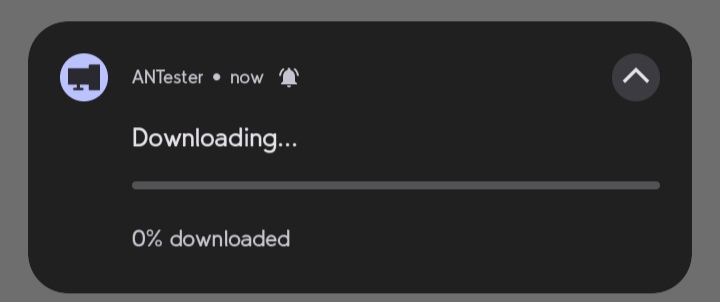
|
|
144
|
+
|
|
107
145
|
#### Notification with an Image (Big Picture Style)
|
|
108
146
|
|
|
109
147
|
```python
|
|
@@ -114,6 +152,8 @@ notification = Notification(
|
|
|
114
152
|
style="big_picture",
|
|
115
153
|
big_picture_path="assets/imgs/photo.png"
|
|
116
154
|
)
|
|
155
|
+
notification.send()
|
|
156
|
+
|
|
117
157
|
```
|
|
118
158
|
|
|
119
159
|
**Sample Image:**
|
|
@@ -128,52 +168,60 @@ notification = Notification(
|
|
|
128
168
|
message='Line 1\nLine 2\nLine 3',
|
|
129
169
|
style='inbox'
|
|
130
170
|
)
|
|
171
|
+
notification.send()
|
|
172
|
+
|
|
131
173
|
```
|
|
132
174
|
|
|
133
175
|
**Sample Image:**
|
|
134
176
|
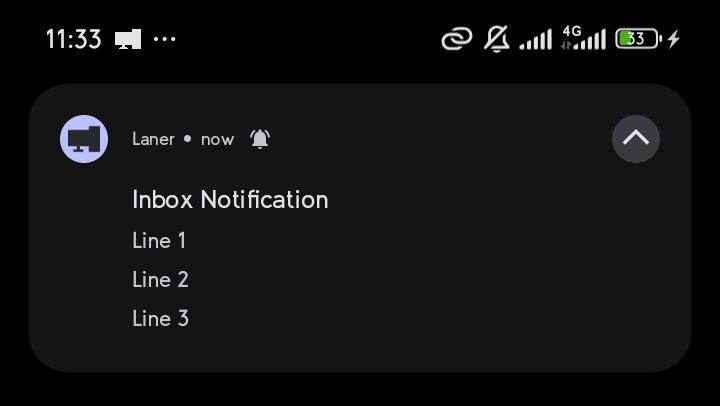
|
|
135
177
|
|
|
136
|
-
####
|
|
178
|
+
#### Notification with an Image (Large Icon Style)
|
|
137
179
|
|
|
138
180
|
```python
|
|
139
181
|
notification = Notification(
|
|
140
|
-
title="
|
|
141
|
-
message="
|
|
142
|
-
style="
|
|
182
|
+
title="FabianDev_",
|
|
183
|
+
message="A twitter about some programming stuff",
|
|
184
|
+
style="large_icon",
|
|
185
|
+
large_icon_path="assets/imgs/profile.png"
|
|
143
186
|
)
|
|
187
|
+
|
|
144
188
|
```
|
|
145
189
|
|
|
146
|
-
|
|
190
|
+
**Sample Image:**
|
|
191
|
+
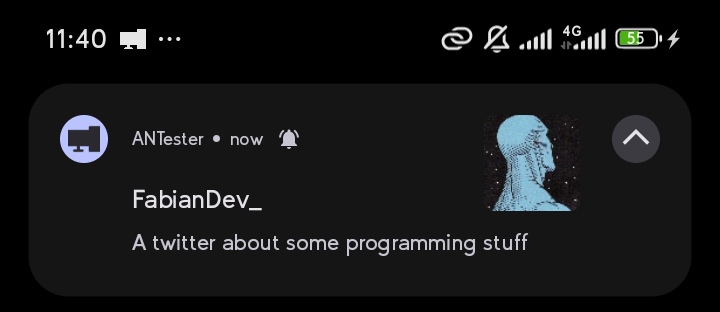
|
|
192
|
+
|
|
193
|
+
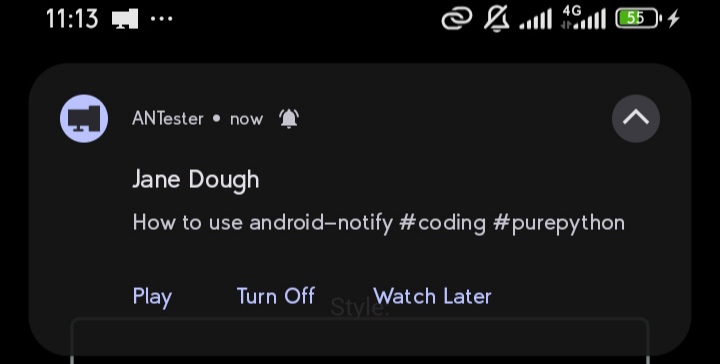
#### Notification with Buttons
|
|
147
194
|
|
|
148
195
|
```python
|
|
149
|
-
notification = Notification(
|
|
150
|
-
|
|
151
|
-
|
|
152
|
-
|
|
153
|
-
|
|
154
|
-
|
|
155
|
-
|
|
196
|
+
notification = Notification(title="Jane Dough", message="How to use android-notify #coding #purepython")
|
|
197
|
+
def playVideo():
|
|
198
|
+
print('Playing Video')
|
|
199
|
+
|
|
200
|
+
def turnOffNoti():
|
|
201
|
+
print('Please Turn OFf Noti')
|
|
202
|
+
|
|
203
|
+
def watchLater():
|
|
204
|
+
print('Add to Watch Later')
|
|
156
205
|
|
|
206
|
+
notification.addButton(text="Play",on_release=playVideo)
|
|
207
|
+
notification.addButton(text="Turn Off",on_release=turnOffNoti)
|
|
208
|
+
notification.addButton(text="Watch Later",on_release=watchLater)
|
|
209
|
+
notification.send()
|
|
157
210
|
```
|
|
158
211
|
|
|
159
|
-
**Sample Image:**
|
|
160
|
-
|
|
161
214
|
|
|
162
|
-
####
|
|
215
|
+
#### Big text notification (Will Display as normal text if Device dosen't support)
|
|
163
216
|
|
|
164
217
|
```python
|
|
165
218
|
notification = Notification(
|
|
166
|
-
title="
|
|
167
|
-
message="
|
|
168
|
-
style="
|
|
169
|
-
large_icon_path="assets/imgs/profile.png"
|
|
219
|
+
title="Article",
|
|
220
|
+
message="Long article content...",
|
|
221
|
+
style="big_text"
|
|
170
222
|
)
|
|
171
|
-
|
|
172
223
|
```
|
|
173
224
|
|
|
174
|
-
**Sample Image:**
|
|
175
|
-

|
|
176
|
-
|
|
177
225
|
## Advanced Features
|
|
178
226
|
|
|
179
227
|
### Updating Notifications
|
|
@@ -193,12 +241,12 @@ notification.updateMessage("New Message")
|
|
|
193
241
|
|
|
194
242
|
```python
|
|
195
243
|
notification = Notification(
|
|
196
|
-
title="Download
|
|
244
|
+
title="Download..",
|
|
197
245
|
style="progress"
|
|
198
246
|
)
|
|
199
247
|
|
|
200
248
|
# Update progress
|
|
201
|
-
notification.updateProgressBar(
|
|
249
|
+
notification.updateProgressBar(30, "30% downloaded")
|
|
202
250
|
|
|
203
251
|
# Remove progress bar
|
|
204
252
|
notification.removeProgressBar("Download Complete")
|
|
@@ -214,8 +262,8 @@ Notifications are organized into channels. You can customize the channel name an
|
|
|
214
262
|
notification = Notification(
|
|
215
263
|
title="Download finished",
|
|
216
264
|
message="How to Catch a Fish.mp4",
|
|
217
|
-
channel_name="Download Notifications", # Will create User-visible name "
|
|
218
|
-
channel_id="
|
|
265
|
+
channel_name="Download Notifications", # Will create User-visible name "Download Notifications"
|
|
266
|
+
channel_id="downloads_notifications" # Optional: specify custom channel ID
|
|
219
267
|
)
|
|
220
268
|
```
|
|
221
269
|
|
|
@@ -231,6 +279,60 @@ notification = Notification(title="Silent Update")
|
|
|
231
279
|
notification.send(silent=True)
|
|
232
280
|
```
|
|
233
281
|
|
|
282
|
+
## Functions
|
|
283
|
+
|
|
284
|
+
### NotificationHandler - To Attach Listener
|
|
285
|
+
|
|
286
|
+
Add this to your main.py App Class so it runs Once, In later Versions It'll be Attached Automatical
|
|
287
|
+
|
|
288
|
+
```python
|
|
289
|
+
from kivymd.app import MDApp
|
|
290
|
+
from android_notify import Notification, NotificationHandler
|
|
291
|
+
|
|
292
|
+
class Myapp(MDApp):
|
|
293
|
+
|
|
294
|
+
def on_start(self):
|
|
295
|
+
# Is called Once when app is Starts up
|
|
296
|
+
NotificationHandler.bindNotifyListener() # if successfull returns True
|
|
297
|
+
Notification(title="Hello", message="This is a basic notification.",callback=self.doSomething).send()
|
|
298
|
+
|
|
299
|
+
def doSomething(self):
|
|
300
|
+
print("print in Debug Console")
|
|
301
|
+
```
|
|
302
|
+
|
|
303
|
+
### Get Which Notification was used to Open App - identifer (str)
|
|
304
|
+
|
|
305
|
+
If you just want to get the Exact Notification Clicked to Open App, you can use NotificationHandler to get unique identifer
|
|
306
|
+
|
|
307
|
+
```python
|
|
308
|
+
from kivymd.app import MDApp
|
|
309
|
+
from android_notify import Notification, NotificationHandler
|
|
310
|
+
|
|
311
|
+
class Myapp(MDApp):
|
|
312
|
+
|
|
313
|
+
def on_start(self):
|
|
314
|
+
|
|
315
|
+
notify = Notification(title="Change Page", message="Click to change App page.", identifer='change_app_page')
|
|
316
|
+
notify.send()
|
|
317
|
+
|
|
318
|
+
notify1 = Notification(title="Change Colour", message="Click to change App Colour", identifer='change_app_color')
|
|
319
|
+
notify1.send()
|
|
320
|
+
|
|
321
|
+
NotificationHandler.bindNotifyListener()
|
|
322
|
+
|
|
323
|
+
def on_resume(self):
|
|
324
|
+
# Is called everytime app is reopened
|
|
325
|
+
notify_identifer = NotificationHandler.getIdentifer()
|
|
326
|
+
if notify_identifer == 'change_app_page':
|
|
327
|
+
# Code to change Screen
|
|
328
|
+
pass
|
|
329
|
+
elif notify_identifer == 'change_app_color':
|
|
330
|
+
# Code to change Screen Color
|
|
331
|
+
pass
|
|
332
|
+
```
|
|
333
|
+
|
|
334
|
+
|
|
335
|
+
|
|
234
336
|
### Assist
|
|
235
337
|
|
|
236
338
|
- How to Copy image to app folder
|
|
@@ -249,7 +351,7 @@ shutil.copy(image_path, os.path.join(app_path, "profile.png"))
|
|
|
249
351
|
|
|
250
352
|
```python
|
|
251
353
|
from android_notify import Notification, NotificationStyles
|
|
252
|
-
|
|
354
|
+
Notification(
|
|
253
355
|
title="New Photo",
|
|
254
356
|
message="Check out this image",
|
|
255
357
|
style=NotificationStyles.BIG_PICTURE,
|
|
@@ -273,7 +375,7 @@ notification.send()
|
|
|
273
375
|
|
|
274
376
|
## Image Requirements
|
|
275
377
|
|
|
276
|
-
- Images must be located within your app's
|
|
378
|
+
- Images must be located within your app's folder
|
|
277
379
|
- Supported paths are relative to your app's storage path
|
|
278
380
|
- Example: `assets/imgs/icon.png`
|
|
279
381
|
|
|
@@ -1,18 +1,25 @@
|
|
|
1
|
-
|
|
2
|
-
|
|
3
|
-
|
|
4
|
-
|
|
1
|
+
<div align="center">
|
|
2
|
+
<br>
|
|
3
|
+
<h1> Android-Notifiy </h1>
|
|
4
|
+
<p> A Python library for effortlessly creating and managing Android notifications in Kivy android apps.</p>
|
|
5
|
+
<p>Supports various styles and ensures seamless integration and customization.</p>
|
|
6
|
+
<!-- <br> -->
|
|
7
|
+
<!-- <img src="https://raw.githubusercontent.com/Fector101/android_notify/main/docs/imgs/democollage.jpg"> -->
|
|
8
|
+
</div>
|
|
5
9
|
|
|
6
10
|
## Features
|
|
7
11
|
|
|
8
|
-
- Compatible with Android 8.0+.
|
|
12
|
+
- Also Compatible with Android 8.0+.
|
|
9
13
|
- Supports including images in notifications.
|
|
14
|
+
- All Notifications can take Functions (version 1.5+) [functions docs](#functions).
|
|
10
15
|
- Support for multiple notification styles:
|
|
11
|
-
-
|
|
12
|
-
-
|
|
13
|
-
-
|
|
14
|
-
-
|
|
15
|
-
- Large Icon
|
|
16
|
+
- [Simple](#basic-usage)
|
|
17
|
+
- [Progress](#progress-bar-notification)
|
|
18
|
+
- [Big Picture](#notification-with-an-image-big-picture-style)
|
|
19
|
+
- [Inbox](#inbox-notification-style)
|
|
20
|
+
- [Large Icon](#notification-with-an-image-large-icon-style)
|
|
21
|
+
- [Buttons](#notification-with-buttons)
|
|
22
|
+
- [Big Text](#big-text-notification-will-display-as-simple-text-if-device-dosent-support)
|
|
16
23
|
|
|
17
24
|
This module automatically handles:
|
|
18
25
|
|
|
@@ -36,7 +43,7 @@ pip install android-notify
|
|
|
36
43
|
In your **`buildozer.spec`** file, ensure you include the following:
|
|
37
44
|
|
|
38
45
|
```ini
|
|
39
|
-
# Add pyjnius so it's packaged with the build
|
|
46
|
+
# Add pyjnius so ensure it's packaged with the build
|
|
40
47
|
requirements = python3, kivy, pyjnius, android-notify
|
|
41
48
|
|
|
42
49
|
# Add permission for notifications
|
|
@@ -57,7 +64,7 @@ from android_notify import Notification
|
|
|
57
64
|
# Create a simple notification
|
|
58
65
|
notification = Notification(
|
|
59
66
|
title="Hello",
|
|
60
|
-
message="This is a basic notification"
|
|
67
|
+
message="This is a basic notification."
|
|
61
68
|
)
|
|
62
69
|
notification.send()
|
|
63
70
|
```
|
|
@@ -80,6 +87,25 @@ The library supports multiple notification styles:
|
|
|
80
87
|
|
|
81
88
|
### Style Examples
|
|
82
89
|
|
|
90
|
+
#### Progress Bar notification
|
|
91
|
+
|
|
92
|
+
```python
|
|
93
|
+
from kivy.clock import Clock
|
|
94
|
+
|
|
95
|
+
notification = Notification(
|
|
96
|
+
title="Downloading...",
|
|
97
|
+
message="0% downloaded",
|
|
98
|
+
style="progress",
|
|
99
|
+
progress_max_value=100,
|
|
100
|
+
progress_current_value=0
|
|
101
|
+
)
|
|
102
|
+
notification.send()
|
|
103
|
+
Clock.schedule_once(lambda dt: notification.updateProgressBar(30, "30% downloaded"), 350)
|
|
104
|
+
```
|
|
105
|
+
|
|
106
|
+
**Sample Image:**
|
|
107
|
+

|
|
108
|
+
|
|
83
109
|
#### Notification with an Image (Big Picture Style)
|
|
84
110
|
|
|
85
111
|
```python
|
|
@@ -90,6 +116,8 @@ notification = Notification(
|
|
|
90
116
|
style="big_picture",
|
|
91
117
|
big_picture_path="assets/imgs/photo.png"
|
|
92
118
|
)
|
|
119
|
+
notification.send()
|
|
120
|
+
|
|
93
121
|
```
|
|
94
122
|
|
|
95
123
|
**Sample Image:**
|
|
@@ -104,52 +132,60 @@ notification = Notification(
|
|
|
104
132
|
message='Line 1\nLine 2\nLine 3',
|
|
105
133
|
style='inbox'
|
|
106
134
|
)
|
|
135
|
+
notification.send()
|
|
136
|
+
|
|
107
137
|
```
|
|
108
138
|
|
|
109
139
|
**Sample Image:**
|
|
110
140
|

|
|
111
141
|
|
|
112
|
-
####
|
|
142
|
+
#### Notification with an Image (Large Icon Style)
|
|
113
143
|
|
|
114
144
|
```python
|
|
115
145
|
notification = Notification(
|
|
116
|
-
title="
|
|
117
|
-
message="
|
|
118
|
-
style="
|
|
146
|
+
title="FabianDev_",
|
|
147
|
+
message="A twitter about some programming stuff",
|
|
148
|
+
style="large_icon",
|
|
149
|
+
large_icon_path="assets/imgs/profile.png"
|
|
119
150
|
)
|
|
151
|
+
|
|
120
152
|
```
|
|
121
153
|
|
|
122
|
-
|
|
154
|
+
**Sample Image:**
|
|
155
|
+

|
|
156
|
+
|
|
157
|
+
#### Notification with Buttons
|
|
123
158
|
|
|
124
159
|
```python
|
|
125
|
-
notification = Notification(
|
|
126
|
-
|
|
127
|
-
|
|
128
|
-
style="progress",
|
|
129
|
-
progress_max_value=100,
|
|
130
|
-
progress_current_value=0
|
|
131
|
-
)
|
|
160
|
+
notification = Notification(title="Jane Dough", message="How to use android-notify #coding #purepython")
|
|
161
|
+
def playVideo():
|
|
162
|
+
print('Playing Video')
|
|
132
163
|
|
|
164
|
+
def turnOffNoti():
|
|
165
|
+
print('Please Turn OFf Noti')
|
|
166
|
+
|
|
167
|
+
def watchLater():
|
|
168
|
+
print('Add to Watch Later')
|
|
169
|
+
|
|
170
|
+
notification.addButton(text="Play",on_release=playVideo)
|
|
171
|
+
notification.addButton(text="Turn Off",on_release=turnOffNoti)
|
|
172
|
+
notification.addButton(text="Watch Later",on_release=watchLater)
|
|
173
|
+
notification.send()
|
|
133
174
|
```
|
|
134
175
|
|
|
135
|
-
**Sample Image:**
|
|
136
|
-

|
|
137
178
|
|
|
138
|
-
####
|
|
179
|
+
#### Big text notification (Will Display as normal text if Device dosen't support)
|
|
139
180
|
|
|
140
181
|
```python
|
|
141
182
|
notification = Notification(
|
|
142
|
-
title="
|
|
143
|
-
message="
|
|
144
|
-
style="
|
|
145
|
-
large_icon_path="assets/imgs/profile.png"
|
|
183
|
+
title="Article",
|
|
184
|
+
message="Long article content...",
|
|
185
|
+
style="big_text"
|
|
146
186
|
)
|
|
147
|
-
|
|
148
187
|
```
|
|
149
188
|
|
|
150
|
-
**Sample Image:**
|
|
151
|
-

|
|
152
|
-
|
|
153
189
|
## Advanced Features
|
|
154
190
|
|
|
155
191
|
### Updating Notifications
|
|
@@ -169,12 +205,12 @@ notification.updateMessage("New Message")
|
|
|
169
205
|
|
|
170
206
|
```python
|
|
171
207
|
notification = Notification(
|
|
172
|
-
title="Download
|
|
208
|
+
title="Download..",
|
|
173
209
|
style="progress"
|
|
174
210
|
)
|
|
175
211
|
|
|
176
212
|
# Update progress
|
|
177
|
-
notification.updateProgressBar(
|
|
213
|
+
notification.updateProgressBar(30, "30% downloaded")
|
|
178
214
|
|
|
179
215
|
# Remove progress bar
|
|
180
216
|
notification.removeProgressBar("Download Complete")
|
|
@@ -190,8 +226,8 @@ Notifications are organized into channels. You can customize the channel name an
|
|
|
190
226
|
notification = Notification(
|
|
191
227
|
title="Download finished",
|
|
192
228
|
message="How to Catch a Fish.mp4",
|
|
193
|
-
channel_name="Download Notifications", # Will create User-visible name "
|
|
194
|
-
channel_id="
|
|
229
|
+
channel_name="Download Notifications", # Will create User-visible name "Download Notifications"
|
|
230
|
+
channel_id="downloads_notifications" # Optional: specify custom channel ID
|
|
195
231
|
)
|
|
196
232
|
```
|
|
197
233
|
|
|
@@ -207,6 +243,60 @@ notification = Notification(title="Silent Update")
|
|
|
207
243
|
notification.send(silent=True)
|
|
208
244
|
```
|
|
209
245
|
|
|
246
|
+
## Functions
|
|
247
|
+
|
|
248
|
+
### NotificationHandler - To Attach Listener
|
|
249
|
+
|
|
250
|
+
Add this to your main.py App Class so it runs Once, In later Versions It'll be Attached Automatical
|
|
251
|
+
|
|
252
|
+
```python
|
|
253
|
+
from kivymd.app import MDApp
|
|
254
|
+
from android_notify import Notification, NotificationHandler
|
|
255
|
+
|
|
256
|
+
class Myapp(MDApp):
|
|
257
|
+
|
|
258
|
+
def on_start(self):
|
|
259
|
+
# Is called Once when app is Starts up
|
|
260
|
+
NotificationHandler.bindNotifyListener() # if successfull returns True
|
|
261
|
+
Notification(title="Hello", message="This is a basic notification.",callback=self.doSomething).send()
|
|
262
|
+
|
|
263
|
+
def doSomething(self):
|
|
264
|
+
print("print in Debug Console")
|
|
265
|
+
```
|
|
266
|
+
|
|
267
|
+
### Get Which Notification was used to Open App - identifer (str)
|
|
268
|
+
|
|
269
|
+
If you just want to get the Exact Notification Clicked to Open App, you can use NotificationHandler to get unique identifer
|
|
270
|
+
|
|
271
|
+
```python
|
|
272
|
+
from kivymd.app import MDApp
|
|
273
|
+
from android_notify import Notification, NotificationHandler
|
|
274
|
+
|
|
275
|
+
class Myapp(MDApp):
|
|
276
|
+
|
|
277
|
+
def on_start(self):
|
|
278
|
+
|
|
279
|
+
notify = Notification(title="Change Page", message="Click to change App page.", identifer='change_app_page')
|
|
280
|
+
notify.send()
|
|
281
|
+
|
|
282
|
+
notify1 = Notification(title="Change Colour", message="Click to change App Colour", identifer='change_app_color')
|
|
283
|
+
notify1.send()
|
|
284
|
+
|
|
285
|
+
NotificationHandler.bindNotifyListener()
|
|
286
|
+
|
|
287
|
+
def on_resume(self):
|
|
288
|
+
# Is called everytime app is reopened
|
|
289
|
+
notify_identifer = NotificationHandler.getIdentifer()
|
|
290
|
+
if notify_identifer == 'change_app_page':
|
|
291
|
+
# Code to change Screen
|
|
292
|
+
pass
|
|
293
|
+
elif notify_identifer == 'change_app_color':
|
|
294
|
+
# Code to change Screen Color
|
|
295
|
+
pass
|
|
296
|
+
```
|
|
297
|
+
|
|
298
|
+
|
|
299
|
+
|
|
210
300
|
### Assist
|
|
211
301
|
|
|
212
302
|
- How to Copy image to app folder
|
|
@@ -225,7 +315,7 @@ shutil.copy(image_path, os.path.join(app_path, "profile.png"))
|
|
|
225
315
|
|
|
226
316
|
```python
|
|
227
317
|
from android_notify import Notification, NotificationStyles
|
|
228
|
-
|
|
318
|
+
Notification(
|
|
229
319
|
title="New Photo",
|
|
230
320
|
message="Check out this image",
|
|
231
321
|
style=NotificationStyles.BIG_PICTURE,
|
|
@@ -249,7 +339,7 @@ notification.send()
|
|
|
249
339
|
|
|
250
340
|
## Image Requirements
|
|
251
341
|
|
|
252
|
-
- Images must be located within your app's
|
|
342
|
+
- Images must be located within your app's folder
|
|
253
343
|
- Supported paths are relative to your app's storage path
|
|
254
344
|
- Example: `assets/imgs/icon.png`
|
|
255
345
|
|
|
@@ -1,10 +1,10 @@
|
|
|
1
1
|
""" Non-Advanced Stuff """
|
|
2
2
|
import random
|
|
3
3
|
import os
|
|
4
|
-
from jnius import autoclass,cast
|
|
5
4
|
|
|
6
5
|
ON_ANDROID = False
|
|
7
6
|
try:
|
|
7
|
+
from jnius import autoclass,cast # Needs Java to be installed
|
|
8
8
|
# Get the required Java classes
|
|
9
9
|
PythonActivity = autoclass('org.kivy.android.PythonActivity')
|
|
10
10
|
NotificationChannel = autoclass('android.app.NotificationChannel')
|