android-notify 1.30__tar.gz → 1.32__tar.gz
This diff represents the content of publicly available package versions that have been released to one of the supported registries. The information contained in this diff is provided for informational purposes only and reflects changes between package versions as they appear in their respective public registries.
Potentially problematic release.
This version of android-notify might be problematic. Click here for more details.
- {android_notify-1.30 → android_notify-1.32}/PKG-INFO +39 -37
- {android_notify-1.30 → android_notify-1.32}/README.md +38 -36
- {android_notify-1.30 → android_notify-1.32}/android_notify.egg-info/PKG-INFO +39 -37
- {android_notify-1.30 → android_notify-1.32}/setup.py +1 -1
- {android_notify-1.30 → android_notify-1.32}/android_notify/__init__.py +0 -0
- {android_notify-1.30 → android_notify-1.32}/android_notify/__main__.py +0 -0
- {android_notify-1.30 → android_notify-1.32}/android_notify/core.py +0 -0
- {android_notify-1.30 → android_notify-1.32}/android_notify/styles.py +0 -0
- {android_notify-1.30 → android_notify-1.32}/android_notify/sword.py +0 -0
- {android_notify-1.30 → android_notify-1.32}/android_notify.egg-info/SOURCES.txt +0 -0
- {android_notify-1.30 → android_notify-1.32}/android_notify.egg-info/dependency_links.txt +0 -0
- {android_notify-1.30 → android_notify-1.32}/android_notify.egg-info/requires.txt +0 -0
- {android_notify-1.30 → android_notify-1.32}/android_notify.egg-info/top_level.txt +0 -0
- {android_notify-1.30 → android_notify-1.32}/setup.cfg +0 -0
|
@@ -1,6 +1,6 @@
|
|
|
1
1
|
Metadata-Version: 2.1
|
|
2
2
|
Name: android-notify
|
|
3
|
-
Version: 1.
|
|
3
|
+
Version: 1.32
|
|
4
4
|
Summary: A Python package that simpilfies creating Android Post notifications using PyJNIus in Kivy apps.
|
|
5
5
|
Home-page: https://github.com/fector101/android-notify
|
|
6
6
|
Author: Fabian
|
|
@@ -26,24 +26,22 @@ Requires-Dist: pyjnius>=1.4.2
|
|
|
26
26
|
<br>
|
|
27
27
|
<h1> Android-Notifiy </h1>
|
|
28
28
|
<p> A Python library for effortlessly creating and managing Android notifications in Kivy android apps.</p>
|
|
29
|
-
<p>
|
|
30
|
-
|
|
31
|
-
</p>
|
|
32
|
-
<br>
|
|
29
|
+
<p>Supports various styles and ensures seamless integration and customization.</p>
|
|
30
|
+
<!-- <br> -->
|
|
33
31
|
<!-- <img src="https://raw.githubusercontent.com/Fector101/android_notify/main/docs/imgs/democollage.jpg"> -->
|
|
34
32
|
</div>
|
|
35
33
|
|
|
36
|
-
|
|
37
34
|
## Features
|
|
38
35
|
|
|
39
36
|
- Compatible with Android 8.0+.
|
|
40
37
|
- Supports including images in notifications.
|
|
41
38
|
- Support for multiple notification styles:
|
|
42
|
-
-
|
|
43
|
-
-
|
|
44
|
-
-
|
|
45
|
-
-
|
|
46
|
-
- Large Icon
|
|
39
|
+
- [Simple](#basic-usage)
|
|
40
|
+
- [Progress](#progress-bar-notification)
|
|
41
|
+
- [Big Picture](#notification-with-an-image-big-picture-style)
|
|
42
|
+
- [Inbox](#inbox-notification-style)
|
|
43
|
+
- [Large Icon](#notification-with-an-image-large-icon-style)
|
|
44
|
+
- [Big Text](#big-text-notification-will-display-as-simple-text-if-device-dosent-support)
|
|
47
45
|
|
|
48
46
|
This module automatically handles:
|
|
49
47
|
|
|
@@ -67,7 +65,7 @@ pip install android-notify
|
|
|
67
65
|
In your **`buildozer.spec`** file, ensure you include the following:
|
|
68
66
|
|
|
69
67
|
```ini
|
|
70
|
-
# Add pyjnius so it's packaged with the build
|
|
68
|
+
# Add pyjnius so ensure it's packaged with the build
|
|
71
69
|
requirements = python3, kivy, pyjnius, android-notify
|
|
72
70
|
|
|
73
71
|
# Add permission for notifications
|
|
@@ -88,7 +86,7 @@ from android_notify import Notification
|
|
|
88
86
|
# Create a simple notification
|
|
89
87
|
notification = Notification(
|
|
90
88
|
title="Hello",
|
|
91
|
-
message="This is a basic notification"
|
|
89
|
+
message="This is a basic notification."
|
|
92
90
|
)
|
|
93
91
|
notification.send()
|
|
94
92
|
```
|
|
@@ -111,6 +109,25 @@ The library supports multiple notification styles:
|
|
|
111
109
|
|
|
112
110
|
### Style Examples
|
|
113
111
|
|
|
112
|
+
#### Progress Bar notification
|
|
113
|
+
|
|
114
|
+
```python
|
|
115
|
+
import time
|
|
116
|
+
notification = Notification(
|
|
117
|
+
title="Downloading...",
|
|
118
|
+
message="0% downloaded",
|
|
119
|
+
style="progress",
|
|
120
|
+
progress_max_value=100,
|
|
121
|
+
progress_current_value=0
|
|
122
|
+
)
|
|
123
|
+
notification.send()
|
|
124
|
+
time.sleep(350)
|
|
125
|
+
notification.updateProgressBar(30, "30% downloaded")
|
|
126
|
+
```
|
|
127
|
+
|
|
128
|
+
**Sample Image:**
|
|
129
|
+
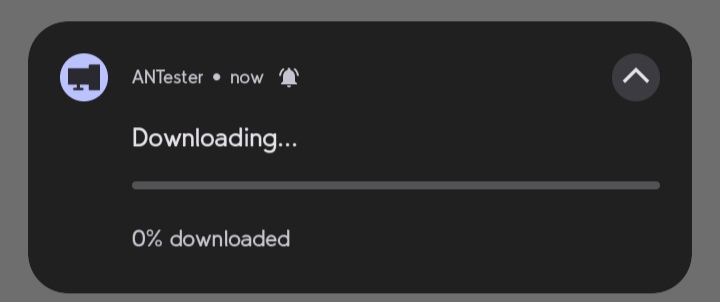
|
|
130
|
+
|
|
114
131
|
#### Notification with an Image (Big Picture Style)
|
|
115
132
|
|
|
116
133
|
```python
|
|
@@ -121,6 +138,8 @@ notification = Notification(
|
|
|
121
138
|
style="big_picture",
|
|
122
139
|
big_picture_path="assets/imgs/photo.png"
|
|
123
140
|
)
|
|
141
|
+
notification.send()
|
|
142
|
+
|
|
124
143
|
```
|
|
125
144
|
|
|
126
145
|
**Sample Image:**
|
|
@@ -135,6 +154,8 @@ notification = Notification(
|
|
|
135
154
|
message='Line 1\nLine 2\nLine 3',
|
|
136
155
|
style='inbox'
|
|
137
156
|
)
|
|
157
|
+
notification.send()
|
|
158
|
+
|
|
138
159
|
```
|
|
139
160
|
|
|
140
161
|
**Sample Image:**
|
|
@@ -150,22 +171,6 @@ notification = Notification(
|
|
|
150
171
|
)
|
|
151
172
|
```
|
|
152
173
|
|
|
153
|
-
#### Progress bar notification
|
|
154
|
-
|
|
155
|
-
```python
|
|
156
|
-
notification = Notification(
|
|
157
|
-
title="Download",
|
|
158
|
-
message="Downloading file...",
|
|
159
|
-
style="progress",
|
|
160
|
-
progress_max_value=100,
|
|
161
|
-
progress_current_value=0
|
|
162
|
-
)
|
|
163
|
-
|
|
164
|
-
```
|
|
165
|
-
|
|
166
|
-
**Sample Image:**
|
|
167
|
-

|
|
168
|
-
|
|
169
174
|
#### Notification with an Image (Large Icon Style)
|
|
170
175
|
|
|
171
176
|
```python
|
|
@@ -205,15 +210,12 @@ notification = Notification(
|
|
|
205
210
|
)
|
|
206
211
|
|
|
207
212
|
# Update progress
|
|
208
|
-
notification.updateProgressBar(30, "30%
|
|
213
|
+
notification.updateProgressBar(30, "30% downloaded")
|
|
209
214
|
|
|
210
215
|
# Remove progress bar
|
|
211
216
|
notification.removeProgressBar("Download Complete")
|
|
212
217
|
```
|
|
213
218
|
|
|
214
|
-
**Sample Image:**
|
|
215
|
-

|
|
216
|
-
|
|
217
219
|
### Channel Management
|
|
218
220
|
|
|
219
221
|
Notifications are organized into channels. You can customize the channel name and ID:
|
|
@@ -224,8 +226,8 @@ Notifications are organized into channels. You can customize the channel name an
|
|
|
224
226
|
notification = Notification(
|
|
225
227
|
title="Download finished",
|
|
226
228
|
message="How to Catch a Fish.mp4",
|
|
227
|
-
channel_name="Download Notifications", # Will create User-visible name "
|
|
228
|
-
channel_id="
|
|
229
|
+
channel_name="Download Notifications", # Will create User-visible name "Download Notifications"
|
|
230
|
+
channel_id="downloads_notifications" # Optional: specify custom channel ID
|
|
229
231
|
)
|
|
230
232
|
```
|
|
231
233
|
|
|
@@ -259,7 +261,7 @@ shutil.copy(image_path, os.path.join(app_path, "profile.png"))
|
|
|
259
261
|
|
|
260
262
|
```python
|
|
261
263
|
from android_notify import Notification, NotificationStyles
|
|
262
|
-
|
|
264
|
+
Notification(
|
|
263
265
|
title="New Photo",
|
|
264
266
|
message="Check out this image",
|
|
265
267
|
style=NotificationStyles.BIG_PICTURE,
|
|
@@ -283,7 +285,7 @@ notification.send()
|
|
|
283
285
|
|
|
284
286
|
## Image Requirements
|
|
285
287
|
|
|
286
|
-
- Images must be located within your app's
|
|
288
|
+
- Images must be located within your app's folder
|
|
287
289
|
- Supported paths are relative to your app's storage path
|
|
288
290
|
- Example: `assets/imgs/icon.png`
|
|
289
291
|
|
|
@@ -2,24 +2,22 @@
|
|
|
2
2
|
<br>
|
|
3
3
|
<h1> Android-Notifiy </h1>
|
|
4
4
|
<p> A Python library for effortlessly creating and managing Android notifications in Kivy android apps.</p>
|
|
5
|
-
<p>
|
|
6
|
-
|
|
7
|
-
</p>
|
|
8
|
-
<br>
|
|
5
|
+
<p>Supports various styles and ensures seamless integration and customization.</p>
|
|
6
|
+
<!-- <br> -->
|
|
9
7
|
<!-- <img src="https://raw.githubusercontent.com/Fector101/android_notify/main/docs/imgs/democollage.jpg"> -->
|
|
10
8
|
</div>
|
|
11
9
|
|
|
12
|
-
|
|
13
10
|
## Features
|
|
14
11
|
|
|
15
12
|
- Compatible with Android 8.0+.
|
|
16
13
|
- Supports including images in notifications.
|
|
17
14
|
- Support for multiple notification styles:
|
|
18
|
-
-
|
|
19
|
-
-
|
|
20
|
-
-
|
|
21
|
-
-
|
|
22
|
-
- Large Icon
|
|
15
|
+
- [Simple](#basic-usage)
|
|
16
|
+
- [Progress](#progress-bar-notification)
|
|
17
|
+
- [Big Picture](#notification-with-an-image-big-picture-style)
|
|
18
|
+
- [Inbox](#inbox-notification-style)
|
|
19
|
+
- [Large Icon](#notification-with-an-image-large-icon-style)
|
|
20
|
+
- [Big Text](#big-text-notification-will-display-as-simple-text-if-device-dosent-support)
|
|
23
21
|
|
|
24
22
|
This module automatically handles:
|
|
25
23
|
|
|
@@ -43,7 +41,7 @@ pip install android-notify
|
|
|
43
41
|
In your **`buildozer.spec`** file, ensure you include the following:
|
|
44
42
|
|
|
45
43
|
```ini
|
|
46
|
-
# Add pyjnius so it's packaged with the build
|
|
44
|
+
# Add pyjnius so ensure it's packaged with the build
|
|
47
45
|
requirements = python3, kivy, pyjnius, android-notify
|
|
48
46
|
|
|
49
47
|
# Add permission for notifications
|
|
@@ -64,7 +62,7 @@ from android_notify import Notification
|
|
|
64
62
|
# Create a simple notification
|
|
65
63
|
notification = Notification(
|
|
66
64
|
title="Hello",
|
|
67
|
-
message="This is a basic notification"
|
|
65
|
+
message="This is a basic notification."
|
|
68
66
|
)
|
|
69
67
|
notification.send()
|
|
70
68
|
```
|
|
@@ -87,6 +85,25 @@ The library supports multiple notification styles:
|
|
|
87
85
|
|
|
88
86
|
### Style Examples
|
|
89
87
|
|
|
88
|
+
#### Progress Bar notification
|
|
89
|
+
|
|
90
|
+
```python
|
|
91
|
+
import time
|
|
92
|
+
notification = Notification(
|
|
93
|
+
title="Downloading...",
|
|
94
|
+
message="0% downloaded",
|
|
95
|
+
style="progress",
|
|
96
|
+
progress_max_value=100,
|
|
97
|
+
progress_current_value=0
|
|
98
|
+
)
|
|
99
|
+
notification.send()
|
|
100
|
+
time.sleep(350)
|
|
101
|
+
notification.updateProgressBar(30, "30% downloaded")
|
|
102
|
+
```
|
|
103
|
+
|
|
104
|
+
**Sample Image:**
|
|
105
|
+

|
|
106
|
+
|
|
90
107
|
#### Notification with an Image (Big Picture Style)
|
|
91
108
|
|
|
92
109
|
```python
|
|
@@ -97,6 +114,8 @@ notification = Notification(
|
|
|
97
114
|
style="big_picture",
|
|
98
115
|
big_picture_path="assets/imgs/photo.png"
|
|
99
116
|
)
|
|
117
|
+
notification.send()
|
|
118
|
+
|
|
100
119
|
```
|
|
101
120
|
|
|
102
121
|
**Sample Image:**
|
|
@@ -111,6 +130,8 @@ notification = Notification(
|
|
|
111
130
|
message='Line 1\nLine 2\nLine 3',
|
|
112
131
|
style='inbox'
|
|
113
132
|
)
|
|
133
|
+
notification.send()
|
|
134
|
+
|
|
114
135
|
```
|
|
115
136
|
|
|
116
137
|
**Sample Image:**
|
|
@@ -126,22 +147,6 @@ notification = Notification(
|
|
|
126
147
|
)
|
|
127
148
|
```
|
|
128
149
|
|
|
129
|
-
#### Progress bar notification
|
|
130
|
-
|
|
131
|
-
```python
|
|
132
|
-
notification = Notification(
|
|
133
|
-
title="Download",
|
|
134
|
-
message="Downloading file...",
|
|
135
|
-
style="progress",
|
|
136
|
-
progress_max_value=100,
|
|
137
|
-
progress_current_value=0
|
|
138
|
-
)
|
|
139
|
-
|
|
140
|
-
```
|
|
141
|
-
|
|
142
|
-
**Sample Image:**
|
|
143
|
-

|
|
144
|
-
|
|
145
150
|
#### Notification with an Image (Large Icon Style)
|
|
146
151
|
|
|
147
152
|
```python
|
|
@@ -181,15 +186,12 @@ notification = Notification(
|
|
|
181
186
|
)
|
|
182
187
|
|
|
183
188
|
# Update progress
|
|
184
|
-
notification.updateProgressBar(30, "30%
|
|
189
|
+
notification.updateProgressBar(30, "30% downloaded")
|
|
185
190
|
|
|
186
191
|
# Remove progress bar
|
|
187
192
|
notification.removeProgressBar("Download Complete")
|
|
188
193
|
```
|
|
189
194
|
|
|
190
|
-
**Sample Image:**
|
|
191
|
-

|
|
192
|
-
|
|
193
195
|
### Channel Management
|
|
194
196
|
|
|
195
197
|
Notifications are organized into channels. You can customize the channel name and ID:
|
|
@@ -200,8 +202,8 @@ Notifications are organized into channels. You can customize the channel name an
|
|
|
200
202
|
notification = Notification(
|
|
201
203
|
title="Download finished",
|
|
202
204
|
message="How to Catch a Fish.mp4",
|
|
203
|
-
channel_name="Download Notifications", # Will create User-visible name "
|
|
204
|
-
channel_id="
|
|
205
|
+
channel_name="Download Notifications", # Will create User-visible name "Download Notifications"
|
|
206
|
+
channel_id="downloads_notifications" # Optional: specify custom channel ID
|
|
205
207
|
)
|
|
206
208
|
```
|
|
207
209
|
|
|
@@ -235,7 +237,7 @@ shutil.copy(image_path, os.path.join(app_path, "profile.png"))
|
|
|
235
237
|
|
|
236
238
|
```python
|
|
237
239
|
from android_notify import Notification, NotificationStyles
|
|
238
|
-
|
|
240
|
+
Notification(
|
|
239
241
|
title="New Photo",
|
|
240
242
|
message="Check out this image",
|
|
241
243
|
style=NotificationStyles.BIG_PICTURE,
|
|
@@ -259,7 +261,7 @@ notification.send()
|
|
|
259
261
|
|
|
260
262
|
## Image Requirements
|
|
261
263
|
|
|
262
|
-
- Images must be located within your app's
|
|
264
|
+
- Images must be located within your app's folder
|
|
263
265
|
- Supported paths are relative to your app's storage path
|
|
264
266
|
- Example: `assets/imgs/icon.png`
|
|
265
267
|
|
|
@@ -1,6 +1,6 @@
|
|
|
1
1
|
Metadata-Version: 2.1
|
|
2
2
|
Name: android-notify
|
|
3
|
-
Version: 1.
|
|
3
|
+
Version: 1.32
|
|
4
4
|
Summary: A Python package that simpilfies creating Android Post notifications using PyJNIus in Kivy apps.
|
|
5
5
|
Home-page: https://github.com/fector101/android-notify
|
|
6
6
|
Author: Fabian
|
|
@@ -26,24 +26,22 @@ Requires-Dist: pyjnius>=1.4.2
|
|
|
26
26
|
<br>
|
|
27
27
|
<h1> Android-Notifiy </h1>
|
|
28
28
|
<p> A Python library for effortlessly creating and managing Android notifications in Kivy android apps.</p>
|
|
29
|
-
<p>
|
|
30
|
-
|
|
31
|
-
</p>
|
|
32
|
-
<br>
|
|
29
|
+
<p>Supports various styles and ensures seamless integration and customization.</p>
|
|
30
|
+
<!-- <br> -->
|
|
33
31
|
<!-- <img src="https://raw.githubusercontent.com/Fector101/android_notify/main/docs/imgs/democollage.jpg"> -->
|
|
34
32
|
</div>
|
|
35
33
|
|
|
36
|
-
|
|
37
34
|
## Features
|
|
38
35
|
|
|
39
36
|
- Compatible with Android 8.0+.
|
|
40
37
|
- Supports including images in notifications.
|
|
41
38
|
- Support for multiple notification styles:
|
|
42
|
-
-
|
|
43
|
-
-
|
|
44
|
-
-
|
|
45
|
-
-
|
|
46
|
-
- Large Icon
|
|
39
|
+
- [Simple](#basic-usage)
|
|
40
|
+
- [Progress](#progress-bar-notification)
|
|
41
|
+
- [Big Picture](#notification-with-an-image-big-picture-style)
|
|
42
|
+
- [Inbox](#inbox-notification-style)
|
|
43
|
+
- [Large Icon](#notification-with-an-image-large-icon-style)
|
|
44
|
+
- [Big Text](#big-text-notification-will-display-as-simple-text-if-device-dosent-support)
|
|
47
45
|
|
|
48
46
|
This module automatically handles:
|
|
49
47
|
|
|
@@ -67,7 +65,7 @@ pip install android-notify
|
|
|
67
65
|
In your **`buildozer.spec`** file, ensure you include the following:
|
|
68
66
|
|
|
69
67
|
```ini
|
|
70
|
-
# Add pyjnius so it's packaged with the build
|
|
68
|
+
# Add pyjnius so ensure it's packaged with the build
|
|
71
69
|
requirements = python3, kivy, pyjnius, android-notify
|
|
72
70
|
|
|
73
71
|
# Add permission for notifications
|
|
@@ -88,7 +86,7 @@ from android_notify import Notification
|
|
|
88
86
|
# Create a simple notification
|
|
89
87
|
notification = Notification(
|
|
90
88
|
title="Hello",
|
|
91
|
-
message="This is a basic notification"
|
|
89
|
+
message="This is a basic notification."
|
|
92
90
|
)
|
|
93
91
|
notification.send()
|
|
94
92
|
```
|
|
@@ -111,6 +109,25 @@ The library supports multiple notification styles:
|
|
|
111
109
|
|
|
112
110
|
### Style Examples
|
|
113
111
|
|
|
112
|
+
#### Progress Bar notification
|
|
113
|
+
|
|
114
|
+
```python
|
|
115
|
+
import time
|
|
116
|
+
notification = Notification(
|
|
117
|
+
title="Downloading...",
|
|
118
|
+
message="0% downloaded",
|
|
119
|
+
style="progress",
|
|
120
|
+
progress_max_value=100,
|
|
121
|
+
progress_current_value=0
|
|
122
|
+
)
|
|
123
|
+
notification.send()
|
|
124
|
+
time.sleep(350)
|
|
125
|
+
notification.updateProgressBar(30, "30% downloaded")
|
|
126
|
+
```
|
|
127
|
+
|
|
128
|
+
**Sample Image:**
|
|
129
|
+

|
|
130
|
+
|
|
114
131
|
#### Notification with an Image (Big Picture Style)
|
|
115
132
|
|
|
116
133
|
```python
|
|
@@ -121,6 +138,8 @@ notification = Notification(
|
|
|
121
138
|
style="big_picture",
|
|
122
139
|
big_picture_path="assets/imgs/photo.png"
|
|
123
140
|
)
|
|
141
|
+
notification.send()
|
|
142
|
+
|
|
124
143
|
```
|
|
125
144
|
|
|
126
145
|
**Sample Image:**
|
|
@@ -135,6 +154,8 @@ notification = Notification(
|
|
|
135
154
|
message='Line 1\nLine 2\nLine 3',
|
|
136
155
|
style='inbox'
|
|
137
156
|
)
|
|
157
|
+
notification.send()
|
|
158
|
+
|
|
138
159
|
```
|
|
139
160
|
|
|
140
161
|
**Sample Image:**
|
|
@@ -150,22 +171,6 @@ notification = Notification(
|
|
|
150
171
|
)
|
|
151
172
|
```
|
|
152
173
|
|
|
153
|
-
#### Progress bar notification
|
|
154
|
-
|
|
155
|
-
```python
|
|
156
|
-
notification = Notification(
|
|
157
|
-
title="Download",
|
|
158
|
-
message="Downloading file...",
|
|
159
|
-
style="progress",
|
|
160
|
-
progress_max_value=100,
|
|
161
|
-
progress_current_value=0
|
|
162
|
-
)
|
|
163
|
-
|
|
164
|
-
```
|
|
165
|
-
|
|
166
|
-
**Sample Image:**
|
|
167
|
-

|
|
168
|
-
|
|
169
174
|
#### Notification with an Image (Large Icon Style)
|
|
170
175
|
|
|
171
176
|
```python
|
|
@@ -205,15 +210,12 @@ notification = Notification(
|
|
|
205
210
|
)
|
|
206
211
|
|
|
207
212
|
# Update progress
|
|
208
|
-
notification.updateProgressBar(30, "30%
|
|
213
|
+
notification.updateProgressBar(30, "30% downloaded")
|
|
209
214
|
|
|
210
215
|
# Remove progress bar
|
|
211
216
|
notification.removeProgressBar("Download Complete")
|
|
212
217
|
```
|
|
213
218
|
|
|
214
|
-
**Sample Image:**
|
|
215
|
-

|
|
216
|
-
|
|
217
219
|
### Channel Management
|
|
218
220
|
|
|
219
221
|
Notifications are organized into channels. You can customize the channel name and ID:
|
|
@@ -224,8 +226,8 @@ Notifications are organized into channels. You can customize the channel name an
|
|
|
224
226
|
notification = Notification(
|
|
225
227
|
title="Download finished",
|
|
226
228
|
message="How to Catch a Fish.mp4",
|
|
227
|
-
channel_name="Download Notifications", # Will create User-visible name "
|
|
228
|
-
channel_id="
|
|
229
|
+
channel_name="Download Notifications", # Will create User-visible name "Download Notifications"
|
|
230
|
+
channel_id="downloads_notifications" # Optional: specify custom channel ID
|
|
229
231
|
)
|
|
230
232
|
```
|
|
231
233
|
|
|
@@ -259,7 +261,7 @@ shutil.copy(image_path, os.path.join(app_path, "profile.png"))
|
|
|
259
261
|
|
|
260
262
|
```python
|
|
261
263
|
from android_notify import Notification, NotificationStyles
|
|
262
|
-
|
|
264
|
+
Notification(
|
|
263
265
|
title="New Photo",
|
|
264
266
|
message="Check out this image",
|
|
265
267
|
style=NotificationStyles.BIG_PICTURE,
|
|
@@ -283,7 +285,7 @@ notification.send()
|
|
|
283
285
|
|
|
284
286
|
## Image Requirements
|
|
285
287
|
|
|
286
|
-
- Images must be located within your app's
|
|
288
|
+
- Images must be located within your app's folder
|
|
287
289
|
- Supported paths are relative to your app's storage path
|
|
288
290
|
- Example: `assets/imgs/icon.png`
|
|
289
291
|
|
|
@@ -6,7 +6,7 @@ with open("README.md", "r", encoding="utf-8") as readme_data:
|
|
|
6
6
|
|
|
7
7
|
setup(
|
|
8
8
|
name="android-notify",
|
|
9
|
-
version="1.
|
|
9
|
+
version="1.32",
|
|
10
10
|
author="Fabian",
|
|
11
11
|
author_email='fector101@yahoo.com',
|
|
12
12
|
description="A Python package that simpilfies creating Android Post notifications using PyJNIus in Kivy apps.",
|
|
File without changes
|
|
File without changes
|
|
File without changes
|
|
File without changes
|
|
File without changes
|
|
File without changes
|
|
File without changes
|
|
File without changes
|
|
File without changes
|
|
File without changes
|