android-notify 1.24__tar.gz → 1.60.7.dev0__tar.gz
This diff represents the content of publicly available package versions that have been released to one of the supported registries. The information contained in this diff is provided for informational purposes only and reflects changes between package versions as they appear in their respective public registries.
- android_notify-1.60.7.dev0/PKG-INFO +294 -0
- android_notify-1.60.7.dev0/README.md +271 -0
- android_notify-1.60.7.dev0/android_notify/__init__.py +7 -0
- android_notify-1.60.7.dev0/android_notify/__main__.py +24 -0
- android_notify-1.60.7.dev0/android_notify/base.py +97 -0
- android_notify-1.60.7.dev0/android_notify/config.py +121 -0
- android_notify-1.60.7.dev0/android_notify/core.py +185 -0
- android_notify-1.60.7.dev0/android_notify/fallback-icons/flet-appicon.png +0 -0
- android_notify-1.60.7.dev0/android_notify/fallback-icons/pydroid3-appicon.png +0 -0
- android_notify-1.60.7.dev0/android_notify/internal/an_types.py +16 -0
- android_notify-1.60.7.dev0/android_notify/internal/android.py +182 -0
- android_notify-1.60.7.dev0/android_notify/internal/channels.py +127 -0
- android_notify-1.60.7.dev0/android_notify/internal/facade.py +373 -0
- android_notify-1.60.7.dev0/android_notify/internal/helper.py +55 -0
- android_notify-1.60.7.dev0/android_notify/internal/intents.py +174 -0
- android_notify-1.60.7.dev0/android_notify/internal/java_classes.py +66 -0
- android_notify-1.60.7.dev0/android_notify/internal/logger.py +61 -0
- android_notify-1.60.7.dev0/android_notify/internal/permissions.py +116 -0
- android_notify-1.60.7.dev0/android_notify/styles.py +30 -0
- android_notify-1.60.7.dev0/android_notify/sword.py +916 -0
- android_notify-1.60.7.dev0/android_notify/tests/android_notify_test.py +399 -0
- android_notify-1.60.7.dev0/android_notify/tests/base_test.py +23 -0
- android_notify-1.60.7.dev0/android_notify/tests/main.py +219 -0
- android_notify-1.60.7.dev0/android_notify/tests/p4a/hook.py +45 -0
- android_notify-1.60.7.dev0/android_notify/tests/serivces/wallpaper.py +99 -0
- android_notify-1.60.7.dev0/android_notify/tests/test_basic_notifications.py +43 -0
- android_notify-1.60.7.dev0/android_notify/tests/test_notification_actions.py +68 -0
- android_notify-1.60.7.dev0/android_notify/tests/test_notification_appearance.py +55 -0
- android_notify-1.60.7.dev0/android_notify/tests/test_notification_behavior.py +29 -0
- android_notify-1.60.7.dev0/android_notify/tests/test_notification_channels.py +41 -0
- android_notify-1.60.7.dev0/android_notify/tests/test_notification_clear.py +55 -0
- android_notify-1.60.7.dev0/android_notify/tests/test_notification_progress.py +31 -0
- android_notify-1.60.7.dev0/android_notify/tests/test_notification_sound.py +24 -0
- android_notify-1.60.7.dev0/android_notify/tests/test_notification_styles.py +48 -0
- android_notify-1.60.7.dev0/android_notify/widgets/images.py +151 -0
- android_notify-1.60.7.dev0/android_notify/widgets/texts.py +169 -0
- android_notify-1.60.7.dev0/android_notify.egg-info/PKG-INFO +294 -0
- android_notify-1.60.7.dev0/android_notify.egg-info/SOURCES.txt +51 -0
- android_notify-1.60.7.dev0/android_notify.egg-info/entry_points.txt +2 -0
- {android_notify-1.24 → android_notify-1.60.7.dev0}/android_notify.egg-info/requires.txt +3 -1
- {android_notify-1.24 → android_notify-1.60.7.dev0}/android_notify.egg-info/top_level.txt +2 -0
- android_notify-1.60.7.dev0/docs/examples/flet-working/src/core.py +221 -0
- android_notify-1.60.7.dev0/docs/examples/flet-working/src/main.py +68 -0
- android_notify-1.60.7.dev0/docs/tests/flet/adv/main.py +97 -0
- android_notify-1.60.7.dev0/docs/tests/flet/adv/tests/__init__.py +0 -0
- android_notify-1.60.7.dev0/docs/tests/flet/adv/tests/test_android_notify_full.py +199 -0
- android_notify-1.60.7.dev0/docs/tests/flet/basic/src/core.py +221 -0
- android_notify-1.60.7.dev0/docs/tests/flet/basic/src/main.py +112 -0
- android_notify-1.60.7.dev0/docs/website/src/pages/data/laner_Sent.py +24 -0
- android_notify-1.60.7.dev0/pyproject.toml +60 -0
- android_notify-1.24/PKG-INFO +0 -281
- android_notify-1.24/README.md +0 -257
- android_notify-1.24/android_notify/__init__.py +0 -8
- android_notify-1.24/android_notify/_dev.py +0 -112
- android_notify-1.24/android_notify/advanced_dev.py +0 -345
- android_notify-1.24/android_notify/core.py +0 -133
- android_notify-1.24/android_notify/styles.py +0 -5
- android_notify-1.24/android_notify.egg-info/PKG-INFO +0 -281
- android_notify-1.24/android_notify.egg-info/SOURCES.txt +0 -13
- android_notify-1.24/setup.py +0 -46
- /android_notify-1.24/android_notify/__main__.py → /android_notify-1.60.7.dev0/android_notify/tests/__init__.py +0 -0
- {android_notify-1.24 → android_notify-1.60.7.dev0}/android_notify.egg-info/dependency_links.txt +0 -0
- {android_notify-1.24 → android_notify-1.60.7.dev0}/setup.cfg +0 -0
|
@@ -0,0 +1,294 @@
|
|
|
1
|
+
Metadata-Version: 2.4
|
|
2
|
+
Name: android-notify
|
|
3
|
+
Version: 1.60.7.dev0
|
|
4
|
+
Summary: A Python package that simplifies creating Android notifications in Kivy and Flet apps.
|
|
5
|
+
Author-email: Fabian <fector101@yahoo.com>
|
|
6
|
+
License-Expression: MIT
|
|
7
|
+
Project-URL: Homepage, https://android-notify.vercel.app
|
|
8
|
+
Project-URL: Documentation, https://android-notify.vercel.app/
|
|
9
|
+
Project-URL: Source, https://github.com/fector101/android_notify
|
|
10
|
+
Project-URL: Tracker, https://github.com/fector101/android_notify/issues
|
|
11
|
+
Project-URL: Funding, https://www.buymeacoffee.com/fector101
|
|
12
|
+
Keywords: android,notifications,kivy,mobile,post-notifications,pyjnius,android-notifications,kivy-notifications,python-android,mobile-development,push-notifications,mobile-app,kivy-application
|
|
13
|
+
Classifier: Programming Language :: Python :: 3
|
|
14
|
+
Classifier: Operating System :: Android
|
|
15
|
+
Classifier: Development Status :: 5 - Production/Stable
|
|
16
|
+
Classifier: Intended Audience :: Developers
|
|
17
|
+
Classifier: Topic :: Software Development :: Libraries :: Python Modules
|
|
18
|
+
Requires-Python: >=3.6
|
|
19
|
+
Description-Content-Type: text/markdown
|
|
20
|
+
Requires-Dist: pyjnius>=1.4.2
|
|
21
|
+
Provides-Extra: dev
|
|
22
|
+
Requires-Dist: kivy>=2.0.0; extra == "dev"
|
|
23
|
+
|
|
24
|
+
<div align="center">
|
|
25
|
+
<br>
|
|
26
|
+
<h1> Android-Notify </h1>
|
|
27
|
+
<p><a href='https://android-notify.vercel.app'>Android Notify</a> is a Python library for effortlessly creating and managing Android notifications in Kivy and Flet apps.</p>
|
|
28
|
+
<p>Supports various styles and ensures seamless integration, customization and Pythonic APIs.</p>
|
|
29
|
+
<!-- <br> -->
|
|
30
|
+
<!-- <img src="https://raw.githubusercontent.com/Fector101/android_notify/main/docs/imgs/democollage.jpg"> -->
|
|
31
|
+
</div>
|
|
32
|
+
<!-- Channel [CRUD]
|
|
33
|
+
The Android Notify package provides a simple yet comprehensive way to create and manage rich notifications on Android devices directly from your Python code. This library bridges the gap between Python and Android's notification system, giving you full control over notifications with a clean, Pythonic API. -->
|
|
34
|
+
|
|
35
|
+
## Features
|
|
36
|
+
|
|
37
|
+
- **Multiple Notification Styles**: Support for various notification styles including:
|
|
38
|
+
- Simple text notifications
|
|
39
|
+
- [Progress bar notifications](https://android-notify.vercel.app/components#progress-bars) (determinate and indeterminate)
|
|
40
|
+
- Large icon notifications
|
|
41
|
+
- Big picture notifications
|
|
42
|
+
- Combined image styles
|
|
43
|
+
- Custom notification Icon - [images section](https://android-notify.vercel.app/components#images)
|
|
44
|
+
- Big text notifications
|
|
45
|
+
- Inbox-style notifications
|
|
46
|
+
- Colored texts and Icons
|
|
47
|
+
|
|
48
|
+
- **Rich Functionality**:
|
|
49
|
+
- Add action buttons with custom callbacks
|
|
50
|
+
- [Update notification](https://android-notify.vercel.app/advanced-methods#updating-notification) content dynamically
|
|
51
|
+
- Manage progress bars with fine-grained control
|
|
52
|
+
- [Custom notification channels](https://android-notify.vercel.app/advanced-methods#channel-management) for Android 8.0+ (Creating and Deleting)
|
|
53
|
+
- Silent notifications
|
|
54
|
+
- Persistent notifications
|
|
55
|
+
- Click handlers and callbacks
|
|
56
|
+
- Cancel Notifications
|
|
57
|
+
|
|
58
|
+
## Quick Start
|
|
59
|
+
|
|
60
|
+
```python
|
|
61
|
+
from android_notify import Notification
|
|
62
|
+
|
|
63
|
+
# Simple notification
|
|
64
|
+
Notification(
|
|
65
|
+
title="Hello",
|
|
66
|
+
message="This is a basic notification."
|
|
67
|
+
).send()
|
|
68
|
+
|
|
69
|
+
```
|
|
70
|
+
|
|
71
|
+
**Sample Image:**
|
|
72
|
+
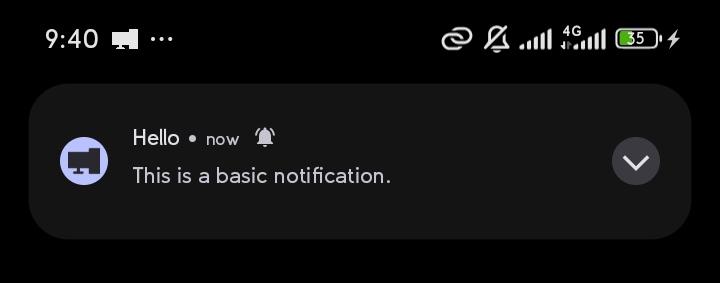
|
|
73
|
+
|
|
74
|
+
## Installation
|
|
75
|
+
|
|
76
|
+
<details>
|
|
77
|
+
<summary><b>Kivy apps:</b></summary>
|
|
78
|
+
<br/>
|
|
79
|
+
|
|
80
|
+
In your **`buildozer.spec`** file, ensure you include the following:
|
|
81
|
+
|
|
82
|
+
```ini
|
|
83
|
+
# Add pyjnius so ensure it's packaged with the build
|
|
84
|
+
requirements = python3, kivy, pyjnius, android-notify==1.60.7.dev0
|
|
85
|
+
# Add permission for notifications
|
|
86
|
+
android.permissions = POST_NOTIFICATIONS
|
|
87
|
+
```
|
|
88
|
+
|
|
89
|
+
</details>
|
|
90
|
+
|
|
91
|
+
|
|
92
|
+
<details>
|
|
93
|
+
<summary><b>Flet apps:</b></summary>
|
|
94
|
+
<br/>
|
|
95
|
+
|
|
96
|
+
In your `pyproject.toml` file, ensure you include the following:
|
|
97
|
+
|
|
98
|
+
|
|
99
|
+
```toml
|
|
100
|
+
[tool.flet.android]
|
|
101
|
+
dependencies = [
|
|
102
|
+
"pyjnius","android-notify==1.60.7.dev0"
|
|
103
|
+
]
|
|
104
|
+
|
|
105
|
+
[tool.flet.android.permission]
|
|
106
|
+
"android.permission.POST_NOTIFICATIONS" = true
|
|
107
|
+
```
|
|
108
|
+
- example of [complete flet pyproject.toml](https://github.com/Fector101/flet-app/blob/main/pyproject.toml)
|
|
109
|
+
|
|
110
|
+
</details>
|
|
111
|
+
|
|
112
|
+
|
|
113
|
+
|
|
114
|
+
<details>
|
|
115
|
+
|
|
116
|
+
<summary><b>On Pydroid 3</b></summary>
|
|
117
|
+
<br/>
|
|
118
|
+
|
|
119
|
+
On the [pydroid 3](https://play.google.com/store/apps/details?id=ru.iiec.pydroid3) mobile app for running python code you can test some features.
|
|
120
|
+
- In pip section where you're asked to insert `Libary name` paste `android-notify==1.60.7.dev0`
|
|
121
|
+
- Minimal working example
|
|
122
|
+
```py
|
|
123
|
+
# Testing with `android-notify==1.60.7.dev0` on pydroid
|
|
124
|
+
from kivy.app import App
|
|
125
|
+
from kivy.uix.boxlayout import BoxLayout
|
|
126
|
+
from kivy.uix.button import Button
|
|
127
|
+
from android_notify import Notification
|
|
128
|
+
from android_notify.core import asks_permission_if_needed
|
|
129
|
+
|
|
130
|
+
|
|
131
|
+
class AndroidNotifyDemoApp(App):
|
|
132
|
+
def build(self):
|
|
133
|
+
layout = BoxLayout(orientation='vertical', spacing=10, padding=20)
|
|
134
|
+
layout.add_widget(Button(
|
|
135
|
+
text="Ask Notification Permission",
|
|
136
|
+
on_release=self.request_permission
|
|
137
|
+
))
|
|
138
|
+
layout.add_widget(Button(
|
|
139
|
+
text="Send Notification",
|
|
140
|
+
on_release=self.send_notification
|
|
141
|
+
))
|
|
142
|
+
return layout
|
|
143
|
+
|
|
144
|
+
def request_permission(self, *args):
|
|
145
|
+
asks_permission_if_needed(legacy=True)
|
|
146
|
+
|
|
147
|
+
def send_notification(self, *args):
|
|
148
|
+
Notification(
|
|
149
|
+
title="Hello from Android Notify",
|
|
150
|
+
message="This is a basic notification.",
|
|
151
|
+
channel_id="android_notify_demo",
|
|
152
|
+
channel_name="Android Notify Demo"
|
|
153
|
+
).send()
|
|
154
|
+
|
|
155
|
+
|
|
156
|
+
if __name__ == "__main__":
|
|
157
|
+
AndroidNotifyDemoApp().run()
|
|
158
|
+
```
|
|
159
|
+
|
|
160
|
+
</details>
|
|
161
|
+
|
|
162
|
+
|
|
163
|
+
<details>
|
|
164
|
+
|
|
165
|
+
<summary><b>Desktop</b></summary>
|
|
166
|
+
<br/>
|
|
167
|
+
|
|
168
|
+
For IDE IntelliSense Can be installed via `pip install`:
|
|
169
|
+
|
|
170
|
+
```bash
|
|
171
|
+
pip install android_notify
|
|
172
|
+
android-notify -v
|
|
173
|
+
```
|
|
174
|
+
</details>
|
|
175
|
+
|
|
176
|
+
## Documentation
|
|
177
|
+
For Dev Version use
|
|
178
|
+
```ini
|
|
179
|
+
requirements = python3, kivy, pyjnius, https://github.com/Fector101/android_notify/archive/without-androidx.zip
|
|
180
|
+
```
|
|
181
|
+
|
|
182
|
+
<details>
|
|
183
|
+
<summary> <b> To talk to BroadCast Listener From Buttons </b> </summary>
|
|
184
|
+
|
|
185
|
+
- Make things happen without being in your app
|
|
186
|
+
```python
|
|
187
|
+
from android_notify import Notification
|
|
188
|
+
notification = Notification(title="Receiver Notification")
|
|
189
|
+
notification.addButton(text="Stop", receiver_name="CarouselReceiver", action="ACTION_STOP")
|
|
190
|
+
notification.addButton(text="Skip", receiver_name="CarouselReceiver", action="ACTION_SKIP")
|
|
191
|
+
```
|
|
192
|
+
You can use this [wiki](https://github.com/Fector101/android_notify/wiki/How-to-Use-with-Broadcast-Listener) as a guide create a broadcast listener
|
|
193
|
+
</details>
|
|
194
|
+
|
|
195
|
+
<details>
|
|
196
|
+
<summary> <b> To use colored text in your notifications </b> </summary>
|
|
197
|
+
|
|
198
|
+
- Copy the [res](https://github.com/Fector101/android_notify/tree/main/android_notify/res) folder to your app path.
|
|
199
|
+
- Lastly in your `buildozer.spec` file
|
|
200
|
+
Add `source.include_exts = xml` and `android.add_resources = # path you pasted`
|
|
201
|
+
```python
|
|
202
|
+
# Use Hex Code to be Safe
|
|
203
|
+
n = Notification(title="Title and Message Color", message="Testing",title_color="red")
|
|
204
|
+
n.send()
|
|
205
|
+
```
|
|
206
|
+
|
|
207
|
+
</details>
|
|
208
|
+
|
|
209
|
+
<details>
|
|
210
|
+
<summary> <b>To use Custom Sounds </b> </summary>
|
|
211
|
+
|
|
212
|
+
- Put audio files in `res/raw` folder,
|
|
213
|
+
- Then from `buildozer.spec` point to res folder `android.add_resources = res`
|
|
214
|
+
- and includes it's format `source.include_exts = wav`.
|
|
215
|
+
|
|
216
|
+
Lastly From the code
|
|
217
|
+
```py
|
|
218
|
+
# Create a custom notification channel with a unique sound resource for android 8+
|
|
219
|
+
Notification.createChannel(
|
|
220
|
+
id="weird_sound_tester",
|
|
221
|
+
name="Weird Sound Tester",
|
|
222
|
+
description="A test channel for custom sounds from the res/raw folder.",
|
|
223
|
+
res_sound_name="sneeze" # file name without .wav or .mp3
|
|
224
|
+
)
|
|
225
|
+
|
|
226
|
+
# Send a notification through the created channel
|
|
227
|
+
n=Notification(
|
|
228
|
+
title="Custom Sound Notification",
|
|
229
|
+
message="This tests playback of a custom sound (sneeze.wav) stored in res/raw.",
|
|
230
|
+
channel_id="weird_sound_tester" # important tells notification to use right channel
|
|
231
|
+
)
|
|
232
|
+
n.setSound("sneeze")# for android 7 below
|
|
233
|
+
n.send()
|
|
234
|
+
```
|
|
235
|
+
</details>
|
|
236
|
+
|
|
237
|
+
|
|
238
|
+
<details>
|
|
239
|
+
<summary> <b> Vibrate feature</b> </summary>
|
|
240
|
+
|
|
241
|
+
```ini
|
|
242
|
+
# buildozer.spec
|
|
243
|
+
android.permissions = VIBRATE
|
|
244
|
+
```
|
|
245
|
+
|
|
246
|
+
```python
|
|
247
|
+
Notification.createChannel(id='shake', name="Shake Passage", vibrate=True)
|
|
248
|
+
|
|
249
|
+
n=Notification(title='Vibrate',channel_id='shake')
|
|
250
|
+
n.setVibrate() # for less than android 8
|
|
251
|
+
n.fVibrate() # To Force Vibrate (when user turned off in settings)
|
|
252
|
+
n.send()
|
|
253
|
+
```
|
|
254
|
+
|
|
255
|
+
</details>
|
|
256
|
+
|
|
257
|
+
|
|
258
|
+
<details>
|
|
259
|
+
<summary> <b> Add Data to Notification</b> </summary>
|
|
260
|
+
|
|
261
|
+
|
|
262
|
+
- `NotificationHandler.data_object` returns a `dict` of data in the clicked `notification`
|
|
263
|
+
- `setData` can also be called after `send` to change `data_object` stored
|
|
264
|
+
- Use `name` if value is constant `Notification(name="change page")`
|
|
265
|
+
```python
|
|
266
|
+
from android_notify import Notification, NotificationHandler
|
|
267
|
+
|
|
268
|
+
def build(self):
|
|
269
|
+
notification = Notification(title="Hello")
|
|
270
|
+
notification.setData({"next wallpaper path": "test.jpg"})
|
|
271
|
+
notification.send()
|
|
272
|
+
|
|
273
|
+
def on_start(self):
|
|
274
|
+
notification_data = NotificationHandler.data_object # {"next wallpaper path": "test.jpg",...}
|
|
275
|
+
print(notifcation_data)
|
|
276
|
+
|
|
277
|
+
def on_resume(self):
|
|
278
|
+
notification_data = NotificationHandler.data_object # {"next wallpaper path": "test.jpg",...}
|
|
279
|
+
print(notifcation_data)
|
|
280
|
+
```
|
|
281
|
+
|
|
282
|
+
</details>
|
|
283
|
+
|
|
284
|
+
|
|
285
|
+
### For full documentation, examples, and advanced usage, API reference visit the [documentation](https://android-notify.vercel.app)
|
|
286
|
+
|
|
287
|
+
## ☕ Support the Project
|
|
288
|
+
|
|
289
|
+
If you find this project helpful, consider buying me a coffee! 😊
|
|
290
|
+
Or Giving it a star on 🌟 [GitHub](https://github.com/Fector101/android_notify/) Your support helps maintain and improve the project.
|
|
291
|
+
|
|
292
|
+
<a href="https://www.buymeacoffee.com/fector101" target="_blank">
|
|
293
|
+
<img src="https://cdn.buymeacoffee.com/buttons/v2/default-yellow.png" alt="Buy Me A Coffee" height="60">
|
|
294
|
+
</a>
|
|
@@ -0,0 +1,271 @@
|
|
|
1
|
+
<div align="center">
|
|
2
|
+
<br>
|
|
3
|
+
<h1> Android-Notify </h1>
|
|
4
|
+
<p><a href='https://android-notify.vercel.app'>Android Notify</a> is a Python library for effortlessly creating and managing Android notifications in Kivy and Flet apps.</p>
|
|
5
|
+
<p>Supports various styles and ensures seamless integration, customization and Pythonic APIs.</p>
|
|
6
|
+
<!-- <br> -->
|
|
7
|
+
<!-- <img src="https://raw.githubusercontent.com/Fector101/android_notify/main/docs/imgs/democollage.jpg"> -->
|
|
8
|
+
</div>
|
|
9
|
+
<!-- Channel [CRUD]
|
|
10
|
+
The Android Notify package provides a simple yet comprehensive way to create and manage rich notifications on Android devices directly from your Python code. This library bridges the gap between Python and Android's notification system, giving you full control over notifications with a clean, Pythonic API. -->
|
|
11
|
+
|
|
12
|
+
## Features
|
|
13
|
+
|
|
14
|
+
- **Multiple Notification Styles**: Support for various notification styles including:
|
|
15
|
+
- Simple text notifications
|
|
16
|
+
- [Progress bar notifications](https://android-notify.vercel.app/components#progress-bars) (determinate and indeterminate)
|
|
17
|
+
- Large icon notifications
|
|
18
|
+
- Big picture notifications
|
|
19
|
+
- Combined image styles
|
|
20
|
+
- Custom notification Icon - [images section](https://android-notify.vercel.app/components#images)
|
|
21
|
+
- Big text notifications
|
|
22
|
+
- Inbox-style notifications
|
|
23
|
+
- Colored texts and Icons
|
|
24
|
+
|
|
25
|
+
- **Rich Functionality**:
|
|
26
|
+
- Add action buttons with custom callbacks
|
|
27
|
+
- [Update notification](https://android-notify.vercel.app/advanced-methods#updating-notification) content dynamically
|
|
28
|
+
- Manage progress bars with fine-grained control
|
|
29
|
+
- [Custom notification channels](https://android-notify.vercel.app/advanced-methods#channel-management) for Android 8.0+ (Creating and Deleting)
|
|
30
|
+
- Silent notifications
|
|
31
|
+
- Persistent notifications
|
|
32
|
+
- Click handlers and callbacks
|
|
33
|
+
- Cancel Notifications
|
|
34
|
+
|
|
35
|
+
## Quick Start
|
|
36
|
+
|
|
37
|
+
```python
|
|
38
|
+
from android_notify import Notification
|
|
39
|
+
|
|
40
|
+
# Simple notification
|
|
41
|
+
Notification(
|
|
42
|
+
title="Hello",
|
|
43
|
+
message="This is a basic notification."
|
|
44
|
+
).send()
|
|
45
|
+
|
|
46
|
+
```
|
|
47
|
+
|
|
48
|
+
**Sample Image:**
|
|
49
|
+

|
|
50
|
+
|
|
51
|
+
## Installation
|
|
52
|
+
|
|
53
|
+
<details>
|
|
54
|
+
<summary><b>Kivy apps:</b></summary>
|
|
55
|
+
<br/>
|
|
56
|
+
|
|
57
|
+
In your **`buildozer.spec`** file, ensure you include the following:
|
|
58
|
+
|
|
59
|
+
```ini
|
|
60
|
+
# Add pyjnius so ensure it's packaged with the build
|
|
61
|
+
requirements = python3, kivy, pyjnius, android-notify==1.60.7.dev0
|
|
62
|
+
# Add permission for notifications
|
|
63
|
+
android.permissions = POST_NOTIFICATIONS
|
|
64
|
+
```
|
|
65
|
+
|
|
66
|
+
</details>
|
|
67
|
+
|
|
68
|
+
|
|
69
|
+
<details>
|
|
70
|
+
<summary><b>Flet apps:</b></summary>
|
|
71
|
+
<br/>
|
|
72
|
+
|
|
73
|
+
In your `pyproject.toml` file, ensure you include the following:
|
|
74
|
+
|
|
75
|
+
|
|
76
|
+
```toml
|
|
77
|
+
[tool.flet.android]
|
|
78
|
+
dependencies = [
|
|
79
|
+
"pyjnius","android-notify==1.60.7.dev0"
|
|
80
|
+
]
|
|
81
|
+
|
|
82
|
+
[tool.flet.android.permission]
|
|
83
|
+
"android.permission.POST_NOTIFICATIONS" = true
|
|
84
|
+
```
|
|
85
|
+
- example of [complete flet pyproject.toml](https://github.com/Fector101/flet-app/blob/main/pyproject.toml)
|
|
86
|
+
|
|
87
|
+
</details>
|
|
88
|
+
|
|
89
|
+
|
|
90
|
+
|
|
91
|
+
<details>
|
|
92
|
+
|
|
93
|
+
<summary><b>On Pydroid 3</b></summary>
|
|
94
|
+
<br/>
|
|
95
|
+
|
|
96
|
+
On the [pydroid 3](https://play.google.com/store/apps/details?id=ru.iiec.pydroid3) mobile app for running python code you can test some features.
|
|
97
|
+
- In pip section where you're asked to insert `Libary name` paste `android-notify==1.60.7.dev0`
|
|
98
|
+
- Minimal working example
|
|
99
|
+
```py
|
|
100
|
+
# Testing with `android-notify==1.60.7.dev0` on pydroid
|
|
101
|
+
from kivy.app import App
|
|
102
|
+
from kivy.uix.boxlayout import BoxLayout
|
|
103
|
+
from kivy.uix.button import Button
|
|
104
|
+
from android_notify import Notification
|
|
105
|
+
from android_notify.core import asks_permission_if_needed
|
|
106
|
+
|
|
107
|
+
|
|
108
|
+
class AndroidNotifyDemoApp(App):
|
|
109
|
+
def build(self):
|
|
110
|
+
layout = BoxLayout(orientation='vertical', spacing=10, padding=20)
|
|
111
|
+
layout.add_widget(Button(
|
|
112
|
+
text="Ask Notification Permission",
|
|
113
|
+
on_release=self.request_permission
|
|
114
|
+
))
|
|
115
|
+
layout.add_widget(Button(
|
|
116
|
+
text="Send Notification",
|
|
117
|
+
on_release=self.send_notification
|
|
118
|
+
))
|
|
119
|
+
return layout
|
|
120
|
+
|
|
121
|
+
def request_permission(self, *args):
|
|
122
|
+
asks_permission_if_needed(legacy=True)
|
|
123
|
+
|
|
124
|
+
def send_notification(self, *args):
|
|
125
|
+
Notification(
|
|
126
|
+
title="Hello from Android Notify",
|
|
127
|
+
message="This is a basic notification.",
|
|
128
|
+
channel_id="android_notify_demo",
|
|
129
|
+
channel_name="Android Notify Demo"
|
|
130
|
+
).send()
|
|
131
|
+
|
|
132
|
+
|
|
133
|
+
if __name__ == "__main__":
|
|
134
|
+
AndroidNotifyDemoApp().run()
|
|
135
|
+
```
|
|
136
|
+
|
|
137
|
+
</details>
|
|
138
|
+
|
|
139
|
+
|
|
140
|
+
<details>
|
|
141
|
+
|
|
142
|
+
<summary><b>Desktop</b></summary>
|
|
143
|
+
<br/>
|
|
144
|
+
|
|
145
|
+
For IDE IntelliSense Can be installed via `pip install`:
|
|
146
|
+
|
|
147
|
+
```bash
|
|
148
|
+
pip install android_notify
|
|
149
|
+
android-notify -v
|
|
150
|
+
```
|
|
151
|
+
</details>
|
|
152
|
+
|
|
153
|
+
## Documentation
|
|
154
|
+
For Dev Version use
|
|
155
|
+
```ini
|
|
156
|
+
requirements = python3, kivy, pyjnius, https://github.com/Fector101/android_notify/archive/without-androidx.zip
|
|
157
|
+
```
|
|
158
|
+
|
|
159
|
+
<details>
|
|
160
|
+
<summary> <b> To talk to BroadCast Listener From Buttons </b> </summary>
|
|
161
|
+
|
|
162
|
+
- Make things happen without being in your app
|
|
163
|
+
```python
|
|
164
|
+
from android_notify import Notification
|
|
165
|
+
notification = Notification(title="Receiver Notification")
|
|
166
|
+
notification.addButton(text="Stop", receiver_name="CarouselReceiver", action="ACTION_STOP")
|
|
167
|
+
notification.addButton(text="Skip", receiver_name="CarouselReceiver", action="ACTION_SKIP")
|
|
168
|
+
```
|
|
169
|
+
You can use this [wiki](https://github.com/Fector101/android_notify/wiki/How-to-Use-with-Broadcast-Listener) as a guide create a broadcast listener
|
|
170
|
+
</details>
|
|
171
|
+
|
|
172
|
+
<details>
|
|
173
|
+
<summary> <b> To use colored text in your notifications </b> </summary>
|
|
174
|
+
|
|
175
|
+
- Copy the [res](https://github.com/Fector101/android_notify/tree/main/android_notify/res) folder to your app path.
|
|
176
|
+
- Lastly in your `buildozer.spec` file
|
|
177
|
+
Add `source.include_exts = xml` and `android.add_resources = # path you pasted`
|
|
178
|
+
```python
|
|
179
|
+
# Use Hex Code to be Safe
|
|
180
|
+
n = Notification(title="Title and Message Color", message="Testing",title_color="red")
|
|
181
|
+
n.send()
|
|
182
|
+
```
|
|
183
|
+
|
|
184
|
+
</details>
|
|
185
|
+
|
|
186
|
+
<details>
|
|
187
|
+
<summary> <b>To use Custom Sounds </b> </summary>
|
|
188
|
+
|
|
189
|
+
- Put audio files in `res/raw` folder,
|
|
190
|
+
- Then from `buildozer.spec` point to res folder `android.add_resources = res`
|
|
191
|
+
- and includes it's format `source.include_exts = wav`.
|
|
192
|
+
|
|
193
|
+
Lastly From the code
|
|
194
|
+
```py
|
|
195
|
+
# Create a custom notification channel with a unique sound resource for android 8+
|
|
196
|
+
Notification.createChannel(
|
|
197
|
+
id="weird_sound_tester",
|
|
198
|
+
name="Weird Sound Tester",
|
|
199
|
+
description="A test channel for custom sounds from the res/raw folder.",
|
|
200
|
+
res_sound_name="sneeze" # file name without .wav or .mp3
|
|
201
|
+
)
|
|
202
|
+
|
|
203
|
+
# Send a notification through the created channel
|
|
204
|
+
n=Notification(
|
|
205
|
+
title="Custom Sound Notification",
|
|
206
|
+
message="This tests playback of a custom sound (sneeze.wav) stored in res/raw.",
|
|
207
|
+
channel_id="weird_sound_tester" # important tells notification to use right channel
|
|
208
|
+
)
|
|
209
|
+
n.setSound("sneeze")# for android 7 below
|
|
210
|
+
n.send()
|
|
211
|
+
```
|
|
212
|
+
</details>
|
|
213
|
+
|
|
214
|
+
|
|
215
|
+
<details>
|
|
216
|
+
<summary> <b> Vibrate feature</b> </summary>
|
|
217
|
+
|
|
218
|
+
```ini
|
|
219
|
+
# buildozer.spec
|
|
220
|
+
android.permissions = VIBRATE
|
|
221
|
+
```
|
|
222
|
+
|
|
223
|
+
```python
|
|
224
|
+
Notification.createChannel(id='shake', name="Shake Passage", vibrate=True)
|
|
225
|
+
|
|
226
|
+
n=Notification(title='Vibrate',channel_id='shake')
|
|
227
|
+
n.setVibrate() # for less than android 8
|
|
228
|
+
n.fVibrate() # To Force Vibrate (when user turned off in settings)
|
|
229
|
+
n.send()
|
|
230
|
+
```
|
|
231
|
+
|
|
232
|
+
</details>
|
|
233
|
+
|
|
234
|
+
|
|
235
|
+
<details>
|
|
236
|
+
<summary> <b> Add Data to Notification</b> </summary>
|
|
237
|
+
|
|
238
|
+
|
|
239
|
+
- `NotificationHandler.data_object` returns a `dict` of data in the clicked `notification`
|
|
240
|
+
- `setData` can also be called after `send` to change `data_object` stored
|
|
241
|
+
- Use `name` if value is constant `Notification(name="change page")`
|
|
242
|
+
```python
|
|
243
|
+
from android_notify import Notification, NotificationHandler
|
|
244
|
+
|
|
245
|
+
def build(self):
|
|
246
|
+
notification = Notification(title="Hello")
|
|
247
|
+
notification.setData({"next wallpaper path": "test.jpg"})
|
|
248
|
+
notification.send()
|
|
249
|
+
|
|
250
|
+
def on_start(self):
|
|
251
|
+
notification_data = NotificationHandler.data_object # {"next wallpaper path": "test.jpg",...}
|
|
252
|
+
print(notifcation_data)
|
|
253
|
+
|
|
254
|
+
def on_resume(self):
|
|
255
|
+
notification_data = NotificationHandler.data_object # {"next wallpaper path": "test.jpg",...}
|
|
256
|
+
print(notifcation_data)
|
|
257
|
+
```
|
|
258
|
+
|
|
259
|
+
</details>
|
|
260
|
+
|
|
261
|
+
|
|
262
|
+
### For full documentation, examples, and advanced usage, API reference visit the [documentation](https://android-notify.vercel.app)
|
|
263
|
+
|
|
264
|
+
## ☕ Support the Project
|
|
265
|
+
|
|
266
|
+
If you find this project helpful, consider buying me a coffee! 😊
|
|
267
|
+
Or Giving it a star on 🌟 [GitHub](https://github.com/Fector101/android_notify/) Your support helps maintain and improve the project.
|
|
268
|
+
|
|
269
|
+
<a href="https://www.buymeacoffee.com/fector101" target="_blank">
|
|
270
|
+
<img src="https://cdn.buymeacoffee.com/buttons/v2/default-yellow.png" alt="Buy Me A Coffee" height="60">
|
|
271
|
+
</a>
|
|
@@ -0,0 +1,24 @@
|
|
|
1
|
+
import argparse
|
|
2
|
+
from .config import __version__
|
|
3
|
+
|
|
4
|
+
def print_version():
|
|
5
|
+
text = f"android_notify: v{__version__}"
|
|
6
|
+
border = '+'+'-'*(len(text) + 2)+'+'
|
|
7
|
+
print(border)
|
|
8
|
+
print(f'| {text} |')
|
|
9
|
+
print(border)
|
|
10
|
+
|
|
11
|
+
def main():
|
|
12
|
+
parser = argparse.ArgumentParser(description="Android Notify CLI")
|
|
13
|
+
parser.add_argument('-v','--version', action='store_true', help="Show the version of android_notify")
|
|
14
|
+
args = parser.parse_args()
|
|
15
|
+
|
|
16
|
+
if args.version:
|
|
17
|
+
print_version()
|
|
18
|
+
# # Placeholder for the main functionality
|
|
19
|
+
# print("Android Notify CLI is running...")
|
|
20
|
+
# DEV: pip install -e ., when edit and test project locally
|
|
21
|
+
|
|
22
|
+
|
|
23
|
+
if __name__ == "__main__":
|
|
24
|
+
main()
|
|
@@ -0,0 +1,97 @@
|
|
|
1
|
+
"""Assists Notification Class with Args keeps subclass cleaner"""
|
|
2
|
+
from dataclasses import dataclass, fields
|
|
3
|
+
import difflib
|
|
4
|
+
from .styles import NotificationStyles
|
|
5
|
+
# For Dev when creating new attr use have to set type for validate_args to work
|
|
6
|
+
|
|
7
|
+
@dataclass
|
|
8
|
+
class BaseNotification:
|
|
9
|
+
"""Encapsulation"""
|
|
10
|
+
|
|
11
|
+
# Basic options
|
|
12
|
+
title: str = ''
|
|
13
|
+
message: str = ''
|
|
14
|
+
style: str = 'simple'
|
|
15
|
+
|
|
16
|
+
# Style-specific attributes
|
|
17
|
+
big_picture_path: str = ''
|
|
18
|
+
large_icon_path: str = ''
|
|
19
|
+
progress_max_value: int = 0
|
|
20
|
+
progress_current_value: float = 0.0 # Also Takes in Ints
|
|
21
|
+
body: str = ''
|
|
22
|
+
lines_txt: str = ''
|
|
23
|
+
|
|
24
|
+
# Notification Functions
|
|
25
|
+
name: str = ''
|
|
26
|
+
callback: object = None
|
|
27
|
+
|
|
28
|
+
# Advanced Options
|
|
29
|
+
id: int = 0
|
|
30
|
+
app_icon: str = 'Defaults to package app icon'
|
|
31
|
+
sub_text: str=''
|
|
32
|
+
|
|
33
|
+
# Channel related
|
|
34
|
+
channel_name: str = 'Default Channel'
|
|
35
|
+
"""User visible channel name"""
|
|
36
|
+
channel_id: str = 'default_channel'
|
|
37
|
+
"""Used to reference notification channel"""
|
|
38
|
+
|
|
39
|
+
silent: bool = False
|
|
40
|
+
logs: bool = False
|
|
41
|
+
|
|
42
|
+
# Custom Notification Attrs
|
|
43
|
+
title_color: str = ''
|
|
44
|
+
message_color: str = ''
|
|
45
|
+
|
|
46
|
+
def __init__(self, **kwargs):
|
|
47
|
+
"""Custom init to handle validation before dataclass assigns values"""
|
|
48
|
+
|
|
49
|
+
# Validate provided arguments
|
|
50
|
+
self.validate_args(kwargs)
|
|
51
|
+
|
|
52
|
+
# Assign validated values using the normal dataclass behavior
|
|
53
|
+
for field_ in fields(self):
|
|
54
|
+
field_name = field_.name
|
|
55
|
+
setattr(self, field_name, kwargs.get(field_name, getattr(self, field_name)))
|
|
56
|
+
|
|
57
|
+
def validate_args(self, inputted_kwargs):
|
|
58
|
+
"""Check for unexpected arguments and suggest corrections before Python validation"""
|
|
59
|
+
default_fields = {field.name : field.type for field in fields(self)} #{'title': <class 'str'>, 'message': <class 'str'>,...}
|
|
60
|
+
allowed_fields_keys = set(default_fields.keys())
|
|
61
|
+
|
|
62
|
+
# Identify invalid arguments
|
|
63
|
+
invalid_args = set(inputted_kwargs) - allowed_fields_keys
|
|
64
|
+
if invalid_args:
|
|
65
|
+
suggestions = []
|
|
66
|
+
for arg in invalid_args:
|
|
67
|
+
closest_match = difflib.get_close_matches(arg, allowed_fields_keys, n=1, cutoff=0.6)
|
|
68
|
+
if closest_match:
|
|
69
|
+
suggestions.append(f"* '{arg}' is invalid -> Did you mean '{closest_match[0]}'?")
|
|
70
|
+
else:
|
|
71
|
+
suggestions.append(f"* '{arg}' is not a valid argument.")
|
|
72
|
+
|
|
73
|
+
suggestion_text = '\n'.join(suggestions)
|
|
74
|
+
raise ValueError(f"Invalid arguments provided:\n{suggestion_text}")
|
|
75
|
+
|
|
76
|
+
# Validating types
|
|
77
|
+
for each_arg in inputted_kwargs.keys():
|
|
78
|
+
expected_type = default_fields[each_arg]
|
|
79
|
+
actual_value = inputted_kwargs[each_arg]
|
|
80
|
+
|
|
81
|
+
# Allow both int and float for progress_current_value
|
|
82
|
+
if each_arg == "progress_current_value":
|
|
83
|
+
if not isinstance(actual_value, (int, float)):
|
|
84
|
+
raise TypeError(f"Expected '{each_arg}' to be int or float, got {type(actual_value)} instead.")
|
|
85
|
+
else:
|
|
86
|
+
if not isinstance(actual_value, expected_type):
|
|
87
|
+
raise TypeError(f"Expected '{each_arg}' to be {expected_type}, got {type(actual_value)} instead.")
|
|
88
|
+
|
|
89
|
+
# Validate `style` values
|
|
90
|
+
style_values = [value for key, value in vars(NotificationStyles).items() if not key.startswith("__")]
|
|
91
|
+
if 'style' in inputted_kwargs and inputted_kwargs['style'] not in ['',*style_values]:
|
|
92
|
+
inputted_style=inputted_kwargs['style']
|
|
93
|
+
allowed_styles=', '.join(style_values)
|
|
94
|
+
raise ValueError(
|
|
95
|
+
f"Invalid style '{inputted_style}'. Allowed styles: {allowed_styles}"
|
|
96
|
+
)
|
|
97
|
+
|