android-notify 1.24.3__tar.gz → 1.30__tar.gz
This diff represents the content of publicly available package versions that have been released to one of the supported registries. The information contained in this diff is provided for informational purposes only and reflects changes between package versions as they appear in their respective public registries.
Potentially problematic release.
This version of android-notify might be problematic. Click here for more details.
- android_notify-1.30/PKG-INFO +360 -0
- android_notify-1.30/README.md +336 -0
- android_notify-1.30/android_notify/__init__.py +3 -0
- {android_notify-1.24.3 → android_notify-1.30}/android_notify/core.py +10 -3
- android_notify-1.30/android_notify/styles.py +15 -0
- android_notify-1.30/android_notify/sword.py +375 -0
- android_notify-1.30/android_notify.egg-info/PKG-INFO +360 -0
- {android_notify-1.24.3 → android_notify-1.30}/android_notify.egg-info/SOURCES.txt +1 -2
- {android_notify-1.24.3 → android_notify-1.30}/setup.py +15 -8
- android_notify-1.24.3/PKG-INFO +0 -298
- android_notify-1.24.3/README.md +0 -274
- android_notify-1.24.3/android_notify/__init__.py +0 -8
- android_notify-1.24.3/android_notify/_dev.py +0 -112
- android_notify-1.24.3/android_notify/advanced_dev.py +0 -345
- android_notify-1.24.3/android_notify/styles.py +0 -5
- android_notify-1.24.3/android_notify.egg-info/PKG-INFO +0 -298
- {android_notify-1.24.3 → android_notify-1.30}/android_notify/__main__.py +0 -0
- {android_notify-1.24.3 → android_notify-1.30}/android_notify.egg-info/dependency_links.txt +0 -0
- {android_notify-1.24.3 → android_notify-1.30}/android_notify.egg-info/requires.txt +0 -0
- {android_notify-1.24.3 → android_notify-1.30}/android_notify.egg-info/top_level.txt +0 -0
- {android_notify-1.24.3 → android_notify-1.30}/setup.cfg +0 -0
|
@@ -0,0 +1,360 @@
|
|
|
1
|
+
Metadata-Version: 2.1
|
|
2
|
+
Name: android-notify
|
|
3
|
+
Version: 1.30
|
|
4
|
+
Summary: A Python package that simpilfies creating Android Post notifications using PyJNIus in Kivy apps.
|
|
5
|
+
Home-page: https://github.com/fector101/android-notify
|
|
6
|
+
Author: Fabian
|
|
7
|
+
Author-email: fector101@yahoo.com
|
|
8
|
+
License: MIT
|
|
9
|
+
Project-URL: Documentation, https://github.com/fector101/android-notify/
|
|
10
|
+
Project-URL: Source, https://github.com/fector101/android-notify
|
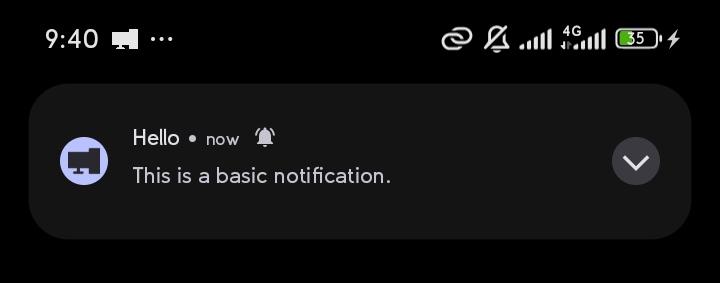
|
11
|
+
Project-URL: Tracker, https://github.com/fector101/android-notify/issues
|
|
12
|
+
Project-URL: Funding, https://www.buymeacoffee.com/fector101
|
|
13
|
+
Keywords: android,notifications,kivy,mobile,post-notifications,pyjnius,android-notifications,kivy-notifications,python-android,mobile-development,push-notifications,mobile-app,kivy-application
|
|
14
|
+
Classifier: Programming Language :: Python :: 3
|
|
15
|
+
Classifier: License :: OSI Approved :: MIT License
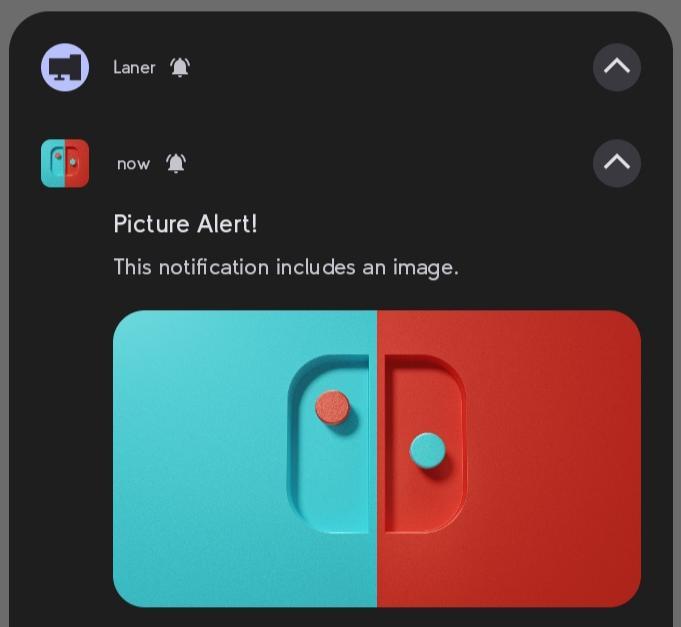
|
|
16
|
+
Classifier: Operating System :: Android
|
|
17
|
+
Classifier: Development Status :: 5 - Production/Stable
|
|
18
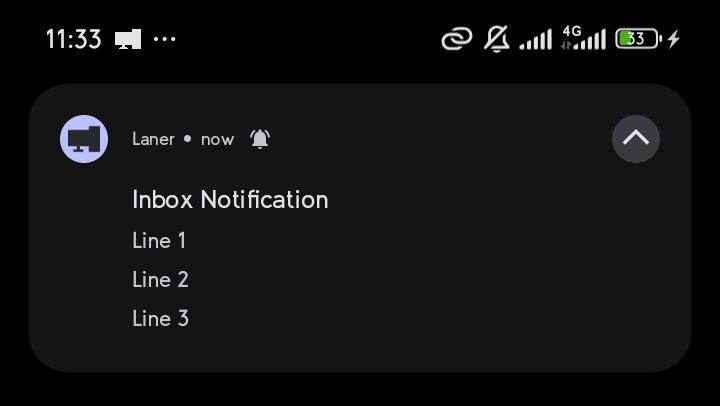
|
+
Classifier: Intended Audience :: Developers
|
|
19
|
+
Classifier: Topic :: Software Development :: Libraries :: Python Modules
|
|
20
|
+
Requires-Python: >=3.6
|
|
21
|
+
Description-Content-Type: text/markdown
|
|
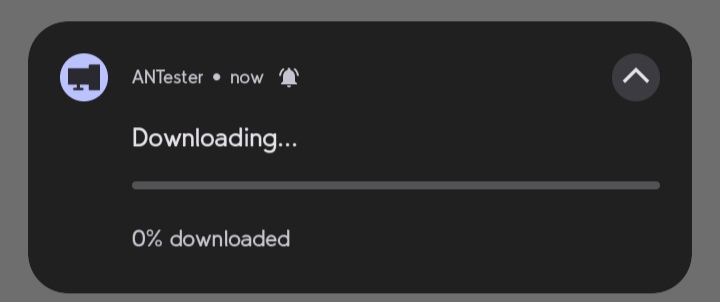
22
|
+
Requires-Dist: kivy>=2.0.0
|
|
23
|
+
Requires-Dist: pyjnius>=1.4.2
|
|
24
|
+
|
|
25
|
+
<div align="center">
|
|
26
|
+
<br>
|
|
27
|
+
<h1> Android-Notifiy </h1>
|
|
28
|
+
<p> A Python library for effortlessly creating and managing Android notifications in Kivy android apps.</p>
|
|
29
|
+
<p>
|
|
30
|
+
Supports various styles and ensures seamless integration and customization.
|
|
31
|
+
</p>
|
|
32
|
+
<br>
|
|
33
|
+
<!-- <img src="https://raw.githubusercontent.com/Fector101/android_notify/main/docs/imgs/democollage.jpg"> -->
|
|
34
|
+
</div>
|
|
35
|
+
|
|
36
|
+
|
|
37
|
+
## Features
|
|
38
|
+
|
|
39
|
+
- Compatible with Android 8.0+.
|
|
40
|
+
- Supports including images in notifications.
|
|
41
|
+
- Support for multiple notification styles:
|
|
42
|
+
- Progress
|
|
43
|
+
- Big Picture
|
|
44
|
+
- Inbox
|
|
45
|
+
- Big Text
|
|
46
|
+
- Large Icon
|
|
47
|
+
|
|
48
|
+
This module automatically handles:
|
|
49
|
+
|
|
50
|
+
- Permission requests for notifications
|
|
51
|
+
- Customizable notification channels.
|
|
52
|
+
|
|
53
|
+
## Installation
|
|
54
|
+
|
|
55
|
+
This package is available on PyPI and can be installed via pip:
|
|
56
|
+
|
|
57
|
+
```bash
|
|
58
|
+
pip install android-notify
|
|
59
|
+
```
|
|
60
|
+
|
|
61
|
+
## **Dependencies**
|
|
62
|
+
|
|
63
|
+
**Prerequisites:**
|
|
64
|
+
|
|
65
|
+
- Kivy
|
|
66
|
+
|
|
67
|
+
In your **`buildozer.spec`** file, ensure you include the following:
|
|
68
|
+
|
|
69
|
+
```ini
|
|
70
|
+
# Add pyjnius so it's packaged with the build
|
|
71
|
+
requirements = python3, kivy, pyjnius, android-notify
|
|
72
|
+
|
|
73
|
+
# Add permission for notifications
|
|
74
|
+
android.permissions = POST_NOTIFICATIONS
|
|
75
|
+
|
|
76
|
+
# Required dependencies (write exactly as shown, no quotation marks)
|
|
77
|
+
android.gradle_dependencies = androidx.core:core:1.6.0, androidx.core:core-ktx:1.15.0
|
|
78
|
+
android.enable_androidx = True
|
|
79
|
+
```
|
|
80
|
+
|
|
81
|
+
---
|
|
82
|
+
|
|
83
|
+
## Basic Usage
|
|
84
|
+
|
|
85
|
+
```python
|
|
86
|
+
from android_notify import Notification
|
|
87
|
+
|
|
88
|
+
# Create a simple notification
|
|
89
|
+
notification = Notification(
|
|
90
|
+
title="Hello",
|
|
91
|
+
message="This is a basic notification"
|
|
92
|
+
)
|
|
93
|
+
notification.send()
|
|
94
|
+
```
|
|
95
|
+
|
|
96
|
+
**Sample Image:**
|
|
97
|
+
|
|
98
|
+
|
|
99
|
+
## Notification Styles
|
|
100
|
+
|
|
101
|
+
The library supports multiple notification styles:
|
|
102
|
+
|
|
103
|
+
1. `simple` - Basic notification with title and message
|
|
104
|
+
2. `progress` - Shows a progress bar
|
|
105
|
+
3. `big_text` - Expandable notification with long text
|
|
106
|
+
4. `inbox` - List-style notification
|
|
107
|
+
5. `big_picture` - Notification with a large image
|
|
108
|
+
6. `large_icon` - Notification with a custom icon
|
|
109
|
+
7. `both_imgs` - Combines big picture and large icon
|
|
110
|
+
8. `custom` - For custom notification styles
|
|
111
|
+
|
|
112
|
+
### Style Examples
|
|
113
|
+
|
|
114
|
+
#### Notification with an Image (Big Picture Style)
|
|
115
|
+
|
|
116
|
+
```python
|
|
117
|
+
# Image notification
|
|
118
|
+
notification = Notification(
|
|
119
|
+
title='Picture Alert!',
|
|
120
|
+
message='This notification includes an image.',
|
|
121
|
+
style="big_picture",
|
|
122
|
+
big_picture_path="assets/imgs/photo.png"
|
|
123
|
+
)
|
|
124
|
+
```
|
|
125
|
+
|
|
126
|
+
**Sample Image:**
|
|
127
|
+
|
|
128
|
+
|
|
129
|
+
#### Inbox Notification Style
|
|
130
|
+
|
|
131
|
+
```python
|
|
132
|
+
# Send a notification with inbox style
|
|
133
|
+
notification = Notification(
|
|
134
|
+
title='Inbox Notification',
|
|
135
|
+
message='Line 1\nLine 2\nLine 3',
|
|
136
|
+
style='inbox'
|
|
137
|
+
)
|
|
138
|
+
```
|
|
139
|
+
|
|
140
|
+
**Sample Image:**
|
|
141
|
+
|
|
142
|
+
|
|
143
|
+
#### Big text notification (Will Display as simple text if Device dosen't support)
|
|
144
|
+
|
|
145
|
+
```python
|
|
146
|
+
notification = Notification(
|
|
147
|
+
title="Article",
|
|
148
|
+
message="Long article content...",
|
|
149
|
+
style="big_text"
|
|
150
|
+
)
|
|
151
|
+
```
|
|
152
|
+
|
|
153
|
+
#### Progress bar notification
|
|
154
|
+
|
|
155
|
+
```python
|
|
156
|
+
notification = Notification(
|
|
157
|
+
title="Download",
|
|
158
|
+
message="Downloading file...",
|
|
159
|
+
style="progress",
|
|
160
|
+
progress_max_value=100,
|
|
161
|
+
progress_current_value=0
|
|
162
|
+
)
|
|
163
|
+
|
|
164
|
+
```
|
|
165
|
+
|
|
166
|
+
**Sample Image:**
|
|
167
|
+
|
|
168
|
+
|
|
169
|
+
#### Notification with an Image (Large Icon Style)
|
|
170
|
+
|
|
171
|
+
```python
|
|
172
|
+
notification = Notification(
|
|
173
|
+
title="Completed download",
|
|
174
|
+
message="profile.jpg",
|
|
175
|
+
style="large_icon",
|
|
176
|
+
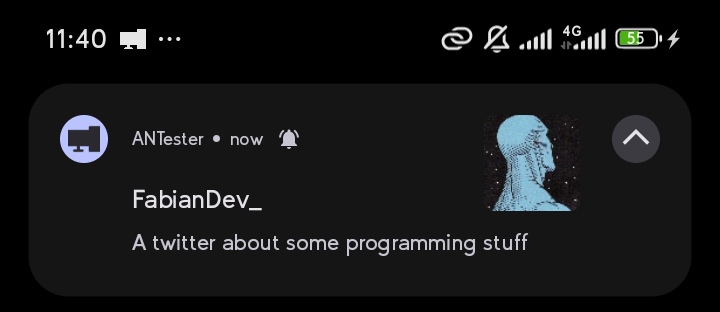
large_icon_path="assets/imgs/profile.png"
|
|
177
|
+
)
|
|
178
|
+
|
|
179
|
+
```
|
|
180
|
+
|
|
181
|
+
**Sample Image:**
|
|
182
|
+
|
|
183
|
+
|
|
184
|
+
## Advanced Features
|
|
185
|
+
|
|
186
|
+
### Updating Notifications
|
|
187
|
+
|
|
188
|
+
```python
|
|
189
|
+
notification = Notification(title="Initial Title")
|
|
190
|
+
notification.send()
|
|
191
|
+
|
|
192
|
+
# Update title
|
|
193
|
+
notification.updateTitle("New Title")
|
|
194
|
+
|
|
195
|
+
# Update message
|
|
196
|
+
notification.updateMessage("New Message")
|
|
197
|
+
```
|
|
198
|
+
|
|
199
|
+
### Progress Bar Management
|
|
200
|
+
|
|
201
|
+
```python
|
|
202
|
+
notification = Notification(
|
|
203
|
+
title="Download..",
|
|
204
|
+
style="progress"
|
|
205
|
+
)
|
|
206
|
+
|
|
207
|
+
# Update progress
|
|
208
|
+
notification.updateProgressBar(30, "30% Complete")
|
|
209
|
+
|
|
210
|
+
# Remove progress bar
|
|
211
|
+
notification.removeProgressBar("Download Complete")
|
|
212
|
+
```
|
|
213
|
+
|
|
214
|
+
**Sample Image:**
|
|
215
|
+

|
|
216
|
+
|
|
217
|
+
### Channel Management
|
|
218
|
+
|
|
219
|
+
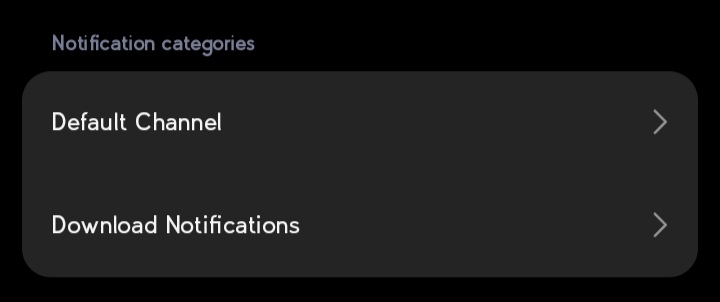
Notifications are organized into channels. You can customize the channel name and ID:
|
|
220
|
+
|
|
221
|
+
- Custom Channel Name's Gives User ability to turn on/off specific
|
|
222
|
+
|
|
223
|
+
```python
|
|
224
|
+
notification = Notification(
|
|
225
|
+
title="Download finished",
|
|
226
|
+
message="How to Catch a Fish.mp4",
|
|
227
|
+
channel_name="Download Notifications", # Will create User-visible name "downloads"
|
|
228
|
+
channel_id="custom_downloads" # Optional: specify custom channel ID
|
|
229
|
+
)
|
|
230
|
+
```
|
|
231
|
+
|
|
232
|
+
**Sample Image:**
|
|
233
|
+
|
|
234
|
+
|
|
235
|
+
### Silent Notifications
|
|
236
|
+
|
|
237
|
+
To send a notification without sound or heads-up display:
|
|
238
|
+
|
|
239
|
+
```python
|
|
240
|
+
notification = Notification(title="Silent Update")
|
|
241
|
+
notification.send(silent=True)
|
|
242
|
+
```
|
|
243
|
+
|
|
244
|
+
### Assist
|
|
245
|
+
|
|
246
|
+
- How to Copy image to app folder
|
|
247
|
+
|
|
248
|
+
```python
|
|
249
|
+
import shutil,os # These modules come packaged with python
|
|
250
|
+
from android.storage import app_storage_path # type: ignore -- This works only on android
|
|
251
|
+
|
|
252
|
+
app_path = os.path.join(app_storage_path(),'app')
|
|
253
|
+
image_path= "/storage/emulated/0/Download/profile.png"
|
|
254
|
+
|
|
255
|
+
shutil.copy(image_path, os.path.join(app_path, "profile.png"))
|
|
256
|
+
```
|
|
257
|
+
|
|
258
|
+
- Avoiding Human Error when using different notification styles
|
|
259
|
+
|
|
260
|
+
```python
|
|
261
|
+
from android_notify import Notification, NotificationStyles
|
|
262
|
+
notification = Notification(
|
|
263
|
+
title="New Photo",
|
|
264
|
+
message="Check out this image",
|
|
265
|
+
style=NotificationStyles.BIG_PICTURE,
|
|
266
|
+
big_picture_path="assets/imgs/photo.png"
|
|
267
|
+
).send()
|
|
268
|
+
```
|
|
269
|
+
|
|
270
|
+
## Development Mode
|
|
271
|
+
|
|
272
|
+
When developing on non-Android platforms, the library provides debugging output:
|
|
273
|
+
|
|
274
|
+
```python
|
|
275
|
+
# Enable logs (default is True when not on Android)
|
|
276
|
+
Notification.logs = True
|
|
277
|
+
|
|
278
|
+
# Create notification for testing
|
|
279
|
+
notification = Notification(title="Test")
|
|
280
|
+
notification.send()
|
|
281
|
+
# Will print notification properties instead of sending
|
|
282
|
+
```
|
|
283
|
+
|
|
284
|
+
## Image Requirements
|
|
285
|
+
|
|
286
|
+
- Images must be located within your app's asset folder
|
|
287
|
+
- Supported paths are relative to your app's storage path
|
|
288
|
+
- Example: `assets/imgs/icon.png`
|
|
289
|
+
|
|
290
|
+
## Error Handling
|
|
291
|
+
|
|
292
|
+
The library validates arguments and provides helpful error messages:
|
|
293
|
+
|
|
294
|
+
- Invalid style names will suggest the closest matching style
|
|
295
|
+
- Invalid arguments will list all valid options
|
|
296
|
+
- Missing image files will raise FileNotFoundError with the attempted path
|
|
297
|
+
|
|
298
|
+
## Limitations
|
|
299
|
+
|
|
300
|
+
1. Only works on Android devices
|
|
301
|
+
2. Images must be within the app's storage path
|
|
302
|
+
3. Channel names are limited to 40 characters
|
|
303
|
+
4. Channel IDs are limited to 50 characters
|
|
304
|
+
|
|
305
|
+
## Best Practices
|
|
306
|
+
|
|
307
|
+
1. Always handle permissions appropriately
|
|
308
|
+
2. Use meaningful channel names for organization
|
|
309
|
+
3. Keep progress bar updates reasonable (don't update too frequently)
|
|
310
|
+
4. Test notifications on different Android versions
|
|
311
|
+
5. Consider using silent notifications for frequent updates
|
|
312
|
+
|
|
313
|
+
## Debugging Tips
|
|
314
|
+
|
|
315
|
+
1. Enable logs during development: `Notification.logs = True`
|
|
316
|
+
2. Check channel creation with Android's notification settings
|
|
317
|
+
3. Verify image paths before sending notifications
|
|
318
|
+
4. Test different styles to ensure proper display
|
|
319
|
+
|
|
320
|
+
Remember to check Android's notification documentation for best practices and guidelines regarding notification frequency and content.
|
|
321
|
+
|
|
322
|
+
## Contribution
|
|
323
|
+
|
|
324
|
+
Feel free to open issues or submit pull requests for improvements!
|
|
325
|
+
|
|
326
|
+
## Reporting Issues
|
|
327
|
+
|
|
328
|
+
Found a bug? Please open an issue on our [GitHub Issues](https://github.com/Fector101/android_notify/issues) page.
|
|
329
|
+
|
|
330
|
+
## Author
|
|
331
|
+
|
|
332
|
+
- Fabian - <fector101@yahoo.com>
|
|
333
|
+
- GitHub: [Android Notify Repo](https://github.com/Fector101/android_notify)
|
|
334
|
+
- Twitter: [FabianDev_](https://twitter.com/intent/user?user_id=1246911115319263233)
|
|
335
|
+
|
|
336
|
+
For feedback or contributions, feel free to reach out!
|
|
337
|
+
|
|
338
|
+
---
|
|
339
|
+
|
|
340
|
+
## ☕ Support the Project
|
|
341
|
+
|
|
342
|
+
If you find this project helpful, consider buying me a coffee! 😊 Or Giving it a star on 🌟 [GitHub](https://github.com/Fector101/android_notify/) Your support helps maintain and improve the project.
|
|
343
|
+
|
|
344
|
+
<a href="https://www.buymeacoffee.com/fector101" target="_blank">
|
|
345
|
+
<img src="https://cdn.buymeacoffee.com/buttons/v2/default-yellow.png" alt="Buy Me A Coffee" height="60">
|
|
346
|
+
</a>
|
|
347
|
+
|
|
348
|
+
---
|
|
349
|
+
|
|
350
|
+
## Acknowledgments
|
|
351
|
+
|
|
352
|
+
- This Project was thoroughly Tested by the [Laner Project](https://github.com/Fector101/Laner/) - A application for Securely Transfering Files Wirelessly between your PC and Phone.
|
|
353
|
+
- Thanks to the Kivy and Pyjnius communities.
|
|
354
|
+
|
|
355
|
+
---
|
|
356
|
+
|
|
357
|
+
## 🌐 **Links**
|
|
358
|
+
|
|
359
|
+
- **PyPI:** [android-notify on PyPI](https://pypi.org/project/android-notify/)
|
|
360
|
+
- **GitHub:** [Source Code Repository](https://github.com/Fector101/android_notify/)
|
|
@@ -0,0 +1,336 @@
|
|
|
1
|
+
<div align="center">
|
|
2
|
+
<br>
|
|
3
|
+
<h1> Android-Notifiy </h1>
|
|
4
|
+
<p> A Python library for effortlessly creating and managing Android notifications in Kivy android apps.</p>
|
|
5
|
+
<p>
|
|
6
|
+
Supports various styles and ensures seamless integration and customization.
|
|
7
|
+
</p>
|
|
8
|
+
<br>
|
|
9
|
+
<!-- <img src="https://raw.githubusercontent.com/Fector101/android_notify/main/docs/imgs/democollage.jpg"> -->
|
|
10
|
+
</div>
|
|
11
|
+
|
|
12
|
+
|
|
13
|
+
## Features
|
|
14
|
+
|
|
15
|
+
- Compatible with Android 8.0+.
|
|
16
|
+
- Supports including images in notifications.
|
|
17
|
+
- Support for multiple notification styles:
|
|
18
|
+
- Progress
|
|
19
|
+
- Big Picture
|
|
20
|
+
- Inbox
|
|
21
|
+
- Big Text
|
|
22
|
+
- Large Icon
|
|
23
|
+
|
|
24
|
+
This module automatically handles:
|
|
25
|
+
|
|
26
|
+
- Permission requests for notifications
|
|
27
|
+
- Customizable notification channels.
|
|
28
|
+
|
|
29
|
+
## Installation
|
|
30
|
+
|
|
31
|
+
This package is available on PyPI and can be installed via pip:
|
|
32
|
+
|
|
33
|
+
```bash
|
|
34
|
+
pip install android-notify
|
|
35
|
+
```
|
|
36
|
+
|
|
37
|
+
## **Dependencies**
|
|
38
|
+
|
|
39
|
+
**Prerequisites:**
|
|
40
|
+
|
|
41
|
+
- Kivy
|
|
42
|
+
|
|
43
|
+
In your **`buildozer.spec`** file, ensure you include the following:
|
|
44
|
+
|
|
45
|
+
```ini
|
|
46
|
+
# Add pyjnius so it's packaged with the build
|
|
47
|
+
requirements = python3, kivy, pyjnius, android-notify
|
|
48
|
+
|
|
49
|
+
# Add permission for notifications
|
|
50
|
+
android.permissions = POST_NOTIFICATIONS
|
|
51
|
+
|
|
52
|
+
# Required dependencies (write exactly as shown, no quotation marks)
|
|
53
|
+
android.gradle_dependencies = androidx.core:core:1.6.0, androidx.core:core-ktx:1.15.0
|
|
54
|
+
android.enable_androidx = True
|
|
55
|
+
```
|
|
56
|
+
|
|
57
|
+
---
|
|
58
|
+
|
|
59
|
+
## Basic Usage
|
|
60
|
+
|
|
61
|
+
```python
|
|
62
|
+
from android_notify import Notification
|
|
63
|
+
|
|
64
|
+
# Create a simple notification
|
|
65
|
+
notification = Notification(
|
|
66
|
+
title="Hello",
|
|
67
|
+
message="This is a basic notification"
|
|
68
|
+
)
|
|
69
|
+
notification.send()
|
|
70
|
+
```
|
|
71
|
+
|
|
72
|
+
**Sample Image:**
|
|
73
|
+

|
|
74
|
+
|
|
75
|
+
## Notification Styles
|
|
76
|
+
|
|
77
|
+
The library supports multiple notification styles:
|
|
78
|
+
|
|
79
|
+
1. `simple` - Basic notification with title and message
|
|
80
|
+
2. `progress` - Shows a progress bar
|
|
81
|
+
3. `big_text` - Expandable notification with long text
|
|
82
|
+
4. `inbox` - List-style notification
|
|
83
|
+
5. `big_picture` - Notification with a large image
|
|
84
|
+
6. `large_icon` - Notification with a custom icon
|
|
85
|
+
7. `both_imgs` - Combines big picture and large icon
|
|
86
|
+
8. `custom` - For custom notification styles
|
|
87
|
+
|
|
88
|
+
### Style Examples
|
|
89
|
+
|
|
90
|
+
#### Notification with an Image (Big Picture Style)
|
|
91
|
+
|
|
92
|
+
```python
|
|
93
|
+
# Image notification
|
|
94
|
+
notification = Notification(
|
|
95
|
+
title='Picture Alert!',
|
|
96
|
+
message='This notification includes an image.',
|
|
97
|
+
style="big_picture",
|
|
98
|
+
big_picture_path="assets/imgs/photo.png"
|
|
99
|
+
)
|
|
100
|
+
```
|
|
101
|
+
|
|
102
|
+
**Sample Image:**
|
|
103
|
+

|
|
104
|
+
|
|
105
|
+
#### Inbox Notification Style
|
|
106
|
+
|
|
107
|
+
```python
|
|
108
|
+
# Send a notification with inbox style
|
|
109
|
+
notification = Notification(
|
|
110
|
+
title='Inbox Notification',
|
|
111
|
+
message='Line 1\nLine 2\nLine 3',
|
|
112
|
+
style='inbox'
|
|
113
|
+
)
|
|
114
|
+
```
|
|
115
|
+
|
|
116
|
+
**Sample Image:**
|
|
117
|
+

|
|
118
|
+
|
|
119
|
+
#### Big text notification (Will Display as simple text if Device dosen't support)
|
|
120
|
+
|
|
121
|
+
```python
|
|
122
|
+
notification = Notification(
|
|
123
|
+
title="Article",
|
|
124
|
+
message="Long article content...",
|
|
125
|
+
style="big_text"
|
|
126
|
+
)
|
|
127
|
+
```
|
|
128
|
+
|
|
129
|
+
#### Progress bar notification
|
|
130
|
+
|
|
131
|
+
```python
|
|
132
|
+
notification = Notification(
|
|
133
|
+
title="Download",
|
|
134
|
+
message="Downloading file...",
|
|
135
|
+
style="progress",
|
|
136
|
+
progress_max_value=100,
|
|
137
|
+
progress_current_value=0
|
|
138
|
+
)
|
|
139
|
+
|
|
140
|
+
```
|
|
141
|
+
|
|
142
|
+
**Sample Image:**
|
|
143
|
+

|
|
144
|
+
|
|
145
|
+
#### Notification with an Image (Large Icon Style)
|
|
146
|
+
|
|
147
|
+
```python
|
|
148
|
+
notification = Notification(
|
|
149
|
+
title="Completed download",
|
|
150
|
+
message="profile.jpg",
|
|
151
|
+
style="large_icon",
|
|
152
|
+
large_icon_path="assets/imgs/profile.png"
|
|
153
|
+
)
|
|
154
|
+
|
|
155
|
+
```
|
|
156
|
+
|
|
157
|
+
**Sample Image:**
|
|
158
|
+

|
|
159
|
+
|
|
160
|
+
## Advanced Features
|
|
161
|
+
|
|
162
|
+
### Updating Notifications
|
|
163
|
+
|
|
164
|
+
```python
|
|
165
|
+
notification = Notification(title="Initial Title")
|
|
166
|
+
notification.send()
|
|
167
|
+
|
|
168
|
+
# Update title
|
|
169
|
+
notification.updateTitle("New Title")
|
|
170
|
+
|
|
171
|
+
# Update message
|
|
172
|
+
notification.updateMessage("New Message")
|
|
173
|
+
```
|
|
174
|
+
|
|
175
|
+
### Progress Bar Management
|
|
176
|
+
|
|
177
|
+
```python
|
|
178
|
+
notification = Notification(
|
|
179
|
+
title="Download..",
|
|
180
|
+
style="progress"
|
|
181
|
+
)
|
|
182
|
+
|
|
183
|
+
# Update progress
|
|
184
|
+
notification.updateProgressBar(30, "30% Complete")
|
|
185
|
+
|
|
186
|
+
# Remove progress bar
|
|
187
|
+
notification.removeProgressBar("Download Complete")
|
|
188
|
+
```
|
|
189
|
+
|
|
190
|
+
**Sample Image:**
|
|
191
|
+

|
|
192
|
+
|
|
193
|
+
### Channel Management
|
|
194
|
+
|
|
195
|
+
Notifications are organized into channels. You can customize the channel name and ID:
|
|
196
|
+
|
|
197
|
+
- Custom Channel Name's Gives User ability to turn on/off specific
|
|
198
|
+
|
|
199
|
+
```python
|
|
200
|
+
notification = Notification(
|
|
201
|
+
title="Download finished",
|
|
202
|
+
message="How to Catch a Fish.mp4",
|
|
203
|
+
channel_name="Download Notifications", # Will create User-visible name "downloads"
|
|
204
|
+
channel_id="custom_downloads" # Optional: specify custom channel ID
|
|
205
|
+
)
|
|
206
|
+
```
|
|
207
|
+
|
|
208
|
+
**Sample Image:**
|
|
209
|
+

|
|
210
|
+
|
|
211
|
+
### Silent Notifications
|
|
212
|
+
|
|
213
|
+
To send a notification without sound or heads-up display:
|
|
214
|
+
|
|
215
|
+
```python
|
|
216
|
+
notification = Notification(title="Silent Update")
|
|
217
|
+
notification.send(silent=True)
|
|
218
|
+
```
|
|
219
|
+
|
|
220
|
+
### Assist
|
|
221
|
+
|
|
222
|
+
- How to Copy image to app folder
|
|
223
|
+
|
|
224
|
+
```python
|
|
225
|
+
import shutil,os # These modules come packaged with python
|
|
226
|
+
from android.storage import app_storage_path # type: ignore -- This works only on android
|
|
227
|
+
|
|
228
|
+
app_path = os.path.join(app_storage_path(),'app')
|
|
229
|
+
image_path= "/storage/emulated/0/Download/profile.png"
|
|
230
|
+
|
|
231
|
+
shutil.copy(image_path, os.path.join(app_path, "profile.png"))
|
|
232
|
+
```
|
|
233
|
+
|
|
234
|
+
- Avoiding Human Error when using different notification styles
|
|
235
|
+
|
|
236
|
+
```python
|
|
237
|
+
from android_notify import Notification, NotificationStyles
|
|
238
|
+
notification = Notification(
|
|
239
|
+
title="New Photo",
|
|
240
|
+
message="Check out this image",
|
|
241
|
+
style=NotificationStyles.BIG_PICTURE,
|
|
242
|
+
big_picture_path="assets/imgs/photo.png"
|
|
243
|
+
).send()
|
|
244
|
+
```
|
|
245
|
+
|
|
246
|
+
## Development Mode
|
|
247
|
+
|
|
248
|
+
When developing on non-Android platforms, the library provides debugging output:
|
|
249
|
+
|
|
250
|
+
```python
|
|
251
|
+
# Enable logs (default is True when not on Android)
|
|
252
|
+
Notification.logs = True
|
|
253
|
+
|
|
254
|
+
# Create notification for testing
|
|
255
|
+
notification = Notification(title="Test")
|
|
256
|
+
notification.send()
|
|
257
|
+
# Will print notification properties instead of sending
|
|
258
|
+
```
|
|
259
|
+
|
|
260
|
+
## Image Requirements
|
|
261
|
+
|
|
262
|
+
- Images must be located within your app's asset folder
|
|
263
|
+
- Supported paths are relative to your app's storage path
|
|
264
|
+
- Example: `assets/imgs/icon.png`
|
|
265
|
+
|
|
266
|
+
## Error Handling
|
|
267
|
+
|
|
268
|
+
The library validates arguments and provides helpful error messages:
|
|
269
|
+
|
|
270
|
+
- Invalid style names will suggest the closest matching style
|
|
271
|
+
- Invalid arguments will list all valid options
|
|
272
|
+
- Missing image files will raise FileNotFoundError with the attempted path
|
|
273
|
+
|
|
274
|
+
## Limitations
|
|
275
|
+
|
|
276
|
+
1. Only works on Android devices
|
|
277
|
+
2. Images must be within the app's storage path
|
|
278
|
+
3. Channel names are limited to 40 characters
|
|
279
|
+
4. Channel IDs are limited to 50 characters
|
|
280
|
+
|
|
281
|
+
## Best Practices
|
|
282
|
+
|
|
283
|
+
1. Always handle permissions appropriately
|
|
284
|
+
2. Use meaningful channel names for organization
|
|
285
|
+
3. Keep progress bar updates reasonable (don't update too frequently)
|
|
286
|
+
4. Test notifications on different Android versions
|
|
287
|
+
5. Consider using silent notifications for frequent updates
|
|
288
|
+
|
|
289
|
+
## Debugging Tips
|
|
290
|
+
|
|
291
|
+
1. Enable logs during development: `Notification.logs = True`
|
|
292
|
+
2. Check channel creation with Android's notification settings
|
|
293
|
+
3. Verify image paths before sending notifications
|
|
294
|
+
4. Test different styles to ensure proper display
|
|
295
|
+
|
|
296
|
+
Remember to check Android's notification documentation for best practices and guidelines regarding notification frequency and content.
|
|
297
|
+
|
|
298
|
+
## Contribution
|
|
299
|
+
|
|
300
|
+
Feel free to open issues or submit pull requests for improvements!
|
|
301
|
+
|
|
302
|
+
## Reporting Issues
|
|
303
|
+
|
|
304
|
+
Found a bug? Please open an issue on our [GitHub Issues](https://github.com/Fector101/android_notify/issues) page.
|
|
305
|
+
|
|
306
|
+
## Author
|
|
307
|
+
|
|
308
|
+
- Fabian - <fector101@yahoo.com>
|
|
309
|
+
- GitHub: [Android Notify Repo](https://github.com/Fector101/android_notify)
|
|
310
|
+
- Twitter: [FabianDev_](https://twitter.com/intent/user?user_id=1246911115319263233)
|
|
311
|
+
|
|
312
|
+
For feedback or contributions, feel free to reach out!
|
|
313
|
+
|
|
314
|
+
---
|
|
315
|
+
|
|
316
|
+
## ☕ Support the Project
|
|
317
|
+
|
|
318
|
+
If you find this project helpful, consider buying me a coffee! 😊 Or Giving it a star on 🌟 [GitHub](https://github.com/Fector101/android_notify/) Your support helps maintain and improve the project.
|
|
319
|
+
|
|
320
|
+
<a href="https://www.buymeacoffee.com/fector101" target="_blank">
|
|
321
|
+
<img src="https://cdn.buymeacoffee.com/buttons/v2/default-yellow.png" alt="Buy Me A Coffee" height="60">
|
|
322
|
+
</a>
|
|
323
|
+
|
|
324
|
+
---
|
|
325
|
+
|
|
326
|
+
## Acknowledgments
|
|
327
|
+
|
|
328
|
+
- This Project was thoroughly Tested by the [Laner Project](https://github.com/Fector101/Laner/) - A application for Securely Transfering Files Wirelessly between your PC and Phone.
|
|
329
|
+
- Thanks to the Kivy and Pyjnius communities.
|
|
330
|
+
|
|
331
|
+
---
|
|
332
|
+
|
|
333
|
+
## 🌐 **Links**
|
|
334
|
+
|
|
335
|
+
- **PyPI:** [android-notify on PyPI](https://pypi.org/project/android-notify/)
|
|
336
|
+
- **GitHub:** [Source Code Repository](https://github.com/Fector101/android_notify/)
|