aignostics 0.2.2__tar.gz → 0.2.8__tar.gz
This diff represents the content of publicly available package versions that have been released to one of the supported registries. The information contained in this diff is provided for informational purposes only and reflects changes between package versions as they appear in their respective public registries.
- {aignostics-0.2.2 → aignostics-0.2.8}/.gitignore +1 -0
- {aignostics-0.2.2 → aignostics-0.2.8}/PKG-INFO +59 -44
- {aignostics-0.2.2 → aignostics-0.2.8}/README.md +56 -40
- {aignostics-0.2.2 → aignostics-0.2.8}/examples/e2e.py +4 -4
- {aignostics-0.2.2 → aignostics-0.2.8}/examples/notebook.py +1 -1
- {aignostics-0.2.2 → aignostics-0.2.8}/pyproject.toml +4 -4
- {aignostics-0.2.2 → aignostics-0.2.8}/src/aignostics/application/_cli.py +331 -144
- {aignostics-0.2.2 → aignostics-0.2.8}/src/aignostics/application/_gui.py +219 -63
- aignostics-0.2.8/src/aignostics/application/_service.py +956 -0
- {aignostics-0.2.2 → aignostics-0.2.8}/src/aignostics/application/_utils.py +34 -0
- {aignostics-0.2.2 → aignostics-0.2.8}/src/aignostics/dataset/__init__.py +2 -0
- {aignostics-0.2.2 → aignostics-0.2.8}/src/aignostics/dataset/_gui.py +0 -1
- {aignostics-0.2.2 → aignostics-0.2.8}/src/aignostics/dataset/_idc_index.py +36 -2
- aignostics-0.2.8/src/aignostics/gui/assets/image-not-found.png +0 -0
- {aignostics-0.2.2 → aignostics-0.2.8}/src/aignostics/notebook/_notebook.py +6 -6
- {aignostics-0.2.2 → aignostics-0.2.8}/src/aignostics/platform/__init__.py +8 -1
- {aignostics-0.2.2 → aignostics-0.2.8}/src/aignostics/platform/resources/runs.py +7 -3
- aignostics-0.2.2/src/aignostics/application/_service.py +0 -481
- {aignostics-0.2.2 → aignostics-0.2.8}/LICENSE +0 -0
- {aignostics-0.2.2 → aignostics-0.2.8}/codegen/out/.openapi-generator/FILES +0 -0
- {aignostics-0.2.2 → aignostics-0.2.8}/codegen/out/.openapi-generator/VERSION +0 -0
- {aignostics-0.2.2 → aignostics-0.2.8}/codegen/out/aignx/codegen/api/public_api.py +0 -0
- {aignostics-0.2.2 → aignostics-0.2.8}/codegen/out/aignx/codegen/api_client.py +0 -0
- {aignostics-0.2.2 → aignostics-0.2.8}/codegen/out/aignx/codegen/api_response.py +0 -0
- {aignostics-0.2.2 → aignostics-0.2.8}/codegen/out/aignx/codegen/configuration.py +0 -0
- {aignostics-0.2.2 → aignostics-0.2.8}/codegen/out/aignx/codegen/exceptions.py +0 -0
- {aignostics-0.2.2 → aignostics-0.2.8}/codegen/out/aignx/codegen/models/__init__.py +0 -0
- {aignostics-0.2.2 → aignostics-0.2.8}/codegen/out/aignx/codegen/models/application_read_response.py +0 -0
- {aignostics-0.2.2 → aignostics-0.2.8}/codegen/out/aignx/codegen/models/application_run_status.py +0 -0
- {aignostics-0.2.2 → aignostics-0.2.8}/codegen/out/aignx/codegen/models/application_version_read_response.py +0 -0
- {aignostics-0.2.2 → aignostics-0.2.8}/codegen/out/aignx/codegen/models/http_validation_error.py +0 -0
- {aignostics-0.2.2 → aignostics-0.2.8}/codegen/out/aignx/codegen/models/input_artifact_creation_request.py +0 -0
- {aignostics-0.2.2 → aignostics-0.2.8}/codegen/out/aignx/codegen/models/input_artifact_read_response.py +0 -0
- {aignostics-0.2.2 → aignostics-0.2.8}/codegen/out/aignx/codegen/models/item_creation_request.py +0 -0
- {aignostics-0.2.2 → aignostics-0.2.8}/codegen/out/aignx/codegen/models/item_result_read_response.py +0 -0
- {aignostics-0.2.2 → aignostics-0.2.8}/codegen/out/aignx/codegen/models/item_status.py +0 -0
- {aignostics-0.2.2 → aignostics-0.2.8}/codegen/out/aignx/codegen/models/output_artifact_read_response.py +0 -0
- {aignostics-0.2.2 → aignostics-0.2.8}/codegen/out/aignx/codegen/models/output_artifact_result_read_response.py +0 -0
- {aignostics-0.2.2 → aignostics-0.2.8}/codegen/out/aignx/codegen/models/output_artifact_scope.py +0 -0
- {aignostics-0.2.2 → aignostics-0.2.8}/codegen/out/aignx/codegen/models/payload_input_artifact.py +0 -0
- {aignostics-0.2.2 → aignostics-0.2.8}/codegen/out/aignx/codegen/models/payload_item.py +0 -0
- {aignostics-0.2.2 → aignostics-0.2.8}/codegen/out/aignx/codegen/models/payload_output_artifact.py +0 -0
- {aignostics-0.2.2 → aignostics-0.2.8}/codegen/out/aignx/codegen/models/run_creation_request.py +0 -0
- {aignostics-0.2.2 → aignostics-0.2.8}/codegen/out/aignx/codegen/models/run_creation_response.py +0 -0
- {aignostics-0.2.2 → aignostics-0.2.8}/codegen/out/aignx/codegen/models/run_read_response.py +0 -0
- {aignostics-0.2.2 → aignostics-0.2.8}/codegen/out/aignx/codegen/models/transfer_urls.py +0 -0
- {aignostics-0.2.2 → aignostics-0.2.8}/codegen/out/aignx/codegen/models/user_payload.py +0 -0
- {aignostics-0.2.2 → aignostics-0.2.8}/codegen/out/aignx/codegen/models/validation_error.py +0 -0
- {aignostics-0.2.2 → aignostics-0.2.8}/codegen/out/aignx/codegen/models/validation_error_loc_inner.py +0 -0
- {aignostics-0.2.2 → aignostics-0.2.8}/codegen/out/aignx/codegen/rest.py +0 -0
- {aignostics-0.2.2 → aignostics-0.2.8}/codegen/out/docs/PublicApi.md +0 -0
- {aignostics-0.2.2 → aignostics-0.2.8}/examples/__init__.py +0 -0
- {aignostics-0.2.2 → aignostics-0.2.8}/examples/notebook.ipynb +0 -0
- {aignostics-0.2.2 → aignostics-0.2.8}/examples/script.py +0 -0
- {aignostics-0.2.2 → aignostics-0.2.8}/src/aignostics/__init__.py +0 -0
- {aignostics-0.2.2 → aignostics-0.2.8}/src/aignostics/application/__init__.py +0 -0
- {aignostics-0.2.2 → aignostics-0.2.8}/src/aignostics/application/_settings.py +0 -0
- {aignostics-0.2.2 → aignostics-0.2.8}/src/aignostics/bucket/__init__.py +0 -0
- {aignostics-0.2.2 → aignostics-0.2.8}/src/aignostics/bucket/_cli.py +0 -0
- {aignostics-0.2.2 → aignostics-0.2.8}/src/aignostics/bucket/_gui.py +0 -0
- {aignostics-0.2.2 → aignostics-0.2.8}/src/aignostics/bucket/_service.py +0 -0
- {aignostics-0.2.2 → aignostics-0.2.8}/src/aignostics/bucket/_settings.py +0 -0
- {aignostics-0.2.2 → aignostics-0.2.8}/src/aignostics/cli.py +0 -0
- {aignostics-0.2.2 → aignostics-0.2.8}/src/aignostics/constants.py +0 -0
- {aignostics-0.2.2 → aignostics-0.2.8}/src/aignostics/dataset/_cli.py +0 -0
- {aignostics-0.2.2 → aignostics-0.2.8}/src/aignostics/dataset/_service.py +0 -0
- {aignostics-0.2.2 → aignostics-0.2.8}/src/aignostics/gui/__init__.py +0 -0
- {aignostics-0.2.2 → aignostics-0.2.8}/src/aignostics/gui/_frame.py +0 -0
- {aignostics-0.2.2 → aignostics-0.2.8}/src/aignostics/gui/_theme.py +0 -0
- {aignostics-0.2.2 → aignostics-0.2.8}/src/aignostics/gui/assets/Google_Cloud_logo.svg +0 -0
- {aignostics-0.2.2 → aignostics-0.2.8}/src/aignostics/gui/assets/NIH_IDC_title.svg +0 -0
- {aignostics-0.2.2 → aignostics-0.2.8}/src/aignostics/gui/assets/home-card-1.png +0 -0
- {aignostics-0.2.2 → aignostics-0.2.8}/src/aignostics/gui/assets/home-card-2.png +0 -0
- {aignostics-0.2.2 → aignostics-0.2.8}/src/aignostics/gui/assets/logo.png +0 -0
- {aignostics-0.2.2 → aignostics-0.2.8}/src/aignostics/gui/assets/ruo.png +0 -0
- {aignostics-0.2.2 → aignostics-0.2.8}/src/aignostics/gui/assets/ruo.svg +0 -0
- {aignostics-0.2.2 → aignostics-0.2.8}/src/aignostics/notebook/__init__.py +0 -0
- {aignostics-0.2.2 → aignostics-0.2.8}/src/aignostics/notebook/_gui.py +0 -0
- {aignostics-0.2.2 → aignostics-0.2.8}/src/aignostics/notebook/_service.py +0 -0
- {aignostics-0.2.2 → aignostics-0.2.8}/src/aignostics/platform/_authentication.py +0 -0
- {aignostics-0.2.2 → aignostics-0.2.8}/src/aignostics/platform/_client.py +0 -0
- {aignostics-0.2.2 → aignostics-0.2.8}/src/aignostics/platform/_constants.py +0 -0
- {aignostics-0.2.2 → aignostics-0.2.8}/src/aignostics/platform/_messages.py +0 -0
- {aignostics-0.2.2 → aignostics-0.2.8}/src/aignostics/platform/_service.py +0 -0
- {aignostics-0.2.2 → aignostics-0.2.8}/src/aignostics/platform/_settings.py +0 -0
- {aignostics-0.2.2 → aignostics-0.2.8}/src/aignostics/platform/_utils.py +0 -0
- {aignostics-0.2.2 → aignostics-0.2.8}/src/aignostics/platform/resources/__init__.py +0 -0
- {aignostics-0.2.2 → aignostics-0.2.8}/src/aignostics/platform/resources/applications.py +0 -0
- {aignostics-0.2.2 → aignostics-0.2.8}/src/aignostics/platform/resources/utils.py +0 -0
- {aignostics-0.2.2 → aignostics-0.2.8}/src/aignostics/system/__init__.py +0 -0
- {aignostics-0.2.2 → aignostics-0.2.8}/src/aignostics/system/_cli.py +0 -0
- {aignostics-0.2.2 → aignostics-0.2.8}/src/aignostics/system/_exceptions.py +0 -0
- {aignostics-0.2.2 → aignostics-0.2.8}/src/aignostics/system/_gui.py +0 -0
- {aignostics-0.2.2 → aignostics-0.2.8}/src/aignostics/system/_service.py +0 -0
- {aignostics-0.2.2 → aignostics-0.2.8}/src/aignostics/system/_settings.py +0 -0
- {aignostics-0.2.2 → aignostics-0.2.8}/src/aignostics/utils/.vendored/bottle.py +0 -0
- {aignostics-0.2.2 → aignostics-0.2.8}/src/aignostics/utils/__init__.py +0 -0
- {aignostics-0.2.2 → aignostics-0.2.8}/src/aignostics/utils/_cli.py +0 -0
- {aignostics-0.2.2 → aignostics-0.2.8}/src/aignostics/utils/_console.py +0 -0
- {aignostics-0.2.2 → aignostics-0.2.8}/src/aignostics/utils/_constants.py +0 -0
- {aignostics-0.2.2 → aignostics-0.2.8}/src/aignostics/utils/_di.py +0 -0
- {aignostics-0.2.2 → aignostics-0.2.8}/src/aignostics/utils/_gui.py +0 -0
- {aignostics-0.2.2 → aignostics-0.2.8}/src/aignostics/utils/_health.py +0 -0
- {aignostics-0.2.2 → aignostics-0.2.8}/src/aignostics/utils/_log.py +0 -0
- {aignostics-0.2.2 → aignostics-0.2.8}/src/aignostics/utils/_logfire.py +0 -0
- {aignostics-0.2.2 → aignostics-0.2.8}/src/aignostics/utils/_notebook.py +0 -0
- {aignostics-0.2.2 → aignostics-0.2.8}/src/aignostics/utils/_process.py +0 -0
- {aignostics-0.2.2 → aignostics-0.2.8}/src/aignostics/utils/_sentry.py +0 -0
- {aignostics-0.2.2 → aignostics-0.2.8}/src/aignostics/utils/_service.py +0 -0
- {aignostics-0.2.2 → aignostics-0.2.8}/src/aignostics/utils/_settings.py +0 -0
- {aignostics-0.2.2 → aignostics-0.2.8}/src/aignostics/utils/boot.py +0 -0
- {aignostics-0.2.2 → aignostics-0.2.8}/src/aignostics/wsi/__init__.py +0 -0
- {aignostics-0.2.2 → aignostics-0.2.8}/src/aignostics/wsi/_cli.py +0 -0
- {aignostics-0.2.2 → aignostics-0.2.8}/src/aignostics/wsi/_gui.py +0 -0
- {aignostics-0.2.2 → aignostics-0.2.8}/src/aignostics/wsi/_openslide_handler.py +0 -0
- {aignostics-0.2.2 → aignostics-0.2.8}/src/aignostics/wsi/_pydicom_handler.py +0 -0
- {aignostics-0.2.2 → aignostics-0.2.8}/src/aignostics/wsi/_service.py +0 -0
- {aignostics-0.2.2 → aignostics-0.2.8}/src/aignostics/wsi/_utils.py +0 -0
|
@@ -1,14 +1,13 @@
|
|
|
1
1
|
Metadata-Version: 2.4
|
|
2
2
|
Name: aignostics
|
|
3
|
-
Version: 0.2.
|
|
4
|
-
Summary: 🔬 Python SDK providing access to Aignostics
|
|
3
|
+
Version: 0.2.8
|
|
4
|
+
Summary: 🔬 Python SDK providing access to the Aignostics Platform. Includes Aignostics Launchpad (Desktop Application), Aignostics CLI (Command-Line Interface), example notebooks, and Aignostics Client Library.
|
|
5
5
|
Project-URL: Homepage, https://aignostics.readthedocs.io/en/latest/
|
|
6
6
|
Project-URL: Documentation, https://aignostics.readthedocs.io/en/latest/
|
|
7
7
|
Project-URL: Source, https://github.com/aignostics/python-sdk
|
|
8
8
|
Project-URL: Changelog, https://github.com/aignostics/python-sdk/releases
|
|
9
9
|
Project-URL: Issues, https://github.com/aignostics/python-sdk/issues
|
|
10
|
-
Author: Andreas
|
|
11
|
-
Author-email: Helmut Hoffer von Ankershoffen <helmut@aignostics.com>
|
|
10
|
+
Author-email: Helmut Hoffer von Ankershoffen <helmut@aignostics.com>, Andreas Kunft <andreas@aignostics.com>
|
|
12
11
|
License: MIT License
|
|
13
12
|
|
|
14
13
|
Copyright (c) [2025] [Aignostics GmbH (support@aignostics.com)]
|
|
@@ -137,7 +136,7 @@ Description-Content-Type: text/markdown
|
|
|
137
136
|
---
|
|
138
137
|
|
|
139
138
|
|
|
140
|
-
##
|
|
139
|
+
## Introduction
|
|
141
140
|
|
|
142
141
|
The **Aignostics Python SDK** includes multiple pathways to interact with the
|
|
143
142
|
**Aignostics Platform**:
|
|
@@ -174,13 +173,15 @@ more about how we achieve
|
|
|
174
173
|
[operational excellence](https://aignostics.readthedocs.io/en/latest/operational_excellence.html) and
|
|
175
174
|
[security](https://aignostics.readthedocs.io/en/latest/security.html).
|
|
176
175
|
|
|
177
|
-
##
|
|
176
|
+
## Quick Start
|
|
178
177
|
|
|
179
178
|
> [!Note]
|
|
180
179
|
> See as follows for a quick start guide to get you up and running with the Aignostics Python SDK as quickly as possible.
|
|
181
|
-
> If you first want to learn bout the basic concepts and components of the Aignostics Platform
|
|
180
|
+
> If you first want to learn bout the basic concepts and components of the Aignostics Platform skip to that section below.
|
|
181
|
+
> The further reading section points you to reference documentation listing all available CLI commans, methods and classes provided by the SDK, how we achieve operational excellence and security, and more.
|
|
182
|
+
> If you are not familiar with terminology please check the glossary at the end of this document.
|
|
182
183
|
|
|
183
|
-
###
|
|
184
|
+
### Launchpad: Run your first computational pathology analysis in 10 minutes from your desktop
|
|
184
185
|
|
|
185
186
|
The **Aignostics Launchpad** is a graphical desktop application that allows you to run
|
|
186
187
|
applications on whole slide images (WSIs) from your computer, and inspect results with QuPath and Python Notebooks with one click. It is designed to be user-friendly and intuitive, for use by Research Pathologists and Data Scientists.
|
|
@@ -194,9 +195,9 @@ The Launchpad is available for Mac OS X, Windows, and Linux, and can be installe
|
|
|
194
195
|
4. Follow the intuitive graphical interface to analyze public datasets or your own whole slide images
|
|
195
196
|
with [Atlas H&E-TME](https://www.aignostics.com/products/he-tme-profiling-product) and other computational pathology applications.
|
|
196
197
|
|
|
197
|
-
###
|
|
198
|
+
### CLI: Manage datasets and application runs from your terminal
|
|
198
199
|
|
|
199
|
-
The
|
|
200
|
+
The Python SDK includes the **Aignostics CLI**, a Command-Line Interface that allows you to
|
|
200
201
|
interact with the Aignostics Platform directly from your terminal or shell script.
|
|
201
202
|
|
|
202
203
|
See as follows for a simple example where we download a sample dataset for the [Atlas
|
|
@@ -205,29 +206,41 @@ H&E-TME application](https://www.aignostics.com/products/he-tme-profiling-produc
|
|
|
205
206
|
```shell
|
|
206
207
|
# Download a sample dataset from the NCI Image Data Commons (IDC) portal to your current working directory
|
|
207
208
|
# As the dataset id refers to the TCGA LUAD collection, this creates a directory tcga_luad with the DICOM files
|
|
208
|
-
uvx aignostics dataset idc download 1.3.6.1.4.1.5962.99.1.1069745200.1645485340.1637452317744.2.0
|
|
209
|
+
uvx aignostics dataset idc download 1.3.6.1.4.1.5962.99.1.1069745200.1645485340.1637452317744.2.0 data/
|
|
209
210
|
# Prepare the metadata for the application run by creating a metadata.csv, extracting
|
|
210
211
|
# the required metadata from the DICOM files. We furthermore add the required
|
|
211
212
|
# information about the tissue type and disease. TODO (Helmut): Update
|
|
212
|
-
uvx aignostics application run prepare he-tme
|
|
213
|
-
# Edit the metadata.csv to insert the required information about the tissue type and disease
|
|
214
|
-
|
|
213
|
+
uvx aignostics application run prepare he-tme data/tcga_luad/run.csv data/
|
|
214
|
+
# Edit the metadata.csv to insert the required information about the staining method, tissue type and disease
|
|
215
|
+
# Adapt to your favourite editor
|
|
216
|
+
nano tcga_luad/metadata.csv
|
|
215
217
|
# Upload the metadata.csv and referenced whole slide images to the Aignostics Platform
|
|
216
|
-
uvx aignostics application run upload he-tme
|
|
218
|
+
uvx aignostics application run upload he-tme data/tcga_luad/run.csv
|
|
217
219
|
# Submit the application run and print tha run id
|
|
218
|
-
uvx aignostics application run submit he-tme
|
|
220
|
+
uvx aignostics application run submit he-tme data/tcga_luad/run.csv
|
|
219
221
|
# Check the status of the application run you triggered
|
|
220
222
|
uvx aignostics application run list
|
|
221
|
-
|
|
223
|
+
# Incrementally download results when they become available
|
|
224
|
+
# Fill in the id from the output in the previous step
|
|
225
|
+
uvx aignostics application run result download APPLICATION_RUN_ID
|
|
226
|
+
```
|
|
227
|
+
|
|
228
|
+
For convenience the the `application run execute` command combines preparation, upload, submission and download.
|
|
229
|
+
The below is equivalent to the above, while adding additionally required metadata using a mapping
|
|
230
|
+
|
|
231
|
+
```shell
|
|
232
|
+
uvx aignostics dataset idc download 1.3.6.1.4.1.5962.99.1.1069745200.1645485340.1637452317744.2.0 data/
|
|
233
|
+
uvx aignostics application run execute he-tme data/tcga_luad/run.csv data/ ".*\.dcm:staining_method=H&E,tissue=LUNG,disease=LUNG_CANCER"
|
|
222
234
|
```
|
|
223
235
|
|
|
224
236
|
The CLI provides extensive help:
|
|
225
237
|
|
|
226
238
|
```shell
|
|
227
|
-
uvx aignostics --help
|
|
228
|
-
uvx aignostics application --help
|
|
229
|
-
uvx aignostics application run --help
|
|
230
|
-
uvx aignostics application run list --help
|
|
239
|
+
uvx aignostics --help # list all spaces such as application, dataset, bucket and system,
|
|
240
|
+
uvx aignostics application --help # list subcommands in the application space
|
|
241
|
+
uvx aignostics application run --help # list subcommands in the application run sub-space
|
|
242
|
+
uvx aignostics application run list --help # show help for specific command
|
|
243
|
+
uvx aignostics application run execute --help # show help for another command
|
|
231
244
|
```
|
|
232
245
|
|
|
233
246
|
Check out our
|
|
@@ -242,10 +255,11 @@ to learn about all commands and options available.
|
|
|
242
255
|
> [your personal dashboard on the Aignostics Platform website](https://platform.aignostics.com/getting-started/quick-start)
|
|
243
256
|
> and follow the steps outlined in the `Use in Python Notebooks` section.
|
|
244
257
|
|
|
245
|
-
|
|
246
|
-
|
|
247
|
-
|
|
248
|
-
|
|
258
|
+
The Python SDK includes Jupyter and Marimo notebooks to help you get started interacting
|
|
259
|
+
with the Aignostics Platform in your notebook environment.
|
|
260
|
+
|
|
261
|
+
The notebooks showcase the interaction with the Aignostics Platform using our "Test Application". To run one them,
|
|
262
|
+
please follow the steps outlined in the snippet below to clone this repository and start either the
|
|
249
263
|
[Jupyter](https://docs.jupyter.org/en/latest/index.html)
|
|
250
264
|
([examples/notebook.ipynb](https://github.com/aignostics/python-sdk/blob/main/examples/notebook.ipynb))
|
|
251
265
|
or [Marimo](https://marimo.io/)
|
|
@@ -267,7 +281,7 @@ uv run marimo edit examples/notebook.py
|
|
|
267
281
|
> You can as well run a notebook within the Aignostics Launchpad. To do so, select the
|
|
268
282
|
> Run you want to inspect in the left sidebar, and click the button "Open in Python Notebook".
|
|
269
283
|
|
|
270
|
-
###
|
|
284
|
+
### Client Library: Call the Aignostics Platform API from your Python scripts
|
|
271
285
|
|
|
272
286
|
> [!IMPORTANT]\
|
|
273
287
|
> Before you get started, you need to set up your authentication credentials if
|
|
@@ -275,35 +289,35 @@ uv run marimo edit examples/notebook.py
|
|
|
275
289
|
> [your personal dashboard on the Aignostics Platform website](https://platform.aignostics.com/getting-started/quick-start)
|
|
276
290
|
> and follow the steps outlined in the `Enterprise Integration` section.
|
|
277
291
|
|
|
278
|
-
Next to using the Launchpad, CLI and notebooks,
|
|
279
|
-
|
|
280
|
-
|
|
292
|
+
Next to using the Launchpad, CLI and example notebooks, the Python SDK includes the
|
|
293
|
+
*Aignostics Client Library* for integration with your Python Codebase.
|
|
294
|
+
|
|
295
|
+
The following sections outline how to install the Python SDK for this purpose and
|
|
296
|
+
interact with the Client.
|
|
281
297
|
|
|
282
298
|
### Installation
|
|
283
299
|
|
|
284
|
-
The Aignostics Python SDK is
|
|
285
|
-
|
|
286
|
-
directly add the dependency via your favourite package manager:
|
|
300
|
+
The Aignostics Python SDK is published on the [Python Package Index (PyPI)](https://pypi.org/project/aignostics/),
|
|
301
|
+
is compatible with Python 3.11 and above, and can be installed via via `uv` or `pip`:
|
|
287
302
|
|
|
288
303
|
**Install with [uv](https://docs.astral.sh/uv/):** If you don't have uv
|
|
289
|
-
installed follow
|
|
290
|
-
[these instructions](https://docs.astral.sh/uv/getting-started/installation/).
|
|
304
|
+
installed follow [these instructions](https://docs.astral.sh/uv/getting-started/installation/).
|
|
291
305
|
|
|
292
306
|
```shell
|
|
293
|
-
#
|
|
307
|
+
# Add Aignostics Python SDK as dependency to your project
|
|
294
308
|
uv add aignostics
|
|
295
309
|
```
|
|
296
310
|
|
|
297
311
|
**Install with [pip](https://pip.pypa.io/en/stable/)**
|
|
298
312
|
|
|
299
313
|
```shell
|
|
300
|
-
#
|
|
314
|
+
# Add Python SDK as dependency to your project
|
|
301
315
|
pip install aignostics
|
|
302
316
|
```
|
|
303
317
|
|
|
304
318
|
#### Usage
|
|
305
319
|
|
|
306
|
-
The following snippet shows how to use the
|
|
320
|
+
The following snippet shows how to use the Client to trigger an application
|
|
307
321
|
run:
|
|
308
322
|
|
|
309
323
|
```python
|
|
@@ -389,11 +403,11 @@ Self-signed URLs for files in google storage buckets can be generated using the
|
|
|
389
403
|
for the Google Storage Bucket**
|
|
390
404
|
|
|
391
405
|
|
|
392
|
-
##
|
|
406
|
+
## Platform
|
|
393
407
|
|
|
394
408
|
### Overview
|
|
395
409
|
|
|
396
|
-
The Aignostics Platform is a comprehensive cloud-based service that allows organizations to leverage advanced computational pathology applications without the need for specialized expertise or complex infrastructure. Via its API it provides a standardized, secure interface for accessing Aignostics' portfolio of advanced computational pathology applications. These applications perform machine learning based tissue and cell analysis on histopathology slides, delivering quantitative measurements, visual representations, and detailed statistical data.
|
|
410
|
+
The **Aignostics Platform** is a comprehensive cloud-based service that allows organizations to leverage advanced computational pathology applications without the need for specialized expertise or complex infrastructure. Via its API it provides a standardized, secure interface for accessing Aignostics' portfolio of advanced computational pathology applications. These applications perform machine learning based tissue and cell analysis on histopathology slides, delivering quantitative measurements, visual representations, and detailed statistical data.
|
|
397
411
|
|
|
398
412
|
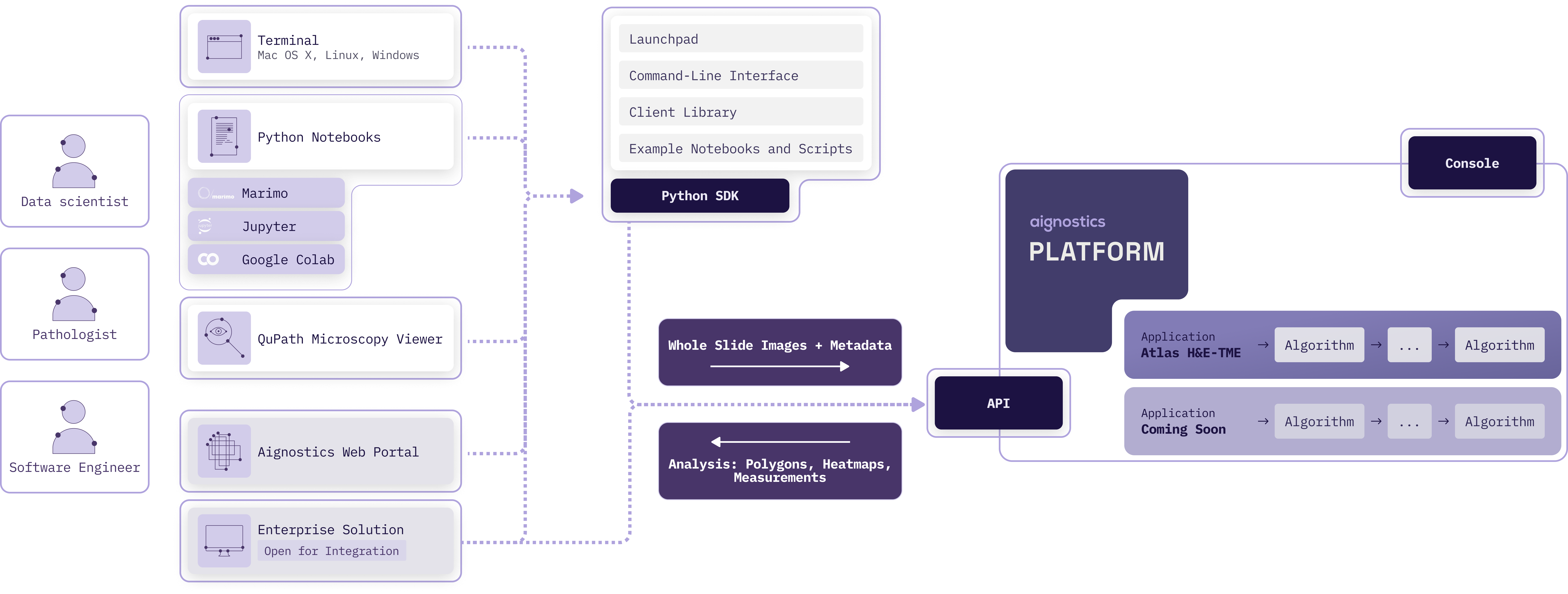
|
|
399
413
|
|
|
@@ -419,9 +433,10 @@ To start using the Aignostics Platform and its advanced applications, your organ
|
|
|
419
433
|
> 3. We can integrate with your IDP system (e.g. SAML, OIDC) for user authentication. Please contact us to discuss the integration.
|
|
420
434
|
> 4. Registering your organistation typically takes 2 business days depending on the complexity of the signed business agreement and specific requirements.
|
|
421
435
|
|
|
422
|
-
###
|
|
436
|
+
### Console
|
|
423
437
|
|
|
424
|
-
The web-based [*Console*](https://platform.aignostics.com)
|
|
438
|
+
The web-based [*Aignostics Console*](https://platform.aignostics.com) is a user-friendly interface that allows you to
|
|
439
|
+
manage your organization, applications, quotas, and users registered with the Aignostics Platform.
|
|
425
440
|
|
|
426
441
|
1. The Console is available to users registered for your organisation to manage their profile and monitor usage of their quota.
|
|
427
442
|
2. Administrators of your organization can invite additional users, manage the organisation and user specific quotas and monitor usage.
|
|
@@ -482,7 +497,7 @@ Visit the [Console](https://platform.aignostics.com) to check your current quota
|
|
|
482
497
|
|
|
483
498
|
### API
|
|
484
499
|
|
|
485
|
-
The Aignostics Platform API is a RESTful web service that allows you to interact with the platform programmatically. It provides endpoints for submitting whole slide images (WSIs) for analysis, checking the status of application runs, and retrieving results.
|
|
500
|
+
The **Aignostics Platform API** is a RESTful web service that allows you to interact with the platform programmatically. It provides endpoints for submitting whole slide images (WSIs) for analysis, checking the status of application runs, and retrieving results.
|
|
486
501
|
|
|
487
502
|
You can interact with the API using the Python client, which is a wrapper around the RESTful API. The Python client simplifies the process of making requests to the API and handling responses. It also provides convenient methods for uploading WSIs, checking application run status, and downloading results.
|
|
488
503
|
|
|
@@ -495,7 +510,7 @@ Every WSI processed by the Platform generates a cost. Usage of the "Test Applica
|
|
|
495
510
|
**[Read the API reference documentation](https://aignostics.readthedocs.io/en/latest/api_reference_v1.html)** or use our **[Interactive API Explorer](https://platform.aignostics.com/explore-api)** to dive into details of all operations and parameters.
|
|
496
511
|
|
|
497
512
|
|
|
498
|
-
##
|
|
513
|
+
## Further Reading
|
|
499
514
|
|
|
500
515
|
1. Inspect our
|
|
501
516
|
[security policy](https://aignostics.readthedocs.io/en/latest/security.html)
|
|
@@ -520,7 +535,7 @@ Every WSI processed by the Platform generates a cost. Usage of the "Test Applica
|
|
|
520
535
|
that this project builds upon. Thank you to all these wonderful contributors!
|
|
521
536
|
|
|
522
537
|
|
|
523
|
-
##
|
|
538
|
+
## Glossary
|
|
524
539
|
|
|
525
540
|
### A
|
|
526
541
|
|
|
@@ -20,7 +20,7 @@
|
|
|
20
20
|
---
|
|
21
21
|
|
|
22
22
|
|
|
23
|
-
##
|
|
23
|
+
## Introduction
|
|
24
24
|
|
|
25
25
|
The **Aignostics Python SDK** includes multiple pathways to interact with the
|
|
26
26
|
**Aignostics Platform**:
|
|
@@ -57,13 +57,15 @@ more about how we achieve
|
|
|
57
57
|
[operational excellence](https://aignostics.readthedocs.io/en/latest/operational_excellence.html) and
|
|
58
58
|
[security](https://aignostics.readthedocs.io/en/latest/security.html).
|
|
59
59
|
|
|
60
|
-
##
|
|
60
|
+
## Quick Start
|
|
61
61
|
|
|
62
62
|
> [!Note]
|
|
63
63
|
> See as follows for a quick start guide to get you up and running with the Aignostics Python SDK as quickly as possible.
|
|
64
|
-
> If you first want to learn bout the basic concepts and components of the Aignostics Platform
|
|
64
|
+
> If you first want to learn bout the basic concepts and components of the Aignostics Platform skip to that section below.
|
|
65
|
+
> The further reading section points you to reference documentation listing all available CLI commans, methods and classes provided by the SDK, how we achieve operational excellence and security, and more.
|
|
66
|
+
> If you are not familiar with terminology please check the glossary at the end of this document.
|
|
65
67
|
|
|
66
|
-
###
|
|
68
|
+
### Launchpad: Run your first computational pathology analysis in 10 minutes from your desktop
|
|
67
69
|
|
|
68
70
|
The **Aignostics Launchpad** is a graphical desktop application that allows you to run
|
|
69
71
|
applications on whole slide images (WSIs) from your computer, and inspect results with QuPath and Python Notebooks with one click. It is designed to be user-friendly and intuitive, for use by Research Pathologists and Data Scientists.
|
|
@@ -77,9 +79,9 @@ The Launchpad is available for Mac OS X, Windows, and Linux, and can be installe
|
|
|
77
79
|
4. Follow the intuitive graphical interface to analyze public datasets or your own whole slide images
|
|
78
80
|
with [Atlas H&E-TME](https://www.aignostics.com/products/he-tme-profiling-product) and other computational pathology applications.
|
|
79
81
|
|
|
80
|
-
###
|
|
82
|
+
### CLI: Manage datasets and application runs from your terminal
|
|
81
83
|
|
|
82
|
-
The
|
|
84
|
+
The Python SDK includes the **Aignostics CLI**, a Command-Line Interface that allows you to
|
|
83
85
|
interact with the Aignostics Platform directly from your terminal or shell script.
|
|
84
86
|
|
|
85
87
|
See as follows for a simple example where we download a sample dataset for the [Atlas
|
|
@@ -88,29 +90,41 @@ H&E-TME application](https://www.aignostics.com/products/he-tme-profiling-produc
|
|
|
88
90
|
```shell
|
|
89
91
|
# Download a sample dataset from the NCI Image Data Commons (IDC) portal to your current working directory
|
|
90
92
|
# As the dataset id refers to the TCGA LUAD collection, this creates a directory tcga_luad with the DICOM files
|
|
91
|
-
uvx aignostics dataset idc download 1.3.6.1.4.1.5962.99.1.1069745200.1645485340.1637452317744.2.0
|
|
93
|
+
uvx aignostics dataset idc download 1.3.6.1.4.1.5962.99.1.1069745200.1645485340.1637452317744.2.0 data/
|
|
92
94
|
# Prepare the metadata for the application run by creating a metadata.csv, extracting
|
|
93
95
|
# the required metadata from the DICOM files. We furthermore add the required
|
|
94
96
|
# information about the tissue type and disease. TODO (Helmut): Update
|
|
95
|
-
uvx aignostics application run prepare he-tme
|
|
96
|
-
# Edit the metadata.csv to insert the required information about the tissue type and disease
|
|
97
|
-
|
|
97
|
+
uvx aignostics application run prepare he-tme data/tcga_luad/run.csv data/
|
|
98
|
+
# Edit the metadata.csv to insert the required information about the staining method, tissue type and disease
|
|
99
|
+
# Adapt to your favourite editor
|
|
100
|
+
nano tcga_luad/metadata.csv
|
|
98
101
|
# Upload the metadata.csv and referenced whole slide images to the Aignostics Platform
|
|
99
|
-
uvx aignostics application run upload he-tme
|
|
102
|
+
uvx aignostics application run upload he-tme data/tcga_luad/run.csv
|
|
100
103
|
# Submit the application run and print tha run id
|
|
101
|
-
uvx aignostics application run submit he-tme
|
|
104
|
+
uvx aignostics application run submit he-tme data/tcga_luad/run.csv
|
|
102
105
|
# Check the status of the application run you triggered
|
|
103
106
|
uvx aignostics application run list
|
|
104
|
-
|
|
107
|
+
# Incrementally download results when they become available
|
|
108
|
+
# Fill in the id from the output in the previous step
|
|
109
|
+
uvx aignostics application run result download APPLICATION_RUN_ID
|
|
110
|
+
```
|
|
111
|
+
|
|
112
|
+
For convenience the the `application run execute` command combines preparation, upload, submission and download.
|
|
113
|
+
The below is equivalent to the above, while adding additionally required metadata using a mapping
|
|
114
|
+
|
|
115
|
+
```shell
|
|
116
|
+
uvx aignostics dataset idc download 1.3.6.1.4.1.5962.99.1.1069745200.1645485340.1637452317744.2.0 data/
|
|
117
|
+
uvx aignostics application run execute he-tme data/tcga_luad/run.csv data/ ".*\.dcm:staining_method=H&E,tissue=LUNG,disease=LUNG_CANCER"
|
|
105
118
|
```
|
|
106
119
|
|
|
107
120
|
The CLI provides extensive help:
|
|
108
121
|
|
|
109
122
|
```shell
|
|
110
|
-
uvx aignostics --help
|
|
111
|
-
uvx aignostics application --help
|
|
112
|
-
uvx aignostics application run --help
|
|
113
|
-
uvx aignostics application run list --help
|
|
123
|
+
uvx aignostics --help # list all spaces such as application, dataset, bucket and system,
|
|
124
|
+
uvx aignostics application --help # list subcommands in the application space
|
|
125
|
+
uvx aignostics application run --help # list subcommands in the application run sub-space
|
|
126
|
+
uvx aignostics application run list --help # show help for specific command
|
|
127
|
+
uvx aignostics application run execute --help # show help for another command
|
|
114
128
|
```
|
|
115
129
|
|
|
116
130
|
Check out our
|
|
@@ -125,10 +139,11 @@ to learn about all commands and options available.
|
|
|
125
139
|
> [your personal dashboard on the Aignostics Platform website](https://platform.aignostics.com/getting-started/quick-start)
|
|
126
140
|
> and follow the steps outlined in the `Use in Python Notebooks` section.
|
|
127
141
|
|
|
128
|
-
|
|
129
|
-
|
|
130
|
-
|
|
131
|
-
|
|
142
|
+
The Python SDK includes Jupyter and Marimo notebooks to help you get started interacting
|
|
143
|
+
with the Aignostics Platform in your notebook environment.
|
|
144
|
+
|
|
145
|
+
The notebooks showcase the interaction with the Aignostics Platform using our "Test Application". To run one them,
|
|
146
|
+
please follow the steps outlined in the snippet below to clone this repository and start either the
|
|
132
147
|
[Jupyter](https://docs.jupyter.org/en/latest/index.html)
|
|
133
148
|
([examples/notebook.ipynb](https://github.com/aignostics/python-sdk/blob/main/examples/notebook.ipynb))
|
|
134
149
|
or [Marimo](https://marimo.io/)
|
|
@@ -150,7 +165,7 @@ uv run marimo edit examples/notebook.py
|
|
|
150
165
|
> You can as well run a notebook within the Aignostics Launchpad. To do so, select the
|
|
151
166
|
> Run you want to inspect in the left sidebar, and click the button "Open in Python Notebook".
|
|
152
167
|
|
|
153
|
-
###
|
|
168
|
+
### Client Library: Call the Aignostics Platform API from your Python scripts
|
|
154
169
|
|
|
155
170
|
> [!IMPORTANT]\
|
|
156
171
|
> Before you get started, you need to set up your authentication credentials if
|
|
@@ -158,35 +173,35 @@ uv run marimo edit examples/notebook.py
|
|
|
158
173
|
> [your personal dashboard on the Aignostics Platform website](https://platform.aignostics.com/getting-started/quick-start)
|
|
159
174
|
> and follow the steps outlined in the `Enterprise Integration` section.
|
|
160
175
|
|
|
161
|
-
Next to using the Launchpad, CLI and notebooks,
|
|
162
|
-
|
|
163
|
-
|
|
176
|
+
Next to using the Launchpad, CLI and example notebooks, the Python SDK includes the
|
|
177
|
+
*Aignostics Client Library* for integration with your Python Codebase.
|
|
178
|
+
|
|
179
|
+
The following sections outline how to install the Python SDK for this purpose and
|
|
180
|
+
interact with the Client.
|
|
164
181
|
|
|
165
182
|
### Installation
|
|
166
183
|
|
|
167
|
-
The Aignostics Python SDK is
|
|
168
|
-
|
|
169
|
-
directly add the dependency via your favourite package manager:
|
|
184
|
+
The Aignostics Python SDK is published on the [Python Package Index (PyPI)](https://pypi.org/project/aignostics/),
|
|
185
|
+
is compatible with Python 3.11 and above, and can be installed via via `uv` or `pip`:
|
|
170
186
|
|
|
171
187
|
**Install with [uv](https://docs.astral.sh/uv/):** If you don't have uv
|
|
172
|
-
installed follow
|
|
173
|
-
[these instructions](https://docs.astral.sh/uv/getting-started/installation/).
|
|
188
|
+
installed follow [these instructions](https://docs.astral.sh/uv/getting-started/installation/).
|
|
174
189
|
|
|
175
190
|
```shell
|
|
176
|
-
#
|
|
191
|
+
# Add Aignostics Python SDK as dependency to your project
|
|
177
192
|
uv add aignostics
|
|
178
193
|
```
|
|
179
194
|
|
|
180
195
|
**Install with [pip](https://pip.pypa.io/en/stable/)**
|
|
181
196
|
|
|
182
197
|
```shell
|
|
183
|
-
#
|
|
198
|
+
# Add Python SDK as dependency to your project
|
|
184
199
|
pip install aignostics
|
|
185
200
|
```
|
|
186
201
|
|
|
187
202
|
#### Usage
|
|
188
203
|
|
|
189
|
-
The following snippet shows how to use the
|
|
204
|
+
The following snippet shows how to use the Client to trigger an application
|
|
190
205
|
run:
|
|
191
206
|
|
|
192
207
|
```python
|
|
@@ -272,11 +287,11 @@ Self-signed URLs for files in google storage buckets can be generated using the
|
|
|
272
287
|
for the Google Storage Bucket**
|
|
273
288
|
|
|
274
289
|
|
|
275
|
-
##
|
|
290
|
+
## Platform
|
|
276
291
|
|
|
277
292
|
### Overview
|
|
278
293
|
|
|
279
|
-
The Aignostics Platform is a comprehensive cloud-based service that allows organizations to leverage advanced computational pathology applications without the need for specialized expertise or complex infrastructure. Via its API it provides a standardized, secure interface for accessing Aignostics' portfolio of advanced computational pathology applications. These applications perform machine learning based tissue and cell analysis on histopathology slides, delivering quantitative measurements, visual representations, and detailed statistical data.
|
|
294
|
+
The **Aignostics Platform** is a comprehensive cloud-based service that allows organizations to leverage advanced computational pathology applications without the need for specialized expertise or complex infrastructure. Via its API it provides a standardized, secure interface for accessing Aignostics' portfolio of advanced computational pathology applications. These applications perform machine learning based tissue and cell analysis on histopathology slides, delivering quantitative measurements, visual representations, and detailed statistical data.
|
|
280
295
|
|
|
281
296
|

|
|
282
297
|
|
|
@@ -302,9 +317,10 @@ To start using the Aignostics Platform and its advanced applications, your organ
|
|
|
302
317
|
> 3. We can integrate with your IDP system (e.g. SAML, OIDC) for user authentication. Please contact us to discuss the integration.
|
|
303
318
|
> 4. Registering your organistation typically takes 2 business days depending on the complexity of the signed business agreement and specific requirements.
|
|
304
319
|
|
|
305
|
-
###
|
|
320
|
+
### Console
|
|
306
321
|
|
|
307
|
-
The web-based [*Console*](https://platform.aignostics.com)
|
|
322
|
+
The web-based [*Aignostics Console*](https://platform.aignostics.com) is a user-friendly interface that allows you to
|
|
323
|
+
manage your organization, applications, quotas, and users registered with the Aignostics Platform.
|
|
308
324
|
|
|
309
325
|
1. The Console is available to users registered for your organisation to manage their profile and monitor usage of their quota.
|
|
310
326
|
2. Administrators of your organization can invite additional users, manage the organisation and user specific quotas and monitor usage.
|
|
@@ -365,7 +381,7 @@ Visit the [Console](https://platform.aignostics.com) to check your current quota
|
|
|
365
381
|
|
|
366
382
|
### API
|
|
367
383
|
|
|
368
|
-
The Aignostics Platform API is a RESTful web service that allows you to interact with the platform programmatically. It provides endpoints for submitting whole slide images (WSIs) for analysis, checking the status of application runs, and retrieving results.
|
|
384
|
+
The **Aignostics Platform API** is a RESTful web service that allows you to interact with the platform programmatically. It provides endpoints for submitting whole slide images (WSIs) for analysis, checking the status of application runs, and retrieving results.
|
|
369
385
|
|
|
370
386
|
You can interact with the API using the Python client, which is a wrapper around the RESTful API. The Python client simplifies the process of making requests to the API and handling responses. It also provides convenient methods for uploading WSIs, checking application run status, and downloading results.
|
|
371
387
|
|
|
@@ -378,7 +394,7 @@ Every WSI processed by the Platform generates a cost. Usage of the "Test Applica
|
|
|
378
394
|
**[Read the API reference documentation](https://aignostics.readthedocs.io/en/latest/api_reference_v1.html)** or use our **[Interactive API Explorer](https://platform.aignostics.com/explore-api)** to dive into details of all operations and parameters.
|
|
379
395
|
|
|
380
396
|
|
|
381
|
-
##
|
|
397
|
+
## Further Reading
|
|
382
398
|
|
|
383
399
|
1. Inspect our
|
|
384
400
|
[security policy](https://aignostics.readthedocs.io/en/latest/security.html)
|
|
@@ -403,7 +419,7 @@ Every WSI processed by the Platform generates a cost. Usage of the "Test Applica
|
|
|
403
419
|
that this project builds upon. Thank you to all these wonderful contributors!
|
|
404
420
|
|
|
405
421
|
|
|
406
|
-
##
|
|
422
|
+
## Glossary
|
|
407
423
|
|
|
408
424
|
### A
|
|
409
425
|
|
|
@@ -42,7 +42,7 @@ def _():
|
|
|
42
42
|
import shapely
|
|
43
43
|
from cloudpathlib import GSPath
|
|
44
44
|
from dotenv import load_dotenv
|
|
45
|
-
from
|
|
45
|
+
from aignostics import dataset
|
|
46
46
|
from PIL import Image, ImageDraw
|
|
47
47
|
from shapely.affinity import translate
|
|
48
48
|
from shapely.geometry import Polygon, box
|
|
@@ -80,7 +80,7 @@ def _():
|
|
|
80
80
|
restrict_navigation=True,
|
|
81
81
|
)
|
|
82
82
|
]) # type: ignore
|
|
83
|
-
return Path, WsiDicom,
|
|
83
|
+
return Path, WsiDicom, dataset, mo, plt
|
|
84
84
|
|
|
85
85
|
|
|
86
86
|
@app.cell
|
|
@@ -97,8 +97,8 @@ def _(Path, mo):
|
|
|
97
97
|
|
|
98
98
|
|
|
99
99
|
@app.cell
|
|
100
|
-
def _(
|
|
101
|
-
idc_client =
|
|
100
|
+
def _(dataset):
|
|
101
|
+
idc_client = dataset.IDCClient() # set-up idc_client
|
|
102
102
|
idc_client.fetch_index("sm_instance_index")
|
|
103
103
|
return (idc_client,)
|
|
104
104
|
|
|
@@ -1,11 +1,11 @@
|
|
|
1
1
|
[project]
|
|
2
2
|
name = "aignostics"
|
|
3
|
-
version = "0.2.
|
|
4
|
-
description = "🔬 Python SDK providing access to Aignostics
|
|
3
|
+
version = "0.2.8"
|
|
4
|
+
description = "🔬 Python SDK providing access to the Aignostics Platform. Includes Aignostics Launchpad (Desktop Application), Aignostics CLI (Command-Line Interface), example notebooks, and Aignostics Client Library."
|
|
5
5
|
readme = "README.md"
|
|
6
6
|
authors = [
|
|
7
7
|
{ name = "Helmut Hoffer von Ankershoffen", email = "helmut@aignostics.com" },
|
|
8
|
-
{ name = "Andreas
|
|
8
|
+
{ name = "Andreas Kunft", email = "andreas@aignostics.com" },
|
|
9
9
|
]
|
|
10
10
|
license = { file = "LICENSE" }
|
|
11
11
|
|
|
@@ -354,7 +354,7 @@ source = ["src/"]
|
|
|
354
354
|
|
|
355
355
|
|
|
356
356
|
[tool.bumpversion]
|
|
357
|
-
current_version = "0.2.
|
|
357
|
+
current_version = "0.2.8"
|
|
358
358
|
parse = "(?P<major>\\d+)\\.(?P<minor>\\d+)\\.(?P<patch>\\d+)"
|
|
359
359
|
serialize = ["{major}.{minor}.{patch}"]
|
|
360
360
|
search = "{current_version}"
|