agent-plex 0.9.0__tar.gz
This diff represents the content of publicly available package versions that have been released to one of the supported registries. The information contained in this diff is provided for informational purposes only and reflects changes between package versions as they appear in their respective public registries.
- agent_plex-0.9.0/CHANGELOG.md +13 -0
- agent_plex-0.9.0/LICENSE +22 -0
- agent_plex-0.9.0/MANIFEST.in +3 -0
- agent_plex-0.9.0/PKG-INFO +221 -0
- agent_plex-0.9.0/README.md +195 -0
- agent_plex-0.9.0/pyproject.toml +55 -0
- agent_plex-0.9.0/setup.cfg +4 -0
- agent_plex-0.9.0/src/agent_plex.egg-info/PKG-INFO +221 -0
- agent_plex-0.9.0/src/agent_plex.egg-info/SOURCES.txt +43 -0
- agent_plex-0.9.0/src/agent_plex.egg-info/dependency_links.txt +1 -0
- agent_plex-0.9.0/src/agent_plex.egg-info/entry_points.txt +2 -0
- agent_plex-0.9.0/src/agent_plex.egg-info/requires.txt +7 -0
- agent_plex-0.9.0/src/agent_plex.egg-info/top_level.txt +1 -0
- agent_plex-0.9.0/src/plex_cli/__init__.py +1 -0
- agent_plex-0.9.0/src/plex_cli/auth.py +80 -0
- agent_plex-0.9.0/src/plex_cli/citations.py +42 -0
- agent_plex-0.9.0/src/plex_cli/cli.py +243 -0
- agent_plex-0.9.0/src/plex_cli/client.py +256 -0
- agent_plex-0.9.0/src/plex_cli/config.py +223 -0
- agent_plex-0.9.0/src/plex_cli/files.py +33 -0
- agent_plex-0.9.0/src/plex_cli/render.py +150 -0
- agent_plex-0.9.0/src/plex_cli/session.py +259 -0
- agent_plex-0.9.0/src/plex_cli/themes/catppuccin-mocha.toml +22 -0
- agent_plex-0.9.0/src/plex_cli/themes/dracula.toml +14 -0
- agent_plex-0.9.0/src/plex_cli/themes/gruvbox.toml +16 -0
- agent_plex-0.9.0/src/plex_cli/themes/matrix.toml +5 -0
- agent_plex-0.9.0/src/plex_cli/themes/terminal-coral.toml +3 -0
- agent_plex-0.9.0/src/plex_cli/themes/terminal-green.toml +4 -0
- agent_plex-0.9.0/src/plex_cli/themes/terminal-violet.toml +3 -0
- agent_plex-0.9.0/src/plex_cli/themes/terminal.toml +4 -0
- agent_plex-0.9.0/src/plex_cli/themes/tokyo-night.toml +14 -0
- agent_plex-0.9.0/src/plex_cli/tui/__init__.py +3 -0
- agent_plex-0.9.0/src/plex_cli/tui/app.py +565 -0
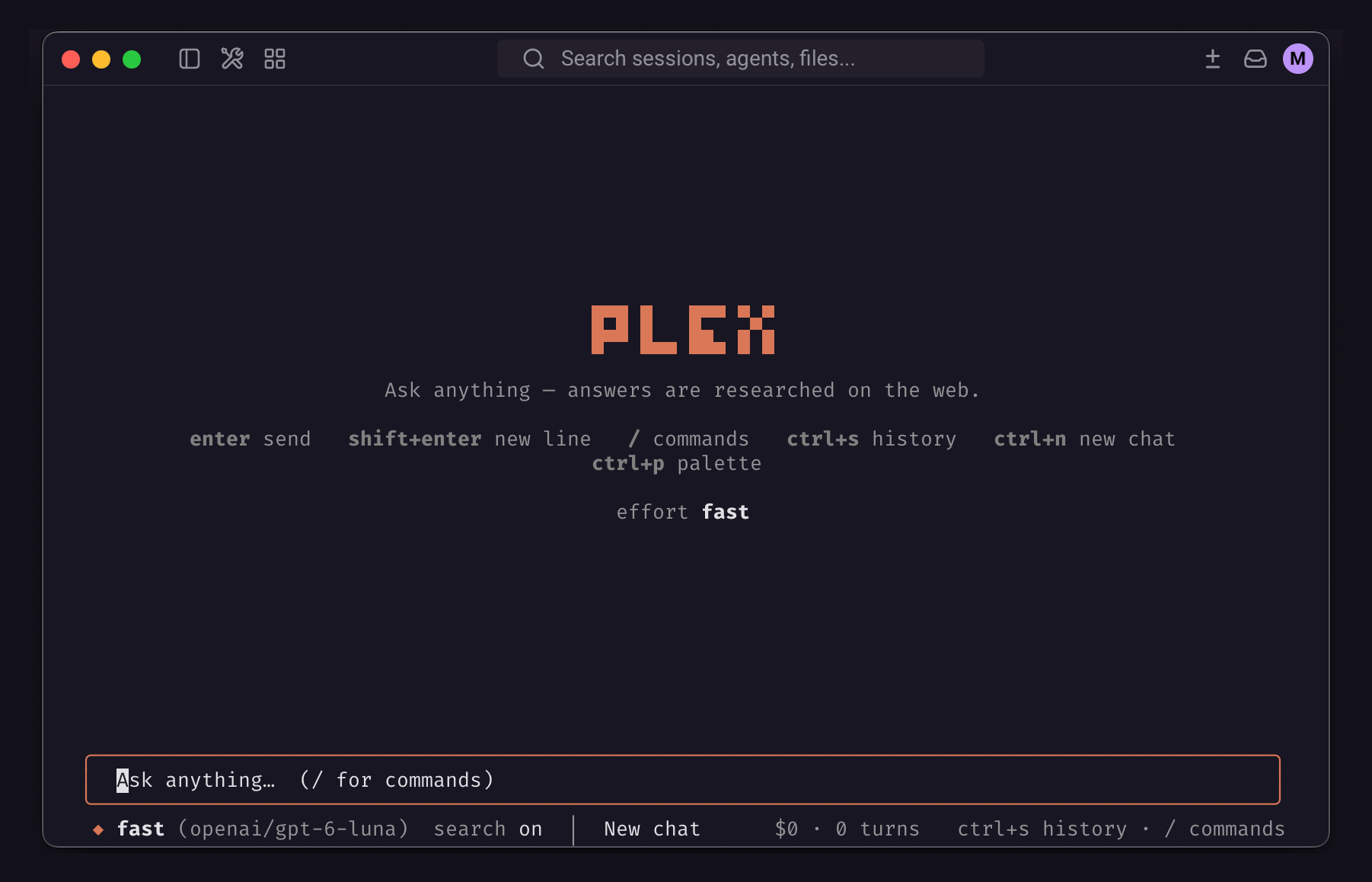
- agent_plex-0.9.0/src/plex_cli/tui/app.tcss +264 -0
- agent_plex-0.9.0/src/plex_cli/tui/backdrop.py +65 -0
- agent_plex-0.9.0/src/plex_cli/tui/commands.py +49 -0
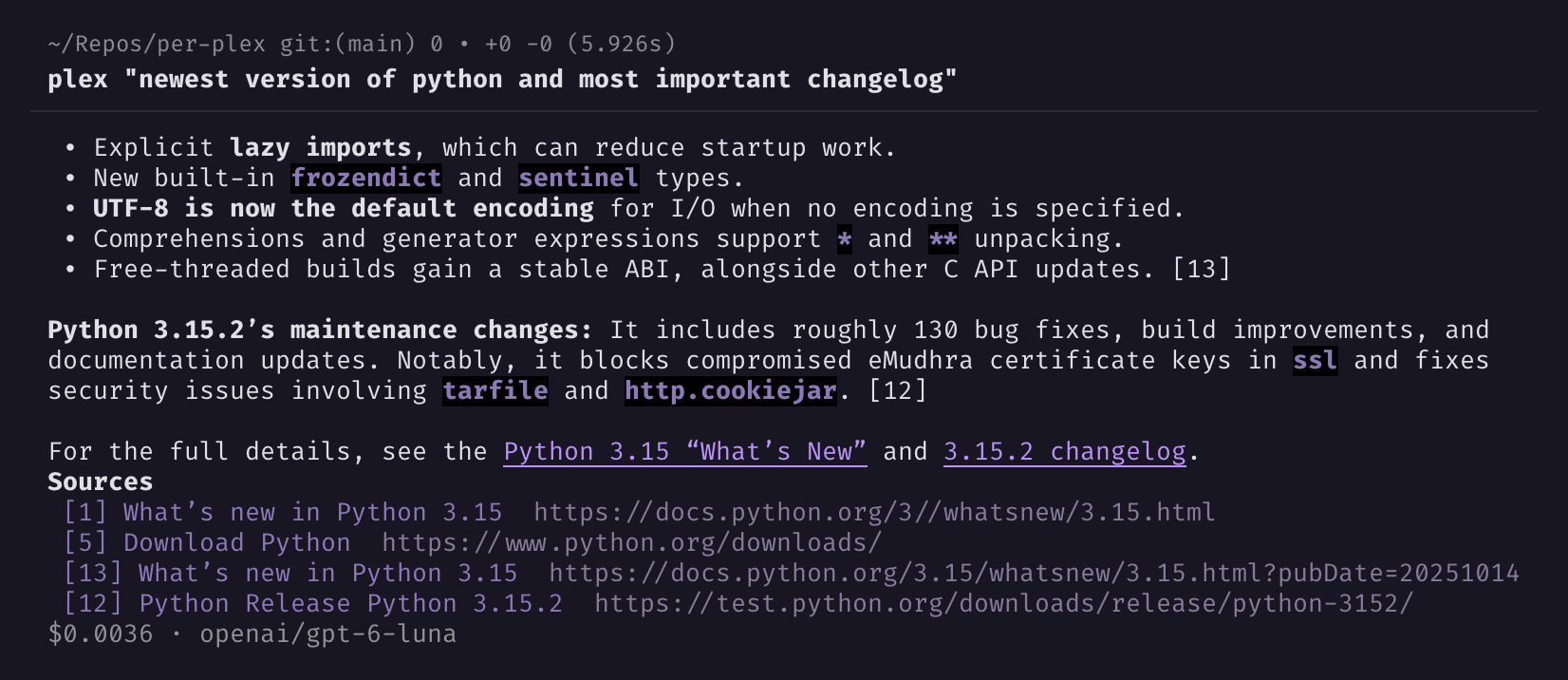
- agent_plex-0.9.0/src/plex_cli/tui/effects.py +174 -0
- agent_plex-0.9.0/src/plex_cli/tui/screens.py +290 -0
- agent_plex-0.9.0/src/plex_cli/tui/themes.py +150 -0
- agent_plex-0.9.0/src/plex_cli/tui/widgets.py +259 -0
- agent_plex-0.9.0/src/plex_cli/turn.py +94 -0
- agent_plex-0.9.0/tests/conftest.py +7 -0
- agent_plex-0.9.0/tests/test_core.py +390 -0
- agent_plex-0.9.0/tests/test_store_auth.py +273 -0
- agent_plex-0.9.0/tests/test_tui.py +669 -0
|
@@ -0,0 +1,13 @@
|
|
|
1
|
+
# Changelog
|
|
2
|
+
|
|
3
|
+
All notable changes to this project will be documented in this file.
|
|
4
|
+
|
|
5
|
+
The format is based on [Keep a Changelog](https://keepachangelog.com/),
|
|
6
|
+
and this project adheres to [Semantic Versioning](https://semver.org/).
|
|
7
|
+
|
|
8
|
+
## [Unreleased]
|
|
9
|
+
|
|
10
|
+
## [0.9.0] - 2026-11-19
|
|
11
|
+
First public release of agent-plex: a fast, good-looking Perplexity chat for your terminal, built on Perplexity's
|
|
12
|
+
Agent API. Install it from PyPI as `agent-plex` or with Homebrew from `manefunction/tap`; the command is `plex`.
|
|
13
|
+
|
agent_plex-0.9.0/LICENSE
ADDED
|
@@ -0,0 +1,22 @@
|
|
|
1
|
+
|
|
2
|
+
The MIT License (MIT)
|
|
3
|
+
|
|
4
|
+
Copyright (c) 2026 Ilia Petrov-Komotskii (Mane Function)
|
|
5
|
+
|
|
6
|
+
Permission is hereby granted, free of charge, to any person obtaining a copy
|
|
7
|
+
of this software and associated documentation files (the "Software"), to deal
|
|
8
|
+
in the Software without restriction, including without limitation the rights
|
|
9
|
+
to use, copy, modify, merge, publish, distribute, sublicense, and/or sell
|
|
10
|
+
copies of the Software, and to permit persons to whom the Software is
|
|
11
|
+
furnished to do so, subject to the following conditions:
|
|
12
|
+
|
|
13
|
+
The above copyright notice and this permission notice shall be included in all
|
|
14
|
+
copies or substantial portions of the Software.
|
|
15
|
+
|
|
16
|
+
THE SOFTWARE IS PROVIDED "AS IS", WITHOUT WARRANTY OF ANY KIND, EXPRESS OR
|
|
17
|
+
IMPLIED, INCLUDING BUT NOT LIMITED TO THE WARRANTIES OF MERCHANTABILITY,
|
|
18
|
+
FITNESS FOR A PARTICULAR PURPOSE AND NONINFRINGEMENT. IN NO EVENT SHALL THE
|
|
19
|
+
AUTHORS OR COPYRIGHT HOLDERS BE LIABLE FOR ANY CLAIM, DAMAGES OR OTHER
|
|
20
|
+
LIABILITY, WHETHER IN AN ACTION OF CONTRACT, TORT OR OTHERWISE, ARISING FROM,
|
|
21
|
+
OUT OF OR IN CONNECTION WITH THE SOFTWARE OR THE USE OR OTHER DEALINGS IN THE
|
|
22
|
+
SOFTWARE.
|
|
@@ -0,0 +1,221 @@
|
|
|
1
|
+
Metadata-Version: 2.4
|
|
2
|
+
Name: agent-plex
|
|
3
|
+
Version: 0.9.0
|
|
4
|
+
Summary: Chat with Perplexity from your terminal (Agent API).
|
|
5
|
+
Author-email: Ilia Petrov-Komotskii <ilia@inkedkettle.games>
|
|
6
|
+
License-Expression: MIT
|
|
7
|
+
Project-URL: Homepage, https://github.com/ManeFunction/agent-plex
|
|
8
|
+
Project-URL: Repository, https://github.com/ManeFunction/agent-plex
|
|
9
|
+
Project-URL: Issues, https://github.com/ManeFunction/agent-plex/issues
|
|
10
|
+
Project-URL: Changelog, https://github.com/ManeFunction/agent-plex/blob/main/CHANGELOG.md
|
|
11
|
+
Keywords: perplexity,chat,cli,tui,terminal,ai
|
|
12
|
+
Classifier: Programming Language :: Python :: 3
|
|
13
|
+
Classifier: Operating System :: OS Independent
|
|
14
|
+
Classifier: Environment :: Console
|
|
15
|
+
Classifier: Topic :: Utilities
|
|
16
|
+
Requires-Python: >=3.11
|
|
17
|
+
Description-Content-Type: text/markdown
|
|
18
|
+
License-File: LICENSE
|
|
19
|
+
Requires-Dist: perplexityai>=0.47
|
|
20
|
+
Requires-Dist: rich>=13
|
|
21
|
+
Requires-Dist: textual<9,>=8
|
|
22
|
+
Provides-Extra: dev
|
|
23
|
+
Requires-Dist: pytest>=8; extra == "dev"
|
|
24
|
+
Requires-Dist: pytest-asyncio>=0.23; extra == "dev"
|
|
25
|
+
Dynamic: license-file
|
|
26
|
+
|
|
27
|
+
# agent-plex
|
|
28
|
+
|
|
29
|
+
A fast, good-looking [Perplexity](https://www.perplexity.ai/) chat for your terminal: researched answers with sources, streamed live, with chat history.
|
|
30
|
+
|
|
31
|
+
It uses Perplexity's [Agent API](https://docs.perplexity.ai/) (`/v1/agent`). Perplexity subscription plan is **not** required. The package is called `agent-plex`; the command it installs is `plex`.
|
|
32
|
+
|
|
33
|
+
> The API is billed per use with an API key. A Perplexity Pro subscription doesn't cover it. A typical `fast` answer costs about $0.002, and plex shows the cost under every answer.
|
|
34
|
+
|
|
35
|
+
You can use it as a full-featured shell with a familiar UI and commands, similar to other popular agentic CLIs like Claude Code or OpenCode.
|
|
36
|
+
|
|
37
|
+
|
|
38
|
+
Or you can get quick answers right in the terminal, without interrupting your work or switching tools.
|
|
39
|
+
|
|
40
|
+
|
|
41
|
+
The main difference with plex is that it's built for quick use, spending minimal time and tokens.
|
|
42
|
+
Big harnesses use more than 10K tokens on every first message just to "set up" the model.
|
|
43
|
+
Perplexity is mainly a search-and-summarize engine, and plex is your door to it with nothing in between.
|
|
44
|
+
|
|
45
|
+
> [!IMPORTANT]
|
|
46
|
+
> Because of this design, Perplexity doesn't store your context on the server side,
|
|
47
|
+
> and every new message in a chat resends the whole history, which increases the cost.
|
|
48
|
+
> It's not meant for long conversations.
|
|
49
|
+
|
|
50
|
+
## Features
|
|
51
|
+
|
|
52
|
+
- Chat UI with streamed answers, inline source citations and the cost of every answer.
|
|
53
|
+
- One-shot mode for scripts: `plex "question"`, and piped input is appended to the question.
|
|
54
|
+
- Effort presets from `fast` to `ultra`, or pick a specific model and its reasoning effort.
|
|
55
|
+
- Saved conversations: reopen the last one, search by id or title, rename, delete, or clear everything.
|
|
56
|
+
- History sidebar, command palette, `/commands` with tab completion, copy the last answer.
|
|
57
|
+
- Themes: ones that keep your terminal's own colors, a few full-color ones, and your own as a small TOML file.
|
|
58
|
+
- Your API key is stored in a file only you can read, or taken from `PERPLEXITY_API_KEY`.
|
|
59
|
+
|
|
60
|
+
## Installation
|
|
61
|
+
|
|
62
|
+
**agent-plex** is available from a variety of sources.
|
|
63
|
+
`pip` or `brew` is recommended, because they have a convenient way to manage updates automatically.
|
|
64
|
+
It needs Python 3.11 or newer.
|
|
65
|
+
|
|
66
|
+
1) **pip (Recommended for everyone with a Python environment)**
|
|
67
|
+
- You can check if you have Python installed by running `python --version` in the Terminal or cmd.
|
|
68
|
+
- For Mac and Linux users, there is a high chance that you already have Python installed on your system.
|
|
69
|
+
- For Windows users, you can download Python from the [official website](https://www.python.org/downloads/).
|
|
70
|
+
- After confirmation, install **agent-plex** through the [PyPI](https://pypi.org/project/agent-plex) package
|
|
71
|
+
manager, typing `pip install agent-plex` in the Terminal. For Mac users, you may need to use `pip3`
|
|
72
|
+
instead of `pip`. The package is called `agent-plex`; the command it installs is `plex`.
|
|
73
|
+
- Verify the installation with `plex --version`.
|
|
74
|
+
- You are perfect, you can use the app with `plex` from any folder in your system.
|
|
75
|
+
2) **brew (Recommended for Mac and Linux users)**
|
|
76
|
+
- Type `brew tap manefunction/tap` in your Terminal to add my custom tap (app source) to your brew sources,
|
|
77
|
+
if you haven't already.
|
|
78
|
+
- Type `brew install agent-plex` to install the application itself.
|
|
79
|
+
- Verify the installation with `plex --version`.
|
|
80
|
+
- You are perfect, you can use the app with `plex` from any folder in your system.
|
|
81
|
+
3) **Python package (manual installation, for advanced users)**
|
|
82
|
+
- Clone the repository or download the source code from GitHub.
|
|
83
|
+
- Go to the folder with the code in your Terminal.
|
|
84
|
+
- Run `pip install .` to install `agent-plex` to your system.
|
|
85
|
+
- Run `plex --version` to verify the install.
|
|
86
|
+
|
|
87
|
+
## Usage
|
|
88
|
+
|
|
89
|
+
### Log in
|
|
90
|
+
|
|
91
|
+
```sh
|
|
92
|
+
plex auth login # paste a key from https://www.perplexity.ai/account/api
|
|
93
|
+
```
|
|
94
|
+
|
|
95
|
+
This works like opencode: the key is stored in `~/.local/share/plex/auth.json` with mode `600`. You can also just start `plex`, and it will ask for a key the first time. `PERPLEXITY_API_KEY` in the environment takes precedence over the stored key.
|
|
96
|
+
|
|
97
|
+
| Command | |
|
|
98
|
+
|---|---|
|
|
99
|
+
| `plex auth status` | shows which key is in use (masked) |
|
|
100
|
+
| `plex auth logout` | removes the stored key |
|
|
101
|
+
|
|
102
|
+
### Chat
|
|
103
|
+
|
|
104
|
+
```sh
|
|
105
|
+
plex # open the chat
|
|
106
|
+
plex -r # reopen the last conversation
|
|
107
|
+
plex -o "python" # reopen a conversation by id or title text
|
|
108
|
+
plex --history # list saved conversations
|
|
109
|
+
plex --clear # delete all saved conversations (asks y/n first)
|
|
110
|
+
|
|
111
|
+
plex "what's new in Python 3.15?" # one-shot: print the answer and exit
|
|
112
|
+
git diff | plex "review this" # piped input is appended to the question
|
|
113
|
+
plex -p high "compare uv and pip" # pick an effort preset
|
|
114
|
+
plex -m openai/gpt-6-luna -e high "…" # a specific model and its effort
|
|
115
|
+
```
|
|
116
|
+
|
|
117
|
+
### Keys
|
|
118
|
+
|
|
119
|
+
| Key | Action |
|
|
120
|
+
|---|---|
|
|
121
|
+
| `enter` | send |
|
|
122
|
+
| `shift+enter` / `alt+enter` / `ctrl+j` | new line |
|
|
123
|
+
| `↑` / `↓` on an empty prompt | recall earlier questions |
|
|
124
|
+
| `esc` | cancel the answer being written |
|
|
125
|
+
| `ctrl+n` | new chat |
|
|
126
|
+
| `ctrl+s` | history sidebar |
|
|
127
|
+
| `ctrl+e` | effort preset picker |
|
|
128
|
+
| `ctrl+p` | command palette |
|
|
129
|
+
| `ctrl+q` | quit |
|
|
130
|
+
|
|
131
|
+
### Commands
|
|
132
|
+
|
|
133
|
+
Type `/` to see suggestions, then press `tab` to complete.
|
|
134
|
+
|
|
135
|
+
| Command | |
|
|
136
|
+
|---|---|
|
|
137
|
+
| `/new`, `/clear` | new conversation |
|
|
138
|
+
| `/history` | browse history |
|
|
139
|
+
| `/preset [level]` | effort preset: `fast` · `low` · `medium` · `high` · `xhigh` · `ultra` (drops a selected model) |
|
|
140
|
+
| `/effort [level]` | effort for the selected model: `minimal` · `low` · `medium` · `high` · `xhigh` · `max` · `default` (in preset mode, asks for a model first) |
|
|
141
|
+
| `/model [id]` / `/model off` | pick a model from the list your key can use, or give an id (e.g. `perplexity/sonar`) / go back to presets |
|
|
142
|
+
| `/search [on\|off]` | toggle web search |
|
|
143
|
+
| `/sources` | sources of the last answer |
|
|
144
|
+
| `/copy` | copy the last answer |
|
|
145
|
+
| `/rename <title>` | rename this conversation |
|
|
146
|
+
| `/delete` | delete this conversation |
|
|
147
|
+
| `/theme` | change the theme |
|
|
148
|
+
| `/login` | set the API key |
|
|
149
|
+
| `/help` | keys and commands |
|
|
150
|
+
| `/quit`, `/exit` | exit |
|
|
151
|
+
|
|
152
|
+
### Files
|
|
153
|
+
|
|
154
|
+
| Path | |
|
|
155
|
+
|---|---|
|
|
156
|
+
| `~/.local/share/plex/auth.json` | API key (0600) |
|
|
157
|
+
| `~/.local/share/plex/sessions/*.json` | conversations, saved after every answer; ones not updated in 64 days (`keep_days`) are deleted when plex starts |
|
|
158
|
+
| `~/.local/share/plex/state.json` | last used effort, model, reasoning effort, search and theme, plus the model last seen for each effort level |
|
|
159
|
+
| `~/.config/plex/config.toml` | optional defaults (see below) |
|
|
160
|
+
|
|
161
|
+
```toml
|
|
162
|
+
# ~/.config/plex/config.toml
|
|
163
|
+
effort = "fast"
|
|
164
|
+
# model = "perplexity/sonar"
|
|
165
|
+
# reasoning = "medium" # reasoning effort in model mode: minimal … max
|
|
166
|
+
# search = true
|
|
167
|
+
# theme = "terminal"
|
|
168
|
+
# max_steps = 5 # research steps in model mode
|
|
169
|
+
# keep_days = 64 # delete conversations not updated in this many days; 0 keeps them forever
|
|
170
|
+
# instructions = "..." # custom system prompt
|
|
171
|
+
```
|
|
172
|
+
|
|
173
|
+
### Themes
|
|
174
|
+
|
|
175
|
+
`terminal` (the default), `terminal-coral`, `terminal-green` and `terminal-violet` keep your terminal's own background, text and palette and add a single accent color. `terminal` takes its accent from the terminal palette too, so it fits any color scheme, light or dark. `matrix` is `terminal-green` with dim digital rain falling behind the chat. The rain never runs through text and pauses while the terminal window is in the background. The others are `tokyo-night`, `catppuccin-mocha`, `dracula` and `gruvbox`.
|
|
176
|
+
|
|
177
|
+
Each theme is one TOML file, named after the theme. The bundled ones live in [`src/plex_cli/themes/`](https://github.com/ManeFunction/agent-plex/tree/main/src/plex_cli/themes). To add your own, put a file in `~/.config/plex/themes/` (`$XDG_CONFIG_HOME/plex/themes/` if that's set, on Linux and macOS alike). plex creates this folder the first time you open the chat UI (one-shot questions don't), with an empty `PUT_YOUR_THEMES_HERE` file in it. Your themes are loaded alongside the bundled ones and show up in `/theme` the next time plex starts. A file with the same name as a bundled theme replaces it. Files with mistakes are skipped, and plex tells you why at startup.
|
|
178
|
+
|
|
179
|
+
A terminal-style theme needs just an accent:
|
|
180
|
+
|
|
181
|
+
```toml
|
|
182
|
+
# ~/.config/plex/themes/terminal-teal.toml
|
|
183
|
+
terminal = true # use the terminal's own background, text and palette
|
|
184
|
+
accent = "#2AA198" # any hex color, or a terminal color like "ansi_cyan"
|
|
185
|
+
# effect = "rain" # optional animated background (the one `matrix` uses)
|
|
186
|
+
```
|
|
187
|
+
|
|
188
|
+
A full-color theme sets its own colors (`primary` is required, the rest are optional):
|
|
189
|
+
|
|
190
|
+
```toml
|
|
191
|
+
# ~/.config/plex/themes/my-theme.toml
|
|
192
|
+
primary = "#88C0D0" # highlights
|
|
193
|
+
secondary = "#81A1C1" # your messages, key hints
|
|
194
|
+
accent = "#EBCB8B" # answer bar, focused input
|
|
195
|
+
warning = "#EBCB8B"
|
|
196
|
+
error = "#BF616A"
|
|
197
|
+
success = "#A3BE8C"
|
|
198
|
+
foreground = "#D8DEE9" # text
|
|
199
|
+
background = "#2E3440"
|
|
200
|
+
surface = "#3B4252" # sidebar, menus, dialogs
|
|
201
|
+
panel = "#434C5E" # borders
|
|
202
|
+
dark = true # false for light themes
|
|
203
|
+
|
|
204
|
+
[variables] # optional fine-tuning with Textual theme variables
|
|
205
|
+
border = "#88C0D0"
|
|
206
|
+
```
|
|
207
|
+
|
|
208
|
+
## Credits
|
|
209
|
+
|
|
210
|
+
Built on the [Perplexity Python SDK](https://github.com/perplexityai/perplexity-py), [Textual](https://textual.textualize.io/) and [Rich](https://github.com/Textualize/rich).
|
|
211
|
+
This is an unofficial client and is not affiliated with Perplexity AI.
|
|
212
|
+
|
|
213
|
+
## Repository info
|
|
214
|
+
|
|
215
|
+
This repo follows the [Conventional Commits](https://www.conventionalcommits.org/) specification.
|
|
216
|
+
|
|
217
|
+
[](https://github.com/ManeFunction/agent-plex/releases/latest)
|
|
218
|
+
[](https://github.com/ManeFunction/agent-plex/releases)
|
|
219
|
+
[](https://pypi.org/project/agent-plex/)
|
|
220
|
+
[](https://pypi.org/project/agent-plex/)
|
|
221
|
+
[](https://github.com/sponsors/ManeFunction)
|
|
@@ -0,0 +1,195 @@
|
|
|
1
|
+
# agent-plex
|
|
2
|
+
|
|
3
|
+
A fast, good-looking [Perplexity](https://www.perplexity.ai/) chat for your terminal: researched answers with sources, streamed live, with chat history.
|
|
4
|
+
|
|
5
|
+
It uses Perplexity's [Agent API](https://docs.perplexity.ai/) (`/v1/agent`). Perplexity subscription plan is **not** required. The package is called `agent-plex`; the command it installs is `plex`.
|
|
6
|
+
|
|
7
|
+
> The API is billed per use with an API key. A Perplexity Pro subscription doesn't cover it. A typical `fast` answer costs about $0.002, and plex shows the cost under every answer.
|
|
8
|
+
|
|
9
|
+
You can use it as a full-featured shell with a familiar UI and commands, similar to other popular agentic CLIs like Claude Code or OpenCode.
|
|
10
|
+

|
|
11
|
+
|
|
12
|
+
Or you can get quick answers right in the terminal, without interrupting your work or switching tools.
|
|
13
|
+

|
|
14
|
+
|
|
15
|
+
The main difference with plex is that it's built for quick use, spending minimal time and tokens.
|
|
16
|
+
Big harnesses use more than 10K tokens on every first message just to "set up" the model.
|
|
17
|
+
Perplexity is mainly a search-and-summarize engine, and plex is your door to it with nothing in between.
|
|
18
|
+
|
|
19
|
+
> [!IMPORTANT]
|
|
20
|
+
> Because of this design, Perplexity doesn't store your context on the server side,
|
|
21
|
+
> and every new message in a chat resends the whole history, which increases the cost.
|
|
22
|
+
> It's not meant for long conversations.
|
|
23
|
+
|
|
24
|
+
## Features
|
|
25
|
+
|
|
26
|
+
- Chat UI with streamed answers, inline source citations and the cost of every answer.
|
|
27
|
+
- One-shot mode for scripts: `plex "question"`, and piped input is appended to the question.
|
|
28
|
+
- Effort presets from `fast` to `ultra`, or pick a specific model and its reasoning effort.
|
|
29
|
+
- Saved conversations: reopen the last one, search by id or title, rename, delete, or clear everything.
|
|
30
|
+
- History sidebar, command palette, `/commands` with tab completion, copy the last answer.
|
|
31
|
+
- Themes: ones that keep your terminal's own colors, a few full-color ones, and your own as a small TOML file.
|
|
32
|
+
- Your API key is stored in a file only you can read, or taken from `PERPLEXITY_API_KEY`.
|
|
33
|
+
|
|
34
|
+
## Installation
|
|
35
|
+
|
|
36
|
+
**agent-plex** is available from a variety of sources.
|
|
37
|
+
`pip` or `brew` is recommended, because they have a convenient way to manage updates automatically.
|
|
38
|
+
It needs Python 3.11 or newer.
|
|
39
|
+
|
|
40
|
+
1) **pip (Recommended for everyone with a Python environment)**
|
|
41
|
+
- You can check if you have Python installed by running `python --version` in the Terminal or cmd.
|
|
42
|
+
- For Mac and Linux users, there is a high chance that you already have Python installed on your system.
|
|
43
|
+
- For Windows users, you can download Python from the [official website](https://www.python.org/downloads/).
|
|
44
|
+
- After confirmation, install **agent-plex** through the [PyPI](https://pypi.org/project/agent-plex) package
|
|
45
|
+
manager, typing `pip install agent-plex` in the Terminal. For Mac users, you may need to use `pip3`
|
|
46
|
+
instead of `pip`. The package is called `agent-plex`; the command it installs is `plex`.
|
|
47
|
+
- Verify the installation with `plex --version`.
|
|
48
|
+
- You are perfect, you can use the app with `plex` from any folder in your system.
|
|
49
|
+
2) **brew (Recommended for Mac and Linux users)**
|
|
50
|
+
- Type `brew tap manefunction/tap` in your Terminal to add my custom tap (app source) to your brew sources,
|
|
51
|
+
if you haven't already.
|
|
52
|
+
- Type `brew install agent-plex` to install the application itself.
|
|
53
|
+
- Verify the installation with `plex --version`.
|
|
54
|
+
- You are perfect, you can use the app with `plex` from any folder in your system.
|
|
55
|
+
3) **Python package (manual installation, for advanced users)**
|
|
56
|
+
- Clone the repository or download the source code from GitHub.
|
|
57
|
+
- Go to the folder with the code in your Terminal.
|
|
58
|
+
- Run `pip install .` to install `agent-plex` to your system.
|
|
59
|
+
- Run `plex --version` to verify the install.
|
|
60
|
+
|
|
61
|
+
## Usage
|
|
62
|
+
|
|
63
|
+
### Log in
|
|
64
|
+
|
|
65
|
+
```sh
|
|
66
|
+
plex auth login # paste a key from https://www.perplexity.ai/account/api
|
|
67
|
+
```
|
|
68
|
+
|
|
69
|
+
This works like opencode: the key is stored in `~/.local/share/plex/auth.json` with mode `600`. You can also just start `plex`, and it will ask for a key the first time. `PERPLEXITY_API_KEY` in the environment takes precedence over the stored key.
|
|
70
|
+
|
|
71
|
+
| Command | |
|
|
72
|
+
|---|---|
|
|
73
|
+
| `plex auth status` | shows which key is in use (masked) |
|
|
74
|
+
| `plex auth logout` | removes the stored key |
|
|
75
|
+
|
|
76
|
+
### Chat
|
|
77
|
+
|
|
78
|
+
```sh
|
|
79
|
+
plex # open the chat
|
|
80
|
+
plex -r # reopen the last conversation
|
|
81
|
+
plex -o "python" # reopen a conversation by id or title text
|
|
82
|
+
plex --history # list saved conversations
|
|
83
|
+
plex --clear # delete all saved conversations (asks y/n first)
|
|
84
|
+
|
|
85
|
+
plex "what's new in Python 3.15?" # one-shot: print the answer and exit
|
|
86
|
+
git diff | plex "review this" # piped input is appended to the question
|
|
87
|
+
plex -p high "compare uv and pip" # pick an effort preset
|
|
88
|
+
plex -m openai/gpt-6-luna -e high "…" # a specific model and its effort
|
|
89
|
+
```
|
|
90
|
+
|
|
91
|
+
### Keys
|
|
92
|
+
|
|
93
|
+
| Key | Action |
|
|
94
|
+
|---|---|
|
|
95
|
+
| `enter` | send |
|
|
96
|
+
| `shift+enter` / `alt+enter` / `ctrl+j` | new line |
|
|
97
|
+
| `↑` / `↓` on an empty prompt | recall earlier questions |
|
|
98
|
+
| `esc` | cancel the answer being written |
|
|
99
|
+
| `ctrl+n` | new chat |
|
|
100
|
+
| `ctrl+s` | history sidebar |
|
|
101
|
+
| `ctrl+e` | effort preset picker |
|
|
102
|
+
| `ctrl+p` | command palette |
|
|
103
|
+
| `ctrl+q` | quit |
|
|
104
|
+
|
|
105
|
+
### Commands
|
|
106
|
+
|
|
107
|
+
Type `/` to see suggestions, then press `tab` to complete.
|
|
108
|
+
|
|
109
|
+
| Command | |
|
|
110
|
+
|---|---|
|
|
111
|
+
| `/new`, `/clear` | new conversation |
|
|
112
|
+
| `/history` | browse history |
|
|
113
|
+
| `/preset [level]` | effort preset: `fast` · `low` · `medium` · `high` · `xhigh` · `ultra` (drops a selected model) |
|
|
114
|
+
| `/effort [level]` | effort for the selected model: `minimal` · `low` · `medium` · `high` · `xhigh` · `max` · `default` (in preset mode, asks for a model first) |
|
|
115
|
+
| `/model [id]` / `/model off` | pick a model from the list your key can use, or give an id (e.g. `perplexity/sonar`) / go back to presets |
|
|
116
|
+
| `/search [on\|off]` | toggle web search |
|
|
117
|
+
| `/sources` | sources of the last answer |
|
|
118
|
+
| `/copy` | copy the last answer |
|
|
119
|
+
| `/rename <title>` | rename this conversation |
|
|
120
|
+
| `/delete` | delete this conversation |
|
|
121
|
+
| `/theme` | change the theme |
|
|
122
|
+
| `/login` | set the API key |
|
|
123
|
+
| `/help` | keys and commands |
|
|
124
|
+
| `/quit`, `/exit` | exit |
|
|
125
|
+
|
|
126
|
+
### Files
|
|
127
|
+
|
|
128
|
+
| Path | |
|
|
129
|
+
|---|---|
|
|
130
|
+
| `~/.local/share/plex/auth.json` | API key (0600) |
|
|
131
|
+
| `~/.local/share/plex/sessions/*.json` | conversations, saved after every answer; ones not updated in 64 days (`keep_days`) are deleted when plex starts |
|
|
132
|
+
| `~/.local/share/plex/state.json` | last used effort, model, reasoning effort, search and theme, plus the model last seen for each effort level |
|
|
133
|
+
| `~/.config/plex/config.toml` | optional defaults (see below) |
|
|
134
|
+
|
|
135
|
+
```toml
|
|
136
|
+
# ~/.config/plex/config.toml
|
|
137
|
+
effort = "fast"
|
|
138
|
+
# model = "perplexity/sonar"
|
|
139
|
+
# reasoning = "medium" # reasoning effort in model mode: minimal … max
|
|
140
|
+
# search = true
|
|
141
|
+
# theme = "terminal"
|
|
142
|
+
# max_steps = 5 # research steps in model mode
|
|
143
|
+
# keep_days = 64 # delete conversations not updated in this many days; 0 keeps them forever
|
|
144
|
+
# instructions = "..." # custom system prompt
|
|
145
|
+
```
|
|
146
|
+
|
|
147
|
+
### Themes
|
|
148
|
+
|
|
149
|
+
`terminal` (the default), `terminal-coral`, `terminal-green` and `terminal-violet` keep your terminal's own background, text and palette and add a single accent color. `terminal` takes its accent from the terminal palette too, so it fits any color scheme, light or dark. `matrix` is `terminal-green` with dim digital rain falling behind the chat. The rain never runs through text and pauses while the terminal window is in the background. The others are `tokyo-night`, `catppuccin-mocha`, `dracula` and `gruvbox`.
|
|
150
|
+
|
|
151
|
+
Each theme is one TOML file, named after the theme. The bundled ones live in [`src/plex_cli/themes/`](https://github.com/ManeFunction/agent-plex/tree/main/src/plex_cli/themes). To add your own, put a file in `~/.config/plex/themes/` (`$XDG_CONFIG_HOME/plex/themes/` if that's set, on Linux and macOS alike). plex creates this folder the first time you open the chat UI (one-shot questions don't), with an empty `PUT_YOUR_THEMES_HERE` file in it. Your themes are loaded alongside the bundled ones and show up in `/theme` the next time plex starts. A file with the same name as a bundled theme replaces it. Files with mistakes are skipped, and plex tells you why at startup.
|
|
152
|
+
|
|
153
|
+
A terminal-style theme needs just an accent:
|
|
154
|
+
|
|
155
|
+
```toml
|
|
156
|
+
# ~/.config/plex/themes/terminal-teal.toml
|
|
157
|
+
terminal = true # use the terminal's own background, text and palette
|
|
158
|
+
accent = "#2AA198" # any hex color, or a terminal color like "ansi_cyan"
|
|
159
|
+
# effect = "rain" # optional animated background (the one `matrix` uses)
|
|
160
|
+
```
|
|
161
|
+
|
|
162
|
+
A full-color theme sets its own colors (`primary` is required, the rest are optional):
|
|
163
|
+
|
|
164
|
+
```toml
|
|
165
|
+
# ~/.config/plex/themes/my-theme.toml
|
|
166
|
+
primary = "#88C0D0" # highlights
|
|
167
|
+
secondary = "#81A1C1" # your messages, key hints
|
|
168
|
+
accent = "#EBCB8B" # answer bar, focused input
|
|
169
|
+
warning = "#EBCB8B"
|
|
170
|
+
error = "#BF616A"
|
|
171
|
+
success = "#A3BE8C"
|
|
172
|
+
foreground = "#D8DEE9" # text
|
|
173
|
+
background = "#2E3440"
|
|
174
|
+
surface = "#3B4252" # sidebar, menus, dialogs
|
|
175
|
+
panel = "#434C5E" # borders
|
|
176
|
+
dark = true # false for light themes
|
|
177
|
+
|
|
178
|
+
[variables] # optional fine-tuning with Textual theme variables
|
|
179
|
+
border = "#88C0D0"
|
|
180
|
+
```
|
|
181
|
+
|
|
182
|
+
## Credits
|
|
183
|
+
|
|
184
|
+
Built on the [Perplexity Python SDK](https://github.com/perplexityai/perplexity-py), [Textual](https://textual.textualize.io/) and [Rich](https://github.com/Textualize/rich).
|
|
185
|
+
This is an unofficial client and is not affiliated with Perplexity AI.
|
|
186
|
+
|
|
187
|
+
## Repository info
|
|
188
|
+
|
|
189
|
+
This repo follows the [Conventional Commits](https://www.conventionalcommits.org/) specification.
|
|
190
|
+
|
|
191
|
+
[](https://github.com/ManeFunction/agent-plex/releases/latest)
|
|
192
|
+
[](https://github.com/ManeFunction/agent-plex/releases)
|
|
193
|
+
[](https://pypi.org/project/agent-plex/)
|
|
194
|
+
[](https://pypi.org/project/agent-plex/)
|
|
195
|
+
[](https://github.com/sponsors/ManeFunction)
|
|
@@ -0,0 +1,55 @@
|
|
|
1
|
+
[build-system]
|
|
2
|
+
requires = ["setuptools>=77"]
|
|
3
|
+
build-backend = "setuptools.build_meta"
|
|
4
|
+
|
|
5
|
+
[project]
|
|
6
|
+
name = "agent-plex"
|
|
7
|
+
dynamic = ["version"]
|
|
8
|
+
description = "Chat with Perplexity from your terminal (Agent API)."
|
|
9
|
+
readme = "README.md"
|
|
10
|
+
authors = [
|
|
11
|
+
{ name = "Ilia Petrov-Komotskii", email = "ilia@inkedkettle.games" }
|
|
12
|
+
]
|
|
13
|
+
license = "MIT"
|
|
14
|
+
requires-python = ">=3.11"
|
|
15
|
+
keywords = ["perplexity", "chat", "cli", "tui", "terminal", "ai"]
|
|
16
|
+
classifiers = [
|
|
17
|
+
"Programming Language :: Python :: 3",
|
|
18
|
+
"Operating System :: OS Independent",
|
|
19
|
+
"Environment :: Console",
|
|
20
|
+
"Topic :: Utilities",
|
|
21
|
+
]
|
|
22
|
+
dependencies = [
|
|
23
|
+
"perplexityai>=0.47",
|
|
24
|
+
"rich>=13",
|
|
25
|
+
"textual>=8,<9", # the TUI overrides private Textual hooks (see tui/screens.py)
|
|
26
|
+
]
|
|
27
|
+
|
|
28
|
+
[project.optional-dependencies]
|
|
29
|
+
dev = ["pytest>=8", "pytest-asyncio>=0.23"]
|
|
30
|
+
|
|
31
|
+
[project.urls]
|
|
32
|
+
Homepage = "https://github.com/ManeFunction/agent-plex"
|
|
33
|
+
Repository = "https://github.com/ManeFunction/agent-plex"
|
|
34
|
+
Issues = "https://github.com/ManeFunction/agent-plex/issues"
|
|
35
|
+
Changelog = "https://github.com/ManeFunction/agent-plex/blob/main/CHANGELOG.md"
|
|
36
|
+
|
|
37
|
+
[project.scripts]
|
|
38
|
+
plex = "plex_cli.cli:main"
|
|
39
|
+
|
|
40
|
+
[tool.setuptools.dynamic]
|
|
41
|
+
version = { attr = "plex_cli.__version__" }
|
|
42
|
+
|
|
43
|
+
[tool.setuptools.packages.find]
|
|
44
|
+
where = ["src"]
|
|
45
|
+
|
|
46
|
+
[tool.setuptools.package-dir]
|
|
47
|
+
"" = "src"
|
|
48
|
+
|
|
49
|
+
[tool.setuptools.package-data]
|
|
50
|
+
plex_cli = ["themes/*.toml", "tui/*.tcss"]
|
|
51
|
+
|
|
52
|
+
[tool.pytest.ini_options]
|
|
53
|
+
testpaths = ["tests"]
|
|
54
|
+
pythonpath = ["src", "tests"]
|
|
55
|
+
asyncio_default_fixture_loop_scope = "function"
|