age_mcp_server 0.2.47__tar.gz
This diff represents the content of publicly available package versions that have been released to one of the supported registries. The information contained in this diff is provided for informational purposes only and reflects changes between package versions as they appear in their respective public registries.
- age_mcp_server-0.2.47/.gitignore +11 -0
- age_mcp_server-0.2.47/LICENSE +21 -0
- age_mcp_server-0.2.47/PKG-INFO +296 -0
- age_mcp_server-0.2.47/README.md +255 -0
- age_mcp_server-0.2.47/pyproject.toml +59 -0
- age_mcp_server-0.2.47/src/age_mcp_server/__init__.py +73 -0
- age_mcp_server-0.2.47/src/age_mcp_server/server.py +404 -0
|
@@ -0,0 +1,21 @@
|
|
|
1
|
+
MIT License
|
|
2
|
+
|
|
3
|
+
Copyright (c) 2025 Rio Fujita
|
|
4
|
+
|
|
5
|
+
Permission is hereby granted, free of charge, to any person obtaining a copy
|
|
6
|
+
of this software and associated documentation files (the "Software"), to deal
|
|
7
|
+
in the Software without restriction, including without limitation the rights
|
|
8
|
+
to use, copy, modify, merge, publish, distribute, sublicense, and/or sell
|
|
9
|
+
copies of the Software, and to permit persons to whom the Software is
|
|
10
|
+
furnished to do so, subject to the following conditions:
|
|
11
|
+
|
|
12
|
+
The above copyright notice and this permission notice shall be included in all
|
|
13
|
+
copies or substantial portions of the Software.
|
|
14
|
+
|
|
15
|
+
THE SOFTWARE IS PROVIDED "AS IS", WITHOUT WARRANTY OF ANY KIND, EXPRESS OR
|
|
16
|
+
IMPLIED, INCLUDING BUT NOT LIMITED TO THE WARRANTIES OF MERCHANTABILITY,
|
|
17
|
+
FITNESS FOR A PARTICULAR PURPOSE AND NONINFRINGEMENT. IN NO EVENT SHALL THE
|
|
18
|
+
AUTHORS OR COPYRIGHT HOLDERS BE LIABLE FOR ANY CLAIM, DAMAGES OR OTHER
|
|
19
|
+
LIABILITY, WHETHER IN AN ACTION OF CONTRACT, TORT OR OTHERWISE, ARISING FROM,
|
|
20
|
+
OUT OF OR IN CONNECTION WITH THE SOFTWARE OR THE USE OR OTHER DEALINGS IN THE
|
|
21
|
+
SOFTWARE.
|
|
@@ -0,0 +1,296 @@
|
|
|
1
|
+
Metadata-Version: 2.4
|
|
2
|
+
Name: age_mcp_server
|
|
3
|
+
Version: 0.2.47
|
|
4
|
+
Summary: Apache AGE MCP Server
|
|
5
|
+
Project-URL: Homepage, https://github.com/rioriost/age_mcp_server
|
|
6
|
+
Project-URL: Issues, https://github.com/rioriost/age_mcp_server/issues
|
|
7
|
+
Project-URL: Repository, https://github.com/rioriost/age_mcp_server
|
|
8
|
+
Author-email: Rio Fujita <rio_github@rio.st>
|
|
9
|
+
License: MIT License
|
|
10
|
+
|
|
11
|
+
Copyright (c) 2025 Rio Fujita
|
|
12
|
+
|
|
13
|
+
Permission is hereby granted, free of charge, to any person obtaining a copy
|
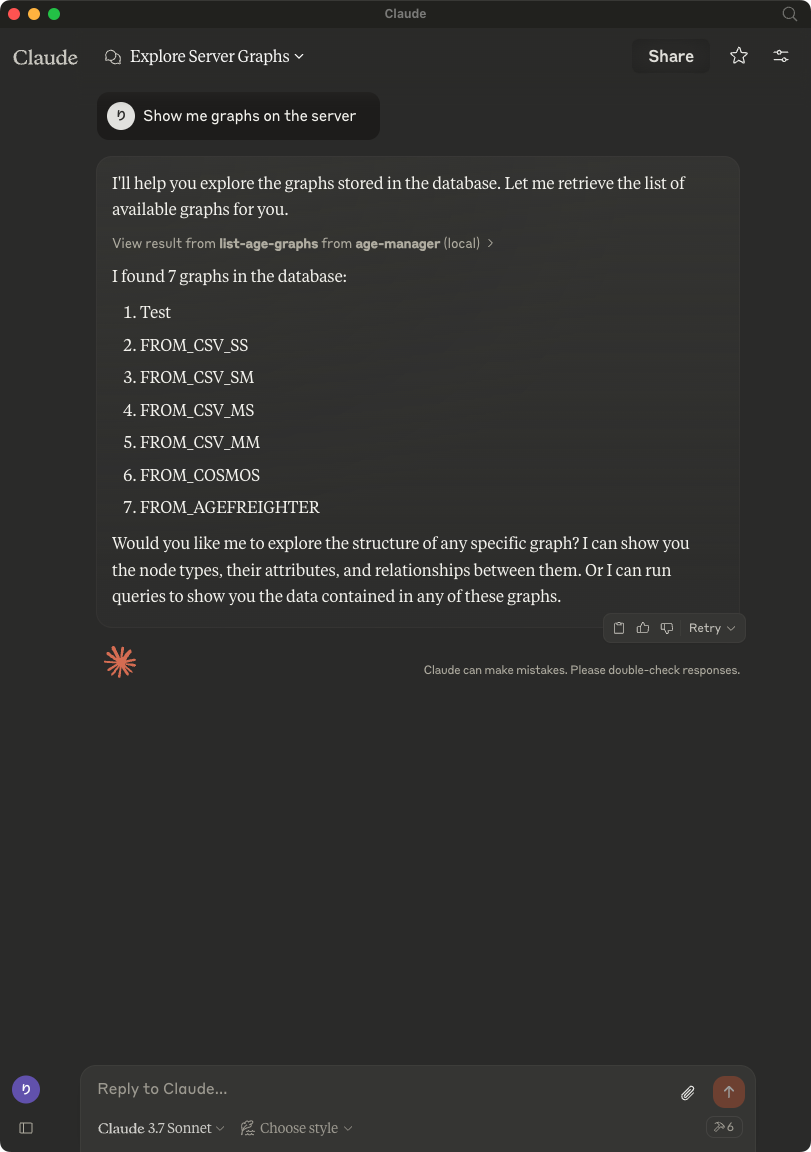
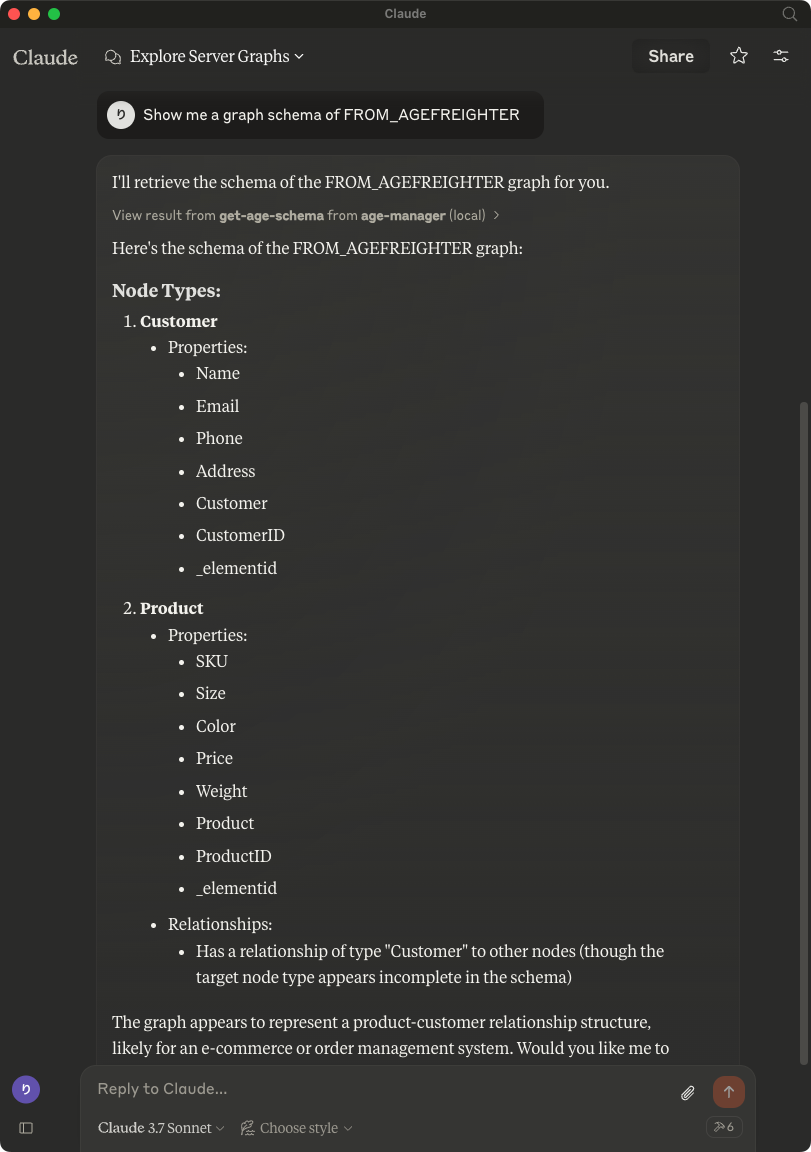
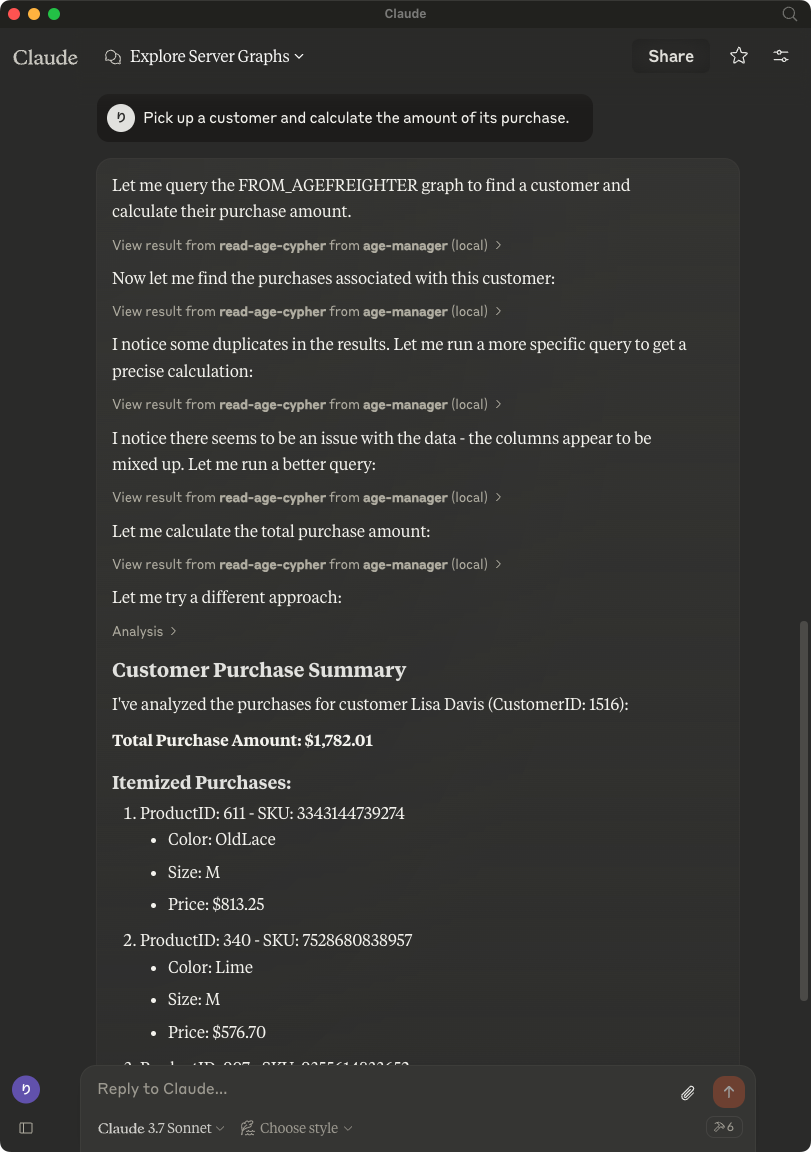
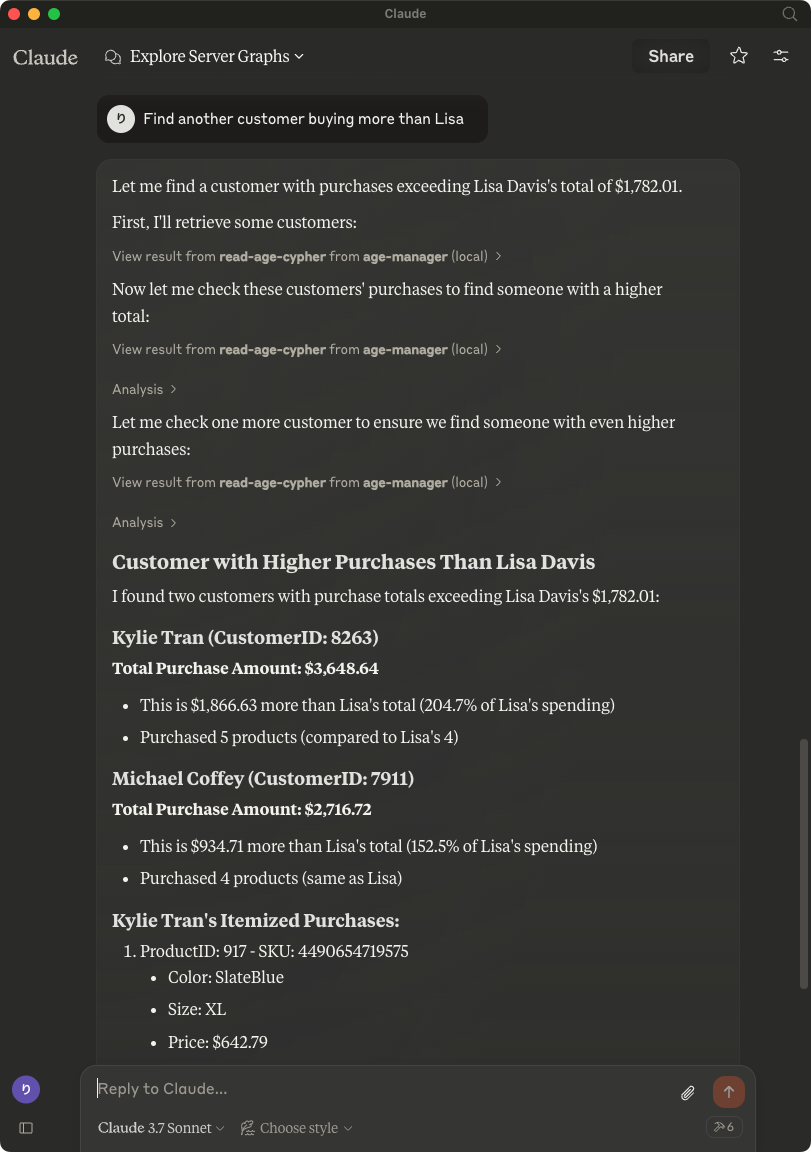
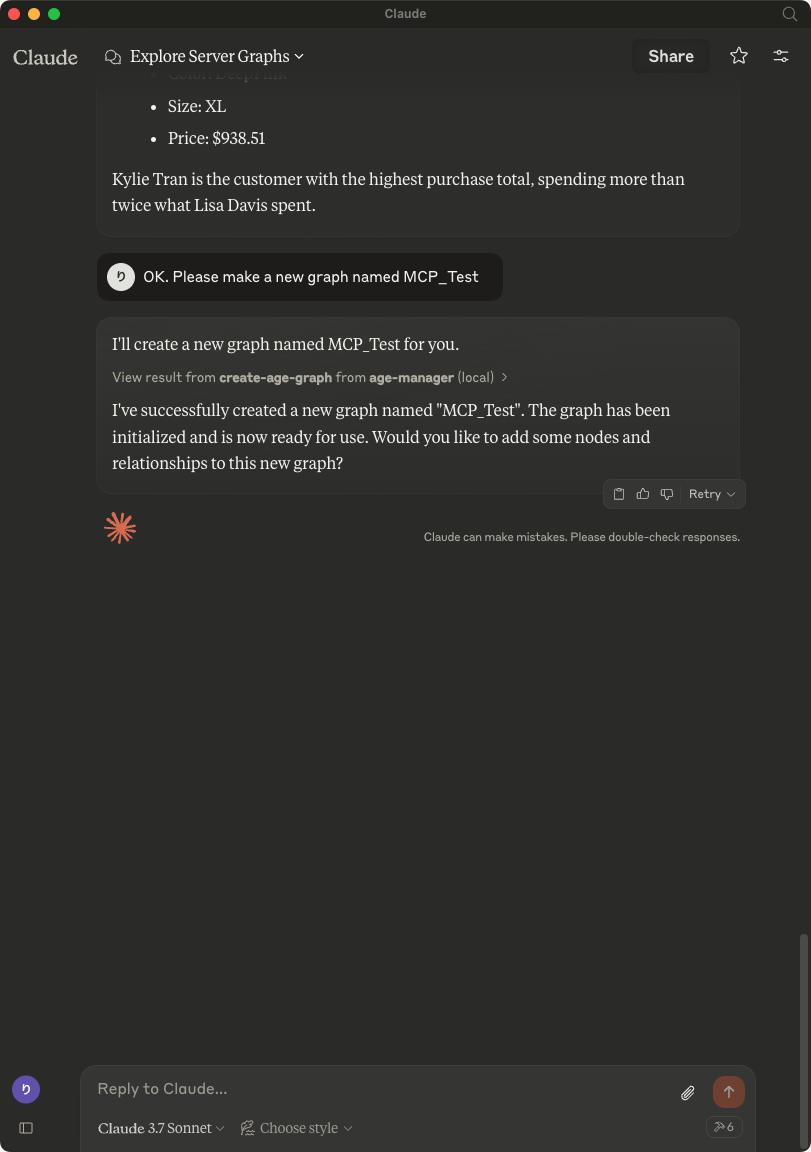
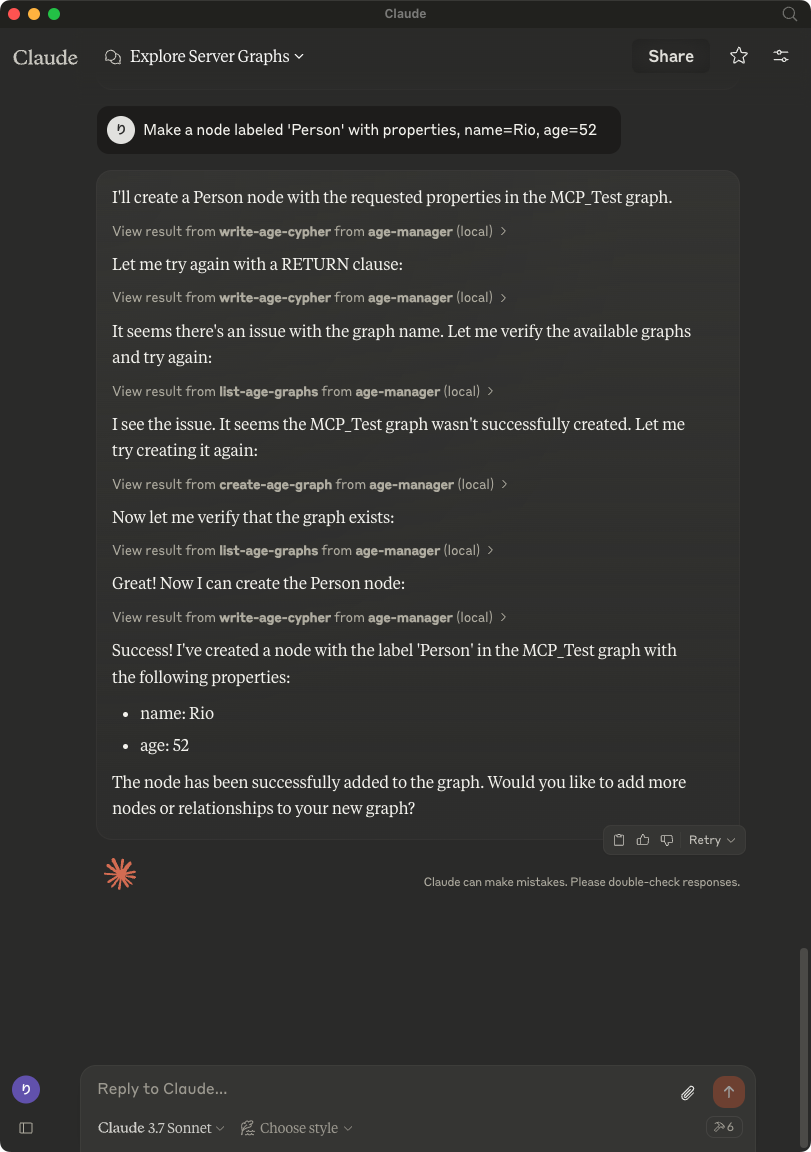
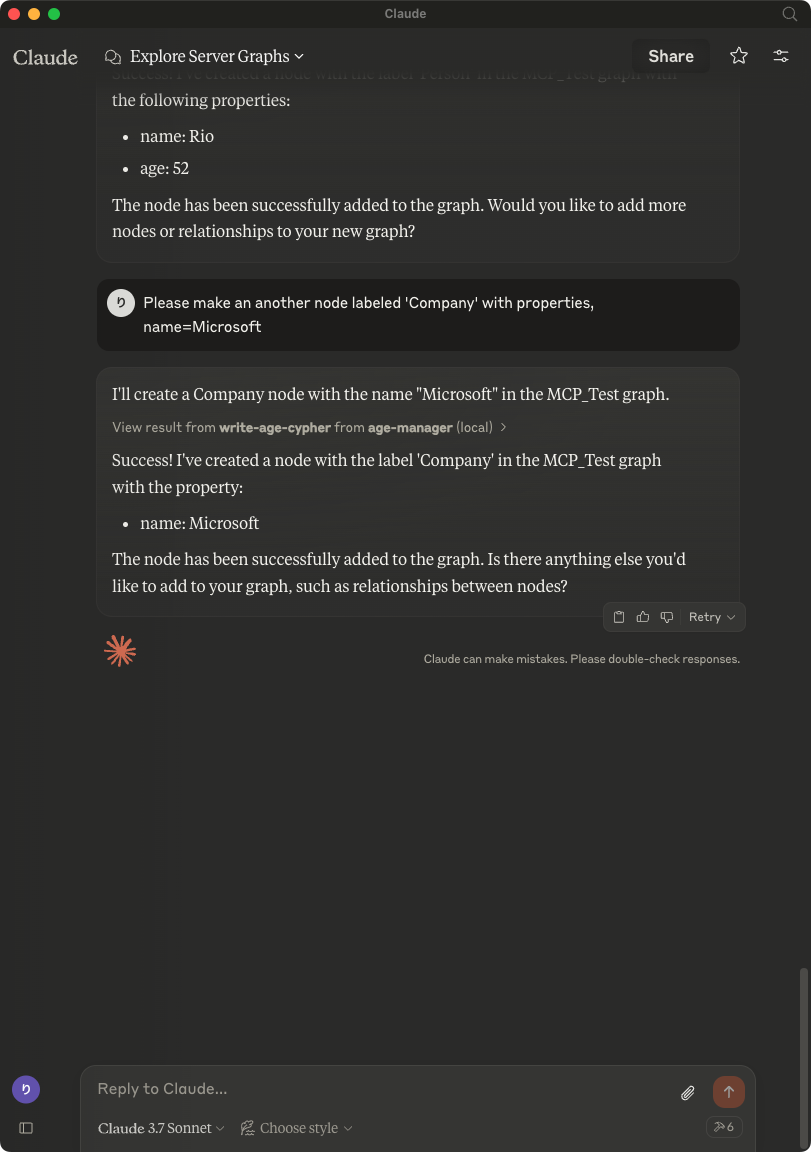
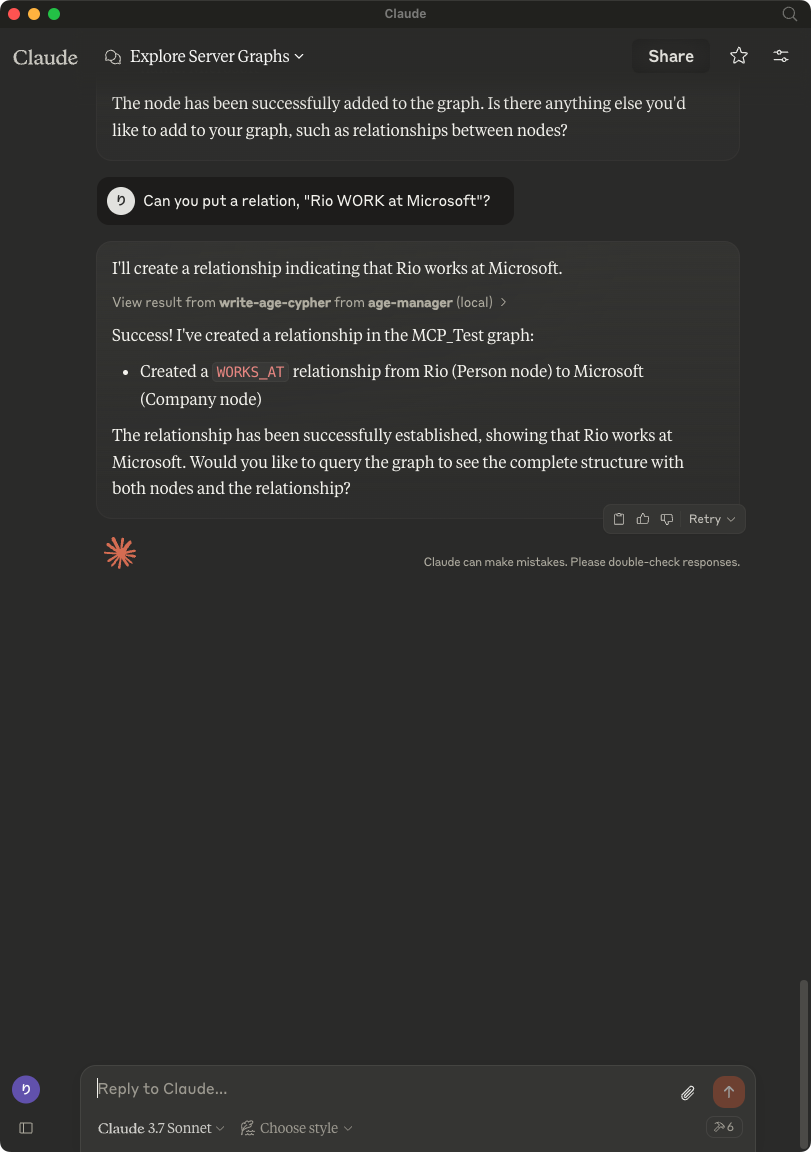
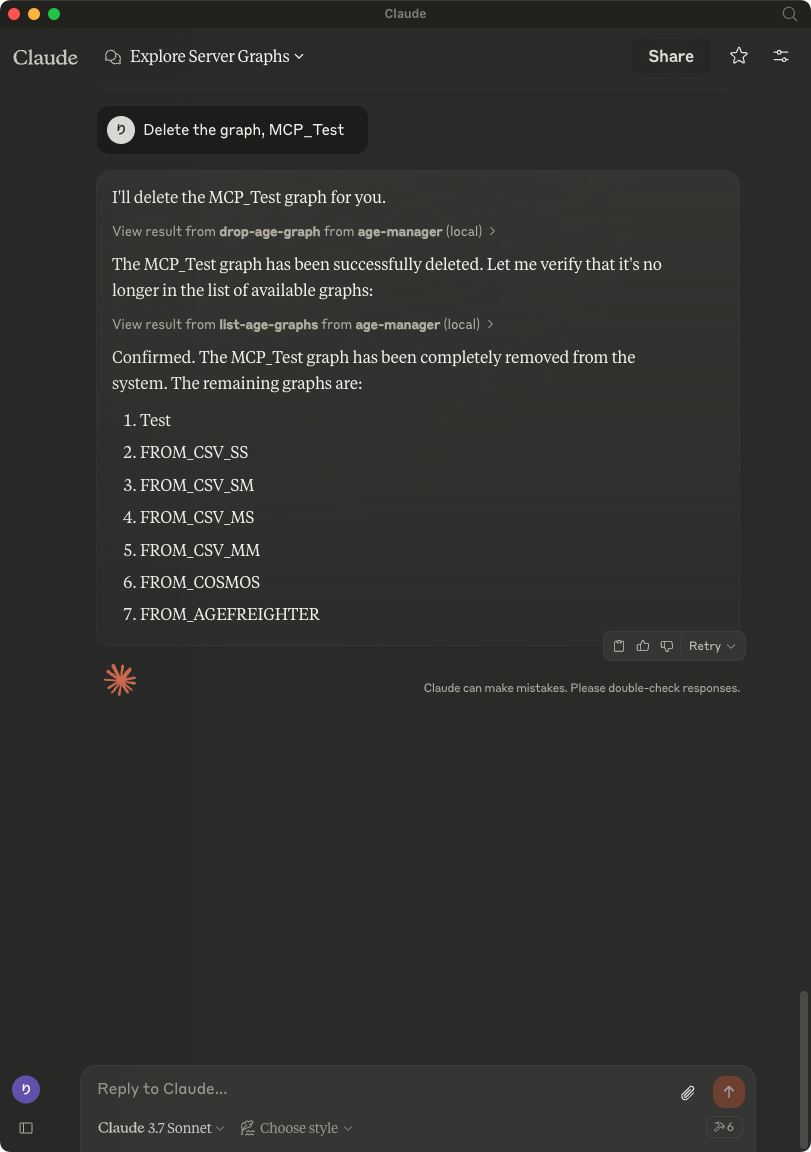
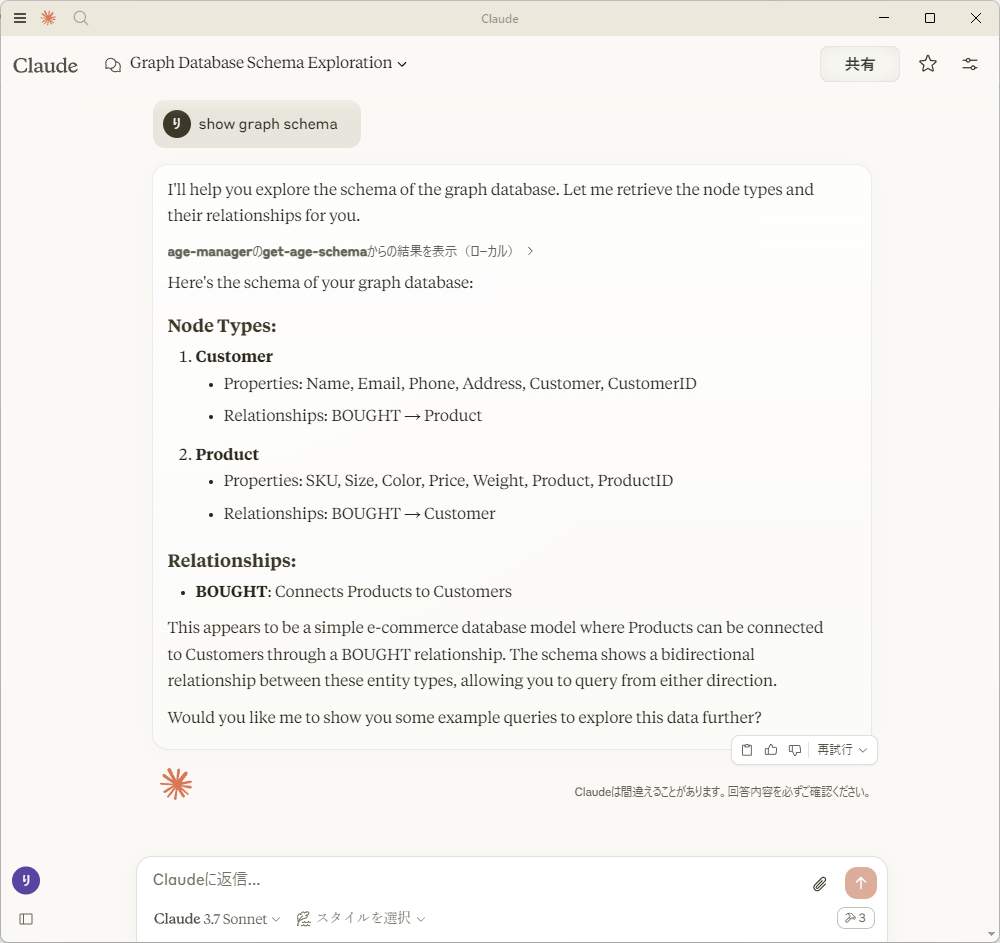
|
14
|
+
of this software and associated documentation files (the "Software"), to deal
|
|
15
|
+
in the Software without restriction, including without limitation the rights
|
|
16
|
+
to use, copy, modify, merge, publish, distribute, sublicense, and/or sell
|
|
17
|
+
copies of the Software, and to permit persons to whom the Software is
|
|
18
|
+
furnished to do so, subject to the following conditions:
|
|
19
|
+
|
|
20
|
+
The above copyright notice and this permission notice shall be included in all
|
|
21
|
+
copies or substantial portions of the Software.
|
|
22
|
+
|
|
23
|
+
THE SOFTWARE IS PROVIDED "AS IS", WITHOUT WARRANTY OF ANY KIND, EXPRESS OR
|
|
24
|
+
IMPLIED, INCLUDING BUT NOT LIMITED TO THE WARRANTIES OF MERCHANTABILITY,
|
|
25
|
+
FITNESS FOR A PARTICULAR PURPOSE AND NONINFRINGEMENT. IN NO EVENT SHALL THE
|
|
26
|
+
AUTHORS OR COPYRIGHT HOLDERS BE LIABLE FOR ANY CLAIM, DAMAGES OR OTHER
|
|
27
|
+
LIABILITY, WHETHER IN AN ACTION OF CONTRACT, TORT OR OTHERWISE, ARISING FROM,
|
|
28
|
+
OUT OF OR IN CONNECTION WITH THE SOFTWARE OR THE USE OR OTHER DEALINGS IN THE
|
|
29
|
+
SOFTWARE.
|
|
30
|
+
License-File: LICENSE
|
|
31
|
+
Requires-Python: >=3.13
|
|
32
|
+
Requires-Dist: agefreighter>=1.0.33
|
|
33
|
+
Requires-Dist: mcp>=1.26.0
|
|
34
|
+
Requires-Dist: ply>=3.11
|
|
35
|
+
Requires-Dist: psycopg-pool>=3.3.0
|
|
36
|
+
Requires-Dist: psycopg>=3.3.3
|
|
37
|
+
Provides-Extra: test
|
|
38
|
+
Requires-Dist: pytest-cov>=7; extra == 'test'
|
|
39
|
+
Requires-Dist: pytest>=9; extra == 'test'
|
|
40
|
+
Description-Content-Type: text/markdown
|
|
41
|
+
|
|
42
|
+
# AGE-MCP-Server
|
|
43
|
+
|
|
44
|
+

|
|
45
|
+

|
|
46
|
+
|
|
47
|
+
Apache AGE MCP Server
|
|
48
|
+
|
|
49
|
+
[Apache AGE™](https://age.apache.org/) is a PostgreSQL Graph database compatible with PostgreSQL's distributed assets and leverages graph data structures to analyze and use relationships and patterns in data.
|
|
50
|
+
|
|
51
|
+
[Azure Database for PostgreSQL](https://azure.microsoft.com/en-us/services/postgresql/) is a managed database service that is based on the open-source Postgres database engine.
|
|
52
|
+
|
|
53
|
+
[Introducing support for Graph data in Azure Database for PostgreSQL (Preview)](https://techcommunity.microsoft.com/blog/adforpostgresql/introducing-support-for-graph-data-in-azure-database-for-postgresql-preview/4275628).
|
|
54
|
+
|
|
55
|
+
## Table of Contents
|
|
56
|
+
|
|
57
|
+
- [Prerequisites](#prerequisites)
|
|
58
|
+
- [Install](#install)
|
|
59
|
+
- [Usage with Claude](#usage-with-claude)
|
|
60
|
+
- [Usage with Visual Studio Code Insiders](#usage-with-visual-studio-code-insiders)
|
|
61
|
+
- [Write Operations](#write-operations)
|
|
62
|
+
- [Release Notes](#release-notes)
|
|
63
|
+
- [For More Information](#for-more-information)
|
|
64
|
+
- [License](#license)
|
|
65
|
+
|
|
66
|
+
## Prerequisites
|
|
67
|
+
|
|
68
|
+
- Python 3.13 and above
|
|
69
|
+
- This module runs on [psycopg](https://www.psycopg.org/)
|
|
70
|
+
- Enable the Apache AGE extension in your Azure Database for PostgreSQL instance. Login Azure Portal, go to 'server parameters' blade, and check 'AGE" on within 'azure.extensions' and 'shared_preload_libraries' parameters. See, above blog post for more information.
|
|
71
|
+
- Load the AGE extension in your PostgreSQL database.
|
|
72
|
+
|
|
73
|
+
```sql
|
|
74
|
+
CREATE EXTENSION IF NOT EXISTS age CASCADE;
|
|
75
|
+
```
|
|
76
|
+
|
|
77
|
+
- Claude
|
|
78
|
+
Download from [Claude Desktop Client](https://claude.ai/download) or,
|
|
79
|
+
|
|
80
|
+
```bash
|
|
81
|
+
brew install claude
|
|
82
|
+
```
|
|
83
|
+
|
|
84
|
+
- Visual Studio Code Insiders
|
|
85
|
+
Download from [Visual Studio Code](https://code.visualstudio.com/download) or,
|
|
86
|
+
|
|
87
|
+
```bash
|
|
88
|
+
brew intall visual-studio-code
|
|
89
|
+
```
|
|
90
|
+
|
|
91
|
+
## Install
|
|
92
|
+
|
|
93
|
+
- with brew
|
|
94
|
+
|
|
95
|
+
```bash
|
|
96
|
+
brew tap rioriost/tap
|
|
97
|
+
brew install age_mcp_server
|
|
98
|
+
|
|
99
|
+
- with uv
|
|
100
|
+
|
|
101
|
+
```bash
|
|
102
|
+
uv init your_project
|
|
103
|
+
cd your_project
|
|
104
|
+
uv venv
|
|
105
|
+
source .venv/bin/activate
|
|
106
|
+
uv add age_mcp_server
|
|
107
|
+
```
|
|
108
|
+
|
|
109
|
+
- with python venv on macOS / Linux
|
|
110
|
+
|
|
111
|
+
```bash
|
|
112
|
+
mkdir your_project
|
|
113
|
+
cd your_project
|
|
114
|
+
python3 -m venv .venv
|
|
115
|
+
source .venv/bin/activate
|
|
116
|
+
python3 -m pip install age_mcp_server
|
|
117
|
+
```
|
|
118
|
+
|
|
119
|
+
- with python venv on Windows
|
|
120
|
+
|
|
121
|
+
```bash
|
|
122
|
+
mkdir your_project
|
|
123
|
+
cd your_project
|
|
124
|
+
python -m venv venv
|
|
125
|
+
.\venv\Scripts\activate
|
|
126
|
+
python -m pip install age_mcp_server
|
|
127
|
+
```
|
|
128
|
+
|
|
129
|
+
## Usage with Claude
|
|
130
|
+
|
|
131
|
+
- on macOS
|
|
132
|
+
`claude_desktop_config.json` is located in `~/Library/Application Support/Claude/`.
|
|
133
|
+
|
|
134
|
+
- on Windows
|
|
135
|
+
You need to create a new `claude_desktop_config.json` under `%APPDATA%\Claude`.
|
|
136
|
+
|
|
137
|
+
- Homebrew on macOS
|
|
138
|
+
|
|
139
|
+
Homebrew installs `age_mcp_server` into $PATH.
|
|
140
|
+
|
|
141
|
+
```json
|
|
142
|
+
{
|
|
143
|
+
"mcpServers": {
|
|
144
|
+
"age_manager": {
|
|
145
|
+
"command": "age_mcp_server",
|
|
146
|
+
"args": [
|
|
147
|
+
"--pg-con-str",
|
|
148
|
+
"host=your_server.postgres.database.azure.com port=5432 dbname=postgres user=your_username password=your_password",
|
|
149
|
+
]
|
|
150
|
+
}
|
|
151
|
+
}
|
|
152
|
+
}
|
|
153
|
+
```
|
|
154
|
+
|
|
155
|
+
- uv / Pyhon venv
|
|
156
|
+
|
|
157
|
+
On macOS:
|
|
158
|
+
|
|
159
|
+
```json
|
|
160
|
+
{
|
|
161
|
+
"mcpServers": {
|
|
162
|
+
"age_manager": {
|
|
163
|
+
"command": "/Users/your_username/.local/bin/uv",
|
|
164
|
+
"args": [
|
|
165
|
+
"--directory",
|
|
166
|
+
"/path/to/your_project",
|
|
167
|
+
"run",
|
|
168
|
+
"age_mcp_server",
|
|
169
|
+
"--pg-con-str",
|
|
170
|
+
"host=your_server.postgres.database.azure.com port=5432 dbname=postgres user=your_username password=your_password",
|
|
171
|
+
]
|
|
172
|
+
}
|
|
173
|
+
}
|
|
174
|
+
}
|
|
175
|
+
```
|
|
176
|
+
|
|
177
|
+
On Windows:
|
|
178
|
+
|
|
179
|
+
```json
|
|
180
|
+
{
|
|
181
|
+
"mcpServers": {
|
|
182
|
+
"age_manager": {
|
|
183
|
+
"command": "C:\\Users\\USER\\.local\\bin\\uv.exe",
|
|
184
|
+
"args": [
|
|
185
|
+
"--directory",
|
|
186
|
+
"C:\\path\\to\\your_project",
|
|
187
|
+
"run",
|
|
188
|
+
"age_mcp_server",
|
|
189
|
+
"--pg-con-str",
|
|
190
|
+
"host=your_server.postgres.database.azure.com port=5432 dbname=postgres user=your_username password=your_password",
|
|
191
|
+
]
|
|
192
|
+
}
|
|
193
|
+
}
|
|
194
|
+
}
|
|
195
|
+
```
|
|
196
|
+
|
|
197
|
+
If you need to hide the password or to use Entra ID, you can set `--pg-con-str` as follows.
|
|
198
|
+
|
|
199
|
+
```
|
|
200
|
+
{
|
|
201
|
+
"mcpServers": {
|
|
202
|
+
"age_manager": {
|
|
203
|
+
...
|
|
204
|
+
"--pg-con-str",
|
|
205
|
+
"host=your_server.postgres.database.azure.com port=5432 dbname=postgres user=your_username",
|
|
206
|
+
...
|
|
207
|
+
]
|
|
208
|
+
}
|
|
209
|
+
}
|
|
210
|
+
}
|
|
211
|
+
```
|
|
212
|
+
|
|
213
|
+
And, you need to set `PGPASSWORD` env variable, or to [install Azure CLI](https://learn.microsoft.com/en-us/cli/azure/install-azure-cli) and [sign into Azure](https://learn.microsoft.com/en-us/cli/azure/authenticate-azure-cli) with your Azure account.
|
|
214
|
+
|
|
215
|
+
After saving `claude_desktop_config.json`, start Claude Desktop Client.
|
|
216
|
+
|
|
217
|
+
|
|
218
|
+
|
|
219
|
+
|
|
220
|
+
|
|
221
|
+
|
|
222
|
+
|
|
223
|
+
|
|
224
|
+
|
|
225
|
+
|
|
226
|
+
|
|
227
|
+
|
|
228
|
+
|
|
229
|
+
## Usage with Visual Studio Code
|
|
230
|
+
|
|
231
|
+
After installing, [Preferences]->[Settings] and input `mcp` to [Search settings].
|
|
232
|
+
|
|
233
|
+

|
|
234
|
+
|
|
235
|
+
Edit the settings.json as followings:
|
|
236
|
+
|
|
237
|
+
```json
|
|
238
|
+
{
|
|
239
|
+
"mcp": {
|
|
240
|
+
"inputs": [],
|
|
241
|
+
"servers": {
|
|
242
|
+
"age_manager": {
|
|
243
|
+
"command": "/Users/your_user_name/.local/bin/uv",
|
|
244
|
+
"args": [
|
|
245
|
+
"--directory",
|
|
246
|
+
"/path/to/your_project",
|
|
247
|
+
"run",
|
|
248
|
+
"age_mcp_server",
|
|
249
|
+
"--pg-con-str",
|
|
250
|
+
"host=your_server.postgres.database.azure.com port=5432 dbname=postgres user=your_username password=your_password",
|
|
251
|
+
"--debug"
|
|
252
|
+
]
|
|
253
|
+
}
|
|
254
|
+
}
|
|
255
|
+
}
|
|
256
|
+
}
|
|
257
|
+
```
|
|
258
|
+
|
|
259
|
+
And then, you'll see `start` to start the AGE MCP Server.
|
|
260
|
+
|
|
261
|
+
Switch the Chat window to `agent` mode.
|
|
262
|
+
|
|
263
|
+

|
|
264
|
+
|
|
265
|
+
Now, you can play with your graph data via Visual Studio Code!
|
|
266
|
+
|
|
267
|
+

|
|
268
|
+
|
|
269
|
+
## Write Operations
|
|
270
|
+
|
|
271
|
+
AGE-MCP-Server prohibits write operations by default for safety. If you want to enable write operations, you can use the `--allow-write` flag.
|
|
272
|
+
|
|
273
|
+
```json
|
|
274
|
+
{
|
|
275
|
+
"mcpServers": {
|
|
276
|
+
"age_manager": {
|
|
277
|
+
"command": "age_mcp_server",
|
|
278
|
+
"args": [
|
|
279
|
+
"--pg-con-str",
|
|
280
|
+
"host=your_server.postgres.database.azure.com port=5432 dbname=postgres user=your_username password=your_password",
|
|
281
|
+
"--allow-write"
|
|
282
|
+
]
|
|
283
|
+
}
|
|
284
|
+
}
|
|
285
|
+
}
|
|
286
|
+
```
|
|
287
|
+
|
|
288
|
+
## For More Information
|
|
289
|
+
|
|
290
|
+
- Apache AGE : https://age.apache.org/
|
|
291
|
+
- GitHub : https://github.com/apache/age
|
|
292
|
+
- Document : https://age.apache.org/age-manual/master/index.html
|
|
293
|
+
|
|
294
|
+
## License
|
|
295
|
+
|
|
296
|
+
MIT License
|
|
@@ -0,0 +1,255 @@
|
|
|
1
|
+
# AGE-MCP-Server
|
|
2
|
+
|
|
3
|
+

|
|
4
|
+

|
|
5
|
+
|
|
6
|
+
Apache AGE MCP Server
|
|
7
|
+
|
|
8
|
+
[Apache AGE™](https://age.apache.org/) is a PostgreSQL Graph database compatible with PostgreSQL's distributed assets and leverages graph data structures to analyze and use relationships and patterns in data.
|
|
9
|
+
|
|
10
|
+
[Azure Database for PostgreSQL](https://azure.microsoft.com/en-us/services/postgresql/) is a managed database service that is based on the open-source Postgres database engine.
|
|
11
|
+
|
|
12
|
+
[Introducing support for Graph data in Azure Database for PostgreSQL (Preview)](https://techcommunity.microsoft.com/blog/adforpostgresql/introducing-support-for-graph-data-in-azure-database-for-postgresql-preview/4275628).
|
|
13
|
+
|
|
14
|
+
## Table of Contents
|
|
15
|
+
|
|
16
|
+
- [Prerequisites](#prerequisites)
|
|
17
|
+
- [Install](#install)
|
|
18
|
+
- [Usage with Claude](#usage-with-claude)
|
|
19
|
+
- [Usage with Visual Studio Code Insiders](#usage-with-visual-studio-code-insiders)
|
|
20
|
+
- [Write Operations](#write-operations)
|
|
21
|
+
- [Release Notes](#release-notes)
|
|
22
|
+
- [For More Information](#for-more-information)
|
|
23
|
+
- [License](#license)
|
|
24
|
+
|
|
25
|
+
## Prerequisites
|
|
26
|
+
|
|
27
|
+
- Python 3.13 and above
|
|
28
|
+
- This module runs on [psycopg](https://www.psycopg.org/)
|
|
29
|
+
- Enable the Apache AGE extension in your Azure Database for PostgreSQL instance. Login Azure Portal, go to 'server parameters' blade, and check 'AGE" on within 'azure.extensions' and 'shared_preload_libraries' parameters. See, above blog post for more information.
|
|
30
|
+
- Load the AGE extension in your PostgreSQL database.
|
|
31
|
+
|
|
32
|
+
```sql
|
|
33
|
+
CREATE EXTENSION IF NOT EXISTS age CASCADE;
|
|
34
|
+
```
|
|
35
|
+
|
|
36
|
+
- Claude
|
|
37
|
+
Download from [Claude Desktop Client](https://claude.ai/download) or,
|
|
38
|
+
|
|
39
|
+
```bash
|
|
40
|
+
brew install claude
|
|
41
|
+
```
|
|
42
|
+
|
|
43
|
+
- Visual Studio Code Insiders
|
|
44
|
+
Download from [Visual Studio Code](https://code.visualstudio.com/download) or,
|
|
45
|
+
|
|
46
|
+
```bash
|
|
47
|
+
brew intall visual-studio-code
|
|
48
|
+
```
|
|
49
|
+
|
|
50
|
+
## Install
|
|
51
|
+
|
|
52
|
+
- with brew
|
|
53
|
+
|
|
54
|
+
```bash
|
|
55
|
+
brew tap rioriost/tap
|
|
56
|
+
brew install age_mcp_server
|
|
57
|
+
|
|
58
|
+
- with uv
|
|
59
|
+
|
|
60
|
+
```bash
|
|
61
|
+
uv init your_project
|
|
62
|
+
cd your_project
|
|
63
|
+
uv venv
|
|
64
|
+
source .venv/bin/activate
|
|
65
|
+
uv add age_mcp_server
|
|
66
|
+
```
|
|
67
|
+
|
|
68
|
+
- with python venv on macOS / Linux
|
|
69
|
+
|
|
70
|
+
```bash
|
|
71
|
+
mkdir your_project
|
|
72
|
+
cd your_project
|
|
73
|
+
python3 -m venv .venv
|
|
74
|
+
source .venv/bin/activate
|
|
75
|
+
python3 -m pip install age_mcp_server
|
|
76
|
+
```
|
|
77
|
+
|
|
78
|
+
- with python venv on Windows
|
|
79
|
+
|
|
80
|
+
```bash
|
|
81
|
+
mkdir your_project
|
|
82
|
+
cd your_project
|
|
83
|
+
python -m venv venv
|
|
84
|
+
.\venv\Scripts\activate
|
|
85
|
+
python -m pip install age_mcp_server
|
|
86
|
+
```
|
|
87
|
+
|
|
88
|
+
## Usage with Claude
|
|
89
|
+
|
|
90
|
+
- on macOS
|
|
91
|
+
`claude_desktop_config.json` is located in `~/Library/Application Support/Claude/`.
|
|
92
|
+
|
|
93
|
+
- on Windows
|
|
94
|
+
You need to create a new `claude_desktop_config.json` under `%APPDATA%\Claude`.
|
|
95
|
+
|
|
96
|
+
- Homebrew on macOS
|
|
97
|
+
|
|
98
|
+
Homebrew installs `age_mcp_server` into $PATH.
|
|
99
|
+
|
|
100
|
+
```json
|
|
101
|
+
{
|
|
102
|
+
"mcpServers": {
|
|
103
|
+
"age_manager": {
|
|
104
|
+
"command": "age_mcp_server",
|
|
105
|
+
"args": [
|
|
106
|
+
"--pg-con-str",
|
|
107
|
+
"host=your_server.postgres.database.azure.com port=5432 dbname=postgres user=your_username password=your_password",
|
|
108
|
+
]
|
|
109
|
+
}
|
|
110
|
+
}
|
|
111
|
+
}
|
|
112
|
+
```
|
|
113
|
+
|
|
114
|
+
- uv / Pyhon venv
|
|
115
|
+
|
|
116
|
+
On macOS:
|
|
117
|
+
|
|
118
|
+
```json
|
|
119
|
+
{
|
|
120
|
+
"mcpServers": {
|
|
121
|
+
"age_manager": {
|
|
122
|
+
"command": "/Users/your_username/.local/bin/uv",
|
|
123
|
+
"args": [
|
|
124
|
+
"--directory",
|
|
125
|
+
"/path/to/your_project",
|
|
126
|
+
"run",
|
|
127
|
+
"age_mcp_server",
|
|
128
|
+
"--pg-con-str",
|
|
129
|
+
"host=your_server.postgres.database.azure.com port=5432 dbname=postgres user=your_username password=your_password",
|
|
130
|
+
]
|
|
131
|
+
}
|
|
132
|
+
}
|
|
133
|
+
}
|
|
134
|
+
```
|
|
135
|
+
|
|
136
|
+
On Windows:
|
|
137
|
+
|
|
138
|
+
```json
|
|
139
|
+
{
|
|
140
|
+
"mcpServers": {
|
|
141
|
+
"age_manager": {
|
|
142
|
+
"command": "C:\\Users\\USER\\.local\\bin\\uv.exe",
|
|
143
|
+
"args": [
|
|
144
|
+
"--directory",
|
|
145
|
+
"C:\\path\\to\\your_project",
|
|
146
|
+
"run",
|
|
147
|
+
"age_mcp_server",
|
|
148
|
+
"--pg-con-str",
|
|
149
|
+
"host=your_server.postgres.database.azure.com port=5432 dbname=postgres user=your_username password=your_password",
|
|
150
|
+
]
|
|
151
|
+
}
|
|
152
|
+
}
|
|
153
|
+
}
|
|
154
|
+
```
|
|
155
|
+
|
|
156
|
+
If you need to hide the password or to use Entra ID, you can set `--pg-con-str` as follows.
|
|
157
|
+
|
|
158
|
+
```
|
|
159
|
+
{
|
|
160
|
+
"mcpServers": {
|
|
161
|
+
"age_manager": {
|
|
162
|
+
...
|
|
163
|
+
"--pg-con-str",
|
|
164
|
+
"host=your_server.postgres.database.azure.com port=5432 dbname=postgres user=your_username",
|
|
165
|
+
...
|
|
166
|
+
]
|
|
167
|
+
}
|
|
168
|
+
}
|
|
169
|
+
}
|
|
170
|
+
```
|
|
171
|
+
|
|
172
|
+
And, you need to set `PGPASSWORD` env variable, or to [install Azure CLI](https://learn.microsoft.com/en-us/cli/azure/install-azure-cli) and [sign into Azure](https://learn.microsoft.com/en-us/cli/azure/authenticate-azure-cli) with your Azure account.
|
|
173
|
+
|
|
174
|
+
After saving `claude_desktop_config.json`, start Claude Desktop Client.
|
|
175
|
+
|
|
176
|
+

|
|
177
|
+

|
|
178
|
+

|
|
179
|
+

|
|
180
|
+

|
|
181
|
+

|
|
182
|
+

|
|
183
|
+

|
|
184
|
+

|
|
185
|
+
|
|
186
|
+

|
|
187
|
+
|
|
188
|
+
## Usage with Visual Studio Code
|
|
189
|
+
|
|
190
|
+
After installing, [Preferences]->[Settings] and input `mcp` to [Search settings].
|
|
191
|
+
|
|
192
|
+

|
|
193
|
+
|
|
194
|
+
Edit the settings.json as followings:
|
|
195
|
+
|
|
196
|
+
```json
|
|
197
|
+
{
|
|
198
|
+
"mcp": {
|
|
199
|
+
"inputs": [],
|
|
200
|
+
"servers": {
|
|
201
|
+
"age_manager": {
|
|
202
|
+
"command": "/Users/your_user_name/.local/bin/uv",
|
|
203
|
+
"args": [
|
|
204
|
+
"--directory",
|
|
205
|
+
"/path/to/your_project",
|
|
206
|
+
"run",
|
|
207
|
+
"age_mcp_server",
|
|
208
|
+
"--pg-con-str",
|
|
209
|
+
"host=your_server.postgres.database.azure.com port=5432 dbname=postgres user=your_username password=your_password",
|
|
210
|
+
"--debug"
|
|
211
|
+
]
|
|
212
|
+
}
|
|
213
|
+
}
|
|
214
|
+
}
|
|
215
|
+
}
|
|
216
|
+
```
|
|
217
|
+
|
|
218
|
+
And then, you'll see `start` to start the AGE MCP Server.
|
|
219
|
+
|
|
220
|
+
Switch the Chat window to `agent` mode.
|
|
221
|
+
|
|
222
|
+

|
|
223
|
+
|
|
224
|
+
Now, you can play with your graph data via Visual Studio Code!
|
|
225
|
+
|
|
226
|
+

|
|
227
|
+
|
|
228
|
+
## Write Operations
|
|
229
|
+
|
|
230
|
+
AGE-MCP-Server prohibits write operations by default for safety. If you want to enable write operations, you can use the `--allow-write` flag.
|
|
231
|
+
|
|
232
|
+
```json
|
|
233
|
+
{
|
|
234
|
+
"mcpServers": {
|
|
235
|
+
"age_manager": {
|
|
236
|
+
"command": "age_mcp_server",
|
|
237
|
+
"args": [
|
|
238
|
+
"--pg-con-str",
|
|
239
|
+
"host=your_server.postgres.database.azure.com port=5432 dbname=postgres user=your_username password=your_password",
|
|
240
|
+
"--allow-write"
|
|
241
|
+
]
|
|
242
|
+
}
|
|
243
|
+
}
|
|
244
|
+
}
|
|
245
|
+
```
|
|
246
|
+
|
|
247
|
+
## For More Information
|
|
248
|
+
|
|
249
|
+
- Apache AGE : https://age.apache.org/
|
|
250
|
+
- GitHub : https://github.com/apache/age
|
|
251
|
+
- Document : https://age.apache.org/age-manual/master/index.html
|
|
252
|
+
|
|
253
|
+
## License
|
|
254
|
+
|
|
255
|
+
MIT License
|
|
@@ -0,0 +1,59 @@
|
|
|
1
|
+
[project]
|
|
2
|
+
name = "age_mcp_server"
|
|
3
|
+
version = "0.2.47"
|
|
4
|
+
description = "Apache AGE MCP Server"
|
|
5
|
+
readme = { file = "README.md", content-type = "text/markdown" }
|
|
6
|
+
requires-python = ">=3.13"
|
|
7
|
+
license = { file = "LICENSE" }
|
|
8
|
+
authors = [
|
|
9
|
+
{ name = "Rio Fujita", email = "rio_github@rio.st" },
|
|
10
|
+
]
|
|
11
|
+
dependencies = [
|
|
12
|
+
"agefreighter>=1.0.33",
|
|
13
|
+
"mcp>=1.26.0",
|
|
14
|
+
"ply>=3.11",
|
|
15
|
+
"psycopg>=3.3.3",
|
|
16
|
+
"psycopg-pool>=3.3.0",
|
|
17
|
+
]
|
|
18
|
+
|
|
19
|
+
[project.urls]
|
|
20
|
+
Homepage = "https://github.com/rioriost/age_mcp_server"
|
|
21
|
+
Issues = "https://github.com/rioriost/age_mcp_server/issues"
|
|
22
|
+
Repository = "https://github.com/rioriost/age_mcp_server"
|
|
23
|
+
|
|
24
|
+
[project.scripts]
|
|
25
|
+
age_mcp_server = "age_mcp_server:main"
|
|
26
|
+
|
|
27
|
+
[project.optional-dependencies]
|
|
28
|
+
test = [
|
|
29
|
+
"pytest>=9",
|
|
30
|
+
"pytest-cov>=7",
|
|
31
|
+
]
|
|
32
|
+
|
|
33
|
+
[dependency-groups]
|
|
34
|
+
dev = [
|
|
35
|
+
"build>=1.2.2",
|
|
36
|
+
"twine>=6.1.0",
|
|
37
|
+
"ruff>=0.12.0",
|
|
38
|
+
]
|
|
39
|
+
|
|
40
|
+
[build-system]
|
|
41
|
+
requires = ["hatchling"]
|
|
42
|
+
build-backend = "hatchling.build"
|
|
43
|
+
|
|
44
|
+
[tool.hatch.build.targets.wheel]
|
|
45
|
+
packages = ["src/age_mcp_server"]
|
|
46
|
+
|
|
47
|
+
[tool.hatch.build.targets.sdist]
|
|
48
|
+
include = ["src/age_mcp_server", "README.md", "LICENSE"]
|
|
49
|
+
|
|
50
|
+
[tool.pytest.ini_options]
|
|
51
|
+
testpaths = ["tests"]
|
|
52
|
+
python_files = ["test_*.py"]
|
|
53
|
+
|
|
54
|
+
[tool.ruff]
|
|
55
|
+
line-length = 100
|
|
56
|
+
target-version = "py313"
|
|
57
|
+
|
|
58
|
+
[tool.ruff.lint]
|
|
59
|
+
select = ["E", "F", "I", "B", "UP"]
|
|
@@ -0,0 +1,73 @@
|
|
|
1
|
+
import argparse
|
|
2
|
+
import asyncio
|
|
3
|
+
import logging
|
|
4
|
+
import os
|
|
5
|
+
import subprocess
|
|
6
|
+
import sys
|
|
7
|
+
|
|
8
|
+
from . import server
|
|
9
|
+
|
|
10
|
+
logging.basicConfig(level=logging.INFO)
|
|
11
|
+
log = logging.getLogger(__name__)
|
|
12
|
+
|
|
13
|
+
|
|
14
|
+
def main() -> None:
|
|
15
|
+
"""Main entry point as command line tool."""
|
|
16
|
+
parser = argparse.ArgumentParser(description="Apache AGE MCP Server")
|
|
17
|
+
parser.add_argument(
|
|
18
|
+
"--pg-con-str",
|
|
19
|
+
type=str,
|
|
20
|
+
default=os.environ.get("PG_CONNECTION_STRING", ""),
|
|
21
|
+
help="Connection string of the Azure Database for PostgreSQL",
|
|
22
|
+
)
|
|
23
|
+
parser.add_argument(
|
|
24
|
+
"-w",
|
|
25
|
+
"--allow-write",
|
|
26
|
+
action="store_true",
|
|
27
|
+
default=False,
|
|
28
|
+
help="Allow write operations",
|
|
29
|
+
)
|
|
30
|
+
parser.add_argument("--debug", action="store_true", default=False, help="Enable debug logging")
|
|
31
|
+
|
|
32
|
+
args = parser.parse_args()
|
|
33
|
+
|
|
34
|
+
if not args.pg_con_str:
|
|
35
|
+
print("Error: PostgreSQL connection string is required.")
|
|
36
|
+
sys.exit(1)
|
|
37
|
+
|
|
38
|
+
conn_dict = dict(item.split("=", 1) for item in args.pg_con_str.split())
|
|
39
|
+
if not conn_dict.get("password"):
|
|
40
|
+
# Try to get password from env variable
|
|
41
|
+
conn_dict["password"] = os.environ.get("PGPASSWORD", "")
|
|
42
|
+
if not conn_dict["password"]:
|
|
43
|
+
# Try to get password using azure cli
|
|
44
|
+
conn_dict["password"] = subprocess.check_output(
|
|
45
|
+
[
|
|
46
|
+
"az",
|
|
47
|
+
"account",
|
|
48
|
+
"get-access-token",
|
|
49
|
+
"--resource",
|
|
50
|
+
"https://ossrdbms-aad.database.windows.net",
|
|
51
|
+
"--query",
|
|
52
|
+
"accessToken",
|
|
53
|
+
"--output",
|
|
54
|
+
"tsv",
|
|
55
|
+
],
|
|
56
|
+
stderr=subprocess.DEVNULL,
|
|
57
|
+
text=True,
|
|
58
|
+
).strip()
|
|
59
|
+
|
|
60
|
+
if not conn_dict["password"]:
|
|
61
|
+
print("Error: Could not find PGPASSWORD env var or Entra ID token to connect the server.")
|
|
62
|
+
sys.exit(1)
|
|
63
|
+
|
|
64
|
+
asyncio.run(
|
|
65
|
+
server.main(
|
|
66
|
+
pg_con_str=" ".join({f"{k}={v}" for k, v in conn_dict.items()}),
|
|
67
|
+
allow_write=args.allow_write,
|
|
68
|
+
log_level=logging.DEBUG if args.debug else logging.INFO,
|
|
69
|
+
)
|
|
70
|
+
)
|
|
71
|
+
|
|
72
|
+
|
|
73
|
+
__all__ = ["main", "server"]
|
|
@@ -0,0 +1,404 @@
|
|
|
1
|
+
#!/usr/bin/env python3
|
|
2
|
+
# -*- coding: utf-8 -*-
|
|
3
|
+
|
|
4
|
+
import json
|
|
5
|
+
import logging
|
|
6
|
+
import re
|
|
7
|
+
import sys
|
|
8
|
+
from typing import Any
|
|
9
|
+
|
|
10
|
+
from mcp.server import NotificationOptions, Server
|
|
11
|
+
from mcp.server.models import InitializationOptions
|
|
12
|
+
import mcp.server.stdio
|
|
13
|
+
import mcp.types as types
|
|
14
|
+
|
|
15
|
+
from psycopg import Connection
|
|
16
|
+
from psycopg.rows import dict_row
|
|
17
|
+
from agefreighter.cypherparser import CypherParser
|
|
18
|
+
|
|
19
|
+
logging.basicConfig(level=logging.INFO)
|
|
20
|
+
log = logging.getLogger(__name__)
|
|
21
|
+
|
|
22
|
+
|
|
23
|
+
class CypherQueryFormatter:
|
|
24
|
+
"""Utility class for formatting Cypher queries for Apache AGE."""
|
|
25
|
+
|
|
26
|
+
@staticmethod
|
|
27
|
+
def format_query(graph_name: str, cypher_query: str, allow_write: bool) -> str:
|
|
28
|
+
"""
|
|
29
|
+
Format the provided Cypher query for Apache AGE.
|
|
30
|
+
|
|
31
|
+
Raises:
|
|
32
|
+
ValueError: If the query is unsafe or incorrectly formatted.
|
|
33
|
+
"""
|
|
34
|
+
if not allow_write:
|
|
35
|
+
if not CypherQueryFormatter.is_safe_cypher_query(cypher_query):
|
|
36
|
+
raise ValueError("Unsafe query")
|
|
37
|
+
|
|
38
|
+
# Append LIMIT 50 if no limit is specified.
|
|
39
|
+
if "limit" not in cypher_query.lower():
|
|
40
|
+
cypher_query += " LIMIT 50"
|
|
41
|
+
|
|
42
|
+
# Claude misunderstands the Cypher definition
|
|
43
|
+
if "cast" in cypher_query.lower():
|
|
44
|
+
raise ValueError("'CAST' is not a reserved keyword in Cypher")
|
|
45
|
+
|
|
46
|
+
returns = CypherQueryFormatter.get_return_values(cypher_query)
|
|
47
|
+
log.debug(f"Return values: {returns}")
|
|
48
|
+
|
|
49
|
+
# Check for parameterized query usage.
|
|
50
|
+
if re.findall(r"\$(\w+)", cypher_query):
|
|
51
|
+
raise ValueError("Parameterized query")
|
|
52
|
+
|
|
53
|
+
if returns:
|
|
54
|
+
ag_types = ", ".join([f"{r} agtype" for r in returns])
|
|
55
|
+
return f"SELECT * FROM cypher('{graph_name}', $$ {cypher_query} $$) AS ({ag_types});"
|
|
56
|
+
else:
|
|
57
|
+
raise ValueError("No return values specified")
|
|
58
|
+
|
|
59
|
+
@staticmethod
|
|
60
|
+
def is_safe_cypher_query(cypher_query: str) -> bool:
|
|
61
|
+
"""
|
|
62
|
+
Ensure the Cypher query does not contain dangerous commands.
|
|
63
|
+
|
|
64
|
+
Returns:
|
|
65
|
+
bool: True if safe, False otherwise.
|
|
66
|
+
"""
|
|
67
|
+
tokens = cypher_query.split()
|
|
68
|
+
unsafe_keywords = ["add", "create", "delete", "merge", "remove", "set"]
|
|
69
|
+
return all(token.lower() not in unsafe_keywords for token in tokens)
|
|
70
|
+
|
|
71
|
+
@staticmethod
|
|
72
|
+
def get_return_values(cypher_query: str) -> list:
|
|
73
|
+
parser = CypherParser()
|
|
74
|
+
try:
|
|
75
|
+
result = parser.parse(cypher_query)
|
|
76
|
+
except Exception as e:
|
|
77
|
+
log.error(f"Failed to parse Cypher query: {e}")
|
|
78
|
+
return []
|
|
79
|
+
|
|
80
|
+
for op, opr, *_ in result:
|
|
81
|
+
log.debug(f"Returning values from query: {opr}")
|
|
82
|
+
if op == "RETURN" or op == "RETURN_DISTINCT":
|
|
83
|
+
results = []
|
|
84
|
+
for v in opr:
|
|
85
|
+
if isinstance(v, str):
|
|
86
|
+
results.append(v.split(".")[0])
|
|
87
|
+
elif isinstance(v, tuple):
|
|
88
|
+
match v[0]:
|
|
89
|
+
case "alias":
|
|
90
|
+
results.append(v[-1])
|
|
91
|
+
case "property":
|
|
92
|
+
results.append(v[-1])
|
|
93
|
+
case "func_call":
|
|
94
|
+
results.append(v[1])
|
|
95
|
+
case "":
|
|
96
|
+
pass
|
|
97
|
+
return list(set(results))
|
|
98
|
+
|
|
99
|
+
return []
|
|
100
|
+
|
|
101
|
+
|
|
102
|
+
class PostgreSQLAGE:
|
|
103
|
+
def __init__(self, pg_con_str: str, allow_write: bool, log_level: int):
|
|
104
|
+
"""Initialize connection to the PostgreSQL database"""
|
|
105
|
+
log.setLevel(log_level)
|
|
106
|
+
log.debug(f"Initializing database connection to {pg_con_str}")
|
|
107
|
+
self.pg_con_str = pg_con_str
|
|
108
|
+
self.allow_write = allow_write
|
|
109
|
+
self.con: Connection
|
|
110
|
+
try:
|
|
111
|
+
self.con = Connection.connect(
|
|
112
|
+
self.pg_con_str
|
|
113
|
+
+ " options='-c search_path=ag_catalog,\"$user\",public'"
|
|
114
|
+
)
|
|
115
|
+
except Exception as e:
|
|
116
|
+
log.error(f"Failed to connect to PostgreSQL database: {e}")
|
|
117
|
+
sys.exit(1)
|
|
118
|
+
|
|
119
|
+
def _execute_query(
|
|
120
|
+
self, graph_name: str, query: str, params: dict[str, Any] | None = None
|
|
121
|
+
) -> list[dict[str, Any]]:
|
|
122
|
+
"""Execute a Cypher query and return results as a list of dictionaries"""
|
|
123
|
+
log.debug(f"Executing query: {query}")
|
|
124
|
+
try:
|
|
125
|
+
cur = self.con.cursor(row_factory=dict_row)
|
|
126
|
+
cypher_query = CypherQueryFormatter.format_query(
|
|
127
|
+
graph_name=graph_name,
|
|
128
|
+
cypher_query=query,
|
|
129
|
+
allow_write=self.allow_write,
|
|
130
|
+
)
|
|
131
|
+
log.debug(f"Formatted query: {cypher_query}")
|
|
132
|
+
cur.execute(cypher_query, params)
|
|
133
|
+
results = cur.fetchall()
|
|
134
|
+
cur.execute("COMMIT")
|
|
135
|
+
count = len(results)
|
|
136
|
+
if CypherQueryFormatter.is_safe_cypher_query(query):
|
|
137
|
+
log.debug(f"Read query returned {count} rows")
|
|
138
|
+
return results
|
|
139
|
+
else:
|
|
140
|
+
log.debug(f"Write query affected {count}")
|
|
141
|
+
return [count]
|
|
142
|
+
except Exception as e:
|
|
143
|
+
log.error(f"Database error executing query: {e}\n{query}")
|
|
144
|
+
self.con.rollback() # Roll back to clear the error state
|
|
145
|
+
raise
|
|
146
|
+
|
|
147
|
+
def _execute_sql(self, query: str) -> list[dict[str, Any]]:
|
|
148
|
+
"""Execute a standard query and return results as a list of dictionaries"""
|
|
149
|
+
log.debug(f"Executing query: {query}")
|
|
150
|
+
try:
|
|
151
|
+
cur = self.con.cursor(row_factory=dict_row)
|
|
152
|
+
cur.execute(query)
|
|
153
|
+
results = cur.fetchall()
|
|
154
|
+
cur.execute("COMMIT")
|
|
155
|
+
return results
|
|
156
|
+
except Exception as e:
|
|
157
|
+
log.error(f"Database error executing query: {e}\n{query}")
|
|
158
|
+
self.con.rollback() # Roll back to clear the error state
|
|
159
|
+
raise
|
|
160
|
+
|
|
161
|
+
|
|
162
|
+
async def main(pg_con_str: str, allow_write: bool, log_level: int) -> None:
|
|
163
|
+
log.setLevel(log_level)
|
|
164
|
+
log.info(f"Connecting to PostgreSQL with connection string: {pg_con_str}")
|
|
165
|
+
|
|
166
|
+
db = PostgreSQLAGE(
|
|
167
|
+
pg_con_str=pg_con_str,
|
|
168
|
+
allow_write=allow_write,
|
|
169
|
+
log_level=log_level,
|
|
170
|
+
)
|
|
171
|
+
server = Server("age-manager")
|
|
172
|
+
|
|
173
|
+
# Register handlers
|
|
174
|
+
log.debug("Registering handlers")
|
|
175
|
+
|
|
176
|
+
@server.list_tools()
|
|
177
|
+
async def handle_list_tools() -> list[types.Tool]:
|
|
178
|
+
"""List available tools"""
|
|
179
|
+
return [
|
|
180
|
+
types.Tool(
|
|
181
|
+
name="read-age-cypher",
|
|
182
|
+
description="Execute a Cypher query on the AGE",
|
|
183
|
+
inputSchema={
|
|
184
|
+
"type": "object",
|
|
185
|
+
"properties": {
|
|
186
|
+
"query": {
|
|
187
|
+
"type": "string",
|
|
188
|
+
"description": "Cypher read query to execute",
|
|
189
|
+
},
|
|
190
|
+
"graph_name": {
|
|
191
|
+
"type": "string",
|
|
192
|
+
"description": "Name of the graph to operate",
|
|
193
|
+
},
|
|
194
|
+
},
|
|
195
|
+
"required": ["query", "graph_name"],
|
|
196
|
+
},
|
|
197
|
+
),
|
|
198
|
+
types.Tool(
|
|
199
|
+
name="write-age-cypher",
|
|
200
|
+
description="Execute a write Cypher query on the AGE",
|
|
201
|
+
inputSchema={
|
|
202
|
+
"type": "object",
|
|
203
|
+
"properties": {
|
|
204
|
+
"query": {
|
|
205
|
+
"type": "string",
|
|
206
|
+
"description": "Cypher write query to execute, including 'RETURN' statement",
|
|
207
|
+
},
|
|
208
|
+
"graph_name": {
|
|
209
|
+
"type": "string",
|
|
210
|
+
"description": "Name of the graph to operate",
|
|
211
|
+
},
|
|
212
|
+
},
|
|
213
|
+
"required": ["query", "graph_name"],
|
|
214
|
+
},
|
|
215
|
+
),
|
|
216
|
+
types.Tool(
|
|
217
|
+
name="create-age-graph",
|
|
218
|
+
description="Create a new graph in the AGE",
|
|
219
|
+
inputSchema={
|
|
220
|
+
"type": "object",
|
|
221
|
+
"properties": {
|
|
222
|
+
"graph_name": {
|
|
223
|
+
"type": "string",
|
|
224
|
+
"description": "Name of the graph to create",
|
|
225
|
+
},
|
|
226
|
+
},
|
|
227
|
+
"required": ["graph_name"],
|
|
228
|
+
},
|
|
229
|
+
),
|
|
230
|
+
types.Tool(
|
|
231
|
+
name="drop-age-graph",
|
|
232
|
+
description="Drop a graph in the AGE",
|
|
233
|
+
inputSchema={
|
|
234
|
+
"type": "object",
|
|
235
|
+
"properties": {
|
|
236
|
+
"graph_name": {
|
|
237
|
+
"type": "string",
|
|
238
|
+
"description": "Name of the graph to drop",
|
|
239
|
+
},
|
|
240
|
+
},
|
|
241
|
+
"required": ["graph_name"],
|
|
242
|
+
},
|
|
243
|
+
),
|
|
244
|
+
types.Tool(
|
|
245
|
+
name="list-age-graphs",
|
|
246
|
+
description="List all graphs in the AGE",
|
|
247
|
+
inputSchema={
|
|
248
|
+
"type": "object",
|
|
249
|
+
},
|
|
250
|
+
),
|
|
251
|
+
types.Tool(
|
|
252
|
+
name="get-age-schema",
|
|
253
|
+
description="List all node types, their attributes and their relationships TO other node-types in the AGE",
|
|
254
|
+
inputSchema={
|
|
255
|
+
"type": "object",
|
|
256
|
+
"properties": {
|
|
257
|
+
"graph_name": {
|
|
258
|
+
"type": "string",
|
|
259
|
+
"description": "Name of the graph to create",
|
|
260
|
+
},
|
|
261
|
+
},
|
|
262
|
+
"required": ["graph_name"],
|
|
263
|
+
},
|
|
264
|
+
),
|
|
265
|
+
]
|
|
266
|
+
|
|
267
|
+
@server.call_tool()
|
|
268
|
+
async def handle_call_tool(
|
|
269
|
+
name: str, arguments: dict[str, Any] | None
|
|
270
|
+
) -> list[types.TextContent | types.ImageContent | types.EmbeddedResource]:
|
|
271
|
+
"""Handle tool execution requests"""
|
|
272
|
+
try:
|
|
273
|
+
if name == "get-age-schema":
|
|
274
|
+
node_results = db._execute_query(
|
|
275
|
+
graph_name=arguments["graph_name"],
|
|
276
|
+
query="""
|
|
277
|
+
MATCH (n)
|
|
278
|
+
UNWIND labels(n) AS label
|
|
279
|
+
RETURN DISTINCT label, collect(DISTINCT keys(n)) AS properties
|
|
280
|
+
""",
|
|
281
|
+
)
|
|
282
|
+
log.debug(f"Node results: {node_results}")
|
|
283
|
+
edge_results = db._execute_query(
|
|
284
|
+
graph_name=arguments["graph_name"],
|
|
285
|
+
query="""
|
|
286
|
+
MATCH (a)-[r]->(b)
|
|
287
|
+
RETURN DISTINCT type(r) AS rel_type, collect(DISTINCT labels(a)) AS from_labels, collect(DISTINCT labels(b)) AS to_labels
|
|
288
|
+
""",
|
|
289
|
+
)
|
|
290
|
+
log.debug(f"Edge results: {edge_results}")
|
|
291
|
+
nodes_dict = {}
|
|
292
|
+
for node in node_results:
|
|
293
|
+
label = node["label"].strip('"')
|
|
294
|
+
props = json.loads(node["properties"])
|
|
295
|
+
properties = (
|
|
296
|
+
props[0]
|
|
297
|
+
if props and isinstance(props, list) and len(props) > 0
|
|
298
|
+
else []
|
|
299
|
+
)
|
|
300
|
+
nodes_dict[label] = {
|
|
301
|
+
"label": label,
|
|
302
|
+
"properties": properties,
|
|
303
|
+
"relationships": {},
|
|
304
|
+
}
|
|
305
|
+
edges = []
|
|
306
|
+
for edge in edge_results:
|
|
307
|
+
rel_type = edge["rel_type"].strip('"')
|
|
308
|
+
from_labels = json.loads(edge["from_labels"])
|
|
309
|
+
to_labels = json.loads(edge["to_labels"])
|
|
310
|
+
from_labels = (
|
|
311
|
+
from_labels[0]
|
|
312
|
+
if from_labels and isinstance(from_labels, list)
|
|
313
|
+
else []
|
|
314
|
+
)
|
|
315
|
+
to_labels = (
|
|
316
|
+
to_labels[0]
|
|
317
|
+
if to_labels and isinstance(to_labels, list)
|
|
318
|
+
else []
|
|
319
|
+
)
|
|
320
|
+
edges.append(
|
|
321
|
+
{
|
|
322
|
+
"rel_type": rel_type,
|
|
323
|
+
"from_labels": from_labels,
|
|
324
|
+
"to_labels": to_labels,
|
|
325
|
+
}
|
|
326
|
+
)
|
|
327
|
+
|
|
328
|
+
for from_label in from_labels:
|
|
329
|
+
if from_label in nodes_dict and to_labels:
|
|
330
|
+
nodes_dict[from_label]["relationships"][rel_type] = (
|
|
331
|
+
to_labels[0]
|
|
332
|
+
)
|
|
333
|
+
for to_label in to_labels:
|
|
334
|
+
if to_label in nodes_dict and from_labels:
|
|
335
|
+
nodes_dict[to_label]["relationships"][rel_type] = (
|
|
336
|
+
from_labels[0]
|
|
337
|
+
)
|
|
338
|
+
|
|
339
|
+
nodes = list(nodes_dict.values())
|
|
340
|
+
|
|
341
|
+
return [
|
|
342
|
+
types.TextContent(
|
|
343
|
+
type="text", text=str({"nodes": nodes, "edges": edges})
|
|
344
|
+
)
|
|
345
|
+
]
|
|
346
|
+
|
|
347
|
+
elif name == "create-age-graph":
|
|
348
|
+
if not allow_write:
|
|
349
|
+
raise PermissionError("Not allowed to create graph")
|
|
350
|
+
query = "SELECT create_graph('{}')".format(arguments["graph_name"])
|
|
351
|
+
log.info(f"Creating graph with name {arguments['graph_name']}")
|
|
352
|
+
results = db._execute_sql(query=query)
|
|
353
|
+
return [types.TextContent(type="text", text=str(results))]
|
|
354
|
+
|
|
355
|
+
elif name == "drop-age-graph":
|
|
356
|
+
if not allow_write:
|
|
357
|
+
raise PermissionError("Not allowed to drop graph")
|
|
358
|
+
query = "SELECT drop_graph('{}', True)".format(arguments["graph_name"])
|
|
359
|
+
log.info(f"Dropping graph with name {arguments['graph_name']}")
|
|
360
|
+
results = db._execute_sql(query=query)
|
|
361
|
+
return [types.TextContent(type="text", text=str(results))]
|
|
362
|
+
|
|
363
|
+
elif name == "list-age-graphs":
|
|
364
|
+
query = "SELECT name FROM ag_graph"
|
|
365
|
+
log.info("Listing graphs")
|
|
366
|
+
results = db._execute_sql(query=query)
|
|
367
|
+
return [types.TextContent(type="text", text=str(results))]
|
|
368
|
+
|
|
369
|
+
elif name == "read-age-cypher":
|
|
370
|
+
if not CypherQueryFormatter.is_safe_cypher_query(arguments["query"]):
|
|
371
|
+
raise ValueError("Only MATCH queries are allowed for read-query")
|
|
372
|
+
results = db._execute_query(
|
|
373
|
+
graph_name=arguments["graph_name"], query=arguments["query"]
|
|
374
|
+
)
|
|
375
|
+
return [types.TextContent(type="text", text=str(results))]
|
|
376
|
+
|
|
377
|
+
elif name == "write-age-cypher":
|
|
378
|
+
if CypherQueryFormatter.is_safe_cypher_query(arguments["query"]):
|
|
379
|
+
raise ValueError("Only write queries are allowed for write-query")
|
|
380
|
+
results = db._execute_query(
|
|
381
|
+
graph_name=arguments["graph_name"], query=arguments["query"]
|
|
382
|
+
)
|
|
383
|
+
return [types.TextContent(type="text", text=str(results))]
|
|
384
|
+
|
|
385
|
+
else:
|
|
386
|
+
raise ValueError(f"Unknown tool: {name}")
|
|
387
|
+
|
|
388
|
+
except Exception as e:
|
|
389
|
+
return [types.TextContent(type="text", text=f"Error: {str(e)}")]
|
|
390
|
+
|
|
391
|
+
async with mcp.server.stdio.stdio_server() as (read_stream, write_stream):
|
|
392
|
+
log.info("Server running with stdio transport")
|
|
393
|
+
await server.run(
|
|
394
|
+
read_stream,
|
|
395
|
+
write_stream,
|
|
396
|
+
InitializationOptions(
|
|
397
|
+
server_name="age",
|
|
398
|
+
server_version="0.2.8",
|
|
399
|
+
capabilities=server.get_capabilities(
|
|
400
|
+
notification_options=NotificationOptions(),
|
|
401
|
+
experimental_capabilities={},
|
|
402
|
+
),
|
|
403
|
+
),
|
|
404
|
+
)
|