VideoTubeEditor 1.0.1__tar.gz
This diff represents the content of publicly available package versions that have been released to one of the supported registries. The information contained in this diff is provided for informational purposes only and reflects changes between package versions as they appear in their respective public registries.
- videotubeeditor-1.0.1/LICENSE.md +21 -0
- videotubeeditor-1.0.1/PKG-INFO +328 -0
- videotubeeditor-1.0.1/README.md +311 -0
- videotubeeditor-1.0.1/pyproject.toml +36 -0
- videotubeeditor-1.0.1/setup.cfg +4 -0
- videotubeeditor-1.0.1/src/VideoTubeEditor/__init__.py +8 -0
- videotubeeditor-1.0.1/src/VideoTubeEditor/__main__.py +6 -0
- videotubeeditor-1.0.1/src/VideoTubeEditor/about_page.py +280 -0
- videotubeeditor-1.0.1/src/VideoTubeEditor/check_system.py +521 -0
- videotubeeditor-1.0.1/src/VideoTubeEditor/cli.py +720 -0
- videotubeeditor-1.0.1/src/VideoTubeEditor/edit_walk.py +470 -0
- videotubeeditor-1.0.1/src/VideoTubeEditor/encoder.py +456 -0
- videotubeeditor-1.0.1/src/VideoTubeEditor/file_stage.py +74 -0
- videotubeeditor-1.0.1/src/VideoTubeEditor/gui.py +1992 -0
- videotubeeditor-1.0.1/src/VideoTubeEditor/host_setup.py +224 -0
- videotubeeditor-1.0.1/src/VideoTubeEditor/join.py +355 -0
- videotubeeditor-1.0.1/src/VideoTubeEditor/media_info.py +68 -0
- videotubeeditor-1.0.1/src/VideoTubeEditor/menu_language.py +1669 -0
- videotubeeditor-1.0.1/src/VideoTubeEditor/menu_model.py +273 -0
- videotubeeditor-1.0.1/src/VideoTubeEditor/menu_painter.py +462 -0
- videotubeeditor-1.0.1/src/VideoTubeEditor/menu_session.py +118 -0
- videotubeeditor-1.0.1/src/VideoTubeEditor/run_output.py +114 -0
- videotubeeditor-1.0.1/src/VideoTubeEditor/self_management.py +79 -0
- videotubeeditor-1.0.1/src/VideoTubeEditor/system_log.py +92 -0
- videotubeeditor-1.0.1/src/VideoTubeEditor/tui.py +728 -0
- videotubeeditor-1.0.1/src/VideoTubeEditor.egg-info/PKG-INFO +328 -0
- videotubeeditor-1.0.1/src/VideoTubeEditor.egg-info/SOURCES.txt +36 -0
- videotubeeditor-1.0.1/src/VideoTubeEditor.egg-info/dependency_links.txt +1 -0
- videotubeeditor-1.0.1/src/VideoTubeEditor.egg-info/entry_points.txt +4 -0
- videotubeeditor-1.0.1/src/VideoTubeEditor.egg-info/requires.txt +2 -0
- videotubeeditor-1.0.1/src/VideoTubeEditor.egg-info/top_level.txt +1 -0
- videotubeeditor-1.0.1/tests/test_about.py +1118 -0
- videotubeeditor-1.0.1/tests/test_docs.py +79 -0
- videotubeeditor-1.0.1/tests/test_edit_tail.py +119 -0
- videotubeeditor-1.0.1/tests/test_gui.py +669 -0
- videotubeeditor-1.0.1/tests/test_language.py +202 -0
- videotubeeditor-1.0.1/tests/test_setup.py +168 -0
- videotubeeditor-1.0.1/tests/test_tui.py +372 -0
|
@@ -0,0 +1,21 @@
|
|
|
1
|
+
# MIT License
|
|
2
|
+
|
|
3
|
+
Copyright (c) 2026 Wilgat Wong <wilgat.wong@gmail.com>
|
|
4
|
+
|
|
5
|
+
Permission is hereby granted, free of charge, to any person obtaining a copy
|
|
6
|
+
of this software and associated documentation files (the "Software"), to deal
|
|
7
|
+
in the Software without restriction, including without limitation the rights
|
|
8
|
+
to use, copy, modify, merge, publish, distribute, sublicense, and/or sell
|
|
9
|
+
copies of the Software, and to permit persons to whom the Software is
|
|
10
|
+
furnished to do so, subject to the following conditions:
|
|
11
|
+
|
|
12
|
+
The above copyright notice and this permission notice shall be included in all
|
|
13
|
+
copies or substantial portions of the Software.
|
|
14
|
+
|
|
15
|
+
THE SOFTWARE IS PROVIDED "AS IS", WITHOUT WARRANTY OF ANY KIND, EXPRESS OR
|
|
16
|
+
IMPLIED, INCLUDING BUT NOT LIMITED TO THE WARRANTIES OF MERCHANTABILITY,
|
|
17
|
+
FITNESS FOR A PARTICULAR PURPOSE AND NONINFRINGEMENT. IN NO EVENT SHALL THE
|
|
18
|
+
AUTHORS OR COPYRIGHT HOLDERS BE LIABLE FOR ANY CLAIM, DAMAGES OR OTHER
|
|
19
|
+
LIABILITY, WHETHER IN AN ACTION OF CONTRACT, TORT OR OTHERWISE, ARISING FROM,
|
|
20
|
+
OUT OF OR IN CONNECTION WITH THE SOFTWARE OR THE USE OR OTHER DEALINGS IN THE
|
|
21
|
+
SOFTWARE.
|
|
@@ -0,0 +1,328 @@
|
|
|
1
|
+
Metadata-Version: 2.4
|
|
2
|
+
Name: VideoTubeEditor
|
|
3
|
+
Version: 1.0.1
|
|
4
|
+
Summary: VideoTubeEditor joins two local videos and cuts, speeds, or boomerangs an MP4, using FFmpeg.
|
|
5
|
+
Author-email: Wilgat Wong <wilgat.wong@gmail.com>
|
|
6
|
+
License: MIT
|
|
7
|
+
Project-URL: Homepage, https://github.com/cloudgen/VideoTubeEditor
|
|
8
|
+
Project-URL: Repository, https://github.com/cloudgen/VideoTubeEditor
|
|
9
|
+
Project-URL: Issues, https://github.com/cloudgen/VideoTubeEditor/issues
|
|
10
|
+
Keywords: Video Editing,Video,Multimedia
|
|
11
|
+
Requires-Python: >=3.11
|
|
12
|
+
Description-Content-Type: text/markdown
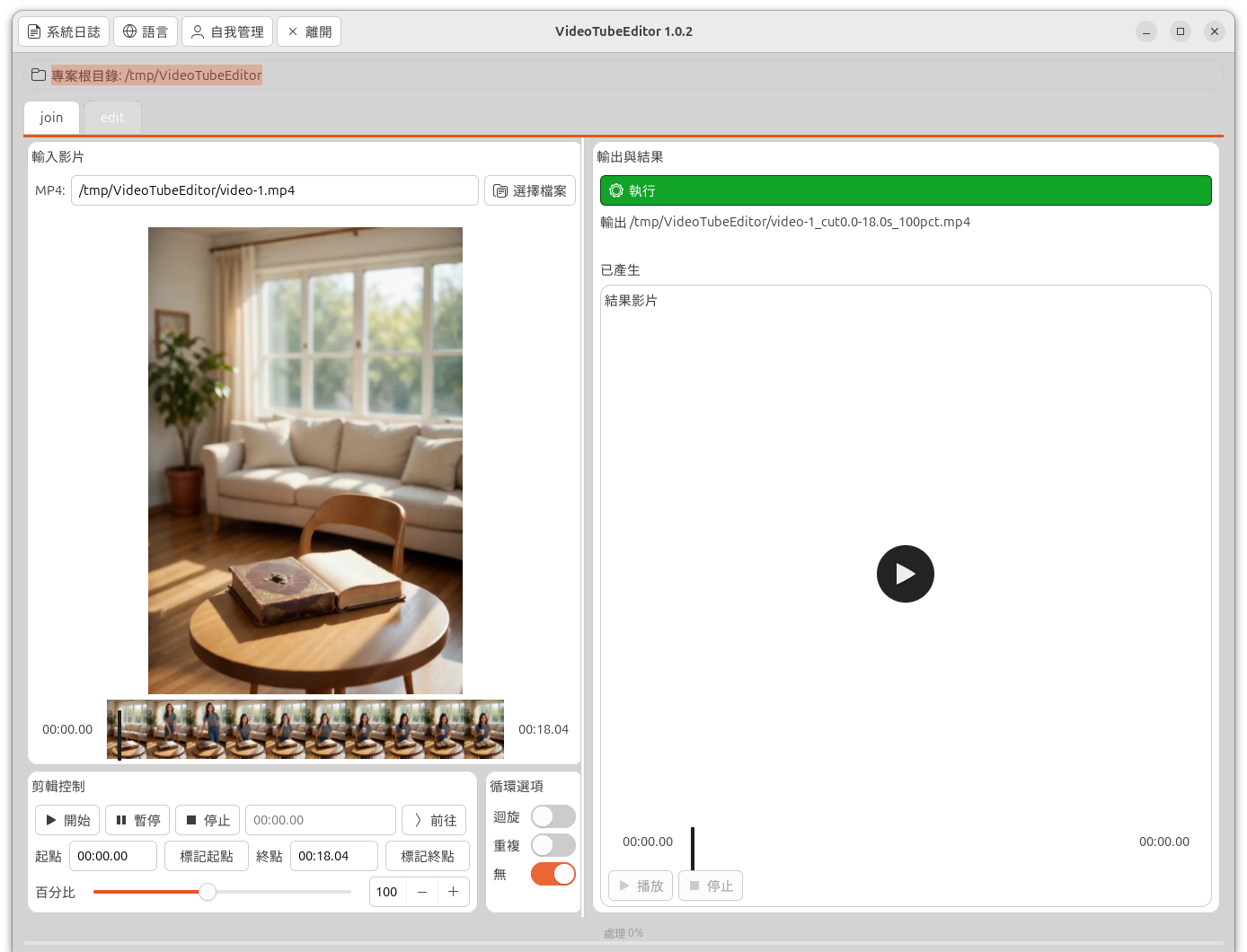
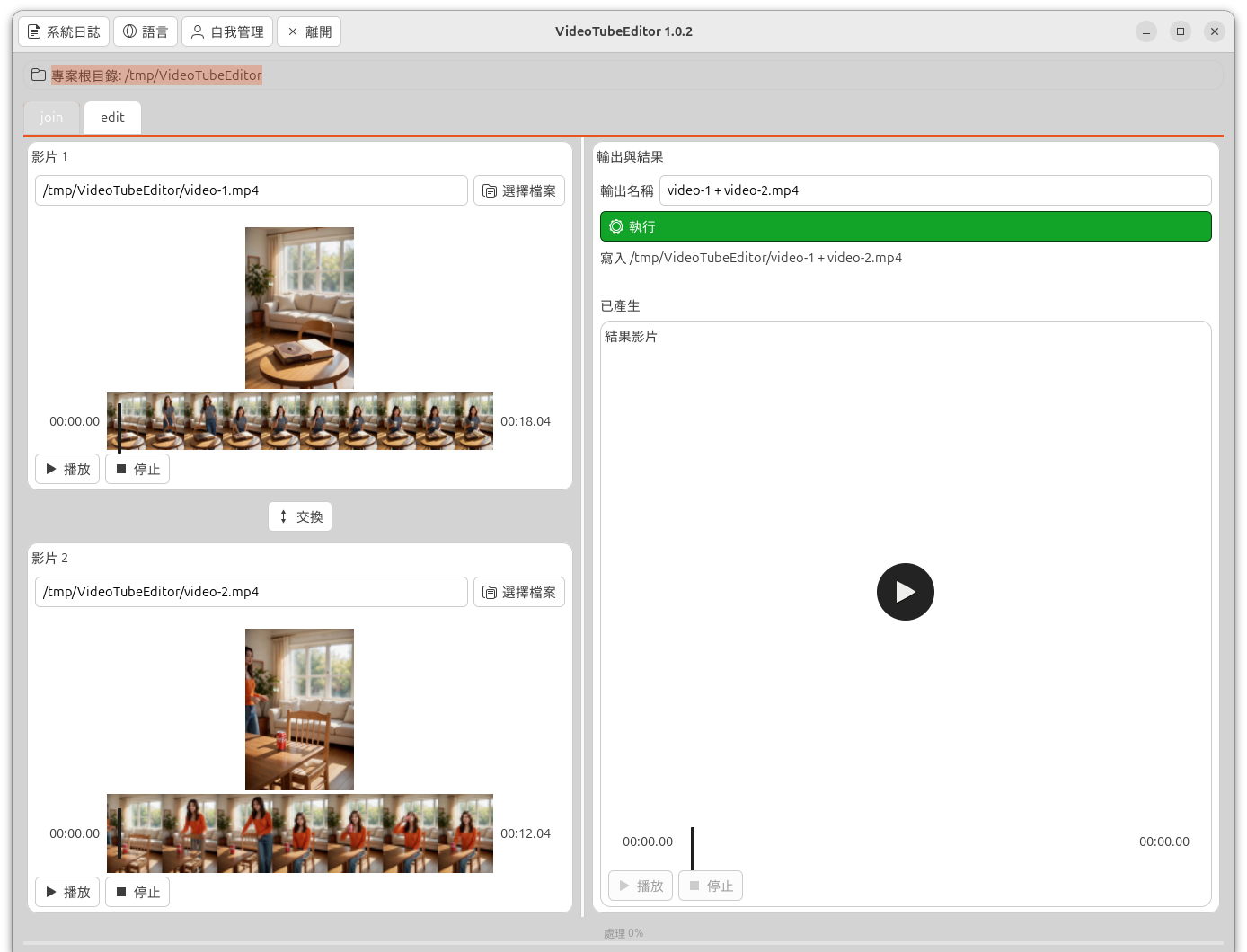
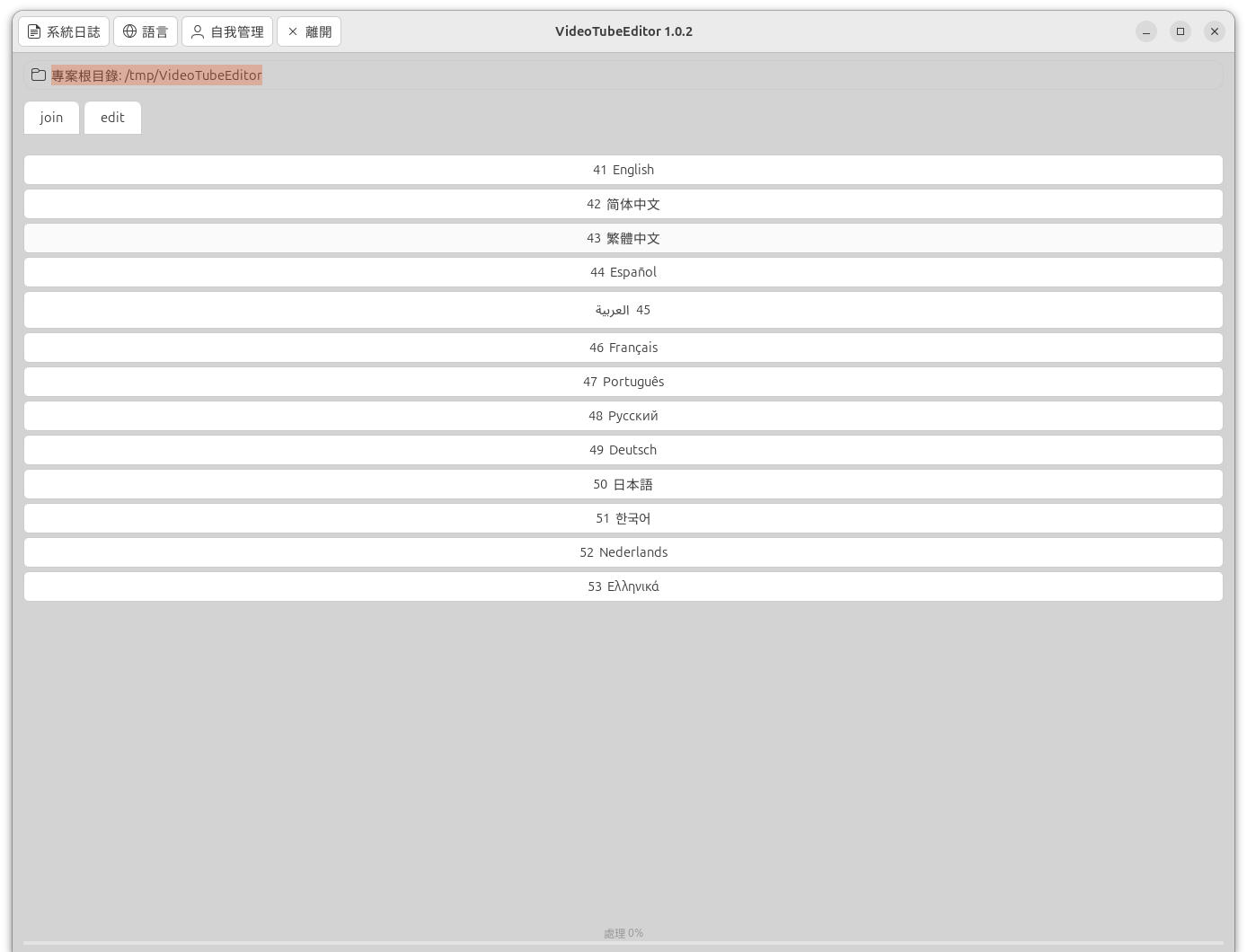
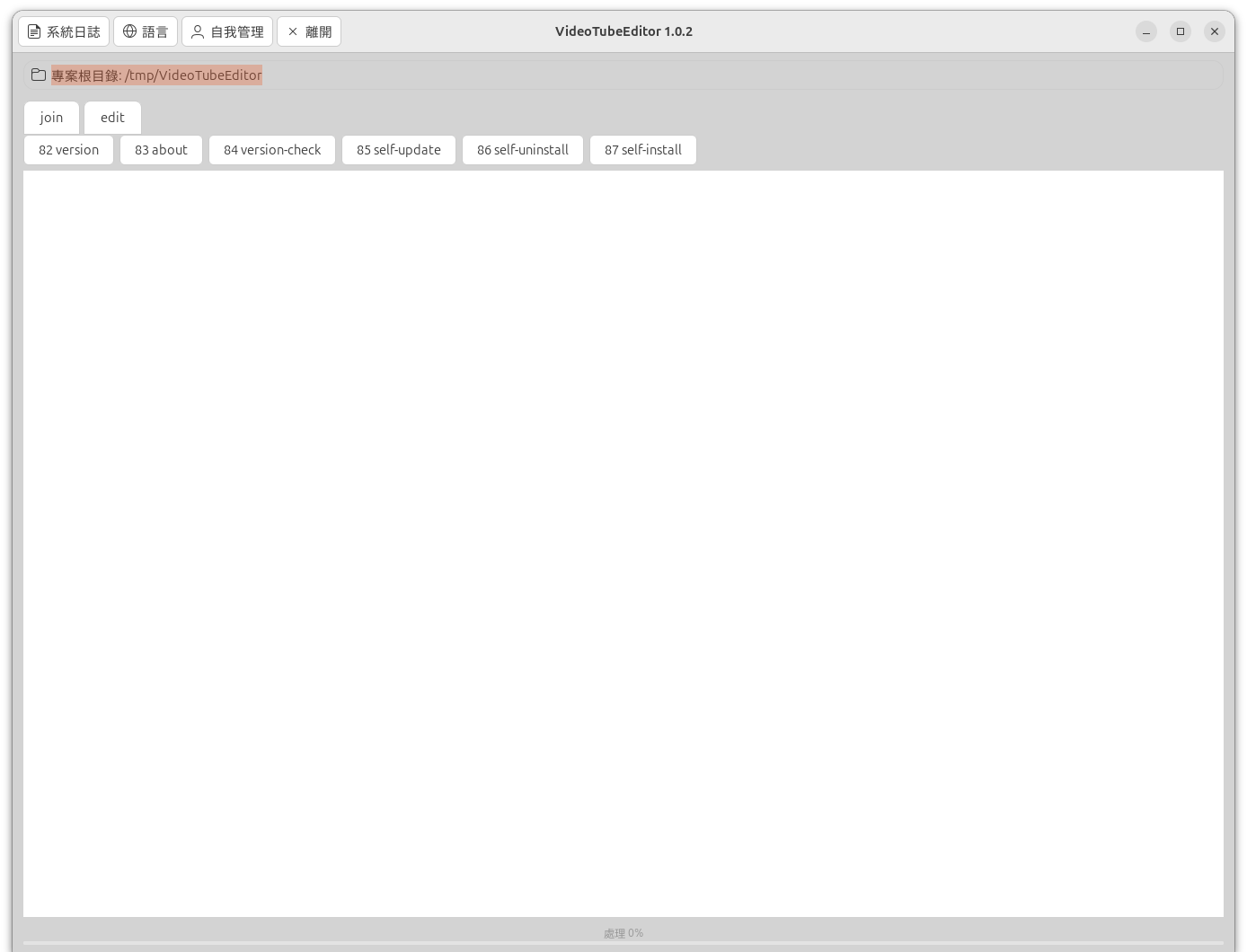
|
|
13
|
+
License-File: LICENSE.md
|
|
14
|
+
Requires-Dist: opencv-python-headless>=5.0.0.93
|
|
15
|
+
Requires-Dist: ChronicleLogger>=1.3.1
|
|
16
|
+
Dynamic: license-file
|
|
17
|
+
|
|
18
|
+
# VideoTubeEditor - Join two local videos, and cut, speed, or boomerang an MP4
|
|
19
|
+
|
|
20
|
+

|
|
21
|
+

|
|
22
|
+
[-purple.svg)](https://github.com/cloudgen/ciao)
|
|
23
|
+
[](https://github.com/cloudgen/VideoTubeEditor)
|
|
24
|
+
[]()
|
|
25
|
+
[](https://pypi.org/project/VideoTubeEditor/)
|
|
26
|
+
|
|
27
|
+
VideoTubeEditor keeps the VideoJoin architecture and adds the VideoSpeed edit steps. It concatenates **two** video files from the current directory using **FFmpeg** (stream copy first, then a fail-closed re-encode). It also cuts an MP4, changes its length, and can append a boomerang or a repeat. Intermediate files are published with **`shutil.move`**.
|
|
28
|
+
|
|
29
|
+
On a terminal with an X11 display (`DISPLAY` set, including `ssh -X`), starting it with no arguments opens a window. **Edit** and **Join** are two groups: one is on screen while the other is hidden. The labels join and edit sit on that group, sharing its left edge and width. The row for the group on screen is highlighted, and the highlight meets the top of the group. Each group splits left and right. The left side is the source or sources and the settings. The right side is the output. Edit plays an MP4, with the elapsed time on the left of the time bar as `00:00.00`, and with Start, Pause, Stop, jump, Mark start, and Mark end. Percent stays 20–200. The tail choices are None, Boomerang, and Repeat, and None starts selected. The window’s top menu shows join, edit, system-log, language, self-management, and Exit. Button names and the other window labels follow the language chosen there. The clock `00:00.00`, the folder path, and the About page stay in their current form. The edit right side also plays the generated file, with that elapsed time bar and with Play and Stop. When Run starts, that generated player is cleared and its controls are disabled. When the run finishes and the file is on disk, the player loads the file and the controls are enabled. Join has two **Select file** buttons, with Video 1 above Video 2. Each source has a player under its path, and the generated file has a third player on the right. Those three players show the elapsed time on the time bar and have Play and Stop. `video-tube-editor tui` opens the text menu and leaves that menu as it is. With no display, a bare start still opens the text menu. **join** is row 1. **edit** is row 2. Neither the window nor the menu starts a job by itself, and neither calls pip.
|
|
30
|
+
|
|
31
|
+
## Features
|
|
32
|
+
|
|
33
|
+
- Text menu on a terminal: **join** (1), **edit** (2), **system-log** (3), **language** (4), **self-management** (8), and **Exit** (9)
|
|
34
|
+
- The first row shows the current folder and a local clock (`HH:MM:SS`) when the row has room
|
|
35
|
+
- Numbered rows line up. A rounded input box sits along the bottom, as wide as the terminal, with the name and version on the status line under the box
|
|
36
|
+
- **system-log** (3) opens view-log, clear-log, and log-folder. **language** (4) picks the menu language and the window labels. **self-management** (8) opens version, about, and the pip lifecycle rows
|
|
37
|
+
- Interactive pick of first and second video (same file cannot be chosen twice)
|
|
38
|
+
- Discovers `.mp4`, `.mov`, `.mkv`, `.avi`, `.m4v` in the **current working directory** (sorted case-insensitively)
|
|
39
|
+
- Stream-copy join first (`ffmpeg` concat demuxer); re-encode fallback (`libx264` CRF 18, AAC 192k)
|
|
40
|
+
- Fail-closed: no success message if both paths fail
|
|
41
|
+
- Unique temp list + media intermediates; cleanup on success and failure
|
|
42
|
+
- Publish intermediates with `shutil.move` (same FS rename; cross-mount copy+delete)
|
|
43
|
+
- FFmpeg on `PATH` checked before joining
|
|
44
|
+
- Console scripts `video-tube-editor`, `video-join`, and `video-speed`, and module entry `python -m VideoTubeEditor`
|
|
45
|
+
- Typed verbs: `help`, `version`, `about`, `hello`, `tui`, `join`, `list-videos`, `edit`, `list-mp4`, `self-install`, `version-check`, `self-update`, `self-uninstall`, `setup`
|
|
46
|
+
- X11 window when a bare start sees `DISPLAY`. The window uses the host GTK 4 and GStreamer packages. They are not pip dependencies. `about` reports whether this Python can import them. On Windows, a missing library names `video-tube-editor tui` and the page does not install packages
|
|
47
|
+
|
|
48
|
+
## Advantages
|
|
49
|
+
|
|
50
|
+
1. **Dual-mode interface.** The menu asks for two indexes and an output name on **join**, and for a folder, a file, a cut, a length percent, and a tail of none, boomerang, or repeat on **edit**. A typed verb asks the same questions. The person does not write an FFmpeg graph. Join tries stream copy, then re-encodes if copy fails. Edit can also run from `--file`, `--start`, and `--end`, and `--json` prints one object without opening the menu. With no arguments on a terminal, the text menu opens. With no terminal and no verb, the program prints help and returns 0. Direct `join` with no terminal exits non-zero.
|
|
51
|
+
2. **Built-in languages.** Row **4** lists thirteen languages: English, Simplified Chinese, Traditional Chinese, Spanish, Arabic, French, Portuguese, Russian, German, Japanese, Korean, Dutch, and Greek. The choice is saved for the next run.
|
|
52
|
+
3. **USB-safe staging.** Intermediate files are written beside the output when that folder can be written, including on a removable drive. The finished file is published with `shutil.move`. When that folder cannot be written, the stage uses the system temporary directory.
|
|
53
|
+
4. **Lifecycle and diagnostics.** `version-check`, `self-update`, `self-install`, and `self-uninstall` are menu rows **84**–**87** and typed verbs. `self-uninstall` on the command line needs `--force`. They call pip and do not use root. **system-log** (**3**) views a log, clears a log, and shows the log folder. **about** (**83**) stays in English.
|
|
54
|
+
|
|
55
|
+
| Feature | Raw FFmpeg CLI | Typical Python wrappers (moviepy) | VideoTubeEditor |
|
|
56
|
+
|---------|----------------|-----------------------------------|-----------|
|
|
57
|
+
| Learning curve | A concat or filter graph the person writes | A Python script | Text menu, or two file numbers and an output name, or edit flags |
|
|
58
|
+
| Non-interactive | Native command line | A custom script | Typed verbs. No terminal and no verb: help, return 0. Direct `join` with no terminal: non-zero. `--json` for an edit job or for help |
|
|
59
|
+
| Menu languages | None | None | Thirteen, kept for the next run |
|
|
60
|
+
| Temporary files | You choose the paths | Often the system temporary directory | Beside the output when that folder can be written. Otherwise the system temporary directory. Publish with `shutil.move` |
|
|
61
|
+
| Self-management | The system package manager | pip from outside the tool | Built-in version-check, self-update, self-install, and self-uninstall |
|
|
62
|
+
| Diagnostics and logs | The encode stream | A logging setup in the script | system-log (row 3) and about (83), in English |
|
|
63
|
+
|
|
64
|
+
## Quick Installation
|
|
65
|
+
|
|
66
|
+
**System requirement:** [FFmpeg](https://ffmpeg.org/download.html) must be installed and available as `ffmpeg` on your `PATH`. The package does **not** install FFmpeg via pip.
|
|
67
|
+
|
|
68
|
+
**Python dependencies:** `ChronicleLogger>=1.3.1` and `opencv-python-headless>=5.0.0.93` (both required). Pip installs them with VideoTubeEditor. Python 3.11 or newer.
|
|
69
|
+
|
|
70
|
+
### PyPI (registry)
|
|
71
|
+
|
|
72
|
+
```bash
|
|
73
|
+
pip install VideoTubeEditor
|
|
74
|
+
```
|
|
75
|
+
|
|
76
|
+
This installs the console entries **`video-tube-editor`**, **`video-join`**, and **`video-speed`**, and the package **`VideoTubeEditor`**. Packaging name SSOT is `pyproject.toml` `[project].name` = `VideoTubeEditor`. This tree is **1.0.1**. The source home is `https://github.com/cloudgen/VideoTubeEditor`. The PyPI badge above shows the live index.
|
|
77
|
+
|
|
78
|
+
### Local install (checkout)
|
|
79
|
+
|
|
80
|
+
From a checkout (editable / unreleased work):
|
|
81
|
+
|
|
82
|
+
```bash
|
|
83
|
+
git clone git@github.com:cloudgen/VideoTubeEditor.git
|
|
84
|
+
# or: git clone https://github.com/cloudgen/VideoTubeEditor.git
|
|
85
|
+
cd VideoTubeEditor
|
|
86
|
+
python3 -m venv venv
|
|
87
|
+
source venv/bin/activate # Windows: venv\Scripts\activate
|
|
88
|
+
pip install -e .
|
|
89
|
+
```
|
|
90
|
+
|
|
91
|
+
### Main menu
|
|
92
|
+
|
|
93
|
+
After install, on a terminal, `video-tube-editor` with no arguments prints this screen. `video-join` and `video-speed` open the same screen. The verb is bold and the note after the colon is italic. `9` leaves. `0` on a submenu goes back. After a command finishes, the main menu is shown again. A number that is not on the list prints an error and lets you choose again.
|
|
94
|
+
|
|
95
|
+
Picture of the English menu. Current directory `/tmp/clips`. The rows are the text the menu paints. The frame is the 80-column box.
|
|
96
|
+
|
|
97
|
+
```text
|
|
98
|
+
$ video-tube-editor
|
|
99
|
+
Path: /tmp/clips 12:06:45
|
|
100
|
+
|
|
101
|
+
1. **join** : *pick two videos in this folder and concatenate*
|
|
102
|
+
2. **edit** : *cut, speed, and optional boomerang or repeat*
|
|
103
|
+
3. **system-log** : *view, clear, and the log folder*
|
|
104
|
+
4. **language** : *display language for this menu*
|
|
105
|
+
8. **self-management**: *version, about, and pip lifecycle*
|
|
106
|
+
9. **Exit** : *leave*
|
|
107
|
+
|
|
108
|
+
|
|
109
|
+
|
|
110
|
+
|
|
111
|
+
╭─────────────────────────────────────────────────────────────────────────────╮
|
|
112
|
+
│ > │
|
|
113
|
+
╰─────────────────────────────────────────────────────────────────────────────╯
|
|
114
|
+
VideoTubeEditor 1.0.1 │ main menu │ Up/Down • Enter
|
|
115
|
+
```
|
|
116
|
+
|
|
117
|
+
**system-log** (3):
|
|
118
|
+
|
|
119
|
+
```text
|
|
120
|
+
Path: /tmp/clips 12:06:45
|
|
121
|
+
|
|
122
|
+
31. **view-log** : *list a log file and show it*
|
|
123
|
+
32. **clear-log** : *empty one log file*
|
|
124
|
+
33. **log-folder**: *show the log folder*
|
|
125
|
+
0. **Back** : *return to the main menu*
|
|
126
|
+
|
|
127
|
+
|
|
128
|
+
|
|
129
|
+
|
|
130
|
+
╭─────────────────────────────────────────────────────────────────────────────╮
|
|
131
|
+
│ > │
|
|
132
|
+
╰─────────────────────────────────────────────────────────────────────────────╯
|
|
133
|
+
VideoTubeEditor 1.0.1 │ system-log │ Up/Down • Enter
|
|
134
|
+
```
|
|
135
|
+
|
|
136
|
+
**language** (4). The short on each language row is that language’s own name. Numbers 40 and 54–59 are not printed. `0` goes back and does not save.
|
|
137
|
+
|
|
138
|
+
```text
|
|
139
|
+
Path: /tmp/clips 12:06:46
|
|
140
|
+
|
|
141
|
+
41. **English** : *use English for this menu*
|
|
142
|
+
42. **简体中文** : *use 简体中文 for this menu*
|
|
143
|
+
43. **繁體中文** : *use 繁體中文 for this menu*
|
|
144
|
+
44. **Español** : *use Español for this menu*
|
|
145
|
+
45. **العربية** : *use العربية for this menu*
|
|
146
|
+
46. **Français** : *use Français for this menu*
|
|
147
|
+
47. **Português** : *use Português for this menu*
|
|
148
|
+
48. **Русский** : *use Русский for this menu*
|
|
149
|
+
49. **Deutsch** : *use Deutsch for this menu*
|
|
150
|
+
50. **日本語** : *use 日本語 for this menu*
|
|
151
|
+
51. **한국어** : *use 한국어 for this menu*
|
|
152
|
+
52. **Nederlands**: *use Nederlands for this menu*
|
|
153
|
+
53. **Ελληνικά** : *use Ελληνικά for this menu*
|
|
154
|
+
0. **Back** : *return to the main menu*
|
|
155
|
+
|
|
156
|
+
╭─────────────────────────────────────────────────────────────────────────────╮
|
|
157
|
+
│ > │
|
|
158
|
+
╰─────────────────────────────────────────────────────────────────────────────╯
|
|
159
|
+
VideoTubeEditor 1.0.1 │ language │ Up/Down • Enter
|
|
160
|
+
```
|
|
161
|
+
|
|
162
|
+
**self-management** (8):
|
|
163
|
+
|
|
164
|
+
```text
|
|
165
|
+
Path: /tmp/clips 14:05:09
|
|
166
|
+
|
|
167
|
+
82. **version** : *show the installed version*
|
|
168
|
+
83. **about** : *version, FFmpeg, and this computer*
|
|
169
|
+
84. **version-check** : *compare this install with pip*
|
|
170
|
+
85. **self-update** : *upgrade this package with pip*
|
|
171
|
+
86. **self-uninstall**: *remove this package with pip*
|
|
172
|
+
87. **self-install** : *install this package with pip*
|
|
173
|
+
0. **Back** : *return to the main menu*
|
|
174
|
+
|
|
175
|
+
╭─────────────────────────────────────────────────────────────────────────────╮
|
|
176
|
+
│ > │
|
|
177
|
+
╰─────────────────────────────────────────────────────────────────────────────╯
|
|
178
|
+
VideoTubeEditor 1.0.1 │ self-management │ Up/Down • Enter
|
|
179
|
+
```
|
|
180
|
+
|
|
181
|
+
Choose a number, or type the command name in the box. The block caret appears in that box while it is focused.
|
|
182
|
+
|
|
183
|
+
## Usage
|
|
184
|
+
|
|
185
|
+
```bash
|
|
186
|
+
video-tube-editor
|
|
187
|
+
# or
|
|
188
|
+
python -m VideoTubeEditor
|
|
189
|
+
# video-join and video-speed call the same entry
|
|
190
|
+
```
|
|
191
|
+
|
|
192
|
+
On a terminal with `DISPLAY` set, that opens the window. `video-tube-editor tui` opens the main menu above, including when `DISPLAY` is set. On a terminal with no `DISPLAY`, a bare start opens that menu. It does not ask for videos yet, and it does not call pip. With no terminal, the same command prints help and returns 0.
|
|
193
|
+
|
|
194
|
+
**join** (1), or `video-tube-editor join` on a terminal, stays on the screen and asks in the bottom box:
|
|
195
|
+
|
|
196
|
+
1. First video number
|
|
197
|
+
2. Second video number from the remaining list
|
|
198
|
+
3. Output name (Enter uses `{stem1} + {stem2}.mp4`)
|
|
199
|
+
|
|
200
|
+
Esc returns to the main menu and does not join. Fewer than two eligible videos fails closed: FFmpeg does not run. `video-tube-editor join` with no terminal exits non-zero and tells you to use a terminal. Join does not cut, speed, or boomerang.
|
|
201
|
+
|
|
202
|
+
**edit** (2), or `video-tube-editor edit` on a terminal, asks for a folder, then one MP4, then the start, the end, the length percent (Enter uses 100), and a tail. The tail is **none** (play once), **boomerang** (append the reverse), or **repeat** (append the clip so it plays twice). Enter uses none. A script can pass the whole job:
|
|
203
|
+
|
|
204
|
+
```bash
|
|
205
|
+
video-tube-editor edit --file clip.mp4 --start 1 --end 5 --percent 50 --boomerang
|
|
206
|
+
video-tube-editor edit --file clip.mp4 --start 1 --end 5 --percent 50 --repeat
|
|
207
|
+
video-tube-editor list-mp4
|
|
208
|
+
```
|
|
209
|
+
|
|
210
|
+
`--boomerang` and `--repeat` together fail closed. The window offers the same three choices. None is the default.
|
|
211
|
+
|
|
212
|
+
`list-mp4` lists MP4 files and does not encode. `--json` prints one object and does not open the menu.
|
|
213
|
+
|
|
214
|
+
```bash
|
|
215
|
+
video-tube-editor help
|
|
216
|
+
video-tube-editor version
|
|
217
|
+
video-tube-editor about
|
|
218
|
+
video-tube-editor hello
|
|
219
|
+
video-tube-editor list-videos
|
|
220
|
+
video-tube-editor version-check
|
|
221
|
+
video-tube-editor self-update
|
|
222
|
+
video-tube-editor self-install
|
|
223
|
+
video-tube-editor self-uninstall --force
|
|
224
|
+
```
|
|
225
|
+
|
|
226
|
+
`version` prints `VideoTubeEditor 1.0.1` and does not call pip. `about` shows one English page: the product identity, a host check of this computer, and a star box. It does not install FFmpeg and it does not call pip. `hello` prints a one-line greeting and does not draw the menu. `list-videos` lists eligible names and does not join. `help` prints usage.
|
|
227
|
+
|
|
228
|
+
`version-check` runs `python -m pip index versions VideoTubeEditor`. `self-update` runs `python -m pip install --upgrade VideoTubeEditor`. `self-install` runs `python -m pip install VideoTubeEditor`. `self-uninstall` runs `python -m pip uninstall -y VideoTubeEditor` and needs `--force` on the command line. Those pip verbs do not use sudo. Empty arguments do not install or update.
|
|
229
|
+
|
|
230
|
+
Exit codes: non-zero if join is started with no terminal, fewer than two videos, FFmpeg is missing, or the join fails. Menu **Exit** (9) returns 0.
|
|
231
|
+
|
|
232
|
+
Import for scripts (thin entry):
|
|
233
|
+
|
|
234
|
+
```python
|
|
235
|
+
from VideoTubeEditor import main
|
|
236
|
+
# interactive session; a terminal opens the text menu
|
|
237
|
+
```
|
|
238
|
+
|
|
239
|
+
## Screenshots
|
|
240
|
+
|
|
241
|
+
Each heading is the file name. The paragraph is what that picture shows. These four pictures are the X11 window for package **1.0.1**. A bare `video-tube-editor` on a terminal with `DISPLAY` set opens this window. The header follows the saved menu language. On these captures that language is Traditional Chinese, so the header reads 系統日誌, 語言, 自我管理, and 離開. English labels for those buttons are system-log, language, self-management, and Exit. The title is VideoTubeEditor 1.0.1. The project-root line names the current directory and does not carry a clock. Each player clock reads `00:00.00`. A loaded source player shows a thumbnail strip under the picture. The generated player stays empty, and its Play and Stop stay disabled, until a finished file is on disk. Play and Stop do not start or stop FFmpeg. Run has not been pressed, so the bottom bar reads 處理 0%.
|
|
242
|
+
|
|
243
|
+
### `gui-edit.png`
|
|
244
|
+
|
|
245
|
+
Edit is the group on screen. The window title is VideoTubeEditor 1.0.1. The edit tab is highlighted and shares the group's left edge. A framed line under the header shows 專案根目錄 (Project Root) and the current directory. 輸入影片 (Input Video) holds one MP4, 選擇檔案 (Select file), and a player at `00:00.00` of `00:18.04`. A thumbnail strip sits under that picture. 剪輯控制 (Edit Controls) has 開始 (Start), 暫停 (Pause), 停止 (Stop), a jump field showing `00:00.00`, and 前往 (Go To). 起點 (Start) is `00:00.00` with 標記起點 (Mark start). 終點 (End) is `00:18.04` with 標記終點 (Mark end). 百分比 (Percent) is 100. 循環選項 (Looping Options) has 無 (None) on, and 迴旋 (Boomerang) and 重複 (Repeat) off. The output name is `video-1_cut0.0-18.0s_100pct.mp4`. 執行 (Run) has not been pressed. 輸出與結果 (Output & Result) shows that name. 已產生 (Generated) is empty. 結果影片 (Resulting Video) is empty, shows `00:00.00` of `00:00.00`, and its 播放 (Play) and 停止 (Stop) are disabled. The bottom bar reads 處理 0% (Process 0%).
|
|
246
|
+
|
|
247
|
+
|
|
248
|
+
|
|
249
|
+
### `gui-join.png`
|
|
250
|
+
|
|
251
|
+
Join is the group on screen. The join tab is highlighted and shares the group's left edge. The same header, project-root line, and 處理 0% bar are on screen. 影片 1 (Video 1) and 影片 2 (Video 2) are loaded. The first player shows `00:00.00` of `00:18.04`. The second shows `00:00.00` of `00:12.04`. A thumbnail strip sits under each source picture. Each source has 播放 (Play) and 停止 (Stop). 輸出名稱 (Output name) is `video-1 + video-2.mp4`. The write line names the current directory and that file. 執行 (Run) has not been pressed. 已產生 (Generated) is empty. 結果影片 (Resulting Video) is empty, shows `00:00.00` of `00:00.00`, and its Play and Stop are disabled.
|
|
252
|
+
|
|
253
|
+
|
|
254
|
+
|
|
255
|
+
### `gui-language.png`
|
|
256
|
+
|
|
257
|
+
The language page lists the thirteen menu languages. The header stays in the saved language. join and edit stay above the list and neither is highlighted. The rows are 41 English, 42 简体中文, 43 繁體中文, 44 Español, 45 العربية, 46 Français, 47 Português, 48 Русский, 49 Deutsch, 50 日本語, 51 한국어, 52 Nederlands, and 53 Ελληνικά. The project-root line names the current directory. The bottom bar reads 處理 0% (Process 0%). Choosing a row saves that language for the next window and for the text menu.
|
|
258
|
+
|
|
259
|
+
|
|
260
|
+
|
|
261
|
+
### `gui-self-management.png`
|
|
262
|
+
|
|
263
|
+
Self-management shows the numbered actions and no extra page under them. The buttons are 82 version, 83 about, 84 version-check, 85 self-update, 86 self-uninstall, and 87 self-install. The header stays in the saved language. join and edit stay above the buttons and neither is highlighted. The project-root line names the current directory. The bottom bar reads 處理 0% (Process 0%). 83 about opens the English about page. The pip rows call pip and do not use root. `self-uninstall` on the command line needs `--force`.
|
|
264
|
+
|
|
265
|
+
|
|
266
|
+
|
|
267
|
+
## Examples
|
|
268
|
+
|
|
269
|
+
```bash
|
|
270
|
+
cd /path/to/folder/with/clips
|
|
271
|
+
video-tube-editor
|
|
272
|
+
```
|
|
273
|
+
|
|
274
|
+
```bash
|
|
275
|
+
video-tube-editor version
|
|
276
|
+
```
|
|
277
|
+
|
|
278
|
+
`version` prints `VideoTubeEditor 1.0.1` and does not call pip. A run that is not the text menu can also print ChronicleLogger status lines above that. The text menu keeps those lines off the screen.
|
|
279
|
+
|
|
280
|
+
```bash
|
|
281
|
+
video-tube-editor join
|
|
282
|
+
video-tube-editor edit --file clip.mp4 --start 1 --end 5 --percent 100
|
|
283
|
+
```
|
|
284
|
+
|
|
285
|
+
The window pictures are in Screenshots. Join still prefers stream copy, then re-encode, and publishes the result with `shutil.move`.
|
|
286
|
+
|
|
287
|
+
## Platform Compatibility
|
|
288
|
+
|
|
289
|
+
| Platform | Status |
|
|
290
|
+
|----------|--------|
|
|
291
|
+
| Linux | Primary; tested development path |
|
|
292
|
+
| macOS | Supported when Python + FFmpeg on PATH |
|
|
293
|
+
| Windows | CLI verbs run when Python is installed. `video-tube-editor setup` installs the declared pip libraries and, on Windows, tries curses and FFmpeg. The picture window still needs an X11 `DISPLAY` and the host GTK 4 and GStreamer packages |
|
|
294
|
+
| Architectures | Any with CPython + FFmpeg binary |
|
|
295
|
+
|
|
296
|
+
The text menu needs a terminal and the curses module. When this Python cannot import curses, `about`, `version`, `help`, and `hello` still run, and opening the text menu says the module is missing. `video-tube-editor setup` installs `ChronicleLogger>=1.3.1` and `opencv-python-headless>=5.0.0.93` for this Python. On Windows it also tries the curses module and FFmpeg. It does not install GTK 4 or GStreamer. With no terminal and no verb, the program prints help and returns 0. It does not wait.
|
|
297
|
+
|
|
298
|
+
## Related Projects
|
|
299
|
+
|
|
300
|
+
- [VideoJoin on GitHub](https://github.com/Wilgat/VideoJoin) — join architecture this package keeps
|
|
301
|
+
- [VideoJoin on PyPI](https://pypi.org/project/VideoJoin/) — the join product on PyPI
|
|
302
|
+
- [AnimeDlp](https://github.com/Wilgat/AnimeDlp) — command-line downloader for anime video sites
|
|
303
|
+
- [ChronicleLogger](https://github.com/Wilgat/ChronicleLogger) — status logger this program depends on (`ChronicleLogger>=1.3.1`)
|
|
304
|
+
- [VideoSpeed](https://github.com/Wilgat/VideoSpeed) — edit steps this package also keeps
|
|
305
|
+
- [CIAO](https://github.com/cloudgen/ciao) — Caution, Intentional, Anti-fragile, Over-engineered
|
|
306
|
+
- [CIAO-Lite](https://github.com/cloudgen/ciao-lite) — short agent contract
|
|
307
|
+
- [safe-rm](https://github.com/cloudgen/safe-rm) — guarded `rm`
|
|
308
|
+
|
|
309
|
+
## Contributing
|
|
310
|
+
|
|
311
|
+
1. Keep product law under `docs/requirements/` in sync when behavior changes.
|
|
312
|
+
2. Prefer small, CIAO-safe changes; do not remove Protection Zones in the join publish path (staging / `shutil.move`) without explicit design.
|
|
313
|
+
3. Version dual SSOT: bump **`pyproject.toml`** and **`src/VideoTubeEditor/__init__.__version__`** together.
|
|
314
|
+
4. Open issues and pull requests on GitHub.
|
|
315
|
+
|
|
316
|
+
## License
|
|
317
|
+
|
|
318
|
+
MIT — see [`LICENSE.md`](./LICENSE.md). Also declared in `pyproject.toml`.
|
|
319
|
+
|
|
320
|
+
## Last Update
|
|
321
|
+
|
|
322
|
+
2026-10-12 — **1.0.1**: The distribution name is VideoTubeEditor. The console script is `video-tube-editor`. The module is `python -m VideoTubeEditor`. Aliases `video-join` and `video-speed` stay. Public home is [cloudgen/VideoTubeEditor](https://github.com/cloudgen/VideoTubeEditor). The four pictures are captures of this window. The title is VideoTubeEditor 1.0.1. Version badge matches `pyproject.toml` and `__version__`.
|
|
323
|
+
|
|
324
|
+
2026-10-12 — **1.0.0**: The distribution name is VideoEditor. The console script is `video-editor`. The module is `python -m VideoEditor`. Public home is [cloudgen/VideoEditor](https://github.com/cloudgen/VideoEditor). The four pictures are captures of this window. The title is VideoEditor 1.0.0. Version badge matches `pyproject.toml` and `__version__`.
|
|
325
|
+
|
|
326
|
+
2026-10-11 — **2.0.0**: The X11 window adds a project-root line, Input Video, Edit Controls, Looping Options, Output & Result, and Resulting Video. Looping Options is three switches and starts on None. A process bar reads Process 0% until a finished file is on disk. The four pictures are captures of that window. Version badge matches `pyproject.toml` and `__version__`.
|
|
327
|
+
|
|
328
|
+
2026-10-10 — **1.1.0**: Public home is [cloudgen/VideoEditor](https://github.com/cloudgen/VideoEditor). The pictures are the X11 window: edit, join, language, and self-management. A bare start on a terminal with `DISPLAY` set opens that window. Console scripts are `video-editor`, `video-join`, and `video-speed`. Version badge matches `pyproject.toml` and `__version__`. `ChronicleLogger>=1.3.1` and `opencv-python-headless>=5.0.0.93` are required.
|