OctoPrint-BitBang 0.2.3__tar.gz → 0.2.6__tar.gz
This diff represents the content of publicly available package versions that have been released to one of the supported registries. The information contained in this diff is provided for informational purposes only and reflects changes between package versions as they appear in their respective public registries.
- {octoprint_bitbang-0.2.3 → octoprint_bitbang-0.2.6/OctoPrint_BitBang.egg-info}/PKG-INFO +24 -17
- {octoprint_bitbang-0.2.3/OctoPrint_BitBang.egg-info → octoprint_bitbang-0.2.6}/PKG-INFO +24 -17
- {octoprint_bitbang-0.2.3 → octoprint_bitbang-0.2.6}/README.md +23 -16
- {octoprint_bitbang-0.2.3 → octoprint_bitbang-0.2.6}/octoprint_bitbang/__init__.py +1 -1
- {octoprint_bitbang-0.2.3 → octoprint_bitbang-0.2.6}/octoprint_bitbang/_plugin.py +1 -1
- {octoprint_bitbang-0.2.3 → octoprint_bitbang-0.2.6}/pyproject.toml +1 -1
- {octoprint_bitbang-0.2.3 → octoprint_bitbang-0.2.6}/LICENSE +0 -0
- {octoprint_bitbang-0.2.3 → octoprint_bitbang-0.2.6}/MANIFEST.in +0 -0
- {octoprint_bitbang-0.2.3 → octoprint_bitbang-0.2.6}/OctoPrint_BitBang.egg-info/SOURCES.txt +0 -0
- {octoprint_bitbang-0.2.3 → octoprint_bitbang-0.2.6}/OctoPrint_BitBang.egg-info/dependency_links.txt +0 -0
- {octoprint_bitbang-0.2.3 → octoprint_bitbang-0.2.6}/OctoPrint_BitBang.egg-info/entry_points.txt +0 -0
- {octoprint_bitbang-0.2.3 → octoprint_bitbang-0.2.6}/OctoPrint_BitBang.egg-info/requires.txt +0 -0
- {octoprint_bitbang-0.2.3 → octoprint_bitbang-0.2.6}/OctoPrint_BitBang.egg-info/top_level.txt +0 -0
- {octoprint_bitbang-0.2.3 → octoprint_bitbang-0.2.6}/octoprint_bitbang/__main__.py +0 -0
- {octoprint_bitbang-0.2.3 → octoprint_bitbang-0.2.6}/octoprint_bitbang/app.py +0 -0
- {octoprint_bitbang-0.2.3 → octoprint_bitbang-0.2.6}/octoprint_bitbang/bin/bitbang-linux-amd64 +0 -0
- {octoprint_bitbang-0.2.3 → octoprint_bitbang-0.2.6}/octoprint_bitbang/bin/bitbang-linux-arm64 +0 -0
- {octoprint_bitbang-0.2.3 → octoprint_bitbang-0.2.6}/octoprint_bitbang/bin/bitbang-linux-armv7 +0 -0
- {octoprint_bitbang-0.2.3 → octoprint_bitbang-0.2.6}/octoprint_bitbang/camera.py +0 -0
- {octoprint_bitbang-0.2.3 → octoprint_bitbang-0.2.6}/octoprint_bitbang/flip_track.py +0 -0
- {octoprint_bitbang-0.2.3 → octoprint_bitbang-0.2.6}/octoprint_bitbang/index.html +0 -0
- {octoprint_bitbang-0.2.3 → octoprint_bitbang-0.2.6}/octoprint_bitbang/octoprint_adapter.py +0 -0
- {octoprint_bitbang-0.2.3 → octoprint_bitbang-0.2.6}/octoprint_bitbang/pi_camera_track.py +0 -0
- {octoprint_bitbang-0.2.3 → octoprint_bitbang-0.2.6}/octoprint_bitbang/pi_h264_source.py +0 -0
- {octoprint_bitbang-0.2.3 → octoprint_bitbang-0.2.6}/octoprint_bitbang/static/favicon.png +0 -0
- {octoprint_bitbang-0.2.3 → octoprint_bitbang-0.2.6}/octoprint_bitbang/static/js/bitbang.js +0 -0
- {octoprint_bitbang-0.2.3 → octoprint_bitbang-0.2.6}/octoprint_bitbang/templates/bitbang_navbar.jinja2 +0 -0
- {octoprint_bitbang-0.2.3 → octoprint_bitbang-0.2.6}/octoprint_bitbang/templates/bitbang_settings.jinja2 +0 -0
- {octoprint_bitbang-0.2.3 → octoprint_bitbang-0.2.6}/octoprint_bitbang/templates/bitbang_webcam.jinja2 +0 -0
- {octoprint_bitbang-0.2.3 → octoprint_bitbang-0.2.6}/octoprint_bitbang/usb_camera_source.py +0 -0
- {octoprint_bitbang-0.2.3 → octoprint_bitbang-0.2.6}/octoprint_bitbang/v4l2_h264_source.py +0 -0
- {octoprint_bitbang-0.2.3 → octoprint_bitbang-0.2.6}/setup.cfg +0 -0
- {octoprint_bitbang-0.2.3 → octoprint_bitbang-0.2.6}/setup.py +0 -0
|
@@ -1,6 +1,6 @@
|
|
|
1
1
|
Metadata-Version: 2.4
|
|
2
2
|
Name: OctoPrint-BitBang
|
|
3
|
-
Version: 0.2.
|
|
3
|
+
Version: 0.2.6
|
|
4
4
|
Summary: Remote OctoPrint access with live H.264 video via BitBang WebRTC
|
|
5
5
|
Author-email: Rich LeGrand <rich.m.legrand@gmail.com>
|
|
6
6
|
License-Expression: MIT
|
|
@@ -55,15 +55,17 @@ This is part of the [BitBang project](https://github.com/richlegrand/bitbang).
|
|
|
55
55
|
|
|
56
56
|
## Installation
|
|
57
57
|
|
|
58
|
-
|
|
58
|
+
### Prerequisites
|
|
59
|
+
|
|
60
|
+
These steps are outside the plugin — do them first.
|
|
61
|
+
|
|
62
|
+
**Free the camera** from OctoPi's default streamer:
|
|
59
63
|
|
|
60
64
|
```bash
|
|
61
|
-
|
|
65
|
+
sudo systemctl disable --now webcamd ffmpeg_hls camera-streamer
|
|
62
66
|
```
|
|
63
67
|
|
|
64
|
-
|
|
65
|
-
|
|
66
|
-
On 32-bit Raspberry Pi OS (`armv7l`, the standard OctoPi image), run these commands first:
|
|
68
|
+
**32-bit Raspberry Pi OS** (`armv7l`, the standard OctoPi image) also needs `aiortc` and `pylibsrtp` rebuilt once, because its [piwheels](https://www.piwheels.org/) wheels link newer system libraries than Bookworm ships:
|
|
67
69
|
|
|
68
70
|
```bash
|
|
69
71
|
sudo apt install -y libvpx-dev libopus-dev libsrtp2-dev
|
|
@@ -72,29 +74,34 @@ sudo apt install -y libvpx-dev libopus-dev libsrtp2-dev
|
|
|
72
74
|
|
|
73
75
|
64-bit and x86_64 need nothing further.
|
|
74
76
|
|
|
75
|
-
|
|
77
|
+
### Install the plugin
|
|
76
78
|
|
|
77
|
-
|
|
78
|
-
|
|
79
|
-
|
|
79
|
+
In OctoPrint, open **Settings → Plugin Manager → Get More**, choose **... from URL**, and paste:
|
|
80
|
+
|
|
81
|
+
```
|
|
82
|
+
https://github.com/richlegrand/OctoPrint-BitBang/releases/latest/download/release.zip
|
|
80
83
|
```
|
|
81
84
|
|
|
82
|
-
|
|
85
|
+
Once the plugin is accepted into OctoPrint's repository you'll also be able to find it by searching for "BitBang". Prefer the command line? `~/oprint/bin/pip install OctoPrint-BitBang` installs the same package. Either way, don't install from the GitHub source zip — it omits the bundled proxy binaries, so remote access and video won't work.
|
|
86
|
+
|
|
87
|
+
### Set up the camera
|
|
88
|
+
|
|
89
|
+
1. Restart OctoPrint to load the plugin — `sudo systemctl restart octoprint` (Plugin Manager offers to do this for you).
|
|
83
90
|
|
|
84
|
-
|
|
91
|
+
2. Point your browser to your OctoPrint server, open the Control tab, and choose **BitBang Camera** from the webcam selector at the top-right.
|
|
85
92
|
|
|
86
|
-
|
|
93
|
+
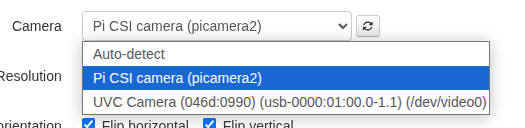
3. Open **Settings → BitBang** and choose camera from dropdown.
|
|
87
94
|
|
|
88
95
|
|
|
89
96
|
|
|
90
|
-
|
|
97
|
+
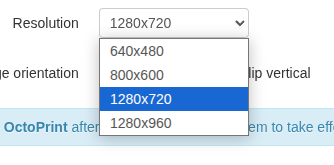
4. Choose resolution.
|
|
91
98
|
|
|
92
99
|
|
|
93
100
|
|
|
94
101
|
|
|
95
|
-
|
|
102
|
+
5. Save and **restart OctoPrint**.
|
|
96
103
|
|
|
97
|
-
|
|
104
|
+
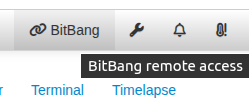
6. Refresh the OctoPrint tab in your browser. A button labeled BitBang is available in the menu bar -- click it for the URL.
|
|
98
105
|
|
|
99
106
|
|
|
100
107
|
|
|
@@ -102,7 +109,7 @@ sudo systemctl restart octoprint
|
|
|
102
109
|
|
|
103
110
|
This URL allows remote access to your printer.
|
|
104
111
|
|
|
105
|
-
|
|
112
|
+
7. Set `Snapshot Webcam` in **Settings → Webcam and Timelapse** to `BitBang Camera` if you want timelapse video/images of your prints.
|
|
106
113
|
|
|
107
114
|
## Configuration
|
|
108
115
|
|
|
@@ -1,6 +1,6 @@
|
|
|
1
1
|
Metadata-Version: 2.4
|
|
2
2
|
Name: OctoPrint-BitBang
|
|
3
|
-
Version: 0.2.
|
|
3
|
+
Version: 0.2.6
|
|
4
4
|
Summary: Remote OctoPrint access with live H.264 video via BitBang WebRTC
|
|
5
5
|
Author-email: Rich LeGrand <rich.m.legrand@gmail.com>
|
|
6
6
|
License-Expression: MIT
|
|
@@ -55,15 +55,17 @@ This is part of the [BitBang project](https://github.com/richlegrand/bitbang).
|
|
|
55
55
|
|
|
56
56
|
## Installation
|
|
57
57
|
|
|
58
|
-
|
|
58
|
+
### Prerequisites
|
|
59
|
+
|
|
60
|
+
These steps are outside the plugin — do them first.
|
|
61
|
+
|
|
62
|
+
**Free the camera** from OctoPi's default streamer:
|
|
59
63
|
|
|
60
64
|
```bash
|
|
61
|
-
|
|
65
|
+
sudo systemctl disable --now webcamd ffmpeg_hls camera-streamer
|
|
62
66
|
```
|
|
63
67
|
|
|
64
|
-
|
|
65
|
-
|
|
66
|
-
On 32-bit Raspberry Pi OS (`armv7l`, the standard OctoPi image), run these commands first:
|
|
68
|
+
**32-bit Raspberry Pi OS** (`armv7l`, the standard OctoPi image) also needs `aiortc` and `pylibsrtp` rebuilt once, because its [piwheels](https://www.piwheels.org/) wheels link newer system libraries than Bookworm ships:
|
|
67
69
|
|
|
68
70
|
```bash
|
|
69
71
|
sudo apt install -y libvpx-dev libopus-dev libsrtp2-dev
|
|
@@ -72,29 +74,34 @@ sudo apt install -y libvpx-dev libopus-dev libsrtp2-dev
|
|
|
72
74
|
|
|
73
75
|
64-bit and x86_64 need nothing further.
|
|
74
76
|
|
|
75
|
-
|
|
77
|
+
### Install the plugin
|
|
76
78
|
|
|
77
|
-
|
|
78
|
-
|
|
79
|
-
|
|
79
|
+
In OctoPrint, open **Settings → Plugin Manager → Get More**, choose **... from URL**, and paste:
|
|
80
|
+
|
|
81
|
+
```
|
|
82
|
+
https://github.com/richlegrand/OctoPrint-BitBang/releases/latest/download/release.zip
|
|
80
83
|
```
|
|
81
84
|
|
|
82
|
-
|
|
85
|
+
Once the plugin is accepted into OctoPrint's repository you'll also be able to find it by searching for "BitBang". Prefer the command line? `~/oprint/bin/pip install OctoPrint-BitBang` installs the same package. Either way, don't install from the GitHub source zip — it omits the bundled proxy binaries, so remote access and video won't work.
|
|
86
|
+
|
|
87
|
+
### Set up the camera
|
|
88
|
+
|
|
89
|
+
1. Restart OctoPrint to load the plugin — `sudo systemctl restart octoprint` (Plugin Manager offers to do this for you).
|
|
83
90
|
|
|
84
|
-
|
|
91
|
+
2. Point your browser to your OctoPrint server, open the Control tab, and choose **BitBang Camera** from the webcam selector at the top-right.
|
|
85
92
|
|
|
86
|
-
|
|
93
|
+
3. Open **Settings → BitBang** and choose camera from dropdown.
|
|
87
94
|
|
|
88
95
|

|
|
89
96
|
|
|
90
|
-
|
|
97
|
+
4. Choose resolution.
|
|
91
98
|
|
|
92
99
|

|
|
93
100
|
|
|
94
101
|
|
|
95
|
-
|
|
102
|
+
5. Save and **restart OctoPrint**.
|
|
96
103
|
|
|
97
|
-
|
|
104
|
+
6. Refresh the OctoPrint tab in your browser. A button labeled BitBang is available in the menu bar -- click it for the URL.
|
|
98
105
|
|
|
99
106
|

|
|
100
107
|
|
|
@@ -102,7 +109,7 @@ sudo systemctl restart octoprint
|
|
|
102
109
|
|
|
103
110
|
This URL allows remote access to your printer.
|
|
104
111
|
|
|
105
|
-
|
|
112
|
+
7. Set `Snapshot Webcam` in **Settings → Webcam and Timelapse** to `BitBang Camera` if you want timelapse video/images of your prints.
|
|
106
113
|
|
|
107
114
|
## Configuration
|
|
108
115
|
|
|
@@ -22,15 +22,17 @@ This is part of the [BitBang project](https://github.com/richlegrand/bitbang).
|
|
|
22
22
|
|
|
23
23
|
## Installation
|
|
24
24
|
|
|
25
|
-
|
|
25
|
+
### Prerequisites
|
|
26
|
+
|
|
27
|
+
These steps are outside the plugin — do them first.
|
|
28
|
+
|
|
29
|
+
**Free the camera** from OctoPi's default streamer:
|
|
26
30
|
|
|
27
31
|
```bash
|
|
28
|
-
|
|
32
|
+
sudo systemctl disable --now webcamd ffmpeg_hls camera-streamer
|
|
29
33
|
```
|
|
30
34
|
|
|
31
|
-
|
|
32
|
-
|
|
33
|
-
On 32-bit Raspberry Pi OS (`armv7l`, the standard OctoPi image), run these commands first:
|
|
35
|
+
**32-bit Raspberry Pi OS** (`armv7l`, the standard OctoPi image) also needs `aiortc` and `pylibsrtp` rebuilt once, because its [piwheels](https://www.piwheels.org/) wheels link newer system libraries than Bookworm ships:
|
|
34
36
|
|
|
35
37
|
```bash
|
|
36
38
|
sudo apt install -y libvpx-dev libopus-dev libsrtp2-dev
|
|
@@ -39,29 +41,34 @@ sudo apt install -y libvpx-dev libopus-dev libsrtp2-dev
|
|
|
39
41
|
|
|
40
42
|
64-bit and x86_64 need nothing further.
|
|
41
43
|
|
|
42
|
-
|
|
44
|
+
### Install the plugin
|
|
43
45
|
|
|
44
|
-
|
|
45
|
-
|
|
46
|
-
|
|
46
|
+
In OctoPrint, open **Settings → Plugin Manager → Get More**, choose **... from URL**, and paste:
|
|
47
|
+
|
|
48
|
+
```
|
|
49
|
+
https://github.com/richlegrand/OctoPrint-BitBang/releases/latest/download/release.zip
|
|
47
50
|
```
|
|
48
51
|
|
|
49
|
-
|
|
52
|
+
Once the plugin is accepted into OctoPrint's repository you'll also be able to find it by searching for "BitBang". Prefer the command line? `~/oprint/bin/pip install OctoPrint-BitBang` installs the same package. Either way, don't install from the GitHub source zip — it omits the bundled proxy binaries, so remote access and video won't work.
|
|
53
|
+
|
|
54
|
+
### Set up the camera
|
|
55
|
+
|
|
56
|
+
1. Restart OctoPrint to load the plugin — `sudo systemctl restart octoprint` (Plugin Manager offers to do this for you).
|
|
50
57
|
|
|
51
|
-
|
|
58
|
+
2. Point your browser to your OctoPrint server, open the Control tab, and choose **BitBang Camera** from the webcam selector at the top-right.
|
|
52
59
|
|
|
53
|
-
|
|
60
|
+
3. Open **Settings → BitBang** and choose camera from dropdown.
|
|
54
61
|
|
|
55
62
|

|
|
56
63
|
|
|
57
|
-
|
|
64
|
+
4. Choose resolution.
|
|
58
65
|
|
|
59
66
|

|
|
60
67
|
|
|
61
68
|
|
|
62
|
-
|
|
69
|
+
5. Save and **restart OctoPrint**.
|
|
63
70
|
|
|
64
|
-
|
|
71
|
+
6. Refresh the OctoPrint tab in your browser. A button labeled BitBang is available in the menu bar -- click it for the URL.
|
|
65
72
|
|
|
66
73
|

|
|
67
74
|
|
|
@@ -69,7 +76,7 @@ sudo systemctl restart octoprint
|
|
|
69
76
|
|
|
70
77
|
This URL allows remote access to your printer.
|
|
71
78
|
|
|
72
|
-
|
|
79
|
+
7. Set `Snapshot Webcam` in **Settings → Webcam and Timelapse** to `BitBang Camera` if you want timelapse video/images of your prints.
|
|
73
80
|
|
|
74
81
|
## Configuration
|
|
75
82
|
|
|
@@ -5,7 +5,7 @@ No account, no subscription, no port forwarding. One shareable link.
|
|
|
5
5
|
"""
|
|
6
6
|
|
|
7
7
|
__plugin_name__ = "BitBang"
|
|
8
|
-
__plugin_version__ = "0.2.
|
|
8
|
+
__plugin_version__ = "0.2.6"
|
|
9
9
|
__plugin_description__ = "Remote OctoPrint access with live H.264 video via BitBang WebRTC. No account, no port forwarding, one shareable link."
|
|
10
10
|
__plugin_url__ = "https://github.com/richlegrand/OctoPrint-BitBang"
|
|
11
11
|
__plugin_author__ = "Rich LeGrand"
|
|
@@ -801,6 +801,6 @@ def _get_update_information():
|
|
|
801
801
|
"branch": "main",
|
|
802
802
|
"commitish": ["main"],
|
|
803
803
|
},
|
|
804
|
-
"pip": "https://github.com/richlegrand/OctoPrint-BitBang/
|
|
804
|
+
"pip": "https://github.com/richlegrand/OctoPrint-BitBang/releases/download/{target_version}/release.zip",
|
|
805
805
|
}
|
|
806
806
|
}
|
|
File without changes
|
|
File without changes
|
|
File without changes
|
{octoprint_bitbang-0.2.3 → octoprint_bitbang-0.2.6}/OctoPrint_BitBang.egg-info/dependency_links.txt
RENAMED
|
File without changes
|
{octoprint_bitbang-0.2.3 → octoprint_bitbang-0.2.6}/OctoPrint_BitBang.egg-info/entry_points.txt
RENAMED
|
File without changes
|
|
File without changes
|
{octoprint_bitbang-0.2.3 → octoprint_bitbang-0.2.6}/OctoPrint_BitBang.egg-info/top_level.txt
RENAMED
|
File without changes
|
|
File without changes
|
|
File without changes
|
{octoprint_bitbang-0.2.3 → octoprint_bitbang-0.2.6}/octoprint_bitbang/bin/bitbang-linux-amd64
RENAMED
|
File without changes
|
{octoprint_bitbang-0.2.3 → octoprint_bitbang-0.2.6}/octoprint_bitbang/bin/bitbang-linux-arm64
RENAMED
|
File without changes
|
{octoprint_bitbang-0.2.3 → octoprint_bitbang-0.2.6}/octoprint_bitbang/bin/bitbang-linux-armv7
RENAMED
|
File without changes
|
|
File without changes
|
|
File without changes
|
|
File without changes
|
|
File without changes
|
|
File without changes
|
|
File without changes
|
|
File without changes
|
|
File without changes
|
|
File without changes
|
|
File without changes
|
|
File without changes
|
|
File without changes
|
|
File without changes
|
|
File without changes
|
|
File without changes
|