OctoPrint-BitBang 0.2.1__tar.gz → 0.2.3__tar.gz
This diff represents the content of publicly available package versions that have been released to one of the supported registries. The information contained in this diff is provided for informational purposes only and reflects changes between package versions as they appear in their respective public registries.
- {octoprint_bitbang-0.2.1 → octoprint_bitbang-0.2.3/OctoPrint_BitBang.egg-info}/PKG-INFO +34 -67
- {octoprint_bitbang-0.2.1 → octoprint_bitbang-0.2.3}/OctoPrint_BitBang.egg-info/SOURCES.txt +2 -1
- {octoprint_bitbang-0.2.1/OctoPrint_BitBang.egg-info → octoprint_bitbang-0.2.3}/PKG-INFO +34 -67
- {octoprint_bitbang-0.2.1 → octoprint_bitbang-0.2.3}/README.md +33 -66
- {octoprint_bitbang-0.2.1 → octoprint_bitbang-0.2.3}/octoprint_bitbang/__init__.py +1 -1
- {octoprint_bitbang-0.2.1 → octoprint_bitbang-0.2.3}/octoprint_bitbang/_plugin.py +11 -1
- {octoprint_bitbang-0.2.1 → octoprint_bitbang-0.2.3}/octoprint_bitbang/bin/bitbang-linux-amd64 +0 -0
- {octoprint_bitbang-0.2.1 → octoprint_bitbang-0.2.3}/octoprint_bitbang/bin/bitbang-linux-arm64 +0 -0
- {octoprint_bitbang-0.2.1 → octoprint_bitbang-0.2.3}/octoprint_bitbang/bin/bitbang-linux-armv7 +0 -0
- {octoprint_bitbang-0.2.1 → octoprint_bitbang-0.2.3}/octoprint_bitbang/static/js/bitbang.js +64 -80
- octoprint_bitbang-0.2.3/octoprint_bitbang/templates/bitbang_webcam.jinja2 +2 -0
- {octoprint_bitbang-0.2.1 → octoprint_bitbang-0.2.3}/pyproject.toml +1 -1
- {octoprint_bitbang-0.2.1 → octoprint_bitbang-0.2.3}/LICENSE +0 -0
- {octoprint_bitbang-0.2.1 → octoprint_bitbang-0.2.3}/MANIFEST.in +0 -0
- {octoprint_bitbang-0.2.1 → octoprint_bitbang-0.2.3}/OctoPrint_BitBang.egg-info/dependency_links.txt +0 -0
- {octoprint_bitbang-0.2.1 → octoprint_bitbang-0.2.3}/OctoPrint_BitBang.egg-info/entry_points.txt +0 -0
- {octoprint_bitbang-0.2.1 → octoprint_bitbang-0.2.3}/OctoPrint_BitBang.egg-info/requires.txt +0 -0
- {octoprint_bitbang-0.2.1 → octoprint_bitbang-0.2.3}/OctoPrint_BitBang.egg-info/top_level.txt +0 -0
- {octoprint_bitbang-0.2.1 → octoprint_bitbang-0.2.3}/octoprint_bitbang/__main__.py +0 -0
- {octoprint_bitbang-0.2.1 → octoprint_bitbang-0.2.3}/octoprint_bitbang/app.py +0 -0
- {octoprint_bitbang-0.2.1 → octoprint_bitbang-0.2.3}/octoprint_bitbang/camera.py +0 -0
- {octoprint_bitbang-0.2.1 → octoprint_bitbang-0.2.3}/octoprint_bitbang/flip_track.py +0 -0
- {octoprint_bitbang-0.2.1 → octoprint_bitbang-0.2.3}/octoprint_bitbang/index.html +0 -0
- {octoprint_bitbang-0.2.1 → octoprint_bitbang-0.2.3}/octoprint_bitbang/octoprint_adapter.py +0 -0
- {octoprint_bitbang-0.2.1 → octoprint_bitbang-0.2.3}/octoprint_bitbang/pi_camera_track.py +0 -0
- {octoprint_bitbang-0.2.1 → octoprint_bitbang-0.2.3}/octoprint_bitbang/pi_h264_source.py +0 -0
- {octoprint_bitbang-0.2.1 → octoprint_bitbang-0.2.3}/octoprint_bitbang/static/favicon.png +0 -0
- {octoprint_bitbang-0.2.1 → octoprint_bitbang-0.2.3}/octoprint_bitbang/templates/bitbang_navbar.jinja2 +0 -0
- {octoprint_bitbang-0.2.1 → octoprint_bitbang-0.2.3}/octoprint_bitbang/templates/bitbang_settings.jinja2 +0 -0
- {octoprint_bitbang-0.2.1 → octoprint_bitbang-0.2.3}/octoprint_bitbang/usb_camera_source.py +0 -0
- {octoprint_bitbang-0.2.1 → octoprint_bitbang-0.2.3}/octoprint_bitbang/v4l2_h264_source.py +0 -0
- {octoprint_bitbang-0.2.1 → octoprint_bitbang-0.2.3}/setup.cfg +0 -0
- {octoprint_bitbang-0.2.1 → octoprint_bitbang-0.2.3}/setup.py +0 -0
|
@@ -1,6 +1,6 @@
|
|
|
1
1
|
Metadata-Version: 2.4
|
|
2
2
|
Name: OctoPrint-BitBang
|
|
3
|
-
Version: 0.2.
|
|
3
|
+
Version: 0.2.3
|
|
4
4
|
Summary: Remote OctoPrint access with live H.264 video via BitBang WebRTC
|
|
5
5
|
Author-email: Rich LeGrand <rich.m.legrand@gmail.com>
|
|
6
6
|
License-Expression: MIT
|
|
@@ -55,74 +55,55 @@ This is part of the [BitBang project](https://github.com/richlegrand/bitbang).
|
|
|
55
55
|
|
|
56
56
|
## Installation
|
|
57
57
|
|
|
58
|
-
|
|
59
|
-
|
|
60
|
-
In OctoPrint: **Settings → Plugin Manager → Get More**, search for **BitBang**, click **Install**.
|
|
61
|
-
|
|
62
|
-
### Plugin Manager, install from URL
|
|
63
|
-
|
|
64
|
-
**Settings → Plugin Manager → Get More → "… from URL"**, then paste:
|
|
65
|
-
|
|
66
|
-
```
|
|
67
|
-
https://github.com/richlegrand/OctoPrint-BitBang/archive/main.zip
|
|
68
|
-
```
|
|
69
|
-
|
|
70
|
-
Click **Install**, then restart OctoPrint when prompted.
|
|
71
|
-
|
|
72
|
-
### pip
|
|
73
|
-
|
|
74
|
-
Inside your OctoPrint venv:
|
|
58
|
+
1. Install from PyPI:
|
|
75
59
|
|
|
76
60
|
```bash
|
|
77
61
|
pip install OctoPrint-BitBang
|
|
78
62
|
```
|
|
79
63
|
|
|
80
|
-
|
|
81
|
-
|
|
82
|
-
### Did it work?
|
|
64
|
+
Don't install from the GitHub source zip — it omits the bundled proxy binaries, so remote access and video won't work.
|
|
83
65
|
|
|
84
|
-
|
|
66
|
+
On 32-bit Raspberry Pi OS (`armv7l`, the standard OctoPi image), run these commands first:
|
|
85
67
|
|
|
86
|
-
|
|
68
|
+
```bash
|
|
69
|
+
sudo apt install -y libvpx-dev libopus-dev libsrtp2-dev
|
|
70
|
+
~/oprint/bin/pip install --no-binary aiortc,pylibsrtp --force-reinstall --no-deps aiortc==1.10.1 pylibsrtp==1.0.0
|
|
71
|
+
```
|
|
87
72
|
|
|
88
|
-
|
|
73
|
+
64-bit and x86_64 need nothing further.
|
|
89
74
|
|
|
90
|
-
|
|
75
|
+
2. Free the camera from OctoPi's default streamer:
|
|
91
76
|
|
|
92
|
-
Stable octopi stack:
|
|
93
77
|
```bash
|
|
94
|
-
sudo systemctl
|
|
95
|
-
sudo systemctl
|
|
96
|
-
sudo systemctl disable webcamd
|
|
97
|
-
sudo systemctl disable ffmpeg_hls
|
|
78
|
+
sudo systemctl disable --now webcamd ffmpeg_hls camera_streamer
|
|
79
|
+
sudo systemctl restart octoprint
|
|
98
80
|
```
|
|
99
81
|
|
|
100
|
-
|
|
101
|
-
|
|
102
|
-
|
|
103
|
-
sudo systemctl disable camera-streamer
|
|
104
|
-
```
|
|
82
|
+
3. Restart OctoPrint (usually with `sudo systemctl restart octoprint`).
|
|
83
|
+
|
|
84
|
+
4. Point your browser to your OctoPrint server, open the Control tab, and choose **BitBang Camera** from the webcam selector at the top-right.
|
|
105
85
|
|
|
106
|
-
|
|
107
|
-
3. Choose camera from dropdown.
|
|
86
|
+
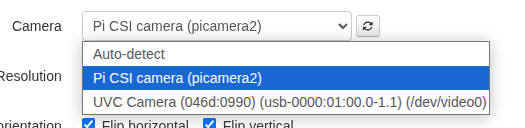
5. Open **Settings → BitBang** and choose camera from dropdown.
|
|
108
87
|
|
|
109
88
|
|
|
110
89
|
|
|
111
|
-
|
|
90
|
+
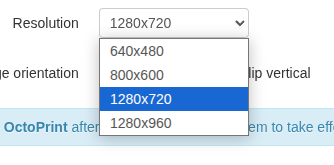
6. Choose resolution.
|
|
112
91
|
|
|
113
92
|
|
|
114
93
|
|
|
115
|
-
|
|
116
|
-
|
|
117
|
-
|
|
94
|
+
|
|
95
|
+
7. Save and **restart OctoPrint**.
|
|
96
|
+
|
|
97
|
+
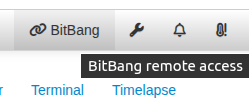
8. Refresh the OctoPrint tab in your browser. A button labeled BitBang is available in the menu bar -- click it for the URL.
|
|
118
98
|
|
|
119
99
|
|
|
120
100
|
|
|
121
101
|
|
|
122
102
|
|
|
123
|
-
|
|
124
103
|
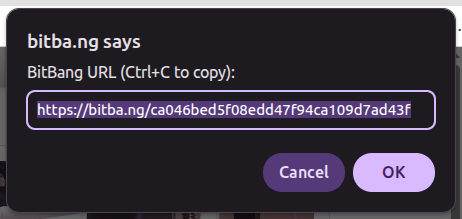
This URL allows remote access to your printer.
|
|
125
104
|
|
|
105
|
+
9. Set `Snapshot Webcam` in **Settings → Webcam and Timelapse** to `BitBang Camera` if you want timelapse video/images of your prints.
|
|
106
|
+
|
|
126
107
|
## Configuration
|
|
127
108
|
|
|
128
109
|
All settings live in **Settings → BitBang**:
|
|
@@ -140,7 +121,7 @@ All settings take effect on OctoPrint restart. Full-screen button and brightness
|
|
|
140
121
|
## How it works
|
|
141
122
|
|
|
142
123
|
- The `bitbang-python` package handles WebRTC signaling, identity, and the ASGI interface.
|
|
143
|
-
- This plugin wraps it with OctoPrint integration: settings UI, `WebcamProviderPlugin` hooks, camera auto-detect, CSRF-safe cookie handling, and
|
|
124
|
+
- This plugin wraps it with OctoPrint integration: settings UI, `WebcamProviderPlugin` hooks, camera auto-detect, CSRF-safe cookie handling, and a webcam-provider template that renders the H.264 `<video>` in OctoPrint's Control tab.
|
|
144
125
|
- The bitba.ng cloud acts purely as a signaling relay to broker a direct connection. If a direct connection isn't available, bitba.ng will use TURN instead.
|
|
145
126
|
|
|
146
127
|
## Privacy
|
|
@@ -167,41 +148,27 @@ See the [BitBang project page](https://github.com/richlegrand/bitbang) for the f
|
|
|
167
148
|
|
|
168
149
|
## Installation Notes
|
|
169
150
|
|
|
170
|
-
|
|
151
|
+
Skip this if [Installation](#installation) worked.
|
|
171
152
|
|
|
172
|
-
The video stack
|
|
153
|
+
The video stack is `av` ([PyAV](https://github.com/PyAV-Org/PyAV)) + `aiortc`, pulled in as wheels, and needs **Python 3.10+** — OctoPi 1.0.x (Bullseye / Python 3.9) has no usable `av` wheel, so upgrade the image to 1.1.0+. On **64-bit** (`aarch64` / `x86_64`) the PyPI wheels bundle their native libraries and work as-is; **32-bit** (`armv7l`) needs the extra step in [Installation](#installation) above, because its [piwheels](https://www.piwheels.org/) wheels link newer system libraries than Bookworm ships.
|
|
173
154
|
|
|
174
|
-
|
|
175
|
-
- **32-bit Raspberry Pi OS** (`armv7l`) -- [piwheels](https://www.piwheels.org/) ships an `av` wheel built against the **system FFmpeg 5.1**, and the `av<12` pin selects it. Supported, with one possible extra step (see below).
|
|
176
|
-
- **Python 3.10+** is required either way (`av` wheels start at cp310).
|
|
155
|
+
### Pi CSI camera not detected (falls back to USB)
|
|
177
156
|
|
|
178
|
-
|
|
157
|
+
The Pi CSI camera is driven through [`picamera2`](https://github.com/raspberrypi/picamera2), a **system** package installed via `apt` -- it is not on PyPI. Your OctoPrint venv can only import it if the venv was created with access to system site-packages. If it can't, CSI auto-detect fails and the plugin **silently falls back to a USB webcam** (or no camera) -- the plugin still loads, so the only symptom is the wrong camera.
|
|
158
|
+
|
|
159
|
+
Check from inside your OctoPrint venv:
|
|
179
160
|
|
|
180
161
|
```bash
|
|
181
|
-
|
|
182
|
-
python --version # must be 3.10 or newer
|
|
162
|
+
python -c "import picamera2" # ImportError -> the venv cannot see picamera2
|
|
183
163
|
```
|
|
184
164
|
|
|
185
|
-
|
|
186
|
-
|
|
187
|
-
| Version | Notes |
|
|
188
|
-
|---|---|
|
|
189
|
-
| **1.1.0** | Bookworm + Python 3.11. The **stable image is 32-bit** (`armv7l`) on every Pi model; 64-bit is nightly-only. v0.1.7 supports both. |
|
|
190
|
-
| **1.0.x** | Bullseye + Python 3.9 -- below the 3.10 minimum. Upgrade to 1.1.0. |
|
|
191
|
-
| **Pre-1.0** | Older base. Upgrade. |
|
|
192
|
-
|
|
193
|
-
### 32-bit: aiortc / libvpx mismatch
|
|
194
|
-
|
|
195
|
-
On some 32-bit images the piwheels `aiortc` wheel is built against a newer `libvpx` than the OS ships, so `octoprint.log` shows `BitBang video stack unavailable: libvpx.so.9: cannot open shared object file`. Install the codec dev headers and rebuild aiortc against the system libvpx (in your OctoPrint venv):
|
|
165
|
+
If that errors, recreate the venv with system site-packages and reinstall OctoPrint and the plugin into it:
|
|
196
166
|
|
|
197
167
|
```bash
|
|
198
|
-
|
|
199
|
-
pip install --no-binary aiortc --force-reinstall --no-deps "aiortc<1.11"
|
|
168
|
+
python3 -m venv --system-site-packages /path/to/oprint
|
|
200
169
|
```
|
|
201
170
|
|
|
202
|
-
|
|
203
|
-
|
|
204
|
-
`av` wheels start at Python 3.10, so OctoPi 1.0.x (Python 3.9) has no usable wheel -- upgrade the image to 1.1.0.
|
|
171
|
+
USB webcams work in a plain venv -- this only affects the Pi CSI camera.
|
|
205
172
|
|
|
206
173
|
### Diagnostic mode
|
|
207
174
|
|
|
@@ -27,4 +27,5 @@ octoprint_bitbang/bin/bitbang-linux-armv7
|
|
|
27
27
|
octoprint_bitbang/static/favicon.png
|
|
28
28
|
octoprint_bitbang/static/js/bitbang.js
|
|
29
29
|
octoprint_bitbang/templates/bitbang_navbar.jinja2
|
|
30
|
-
octoprint_bitbang/templates/bitbang_settings.jinja2
|
|
30
|
+
octoprint_bitbang/templates/bitbang_settings.jinja2
|
|
31
|
+
octoprint_bitbang/templates/bitbang_webcam.jinja2
|
|
@@ -1,6 +1,6 @@
|
|
|
1
1
|
Metadata-Version: 2.4
|
|
2
2
|
Name: OctoPrint-BitBang
|
|
3
|
-
Version: 0.2.
|
|
3
|
+
Version: 0.2.3
|
|
4
4
|
Summary: Remote OctoPrint access with live H.264 video via BitBang WebRTC
|
|
5
5
|
Author-email: Rich LeGrand <rich.m.legrand@gmail.com>
|
|
6
6
|
License-Expression: MIT
|
|
@@ -55,74 +55,55 @@ This is part of the [BitBang project](https://github.com/richlegrand/bitbang).
|
|
|
55
55
|
|
|
56
56
|
## Installation
|
|
57
57
|
|
|
58
|
-
|
|
59
|
-
|
|
60
|
-
In OctoPrint: **Settings → Plugin Manager → Get More**, search for **BitBang**, click **Install**.
|
|
61
|
-
|
|
62
|
-
### Plugin Manager, install from URL
|
|
63
|
-
|
|
64
|
-
**Settings → Plugin Manager → Get More → "… from URL"**, then paste:
|
|
65
|
-
|
|
66
|
-
```
|
|
67
|
-
https://github.com/richlegrand/OctoPrint-BitBang/archive/main.zip
|
|
68
|
-
```
|
|
69
|
-
|
|
70
|
-
Click **Install**, then restart OctoPrint when prompted.
|
|
71
|
-
|
|
72
|
-
### pip
|
|
73
|
-
|
|
74
|
-
Inside your OctoPrint venv:
|
|
58
|
+
1. Install from PyPI:
|
|
75
59
|
|
|
76
60
|
```bash
|
|
77
61
|
pip install OctoPrint-BitBang
|
|
78
62
|
```
|
|
79
63
|
|
|
80
|
-
|
|
81
|
-
|
|
82
|
-
### Did it work?
|
|
64
|
+
Don't install from the GitHub source zip — it omits the bundled proxy binaries, so remote access and video won't work.
|
|
83
65
|
|
|
84
|
-
|
|
66
|
+
On 32-bit Raspberry Pi OS (`armv7l`, the standard OctoPi image), run these commands first:
|
|
85
67
|
|
|
86
|
-
|
|
68
|
+
```bash
|
|
69
|
+
sudo apt install -y libvpx-dev libopus-dev libsrtp2-dev
|
|
70
|
+
~/oprint/bin/pip install --no-binary aiortc,pylibsrtp --force-reinstall --no-deps aiortc==1.10.1 pylibsrtp==1.0.0
|
|
71
|
+
```
|
|
87
72
|
|
|
88
|
-
|
|
73
|
+
64-bit and x86_64 need nothing further.
|
|
89
74
|
|
|
90
|
-
|
|
75
|
+
2. Free the camera from OctoPi's default streamer:
|
|
91
76
|
|
|
92
|
-
Stable octopi stack:
|
|
93
77
|
```bash
|
|
94
|
-
sudo systemctl
|
|
95
|
-
sudo systemctl
|
|
96
|
-
sudo systemctl disable webcamd
|
|
97
|
-
sudo systemctl disable ffmpeg_hls
|
|
78
|
+
sudo systemctl disable --now webcamd ffmpeg_hls camera_streamer
|
|
79
|
+
sudo systemctl restart octoprint
|
|
98
80
|
```
|
|
99
81
|
|
|
100
|
-
|
|
101
|
-
|
|
102
|
-
|
|
103
|
-
sudo systemctl disable camera-streamer
|
|
104
|
-
```
|
|
82
|
+
3. Restart OctoPrint (usually with `sudo systemctl restart octoprint`).
|
|
83
|
+
|
|
84
|
+
4. Point your browser to your OctoPrint server, open the Control tab, and choose **BitBang Camera** from the webcam selector at the top-right.
|
|
105
85
|
|
|
106
|
-
|
|
107
|
-
3. Choose camera from dropdown.
|
|
86
|
+
5. Open **Settings → BitBang** and choose camera from dropdown.
|
|
108
87
|
|
|
109
88
|

|
|
110
89
|
|
|
111
|
-
|
|
90
|
+
6. Choose resolution.
|
|
112
91
|
|
|
113
92
|

|
|
114
93
|
|
|
115
|
-
|
|
116
|
-
|
|
117
|
-
|
|
94
|
+
|
|
95
|
+
7. Save and **restart OctoPrint**.
|
|
96
|
+
|
|
97
|
+
8. Refresh the OctoPrint tab in your browser. A button labeled BitBang is available in the menu bar -- click it for the URL.
|
|
118
98
|
|
|
119
99
|

|
|
120
100
|
|
|
121
101
|

|
|
122
102
|
|
|
123
|
-
|
|
124
103
|
This URL allows remote access to your printer.
|
|
125
104
|
|
|
105
|
+
9. Set `Snapshot Webcam` in **Settings → Webcam and Timelapse** to `BitBang Camera` if you want timelapse video/images of your prints.
|
|
106
|
+
|
|
126
107
|
## Configuration
|
|
127
108
|
|
|
128
109
|
All settings live in **Settings → BitBang**:
|
|
@@ -140,7 +121,7 @@ All settings take effect on OctoPrint restart. Full-screen button and brightness
|
|
|
140
121
|
## How it works
|
|
141
122
|
|
|
142
123
|
- The `bitbang-python` package handles WebRTC signaling, identity, and the ASGI interface.
|
|
143
|
-
- This plugin wraps it with OctoPrint integration: settings UI, `WebcamProviderPlugin` hooks, camera auto-detect, CSRF-safe cookie handling, and
|
|
124
|
+
- This plugin wraps it with OctoPrint integration: settings UI, `WebcamProviderPlugin` hooks, camera auto-detect, CSRF-safe cookie handling, and a webcam-provider template that renders the H.264 `<video>` in OctoPrint's Control tab.
|
|
144
125
|
- The bitba.ng cloud acts purely as a signaling relay to broker a direct connection. If a direct connection isn't available, bitba.ng will use TURN instead.
|
|
145
126
|
|
|
146
127
|
## Privacy
|
|
@@ -167,41 +148,27 @@ See the [BitBang project page](https://github.com/richlegrand/bitbang) for the f
|
|
|
167
148
|
|
|
168
149
|
## Installation Notes
|
|
169
150
|
|
|
170
|
-
|
|
151
|
+
Skip this if [Installation](#installation) worked.
|
|
171
152
|
|
|
172
|
-
The video stack
|
|
153
|
+
The video stack is `av` ([PyAV](https://github.com/PyAV-Org/PyAV)) + `aiortc`, pulled in as wheels, and needs **Python 3.10+** — OctoPi 1.0.x (Bullseye / Python 3.9) has no usable `av` wheel, so upgrade the image to 1.1.0+. On **64-bit** (`aarch64` / `x86_64`) the PyPI wheels bundle their native libraries and work as-is; **32-bit** (`armv7l`) needs the extra step in [Installation](#installation) above, because its [piwheels](https://www.piwheels.org/) wheels link newer system libraries than Bookworm ships.
|
|
173
154
|
|
|
174
|
-
|
|
175
|
-
- **32-bit Raspberry Pi OS** (`armv7l`) -- [piwheels](https://www.piwheels.org/) ships an `av` wheel built against the **system FFmpeg 5.1**, and the `av<12` pin selects it. Supported, with one possible extra step (see below).
|
|
176
|
-
- **Python 3.10+** is required either way (`av` wheels start at cp310).
|
|
155
|
+
### Pi CSI camera not detected (falls back to USB)
|
|
177
156
|
|
|
178
|
-
|
|
157
|
+
The Pi CSI camera is driven through [`picamera2`](https://github.com/raspberrypi/picamera2), a **system** package installed via `apt` -- it is not on PyPI. Your OctoPrint venv can only import it if the venv was created with access to system site-packages. If it can't, CSI auto-detect fails and the plugin **silently falls back to a USB webcam** (or no camera) -- the plugin still loads, so the only symptom is the wrong camera.
|
|
158
|
+
|
|
159
|
+
Check from inside your OctoPrint venv:
|
|
179
160
|
|
|
180
161
|
```bash
|
|
181
|
-
|
|
182
|
-
python --version # must be 3.10 or newer
|
|
162
|
+
python -c "import picamera2" # ImportError -> the venv cannot see picamera2
|
|
183
163
|
```
|
|
184
164
|
|
|
185
|
-
|
|
186
|
-
|
|
187
|
-
| Version | Notes |
|
|
188
|
-
|---|---|
|
|
189
|
-
| **1.1.0** | Bookworm + Python 3.11. The **stable image is 32-bit** (`armv7l`) on every Pi model; 64-bit is nightly-only. v0.1.7 supports both. |
|
|
190
|
-
| **1.0.x** | Bullseye + Python 3.9 -- below the 3.10 minimum. Upgrade to 1.1.0. |
|
|
191
|
-
| **Pre-1.0** | Older base. Upgrade. |
|
|
192
|
-
|
|
193
|
-
### 32-bit: aiortc / libvpx mismatch
|
|
194
|
-
|
|
195
|
-
On some 32-bit images the piwheels `aiortc` wheel is built against a newer `libvpx` than the OS ships, so `octoprint.log` shows `BitBang video stack unavailable: libvpx.so.9: cannot open shared object file`. Install the codec dev headers and rebuild aiortc against the system libvpx (in your OctoPrint venv):
|
|
165
|
+
If that errors, recreate the venv with system site-packages and reinstall OctoPrint and the plugin into it:
|
|
196
166
|
|
|
197
167
|
```bash
|
|
198
|
-
|
|
199
|
-
pip install --no-binary aiortc --force-reinstall --no-deps "aiortc<1.11"
|
|
168
|
+
python3 -m venv --system-site-packages /path/to/oprint
|
|
200
169
|
```
|
|
201
170
|
|
|
202
|
-
|
|
203
|
-
|
|
204
|
-
`av` wheels start at Python 3.10, so OctoPi 1.0.x (Python 3.9) has no usable wheel -- upgrade the image to 1.1.0.
|
|
171
|
+
USB webcams work in a plain venv -- this only affects the Pi CSI camera.
|
|
205
172
|
|
|
206
173
|
### Diagnostic mode
|
|
207
174
|
|
|
@@ -22,74 +22,55 @@ This is part of the [BitBang project](https://github.com/richlegrand/bitbang).
|
|
|
22
22
|
|
|
23
23
|
## Installation
|
|
24
24
|
|
|
25
|
-
|
|
26
|
-
|
|
27
|
-
In OctoPrint: **Settings → Plugin Manager → Get More**, search for **BitBang**, click **Install**.
|
|
28
|
-
|
|
29
|
-
### Plugin Manager, install from URL
|
|
30
|
-
|
|
31
|
-
**Settings → Plugin Manager → Get More → "… from URL"**, then paste:
|
|
32
|
-
|
|
33
|
-
```
|
|
34
|
-
https://github.com/richlegrand/OctoPrint-BitBang/archive/main.zip
|
|
35
|
-
```
|
|
36
|
-
|
|
37
|
-
Click **Install**, then restart OctoPrint when prompted.
|
|
38
|
-
|
|
39
|
-
### pip
|
|
40
|
-
|
|
41
|
-
Inside your OctoPrint venv:
|
|
25
|
+
1. Install from PyPI:
|
|
42
26
|
|
|
43
27
|
```bash
|
|
44
28
|
pip install OctoPrint-BitBang
|
|
45
29
|
```
|
|
46
30
|
|
|
47
|
-
|
|
48
|
-
|
|
49
|
-
### Did it work?
|
|
31
|
+
Don't install from the GitHub source zip — it omits the bundled proxy binaries, so remote access and video won't work.
|
|
50
32
|
|
|
51
|
-
|
|
33
|
+
On 32-bit Raspberry Pi OS (`armv7l`, the standard OctoPi image), run these commands first:
|
|
52
34
|
|
|
53
|
-
|
|
35
|
+
```bash
|
|
36
|
+
sudo apt install -y libvpx-dev libopus-dev libsrtp2-dev
|
|
37
|
+
~/oprint/bin/pip install --no-binary aiortc,pylibsrtp --force-reinstall --no-deps aiortc==1.10.1 pylibsrtp==1.0.0
|
|
38
|
+
```
|
|
54
39
|
|
|
55
|
-
|
|
40
|
+
64-bit and x86_64 need nothing further.
|
|
56
41
|
|
|
57
|
-
|
|
42
|
+
2. Free the camera from OctoPi's default streamer:
|
|
58
43
|
|
|
59
|
-
Stable octopi stack:
|
|
60
44
|
```bash
|
|
61
|
-
sudo systemctl
|
|
62
|
-
sudo systemctl
|
|
63
|
-
sudo systemctl disable webcamd
|
|
64
|
-
sudo systemctl disable ffmpeg_hls
|
|
45
|
+
sudo systemctl disable --now webcamd ffmpeg_hls camera_streamer
|
|
46
|
+
sudo systemctl restart octoprint
|
|
65
47
|
```
|
|
66
48
|
|
|
67
|
-
|
|
68
|
-
|
|
69
|
-
|
|
70
|
-
sudo systemctl disable camera-streamer
|
|
71
|
-
```
|
|
49
|
+
3. Restart OctoPrint (usually with `sudo systemctl restart octoprint`).
|
|
50
|
+
|
|
51
|
+
4. Point your browser to your OctoPrint server, open the Control tab, and choose **BitBang Camera** from the webcam selector at the top-right.
|
|
72
52
|
|
|
73
|
-
|
|
74
|
-
3. Choose camera from dropdown.
|
|
53
|
+
5. Open **Settings → BitBang** and choose camera from dropdown.
|
|
75
54
|
|
|
76
55
|

|
|
77
56
|
|
|
78
|
-
|
|
57
|
+
6. Choose resolution.
|
|
79
58
|
|
|
80
59
|

|
|
81
60
|
|
|
82
|
-
|
|
83
|
-
|
|
84
|
-
|
|
61
|
+
|
|
62
|
+
7. Save and **restart OctoPrint**.
|
|
63
|
+
|
|
64
|
+
8. Refresh the OctoPrint tab in your browser. A button labeled BitBang is available in the menu bar -- click it for the URL.
|
|
85
65
|
|
|
86
66
|

|
|
87
67
|
|
|
88
68
|

|
|
89
69
|
|
|
90
|
-
|
|
91
70
|
This URL allows remote access to your printer.
|
|
92
71
|
|
|
72
|
+
9. Set `Snapshot Webcam` in **Settings → Webcam and Timelapse** to `BitBang Camera` if you want timelapse video/images of your prints.
|
|
73
|
+
|
|
93
74
|
## Configuration
|
|
94
75
|
|
|
95
76
|
All settings live in **Settings → BitBang**:
|
|
@@ -107,7 +88,7 @@ All settings take effect on OctoPrint restart. Full-screen button and brightness
|
|
|
107
88
|
## How it works
|
|
108
89
|
|
|
109
90
|
- The `bitbang-python` package handles WebRTC signaling, identity, and the ASGI interface.
|
|
110
|
-
- This plugin wraps it with OctoPrint integration: settings UI, `WebcamProviderPlugin` hooks, camera auto-detect, CSRF-safe cookie handling, and
|
|
91
|
+
- This plugin wraps it with OctoPrint integration: settings UI, `WebcamProviderPlugin` hooks, camera auto-detect, CSRF-safe cookie handling, and a webcam-provider template that renders the H.264 `<video>` in OctoPrint's Control tab.
|
|
111
92
|
- The bitba.ng cloud acts purely as a signaling relay to broker a direct connection. If a direct connection isn't available, bitba.ng will use TURN instead.
|
|
112
93
|
|
|
113
94
|
## Privacy
|
|
@@ -134,41 +115,27 @@ See the [BitBang project page](https://github.com/richlegrand/bitbang) for the f
|
|
|
134
115
|
|
|
135
116
|
## Installation Notes
|
|
136
117
|
|
|
137
|
-
|
|
118
|
+
Skip this if [Installation](#installation) worked.
|
|
138
119
|
|
|
139
|
-
The video stack
|
|
120
|
+
The video stack is `av` ([PyAV](https://github.com/PyAV-Org/PyAV)) + `aiortc`, pulled in as wheels, and needs **Python 3.10+** — OctoPi 1.0.x (Bullseye / Python 3.9) has no usable `av` wheel, so upgrade the image to 1.1.0+. On **64-bit** (`aarch64` / `x86_64`) the PyPI wheels bundle their native libraries and work as-is; **32-bit** (`armv7l`) needs the extra step in [Installation](#installation) above, because its [piwheels](https://www.piwheels.org/) wheels link newer system libraries than Bookworm ships.
|
|
140
121
|
|
|
141
|
-
|
|
142
|
-
- **32-bit Raspberry Pi OS** (`armv7l`) -- [piwheels](https://www.piwheels.org/) ships an `av` wheel built against the **system FFmpeg 5.1**, and the `av<12` pin selects it. Supported, with one possible extra step (see below).
|
|
143
|
-
- **Python 3.10+** is required either way (`av` wheels start at cp310).
|
|
122
|
+
### Pi CSI camera not detected (falls back to USB)
|
|
144
123
|
|
|
145
|
-
|
|
124
|
+
The Pi CSI camera is driven through [`picamera2`](https://github.com/raspberrypi/picamera2), a **system** package installed via `apt` -- it is not on PyPI. Your OctoPrint venv can only import it if the venv was created with access to system site-packages. If it can't, CSI auto-detect fails and the plugin **silently falls back to a USB webcam** (or no camera) -- the plugin still loads, so the only symptom is the wrong camera.
|
|
125
|
+
|
|
126
|
+
Check from inside your OctoPrint venv:
|
|
146
127
|
|
|
147
128
|
```bash
|
|
148
|
-
|
|
149
|
-
python --version # must be 3.10 or newer
|
|
129
|
+
python -c "import picamera2" # ImportError -> the venv cannot see picamera2
|
|
150
130
|
```
|
|
151
131
|
|
|
152
|
-
|
|
153
|
-
|
|
154
|
-
| Version | Notes |
|
|
155
|
-
|---|---|
|
|
156
|
-
| **1.1.0** | Bookworm + Python 3.11. The **stable image is 32-bit** (`armv7l`) on every Pi model; 64-bit is nightly-only. v0.1.7 supports both. |
|
|
157
|
-
| **1.0.x** | Bullseye + Python 3.9 -- below the 3.10 minimum. Upgrade to 1.1.0. |
|
|
158
|
-
| **Pre-1.0** | Older base. Upgrade. |
|
|
159
|
-
|
|
160
|
-
### 32-bit: aiortc / libvpx mismatch
|
|
161
|
-
|
|
162
|
-
On some 32-bit images the piwheels `aiortc` wheel is built against a newer `libvpx` than the OS ships, so `octoprint.log` shows `BitBang video stack unavailable: libvpx.so.9: cannot open shared object file`. Install the codec dev headers and rebuild aiortc against the system libvpx (in your OctoPrint venv):
|
|
132
|
+
If that errors, recreate the venv with system site-packages and reinstall OctoPrint and the plugin into it:
|
|
163
133
|
|
|
164
134
|
```bash
|
|
165
|
-
|
|
166
|
-
pip install --no-binary aiortc --force-reinstall --no-deps "aiortc<1.11"
|
|
135
|
+
python3 -m venv --system-site-packages /path/to/oprint
|
|
167
136
|
```
|
|
168
137
|
|
|
169
|
-
|
|
170
|
-
|
|
171
|
-
`av` wheels start at Python 3.10, so OctoPi 1.0.x (Python 3.9) has no usable wheel -- upgrade the image to 1.1.0.
|
|
138
|
+
USB webcams work in a plain venv -- this only affects the Pi CSI camera.
|
|
172
139
|
|
|
173
140
|
### Diagnostic mode
|
|
174
141
|
|
|
@@ -5,7 +5,7 @@ No account, no subscription, no port forwarding. One shareable link.
|
|
|
5
5
|
"""
|
|
6
6
|
|
|
7
7
|
__plugin_name__ = "BitBang"
|
|
8
|
-
__plugin_version__ = "0.2.
|
|
8
|
+
__plugin_version__ = "0.2.3"
|
|
9
9
|
__plugin_description__ = "Remote OctoPrint access with live H.264 video via BitBang WebRTC. No account, no port forwarding, one shareable link."
|
|
10
10
|
__plugin_url__ = "https://github.com/richlegrand/OctoPrint-BitBang"
|
|
11
11
|
__plugin_author__ = "Rich LeGrand"
|
|
@@ -233,7 +233,13 @@ class BitBangPlugin(
|
|
|
233
233
|
return None
|
|
234
234
|
path = os.path.join(os.path.dirname(__file__), "bin", f"bitbang-linux-{arch}")
|
|
235
235
|
if not os.path.exists(path):
|
|
236
|
-
self._logger.warning(
|
|
236
|
+
self._logger.warning(
|
|
237
|
+
f"[video-bridge] bundled Go binary missing: {path} -- remote "
|
|
238
|
+
f"access and video are disabled. The proxy binaries ship only in "
|
|
239
|
+
f"the PyPI package (and CI release artifacts), not the GitHub "
|
|
240
|
+
f"source archive. Reinstall with 'pip install -U OctoPrint-BitBang' "
|
|
241
|
+
f"(or remove + reinstall) to pull it."
|
|
242
|
+
)
|
|
237
243
|
return None
|
|
238
244
|
try: # pip/zip don't preserve the exec bit
|
|
239
245
|
os.chmod(path, os.stat(path).st_mode | stat.S_IXUSR | stat.S_IXGRP | stat.S_IXOTH)
|
|
@@ -760,6 +766,10 @@ class BitBangPlugin(
|
|
|
760
766
|
return [
|
|
761
767
|
{"type": "settings", "custom_bindings": False},
|
|
762
768
|
{"type": "navbar", "custom_bindings": False},
|
|
769
|
+
# Render the live view as a proper webcam provider template so
|
|
770
|
+
# OctoPrint shows it only when "BitBang Camera" is the selected
|
|
771
|
+
# webcam -- no DOM-replacing the classic webcam.
|
|
772
|
+
{"type": "webcam", "name": "BitBang Camera", "template": "bitbang_webcam.jinja2"},
|
|
763
773
|
]
|
|
764
774
|
|
|
765
775
|
def get_template_vars(self):
|
{octoprint_bitbang-0.2.1 → octoprint_bitbang-0.2.3}/octoprint_bitbang/bin/bitbang-linux-amd64
RENAMED
|
Binary file
|
{octoprint_bitbang-0.2.1 → octoprint_bitbang-0.2.3}/octoprint_bitbang/bin/bitbang-linux-arm64
RENAMED
|
Binary file
|
{octoprint_bitbang-0.2.1 → octoprint_bitbang-0.2.3}/octoprint_bitbang/bin/bitbang-linux-armv7
RENAMED
|
Binary file
|
|
@@ -1,11 +1,13 @@
|
|
|
1
1
|
/*
|
|
2
2
|
* OctoPrint-BitBang - H.264 video for OctoPrint
|
|
3
3
|
*
|
|
4
|
-
*
|
|
5
|
-
*
|
|
6
|
-
*
|
|
7
|
-
* -
|
|
8
|
-
*
|
|
4
|
+
* The live view is rendered by our webcam provider template
|
|
5
|
+
* (bitbang_webcam.jinja2) as <video id="bitbang-webcam">. This script
|
|
6
|
+
* decorates that element and wires the stream:
|
|
7
|
+
* - Remote (via BitBang): bootstrap.js attaches the WebRTC track via the
|
|
8
|
+
* data-bitbang-stream attribute.
|
|
9
|
+
* - Local (direct access): opens a WebRTC peer connection to the plugin's
|
|
10
|
+
* /offer endpoint for H.264 video on the LAN.
|
|
9
11
|
*/
|
|
10
12
|
(function () {
|
|
11
13
|
var isBitBang = !!window.__bbSessionId;
|
|
@@ -16,7 +18,9 @@
|
|
|
16
18
|
|
|
17
19
|
var btn = document.createElement("button");
|
|
18
20
|
btn.className = "btn btn-mini";
|
|
19
|
-
|
|
21
|
+
// Lower-left: clear of OctoPrint's webcam switcher (top-right) and our
|
|
22
|
+
// brightness slider (bottom-right).
|
|
23
|
+
btn.style.cssText = "position:absolute;bottom:8px;left:8px;z-index:10;opacity:0.6;cursor:pointer;pointer-events:auto";
|
|
20
24
|
btn.innerHTML = '<i class="fas fa-expand"></i>';
|
|
21
25
|
btn.title = "Fullscreen";
|
|
22
26
|
btn.onmouseover = function () { btn.style.opacity = "1"; };
|
|
@@ -183,43 +187,21 @@
|
|
|
183
187
|
video.addEventListener("resize", reflow);
|
|
184
188
|
}
|
|
185
189
|
|
|
186
|
-
|
|
190
|
+
// Decorate the <video> element OctoPrint renders from our webcam provider
|
|
191
|
+
// template (bitbang_webcam.jinja2): sizing, fullscreen button, status overlay
|
|
192
|
+
// and the brightness control. We no longer touch the classic webcam's DOM --
|
|
193
|
+
// OctoPrint shows our template only when "BitBang Camera" is the selected webcam.
|
|
194
|
+
function decorateVideo(video) {
|
|
195
|
+
if (video.dataset.bbDecorated) return;
|
|
196
|
+
video.dataset.bbDecorated = "1";
|
|
197
|
+
video.autoplay = true;
|
|
198
|
+
video.playsInline = true;
|
|
199
|
+
video.muted = true;
|
|
187
200
|
video.style.backgroundColor = "#000";
|
|
188
201
|
applyVideoSizing(video);
|
|
189
|
-
|
|
190
|
-
// OctoPrint 1.11+ Classic Webcam hides its default containers until
|
|
191
|
-
// a stream URL is configured. Mount into the outer container so
|
|
192
|
-
// we're visible regardless of the user's webcam settings.
|
|
193
|
-
var classicContainer = document.getElementById("classicwebcam_container");
|
|
194
|
-
if (classicContainer) {
|
|
195
|
-
// Knockout visibility bindings on classicwebcam's built-in
|
|
196
|
-
// containers keep re-showing them, so use a stylesheet rule
|
|
197
|
-
// which beats Knockout's inline style.display assignments.
|
|
198
|
-
if (!document.getElementById("bitbang-hide-classicwebcam")) {
|
|
199
|
-
var style = document.createElement("style");
|
|
200
|
-
style.id = "bitbang-hide-classicwebcam";
|
|
201
|
-
style.textContent =
|
|
202
|
-
"#webcam_video_container, #webcam_img_container " +
|
|
203
|
-
"{ display: none !important; }" +
|
|
204
|
-
"#classicwebcam_container " +
|
|
205
|
-
"{ padding: 0 !important; line-height: 0 !important; font-size: 0 !important; }";
|
|
206
|
-
document.head.appendChild(style);
|
|
207
|
-
}
|
|
208
|
-
classicContainer.appendChild(video);
|
|
209
|
-
addFullscreenButton(video);
|
|
210
|
-
addStatusOverlay(video);
|
|
211
|
-
applyCameraConfig(video);
|
|
212
|
-
return true;
|
|
213
|
-
}
|
|
214
|
-
|
|
215
|
-
// Fallback for other layouts: replace #webcam_image in place.
|
|
216
|
-
var img = document.getElementById("webcam_image");
|
|
217
|
-
if (!img) return false;
|
|
218
|
-
img.parentNode.replaceChild(video, img);
|
|
219
202
|
addFullscreenButton(video);
|
|
220
203
|
addStatusOverlay(video);
|
|
221
204
|
applyCameraConfig(video);
|
|
222
|
-
return true;
|
|
223
205
|
}
|
|
224
206
|
|
|
225
207
|
// Intercept download links that use absolute URLs. OctoPrint
|
|
@@ -253,12 +235,28 @@
|
|
|
253
235
|
// Connect video via local offer/answer endpoint. Works on LAN and
|
|
254
236
|
// remotely (fetches TURN servers). Can be called with an existing
|
|
255
237
|
// video element (fallback from remote mode) or creates its own.
|
|
256
|
-
function connectLocalVideo(video) {
|
|
238
|
+
function connectLocalVideo(video, attempt) {
|
|
239
|
+
// On a fresh page load the OctoPrint session's CSRF token may not be
|
|
240
|
+
// established yet, so the first POST /plugin/bitbang/offer can come back
|
|
241
|
+
// 400/403. Retry a bounded number of times so the stream comes up on its
|
|
242
|
+
// own instead of requiring a manual page refresh.
|
|
243
|
+
attempt = attempt || 0;
|
|
244
|
+
var MAX_ATTEMPTS = 10;
|
|
245
|
+
var RETRY_MS = 1500;
|
|
246
|
+
var pc = null;
|
|
247
|
+
function retry(why) {
|
|
248
|
+
if (pc) { try { pc.close(); } catch (e) {} }
|
|
249
|
+
if (attempt + 1 < MAX_ATTEMPTS) {
|
|
250
|
+
setTimeout(function () { connectLocalVideo(video, attempt + 1); }, RETRY_MS);
|
|
251
|
+
} else {
|
|
252
|
+
console.log("[BitBang] Local video gave up after retries:", why);
|
|
253
|
+
}
|
|
254
|
+
}
|
|
257
255
|
fetch("/plugin/bitbang/ice-servers").then(function (r) {
|
|
258
256
|
return r.json();
|
|
259
257
|
}).then(function (iceServers) {
|
|
260
258
|
var config = (iceServers && iceServers.length > 0) ? { iceServers: iceServers } : {};
|
|
261
|
-
|
|
259
|
+
pc = new RTCPeerConnection(config);
|
|
262
260
|
|
|
263
261
|
pc.ontrack = function (event) {
|
|
264
262
|
if (event.streams && event.streams[0]) {
|
|
@@ -283,57 +281,43 @@
|
|
|
283
281
|
})
|
|
284
282
|
});
|
|
285
283
|
}).then(function (response) {
|
|
286
|
-
|
|
287
|
-
|
|
288
|
-
|
|
289
|
-
console.log("[BitBang] Local video not available:", answer.error);
|
|
284
|
+
if (!response.ok) {
|
|
285
|
+
// 400 (CSRF token not ready yet), 403 (not logged in yet), etc.
|
|
286
|
+
retry("offer HTTP " + response.status);
|
|
290
287
|
return;
|
|
291
288
|
}
|
|
292
|
-
return
|
|
289
|
+
return response.json().then(function (answer) {
|
|
290
|
+
if (answer.error) {
|
|
291
|
+
console.log("[BitBang] Local video not available:", answer.error);
|
|
292
|
+
return;
|
|
293
|
+
}
|
|
294
|
+
return pc.setRemoteDescription(answer);
|
|
295
|
+
});
|
|
293
296
|
});
|
|
294
297
|
}).catch(function (err) {
|
|
295
|
-
|
|
298
|
+
retry(String(err));
|
|
296
299
|
});
|
|
297
300
|
}
|
|
298
301
|
|
|
299
|
-
|
|
300
|
-
|
|
301
|
-
|
|
302
|
-
|
|
303
|
-
|
|
304
|
-
for (var k in attrs) video.setAttribute(k, attrs[k]);
|
|
305
|
-
return video;
|
|
306
|
-
}
|
|
307
|
-
|
|
308
|
-
function whenWebcamReady(callback) {
|
|
309
|
-
if (document.readyState === "loading") {
|
|
310
|
-
document.addEventListener("DOMContentLoaded", callback);
|
|
311
|
-
} else {
|
|
312
|
-
callback();
|
|
313
|
-
}
|
|
302
|
+
// Wait for OctoPrint to render our webcam template's
|
|
303
|
+
// <video id="bitbang-webcam">, then hand it to the callback once.
|
|
304
|
+
function whenVideoReady(callback) {
|
|
305
|
+
var existing = document.getElementById("bitbang-webcam");
|
|
306
|
+
if (existing) { callback(existing); return; }
|
|
314
307
|
var observer = new MutationObserver(function () {
|
|
315
|
-
|
|
316
|
-
|
|
317
|
-
callback();
|
|
318
|
-
}
|
|
308
|
+
var el = document.getElementById("bitbang-webcam");
|
|
309
|
+
if (el) { observer.disconnect(); callback(el); }
|
|
319
310
|
});
|
|
320
311
|
observer.observe(document.body, { childList: true, subtree: true });
|
|
321
312
|
}
|
|
322
313
|
|
|
323
|
-
|
|
324
|
-
|
|
325
|
-
|
|
326
|
-
|
|
327
|
-
|
|
328
|
-
|
|
329
|
-
});
|
|
330
|
-
} else {
|
|
331
|
-
// Local mode: direct WebRTC to the plugin's signaling endpoint
|
|
332
|
-
whenWebcamReady(function () {
|
|
333
|
-
if (document.querySelector("video[data-bitbang-local]")) return;
|
|
334
|
-
var video = createVideo({"data-bitbang-local": "1"});
|
|
335
|
-
if (!replaceWebcam(video)) return;
|
|
314
|
+
whenVideoReady(function (video) {
|
|
315
|
+
decorateVideo(video);
|
|
316
|
+
// Remote (via BitBang URL): bootstrap.js attaches the WebRTC track
|
|
317
|
+
// through the data-bitbang-stream attribute already on the element.
|
|
318
|
+
// Local (direct LAN access): open a peer connection to /offer.
|
|
319
|
+
if (!isBitBang) {
|
|
336
320
|
connectLocalVideo(video);
|
|
337
|
-
}
|
|
338
|
-
}
|
|
321
|
+
}
|
|
322
|
+
});
|
|
339
323
|
})();
|
|
File without changes
|
|
File without changes
|
{octoprint_bitbang-0.2.1 → octoprint_bitbang-0.2.3}/OctoPrint_BitBang.egg-info/dependency_links.txt
RENAMED
|
File without changes
|
{octoprint_bitbang-0.2.1 → octoprint_bitbang-0.2.3}/OctoPrint_BitBang.egg-info/entry_points.txt
RENAMED
|
File without changes
|
|
File without changes
|
{octoprint_bitbang-0.2.1 → octoprint_bitbang-0.2.3}/OctoPrint_BitBang.egg-info/top_level.txt
RENAMED
|
File without changes
|
|
File without changes
|
|
File without changes
|
|
File without changes
|
|
File without changes
|
|
File without changes
|
|
File without changes
|
|
File without changes
|
|
File without changes
|
|
File without changes
|
|
File without changes
|
|
File without changes
|
|
File without changes
|
|
File without changes
|
|
File without changes
|
|
File without changes
|