Mesa 2.3.1__tar.gz → 2.3.3__tar.gz
This diff represents the content of publicly available package versions that have been released to one of the supported registries. The information contained in this diff is provided for informational purposes only and reflects changes between package versions as they appear in their respective public registries.
Potentially problematic release.
This version of Mesa might be problematic. Click here for more details.
- {mesa-2.3.1 → mesa-2.3.3}/.github/workflows/build_lint.yml +1 -0
- {mesa-2.3.1 → mesa-2.3.3}/.gitignore +2 -4
- {mesa-2.3.1 → mesa-2.3.3}/.readthedocs.yml +2 -2
- {mesa-2.3.1 → mesa-2.3.3}/CONTRIBUTING.md +34 -0
- {mesa-2.3.1 → mesa-2.3.3}/HISTORY.md +11 -0
- {mesa-2.3.1 → mesa-2.3.3}/PKG-INFO +7 -3
- {mesa-2.3.1 → mesa-2.3.3}/README.md +6 -1
- {mesa-2.3.1 → mesa-2.3.3}/docs/conf.py +1 -1
- {mesa-2.3.1 → mesa-2.3.3}/docs/index.md +7 -7
- {mesa-2.3.1 → mesa-2.3.3}/docs/packages.md +1 -1
- {mesa-2.3.1 → mesa-2.3.3}/mesa/__init__.py +1 -1
- {mesa-2.3.1 → mesa-2.3.3}/mesa/agent.py +15 -0
- {mesa-2.3.1 → mesa-2.3.3}/mesa/batchrunner.py +4 -4
- {mesa-2.3.1 → mesa-2.3.3}/mesa/experimental/components/matplotlib.py +1 -1
- {mesa-2.3.1 → mesa-2.3.3}/mesa/space.py +3 -3
- {mesa-2.3.1 → mesa-2.3.3}/pyproject.toml +0 -1
- {mesa-2.3.1 → mesa-2.3.3}/tests/test_agent.py +24 -0
- {mesa-2.3.1 → mesa-2.3.3}/.codespellignore +0 -0
- {mesa-2.3.1 → mesa-2.3.3}/.coveragerc +0 -0
- {mesa-2.3.1 → mesa-2.3.3}/.github/ISSUE_TEMPLATE/asking-help.md +0 -0
- {mesa-2.3.1 → mesa-2.3.3}/.github/ISSUE_TEMPLATE/bug-report.md +0 -0
- {mesa-2.3.1 → mesa-2.3.3}/.github/ISSUE_TEMPLATE/feature-request.md +0 -0
- {mesa-2.3.1 → mesa-2.3.3}/.github/dependabot.yml +0 -0
- {mesa-2.3.1 → mesa-2.3.3}/.github/release.yml +0 -0
- {mesa-2.3.1 → mesa-2.3.3}/.github/workflows/benchmarks.yml +0 -0
- {mesa-2.3.1 → mesa-2.3.3}/.github/workflows/release.yml +0 -0
- {mesa-2.3.1 → mesa-2.3.3}/.pre-commit-config.yaml +0 -0
- {mesa-2.3.1 → mesa-2.3.3}/CITATION.bib +0 -0
- {mesa-2.3.1 → mesa-2.3.3}/CODE_OF_CONDUCT.md +0 -0
- {mesa-2.3.1 → mesa-2.3.3}/Dockerfile +0 -0
- {mesa-2.3.1 → mesa-2.3.3}/LICENSE +0 -0
- {mesa-2.3.1 → mesa-2.3.3}/benchmarks/Flocking/__init__.py +0 -0
- {mesa-2.3.1 → mesa-2.3.3}/benchmarks/Flocking/flocking.py +0 -0
- {mesa-2.3.1 → mesa-2.3.3}/benchmarks/Schelling/__init__.py +0 -0
- {mesa-2.3.1 → mesa-2.3.3}/benchmarks/Schelling/schelling.py +0 -0
- {mesa-2.3.1 → mesa-2.3.3}/benchmarks/WolfSheep/__init__.py +0 -0
- {mesa-2.3.1 → mesa-2.3.3}/benchmarks/WolfSheep/wolf_sheep.py +0 -0
- {mesa-2.3.1 → mesa-2.3.3}/benchmarks/compare_timings.py +0 -0
- {mesa-2.3.1 → mesa-2.3.3}/benchmarks/configurations.py +0 -0
- {mesa-2.3.1 → mesa-2.3.3}/benchmarks/global_benchmark.py +0 -0
- {mesa-2.3.1 → mesa-2.3.3}/codecov.yaml +0 -0
- {mesa-2.3.1 → mesa-2.3.3}/docker-compose.yml +0 -0
- {mesa-2.3.1 → mesa-2.3.3}/docs/Makefile +0 -0
- {mesa-2.3.1 → mesa-2.3.3}/docs/README.md +0 -0
- {mesa-2.3.1 → mesa-2.3.3}/docs/apis/api_main.md +0 -0
- {mesa-2.3.1 → mesa-2.3.3}/docs/apis/batchrunner.md +0 -0
- {mesa-2.3.1 → mesa-2.3.3}/docs/apis/datacollection.md +0 -0
- {mesa-2.3.1 → mesa-2.3.3}/docs/apis/experimental.md +0 -0
- {mesa-2.3.1 → mesa-2.3.3}/docs/apis/init.md +0 -0
- {mesa-2.3.1 → mesa-2.3.3}/docs/apis/space.md +0 -0
- {mesa-2.3.1 → mesa-2.3.3}/docs/apis/time.md +0 -0
- {mesa-2.3.1 → mesa-2.3.3}/docs/apis/visualization.md +0 -0
- {mesa-2.3.1 → mesa-2.3.3}/docs/best-practices.md +0 -0
- {mesa-2.3.1 → mesa-2.3.3}/docs/howto.md +0 -0
- {mesa-2.3.1 → mesa-2.3.3}/docs/images/Mesa_Screenshot.png +0 -0
- {mesa-2.3.1 → mesa-2.3.3}/docs/images/mesa_logo.ico +0 -0
- {mesa-2.3.1 → mesa-2.3.3}/docs/images/mesa_logo.png +0 -0
- {mesa-2.3.1 → mesa-2.3.3}/docs/images/tutorial/br_ginis.png +0 -0
- {mesa-2.3.1 → mesa-2.3.3}/docs/images/tutorial/dc_endwealth.png +0 -0
- {mesa-2.3.1 → mesa-2.3.3}/docs/images/tutorial/dc_gini.png +0 -0
- {mesa-2.3.1 → mesa-2.3.3}/docs/images/tutorial/dc_oneagent.png +0 -0
- {mesa-2.3.1 → mesa-2.3.3}/docs/images/tutorial/first_hist.png +0 -0
- {mesa-2.3.1 → mesa-2.3.3}/docs/images/tutorial/multirun_hist.png +0 -0
- {mesa-2.3.1 → mesa-2.3.3}/docs/images/tutorial/numpy_grid.png +0 -0
- {mesa-2.3.1 → mesa-2.3.3}/docs/images/tutorial/viz_chart.png +0 -0
- {mesa-2.3.1 → mesa-2.3.3}/docs/images/tutorial/viz_empty.png +0 -0
- {mesa-2.3.1 → mesa-2.3.3}/docs/images/tutorial/viz_greycircles.png +0 -0
- {mesa-2.3.1 → mesa-2.3.3}/docs/images/tutorial/viz_histogram.png +0 -0
- {mesa-2.3.1 → mesa-2.3.3}/docs/images/tutorial/viz_redcircles.png +0 -0
- {mesa-2.3.1 → mesa-2.3.3}/docs/make.bat +0 -0
- {mesa-2.3.1 → mesa-2.3.3}/docs/mesa.md +0 -0
- {mesa-2.3.1 → mesa-2.3.3}/docs/mesa.visualization.md +0 -0
- {mesa-2.3.1 → mesa-2.3.3}/docs/mesa.visualization.modules.md +0 -0
- {mesa-2.3.1 → mesa-2.3.3}/docs/modular-visualization.md +0 -0
- {mesa-2.3.1 → mesa-2.3.3}/docs/overview.md +0 -0
- {mesa-2.3.1 → mesa-2.3.3}/docs/tutorials/MoneyModel.py +0 -0
- {mesa-2.3.1 → mesa-2.3.3}/docs/tutorials/adv_tutorial_legacy.ipynb +0 -0
- {mesa-2.3.1 → mesa-2.3.3}/docs/tutorials/files/viz_chart.png +0 -0
- {mesa-2.3.1 → mesa-2.3.3}/docs/tutorials/files/viz_empty.png +0 -0
- {mesa-2.3.1 → mesa-2.3.3}/docs/tutorials/files/viz_greycircles.png +0 -0
- {mesa-2.3.1 → mesa-2.3.3}/docs/tutorials/files/viz_histogram.png +0 -0
- {mesa-2.3.1 → mesa-2.3.3}/docs/tutorials/files/viz_redcircles.png +0 -0
- {mesa-2.3.1 → mesa-2.3.3}/docs/tutorials/files/viz_slider.png +0 -0
- {mesa-2.3.1 → mesa-2.3.3}/docs/tutorials/intro_tutorial.ipynb +0 -0
- {mesa-2.3.1 → mesa-2.3.3}/docs/tutorials/visualization_tutorial.ipynb +0 -0
- {mesa-2.3.1 → mesa-2.3.3}/mesa/cookiecutter-mesa/cookiecutter.json +0 -0
- {mesa-2.3.1 → mesa-2.3.3}/mesa/cookiecutter-mesa/hooks/post_gen_project.py +0 -0
- {mesa-2.3.1 → mesa-2.3.3}/mesa/cookiecutter-mesa/{{cookiecutter.snake}}/README.md +0 -0
- {mesa-2.3.1 → mesa-2.3.3}/mesa/cookiecutter-mesa/{{cookiecutter.snake}}/run.pytemplate +0 -0
- {mesa-2.3.1 → mesa-2.3.3}/mesa/cookiecutter-mesa/{{cookiecutter.snake}}/setup.pytemplate +0 -0
- {mesa-2.3.1 → mesa-2.3.3}/mesa/cookiecutter-mesa/{{cookiecutter.snake}}/{{cookiecutter.snake}}/__init__.py +0 -0
- {mesa-2.3.1 → mesa-2.3.3}/mesa/cookiecutter-mesa/{{cookiecutter.snake}}/{{cookiecutter.snake}}/model.pytemplate +0 -0
- {mesa-2.3.1 → mesa-2.3.3}/mesa/cookiecutter-mesa/{{cookiecutter.snake}}/{{cookiecutter.snake}}/server.pytemplate +0 -0
- {mesa-2.3.1 → mesa-2.3.3}/mesa/datacollection.py +0 -0
- {mesa-2.3.1 → mesa-2.3.3}/mesa/experimental/UserParam.py +0 -0
- {mesa-2.3.1 → mesa-2.3.3}/mesa/experimental/__init__.py +0 -0
- {mesa-2.3.1 → mesa-2.3.3}/mesa/experimental/cell_space/__init__.py +0 -0
- {mesa-2.3.1 → mesa-2.3.3}/mesa/experimental/cell_space/cell.py +0 -0
- {mesa-2.3.1 → mesa-2.3.3}/mesa/experimental/cell_space/cell_agent.py +0 -0
- {mesa-2.3.1 → mesa-2.3.3}/mesa/experimental/cell_space/cell_collection.py +0 -0
- {mesa-2.3.1 → mesa-2.3.3}/mesa/experimental/cell_space/discrete_space.py +0 -0
- {mesa-2.3.1 → mesa-2.3.3}/mesa/experimental/cell_space/grid.py +0 -0
- {mesa-2.3.1 → mesa-2.3.3}/mesa/experimental/cell_space/network.py +0 -0
- {mesa-2.3.1 → mesa-2.3.3}/mesa/experimental/components/altair.py +0 -0
- {mesa-2.3.1 → mesa-2.3.3}/mesa/experimental/devs/__init__.py +0 -0
- {mesa-2.3.1 → mesa-2.3.3}/mesa/experimental/devs/eventlist.py +0 -0
- {mesa-2.3.1 → mesa-2.3.3}/mesa/experimental/devs/examples/epstein_civil_violence.py +0 -0
- {mesa-2.3.1 → mesa-2.3.3}/mesa/experimental/devs/examples/wolf_sheep.py +0 -0
- {mesa-2.3.1 → mesa-2.3.3}/mesa/experimental/devs/simulator.py +0 -0
- {mesa-2.3.1 → mesa-2.3.3}/mesa/experimental/jupyter_viz.py +0 -0
- {mesa-2.3.1 → mesa-2.3.3}/mesa/flat/__init__.py +0 -0
- {mesa-2.3.1 → mesa-2.3.3}/mesa/flat/visualization.py +0 -0
- {mesa-2.3.1 → mesa-2.3.3}/mesa/main.py +0 -0
- {mesa-2.3.1 → mesa-2.3.3}/mesa/model.py +0 -0
- {mesa-2.3.1 → mesa-2.3.3}/mesa/time.py +0 -0
- {mesa-2.3.1 → mesa-2.3.3}/mesa/visualization/ModularVisualization.py +0 -0
- {mesa-2.3.1 → mesa-2.3.3}/mesa/visualization/TextVisualization.py +0 -0
- {mesa-2.3.1 → mesa-2.3.3}/mesa/visualization/UserParam.py +0 -0
- {mesa-2.3.1 → mesa-2.3.3}/mesa/visualization/__init__.py +0 -0
- {mesa-2.3.1 → mesa-2.3.3}/mesa/visualization/modules.py +0 -0
- {mesa-2.3.1 → mesa-2.3.3}/mypy.ini +0 -0
- {mesa-2.3.1 → mesa-2.3.3}/tests/__init__.py +0 -0
- {mesa-2.3.1 → mesa-2.3.3}/tests/read_requirements.py +0 -0
- {mesa-2.3.1 → mesa-2.3.3}/tests/test_batch_run.py +0 -0
- {mesa-2.3.1 → mesa-2.3.3}/tests/test_cell_space.py +0 -0
- {mesa-2.3.1 → mesa-2.3.3}/tests/test_datacollector.py +0 -0
- {mesa-2.3.1 → mesa-2.3.3}/tests/test_devs.py +0 -0
- {mesa-2.3.1 → mesa-2.3.3}/tests/test_end_to_end_viz.sh +0 -0
- {mesa-2.3.1 → mesa-2.3.3}/tests/test_examples.py +0 -0
- {mesa-2.3.1 → mesa-2.3.3}/tests/test_grid.py +0 -0
- {mesa-2.3.1 → mesa-2.3.3}/tests/test_import_namespace.py +0 -0
- {mesa-2.3.1 → mesa-2.3.3}/tests/test_jupyter_viz.py +0 -0
- {mesa-2.3.1 → mesa-2.3.3}/tests/test_lifespan.py +0 -0
- {mesa-2.3.1 → mesa-2.3.3}/tests/test_main.py +0 -0
- {mesa-2.3.1 → mesa-2.3.3}/tests/test_model.py +0 -0
- {mesa-2.3.1 → mesa-2.3.3}/tests/test_scaffold.py +0 -0
- {mesa-2.3.1 → mesa-2.3.3}/tests/test_space.py +0 -0
- {mesa-2.3.1 → mesa-2.3.3}/tests/test_time.py +0 -0
- {mesa-2.3.1 → mesa-2.3.3}/tests/test_tornado.py +0 -0
- {mesa-2.3.1 → mesa-2.3.3}/tests/test_usersettableparam.py +0 -0
- {mesa-2.3.1 → mesa-2.3.3}/tests/test_visualization.py +0 -0
|
@@ -15,6 +15,8 @@ __pycache__/
|
|
|
15
15
|
.Python
|
|
16
16
|
env/
|
|
17
17
|
venv/
|
|
18
|
+
pythonenv*/
|
|
19
|
+
.venv/
|
|
18
20
|
build/
|
|
19
21
|
develop-eggs/
|
|
20
22
|
dist/
|
|
@@ -83,10 +85,6 @@ target/
|
|
|
83
85
|
.dmypy.json
|
|
84
86
|
dmypy.json
|
|
85
87
|
|
|
86
|
-
# pythonenv
|
|
87
|
-
pythonenv*/
|
|
88
|
-
|
|
89
88
|
# JS dependencies
|
|
90
89
|
mesa/visualization/templates/external/
|
|
91
90
|
mesa/visualization/templates/js/external/
|
|
92
|
-
|
|
@@ -36,6 +36,40 @@ discuss via [Matrix] OR via [an issue].
|
|
|
36
36
|
- Describe the change w/ ticket number(s) that the code fixes.
|
|
37
37
|
- Format your commit message as per [Tim Pope's guideline].
|
|
38
38
|
|
|
39
|
+
## I have no idea where to start
|
|
40
|
+
That's fine! Here's a rough outline where you could start, depending on your experience:
|
|
41
|
+
|
|
42
|
+
### I'm a modeller (but not an experienced developer)
|
|
43
|
+
You already know how to build Mesa models (if not skip below), and probably have found things Mesa can't do (elegantly). You want to improve that. Awesome!
|
|
44
|
+
|
|
45
|
+
First step is to install some proper tools, if you haven't already.
|
|
46
|
+
- A good IDE helps for code development, testing and formatting. [PyCharm](https://www.jetbrains.com/pycharm/) or [VSCode](https://code.visualstudio.com/) for example.
|
|
47
|
+
- Dive into Git and GitHub. Watch some videos, this takes some time to click. [GitHub Desktop](https://desktop.github.com/) is great.
|
|
48
|
+
- [`https://github.dev/projectmesa/mesa`](https://github.dev/projectmesa/mesa) is great for small changes (to docs).
|
|
49
|
+
|
|
50
|
+
Learn the tools, talk to us about what you want to change, and open a small PR. Or update an [example model](https://github.com/projectmesa/mesa-examples) (check open [issues](https://github.com/projectmesa/mesa-examples/issues))!
|
|
51
|
+
|
|
52
|
+
### I'm a developer (but not a modeller)
|
|
53
|
+
Awesome! You have the basics of open-source software development (if not check above), but not much modelling experience.
|
|
54
|
+
|
|
55
|
+
First step is to start thinking like a modeller. To understand the fine details about our library and contribute meaningfully, get some modelling experience:
|
|
56
|
+
- Go though our [Introductory Tutorial](https://mesa.readthedocs.io/en/latest/tutorials/intro_tutorial.html) and [Visualization Tutorial](https://mesa.readthedocs.io/en/latest/tutorials/visualization_tutorial.html). While going through them, dive into the source code to really see what everything does.
|
|
57
|
+
- Follow an ABM course (if possible). They might be a bit outdated programming language wise, but conceptual they're sound.
|
|
58
|
+
- This MOOC on ABM concepts: [Agent Based Modeling](https://ocw.tudelft.nl/course-lectures/agent-based-modeling/)
|
|
59
|
+
- This MOOC on practical ABM modelling: [Agent-Based Models with Python: An Introduction to Mesa](https://www.complexityexplorer.org/courses/172-agent-based-models-with-python-an-introduction-to-mesa)
|
|
60
|
+
- Go though multiple of our [examples](https://github.com/projectmesa/mesa-examples). Play with them, modify things and get a feel for Mesa and ABMs.
|
|
61
|
+
- Check our open [issues](https://github.com/projectmesa/mesa-examples/issues) for the examples.
|
|
62
|
+
- If you see anything you want to improve, feel free to open a (small) PR!
|
|
63
|
+
- If you have a feel for Mesa, check our [discussions](https://github.com/projectmesa/mesa/discussions) and [issues](https://github.com/projectmesa/mesa/issues).
|
|
64
|
+
- Also go thought our [release notes](https://github.com/projectmesa/mesa/releases) to see what we recently have been working on, and see some examples of successful PRs.
|
|
65
|
+
- Once you found or thought of a nice idea, comment on the issue/discussion (or open a new one) and get to work!
|
|
66
|
+
|
|
67
|
+
### I'm both
|
|
68
|
+
That's great! You can just start working on things, reach out to us. Skim to the list above if you feel you're missing anything. Start small but don't be afraid to dream big!
|
|
69
|
+
|
|
70
|
+
### I'm neither
|
|
71
|
+
Start with creating your own models, for fun. Once you have some experience, move to the topics above.
|
|
72
|
+
|
|
39
73
|
## Testing and Code Standards
|
|
40
74
|
|
|
41
75
|
```{image} https://codecov.io/gh/projectmesa/mesa/branch/main/graph/badge.svg
|
|
@@ -1,6 +1,17 @@
|
|
|
1
1
|
---
|
|
2
2
|
title: Release History
|
|
3
3
|
---
|
|
4
|
+
# 2.3.2 (2024-07-22)
|
|
5
|
+
## Highlights
|
|
6
|
+
Mesa 2.3.2 is a small patch release which fixes two bugs, one to the batch_run function still depending on `schedule.steps`, and one in the agent marker visualisation.
|
|
7
|
+
|
|
8
|
+
## What's Changed
|
|
9
|
+
### 🐛 Bugs fixed
|
|
10
|
+
* fix: Render agent marker radius correctly by @rht in https://github.com/projectmesa/mesa/pull/2181
|
|
11
|
+
* fix: Use model.schedule.steps -> mode._steps for batch_run by @rht in https://github.com/projectmesa/mesa/pull/2183
|
|
12
|
+
|
|
13
|
+
**Full Changelog**: https://github.com/projectmesa/mesa/compare/v2.3.1...v2.3.2
|
|
14
|
+
|
|
4
15
|
# 2.3.1 (2024-07-03)
|
|
5
16
|
## Highlights
|
|
6
17
|
Mesa 2.3.1 is a small patch release with a datacollector bug fixed and improved documentation.
|
|
@@ -1,6 +1,6 @@
|
|
|
1
1
|
Metadata-Version: 2.3
|
|
2
2
|
Name: Mesa
|
|
3
|
-
Version: 2.3.
|
|
3
|
+
Version: 2.3.3
|
|
4
4
|
Summary: Agent-based modeling (ABM) in Python
|
|
5
5
|
Project-URL: homepage, https://github.com/projectmesa/mesa
|
|
6
6
|
Project-URL: repository, https://github.com/projectmesa/mesa
|
|
@@ -32,7 +32,6 @@ Requires-Dist: pandas
|
|
|
32
32
|
Requires-Dist: solara
|
|
33
33
|
Requires-Dist: tqdm
|
|
34
34
|
Provides-Extra: dev
|
|
35
|
-
Requires-Dist: coverage; extra == 'dev'
|
|
36
35
|
Requires-Dist: pytest-cov; extra == 'dev'
|
|
37
36
|
Requires-Dist: pytest-mock; extra == 'dev'
|
|
38
37
|
Requires-Dist: pytest>=4.6; extra == 'dev'
|
|
@@ -56,6 +55,8 @@ Description-Content-Type: text/markdown
|
|
|
56
55
|
| Meta | [](https://github.com/astral-sh/ruff) [](https://github.com/psf/black) [](https://github.com/pypa/hatch) |
|
|
57
56
|
| Chat | [](https://matrix.to/#/#project-mesa:matrix.org) |
|
|
58
57
|
|
|
58
|
+
*This is the `2.3.x-maintenance` branch. Example models for Mesa 2.x can be found [here](https://github.com/projectmesa/mesa-examples/tree/mesa-2.x/examples).*
|
|
59
|
+
|
|
59
60
|
Mesa allows users to quickly create agent-based models using built-in
|
|
60
61
|
core components (such as spatial grids and agent schedulers) or
|
|
61
62
|
customized implementations; visualize them using a browser-based
|
|
@@ -95,15 +96,18 @@ Or any other (development) branch on this repo or your own fork:
|
|
|
95
96
|
pip install -U -e git+https://github.com/YOUR_FORK/mesa@YOUR_BRANCH#egg=mesa
|
|
96
97
|
```
|
|
97
98
|
|
|
99
|
+
## Resources
|
|
98
100
|
For resources or help on using Mesa, check out the following:
|
|
99
101
|
|
|
100
102
|
- [Intro to Mesa Tutorial](http://mesa.readthedocs.org/en/stable/tutorials/intro_tutorial.html) (An introductory model, the Boltzmann
|
|
101
103
|
Wealth Model, for beginners or those new to Mesa.)
|
|
104
|
+
- [Visualization Tutorial](https://mesa.readthedocs.io/en/stable/tutorials/visualization_tutorial.html) (An introduction into our Solara visualization)
|
|
102
105
|
- [Complexity Explorer Tutorial](https://www.complexityexplorer.org/courses/172-agent-based-models-with-python-an-introduction-to-mesa) (An advanced-beginner model,
|
|
103
106
|
SugarScape with Traders, with instructional videos)
|
|
104
|
-
- [Mesa Examples](https://github.com/projectmesa/mesa-examples/tree/
|
|
107
|
+
- [Mesa Examples](https://github.com/projectmesa/mesa-examples/tree/mesa-2.x/examples) (A repository of seminal ABMs using Mesa and
|
|
105
108
|
examples of employing specific Mesa Features)
|
|
106
109
|
- [Docs](http://mesa.readthedocs.org/) (Mesa's documentation, API and useful snippets)
|
|
110
|
+
- [Development version docs](https://mesa.readthedocs.io/en/latest/) (the latest version docs if you're using a pre-release Mesa version)
|
|
107
111
|
- [Discussions](https://github.com/projectmesa/mesa/discussions) (GitHub threaded discussions about Mesa)
|
|
108
112
|
- [Matrix Chat](https://matrix.to/#/#project-mesa:matrix.org) (Chat Forum via Matrix to talk about Mesa)
|
|
109
113
|
|
|
@@ -7,6 +7,8 @@
|
|
|
7
7
|
| Meta | [](https://github.com/astral-sh/ruff) [](https://github.com/psf/black) [](https://github.com/pypa/hatch) |
|
|
8
8
|
| Chat | [](https://matrix.to/#/#project-mesa:matrix.org) |
|
|
9
9
|
|
|
10
|
+
*This is the `2.3.x-maintenance` branch. Example models for Mesa 2.x can be found [here](https://github.com/projectmesa/mesa-examples/tree/mesa-2.x/examples).*
|
|
11
|
+
|
|
10
12
|
Mesa allows users to quickly create agent-based models using built-in
|
|
11
13
|
core components (such as spatial grids and agent schedulers) or
|
|
12
14
|
customized implementations; visualize them using a browser-based
|
|
@@ -46,15 +48,18 @@ Or any other (development) branch on this repo or your own fork:
|
|
|
46
48
|
pip install -U -e git+https://github.com/YOUR_FORK/mesa@YOUR_BRANCH#egg=mesa
|
|
47
49
|
```
|
|
48
50
|
|
|
51
|
+
## Resources
|
|
49
52
|
For resources or help on using Mesa, check out the following:
|
|
50
53
|
|
|
51
54
|
- [Intro to Mesa Tutorial](http://mesa.readthedocs.org/en/stable/tutorials/intro_tutorial.html) (An introductory model, the Boltzmann
|
|
52
55
|
Wealth Model, for beginners or those new to Mesa.)
|
|
56
|
+
- [Visualization Tutorial](https://mesa.readthedocs.io/en/stable/tutorials/visualization_tutorial.html) (An introduction into our Solara visualization)
|
|
53
57
|
- [Complexity Explorer Tutorial](https://www.complexityexplorer.org/courses/172-agent-based-models-with-python-an-introduction-to-mesa) (An advanced-beginner model,
|
|
54
58
|
SugarScape with Traders, with instructional videos)
|
|
55
|
-
- [Mesa Examples](https://github.com/projectmesa/mesa-examples/tree/
|
|
59
|
+
- [Mesa Examples](https://github.com/projectmesa/mesa-examples/tree/mesa-2.x/examples) (A repository of seminal ABMs using Mesa and
|
|
56
60
|
examples of employing specific Mesa Features)
|
|
57
61
|
- [Docs](http://mesa.readthedocs.org/) (Mesa's documentation, API and useful snippets)
|
|
62
|
+
- [Development version docs](https://mesa.readthedocs.io/en/latest/) (the latest version docs if you're using a pre-release Mesa version)
|
|
58
63
|
- [Discussions](https://github.com/projectmesa/mesa/discussions) (GitHub threaded discussions about Mesa)
|
|
59
64
|
- [Matrix Chat](https://matrix.to/#/#project-mesa:matrix.org) (Chat Forum via Matrix to talk about Mesa)
|
|
60
65
|
|
|
@@ -18,13 +18,13 @@
|
|
|
18
18
|
|
|
19
19
|
[Mesa] is an Apache2 licensed agent-based modeling (or ABM) framework in Python.
|
|
20
20
|
|
|
21
|
+
The original conference paper is [available here](http://conference.scipy.org.s3-website-us-east-1.amazonaws.com/proceedings/scipy2015/jacqueline_kazil.html).
|
|
22
|
+
|
|
21
23
|
Mesa allows users to quickly create agent-based models using built-in core components (such as spatial grids and agent schedulers) or customized implementations; visualize them using a browser-based interface; and analyze their results using Python's data analysis tools. Its goal is to be the Python-based counterpart to NetLogo, Repast, or MASON.
|
|
22
24
|
|
|
23
|
-
|
|
24
|
-
|
|
25
|
-
|
|
26
|
-
:width: 100%
|
|
27
|
-
```
|
|
25
|
+
|
|
26
|
+
|
|
27
|
+
|
|
28
28
|
|
|
29
29
|
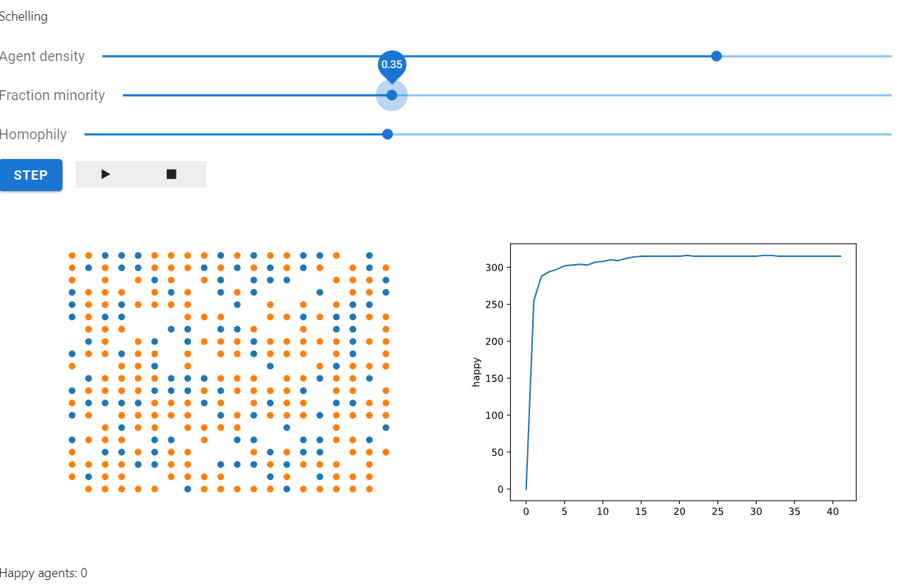
*Above: A Mesa implementation of the Schelling segregation model,
|
|
30
30
|
being visualized in a browser window and analyzed in a Jupyter
|
|
@@ -55,7 +55,7 @@ For more help on using Mesa, check out the following resources:
|
|
|
55
55
|
- [Mesa Introductory Tutorial]
|
|
56
56
|
- [Mesa Visualization Tutorial]
|
|
57
57
|
- [GitHub Issue Tracker]
|
|
58
|
-
- [
|
|
58
|
+
- [Matrix chat room]
|
|
59
59
|
- [PyPI]
|
|
60
60
|
|
|
61
61
|
## Contributing back to Mesa
|
|
@@ -95,9 +95,9 @@ tutorials/adv_tutorial_legacy.ipynb
|
|
|
95
95
|
- {ref}`search`
|
|
96
96
|
|
|
97
97
|
[contributors guide]: https://github.com/projectmesa/mesa/blob/main/CONTRIBUTING.md
|
|
98
|
-
[email list]: https://groups.google.com/d/forum/projectmesa
|
|
99
98
|
[github]: https://github.com/projectmesa/mesa/
|
|
100
99
|
[github issue tracker]: https://github.com/projectmesa/mesa/issues
|
|
100
|
+
[matrix chat room]: https://matrix.to/#/#project-mesa:matrix.org
|
|
101
101
|
[mesa]: https://github.com/projectmesa/mesa/
|
|
102
102
|
[mesa introductory tutorial]: tutorials/intro_tutorial.html
|
|
103
103
|
[mesa visualization tutorial]: tutorials/visualization_tutorial.html
|
|
@@ -91,7 +91,7 @@ Most likely you created an ABM that has the code that you want to share in it, w
|
|
|
91
91
|
>
|
|
92
92
|
> 7. `git add` all the files to the repo, which means the repo starts to track the files. Then `git commit` the files with a meaningful message. To learn more about this see: [Saving changes](https://www.atlassian.com/git/tutorials/saving-changes). Finally, you will want to `git push` all your changes to GitHub, see: [Git Push](https://help.github.com/articles/pushing-to-a-remote/).
|
|
93
93
|
>
|
|
94
|
-
> 8. Let people know about your package on the [MESA Wiki Page](https://github.com/projectmesa/mesa/wiki) and share it
|
|
94
|
+
> 8. Let people know about your package on the [MESA Wiki Page](https://github.com/projectmesa/mesa/wiki) and share it in the [matrix chat room](https://matrix.to/#/#project-mesa:matrix.org). In the future, we will create more of a directory, but at this point we are not there yet.
|
|
95
95
|
|
|
96
96
|
From this point, someone can clone your repo and then add your repo to their Python path and use it in their project. However, if you want to take your package to the next level, you will want to add more structure to your package and share it on PyPI.
|
|
97
97
|
|
|
@@ -26,7 +26,7 @@ __all__ = [
|
|
|
26
26
|
]
|
|
27
27
|
|
|
28
28
|
__title__ = "mesa"
|
|
29
|
-
__version__ = "2.3.
|
|
29
|
+
__version__ = "2.3.3"
|
|
30
30
|
__license__ = "Apache 2.0"
|
|
31
31
|
_this_year = datetime.datetime.now(tz=datetime.timezone.utc).date().year
|
|
32
32
|
__copyright__ = f"Copyright {_this_year} Project Mesa Team"
|
|
@@ -274,6 +274,21 @@ class AgentSet(MutableSet, Sequence):
|
|
|
274
274
|
for agent in self._agents
|
|
275
275
|
]
|
|
276
276
|
|
|
277
|
+
def set(self, attr_name: str, value: Any) -> AgentSet:
|
|
278
|
+
"""
|
|
279
|
+
Set a specified attribute to a given value for all agents in the AgentSet.
|
|
280
|
+
|
|
281
|
+
Args:
|
|
282
|
+
attr_name (str): The name of the attribute to set.
|
|
283
|
+
value (Any): The value to set the attribute to.
|
|
284
|
+
|
|
285
|
+
Returns:
|
|
286
|
+
AgentSet: The AgentSet instance itself, after setting the attribute.
|
|
287
|
+
"""
|
|
288
|
+
for agent in self:
|
|
289
|
+
setattr(agent, attr_name, value)
|
|
290
|
+
return self
|
|
291
|
+
|
|
277
292
|
def __getitem__(self, item: int | slice) -> Agent:
|
|
278
293
|
"""
|
|
279
294
|
Retrieve an agent or a slice of agents from the AgentSet.
|
|
@@ -132,14 +132,14 @@ def _model_run_func(
|
|
|
132
132
|
"""
|
|
133
133
|
run_id, iteration, kwargs = run
|
|
134
134
|
model = model_cls(**kwargs)
|
|
135
|
-
while model.running and model.
|
|
135
|
+
while model.running and model._steps <= max_steps:
|
|
136
136
|
model.step()
|
|
137
137
|
|
|
138
138
|
data = []
|
|
139
139
|
|
|
140
|
-
steps = list(range(0, model.
|
|
141
|
-
if not steps or steps[-1] != model.
|
|
142
|
-
steps.append(model.
|
|
140
|
+
steps = list(range(0, model._steps, data_collection_period))
|
|
141
|
+
if not steps or steps[-1] != model._steps - 1:
|
|
142
|
+
steps.append(model._steps - 1)
|
|
143
143
|
|
|
144
144
|
for step in steps:
|
|
145
145
|
model_data, all_agents_data = _collect_data(model, step)
|
|
@@ -50,7 +50,7 @@ def _draw_grid(space, space_ax, agent_portrayal):
|
|
|
50
50
|
out = {"x": x, "y": y}
|
|
51
51
|
# This is the default value for the marker size, which auto-scales
|
|
52
52
|
# according to the grid area.
|
|
53
|
-
out["s"] = (180 /
|
|
53
|
+
out["s"] = (180 / max(g.width, g.height)) ** 2
|
|
54
54
|
if len(s) > 0:
|
|
55
55
|
out["s"] = s
|
|
56
56
|
if len(c) > 0:
|
|
@@ -586,7 +586,7 @@ class PropertyLayer:
|
|
|
586
586
|
aggregate_property(operation): Performs an aggregate operation over all cells.
|
|
587
587
|
"""
|
|
588
588
|
|
|
589
|
-
|
|
589
|
+
propertylayer_experimental_warning_given = False
|
|
590
590
|
|
|
591
591
|
def __init__(
|
|
592
592
|
self, name: str, width: int, height: int, default_value, dtype=np.float64
|
|
@@ -633,14 +633,14 @@ class PropertyLayer:
|
|
|
633
633
|
|
|
634
634
|
self.data = np.full((width, height), default_value, dtype=dtype)
|
|
635
635
|
|
|
636
|
-
if not self.__class__.
|
|
636
|
+
if not self.__class__.propertylayer_experimental_warning_given:
|
|
637
637
|
warnings.warn(
|
|
638
638
|
"The new PropertyLayer and _PropertyGrid classes experimental. It may be changed or removed in any and all future releases, including patch releases.\n"
|
|
639
639
|
"We would love to hear what you think about this new feature. If you have any thoughts, share them with us here: https://github.com/projectmesa/mesa/discussions/1932",
|
|
640
640
|
FutureWarning,
|
|
641
641
|
stacklevel=2,
|
|
642
642
|
)
|
|
643
|
-
self.__class__.
|
|
643
|
+
self.__class__.propertylayer_experimental_warning_given = True
|
|
644
644
|
|
|
645
645
|
def set_cell(self, position: Coordinate, value):
|
|
646
646
|
"""
|
|
@@ -210,6 +210,30 @@ def test_agentset_do_method():
|
|
|
210
210
|
assert len(agentset) == 0
|
|
211
211
|
|
|
212
212
|
|
|
213
|
+
def test_agentset_set_method():
|
|
214
|
+
# Initialize the model and agents with and without existing attributes
|
|
215
|
+
class TestAgentWithAttribute(Agent):
|
|
216
|
+
def __init__(self, unique_id, model, age=None):
|
|
217
|
+
super().__init__(unique_id, model)
|
|
218
|
+
self.age = age
|
|
219
|
+
|
|
220
|
+
model = Model()
|
|
221
|
+
agents = [TestAgentWithAttribute(model.next_id(), model, age=i) for i in range(5)]
|
|
222
|
+
agentset = AgentSet(agents, model)
|
|
223
|
+
|
|
224
|
+
# Set a new attribute "health" and an existing attribute "age" for all agents
|
|
225
|
+
agentset.set("health", 100).set("age", 50).set("status", "active")
|
|
226
|
+
|
|
227
|
+
# Check if all agents have the "health", "age", and "status" attributes correctly set
|
|
228
|
+
for agent in agentset:
|
|
229
|
+
assert hasattr(agent, "health")
|
|
230
|
+
assert agent.health == 100
|
|
231
|
+
assert hasattr(agent, "age")
|
|
232
|
+
assert agent.age == 50
|
|
233
|
+
assert hasattr(agent, "status")
|
|
234
|
+
assert agent.status == "active"
|
|
235
|
+
|
|
236
|
+
|
|
213
237
|
def test_agentset_get_attribute():
|
|
214
238
|
model = Model()
|
|
215
239
|
agents = [TestAgent(model.next_id(), model) for _ in range(10)]
|
|
File without changes
|
|
File without changes
|
|
File without changes
|
|
File without changes
|
|
File without changes
|
|
File without changes
|
|
File without changes
|
|
File without changes
|
|
File without changes
|
|
File without changes
|
|
File without changes
|
|
File without changes
|
|
File without changes
|
|
File without changes
|
|
File without changes
|
|
File without changes
|
|
File without changes
|
|
File without changes
|
|
File without changes
|
|
File without changes
|
|
File without changes
|
|
File without changes
|
|
File without changes
|
|
File without changes
|
|
File without changes
|
|
File without changes
|
|
File without changes
|
|
File without changes
|
|
File without changes
|
|
File without changes
|
|
File without changes
|
|
File without changes
|
|
File without changes
|
|
File without changes
|
|
File without changes
|
|
File without changes
|
|
File without changes
|
|
File without changes
|
|
File without changes
|
|
File without changes
|
|
File without changes
|
|
File without changes
|
|
File without changes
|
|
File without changes
|
|
File without changes
|
|
File without changes
|
|
File without changes
|
|
File without changes
|
|
File without changes
|
|
File without changes
|
|
File without changes
|
|
File without changes
|
|
File without changes
|
|
File without changes
|
|
File without changes
|
|
File without changes
|
|
File without changes
|
|
File without changes
|
|
File without changes
|
|
File without changes
|
|
File without changes
|
|
File without changes
|
|
File without changes
|
|
File without changes
|
|
File without changes
|
|
File without changes
|
|
File without changes
|
|
File without changes
|
|
File without changes
|
|
File without changes
|
|
File without changes
|
|
File without changes
|
|
File without changes
|
|
File without changes
|
|
File without changes
|
|
File without changes
|
|
File without changes
|
|
File without changes
|
|
File without changes
|
|
File without changes
|
|
File without changes
|
|
File without changes
|
|
File without changes
|
|
File without changes
|
|
File without changes
|
|
File without changes
|
|
File without changes
|
|
File without changes
|
|
File without changes
|
|
File without changes
|
|
File without changes
|
|
File without changes
|
|
File without changes
|
|
File without changes
|
|
File without changes
|
|
File without changes
|
|
File without changes
|
|
File without changes
|
|
File without changes
|
|
File without changes
|
|
File without changes
|
|
File without changes
|
|
File without changes
|
|
File without changes
|
|
File without changes
|
|
File without changes
|
|
File without changes
|
|
File without changes
|
|
File without changes
|
|
File without changes
|
|
File without changes
|
|
File without changes
|
|
File without changes
|
|
File without changes
|
|
File without changes
|
|
File without changes
|
|
File without changes
|
|
File without changes
|
|
File without changes
|
|
File without changes
|
|
File without changes
|
|
File without changes
|
|
File without changes
|
|
File without changes
|