Kea2-python 1.0.1__tar.gz → 1.0.3__tar.gz
This diff represents the content of publicly available package versions that have been released to one of the supported registries. The information contained in this diff is provided for informational purposes only and reflects changes between package versions as they appear in their respective public registries.
- {kea2_python-1.0.1 → kea2_python-1.0.3}/Kea2_python.egg-info/PKG-INFO +42 -28
- {kea2_python-1.0.1 → kea2_python-1.0.3}/Kea2_python.egg-info/SOURCES.txt +7 -4
- {kea2_python-1.0.1 → kea2_python-1.0.3}/PKG-INFO +42 -28
- {kea2_python-1.0.1 → kea2_python-1.0.3}/README.md +41 -27
- {kea2_python-1.0.1 → kea2_python-1.0.3}/kea2/adbUtils.py +4 -3
- {kea2_python-1.0.1 → kea2_python-1.0.3}/kea2/assets/fastbot_libs/arm64-v8a/libfastbot_native.so +0 -0
- kea2_python-1.0.3/kea2/assets/fastbot_libs/armeabi-v7a/libfastbot_native.so +0 -0
- kea2_python-1.0.3/kea2/assets/fastbot_libs/x86/libfastbot_native.so +0 -0
- {kea2_python-1.0.1 → kea2_python-1.0.3}/kea2/assets/fastbot_libs/x86_64/libfastbot_native.so +0 -0
- kea2_python-1.0.3/kea2/assets/monkeyq.jar +0 -0
- {kea2_python-1.0.1 → kea2_python-1.0.3}/kea2/assets/quicktest.py +20 -5
- {kea2_python-1.0.1 → kea2_python-1.0.3}/kea2/cli.py +14 -33
- {kea2_python-1.0.1 → kea2_python-1.0.3}/kea2/fastbotManager.py +10 -7
- {kea2_python-1.0.1 → kea2_python-1.0.3}/kea2/keaUtils.py +49 -28
- {kea2_python-1.0.1 → kea2_python-1.0.3}/kea2/kea_launcher.py +33 -22
- {kea2_python-1.0.1 → kea2_python-1.0.3}/kea2/logWatcher.py +3 -4
- kea2_python-1.0.3/kea2/report/__init__.py +0 -0
- {kea2_python-1.0.1/kea2 → kea2_python-1.0.3/kea2/report}/bug_report_generator.py +54 -487
- kea2_python-1.0.3/kea2/report/mixin.py +468 -0
- {kea2_python-1.0.1/kea2 → kea2_python-1.0.3/kea2/report}/report_merger.py +87 -104
- {kea2_python-1.0.1/kea2 → kea2_python-1.0.3/kea2/report}/templates/bug_report_template.html +193 -188
- {kea2_python-1.0.1/kea2 → kea2_python-1.0.3/kea2/report}/templates/merged_bug_report_template.html +191 -187
- kea2_python-1.0.3/kea2/report/utils.py +10 -0
- {kea2_python-1.0.1 → kea2_python-1.0.3}/kea2/resultSyncer.py +4 -1
- {kea2_python-1.0.1 → kea2_python-1.0.3}/kea2/u2Driver.py +12 -4
- {kea2_python-1.0.1 → kea2_python-1.0.3}/kea2/utils.py +4 -6
- {kea2_python-1.0.1 → kea2_python-1.0.3}/kea2/version_manager.py +4 -3
- {kea2_python-1.0.1 → kea2_python-1.0.3}/pyproject.toml +6 -3
- kea2_python-1.0.1/kea2/assets/fastbot_libs/armeabi-v7a/libfastbot_native.so +0 -0
- kea2_python-1.0.1/kea2/assets/fastbot_libs/x86/libfastbot_native.so +0 -0
- kea2_python-1.0.1/kea2/assets/monkeyq.jar +0 -0
- {kea2_python-1.0.1 → kea2_python-1.0.3}/Kea2_python.egg-info/dependency_links.txt +0 -0
- {kea2_python-1.0.1 → kea2_python-1.0.3}/Kea2_python.egg-info/entry_points.txt +0 -0
- {kea2_python-1.0.1 → kea2_python-1.0.3}/Kea2_python.egg-info/requires.txt +0 -0
- {kea2_python-1.0.1 → kea2_python-1.0.3}/Kea2_python.egg-info/top_level.txt +0 -0
- {kea2_python-1.0.1 → kea2_python-1.0.3}/LICENSE +0 -0
- {kea2_python-1.0.1 → kea2_python-1.0.3}/kea2/__init__.py +0 -0
- {kea2_python-1.0.1 → kea2_python-1.0.3}/kea2/absDriver.py +0 -0
- {kea2_python-1.0.1 → kea2_python-1.0.3}/kea2/assets/config_version.json +0 -0
- {kea2_python-1.0.1 → kea2_python-1.0.3}/kea2/assets/fastbot-thirdpart.jar +0 -0
- {kea2_python-1.0.1 → kea2_python-1.0.3}/kea2/assets/fastbot_configs/abl.strings +0 -0
- {kea2_python-1.0.1 → kea2_python-1.0.3}/kea2/assets/fastbot_configs/awl.strings +0 -0
- {kea2_python-1.0.1 → kea2_python-1.0.3}/kea2/assets/fastbot_configs/max.config +0 -0
- {kea2_python-1.0.1 → kea2_python-1.0.3}/kea2/assets/fastbot_configs/max.fuzzing.strings +0 -0
- {kea2_python-1.0.1 → kea2_python-1.0.3}/kea2/assets/fastbot_configs/max.schema.strings +0 -0
- {kea2_python-1.0.1 → kea2_python-1.0.3}/kea2/assets/fastbot_configs/max.strings +0 -0
- {kea2_python-1.0.1 → kea2_python-1.0.3}/kea2/assets/fastbot_configs/max.tree.pruning +0 -0
- {kea2_python-1.0.1 → kea2_python-1.0.3}/kea2/assets/fastbot_configs/teardown.py +0 -0
- {kea2_python-1.0.1 → kea2_python-1.0.3}/kea2/assets/fastbot_configs/widget.block.py +0 -0
- {kea2_python-1.0.1 → kea2_python-1.0.3}/kea2/assets/framework.jar +0 -0
- {kea2_python-1.0.1 → kea2_python-1.0.3}/kea2/assets/kea2-thirdpart.jar +0 -0
- {kea2_python-1.0.1 → kea2_python-1.0.3}/kea2/mixin.py +0 -0
- {kea2_python-1.0.1 → kea2_python-1.0.3}/setup.cfg +0 -0
- {kea2_python-1.0.1 → kea2_python-1.0.3}/tests/test_u2Selector.py +0 -0
|
@@ -1,6 +1,6 @@
|
|
|
1
1
|
Metadata-Version: 2.4
|
|
2
2
|
Name: Kea2-python
|
|
3
|
-
Version: 1.0.
|
|
3
|
+
Version: 1.0.3
|
|
4
4
|
Summary: A python library for supporting and customizing automated UI testing for mobile apps
|
|
5
5
|
Author-email: Xixian Liang <xixian@stu.ecnu.edu.cn>
|
|
6
6
|
Requires-Python: >=3.8
|
|
@@ -24,7 +24,7 @@ Dynamic: license-file
|
|
|
24
24
|
<img src="https://github.com/user-attachments/assets/84e47b87-2dd2-4d7e-91d1-e8c1d1db0cf4" style="border-radius: 14px; width: 20%; height: 20%;"/>
|
|
25
25
|
</div>
|
|
26
26
|
|
|
27
|
-
|
|
27
|
+
Please contact Xixian Liang at [xixian@stu.ecnu.edu.cn](xixian@stu.ecnu.edu.cn) with your Wechat ID / QR code to be invited to the WeChat discussion group. Of course, we are also ready on GitHub to answer your questions/feedback.
|
|
28
28
|
|
|
29
29
|
### Github repo link
|
|
30
30
|
[https://github.com/ecnusse/Kea2](https://github.com/ecnusse/Kea2)
|
|
@@ -43,7 +43,7 @@ The group has reached its capacity. Please contact Xixian Liang at [xixian@stu.e
|
|
|
43
43
|
|
|
44
44
|
Kea2 is an easy-to-use tool for fuzzing mobile apps. Its key *novelty* is able to fuse automated UI testing with scripts (usually written by human), thus empowering automated UI testing with human intelligence for effectively finding *crashing bugs* as well as *non-crashing functional (logic) bugs*.
|
|
45
45
|
|
|
46
|
-
Kea2 is currently built on top of [Fastbot](https://github.com/bytedance/Fastbot_Android), *an industrial-strength automated UI testing tool*, and [uiautomator2](https://github.com/openatx/uiautomator2), *an easy-to-use and stable Android automation library*.
|
|
46
|
+
Kea2 is currently built on top of [Fastbot](https://github.com/ecnusse/Fastbot_Android) 3.0 (a modified/enhanced version of the original [FastBot](https://github.com/bytedance/Fastbot_Android) 2.0), *an industrial-strength automated UI testing tool from ByteDance*, and [uiautomator2](https://github.com/openatx/uiautomator2), *an easy-to-use and stable Android automation library*.
|
|
47
47
|
Kea2 currently targets [Android](https://en.wikipedia.org/wiki/Android_(operating_system)) apps.
|
|
48
48
|
|
|
49
49
|
## Novelty & Important features
|
|
@@ -76,11 +76,11 @@ Kea2 (and its idea) has been used/integrated by
|
|
|
76
76
|
|
|
77
77
|
- [OPay Business](https://play.google.com/store/apps/details?id=team.opay.pay.merchant.service) --- a financial & payment app. OPay uses Kea2 for regression testing on POS machines and mobile devices.
|
|
78
78
|
|
|
79
|
-
- [WeChat's iExplorer]() --- WeChat's in-house testing platform
|
|
79
|
+
- [WeChat's iExplorer]() --- WeChat's in-house testing platform (coming with an interactive UI-based tool to ease writing scripts)
|
|
80
80
|
|
|
81
|
-
- [WeChat Payment's UAT]() --- WeChat Payment's in-house testing platform
|
|
81
|
+
- [WeChat Payment's UAT]() --- WeChat Payment's in-house testing platform (fully automated property-based testing by synthesizing properties from the system specifications)
|
|
82
82
|
|
|
83
|
-
- [DevEco Testing](https://developer.huawei.com/consumer/cn/deveco-testing/) --- Huawei's Official Testing Platform for HarmonyOS
|
|
83
|
+
- [DevEco Testing](https://developer.huawei.com/consumer/cn/deveco-testing/) --- Huawei's Official Testing Platform for HarmonyOS (Kea2 is built upon Hypium)
|
|
84
84
|
|
|
85
85
|
- [ByteDance's Fastbot](https://github.com/bytedance/Fastbot_Android)
|
|
86
86
|
|
|
@@ -90,7 +90,7 @@ Please let us know and willing to hear your feedback/questions if you are also u
|
|
|
90
90
|
Kea2 currently works with:
|
|
91
91
|
- [unittest](https://docs.python.org/3/library/unittest.html) as the testing framework to manage the scripts;
|
|
92
92
|
- [uiautomator2](https://github.com/openatx/uiautomator2) as the UI test driver;
|
|
93
|
-
- [Fastbot](https://github.com/bytedance/Fastbot_Android) as the backend automated UI testing tool.
|
|
93
|
+
- [Fastbot](https://github.com/bytedance/Fastbot_Android) as the backend automated UI testing tool.
|
|
94
94
|
|
|
95
95
|
In the future, Kea2 will be extended to support
|
|
96
96
|
- [pytest](https://docs.pytest.org/en/stable/), another popular python testing framework;
|
|
@@ -121,34 +121,34 @@ python3 -m pip install -U kea2-python
|
|
|
121
121
|
```
|
|
122
122
|
> If you're using mirror sites like Tsinghua or USTC, you may fail to upgrade. Because these sites may not have the latest version yet. In this case, you can try to install Kea2 by specifying the latest version manually, or use `pypi.org` directly by `pip install kea2-python -i https://pypi.org/simple`.
|
|
123
123
|
|
|
124
|
-
Upgrade Kea2 to the specifc latest version (e.g., 0.
|
|
124
|
+
Upgrade Kea2 to the specifc latest version (e.g., 1.0.0) if you already installed Kea2 before:
|
|
125
125
|
```bash
|
|
126
|
-
python3 -m pip install -U kea2-python==0.
|
|
126
|
+
python3 -m pip install -U kea2-python==1.0.0
|
|
127
127
|
```
|
|
128
128
|
|
|
129
|
+
Initialize Kea2 under your preferred working directory:
|
|
130
|
+
```python
|
|
131
|
+
kea2 init
|
|
132
|
+
```
|
|
129
133
|
|
|
134
|
+
> This initialization step is always needed if it is your first time to run Kea2. If you have upgraded Kea2, you are also recommended to rerun this step to ensure any potential new configurations of Kea2 would take effect.
|
|
130
135
|
|
|
131
136
|
|
|
132
137
|
## Quick Test
|
|
133
138
|
|
|
134
139
|
Kea2 connects to and runs on Android devices. We recommend you to do a quick test to ensure that Kea2 is compatible with your devices.
|
|
135
140
|
|
|
136
|
-
1. Connect to a real Android device or an Android emulator
|
|
141
|
+
1. Connect to a real Android device or an Android emulator and make sure you can see the connected device by running `adb devices`.
|
|
137
142
|
|
|
138
143
|
2. Run `quicktest.py` to test a sample app `omninotes` (released as `omninotes.apk` in Kea2's repository). The script `quicktest.py` will automatically install and test this sample app for a short time.
|
|
139
144
|
|
|
140
|
-
Initialize Kea2 under your preferred working directory:
|
|
141
|
-
```python
|
|
142
|
-
kea2 init
|
|
143
|
-
```
|
|
144
|
-
|
|
145
|
-
> This step is always needed if it is your first time to run Kea2.
|
|
146
|
-
|
|
147
145
|
Run the quick test:
|
|
148
|
-
```
|
|
146
|
+
```bash
|
|
149
147
|
python3 quicktest.py
|
|
150
148
|
```
|
|
151
149
|
|
|
150
|
+
> This quick test would automatically download `omninotes.apk`. If the download fails, please copy `omninotes.apk` from Kea2's repository (top-level) to your working directory and execute the quick test command again.
|
|
151
|
+
|
|
152
152
|
If you can see the app `omninotes` is successfully running and tested, Kea2 works!
|
|
153
153
|
Otherwise, please help [file a bug report](https://github.com/ecnusse/Kea2/issues) with the error message to us. Thank you!
|
|
154
154
|
|
|
@@ -162,7 +162,7 @@ Test your app with the full capability of Fastbot for stress testing and finding
|
|
|
162
162
|
kea2 run -p it.feio.android.omninotes.alpha --running-minutes 10 --throttle 200
|
|
163
163
|
```
|
|
164
164
|
|
|
165
|
-
To understand the meanings of the options, you can see our [manual](docs/manual_en.md#launching-kea2).
|
|
165
|
+
To understand the meanings of the options, you can see our [user manual](docs/manual_en.md#launching-kea2).
|
|
166
166
|
|
|
167
167
|
> The usage is similar to the the original Fastbot's [shell commands](https://github.com/bytedance/Fastbot_Android?tab=readme-ov-file#run-fastbot-with-shell-command).
|
|
168
168
|
|
|
@@ -242,13 +242,19 @@ For the preceding always-holding property, we can write the following script to
|
|
|
242
242
|
lambda self: self.d(description="input_box").exists
|
|
243
243
|
)
|
|
244
244
|
def test_input_box(self):
|
|
245
|
+
|
|
246
|
+
# genenerate a random non-empty string (this is also property-based testing by feeding random text inputs!)
|
|
245
247
|
from hypothesis.strategies import text, ascii_letters
|
|
246
248
|
random_str = text(alphabet=ascii_letters).example()
|
|
249
|
+
|
|
250
|
+
# input this non-empty string into the input box
|
|
247
251
|
self.d(description="input_box").set_text(random_str)
|
|
252
|
+
|
|
253
|
+
# check whether the send button exists
|
|
248
254
|
assert self.d(description="send_button").exist
|
|
249
255
|
|
|
250
256
|
# we can even do more assertions, e.g.,
|
|
251
|
-
# the input string should
|
|
257
|
+
# the input string should successfully appear on the message sending page
|
|
252
258
|
assert self.d(text=random_str).exist
|
|
253
259
|
```
|
|
254
260
|
> We use [hypothesis](https://github.com/HypothesisWorks/hypothesis) to generate random texts.
|
|
@@ -283,13 +289,14 @@ kea2 run -p it.feio.android.omninotes.alpha --agent u2 --running-minutes 10 --th
|
|
|
283
289
|
|
|
284
290
|
## Test Reports(测试报告)
|
|
285
291
|
|
|
286
|
-
Kea2 automatically generates
|
|
292
|
+
Kea2 automatically generates a HTML test report after each testing session. You can find the report in `output/` under your working directory.
|
|
287
293
|
|
|
288
|
-
|
|
294
|
+
You can also manually generate the test report by `kea2 report` (see `kea2 report -h` for details).
|
|
289
295
|
|
|
290
|
-
|
|
296
|
+
You can also merge the test report from multiple testing sessions by `kea2 merge` (see `kea2 merge -h` for details).
|
|
297
|
+
The merged test report is quite useful if you would test your apps for multiple sessions.
|
|
291
298
|
|
|
292
|
-
|
|
299
|
+
You can find a sample [test report](https://ecnusse.github.io/Kea2_sample_report/) from Opay (Thank you!). You can find more details on the test report in [this documentation](docs/test_report_introduction.md).
|
|
293
300
|
|
|
294
301
|
## Documentations(更多文档)
|
|
295
302
|
|
|
@@ -305,7 +312,8 @@ You can find the [user manual](docs/manual_en.md), which includes:
|
|
|
305
312
|
### Other resources about Kea2 (in Chinese)
|
|
306
313
|
- [Q&A for Kea2 and PBT (对Kea2和PBT技术的常见问题和回答)](https://sy8pzmhmun.feishu.cn/wiki/SLGwwqgzIiEuC3kwmV8cSZY0nTg?from=from_copylink)
|
|
307
314
|
- [Kea2 101 (Kea2 从0到1 的入门教程与最佳实践,建议新手阅读)](https://sy8pzmhmun.feishu.cn/wiki/EwaWwPCitiUJoBkIgALcHtglnDK?from=from_copylink)
|
|
308
|
-
- [Kea2 分享交流会 (2025.09, bilibili 录播)](https://www.bilibili.com/video/BV1CZYNz9Ei5
|
|
315
|
+
- [Kea2 分享交流会 (2025.09, bilibili 录播)](https://www.bilibili.com/video/BV1CZYNz9Ei5/)
|
|
316
|
+
- [Kea2 工具快速介绍 (2025.11, bilibili 录播)](https://www.bilibili.com/video/BV1WAyUBDEMw/)
|
|
309
317
|
|
|
310
318
|
Some blogs on Kea/Kea2 (in Chinese):
|
|
311
319
|
- [别再苦哈哈写测试脚本了,生成它们吧!(一)](https://mp.weixin.qq.com/s/R2kLCkXpDjpa8wCX4Eidtg)
|
|
@@ -343,7 +351,7 @@ kea2的核心作用:
|
|
|
343
351
|
|
|
344
352
|
提供了条件触发器。 在FB跑路的时候,会不停遍历条件触发器,一旦触发,挂起FB,开始执行触发器指定的 ui test 及 assert。执行完毕,继续切回FB跑路。
|
|
345
353
|
|
|
346
|
-
|
|
354
|
+
kea2做了什么:
|
|
347
355
|
|
|
348
356
|
替换了FB的条件触发功能。
|
|
349
357
|
替换了FB的黑名单,黑控件功能。
|
|
@@ -371,7 +379,7 @@ hea2做了什么:
|
|
|
371
379
|
|
|
372
380
|
> Guided, Stochastic Model-Based GUI Testing of Android Apps. ESEC/FSE 2017. [pdf](https://dl.acm.org/doi/10.1145/3106237.3106298)
|
|
373
381
|
|
|
374
|
-
|
|
382
|
+
## Maintainers/Contributors
|
|
375
383
|
|
|
376
384
|
Kea2 has been actively developed and maintained by the people in [ecnusse](https://github.com/ecnusse):
|
|
377
385
|
|
|
@@ -389,7 +397,13 @@ Kea2 has been actively developed and maintained by the people in [ecnusse](https
|
|
|
389
397
|
|
|
390
398
|
Kea2 has also received many valuable insights, advices, feedbacks and lessons shared by several industrial people from Bytedance ([Zhao Zhang](https://github.com/zhangzhao4444), Yuhui Su from the Fastbot team), OPay (Tiesong Liu), WeChat (Haochuan Lu, Yuetang Deng), Huawei, Xiaomi and etc. Kudos!
|
|
391
399
|
|
|
392
|
-
###
|
|
400
|
+
### Become a Contributor!
|
|
401
|
+
|
|
402
|
+
Kea2 is an open-source project and we are calling for more contributors to join us!
|
|
403
|
+
|
|
404
|
+
See [Developer guide](DEVELOP.md) for more details.
|
|
405
|
+
|
|
406
|
+
## Star History
|
|
393
407
|
|
|
394
408
|
[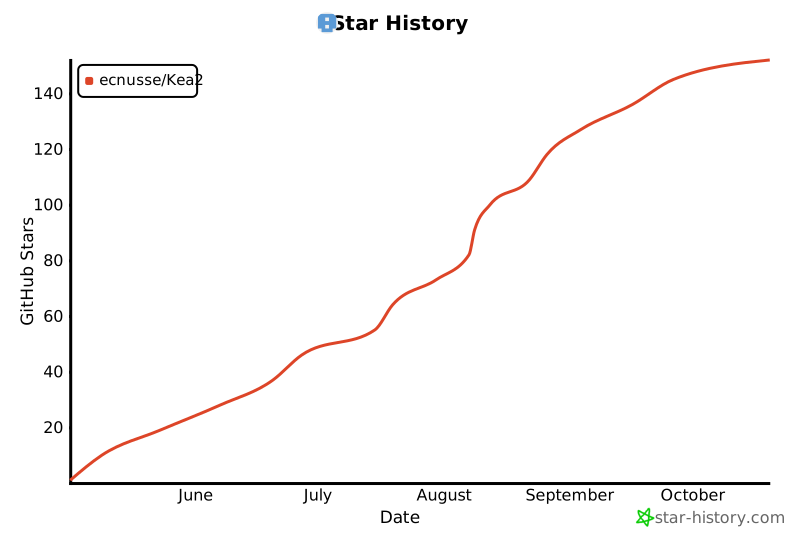](https://www.star-history.com/#ecnusse/Kea2&Date)
|
|
395
409
|
|
|
@@ -10,14 +10,12 @@ Kea2_python.egg-info/top_level.txt
|
|
|
10
10
|
kea2/__init__.py
|
|
11
11
|
kea2/absDriver.py
|
|
12
12
|
kea2/adbUtils.py
|
|
13
|
-
kea2/bug_report_generator.py
|
|
14
13
|
kea2/cli.py
|
|
15
14
|
kea2/fastbotManager.py
|
|
16
15
|
kea2/keaUtils.py
|
|
17
16
|
kea2/kea_launcher.py
|
|
18
17
|
kea2/logWatcher.py
|
|
19
18
|
kea2/mixin.py
|
|
20
|
-
kea2/report_merger.py
|
|
21
19
|
kea2/resultSyncer.py
|
|
22
20
|
kea2/u2Driver.py
|
|
23
21
|
kea2/utils.py
|
|
@@ -41,6 +39,11 @@ kea2/assets/fastbot_libs/arm64-v8a/libfastbot_native.so
|
|
|
41
39
|
kea2/assets/fastbot_libs/armeabi-v7a/libfastbot_native.so
|
|
42
40
|
kea2/assets/fastbot_libs/x86/libfastbot_native.so
|
|
43
41
|
kea2/assets/fastbot_libs/x86_64/libfastbot_native.so
|
|
44
|
-
kea2/
|
|
45
|
-
kea2/
|
|
42
|
+
kea2/report/__init__.py
|
|
43
|
+
kea2/report/bug_report_generator.py
|
|
44
|
+
kea2/report/mixin.py
|
|
45
|
+
kea2/report/report_merger.py
|
|
46
|
+
kea2/report/utils.py
|
|
47
|
+
kea2/report/templates/bug_report_template.html
|
|
48
|
+
kea2/report/templates/merged_bug_report_template.html
|
|
46
49
|
tests/test_u2Selector.py
|
|
@@ -1,6 +1,6 @@
|
|
|
1
1
|
Metadata-Version: 2.4
|
|
2
2
|
Name: Kea2-python
|
|
3
|
-
Version: 1.0.
|
|
3
|
+
Version: 1.0.3
|
|
4
4
|
Summary: A python library for supporting and customizing automated UI testing for mobile apps
|
|
5
5
|
Author-email: Xixian Liang <xixian@stu.ecnu.edu.cn>
|
|
6
6
|
Requires-Python: >=3.8
|
|
@@ -24,7 +24,7 @@ Dynamic: license-file
|
|
|
24
24
|
<img src="https://github.com/user-attachments/assets/84e47b87-2dd2-4d7e-91d1-e8c1d1db0cf4" style="border-radius: 14px; width: 20%; height: 20%;"/>
|
|
25
25
|
</div>
|
|
26
26
|
|
|
27
|
-
|
|
27
|
+
Please contact Xixian Liang at [xixian@stu.ecnu.edu.cn](xixian@stu.ecnu.edu.cn) with your Wechat ID / QR code to be invited to the WeChat discussion group. Of course, we are also ready on GitHub to answer your questions/feedback.
|
|
28
28
|
|
|
29
29
|
### Github repo link
|
|
30
30
|
[https://github.com/ecnusse/Kea2](https://github.com/ecnusse/Kea2)
|
|
@@ -43,7 +43,7 @@ The group has reached its capacity. Please contact Xixian Liang at [xixian@stu.e
|
|
|
43
43
|
|
|
44
44
|
Kea2 is an easy-to-use tool for fuzzing mobile apps. Its key *novelty* is able to fuse automated UI testing with scripts (usually written by human), thus empowering automated UI testing with human intelligence for effectively finding *crashing bugs* as well as *non-crashing functional (logic) bugs*.
|
|
45
45
|
|
|
46
|
-
Kea2 is currently built on top of [Fastbot](https://github.com/bytedance/Fastbot_Android), *an industrial-strength automated UI testing tool*, and [uiautomator2](https://github.com/openatx/uiautomator2), *an easy-to-use and stable Android automation library*.
|
|
46
|
+
Kea2 is currently built on top of [Fastbot](https://github.com/ecnusse/Fastbot_Android) 3.0 (a modified/enhanced version of the original [FastBot](https://github.com/bytedance/Fastbot_Android) 2.0), *an industrial-strength automated UI testing tool from ByteDance*, and [uiautomator2](https://github.com/openatx/uiautomator2), *an easy-to-use and stable Android automation library*.
|
|
47
47
|
Kea2 currently targets [Android](https://en.wikipedia.org/wiki/Android_(operating_system)) apps.
|
|
48
48
|
|
|
49
49
|
## Novelty & Important features
|
|
@@ -76,11 +76,11 @@ Kea2 (and its idea) has been used/integrated by
|
|
|
76
76
|
|
|
77
77
|
- [OPay Business](https://play.google.com/store/apps/details?id=team.opay.pay.merchant.service) --- a financial & payment app. OPay uses Kea2 for regression testing on POS machines and mobile devices.
|
|
78
78
|
|
|
79
|
-
- [WeChat's iExplorer]() --- WeChat's in-house testing platform
|
|
79
|
+
- [WeChat's iExplorer]() --- WeChat's in-house testing platform (coming with an interactive UI-based tool to ease writing scripts)
|
|
80
80
|
|
|
81
|
-
- [WeChat Payment's UAT]() --- WeChat Payment's in-house testing platform
|
|
81
|
+
- [WeChat Payment's UAT]() --- WeChat Payment's in-house testing platform (fully automated property-based testing by synthesizing properties from the system specifications)
|
|
82
82
|
|
|
83
|
-
- [DevEco Testing](https://developer.huawei.com/consumer/cn/deveco-testing/) --- Huawei's Official Testing Platform for HarmonyOS
|
|
83
|
+
- [DevEco Testing](https://developer.huawei.com/consumer/cn/deveco-testing/) --- Huawei's Official Testing Platform for HarmonyOS (Kea2 is built upon Hypium)
|
|
84
84
|
|
|
85
85
|
- [ByteDance's Fastbot](https://github.com/bytedance/Fastbot_Android)
|
|
86
86
|
|
|
@@ -90,7 +90,7 @@ Please let us know and willing to hear your feedback/questions if you are also u
|
|
|
90
90
|
Kea2 currently works with:
|
|
91
91
|
- [unittest](https://docs.python.org/3/library/unittest.html) as the testing framework to manage the scripts;
|
|
92
92
|
- [uiautomator2](https://github.com/openatx/uiautomator2) as the UI test driver;
|
|
93
|
-
- [Fastbot](https://github.com/bytedance/Fastbot_Android) as the backend automated UI testing tool.
|
|
93
|
+
- [Fastbot](https://github.com/bytedance/Fastbot_Android) as the backend automated UI testing tool.
|
|
94
94
|
|
|
95
95
|
In the future, Kea2 will be extended to support
|
|
96
96
|
- [pytest](https://docs.pytest.org/en/stable/), another popular python testing framework;
|
|
@@ -121,34 +121,34 @@ python3 -m pip install -U kea2-python
|
|
|
121
121
|
```
|
|
122
122
|
> If you're using mirror sites like Tsinghua or USTC, you may fail to upgrade. Because these sites may not have the latest version yet. In this case, you can try to install Kea2 by specifying the latest version manually, or use `pypi.org` directly by `pip install kea2-python -i https://pypi.org/simple`.
|
|
123
123
|
|
|
124
|
-
Upgrade Kea2 to the specifc latest version (e.g., 0.
|
|
124
|
+
Upgrade Kea2 to the specifc latest version (e.g., 1.0.0) if you already installed Kea2 before:
|
|
125
125
|
```bash
|
|
126
|
-
python3 -m pip install -U kea2-python==0.
|
|
126
|
+
python3 -m pip install -U kea2-python==1.0.0
|
|
127
127
|
```
|
|
128
128
|
|
|
129
|
+
Initialize Kea2 under your preferred working directory:
|
|
130
|
+
```python
|
|
131
|
+
kea2 init
|
|
132
|
+
```
|
|
129
133
|
|
|
134
|
+
> This initialization step is always needed if it is your first time to run Kea2. If you have upgraded Kea2, you are also recommended to rerun this step to ensure any potential new configurations of Kea2 would take effect.
|
|
130
135
|
|
|
131
136
|
|
|
132
137
|
## Quick Test
|
|
133
138
|
|
|
134
139
|
Kea2 connects to and runs on Android devices. We recommend you to do a quick test to ensure that Kea2 is compatible with your devices.
|
|
135
140
|
|
|
136
|
-
1. Connect to a real Android device or an Android emulator
|
|
141
|
+
1. Connect to a real Android device or an Android emulator and make sure you can see the connected device by running `adb devices`.
|
|
137
142
|
|
|
138
143
|
2. Run `quicktest.py` to test a sample app `omninotes` (released as `omninotes.apk` in Kea2's repository). The script `quicktest.py` will automatically install and test this sample app for a short time.
|
|
139
144
|
|
|
140
|
-
Initialize Kea2 under your preferred working directory:
|
|
141
|
-
```python
|
|
142
|
-
kea2 init
|
|
143
|
-
```
|
|
144
|
-
|
|
145
|
-
> This step is always needed if it is your first time to run Kea2.
|
|
146
|
-
|
|
147
145
|
Run the quick test:
|
|
148
|
-
```
|
|
146
|
+
```bash
|
|
149
147
|
python3 quicktest.py
|
|
150
148
|
```
|
|
151
149
|
|
|
150
|
+
> This quick test would automatically download `omninotes.apk`. If the download fails, please copy `omninotes.apk` from Kea2's repository (top-level) to your working directory and execute the quick test command again.
|
|
151
|
+
|
|
152
152
|
If you can see the app `omninotes` is successfully running and tested, Kea2 works!
|
|
153
153
|
Otherwise, please help [file a bug report](https://github.com/ecnusse/Kea2/issues) with the error message to us. Thank you!
|
|
154
154
|
|
|
@@ -162,7 +162,7 @@ Test your app with the full capability of Fastbot for stress testing and finding
|
|
|
162
162
|
kea2 run -p it.feio.android.omninotes.alpha --running-minutes 10 --throttle 200
|
|
163
163
|
```
|
|
164
164
|
|
|
165
|
-
To understand the meanings of the options, you can see our [manual](docs/manual_en.md#launching-kea2).
|
|
165
|
+
To understand the meanings of the options, you can see our [user manual](docs/manual_en.md#launching-kea2).
|
|
166
166
|
|
|
167
167
|
> The usage is similar to the the original Fastbot's [shell commands](https://github.com/bytedance/Fastbot_Android?tab=readme-ov-file#run-fastbot-with-shell-command).
|
|
168
168
|
|
|
@@ -242,13 +242,19 @@ For the preceding always-holding property, we can write the following script to
|
|
|
242
242
|
lambda self: self.d(description="input_box").exists
|
|
243
243
|
)
|
|
244
244
|
def test_input_box(self):
|
|
245
|
+
|
|
246
|
+
# genenerate a random non-empty string (this is also property-based testing by feeding random text inputs!)
|
|
245
247
|
from hypothesis.strategies import text, ascii_letters
|
|
246
248
|
random_str = text(alphabet=ascii_letters).example()
|
|
249
|
+
|
|
250
|
+
# input this non-empty string into the input box
|
|
247
251
|
self.d(description="input_box").set_text(random_str)
|
|
252
|
+
|
|
253
|
+
# check whether the send button exists
|
|
248
254
|
assert self.d(description="send_button").exist
|
|
249
255
|
|
|
250
256
|
# we can even do more assertions, e.g.,
|
|
251
|
-
# the input string should
|
|
257
|
+
# the input string should successfully appear on the message sending page
|
|
252
258
|
assert self.d(text=random_str).exist
|
|
253
259
|
```
|
|
254
260
|
> We use [hypothesis](https://github.com/HypothesisWorks/hypothesis) to generate random texts.
|
|
@@ -283,13 +289,14 @@ kea2 run -p it.feio.android.omninotes.alpha --agent u2 --running-minutes 10 --th
|
|
|
283
289
|
|
|
284
290
|
## Test Reports(测试报告)
|
|
285
291
|
|
|
286
|
-
Kea2 automatically generates
|
|
292
|
+
Kea2 automatically generates a HTML test report after each testing session. You can find the report in `output/` under your working directory.
|
|
287
293
|
|
|
288
|
-
|
|
294
|
+
You can also manually generate the test report by `kea2 report` (see `kea2 report -h` for details).
|
|
289
295
|
|
|
290
|
-
|
|
296
|
+
You can also merge the test report from multiple testing sessions by `kea2 merge` (see `kea2 merge -h` for details).
|
|
297
|
+
The merged test report is quite useful if you would test your apps for multiple sessions.
|
|
291
298
|
|
|
292
|
-
|
|
299
|
+
You can find a sample [test report](https://ecnusse.github.io/Kea2_sample_report/) from Opay (Thank you!). You can find more details on the test report in [this documentation](docs/test_report_introduction.md).
|
|
293
300
|
|
|
294
301
|
## Documentations(更多文档)
|
|
295
302
|
|
|
@@ -305,7 +312,8 @@ You can find the [user manual](docs/manual_en.md), which includes:
|
|
|
305
312
|
### Other resources about Kea2 (in Chinese)
|
|
306
313
|
- [Q&A for Kea2 and PBT (对Kea2和PBT技术的常见问题和回答)](https://sy8pzmhmun.feishu.cn/wiki/SLGwwqgzIiEuC3kwmV8cSZY0nTg?from=from_copylink)
|
|
307
314
|
- [Kea2 101 (Kea2 从0到1 的入门教程与最佳实践,建议新手阅读)](https://sy8pzmhmun.feishu.cn/wiki/EwaWwPCitiUJoBkIgALcHtglnDK?from=from_copylink)
|
|
308
|
-
- [Kea2 分享交流会 (2025.09, bilibili 录播)](https://www.bilibili.com/video/BV1CZYNz9Ei5
|
|
315
|
+
- [Kea2 分享交流会 (2025.09, bilibili 录播)](https://www.bilibili.com/video/BV1CZYNz9Ei5/)
|
|
316
|
+
- [Kea2 工具快速介绍 (2025.11, bilibili 录播)](https://www.bilibili.com/video/BV1WAyUBDEMw/)
|
|
309
317
|
|
|
310
318
|
Some blogs on Kea/Kea2 (in Chinese):
|
|
311
319
|
- [别再苦哈哈写测试脚本了,生成它们吧!(一)](https://mp.weixin.qq.com/s/R2kLCkXpDjpa8wCX4Eidtg)
|
|
@@ -343,7 +351,7 @@ kea2的核心作用:
|
|
|
343
351
|
|
|
344
352
|
提供了条件触发器。 在FB跑路的时候,会不停遍历条件触发器,一旦触发,挂起FB,开始执行触发器指定的 ui test 及 assert。执行完毕,继续切回FB跑路。
|
|
345
353
|
|
|
346
|
-
|
|
354
|
+
kea2做了什么:
|
|
347
355
|
|
|
348
356
|
替换了FB的条件触发功能。
|
|
349
357
|
替换了FB的黑名单,黑控件功能。
|
|
@@ -371,7 +379,7 @@ hea2做了什么:
|
|
|
371
379
|
|
|
372
380
|
> Guided, Stochastic Model-Based GUI Testing of Android Apps. ESEC/FSE 2017. [pdf](https://dl.acm.org/doi/10.1145/3106237.3106298)
|
|
373
381
|
|
|
374
|
-
|
|
382
|
+
## Maintainers/Contributors
|
|
375
383
|
|
|
376
384
|
Kea2 has been actively developed and maintained by the people in [ecnusse](https://github.com/ecnusse):
|
|
377
385
|
|
|
@@ -389,7 +397,13 @@ Kea2 has been actively developed and maintained by the people in [ecnusse](https
|
|
|
389
397
|
|
|
390
398
|
Kea2 has also received many valuable insights, advices, feedbacks and lessons shared by several industrial people from Bytedance ([Zhao Zhang](https://github.com/zhangzhao4444), Yuhui Su from the Fastbot team), OPay (Tiesong Liu), WeChat (Haochuan Lu, Yuetang Deng), Huawei, Xiaomi and etc. Kudos!
|
|
391
399
|
|
|
392
|
-
###
|
|
400
|
+
### Become a Contributor!
|
|
401
|
+
|
|
402
|
+
Kea2 is an open-source project and we are calling for more contributors to join us!
|
|
403
|
+
|
|
404
|
+
See [Developer guide](DEVELOP.md) for more details.
|
|
405
|
+
|
|
406
|
+
## Star History
|
|
393
407
|
|
|
394
408
|
[](https://www.star-history.com/#ecnusse/Kea2&Date)
|
|
395
409
|
|
|
@@ -9,7 +9,7 @@
|
|
|
9
9
|
<img src="https://github.com/user-attachments/assets/84e47b87-2dd2-4d7e-91d1-e8c1d1db0cf4" style="border-radius: 14px; width: 20%; height: 20%;"/>
|
|
10
10
|
</div>
|
|
11
11
|
|
|
12
|
-
|
|
12
|
+
Please contact Xixian Liang at [xixian@stu.ecnu.edu.cn](xixian@stu.ecnu.edu.cn) with your Wechat ID / QR code to be invited to the WeChat discussion group. Of course, we are also ready on GitHub to answer your questions/feedback.
|
|
13
13
|
|
|
14
14
|
### Github repo link
|
|
15
15
|
[https://github.com/ecnusse/Kea2](https://github.com/ecnusse/Kea2)
|
|
@@ -28,7 +28,7 @@ The group has reached its capacity. Please contact Xixian Liang at [xixian@stu.e
|
|
|
28
28
|
|
|
29
29
|
Kea2 is an easy-to-use tool for fuzzing mobile apps. Its key *novelty* is able to fuse automated UI testing with scripts (usually written by human), thus empowering automated UI testing with human intelligence for effectively finding *crashing bugs* as well as *non-crashing functional (logic) bugs*.
|
|
30
30
|
|
|
31
|
-
Kea2 is currently built on top of [Fastbot](https://github.com/bytedance/Fastbot_Android), *an industrial-strength automated UI testing tool*, and [uiautomator2](https://github.com/openatx/uiautomator2), *an easy-to-use and stable Android automation library*.
|
|
31
|
+
Kea2 is currently built on top of [Fastbot](https://github.com/ecnusse/Fastbot_Android) 3.0 (a modified/enhanced version of the original [FastBot](https://github.com/bytedance/Fastbot_Android) 2.0), *an industrial-strength automated UI testing tool from ByteDance*, and [uiautomator2](https://github.com/openatx/uiautomator2), *an easy-to-use and stable Android automation library*.
|
|
32
32
|
Kea2 currently targets [Android](https://en.wikipedia.org/wiki/Android_(operating_system)) apps.
|
|
33
33
|
|
|
34
34
|
## Novelty & Important features
|
|
@@ -61,11 +61,11 @@ Kea2 (and its idea) has been used/integrated by
|
|
|
61
61
|
|
|
62
62
|
- [OPay Business](https://play.google.com/store/apps/details?id=team.opay.pay.merchant.service) --- a financial & payment app. OPay uses Kea2 for regression testing on POS machines and mobile devices.
|
|
63
63
|
|
|
64
|
-
- [WeChat's iExplorer]() --- WeChat's in-house testing platform
|
|
64
|
+
- [WeChat's iExplorer]() --- WeChat's in-house testing platform (coming with an interactive UI-based tool to ease writing scripts)
|
|
65
65
|
|
|
66
|
-
- [WeChat Payment's UAT]() --- WeChat Payment's in-house testing platform
|
|
66
|
+
- [WeChat Payment's UAT]() --- WeChat Payment's in-house testing platform (fully automated property-based testing by synthesizing properties from the system specifications)
|
|
67
67
|
|
|
68
|
-
- [DevEco Testing](https://developer.huawei.com/consumer/cn/deveco-testing/) --- Huawei's Official Testing Platform for HarmonyOS
|
|
68
|
+
- [DevEco Testing](https://developer.huawei.com/consumer/cn/deveco-testing/) --- Huawei's Official Testing Platform for HarmonyOS (Kea2 is built upon Hypium)
|
|
69
69
|
|
|
70
70
|
- [ByteDance's Fastbot](https://github.com/bytedance/Fastbot_Android)
|
|
71
71
|
|
|
@@ -75,7 +75,7 @@ Please let us know and willing to hear your feedback/questions if you are also u
|
|
|
75
75
|
Kea2 currently works with:
|
|
76
76
|
- [unittest](https://docs.python.org/3/library/unittest.html) as the testing framework to manage the scripts;
|
|
77
77
|
- [uiautomator2](https://github.com/openatx/uiautomator2) as the UI test driver;
|
|
78
|
-
- [Fastbot](https://github.com/bytedance/Fastbot_Android) as the backend automated UI testing tool.
|
|
78
|
+
- [Fastbot](https://github.com/bytedance/Fastbot_Android) as the backend automated UI testing tool.
|
|
79
79
|
|
|
80
80
|
In the future, Kea2 will be extended to support
|
|
81
81
|
- [pytest](https://docs.pytest.org/en/stable/), another popular python testing framework;
|
|
@@ -106,34 +106,34 @@ python3 -m pip install -U kea2-python
|
|
|
106
106
|
```
|
|
107
107
|
> If you're using mirror sites like Tsinghua or USTC, you may fail to upgrade. Because these sites may not have the latest version yet. In this case, you can try to install Kea2 by specifying the latest version manually, or use `pypi.org` directly by `pip install kea2-python -i https://pypi.org/simple`.
|
|
108
108
|
|
|
109
|
-
Upgrade Kea2 to the specifc latest version (e.g., 0.
|
|
109
|
+
Upgrade Kea2 to the specifc latest version (e.g., 1.0.0) if you already installed Kea2 before:
|
|
110
110
|
```bash
|
|
111
|
-
python3 -m pip install -U kea2-python==0.
|
|
111
|
+
python3 -m pip install -U kea2-python==1.0.0
|
|
112
112
|
```
|
|
113
113
|
|
|
114
|
+
Initialize Kea2 under your preferred working directory:
|
|
115
|
+
```python
|
|
116
|
+
kea2 init
|
|
117
|
+
```
|
|
114
118
|
|
|
119
|
+
> This initialization step is always needed if it is your first time to run Kea2. If you have upgraded Kea2, you are also recommended to rerun this step to ensure any potential new configurations of Kea2 would take effect.
|
|
115
120
|
|
|
116
121
|
|
|
117
122
|
## Quick Test
|
|
118
123
|
|
|
119
124
|
Kea2 connects to and runs on Android devices. We recommend you to do a quick test to ensure that Kea2 is compatible with your devices.
|
|
120
125
|
|
|
121
|
-
1. Connect to a real Android device or an Android emulator
|
|
126
|
+
1. Connect to a real Android device or an Android emulator and make sure you can see the connected device by running `adb devices`.
|
|
122
127
|
|
|
123
128
|
2. Run `quicktest.py` to test a sample app `omninotes` (released as `omninotes.apk` in Kea2's repository). The script `quicktest.py` will automatically install and test this sample app for a short time.
|
|
124
129
|
|
|
125
|
-
Initialize Kea2 under your preferred working directory:
|
|
126
|
-
```python
|
|
127
|
-
kea2 init
|
|
128
|
-
```
|
|
129
|
-
|
|
130
|
-
> This step is always needed if it is your first time to run Kea2.
|
|
131
|
-
|
|
132
130
|
Run the quick test:
|
|
133
|
-
```
|
|
131
|
+
```bash
|
|
134
132
|
python3 quicktest.py
|
|
135
133
|
```
|
|
136
134
|
|
|
135
|
+
> This quick test would automatically download `omninotes.apk`. If the download fails, please copy `omninotes.apk` from Kea2's repository (top-level) to your working directory and execute the quick test command again.
|
|
136
|
+
|
|
137
137
|
If you can see the app `omninotes` is successfully running and tested, Kea2 works!
|
|
138
138
|
Otherwise, please help [file a bug report](https://github.com/ecnusse/Kea2/issues) with the error message to us. Thank you!
|
|
139
139
|
|
|
@@ -147,7 +147,7 @@ Test your app with the full capability of Fastbot for stress testing and finding
|
|
|
147
147
|
kea2 run -p it.feio.android.omninotes.alpha --running-minutes 10 --throttle 200
|
|
148
148
|
```
|
|
149
149
|
|
|
150
|
-
To understand the meanings of the options, you can see our [manual](docs/manual_en.md#launching-kea2).
|
|
150
|
+
To understand the meanings of the options, you can see our [user manual](docs/manual_en.md#launching-kea2).
|
|
151
151
|
|
|
152
152
|
> The usage is similar to the the original Fastbot's [shell commands](https://github.com/bytedance/Fastbot_Android?tab=readme-ov-file#run-fastbot-with-shell-command).
|
|
153
153
|
|
|
@@ -227,13 +227,19 @@ For the preceding always-holding property, we can write the following script to
|
|
|
227
227
|
lambda self: self.d(description="input_box").exists
|
|
228
228
|
)
|
|
229
229
|
def test_input_box(self):
|
|
230
|
+
|
|
231
|
+
# genenerate a random non-empty string (this is also property-based testing by feeding random text inputs!)
|
|
230
232
|
from hypothesis.strategies import text, ascii_letters
|
|
231
233
|
random_str = text(alphabet=ascii_letters).example()
|
|
234
|
+
|
|
235
|
+
# input this non-empty string into the input box
|
|
232
236
|
self.d(description="input_box").set_text(random_str)
|
|
237
|
+
|
|
238
|
+
# check whether the send button exists
|
|
233
239
|
assert self.d(description="send_button").exist
|
|
234
240
|
|
|
235
241
|
# we can even do more assertions, e.g.,
|
|
236
|
-
# the input string should
|
|
242
|
+
# the input string should successfully appear on the message sending page
|
|
237
243
|
assert self.d(text=random_str).exist
|
|
238
244
|
```
|
|
239
245
|
> We use [hypothesis](https://github.com/HypothesisWorks/hypothesis) to generate random texts.
|
|
@@ -268,13 +274,14 @@ kea2 run -p it.feio.android.omninotes.alpha --agent u2 --running-minutes 10 --th
|
|
|
268
274
|
|
|
269
275
|
## Test Reports(测试报告)
|
|
270
276
|
|
|
271
|
-
Kea2 automatically generates
|
|
277
|
+
Kea2 automatically generates a HTML test report after each testing session. You can find the report in `output/` under your working directory.
|
|
272
278
|
|
|
273
|
-
|
|
279
|
+
You can also manually generate the test report by `kea2 report` (see `kea2 report -h` for details).
|
|
274
280
|
|
|
275
|
-
|
|
281
|
+
You can also merge the test report from multiple testing sessions by `kea2 merge` (see `kea2 merge -h` for details).
|
|
282
|
+
The merged test report is quite useful if you would test your apps for multiple sessions.
|
|
276
283
|
|
|
277
|
-
|
|
284
|
+
You can find a sample [test report](https://ecnusse.github.io/Kea2_sample_report/) from Opay (Thank you!). You can find more details on the test report in [this documentation](docs/test_report_introduction.md).
|
|
278
285
|
|
|
279
286
|
## Documentations(更多文档)
|
|
280
287
|
|
|
@@ -290,7 +297,8 @@ You can find the [user manual](docs/manual_en.md), which includes:
|
|
|
290
297
|
### Other resources about Kea2 (in Chinese)
|
|
291
298
|
- [Q&A for Kea2 and PBT (对Kea2和PBT技术的常见问题和回答)](https://sy8pzmhmun.feishu.cn/wiki/SLGwwqgzIiEuC3kwmV8cSZY0nTg?from=from_copylink)
|
|
292
299
|
- [Kea2 101 (Kea2 从0到1 的入门教程与最佳实践,建议新手阅读)](https://sy8pzmhmun.feishu.cn/wiki/EwaWwPCitiUJoBkIgALcHtglnDK?from=from_copylink)
|
|
293
|
-
- [Kea2 分享交流会 (2025.09, bilibili 录播)](https://www.bilibili.com/video/BV1CZYNz9Ei5
|
|
300
|
+
- [Kea2 分享交流会 (2025.09, bilibili 录播)](https://www.bilibili.com/video/BV1CZYNz9Ei5/)
|
|
301
|
+
- [Kea2 工具快速介绍 (2025.11, bilibili 录播)](https://www.bilibili.com/video/BV1WAyUBDEMw/)
|
|
294
302
|
|
|
295
303
|
Some blogs on Kea/Kea2 (in Chinese):
|
|
296
304
|
- [别再苦哈哈写测试脚本了,生成它们吧!(一)](https://mp.weixin.qq.com/s/R2kLCkXpDjpa8wCX4Eidtg)
|
|
@@ -328,7 +336,7 @@ kea2的核心作用:
|
|
|
328
336
|
|
|
329
337
|
提供了条件触发器。 在FB跑路的时候,会不停遍历条件触发器,一旦触发,挂起FB,开始执行触发器指定的 ui test 及 assert。执行完毕,继续切回FB跑路。
|
|
330
338
|
|
|
331
|
-
|
|
339
|
+
kea2做了什么:
|
|
332
340
|
|
|
333
341
|
替换了FB的条件触发功能。
|
|
334
342
|
替换了FB的黑名单,黑控件功能。
|
|
@@ -356,7 +364,7 @@ hea2做了什么:
|
|
|
356
364
|
|
|
357
365
|
> Guided, Stochastic Model-Based GUI Testing of Android Apps. ESEC/FSE 2017. [pdf](https://dl.acm.org/doi/10.1145/3106237.3106298)
|
|
358
366
|
|
|
359
|
-
|
|
367
|
+
## Maintainers/Contributors
|
|
360
368
|
|
|
361
369
|
Kea2 has been actively developed and maintained by the people in [ecnusse](https://github.com/ecnusse):
|
|
362
370
|
|
|
@@ -374,7 +382,13 @@ Kea2 has been actively developed and maintained by the people in [ecnusse](https
|
|
|
374
382
|
|
|
375
383
|
Kea2 has also received many valuable insights, advices, feedbacks and lessons shared by several industrial people from Bytedance ([Zhao Zhang](https://github.com/zhangzhao4444), Yuhui Su from the Fastbot team), OPay (Tiesong Liu), WeChat (Haochuan Lu, Yuetang Deng), Huawei, Xiaomi and etc. Kudos!
|
|
376
384
|
|
|
377
|
-
###
|
|
385
|
+
### Become a Contributor!
|
|
386
|
+
|
|
387
|
+
Kea2 is an open-source project and we are calling for more contributors to join us!
|
|
388
|
+
|
|
389
|
+
See [Developer guide](DEVELOP.md) for more details.
|
|
390
|
+
|
|
391
|
+
## Star History
|
|
378
392
|
|
|
379
393
|
[](https://www.star-history.com/#ecnusse/Kea2&Date)
|
|
380
394
|
|
|
@@ -1,11 +1,12 @@
|
|
|
1
1
|
import sys
|
|
2
2
|
import subprocess
|
|
3
3
|
import threading
|
|
4
|
-
from typing import List, Optional, Set, Tuple
|
|
5
4
|
|
|
6
|
-
from
|
|
5
|
+
from typing import IO, Generator, Optional, List, Union, List, Optional, Set, Tuple
|
|
6
|
+
|
|
7
7
|
from adbutils import AdbDevice, adb
|
|
8
|
-
|
|
8
|
+
|
|
9
|
+
from .utils import getLogger
|
|
9
10
|
|
|
10
11
|
logger = getLogger(__name__)
|
|
11
12
|
|
{kea2_python-1.0.1 → kea2_python-1.0.3}/kea2/assets/fastbot_libs/arm64-v8a/libfastbot_native.so
RENAMED
|
Binary file
|
|
Binary file
|
{kea2_python-1.0.1 → kea2_python-1.0.3}/kea2/assets/fastbot_libs/x86_64/libfastbot_native.so
RENAMED
|
Binary file
|
|
Binary file
|