IronDome 1.0.5__tar.gz
This diff represents the content of publicly available package versions that have been released to one of the supported registries. The information contained in this diff is provided for informational purposes only and reflects changes between package versions as they appear in their respective public registries.
- irondome-1.0.5/IronDome.egg-info/PKG-INFO +330 -0
- irondome-1.0.5/IronDome.egg-info/SOURCES.txt +22 -0
- irondome-1.0.5/IronDome.egg-info/dependency_links.txt +1 -0
- irondome-1.0.5/IronDome.egg-info/entry_points.txt +2 -0
- irondome-1.0.5/IronDome.egg-info/requires.txt +1 -0
- irondome-1.0.5/IronDome.egg-info/top_level.txt +1 -0
- irondome-1.0.5/LICENSE +74 -0
- irondome-1.0.5/MANIFEST.in +9 -0
- irondome-1.0.5/PKG-INFO +330 -0
- irondome-1.0.5/README.md +300 -0
- irondome-1.0.5/password_manager/__init__.py +6 -0
- irondome-1.0.5/password_manager/__main__.py +36 -0
- irondome-1.0.5/password_manager/auth.py +266 -0
- irondome-1.0.5/password_manager/constants.py +15 -0
- irondome-1.0.5/password_manager/encryption.py +126 -0
- irondome-1.0.5/password_manager/generator.py +153 -0
- irondome-1.0.5/password_manager/logger.py +34 -0
- irondome-1.0.5/password_manager/manager.py +697 -0
- irondome-1.0.5/password_manager/session.py +206 -0
- irondome-1.0.5/password_manager/storage.py +328 -0
- irondome-1.0.5/password_manager/utils.py +183 -0
- irondome-1.0.5/pyproject.toml +48 -0
- irondome-1.0.5/requirements.txt +1 -0
- irondome-1.0.5/setup.cfg +4 -0
|
@@ -0,0 +1,330 @@
|
|
|
1
|
+
Metadata-Version: 2.4
|
|
2
|
+
Name: IronDome
|
|
3
|
+
Version: 1.0.5
|
|
4
|
+
Summary: Iron Dome - A secure CLI password manager with AES-256 encryption and zero-knowledge architecture
|
|
5
|
+
Author: King Hippopotamus
|
|
6
|
+
License: GPL-3.0-only
|
|
7
|
+
Project-URL: Homepage, https://github.com/TheKingHippopotamus/IronDome-Bunker
|
|
8
|
+
Project-URL: Repository, https://github.com/TheKingHippopotamus/IronDome-Bunker
|
|
9
|
+
Project-URL: Issues, https://github.com/TheKingHippopotamus/IronDome-Bunker/issues
|
|
10
|
+
Keywords: password,manager,security,encryption,cli
|
|
11
|
+
Classifier: Development Status :: 4 - Beta
|
|
12
|
+
Classifier: Environment :: Console
|
|
13
|
+
Classifier: Intended Audience :: End Users/Desktop
|
|
14
|
+
Classifier: Operating System :: OS Independent
|
|
15
|
+
Classifier: Programming Language :: Python :: 3
|
|
16
|
+
Classifier: Programming Language :: Python :: 3.8
|
|
17
|
+
Classifier: Programming Language :: Python :: 3.9
|
|
18
|
+
Classifier: Programming Language :: Python :: 3.10
|
|
19
|
+
Classifier: Programming Language :: Python :: 3.11
|
|
20
|
+
Classifier: Programming Language :: Python :: 3.12
|
|
21
|
+
Classifier: Programming Language :: Python :: 3.13
|
|
22
|
+
Classifier: Topic :: Security
|
|
23
|
+
Classifier: Topic :: Security :: Cryptography
|
|
24
|
+
Classifier: Topic :: Utilities
|
|
25
|
+
Requires-Python: >=3.8
|
|
26
|
+
Description-Content-Type: text/markdown
|
|
27
|
+
License-File: LICENSE
|
|
28
|
+
Requires-Dist: cryptography>=36.0.0
|
|
29
|
+
Dynamic: license-file
|
|
30
|
+
|
|
31
|
+
# Secure CLI Password Manager | Cybersecurity
|
|
32
|
+
& Python Engineering
|
|
33
|
+
|
|
34
|
+
A professional-grade, secure password management system that allows you to create, store, and manage passwords locally with multiple layers of encryption. All data is stored locally with advanced encryption, ensuring your sensitive information never leaves your device.
|
|
35
|
+
|
|
36
|
+
## Table of Contents
|
|
37
|
+
- [Features](#features)
|
|
38
|
+
- [Installation](#installation)
|
|
39
|
+
- [Usage](#usage)
|
|
40
|
+
- [Security Architecture](#security-architecture)
|
|
41
|
+
- [Directory Structure](#directory-structure)
|
|
42
|
+
- [Advanced Usage](#advanced-usage)
|
|
43
|
+
- [Security Best Practices](#security-best-practices)
|
|
44
|
+
- [Technical Details](#technical-details)
|
|
45
|
+
- [Requirements](#requirements)
|
|
46
|
+
- [License](#license)
|
|
47
|
+
- [Screenshots and Demo](#screenshots-and-demo)
|
|
48
|
+
|
|
49
|
+
## Features
|
|
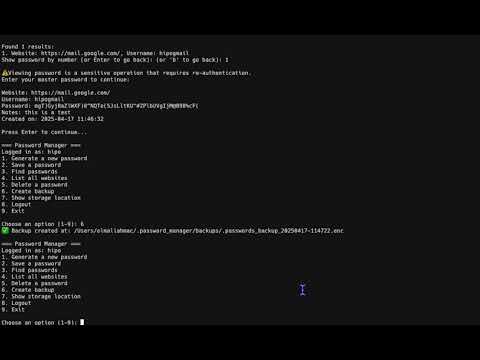
50
|
+
|
|
51
|
+
### Security Features
|
|
52
|
+
- **Military-grade AES-256 encryption** via Fernet symmetric encryption
|
|
53
|
+
- **Zero-knowledge architecture** - your master password is never stored, only a salted hash
|
|
54
|
+
- **Protection against brute force attacks** with adaptive account lockouts
|
|
55
|
+
- **Hardware-linked encryption** with machine-specific key derivation
|
|
56
|
+
- **Session protection** with automatic timeout after inactivity
|
|
57
|
+
- **Secure credential storage** with separate master username/password handling
|
|
58
|
+
- **File isolation** with sensitive data stored in a restricted permissions directory
|
|
59
|
+
|
|
60
|
+
### Management Features
|
|
61
|
+
- **Strong password generation** with customizable options:
|
|
62
|
+
- Adjustable length (4-100+ characters)
|
|
63
|
+
- Customizable character sets (lowercase, uppercase, numbers, special chars)
|
|
64
|
+
- Real-time password strength evaluation
|
|
65
|
+
- **Comprehensive search capabilities** with domain and username matching
|
|
66
|
+
- **Secure backup system** with encrypted backups stored in a dedicated directory
|
|
67
|
+
- **Detailed logging** without sensitive data exposure
|
|
68
|
+
- **Automatic data migration** when file paths are updated
|
|
69
|
+
|
|
70
|
+
### User Experience
|
|
71
|
+
- **Command-line interface** with intuitive menu navigation
|
|
72
|
+
- **Secure authentication** with multiple protection layers
|
|
73
|
+
- **Search optimization** with domain extraction for better matches
|
|
74
|
+
- **Back navigation** throughout the application
|
|
75
|
+
|
|
76
|
+
## Installation
|
|
77
|
+
|
|
78
|
+
1. Clone the repository:
|
|
79
|
+
```
|
|
80
|
+
https://github.com/TheKingHippopotamus/Secure_Password_Manager.git
|
|
81
|
+
cd password-manager
|
|
82
|
+
```
|
|
83
|
+
|
|
84
|
+
2. Install required dependencies:
|
|
85
|
+
```
|
|
86
|
+
pip install -r requirements.txt
|
|
87
|
+
```
|
|
88
|
+
|
|
89
|
+
3. Run the password manager:
|
|
90
|
+
```
|
|
91
|
+
python -m password_manager
|
|
92
|
+
```
|
|
93
|
+
or
|
|
94
|
+
```
|
|
95
|
+
./run.py
|
|
96
|
+
```
|
|
97
|
+
|
|
98
|
+
## Usage
|
|
99
|
+
|
|
100
|
+
### First-time Setup
|
|
101
|
+
On first run, you'll be guided through creating a master account:
|
|
102
|
+
1. Enter a master username (minimum 4 characters)
|
|
103
|
+
2. Create a strong master password (minimum 8 characters)
|
|
104
|
+
3. Confirm your master password
|
|
105
|
+
|
|
106
|
+
This master account will be used to encrypt and decrypt all your stored passwords.
|
|
107
|
+
|
|
108
|
+
### Main Menu
|
|
109
|
+
The interactive menu provides access to all functionality:
|
|
110
|
+
```
|
|
111
|
+
=== Password Manager ===
|
|
112
|
+
Logged in as: your_username
|
|
113
|
+
1. Generate a new password
|
|
114
|
+
2. Save a password
|
|
115
|
+
3. Find passwords
|
|
116
|
+
4. List all websites
|
|
117
|
+
5. Delete a password
|
|
118
|
+
6. Create backup
|
|
119
|
+
7. Show storage location
|
|
120
|
+
8. Logout
|
|
121
|
+
9. Exit
|
|
122
|
+
```
|
|
123
|
+
|
|
124
|
+
### Managing Passwords
|
|
125
|
+
- **Generate passwords** with customizable length and character sets
|
|
126
|
+
- **Save passwords** for different websites/services with username and optional notes
|
|
127
|
+
- **Find passwords** by searching for website or username
|
|
128
|
+
- **View all websites** stored in the system
|
|
129
|
+
- **Delete passwords** with confirmation and re-authentication
|
|
130
|
+
|
|
131
|
+
## Security Architecture
|
|
132
|
+
|
|
133
|
+
The application implements multiple layers of security:
|
|
134
|
+
|
|
135
|
+
### Key Derivation
|
|
136
|
+
1. Your master password is never stored in its original form
|
|
137
|
+
2. A unique salt is generated for each master account
|
|
138
|
+
3. Password-Based Key Derivation Function 2 (PBKDF2) with 600,000 iterations is used (OWASP 2023 recommendation)
|
|
139
|
+
4. PBKDF2-HMAC-SHA256 is used for both password hashing and key derivation
|
|
140
|
+
|
|
141
|
+
### Encryption Levels
|
|
142
|
+
1. **Machine-specific system key**: Derived from hardware identifiers and salt
|
|
143
|
+
- Used to encrypt master username and password hash
|
|
144
|
+
- Ties encrypted data to your specific device
|
|
145
|
+
|
|
146
|
+
2. **User-specific encryption key**: Derived from username, password, and salt
|
|
147
|
+
- Used to encrypt/decrypt your password database
|
|
148
|
+
- Requires both username and password to reconstruct
|
|
149
|
+
|
|
150
|
+
### Authentication Security
|
|
151
|
+
1. **Brute force protection**:
|
|
152
|
+
- Limited login attempts (adaptive based on previous failures)
|
|
153
|
+
- Device lockout after exceeded attempts
|
|
154
|
+
- Increased security with each failed attempt
|
|
155
|
+
|
|
156
|
+
2. **Session security**:
|
|
157
|
+
- Automatic timeout after 30 minutes of inactivity
|
|
158
|
+
- Sensitive operations require re-authentication
|
|
159
|
+
- Activity tracking to prevent session hijacking
|
|
160
|
+
|
|
161
|
+
### Data Security
|
|
162
|
+
1. **Filesystem security**:
|
|
163
|
+
- Sensitive files stored in restricted permission directory (`mode 0o700`)
|
|
164
|
+
- Files are hidden from casual directory listings
|
|
165
|
+
- Naming convention prevents accidental exposure
|
|
166
|
+
|
|
167
|
+
2. **Data integrity**:
|
|
168
|
+
- Backups are encrypted with the same security as the main database
|
|
169
|
+
- File operations use safe write patterns to prevent corruption
|
|
170
|
+
|
|
171
|
+
## Directory Structure
|
|
172
|
+
|
|
173
|
+
```
|
|
174
|
+
~/.password_manager/
|
|
175
|
+
├── password_manager.log # Application log (non-sensitive information)
|
|
176
|
+
├── backups/ # Encrypted backup storage directory
|
|
177
|
+
│ └── .passwords_backup_[timestamp].enc # Encrypted backups
|
|
178
|
+
└── secrets/ # Directory for sensitive files (restricted permissions)
|
|
179
|
+
├── .passwords.enc # Encrypted password database
|
|
180
|
+
├── salt.bin # Salt for key derivation
|
|
181
|
+
├── .master_user.enc # Encrypted master username
|
|
182
|
+
├── .master_hash.enc # Encrypted master password hash
|
|
183
|
+
└── .login_attempts.dat # Login attempt tracking for lockout system
|
|
184
|
+
```
|
|
185
|
+
|
|
186
|
+
The package itself follows a modular architecture:
|
|
187
|
+
```
|
|
188
|
+
password_manager/
|
|
189
|
+
├── __init__.py # Package initialization
|
|
190
|
+
├── __main__.py # Entry point
|
|
191
|
+
├── manager.py # Main SecurePasswordManager class
|
|
192
|
+
├── auth.py # Authentication and master account management
|
|
193
|
+
├── encryption.py # Encryption utilities
|
|
194
|
+
├── session.py # Session management and timeout control
|
|
195
|
+
├── storage.py # File storage operations
|
|
196
|
+
├── generator.py # Password generation
|
|
197
|
+
├── utils.py # Utility functions
|
|
198
|
+
├── logger.py # Logging setup
|
|
199
|
+
└── constants.py # Constants and configuration
|
|
200
|
+
```
|
|
201
|
+
|
|
202
|
+
## Advanced Usage
|
|
203
|
+
|
|
204
|
+
### Custom Password Generation
|
|
205
|
+
When generating passwords, you can specify:
|
|
206
|
+
- Password length (recommended 15+ characters)
|
|
207
|
+
- Whether to include special characters
|
|
208
|
+
- Whether to include uppercase letters
|
|
209
|
+
- Whether to include digits
|
|
210
|
+
|
|
211
|
+
Example of a highly secure password configuration:
|
|
212
|
+
- Length: 20+ characters
|
|
213
|
+
- Include all character types
|
|
214
|
+
- Resulting in an "Excellent" password strength rating
|
|
215
|
+
|
|
216
|
+
### Managing Sensitive Accounts
|
|
217
|
+
For highly sensitive accounts, consider:
|
|
218
|
+
1. Generating longer passwords (25+ characters)
|
|
219
|
+
2. Adding detailed notes about account recovery options
|
|
220
|
+
3. Creating regular backups after adding or updating important passwords
|
|
221
|
+
|
|
222
|
+
### Manual Backups
|
|
223
|
+
While automatic backups are created when using the backup feature, you can also manually copy the `.passwords.enc` file to a secure location for additional protection.
|
|
224
|
+
|
|
225
|
+
### Multi-Device Usage
|
|
226
|
+
This password manager is designed for single-device use with machine-specific encryption. For multi-device scenarios:
|
|
227
|
+
1. Install the password manager on each device
|
|
228
|
+
2. Create separate master accounts on each device
|
|
229
|
+
3. Use the built-in password generation on your primary device
|
|
230
|
+
4. Manually transfer passwords to secondary devices
|
|
231
|
+
|
|
232
|
+
## Security Best Practices
|
|
233
|
+
|
|
234
|
+
1. **Master Password Guidelines**:
|
|
235
|
+
- Use a unique, strong master password (15+ characters)
|
|
236
|
+
- Include a mix of character types
|
|
237
|
+
- Avoid dictionary words and personal information
|
|
238
|
+
- Consider using a passphrase of 4-5 random words
|
|
239
|
+
|
|
240
|
+
2. **Application Usage**:
|
|
241
|
+
- Always log out when leaving your computer
|
|
242
|
+
- Regularly create backups
|
|
243
|
+
- Periodically review and update weak passwords
|
|
244
|
+
- Do not run the application in untrusted environments
|
|
245
|
+
|
|
246
|
+
3. **System Security**:
|
|
247
|
+
- Keep your operating system and Python updated
|
|
248
|
+
- Use disk encryption on your computer
|
|
249
|
+
- Protect your user account with a strong password
|
|
250
|
+
- Consider using a firewall and antivirus protection
|
|
251
|
+
|
|
252
|
+
## Technical Details
|
|
253
|
+
|
|
254
|
+
### Cryptographic Implementation
|
|
255
|
+
- **Symmetric Encryption**: AES-256 in CBC mode with PKCS7 padding (via Fernet)
|
|
256
|
+
- **Key Derivation**: PBKDF2HMAC with SHA-256
|
|
257
|
+
- **Password Hashing**: PBKDF2-HMAC-SHA256 with 600,000 iterations and unique salt
|
|
258
|
+
- **Random Number Generation**: Python `secrets` module (cryptographically secure)
|
|
259
|
+
|
|
260
|
+
### Password Strength Evaluation
|
|
261
|
+
Passwords are evaluated based on:
|
|
262
|
+
- Length (30 points for 16+ characters)
|
|
263
|
+
- Character diversity (up to 60 points)
|
|
264
|
+
- Special characters (20 points)
|
|
265
|
+
- Uppercase letters (15 points)
|
|
266
|
+
- Digits (15 points)
|
|
267
|
+
|
|
268
|
+
Resulting in ratings:
|
|
269
|
+
- 80+ points: Excellent
|
|
270
|
+
- 60-79 points: Very Strong
|
|
271
|
+
- 40-59 points: Strong
|
|
272
|
+
- 25-39 points: Medium
|
|
273
|
+
- Below 25: Weak
|
|
274
|
+
|
|
275
|
+
### Lockout Mechanism
|
|
276
|
+
The adaptive lockout system:
|
|
277
|
+
1. Tracks login attempts per device
|
|
278
|
+
2. Reduces allowed attempts based on previous lockouts
|
|
279
|
+
3. Implements progressive security with repeated failures
|
|
280
|
+
4. Stores device identifiers and lockout information
|
|
281
|
+
|
|
282
|
+
## Requirements
|
|
283
|
+
|
|
284
|
+
- Python 3.6+
|
|
285
|
+
- cryptography library (for encryption)
|
|
286
|
+
- Operating system: Windows, macOS, or Linux
|
|
287
|
+
- Approximately 5MB of disk space
|
|
288
|
+
|
|
289
|
+
## License
|
|
290
|
+
|
|
291
|
+
GNU General Public License v3.0 (GPL-3.0)
|
|
292
|
+
|
|
293
|
+
This program is free software: you can redistribute it and/or modify it under the terms of the GNU General Public License as published by the Free Software Foundation, either version 3 of the License, or (at your option) any later version.
|
|
294
|
+
|
|
295
|
+
This program is distributed in the hope that it will be useful, but WITHOUT ANY WARRANTY; without even the implied warranty of MERCHANTABILITY or FITNESS FOR A PARTICULAR PURPOSE. See the GNU General Public License for more details.
|
|
296
|
+
|
|
297
|
+
Key requirements of this license:
|
|
298
|
+
- **Attribution**: You must give appropriate credit to the original author
|
|
299
|
+
- **Share Source Code**: If you distribute this software, you must make your source code available
|
|
300
|
+
- **Same License**: Any derivative works must be distributed under the same license
|
|
301
|
+
- **State Changes**: You must indicate any changes made to the original code
|
|
302
|
+
|
|
303
|
+
---
|
|
304
|
+
|
|
305
|
+
© 2023 Secure Password Manager. All rights reserved.
|
|
306
|
+
@King.Hippopotamus
|
|
307
|
+
|
|
308
|
+
## Screenshots and Demo
|
|
309
|
+
|
|
310
|
+
### Application Interface
|
|
311
|
+

|
|
312
|
+
*Login screen with secure authentication*
|
|
313
|
+
|
|
314
|
+

|
|
315
|
+
*Main dashboard interface showing stored passwords*
|
|
316
|
+
|
|
317
|
+

|
|
318
|
+
*Detailed view of password information*
|
|
319
|
+
|
|
320
|
+
### Video Demonstration
|
|
321
|
+
[](https://youtu.be/9hPm1w-NM2Q)
|
|
322
|
+
*Click on the image above to watch the Password Manager demonstration video on YouTube*
|
|
323
|
+
|
|
324
|
+
|
|
325
|
+
|
|
326
|
+
|
|
327
|
+
|
|
328
|
+
|
|
329
|
+
|
|
330
|
+
# Secure_Password_Manager
|
|
@@ -0,0 +1,22 @@
|
|
|
1
|
+
LICENSE
|
|
2
|
+
MANIFEST.in
|
|
3
|
+
README.md
|
|
4
|
+
pyproject.toml
|
|
5
|
+
requirements.txt
|
|
6
|
+
IronDome.egg-info/PKG-INFO
|
|
7
|
+
IronDome.egg-info/SOURCES.txt
|
|
8
|
+
IronDome.egg-info/dependency_links.txt
|
|
9
|
+
IronDome.egg-info/entry_points.txt
|
|
10
|
+
IronDome.egg-info/requires.txt
|
|
11
|
+
IronDome.egg-info/top_level.txt
|
|
12
|
+
password_manager/__init__.py
|
|
13
|
+
password_manager/__main__.py
|
|
14
|
+
password_manager/auth.py
|
|
15
|
+
password_manager/constants.py
|
|
16
|
+
password_manager/encryption.py
|
|
17
|
+
password_manager/generator.py
|
|
18
|
+
password_manager/logger.py
|
|
19
|
+
password_manager/manager.py
|
|
20
|
+
password_manager/session.py
|
|
21
|
+
password_manager/storage.py
|
|
22
|
+
password_manager/utils.py
|
|
@@ -0,0 +1 @@
|
|
|
1
|
+
|
|
@@ -0,0 +1 @@
|
|
|
1
|
+
cryptography>=36.0.0
|
|
@@ -0,0 +1 @@
|
|
|
1
|
+
password_manager
|
irondome-1.0.5/LICENSE
ADDED
|
@@ -0,0 +1,74 @@
|
|
|
1
|
+
GNU GENERAL PUBLIC LICENSE
|
|
2
|
+
Version 3, 29 June 2007
|
|
3
|
+
|
|
4
|
+
Copyright (C) 2023 King Hippopotamus
|
|
5
|
+
|
|
6
|
+
Everyone is permitted to copy and distribute verbatim copies
|
|
7
|
+
of this license document, but changing it is not allowed.
|
|
8
|
+
|
|
9
|
+
Preamble
|
|
10
|
+
|
|
11
|
+
The GNU General Public License is a free, copyleft license for
|
|
12
|
+
software and other kinds of works.
|
|
13
|
+
|
|
14
|
+
The licenses for most software and other practical works are designed
|
|
15
|
+
to take away your freedom to share and change the works. By contrast,
|
|
16
|
+
the GNU General Public License is intended to guarantee your freedom to
|
|
17
|
+
share and change all versions of a program--to make sure it remains free
|
|
18
|
+
software for all its users. We, the Free Software Foundation, use the
|
|
19
|
+
GNU General Public License for most of our software; it applies also to
|
|
20
|
+
any other work released this way by its authors. You can apply it to
|
|
21
|
+
your programs, too.
|
|
22
|
+
|
|
23
|
+
When we speak of free software, we are referring to freedom, not
|
|
24
|
+
price. Our General Public Licenses are designed to make sure that you
|
|
25
|
+
have the freedom to distribute copies of free software (and charge for
|
|
26
|
+
them if you wish), that you receive source code or can get it if you
|
|
27
|
+
want it, that you can change the software or use pieces of it in new
|
|
28
|
+
free programs, and that you know you can do these things.
|
|
29
|
+
|
|
30
|
+
To protect your rights, we need to prevent others from denying you
|
|
31
|
+
these rights or asking you to surrender the rights. Therefore, you have
|
|
32
|
+
certain responsibilities if you distribute copies of the software, or if
|
|
33
|
+
you modify it: responsibilities to respect the freedom of others.
|
|
34
|
+
|
|
35
|
+
For example, if you distribute copies of such a program, whether
|
|
36
|
+
gratuitous or for a fee, you must pass on to the recipients the same
|
|
37
|
+
freedoms that you received. You must make sure that they, too, receive
|
|
38
|
+
or can get the source code. And you must show them these terms so they
|
|
39
|
+
know their rights.
|
|
40
|
+
|
|
41
|
+
Developers that use the GNU GPL protect your rights with two steps:
|
|
42
|
+
(1) assert copyright on the software, and (2) offer you this License
|
|
43
|
+
giving you legal permission to copy, distribute and/or modify it.
|
|
44
|
+
|
|
45
|
+
For the developers' and authors' protection, the GPL clearly explains
|
|
46
|
+
that there is no warranty for this free software. For both users' and
|
|
47
|
+
authors' sake, the GPL requires that modified versions be marked as
|
|
48
|
+
changed, so that their problems will not be attributed erroneously to
|
|
49
|
+
authors of previous versions.
|
|
50
|
+
|
|
51
|
+
Some devices are designed to deny users access to install or run
|
|
52
|
+
modified versions of the software inside them, although the manufacturer
|
|
53
|
+
can do so. This is fundamentally incompatible with the aim of protecting
|
|
54
|
+
users' freedom to change the software. The systematic pattern of such
|
|
55
|
+
abuse occurs in the area of products for individuals to use, which is
|
|
56
|
+
precisely where it is most unacceptable. Therefore, we have designed
|
|
57
|
+
this version of the GPL to prohibit the practice for those products. If
|
|
58
|
+
such problems arise substantially in other domains, we stand ready to
|
|
59
|
+
extend this provision to those domains in future versions of the GPL, as
|
|
60
|
+
needed to protect the freedom of users.
|
|
61
|
+
|
|
62
|
+
Finally, every program is threatened constantly by software patents.
|
|
63
|
+
States should not allow patents to restrict development and use of
|
|
64
|
+
software on general-purpose computers, but in those that do, we wish to
|
|
65
|
+
avoid the special danger that patents applied to a free program could
|
|
66
|
+
make it effectively proprietary. To prevent this, the GPL assures that
|
|
67
|
+
patents cannot be used to render the program non-free.
|
|
68
|
+
|
|
69
|
+
The precise terms and conditions for copying, distribution and
|
|
70
|
+
modification follow:
|
|
71
|
+
|
|
72
|
+
[...]
|
|
73
|
+
|
|
74
|
+
For the full license, visit: https://www.gnu.org/licenses/gpl-3.0.txt
|