3dprintmon 0.2.0__tar.gz
This diff represents the content of publicly available package versions that have been released to one of the supported registries. The information contained in this diff is provided for informational purposes only and reflects changes between package versions as they appear in their respective public registries.
- 3dprintmon-0.2.0/CHANGELOG.md +88 -0
- 3dprintmon-0.2.0/CONTRIBUTING.md +63 -0
- 3dprintmon-0.2.0/LICENSE +21 -0
- 3dprintmon-0.2.0/MANIFEST.in +5 -0
- 3dprintmon-0.2.0/PKG-INFO +238 -0
- 3dprintmon-0.2.0/README.md +196 -0
- 3dprintmon-0.2.0/SECURITY.md +31 -0
- 3dprintmon-0.2.0/docs/Roadmap.md +36 -0
- 3dprintmon-0.2.0/packaging/3dprintmon.png +0 -0
- 3dprintmon-0.2.0/packaging/launcher.py +18 -0
- 3dprintmon-0.2.0/packaging/make_icon.py +16 -0
- 3dprintmon-0.2.0/pyproject.toml +73 -0
- 3dprintmon-0.2.0/setup.cfg +4 -0
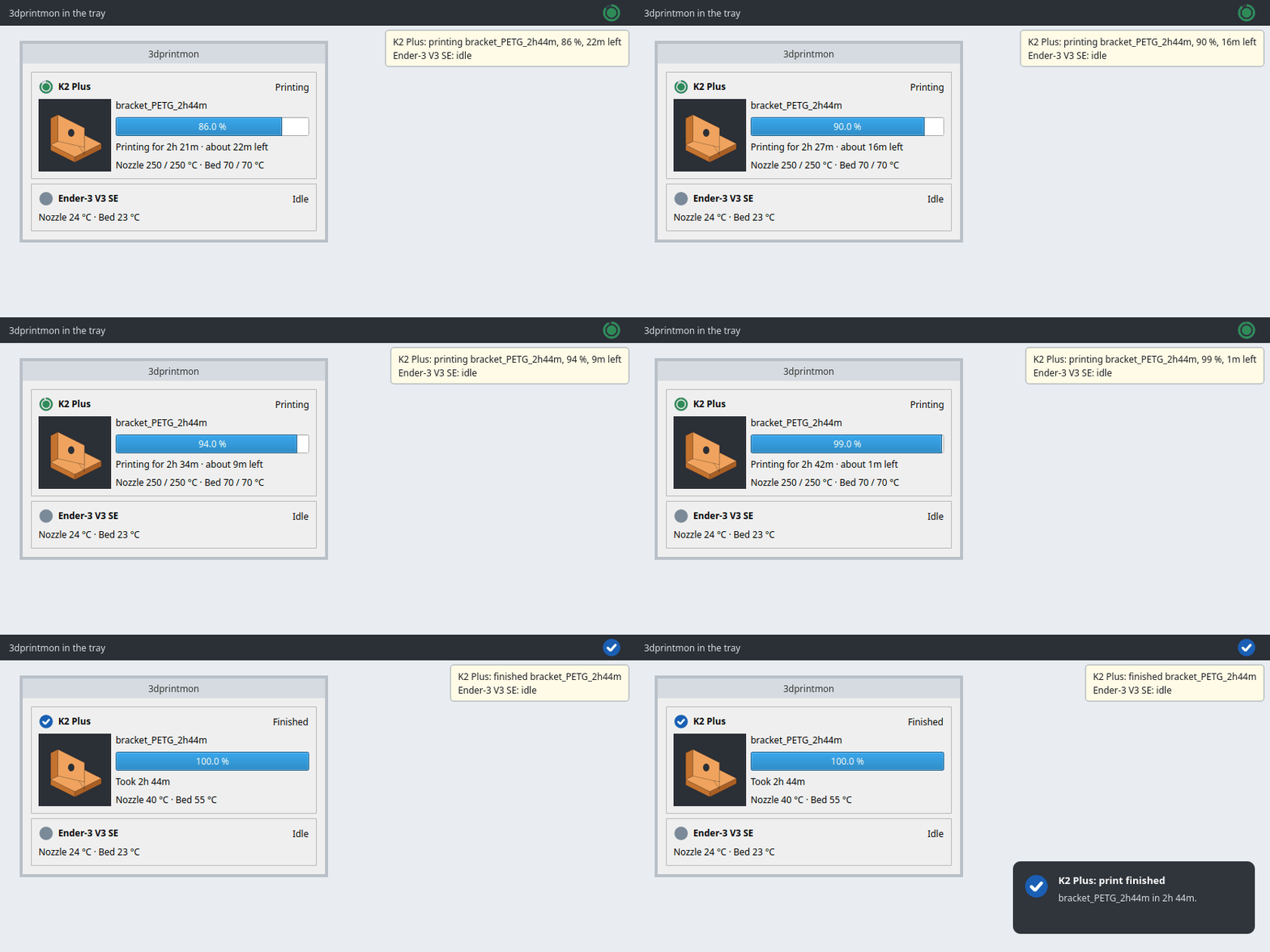
- 3dprintmon-0.2.0/src/3dprintmon.egg-info/PKG-INFO +238 -0
- 3dprintmon-0.2.0/src/3dprintmon.egg-info/SOURCES.txt +50 -0
- 3dprintmon-0.2.0/src/3dprintmon.egg-info/dependency_links.txt +1 -0
- 3dprintmon-0.2.0/src/3dprintmon.egg-info/entry_points.txt +2 -0
- 3dprintmon-0.2.0/src/3dprintmon.egg-info/requires.txt +13 -0
- 3dprintmon-0.2.0/src/3dprintmon.egg-info/top_level.txt +1 -0
- 3dprintmon-0.2.0/src/printmon/__init__.py +5 -0
- 3dprintmon-0.2.0/src/printmon/__main__.py +7 -0
- 3dprintmon-0.2.0/src/printmon/autostart.py +191 -0
- 3dprintmon-0.2.0/src/printmon/cli.py +174 -0
- 3dprintmon-0.2.0/src/printmon/config.py +219 -0
- 3dprintmon-0.2.0/src/printmon/events.py +204 -0
- 3dprintmon-0.2.0/src/printmon/fileinfo.py +112 -0
- 3dprintmon-0.2.0/src/printmon/gui/__init__.py +1 -0
- 3dprintmon-0.2.0/src/printmon/gui/alert.py +113 -0
- 3dprintmon-0.2.0/src/printmon/gui/icons.py +91 -0
- 3dprintmon-0.2.0/src/printmon/gui/live.py +161 -0
- 3dprintmon-0.2.0/src/printmon/gui/settings_dialog.py +294 -0
- 3dprintmon-0.2.0/src/printmon/gui/tray.py +436 -0
- 3dprintmon-0.2.0/src/printmon/gui/window.py +198 -0
- 3dprintmon-0.2.0/src/printmon/monitor.py +120 -0
- 3dprintmon-0.2.0/src/printmon/moonraker.py +232 -0
- 3dprintmon-0.2.0/src/printmon/policy.py +84 -0
- 3dprintmon-0.2.0/src/printmon/py.typed +0 -0
- 3dprintmon-0.2.0/src/printmon/status.py +226 -0
- 3dprintmon-0.2.0/src/printmon/version.py +3 -0
- 3dprintmon-0.2.0/tests/conftest.py +189 -0
- 3dprintmon-0.2.0/tests/test_autostart.py +70 -0
- 3dprintmon-0.2.0/tests/test_cli.py +67 -0
- 3dprintmon-0.2.0/tests/test_config.py +127 -0
- 3dprintmon-0.2.0/tests/test_events.py +73 -0
- 3dprintmon-0.2.0/tests/test_fileinfo.py +69 -0
- 3dprintmon-0.2.0/tests/test_gui.py +279 -0
- 3dprintmon-0.2.0/tests/test_live.py +34 -0
- 3dprintmon-0.2.0/tests/test_monitor.py +73 -0
- 3dprintmon-0.2.0/tests/test_moonraker.py +119 -0
- 3dprintmon-0.2.0/tests/test_policy.py +71 -0
- 3dprintmon-0.2.0/tests/test_status.py +74 -0
- 3dprintmon-0.2.0/tests/test_tracker.py +107 -0
|
@@ -0,0 +1,88 @@
|
|
|
1
|
+
# Changelog
|
|
2
|
+
|
|
3
|
+
All notable changes to 3dprintmon are recorded here. The format follows
|
|
4
|
+
[Keep a Changelog](https://keepachangelog.com/en/1.1.0/), and versions follow
|
|
5
|
+
[Semantic Versioning](https://semver.org/).
|
|
6
|
+
|
|
7
|
+
## [Unreleased]
|
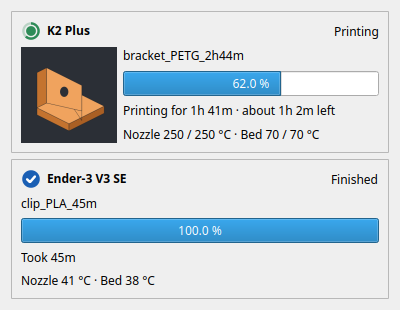
|
8
|
+
|
|
9
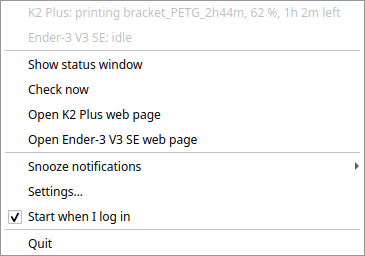
|
+
## [0.2.0] - 2026-11-28
|
|
10
|
+
|
|
11
|
+
The first public release, now on PyPI and as ready-to-run apps: live
|
|
12
|
+
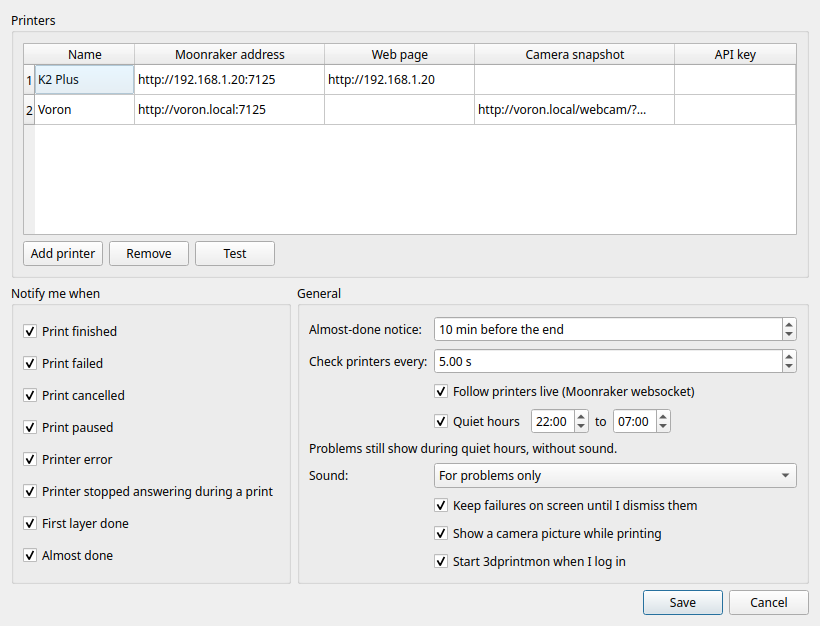
updates, first-layer and almost-done notices, failures that stay on screen,
|
|
13
|
+
quiet hours, thumbnails, a settings window and starting with the computer.
|
|
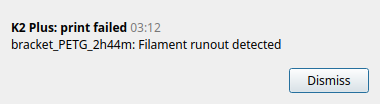
14
|
+
|
|
15
|
+
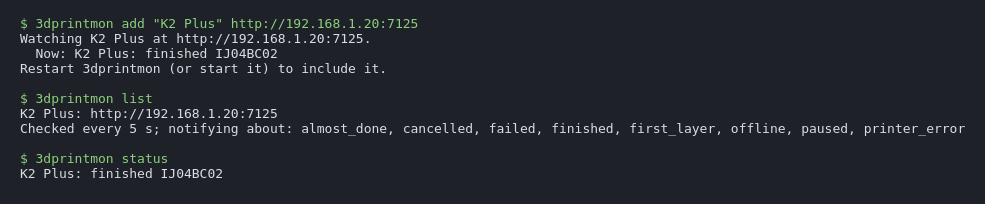
|
|
16
|
+
|
|
17
|
+
Try it: `pipx install 3dprintmon`, then `3dprintmon` and add your printer
|
|
18
|
+
under **Settings…**, or download the app for Windows, macOS or Linux below.
|
|
19
|
+
|
|
20
|
+
### Added
|
|
21
|
+
|
|
22
|
+
- **Live updates** over Moonraker's websocket: the icon and notifications
|
|
23
|
+
change within a second; a regular check every minute stays as a safety net,
|
|
24
|
+
and runs at once if the connection drops.
|
|
25
|
+
- **First layer done** and **almost done** notifications (10 minutes before
|
|
26
|
+
the end by default; `almost_done_minutes`, 0 turns it off).
|
|
27
|
+
- **Failures are hard to miss:** a window that stays until dismissed, a chime,
|
|
28
|
+
and notifications that stay where the desktop allows.
|
|
29
|
+
- **Quiet hours** and **Snooze notifications** in the menu: routine
|
|
30
|
+
notifications wait, failures still show, silently.
|
|
31
|
+
- **Thumbnail** of the job in the status window, and its layer count and time
|
|
32
|
+
estimate, from Moonraker's metadata or the G-code file itself (for printers
|
|
33
|
+
such as the K2 whose Moonraker doesn't index them).
|
|
34
|
+
- **Camera picture** in the window while printing, from Moonraker's webcam or a
|
|
35
|
+
printer's `camera_url`.
|
|
36
|
+
- **Settings window** for printers (with **Test**) and every option, applied
|
|
37
|
+
without a restart.
|
|
38
|
+
- **Start with the computer:** `3dprintmon autostart on|off|status` and a menu
|
|
39
|
+
checkbox (XDG autostart on Linux, a LaunchAgent on macOS, the `Run` key on
|
|
40
|
+
Windows).
|
|
41
|
+
- **Packaged apps** for Windows, macOS and Linux attached to each release, and
|
|
42
|
+
publishing to PyPI.
|
|
43
|
+
|
|
44
|
+
### Changed
|
|
45
|
+
|
|
46
|
+
- The settings file gains `almost_done_minutes`, `quiet_hours`, `sound`,
|
|
47
|
+
`alert_problems`, `live_updates`, `camera` and per-printer `camera_url`;
|
|
48
|
+
existing files keep working.
|
|
49
|
+
|
|
50
|
+
### Documentation
|
|
51
|
+
|
|
52
|
+
- The README in the style of the other projects: banner, badges, downloads,
|
|
53
|
+
pictures of the settings and alert windows, a "How it knows" section and
|
|
54
|
+
Support. New `CONTRIBUTING.md`, `SECURITY.md`, `LICENSE` (MIT), issue
|
|
55
|
+
templates, Dependabot and a Sponsor button.
|
|
56
|
+
|
|
57
|
+
## [0.1.0] - 2026-11-28
|
|
58
|
+
|
|
59
|
+
The first release: a tray icon that watches your Klipper printers and tells
|
|
60
|
+
you when a print finishes or fails.
|
|
61
|
+
|
|
62
|
+

|
|
63
|
+
|
|
64
|
+
Try it: `pipx install git+https://github.com/drak42/3dprintmon.git@v0.1.0`, then
|
|
65
|
+
`3dprintmon add "My printer" 192.168.1.20` and `3dprintmon`.
|
|
66
|
+
|
|
67
|
+
### Added
|
|
68
|
+
|
|
69
|
+
- A tray icon that watches one or more Klipper printers through Moonraker,
|
|
70
|
+
showing the most urgent state with a progress ring while printing.
|
|
71
|
+
- Notifications when a print finishes, fails, is cancelled or paused, when
|
|
72
|
+
Klipper stops with an error, and when a printer stops answering during a print.
|
|
73
|
+
- A status window with each printer's file, progress, time printing and left,
|
|
74
|
+
temperatures and message.
|
|
75
|
+
- A tray menu with each printer's status, Check now, each printer's web page and Quit.
|
|
76
|
+
- `3dprintmon status`, `add`, `remove`, `list` and `config-path`, and
|
|
77
|
+
`--printer` to watch printers without changing the settings.
|
|
78
|
+
- Settings in a TOML file in each system's usual place.
|
|
79
|
+
|
|
80
|
+
### Documentation
|
|
81
|
+
|
|
82
|
+
- README pictures: a demo GIF of a print finishing, the status window, the
|
|
83
|
+
tray icons and menu, and the commands in a terminal, made by
|
|
84
|
+
`docs/demo/make_media.py`.
|
|
85
|
+
|
|
86
|
+
[Unreleased]: https://github.com/drak42/3dprintmon/compare/v0.2.0...HEAD
|
|
87
|
+
[0.2.0]: https://github.com/drak42/3dprintmon/compare/v0.1.0...v0.2.0
|
|
88
|
+
[0.1.0]: https://github.com/drak42/3dprintmon/releases/tag/v0.1.0
|
|
@@ -0,0 +1,63 @@
|
|
|
1
|
+
# Contributing
|
|
2
|
+
|
|
3
|
+
Bug reports, ideas and pull requests are welcome. For a bug, the
|
|
4
|
+
[bug report form](https://github.com/drak42/3dprintmon/issues/new/choose) asks
|
|
5
|
+
for what's needed to reproduce it.
|
|
6
|
+
|
|
7
|
+
## Development
|
|
8
|
+
|
|
9
|
+
Python 3.12 or newer.
|
|
10
|
+
|
|
11
|
+
```bash
|
|
12
|
+
python3 -m venv .venv
|
|
13
|
+
.venv/bin/pip install -e ".[dev]"
|
|
14
|
+
```
|
|
15
|
+
|
|
16
|
+
Before every commit, all of these must pass (GitHub Actions runs them on
|
|
17
|
+
Linux, macOS and Windows):
|
|
18
|
+
|
|
19
|
+
```bash
|
|
20
|
+
.venv/bin/ruff check src tests
|
|
21
|
+
.venv/bin/mypy
|
|
22
|
+
.venv/bin/pytest
|
|
23
|
+
```
|
|
24
|
+
|
|
25
|
+
- **Layout:** the logic is plain Python in `src/printmon/` (Moonraker client,
|
|
26
|
+
status, events, policy, settings, autostart) with full tests; the Qt parts
|
|
27
|
+
are in `src/printmon/gui/` and stay thin.
|
|
28
|
+
- **Style:** type hints everywhere (mypy strict), lines up to 100 characters,
|
|
29
|
+
`pathlib` for paths, frozen dataclasses for values, a docstring on every
|
|
30
|
+
module saying what it does and what it doesn't.
|
|
31
|
+
- **Tests** never contact a real printer or touch your home folder: they use
|
|
32
|
+
the stand-in Moonraker in `tests/conftest.py`, a temporary settings file,
|
|
33
|
+
and Qt's offscreen platform. New behaviour comes with tests; a bug fix with a
|
|
34
|
+
test that would have caught it.
|
|
35
|
+
- **Docs** are part of the change: README, `CHANGELOG.md` and `docs/Roadmap.md`.
|
|
36
|
+
- **Commits** follow [Conventional Commits](https://www.conventionalcommits.org/)
|
|
37
|
+
(`feat: ...`, `fix: ...`, `docs: ...`, `chore(release): X.Y.Z`).
|
|
38
|
+
|
|
39
|
+
## Pictures and packages
|
|
40
|
+
|
|
41
|
+
- `docs/demo/make_media.py` and `docs/demo/make_banner.py` make the README's
|
|
42
|
+
pictures (`pip install -e ".[demo]"`, run with `QT_QPA_PLATFORM=offscreen`).
|
|
43
|
+
- `packaging/` holds the launcher and icon for the packaged apps; the release
|
|
44
|
+
workflow builds them with PyInstaller (`pip install -e ".[bundle]"`).
|
|
45
|
+
|
|
46
|
+
# Releasing
|
|
47
|
+
|
|
48
|
+
1. Make sure `main` is green on GitHub Actions.
|
|
49
|
+
2. Set the new version in `src/printmon/version.py` (`__version__`).
|
|
50
|
+
3. In `CHANGELOG.md`, move the entries under `[Unreleased]` into a new
|
|
51
|
+
`## [X.Y.Z] - YYYY-MM-DD` section, starting with a one-line summary (and a
|
|
52
|
+
picture with an absolute `raw.githubusercontent.com` link when there is
|
|
53
|
+
something to see), and update the comparison links at the bottom. In
|
|
54
|
+
`docs/Roadmap.md`, move the release's items to **Done**.
|
|
55
|
+
4. Commit (`chore(release): X.Y.Z`) and push to `main`.
|
|
56
|
+
5. Tag and push: `git tag -a vX.Y.Z -m "3dprintmon X.Y.Z"` then
|
|
57
|
+
`git push origin vX.Y.Z`.
|
|
58
|
+
|
|
59
|
+
Pushing the tag runs `.github/workflows/release.yml`: it checks the tag
|
|
60
|
+
matches the version, runs the checks, builds the package, publishes the GitHub
|
|
61
|
+
release with that version's changelog section as notes, builds the packaged
|
|
62
|
+
apps for Windows, macOS and Linux and attaches them, and uploads the package
|
|
63
|
+
to PyPI with trusted publishing. PyPI never accepts the same version twice.
|
3dprintmon-0.2.0/LICENSE
ADDED
|
@@ -0,0 +1,21 @@
|
|
|
1
|
+
MIT License
|
|
2
|
+
|
|
3
|
+
Copyright (c) 2026 Christopher Eslick
|
|
4
|
+
|
|
5
|
+
Permission is hereby granted, free of charge, to any person obtaining a copy
|
|
6
|
+
of this software and associated documentation files (the "Software"), to deal
|
|
7
|
+
in the Software without restriction, including without limitation the rights
|
|
8
|
+
to use, copy, modify, merge, publish, distribute, sublicense, and/or sell
|
|
9
|
+
copies of the Software, and to permit persons to whom the Software is
|
|
10
|
+
furnished to do so, subject to the following conditions:
|
|
11
|
+
|
|
12
|
+
The above copyright notice and this permission notice shall be included in all
|
|
13
|
+
copies or substantial portions of the Software.
|
|
14
|
+
|
|
15
|
+
THE SOFTWARE IS PROVIDED "AS IS", WITHOUT WARRANTY OF ANY KIND, EXPRESS OR
|
|
16
|
+
IMPLIED, INCLUDING BUT NOT LIMITED TO THE WARRANTIES OF MERCHANTABILITY,
|
|
17
|
+
FITNESS FOR A PARTICULAR PURPOSE AND NONINFRINGEMENT. IN NO EVENT SHALL THE
|
|
18
|
+
AUTHORS OR COPYRIGHT HOLDERS BE LIABLE FOR ANY CLAIM, DAMAGES OR OTHER
|
|
19
|
+
LIABILITY, WHETHER IN AN ACTION OF CONTRACT, TORT OR OTHERWISE, ARISING FROM,
|
|
20
|
+
OUT OF OR IN CONNECTION WITH THE SOFTWARE OR THE USE OR OTHER DEALINGS IN THE
|
|
21
|
+
SOFTWARE.
|
|
@@ -0,0 +1,238 @@
|
|
|
1
|
+
Metadata-Version: 2.4
|
|
2
|
+
Name: 3dprintmon
|
|
3
|
+
Version: 0.2.0
|
|
4
|
+
Summary: A tray icon that watches your Klipper 3D printers and tells you when a print finishes, fails or needs you.
|
|
5
|
+
Author: Christopher Eslick
|
|
6
|
+
License-Expression: MIT
|
|
7
|
+
Project-URL: Homepage, https://github.com/drak42/3dprintmon
|
|
8
|
+
Project-URL: Repository, https://github.com/drak42/3dprintmon
|
|
9
|
+
Project-URL: Issues, https://github.com/drak42/3dprintmon/issues
|
|
10
|
+
Project-URL: Changelog, https://github.com/drak42/3dprintmon/blob/main/CHANGELOG.md
|
|
11
|
+
Project-URL: Funding, https://buymeacoffee.com/drak42
|
|
12
|
+
Keywords: 3d-printing,klipper,moonraker,tray,notifications,monitor,creality,k2
|
|
13
|
+
Classifier: Development Status :: 3 - Alpha
|
|
14
|
+
Classifier: Environment :: X11 Applications :: Qt
|
|
15
|
+
Classifier: Environment :: MacOS X
|
|
16
|
+
Classifier: Environment :: Win32 (MS Windows)
|
|
17
|
+
Classifier: Intended Audience :: End Users/Desktop
|
|
18
|
+
Classifier: Intended Audience :: Manufacturing
|
|
19
|
+
Classifier: Operating System :: MacOS
|
|
20
|
+
Classifier: Operating System :: Microsoft :: Windows
|
|
21
|
+
Classifier: Operating System :: POSIX :: Linux
|
|
22
|
+
Classifier: Programming Language :: Python :: 3
|
|
23
|
+
Classifier: Programming Language :: Python :: 3.12
|
|
24
|
+
Classifier: Programming Language :: Python :: 3.13
|
|
25
|
+
Classifier: Topic :: Printing
|
|
26
|
+
Classifier: Topic :: System :: Monitoring
|
|
27
|
+
Classifier: Typing :: Typed
|
|
28
|
+
Requires-Python: >=3.12
|
|
29
|
+
Description-Content-Type: text/markdown
|
|
30
|
+
License-File: LICENSE
|
|
31
|
+
Requires-Dist: PySide6>=6.6
|
|
32
|
+
Provides-Extra: dev
|
|
33
|
+
Requires-Dist: pytest>=8.0; extra == "dev"
|
|
34
|
+
Requires-Dist: ruff==0.17.6; extra == "dev"
|
|
35
|
+
Requires-Dist: mypy==2.4.1; extra == "dev"
|
|
36
|
+
Provides-Extra: demo
|
|
37
|
+
Requires-Dist: pillow>=10; extra == "demo"
|
|
38
|
+
Provides-Extra: bundle
|
|
39
|
+
Requires-Dist: pyinstaller>=6.10; extra == "bundle"
|
|
40
|
+
Requires-Dist: pillow>=10; extra == "bundle"
|
|
41
|
+
Dynamic: license-file
|
|
42
|
+
|
|
43
|
+
# 3dprintmon
|
|
44
|
+
|
|
45
|
+
|
|
46
|
+
|
|
47
|
+
[](https://pypi.org/project/3dprintmon/)
|
|
48
|
+
[](https://pypi.org/project/3dprintmon/)
|
|
49
|
+
[](https://pepy.tech/projects/3dprintmon)
|
|
50
|
+
[](https://github.com/drak42/3dprintmon/actions/workflows/ci.yml)
|
|
51
|
+
[](https://github.com/drak42/3dprintmon/blob/main/LICENSE)
|
|
52
|
+
[](https://buymeacoffee.com/drak42)
|
|
53
|
+
|
|
54
|
+
A small tray icon that watches your 3D printers' current jobs and tells you
|
|
55
|
+
when a print **finishes**, **fails**, is **cancelled** or **paused**, when its
|
|
56
|
+
**first layer is done**, when it's **almost finished**, or when a printer stops
|
|
57
|
+
answering. For Klipper printers with Moonraker (such as the Creality K2 Plus,
|
|
58
|
+
Voron or any Mainsail/Fluidd printer), on Linux, macOS and Windows.
|
|
59
|
+
|
|
60
|
+

|
|
61
|
+
|
|
62
|
+
*The notification is drawn as an example; your desktop shows it in its own style.*
|
|
63
|
+
|
|
64
|
+
## Quick start
|
|
65
|
+
|
|
66
|
+
```bash
|
|
67
|
+
pipx install 3dprintmon # from PyPI
|
|
68
|
+
3dprintmon add "K2 Plus" 192.168.1.20 # your printer's address (Moonraker, port 7125)
|
|
69
|
+
3dprintmon autostart on # start with the computer (optional)
|
|
70
|
+
3dprintmon # the icon appears in the tray
|
|
71
|
+
```
|
|
72
|
+
|
|
73
|
+
Or download a ready-to-run app (no Python needed) from the
|
|
74
|
+
[latest release](https://github.com/drak42/3dprintmon/releases/latest):
|
|
75
|
+
|
|
76
|
+
| System | Download | First start |
|
|
77
|
+
|---|---|---|
|
|
78
|
+
| Windows | `3dprintmon-X.Y.Z-windows.zip` | Unzip, run `3dprintmon.exe`. Windows may warn about an unknown publisher: **More info → Run anyway** |
|
|
79
|
+
| macOS (Apple silicon) | `3dprintmon-X.Y.Z-macos.zip` | Unzip, move `3dprintmon.app` to Applications, then **right-click → Open** the first time (the app isn't signed by Apple) |
|
|
80
|
+
| Linux | `3dprintmon-X.Y.Z-linux.tar.gz` | Extract, run `3dprintmon/3dprintmon` |
|
|
81
|
+
|
|
82
|
+
Add printers from **Settings…** in the tray menu.
|
|
83
|
+
|
|
84
|
+
## Features
|
|
85
|
+
|
|
86
|
+
- **Several printers at once.** The icon shows the most urgent one, with a
|
|
87
|
+
progress ring while printing; the tooltip, menu and window list them all.
|
|
88
|
+
- **Live:** follows each printer over Moonraker's websocket, so the icon and
|
|
89
|
+
notifications change within a second, with a regular check as a safety net.
|
|
90
|
+
- **Notifications** for finished, failed, cancelled and paused prints, printer
|
|
91
|
+
errors, a printer that stops answering mid-print, the **first layer done**
|
|
92
|
+
(time to check it stuck) and **almost done** (10 minutes before the end, or
|
|
93
|
+
your choice). Each can be turned off.
|
|
94
|
+
- **Failures are hard to miss:** they stay in an alert window until you dismiss
|
|
95
|
+
them, with a short chime.
|
|
96
|
+
- **Quiet hours and snooze:** hold back the routine notifications at night or
|
|
97
|
+
for a while; failures still show, silently.
|
|
98
|
+
- **Status window** with each job's **thumbnail**, progress, time printing and
|
|
99
|
+
left, temperatures, the printer's message, and a **camera picture** while
|
|
100
|
+
printing (from Moonraker's webcam or a snapshot address you set).
|
|
101
|
+
- **Settings window** for printers and every option; no file editing needed.
|
|
102
|
+
- **Starts with the computer** if you want it to.
|
|
103
|
+
- **Reads, never writes:** it never sends a command to a printer.
|
|
104
|
+
|
|
105
|
+
| Status window | Tray menu |
|
|
106
|
+
|---|---|
|
|
107
|
+
|  |  |
|
|
108
|
+
|
|
109
|
+
The icon at a glance:
|
|
110
|
+
|
|
111
|
+

|
|
112
|
+
|
|
113
|
+
## Use
|
|
114
|
+
|
|
115
|
+
Click the icon to show or hide the status window; right-click (or click, on
|
|
116
|
+
macOS) for the menu: each printer's status, **Check now**, each printer's web
|
|
117
|
+
page, **Snooze notifications**, **Settings…**, **Start when I log in** and
|
|
118
|
+
**Quit**. Closing the window leaves the icon running.
|
|
119
|
+
|
|
120
|
+
### Settings window
|
|
121
|
+
|
|
122
|
+
|
|
123
|
+
|
|
124
|
+
Add a printer with its name and **Moonraker address** (such as
|
|
125
|
+
`http://192.168.1.20:7125`; port 7125 is assumed). **Test** checks it answers.
|
|
126
|
+
Optionally give its **web page** (Fluidd, Mainsail or the printer's own; the
|
|
127
|
+
address without the port is used otherwise), a **camera snapshot** address
|
|
128
|
+
(a URL that returns one JPEG or PNG picture; Moonraker's webcam is used if
|
|
129
|
+
it has one) and an **API key** if Moonraker asks for one.
|
|
130
|
+
|
|
131
|
+
### When something fails
|
|
132
|
+
|
|
133
|
+
A failed print, a printer error or a printer that stops answering mid-print
|
|
134
|
+
shows a notification, plays a chime and opens a small window that stays until
|
|
135
|
+
you dismiss it, even during quiet hours (silently then):
|
|
136
|
+
|
|
137
|
+
|
|
138
|
+
|
|
139
|
+
### Commands
|
|
140
|
+
|
|
141
|
+
The same program works in a terminal:
|
|
142
|
+
|
|
143
|
+
|
|
144
|
+
|
|
145
|
+
| Command | What it does |
|
|
146
|
+
|---|---|
|
|
147
|
+
| `3dprintmon` | Start the tray |
|
|
148
|
+
| `3dprintmon status` | Check every printer once and print a line each (exit status 1 if one is offline) |
|
|
149
|
+
| `3dprintmon add NAME URL` | Add a printer (`--web-url`, `--api-key` optional), or change one with that name |
|
|
150
|
+
| `3dprintmon remove NAME` / `list` | Stop watching a printer / list them |
|
|
151
|
+
| `3dprintmon autostart on`, `off`, `status` | Start with the computer, or not |
|
|
152
|
+
| `3dprintmon --printer URL` | Watch that printer only, without changing the settings (repeat for several) |
|
|
153
|
+
| `3dprintmon config-path` | Print where the settings file is |
|
|
154
|
+
| `3dprintmon --debug` | Log every check to the terminal |
|
|
155
|
+
|
|
156
|
+
## Settings file
|
|
157
|
+
|
|
158
|
+
The settings window and `3dprintmon add` write it; you can also edit it (then
|
|
159
|
+
restart 3dprintmon). It is at `~/.config/3dprintmon/config.toml` on Linux,
|
|
160
|
+
`~/Library/Application Support/3dprintmon/config.toml` on macOS and
|
|
161
|
+
`%APPDATA%\3dprintmon\config.toml` on Windows (`3dprintmon config-path`).
|
|
162
|
+
|
|
163
|
+
```toml
|
|
164
|
+
poll_seconds = 5 # how often to check without live updates (60 s while live)
|
|
165
|
+
notify = ["finished", "failed", "cancelled", "paused", "printer_error", "offline",
|
|
166
|
+
"first_layer", "almost_done"]
|
|
167
|
+
almost_done_minutes = 10 # 0 turns the almost-done notice off
|
|
168
|
+
quiet_hours = "22:00-07:00" # "" for none
|
|
169
|
+
sound = "problems" # "problems", "all" or "off"
|
|
170
|
+
alert_problems = true # keep failures on screen until dismissed
|
|
171
|
+
live_updates = true # follow printers over Moonraker's websocket
|
|
172
|
+
camera = true # camera picture in the window while printing
|
|
173
|
+
|
|
174
|
+
[[printers]]
|
|
175
|
+
name = "K2 Plus"
|
|
176
|
+
url = "http://192.168.1.20:7125"
|
|
177
|
+
|
|
178
|
+
[[printers]]
|
|
179
|
+
name = "Voron"
|
|
180
|
+
url = "http://voron.local:7125"
|
|
181
|
+
web_url = "http://voron.local"
|
|
182
|
+
camera_url = "http://voron.local/webcam/?action=snapshot"
|
|
183
|
+
api_key = "only if Moonraker asks for one"
|
|
184
|
+
```
|
|
185
|
+
|
|
186
|
+
## How it knows
|
|
187
|
+
|
|
188
|
+
- **Job state, progress, times, temperatures** come from Klipper through
|
|
189
|
+
Moonraker (`print_stats`, `display_status`, `virtual_sdcard`, `webhooks`,
|
|
190
|
+
`gcode_move`, the heaters).
|
|
191
|
+
- **Time left** uses the slicer's estimate for the file, else progress so far.
|
|
192
|
+
- **Thumbnail, layer count and estimate** come from Moonraker's file metadata,
|
|
193
|
+
or, when Moonraker hasn't indexed them (the Creality K2), from the first and
|
|
194
|
+
last few kilobytes of the G-code file itself.
|
|
195
|
+
- **First layer done** uses the printer's layer counter when it reports one,
|
|
196
|
+
otherwise the nozzle staying above the first layer's height for 20 seconds
|
|
197
|
+
(so a quick Z-hop doesn't count).
|
|
198
|
+
- A job already under way when 3dprintmon starts isn't announced again.
|
|
199
|
+
|
|
200
|
+
## Platform notes
|
|
201
|
+
|
|
202
|
+
- **Linux:** needs a desktop with a system tray. On GNOME, install the
|
|
203
|
+
*AppIndicator and KStatusNotifierItem Support* extension; KDE, Cinnamon, XFCE
|
|
204
|
+
and others have one built in. Without a tray, the status window opens
|
|
205
|
+
instead. Notifications use the desktop's notification service; starting at
|
|
206
|
+
login adds `~/.config/autostart/3dprintmon.desktop`.
|
|
207
|
+
- **macOS:** the icon sits in the menu bar. The first notification may ask for
|
|
208
|
+
permission (System Settings → Notifications). Starting at login adds a
|
|
209
|
+
LaunchAgent in `~/Library/LaunchAgents`.
|
|
210
|
+
- **Windows:** the icon sits in the notification area (it may be under the ^
|
|
211
|
+
arrow at first; drag it out to keep it visible). Starting at login adds a
|
|
212
|
+
value under the current user's `Run` key.
|
|
213
|
+
|
|
214
|
+
## Troubleshooting
|
|
215
|
+
|
|
216
|
+
| Problem | What to do |
|
|
217
|
+
|---|---|
|
|
218
|
+
| "offline (Cannot reach …)" | Check the printer is on and the address and port are right: `3dprintmon status`. Moonraker's port is usually 7125 |
|
|
219
|
+
| "Moonraker answered 401" | Moonraker wants an API key: add it in Settings or with `--api-key` |
|
|
220
|
+
| No icon on Linux | Install a tray extension (see Platform notes); the window opens meanwhile |
|
|
221
|
+
| No notifications | Check the system's notification settings allow them; on Linux a notification service must be running |
|
|
222
|
+
| No thumbnail | The file has none (some slicers or settings leave them out) |
|
|
223
|
+
| No camera picture | Moonraker lists no webcam: set the printer's **camera snapshot** address to a URL that returns a single picture |
|
|
224
|
+
| Updates only every minute | The live connection isn't working (a proxy in the way?); 3dprintmon falls back to checking. Turn off live updates to check every `poll_seconds` instead |
|
|
225
|
+
| Time left looks wrong | It uses the slicer's estimate when the file has one, otherwise progress so far |
|
|
226
|
+
|
|
227
|
+
## Development
|
|
228
|
+
|
|
229
|
+
See [CONTRIBUTING.md](https://github.com/drak42/3dprintmon/blob/main/CONTRIBUTING.md),
|
|
230
|
+
the [CHANGELOG](https://github.com/drak42/3dprintmon/blob/main/CHANGELOG.md) and
|
|
231
|
+
the [Roadmap](https://github.com/drak42/3dprintmon/blob/main/docs/Roadmap.md).
|
|
232
|
+
|
|
233
|
+
## Support
|
|
234
|
+
|
|
235
|
+
3dprintmon is free and open source. If it saves you a trip to the printer, you
|
|
236
|
+
can [buy me a coffee](https://buymeacoffee.com/drak42) ☕. Bug reports, ideas
|
|
237
|
+
and pull requests are just as welcome: see
|
|
238
|
+
[CONTRIBUTING.md](https://github.com/drak42/3dprintmon/blob/main/CONTRIBUTING.md).
|
|
@@ -0,0 +1,196 @@
|
|
|
1
|
+
# 3dprintmon
|
|
2
|
+
|
|
3
|
+

|
|
4
|
+
|
|
5
|
+
[](https://pypi.org/project/3dprintmon/)
|
|
6
|
+
[](https://pypi.org/project/3dprintmon/)
|
|
7
|
+
[](https://pepy.tech/projects/3dprintmon)
|
|
8
|
+
[](https://github.com/drak42/3dprintmon/actions/workflows/ci.yml)
|
|
9
|
+
[](https://github.com/drak42/3dprintmon/blob/main/LICENSE)
|
|
10
|
+
[](https://buymeacoffee.com/drak42)
|
|
11
|
+
|
|
12
|
+
A small tray icon that watches your 3D printers' current jobs and tells you
|
|
13
|
+
when a print **finishes**, **fails**, is **cancelled** or **paused**, when its
|
|
14
|
+
**first layer is done**, when it's **almost finished**, or when a printer stops
|
|
15
|
+
answering. For Klipper printers with Moonraker (such as the Creality K2 Plus,
|
|
16
|
+
Voron or any Mainsail/Fluidd printer), on Linux, macOS and Windows.
|
|
17
|
+
|
|
18
|
+

|
|
19
|
+
|
|
20
|
+
*The notification is drawn as an example; your desktop shows it in its own style.*
|
|
21
|
+
|
|
22
|
+
## Quick start
|
|
23
|
+
|
|
24
|
+
```bash
|
|
25
|
+
pipx install 3dprintmon # from PyPI
|
|
26
|
+
3dprintmon add "K2 Plus" 192.168.1.20 # your printer's address (Moonraker, port 7125)
|
|
27
|
+
3dprintmon autostart on # start with the computer (optional)
|
|
28
|
+
3dprintmon # the icon appears in the tray
|
|
29
|
+
```
|
|
30
|
+
|
|
31
|
+
Or download a ready-to-run app (no Python needed) from the
|
|
32
|
+
[latest release](https://github.com/drak42/3dprintmon/releases/latest):
|
|
33
|
+
|
|
34
|
+
| System | Download | First start |
|
|
35
|
+
|---|---|---|
|
|
36
|
+
| Windows | `3dprintmon-X.Y.Z-windows.zip` | Unzip, run `3dprintmon.exe`. Windows may warn about an unknown publisher: **More info → Run anyway** |
|
|
37
|
+
| macOS (Apple silicon) | `3dprintmon-X.Y.Z-macos.zip` | Unzip, move `3dprintmon.app` to Applications, then **right-click → Open** the first time (the app isn't signed by Apple) |
|
|
38
|
+
| Linux | `3dprintmon-X.Y.Z-linux.tar.gz` | Extract, run `3dprintmon/3dprintmon` |
|
|
39
|
+
|
|
40
|
+
Add printers from **Settings…** in the tray menu.
|
|
41
|
+
|
|
42
|
+
## Features
|
|
43
|
+
|
|
44
|
+
- **Several printers at once.** The icon shows the most urgent one, with a
|
|
45
|
+
progress ring while printing; the tooltip, menu and window list them all.
|
|
46
|
+
- **Live:** follows each printer over Moonraker's websocket, so the icon and
|
|
47
|
+
notifications change within a second, with a regular check as a safety net.
|
|
48
|
+
- **Notifications** for finished, failed, cancelled and paused prints, printer
|
|
49
|
+
errors, a printer that stops answering mid-print, the **first layer done**
|
|
50
|
+
(time to check it stuck) and **almost done** (10 minutes before the end, or
|
|
51
|
+
your choice). Each can be turned off.
|
|
52
|
+
- **Failures are hard to miss:** they stay in an alert window until you dismiss
|
|
53
|
+
them, with a short chime.
|
|
54
|
+
- **Quiet hours and snooze:** hold back the routine notifications at night or
|
|
55
|
+
for a while; failures still show, silently.
|
|
56
|
+
- **Status window** with each job's **thumbnail**, progress, time printing and
|
|
57
|
+
left, temperatures, the printer's message, and a **camera picture** while
|
|
58
|
+
printing (from Moonraker's webcam or a snapshot address you set).
|
|
59
|
+
- **Settings window** for printers and every option; no file editing needed.
|
|
60
|
+
- **Starts with the computer** if you want it to.
|
|
61
|
+
- **Reads, never writes:** it never sends a command to a printer.
|
|
62
|
+
|
|
63
|
+
| Status window | Tray menu |
|
|
64
|
+
|---|---|
|
|
65
|
+
|  |  |
|
|
66
|
+
|
|
67
|
+
The icon at a glance:
|
|
68
|
+
|
|
69
|
+

|
|
70
|
+
|
|
71
|
+
## Use
|
|
72
|
+
|
|
73
|
+
Click the icon to show or hide the status window; right-click (or click, on
|
|
74
|
+
macOS) for the menu: each printer's status, **Check now**, each printer's web
|
|
75
|
+
page, **Snooze notifications**, **Settings…**, **Start when I log in** and
|
|
76
|
+
**Quit**. Closing the window leaves the icon running.
|
|
77
|
+
|
|
78
|
+
### Settings window
|
|
79
|
+
|
|
80
|
+

|
|
81
|
+
|
|
82
|
+
Add a printer with its name and **Moonraker address** (such as
|
|
83
|
+
`http://192.168.1.20:7125`; port 7125 is assumed). **Test** checks it answers.
|
|
84
|
+
Optionally give its **web page** (Fluidd, Mainsail or the printer's own; the
|
|
85
|
+
address without the port is used otherwise), a **camera snapshot** address
|
|
86
|
+
(a URL that returns one JPEG or PNG picture; Moonraker's webcam is used if
|
|
87
|
+
it has one) and an **API key** if Moonraker asks for one.
|
|
88
|
+
|
|
89
|
+
### When something fails
|
|
90
|
+
|
|
91
|
+
A failed print, a printer error or a printer that stops answering mid-print
|
|
92
|
+
shows a notification, plays a chime and opens a small window that stays until
|
|
93
|
+
you dismiss it, even during quiet hours (silently then):
|
|
94
|
+
|
|
95
|
+

|
|
96
|
+
|
|
97
|
+
### Commands
|
|
98
|
+
|
|
99
|
+
The same program works in a terminal:
|
|
100
|
+
|
|
101
|
+

|
|
102
|
+
|
|
103
|
+
| Command | What it does |
|
|
104
|
+
|---|---|
|
|
105
|
+
| `3dprintmon` | Start the tray |
|
|
106
|
+
| `3dprintmon status` | Check every printer once and print a line each (exit status 1 if one is offline) |
|
|
107
|
+
| `3dprintmon add NAME URL` | Add a printer (`--web-url`, `--api-key` optional), or change one with that name |
|
|
108
|
+
| `3dprintmon remove NAME` / `list` | Stop watching a printer / list them |
|
|
109
|
+
| `3dprintmon autostart on`, `off`, `status` | Start with the computer, or not |
|
|
110
|
+
| `3dprintmon --printer URL` | Watch that printer only, without changing the settings (repeat for several) |
|
|
111
|
+
| `3dprintmon config-path` | Print where the settings file is |
|
|
112
|
+
| `3dprintmon --debug` | Log every check to the terminal |
|
|
113
|
+
|
|
114
|
+
## Settings file
|
|
115
|
+
|
|
116
|
+
The settings window and `3dprintmon add` write it; you can also edit it (then
|
|
117
|
+
restart 3dprintmon). It is at `~/.config/3dprintmon/config.toml` on Linux,
|
|
118
|
+
`~/Library/Application Support/3dprintmon/config.toml` on macOS and
|
|
119
|
+
`%APPDATA%\3dprintmon\config.toml` on Windows (`3dprintmon config-path`).
|
|
120
|
+
|
|
121
|
+
```toml
|
|
122
|
+
poll_seconds = 5 # how often to check without live updates (60 s while live)
|
|
123
|
+
notify = ["finished", "failed", "cancelled", "paused", "printer_error", "offline",
|
|
124
|
+
"first_layer", "almost_done"]
|
|
125
|
+
almost_done_minutes = 10 # 0 turns the almost-done notice off
|
|
126
|
+
quiet_hours = "22:00-07:00" # "" for none
|
|
127
|
+
sound = "problems" # "problems", "all" or "off"
|
|
128
|
+
alert_problems = true # keep failures on screen until dismissed
|
|
129
|
+
live_updates = true # follow printers over Moonraker's websocket
|
|
130
|
+
camera = true # camera picture in the window while printing
|
|
131
|
+
|
|
132
|
+
[[printers]]
|
|
133
|
+
name = "K2 Plus"
|
|
134
|
+
url = "http://192.168.1.20:7125"
|
|
135
|
+
|
|
136
|
+
[[printers]]
|
|
137
|
+
name = "Voron"
|
|
138
|
+
url = "http://voron.local:7125"
|
|
139
|
+
web_url = "http://voron.local"
|
|
140
|
+
camera_url = "http://voron.local/webcam/?action=snapshot"
|
|
141
|
+
api_key = "only if Moonraker asks for one"
|
|
142
|
+
```
|
|
143
|
+
|
|
144
|
+
## How it knows
|
|
145
|
+
|
|
146
|
+
- **Job state, progress, times, temperatures** come from Klipper through
|
|
147
|
+
Moonraker (`print_stats`, `display_status`, `virtual_sdcard`, `webhooks`,
|
|
148
|
+
`gcode_move`, the heaters).
|
|
149
|
+
- **Time left** uses the slicer's estimate for the file, else progress so far.
|
|
150
|
+
- **Thumbnail, layer count and estimate** come from Moonraker's file metadata,
|
|
151
|
+
or, when Moonraker hasn't indexed them (the Creality K2), from the first and
|
|
152
|
+
last few kilobytes of the G-code file itself.
|
|
153
|
+
- **First layer done** uses the printer's layer counter when it reports one,
|
|
154
|
+
otherwise the nozzle staying above the first layer's height for 20 seconds
|
|
155
|
+
(so a quick Z-hop doesn't count).
|
|
156
|
+
- A job already under way when 3dprintmon starts isn't announced again.
|
|
157
|
+
|
|
158
|
+
## Platform notes
|
|
159
|
+
|
|
160
|
+
- **Linux:** needs a desktop with a system tray. On GNOME, install the
|
|
161
|
+
*AppIndicator and KStatusNotifierItem Support* extension; KDE, Cinnamon, XFCE
|
|
162
|
+
and others have one built in. Without a tray, the status window opens
|
|
163
|
+
instead. Notifications use the desktop's notification service; starting at
|
|
164
|
+
login adds `~/.config/autostart/3dprintmon.desktop`.
|
|
165
|
+
- **macOS:** the icon sits in the menu bar. The first notification may ask for
|
|
166
|
+
permission (System Settings → Notifications). Starting at login adds a
|
|
167
|
+
LaunchAgent in `~/Library/LaunchAgents`.
|
|
168
|
+
- **Windows:** the icon sits in the notification area (it may be under the ^
|
|
169
|
+
arrow at first; drag it out to keep it visible). Starting at login adds a
|
|
170
|
+
value under the current user's `Run` key.
|
|
171
|
+
|
|
172
|
+
## Troubleshooting
|
|
173
|
+
|
|
174
|
+
| Problem | What to do |
|
|
175
|
+
|---|---|
|
|
176
|
+
| "offline (Cannot reach …)" | Check the printer is on and the address and port are right: `3dprintmon status`. Moonraker's port is usually 7125 |
|
|
177
|
+
| "Moonraker answered 401" | Moonraker wants an API key: add it in Settings or with `--api-key` |
|
|
178
|
+
| No icon on Linux | Install a tray extension (see Platform notes); the window opens meanwhile |
|
|
179
|
+
| No notifications | Check the system's notification settings allow them; on Linux a notification service must be running |
|
|
180
|
+
| No thumbnail | The file has none (some slicers or settings leave them out) |
|
|
181
|
+
| No camera picture | Moonraker lists no webcam: set the printer's **camera snapshot** address to a URL that returns a single picture |
|
|
182
|
+
| Updates only every minute | The live connection isn't working (a proxy in the way?); 3dprintmon falls back to checking. Turn off live updates to check every `poll_seconds` instead |
|
|
183
|
+
| Time left looks wrong | It uses the slicer's estimate when the file has one, otherwise progress so far |
|
|
184
|
+
|
|
185
|
+
## Development
|
|
186
|
+
|
|
187
|
+
See [CONTRIBUTING.md](https://github.com/drak42/3dprintmon/blob/main/CONTRIBUTING.md),
|
|
188
|
+
the [CHANGELOG](https://github.com/drak42/3dprintmon/blob/main/CHANGELOG.md) and
|
|
189
|
+
the [Roadmap](https://github.com/drak42/3dprintmon/blob/main/docs/Roadmap.md).
|
|
190
|
+
|
|
191
|
+
## Support
|
|
192
|
+
|
|
193
|
+
3dprintmon is free and open source. If it saves you a trip to the printer, you
|
|
194
|
+
can [buy me a coffee](https://buymeacoffee.com/drak42) ☕. Bug reports, ideas
|
|
195
|
+
and pull requests are just as welcome: see
|
|
196
|
+
[CONTRIBUTING.md](https://github.com/drak42/3dprintmon/blob/main/CONTRIBUTING.md).
|
|
@@ -0,0 +1,31 @@
|
|
|
1
|
+
# Security
|
|
2
|
+
|
|
3
|
+
## Reporting a problem
|
|
4
|
+
|
|
5
|
+
Please report security problems privately through GitHub:
|
|
6
|
+
[Report a vulnerability](https://github.com/drak42/3dprintmon/security/advisories/new)
|
|
7
|
+
(the **Security** tab of the repository). Don't open a public issue for them.
|
|
8
|
+
|
|
9
|
+
Include what you found, how to reproduce it, and which version of 3dprintmon
|
|
10
|
+
(`3dprintmon --version`) it affects. You'll get a reply as soon as possible,
|
|
11
|
+
and a fix is released as a new version on PyPI and GitHub.
|
|
12
|
+
|
|
13
|
+
## Supported versions
|
|
14
|
+
|
|
15
|
+
Only the latest release receives fixes. Upgrade with `pipx upgrade 3dprintmon`,
|
|
16
|
+
or download the latest packaged app.
|
|
17
|
+
|
|
18
|
+
## What 3dprintmon touches
|
|
19
|
+
|
|
20
|
+
Useful context when judging a problem:
|
|
21
|
+
|
|
22
|
+
- It only **reads** from printers: Moonraker's status, file information, the
|
|
23
|
+
start and end of the G-code file being printed, and camera pictures, over
|
|
24
|
+
HTTP GET requests and a websocket subscription. It never sends commands.
|
|
25
|
+
- A printer's API key (`api_key`) is sent only to that printer's Moonraker
|
|
26
|
+
address, never to camera addresses on other hosts.
|
|
27
|
+
- It writes only its own settings file, a short sound file in the temporary
|
|
28
|
+
folder, and, when you turn on starting at login, one autostart entry (an
|
|
29
|
+
XDG desktop entry, a macOS LaunchAgent or a value under the current user's
|
|
30
|
+
Windows `Run` key).
|
|
31
|
+
- It listens on no network port.
|