vetir-style-this-piece 1.0.0
This diff represents the content of publicly available package versions that have been released to one of the supported registries. The information contained in this diff is provided for informational purposes only and reflects changes between package versions as they appear in their respective public registries.
- package/README.md +568 -0
- package/dist/StyleThisPiece.css +350 -0
- package/dist/StyleThisPiece.css.map +1 -0
- package/dist/StyleThisPiece.d.cts +2 -0
- package/dist/StyleThisPiece.d.ts +2 -0
- package/dist/index.cjs +398 -0
- package/dist/index.cjs.map +1 -0
- package/dist/index.d.cts +124 -0
- package/dist/index.d.ts +124 -0
- package/dist/index.js +385 -0
- package/dist/index.js.map +1 -0
- package/docs/style-this-piece-demo-flow.gif +0 -0
- package/package.json +69 -0
package/README.md
ADDED
|
@@ -0,0 +1,568 @@
|
|
|
1
|
+
# vetir-style-this-piece
|
|
2
|
+
|
|
3
|
+
A React component that adds **AI outfit suggestions** to any product page. The shopper sees a "Style this Piece" button, clicks it, and gets a carousel of complete outfits built around that product.
|
|
4
|
+
|
|
5
|
+
Works with **Vite**, **Create React App**, **Next.js**, or any React 16.8+ app.
|
|
6
|
+
|
|
7
|
+
## Preview
|
|
8
|
+
|
|
9
|
+
|
|
10
|
+
|
|
11
|
+
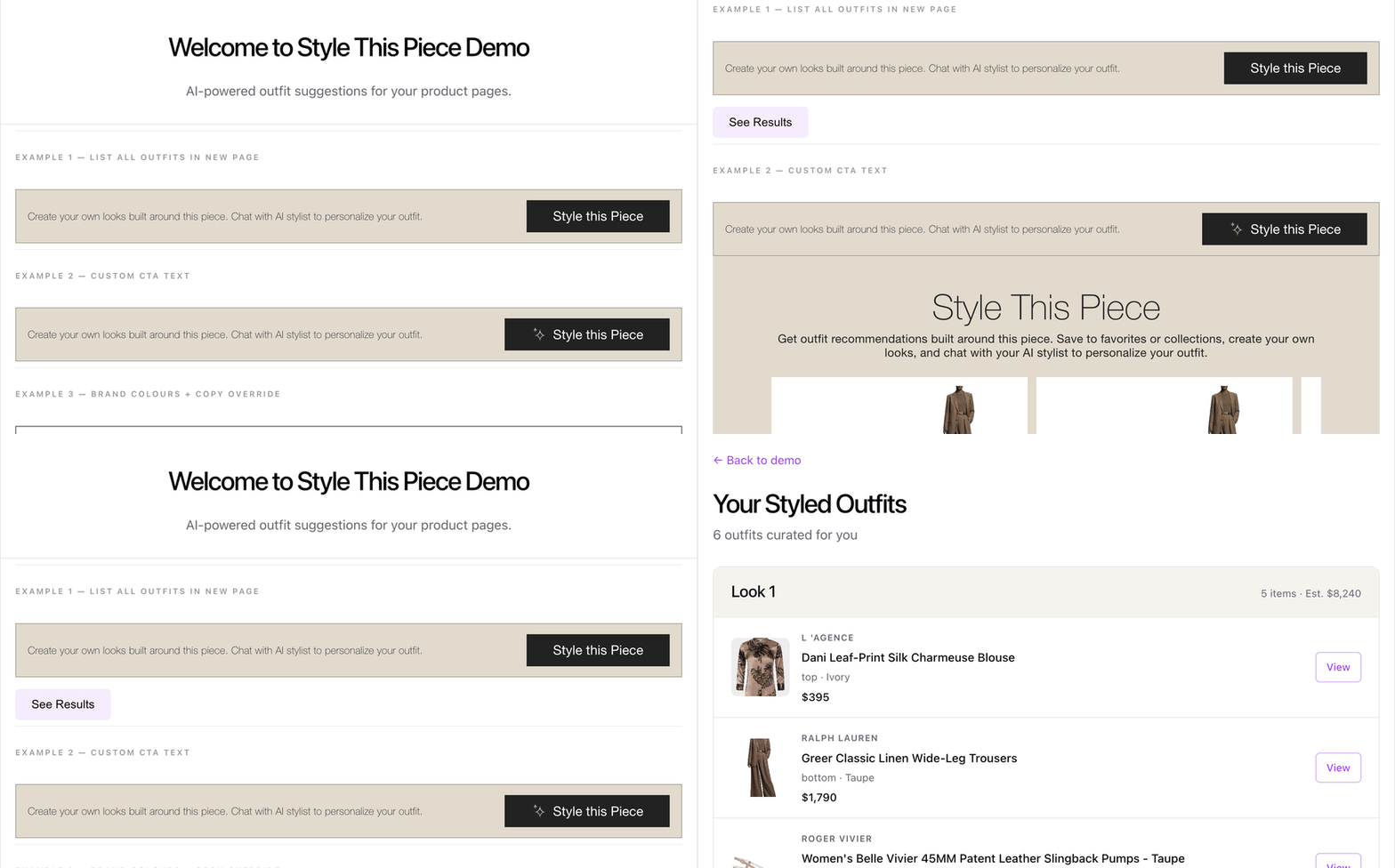
_Live demo showing multiple banner configurations (custom CTA, brand colours, compact button) and AI outfit results._
|
|
12
|
+
|
|
13
|
+
---
|
|
14
|
+
|
|
15
|
+
## What it does
|
|
16
|
+
|
|
17
|
+
1. You place the component on a product page.
|
|
18
|
+
2. The shopper clicks the banner button.
|
|
19
|
+
3. The library calls your AI stylist API and **streams outfit results** in real time.
|
|
20
|
+
4. Outfits appear as cards below the banner (or on a page you build yourself).
|
|
21
|
+
|
|
22
|
+
You do **not** need to write the API call, loading states, or carousel — the default component handles all of that.
|
|
23
|
+
|
|
24
|
+
---
|
|
25
|
+
|
|
26
|
+
## Before you start
|
|
27
|
+
|
|
28
|
+
Make sure you have these ready:
|
|
29
|
+
|
|
30
|
+
| You need | What it is |
|
|
31
|
+
| --------------------- | ------------------------------------------------------------------------ |
|
|
32
|
+
| **Partner API token** | A key from your API provider. The library sends this with every request. |
|
|
33
|
+
| **API base URL** | Your stylist API root URL (e.g. `https://api.example.com/s1/`). |
|
|
34
|
+
| **Product ID** | The ID of the product on the page (from your product data). |
|
|
35
|
+
| **User ID** | A user ID or guest ID string. Required for the API to work. |
|
|
36
|
+
| **React app** | React 16.8 or newer (`react` and `react-dom` installed in your project). |
|
|
37
|
+
|
|
38
|
+
> Pass `productId`, `userId`, `token`, and `apiBaseUrl`. If any are missing, the banner shows a clear error message. The library does not ship a default API URL.
|
|
39
|
+
|
|
40
|
+
---
|
|
41
|
+
|
|
42
|
+
## Step-by-step setup
|
|
43
|
+
|
|
44
|
+
### Step 1 — Install the package
|
|
45
|
+
|
|
46
|
+
```bash
|
|
47
|
+
npm install vetir-style-this-piece
|
|
48
|
+
```
|
|
49
|
+
|
|
50
|
+
Run this in your project folder (the same place as your `package.json`). After installing, you should see it inside `node_modules/vetir-style-this-piece/`.
|
|
51
|
+
|
|
52
|
+
### Step 2 — Import the CSS (once)
|
|
53
|
+
|
|
54
|
+
Add this **one line** to your app entry file. If you skip this, the banner and cards will look unstyled.
|
|
55
|
+
|
|
56
|
+
**Vite / Create React App** — `src/main.jsx` or `src/index.js`:
|
|
57
|
+
|
|
58
|
+
```js
|
|
59
|
+
import "vetir-style-this-piece/style.css";
|
|
60
|
+
```
|
|
61
|
+
|
|
62
|
+
**Next.js** — `pages/_app.js` or `app/layout.js`:
|
|
63
|
+
|
|
64
|
+
```js
|
|
65
|
+
import "vetir-style-this-piece/style.css";
|
|
66
|
+
```
|
|
67
|
+
|
|
68
|
+
### Step 3 — Add the component to your product page
|
|
69
|
+
|
|
70
|
+
```jsx
|
|
71
|
+
import StyleThisPiece from "vetir-style-this-piece";
|
|
72
|
+
|
|
73
|
+
function ProductPage({ product }) {
|
|
74
|
+
const userId = getLoggedInUserId() || getGuestUserId();
|
|
75
|
+
const apiToken = import.meta.env.VITE_STP_API_KEY;
|
|
76
|
+
const apiBaseUrl = import.meta.env.VITE_STP_API_BASE_URL;
|
|
77
|
+
|
|
78
|
+
return (
|
|
79
|
+
<div>
|
|
80
|
+
{/* your existing product details */}
|
|
81
|
+
<h1>{product.name}</h1>
|
|
82
|
+
|
|
83
|
+
<StyleThisPiece
|
|
84
|
+
productId={product.id}
|
|
85
|
+
userId={userId}
|
|
86
|
+
token={apiToken}
|
|
87
|
+
apiBaseUrl={apiBaseUrl}
|
|
88
|
+
/>
|
|
89
|
+
</div>
|
|
90
|
+
);
|
|
91
|
+
}
|
|
92
|
+
```
|
|
93
|
+
|
|
94
|
+
That is the **minimum** working setup. The banner appears, outfits stream in below it when clicked.
|
|
95
|
+
|
|
96
|
+
### Step 4 — Add a "Shop the look" button (optional)
|
|
97
|
+
|
|
98
|
+
By default, outfit cards have no button. Pass `onCardCta` to handle clicks:
|
|
99
|
+
|
|
100
|
+
```jsx
|
|
101
|
+
<StyleThisPiece
|
|
102
|
+
productId={product.id}
|
|
103
|
+
userId={userId}
|
|
104
|
+
token={apiToken}
|
|
105
|
+
apiBaseUrl={apiBaseUrl}
|
|
106
|
+
cardCtaText="Shop The Look"
|
|
107
|
+
onCardCta={(outfit) => {
|
|
108
|
+
// outfit is an array of products (top, bottom, shoes, bag, etc.)
|
|
109
|
+
openOutfitModal(outfit);
|
|
110
|
+
}}
|
|
111
|
+
/>
|
|
112
|
+
```
|
|
113
|
+
|
|
114
|
+
### Step 5 — Match your brand (optional)
|
|
115
|
+
|
|
116
|
+
Override text and colours with props — no CSS file edits needed:
|
|
117
|
+
|
|
118
|
+
```jsx
|
|
119
|
+
<StyleThisPiece
|
|
120
|
+
productId={product.id}
|
|
121
|
+
userId={userId}
|
|
122
|
+
token={apiToken}
|
|
123
|
+
apiBaseUrl={apiBaseUrl}
|
|
124
|
+
bannerText="See how to wear this piece."
|
|
125
|
+
ctaText="Get Outfit Ideas"
|
|
126
|
+
ctaStyle={{ background: "#000", color: "#fff" }}
|
|
127
|
+
/>
|
|
128
|
+
```
|
|
129
|
+
|
|
130
|
+
---
|
|
131
|
+
|
|
132
|
+
## Understanding the required props
|
|
133
|
+
|
|
134
|
+
| Prop | In plain English |
|
|
135
|
+
| ----------- | --------------------------------------------------------------------------------------------------------------------------------------------------------- |
|
|
136
|
+
| `productId` | Which product to build outfits around. Use the same ID your catalogue uses. |
|
|
137
|
+
| `userId` | Who is asking for outfits. Use a real user ID or a guest ID. If empty, the banner shows **"User ID is required"**. |
|
|
138
|
+
| `token` | Your partner API key. If empty, the banner shows **"API token is required"**. |
|
|
139
|
+
| `apiBaseUrl` | Your stylist API base URL. If empty, the banner shows **"API base URL is required"**. Not hardcoded in the library — you must pass it. |
|
|
140
|
+
|
|
141
|
+
**Guest users:** Most apps pass `authUserId || guestUserId`. As long as `userId` is a non-empty string, the API is called.
|
|
142
|
+
|
|
143
|
+
**Token security:** Load the token from your server or a build-time env var (e.g. `import.meta.env.VITE_STP_TOKEN`). The token is sent from the browser to the stylist API.
|
|
144
|
+
|
|
145
|
+
---
|
|
146
|
+
|
|
147
|
+
## What happens when the user clicks
|
|
148
|
+
|
|
149
|
+
```
|
|
150
|
+
User clicks "Style this Piece"
|
|
151
|
+
↓
|
|
152
|
+
Is productId set? ──no──→ Banner shows "Product ID is required"
|
|
153
|
+
│
|
|
154
|
+
yes
|
|
155
|
+
↓
|
|
156
|
+
Is userId set? ──no──→ Banner shows "User ID is required"
|
|
157
|
+
│
|
|
158
|
+
yes
|
|
159
|
+
↓
|
|
160
|
+
Is token set? ──no──→ Banner shows "API token is required"
|
|
161
|
+
│
|
|
162
|
+
yes
|
|
163
|
+
↓
|
|
164
|
+
Is apiBaseUrl set? ──no──→ Banner shows "API base URL is required"
|
|
165
|
+
│
|
|
166
|
+
yes
|
|
167
|
+
↓
|
|
168
|
+
Library calls the streaming API with productId + userId + token + apiBaseUrl
|
|
169
|
+
↓
|
|
170
|
+
Outfits arrive one by one (loading spinner while waiting)
|
|
171
|
+
↓
|
|
172
|
+
Cards appear in a horizontal carousel below the banner
|
|
173
|
+
↓
|
|
174
|
+
User clicks a card CTA (if you provided onCardCta)
|
|
175
|
+
↓
|
|
176
|
+
Your onCardCta(outfit) runs with the full outfit array
|
|
177
|
+
```
|
|
178
|
+
|
|
179
|
+
---
|
|
180
|
+
|
|
181
|
+
## Choose your integration style
|
|
182
|
+
|
|
183
|
+
| Approach | Best for | What you use |
|
|
184
|
+
| ------------------------ | ---------------------------------------------------- | ------------------------------------------------------------------ |
|
|
185
|
+
| **All-in-one** (easiest) | Most product pages | `<StyleThisPiece />` — banner, API, and results included |
|
|
186
|
+
| **Hook + banner** | Custom results UI (new page, modal, your own layout) | `useStyleThisPieceOutfits` + `StyleThisPieceBanner` |
|
|
187
|
+
| **Full control** | Completely custom flow | Hook + `StyleThisPieceBanner` + `StyleThisPieceResults` separately |
|
|
188
|
+
|
|
189
|
+
**Start with the all-in-one component.** Only switch to the hook if you need to render results somewhere else.
|
|
190
|
+
|
|
191
|
+
---
|
|
192
|
+
|
|
193
|
+
## Examples
|
|
194
|
+
|
|
195
|
+
### Example 1 — Custom results page (hook + banner)
|
|
196
|
+
|
|
197
|
+
**When to use:** You want outfits on a separate page or in your own design — not the built-in carousel.
|
|
198
|
+
|
|
199
|
+
The hook fetches outfits. The banner is just the trigger button. You decide where results go.
|
|
200
|
+
|
|
201
|
+
**Trigger (product page):**
|
|
202
|
+
|
|
203
|
+
```jsx
|
|
204
|
+
import {
|
|
205
|
+
StyleThisPieceBanner,
|
|
206
|
+
useStyleThisPieceOutfits,
|
|
207
|
+
} from "vetir-style-this-piece";
|
|
208
|
+
|
|
209
|
+
function StyleTrigger({ productId, userId, token, apiBaseUrl, onSeeResults }) {
|
|
210
|
+
const { outfits, isLoading, error, generateOutfits } =
|
|
211
|
+
useStyleThisPieceOutfits({
|
|
212
|
+
productId,
|
|
213
|
+
userId,
|
|
214
|
+
token,
|
|
215
|
+
baseUrl: apiBaseUrl,
|
|
216
|
+
});
|
|
217
|
+
|
|
218
|
+
const hasResults = outfits.length > 0;
|
|
219
|
+
|
|
220
|
+
return (
|
|
221
|
+
<>
|
|
222
|
+
<StyleThisPieceBanner
|
|
223
|
+
isLoading={isLoading}
|
|
224
|
+
error={hasResults ? null : error}
|
|
225
|
+
onGenerate={generateOutfits}
|
|
226
|
+
showCtaIcon={false}
|
|
227
|
+
/>
|
|
228
|
+
{hasResults && (
|
|
229
|
+
<button type="button" onClick={() => onSeeResults(outfits)}>
|
|
230
|
+
See Results
|
|
231
|
+
</button>
|
|
232
|
+
)}
|
|
233
|
+
</>
|
|
234
|
+
);
|
|
235
|
+
}
|
|
236
|
+
```
|
|
237
|
+
|
|
238
|
+
**Results page (your own UI):**
|
|
239
|
+
|
|
240
|
+
```jsx
|
|
241
|
+
function OutfitResultsPage({ outfits }) {
|
|
242
|
+
return (
|
|
243
|
+
<ul>
|
|
244
|
+
{outfits.map((outfit, i) => (
|
|
245
|
+
<li key={i}>
|
|
246
|
+
<h2>Look {i + 1}</h2>
|
|
247
|
+
<ul>
|
|
248
|
+
{outfit.map((product) => (
|
|
249
|
+
<li key={product.id}>
|
|
250
|
+
<img src={product.imageUrls?.[0]} alt={product.productName} />
|
|
251
|
+
<span>
|
|
252
|
+
{product.brandName} — {product.productName}
|
|
253
|
+
</span>
|
|
254
|
+
<span>${product.productPrice?.toLocaleString()}</span>
|
|
255
|
+
{product.productButtonLink && (
|
|
256
|
+
<a
|
|
257
|
+
href={product.productButtonLink}
|
|
258
|
+
target="_blank"
|
|
259
|
+
rel="noreferrer"
|
|
260
|
+
>
|
|
261
|
+
View
|
|
262
|
+
</a>
|
|
263
|
+
)}
|
|
264
|
+
</li>
|
|
265
|
+
))}
|
|
266
|
+
</ul>
|
|
267
|
+
</li>
|
|
268
|
+
))}
|
|
269
|
+
</ul>
|
|
270
|
+
);
|
|
271
|
+
}
|
|
272
|
+
```
|
|
273
|
+
|
|
274
|
+
**Wire with your router:**
|
|
275
|
+
|
|
276
|
+
```jsx
|
|
277
|
+
<StyleTrigger
|
|
278
|
+
productId={productId}
|
|
279
|
+
userId={userId}
|
|
280
|
+
token={token}
|
|
281
|
+
apiBaseUrl={apiBaseUrl}
|
|
282
|
+
onSeeResults={(outfits) => navigate("/outfits", { state: { outfits } })}
|
|
283
|
+
/>
|
|
284
|
+
```
|
|
285
|
+
|
|
286
|
+
---
|
|
287
|
+
|
|
288
|
+
### Example 2 — Custom card CTA text
|
|
289
|
+
|
|
290
|
+
Change the button label on each outfit card:
|
|
291
|
+
|
|
292
|
+
```jsx
|
|
293
|
+
<StyleThisPiece
|
|
294
|
+
productId={productId}
|
|
295
|
+
userId={userId}
|
|
296
|
+
token={token}
|
|
297
|
+
apiBaseUrl={apiBaseUrl}
|
|
298
|
+
cardCtaText="Explore This Look"
|
|
299
|
+
onCardCta={(outfit) => openOutfitModal(outfit)}
|
|
300
|
+
/>
|
|
301
|
+
```
|
|
302
|
+
|
|
303
|
+
---
|
|
304
|
+
|
|
305
|
+
### Example 3 — Brand colours and copy override
|
|
306
|
+
|
|
307
|
+
Change all visible text and colours without touching CSS files:
|
|
308
|
+
|
|
309
|
+
```jsx
|
|
310
|
+
<StyleThisPiece
|
|
311
|
+
productId={productId}
|
|
312
|
+
userId={userId}
|
|
313
|
+
token={token}
|
|
314
|
+
apiBaseUrl={apiBaseUrl}
|
|
315
|
+
bannerText="Discover complete looks featuring this item."
|
|
316
|
+
ctaText="Get Styled"
|
|
317
|
+
resultsTitle="Complete The Look"
|
|
318
|
+
resultsDescription="AI-curated outfits built around your selection."
|
|
319
|
+
bannerStyle={{ background: "white", borderColor: "#444" }}
|
|
320
|
+
ctaStyle={{ background: "#d4af37", color: "#000" }}
|
|
321
|
+
/>
|
|
322
|
+
```
|
|
323
|
+
|
|
324
|
+
---
|
|
325
|
+
|
|
326
|
+
### Example 4 — Compact round CTA + card extras
|
|
327
|
+
|
|
328
|
+
A small round icon button and extra info under each card (item count, total price):
|
|
329
|
+
|
|
330
|
+
```jsx
|
|
331
|
+
<StyleThisPiece
|
|
332
|
+
productId={productId}
|
|
333
|
+
userId={userId}
|
|
334
|
+
token={token}
|
|
335
|
+
apiBaseUrl={apiBaseUrl}
|
|
336
|
+
bannerText=""
|
|
337
|
+
ctaText=""
|
|
338
|
+
bannerStyle={{ borderRadius: 60, padding: "8px", width: 120, height: 120 }}
|
|
339
|
+
ctaStyle={{
|
|
340
|
+
width: 60,
|
|
341
|
+
padding: 0,
|
|
342
|
+
justifyContent: "center",
|
|
343
|
+
height: 60,
|
|
344
|
+
borderRadius: 60,
|
|
345
|
+
}}
|
|
346
|
+
renderCardExtra={(outfit) => (
|
|
347
|
+
<div style={{ padding: "8px 12px", fontSize: 12, color: "#555" }}>
|
|
348
|
+
{outfit.length} items · Est. $
|
|
349
|
+
{outfit.reduce((s, p) => s + (p.productPrice || 0), 0).toLocaleString()}
|
|
350
|
+
</div>
|
|
351
|
+
)}
|
|
352
|
+
/>
|
|
353
|
+
```
|
|
354
|
+
|
|
355
|
+
---
|
|
356
|
+
|
|
357
|
+
### Example 5 — Custom label above the carousel
|
|
358
|
+
|
|
359
|
+
Add a branded strip above the outfit cards:
|
|
360
|
+
|
|
361
|
+
```jsx
|
|
362
|
+
<StyleThisPiece
|
|
363
|
+
productId={productId}
|
|
364
|
+
userId={userId}
|
|
365
|
+
token={token}
|
|
366
|
+
apiBaseUrl={apiBaseUrl}
|
|
367
|
+
renderResultsHeader={() => (
|
|
368
|
+
<div
|
|
369
|
+
style={{
|
|
370
|
+
padding: "8px 16px",
|
|
371
|
+
background: "#222",
|
|
372
|
+
color: "#fff",
|
|
373
|
+
fontSize: 12,
|
|
374
|
+
letterSpacing: 2,
|
|
375
|
+
textTransform: "uppercase",
|
|
376
|
+
textAlign: "center",
|
|
377
|
+
}}
|
|
378
|
+
>
|
|
379
|
+
✦ Styled by AI · Personalised for you
|
|
380
|
+
</div>
|
|
381
|
+
)}
|
|
382
|
+
/>
|
|
383
|
+
```
|
|
384
|
+
|
|
385
|
+
---
|
|
386
|
+
|
|
387
|
+
### Full production integration
|
|
388
|
+
|
|
389
|
+
Everything together: custom API URL, results in a specific page section, card CTA, header, and styling:
|
|
390
|
+
|
|
391
|
+
```jsx
|
|
392
|
+
const resultsRef = useRef(null);
|
|
393
|
+
|
|
394
|
+
<StyleThisPiece
|
|
395
|
+
productId={productId}
|
|
396
|
+
userId={userId}
|
|
397
|
+
token={token}
|
|
398
|
+
apiBaseUrl={apiBaseUrl}
|
|
399
|
+
gender="female"
|
|
400
|
+
resultsContainerRef={resultsRef}
|
|
401
|
+
cardCtaText="Shop The Look"
|
|
402
|
+
onCardCta={(outfit) => openOutfitModal(outfit)}
|
|
403
|
+
renderResultsHeader={() => (
|
|
404
|
+
<div
|
|
405
|
+
style={{
|
|
406
|
+
padding: "8px 16px",
|
|
407
|
+
background: "#222",
|
|
408
|
+
color: "#fff",
|
|
409
|
+
fontSize: 12,
|
|
410
|
+
}}
|
|
411
|
+
>
|
|
412
|
+
✦ AI Stylist Picks
|
|
413
|
+
</div>
|
|
414
|
+
)}
|
|
415
|
+
renderCardExtra={(outfit) => (
|
|
416
|
+
<div style={{ padding: "8px 12px", fontSize: 12, color: "#555" }}>
|
|
417
|
+
{outfit.length} items
|
|
418
|
+
</div>
|
|
419
|
+
)}
|
|
420
|
+
resultsTitle="Styled For You"
|
|
421
|
+
resultsDescription="AI-curated outfits built around this piece."
|
|
422
|
+
bannerStyle={{ borderColor: "#333" }}
|
|
423
|
+
ctaStyle={{ background: "#c9a96e" }}
|
|
424
|
+
/>;
|
|
425
|
+
|
|
426
|
+
{
|
|
427
|
+
/* Results render inside this div instead of below the banner */
|
|
428
|
+
}
|
|
429
|
+
<div ref={resultsRef} />;
|
|
430
|
+
```
|
|
431
|
+
|
|
432
|
+
`resultsContainerRef` lets you control **where** on the page the carousel appears — useful if your layout has a sidebar or a dedicated "stylist" section.
|
|
433
|
+
|
|
434
|
+
---
|
|
435
|
+
|
|
436
|
+
## Props reference
|
|
437
|
+
|
|
438
|
+
### `StyleThisPiece` (default export — recommended)
|
|
439
|
+
|
|
440
|
+
| Prop | Required | Description |
|
|
441
|
+
| --------------------------------- | -------- | ---------------------------------------------------------------------- |
|
|
442
|
+
| `productId` | ✅ | Product to style |
|
|
443
|
+
| `userId` | ✅ | User or guest ID. Empty → banner shows "User ID is required" |
|
|
444
|
+
| `token` | ✅ | Partner API key |
|
|
445
|
+
| `apiBaseUrl` | ✅ | Stylist API base URL. Empty → banner shows "API base URL is required" |
|
|
446
|
+
| `gender` | — | `female` (default) or `male` |
|
|
447
|
+
| `country` | — | Region for pricing. Default: from cookie or `United States of America` |
|
|
448
|
+
| `hideBannerOnResults` | — | Hide banner once results show. Default `false` |
|
|
449
|
+
| `resultsContainerRef` | — | Render results inside this DOM element instead of inline |
|
|
450
|
+
| `onCardCta` | — | Called when card button clicked. Button only shows if this is set |
|
|
451
|
+
| `cardCtaText` | — | Card button label (e.g. `"Shop The Look"`) |
|
|
452
|
+
| `renderResultsHeader` | — | Custom JSX above the carousel |
|
|
453
|
+
| `renderCardExtra` | — | Custom JSX inside each outfit card |
|
|
454
|
+
| `bannerText` | — | Text next to the CTA button |
|
|
455
|
+
| `ctaText` | — | CTA button label |
|
|
456
|
+
| `showCtaIcon` | — | Show sparkle icon. Default `true` |
|
|
457
|
+
| `ctaIcon` | — | Replace sparkle with your own image URL |
|
|
458
|
+
| `resultsTitle` | — | Heading above the carousel |
|
|
459
|
+
| `resultsDescription` | — | Subheading above the carousel |
|
|
460
|
+
| `bannerStyle` / `ctaStyle` / etc. | — | Inline styles to match your brand |
|
|
461
|
+
|
|
462
|
+
### Named exports (advanced)
|
|
463
|
+
|
|
464
|
+
```jsx
|
|
465
|
+
import {
|
|
466
|
+
StyleThisPieceBanner,
|
|
467
|
+
StyleThisPieceResults,
|
|
468
|
+
StyleThisPieceOutfitCard,
|
|
469
|
+
useStyleThisPieceOutfits,
|
|
470
|
+
} from "vetir-style-this-piece";
|
|
471
|
+
```
|
|
472
|
+
|
|
473
|
+
#### `useStyleThisPieceOutfits`
|
|
474
|
+
|
|
475
|
+
```ts
|
|
476
|
+
const {
|
|
477
|
+
outfits, // array of outfits; each outfit is an array of products
|
|
478
|
+
isLoading, // true until the first outfit arrives
|
|
479
|
+
isStreaming, // true while more outfits are still coming in
|
|
480
|
+
hasStarted, // true after the user clicked generate
|
|
481
|
+
error, // error message string, or null
|
|
482
|
+
generateOutfits, // call this to start (wired to banner button)
|
|
483
|
+
reset, // go back to the initial banner state
|
|
484
|
+
} = useStyleThisPieceOutfits({
|
|
485
|
+
productId,
|
|
486
|
+
userId,
|
|
487
|
+
token,
|
|
488
|
+
baseUrl, // required — same as apiBaseUrl on the main component
|
|
489
|
+
gender?,
|
|
490
|
+
country?,
|
|
491
|
+
});
|
|
492
|
+
```
|
|
493
|
+
|
|
494
|
+
---
|
|
495
|
+
|
|
496
|
+
## What you get back from the API
|
|
497
|
+
|
|
498
|
+
Each **outfit** is an array of **products** (typically top, bottom, shoes, bag, jewelry):
|
|
499
|
+
|
|
500
|
+
```ts
|
|
501
|
+
interface OutfitProduct {
|
|
502
|
+
id: string;
|
|
503
|
+
productId: string;
|
|
504
|
+
brandName: string;
|
|
505
|
+
productName: string;
|
|
506
|
+
productPrice: number;
|
|
507
|
+
imageUrls: string[]; // use imageUrls[0] for the card image
|
|
508
|
+
productColor: string;
|
|
509
|
+
categoryName: string;
|
|
510
|
+
aiCategoryName: "top" | "bottom" | "footwear" | "bag" | "jewelry";
|
|
511
|
+
productSizes: string[];
|
|
512
|
+
productButtonLink: string; // link to buy this item
|
|
513
|
+
returnObject: { url: string; text: string };
|
|
514
|
+
gender: string;
|
|
515
|
+
country: string[];
|
|
516
|
+
}
|
|
517
|
+
```
|
|
518
|
+
|
|
519
|
+
When `onCardCta` or `renderCardExtra` fires, you receive one full outfit array — loop over it to show each item.
|
|
520
|
+
|
|
521
|
+
---
|
|
522
|
+
|
|
523
|
+
## Troubleshooting
|
|
524
|
+
|
|
525
|
+
| Problem | Likely cause | Fix |
|
|
526
|
+
| ------------------------------------------------------- | ------------------------ | ------------------------------------------------------------ |
|
|
527
|
+
| `Failed to resolve import "vetir-style-this-piece"` | Package not installed | Run `npm install` in your project |
|
|
528
|
+
| `Failed to resolve import "vetir-style-this-piece/style.css"` | Same as above | Run `npm install`, then restart dev server |
|
|
529
|
+
| Banner looks broken / no styles | CSS not imported | Add `import 'vetir-style-this-piece/style.css'` to your entry file |
|
|
530
|
+
| Banner says "Product ID is required" | `productId` is empty | Pass the product ID from your product data |
|
|
531
|
+
| Banner says "User ID is required" | `userId` is empty | Pass `authUserId \|\| guestUserId` |
|
|
532
|
+
| Banner says "API token is required" | `token` prop missing | Pass your partner API key |
|
|
533
|
+
| Banner says "API base URL is required" | `apiBaseUrl` missing | Pass your stylist API base URL |
|
|
534
|
+
| Stream fails / Retry shown | Bad token or API error | Check token value and API base URL |
|
|
535
|
+
| Card has no button | `onCardCta` not provided | Add `onCardCta` and `cardCtaText` together |
|
|
536
|
+
| Results in wrong place | Layout issue | Use `resultsContainerRef` to target a specific `<div>` |
|
|
537
|
+
|
|
538
|
+
---
|
|
539
|
+
|
|
540
|
+
## Peer dependencies
|
|
541
|
+
|
|
542
|
+
Your app must already have React installed:
|
|
543
|
+
|
|
544
|
+
```json
|
|
545
|
+
"react": ">=16.8.0",
|
|
546
|
+
"react-dom": ">=16.8.0"
|
|
547
|
+
```
|
|
548
|
+
|
|
549
|
+
The library does not bundle React — it uses yours.
|
|
550
|
+
|
|
551
|
+
---
|
|
552
|
+
|
|
553
|
+
## Local development (yalc)
|
|
554
|
+
|
|
555
|
+
For testing unreleased changes in another project:
|
|
556
|
+
|
|
557
|
+
```bash
|
|
558
|
+
# In this repo — after every change:
|
|
559
|
+
npm run push
|
|
560
|
+
|
|
561
|
+
# In consumer — one-time setup:
|
|
562
|
+
yalc add vetir-style-this-piece
|
|
563
|
+
yarn install
|
|
564
|
+
```
|
|
565
|
+
|
|
566
|
+
---
|
|
567
|
+
|
|
568
|
+
More examples: [USAGE.md](./USAGE.md)
|