markdownfly 0.1.0 → 0.2.0
This diff represents the content of publicly available package versions that have been released to one of the supported registries. The information contained in this diff is provided for informational purposes only and reflects changes between package versions as they appear in their respective public registries.
- package/README.md +444 -289
- package/dist/cli.js +2840 -659
- package/dist/cli.js.map +1 -1
- package/dist/index.d.ts +529 -12
- package/dist/index.js +2894 -662
- package/dist/index.js.map +1 -1
- package/package.json +78 -75
package/README.md
CHANGED
|
@@ -1,289 +1,444 @@
|
|
|
1
|
-
|
|
2
|
-
|
|
3
|
-
|
|
4
|
-
|
|
5
|
-
|
|
6
|
-
|
|
7
|
-
|
|
8
|
-
|
|
9
|
-
|
|
10
|
-
|
|
11
|
-
|
|
12
|
-
-
|
|
13
|
-
|
|
14
|
-
|
|
15
|
-
|
|
16
|
-
|
|
17
|
-
|
|
18
|
-
|
|
19
|
-
|
|
20
|
-
|
|
21
|
-
|
|
22
|
-
|
|
23
|
-
|
|
24
|
-
|
|
25
|
-
|
|
26
|
-
|
|
27
|
-
|
|
28
|
-
|
|
29
|
-
|
|
30
|
-
|
|
31
|
-
|
|
32
|
-
|
|
33
|
-
|
|
34
|
-
|
|
35
|
-
|
|
36
|
-
|
|
37
|
-
#
|
|
38
|
-
|
|
39
|
-
|
|
40
|
-
|
|
41
|
-
|
|
42
|
-
|
|
43
|
-
|
|
44
|
-
|
|
45
|
-
|
|
46
|
-
|
|
47
|
-
|
|
48
|
-
|
|
49
|
-
|
|
50
|
-
|
|
51
|
-
|
|
52
|
-
|
|
53
|
-
|
|
54
|
-
|
|
55
|
-
|
|
56
|
-
|
|
57
|
-
|
|
58
|
-
|
|
59
|
-
|
|
60
|
-
|
|
61
|
-
|
|
62
|
-
|
|
63
|
-
|
|
64
|
-
|
|
65
|
-
|
|
66
|
-
|
|
67
|
-
|
|
68
|
-
|
|
69
|
-
|
|
70
|
-
|
|
71
|
-
|
|
72
|
-
|
|
73
|
-
|
|
74
|
-
|
|
75
|
-
|
|
76
|
-
|
|
77
|
-
|
|
78
|
-
|
|
79
|
-
|
|
80
|
-
|
|
81
|
-
|
|
82
|
-
|
|
83
|
-
|
|
84
|
-
|
|
85
|
-
|
|
86
|
-
|
|
87
|
-
|
|
88
|
-
|
|
89
|
-
|
|
90
|
-
|
|
91
|
-
|
|
92
|
-
|
|
93
|
-
|
|
94
|
-
|
|
95
|
-
|
|
96
|
-
|
|
97
|
-
|
|
98
|
-
|
|
99
|
-
|
|
100
|
-
|
|
101
|
-
|
|
102
|
-
|
|
103
|
-
|
|
104
|
-
|
|
105
|
-
|
|
106
|
-
|
|
107
|
-
|
|
108
|
-
|
|
109
|
-
|
|
110
|
-
|
|
111
|
-
|
|
112
|
-
|
|
113
|
-
|
|
114
|
-
|
|
115
|
-
|
|
116
|
-
|
|
117
|
-
|
|
118
|
-
-
|
|
119
|
-
|
|
120
|
-
|
|
121
|
-
|
|
122
|
-
|
|
123
|
-
|
|
124
|
-
|
|
125
|
-
|
|
126
|
-
|
|
127
|
-
|
|
128
|
-
|
|
129
|
-
|
|
130
|
-
|
|
131
|
-
|
|
132
|
-
|
|
133
|
-
|
|
134
|
-
|
|
135
|
-
|
|
136
|
-
|
|
137
|
-
|
|
138
|
-
|
|
139
|
-
|
|
140
|
-
|
|
141
|
-
|
|
142
|
-
|
|
143
|
-
|
|
144
|
-
|
|
145
|
-
|
|
146
|
-
|
|
147
|
-
|
|
148
|
-
-
|
|
149
|
-
|
|
150
|
-
|
|
151
|
-
|
|
152
|
-
|
|
153
|
-
|
|
154
|
-
|
|
155
|
-
|
|
156
|
-
|
|
157
|
-
|
|
158
|
-
|
|
159
|
-
|
|
160
|
-
|
|
161
|
-
|
|
162
|
-
|
|
163
|
-
|
|
164
|
-
|
|
165
|
-
|
|
166
|
-
|
|
167
|
-
|
|
168
|
-
|
|
169
|
-
|
|
170
|
-
|
|
171
|
-
|
|
172
|
-
|
|
173
|
-
|
|
174
|
-
|
|
175
|
-
|
|
176
|
-
|
|
177
|
-
|
|
178
|
-
|
|
179
|
-
|
|
180
|
-
|
|
181
|
-
|
|
182
|
-
|
|
183
|
-
|
|
184
|
-
|
|
185
|
-
###
|
|
186
|
-
|
|
187
|
-
```
|
|
188
|
-
|
|
189
|
-
|
|
190
|
-
|
|
191
|
-
|
|
192
|
-
|
|
193
|
-
|
|
194
|
-
|
|
195
|
-
|
|
196
|
-
|
|
197
|
-
|
|
198
|
-
|
|
199
|
-
|
|
200
|
-
###
|
|
201
|
-
|
|
202
|
-
|
|
203
|
-
|
|
204
|
-
|
|
205
|
-
|
|
206
|
-
|
|
207
|
-
###
|
|
208
|
-
|
|
209
|
-
|
|
210
|
-
|
|
211
|
-
```
|
|
212
|
-
|
|
213
|
-
|
|
214
|
-
|
|
215
|
-
|
|
216
|
-
|
|
217
|
-
-
|
|
218
|
-
|
|
219
|
-
|
|
220
|
-
|
|
221
|
-
|
|
222
|
-
|
|
223
|
-
|
|
224
|
-
|
|
225
|
-
|
|
226
|
-
|
|
227
|
-
|
|
228
|
-
|
|
229
|
-
|
|
230
|
-
|
|
231
|
-
|
|
232
|
-
|
|
233
|
-
|
|
234
|
-
|
|
235
|
-
|
|
236
|
-
|
|
237
|
-
|
|
238
|
-
|
|
239
|
-
|
|
240
|
-
|
|
241
|
-
@(
|
|
242
|
-
|
|
243
|
-
|
|
244
|
-
|
|
245
|
-
|
|
246
|
-
|
|
247
|
-
|
|
248
|
-
|
|
249
|
-
|
|
250
|
-
|
|
251
|
-
|
|
252
|
-
|
|
253
|
-
|
|
254
|
-
|
|
255
|
-
|
|
256
|
-
|
|
257
|
-
|
|
258
|
-
|
|
259
|
-
|
|
260
|
-
|
|
261
|
-
|
|
262
|
-
|
|
263
|
-
|
|
264
|
-
|
|
265
|
-
|
|
266
|
-
|
|
267
|
-
|
|
268
|
-
|
|
269
|
-
|
|
270
|
-
|
|
271
|
-
|
|
272
|
-
|
|
273
|
-
-
|
|
274
|
-
-
|
|
275
|
-
|
|
276
|
-
|
|
277
|
-
|
|
278
|
-
|
|
279
|
-
|
|
280
|
-
|
|
281
|
-
|
|
282
|
-
|
|
283
|
-
|
|
284
|
-
|
|
285
|
-
|
|
286
|
-
|
|
287
|
-
|
|
288
|
-
|
|
289
|
-
|
|
1
|
+
<div align="center">
|
|
2
|
+
|
|
3
|
+
# 🚀 MarkdownFly (mfly)
|
|
4
|
+
|
|
5
|
+
**Markdown to PowerPoint (.pptx) — the CLI tool built for developers.**
|
|
6
|
+
Write slides in Markdown with syntax-highlighted code and embedded diagrams.
|
|
7
|
+
Generate beautiful, fully editable `.pptx` in seconds.
|
|
8
|
+
|
|
9
|
+
[](https://www.npmjs.com/package/markdownfly)
|
|
10
|
+
[](https://www.npmjs.com/package/markdownfly)
|
|
11
|
+
[](./LICENSE)
|
|
12
|
+
[](https://nodejs.org)
|
|
13
|
+
|
|
14
|
+
[English](./README.md) · [简体中文](./README_CN.md)
|
|
15
|
+
|
|
16
|
+
</div>
|
|
17
|
+
|
|
18
|
+
---
|
|
19
|
+
|
|
20
|
+
<details>
|
|
21
|
+
<summary>📖 Table of Contents</summary>
|
|
22
|
+
|
|
23
|
+
- [✨ Features](#-features)
|
|
24
|
+
- [📦 Installation](#-installation)
|
|
25
|
+
- [🚀 Quick Start](#-quick-start)
|
|
26
|
+
- [🎨 Built-in Themes](#-built-in-themes)
|
|
27
|
+
- [📝 Markdown Syntax Guide](#-markdown-syntax-guide)
|
|
28
|
+
- [Slide Splitting Rules](#slide-splitting-rules)
|
|
29
|
+
- [Frontmatter](#frontmatter)
|
|
30
|
+
- [In-Slide Layout (Grid)](#in-slide-layout-grid)
|
|
31
|
+
- [Slide Directives](#slide-directives-)
|
|
32
|
+
- [Callouts](#callouts)
|
|
33
|
+
- [Task Lists](#task-lists)
|
|
34
|
+
- [Images](#images)
|
|
35
|
+
- [Code Blocks with Syntax Highlighting](#code-blocks-with-syntax-highlighting)
|
|
36
|
+
- [Diagram Code Blocks](#diagram-code-blocks)
|
|
37
|
+
- [Footnotes](#footnotes)
|
|
38
|
+
- [🧪 Testing](#-testing)
|
|
39
|
+
- [🤔 Why MarkdownFly?](#-why-markdownfly)
|
|
40
|
+
- [⭐ Star History](#-star-history)
|
|
41
|
+
- [📄 License](#-license)
|
|
42
|
+
|
|
43
|
+
</details>
|
|
44
|
+
|
|
45
|
+
---
|
|
46
|
+
|
|
47
|
+
## ✨ Features
|
|
48
|
+
|
|
49
|
+
- 📑 **Markdown to PowerPoint**: Convert standard Markdown to editable 16:9 widescreen `.pptx` slides.
|
|
50
|
+
- 🎨 **Syntax Highlighting**: Token-level code highlighting powered by [Shiki](https://shiki.style/) (Python, TypeScript, Go, Rust, Java, C++, Bash, SQL, and 20+ languages).
|
|
51
|
+
- 📊 **Built-in Diagram Rendering (Zero native binary dependencies)**:
|
|
52
|
+
- **Mermaid**: Flowcharts, sequence diagrams, state diagrams, class diagrams.
|
|
53
|
+
- **Graphviz / DOT**: Network graphs, finite state machines, architecture topologies (via WASM).
|
|
54
|
+
- **PlantUML**: Sequence, class, activity, state, component and use-case diagrams (TeaVM-compiled engine — no JVM required).
|
|
55
|
+
- **ECharts**: Bar charts, line charts, pie charts directly from JSON options (via ECharts SSR).
|
|
56
|
+
- 🖼️ **Image Embedding**: Local file paths, remote URLs (`http://`/`https://`), and base64 Data URIs.
|
|
57
|
+
- 📐 **Automatic Layout Detection**: Title slides, section dividers, code spotlights, quotes, and content slides.
|
|
58
|
+
- ⚡ **Batch Conversion**: Convert multiple files with glob support (`mfly *.md`).
|
|
59
|
+
|
|
60
|
+
---
|
|
61
|
+
|
|
62
|
+
## 📦 Installation
|
|
63
|
+
|
|
64
|
+
Requires Node.js 20+.
|
|
65
|
+
|
|
66
|
+
```bash
|
|
67
|
+
# Install globally from npm (preferred)
|
|
68
|
+
npm install -g markdownfly
|
|
69
|
+
|
|
70
|
+
# Or run without installing
|
|
71
|
+
npx markdownfly@latest slides.md
|
|
72
|
+
```
|
|
73
|
+
|
|
74
|
+
Develop from source:
|
|
75
|
+
|
|
76
|
+
```bash
|
|
77
|
+
# Clone and install dependencies
|
|
78
|
+
git clone https://github.com/Kyvin-Guan/markdownFly.git
|
|
79
|
+
cd markdownFly
|
|
80
|
+
pnpm install
|
|
81
|
+
pnpm build
|
|
82
|
+
```
|
|
83
|
+
|
|
84
|
+
Link locally for global CLI access:
|
|
85
|
+
```bash
|
|
86
|
+
pnpm link --global
|
|
87
|
+
```
|
|
88
|
+
|
|
89
|
+
---
|
|
90
|
+
|
|
91
|
+
## 🚀 Quick Start
|
|
92
|
+
|
|
93
|
+
### Basic Usage
|
|
94
|
+
|
|
95
|
+
```bash
|
|
96
|
+
# Convert a single file (named after the input: slides.md → slides.pptx)
|
|
97
|
+
mfly slides.md
|
|
98
|
+
|
|
99
|
+
# Specify theme — presets: blue, emerald, gold, slate; color-only: ocean, ocean-dark, forest, champagne, graphite
|
|
100
|
+
mfly slides.md -t blue
|
|
101
|
+
mfly slides.md -t emerald
|
|
102
|
+
mfly slides.md -t ocean-dark
|
|
103
|
+
|
|
104
|
+
# Specify custom output path
|
|
105
|
+
mfly slides.md -t blue -o presentation.pptx
|
|
106
|
+
|
|
107
|
+
# Free composition (optional advanced): override color / text / layout slots
|
|
108
|
+
mfly slides.md -t blue --text kai # blue palette+layout, swap text to kai
|
|
109
|
+
mfly slides.md --color forest --text academic --layout golden # full custom mix
|
|
110
|
+
mfly slides.md --layout minimal # only the layout, rest default theme blue
|
|
111
|
+
|
|
112
|
+
# Batch convert multiple Markdown files
|
|
113
|
+
mfly docs/*.md
|
|
114
|
+
```
|
|
115
|
+
|
|
116
|
+
Composition flags:
|
|
117
|
+
|
|
118
|
+
- `--color <name>` color scheme: `ocean, ocean-dark, forest, champagne, graphite`
|
|
119
|
+
- `--text <name>` text scheme: `system, academic, kai, source-han-serif`
|
|
120
|
+
- `--layout <name>` layout scheme: `legacy, folio, golden, minimal`
|
|
121
|
+
|
|
122
|
+
A composition flag **precisely overrides** the matching theme slot
|
|
123
|
+
(precedence: composition > theme preset > default). When composition flags are
|
|
124
|
+
given without `-t`, the default theme `blue` is used as the base. An unknown
|
|
125
|
+
composition name fails with exit `1` and lists the available names.
|
|
126
|
+
|
|
127
|
+
If the default output name already exists, a timestamped name is used
|
|
128
|
+
(`slides-20260907-131500.pptx`) instead of overwriting. With `-o` the target
|
|
129
|
+
is overwritten without prompting.
|
|
130
|
+
|
|
131
|
+
### Automation (`--quiet` / `--json`)
|
|
132
|
+
|
|
133
|
+
```bash
|
|
134
|
+
# Machine-readable result (one JSON line on stdout; diagnostics on stderr)
|
|
135
|
+
mfly slides.md --json
|
|
136
|
+
|
|
137
|
+
# Suppress per-file progress lines
|
|
138
|
+
mfly docs/*.md --quiet
|
|
139
|
+
```
|
|
140
|
+
|
|
141
|
+
- `--json` prints a single JSON object to stdout:
|
|
142
|
+
`{"ok":true,"durationMs":1234,"files":[{"input":"slides.md","output":"C:/abs/slides.pptx","ok":true}]}`.
|
|
143
|
+
Per-file failures set `ok:false` with an `error` field.
|
|
144
|
+
- Exit code is `0` only when **every** file converts successfully; if any file
|
|
145
|
+
fails the process exits `1` (a summary line is printed to stderr).
|
|
146
|
+
- `-t` with an unknown theme name fails with exit `1` (unknown theme names in
|
|
147
|
+
markdown frontmatter fall back to the default theme `blue` with a warning).
|
|
148
|
+
- Progress lines go to stderr; errors and warnings always go to stderr.
|
|
149
|
+
|
|
150
|
+
---
|
|
151
|
+
|
|
152
|
+
## 🎨 Built-in Themes
|
|
153
|
+
|
|
154
|
+
`-t` / frontmatter `theme:` take a **theme name**. Resolution order:
|
|
155
|
+
**theme preset → color scheme**.
|
|
156
|
+
|
|
157
|
+
| Theme name | Kind | Color | Text | Layout | Best For |
|
|
158
|
+
| :--- | :--- | :--- | :--- | :--- | :--- |
|
|
159
|
+
| **`blue`** *(default)* | Preset package | `ocean` | `academic` (SimSun) | `legacy` | Default full theme |
|
|
160
|
+
| `emerald` | Preset package | `forest` | `system` (Microsoft YaHei) | `folio` | Fresh green · editorial layout |
|
|
161
|
+
| `gold` | Preset package | `champagne` | `kai` (KaiTi) | `golden` | Warm gold · golden-ratio layout |
|
|
162
|
+
| `slate` | Preset package | `graphite` | `source-han-serif` (Source Han Serif) | `minimal` | Neutral monochrome · archival layout |
|
|
163
|
+
| `ocean` | Color only | Deep sea ink `#1E4A6F` / Sea-foam paper `#F0F8FF`; primary `#4F9FD9` / secondary `#2D6A9F` | Default `system` | Layout pack off | Recolor only |
|
|
164
|
+
| `ocean-dark` | Color only | Light foam `#D6E7F5` / Deep sea `#0B1C2E`; primary `#5BAAE8` / secondary `#8BBCDD` | Default `system` | Layout pack off | Night / dark decks (inverse of `ocean`) |
|
|
165
|
+
| `forest` | Color only | Deep green ink `#2A4A3F` / Pale green paper `#F0FFF5`; primary `#5F9A8A` / secondary `#3F6A5A` | Default `system` | Layout pack off | Fresh green decks |
|
|
166
|
+
| `champagne` | Color only | Dark gold ink `#CFB53B` / Cream paper `#FFFCE6`; primary `#E5CD5F` / secondary `#F5E08A` | Default `system` | Layout pack off | Warm metallic gold decks |
|
|
167
|
+
| `graphite` | Color only | Dark gray ink `#4D4D4D` / Light gray paper `#F8F8F8`; primary `#D9D9D9` / secondary `#A6A6A6` | Default `system` | Layout pack off | Neutral monochrome decks |
|
|
168
|
+
|
|
169
|
+
- Omitting `-t` / `theme` uses the default theme **`blue`**.
|
|
170
|
+
- A theme preset selects color × text × layout in one name; color-scheme names remain valid for recolor-only use.
|
|
171
|
+
- `ocean-dark` is the inverse of `ocean` (same color family), sharing its default text/layout; not listed as a separate preset.
|
|
172
|
+
- **Free composition**: override the theme's color / text / layout slots individually via `--color` / `--text` / `--layout` (or frontmatter `color_scheme` / `text_scheme` / `layout_scheme`).
|
|
173
|
+
- Extend via library APIs `registerThemePreset` / `registerColorScheme` / `registerTextScheme` / `registerLayoutScheme`.
|
|
174
|
+
|
|
175
|
+
---
|
|
176
|
+
|
|
177
|
+
## 📝 Markdown Syntax Guide
|
|
178
|
+
|
|
179
|
+
### Slide Splitting Rules
|
|
180
|
+
|
|
181
|
+
- `---` (Horizontal Rule): Primary slide separator.
|
|
182
|
+
- `# Heading 1`: Creates a new slide with **Title** (cover) layout.
|
|
183
|
+
- `## Heading 2`: Creates a new slide with **Content** or **Section** layout.
|
|
184
|
+
|
|
185
|
+
### Frontmatter
|
|
186
|
+
|
|
187
|
+
```yaml
|
|
188
|
+
---
|
|
189
|
+
theme: blue # Options: blue (default), emerald, gold, slate, ocean, ocean-dark, forest, champagne, graphite
|
|
190
|
+
color_scheme: champagne # Optional: color scheme overriding the theme's color (ocean, forest, champagne, graphite...)
|
|
191
|
+
text_scheme: kai # Optional: text scheme overriding the theme's text (system, academic, kai, source-han-serif)
|
|
192
|
+
layout_scheme: folio # Optional: layout scheme overriding the theme's layout (legacy, folio, golden, minimal)
|
|
193
|
+
author: "Your Name"
|
|
194
|
+
footer: "Confidential - {page} / {total}" # {page}/{total}/{section}/{title}
|
|
195
|
+
resource_dir: ./assets # Base directory for relative image paths
|
|
196
|
+
layout: code # Optional default layout for content slides
|
|
197
|
+
---
|
|
198
|
+
```
|
|
199
|
+
|
|
200
|
+
### In-Slide Layout (Grid)
|
|
201
|
+
|
|
202
|
+
Split a slide into columns and rows with standalone lines — no extra markup:
|
|
203
|
+
|
|
204
|
+
````markdown
|
|
205
|
+
## Architecture Overview
|
|
206
|
+
|
|
207
|
+
### Architecture Diagram
|
|
208
|
+
```mermaid
|
|
209
|
+
graph LR
|
|
210
|
+
A[Client] --> B[API]
|
|
211
|
+
```
|
|
212
|
+
<-> <!-- two columns: diagram on the left -->
|
|
213
|
+
|
|
214
|
+
### Key Points
|
|
215
|
+
- Low latency
|
|
216
|
+
- Horizontally scalable
|
|
217
|
+
- Cost-efficient
|
|
218
|
+
=== <!-- stacked rows: what follows starts a new row -->
|
|
219
|
+
|
|
220
|
+
### Summary
|
|
221
|
+
> [!TIP]
|
|
222
|
+
> `===` splits a slide into stacked rows — handy for before/after comparisons.
|
|
223
|
+
````
|
|
224
|
+
|
|
225
|
+
- `<->` (standalone line): horizontal separator → **columns** (side-by-side).
|
|
226
|
+
- `===` (standalone line): vertical separator → **rows** (stacked).
|
|
227
|
+
- Combine both for grids. Markers inside code blocks are never rewritten.
|
|
228
|
+
|
|
229
|
+
### Slide Directives `@(...)`
|
|
230
|
+
|
|
231
|
+
A standalone `@(key=value, ...)` line at the bottom of a slide sets per-slide options:
|
|
232
|
+
|
|
233
|
+
```markdown
|
|
234
|
+
## Table to Chart
|
|
235
|
+
|
|
236
|
+
| Quarter | Orders |
|
|
237
|
+
| :--- | :--- |
|
|
238
|
+
| Q1 | 320 |
|
|
239
|
+
| Q2 | 580 |
|
|
240
|
+
|
|
241
|
+
@(chart=bar, notes=expand on the Q1-Q2 numbers here)
|
|
242
|
+
```
|
|
243
|
+
|
|
244
|
+
| Directive | Value | Effect |
|
|
245
|
+
| :--- | :--- | :--- |
|
|
246
|
+
| `layout` | `title` / `section` / `content` / `code` / `quote` / `image-single` / `image-double` / `image-triple` | Override auto-detected layout |
|
|
247
|
+
| `notes` | text | Speaker notes for this slide |
|
|
248
|
+
| `chart` | `bar` / `line` / `pie` | Render the first table as a chart |
|
|
249
|
+
| `highlight` | `2-4,6` | Highlight lines in the slide's code block |
|
|
250
|
+
| `background` | URL/path | Slide background image |
|
|
251
|
+
| `steps` | `true` | Progressive reveal (reserved) |
|
|
252
|
+
|
|
253
|
+
### Callouts
|
|
254
|
+
|
|
255
|
+
```markdown
|
|
256
|
+
> [!NOTE]
|
|
257
|
+
> Important point to remember.
|
|
258
|
+
|
|
259
|
+
> [!TIP]
|
|
260
|
+
> Helpful suggestion.
|
|
261
|
+
|
|
262
|
+
> [!WARNING]
|
|
263
|
+
> Watch out for this.
|
|
264
|
+
```
|
|
265
|
+
|
|
266
|
+
Supported variants: `NOTE` / `INFO` / `TIP` / `SUCCESS` / `WARNING` / `CAUTION` / `DANGER` — rendered as theme-styled accent cards.
|
|
267
|
+
|
|
268
|
+
You can also give a card a custom title by writing it after the marker: `> [!NOTE] Deploy reminder`.
|
|
269
|
+
|
|
270
|
+
### Task Lists
|
|
271
|
+
|
|
272
|
+
```markdown
|
|
273
|
+
- [x] Completed item
|
|
274
|
+
- [ ] Upcoming item
|
|
275
|
+
```
|
|
276
|
+
|
|
277
|
+
### Images
|
|
278
|
+
|
|
279
|
+
A standalone image line renders as a slide element (aspect ratio preserved, centered in its column). Paths are resolved relative to the markdown file, or relative to `resource_dir` (which itself is resolved relative to the markdown file, never the current working directory); remote URLs (`http/https`) and base64 data URIs also work. A missing or failed image is skipped with a warning on stderr — the deck is still generated.
|
|
280
|
+
|
|
281
|
+
```markdown
|
|
282
|
+
{w=6in,align=center}
|
|
283
|
+
{w=60%}
|
|
284
|
+
{width=120px,height=40mm,align=right}
|
|
285
|
+
```
|
|
286
|
+
|
|
287
|
+
- Keys: `w`/`width`, `h`/`height`, `align` (`left`/`center`/`right`, default `center`)
|
|
288
|
+
- Units: `px` (default), `pt`, `cm`, `mm`, `in`/`inch`, `%` (relative to the column; single value preserves aspect ratio)
|
|
289
|
+
- Invalid params are silently ignored — the image still renders
|
|
290
|
+
- Formats: `png`, `jpg`/`jpeg`, `gif`, `webp`, `bmp`, `svg`. Alt text carries into the PPTX, so `` is what a screen reader announces.
|
|
291
|
+
- ⚠ `webp` is stored faithfully but not every reader decodes it — PowerPoint for the web and Office 2019 and earlier show a broken image. A warning is printed on stderr.
|
|
292
|
+
- `svg` is rasterized to a PNG (1200px wide) as it is embedded, so it renders the same in every reader. The author's own framing is kept, including any padding built into the viewBox. The trade-off: the deck carries a raster rather than a vector, so it no longer scales losslessly, and SVG-heavy decks get larger.
|
|
293
|
+
- ⚠ Security: image paths (`` and `@(background=...)`) are resolved without restrictions — only convert markdown you own or trust.
|
|
294
|
+
|
|
295
|
+
### Code Blocks with Syntax Highlighting
|
|
296
|
+
|
|
297
|
+
`````markdown
|
|
298
|
+
````typescript
|
|
299
|
+
interface User {
|
|
300
|
+
id: string;
|
|
301
|
+
name: string;
|
|
302
|
+
}
|
|
303
|
+
|
|
304
|
+
function greet(user: User): string {
|
|
305
|
+
return `Hello, ${user.name}!`;
|
|
306
|
+
}
|
|
307
|
+
````
|
|
308
|
+
`````
|
|
309
|
+
|
|
310
|
+
`````markdown
|
|
311
|
+
````python
|
|
312
|
+
def quick_sort(arr): ...
|
|
313
|
+
````
|
|
314
|
+
@(highlight=1,3-4) <!-- highlight specific lines -->
|
|
315
|
+
`````
|
|
316
|
+
|
|
317
|
+
### Diagram Code Blocks
|
|
318
|
+
|
|
319
|
+
`````markdown
|
|
320
|
+
````mermaid
|
|
321
|
+
graph TD
|
|
322
|
+
A[Client] --> B[API Gateway]
|
|
323
|
+
B --> C[Auth Service]
|
|
324
|
+
B --> D[Data Service]
|
|
325
|
+
````
|
|
326
|
+
|
|
327
|
+
````dot
|
|
328
|
+
digraph Architecture {
|
|
329
|
+
rankdir=LR;
|
|
330
|
+
node [shape=box, style=filled, fillcolor=lightblue];
|
|
331
|
+
Frontend -> Backend -> Database;
|
|
332
|
+
}
|
|
333
|
+
````
|
|
334
|
+
|
|
335
|
+
````echarts
|
|
336
|
+
{
|
|
337
|
+
"xAxis": { "type": "category", "data": ["Q1", "Q2", "Q3", "Q4"] },
|
|
338
|
+
"yAxis": { "type": "value" },
|
|
339
|
+
"series": [{ "data": [150, 230, 224, 218], "type": "bar" }]
|
|
340
|
+
}
|
|
341
|
+
````
|
|
342
|
+
|
|
343
|
+
````plantuml
|
|
344
|
+
@startuml
|
|
345
|
+
Alice -> Bob : login request
|
|
346
|
+
Bob --> Alice : login OK
|
|
347
|
+
@enduml
|
|
348
|
+
````
|
|
349
|
+
`````
|
|
350
|
+
|
|
351
|
+
Accepted diagram languages: `mermaid`, `dot` (alias `graphviz`), `echarts`, `plantuml` (alias `puml`).
|
|
352
|
+
Diagram slides follow the presentation theme, including its dark palette.
|
|
353
|
+
|
|
354
|
+
PlantUML notes:
|
|
355
|
+
|
|
356
|
+
- The `@startuml`/`@enduml` envelope is optional — bare source is wrapped for you, and an unclosed `@startuml` is closed automatically.
|
|
357
|
+
- `!theme` is not available (the bundled engine ships no theme files); use `skinparam` instead. The directive is skipped with a warning rather than failing the diagram.
|
|
358
|
+
- Set `MFLY_DEBUG=1` to forward the PlantUML engine's internal logging to stderr; it is muted by default so it cannot disturb stdout.
|
|
359
|
+
- Diagram errors do not fail the deck: the affected slide shows a red placeholder and the rest of the presentation is still generated.
|
|
360
|
+
|
|
361
|
+
#### Comments (`%%` Draft Lines)
|
|
362
|
+
|
|
363
|
+
A standalone line starting with `%%` is removed entirely before rendering —
|
|
364
|
+
handy for draft notes that never reach the deck. Lines inside fenced code
|
|
365
|
+
blocks are never affected.
|
|
366
|
+
|
|
367
|
+
```markdown
|
|
368
|
+
%% this line will never appear in your slides
|
|
369
|
+
```
|
|
370
|
+
|
|
371
|
+
#### Cover Author / Date Lines
|
|
372
|
+
|
|
373
|
+
The first cover slide recognizes `作者:…` / `日期:…` prefix lines (multiple
|
|
374
|
+
lines allowed) as cover metadata rather than body paragraphs:
|
|
375
|
+
|
|
376
|
+
```markdown
|
|
377
|
+
作者:张三
|
|
378
|
+
日期:2026-10-04
|
|
379
|
+
```
|
|
380
|
+
|
|
381
|
+
#### Image-Page Auto Layout
|
|
382
|
+
|
|
383
|
+
A slide holding 1–3 images with no substantial body text is auto-detected as an
|
|
384
|
+
image page (`image-single` / `image-double` / `image-triple`). You can also opt
|
|
385
|
+
in explicitly, including via the `layout` directive:
|
|
386
|
+
|
|
387
|
+
```markdown
|
|
388
|
+
@(layout=image-single)
|
|
389
|
+
```
|
|
390
|
+
|
|
391
|
+
### Footnotes
|
|
392
|
+
|
|
393
|
+
- A standalone `===` always means a row break — setext-style headlines (`Title` + `===`) are `# Headings` in mfly.
|
|
394
|
+
- A standalone `<->` always means a column break; use `***text***` for bold italic (the moffee convention of `<->bold and italic<->` is deliberately not adopted to avoid ambiguity).
|
|
395
|
+
|
|
396
|
+
---
|
|
397
|
+
|
|
398
|
+
## 🧪 Testing
|
|
399
|
+
|
|
400
|
+
```bash
|
|
401
|
+
# Run all unit and integration tests
|
|
402
|
+
pnpm test
|
|
403
|
+
```
|
|
404
|
+
|
|
405
|
+
---
|
|
406
|
+
|
|
407
|
+
## 🤔 Why MarkdownFly?
|
|
408
|
+
|
|
409
|
+
| Feature | **MarkdownFly** | Marp | Slidev | reveal.js |
|
|
410
|
+
| :--- | :---: | :---: | :---: | :---: |
|
|
411
|
+
| Output format | ✅ `.pptx` (editable) | PDF / HTML | HTML | HTML |
|
|
412
|
+
| No browser / headless Chrome needed | ✅ | ❌ | ❌ | ❌ |
|
|
413
|
+
| Zero native binary dependencies | ✅ | ❌ | ❌ | ❌ |
|
|
414
|
+
| Mermaid / Graphviz / PlantUML / ECharts | ✅ All 4 | Mermaid only | Mermaid only | ❌ |
|
|
415
|
+
| CLI-first, CI/CD friendly | ✅ | ✅ | ⚠️ | ❌ |
|
|
416
|
+
| Syntax-highlighted code blocks | ✅ Shiki | ✅ | ✅ | ⚠️ |
|
|
417
|
+
| Editable slides after export | ✅ | ❌ | ❌ | ❌ |
|
|
418
|
+
| In-slide grid layout | ✅ `<->` / `===` | ❌ | ⚠️ | ❌ |
|
|
419
|
+
|
|
420
|
+
> **TL;DR** — MarkdownFly is the only tool that outputs a **natively editable `.pptx`** with full diagram support and **zero native binary dependencies**.
|
|
421
|
+
|
|
422
|
+
---
|
|
423
|
+
|
|
424
|
+
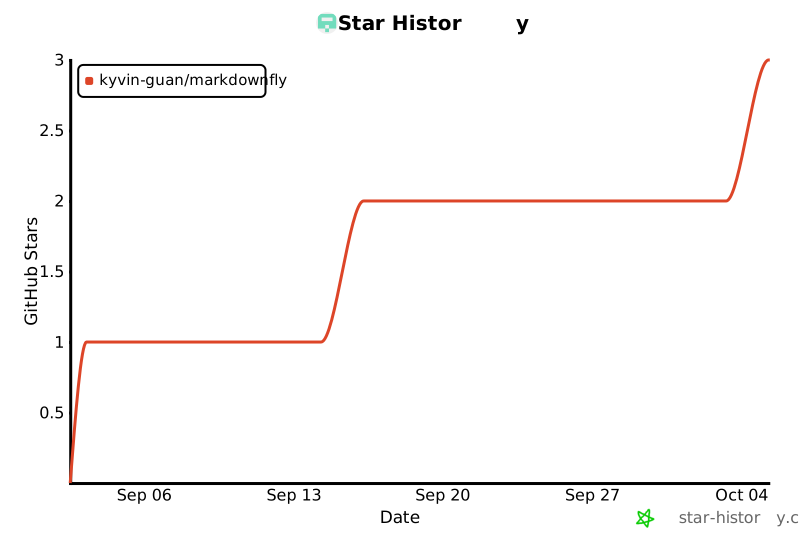
## ⭐ Star History
|
|
425
|
+
|
|
426
|
+
<div align="center">
|
|
427
|
+
|
|
428
|
+
[](https://star-history.com/#Kyvin-Guan/markdownFly&Date)
|
|
429
|
+
|
|
430
|
+
</div>
|
|
431
|
+
|
|
432
|
+
---
|
|
433
|
+
|
|
434
|
+
## 📄 License
|
|
435
|
+
|
|
436
|
+
MIT License © 2026 MarkdownFly Contributors
|
|
437
|
+
|
|
438
|
+
---
|
|
439
|
+
|
|
440
|
+
<div align="center">
|
|
441
|
+
|
|
442
|
+
Made with ❤️ by [MarkdownFly Contributors](https://github.com/Kyvin-Guan/markdownFly/graphs/contributors)
|
|
443
|
+
|
|
444
|
+
</div>
|