markdown-text-editor 1.7.0 → 1.8.0
This diff represents the content of publicly available package versions that have been released to one of the supported registries. The information contained in this diff is provided for informational purposes only and reflects changes between package versions as they appear in their respective public registries.
- package/LICENSE +1 -1
- package/README.md +17 -10
- package/dist/markdown-text-editor.es.js +829 -646
- package/dist/markdown-text-editor.es.js.map +1 -1
- package/dist/markdown-text-editor.min.js +73 -71
- package/dist/markdown-text-editor.min.js.map +1 -1
- package/dist/markdown-text-editor.umd.js +73 -71
- package/dist/markdown-text-editor.umd.js.map +1 -1
- package/package.json +13 -8
- package/types/index.d.ts +9 -0
package/LICENSE
CHANGED
package/README.md
CHANGED
|
@@ -1,6 +1,6 @@
|
|
|
1
|
-
#
|
|
1
|
+
# Markdown Text Editor
|
|
2
2
|
|
|
3
|
-
###
|
|
3
|
+
### Toolbar, live preview and WYSIWYG on the textarea you already have
|
|
4
4
|
|
|
5
5
|
[![npm installs][npm_installs]](https://www.npmjs.com/package/markdown-text-editor)
|
|
6
6
|
[![Jsdelivr hits][jsdelivr]](https://cdn.jsdelivr.net/npm/markdown-text-editor)
|
|
@@ -13,27 +13,34 @@ A lightweight, embeddable JavaScript Markdown editor that transforms a standard
|
|
|
13
13
|
|
|
14
14
|
A native-first Markdown editor built on a standard textarea. No data binding, no API — just drop it in and your forms keep working as-is.
|
|
15
15
|
|
|
16
|
+
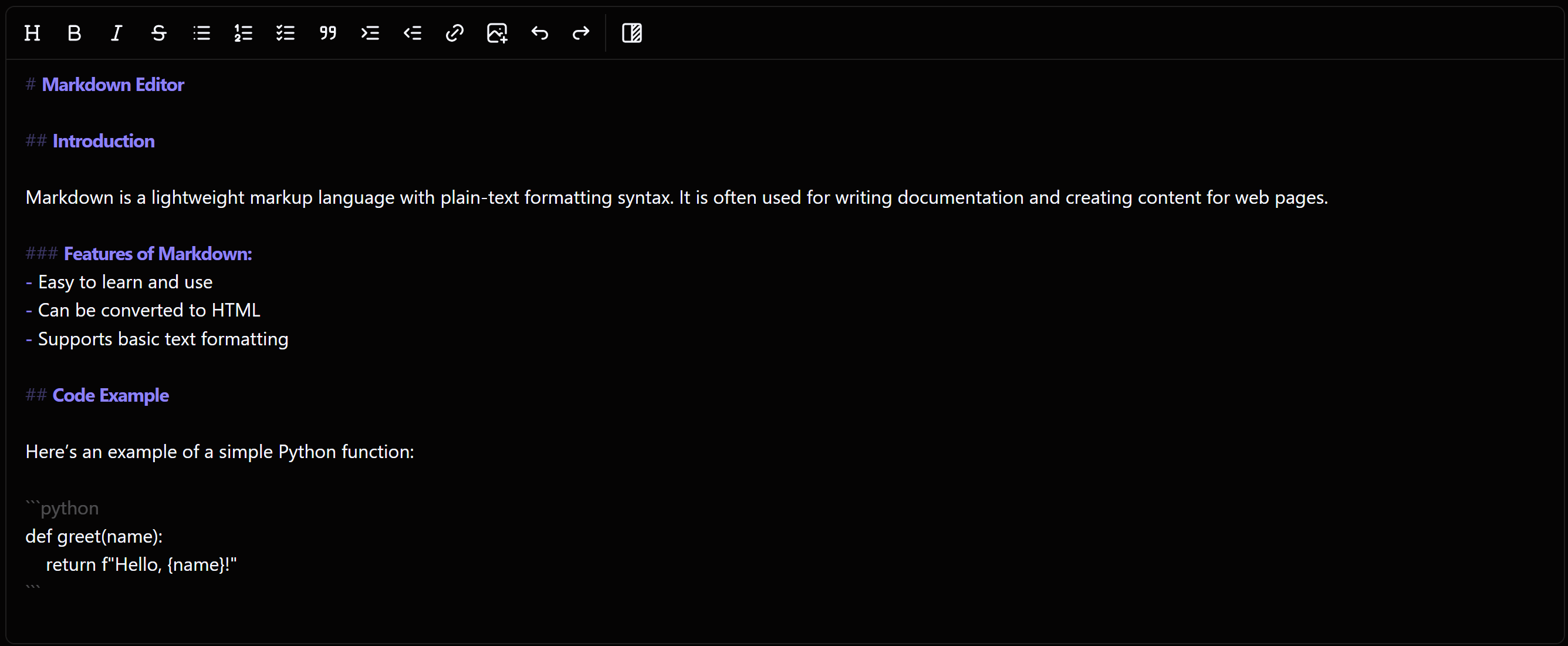
**Works standalone.** No Frutjam, no Tailwind, no framework required, the styles are bundled.
|
|
17
|
+
|
|
18
|
+
|
|
19
|
+
|
|
20
|
+
<sub>Hybrid mode. Text is styled as you type and the Markdown stays where it is, because this is your `<textarea>`, not a copy of it.</sub>
|
|
21
|
+
|
|
16
22
|
> **No complex APIs. No data binding. No JSON schemas.** Just a `<textarea>` that types Markdown and submits like any normal form field — enhanced with a rich toolbar, live preview, and WYSIWYG hybrid mode.
|
|
17
23
|
|
|
18
24
|
## ⭐ Why developers choose this over EasyMDE / SimpleMDE
|
|
19
25
|
|
|
20
|
-
Most JavaScript markdown editors (EasyMDE, SimpleMDE, CodeMirror-based editors)
|
|
26
|
+
Most JavaScript markdown editors (EasyMDE, SimpleMDE, CodeMirror-based editors) hide your `<textarea>` and edit a copy, writing the value back when the form is submitted. That holds up until something else needs the field: a `required` input the browser cannot focus blocks the submit entirely, and `.value` or `FormData` read before submit returns an empty string, which breaks htmx, Turbo, Livewire, autosave and unsaved-changes guards.
|
|
21
27
|
|
|
22
28
|
**MarkdownEditor is different.** It sits transparently on top of your existing `<textarea>`:
|
|
23
29
|
|
|
24
30
|
| Feature | MarkdownEditor | EasyMDE / SimpleMDE |
|
|
25
31
|
|---|---|---|
|
|
26
|
-
| Native `<textarea>` preserved | ✅ | ❌
|
|
27
|
-
|
|
|
28
|
-
|
|
|
32
|
+
| Native `<textarea>` preserved | ✅ | ❌ Hidden, edited as a copy |
|
|
33
|
+
| Works with `required` fields | ✅ | ❌ Browser blocks the submit |
|
|
34
|
+
| `.value` correct before submit | ✅ | ❌ Empty until the form submits |
|
|
35
|
+
| Serialises with `FormData`, htmx, Turbo | ✅ | ❌ Needs the editor's own API |
|
|
29
36
|
| WYSIWYG hybrid mode | ✅ | ❌ |
|
|
30
|
-
|
|
|
31
|
-
|
|
|
32
|
-
| RTL support | ✅ | ❌ |
|
|
37
|
+
| Inline event handlers (CSP) | ✅ None | Some |
|
|
38
|
+
| RTL support | ✅ Built in | Via CodeMirror's `direction` option |
|
|
33
39
|
| Built-in Find & Replace | ✅ | ❌ |
|
|
34
40
|
| Swap the markdown parser | ✅ | ❌ |
|
|
35
41
|
| Keyboard shortcuts | ✅ | Partial |
|
|
36
42
|
| Dark mode / theming | ✅ | Limited |
|
|
43
|
+
| Bundle size, gzipped | 51 KB | 107 KB (JS + CSS) |
|
|
37
44
|
|
|
38
45
|
## 🚀 Quick Start
|
|
39
46
|
|
|
@@ -149,7 +156,7 @@ useEffect(() => {
|
|
|
149
156
|
}, []);
|
|
150
157
|
```
|
|
151
158
|
|
|
152
|
-
Use `defaultValue`, not `value`. The editor writes to the textarea directly, so a controlled binding (or Vue's `:value`) would overwrite what the user is typing. Full React and Vue examples are in the [documentation](https://frutjam.com/
|
|
159
|
+
Use `defaultValue`, not `value`. The editor writes to the textarea directly, so a controlled binding (or Vue's `:value`) would overwrite what the user is typing. Full React and Vue examples are in the [documentation](https://frutjam.com/plugins/markdown-editor).
|
|
153
160
|
|
|
154
161
|
The same two rules cover Svelte, Angular and anything else: don't bind the value, and call `destroy()` on unmount. In Angular, `onChange` fires outside the zone, so wrap it in `zone.run()` for change detection to notice.
|
|
155
162
|
|