koishi-plugin-twitter-fetcher 0.0.4 → 1.0.2
This diff represents the content of publicly available package versions that have been released to one of the supported registries. The information contained in this diff is provided for informational purposes only and reflects changes between package versions as they appear in their respective public registries.
- package/lib/index.d.ts +31 -2
- package/lib/index.js +260 -92
- package/package.json +9 -5
- package/readme.md +87 -20
package/lib/index.d.ts
CHANGED
|
@@ -1,13 +1,42 @@
|
|
|
1
1
|
import { Context, Schema } from 'koishi';
|
|
2
2
|
export declare const name = "twitter-fetcher";
|
|
3
|
-
export declare const inject:
|
|
4
|
-
|
|
3
|
+
export declare const inject: {
|
|
4
|
+
required: string[];
|
|
5
|
+
};
|
|
6
|
+
declare module 'koishi' {
|
|
7
|
+
interface Tables {
|
|
8
|
+
twitter_subscriptions: {
|
|
9
|
+
id: string;
|
|
10
|
+
last_tweet_url: string;
|
|
11
|
+
};
|
|
12
|
+
}
|
|
13
|
+
}
|
|
14
|
+
interface BaseConfig {
|
|
5
15
|
showScreenshot: boolean;
|
|
6
16
|
sendText: boolean;
|
|
7
17
|
sendMedia: boolean;
|
|
8
18
|
cookie: string;
|
|
9
19
|
useForward: boolean;
|
|
20
|
+
sub_showLink: boolean;
|
|
21
|
+
sub_showScreenshot: boolean;
|
|
22
|
+
sub_sendText: boolean;
|
|
23
|
+
sub_sendMedia: boolean;
|
|
24
|
+
sub_useForward: boolean;
|
|
10
25
|
logDetails: boolean;
|
|
11
26
|
}
|
|
27
|
+
type SubscriptionConfig = {
|
|
28
|
+
enableSubscription: false;
|
|
29
|
+
} | {
|
|
30
|
+
enableSubscription: true;
|
|
31
|
+
platform: string;
|
|
32
|
+
selfId: string;
|
|
33
|
+
updateInterval: number;
|
|
34
|
+
subscriptions: {
|
|
35
|
+
username: string;
|
|
36
|
+
groupIds: string[];
|
|
37
|
+
}[];
|
|
38
|
+
};
|
|
39
|
+
export type Config = BaseConfig & SubscriptionConfig;
|
|
12
40
|
export declare const Config: Schema<Config>;
|
|
13
41
|
export declare function apply(ctx: Context, config: Config): void;
|
|
42
|
+
export {};
|
package/lib/index.js
CHANGED
|
@@ -28,118 +28,286 @@ __export(src_exports, {
|
|
|
28
28
|
module.exports = __toCommonJS(src_exports);
|
|
29
29
|
var import_koishi = require("koishi");
|
|
30
30
|
var name = "twitter-fetcher";
|
|
31
|
-
var inject =
|
|
31
|
+
var inject = {
|
|
32
|
+
required: ["puppeteer", "database"]
|
|
33
|
+
};
|
|
32
34
|
var logger = new import_koishi.Logger(name);
|
|
33
|
-
var Config = import_koishi.Schema.
|
|
34
|
-
|
|
35
|
-
|
|
36
|
-
|
|
37
|
-
|
|
38
|
-
|
|
39
|
-
|
|
40
|
-
|
|
35
|
+
var Config = import_koishi.Schema.intersect([
|
|
36
|
+
// --- 第 1 块: 解析设置 ---
|
|
37
|
+
import_koishi.Schema.object({
|
|
38
|
+
showScreenshot: import_koishi.Schema.boolean().description("是否发送推文截图。").default(true),
|
|
39
|
+
sendText: import_koishi.Schema.boolean().description("是否发送提取的推文文本。").default(true),
|
|
40
|
+
sendMedia: import_koishi.Schema.boolean().description("是否发送推文中的图片和视频。").default(true),
|
|
41
|
+
cookie: import_koishi.Schema.string().role("textarea").description("Twitter/X 登录 Cookie(auth_token)."),
|
|
42
|
+
useForward: import_koishi.Schema.boolean().description("是否使用合并转发的形式发送(仅 QQ 平台效果最佳).").default(false)
|
|
43
|
+
}).description("解析设置 - 当手动发送链接时生效"),
|
|
44
|
+
// --- 第 2 块: 订阅推送内容设置 ---
|
|
45
|
+
import_koishi.Schema.object({
|
|
46
|
+
sub_showLink: import_koishi.Schema.boolean().description("推送时, 是否在消息顶部附带原始推文链接。").default(true),
|
|
47
|
+
sub_showScreenshot: import_koishi.Schema.boolean().description("推送时, 是否发送推文截图。").default(true),
|
|
48
|
+
sub_sendText: import_koishi.Schema.boolean().description("推送时, 是否发送提取的推文文本。").default(true),
|
|
49
|
+
sub_sendMedia: import_koishi.Schema.boolean().description("推送时, 是否发送推文中的图片和视频。").default(true),
|
|
50
|
+
sub_useForward: import_koishi.Schema.boolean().description("推送时, 是否使用合并转发。").default(false)
|
|
51
|
+
}).description("订阅推送内容设置 - 当自动推送订阅时生效"),
|
|
52
|
+
// --- 第 3 块: 订阅设置 ---
|
|
53
|
+
// 第一部分:仅用于在 UI 上创建“订阅设置”分组和那个可见的布尔开关
|
|
54
|
+
import_koishi.Schema.object({
|
|
55
|
+
enableSubscription: import_koishi.Schema.boolean().description("**【总开关】是否启用订阅功能。** 开启后会显示详细设置。").default(false)
|
|
56
|
+
}).description("订阅设置"),
|
|
57
|
+
// 第二部分:根据 enableSubscription 的值,来决定是否显示下方的详细配置
|
|
58
|
+
import_koishi.Schema.union([
|
|
59
|
+
import_koishi.Schema.object({
|
|
60
|
+
enableSubscription: import_koishi.Schema.const(false)
|
|
61
|
+
// 当开关为 false 时,此对象生效,不添加任何额外字段
|
|
62
|
+
}),
|
|
63
|
+
import_koishi.Schema.object({
|
|
64
|
+
enableSubscription: import_koishi.Schema.const(true),
|
|
65
|
+
// 当开关为 true 时,此对象生效,加载所有必填字段
|
|
66
|
+
platform: import_koishi.Schema.string().description("用于执行推送的机器人平台 (例如: onebot)。").required(),
|
|
67
|
+
selfId: import_koishi.Schema.string().description("用于执行推送的机器人账号/ID (例如: 12345678)。").required(),
|
|
68
|
+
updateInterval: import_koishi.Schema.number().min(1).description("每隔多少分钟检查一次更新。").default(5),
|
|
69
|
+
subscriptions: import_koishi.Schema.array(import_koishi.Schema.object({
|
|
70
|
+
username: import_koishi.Schema.string().description("推特用户名"),
|
|
71
|
+
groupIds: import_koishi.Schema.array(String).role("table").description("需要推送的群号列表")
|
|
72
|
+
})).role("table").description("订阅列表")
|
|
73
|
+
})
|
|
74
|
+
]),
|
|
75
|
+
// --- 第 4 块: 调试设置 ---
|
|
76
|
+
import_koishi.Schema.object({
|
|
77
|
+
logDetails: import_koishi.Schema.boolean().description("是否在控制台输出详细的调试日志。").default(false)
|
|
78
|
+
}).description("调试设置")
|
|
79
|
+
]);
|
|
41
80
|
var TWEET_URL_REGEX = /https?:\/\/(twitter\.com|x\.com)\/(\w+)\/status\/(\d+)/g;
|
|
81
|
+
async function getLatestTweetUrlByPuppeteer(puppeteer, username, cookie, log) {
|
|
82
|
+
log?.(`正在访问用户主页: https://x.com/${username}`);
|
|
83
|
+
const page = await puppeteer.page();
|
|
84
|
+
try {
|
|
85
|
+
if (cookie) await page.setCookie({ name: "auth_token", value: cookie, domain: ".x.com", path: "/", httpOnly: true, secure: true });
|
|
86
|
+
await page.goto(`https://x.com/${username}`, { waitUntil: "networkidle2", timeout: 3e4 });
|
|
87
|
+
await page.waitForSelector('article[data-testid="tweet"]', { timeout: 2e4 });
|
|
88
|
+
const latestTweetUrl = await page.evaluate(() => {
|
|
89
|
+
const articles = document.querySelectorAll('article[data-testid="tweet"]');
|
|
90
|
+
for (const article of articles) {
|
|
91
|
+
if (article.querySelector('[data-testid="socialContext"]')?.textContent.includes("Pinned")) continue;
|
|
92
|
+
const link = article.querySelector('a[href*="/status/"]');
|
|
93
|
+
if (link) return link.href;
|
|
94
|
+
}
|
|
95
|
+
return null;
|
|
96
|
+
});
|
|
97
|
+
if (latestTweetUrl) {
|
|
98
|
+
log?.(`成功获取到最新推文链接: ${latestTweetUrl}`);
|
|
99
|
+
return latestTweetUrl;
|
|
100
|
+
}
|
|
101
|
+
logger.warn(`[Puppeteer] 在 ${username} 的主页上未能找到任何推文链接.`);
|
|
102
|
+
return null;
|
|
103
|
+
} finally {
|
|
104
|
+
await page.close();
|
|
105
|
+
}
|
|
106
|
+
}
|
|
107
|
+
__name(getLatestTweetUrlByPuppeteer, "getLatestTweetUrlByPuppeteer");
|
|
108
|
+
async function getTweetScreenshot(puppeteer, url, cookie, log) {
|
|
109
|
+
const page = await puppeteer.page();
|
|
110
|
+
try {
|
|
111
|
+
log?.(`准备截图页面: ${url}`);
|
|
112
|
+
if (cookie) await page.setCookie({ name: "auth_token", value: cookie, domain: ".x.com", path: "/", httpOnly: true, secure: true });
|
|
113
|
+
await page.goto(url, { waitUntil: "networkidle2", timeout: 2e4 });
|
|
114
|
+
const tweetElement = await page.waitForSelector('article[data-testid="tweet"]', { timeout: 15e3 });
|
|
115
|
+
if (!tweetElement) throw new Error("无法在页面上定位到推文元素.");
|
|
116
|
+
log?.("定位到推文元素, 正在生成截图...");
|
|
117
|
+
return await tweetElement.screenshot();
|
|
118
|
+
} finally {
|
|
119
|
+
await page.close();
|
|
120
|
+
}
|
|
121
|
+
}
|
|
122
|
+
__name(getTweetScreenshot, "getTweetScreenshot");
|
|
42
123
|
function apply(ctx, config) {
|
|
43
|
-
logger.info("Twitter Fetcher
|
|
44
|
-
ctx.
|
|
45
|
-
|
|
46
|
-
|
|
47
|
-
|
|
48
|
-
|
|
49
|
-
|
|
50
|
-
|
|
51
|
-
|
|
52
|
-
|
|
53
|
-
|
|
54
|
-
const mediaParts = [];
|
|
55
|
-
let screenshotElement = null;
|
|
56
|
-
if (config.showScreenshot) {
|
|
57
|
-
try {
|
|
58
|
-
const screenshotBuffer = await getTweetScreenshot(ctx.puppeteer, originalUrl, config.cookie);
|
|
59
|
-
if (!screenshotBuffer) throw new Error("截图结果为空");
|
|
60
|
-
const dataUri = `data:image/png;base64,${screenshotBuffer.toString("base64")}`;
|
|
61
|
-
screenshotElement = import_koishi.h.image(dataUri);
|
|
62
|
-
} catch (error) {
|
|
63
|
-
if (config.logDetails) logger.warn(`[!] 截图失败: ${error.message}`);
|
|
124
|
+
logger.info("Twitter Fetcher 插件已启动.");
|
|
125
|
+
ctx.model.extend("twitter_subscriptions", { id: "string", last_tweet_url: "string" }, { primary: "id" });
|
|
126
|
+
const createLogStepper = /* @__PURE__ */ __name((prefix) => {
|
|
127
|
+
let step = 1;
|
|
128
|
+
return (message, isWarning = false) => {
|
|
129
|
+
if (config.logDetails) {
|
|
130
|
+
const logMessage = `[${prefix}] [步骤 ${step++}] ${message}`;
|
|
131
|
+
if (isWarning) {
|
|
132
|
+
logger.warn(logMessage);
|
|
133
|
+
} else {
|
|
134
|
+
logger.info(logMessage);
|
|
64
135
|
}
|
|
65
136
|
}
|
|
137
|
+
};
|
|
138
|
+
}, "createLogStepper");
|
|
139
|
+
async function processTweet(tweetUrl, options) {
|
|
140
|
+
const log = createLogStepper(tweetUrl);
|
|
141
|
+
log(`开始处理推文`);
|
|
142
|
+
const textParts = [];
|
|
143
|
+
const mediaParts = [];
|
|
144
|
+
if (options.showLink) {
|
|
145
|
+
log("配置了推送时附带链接, 在消息头部加入推文URL.");
|
|
146
|
+
textParts.push(tweetUrl);
|
|
147
|
+
}
|
|
148
|
+
let screenshotElement = null;
|
|
149
|
+
if (options.showScreenshot) {
|
|
150
|
+
log("开始获取推文截图.");
|
|
66
151
|
try {
|
|
67
|
-
const
|
|
68
|
-
|
|
69
|
-
|
|
70
|
-
|
|
71
|
-
if (apiResponse.text && config.sendText) textParts.push(`推文内容:${apiResponse.text}`);
|
|
72
|
-
if (config.logDetails) logger.info(`[3/5] 文本部分构造完毕。`);
|
|
73
|
-
if (screenshotElement) mediaParts.push(screenshotElement);
|
|
74
|
-
if (config.sendMedia && apiResponse.media_extended) {
|
|
75
|
-
for (const media of apiResponse.media_extended) {
|
|
76
|
-
try {
|
|
77
|
-
const file = await ctx.http.file(media.url);
|
|
78
|
-
const buffer = Buffer.from(file.data);
|
|
79
|
-
const mimeType = file.mime || (media.type === "video" ? "video/mp4" : "image/jpeg");
|
|
80
|
-
const dataUri = `data:${mimeType};base64,${buffer.toString("base64")}`;
|
|
81
|
-
if (media.type === "image") mediaParts.push(import_koishi.h.image(dataUri));
|
|
82
|
-
else if (media.type === "video") mediaParts.push(import_koishi.h.video(dataUri));
|
|
83
|
-
} catch (error) {
|
|
84
|
-
if (config.logDetails) logger.warn(`下载媒体文件失败: ${media.url}`, error);
|
|
85
|
-
}
|
|
86
|
-
}
|
|
152
|
+
const screenshotBuffer = await getTweetScreenshot(ctx.puppeteer, tweetUrl, config.cookie, log);
|
|
153
|
+
if (screenshotBuffer) {
|
|
154
|
+
screenshotElement = import_koishi.h.image(`data:image/png;base64,${screenshotBuffer.toString("base64")}`);
|
|
155
|
+
log("截图成功并转换为 h.image 元素.");
|
|
87
156
|
}
|
|
88
157
|
} catch (error) {
|
|
89
|
-
|
|
158
|
+
log(`截图失败: ${error.message}`, true);
|
|
159
|
+
}
|
|
160
|
+
}
|
|
161
|
+
try {
|
|
162
|
+
const apiUrl = tweetUrl.replace(/(twitter\.com|x\.com)/, "api.vxtwitter.com");
|
|
163
|
+
log(`使用 vxtwitter API 进行解析: ${apiUrl}`);
|
|
164
|
+
const http = ctx.http.extend({ headers: { "User-Agent": "Koishi-Twitter-Fetcher" } });
|
|
165
|
+
const apiResponse = await http.get(apiUrl);
|
|
166
|
+
log("成功接收到 vxtwitter API 的响应.");
|
|
167
|
+
if (apiResponse.user_screen_name) textParts.push(`用户ID: ${apiResponse.user_screen_name}`);
|
|
168
|
+
if (apiResponse.text && options.sendText) textParts.push(`推文内容: ${apiResponse.text}`);
|
|
169
|
+
if (screenshotElement) mediaParts.push(screenshotElement);
|
|
170
|
+
if (options.sendMedia && apiResponse.media_extended) {
|
|
171
|
+
log(`发现 ${apiResponse.media_extended.length} 个媒体文件, 准备下载.`);
|
|
172
|
+
for (const [index, media] of apiResponse.media_extended.entries()) {
|
|
173
|
+
try {
|
|
174
|
+
const file = await http.file(media.url);
|
|
175
|
+
const dataUri = `data:${file.mime};base64,${Buffer.from(file.data).toString("base64")}`;
|
|
176
|
+
if (media.type === "image") mediaParts.push(import_koishi.h.image(dataUri));
|
|
177
|
+
else if (media.type === "video") mediaParts.push(import_koishi.h.video(dataUri));
|
|
178
|
+
log(`媒体文件 ${index + 1}/${apiResponse.media_extended.length} (${media.type}) 下载并转换成功.`);
|
|
179
|
+
} catch (error) {
|
|
180
|
+
log(`下载媒体文件失败: ${media.url}, 错误: ${error.message}`, true);
|
|
181
|
+
}
|
|
182
|
+
}
|
|
90
183
|
}
|
|
91
184
|
const hasText = textParts.length > 0;
|
|
92
185
|
const hasMedia = mediaParts.length > 0;
|
|
93
186
|
if (!hasText && !hasMedia) {
|
|
94
|
-
|
|
187
|
+
log("处理完成, 但未能获取到任何文本或媒体内容.", true);
|
|
188
|
+
return "未能获取到任何内容.";
|
|
189
|
+
}
|
|
190
|
+
log("内容组装完毕, 准备发送.");
|
|
191
|
+
if (options.useForward && options.platform === "onebot") {
|
|
192
|
+
const forwardElements = [textParts.join("\n"), ...mediaParts].filter(Boolean);
|
|
193
|
+
return (0, import_koishi.h)("figure", {}, forwardElements);
|
|
95
194
|
} else {
|
|
96
|
-
|
|
97
|
-
|
|
98
|
-
if (hasText) forwardElements.push(textParts.join("\n"));
|
|
99
|
-
if (hasMedia) forwardElements.push(...mediaParts);
|
|
100
|
-
if (config.logDetails) logger.info(`[4/5] 正在构造合并转发消息...`);
|
|
101
|
-
await session.send((0, import_koishi.h)("figure", {}, forwardElements));
|
|
102
|
-
if (config.logDetails) logger.info(`[5/5] 合并转发消息已发送。`);
|
|
103
|
-
} else {
|
|
104
|
-
const finalParts = [];
|
|
105
|
-
if (hasText) finalParts.push(textParts.join("\n"));
|
|
106
|
-
if (hasMedia) finalParts.push(...mediaParts);
|
|
107
|
-
const messageToSend = finalParts.join("\n\n");
|
|
108
|
-
if (config.logDetails) logger.info(`[4/5] 最终拼接的待发消息字符串:
|
|
109
|
-
---
|
|
110
|
-
${messageToSend}
|
|
111
|
-
---`);
|
|
112
|
-
await session.send(messageToSend);
|
|
113
|
-
if (config.logDetails) logger.info(`[5/5] 消息已发送。`);
|
|
114
|
-
}
|
|
195
|
+
const finalParts = [textParts.join("\n"), ...mediaParts].filter(Boolean);
|
|
196
|
+
return finalParts.join("\n\n");
|
|
115
197
|
}
|
|
116
198
|
} catch (error) {
|
|
117
|
-
logger.
|
|
118
|
-
|
|
119
|
-
await session.bot.deleteMessage(session.channelId, statusMessage[0]);
|
|
199
|
+
logger.warn(`[!] API 处理失败:`, error);
|
|
200
|
+
return `获取推文内容失败: ${error.message}`;
|
|
120
201
|
}
|
|
202
|
+
}
|
|
203
|
+
__name(processTweet, "processTweet");
|
|
204
|
+
ctx.middleware(async (session, next) => {
|
|
205
|
+
TWEET_URL_REGEX.lastIndex = 0;
|
|
206
|
+
const match = TWEET_URL_REGEX.exec(session.content);
|
|
207
|
+
if (!match) return next();
|
|
208
|
+
const statusMessage = await session.send((0, import_koishi.h)("quote", { id: session.messageId }) + "正在解析推文链接, 请稍候...");
|
|
209
|
+
const messageToSend = await processTweet(match[0], {
|
|
210
|
+
showLink: false,
|
|
211
|
+
showScreenshot: config.showScreenshot,
|
|
212
|
+
sendText: config.sendText,
|
|
213
|
+
sendMedia: config.sendMedia,
|
|
214
|
+
useForward: config.useForward,
|
|
215
|
+
platform: session.platform
|
|
216
|
+
});
|
|
217
|
+
await session.send(messageToSend);
|
|
218
|
+
await session.bot.deleteMessage(session.channelId, statusMessage[0]);
|
|
121
219
|
});
|
|
122
|
-
|
|
123
|
-
|
|
124
|
-
|
|
125
|
-
|
|
126
|
-
|
|
127
|
-
if (
|
|
128
|
-
|
|
129
|
-
|
|
130
|
-
await page.setCookie(cookieObj, xCookie);
|
|
220
|
+
async function checkAndPushUpdates(isManualTrigger = false) {
|
|
221
|
+
if (!config.enableSubscription) return;
|
|
222
|
+
if (config.logDetails) logger.info("[订阅] 开始新一轮更新检查...");
|
|
223
|
+
const botKey = `${config.platform}:${config.selfId}`;
|
|
224
|
+
const bot = ctx.bots[botKey];
|
|
225
|
+
if (!bot || !bot.online) {
|
|
226
|
+
logger.warn(`[订阅] 配置中指定的机器人 [${botKey}] 不存在或不在线, 跳过本轮检查.`);
|
|
227
|
+
return isManualTrigger ? `配置中指定的机器人 [${botKey}] 不存在或不在线.` : void 0;
|
|
131
228
|
}
|
|
132
|
-
|
|
133
|
-
const
|
|
134
|
-
|
|
135
|
-
|
|
136
|
-
|
|
137
|
-
|
|
138
|
-
|
|
139
|
-
|
|
229
|
+
let updatesFound = 0;
|
|
230
|
+
for (const sub of config.subscriptions) {
|
|
231
|
+
if (!sub.username || !sub.groupIds || sub.groupIds.length === 0) continue;
|
|
232
|
+
const log = createLogStepper(`订阅:${sub.username}`);
|
|
233
|
+
log("开始处理此用户的订阅.");
|
|
234
|
+
try {
|
|
235
|
+
const latestTweetUrl = await getLatestTweetUrlByPuppeteer(ctx.puppeteer, sub.username, config.cookie, log);
|
|
236
|
+
if (!latestTweetUrl) {
|
|
237
|
+
log("未能获取到最新推文链接, 跳过.", true);
|
|
238
|
+
continue;
|
|
239
|
+
}
|
|
240
|
+
const record = await ctx.database.get("twitter_subscriptions", { id: sub.username });
|
|
241
|
+
const lastUrl = record[0]?.last_tweet_url;
|
|
242
|
+
log(`数据库中记录的上次链接: ${lastUrl || "无"}`);
|
|
243
|
+
const isNew = !lastUrl || lastUrl !== latestTweetUrl;
|
|
244
|
+
const shouldPush = isNew || isManualTrigger && latestTweetUrl;
|
|
245
|
+
if (shouldPush) {
|
|
246
|
+
updatesFound++;
|
|
247
|
+
logger.info(`[订阅] ★★★ 发现 [${sub.username}] 的新推文! ★★★`);
|
|
248
|
+
log(`准备推送新内容: ${latestTweetUrl}`);
|
|
249
|
+
const messageToSend = await processTweet(latestTweetUrl, {
|
|
250
|
+
showLink: config.sub_showLink,
|
|
251
|
+
showScreenshot: config.sub_showScreenshot,
|
|
252
|
+
sendText: config.sub_sendText,
|
|
253
|
+
sendMedia: config.sub_sendMedia,
|
|
254
|
+
useForward: config.sub_useForward,
|
|
255
|
+
platform: bot.platform
|
|
256
|
+
});
|
|
257
|
+
for (const groupId of sub.groupIds) {
|
|
258
|
+
await bot.sendMessage(groupId, messageToSend);
|
|
259
|
+
}
|
|
260
|
+
log(`已向 ${sub.groupIds.length} 个群组完成推送.`);
|
|
261
|
+
if (isNew) {
|
|
262
|
+
await ctx.database.upsert("twitter_subscriptions", [{ id: sub.username, last_tweet_url: latestTweetUrl }]);
|
|
263
|
+
log("数据库已更新为最新推文链接.");
|
|
264
|
+
}
|
|
265
|
+
} else {
|
|
266
|
+
log("链接无变化, 无需推送.");
|
|
267
|
+
}
|
|
268
|
+
} catch (error) {
|
|
269
|
+
logger.warn(`[订阅] 检查 [${sub.username}] 时发生错误:`, error);
|
|
270
|
+
}
|
|
271
|
+
}
|
|
272
|
+
if (config.logDetails) logger.info(`[订阅] 本轮更新检查结束, 共发现 ${updatesFound} 个更新.`);
|
|
273
|
+
if (isManualTrigger) {
|
|
274
|
+
return `手动检查完成, 共为 ${updatesFound} 个订阅执行了推送任务.`;
|
|
275
|
+
}
|
|
276
|
+
}
|
|
277
|
+
__name(checkAndPushUpdates, "checkAndPushUpdates");
|
|
278
|
+
if (config.enableSubscription) {
|
|
279
|
+
ctx.setInterval(() => checkAndPushUpdates(false), config.updateInterval * import_koishi.Time.minute);
|
|
280
|
+
ctx.command("测试推特用户推送 <username:string>", "测试指定用户的最新推文能否被正确获取和推送").action(async ({ session }, username) => {
|
|
281
|
+
if (!username) return "请输入要测试的用户名.";
|
|
282
|
+
await session.send(`正在为 [${username}] 获取最新推文并模拟推送到当前会话...`);
|
|
283
|
+
const log = createLogStepper(`测试:${username}`);
|
|
284
|
+
try {
|
|
285
|
+
const latestTweetUrl = await getLatestTweetUrlByPuppeteer(ctx.puppeteer, username, config.cookie, log);
|
|
286
|
+
if (!latestTweetUrl) return "无法找到该用户的最新推文链接.";
|
|
287
|
+
await session.send(`成功获取到最新推文链接: ${latestTweetUrl}
|
|
288
|
+
正在生成内容...`);
|
|
289
|
+
const messageToSend = await processTweet(latestTweetUrl, {
|
|
290
|
+
showLink: config.sub_showLink,
|
|
291
|
+
showScreenshot: config.sub_showScreenshot,
|
|
292
|
+
sendText: config.sub_sendText,
|
|
293
|
+
sendMedia: config.sub_sendMedia,
|
|
294
|
+
useForward: config.sub_useForward,
|
|
295
|
+
platform: session.platform
|
|
296
|
+
});
|
|
297
|
+
await session.send(messageToSend);
|
|
298
|
+
} catch (error) {
|
|
299
|
+
logger.warn(`[测试] 测试 [${username}] 时出错:`, error);
|
|
300
|
+
return `测试失败: ${error.message}`;
|
|
301
|
+
}
|
|
302
|
+
});
|
|
303
|
+
ctx.command("测试群组推送", "立即获取所有订阅的最新推文并强制推送, 用于测试").action(async ({ session }) => {
|
|
304
|
+
session.send("正在手动触发所有订阅的强制推送任务...");
|
|
305
|
+
const result = await checkAndPushUpdates(true);
|
|
306
|
+
return result;
|
|
307
|
+
});
|
|
140
308
|
}
|
|
141
309
|
}
|
|
142
|
-
__name(
|
|
310
|
+
__name(apply, "apply");
|
|
143
311
|
// Annotate the CommonJS export names for ESM import in node:
|
|
144
312
|
0 && (module.exports = {
|
|
145
313
|
Config,
|
package/package.json
CHANGED
|
@@ -1,7 +1,7 @@
|
|
|
1
1
|
{
|
|
2
2
|
"name": "koishi-plugin-twitter-fetcher",
|
|
3
|
-
"description": "
|
|
4
|
-
"version": "
|
|
3
|
+
"description": "一个推特/Twitter/X内容获取与订阅插件,支持链接实时解析和用户后台订阅推送。",
|
|
4
|
+
"version": "1.0.2",
|
|
5
5
|
"main": "lib/index.js",
|
|
6
6
|
"typings": "lib/index.d.ts",
|
|
7
7
|
"files": [
|
|
@@ -25,7 +25,10 @@
|
|
|
25
25
|
"x",
|
|
26
26
|
"fetcher",
|
|
27
27
|
"parse",
|
|
28
|
-
"resolver"
|
|
28
|
+
"resolver",
|
|
29
|
+
"subscribe",
|
|
30
|
+
"subscription",
|
|
31
|
+
"push"
|
|
29
32
|
],
|
|
30
33
|
"peerDependencies": {
|
|
31
34
|
"koishi": "^4.18.7",
|
|
@@ -33,11 +36,12 @@
|
|
|
33
36
|
},
|
|
34
37
|
"koishi": {
|
|
35
38
|
"description": {
|
|
36
|
-
"zh": "
|
|
39
|
+
"zh": "自动解析推特/Twitter/X链接,聚合内容。现已支持订阅推送!"
|
|
37
40
|
},
|
|
38
41
|
"service": {
|
|
39
42
|
"required": [
|
|
40
|
-
"puppeteer"
|
|
43
|
+
"puppeteer",
|
|
44
|
+
"database"
|
|
41
45
|
]
|
|
42
46
|
}
|
|
43
47
|
}
|
package/readme.md
CHANGED
|
@@ -3,20 +3,24 @@
|
|
|
3
3
|
[](https://www.npmjs.com/package/koishi-plugin-twitter-fetcher)
|
|
4
4
|
[](https://www.npmjs.com/package/koishi-plugin-twitter-fetcher)
|
|
5
5
|
|
|
6
|
-
一个 推特/Twitter/X
|
|
6
|
+
一个 推特/Twitter/X 内容获取与订阅插件。它不仅可以在你发送推特链接时即时解析其完整内容,还能让你订阅喜爱的推特用户,自动将他们的最新动态推送到指定的群聊中。
|
|
7
7
|
|
|
8
|
-
*
|
|
9
|
-
*
|
|
10
|
-
* 推文中包含的所有图片和视频
|
|
8
|
+
* **链接解析模式**:当群友在聊天中发送一条推特链接时,插件会自动抓取该链接的全部信息,包含用户ID、推文内容、推文截图以及所有图片和视频。
|
|
9
|
+
* **订阅推送模式**:在后台定时检查你订阅的推特用户,一旦发现新推文,就会自动将其内容推送到你指定的群组。
|
|
11
10
|
|
|
12
11
|
---
|
|
13
12
|
|
|
14
13
|
## ✨ 功能特性
|
|
15
14
|
|
|
16
|
-
*
|
|
17
|
-
*
|
|
18
|
-
*
|
|
19
|
-
*
|
|
15
|
+
* **双模工作**: 同时支持 **链接实时解析** 和 **用户后台订阅** 两种模式。
|
|
16
|
+
* **配置清晰**: 采用总开关控制订阅功能,启用后才显示详细配置,清爽直观。
|
|
17
|
+
* **定时推送**: 订阅功能可按指定频率自动检查并推送新推文。
|
|
18
|
+
* **内容全面**: 无论是解析还是推送,都能完整获取推文的文本、截图、图片、视频。
|
|
19
|
+
* **高度定制**: 链接解析和订阅推送的内容格式(如是否带截图、文本等)可分开独立配置。
|
|
20
|
+
* **多群组推送**: 可将同一个用户的更新推送到多个不同的群组。
|
|
21
|
+
* **智能发送**: 在 QQ 平台可使用合并转发,在其他平台则会自动切换为图文拼接模式。
|
|
22
|
+
* **内置测试指令**: 提供了方便的指令来测试用户推送和群组推送功能是否正常。
|
|
23
|
+
* **运行稳定**: 采用链接比对,防止出现重复推送的情况。
|
|
20
24
|
|
|
21
25
|
---
|
|
22
26
|
|
|
@@ -24,50 +28,112 @@
|
|
|
24
28
|
|
|
25
29
|
1. **从 Koishi 插件市场搜索并安装 `twitter-fetcher`。**
|
|
26
30
|
|
|
27
|
-
2. **安装前置依赖 `puppeteer
|
|
31
|
+
2. **安装前置依赖 `puppeteer` 和 `database`**:本插件的功能依赖于 `puppeteer` 服务和 `database` 服务,请确保你已经正确安装并配置了它们。
|
|
28
32
|
```bash
|
|
29
33
|
# 如果你尚未安装 puppeteer
|
|
30
34
|
npm install koishi-plugin-puppeteer
|
|
31
|
-
|
|
35
|
+
|
|
32
36
|
|
|
33
37
|
---
|
|
34
38
|
|
|
35
39
|
## ⚙️ 配置项
|
|
36
40
|
|
|
37
|
-
|
|
41
|
+
你可以在插件配置页面中调整以下选项,它们被清晰地分成了不同模块:
|
|
42
|
+
|
|
43
|
+
### 1. 解析设置
|
|
44
|
+
> 这些选项仅在**手动发送链接**进行解析时生效。
|
|
38
45
|
|
|
39
46
|
* **`showScreenshot`**: 是否发送推文截图。(默认: `true`)
|
|
40
47
|
* **`sendText`**: 是否发送提取的推文文本。(默认: `true`)
|
|
41
48
|
* **`sendMedia`**: 是否发送推文中的图片和视频。(默认: `true`)
|
|
42
|
-
* **`cookie`**:
|
|
43
|
-
* **`useForward`**: (
|
|
44
|
-
|
|
49
|
+
* **`cookie`**: Twitter/X 登录 Cookie(auth_token)。
|
|
50
|
+
* **`useForward`**: 是否使用合并转发的形式发送。(默认: `false`)
|
|
51
|
+
|
|
52
|
+
### 2. 订阅推送内容设置
|
|
53
|
+
> 这些选项仅在**后台自动推送**订阅的推文时生效。
|
|
54
|
+
|
|
55
|
+
* **`sub_showLink`**: 推送时,是否附带原始推文链接。(默认: `true`)
|
|
56
|
+
* **`sub_showScreenshot`**: 推送时,是否发送截图。(默认: `true`)
|
|
57
|
+
* **`sub_sendText`**: 推送时,是否发送文本。(默认: `true`)
|
|
58
|
+
* **`sub_sendMedia`**: 推送时,是否发送媒体文件。(默认: `true`)
|
|
59
|
+
* **`sub_useForward`**: 推送时,是否使用合并转发。(默认: `false`)
|
|
60
|
+
|
|
61
|
+
### 3. 订阅设置
|
|
62
|
+
> 在这里启用并管理你的订阅列表。
|
|
63
|
+
|
|
64
|
+
* **`enableSubscription`**: **【总开关】** 是否启用订阅功能。这是一个总开关,开启后才会显示下面的详细设置,并使订阅功能真正开始工作。
|
|
65
|
+
* **`platform`**: (必填) 用于执行推送的机器人平台 (例如: `onebot`)。
|
|
66
|
+
* **`selfId`**: (必填) 用于执行推送的机器人账号/ID (例如: `12345678`)。
|
|
67
|
+
* **`updateInterval`**: 每隔多少分钟检查一次更新。(默认: `5` 分钟)
|
|
68
|
+
* **`subscriptions`**: 你的订阅列表。这是一个表格,你可以添加多行:
|
|
69
|
+
* **`username`**: 你要订阅的推特用户名 (例如 `elonmusk`)。
|
|
70
|
+
* **`groupIds`**: 一个或多个群号的列表,新推文将会被推送到这些群。
|
|
71
|
+
|
|
72
|
+
### 4. 调试设置
|
|
73
|
+
|
|
74
|
+
* **`logDetails`**: 是否在控制台输出详细的分步调试日志。日常使用建议关闭。(默认: `false`)
|
|
45
75
|
|
|
46
76
|
---
|
|
47
77
|
|
|
48
78
|
## 📝 使用方法
|
|
49
79
|
|
|
50
|
-
|
|
51
|
-
|
|
52
|
-
你只需要在任意群聊或私聊中,发送一条包含 Twitter/X 链接的消息即可。
|
|
80
|
+
### 1. 链接解析
|
|
81
|
+
安装并启用插件后,此功能默认开启。你只需要在任意群聊或私聊中,发送一条包含 Twitter/X 链接的消息即可。
|
|
53
82
|
|
|
54
83
|
**例如:**
|
|
55
84
|
> 快看这个!https://x.com/elonmusk/status/1585841233215102976
|
|
56
85
|
|
|
57
86
|
机器人将会自动解析并回复聚合了全部内容的消息。
|
|
58
87
|
|
|
88
|
+
### 2. 订阅功能
|
|
89
|
+
1. 前往插件配置页,在 **【订阅设置】** 中,将 `enableSubscription` **总开关** 打开。
|
|
90
|
+
2. 开启后,下方的详细设置会展开。请正确填写 `platform` 和 `selfId`,告诉插件使用哪个机器人账号进行推送。
|
|
91
|
+
3. 在 `subscriptions` 表格中,点击“添加行”,然后填入你想订阅的 **推特用户名** 和希望接收推送的 **群号列表**。
|
|
92
|
+
4. 保存配置。插件将自动开始按照 `updateInterval` 设定的时间间隔检查更新。当发现新推文时,会自动推送到指定的群组。
|
|
93
|
+
|
|
94
|
+
### 3. Twitter/X auth_token 的获取
|
|
95
|
+
1. 在电脑浏览器上打开 https://x.com 并登录你自己的账号。
|
|
96
|
+
2. 按 F12 打开开发者面板。
|
|
97
|
+
3. 在开发者工具面板的顶部菜单栏中,找到并点击 “应用” (Application) 选项卡。
|
|
98
|
+
4. 在左侧的菜单中,展开 “存储” (Storage) 下的 “Cookie” (Cookies) 栏目。
|
|
99
|
+
5. 在这个列表中找到名为 auth_token 的那一行。
|
|
100
|
+
6. 在 auth_token 这一行中,找到 “值” (Value) 这一列对应的内容,它通常是一长串由字母和数字组成的字符串。
|
|
101
|
+
7. 将刚刚复制的这一长串 auth_token 的值,粘贴到 Koishi 插件配置页面的 cookie 输入框中。
|
|
102
|
+
|
|
103
|
+
---
|
|
104
|
+
|
|
105
|
+
## ⌨️ 命令
|
|
106
|
+
|
|
107
|
+
**注意:** 以下命令只有在配置中启用了 `enableSubscription` 总开关后才可用。
|
|
108
|
+
|
|
109
|
+
* `测试推特用户推送 <username:string>`
|
|
110
|
+
* 功能:测试获取指定用户的最新推文,并将生成的内容直接发送到当前会话。
|
|
111
|
+
* 用途:用于在添加到订阅列表前,验证对某个用户的抓取是否成功,以及预览推送消息的格式。
|
|
112
|
+
* 示例:`测试推特用户推送 elonmusk`
|
|
113
|
+
|
|
114
|
+
* `测试群组推送`
|
|
115
|
+
* 功能:立即手动触发一次对所有已配置订阅的检查,并将最新推文(无论是否已推送过)强制推送到目标群组。
|
|
116
|
+
* 用途:用于在配置好订阅列表后,立即验证机器人的推送功能是否正常工作,无需等待下一个检查周期。
|
|
117
|
+
|
|
59
118
|
---
|
|
60
119
|
|
|
61
120
|
## 🖼️ 效果演示
|
|
62
121
|
|
|
63
|
-
|
|
122
|
+
**链接解析效果:**
|
|
123
|
+
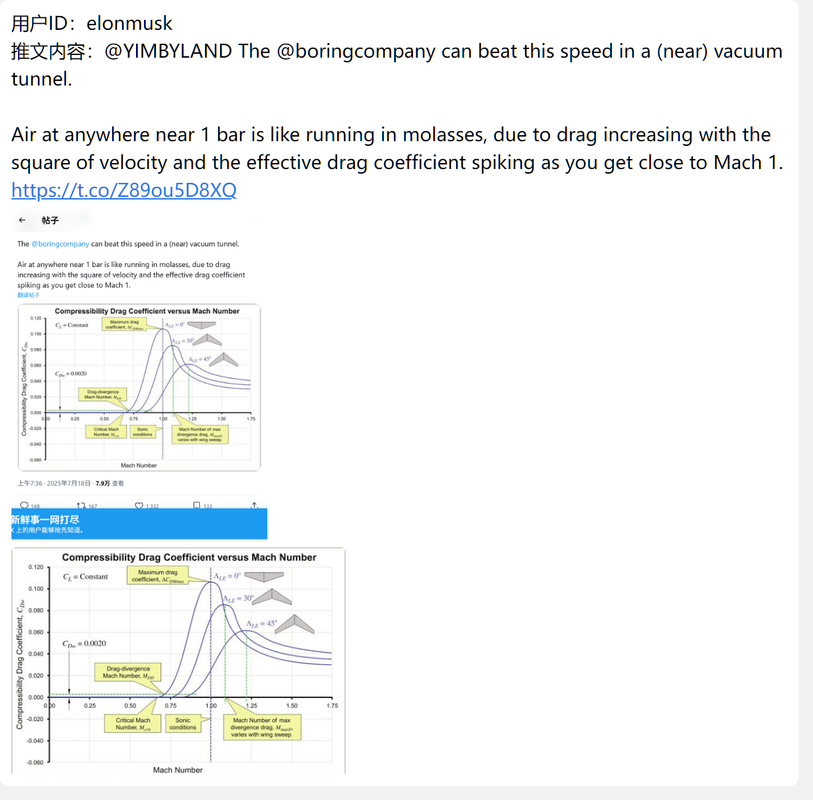
|
|
124
|
+
|
|
125
|
+
**订阅推送效果:** (与上方类似,但会根据你的“订阅推送内容设置”进行格式化,并自动发送到指定群组)
|
|
64
126
|
|
|
65
127
|
---
|
|
66
128
|
|
|
67
129
|
## ⚠️ 注意事项
|
|
68
130
|
|
|
69
131
|
* 本插件的数据来源于 `vxtwitter.com` API,解析的成功与否依赖于该服务的稳定性。
|
|
70
|
-
*
|
|
132
|
+
* 截图和订阅功能依赖 Puppeteer 访问 Twitter 官网,可能会因网络波动或 Twitter 前端代码更新而偶尔失败。
|
|
133
|
+
* 订阅功能会将已推送的推文链接记录在数据库中,以防止重复推送。
|
|
134
|
+
* 遇到推送失败请优先重启 Puppeteer。
|
|
135
|
+
* 如遇到推文截图内容被遮挡请修改 Puppeteer 浏览器设置中的 默认的视图宽度 和 默认视图高度 选项,建议2560*1440。
|
|
136
|
+
|
|
71
137
|
|
|
72
138
|
---
|
|
73
139
|
|
|
@@ -89,4 +155,5 @@
|
|
|
89
155
|
|
|
90
156
|
* **Koishi**: 提供了一切的基础。
|
|
91
157
|
* **`vxtwitter.com`**: 提供了稳定、好用的推文解析 API。
|
|
92
|
-
* **shangxue 的 `bilibili-videolink-analysis` 插件**: 本插件的文件处理方案深受其启发,特此感谢。
|
|
158
|
+
* **shangxue 的 `bilibili-videolink-analysis` 插件**: 本插件的文件处理方案深受其启发,特此感谢。
|
|
159
|
+
* 特别鸣谢:Google Gemini 2.5 Pro。
|