console-table-printer 2.16.0 → 2.16.1
This diff represents the content of publicly available package versions that have been released to one of the supported registries. The information contained in this diff is provided for informational purposes only and reflects changes between package versions as they appear in their respective public registries.
- package/README.md +33 -33
- package/package.json +19 -8
package/README.md
CHANGED
|
@@ -1,6 +1,6 @@
|
|
|
1
1
|
<h1 align="center">console-table-printer</h1>
|
|
2
2
|
|
|
3
|
-
> 🖥️🍭Printing
|
|
3
|
+
> 🖥️🍭 Printing pretty tables in your console
|
|
4
4
|
|
|
5
5
|

|
|
6
6
|
[](https://packagephobia.com/result?p=console-table-printer)
|
|
@@ -9,7 +9,7 @@
|
|
|
9
9
|
|
|
10
10
|
## Synopsis
|
|
11
11
|
|
|
12
|
-
|
|
12
|
+
Print simple tables with colored rows in your console. It's useful when you want to present tables in console output using JS.
|
|
13
13
|
|
|
14
14
|
## Installation
|
|
15
15
|
|
|
@@ -35,7 +35,7 @@ printTable(tasks);
|
|
|
35
35
|
|
|
36
36
|
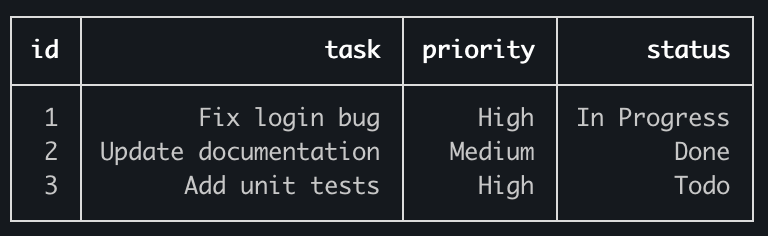
|
|
37
37
|
|
|
38
|
-
## 🚨🚨Announcement🚨🚨 Official
|
|
38
|
+
## 🚨🚨Announcement🚨🚨 Official documentation has moved [here](https://console-table.netlify.app/docs)
|
|
39
39
|
|
|
40
40
|
You can also create a Table instance and print it:
|
|
41
41
|
|
|
@@ -59,7 +59,7 @@ leaderboard.printTable();
|
|
|
59
59
|
|
|
60
60
|
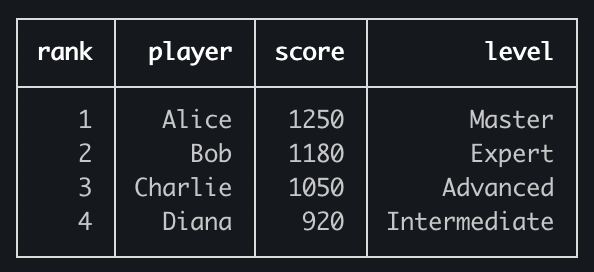
|
|
61
61
|
|
|
62
|
-
You can also
|
|
62
|
+
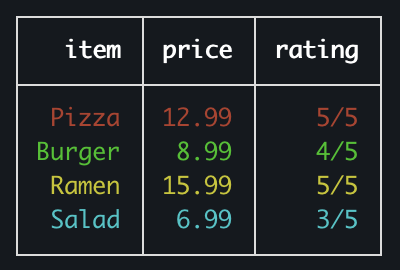
You can also add color to your table like this:
|
|
63
63
|
|
|
64
64
|
```typescript
|
|
65
65
|
import { Table } from 'console-table-printer';
|
|
@@ -74,7 +74,7 @@ p.printTable();
|
|
|
74
74
|
|
|
75
75
|
|
|
76
76
|
|
|
77
|
-
You can also
|
|
77
|
+
You can also configure column properties (color/alignment/title).
|
|
78
78
|
|
|
79
79
|
```typescript
|
|
80
80
|
import { Table } from 'console-table-printer';
|
|
@@ -103,31 +103,31 @@ p.printTable();
|
|
|
103
103
|
|
|
104
104
|
## CLI
|
|
105
105
|
|
|
106
|
-
There is also a CLI tool for printing
|
|
106
|
+
There is also a CLI tool for printing tables directly in the terminal: [table-printer-cli](https://www.npmjs.com/package/table-printer-cli)
|
|
107
107
|
|
|
108
108
|
## Documentation
|
|
109
109
|
|
|
110
|
-
Official documentation has
|
|
110
|
+
Official documentation has moved here: [console-table-documentation](https://console-table.netlify.app)
|
|
111
111
|
|
|
112
112
|
### Table instance creation
|
|
113
113
|
|
|
114
|
-
|
|
114
|
+
Three ways to create a Table instance:
|
|
115
115
|
|
|
116
|
-
1. Simplest way `new Table()`
|
|
116
|
+
1. Simplest way: `new Table()`
|
|
117
117
|
|
|
118
|
-
2.
|
|
118
|
+
2. With column names only: `new Table(['column1', 'column2', 'column3'])`
|
|
119
119
|
|
|
120
|
-
3. Detailed
|
|
120
|
+
3. Detailed table instance creation:
|
|
121
121
|
|
|
122
122
|
```typescript
|
|
123
123
|
import { Table } from 'console-table-printer';
|
|
124
124
|
|
|
125
125
|
new Table({
|
|
126
|
-
title: '📊 Sales Report Q4 2024', //
|
|
126
|
+
title: '📊 Sales Report Q4 2024', // Text shown above the table (optional)
|
|
127
127
|
columns: [
|
|
128
128
|
{ name: 'region', alignment: 'left', color: 'blue' }, // with alignment and color
|
|
129
|
-
{ name: 'sales', alignment: 'right', maxLen: 30 }, // lines bigger than this will be
|
|
130
|
-
{ name: 'growth', title: 'Growth %' }, // Title is
|
|
129
|
+
{ name: 'sales', alignment: 'right', maxLen: 30 }, // lines bigger than this will be split into multiple lines
|
|
130
|
+
{ name: 'growth', title: 'Growth %' }, // Title is shown while printing; by default, title = name
|
|
131
131
|
{ name: 'price', transform: (value) => `$${Number(value).toFixed(2)}` }, // Transform function to format cell values before display
|
|
132
132
|
],
|
|
133
133
|
rows: [
|
|
@@ -135,17 +135,17 @@ new Table({
|
|
|
135
135
|
{ region: 'Europe', sales: '$1.8M', growth: '+8%' },
|
|
136
136
|
{ region: 'Asia Pacific', sales: '$3.2M', growth: '+22%' },
|
|
137
137
|
],
|
|
138
|
-
sort: (row1, row2) => row2.sales - row1.sales, // sorting order of rows (optional),
|
|
138
|
+
sort: (row1, row2) => row2.sales - row1.sales, // sorting order of rows (optional), using the same comparator shape as Array.sort
|
|
139
139
|
filter: (row) => row.growth > '+10%', // filtering rows (optional)
|
|
140
|
-
enabledColumns: ['region', 'sales'], // array of columns that you want to see
|
|
141
|
-
disabledColumns: ['growth'], // array of columns that you
|
|
140
|
+
enabledColumns: ['region', 'sales'], // array of columns that you want to see; all others will be ignored (optional)
|
|
141
|
+
disabledColumns: ['growth'], // array of columns that you don't want to see, these will always be hidden
|
|
142
142
|
colorMap: {
|
|
143
|
-
high_growth: '\x1b[32m', // define
|
|
143
|
+
high_growth: '\x1b[32m', // define a custom color
|
|
144
144
|
},
|
|
145
145
|
charLength: {
|
|
146
146
|
'👋': 2,
|
|
147
147
|
'😅': 2,
|
|
148
|
-
}, // custom
|
|
148
|
+
}, // custom character widths in the console
|
|
149
149
|
defaultColumnOptions: {
|
|
150
150
|
alignment: 'center',
|
|
151
151
|
color: 'red',
|
|
@@ -157,36 +157,36 @@ new Table({
|
|
|
157
157
|
|
|
158
158
|
### Functions
|
|
159
159
|
|
|
160
|
-
- `addRow(
|
|
161
|
-
- `addRows(rowObjects, options)`
|
|
162
|
-
- `clearRows()`
|
|
163
|
-
- `addColumn(columnObject)`
|
|
164
|
-
- `addColumns(columnObjects)`
|
|
165
|
-
- `printTable()` Prints the table
|
|
160
|
+
- `addRow(rowObject, options)` Adds a single row. This can be chained.
|
|
161
|
+
- `addRows(rowObjects, options)` Adds multiple rows. This accepts an array of row objects. In this case, options will be applied to all rows.
|
|
162
|
+
- `clearRows()` Removes all rows while keeping the table columns and options. This can be chained.
|
|
163
|
+
- `addColumn(columnObject)` Adds a single column.
|
|
164
|
+
- `addColumns(columnObjects)` Adds multiple columns.
|
|
165
|
+
- `printTable()` Prints the table in your console.
|
|
166
166
|
|
|
167
|
-
###
|
|
167
|
+
### Possible `color` values for rows
|
|
168
168
|
|
|
169
|
-
Check
|
|
169
|
+
Check docs: [color-vals](https://console-table.netlify.app/docs/doc-color)
|
|
170
170
|
|
|
171
|
-
Example usage: To
|
|
171
|
+
Example usage: To create a blue row
|
|
172
172
|
|
|
173
173
|
```typescript
|
|
174
174
|
table.addRow(rowObject, { color: 'blue' });
|
|
175
175
|
```
|
|
176
176
|
|
|
177
|
-
Example usage: To apply blue
|
|
177
|
+
Example usage: To apply blue to all rows
|
|
178
178
|
|
|
179
179
|
```typescript
|
|
180
180
|
table.addRows(rowsArray, { color: 'blue' });
|
|
181
181
|
```
|
|
182
182
|
|
|
183
|
-
###
|
|
183
|
+
### Possible `alignment` values for columns
|
|
184
184
|
|
|
185
|
-
Check
|
|
185
|
+
Check docs: [alignment-vals](https://console-table.netlify.app/docs/doc-alignment)
|
|
186
186
|
|
|
187
|
-
###
|
|
187
|
+
### TypeScript Support
|
|
188
188
|
|
|
189
|
-
You can get color
|
|
189
|
+
You can get color and alignment as types. Check docs: [types-docs](https://console-table.netlify.app/docs/doc-typescript)
|
|
190
190
|
|
|
191
191
|
## License
|
|
192
192
|
|
package/package.json
CHANGED
|
@@ -1,6 +1,6 @@
|
|
|
1
1
|
{
|
|
2
2
|
"name": "console-table-printer",
|
|
3
|
-
"version": "2.16.
|
|
3
|
+
"version": "2.16.1",
|
|
4
4
|
"repository": {
|
|
5
5
|
"type": "git",
|
|
6
6
|
"url": "git+https://github.com/console-table-printer/console-table-printer.git"
|
|
@@ -19,9 +19,20 @@
|
|
|
19
19
|
},
|
|
20
20
|
"keywords": [
|
|
21
21
|
"console-table",
|
|
22
|
-
"
|
|
23
|
-
"
|
|
24
|
-
"
|
|
22
|
+
"terminal-table",
|
|
23
|
+
"table-printer",
|
|
24
|
+
"pretty-table",
|
|
25
|
+
"cli-table",
|
|
26
|
+
"unicode-table",
|
|
27
|
+
"console-output",
|
|
28
|
+
"ascii-table",
|
|
29
|
+
"colored-table",
|
|
30
|
+
"table-formatter",
|
|
31
|
+
"object-table",
|
|
32
|
+
"pretty-print",
|
|
33
|
+
"json-table",
|
|
34
|
+
"json-to-table",
|
|
35
|
+
"array-to-table"
|
|
25
36
|
],
|
|
26
37
|
"files": [
|
|
27
38
|
"dist"
|
|
@@ -33,10 +44,10 @@
|
|
|
33
44
|
"@semantic-release/changelog": "^6.0.3",
|
|
34
45
|
"@semantic-release/git": "^10.0.1",
|
|
35
46
|
"@types/jest": "^30.0.0",
|
|
36
|
-
"@types/node": "^25.9.
|
|
37
|
-
"eslint": "^10.4.
|
|
47
|
+
"@types/node": "^25.9.2",
|
|
48
|
+
"eslint": "^10.4.1",
|
|
38
49
|
"eslint-config-prettier": "^10.1.8",
|
|
39
|
-
"eslint-plugin-prettier": "^5.5.
|
|
50
|
+
"eslint-plugin-prettier": "^5.5.6",
|
|
40
51
|
"husky": "^9.1.7",
|
|
41
52
|
"jest": "^30.4.2",
|
|
42
53
|
"prettier": "^3.8.3",
|
|
@@ -44,7 +55,7 @@
|
|
|
44
55
|
"semantic-release": "^25.0.3",
|
|
45
56
|
"ts-jest": "^29.4.11",
|
|
46
57
|
"typescript": "^6.0.3",
|
|
47
|
-
"typescript-eslint": "^8.60.
|
|
58
|
+
"typescript-eslint": "^8.60.1"
|
|
48
59
|
},
|
|
49
60
|
"homepage": "https://console-table.netlify.app",
|
|
50
61
|
"dependencies": {
|