@modern-js/main-doc 0.0.0-nightly-20250514160342 → 0.0.0-nightly-20250518160324
This diff represents the content of publicly available package versions that have been released to one of the supported registries. The information contained in this diff is provided for informational purposes only and reflects changes between package versions as they appear in their respective public registries.
- package/docs/en/apis/app/hooks/server/server.mdx +10 -0
- package/docs/en/apis/app/hooks/src/routes.mdx +3 -3
- package/docs/en/apis/app/runtime/bff/use-hono-context.mdx +30 -0
- package/docs/en/components/enable-bff.mdx +1 -27
- package/docs/en/components/rsbuild-config-tooltip.mdx +2 -2
- package/docs/en/components/tech-stack-node-framework.mdx +1 -1
- package/docs/en/configure/app/dev/asset-prefix.mdx +2 -3
- package/docs/en/configure/app/dev/client.mdx +2 -3
- package/docs/en/configure/app/dev/hmr.mdx +2 -3
- package/docs/en/configure/app/dev/live-reload.mdx +2 -3
- package/docs/en/configure/app/dev/progress-bar.mdx +2 -3
- package/docs/en/configure/app/dev/setup-middlewares.mdx +2 -3
- package/docs/en/configure/app/dev/watch-files.mdx +2 -3
- package/docs/en/configure/app/dev/write-to-disk.mdx +2 -3
- package/docs/en/configure/app/html/app-icon.mdx +2 -3
- package/docs/en/configure/app/html/crossorigin.mdx +2 -3
- package/docs/en/configure/app/html/favicon.mdx +2 -3
- package/docs/en/configure/app/html/inject.mdx +2 -3
- package/docs/en/configure/app/html/meta.mdx +2 -3
- package/docs/en/configure/app/html/mount-id.mdx +2 -3
- package/docs/en/configure/app/html/output-structure.mdx +2 -3
- package/docs/en/configure/app/html/script-loading.mdx +2 -3
- package/docs/en/configure/app/html/tags.mdx +2 -3
- package/docs/en/configure/app/html/template-parameters.mdx +2 -3
- package/docs/en/configure/app/html/template.mdx +2 -3
- package/docs/en/configure/app/html/title.mdx +2 -3
- package/docs/en/configure/app/output/asset-prefix.mdx +2 -3
- package/docs/en/configure/app/output/charset.mdx +2 -3
- package/docs/en/configure/app/output/copy.mdx +2 -3
- package/docs/en/configure/app/output/css-modules.mdx +2 -3
- package/docs/en/configure/app/output/data-uri-limit.mdx +2 -3
- package/docs/en/configure/app/output/dist-path.mdx +2 -3
- package/docs/en/configure/app/output/externals.mdx +2 -3
- package/docs/en/configure/app/output/filename-hash.mdx +2 -3
- package/docs/en/configure/app/output/filename.mdx +2 -3
- package/docs/en/configure/app/output/inject-styles.mdx +2 -3
- package/docs/en/configure/app/output/inline-scripts.mdx +2 -3
- package/docs/en/configure/app/output/inline-styles.mdx +2 -3
- package/docs/en/configure/app/output/legal-comments.mdx +2 -3
- package/docs/en/configure/app/output/minify.mdx +2 -3
- package/docs/en/configure/app/output/override-browserslist.mdx +2 -3
- package/docs/en/configure/app/output/polyfill.mdx +2 -3
- package/docs/en/configure/app/output/source-map.mdx +2 -3
- package/docs/en/configure/app/performance/build-cache.mdx +2 -3
- package/docs/en/configure/app/performance/bundle-analyze.mdx +2 -3
- package/docs/en/configure/app/performance/chunk-split.mdx +2 -3
- package/docs/en/configure/app/performance/dns-prefetch.mdx +2 -3
- package/docs/en/configure/app/performance/preconnect.mdx +2 -3
- package/docs/en/configure/app/performance/prefetch.mdx +2 -3
- package/docs/en/configure/app/performance/preload.mdx +2 -3
- package/docs/en/configure/app/performance/print-file-size.mdx +2 -3
- package/docs/en/configure/app/performance/profile.mdx +2 -3
- package/docs/en/configure/app/performance/remove-console.mdx +2 -3
- package/docs/en/configure/app/performance/remove-moment-locale.mdx +2 -3
- package/docs/en/configure/app/plugins.mdx +13 -33
- package/docs/en/configure/app/runtime/master-app.mdx +1 -5
- package/docs/en/configure/app/runtime/plugins.mdx +58 -0
- package/docs/en/configure/app/security/nonce.mdx +2 -3
- package/docs/en/configure/app/security/sri.mdx +0 -1
- package/docs/en/configure/app/server/port.mdx +2 -3
- package/docs/en/configure/app/source/alias-strategy.mdx +2 -3
- package/docs/en/configure/app/source/alias.mdx +2 -3
- package/docs/en/configure/app/source/decorators.mdx +2 -3
- package/docs/en/configure/app/source/define.mdx +2 -3
- package/docs/en/configure/app/source/exclude.mdx +2 -3
- package/docs/en/configure/app/source/include.mdx +2 -3
- package/docs/en/configure/app/source/pre-entry.mdx +2 -3
- package/docs/en/configure/app/source/transform-import.mdx +2 -3
- package/docs/en/configure/app/tools/css-extract.mdx +2 -3
- package/docs/en/configure/app/tools/css-loader.mdx +2 -2
- package/docs/en/configure/app/tools/html-plugin.mdx +2 -3
- package/docs/en/configure/app/tools/lightningcss-loader.mdx +2 -3
- package/docs/en/configure/app/tools/postcss.mdx +2 -3
- package/docs/en/configure/app/tools/rspack.mdx +2 -3
- package/docs/en/configure/app/tools/style-loader.mdx +2 -3
- package/docs/en/guides/advanced-features/bff/extend-server.mdx +33 -82
- package/docs/en/guides/advanced-features/bff/frameworks.mdx +12 -68
- package/docs/en/guides/advanced-features/custom-server.mdx +13 -9
- package/docs/en/plugin/cli-plugins/api.mdx +6 -0
- package/docs/en/plugin/runtime-plugins/api.mdx +6 -0
- package/docs/en/tutorials/first-app/c04-routes.mdx +4 -2
- package/docs/en/tutorials/first-app/c05-loader.mdx +4 -1
- package/docs/zh/apis/app/hooks/server/server.mdx +10 -0
- package/docs/zh/apis/app/hooks/src/routes.mdx +3 -3
- package/docs/zh/apis/app/runtime/bff/use-hono-context.mdx +31 -0
- package/docs/zh/components/enable-bff.mdx +2 -27
- package/docs/zh/components/rsbuild-config-tooltip.mdx +2 -2
- package/docs/zh/components/tech-stack-node-framework.mdx +1 -1
- package/docs/zh/configure/app/dev/asset-prefix.mdx +2 -3
- package/docs/zh/configure/app/dev/client.mdx +2 -3
- package/docs/zh/configure/app/dev/hmr.mdx +2 -3
- package/docs/zh/configure/app/dev/live-reload.mdx +2 -3
- package/docs/zh/configure/app/dev/progress-bar.mdx +2 -3
- package/docs/zh/configure/app/dev/setup-middlewares.mdx +2 -3
- package/docs/zh/configure/app/dev/watch-files.mdx +2 -3
- package/docs/zh/configure/app/dev/write-to-disk.mdx +2 -3
- package/docs/zh/configure/app/html/app-icon.mdx +2 -3
- package/docs/zh/configure/app/html/crossorigin.mdx +2 -3
- package/docs/zh/configure/app/html/favicon.mdx +2 -3
- package/docs/zh/configure/app/html/inject.mdx +2 -3
- package/docs/zh/configure/app/html/meta.mdx +2 -3
- package/docs/zh/configure/app/html/mount-id.mdx +2 -3
- package/docs/zh/configure/app/html/output-structure.mdx +2 -3
- package/docs/zh/configure/app/html/script-loading.mdx +2 -3
- package/docs/zh/configure/app/html/tags.mdx +2 -3
- package/docs/zh/configure/app/html/template-parameters.mdx +2 -3
- package/docs/zh/configure/app/html/template.mdx +2 -3
- package/docs/zh/configure/app/html/title.mdx +2 -3
- package/docs/zh/configure/app/output/asset-prefix.mdx +2 -3
- package/docs/zh/configure/app/output/charset.mdx +2 -3
- package/docs/zh/configure/app/output/copy.mdx +2 -3
- package/docs/zh/configure/app/output/css-modules.mdx +2 -3
- package/docs/zh/configure/app/output/data-uri-limit.mdx +2 -3
- package/docs/zh/configure/app/output/dist-path.mdx +2 -3
- package/docs/zh/configure/app/output/externals.mdx +2 -3
- package/docs/zh/configure/app/output/filename-hash.mdx +2 -3
- package/docs/zh/configure/app/output/filename.mdx +2 -3
- package/docs/zh/configure/app/output/inject-styles.mdx +2 -3
- package/docs/zh/configure/app/output/inline-scripts.mdx +2 -3
- package/docs/zh/configure/app/output/inline-styles.mdx +2 -3
- package/docs/zh/configure/app/output/legal-comments.mdx +2 -3
- package/docs/zh/configure/app/output/minify.mdx +2 -3
- package/docs/zh/configure/app/output/override-browserslist.mdx +2 -3
- package/docs/zh/configure/app/output/polyfill.mdx +2 -3
- package/docs/zh/configure/app/output/source-map.mdx +2 -3
- package/docs/zh/configure/app/performance/build-cache.mdx +2 -3
- package/docs/zh/configure/app/performance/bundle-analyze.mdx +2 -3
- package/docs/zh/configure/app/performance/chunk-split.mdx +2 -3
- package/docs/zh/configure/app/performance/dns-prefetch.mdx +2 -3
- package/docs/zh/configure/app/performance/preconnect.mdx +2 -3
- package/docs/zh/configure/app/performance/prefetch.mdx +2 -3
- package/docs/zh/configure/app/performance/preload.mdx +2 -3
- package/docs/zh/configure/app/performance/print-file-size.mdx +2 -3
- package/docs/zh/configure/app/performance/profile.mdx +2 -3
- package/docs/zh/configure/app/performance/remove-console.mdx +2 -3
- package/docs/zh/configure/app/performance/remove-moment-locale.mdx +2 -3
- package/docs/zh/configure/app/plugins.mdx +3 -24
- package/docs/zh/configure/app/runtime/master-app.mdx +1 -5
- package/docs/zh/configure/app/runtime/plugins.mdx +58 -0
- package/docs/zh/configure/app/security/nonce.mdx +2 -3
- package/docs/zh/configure/app/security/sri.mdx +0 -1
- package/docs/zh/configure/app/server/port.mdx +2 -3
- package/docs/zh/configure/app/source/alias-strategy.mdx +2 -3
- package/docs/zh/configure/app/source/alias.mdx +2 -3
- package/docs/zh/configure/app/source/decorators.mdx +2 -3
- package/docs/zh/configure/app/source/define.mdx +2 -3
- package/docs/zh/configure/app/source/exclude.mdx +2 -3
- package/docs/zh/configure/app/source/include.mdx +2 -3
- package/docs/zh/configure/app/source/pre-entry.mdx +2 -3
- package/docs/zh/configure/app/source/transform-import.mdx +2 -3
- package/docs/zh/configure/app/tools/css-extract.mdx +2 -3
- package/docs/zh/configure/app/tools/css-loader.mdx +2 -3
- package/docs/zh/configure/app/tools/html-plugin.mdx +2 -3
- package/docs/zh/configure/app/tools/lightningcss-loader.mdx +2 -3
- package/docs/zh/configure/app/tools/postcss.mdx +2 -3
- package/docs/zh/configure/app/tools/rspack.mdx +2 -3
- package/docs/zh/configure/app/tools/style-loader.mdx +2 -3
- package/docs/zh/guides/advanced-features/bff/extend-server.mdx +28 -76
- package/docs/zh/guides/advanced-features/bff/frameworks.mdx +6 -66
- package/docs/zh/guides/advanced-features/custom-server.mdx +12 -8
- package/docs/zh/plugin/cli-plugins/api.mdx +6 -0
- package/docs/zh/plugin/runtime-plugins/api.mdx +6 -0
- package/docs/zh/tutorials/first-app/c04-routes.mdx +4 -2
- package/docs/zh/tutorials/first-app/c05-loader.mdx +4 -1
- package/package.json +6 -4
- package/rspress.config.ts +6 -1
- package/src/components/RsbuildLink/index.tsx +2 -2
- package/src/index.ts +1 -5
- package/src/pages/index.tsx +3 -3
- package/docs/en/apis/app/hooks/api/middleware.mdx +0 -11
- package/docs/en/apis/app/runtime/bff/hook.mdx +0 -44
- package/docs/en/apis/app/runtime/bff/use-context.mdx +0 -38
- package/docs/zh/apis/app/hooks/api/middleware.mdx +0 -11
- package/docs/zh/apis/app/runtime/bff/hook.mdx +0 -44
- package/docs/zh/apis/app/runtime/bff/use-context.mdx +0 -38
|
@@ -1,6 +1,5 @@
|
|
|
1
1
|
---
|
|
2
2
|
title: removeConsole
|
|
3
|
-
configName: performance.removeConsole
|
|
4
3
|
---
|
|
5
4
|
|
|
6
5
|
# performance.removeConsole
|
|
@@ -10,6 +9,6 @@ configName: performance.removeConsole
|
|
|
10
9
|
|
|
11
10
|
在生产环境构建时,是否自动移除代码中的 `console.[methodName]`。
|
|
12
11
|
|
|
13
|
-
import
|
|
12
|
+
import RsbuildConfig from '@site-docs/components/rsbuild-config-tooltip';
|
|
14
13
|
|
|
15
|
-
<
|
|
14
|
+
<RsbuildConfig configName="performance.removeConsole" />
|
|
@@ -1,6 +1,5 @@
|
|
|
1
1
|
---
|
|
2
2
|
title: removeMomentLocale
|
|
3
|
-
configName: performance.removeMomentLocale
|
|
4
3
|
---
|
|
5
4
|
|
|
6
5
|
# performance.removeMomentLocale
|
|
@@ -10,6 +9,6 @@ configName: performance.removeMomentLocale
|
|
|
10
9
|
|
|
11
10
|
是否移除 [moment.js](https://momentjs.com/) 的语言包文件。
|
|
12
11
|
|
|
13
|
-
import
|
|
12
|
+
import RsbuildConfig from '@site-docs/components/rsbuild-config-tooltip';
|
|
14
13
|
|
|
15
|
-
<
|
|
14
|
+
<RsbuildConfig configName="performance.removeMomentLocale" />
|
|
@@ -1,39 +1,18 @@
|
|
|
1
|
-
---
|
|
2
|
-
sidebar_position: 9
|
|
3
|
-
---
|
|
4
|
-
|
|
5
1
|
# plugins
|
|
6
2
|
|
|
7
3
|
- **类型:** `CliPlugin[]`
|
|
8
4
|
- **默认值:** `[]`
|
|
9
5
|
|
|
10
|
-
用于配置自定义的 Modern.js
|
|
11
|
-
|
|
12
|
-
自定义插件的编写方式请参考 [如何编写插件](/plugin/plugin-system)。
|
|
6
|
+
用于配置自定义的 Modern.js 框架 CLI 插件。自定义 CLI 插件的编写方式请参考 [如何编写 CLI 插件](/plugin/introduction.html#cli-插件)。
|
|
13
7
|
|
|
14
8
|
## 注意事项
|
|
15
9
|
|
|
16
|
-
|
|
10
|
+
该选项**用于配置框架 CLI 插件**,如果你需要配置其他类型的插件,请选择对应的配置方式:
|
|
17
11
|
|
|
18
12
|
- 配置 Rsbuild 插件,请使用 [builderPlugins](/configure/app/builder-plugins) 配置项。
|
|
19
13
|
- 配置 Rspack 或 webpack 插件,请使用 [tools.bundlerChain](/configure/app/tools/bundler-chain) 配置项。
|
|
20
14
|
- 配置 Babel 插件,请使用 [tools.babel](/configure/app/tools/babel) 配置项。
|
|
21
|
-
|
|
22
|
-
## 插件类型
|
|
23
|
-
|
|
24
|
-
Modern.js 中内置了三种不同的框架插件:
|
|
25
|
-
|
|
26
|
-
- `CLI 插件`,适用于本地开发、编译构建阶段,可以在命令行和编译阶段扩展各种能力。
|
|
27
|
-
- `Server 插件`,适用于服务端。
|
|
28
|
-
- `Runtime 插件`,适用于前端运行时。
|
|
29
|
-
|
|
30
|
-
目前 Modern.js 开放了自定义 CLI 插件的能力,Server 插件和 Runtime 插件会在后续开放。
|
|
31
|
-
|
|
32
|
-
## 插件执行顺序
|
|
33
|
-
|
|
34
|
-
默认情况下,自定义插件会按照 `plugins` 数组的顺序依次执行,Modern.js 内置插件的执行时机早于自定义插件。
|
|
35
|
-
|
|
36
|
-
当插件内部使用了控制顺序的相关字段,比如 `pre`、`post` 时,会基于声明的字段对执行顺序进行调整,详见 [插件结构](/plugin/plugin-system)。
|
|
15
|
+
- 配置框架 Runtime 插件,请使用 [runtime 配置文件 plugins](/configure/app/runtime/plugins) 配置项。
|
|
37
16
|
|
|
38
17
|
## 示例
|
|
39
18
|
|
|
@@ -0,0 +1,58 @@
|
|
|
1
|
+
# plugins
|
|
2
|
+
|
|
3
|
+
- **类型:** `RuntimePlugin[]`
|
|
4
|
+
- **默认值:** `[]`
|
|
5
|
+
|
|
6
|
+
用于配置自定义的 Modern.js Runtime 插件。自定义 Runtime 插件的编写方式请参考 [如何编写 Runtime 插件](/plugin/introduction.html#runtime-插件)。
|
|
7
|
+
|
|
8
|
+
:::info
|
|
9
|
+
|
|
10
|
+
Runtime 插件需要在 `src/modern.runtime.ts` 文件中的 plugins 中进行配置。
|
|
11
|
+
|
|
12
|
+
:::
|
|
13
|
+
|
|
14
|
+
## 示例
|
|
15
|
+
|
|
16
|
+
下面是 Runtime 插件的使用示例。
|
|
17
|
+
|
|
18
|
+
### 使用 npm 上的插件
|
|
19
|
+
|
|
20
|
+
使用 npm 上的插件,需要通过包管理器安装插件,并通过 import 引入。
|
|
21
|
+
|
|
22
|
+
```ts title="src/modern.runtime.ts"
|
|
23
|
+
import { defineRuntimeConfig } from '@modern-js/runtime';
|
|
24
|
+
import { myPlugin } from 'my-plugin';
|
|
25
|
+
|
|
26
|
+
export default defineRuntimeConfig({
|
|
27
|
+
plugins: [myPlugin()],
|
|
28
|
+
});
|
|
29
|
+
```
|
|
30
|
+
|
|
31
|
+
### 使用本地插件
|
|
32
|
+
|
|
33
|
+
使用本地代码仓库中的插件,直接通过相对路径 import 引入即可。
|
|
34
|
+
|
|
35
|
+
```ts title="src/modern.runtime.ts"
|
|
36
|
+
import { defineRuntimeConfig } from '@modern-js/runtime';
|
|
37
|
+
import { myPlugin } from './config/plugin/myPlugin';
|
|
38
|
+
|
|
39
|
+
export default defineRuntimeConfig({
|
|
40
|
+
plugins: [myPlugin()],
|
|
41
|
+
});
|
|
42
|
+
```
|
|
43
|
+
|
|
44
|
+
### 插件配置项
|
|
45
|
+
|
|
46
|
+
如果插件提供了一些自定义的配置项,可以通过插件函数的参数传入配置。
|
|
47
|
+
|
|
48
|
+
```ts title="src/modern.runtime.ts"
|
|
49
|
+
import { defineRuntimeConfig } from '@modern-js/runtime';
|
|
50
|
+
import { myPlugin } from './config/plugin/myPlugin';
|
|
51
|
+
|
|
52
|
+
export default defineRuntimeConfig({
|
|
53
|
+
plugins: [myPlugin({
|
|
54
|
+
foo: 1,
|
|
55
|
+
bar: 2,
|
|
56
|
+
})],
|
|
57
|
+
});
|
|
58
|
+
```
|
|
@@ -1,6 +1,5 @@
|
|
|
1
1
|
---
|
|
2
2
|
title: nonce
|
|
3
|
-
configName: security.nonce
|
|
4
3
|
---
|
|
5
4
|
|
|
6
5
|
# security.nonce
|
|
@@ -15,6 +14,6 @@ type Nonce = string;
|
|
|
15
14
|
|
|
16
15
|
为 HTML 所引入的脚本资源添加随机属性值 nonce,使浏览器在解析到带有匹配 nonce 值的内联脚本时,能判断该脚本是否能执行。
|
|
17
16
|
|
|
18
|
-
import
|
|
17
|
+
import RsbuildConfig from '@site-docs/components/rsbuild-config-tooltip';
|
|
19
18
|
|
|
20
|
-
<
|
|
19
|
+
<RsbuildConfig configName="security.nonce" />
|
|
@@ -1,6 +1,5 @@
|
|
|
1
1
|
---
|
|
2
2
|
title: port
|
|
3
|
-
configName: server.port
|
|
4
3
|
---
|
|
5
4
|
|
|
6
5
|
# server.port
|
|
@@ -38,6 +37,6 @@ export default defineConfig({
|
|
|
38
37
|
});
|
|
39
38
|
```
|
|
40
39
|
|
|
41
|
-
import
|
|
40
|
+
import RsbuildConfig from '@site-docs/components/rsbuild-config-tooltip';
|
|
42
41
|
|
|
43
|
-
<
|
|
42
|
+
<RsbuildConfig configName="server.port" />
|
|
@@ -1,6 +1,5 @@
|
|
|
1
1
|
---
|
|
2
2
|
title: aliasStrategy
|
|
3
|
-
configName: source.aliasStrategy
|
|
4
3
|
---
|
|
5
4
|
|
|
6
5
|
# source.aliasStrategy
|
|
@@ -10,6 +9,6 @@ configName: source.aliasStrategy
|
|
|
10
9
|
|
|
11
10
|
`source.aliasStrategy` 用于控制 `tsconfig.json` 中的 `paths` 选项与打包工具的 `alias` 选项的优先级。
|
|
12
11
|
|
|
13
|
-
import
|
|
12
|
+
import RsbuildConfig from '@site-docs/components/rsbuild-config-tooltip';
|
|
14
13
|
|
|
15
|
-
<
|
|
14
|
+
<RsbuildConfig configName="source.aliasStrategy" />
|
|
@@ -1,6 +1,5 @@
|
|
|
1
1
|
---
|
|
2
2
|
title: alias
|
|
3
|
-
configName: source.alias
|
|
4
3
|
---
|
|
5
4
|
|
|
6
5
|
# source.alias
|
|
@@ -19,6 +18,6 @@ type Alias = Record<string, string | false | (string | false)[]> | Function;
|
|
|
19
18
|
对于 TypeScript 项目,你只需要在 `tsconfig.json` 中配置 [compilerOptions.paths](https://www.typescriptlang.org/tsconfig#paths) 即可,Rsbuild 会自动识别它,不需要额外配置 `source.alias` 字段,详见 [「路径别名」](https://modernjs.dev/guides/basic-features/alias.html)。
|
|
20
19
|
:::
|
|
21
20
|
|
|
22
|
-
import
|
|
21
|
+
import RsbuildConfig from '@site-docs/components/rsbuild-config-tooltip';
|
|
23
22
|
|
|
24
|
-
<
|
|
23
|
+
<RsbuildConfig configName="source.alias" />
|
|
@@ -1,6 +1,5 @@
|
|
|
1
1
|
---
|
|
2
2
|
title: decorators
|
|
3
|
-
configName: source.decorators
|
|
4
3
|
---
|
|
5
4
|
|
|
6
5
|
# source.decorators
|
|
@@ -23,6 +22,6 @@ const defaultDecorators = {
|
|
|
23
22
|
|
|
24
23
|
用于配置装饰器语法。
|
|
25
24
|
|
|
26
|
-
import
|
|
25
|
+
import RsbuildConfig from '@site-docs/components/rsbuild-config-tooltip';
|
|
27
26
|
|
|
28
|
-
<
|
|
27
|
+
<RsbuildConfig configName="source.decorators" />
|
|
@@ -1,6 +1,5 @@
|
|
|
1
1
|
---
|
|
2
2
|
title: define
|
|
3
|
-
configName: source.define
|
|
4
3
|
---
|
|
5
4
|
|
|
6
5
|
# source.define
|
|
@@ -16,6 +15,6 @@ const defaultDefine = {
|
|
|
16
15
|
|
|
17
16
|
构建时将代码中的变量替换成其它值或者表达式,可以用于在代码逻辑中区分开发环境与生产环境等场景。
|
|
18
17
|
|
|
19
|
-
import
|
|
18
|
+
import RsbuildConfig from '@site-docs/components/rsbuild-config-tooltip';
|
|
20
19
|
|
|
21
|
-
<
|
|
20
|
+
<RsbuildConfig configName="source.define" />
|
|
@@ -1,6 +1,5 @@
|
|
|
1
1
|
---
|
|
2
2
|
title: exclude
|
|
3
|
-
configName: source.exclude
|
|
4
3
|
---
|
|
5
4
|
|
|
6
5
|
# source.exclude
|
|
@@ -10,6 +9,6 @@ configName: source.exclude
|
|
|
10
9
|
|
|
11
10
|
指定不需要编译的 JavaScript/TypeScript 文件。用法与 Rspack 中的 [Rule.exclude](https://rspack.dev/zh/config/module#ruleexclude) 一致,支持传入字符串或正则表达式来匹配模块的路径。
|
|
12
11
|
|
|
13
|
-
import
|
|
12
|
+
import RsbuildConfig from '@site-docs/components/rsbuild-config-tooltip';
|
|
14
13
|
|
|
15
|
-
<
|
|
14
|
+
<RsbuildConfig configName="source.exclude" />
|
|
@@ -1,6 +1,5 @@
|
|
|
1
1
|
---
|
|
2
2
|
title: include
|
|
3
|
-
configName: source.include
|
|
4
3
|
---
|
|
5
4
|
|
|
6
5
|
# source.include
|
|
@@ -21,6 +20,6 @@ const defaultInclude = [
|
|
|
21
20
|
|
|
22
21
|
`source.include` 用于指定额外需要编译的 JavaScript 文件。
|
|
23
22
|
|
|
24
|
-
import
|
|
23
|
+
import RsbuildConfig from '@site-docs/components/rsbuild-config-tooltip';
|
|
25
24
|
|
|
26
|
-
<
|
|
25
|
+
<RsbuildConfig configName="source.include" />
|
|
@@ -1,6 +1,5 @@
|
|
|
1
1
|
---
|
|
2
2
|
title: preEntry
|
|
3
|
-
configName: source.preEntry
|
|
4
3
|
---
|
|
5
4
|
|
|
6
5
|
# source.preEntry
|
|
@@ -10,6 +9,6 @@ configName: source.preEntry
|
|
|
10
9
|
|
|
11
10
|
在每个页面的入口文件前添加一段代码,这段代码会早于页面的代码执行,因此可以用于执行一些全局的代码逻辑,比如注入 polyfill、设置全局样式等。
|
|
12
11
|
|
|
13
|
-
import
|
|
12
|
+
import RsbuildConfig from '@site-docs/components/rsbuild-config-tooltip';
|
|
14
13
|
|
|
15
|
-
<
|
|
14
|
+
<RsbuildConfig configName="source.preEntry" />
|
|
@@ -1,6 +1,5 @@
|
|
|
1
1
|
---
|
|
2
2
|
title: transformImport
|
|
3
|
-
configName: source.transformImport
|
|
4
3
|
---
|
|
5
4
|
|
|
6
5
|
# source.transformImport
|
|
@@ -59,9 +58,9 @@ const defaultArcoConfig = [
|
|
|
59
58
|
当你添加了 `antd` 或 `@arco-design/web-react` 相关的配置时,优先级会高于上述默认配置。
|
|
60
59
|
:::
|
|
61
60
|
|
|
62
|
-
import
|
|
61
|
+
import RsbuildConfig from '@site-docs/components/rsbuild-config-tooltip';
|
|
63
62
|
|
|
64
|
-
<
|
|
63
|
+
<RsbuildConfig configName="source.transformImport" />
|
|
65
64
|
|
|
66
65
|
### 禁用默认配置
|
|
67
66
|
|
|
@@ -1,6 +1,5 @@
|
|
|
1
1
|
---
|
|
2
2
|
title: cssExtract
|
|
3
|
-
configName: tools.cssExtract
|
|
4
3
|
---
|
|
5
4
|
|
|
6
5
|
# tools.cssExtract
|
|
@@ -30,6 +29,6 @@ const defaultOptions = {
|
|
|
30
29
|
|
|
31
30
|
通过 `tools.cssExtract` 可以更改 [CssExtractRspackPlugin](https://www.rspack.dev/zh/plugins/rspack/css-extract-rspack-plugin) 或 [mini-css-extract-plugin](https://github.com/webpack-contrib/mini-css-extract-plugin) 的配置。
|
|
32
31
|
|
|
33
|
-
import
|
|
32
|
+
import RsbuildConfig from '@site-docs/components/rsbuild-config-tooltip';
|
|
34
33
|
|
|
35
|
-
<
|
|
34
|
+
<RsbuildConfig configName="tools.cssExtract" />
|
|
@@ -1,6 +1,5 @@
|
|
|
1
1
|
---
|
|
2
2
|
title: cssLoader
|
|
3
|
-
configName: tools.cssLoader
|
|
4
3
|
---
|
|
5
4
|
|
|
6
5
|
# tools.cssLoader
|
|
@@ -17,6 +16,6 @@ const defaultOptions = {
|
|
|
17
16
|
|
|
18
17
|
修改 [css-loader](https://github.com/webpack-contrib/css-loader) 的配置项。
|
|
19
18
|
|
|
20
|
-
import
|
|
19
|
+
import RsbuildConfig from '@site-docs/components/rsbuild-config-tooltip';
|
|
21
20
|
|
|
22
|
-
<
|
|
21
|
+
<RsbuildConfig configName="tools.cssLoader" />
|
|
@@ -1,6 +1,5 @@
|
|
|
1
1
|
---
|
|
2
2
|
title: htmlPlugin
|
|
3
|
-
configName: tools.htmlPlugin
|
|
4
3
|
---
|
|
5
4
|
|
|
6
5
|
# tools.htmlPlugin
|
|
@@ -36,6 +35,6 @@ const defaultOptions = {
|
|
|
36
35
|
|
|
37
36
|
通过 `tools.htmlPlugin` 可以修改 [html-rspack-plugin](https://github.com/rspack-contrib/html-rspack-plugin) 或 [html-webpack-plugin](https://github.com/jantimon/html-webpack-plugin) 的配置项。
|
|
38
37
|
|
|
39
|
-
import
|
|
38
|
+
import RsbuildConfig from '@site-docs/components/rsbuild-config-tooltip';
|
|
40
39
|
|
|
41
|
-
<
|
|
40
|
+
<RsbuildConfig configName="tools.htmlPlugin" />
|
|
@@ -1,6 +1,5 @@
|
|
|
1
1
|
---
|
|
2
2
|
title: lightningcssLoader
|
|
3
|
-
configName: tools.lightningcssLoader
|
|
4
3
|
---
|
|
5
4
|
|
|
6
5
|
# tools.lightningcssLoader
|
|
@@ -36,6 +35,6 @@ const defaultOptions = {
|
|
|
36
35
|
|
|
37
36
|
需要注意的是,开启 `lightningcss-loader` 时,将会默认关闭 `postcss-loader`。
|
|
38
37
|
|
|
39
|
-
import
|
|
38
|
+
import RsbuildConfig from '@site-docs/components/rsbuild-config-tooltip';
|
|
40
39
|
|
|
41
|
-
<
|
|
40
|
+
<RsbuildConfig configName="tools.lightningcssLoader" />
|
|
@@ -1,6 +1,5 @@
|
|
|
1
1
|
---
|
|
2
2
|
title: postcss
|
|
3
|
-
configName: tools.postcss
|
|
4
3
|
---
|
|
5
4
|
|
|
6
5
|
# tools.postcss
|
|
@@ -35,6 +34,6 @@ Modern.js 默认集成 PostCSS,你可以通过 `tools.postcss` 对 [postcss-lo
|
|
|
35
34
|
|
|
36
35
|
需要注意的是,当你开启 `tools.lightningcss` 配置时,PostCSS 将会被默认禁用,包括 `postcss-loader` 及其默认插件。
|
|
37
36
|
|
|
38
|
-
import
|
|
37
|
+
import RsbuildConfig from '@site-docs/components/rsbuild-config-tooltip';
|
|
39
38
|
|
|
40
|
-
<
|
|
39
|
+
<RsbuildConfig configName="tools.postcss" />
|
|
@@ -1,6 +1,5 @@
|
|
|
1
1
|
---
|
|
2
2
|
title: rspack
|
|
3
|
-
configName: tools.rspack
|
|
4
3
|
---
|
|
5
4
|
|
|
6
5
|
# tools.rspack
|
|
@@ -10,6 +9,6 @@ configName: tools.rspack
|
|
|
10
9
|
|
|
11
10
|
`tools.rspack` 选项用于修改 [Rspack](https://rspack.dev/) 的配置项。
|
|
12
11
|
|
|
13
|
-
import
|
|
12
|
+
import RsbuildConfig from '@site-docs/components/rsbuild-config-tooltip';
|
|
14
13
|
|
|
15
|
-
<
|
|
14
|
+
<RsbuildConfig configName="tools.rspack" />
|
|
@@ -1,6 +1,5 @@
|
|
|
1
1
|
---
|
|
2
2
|
title: styleLoader
|
|
3
|
-
configName: tools.styleLoader
|
|
4
3
|
---
|
|
5
4
|
|
|
6
5
|
# tools.styleLoader
|
|
@@ -10,6 +9,6 @@ configName: tools.styleLoader
|
|
|
10
9
|
|
|
11
10
|
通过 `tools.styleLoader` 可以设置 [style-loader](https://github.com/webpack-contrib/style-loader) 的配置项。
|
|
12
11
|
|
|
13
|
-
import
|
|
12
|
+
import RsbuildConfig from '@site-docs/components/rsbuild-config-tooltip';
|
|
14
13
|
|
|
15
|
-
<
|
|
14
|
+
<RsbuildConfig configName="tools.styleLoader" />
|
|
@@ -2,31 +2,39 @@
|
|
|
2
2
|
|
|
3
3
|
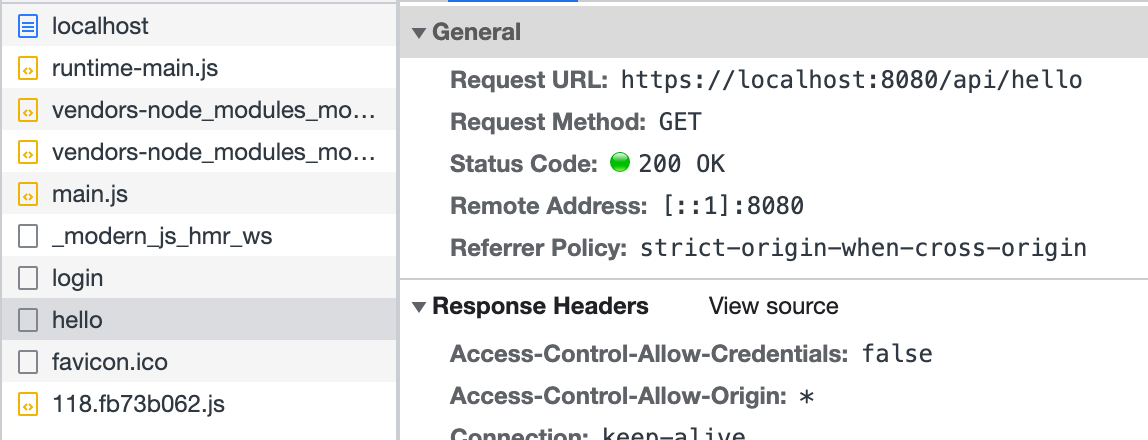
部分应用中,开发者可能希望对所有 BFF 函数做统一的处理,例如鉴权、日志、数据处理等。
|
|
4
4
|
|
|
5
|
-
Modern.js
|
|
5
|
+
Modern.js 支持用户通过 [Custom Server](/guides/advanced-features/custom-server.html) 的方式来自由扩展 BFF Server。
|
|
6
6
|
|
|
7
|
-
## 中间件
|
|
8
7
|
|
|
9
|
-
|
|
8
|
+
## 使用中间件
|
|
10
9
|
|
|
11
|
-
|
|
12
|
-
import { hook } from '@modern-js/runtime/server';
|
|
13
|
-
import { Request, Response, NextFunction } from 'express';
|
|
10
|
+
开发者可以在 `server/modern.server.ts` 中通过 配置 middlewares 来使用中间件。下面介绍如何手写一个 BFF 中间件,添加权限校验:
|
|
14
11
|
|
|
15
|
-
|
|
16
|
-
|
|
17
|
-
|
|
18
|
-
|
|
19
|
-
|
|
20
|
-
|
|
21
|
-
|
|
22
|
-
|
|
23
|
-
|
|
24
|
-
|
|
25
|
-
|
|
26
|
-
|
|
12
|
+
|
|
13
|
+
```ts title="server/modern.server.ts"
|
|
14
|
+
import {
|
|
15
|
+
type MiddlewareHandler,
|
|
16
|
+
defineServerConfig,
|
|
17
|
+
} from '@modern-js/server-runtime';
|
|
18
|
+
|
|
19
|
+
const requireAuthForApi: MiddlewareHandler = async (c, next) => {
|
|
20
|
+
if (c.req.path.startsWith('/api') && c.req.path !== '/api/login') {
|
|
21
|
+
const sid = c.req.cookie('sid');
|
|
22
|
+
if (!sid) {
|
|
23
|
+
return c.json({ code: -1, message: 'need login' }, 400);
|
|
27
24
|
}
|
|
28
|
-
}
|
|
25
|
+
}
|
|
26
|
+
await next();
|
|
27
|
+
};
|
|
28
|
+
|
|
29
|
+
export default defineServerConfig({
|
|
30
|
+
middlewares: [
|
|
31
|
+
{
|
|
32
|
+
name: 'require-auth-for-api',
|
|
33
|
+
handler: requireAuthForApi,
|
|
34
|
+
},
|
|
35
|
+
]
|
|
29
36
|
});
|
|
37
|
+
|
|
30
38
|
```
|
|
31
39
|
|
|
32
40
|
|
|
@@ -97,60 +105,4 @@ export default () => {
|
|
|
97
105
|
|
|
98
106
|
|
|
99
107
|
|
|
100
|
-
以上代码模拟了在
|
|
101
|
-
|
|
102
|
-
:::info
|
|
103
|
-
不同运行时框架中,中间件的写法不一定相同,详情可见[运行时框架](/guides/advanced-features/bff/frameworks)。
|
|
104
|
-
|
|
105
|
-
:::
|
|
106
|
-
|
|
107
|
-
## 定义 Server 实例
|
|
108
|
-
|
|
109
|
-
除了中间件之外,还可以通过 `api/app.ts` 文件来定义 BFF Server 的实例。开发者需要默认导出一个能被运行时框架插件识别的实例。这里简单展示一下 Koa 和 Express 如何定义 Server 实例。
|
|
110
|
-
|
|
111
|
-
import { Tabs, Tab as TabItem } from "@theme";
|
|
112
|
-
|
|
113
|
-
<Tabs>
|
|
114
|
-
<TabItem value="express" label="Express.js" default>
|
|
115
|
-
|
|
116
|
-
```ts title="api/app.ts"
|
|
117
|
-
import express from 'express';
|
|
118
|
-
|
|
119
|
-
const app = express();
|
|
120
|
-
app.use(async (req, res, next) => {
|
|
121
|
-
console.info(`access url: ${req.url}`);
|
|
122
|
-
next();
|
|
123
|
-
});
|
|
124
|
-
|
|
125
|
-
export default app;
|
|
126
|
-
```
|
|
127
|
-
|
|
128
|
-
</TabItem>
|
|
129
|
-
<TabItem value="koa" label="Koa.js">
|
|
130
|
-
|
|
131
|
-
```ts title="api/app.ts"
|
|
132
|
-
import koa from 'koa';
|
|
133
|
-
|
|
134
|
-
const app = new Koa();
|
|
135
|
-
app.use(async (ctx, next) => {
|
|
136
|
-
console.info(`access url: ${ctx.url}`);
|
|
137
|
-
await next();
|
|
138
|
-
});
|
|
139
|
-
|
|
140
|
-
export default app;
|
|
141
|
-
```
|
|
142
|
-
|
|
143
|
-
</TabItem>
|
|
144
|
-
</Tabs>
|
|
145
|
-
|
|
146
|
-
在复杂的 BFF 逻辑中,定义 Server 实例可以更方便通过一个入口来组织代码逻辑,设计目录结构。在这个文件中,可以执行初始化逻辑,添加全局中间件,声明路由,甚至扩展原有框架。
|
|
147
|
-
|
|
148
|
-
BFF 函数定义的路由会在 `app.ts` 文件定义的路由之后注册,所以在这里你也可以拦截 BFF 函数定义的路由,进行预处理或是提前响应。
|
|
149
|
-
|
|
150
|
-
:::note
|
|
151
|
-
此时,如果应用中同时存在 `api/_app.ts`,则定义的中间件会被放在 `api/app.ts` 导出实例的最后执行。多数情况下,中间件就能覆盖大多数 BFF 函数的定制需求。只有当应用的服务端逻辑比较复杂时,才需要自定义 Server 实例。
|
|
152
|
-
:::
|
|
153
|
-
|
|
154
|
-
:::caution
|
|
155
|
-
当应用中没有 `api/app.ts` 的时候,Modern.js 默认会添加 [koa-body](https://www.npmjs.com/package/koa-body)。当应用中存在 `api/app.ts` 时,如果开发者希望使用带有 Body 的 BFF 函数,需要**自行添加** `koa-body`。
|
|
156
|
-
:::
|
|
108
|
+
以上代码模拟了在 `server/Modern.server.ts` 中定义中间件的方式,实现了简易的登录功能。同样,可以在这个配置文件中实现其他功能来扩展 BFF Server。
|
|
@@ -5,82 +5,22 @@ title: 运行时框架
|
|
|
5
5
|
|
|
6
6
|
# 运行时框架
|
|
7
7
|
|
|
8
|
-
Modern.js
|
|
9
|
-
|
|
10
|
-
使用不同运行时框架时,有部分 API 会存在差异。
|
|
8
|
+
Modern.js 以 [Hono.js](https://hono.dev/) 作为 BFF 和 Server 运行时框架,因此可以基于 Hono.js 生态[扩展 BFF Server](/guides/advanced-features/bff/extend-server.html)。
|
|
11
9
|
|
|
12
10
|
## 获取请求上下文
|
|
13
11
|
|
|
14
|
-
在 BFF
|
|
15
|
-
|
|
16
|
-
import { Tabs, Tab as TabItem } from "@theme";
|
|
17
|
-
|
|
18
|
-
<Tabs>
|
|
19
|
-
<TabItem value="express" label="Express.js" default>
|
|
20
|
-
|
|
21
|
-
```ts title="api/lambda/hello.ts"
|
|
22
|
-
import { useContext } from '@modern-js/runtime/express'
|
|
23
|
-
export const get = async () => {
|
|
24
|
-
const { req } = useContext();
|
|
25
|
-
console.info(`access url: ${req.url}`);
|
|
26
|
-
return 'Hello Modern.js'
|
|
27
|
-
};
|
|
28
|
-
```
|
|
29
|
-
|
|
30
|
-
</TabItem>
|
|
31
|
-
<TabItem value="koa" label="Koa.js">
|
|
12
|
+
在 BFF 函数中,有时需要获取请求上下文,来处理更多逻辑。此时,你可以通过 `useHonoContext` 来获取:
|
|
32
13
|
|
|
33
14
|
```ts title="api/lambda/hello.ts"
|
|
34
|
-
import {
|
|
15
|
+
import { useHonoContext } from '@modern-js/plugin-bff/hono'
|
|
35
16
|
export const get = async () => {
|
|
36
|
-
const
|
|
37
|
-
console.info(`access url: ${req.url}`);
|
|
17
|
+
const c = useHonoContext();
|
|
18
|
+
console.info(`access url: ${c.req.url}`);
|
|
38
19
|
return 'Hello Modern.js'
|
|
39
20
|
};
|
|
40
21
|
```
|
|
41
22
|
|
|
42
|
-
</TabItem>
|
|
43
|
-
</Tabs>
|
|
44
|
-
|
|
45
23
|
:::info
|
|
46
|
-
详细内容可以参考 [
|
|
24
|
+
详细内容可以参考 [useHonoContext](/apis/app/runtime/bff/use-hono-context)。
|
|
47
25
|
:::
|
|
48
26
|
|
|
49
|
-
## 使用中间件
|
|
50
|
-
|
|
51
|
-
在 BFF 函数中,有时需要使用中间件,来处理更多逻辑。此时,根据不同的运行时框架,你需要从通过不同的 API 来获取:
|
|
52
|
-
|
|
53
|
-
<Tabs>
|
|
54
|
-
<TabItem value="express" label="Express.js" default>
|
|
55
|
-
|
|
56
|
-
```ts title="api/_app.ts"
|
|
57
|
-
import { hook } from '@modern-js/runtime/express';
|
|
58
|
-
|
|
59
|
-
export default hook(({ addMiddleware }) => {
|
|
60
|
-
addMiddleware((req, res, next) => {
|
|
61
|
-
req.query.id = 'koa';
|
|
62
|
-
next();
|
|
63
|
-
});
|
|
64
|
-
});
|
|
65
|
-
```
|
|
66
|
-
|
|
67
|
-
</TabItem>
|
|
68
|
-
<TabItem value="koa" label="Koa.js">
|
|
69
|
-
|
|
70
|
-
```ts title="api/_app.ts"
|
|
71
|
-
import { hook } from '@modern-js/runtime/koa';
|
|
72
|
-
|
|
73
|
-
export default hook(({ addMiddleware }) => {
|
|
74
|
-
addMiddleware(async (ctx, next) => {
|
|
75
|
-
ctx.req.query.id = 'koa';
|
|
76
|
-
await next();
|
|
77
|
-
});
|
|
78
|
-
});
|
|
79
|
-
```
|
|
80
|
-
|
|
81
|
-
</TabItem>
|
|
82
|
-
</Tabs>
|
|
83
|
-
|
|
84
|
-
:::info
|
|
85
|
-
详细内容可以参考 [hook](/apis/app/runtime/bff/hook)。
|
|
86
|
-
:::
|