@modern-js/main-doc 0.0.0-nightly-20250514160342 → 0.0.0-nightly-20250518160324
This diff represents the content of publicly available package versions that have been released to one of the supported registries. The information contained in this diff is provided for informational purposes only and reflects changes between package versions as they appear in their respective public registries.
- package/docs/en/apis/app/hooks/server/server.mdx +10 -0
- package/docs/en/apis/app/hooks/src/routes.mdx +3 -3
- package/docs/en/apis/app/runtime/bff/use-hono-context.mdx +30 -0
- package/docs/en/components/enable-bff.mdx +1 -27
- package/docs/en/components/rsbuild-config-tooltip.mdx +2 -2
- package/docs/en/components/tech-stack-node-framework.mdx +1 -1
- package/docs/en/configure/app/dev/asset-prefix.mdx +2 -3
- package/docs/en/configure/app/dev/client.mdx +2 -3
- package/docs/en/configure/app/dev/hmr.mdx +2 -3
- package/docs/en/configure/app/dev/live-reload.mdx +2 -3
- package/docs/en/configure/app/dev/progress-bar.mdx +2 -3
- package/docs/en/configure/app/dev/setup-middlewares.mdx +2 -3
- package/docs/en/configure/app/dev/watch-files.mdx +2 -3
- package/docs/en/configure/app/dev/write-to-disk.mdx +2 -3
- package/docs/en/configure/app/html/app-icon.mdx +2 -3
- package/docs/en/configure/app/html/crossorigin.mdx +2 -3
- package/docs/en/configure/app/html/favicon.mdx +2 -3
- package/docs/en/configure/app/html/inject.mdx +2 -3
- package/docs/en/configure/app/html/meta.mdx +2 -3
- package/docs/en/configure/app/html/mount-id.mdx +2 -3
- package/docs/en/configure/app/html/output-structure.mdx +2 -3
- package/docs/en/configure/app/html/script-loading.mdx +2 -3
- package/docs/en/configure/app/html/tags.mdx +2 -3
- package/docs/en/configure/app/html/template-parameters.mdx +2 -3
- package/docs/en/configure/app/html/template.mdx +2 -3
- package/docs/en/configure/app/html/title.mdx +2 -3
- package/docs/en/configure/app/output/asset-prefix.mdx +2 -3
- package/docs/en/configure/app/output/charset.mdx +2 -3
- package/docs/en/configure/app/output/copy.mdx +2 -3
- package/docs/en/configure/app/output/css-modules.mdx +2 -3
- package/docs/en/configure/app/output/data-uri-limit.mdx +2 -3
- package/docs/en/configure/app/output/dist-path.mdx +2 -3
- package/docs/en/configure/app/output/externals.mdx +2 -3
- package/docs/en/configure/app/output/filename-hash.mdx +2 -3
- package/docs/en/configure/app/output/filename.mdx +2 -3
- package/docs/en/configure/app/output/inject-styles.mdx +2 -3
- package/docs/en/configure/app/output/inline-scripts.mdx +2 -3
- package/docs/en/configure/app/output/inline-styles.mdx +2 -3
- package/docs/en/configure/app/output/legal-comments.mdx +2 -3
- package/docs/en/configure/app/output/minify.mdx +2 -3
- package/docs/en/configure/app/output/override-browserslist.mdx +2 -3
- package/docs/en/configure/app/output/polyfill.mdx +2 -3
- package/docs/en/configure/app/output/source-map.mdx +2 -3
- package/docs/en/configure/app/performance/build-cache.mdx +2 -3
- package/docs/en/configure/app/performance/bundle-analyze.mdx +2 -3
- package/docs/en/configure/app/performance/chunk-split.mdx +2 -3
- package/docs/en/configure/app/performance/dns-prefetch.mdx +2 -3
- package/docs/en/configure/app/performance/preconnect.mdx +2 -3
- package/docs/en/configure/app/performance/prefetch.mdx +2 -3
- package/docs/en/configure/app/performance/preload.mdx +2 -3
- package/docs/en/configure/app/performance/print-file-size.mdx +2 -3
- package/docs/en/configure/app/performance/profile.mdx +2 -3
- package/docs/en/configure/app/performance/remove-console.mdx +2 -3
- package/docs/en/configure/app/performance/remove-moment-locale.mdx +2 -3
- package/docs/en/configure/app/plugins.mdx +13 -33
- package/docs/en/configure/app/runtime/master-app.mdx +1 -5
- package/docs/en/configure/app/runtime/plugins.mdx +58 -0
- package/docs/en/configure/app/security/nonce.mdx +2 -3
- package/docs/en/configure/app/security/sri.mdx +0 -1
- package/docs/en/configure/app/server/port.mdx +2 -3
- package/docs/en/configure/app/source/alias-strategy.mdx +2 -3
- package/docs/en/configure/app/source/alias.mdx +2 -3
- package/docs/en/configure/app/source/decorators.mdx +2 -3
- package/docs/en/configure/app/source/define.mdx +2 -3
- package/docs/en/configure/app/source/exclude.mdx +2 -3
- package/docs/en/configure/app/source/include.mdx +2 -3
- package/docs/en/configure/app/source/pre-entry.mdx +2 -3
- package/docs/en/configure/app/source/transform-import.mdx +2 -3
- package/docs/en/configure/app/tools/css-extract.mdx +2 -3
- package/docs/en/configure/app/tools/css-loader.mdx +2 -2
- package/docs/en/configure/app/tools/html-plugin.mdx +2 -3
- package/docs/en/configure/app/tools/lightningcss-loader.mdx +2 -3
- package/docs/en/configure/app/tools/postcss.mdx +2 -3
- package/docs/en/configure/app/tools/rspack.mdx +2 -3
- package/docs/en/configure/app/tools/style-loader.mdx +2 -3
- package/docs/en/guides/advanced-features/bff/extend-server.mdx +33 -82
- package/docs/en/guides/advanced-features/bff/frameworks.mdx +12 -68
- package/docs/en/guides/advanced-features/custom-server.mdx +13 -9
- package/docs/en/plugin/cli-plugins/api.mdx +6 -0
- package/docs/en/plugin/runtime-plugins/api.mdx +6 -0
- package/docs/en/tutorials/first-app/c04-routes.mdx +4 -2
- package/docs/en/tutorials/first-app/c05-loader.mdx +4 -1
- package/docs/zh/apis/app/hooks/server/server.mdx +10 -0
- package/docs/zh/apis/app/hooks/src/routes.mdx +3 -3
- package/docs/zh/apis/app/runtime/bff/use-hono-context.mdx +31 -0
- package/docs/zh/components/enable-bff.mdx +2 -27
- package/docs/zh/components/rsbuild-config-tooltip.mdx +2 -2
- package/docs/zh/components/tech-stack-node-framework.mdx +1 -1
- package/docs/zh/configure/app/dev/asset-prefix.mdx +2 -3
- package/docs/zh/configure/app/dev/client.mdx +2 -3
- package/docs/zh/configure/app/dev/hmr.mdx +2 -3
- package/docs/zh/configure/app/dev/live-reload.mdx +2 -3
- package/docs/zh/configure/app/dev/progress-bar.mdx +2 -3
- package/docs/zh/configure/app/dev/setup-middlewares.mdx +2 -3
- package/docs/zh/configure/app/dev/watch-files.mdx +2 -3
- package/docs/zh/configure/app/dev/write-to-disk.mdx +2 -3
- package/docs/zh/configure/app/html/app-icon.mdx +2 -3
- package/docs/zh/configure/app/html/crossorigin.mdx +2 -3
- package/docs/zh/configure/app/html/favicon.mdx +2 -3
- package/docs/zh/configure/app/html/inject.mdx +2 -3
- package/docs/zh/configure/app/html/meta.mdx +2 -3
- package/docs/zh/configure/app/html/mount-id.mdx +2 -3
- package/docs/zh/configure/app/html/output-structure.mdx +2 -3
- package/docs/zh/configure/app/html/script-loading.mdx +2 -3
- package/docs/zh/configure/app/html/tags.mdx +2 -3
- package/docs/zh/configure/app/html/template-parameters.mdx +2 -3
- package/docs/zh/configure/app/html/template.mdx +2 -3
- package/docs/zh/configure/app/html/title.mdx +2 -3
- package/docs/zh/configure/app/output/asset-prefix.mdx +2 -3
- package/docs/zh/configure/app/output/charset.mdx +2 -3
- package/docs/zh/configure/app/output/copy.mdx +2 -3
- package/docs/zh/configure/app/output/css-modules.mdx +2 -3
- package/docs/zh/configure/app/output/data-uri-limit.mdx +2 -3
- package/docs/zh/configure/app/output/dist-path.mdx +2 -3
- package/docs/zh/configure/app/output/externals.mdx +2 -3
- package/docs/zh/configure/app/output/filename-hash.mdx +2 -3
- package/docs/zh/configure/app/output/filename.mdx +2 -3
- package/docs/zh/configure/app/output/inject-styles.mdx +2 -3
- package/docs/zh/configure/app/output/inline-scripts.mdx +2 -3
- package/docs/zh/configure/app/output/inline-styles.mdx +2 -3
- package/docs/zh/configure/app/output/legal-comments.mdx +2 -3
- package/docs/zh/configure/app/output/minify.mdx +2 -3
- package/docs/zh/configure/app/output/override-browserslist.mdx +2 -3
- package/docs/zh/configure/app/output/polyfill.mdx +2 -3
- package/docs/zh/configure/app/output/source-map.mdx +2 -3
- package/docs/zh/configure/app/performance/build-cache.mdx +2 -3
- package/docs/zh/configure/app/performance/bundle-analyze.mdx +2 -3
- package/docs/zh/configure/app/performance/chunk-split.mdx +2 -3
- package/docs/zh/configure/app/performance/dns-prefetch.mdx +2 -3
- package/docs/zh/configure/app/performance/preconnect.mdx +2 -3
- package/docs/zh/configure/app/performance/prefetch.mdx +2 -3
- package/docs/zh/configure/app/performance/preload.mdx +2 -3
- package/docs/zh/configure/app/performance/print-file-size.mdx +2 -3
- package/docs/zh/configure/app/performance/profile.mdx +2 -3
- package/docs/zh/configure/app/performance/remove-console.mdx +2 -3
- package/docs/zh/configure/app/performance/remove-moment-locale.mdx +2 -3
- package/docs/zh/configure/app/plugins.mdx +3 -24
- package/docs/zh/configure/app/runtime/master-app.mdx +1 -5
- package/docs/zh/configure/app/runtime/plugins.mdx +58 -0
- package/docs/zh/configure/app/security/nonce.mdx +2 -3
- package/docs/zh/configure/app/security/sri.mdx +0 -1
- package/docs/zh/configure/app/server/port.mdx +2 -3
- package/docs/zh/configure/app/source/alias-strategy.mdx +2 -3
- package/docs/zh/configure/app/source/alias.mdx +2 -3
- package/docs/zh/configure/app/source/decorators.mdx +2 -3
- package/docs/zh/configure/app/source/define.mdx +2 -3
- package/docs/zh/configure/app/source/exclude.mdx +2 -3
- package/docs/zh/configure/app/source/include.mdx +2 -3
- package/docs/zh/configure/app/source/pre-entry.mdx +2 -3
- package/docs/zh/configure/app/source/transform-import.mdx +2 -3
- package/docs/zh/configure/app/tools/css-extract.mdx +2 -3
- package/docs/zh/configure/app/tools/css-loader.mdx +2 -3
- package/docs/zh/configure/app/tools/html-plugin.mdx +2 -3
- package/docs/zh/configure/app/tools/lightningcss-loader.mdx +2 -3
- package/docs/zh/configure/app/tools/postcss.mdx +2 -3
- package/docs/zh/configure/app/tools/rspack.mdx +2 -3
- package/docs/zh/configure/app/tools/style-loader.mdx +2 -3
- package/docs/zh/guides/advanced-features/bff/extend-server.mdx +28 -76
- package/docs/zh/guides/advanced-features/bff/frameworks.mdx +6 -66
- package/docs/zh/guides/advanced-features/custom-server.mdx +12 -8
- package/docs/zh/plugin/cli-plugins/api.mdx +6 -0
- package/docs/zh/plugin/runtime-plugins/api.mdx +6 -0
- package/docs/zh/tutorials/first-app/c04-routes.mdx +4 -2
- package/docs/zh/tutorials/first-app/c05-loader.mdx +4 -1
- package/package.json +6 -4
- package/rspress.config.ts +6 -1
- package/src/components/RsbuildLink/index.tsx +2 -2
- package/src/index.ts +1 -5
- package/src/pages/index.tsx +3 -3
- package/docs/en/apis/app/hooks/api/middleware.mdx +0 -11
- package/docs/en/apis/app/runtime/bff/hook.mdx +0 -44
- package/docs/en/apis/app/runtime/bff/use-context.mdx +0 -38
- package/docs/zh/apis/app/hooks/api/middleware.mdx +0 -11
- package/docs/zh/apis/app/runtime/bff/hook.mdx +0 -44
- package/docs/zh/apis/app/runtime/bff/use-context.mdx +0 -38
|
@@ -1,6 +1,5 @@
|
|
|
1
1
|
---
|
|
2
2
|
title: postcss
|
|
3
|
-
configName: tools.postcss
|
|
4
3
|
---
|
|
5
4
|
|
|
6
5
|
# tools.postcss
|
|
@@ -34,6 +33,6 @@ Modern.js integrates PostCSS by default, you can configure [postcss-loader](http
|
|
|
34
33
|
|
|
35
34
|
It should be noted that when you enable the `tools.lightningcss` configuration, PostCSS will be disabled by default, including `postcss-loader` and its default plugins.
|
|
36
35
|
|
|
37
|
-
import
|
|
36
|
+
import RsbuildConfig from '@site-docs-en/components/rsbuild-config-tooltip';
|
|
38
37
|
|
|
39
|
-
<
|
|
38
|
+
<RsbuildConfig configName="tools.postcss" />
|
|
@@ -1,6 +1,5 @@
|
|
|
1
1
|
---
|
|
2
2
|
title: rspack
|
|
3
|
-
configName: tools.rspack
|
|
4
3
|
---
|
|
5
4
|
|
|
6
5
|
# tools.rspack
|
|
@@ -10,6 +9,6 @@ configName: tools.rspack
|
|
|
10
9
|
|
|
11
10
|
`tools.rspack` is used to configure [Rspack](https://rspack.dev/).
|
|
12
11
|
|
|
13
|
-
import
|
|
12
|
+
import RsbuildConfig from '@site-docs-en/components/rsbuild-config-tooltip';
|
|
14
13
|
|
|
15
|
-
<
|
|
14
|
+
<RsbuildConfig configName="tools.rspack" />
|
|
@@ -1,6 +1,5 @@
|
|
|
1
1
|
---
|
|
2
2
|
title: styleLoader
|
|
3
|
-
configName: tools.styleLoader
|
|
4
3
|
---
|
|
5
4
|
|
|
6
5
|
# tools.styleLoader
|
|
@@ -10,6 +9,6 @@ configName: tools.styleLoader
|
|
|
10
9
|
|
|
11
10
|
The config of [style-loader](https://github.com/webpack-contrib/style-loader) can be set through `tools.styleLoader`.
|
|
12
11
|
|
|
13
|
-
import
|
|
12
|
+
import RsbuildConfig from '@site-docs-en/components/rsbuild-config-tooltip';
|
|
14
13
|
|
|
15
|
-
<
|
|
14
|
+
<RsbuildConfig configName="tools.styleLoader" />
|
|
@@ -1,35 +1,41 @@
|
|
|
1
1
|
# Extend BFF Server
|
|
2
2
|
|
|
3
|
-
In some applications, developers may want to handle all BFF functions uniformly, such as
|
|
3
|
+
In some applications, developers may want to handle all BFF functions uniformly, such as authentication, logging, data processing, etc.
|
|
4
4
|
|
|
5
|
-
Modern.js
|
|
5
|
+
Modern.js allows users to freely extend the BFF Server through the [Custom Server](/guides/advanced-features/custom-server.html) method.
|
|
6
6
|
|
|
7
|
-
## Middleware
|
|
7
|
+
## Using Middleware
|
|
8
8
|
|
|
9
|
-
Developers can
|
|
9
|
+
Developers can use middleware by configuring middlewares in `server/modern.server.ts`. The following describes how to write a BFF middleware manually to add permission verification:
|
|
10
10
|
|
|
11
|
-
```ts title="
|
|
12
|
-
import {
|
|
13
|
-
|
|
11
|
+
```ts title="server/modern.server.ts"
|
|
12
|
+
import {
|
|
13
|
+
type MiddlewareHandler,
|
|
14
|
+
defineServerConfig,
|
|
15
|
+
} from '@modern-js/server-runtime';
|
|
14
16
|
|
|
15
|
-
|
|
16
|
-
|
|
17
|
-
|
|
18
|
-
|
|
19
|
-
|
|
20
|
-
res.status(400);
|
|
21
|
-
res.json({ code: -1, message: 'need login' });
|
|
22
|
-
} else {
|
|
23
|
-
next();
|
|
24
|
-
}
|
|
25
|
-
} else {
|
|
26
|
-
next();
|
|
17
|
+
const requireAuthForApi: MiddlewareHandler = async (c, next) => {
|
|
18
|
+
if (c.req.path.startsWith('/api') && c.req.path !== '/api/login') {
|
|
19
|
+
const sid = c.req.cookie('sid');
|
|
20
|
+
if (!sid) {
|
|
21
|
+
return c.json({ code: -1, message: 'need login' }, 400);
|
|
27
22
|
}
|
|
28
|
-
}
|
|
23
|
+
}
|
|
24
|
+
await next();
|
|
25
|
+
};
|
|
26
|
+
|
|
27
|
+
export default defineServerConfig({
|
|
28
|
+
middlewares: [
|
|
29
|
+
{
|
|
30
|
+
name: 'require-auth-for-api',
|
|
31
|
+
handler: requireAuthForApi,
|
|
32
|
+
},
|
|
33
|
+
]
|
|
29
34
|
});
|
|
35
|
+
|
|
30
36
|
```
|
|
31
37
|
|
|
32
|
-
Then add a
|
|
38
|
+
Then add a regular BFF function `api/lambda/hello.ts`:
|
|
33
39
|
|
|
34
40
|
```ts title="api/lambda/hello.ts"
|
|
35
41
|
export default async () => {
|
|
@@ -37,7 +43,7 @@ export default async () => {
|
|
|
37
43
|
};
|
|
38
44
|
```
|
|
39
45
|
|
|
40
|
-
Next, in the frontend
|
|
46
|
+
Next, in the frontend `src/routes/page.tsx`, add the interface access code and directly use the integrated method to call:
|
|
41
47
|
|
|
42
48
|
```ts title="src/routes/page.tsx"
|
|
43
49
|
import { useState, useEffect } from 'react';
|
|
@@ -59,14 +65,14 @@ export default () => {
|
|
|
59
65
|
};
|
|
60
66
|
```
|
|
61
67
|
|
|
62
|
-
Now run the `dev` command to start the project, and
|
|
68
|
+
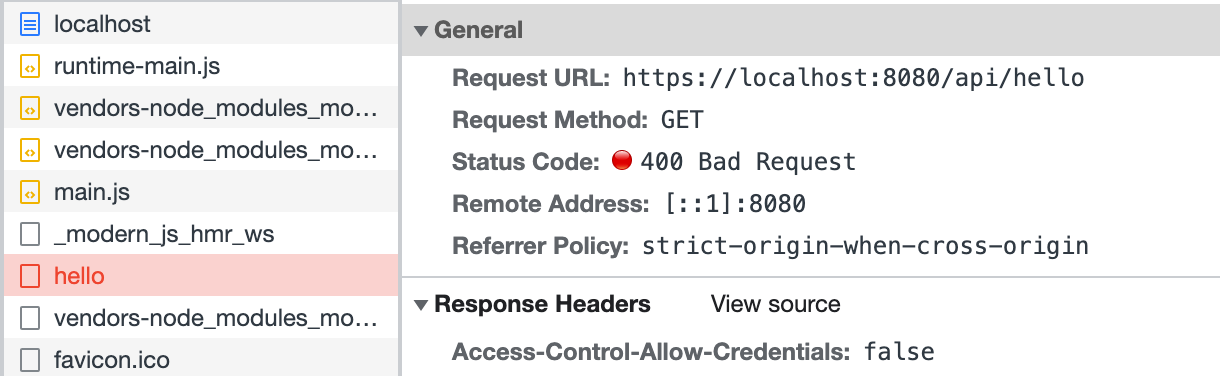
Now run the `dev` command to start the project, and access `http://localhost:8080/` to find that the request for `/api/hello` has been intercepted:
|
|
63
69
|
|
|
64
70
|
|
|
65
71
|
|
|
66
|
-
Finally, modify the frontend code
|
|
72
|
+
Finally, modify the frontend code `src/routes/page.tsx`, and call the login interface before accessing `/api/hello`:
|
|
67
73
|
|
|
68
74
|
:::note
|
|
69
|
-
|
|
75
|
+
This part does not implement a real login interface; the code is just for demonstration.
|
|
70
76
|
:::
|
|
71
77
|
|
|
72
78
|
```ts
|
|
@@ -92,63 +98,8 @@ export default () => {
|
|
|
92
98
|
};
|
|
93
99
|
```
|
|
94
100
|
|
|
95
|
-
Refresh the page
|
|
101
|
+
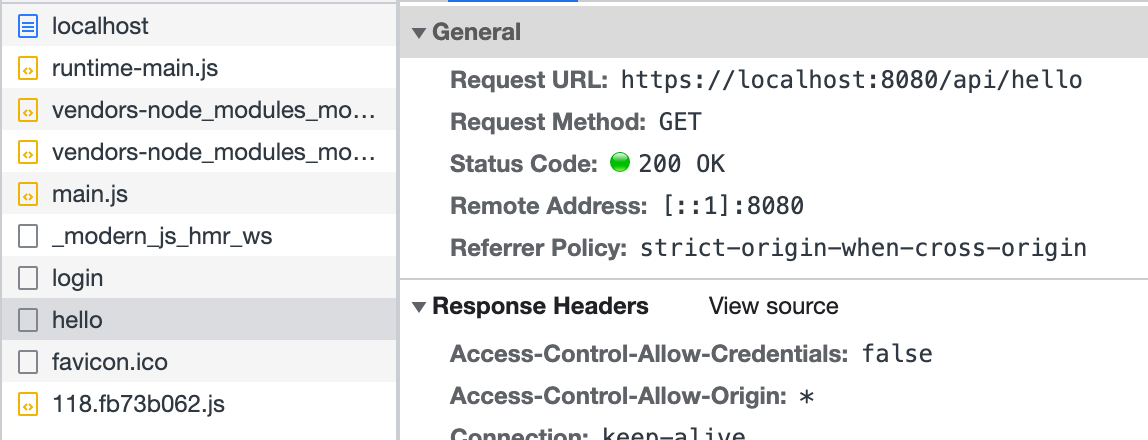
Refresh the page, and you can see that the access to `/api/hello` is successful:
|
|
96
102
|
|
|
97
103
|
|
|
98
104
|
|
|
99
|
-
The above code simulates
|
|
100
|
-
|
|
101
|
-
:::info
|
|
102
|
-
The way middleware is written may differ depending on the runtime framework. For details, see [Runtime Frameworks](/guides/advanced-features/bff/frameworks).
|
|
103
|
-
:::
|
|
104
|
-
|
|
105
|
-
## Define Server Instance
|
|
106
|
-
|
|
107
|
-
In addition to middleware, you can also define a BFF Server instance via the `api/app.ts`. Developers need to export an instance that can be recognized by the runtime framework plugin. Here is a simple demonstration of how to define a server instance with Koa and Express.
|
|
108
|
-
|
|
109
|
-
import { Tabs, Tab as TabItem } from "@theme";
|
|
110
|
-
|
|
111
|
-
<Tabs>
|
|
112
|
-
<TabItem value="express" label="Express.js" default>
|
|
113
|
-
|
|
114
|
-
```ts title="api/app.ts"
|
|
115
|
-
import express from 'express';
|
|
116
|
-
|
|
117
|
-
const app = express();
|
|
118
|
-
app.use(async (req, res, next) => {
|
|
119
|
-
console.info(`access url: ${req.url}`);
|
|
120
|
-
next();
|
|
121
|
-
});
|
|
122
|
-
|
|
123
|
-
export default app;
|
|
124
|
-
```
|
|
125
|
-
|
|
126
|
-
</TabItem>
|
|
127
|
-
<TabItem value="koa" label="Koa.js">
|
|
128
|
-
|
|
129
|
-
```ts title="api/app.ts"
|
|
130
|
-
import koa from 'koa';
|
|
131
|
-
|
|
132
|
-
const app = new Koa();
|
|
133
|
-
app.use(async (ctx, next) => {
|
|
134
|
-
console.info(`access url: ${ctx.url}`);
|
|
135
|
-
await next();
|
|
136
|
-
});
|
|
137
|
-
|
|
138
|
-
export default app;
|
|
139
|
-
```
|
|
140
|
-
|
|
141
|
-
</TabItem>
|
|
142
|
-
</Tabs>
|
|
143
|
-
|
|
144
|
-
In complex BFF logic, defining a server instance allows for easier organization of code logic and directory structure design through a single entry point. In this file, you can perform initialization logic, add global middleware, declare routes, and even extend the original framework.
|
|
145
|
-
|
|
146
|
-
The routes defined by the BFF functions will be registered after the routes defined in the `app.ts` file. Therefore, you can also intercept the routes defined by the BFF functions here for preprocessing or early responses.
|
|
147
|
-
|
|
148
|
-
:::note
|
|
149
|
-
At this time, if `api/_app.ts` exists in the application, the defined middleware will be executed after the middleware exported by the `api/app.ts` instance. In most cases, middleware can cover most customization needs for BFF functions. Only when the application's server-side logic is more complex do you need to customize the server instance.
|
|
150
|
-
:::
|
|
151
|
-
|
|
152
|
-
:::caution
|
|
153
|
-
When `api/app.ts` does not exist in the application, Modern.js will default to adding [koa-body](https://www.npmjs.com/package/koa-body). When `api/app.ts` does exist in the application, if developers wish to use BFF functions with bodies, they will need to **add `koa-body` themselves**.
|
|
154
|
-
:::
|
|
105
|
+
The above code simulates defining middleware in `server/Modern.server.ts` and implements a simple login function. Similarly, other functionalities can be implemented in this configuration file to extend the BFF Server.
|
|
@@ -1,81 +1,25 @@
|
|
|
1
|
-
|
|
2
|
-
|
|
3
|
-
|
|
1
|
+
---
|
|
2
|
+
sidebar_position: 3
|
|
3
|
+
title: Runtime Framework
|
|
4
|
+
---
|
|
4
5
|
|
|
5
|
-
|
|
6
|
-
|
|
7
|
-
## Accessing Request Context
|
|
6
|
+
# Runtime Framework
|
|
8
7
|
|
|
9
|
-
|
|
8
|
+
Modern.js uses [Hono.js](https://hono.dev/) as the BFF and Server runtime framework, so you can [extend BFF Server](/guides/advanced-features/bff/extend-server.html) based on the Hono.js ecosystem.
|
|
10
9
|
|
|
11
|
-
|
|
10
|
+
## Getting Request Context
|
|
12
11
|
|
|
13
|
-
|
|
14
|
-
<TabItem value="express" label="Express.js" default>
|
|
12
|
+
Sometimes in BFF functions, it's necessary to obtain the request context to handle more logic. In such cases, you can use `useHonoContext` to get it:
|
|
15
13
|
|
|
16
14
|
```ts title="api/lambda/hello.ts"
|
|
17
|
-
import {
|
|
15
|
+
import { useHonoContext } from '@modern-js/plugin-bff/hono'
|
|
18
16
|
export const get = async () => {
|
|
19
|
-
const
|
|
20
|
-
console.info(`access url: ${req.url}`);
|
|
17
|
+
const c = useHonoContext();
|
|
18
|
+
console.info(`access url: ${c.req.url}`);
|
|
21
19
|
return 'Hello Modern.js'
|
|
22
20
|
};
|
|
23
21
|
```
|
|
24
22
|
|
|
25
|
-
</TabItem>
|
|
26
|
-
<TabItem value="koa" label="Koa.js">
|
|
27
|
-
|
|
28
|
-
```ts title="api/lambda/hello.ts"
|
|
29
|
-
import { useContext } from '@modern-js/runtime/koa'
|
|
30
|
-
export const get = async () => {
|
|
31
|
-
const ctx = useContext();
|
|
32
|
-
console.info(`access url: ${req.url}`);
|
|
33
|
-
return 'Hello Modern.js'
|
|
34
|
-
};
|
|
35
|
-
```
|
|
36
|
-
|
|
37
|
-
</TabItem>
|
|
38
|
-
</Tabs>
|
|
39
|
-
|
|
40
|
-
:::info
|
|
41
|
-
For more details, refer to [useContext](/apis/app/runtime/bff/use-context).
|
|
42
|
-
:::
|
|
43
|
-
|
|
44
|
-
## Using Middleware
|
|
45
|
-
|
|
46
|
-
In BFF functions, you may need to use middleware to handle more logic. Depending on the runtime framework, you need to use different APIs:
|
|
47
|
-
|
|
48
|
-
<Tabs>
|
|
49
|
-
<TabItem value="express" label="Express.js" default>
|
|
50
|
-
|
|
51
|
-
```ts title="api/_app.ts"
|
|
52
|
-
import { hook } from '@modern-js/runtime/express';
|
|
53
|
-
|
|
54
|
-
export default hook(({ addMiddleware }) => {
|
|
55
|
-
addMiddleware((req, res, next) => {
|
|
56
|
-
req.query.id = 'koa';
|
|
57
|
-
next();
|
|
58
|
-
});
|
|
59
|
-
});
|
|
60
|
-
```
|
|
61
|
-
|
|
62
|
-
</TabItem>
|
|
63
|
-
<TabItem value="koa" label="Koa.js">
|
|
64
|
-
|
|
65
|
-
```ts title="api/_app.ts"
|
|
66
|
-
import { hook } from '@modern-js/runtime/koa';
|
|
67
|
-
|
|
68
|
-
export default hook(({ addMiddleware }) => {
|
|
69
|
-
addMiddleware(async (ctx, next) => {
|
|
70
|
-
ctx.req.query.id = 'koa';
|
|
71
|
-
await next();
|
|
72
|
-
});
|
|
73
|
-
});
|
|
74
|
-
```
|
|
75
|
-
|
|
76
|
-
</TabItem>
|
|
77
|
-
</Tabs>
|
|
78
|
-
|
|
79
23
|
:::info
|
|
80
|
-
For more details, refer to [
|
|
24
|
+
For more details, refer to [useHonoContext](/apis/app/runtime/bff/use-hono-context).
|
|
81
25
|
:::
|
|
@@ -6,12 +6,19 @@ sidebar_position: 16
|
|
|
6
6
|
|
|
7
7
|
Modern.js encapsulates most server-side capabilities required by projects, typically eliminating the need for server-side development. However, in certain scenarios such as user authentication, request preprocessing, or adding page skeletons, custom server-side logic may still be necessary.
|
|
8
8
|
|
|
9
|
-
## Custom Server
|
|
9
|
+
## Starting a Custom Server
|
|
10
10
|
|
|
11
|
-
|
|
11
|
+
To start a custom server, the following steps need to be taken:
|
|
12
|
+
1. Add and install the dependencies `@modern-js/server-runtime` and `ts-node` to `devDependencies`.
|
|
13
|
+
2. Add `server` to the `include` section of `tsconfig`.
|
|
14
|
+
3. Create a file `server/modern.server.ts` in the project directory, where you can write custom logic.
|
|
15
|
+
|
|
16
|
+
## Capabilities of the Custom Server
|
|
17
|
+
|
|
18
|
+
In the `server/modern.server.ts` file, you can add the following configurations to extend the Server:
|
|
12
19
|
- **Middleware**
|
|
13
20
|
- **Render Middleware**
|
|
14
|
-
- **Server Plugin**
|
|
21
|
+
- **Server-side Plugin**
|
|
15
22
|
|
|
16
23
|
In the **Plugin**, you can define **Middleware** and **RenderMiddleware**. The middleware loading process is illustrated in the following diagram:
|
|
17
24
|
|
|
@@ -60,20 +67,17 @@ type ServerConfig = {
|
|
|
60
67
|
### Middleware
|
|
61
68
|
|
|
62
69
|
Middleware supports executing custom logic before and after the **request handling** and **page routing** processes in Modern.js services.
|
|
63
|
-
|
|
70
|
+
If custom logic needs to handle both API routes and page routes, Middleware is the clear choice.
|
|
64
71
|
|
|
65
|
-
|
|
66
|
-
In the BFF scenario, BFF routing will only go through Middleware when the [runtime framework](/guides/advanced-features/bff/frameworks.html) is Hono.
|
|
67
|
-
:::
|
|
72
|
+
If you only need to handle BFF API routes, you can determine whether a request is for a BFF API by checking if `req.path` starts with the BFF `prefix`.
|
|
68
73
|
|
|
69
74
|
#### Using Posture
|
|
70
75
|
|
|
71
76
|
```ts title="server/modern.server.ts"
|
|
72
77
|
import { defineServerConfig, type MiddlewareHandler } from '@modern-js/server-runtime';
|
|
73
|
-
import { getMonitors } from '@modern-js/runtime';
|
|
74
78
|
|
|
75
79
|
export const handler: MiddlewareHandler = async (c, next) => {
|
|
76
|
-
const monitors =
|
|
80
|
+
const monitors = c.get('monitors');
|
|
77
81
|
const start = Date.now();
|
|
78
82
|
|
|
79
83
|
await next();
|
|
@@ -2,6 +2,12 @@
|
|
|
2
2
|
|
|
3
3
|
This document details the API for Modern.js CLI plugins. CLI plugins allow you to extend and customize the functionality of Modern.js projects during the build and development process.
|
|
4
4
|
|
|
5
|
+
:::info
|
|
6
|
+
|
|
7
|
+
CLI plugins need to be configured via the [`plugins`](/configure/app/plugins) field in `modern.config.ts`.
|
|
8
|
+
|
|
9
|
+
:::
|
|
10
|
+
|
|
5
11
|
## Plugin Basic Structure
|
|
6
12
|
|
|
7
13
|
A typical CLI plugin structure is as follows:
|
|
@@ -2,6 +2,12 @@
|
|
|
2
2
|
|
|
3
3
|
Modern.js's Runtime Plugins allow you to extend and modify the behavior of your application during its React code execution. With Runtime Plugins, you can easily perform initialization tasks, implement React Higher-Order Component (HOC) wrapping, and more.
|
|
4
4
|
|
|
5
|
+
:::info
|
|
6
|
+
|
|
7
|
+
Runtime plugins need to be configured via the [`plugins`](/configure/app/runtime/plugins) field in `src/modern.runtime.ts`.
|
|
8
|
+
|
|
9
|
+
:::
|
|
10
|
+
|
|
5
11
|
## Plugin Structure
|
|
6
12
|
|
|
7
13
|
A typical Runtime Plugin looks like this:
|
|
@@ -118,10 +118,11 @@ import { Radio } from 'antd';
|
|
|
118
118
|
|
|
119
119
|
Then modify the top of the UI to add a set of radio group:
|
|
120
120
|
|
|
121
|
-
```tsx
|
|
121
|
+
```tsx
|
|
122
122
|
export default function Layout() {
|
|
123
123
|
return (
|
|
124
124
|
<div>
|
|
125
|
+
// [!code highlight:6]
|
|
125
126
|
<div className="h-16 p-2 flex items-center justify-center">
|
|
126
127
|
<Radio.Group onChange={handleSetList} value={currentList}>
|
|
127
128
|
<Radio value="/">All</Radio>
|
|
@@ -146,8 +147,9 @@ import { Outlet, useLocation, useNavigate } from '@modern-js/runtime/router';
|
|
|
146
147
|
|
|
147
148
|
Finally, add local state and related logic to the Layout component:
|
|
148
149
|
|
|
149
|
-
```tsx
|
|
150
|
+
```tsx
|
|
150
151
|
export default function Layout() {
|
|
152
|
+
// [!code highlight:8]
|
|
151
153
|
const navigate = useNavigate();
|
|
152
154
|
const location = useLocation();
|
|
153
155
|
const [currentList, setList] = useState(location.pathname || '/');
|
|
@@ -56,11 +56,13 @@ Data Loader doesn't just work for SSR. In CSR projects, Data Loader can also avo
|
|
|
56
56
|
|
|
57
57
|
Modern.js also provides a hooks API called `useLoaderData`, we modify the exported component of `src/routes/page.tsx`:
|
|
58
58
|
|
|
59
|
-
```tsx
|
|
59
|
+
```tsx
|
|
60
|
+
// [!code highlight:2]
|
|
60
61
|
import { useLoaderData } from '@modern-js/runtime/router';
|
|
61
62
|
import type { LoaderData } from './page.data';
|
|
62
63
|
|
|
63
64
|
function Index() {
|
|
65
|
+
// [!code highlight:1]
|
|
64
66
|
const { data } = useLoaderData() as LoaderData;
|
|
65
67
|
|
|
66
68
|
return (
|
|
@@ -68,6 +70,7 @@ function Index() {
|
|
|
68
70
|
<Helmet>
|
|
69
71
|
<title>All</title>
|
|
70
72
|
</Helmet>
|
|
73
|
+
// [!code highlight:1]
|
|
71
74
|
<List
|
|
72
75
|
dataSource={data}
|
|
73
76
|
renderItem={info => <Item key={info.name} info={info} />}
|
|
@@ -0,0 +1,10 @@
|
|
|
1
|
+
---
|
|
2
|
+
title: modern.server.[tj]s
|
|
3
|
+
sidebar_position: 1
|
|
4
|
+
---
|
|
5
|
+
|
|
6
|
+
# modern.server.[tj]s
|
|
7
|
+
|
|
8
|
+
扩展 Modern.js Server 的文件,在此文件中可以给 Modern.js 工程启动的 Server 配置 [Middleware](/guides/advanced-features/custom-server.html#middleware) 、 [RenderMiddleware](/guides/advanced-features/custom-server.html#rendermiddleware) 或 [Plugin](/guides/advanced-features/custom-server.html#plugin)。
|
|
9
|
+
|
|
10
|
+
可以对请求和响应进行拦截处理,鉴权与角色、请求预处理、异常兜底等。也可在内置处理逻辑(包括路由匹配、资源寻址、头部注入、页面渲染,静态 Web 托管)插入特定的业务逻辑。
|
|
@@ -10,11 +10,11 @@ sidebar_position: 2
|
|
|
10
10
|
|
|
11
11
|
任何在 `src/routes` 下的 `layout.[tj]sx` 和 `page.[tj]sx` 都会作为应用的路由:
|
|
12
12
|
|
|
13
|
-
```bash
|
|
13
|
+
```bash
|
|
14
14
|
.
|
|
15
15
|
└── routes
|
|
16
|
-
├── layout.tsx
|
|
17
|
-
├── page.tsx
|
|
16
|
+
├── layout.tsx # [!code highlight]
|
|
17
|
+
├── page.tsx # [!code highlight]
|
|
18
18
|
└── user
|
|
19
19
|
├── layout.tsx
|
|
20
20
|
└── page.tsx
|
|
@@ -0,0 +1,31 @@
|
|
|
1
|
+
---
|
|
2
|
+
title: useHonoContext
|
|
3
|
+
---
|
|
4
|
+
# useHonoContext
|
|
5
|
+
|
|
6
|
+
用于在一体化 BFF 函数中获取 Hono 上下文。
|
|
7
|
+
|
|
8
|
+
|
|
9
|
+
## 使用姿势
|
|
10
|
+
|
|
11
|
+
```ts
|
|
12
|
+
import { useHonoContext } from '@modern-js/plugin-bff/hono';
|
|
13
|
+
```
|
|
14
|
+
|
|
15
|
+
## 函数签名
|
|
16
|
+
|
|
17
|
+
`function useHonoContext(): Context`
|
|
18
|
+
|
|
19
|
+
## 示例
|
|
20
|
+
|
|
21
|
+
开发者可以通过 `context` 获取更多的请求信息,例如设置响应头:
|
|
22
|
+
|
|
23
|
+
```ts
|
|
24
|
+
import { useHonoContext } from '@modern-js/plugin-bff/hono';
|
|
25
|
+
|
|
26
|
+
export async function get() {
|
|
27
|
+
const c = useHonoContext();
|
|
28
|
+
c.res.headers.set('x-bff-api', 'true');
|
|
29
|
+
// ...
|
|
30
|
+
}
|
|
31
|
+
```
|
|
@@ -9,40 +9,15 @@ import { PackageManagerTabs } from '@theme';
|
|
|
9
9
|
```bash
|
|
10
10
|
? 请选择你想要的操作 启用可选功能
|
|
11
11
|
? 请选择功能名称 启用「BFF」功能
|
|
12
|
-
? 请选择 BFF 类型 框架模式
|
|
13
12
|
```
|
|
14
13
|
|
|
15
|
-
|
|
16
|
-
目前推荐使用框架模式创建 BFF,后续我们将会移除 BFF 类型的概念。
|
|
17
|
-
:::
|
|
14
|
+
3. 将下面的代码添加到 `modern.config.[tj]s` 中:
|
|
18
15
|
|
|
19
|
-
3. 根据选择的运行时框架,将下面的代码添加到 `modern.config.[tj]s` 中:
|
|
20
|
-
|
|
21
|
-
import { Tabs, Tab as TabItem } from "@theme";
|
|
22
|
-
|
|
23
|
-
<Tabs>
|
|
24
|
-
<TabItem value="express" label="Express.js" default>
|
|
25
16
|
|
|
26
17
|
```ts title="modern.config.ts"
|
|
27
|
-
import { expressPlugin } from '@modern-js/plugin-express';
|
|
28
18
|
import { bffPlugin } from '@modern-js/plugin-bff';
|
|
29
19
|
|
|
30
20
|
export default defineConfig({
|
|
31
|
-
plugins: [
|
|
21
|
+
plugins: [bffPlugin()],
|
|
32
22
|
});
|
|
33
23
|
```
|
|
34
|
-
|
|
35
|
-
</TabItem>
|
|
36
|
-
<TabItem value="koa" label="Koa.js">
|
|
37
|
-
|
|
38
|
-
```ts title="modern.config.ts"
|
|
39
|
-
import { koaPlugin } from '@modern-js/plugin-koa';
|
|
40
|
-
import { bffPlugin } from '@modern-js/plugin-bff';
|
|
41
|
-
|
|
42
|
-
export default defineConfig({
|
|
43
|
-
plugins: [koaPlugin(), bffPlugin()],
|
|
44
|
-
});
|
|
45
|
-
```
|
|
46
|
-
|
|
47
|
-
</TabItem>
|
|
48
|
-
</Tabs>
|
|
@@ -1,5 +1,5 @@
|
|
|
1
|
-
import
|
|
1
|
+
import RsbuildLink from '@site/src/components/RsbuildLink';
|
|
2
2
|
|
|
3
3
|
:::info
|
|
4
|
-
该配置项的使用方式与 Rsbuild 完全一致。详细信息请参考 <
|
|
4
|
+
该配置项的使用方式与 Rsbuild 完全一致。详细信息请参考 <RsbuildLink configName={props.configName}/>。
|
|
5
5
|
:::
|
|
@@ -1 +1 @@
|
|
|
1
|
-
Modern.js
|
|
1
|
+
Modern.js Server 和 BFF 是以 [Hono.js](https://hono.dev/) 作为运行时框架,可以基于 Hono.js 生态扩展 Server,请参考 [自定义 Server](/guides/advanced-features/custom-server.html)。
|
|
@@ -1,6 +1,5 @@
|
|
|
1
1
|
---
|
|
2
2
|
title: assetPrefix
|
|
3
|
-
configName: dev.assetPrefix
|
|
4
3
|
---
|
|
5
4
|
|
|
6
5
|
# dev.assetPrefix
|
|
@@ -10,9 +9,9 @@ configName: dev.assetPrefix
|
|
|
10
9
|
|
|
11
10
|
此配置项用于设置 **开发模式** 下的静态资源 URL 前缀。
|
|
12
11
|
|
|
13
|
-
import
|
|
12
|
+
import RsbuildConfig from '@site-docs/components/rsbuild-config-tooltip';
|
|
14
13
|
|
|
15
|
-
<
|
|
14
|
+
<RsbuildConfig configName="dev.assetPrefix" />
|
|
16
15
|
|
|
17
16
|
:::warning
|
|
18
17
|
请注意,该配置项仅适用于开发模式。在生产模式下,请使用 [output.assetPrefix](/configure/app/output/asset-prefix) 配置项进行设置。
|
|
@@ -1,6 +1,5 @@
|
|
|
1
1
|
---
|
|
2
2
|
title: client
|
|
3
|
-
configName: dev.client
|
|
4
3
|
---
|
|
5
4
|
|
|
6
5
|
# dev.client
|
|
@@ -41,6 +40,6 @@ const defaultConfig = {
|
|
|
41
40
|
|
|
42
41
|
配置 Modern.js 在开发过程中注入的 client 代码,可以用于设置热更新对应的 WebSocket URL。
|
|
43
42
|
|
|
44
|
-
import
|
|
43
|
+
import RsbuildConfig from '@site-docs/components/rsbuild-config-tooltip';
|
|
45
44
|
|
|
46
|
-
<
|
|
45
|
+
<RsbuildConfig configName="dev.client" />
|
|
@@ -1,6 +1,5 @@
|
|
|
1
1
|
---
|
|
2
2
|
title: hmr
|
|
3
|
-
configName: dev.hmr
|
|
4
3
|
---
|
|
5
4
|
|
|
6
5
|
# dev.hmr
|
|
@@ -10,6 +9,6 @@ configName: dev.hmr
|
|
|
10
9
|
|
|
11
10
|
是否开启 Hot Module Replacement 热更新能力。
|
|
12
11
|
|
|
13
|
-
import
|
|
12
|
+
import RsbuildConfig from '@site-docs/components/rsbuild-config-tooltip';
|
|
14
13
|
|
|
15
|
-
<
|
|
14
|
+
<RsbuildConfig configName="dev.hmr" />
|
|
@@ -1,6 +1,5 @@
|
|
|
1
1
|
---
|
|
2
2
|
title: liveReload
|
|
3
|
-
configName: dev.liveReload
|
|
4
3
|
---
|
|
5
4
|
|
|
6
5
|
# dev.liveReload
|
|
@@ -10,6 +9,6 @@ configName: dev.liveReload
|
|
|
10
9
|
|
|
11
10
|
是否在源文件变更时自动刷新页面。
|
|
12
11
|
|
|
13
|
-
import
|
|
12
|
+
import RsbuildConfig from '@site-docs/components/rsbuild-config-tooltip';
|
|
14
13
|
|
|
15
|
-
<
|
|
14
|
+
<RsbuildConfig configName="dev.liveReload" />
|
|
@@ -1,6 +1,5 @@
|
|
|
1
1
|
---
|
|
2
2
|
title: progressBar
|
|
3
|
-
configName: dev.progressBar
|
|
4
3
|
---
|
|
5
4
|
|
|
6
5
|
# dev.progressBar
|
|
@@ -19,6 +18,6 @@ type ProgressBar =
|
|
|
19
18
|
|
|
20
19
|
是否在编译过程中展示进度条。
|
|
21
20
|
|
|
22
|
-
import
|
|
21
|
+
import RsbuildConfig from '@site-docs/components/rsbuild-config-tooltip';
|
|
23
22
|
|
|
24
|
-
<
|
|
23
|
+
<RsbuildConfig configName="dev.progressBar" />
|
|
@@ -1,6 +1,5 @@
|
|
|
1
1
|
---
|
|
2
2
|
title: setupMiddlewares
|
|
3
|
-
configName: dev.setupMiddlewares
|
|
4
3
|
---
|
|
5
4
|
|
|
6
5
|
# dev.setupMiddlewares
|
|
@@ -51,6 +50,6 @@ type SetupMiddlewares = Array<
|
|
|
51
50
|
|
|
52
51
|
提供执行自定义函数和应用自定义中间件的能力。
|
|
53
52
|
|
|
54
|
-
import
|
|
53
|
+
import RsbuildConfig from '@site-docs/components/rsbuild-config-tooltip';
|
|
55
54
|
|
|
56
|
-
<
|
|
55
|
+
<RsbuildConfig configName="dev.setupMiddlewares" />
|
|
@@ -1,6 +1,5 @@
|
|
|
1
1
|
---
|
|
2
2
|
title: watchFiles
|
|
3
|
-
configName: dev.watchFiles
|
|
4
3
|
---
|
|
5
4
|
|
|
6
5
|
# dev.watchFiles
|
|
@@ -27,6 +26,6 @@ type WatchFilesConfig = WatchFiles | WatchFiles[];
|
|
|
27
26
|
|
|
28
27
|
监听指定文件和目录的变化。当文件发生变化时,可以触发页面的重新加载,或者触发 dev server 重新启动。
|
|
29
28
|
|
|
30
|
-
import
|
|
29
|
+
import RsbuildConfig from '@site-docs/components/rsbuild-config-tooltip';
|
|
31
30
|
|
|
32
|
-
<
|
|
31
|
+
<RsbuildConfig configName="dev.watchFiles" />
|