@modern-js/main-doc 0.0.0-nightly-20250513160312 → 0.0.0-nightly-20250515160310
This diff represents the content of publicly available package versions that have been released to one of the supported registries. The information contained in this diff is provided for informational purposes only and reflects changes between package versions as they appear in their respective public registries.
- package/docs/en/apis/app/hooks/server/server.mdx +10 -0
- package/docs/en/apis/app/runtime/bff/use-hono-context.mdx +30 -0
- package/docs/en/components/enable-bff.mdx +1 -27
- package/docs/en/components/tech-stack-node-framework.mdx +1 -1
- package/docs/en/configure/app/plugins.mdx +13 -33
- package/docs/en/configure/app/runtime/master-app.mdx +1 -5
- package/docs/en/configure/app/runtime/plugins.mdx +58 -0
- package/docs/en/guides/advanced-features/bff/extend-server.mdx +33 -82
- package/docs/en/guides/advanced-features/bff/frameworks.mdx +12 -68
- package/docs/en/guides/advanced-features/bff.mdx +1 -1
- package/docs/en/guides/advanced-features/custom-server.mdx +13 -9
- package/docs/en/guides/advanced-features/page-performance/inline-assets.mdx +2 -0
- package/docs/en/guides/advanced-features/page-performance/optimize-bundle.mdx +1 -1
- package/docs/en/guides/basic-features/html.mdx +3 -3
- package/docs/en/plugin/cli-plugins/api.mdx +6 -0
- package/docs/en/plugin/runtime-plugins/api.mdx +37 -12
- package/docs/zh/apis/app/hooks/server/server.mdx +10 -0
- package/docs/zh/apis/app/runtime/bff/use-hono-context.mdx +31 -0
- package/docs/zh/components/enable-bff.mdx +2 -27
- package/docs/zh/components/tech-stack-node-framework.mdx +1 -1
- package/docs/zh/configure/app/plugins.mdx +3 -24
- package/docs/zh/configure/app/runtime/master-app.mdx +1 -5
- package/docs/zh/configure/app/runtime/plugins.mdx +58 -0
- package/docs/zh/guides/advanced-features/bff/extend-server.mdx +28 -76
- package/docs/zh/guides/advanced-features/bff/frameworks.mdx +6 -66
- package/docs/zh/guides/advanced-features/custom-server.mdx +12 -8
- package/docs/zh/plugin/cli-plugins/api.mdx +6 -0
- package/docs/zh/plugin/runtime-plugins/api.mdx +37 -12
- package/package.json +2 -2
- package/docs/en/apis/app/hooks/api/middleware.mdx +0 -11
- package/docs/en/apis/app/runtime/bff/hook.mdx +0 -44
- package/docs/en/apis/app/runtime/bff/use-context.mdx +0 -38
- package/docs/zh/apis/app/hooks/api/middleware.mdx +0 -11
- package/docs/zh/apis/app/runtime/bff/hook.mdx +0 -44
- package/docs/zh/apis/app/runtime/bff/use-context.mdx +0 -38
|
@@ -2,6 +2,12 @@
|
|
|
2
2
|
|
|
3
3
|
Modern.js's Runtime Plugins allow you to extend and modify the behavior of your application during its React code execution. With Runtime Plugins, you can easily perform initialization tasks, implement React Higher-Order Component (HOC) wrapping, and more.
|
|
4
4
|
|
|
5
|
+
:::info
|
|
6
|
+
|
|
7
|
+
Runtime plugins need to be configured via the [`plugins`](/configure/app/runtime/plugins) field in `src/modern.runtime.ts`.
|
|
8
|
+
|
|
9
|
+
:::
|
|
10
|
+
|
|
5
11
|
## Plugin Structure
|
|
6
12
|
|
|
7
13
|
A typical Runtime Plugin looks like this:
|
|
@@ -150,16 +156,35 @@ Allows you to wrap the application's root component with a custom React componen
|
|
|
150
156
|
You can combine multiple hooks to implement more complex functionality. For example, you can use `onBeforeRender` to fetch data and then use `wrapRoot` to pass the data to the entire application via Context:
|
|
151
157
|
|
|
152
158
|
```ts
|
|
153
|
-
|
|
154
|
-
|
|
155
|
-
|
|
156
|
-
});
|
|
157
|
-
|
|
158
|
-
|
|
159
|
-
return
|
|
160
|
-
|
|
161
|
-
|
|
162
|
-
|
|
163
|
-
|
|
164
|
-
|
|
159
|
+
import { RuntimePluginFuture, RuntimeReactContext } from '@modern-js/runtime';
|
|
160
|
+
import { useContext, createContext } from 'react';
|
|
161
|
+
|
|
162
|
+
export const ThemeContext = createContext<{ theme: string } | null>(null);
|
|
163
|
+
|
|
164
|
+
export const themePlugin = (): RuntimePluginFuture => {
|
|
165
|
+
return {
|
|
166
|
+
name: 'theme-plugin',
|
|
167
|
+
setup: api => {
|
|
168
|
+
api.onBeforeRender(async context => {
|
|
169
|
+
const userPreference = await fetch('/api/user/theme-settings').then(
|
|
170
|
+
res => res.json(),
|
|
171
|
+
);
|
|
172
|
+
context.data = {
|
|
173
|
+
theme: userPreference.theme,
|
|
174
|
+
};
|
|
175
|
+
});
|
|
176
|
+
|
|
177
|
+
api.wrapRoot(App => {
|
|
178
|
+
return props => {
|
|
179
|
+
const context = useContext(RuntimeReactContext);
|
|
180
|
+
return (
|
|
181
|
+
<ThemeContext.Provider value={context.data}>
|
|
182
|
+
<App {...props} />
|
|
183
|
+
</ThemeContext.Provider>
|
|
184
|
+
);
|
|
185
|
+
};
|
|
186
|
+
});
|
|
187
|
+
},
|
|
188
|
+
};
|
|
189
|
+
};
|
|
165
190
|
```
|
|
@@ -0,0 +1,10 @@
|
|
|
1
|
+
---
|
|
2
|
+
title: modern.server.[tj]s
|
|
3
|
+
sidebar_position: 1
|
|
4
|
+
---
|
|
5
|
+
|
|
6
|
+
# modern.server.[tj]s
|
|
7
|
+
|
|
8
|
+
扩展 Modern.js Server 的文件,在此文件中可以给 Modern.js 工程启动的 Server 配置 [Middleware](/guides/advanced-features/custom-server.html#middleware) 、 [RenderMiddleware](/guides/advanced-features/custom-server.html#rendermiddleware) 或 [Plugin](/guides/advanced-features/custom-server.html#plugin)。
|
|
9
|
+
|
|
10
|
+
可以对请求和响应进行拦截处理,鉴权与角色、请求预处理、异常兜底等。也可在内置处理逻辑(包括路由匹配、资源寻址、头部注入、页面渲染,静态 Web 托管)插入特定的业务逻辑。
|
|
@@ -0,0 +1,31 @@
|
|
|
1
|
+
---
|
|
2
|
+
title: useHonoContext
|
|
3
|
+
---
|
|
4
|
+
# useHonoContext
|
|
5
|
+
|
|
6
|
+
用于在一体化 BFF 函数中获取 Hono 上下文。
|
|
7
|
+
|
|
8
|
+
|
|
9
|
+
## 使用姿势
|
|
10
|
+
|
|
11
|
+
```ts
|
|
12
|
+
import { useHonoContext } from '@modern-js/plugin-bff/hono';
|
|
13
|
+
```
|
|
14
|
+
|
|
15
|
+
## 函数签名
|
|
16
|
+
|
|
17
|
+
`function useHonoContext(): Context`
|
|
18
|
+
|
|
19
|
+
## 示例
|
|
20
|
+
|
|
21
|
+
开发者可以通过 `context` 获取更多的请求信息,例如设置响应头:
|
|
22
|
+
|
|
23
|
+
```ts
|
|
24
|
+
import { useHonoContext } from '@modern-js/plugin-bff/hono';
|
|
25
|
+
|
|
26
|
+
export async function get() {
|
|
27
|
+
const c = useHonoContext();
|
|
28
|
+
c.res.headers.set('x-bff-api', 'true');
|
|
29
|
+
// ...
|
|
30
|
+
}
|
|
31
|
+
```
|
|
@@ -9,40 +9,15 @@ import { PackageManagerTabs } from '@theme';
|
|
|
9
9
|
```bash
|
|
10
10
|
? 请选择你想要的操作 启用可选功能
|
|
11
11
|
? 请选择功能名称 启用「BFF」功能
|
|
12
|
-
? 请选择 BFF 类型 框架模式
|
|
13
12
|
```
|
|
14
13
|
|
|
15
|
-
|
|
16
|
-
目前推荐使用框架模式创建 BFF,后续我们将会移除 BFF 类型的概念。
|
|
17
|
-
:::
|
|
14
|
+
3. 将下面的代码添加到 `modern.config.[tj]s` 中:
|
|
18
15
|
|
|
19
|
-
3. 根据选择的运行时框架,将下面的代码添加到 `modern.config.[tj]s` 中:
|
|
20
|
-
|
|
21
|
-
import { Tabs, Tab as TabItem } from "@theme";
|
|
22
|
-
|
|
23
|
-
<Tabs>
|
|
24
|
-
<TabItem value="express" label="Express.js" default>
|
|
25
16
|
|
|
26
17
|
```ts title="modern.config.ts"
|
|
27
|
-
import { expressPlugin } from '@modern-js/plugin-express';
|
|
28
18
|
import { bffPlugin } from '@modern-js/plugin-bff';
|
|
29
19
|
|
|
30
20
|
export default defineConfig({
|
|
31
|
-
plugins: [
|
|
21
|
+
plugins: [bffPlugin()],
|
|
32
22
|
});
|
|
33
23
|
```
|
|
34
|
-
|
|
35
|
-
</TabItem>
|
|
36
|
-
<TabItem value="koa" label="Koa.js">
|
|
37
|
-
|
|
38
|
-
```ts title="modern.config.ts"
|
|
39
|
-
import { koaPlugin } from '@modern-js/plugin-koa';
|
|
40
|
-
import { bffPlugin } from '@modern-js/plugin-bff';
|
|
41
|
-
|
|
42
|
-
export default defineConfig({
|
|
43
|
-
plugins: [koaPlugin(), bffPlugin()],
|
|
44
|
-
});
|
|
45
|
-
```
|
|
46
|
-
|
|
47
|
-
</TabItem>
|
|
48
|
-
</Tabs>
|
|
@@ -1 +1 @@
|
|
|
1
|
-
Modern.js
|
|
1
|
+
Modern.js Server 和 BFF 是以 [Hono.js](https://hono.dev/) 作为运行时框架,可以基于 Hono.js 生态扩展 Server,请参考 [自定义 Server](/guides/advanced-features/custom-server.html)。
|
|
@@ -1,39 +1,18 @@
|
|
|
1
|
-
---
|
|
2
|
-
sidebar_position: 9
|
|
3
|
-
---
|
|
4
|
-
|
|
5
1
|
# plugins
|
|
6
2
|
|
|
7
3
|
- **类型:** `CliPlugin[]`
|
|
8
4
|
- **默认值:** `[]`
|
|
9
5
|
|
|
10
|
-
用于配置自定义的 Modern.js
|
|
11
|
-
|
|
12
|
-
自定义插件的编写方式请参考 [如何编写插件](/plugin/plugin-system)。
|
|
6
|
+
用于配置自定义的 Modern.js 框架 CLI 插件。自定义 CLI 插件的编写方式请参考 [如何编写 CLI 插件](/plugin/introduction.html#cli-插件)。
|
|
13
7
|
|
|
14
8
|
## 注意事项
|
|
15
9
|
|
|
16
|
-
|
|
10
|
+
该选项**用于配置框架 CLI 插件**,如果你需要配置其他类型的插件,请选择对应的配置方式:
|
|
17
11
|
|
|
18
12
|
- 配置 Rsbuild 插件,请使用 [builderPlugins](/configure/app/builder-plugins) 配置项。
|
|
19
13
|
- 配置 Rspack 或 webpack 插件,请使用 [tools.bundlerChain](/configure/app/tools/bundler-chain) 配置项。
|
|
20
14
|
- 配置 Babel 插件,请使用 [tools.babel](/configure/app/tools/babel) 配置项。
|
|
21
|
-
|
|
22
|
-
## 插件类型
|
|
23
|
-
|
|
24
|
-
Modern.js 中内置了三种不同的框架插件:
|
|
25
|
-
|
|
26
|
-
- `CLI 插件`,适用于本地开发、编译构建阶段,可以在命令行和编译阶段扩展各种能力。
|
|
27
|
-
- `Server 插件`,适用于服务端。
|
|
28
|
-
- `Runtime 插件`,适用于前端运行时。
|
|
29
|
-
|
|
30
|
-
目前 Modern.js 开放了自定义 CLI 插件的能力,Server 插件和 Runtime 插件会在后续开放。
|
|
31
|
-
|
|
32
|
-
## 插件执行顺序
|
|
33
|
-
|
|
34
|
-
默认情况下,自定义插件会按照 `plugins` 数组的顺序依次执行,Modern.js 内置插件的执行时机早于自定义插件。
|
|
35
|
-
|
|
36
|
-
当插件内部使用了控制顺序的相关字段,比如 `pre`、`post` 时,会基于声明的字段对执行顺序进行调整,详见 [插件结构](/plugin/plugin-system)。
|
|
15
|
+
- 配置框架 Runtime 插件,请使用 [runtime 配置文件 plugins](/configure/app/runtime/plugins) 配置项。
|
|
37
16
|
|
|
38
17
|
## 示例
|
|
39
18
|
|
|
@@ -0,0 +1,58 @@
|
|
|
1
|
+
# plugins
|
|
2
|
+
|
|
3
|
+
- **类型:** `RuntimePlugin[]`
|
|
4
|
+
- **默认值:** `[]`
|
|
5
|
+
|
|
6
|
+
用于配置自定义的 Modern.js Runtime 插件。自定义 Runtime 插件的编写方式请参考 [如何编写 Runtime 插件](/plugin/introduction.html#runtime-插件)。
|
|
7
|
+
|
|
8
|
+
:::info
|
|
9
|
+
|
|
10
|
+
Runtime 插件需要在 `src/modern.runtime.ts` 文件中的 plugins 中进行配置。
|
|
11
|
+
|
|
12
|
+
:::
|
|
13
|
+
|
|
14
|
+
## 示例
|
|
15
|
+
|
|
16
|
+
下面是 Runtime 插件的使用示例。
|
|
17
|
+
|
|
18
|
+
### 使用 npm 上的插件
|
|
19
|
+
|
|
20
|
+
使用 npm 上的插件,需要通过包管理器安装插件,并通过 import 引入。
|
|
21
|
+
|
|
22
|
+
```ts title="src/modern.runtime.ts"
|
|
23
|
+
import { defineRuntimeConfig } from '@modern-js/runtime';
|
|
24
|
+
import { myPlugin } from 'my-plugin';
|
|
25
|
+
|
|
26
|
+
export default defineRuntimeConfig({
|
|
27
|
+
plugins: [myPlugin()],
|
|
28
|
+
});
|
|
29
|
+
```
|
|
30
|
+
|
|
31
|
+
### 使用本地插件
|
|
32
|
+
|
|
33
|
+
使用本地代码仓库中的插件,直接通过相对路径 import 引入即可。
|
|
34
|
+
|
|
35
|
+
```ts title="src/modern.runtime.ts"
|
|
36
|
+
import { defineRuntimeConfig } from '@modern-js/runtime';
|
|
37
|
+
import { myPlugin } from './config/plugin/myPlugin';
|
|
38
|
+
|
|
39
|
+
export default defineRuntimeConfig({
|
|
40
|
+
plugins: [myPlugin()],
|
|
41
|
+
});
|
|
42
|
+
```
|
|
43
|
+
|
|
44
|
+
### 插件配置项
|
|
45
|
+
|
|
46
|
+
如果插件提供了一些自定义的配置项,可以通过插件函数的参数传入配置。
|
|
47
|
+
|
|
48
|
+
```ts title="src/modern.runtime.ts"
|
|
49
|
+
import { defineRuntimeConfig } from '@modern-js/runtime';
|
|
50
|
+
import { myPlugin } from './config/plugin/myPlugin';
|
|
51
|
+
|
|
52
|
+
export default defineRuntimeConfig({
|
|
53
|
+
plugins: [myPlugin({
|
|
54
|
+
foo: 1,
|
|
55
|
+
bar: 2,
|
|
56
|
+
})],
|
|
57
|
+
});
|
|
58
|
+
```
|
|
@@ -2,31 +2,39 @@
|
|
|
2
2
|
|
|
3
3
|
部分应用中,开发者可能希望对所有 BFF 函数做统一的处理,例如鉴权、日志、数据处理等。
|
|
4
4
|
|
|
5
|
-
Modern.js
|
|
5
|
+
Modern.js 支持用户通过 [Custom Server](/guides/advanced-features/custom-server.html) 的方式来自由扩展 BFF Server。
|
|
6
6
|
|
|
7
|
-
## 中间件
|
|
8
7
|
|
|
9
|
-
|
|
8
|
+
## 使用中间件
|
|
10
9
|
|
|
11
|
-
|
|
12
|
-
import { hook } from '@modern-js/runtime/server';
|
|
13
|
-
import { Request, Response, NextFunction } from 'express';
|
|
10
|
+
开发者可以在 `server/modern.server.ts` 中通过 配置 middlewares 来使用中间件。下面介绍如何手写一个 BFF 中间件,添加权限校验:
|
|
14
11
|
|
|
15
|
-
|
|
16
|
-
|
|
17
|
-
|
|
18
|
-
|
|
19
|
-
|
|
20
|
-
|
|
21
|
-
|
|
22
|
-
|
|
23
|
-
|
|
24
|
-
|
|
25
|
-
|
|
26
|
-
|
|
12
|
+
|
|
13
|
+
```ts title="server/modern.server.ts"
|
|
14
|
+
import {
|
|
15
|
+
type MiddlewareHandler,
|
|
16
|
+
defineServerConfig,
|
|
17
|
+
} from '@modern-js/server-runtime';
|
|
18
|
+
|
|
19
|
+
const requireAuthForApi: MiddlewareHandler = async (c, next) => {
|
|
20
|
+
if (c.req.path.startsWith('/api') && c.req.path !== '/api/login') {
|
|
21
|
+
const sid = c.req.cookie('sid');
|
|
22
|
+
if (!sid) {
|
|
23
|
+
return c.json({ code: -1, message: 'need login' }, 400);
|
|
27
24
|
}
|
|
28
|
-
}
|
|
25
|
+
}
|
|
26
|
+
await next();
|
|
27
|
+
};
|
|
28
|
+
|
|
29
|
+
export default defineServerConfig({
|
|
30
|
+
middlewares: [
|
|
31
|
+
{
|
|
32
|
+
name: 'require-auth-for-api',
|
|
33
|
+
handler: requireAuthForApi,
|
|
34
|
+
},
|
|
35
|
+
]
|
|
29
36
|
});
|
|
37
|
+
|
|
30
38
|
```
|
|
31
39
|
|
|
32
40
|
|
|
@@ -97,60 +105,4 @@ export default () => {
|
|
|
97
105
|
|
|
98
106
|
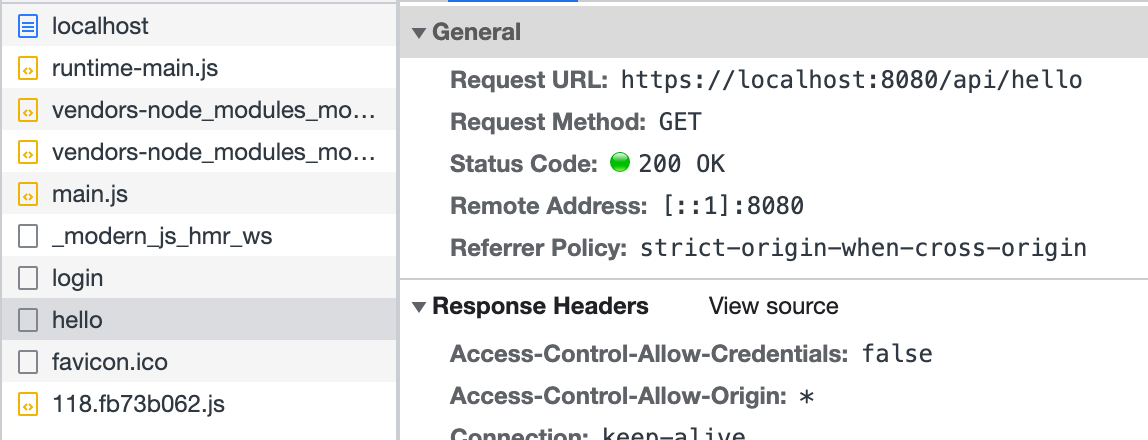
|
|
99
107
|
|
|
100
|
-
以上代码模拟了在
|
|
101
|
-
|
|
102
|
-
:::info
|
|
103
|
-
不同运行时框架中,中间件的写法不一定相同,详情可见[运行时框架](/guides/advanced-features/bff/frameworks)。
|
|
104
|
-
|
|
105
|
-
:::
|
|
106
|
-
|
|
107
|
-
## 定义 Server 实例
|
|
108
|
-
|
|
109
|
-
除了中间件之外,还可以通过 `api/app.ts` 文件来定义 BFF Server 的实例。开发者需要默认导出一个能被运行时框架插件识别的实例。这里简单展示一下 Koa 和 Express 如何定义 Server 实例。
|
|
110
|
-
|
|
111
|
-
import { Tabs, Tab as TabItem } from "@theme";
|
|
112
|
-
|
|
113
|
-
<Tabs>
|
|
114
|
-
<TabItem value="express" label="Express.js" default>
|
|
115
|
-
|
|
116
|
-
```ts title="api/app.ts"
|
|
117
|
-
import express from 'express';
|
|
118
|
-
|
|
119
|
-
const app = express();
|
|
120
|
-
app.use(async (req, res, next) => {
|
|
121
|
-
console.info(`access url: ${req.url}`);
|
|
122
|
-
next();
|
|
123
|
-
});
|
|
124
|
-
|
|
125
|
-
export default app;
|
|
126
|
-
```
|
|
127
|
-
|
|
128
|
-
</TabItem>
|
|
129
|
-
<TabItem value="koa" label="Koa.js">
|
|
130
|
-
|
|
131
|
-
```ts title="api/app.ts"
|
|
132
|
-
import koa from 'koa';
|
|
133
|
-
|
|
134
|
-
const app = new Koa();
|
|
135
|
-
app.use(async (ctx, next) => {
|
|
136
|
-
console.info(`access url: ${ctx.url}`);
|
|
137
|
-
await next();
|
|
138
|
-
});
|
|
139
|
-
|
|
140
|
-
export default app;
|
|
141
|
-
```
|
|
142
|
-
|
|
143
|
-
</TabItem>
|
|
144
|
-
</Tabs>
|
|
145
|
-
|
|
146
|
-
在复杂的 BFF 逻辑中,定义 Server 实例可以更方便通过一个入口来组织代码逻辑,设计目录结构。在这个文件中,可以执行初始化逻辑,添加全局中间件,声明路由,甚至扩展原有框架。
|
|
147
|
-
|
|
148
|
-
BFF 函数定义的路由会在 `app.ts` 文件定义的路由之后注册,所以在这里你也可以拦截 BFF 函数定义的路由,进行预处理或是提前响应。
|
|
149
|
-
|
|
150
|
-
:::note
|
|
151
|
-
此时,如果应用中同时存在 `api/_app.ts`,则定义的中间件会被放在 `api/app.ts` 导出实例的最后执行。多数情况下,中间件就能覆盖大多数 BFF 函数的定制需求。只有当应用的服务端逻辑比较复杂时,才需要自定义 Server 实例。
|
|
152
|
-
:::
|
|
153
|
-
|
|
154
|
-
:::caution
|
|
155
|
-
当应用中没有 `api/app.ts` 的时候,Modern.js 默认会添加 [koa-body](https://www.npmjs.com/package/koa-body)。当应用中存在 `api/app.ts` 时,如果开发者希望使用带有 Body 的 BFF 函数,需要**自行添加** `koa-body`。
|
|
156
|
-
:::
|
|
108
|
+
以上代码模拟了在 `server/Modern.server.ts` 中定义中间件的方式,实现了简易的登录功能。同样,可以在这个配置文件中实现其他功能来扩展 BFF Server。
|
|
@@ -5,82 +5,22 @@ title: 运行时框架
|
|
|
5
5
|
|
|
6
6
|
# 运行时框架
|
|
7
7
|
|
|
8
|
-
Modern.js
|
|
9
|
-
|
|
10
|
-
使用不同运行时框架时,有部分 API 会存在差异。
|
|
8
|
+
Modern.js 以 [Hono.js](https://hono.dev/) 作为 BFF 和 Server 运行时框架,因此可以基于 Hono.js 生态[扩展 BFF Server](/guides/advanced-features/bff/extend-server.html)。
|
|
11
9
|
|
|
12
10
|
## 获取请求上下文
|
|
13
11
|
|
|
14
|
-
在 BFF
|
|
15
|
-
|
|
16
|
-
import { Tabs, Tab as TabItem } from "@theme";
|
|
17
|
-
|
|
18
|
-
<Tabs>
|
|
19
|
-
<TabItem value="express" label="Express.js" default>
|
|
20
|
-
|
|
21
|
-
```ts title="api/lambda/hello.ts"
|
|
22
|
-
import { useContext } from '@modern-js/runtime/express'
|
|
23
|
-
export const get = async () => {
|
|
24
|
-
const { req } = useContext();
|
|
25
|
-
console.info(`access url: ${req.url}`);
|
|
26
|
-
return 'Hello Modern.js'
|
|
27
|
-
};
|
|
28
|
-
```
|
|
29
|
-
|
|
30
|
-
</TabItem>
|
|
31
|
-
<TabItem value="koa" label="Koa.js">
|
|
12
|
+
在 BFF 函数中,有时需要获取请求上下文,来处理更多逻辑。此时,你可以通过 `useHonoContext` 来获取:
|
|
32
13
|
|
|
33
14
|
```ts title="api/lambda/hello.ts"
|
|
34
|
-
import {
|
|
15
|
+
import { useHonoContext } from '@modern-js/plugin-bff/hono'
|
|
35
16
|
export const get = async () => {
|
|
36
|
-
const
|
|
37
|
-
console.info(`access url: ${req.url}`);
|
|
17
|
+
const c = useHonoContext();
|
|
18
|
+
console.info(`access url: ${c.req.url}`);
|
|
38
19
|
return 'Hello Modern.js'
|
|
39
20
|
};
|
|
40
21
|
```
|
|
41
22
|
|
|
42
|
-
</TabItem>
|
|
43
|
-
</Tabs>
|
|
44
|
-
|
|
45
23
|
:::info
|
|
46
|
-
详细内容可以参考 [
|
|
24
|
+
详细内容可以参考 [useHonoContext](/apis/app/runtime/bff/use-hono-context)。
|
|
47
25
|
:::
|
|
48
26
|
|
|
49
|
-
## 使用中间件
|
|
50
|
-
|
|
51
|
-
在 BFF 函数中,有时需要使用中间件,来处理更多逻辑。此时,根据不同的运行时框架,你需要从通过不同的 API 来获取:
|
|
52
|
-
|
|
53
|
-
<Tabs>
|
|
54
|
-
<TabItem value="express" label="Express.js" default>
|
|
55
|
-
|
|
56
|
-
```ts title="api/_app.ts"
|
|
57
|
-
import { hook } from '@modern-js/runtime/express';
|
|
58
|
-
|
|
59
|
-
export default hook(({ addMiddleware }) => {
|
|
60
|
-
addMiddleware((req, res, next) => {
|
|
61
|
-
req.query.id = 'koa';
|
|
62
|
-
next();
|
|
63
|
-
});
|
|
64
|
-
});
|
|
65
|
-
```
|
|
66
|
-
|
|
67
|
-
</TabItem>
|
|
68
|
-
<TabItem value="koa" label="Koa.js">
|
|
69
|
-
|
|
70
|
-
```ts title="api/_app.ts"
|
|
71
|
-
import { hook } from '@modern-js/runtime/koa';
|
|
72
|
-
|
|
73
|
-
export default hook(({ addMiddleware }) => {
|
|
74
|
-
addMiddleware(async (ctx, next) => {
|
|
75
|
-
ctx.req.query.id = 'koa';
|
|
76
|
-
await next();
|
|
77
|
-
});
|
|
78
|
-
});
|
|
79
|
-
```
|
|
80
|
-
|
|
81
|
-
</TabItem>
|
|
82
|
-
</Tabs>
|
|
83
|
-
|
|
84
|
-
:::info
|
|
85
|
-
详细内容可以参考 [hook](/apis/app/runtime/bff/hook)。
|
|
86
|
-
:::
|
|
@@ -6,14 +6,20 @@ sidebar_position: 16
|
|
|
6
6
|
|
|
7
7
|
Modern.js 将大部分项目需要的服务端能力都进行了封装,通常项目无需进行服务端开发。但在有些开发场景下,例如用户鉴权、请求预处理、添加页面渲染骨架等,项目仍需要对服务端进行定制。
|
|
8
8
|
|
|
9
|
+
## 开启自定义 Server
|
|
10
|
+
|
|
11
|
+
开启自定义 Server 功能,需要执行以下步骤:
|
|
12
|
+
1. devDependencies 增加 `@modern-js/server-runtime` 及 `ts-node`依赖并安装。
|
|
13
|
+
2. `tsconfig` 的 `include` 中添加 `server`。
|
|
14
|
+
3. 项目目录下创建 `server/modern.server.ts` 文件,可以在这个文件中编写自定义逻辑。
|
|
15
|
+
|
|
9
16
|
## 自定义 Server 能力
|
|
10
17
|
|
|
11
|
-
|
|
18
|
+
`server/modern.server.ts` 文件中添加如下配置来扩展 Server:
|
|
12
19
|
- **中间件(Middleware)**
|
|
13
20
|
- **渲染中间件(RenderMiddleware)**
|
|
14
21
|
- **服务端插件(Plugin)**
|
|
15
22
|
|
|
16
|
-
|
|
17
23
|
其中 **Plugin** 中可以定义 **Middleware** 与 **RenderMiddleware**。 中间件加载流程如下图所示:
|
|
18
24
|
|
|
19
25
|
<img
|
|
@@ -58,20 +64,18 @@ type ServerConfig = {
|
|
|
58
64
|
### Middleware
|
|
59
65
|
|
|
60
66
|
Middleware 支持在 Modern.js 服务的**请求处理**与**页面路由**的流程前后,执行自定义逻辑。
|
|
61
|
-
即自定义逻辑既要处理接口路由,也要作用于页面路由,那么 Middleware
|
|
67
|
+
即自定义逻辑既要处理接口路由,也要作用于页面路由,那么 Middleware 是不二选择。
|
|
68
|
+
|
|
69
|
+
如果仅需要处理 BFF 接口路由,可以通过检查 `req.path` 是否以 BFF `prefix` 开头,来判断是否为 BFF 接口请求。
|
|
62
70
|
|
|
63
|
-
:::note
|
|
64
|
-
BFF 场景只有[运行时框架](/guides/advanced-features/bff/frameworks.html)为 Hono 时,BFF 路由才会经过 Middleware。
|
|
65
|
-
:::
|
|
66
71
|
|
|
67
72
|
#### 使用姿势
|
|
68
73
|
|
|
69
74
|
```ts title="server/modern.server.ts"
|
|
70
75
|
import { defineServerConfig, type MiddlewareHandler } from '@modern-js/server-runtime';
|
|
71
|
-
import { getMonitors } from '@modern-js/runtime';
|
|
72
76
|
|
|
73
77
|
export const handler: MiddlewareHandler = async (c, next) => {
|
|
74
|
-
const monitors =
|
|
78
|
+
const monitors = c.get('monitors');
|
|
75
79
|
const start = Date.now();
|
|
76
80
|
|
|
77
81
|
await next();
|
|
@@ -2,6 +2,12 @@
|
|
|
2
2
|
|
|
3
3
|
Modern.js 的 Runtime 插件允许您在应用程序的 React 代码运行时扩展和修改其行为。通过 Runtime 插件,您可以轻松地执行初始化任务、实现 React 高阶组件(HOC)封装等功能。
|
|
4
4
|
|
|
5
|
+
:::info
|
|
6
|
+
|
|
7
|
+
Runtime 插件需要通过 `src/modern.runtime.ts` 中的 [`plugins`](/configure/app/runtime/plugins) 字段配置。
|
|
8
|
+
|
|
9
|
+
:::
|
|
10
|
+
|
|
5
11
|
## 插件结构
|
|
6
12
|
|
|
7
13
|
一个典型的 Runtime 插件如下所示:
|
|
@@ -151,16 +157,35 @@ await hooks.onBeforeRender.call(myContext);
|
|
|
151
157
|
您可以组合使用多个钩子来实现更复杂的功能。例如,您可以使用 `onBeforeRender` 获取数据,然后使用 `wrapRoot` 将数据通过 Context 传递给整个应用:
|
|
152
158
|
|
|
153
159
|
```ts
|
|
154
|
-
|
|
155
|
-
|
|
156
|
-
|
|
157
|
-
});
|
|
158
|
-
|
|
159
|
-
|
|
160
|
-
return
|
|
161
|
-
|
|
162
|
-
|
|
163
|
-
|
|
164
|
-
|
|
165
|
-
|
|
160
|
+
import { RuntimePluginFuture, RuntimeReactContext } from '@modern-js/runtime';
|
|
161
|
+
import { useContext, createContext } from 'react';
|
|
162
|
+
|
|
163
|
+
export const ThemeContext = createContext<{ theme: string } | null>(null);
|
|
164
|
+
|
|
165
|
+
export const themePlugin = (): RuntimePluginFuture => {
|
|
166
|
+
return {
|
|
167
|
+
name: 'theme-plugin',
|
|
168
|
+
setup: api => {
|
|
169
|
+
api.onBeforeRender(async context => {
|
|
170
|
+
const userPreference = await fetch('/api/user/theme-settings').then(
|
|
171
|
+
res => res.json(),
|
|
172
|
+
);
|
|
173
|
+
context.data = {
|
|
174
|
+
theme: userPreference.theme,
|
|
175
|
+
};
|
|
176
|
+
});
|
|
177
|
+
|
|
178
|
+
api.wrapRoot(App => {
|
|
179
|
+
return props => {
|
|
180
|
+
const context = useContext(RuntimeReactContext);
|
|
181
|
+
return (
|
|
182
|
+
<ThemeContext.Provider value={context.data}>
|
|
183
|
+
<App {...props} />
|
|
184
|
+
</ThemeContext.Provider>
|
|
185
|
+
);
|
|
186
|
+
};
|
|
187
|
+
});
|
|
188
|
+
},
|
|
189
|
+
};
|
|
190
|
+
};
|
|
166
191
|
```
|
package/package.json
CHANGED
|
@@ -15,14 +15,14 @@
|
|
|
15
15
|
"modern",
|
|
16
16
|
"modern.js"
|
|
17
17
|
],
|
|
18
|
-
"version": "0.0.0-nightly-
|
|
18
|
+
"version": "0.0.0-nightly-20250515160310",
|
|
19
19
|
"publishConfig": {
|
|
20
20
|
"registry": "https://registry.npmjs.org/",
|
|
21
21
|
"access": "public"
|
|
22
22
|
},
|
|
23
23
|
"dependencies": {
|
|
24
24
|
"mermaid": "^11.4.1",
|
|
25
|
-
"@modern-js/sandpack-react": "0.0.0-nightly-
|
|
25
|
+
"@modern-js/sandpack-react": "0.0.0-nightly-20250515160310"
|
|
26
26
|
},
|
|
27
27
|
"devDependencies": {
|
|
28
28
|
"@rspress/shared": "1.43.11",
|
|
@@ -1,11 +0,0 @@
|
|
|
1
|
-
---
|
|
2
|
-
title: _app.[tj]s
|
|
3
|
-
sidebar_position: 2
|
|
4
|
-
---
|
|
5
|
-
# _app.[tj]s
|
|
6
|
-
|
|
7
|
-
This file can add pre-middleware to BFF functions. For detailed information, refer to [Extend BFF Server](/guides/advanced-features/bff/extend-server).
|
|
8
|
-
|
|
9
|
-
:::note
|
|
10
|
-
For specific examples, please refer to [hook](/apis/app/runtime/bff/hook).
|
|
11
|
-
:::
|
|
@@ -1,44 +0,0 @@
|
|
|
1
|
-
---
|
|
2
|
-
title: hook
|
|
3
|
-
---
|
|
4
|
-
# hook
|
|
5
|
-
|
|
6
|
-
Used to add framework middleware under BFF function mode, the middleware will execute before BFF function.
|
|
7
|
-
|
|
8
|
-
## Usage
|
|
9
|
-
|
|
10
|
-
according to the framework extend plugin, export from the corresponding namespace:
|
|
11
|
-
|
|
12
|
-
```ts
|
|
13
|
-
import { hook } from '@modern-js/runtime/{namespace}';
|
|
14
|
-
```
|
|
15
|
-
|
|
16
|
-
## Function Signature
|
|
17
|
-
|
|
18
|
-
```ts
|
|
19
|
-
type HookOptions = {
|
|
20
|
-
addMiddleware: string | function;
|
|
21
|
-
};
|
|
22
|
-
|
|
23
|
-
function hook(options: HookOptions): void;
|
|
24
|
-
```
|
|
25
|
-
|
|
26
|
-
### Input
|
|
27
|
-
|
|
28
|
-
- `options`: a range of hooks provided by Modern.js.
|
|
29
|
-
- `addMiddleware`: add middlewares for BFF.
|
|
30
|
-
|
|
31
|
-
## Example
|
|
32
|
-
|
|
33
|
-
middleware for different frameworks should be different(an example is when using the koa framework):
|
|
34
|
-
|
|
35
|
-
```ts title=api/_app.ts
|
|
36
|
-
import { hook } from '@modern-js/runtime/koa';
|
|
37
|
-
|
|
38
|
-
export default hook(({ addMiddleware }) => {
|
|
39
|
-
addMiddleware(async (ctx, next) => {
|
|
40
|
-
ctx.req.query.id = 'koa';
|
|
41
|
-
await next();
|
|
42
|
-
});
|
|
43
|
-
});
|
|
44
|
-
```
|