@modern-js/main-doc 0.0.0-nightly-20250513160312 → 0.0.0-nightly-20250515160310
This diff represents the content of publicly available package versions that have been released to one of the supported registries. The information contained in this diff is provided for informational purposes only and reflects changes between package versions as they appear in their respective public registries.
- package/docs/en/apis/app/hooks/server/server.mdx +10 -0
- package/docs/en/apis/app/runtime/bff/use-hono-context.mdx +30 -0
- package/docs/en/components/enable-bff.mdx +1 -27
- package/docs/en/components/tech-stack-node-framework.mdx +1 -1
- package/docs/en/configure/app/plugins.mdx +13 -33
- package/docs/en/configure/app/runtime/master-app.mdx +1 -5
- package/docs/en/configure/app/runtime/plugins.mdx +58 -0
- package/docs/en/guides/advanced-features/bff/extend-server.mdx +33 -82
- package/docs/en/guides/advanced-features/bff/frameworks.mdx +12 -68
- package/docs/en/guides/advanced-features/bff.mdx +1 -1
- package/docs/en/guides/advanced-features/custom-server.mdx +13 -9
- package/docs/en/guides/advanced-features/page-performance/inline-assets.mdx +2 -0
- package/docs/en/guides/advanced-features/page-performance/optimize-bundle.mdx +1 -1
- package/docs/en/guides/basic-features/html.mdx +3 -3
- package/docs/en/plugin/cli-plugins/api.mdx +6 -0
- package/docs/en/plugin/runtime-plugins/api.mdx +37 -12
- package/docs/zh/apis/app/hooks/server/server.mdx +10 -0
- package/docs/zh/apis/app/runtime/bff/use-hono-context.mdx +31 -0
- package/docs/zh/components/enable-bff.mdx +2 -27
- package/docs/zh/components/tech-stack-node-framework.mdx +1 -1
- package/docs/zh/configure/app/plugins.mdx +3 -24
- package/docs/zh/configure/app/runtime/master-app.mdx +1 -5
- package/docs/zh/configure/app/runtime/plugins.mdx +58 -0
- package/docs/zh/guides/advanced-features/bff/extend-server.mdx +28 -76
- package/docs/zh/guides/advanced-features/bff/frameworks.mdx +6 -66
- package/docs/zh/guides/advanced-features/custom-server.mdx +12 -8
- package/docs/zh/plugin/cli-plugins/api.mdx +6 -0
- package/docs/zh/plugin/runtime-plugins/api.mdx +37 -12
- package/package.json +2 -2
- package/docs/en/apis/app/hooks/api/middleware.mdx +0 -11
- package/docs/en/apis/app/runtime/bff/hook.mdx +0 -44
- package/docs/en/apis/app/runtime/bff/use-context.mdx +0 -38
- package/docs/zh/apis/app/hooks/api/middleware.mdx +0 -11
- package/docs/zh/apis/app/runtime/bff/hook.mdx +0 -44
- package/docs/zh/apis/app/runtime/bff/use-context.mdx +0 -38
|
@@ -0,0 +1,10 @@
|
|
|
1
|
+
---
|
|
2
|
+
title: modern.server.[tj]s
|
|
3
|
+
sidebar_position: 1
|
|
4
|
+
---
|
|
5
|
+
|
|
6
|
+
# modern.server.[tj]s
|
|
7
|
+
|
|
8
|
+
This file extends the Modern.js Server. In this file, you can configure [Middleware](/guides/advanced-features/custom-server.html#middleware), [RenderMiddleware](/guides/advanced-features/custom-server.html#rendermiddleware), or [Plugin](/guides/advanced-features/custom-server.html#plugin) for the Server that starts with the Modern.js project.
|
|
9
|
+
|
|
10
|
+
You can intercept and handle requests and responses, perform authentication and role checks, preprocess requests, and handle exceptions, etc. You can also insert specific business logic into the built-in processing logic (including route matching, resource addressing, header injection, page rendering, and static web hosting).
|
|
@@ -0,0 +1,30 @@
|
|
|
1
|
+
---
|
|
2
|
+
title: useHonoContext
|
|
3
|
+
---
|
|
4
|
+
# useHonoContext
|
|
5
|
+
|
|
6
|
+
Used to obtain Hono context in an integrated BFF function.
|
|
7
|
+
|
|
8
|
+
## Usage
|
|
9
|
+
|
|
10
|
+
```ts
|
|
11
|
+
import { useHonoContext } from '@modern-js/plugin-bff/hono';
|
|
12
|
+
```
|
|
13
|
+
|
|
14
|
+
## Function Signature
|
|
15
|
+
|
|
16
|
+
`function useHonoContext(): Context`
|
|
17
|
+
|
|
18
|
+
## Example
|
|
19
|
+
|
|
20
|
+
Developers can use `context` to obtain more request information, such as setting response headers:
|
|
21
|
+
|
|
22
|
+
```ts
|
|
23
|
+
import { useHonoContext } from '@modern-js/plugin-bff/hono';
|
|
24
|
+
|
|
25
|
+
export async function get() {
|
|
26
|
+
const c = useHonoContext();
|
|
27
|
+
c.res.headers.set('x-bff-api', 'true');
|
|
28
|
+
// ...
|
|
29
|
+
}
|
|
30
|
+
```
|
|
@@ -9,40 +9,14 @@ import { PackageManagerTabs } from '@theme';
|
|
|
9
9
|
```bash
|
|
10
10
|
? Please select the operation you want to perform Enable optional features
|
|
11
11
|
? Please select the feature to enable Enable "BFF"
|
|
12
|
-
? Please select BFF type Framework mode
|
|
13
12
|
```
|
|
14
13
|
|
|
15
|
-
:::note
|
|
16
|
-
Currently, it is recommended to create BFF in framework mode. We will remove the BFF type concept in the future.
|
|
17
|
-
:::
|
|
18
|
-
|
|
19
14
|
3. Depending on the chosen runtime framework, add the following code to `modern.config.[tj]s`:
|
|
20
15
|
|
|
21
|
-
import { Tabs, Tab as TabItem } from "@theme";
|
|
22
|
-
|
|
23
|
-
<Tabs>
|
|
24
|
-
<TabItem value="express" label="Express.js" default>
|
|
25
|
-
|
|
26
|
-
```ts title="modern.config.ts"
|
|
27
|
-
import { expressPlugin } from '@modern-js/plugin-express';
|
|
28
|
-
import { bffPlugin } from '@modern-js/plugin-bff';
|
|
29
|
-
|
|
30
|
-
export default defineConfig({
|
|
31
|
-
plugins: [expressPlugin(), bffPlugin()],
|
|
32
|
-
});
|
|
33
|
-
```
|
|
34
|
-
|
|
35
|
-
</TabItem>
|
|
36
|
-
<TabItem value="koa" label="Koa.js">
|
|
37
|
-
|
|
38
16
|
```ts title="modern.config.ts"
|
|
39
|
-
import { koaPlugin } from '@modern-js/plugin-koa';
|
|
40
17
|
import { bffPlugin } from '@modern-js/plugin-bff';
|
|
41
18
|
|
|
42
19
|
export default defineConfig({
|
|
43
|
-
plugins: [
|
|
20
|
+
plugins: [bffPlugin()],
|
|
44
21
|
});
|
|
45
22
|
```
|
|
46
|
-
|
|
47
|
-
</TabItem>
|
|
48
|
-
</Tabs>
|
|
@@ -1 +1 @@
|
|
|
1
|
-
Modern.js
|
|
1
|
+
Modern.js Server and BFF use [Hono.js](https://hono.dev/) as the runtime framework, and you can extend the Server based on the Hono.js ecosystem. Please refer to [Custom Server](/guides/advanced-features/custom-server.html).
|
|
@@ -1,47 +1,27 @@
|
|
|
1
|
-
---
|
|
2
|
-
sidebar_position: 9
|
|
3
|
-
---
|
|
4
|
-
|
|
5
1
|
# plugins
|
|
6
2
|
|
|
7
3
|
- **Type:** `CliPlugin[]`
|
|
8
4
|
- **Default:** `[]`
|
|
9
5
|
|
|
10
|
-
Used to configure custom Modern.js framework plugins.
|
|
11
|
-
|
|
12
|
-
Refer to [How to Develop Plugins](/plugin/plugin-system) for how to write custom plugins.
|
|
6
|
+
Used to configure custom Modern.js framework CLI plugins. For information on how to create custom CLI plugins, please refer to [How to Write CLI Plugins](/plugin/introduction.html#cli-plugins).
|
|
13
7
|
|
|
14
8
|
## Note
|
|
15
9
|
|
|
16
|
-
This option is
|
|
17
|
-
|
|
18
|
-
- Use [builderPlugins](/configure/app/builder-plugins) to configure Rsbuild plugins.
|
|
19
|
-
- Use [tools.bundlerChain](/configure/app/tools/bundler-chain) to configure Rspack or webpack plugins.
|
|
20
|
-
- Use [tools.babel](/configure/app/tools/babel) to configure Babel plugins.
|
|
21
|
-
|
|
22
|
-
## Plugin types
|
|
23
|
-
|
|
24
|
-
Modern.js has three types of plugins:
|
|
25
|
-
|
|
26
|
-
- `CLI plugins`, applicable to local development, compilation and construction stages, can extend various capabilities in the command line and compilation stages.
|
|
27
|
-
- `Server plugins`, applicable to the server.
|
|
28
|
-
- `Runtime plugins`, applicable to the front-end runtime.
|
|
29
|
-
|
|
30
|
-
Currently, Modern.js has opened up the ability to customize CLI plugins, and Server plugins and Runtime plugins will be opened up later.
|
|
31
|
-
|
|
32
|
-
## Plugin execution order
|
|
10
|
+
This option is **specifically for configuring framework CLI plugins**. If you need to configure other types of plugins, use the appropriate configuration method:
|
|
33
11
|
|
|
34
|
-
|
|
12
|
+
- Use [builderPlugins](/configure/app/builder-plugins) for Rsbuild plugins.
|
|
13
|
+
- Use [tools.bundlerChain](/configure/app/tools/bundler-chain) for Rspack or webpack plugins.
|
|
14
|
+
- Use [tools.babel](/configure/app/tools/babel) for Babel plugins.
|
|
15
|
+
- Use the [plugins field in runtime config](/configure/app/runtime/plugins) for framework Runtime plugins.
|
|
35
16
|
|
|
36
|
-
When the plugin sets options that control the order, such as `pre` and `post`, the execution order will be adjusted based on the declared fields. Refer to [Plugins Structure](/plugin/plugin-system) for more information.
|
|
37
17
|
|
|
38
|
-
##
|
|
18
|
+
## Examples
|
|
39
19
|
|
|
40
|
-
|
|
20
|
+
Below are examples of using CLI plugins:
|
|
41
21
|
|
|
42
|
-
###
|
|
22
|
+
### Using plugins from npm
|
|
43
23
|
|
|
44
|
-
To use plugins from npm registry,
|
|
24
|
+
To use plugins from the npm registry, first install the plugins and then import them in your configuration:
|
|
45
25
|
|
|
46
26
|
```ts title="modern.config.ts"
|
|
47
27
|
import { myPlugin } from 'my-plugin';
|
|
@@ -51,9 +31,9 @@ export default defineConfig({
|
|
|
51
31
|
});
|
|
52
32
|
```
|
|
53
33
|
|
|
54
|
-
###
|
|
34
|
+
### Using local plugins
|
|
55
35
|
|
|
56
|
-
To use local
|
|
36
|
+
To use plugins from your local repository, import them directly using a relative path:
|
|
57
37
|
|
|
58
38
|
```ts title="modern.config.ts"
|
|
59
39
|
import { myPlugin } from './config/plugin/myPlugin';
|
|
@@ -65,7 +45,7 @@ export default defineConfig({
|
|
|
65
45
|
|
|
66
46
|
### Plugin configuration
|
|
67
47
|
|
|
68
|
-
If
|
|
48
|
+
If a plugin provides custom configuration options, pass them as parameters to the plugin function:
|
|
69
49
|
|
|
70
50
|
```ts title="modern.config.ts"
|
|
71
51
|
import { myPlugin } from 'my-plugin';
|
|
@@ -0,0 +1,58 @@
|
|
|
1
|
+
# plugins
|
|
2
|
+
|
|
3
|
+
- **Type:** `RuntimePlugin[]`
|
|
4
|
+
- **Default:** `[]`
|
|
5
|
+
|
|
6
|
+
Used to configure custom Modern.js Runtime plugins. For details on how to create custom Runtime plugins, please refer to [How to Write Runtime Plugins](/plugin/introduction#runtime-plugins).
|
|
7
|
+
|
|
8
|
+
:::info
|
|
9
|
+
|
|
10
|
+
Runtime plugins must be configured in the `plugins` array within the `src/modern.runtime.ts` file.
|
|
11
|
+
|
|
12
|
+
:::
|
|
13
|
+
|
|
14
|
+
## Examples
|
|
15
|
+
|
|
16
|
+
Here are examples demonstrating how to use Runtime plugins:
|
|
17
|
+
|
|
18
|
+
### Using plugins from npm packages
|
|
19
|
+
|
|
20
|
+
To use plugins published on npm, first install them via your package manager, then import them into your configuration.
|
|
21
|
+
|
|
22
|
+
```ts title="src/modern.runtime.ts"
|
|
23
|
+
import { defineRuntimeConfig } from '@modern-js/runtime';
|
|
24
|
+
import { myPlugin } from 'my-plugin';
|
|
25
|
+
|
|
26
|
+
export default defineRuntimeConfig({
|
|
27
|
+
plugins: [myPlugin()],
|
|
28
|
+
});
|
|
29
|
+
```
|
|
30
|
+
|
|
31
|
+
### Using local plugins
|
|
32
|
+
|
|
33
|
+
To use plugins from your local codebase, import them directly using relative paths.
|
|
34
|
+
|
|
35
|
+
```ts title="src/modern.runtime.ts"
|
|
36
|
+
import { defineRuntimeConfig } from '@modern-js/runtime';
|
|
37
|
+
import { myPlugin } from './config/plugin/myPlugin';
|
|
38
|
+
|
|
39
|
+
export default defineRuntimeConfig({
|
|
40
|
+
plugins: [myPlugin()],
|
|
41
|
+
});
|
|
42
|
+
```
|
|
43
|
+
|
|
44
|
+
### Plugin configuration
|
|
45
|
+
|
|
46
|
+
If a plugin supports custom configuration options, you can provide them as arguments to the plugin function.
|
|
47
|
+
|
|
48
|
+
```ts title="src/modern.runtime.ts"
|
|
49
|
+
import { defineRuntimeConfig } from '@modern-js/runtime';
|
|
50
|
+
import { myPlugin } from './config/plugin/myPlugin';
|
|
51
|
+
|
|
52
|
+
export default defineRuntimeConfig({
|
|
53
|
+
plugins: [myPlugin({
|
|
54
|
+
foo: 1,
|
|
55
|
+
bar: 2,
|
|
56
|
+
})],
|
|
57
|
+
});
|
|
58
|
+
```
|
|
@@ -1,35 +1,41 @@
|
|
|
1
1
|
# Extend BFF Server
|
|
2
2
|
|
|
3
|
-
In some applications, developers may want to handle all BFF functions uniformly, such as
|
|
3
|
+
In some applications, developers may want to handle all BFF functions uniformly, such as authentication, logging, data processing, etc.
|
|
4
4
|
|
|
5
|
-
Modern.js
|
|
5
|
+
Modern.js allows users to freely extend the BFF Server through the [Custom Server](/guides/advanced-features/custom-server.html) method.
|
|
6
6
|
|
|
7
|
-
## Middleware
|
|
7
|
+
## Using Middleware
|
|
8
8
|
|
|
9
|
-
Developers can
|
|
9
|
+
Developers can use middleware by configuring middlewares in `server/modern.server.ts`. The following describes how to write a BFF middleware manually to add permission verification:
|
|
10
10
|
|
|
11
|
-
```ts title="
|
|
12
|
-
import {
|
|
13
|
-
|
|
11
|
+
```ts title="server/modern.server.ts"
|
|
12
|
+
import {
|
|
13
|
+
type MiddlewareHandler,
|
|
14
|
+
defineServerConfig,
|
|
15
|
+
} from '@modern-js/server-runtime';
|
|
14
16
|
|
|
15
|
-
|
|
16
|
-
|
|
17
|
-
|
|
18
|
-
|
|
19
|
-
|
|
20
|
-
res.status(400);
|
|
21
|
-
res.json({ code: -1, message: 'need login' });
|
|
22
|
-
} else {
|
|
23
|
-
next();
|
|
24
|
-
}
|
|
25
|
-
} else {
|
|
26
|
-
next();
|
|
17
|
+
const requireAuthForApi: MiddlewareHandler = async (c, next) => {
|
|
18
|
+
if (c.req.path.startsWith('/api') && c.req.path !== '/api/login') {
|
|
19
|
+
const sid = c.req.cookie('sid');
|
|
20
|
+
if (!sid) {
|
|
21
|
+
return c.json({ code: -1, message: 'need login' }, 400);
|
|
27
22
|
}
|
|
28
|
-
}
|
|
23
|
+
}
|
|
24
|
+
await next();
|
|
25
|
+
};
|
|
26
|
+
|
|
27
|
+
export default defineServerConfig({
|
|
28
|
+
middlewares: [
|
|
29
|
+
{
|
|
30
|
+
name: 'require-auth-for-api',
|
|
31
|
+
handler: requireAuthForApi,
|
|
32
|
+
},
|
|
33
|
+
]
|
|
29
34
|
});
|
|
35
|
+
|
|
30
36
|
```
|
|
31
37
|
|
|
32
|
-
Then add a
|
|
38
|
+
Then add a regular BFF function `api/lambda/hello.ts`:
|
|
33
39
|
|
|
34
40
|
```ts title="api/lambda/hello.ts"
|
|
35
41
|
export default async () => {
|
|
@@ -37,7 +43,7 @@ export default async () => {
|
|
|
37
43
|
};
|
|
38
44
|
```
|
|
39
45
|
|
|
40
|
-
Next, in the frontend
|
|
46
|
+
Next, in the frontend `src/routes/page.tsx`, add the interface access code and directly use the integrated method to call:
|
|
41
47
|
|
|
42
48
|
```ts title="src/routes/page.tsx"
|
|
43
49
|
import { useState, useEffect } from 'react';
|
|
@@ -59,14 +65,14 @@ export default () => {
|
|
|
59
65
|
};
|
|
60
66
|
```
|
|
61
67
|
|
|
62
|
-
Now run the `dev` command to start the project, and
|
|
68
|
+
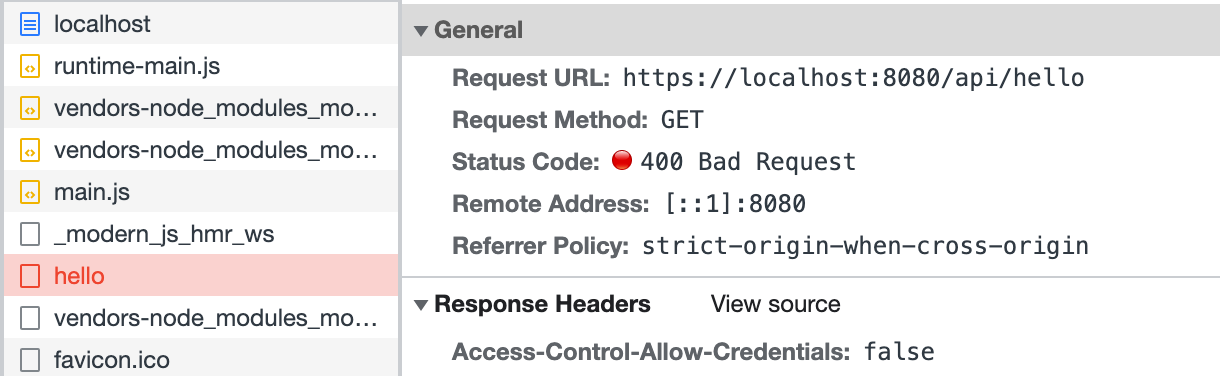
Now run the `dev` command to start the project, and access `http://localhost:8080/` to find that the request for `/api/hello` has been intercepted:
|
|
63
69
|
|
|
64
70
|
|
|
65
71
|
|
|
66
|
-
Finally, modify the frontend code
|
|
72
|
+
Finally, modify the frontend code `src/routes/page.tsx`, and call the login interface before accessing `/api/hello`:
|
|
67
73
|
|
|
68
74
|
:::note
|
|
69
|
-
|
|
75
|
+
This part does not implement a real login interface; the code is just for demonstration.
|
|
70
76
|
:::
|
|
71
77
|
|
|
72
78
|
```ts
|
|
@@ -92,63 +98,8 @@ export default () => {
|
|
|
92
98
|
};
|
|
93
99
|
```
|
|
94
100
|
|
|
95
|
-
Refresh the page
|
|
101
|
+
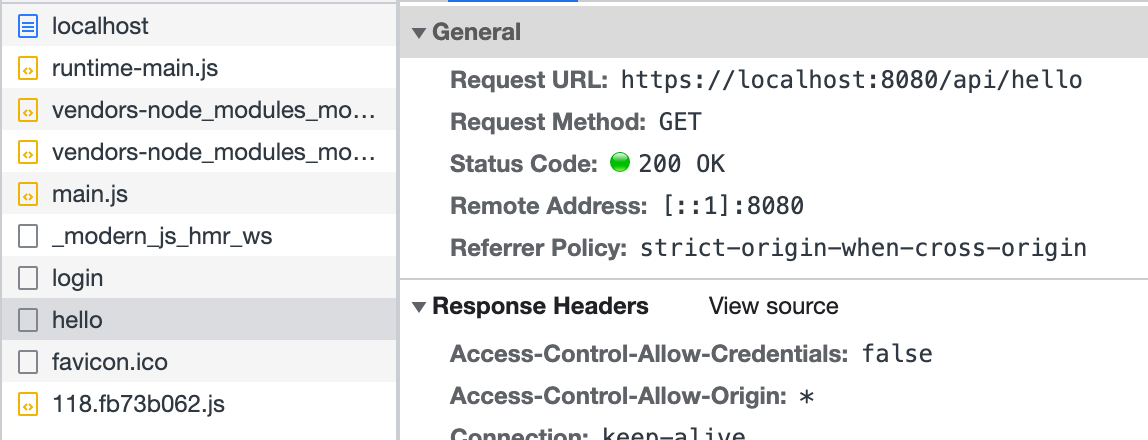
Refresh the page, and you can see that the access to `/api/hello` is successful:
|
|
96
102
|
|
|
97
103
|
|
|
98
104
|
|
|
99
|
-
The above code simulates
|
|
100
|
-
|
|
101
|
-
:::info
|
|
102
|
-
The way middleware is written may differ depending on the runtime framework. For details, see [Runtime Frameworks](/guides/advanced-features/bff/frameworks).
|
|
103
|
-
:::
|
|
104
|
-
|
|
105
|
-
## Define Server Instance
|
|
106
|
-
|
|
107
|
-
In addition to middleware, you can also define a BFF Server instance via the `api/app.ts`. Developers need to export an instance that can be recognized by the runtime framework plugin. Here is a simple demonstration of how to define a server instance with Koa and Express.
|
|
108
|
-
|
|
109
|
-
import { Tabs, Tab as TabItem } from "@theme";
|
|
110
|
-
|
|
111
|
-
<Tabs>
|
|
112
|
-
<TabItem value="express" label="Express.js" default>
|
|
113
|
-
|
|
114
|
-
```ts title="api/app.ts"
|
|
115
|
-
import express from 'express';
|
|
116
|
-
|
|
117
|
-
const app = express();
|
|
118
|
-
app.use(async (req, res, next) => {
|
|
119
|
-
console.info(`access url: ${req.url}`);
|
|
120
|
-
next();
|
|
121
|
-
});
|
|
122
|
-
|
|
123
|
-
export default app;
|
|
124
|
-
```
|
|
125
|
-
|
|
126
|
-
</TabItem>
|
|
127
|
-
<TabItem value="koa" label="Koa.js">
|
|
128
|
-
|
|
129
|
-
```ts title="api/app.ts"
|
|
130
|
-
import koa from 'koa';
|
|
131
|
-
|
|
132
|
-
const app = new Koa();
|
|
133
|
-
app.use(async (ctx, next) => {
|
|
134
|
-
console.info(`access url: ${ctx.url}`);
|
|
135
|
-
await next();
|
|
136
|
-
});
|
|
137
|
-
|
|
138
|
-
export default app;
|
|
139
|
-
```
|
|
140
|
-
|
|
141
|
-
</TabItem>
|
|
142
|
-
</Tabs>
|
|
143
|
-
|
|
144
|
-
In complex BFF logic, defining a server instance allows for easier organization of code logic and directory structure design through a single entry point. In this file, you can perform initialization logic, add global middleware, declare routes, and even extend the original framework.
|
|
145
|
-
|
|
146
|
-
The routes defined by the BFF functions will be registered after the routes defined in the `app.ts` file. Therefore, you can also intercept the routes defined by the BFF functions here for preprocessing or early responses.
|
|
147
|
-
|
|
148
|
-
:::note
|
|
149
|
-
At this time, if `api/_app.ts` exists in the application, the defined middleware will be executed after the middleware exported by the `api/app.ts` instance. In most cases, middleware can cover most customization needs for BFF functions. Only when the application's server-side logic is more complex do you need to customize the server instance.
|
|
150
|
-
:::
|
|
151
|
-
|
|
152
|
-
:::caution
|
|
153
|
-
When `api/app.ts` does not exist in the application, Modern.js will default to adding [koa-body](https://www.npmjs.com/package/koa-body). When `api/app.ts` does exist in the application, if developers wish to use BFF functions with bodies, they will need to **add `koa-body` themselves**.
|
|
154
|
-
:::
|
|
105
|
+
The above code simulates defining middleware in `server/Modern.server.ts` and implements a simple login function. Similarly, other functionalities can be implemented in this configuration file to extend the BFF Server.
|
|
@@ -1,81 +1,25 @@
|
|
|
1
|
-
|
|
2
|
-
|
|
3
|
-
|
|
1
|
+
---
|
|
2
|
+
sidebar_position: 3
|
|
3
|
+
title: Runtime Framework
|
|
4
|
+
---
|
|
4
5
|
|
|
5
|
-
|
|
6
|
-
|
|
7
|
-
## Accessing Request Context
|
|
6
|
+
# Runtime Framework
|
|
8
7
|
|
|
9
|
-
|
|
8
|
+
Modern.js uses [Hono.js](https://hono.dev/) as the BFF and Server runtime framework, so you can [extend BFF Server](/guides/advanced-features/bff/extend-server.html) based on the Hono.js ecosystem.
|
|
10
9
|
|
|
11
|
-
|
|
10
|
+
## Getting Request Context
|
|
12
11
|
|
|
13
|
-
|
|
14
|
-
<TabItem value="express" label="Express.js" default>
|
|
12
|
+
Sometimes in BFF functions, it's necessary to obtain the request context to handle more logic. In such cases, you can use `useHonoContext` to get it:
|
|
15
13
|
|
|
16
14
|
```ts title="api/lambda/hello.ts"
|
|
17
|
-
import {
|
|
15
|
+
import { useHonoContext } from '@modern-js/plugin-bff/hono'
|
|
18
16
|
export const get = async () => {
|
|
19
|
-
const
|
|
20
|
-
console.info(`access url: ${req.url}`);
|
|
17
|
+
const c = useHonoContext();
|
|
18
|
+
console.info(`access url: ${c.req.url}`);
|
|
21
19
|
return 'Hello Modern.js'
|
|
22
20
|
};
|
|
23
21
|
```
|
|
24
22
|
|
|
25
|
-
</TabItem>
|
|
26
|
-
<TabItem value="koa" label="Koa.js">
|
|
27
|
-
|
|
28
|
-
```ts title="api/lambda/hello.ts"
|
|
29
|
-
import { useContext } from '@modern-js/runtime/koa'
|
|
30
|
-
export const get = async () => {
|
|
31
|
-
const ctx = useContext();
|
|
32
|
-
console.info(`access url: ${req.url}`);
|
|
33
|
-
return 'Hello Modern.js'
|
|
34
|
-
};
|
|
35
|
-
```
|
|
36
|
-
|
|
37
|
-
</TabItem>
|
|
38
|
-
</Tabs>
|
|
39
|
-
|
|
40
|
-
:::info
|
|
41
|
-
For more details, refer to [useContext](/apis/app/runtime/bff/use-context).
|
|
42
|
-
:::
|
|
43
|
-
|
|
44
|
-
## Using Middleware
|
|
45
|
-
|
|
46
|
-
In BFF functions, you may need to use middleware to handle more logic. Depending on the runtime framework, you need to use different APIs:
|
|
47
|
-
|
|
48
|
-
<Tabs>
|
|
49
|
-
<TabItem value="express" label="Express.js" default>
|
|
50
|
-
|
|
51
|
-
```ts title="api/_app.ts"
|
|
52
|
-
import { hook } from '@modern-js/runtime/express';
|
|
53
|
-
|
|
54
|
-
export default hook(({ addMiddleware }) => {
|
|
55
|
-
addMiddleware((req, res, next) => {
|
|
56
|
-
req.query.id = 'koa';
|
|
57
|
-
next();
|
|
58
|
-
});
|
|
59
|
-
});
|
|
60
|
-
```
|
|
61
|
-
|
|
62
|
-
</TabItem>
|
|
63
|
-
<TabItem value="koa" label="Koa.js">
|
|
64
|
-
|
|
65
|
-
```ts title="api/_app.ts"
|
|
66
|
-
import { hook } from '@modern-js/runtime/koa';
|
|
67
|
-
|
|
68
|
-
export default hook(({ addMiddleware }) => {
|
|
69
|
-
addMiddleware(async (ctx, next) => {
|
|
70
|
-
ctx.req.query.id = 'koa';
|
|
71
|
-
await next();
|
|
72
|
-
});
|
|
73
|
-
});
|
|
74
|
-
```
|
|
75
|
-
|
|
76
|
-
</TabItem>
|
|
77
|
-
</Tabs>
|
|
78
|
-
|
|
79
23
|
:::info
|
|
80
|
-
For more details, refer to [
|
|
24
|
+
For more details, refer to [useHonoContext](/apis/app/runtime/bff/use-hono-context).
|
|
81
25
|
:::
|
|
@@ -6,7 +6,7 @@ title: BFF
|
|
|
6
6
|
|
|
7
7
|
BFF (Backends for Frontends) is an architectural pattern primarily used to address issues of data aggregation in front-end and back-end collaboration. Under the BFF architecture, front-end applications do not communicate directly with backend services. Instead, they interact with backend services through a dedicated BFF middleware layer, custom-made for the front end.
|
|
8
8
|
|
|
9
|
-
The main problems it to solve include:
|
|
9
|
+
The main problems it tries to solve include:
|
|
10
10
|
|
|
11
11
|
- Aggregation, mapping, clipping, and proxying of lower-level APIs according to their own business needs.
|
|
12
12
|
- Cache data for some specific scenarios to improve performance and thus improve user experience.
|
|
@@ -6,12 +6,19 @@ sidebar_position: 16
|
|
|
6
6
|
|
|
7
7
|
Modern.js encapsulates most server-side capabilities required by projects, typically eliminating the need for server-side development. However, in certain scenarios such as user authentication, request preprocessing, or adding page skeletons, custom server-side logic may still be necessary.
|
|
8
8
|
|
|
9
|
-
## Custom Server
|
|
9
|
+
## Starting a Custom Server
|
|
10
10
|
|
|
11
|
-
|
|
11
|
+
To start a custom server, the following steps need to be taken:
|
|
12
|
+
1. Add and install the dependencies `@modern-js/server-runtime` and `ts-node` to `devDependencies`.
|
|
13
|
+
2. Add `server` to the `include` section of `tsconfig`.
|
|
14
|
+
3. Create a file `server/modern.server.ts` in the project directory, where you can write custom logic.
|
|
15
|
+
|
|
16
|
+
## Capabilities of the Custom Server
|
|
17
|
+
|
|
18
|
+
In the `server/modern.server.ts` file, you can add the following configurations to extend the Server:
|
|
12
19
|
- **Middleware**
|
|
13
20
|
- **Render Middleware**
|
|
14
|
-
- **Server Plugin**
|
|
21
|
+
- **Server-side Plugin**
|
|
15
22
|
|
|
16
23
|
In the **Plugin**, you can define **Middleware** and **RenderMiddleware**. The middleware loading process is illustrated in the following diagram:
|
|
17
24
|
|
|
@@ -60,20 +67,17 @@ type ServerConfig = {
|
|
|
60
67
|
### Middleware
|
|
61
68
|
|
|
62
69
|
Middleware supports executing custom logic before and after the **request handling** and **page routing** processes in Modern.js services.
|
|
63
|
-
|
|
70
|
+
If custom logic needs to handle both API routes and page routes, Middleware is the clear choice.
|
|
64
71
|
|
|
65
|
-
|
|
66
|
-
In the BFF scenario, BFF routing will only go through Middleware when the [runtime framework](/guides/advanced-features/bff/frameworks.html) is Hono.
|
|
67
|
-
:::
|
|
72
|
+
If you only need to handle BFF API routes, you can determine whether a request is for a BFF API by checking if `req.path` starts with the BFF `prefix`.
|
|
68
73
|
|
|
69
74
|
#### Using Posture
|
|
70
75
|
|
|
71
76
|
```ts title="server/modern.server.ts"
|
|
72
77
|
import { defineServerConfig, type MiddlewareHandler } from '@modern-js/server-runtime';
|
|
73
|
-
import { getMonitors } from '@modern-js/runtime';
|
|
74
78
|
|
|
75
79
|
export const handler: MiddlewareHandler = async (c, next) => {
|
|
76
|
-
const monitors =
|
|
80
|
+
const monitors = c.get('monitors');
|
|
77
81
|
const start = Date.now();
|
|
78
82
|
|
|
79
83
|
await next();
|
|
@@ -96,6 +96,8 @@ When you reference a static asset in your CSS file, you can also force the asset
|
|
|
96
96
|
:::tip Do you really need to exclude assets from inlining?
|
|
97
97
|
Excluding assets from inlining will increase the number of assets that the Web App needs to load. This will reduce the efficiency of loading assets in a weak network environment or in scenarios where HTTP2 is not enabled. Please use force no Inline with caution.
|
|
98
98
|
|
|
99
|
+
:::
|
|
100
|
+
|
|
99
101
|
## Inline JS files
|
|
100
102
|
|
|
101
103
|
In addition to inlining static assets into JS files, Modern.js also supports inlining JS files into HTML files.
|
|
@@ -4,7 +4,7 @@ sidebar_position: 13
|
|
|
4
4
|
|
|
5
5
|
# Bundle Size Optimization
|
|
6
6
|
|
|
7
|
-
Bundle size optimization is an important part
|
|
7
|
+
Bundle size optimization is an important part of optimizing your production environment because it directly affects the user experience. In this document, we will introduce some common bundle size optimization methods in Modern.js.
|
|
8
8
|
|
|
9
9
|
## Reduce duplicate dependencies
|
|
10
10
|
|
|
@@ -8,7 +8,7 @@ Modern.js provides **JSX syntax** and **HTML(EJS) syntax** to customize the HTML
|
|
|
8
8
|
|
|
9
9
|
## JSX Syntax
|
|
10
10
|
|
|
11
|
-
According to Modern.js conventions, you can create a `Document.[jt]sx` file under `src/` or the entry directory and default export a component
|
|
11
|
+
According to Modern.js conventions, you can create a `Document.[jt]sx` file under `src/` or the entry directory and default export a component. The rendering result of this component can be used as the HTML template of the entry.
|
|
12
12
|
|
|
13
13
|
For example, consider the following directory structure:
|
|
14
14
|
|
|
@@ -218,9 +218,9 @@ The implementation of custom HTML fragments is to merge the fragments with the b
|
|
|
218
218
|
|
|
219
219
|
:::
|
|
220
220
|
|
|
221
|
-
###
|
|
221
|
+
### Customize the entire HTML Template
|
|
222
222
|
|
|
223
|
-
In some cases, HTML fragments may
|
|
223
|
+
In some cases, HTML fragments may not offer enough control. Modern.js provides a fully customized way.
|
|
224
224
|
|
|
225
225
|
:::caution Note
|
|
226
226
|
It is generally not recommended to directly override the default HTML template, as some functional options may be lost. If it is truly necessary to customize the entire HTML template, it is recommended to modify based on the built-in template as needed.
|
|
@@ -2,6 +2,12 @@
|
|
|
2
2
|
|
|
3
3
|
This document details the API for Modern.js CLI plugins. CLI plugins allow you to extend and customize the functionality of Modern.js projects during the build and development process.
|
|
4
4
|
|
|
5
|
+
:::info
|
|
6
|
+
|
|
7
|
+
CLI plugins need to be configured via the [`plugins`](/configure/app/plugins) field in `modern.config.ts`.
|
|
8
|
+
|
|
9
|
+
:::
|
|
10
|
+
|
|
5
11
|
## Plugin Basic Structure
|
|
6
12
|
|
|
7
13
|
A typical CLI plugin structure is as follows:
|