@modern-js/main-doc 0.0.0-next-1686037191101 → 0.0.0-next-1686045734613
This diff represents the content of publicly available package versions that have been released to one of the supported registries. The information contained in this diff is provided for informational purposes only and reflects changes between package versions as they appear in their respective public registries.
- package/CHANGELOG.md +9 -4
- package/docs/en/components/debug-app.mdx +1 -1
- package/docs/en/components/deploy.mdx +1 -0
- package/docs/en/components/init-app.mdx +3 -7
- package/docs/en/components/release-note.mdx +1 -0
- package/docs/en/guides/get-started/glossary.mdx +12 -12
- package/docs/en/guides/get-started/introduction.mdx +17 -20
- package/docs/en/guides/get-started/quick-start.mdx +21 -37
- package/docs/en/guides/get-started/upgrade.mdx +15 -14
- package/docs/en/guides/topic-detail/changesets/add.mdx +16 -14
- package/docs/en/guides/topic-detail/changesets/changelog.mdx +28 -28
- package/docs/en/guides/topic-detail/changesets/commit.mdx +23 -23
- package/docs/en/guides/topic-detail/changesets/config.mdx +10 -10
- package/docs/en/guides/topic-detail/changesets/github.mdx +12 -12
- package/docs/en/guides/topic-detail/changesets/introduce.mdx +13 -13
- package/docs/en/guides/topic-detail/changesets/release-note.mdx +38 -34
- package/docs/en/guides/topic-detail/changesets/release-pre.mdx +6 -6
- package/docs/en/guides/topic-detail/changesets/release.mdx +42 -42
- package/docs/zh/community/blog/v2-release-note.mdx +1 -1
- package/docs/zh/components/init-app.mdx +5 -9
- package/docs/zh/guides/get-started/quick-start.mdx +7 -10
- package/docs/zh/guides/get-started/upgrade.mdx +1 -1
- package/docs/zh/guides/topic-detail/changesets/add.mdx +10 -8
- package/docs/zh/guides/topic-detail/changesets/changelog.mdx +9 -9
- package/docs/zh/guides/topic-detail/changesets/commit.mdx +10 -10
- package/docs/zh/guides/topic-detail/changesets/config.mdx +1 -1
- package/docs/zh/guides/topic-detail/changesets/github.mdx +9 -9
- package/docs/zh/guides/topic-detail/changesets/introduce.mdx +9 -9
- package/docs/zh/guides/topic-detail/changesets/release-note.mdx +28 -24
- package/docs/zh/guides/topic-detail/changesets/release-pre.mdx +5 -5
- package/docs/zh/guides/topic-detail/changesets/release.mdx +22 -22
- package/package.json +5 -5
|
@@ -4,7 +4,7 @@ sidebar_position: 1
|
|
|
4
4
|
|
|
5
5
|
# 认识 Changesets
|
|
6
6
|
|
|
7
|
-
Modern.js 默认集成了 [changesets](https://github.com/changesets/changesets) 用于模块和 Monorepo
|
|
7
|
+
Modern.js 默认集成了 [changesets](https://github.com/changesets/changesets) 用于模块和 Monorepo 工程方案的包版本管理。
|
|
8
8
|
|
|
9
9
|
## 特点
|
|
10
10
|
|
|
@@ -14,7 +14,7 @@ Changesets 具有以下几个特点:
|
|
|
14
14
|
|
|
15
15
|
- 在发布版本时,会根据 changeset 内容自动升级对应包的版本号,并在对应的包中生成 changelog 信息。
|
|
16
16
|
|
|
17
|
-
- 在 Monorepo
|
|
17
|
+
- 在 Monorepo 项目中,changeset 会自动生成仓库依赖图,升级时只会升级变更包及相关依赖包的版本号。
|
|
18
18
|
|
|
19
19
|
## 初始化
|
|
20
20
|
|
|
@@ -37,20 +37,20 @@ Changesets 默认配置如下:
|
|
|
37
37
|
}
|
|
38
38
|
```
|
|
39
39
|
|
|
40
|
-
配置文件提供了生成 changesets
|
|
40
|
+
配置文件提供了生成 changesets 的一些基本配置,字段详细介绍请参考 [Changesets 配置文件](/guides/topic-detail/changesets/config)。
|
|
41
41
|
|
|
42
42
|
## 命令
|
|
43
43
|
|
|
44
|
-
- `change
|
|
44
|
+
- `change`: 创建一个 changeset,执行完成该命令后会自动在 `.changeset` 目录生成一个 changeset 文件。
|
|
45
45
|
|
|
46
|
-
- `bump
|
|
46
|
+
- `bump`: 根据当前 changeset 升级对应包版本号。
|
|
47
47
|
|
|
48
|
-
- `pre
|
|
48
|
+
- `pre`: 标记进入和退出 pre-release 模式,在 pre release 模式下执行 `bump` 命令,将会生成 `x.x.x-${pre-tag}.x` 的版本号格式。
|
|
49
49
|
|
|
50
|
-
- `release
|
|
50
|
+
- `release`: 发布包到 NPM。
|
|
51
51
|
|
|
52
|
-
- `status
|
|
52
|
+
- `status`: 查看当前 changeset 状态。
|
|
53
53
|
|
|
54
|
-
- `gen-release-note
|
|
54
|
+
- `gen-release-note`: 根据当前的 chagneset 状态生成 Release Note 信息。
|
|
55
55
|
|
|
56
56
|
具体命令支持的参数可以查看后续对应章节介绍。
|
|
@@ -22,15 +22,13 @@ Modern.js 提供了 `modern gen-release-note` 命令,支持通过当前存在
|
|
|
22
22
|
|
|
23
23
|
## 信息
|
|
24
24
|
|
|
25
|
-
###
|
|
25
|
+
### getReleaseInfo
|
|
26
26
|
|
|
27
27
|
生成 Release Note 信息需要先收集一些信息,比如 commit ID、Pull Request ID、commit message 等等。
|
|
28
28
|
|
|
29
29
|
该逻辑可通过 `getReleaseInfo` 函数实现。
|
|
30
30
|
|
|
31
|
-
####
|
|
32
|
-
|
|
33
|
-
##### Params
|
|
31
|
+
#### Params
|
|
34
32
|
|
|
35
33
|
- commit
|
|
36
34
|
|
|
@@ -45,9 +43,17 @@ Modern.js 提供了 `modern gen-release-note` 命令,支持通过当前存在
|
|
|
45
43
|
初步解析 commit 获取基本信息。
|
|
46
44
|
|
|
47
45
|
```ts
|
|
46
|
+
export enum CommitType {
|
|
47
|
+
Performance = 'performance',
|
|
48
|
+
Features = 'features',
|
|
49
|
+
BugFix = 'bugFix',
|
|
50
|
+
Doc = 'doc',
|
|
51
|
+
Other = 'other',
|
|
52
|
+
}
|
|
53
|
+
|
|
48
54
|
interface Commit {
|
|
49
55
|
id: string; // commit id
|
|
50
|
-
type:
|
|
56
|
+
type: CommitType;
|
|
51
57
|
repository?: string; // 参数传入的 repo 信息或者 package.json 中定义的 repository 信息
|
|
52
58
|
pullRequestId?: string;
|
|
53
59
|
author?: string;
|
|
@@ -58,17 +64,17 @@ interface Commit {
|
|
|
58
64
|
}
|
|
59
65
|
```
|
|
60
66
|
|
|
61
|
-
|
|
67
|
+
#### 返回值
|
|
62
68
|
|
|
63
69
|
commitObj, 补充后完整的 commit 对象。
|
|
64
70
|
|
|
65
|
-
|
|
71
|
+
#### 默认实现
|
|
66
72
|
|
|
67
73
|
Modern.js 的默认实现为:根据 commit 信息拆分出 Pull Request ID,并根据 commit id 获取到用户信息,加入到 commitObj 中。
|
|
68
74
|
|
|
69
75
|
```ts
|
|
70
76
|
function getReleaseInfo(commit: string, commitObj: Commit) {
|
|
71
|
-
const commitRegex = /(.*)\(#(\d*)\)/;
|
|
77
|
+
const commitRegex = /(.*)\(#(\d*)\)/;
|
|
72
78
|
|
|
73
79
|
const [commitId, message, email] = commit.split('--');
|
|
74
80
|
|
|
@@ -108,15 +114,13 @@ const commitRegex = /(.*)\(#(\d*)\)/;
|
|
|
108
114
|
}
|
|
109
115
|
```
|
|
110
116
|
|
|
111
|
-
|
|
117
|
+
#### getReleaseNoteLine
|
|
112
118
|
|
|
113
119
|
根据 `getReleaseInfo` 中获取的 commit 对象信息,生成对应的 Release Note。
|
|
114
120
|
|
|
115
121
|
该逻辑可通过 `getReleaseNoteLine` 函数实现。
|
|
116
122
|
|
|
117
|
-
####
|
|
118
|
-
|
|
119
|
-
##### Params
|
|
123
|
+
#### Params
|
|
120
124
|
|
|
121
125
|
- commit
|
|
122
126
|
|
|
@@ -128,11 +132,11 @@ const commitRegex = /(.*)\(#(\d*)\)/;
|
|
|
128
132
|
|
|
129
133
|
获取对应语言的 Release Note 信息,支持 `en` 和 `zh`,默认为 `en`。
|
|
130
134
|
|
|
131
|
-
|
|
135
|
+
#### 返回值
|
|
132
136
|
|
|
133
137
|
生成的 Release Note。
|
|
134
138
|
|
|
135
|
-
|
|
139
|
+
#### 默认实现
|
|
136
140
|
|
|
137
141
|
Modern.js 的默认实现为:
|
|
138
142
|
|
|
@@ -186,7 +190,7 @@ module.exports = {
|
|
|
186
190
|
pnpm run gen-release-note --custom ./scripts/my-release-note-config.js
|
|
187
191
|
```
|
|
188
192
|
|
|
189
|
-
也可以把命令参数直接定义到 package.json 中:
|
|
193
|
+
也可以把命令参数直接定义到 `package.json` 中:
|
|
190
194
|
|
|
191
195
|
```json title="package.json"
|
|
192
196
|
{
|
|
@@ -204,7 +208,7 @@ pnpm run gen-release-note --custom ./scripts/my-release-note-config.js
|
|
|
204
208
|
|
|
205
209
|
custom 参数值还可以使用模块工程方案进行管理,提供通用方案。
|
|
206
210
|
|
|
207
|
-
|
|
211
|
+
#### 使用 `npx @modern-js/create@latest` 创建模块工程方案
|
|
208
212
|
|
|
209
213
|
```md
|
|
210
214
|
? 请选择你想创建的工程类型:Npm 模块
|
|
@@ -213,7 +217,7 @@ custom 参数值还可以使用模块工程方案进行管理,提供通用方
|
|
|
213
217
|
? 请选择包管理工具:pnpm
|
|
214
218
|
```
|
|
215
219
|
|
|
216
|
-
|
|
220
|
+
#### 实现自定义内容
|
|
217
221
|
|
|
218
222
|
```ts title="src/index.ts"
|
|
219
223
|
export function getReleaseInfo() {}
|
|
@@ -221,9 +225,9 @@ export function getReleaseInfo() {}
|
|
|
221
225
|
export function getReleaseNoteLine() {}
|
|
222
226
|
```
|
|
223
227
|
|
|
224
|
-
|
|
225
|
-
|
|
226
|
-
|
|
228
|
+
#### 将模块发布到 NPM
|
|
229
|
+
#### 在目标仓库根目录安装对应模块,例如 `custom-release-note`
|
|
230
|
+
#### 执行 gen-release-note 命令添加 custom 参数
|
|
227
231
|
|
|
228
232
|
```bash
|
|
229
233
|
pnpm run gen-release-note --custom custom-release-note
|
|
@@ -233,7 +237,7 @@ pnpm run gen-release-note --custom custom-release-note
|
|
|
233
237
|
|
|
234
238
|
如果你当前仓库为 Monorepo 工程方案,可以直接使用模块子项目进行管理。
|
|
235
239
|
|
|
236
|
-
|
|
240
|
+
#### 执行 `pnpm run new` 创建模块子项目
|
|
237
241
|
|
|
238
242
|
```md
|
|
239
243
|
? 请选择你想创建的工程类型:Npm 模块
|
|
@@ -242,7 +246,7 @@ pnpm run gen-release-note --custom custom-release-note
|
|
|
242
246
|
? 请选择开发语言:TS
|
|
243
247
|
```
|
|
244
248
|
|
|
245
|
-
|
|
249
|
+
#### 实现自定义内容
|
|
246
250
|
|
|
247
251
|
```ts title="src/index.ts"
|
|
248
252
|
export function getReleaseInfo() {}
|
|
@@ -250,7 +254,7 @@ export function getReleaseInfo() {}
|
|
|
250
254
|
export function getReleaseNoteLine() {}
|
|
251
255
|
```
|
|
252
256
|
|
|
253
|
-
|
|
257
|
+
#### 在 Monorepo 根目录添加子项目模块依赖,例如 `custom-release-note`。
|
|
254
258
|
|
|
255
259
|
```json title="package.json"
|
|
256
260
|
{
|
|
@@ -260,7 +264,7 @@ export function getReleaseNoteLine() {}
|
|
|
260
264
|
}
|
|
261
265
|
```
|
|
262
266
|
|
|
263
|
-
|
|
267
|
+
#### 执行 `gen-release-note` 命令添加 `--custom` 参数
|
|
264
268
|
|
|
265
269
|
```bash
|
|
266
270
|
pnpm run gen-release-note --custom custom-release-note
|
|
@@ -13,7 +13,7 @@ sidebar_position: 4
|
|
|
13
13
|
|
|
14
14
|
:::
|
|
15
15
|
|
|
16
|
-
####
|
|
16
|
+
#### 执行 bump 命令升级预发布版本版本号
|
|
17
17
|
|
|
18
18
|
```bash
|
|
19
19
|
pnpm run bump --canary --preid <preid>
|
|
@@ -23,11 +23,11 @@ pnpm run bump --canary --preid <preid>
|
|
|
23
23
|
|
|
24
24
|
使用 `--canary` 参数后,`bump` 命令由以下三个步骤完成:
|
|
25
25
|
|
|
26
|
-
- `changeset pre enter <preid>`
|
|
26
|
+
- `changeset pre enter <preid>` 进入预发布模式。
|
|
27
27
|
|
|
28
|
-
- `changeset version`
|
|
28
|
+
- `changeset version` 升级版本号。
|
|
29
29
|
|
|
30
|
-
- `changeset pre exit`
|
|
30
|
+
- `changeset pre exit` 退出预发布模式。
|
|
31
31
|
|
|
32
32
|
#### 检查相关变更并提交
|
|
33
33
|
|
|
@@ -35,7 +35,7 @@ pnpm run bump --canary --preid <preid>
|
|
|
35
35
|
|
|
36
36
|
建议预发布操作不在主分支上进行,不合入主分支,当预发布验证完成后,直接基于主分支发布正式版本。
|
|
37
37
|
|
|
38
|
-
####
|
|
38
|
+
#### 执行 release 命令发布预发布版本
|
|
39
39
|
|
|
40
40
|
```bash
|
|
41
41
|
pnpm run release --tag <tag>
|
|
@@ -4,7 +4,7 @@ sidebar_position: 3
|
|
|
4
4
|
|
|
5
5
|
# 发布正式版本
|
|
6
6
|
|
|
7
|
-
发版正式版本时,我们需要根据开发过程中生成的
|
|
7
|
+
发版正式版本时,我们需要根据开发过程中生成的 changesets 进行相关包版本号升级,并执行 publish 命令发布到 NPM 上。
|
|
8
8
|
|
|
9
9
|
## 步骤
|
|
10
10
|
|
|
@@ -15,7 +15,7 @@ sidebar_position: 3
|
|
|
15
15
|
|
|
16
16
|
### 模块工程方案
|
|
17
17
|
|
|
18
|
-
####
|
|
18
|
+
#### 在根目录执行 bump 命令
|
|
19
19
|
|
|
20
20
|
```bash
|
|
21
21
|
pnpm run bump
|
|
@@ -29,16 +29,16 @@ pnpm run bump
|
|
|
29
29
|
|
|
30
30
|
- 根据 changeset 信息升级该包版本号。
|
|
31
31
|
|
|
32
|
-
- 在根目录的 `CHANGELOG.md` 文件中写入
|
|
32
|
+
- 在根目录的 `CHANGELOG.md` 文件中写入 changelog 信息,文件不存在时会自动创建。
|
|
33
33
|
|
|
34
|
-
####
|
|
34
|
+
#### 确认并提交当前变更
|
|
35
35
|
|
|
36
36
|
```bash
|
|
37
37
|
git add .
|
|
38
38
|
git commit -m "release: bump package"
|
|
39
39
|
```
|
|
40
40
|
|
|
41
|
-
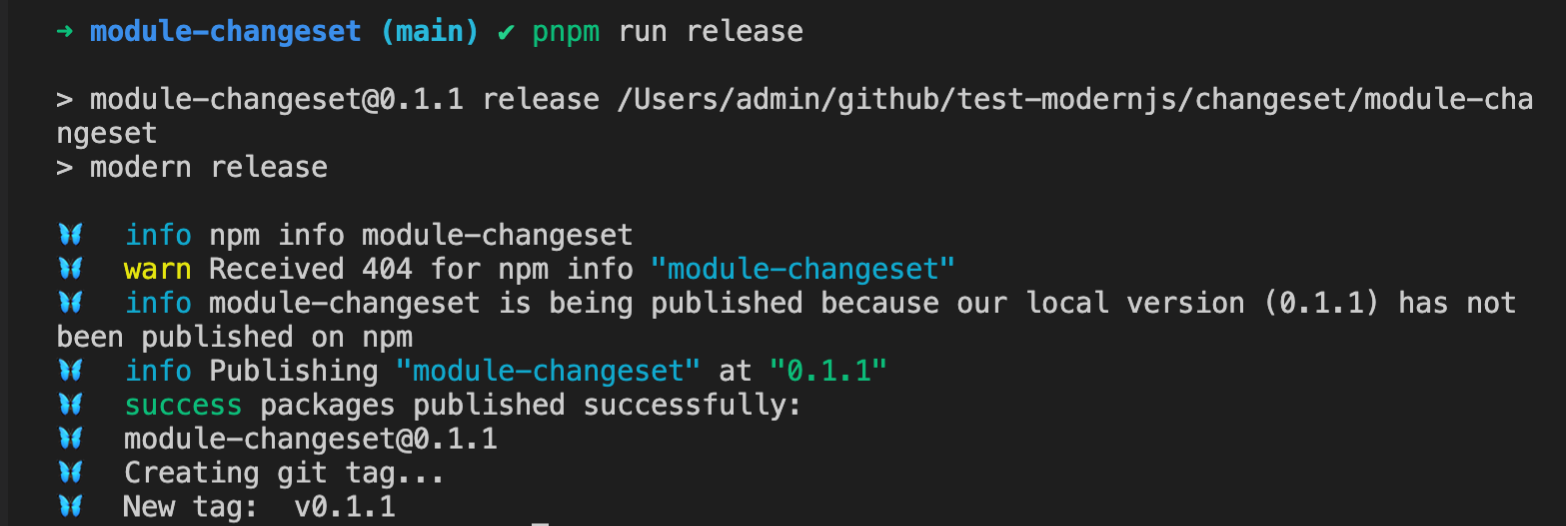
#### 在根目录执行以下命令发布包至 NPM
|
|
41
|
+
#### 在根目录执行以下命令发布包至 NPM
|
|
42
42
|
|
|
43
43
|
```bash
|
|
44
44
|
pnpm run release
|
|
@@ -46,7 +46,7 @@ pnpm run release
|
|
|
46
46
|
|
|
47
47
|
|
|
48
48
|
|
|
49
|
-
#### push 对应的 tag
|
|
49
|
+
#### push 对应的 tag 信息至远程仓库
|
|
50
50
|
|
|
51
51
|
```bash
|
|
52
52
|
git push --follow-tags
|
|
@@ -54,7 +54,7 @@ git push --follow-tags
|
|
|
54
54
|
|
|
55
55
|
### Monorepo 工程方案
|
|
56
56
|
|
|
57
|
-
####
|
|
57
|
+
#### 在根目录执行 bump 命令
|
|
58
58
|
|
|
59
59
|
```bash
|
|
60
60
|
pnpm run bump
|
|
@@ -62,7 +62,7 @@ pnpm run bump
|
|
|
62
62
|
|
|
63
63
|

|
|
64
64
|
|
|
65
|
-
执行该命令时,
|
|
65
|
+
执行该命令时,changesets 会自动进行以下操作:
|
|
66
66
|
|
|
67
67
|
- 删除 `.changesets` 目录下的所有 changeset 文件。
|
|
68
68
|
|
|
@@ -70,7 +70,7 @@ pnpm run bump
|
|
|
70
70
|
|
|
71
71
|
- 在需要升级的包目录的 `CHANGELOG.md` 文件中写入 Changelog 信息,文件不存在时会自动创建。
|
|
72
72
|
|
|
73
|
-
####
|
|
73
|
+
#### 确认并提交当前变更
|
|
74
74
|
|
|
75
75
|
:::info
|
|
76
76
|
需确认自动升级的版本号是否符合预期,如果需要了解版本升级策略,请查看[升级版本策略](/guides/topic-detail/changesets/release#升级版本策略)。
|
|
@@ -82,7 +82,7 @@ git add .
|
|
|
82
82
|
git commit -m "release: bump package"
|
|
83
83
|
```
|
|
84
84
|
|
|
85
|
-
#### 在根目录执行以下命令发布包至 NPM
|
|
85
|
+
#### 在根目录执行以下命令发布包至 NPM
|
|
86
86
|
|
|
87
87
|
```bash
|
|
88
88
|
pnpm run release
|
|
@@ -95,7 +95,7 @@ pnpm run release
|
|
|
95
95
|
|
|
96
96
|
:::
|
|
97
97
|
|
|
98
|
-
#### push 对应的 tag
|
|
98
|
+
#### push 对应的 tag 信息至远程仓库
|
|
99
99
|
|
|
100
100
|
```bash
|
|
101
101
|
git push --follow-tags
|
|
@@ -105,7 +105,7 @@ git push --follow-tags
|
|
|
105
105
|
|
|
106
106
|
### bump 命令参数
|
|
107
107
|
|
|
108
|
-
- `--snapshot
|
|
108
|
+
- `--snapshot`:生成基于时间戳的版本号。
|
|
109
109
|
|
|
110
110
|
```bash
|
|
111
111
|
pnpm run bump --snapshot canary
|
|
@@ -115,7 +115,7 @@ pnpm run bump --snapshot canary
|
|
|
115
115
|
|
|
116
116
|
该参数主要用于发布临时测试版本进行测试,不需要进行代码提交。
|
|
117
117
|
|
|
118
|
-
- `--ignore
|
|
118
|
+
- `--ignore`:发布时手动忽略部分包。
|
|
119
119
|
|
|
120
120
|
例如本次发布你需要忽略 `module-2` 包:
|
|
121
121
|
|
|
@@ -133,19 +133,19 @@ pnpm run bump --ignore module-2 --ignore module-3
|
|
|
133
133
|
|
|
134
134
|
### release 命令参数
|
|
135
135
|
|
|
136
|
-
- `--otp
|
|
136
|
+
- `--otp`:使用 `npm token` 发布包。
|
|
137
137
|
|
|
138
138
|
```bash
|
|
139
139
|
pnpm run relese --otp <token>
|
|
140
140
|
```
|
|
141
141
|
|
|
142
|
-
- `--tag
|
|
142
|
+
- `--tag`:发布使用特定的 tag,默认使用 `latest`
|
|
143
143
|
|
|
144
144
|
```bash
|
|
145
145
|
pnpm run release --tag <tag>
|
|
146
146
|
```
|
|
147
147
|
|
|
148
|
-
- `--ignore-scripts
|
|
148
|
+
- `--ignore-scripts`:发布时忽略 npm scripts。
|
|
149
149
|
|
|
150
150
|
执行 `publish` 命令时,npm 会自动触发很多命令,比如 `prepare`、`prepublish`,使用该参数可以忽略这些命令执行。该参数仅支持在使用 pnpm 的 Monorepo 中使用。
|
|
151
151
|
|
|
@@ -153,7 +153,7 @@ pnpm run release --tag <tag>
|
|
|
153
153
|
pnpm run release --ignore-scripts
|
|
154
154
|
```
|
|
155
155
|
|
|
156
|
-
- `--no-git-checks
|
|
156
|
+
- `--no-git-checks`:发布时忽略检查当前分支。
|
|
157
157
|
|
|
158
158
|
执行发布命令时,默认会自动检查当前分支是否为发布分支,是否存在未提交变更等等,使用该参数可以忽略 git 相关检查。
|
|
159
159
|
|
|
@@ -165,7 +165,7 @@ pnpm run release --no-git-checks
|
|
|
165
165
|
|
|
166
166
|
### dependencies 或者 devDependencies 依赖
|
|
167
167
|
|
|
168
|
-
|
|
168
|
+
- patch 版本依赖只升级自身
|
|
169
169
|
|
|
170
170
|
例如存在如下场景:
|
|
171
171
|
|
|
@@ -175,7 +175,7 @@ Monorepo 中存在两个包,`module-1` 和 `module-2`,`module-2` 的 `depend
|
|
|
175
175
|
|
|
176
176
|
执行 bump 命令后将只会升级 `module-1` 的 patch 版本号。
|
|
177
177
|
|
|
178
|
-
|
|
178
|
+
- major / minor 版本自身升级 major 或者 minor 版本号,依赖包升级 patch 版本号
|
|
179
179
|
|
|
180
180
|
例如存在如下场景:
|
|
181
181
|
|
|
@@ -187,7 +187,7 @@ Monorepo 中存在两个包,`module-1` 和 `module-2`,`module-2` 的 depende
|
|
|
187
187
|
|
|
188
188
|
### peerDependencies 依赖
|
|
189
189
|
|
|
190
|
-
|
|
190
|
+
- patch 版本依赖自身和依赖包都升级 patch 版本号
|
|
191
191
|
|
|
192
192
|
例如存在如下场景:
|
|
193
193
|
|
|
@@ -197,7 +197,7 @@ Monorepo 中存在两个包,`module-1` 和 `module-2`,`module-2` 的 `peerDe
|
|
|
197
197
|
|
|
198
198
|
执行 bump 命令后将 `module-1` 和 `module-2` 都升级 patch 版本号。
|
|
199
199
|
|
|
200
|
-
|
|
200
|
+
- major / minor 版本自身升级 major 或者 minor 版本号,依赖包升级 major 版本号
|
|
201
201
|
|
|
202
202
|
例如存在如下场景:
|
|
203
203
|
|
|
@@ -207,7 +207,7 @@ Monorepo 中存在两个包,`module-1` 和 `module-2`,`module-2` 的 `peerDe
|
|
|
207
207
|
|
|
208
208
|
执行 bump 命令后将 module-1 将升级 `minor` 版本号, `module-2` 升级 `major` 版本号。
|
|
209
209
|
|
|
210
|
-
|
|
210
|
+
- 修改 peerDependencies 的升级策略
|
|
211
211
|
|
|
212
212
|
`peerDependencies` 的升级策略支持通过配置 `onlyUpdatePeerDependentsWhenOutOfRange` 来修改依赖升级策略,当只有超出声明的版本类型范围时,才对应升级 `peerDependencies`。
|
|
213
213
|
|
package/package.json
CHANGED
|
@@ -15,13 +15,13 @@
|
|
|
15
15
|
"modern",
|
|
16
16
|
"modern.js"
|
|
17
17
|
],
|
|
18
|
-
"version": "0.0.0-next-
|
|
18
|
+
"version": "0.0.0-next-1686045734613",
|
|
19
19
|
"publishConfig": {
|
|
20
20
|
"registry": "https://registry.npmjs.org/",
|
|
21
21
|
"access": "public"
|
|
22
22
|
},
|
|
23
23
|
"peerDependencies": {
|
|
24
|
-
"@modern-js/builder-doc": "0.0.0-next-
|
|
24
|
+
"@modern-js/builder-doc": "0.0.0-next-1686045734613"
|
|
25
25
|
},
|
|
26
26
|
"devDependencies": {
|
|
27
27
|
"classnames": "^2",
|
|
@@ -33,9 +33,9 @@
|
|
|
33
33
|
"fs-extra": "^10",
|
|
34
34
|
"@types/node": "^16",
|
|
35
35
|
"@types/fs-extra": "^9",
|
|
36
|
-
"@modern-js/builder-doc": "0.0.0-next-
|
|
37
|
-
"@modern-js/doc-plugin-auto-sidebar": "0.0.0-next-
|
|
38
|
-
"@modern-js/doc-tools": "0.0.0-next-
|
|
36
|
+
"@modern-js/builder-doc": "0.0.0-next-1686045734613",
|
|
37
|
+
"@modern-js/doc-plugin-auto-sidebar": "0.0.0-next-1686045734613",
|
|
38
|
+
"@modern-js/doc-tools": "0.0.0-next-1686045734613"
|
|
39
39
|
},
|
|
40
40
|
"scripts": {
|
|
41
41
|
"dev": "modern dev",
|