@modern-js/main-doc 0.0.0-next-1686037191101 → 0.0.0-next-1686045734613
This diff represents the content of publicly available package versions that have been released to one of the supported registries. The information contained in this diff is provided for informational purposes only and reflects changes between package versions as they appear in their respective public registries.
- package/CHANGELOG.md +9 -4
- package/docs/en/components/debug-app.mdx +1 -1
- package/docs/en/components/deploy.mdx +1 -0
- package/docs/en/components/init-app.mdx +3 -7
- package/docs/en/components/release-note.mdx +1 -0
- package/docs/en/guides/get-started/glossary.mdx +12 -12
- package/docs/en/guides/get-started/introduction.mdx +17 -20
- package/docs/en/guides/get-started/quick-start.mdx +21 -37
- package/docs/en/guides/get-started/upgrade.mdx +15 -14
- package/docs/en/guides/topic-detail/changesets/add.mdx +16 -14
- package/docs/en/guides/topic-detail/changesets/changelog.mdx +28 -28
- package/docs/en/guides/topic-detail/changesets/commit.mdx +23 -23
- package/docs/en/guides/topic-detail/changesets/config.mdx +10 -10
- package/docs/en/guides/topic-detail/changesets/github.mdx +12 -12
- package/docs/en/guides/topic-detail/changesets/introduce.mdx +13 -13
- package/docs/en/guides/topic-detail/changesets/release-note.mdx +38 -34
- package/docs/en/guides/topic-detail/changesets/release-pre.mdx +6 -6
- package/docs/en/guides/topic-detail/changesets/release.mdx +42 -42
- package/docs/zh/community/blog/v2-release-note.mdx +1 -1
- package/docs/zh/components/init-app.mdx +5 -9
- package/docs/zh/guides/get-started/quick-start.mdx +7 -10
- package/docs/zh/guides/get-started/upgrade.mdx +1 -1
- package/docs/zh/guides/topic-detail/changesets/add.mdx +10 -8
- package/docs/zh/guides/topic-detail/changesets/changelog.mdx +9 -9
- package/docs/zh/guides/topic-detail/changesets/commit.mdx +10 -10
- package/docs/zh/guides/topic-detail/changesets/config.mdx +1 -1
- package/docs/zh/guides/topic-detail/changesets/github.mdx +9 -9
- package/docs/zh/guides/topic-detail/changesets/introduce.mdx +9 -9
- package/docs/zh/guides/topic-detail/changesets/release-note.mdx +28 -24
- package/docs/zh/guides/topic-detail/changesets/release-pre.mdx +5 -5
- package/docs/zh/guides/topic-detail/changesets/release.mdx +22 -22
- package/package.json +5 -5
|
@@ -4,7 +4,7 @@ sidebar_position: 7
|
|
|
4
4
|
|
|
5
5
|
# Customizing Commit Messages
|
|
6
6
|
|
|
7
|
-
Changesets supports configuring `commit` to automatically submit the current changes when
|
|
7
|
+
Changesets supports configuring `commit` to automatically submit the current changes when running the `change` and `bump` commands.
|
|
8
8
|
|
|
9
9
|
The default `commit` information is provided by `@changesets/cli/commit`, and the default information format is:
|
|
10
10
|
|
|
@@ -17,8 +17,8 @@ When the default commit information cannot meet the requirements, custom commit
|
|
|
17
17
|
|
|
18
18
|
Commit information is divided into two types:
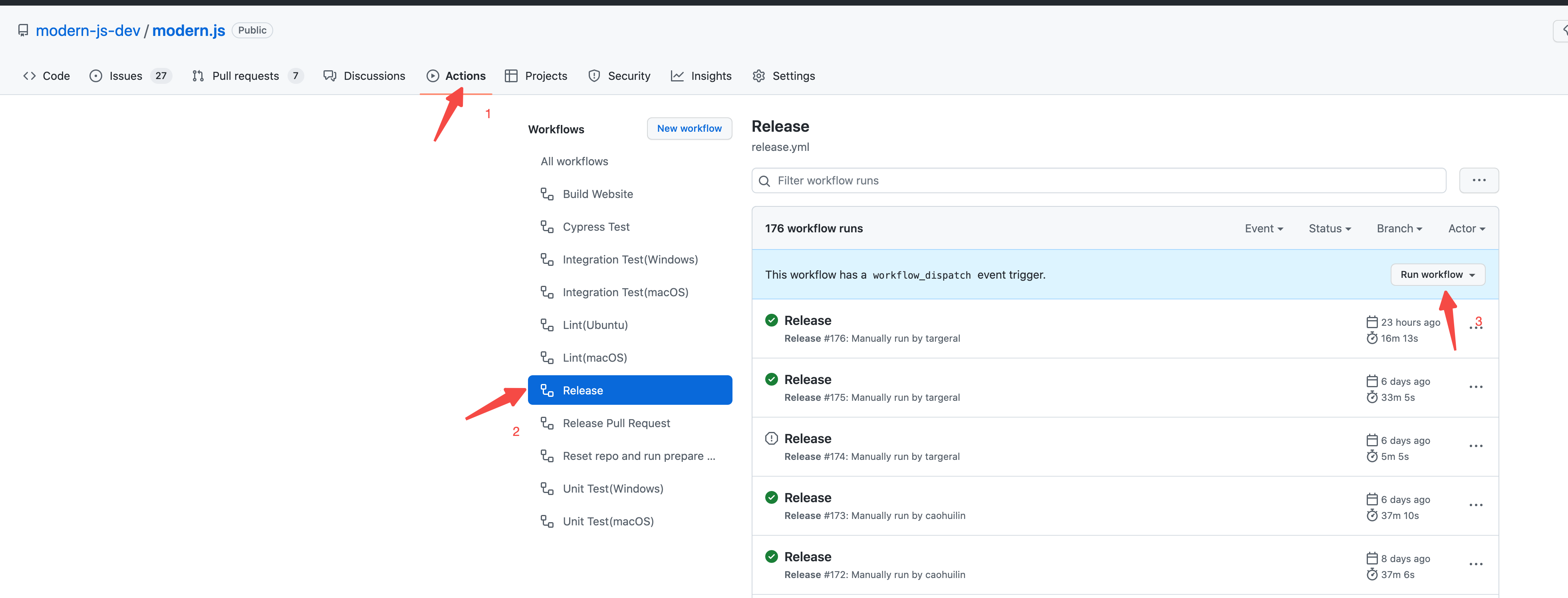
|
|
19
19
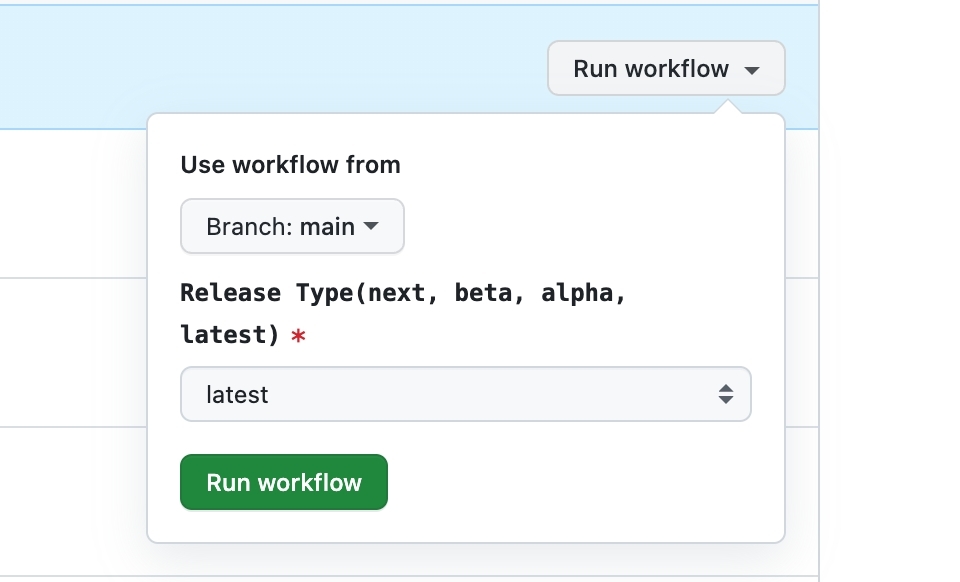
|
|
|
20
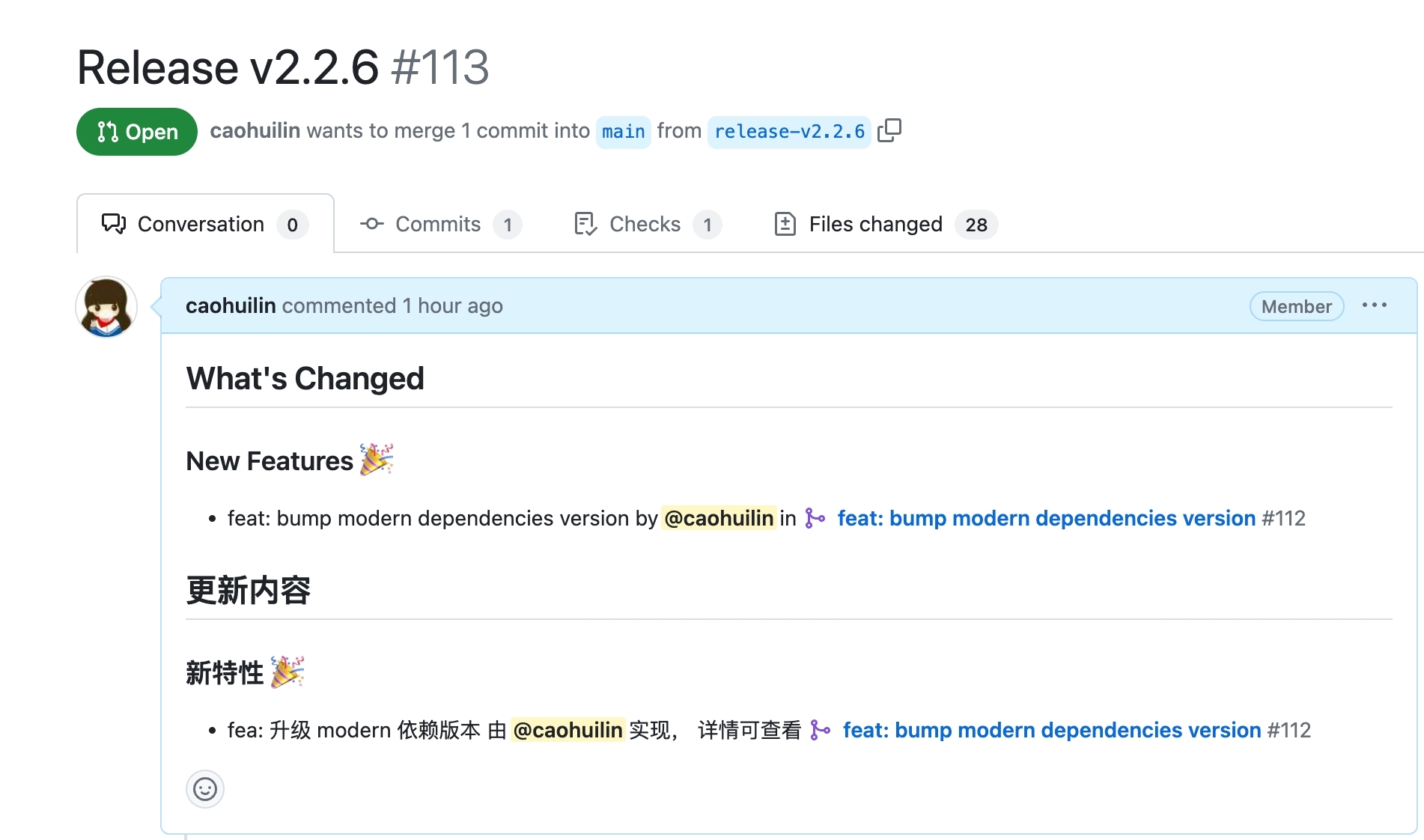
|
-
- Commit information automatically generated when
|
|
21
|
-
- Commit information automatically generated when
|
|
20
|
+
- Commit information automatically generated when running the `change` command.
|
|
21
|
+
- Commit information automatically generated when running the `bump` command.
|
|
22
22
|
|
|
23
23
|
The custom logic mainly implements two functions, `getAddMessage` and `getVersionMessage`, which are used to define the above two types of information, respectively.
|
|
24
24
|
|
|
@@ -101,18 +101,18 @@ type ComprehensiveRelease = {
|
|
|
101
101
|
};
|
|
102
102
|
|
|
103
103
|
type PreState = {
|
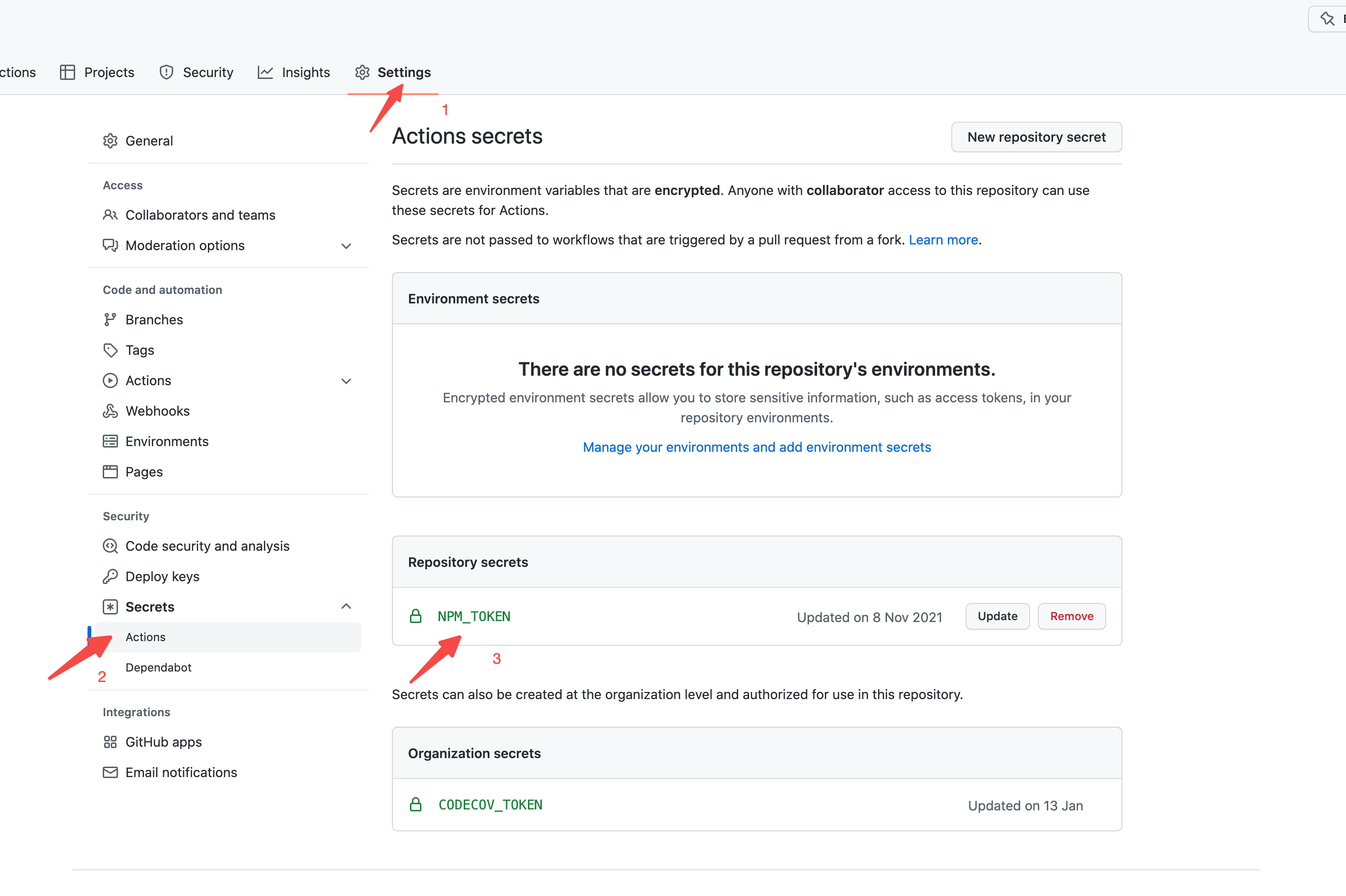
|
104
|
-
mode: 'pre' | 'exit'; // pre
|
|
105
|
-
tag: string; // pre
|
|
104
|
+
mode: 'pre' | 'exit'; // Current state of pre mode
|
|
105
|
+
tag: string; // Type of pre
|
|
106
106
|
initialVersions: {
|
|
107
|
-
[pkgName: string]: string; //
|
|
107
|
+
[pkgName: string]: string; // Package name and version information before version upgrade
|
|
108
108
|
};
|
|
109
|
-
changesets: string[]; //
|
|
109
|
+
changesets: string[]; // List of changeset ids for this upgrade
|
|
110
110
|
};
|
|
111
111
|
|
|
112
112
|
type ReleasePlan = {
|
|
113
|
-
changesets: Changeset[]; //
|
|
114
|
-
releases: ComprehensiveRelease[]; //
|
|
115
|
-
preState: PreState | undefined; //
|
|
113
|
+
changesets: Changeset[]; // List of changesets for this upgrade
|
|
114
|
+
releases: ComprehensiveRelease[]; // Information of the current upgrade, including package name, current version, upgraded version, and upgrade type
|
|
115
|
+
preState: PreState | undefined; // If it is a pre-release, provide relevant state information
|
|
116
116
|
};
|
|
117
117
|
```
|
|
118
118
|
|
|
@@ -128,7 +128,7 @@ Commit message content.
|
|
|
128
128
|
|
|
129
129
|
#### Default Implementation
|
|
130
130
|
|
|
131
|
-
The default processing logic of `@changesets/cli/commit` is to first display the number of packages that need to be released, then display the names and new version
|
|
131
|
+
The default processing logic of `@changesets/cli/commit` is to first display the number of packages that need to be released, then display the names and new version of the released packages, and [skip ci] information is added according to the `skipCI` parameter configuration passed in.
|
|
132
132
|
|
|
133
133
|
```ts
|
|
134
134
|
const getVersionMessage = async (
|
|
@@ -157,7 +157,7 @@ const getVersionMessage = async (
|
|
|
157
157
|
|
|
158
158
|
## Configuration
|
|
159
159
|
|
|
160
|
-
The `commit` field in the changesets configuration file is used to mark whether to submit commit information when
|
|
160
|
+
The `commit` field in the changesets configuration file is used to mark whether to submit commit information when running the `change` and `bump` commands, and the way to obtain commit information.
|
|
161
161
|
|
|
162
162
|
This configuration can be a `boolean`. When it is `true`, the default `@changesets/cli/commit` formatting commit information will be used.
|
|
163
163
|
|
|
@@ -191,15 +191,15 @@ Configure `commit` as `./my-commit-config.js`:
|
|
|
191
191
|
}
|
|
192
192
|
```
|
|
193
193
|
|
|
194
|
-
### Using Module
|
|
194
|
+
### Using NPM Module
|
|
195
195
|
|
|
196
|
-
Customizing commit can also be managed using the module project to provide a common solution.
|
|
196
|
+
Customizing commit can also be managed using the NPM module project to provide a common solution.
|
|
197
197
|
|
|
198
|
-
#### Use `npx @modern-js/create@latest` to create a module project
|
|
198
|
+
#### Use `npx @modern-js/create@latest` to create a module project
|
|
199
199
|
|
|
200
200
|
```md
|
|
201
201
|
? Please select the type of project you want to create: Npm Module
|
|
202
|
-
? Please fill in the project name: custom-
|
|
202
|
+
? Please fill in the project name: custom-commit
|
|
203
203
|
? Please select the programming language: TS
|
|
204
204
|
? Please select the package manager: pnpm
|
|
205
205
|
```
|
|
@@ -212,11 +212,11 @@ export async function getAddMessage() {}
|
|
|
212
212
|
export async function getVersionMessage() {}
|
|
213
213
|
```
|
|
214
214
|
|
|
215
|
-
#### Publish the module to NPM
|
|
215
|
+
#### Publish the module to NPM
|
|
216
216
|
|
|
217
|
-
#### Install the corresponding module in the root directory of the target repository, such as `custom-commit
|
|
217
|
+
#### Install the corresponding module in the root directory of the target repository, such as `custom-commit`
|
|
218
218
|
|
|
219
|
-
#### Configure the commit configuration of changesets as the package name
|
|
219
|
+
#### Configure the commit configuration of changesets as the package name
|
|
220
220
|
|
|
221
221
|
```json title="package.json"
|
|
222
222
|
{
|
|
@@ -227,9 +227,9 @@ export async function getVersionMessage() {}
|
|
|
227
227
|
|
|
228
228
|
### Using Monorepo Sub-Project
|
|
229
229
|
|
|
230
|
-
If your current repository is Monorepo, you can directly manage it using module sub-projects.
|
|
230
|
+
If your current repository is Monorepo, you can directly manage it using NPM module sub-projects.
|
|
231
231
|
|
|
232
|
-
#### Run `pnpm run new` to create a module sub-project
|
|
232
|
+
#### Run `pnpm run new` to create a module sub-project
|
|
233
233
|
|
|
234
234
|
```bash
|
|
235
235
|
? Please select the type of project you want to create: Npm Module
|
|
@@ -246,7 +246,7 @@ export async function getAddMessage() {}
|
|
|
246
246
|
export async function getVersionMessage() {}
|
|
247
247
|
```
|
|
248
248
|
|
|
249
|
-
Add the sub-project module dependency, such as `custom-commit`, to the Monorepo root directory
|
|
249
|
+
#### Add the sub-project module dependency, such as `custom-commit`, to the Monorepo root directory
|
|
250
250
|
|
|
251
251
|
```json title="package.json"
|
|
252
252
|
{
|
|
@@ -257,7 +257,7 @@ Add the sub-project module dependency, such as `custom-commit`, to the Monorepo
|
|
|
257
257
|
}
|
|
258
258
|
```
|
|
259
259
|
|
|
260
|
-
Configure the commit configuration of Changesets as the package name
|
|
260
|
+
#### Configure the commit configuration of Changesets as the package name
|
|
261
261
|
|
|
262
262
|
```json title=".changesets/config.json"
|
|
263
263
|
{
|
|
@@ -4,9 +4,9 @@ sidebar_position: 5
|
|
|
4
4
|
|
|
5
5
|
# Changesets Configuration
|
|
6
6
|
|
|
7
|
-
|
|
7
|
+
When initializing a Modern.js repository, the configuration file for changesets will be initialized by default, that is, the `.changeset/config.json` file. Below, we will learn in detail what configurations are supported in this file.
|
|
8
8
|
|
|
9
|
-
##
|
|
9
|
+
## Introduction
|
|
10
10
|
|
|
11
11
|
### commit
|
|
12
12
|
|
|
@@ -14,14 +14,14 @@ Type: `boolean`
|
|
|
14
14
|
|
|
15
15
|
Default: `false`
|
|
16
16
|
|
|
17
|
-
When this field is configured as `true`, the code submission operation will be automatically executed when
|
|
17
|
+
When this field is configured as `true`, the code submission operation will be automatically executed when running the `change` and `bump` commands.
|
|
18
18
|
|
|
19
19
|
The default commit information format is as follows:
|
|
20
20
|
|
|
21
21
|

|
|
22
22
|
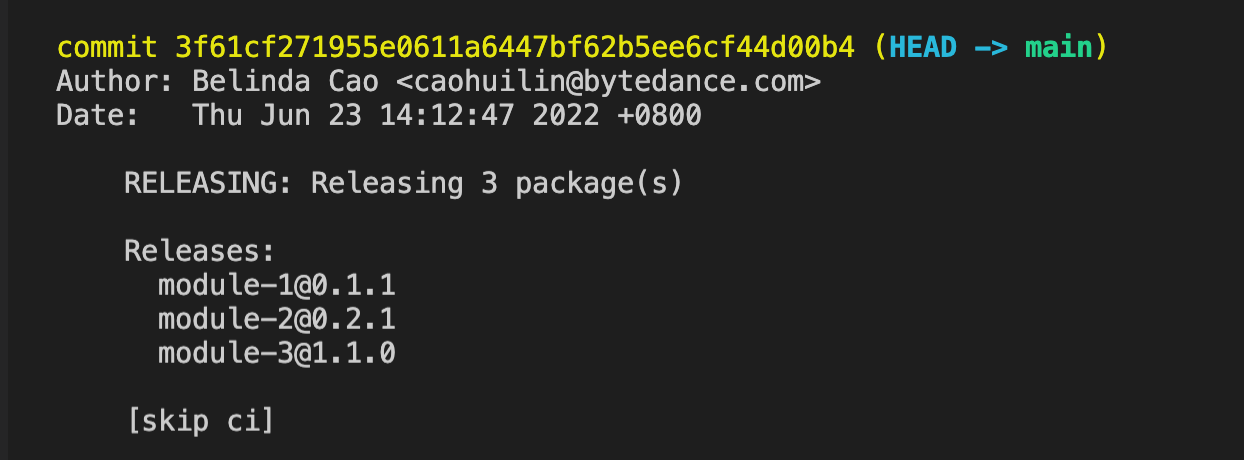
|
|
23
23
|
|
|
24
|
-
This commit information supports customization, which we will discuss in detail in the [Customizing Commit
|
|
24
|
+
This commit information supports customization, which we will discuss in detail in the [Customizing Commit Messages](/guides/topic-detail/changesets/commit) chapter.
|
|
25
25
|
|
|
26
26
|
### access
|
|
27
27
|
|
|
@@ -58,7 +58,7 @@ Type: `string[]`
|
|
|
58
58
|
|
|
59
59
|
Default: `[]`
|
|
60
60
|
|
|
61
|
-
Used to declare packages to be ignored when
|
|
61
|
+
Used to declare packages to be ignored when running the `bump` command. The usage is consistent with the `--ignore` parameter of the `bump` command. Note that the two cannot be used at the same time.
|
|
62
62
|
|
|
63
63
|
### fixed
|
|
64
64
|
|
|
@@ -66,7 +66,7 @@ Type: `string[][]`
|
|
|
66
66
|
|
|
67
67
|
Default: `[]`
|
|
68
68
|
|
|
69
|
-
Used to group packages in monorepos. The version
|
|
69
|
+
Used to group packages in monorepos. The version of packages in the same group will be bound, and each time the `bump` command is run, a package in the same group is upgraded, others will be upgraded together.
|
|
70
70
|
Regular expressions can be used to match package names.
|
|
71
71
|
|
|
72
72
|
### linked
|
|
@@ -75,7 +75,7 @@ Type: `string[][]`
|
|
|
75
75
|
|
|
76
76
|
Default: `[]`
|
|
77
77
|
|
|
78
|
-
Similar to `fixed`, it also groups packages in monorepos, but only the packages related to the changeset declaration will be upgraded when the `bump` command is
|
|
78
|
+
Similar to `fixed`, it also groups packages in monorepos, but only the packages related to the changeset declaration will be upgraded when the `bump` command is run, and the version of the changeset packages in the same group will remain consistent.
|
|
79
79
|
Regular expressions can be used to match package names.
|
|
80
80
|
|
|
81
81
|
### updateInternalDependencies
|
|
@@ -86,7 +86,7 @@ Default: `patch`
|
|
|
86
86
|
|
|
87
87
|
Used to declare the version number rule for updating internal dependencies.
|
|
88
88
|
|
|
89
|
-
When upgrading the version number by
|
|
89
|
+
When upgrading the version number by running the `bump` command, the dependency declaration using the package in the repository will be automatically updated by default. After configuring this field as `minor`, if the version number is upgraded to `patch`, the reference dependency declaration will not be updated automatically.
|
|
90
90
|
|
|
91
91
|
For example:
|
|
92
92
|
|
|
@@ -108,7 +108,7 @@ Default: `@changesets/cli/changelog`
|
|
|
108
108
|
|
|
109
109
|
The rule for generating changelog.
|
|
110
110
|
|
|
111
|
-
When configured as `false`, only the version number will be declared in the `CHANGELOG.md` file when
|
|
111
|
+
When configured as `false`, only the version number will be declared in the `CHANGELOG.md` file when running the `bump` command, and no other changelog information will be declared.
|
|
112
112
|
|
|
113
113
|
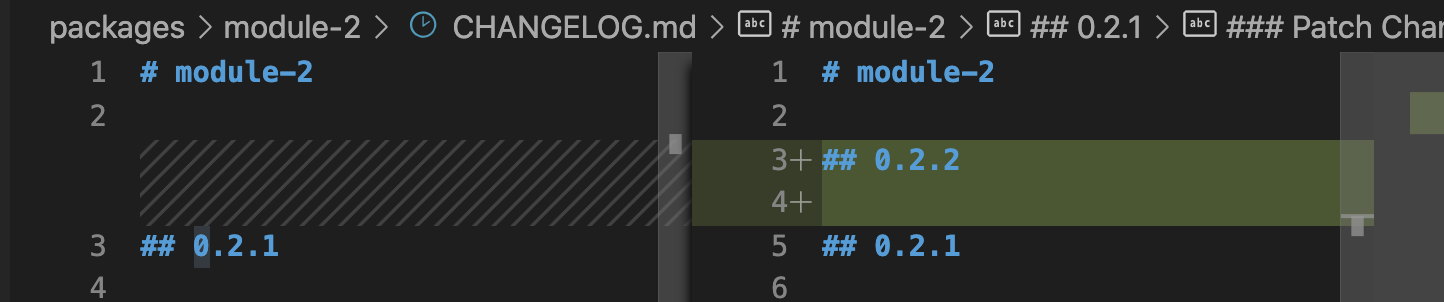
|
|
114
114
|
|
|
@@ -136,7 +136,7 @@ Type: `always` | `out-of-range`
|
|
|
136
136
|
|
|
137
137
|
Default: `always`
|
|
138
138
|
|
|
139
|
-
When upgrading the version number by
|
|
139
|
+
When upgrading the version number by running the `bump` command, the dependency declaration using the package in the repository will be automatically updated by default. When this parameter is set to `out-of-range`, the dependency declaration using the package in the repository will be updated only when it is outside the declared range.
|
|
140
140
|
|
|
141
141
|
#### useCalculatedVersionForSnapshots
|
|
142
142
|
|
|
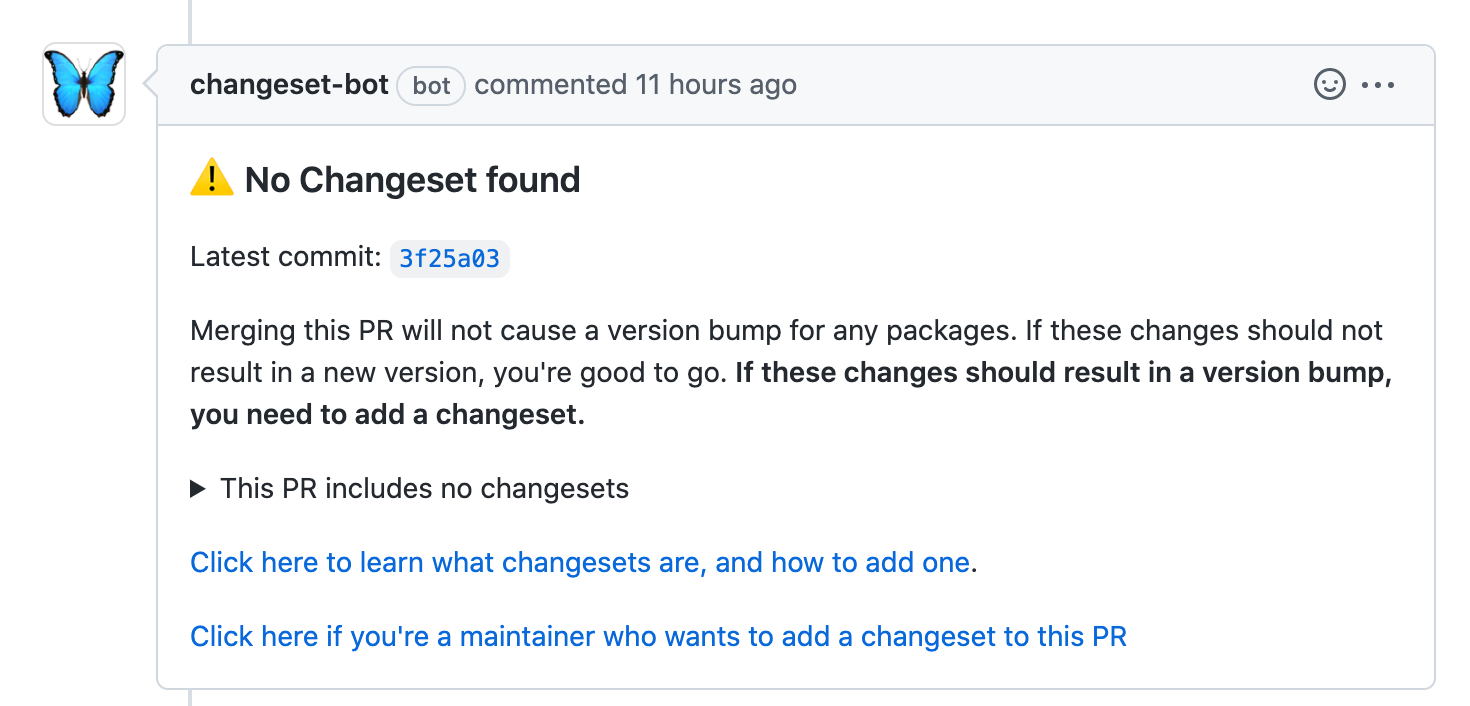
@@ -28,7 +28,7 @@ After the configuration is completed, the robot will automatically check whether
|
|
|
28
28
|
|
|
29
29
|
|
|
30
30
|
|
|
31
|
-
You can
|
|
31
|
+
You can run `pnpm run change` in the repository to add changeset, or click the second link below to fill in changeset directly.
|
|
32
32
|
|
|
33
33
|
#### Changeset added
|
|
34
34
|
|
|
@@ -44,11 +44,11 @@ You can directly ignore the prompt information when no changeset is added, which
|
|
|
44
44
|
|
|
45
45
|
### Automatically create Release Pull Request
|
|
46
46
|
|
|
47
|
-
Modern.js provides a Github Action to automatically create release Pull Request, which can automatically
|
|
47
|
+
Modern.js provides a Github Action to automatically create release Pull Request, which can automatically run bump command, update lock file and create Pull Request operation based on the selected branch.
|
|
48
48
|
|
|
49
49
|
#### Usage
|
|
50
50
|
|
|
51
|
-
Create a `.github/workflows/release-pull-request.yml` file in the repository and fill in the following content:
|
|
51
|
+
- Create a `.github/workflows/release-pull-request.yml` file in the repository and fill in the following content:
|
|
52
52
|
|
|
53
53
|
```yaml
|
|
54
54
|
name: Release Pull Request
|
|
@@ -93,25 +93,25 @@ jobs:
|
|
|
93
93
|
REF: ${{ github.ref }}
|
|
94
94
|
```
|
|
95
95
|
|
|
96
|
-
After merging Workflow into the main branch, go to the Action page corresponding to the Github repository and select Release Pull Request:
|
|
96
|
+
- After merging Workflow into the main branch, go to the Action page corresponding to the Github repository and select Release Pull Request:
|
|
97
97
|
|
|
98
98
|
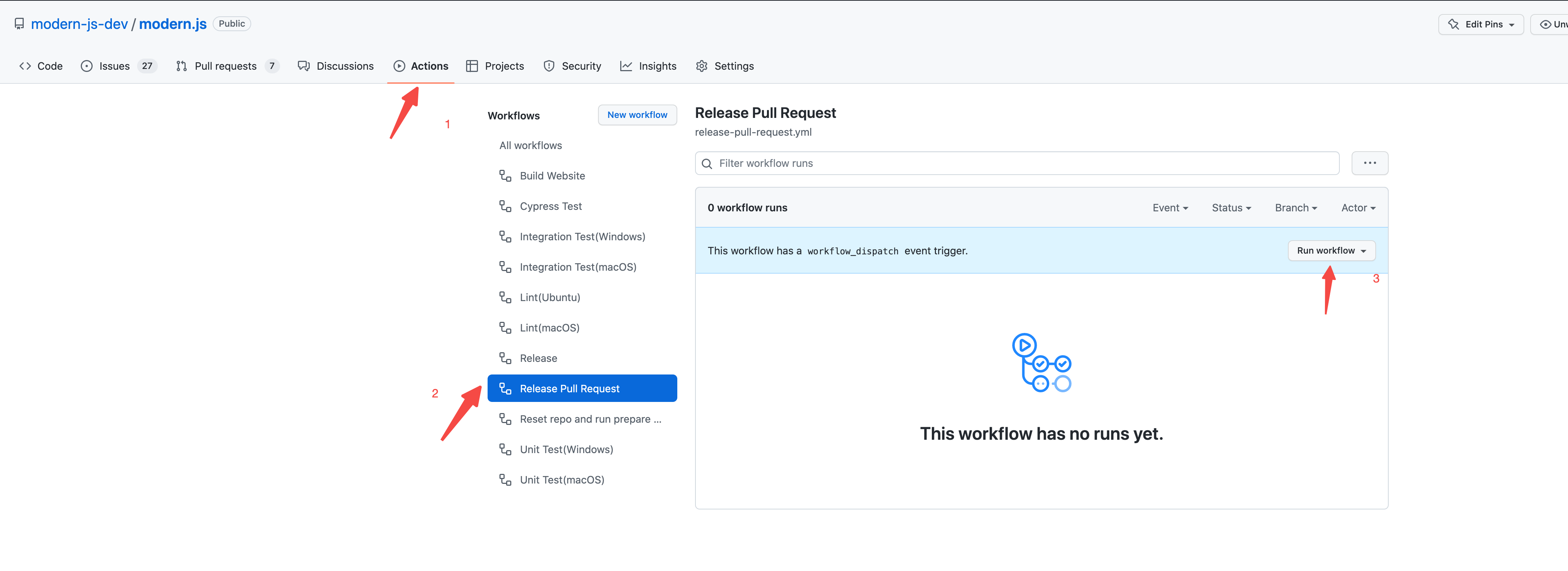
|
|
99
99
|
|
|
100
|
-
Select the release type of this release, and click the Run workflow button:
|
|
100
|
+
- Select the release type of this release, and click the Run workflow button:
|
|
101
101
|
|
|
102
102
|
|
|
103
103
|
|
|
104
|
-
After the workflow is completed, a `Release-${version}` Pull Request will be automatically created, the related version number of `bump` changeset will be automatically updated, and the lock file will be updated. The content of Pull Request is the Release Note automatically generated by
|
|
104
|
+
- After the workflow is completed, a `Release-${version}` Pull Request will be automatically created, the related version number of `bump` changeset will be automatically updated, and the lock file will be updated. The content of Pull Request is the Release Note automatically generated by running the `gen-release-note` command.
|
|
105
105
|
|
|
106
106
|
|
|
107
107
|
|
|
108
108
|
### Automatic Release
|
|
109
109
|
|
|
110
|
-
Modern.js provides a Github Action to automatically release versions, which can automatically
|
|
110
|
+
Modern.js provides a Github Action to automatically release versions, which can automatically run release command based on the selected branch and publish the package to NPM.
|
|
111
111
|
|
|
112
112
|
#### Usage
|
|
113
113
|
|
|
114
|
-
Create a `.github/workflows/release.yml` file in the repository and fill in the following content:
|
|
114
|
+
- Create a `.github/workflows/release.yml` file in the repository and fill in the following content:
|
|
115
115
|
|
|
116
116
|
```yaml
|
|
117
117
|
name: Release
|
|
@@ -160,16 +160,16 @@ jobs:
|
|
|
160
160
|
REF: ${{ github.ref }}
|
|
161
161
|
```
|
|
162
162
|
|
|
163
|
-
Configure the NPM_TOKEN of the repository:
|
|
163
|
+
- Configure the NPM_TOKEN of the repository:
|
|
164
164
|
|
|
165
165
|
|
|
166
166
|
|
|
167
|
-
After merging Workflow into the main branch, go to the Action page corresponding to the Github repository and select Release:
|
|
167
|
+
- After merging Workflow into the main branch, go to the Action page corresponding to the Github repository and select Release:
|
|
168
168
|
|
|
169
169
|
|
|
170
170
|
|
|
171
|
-
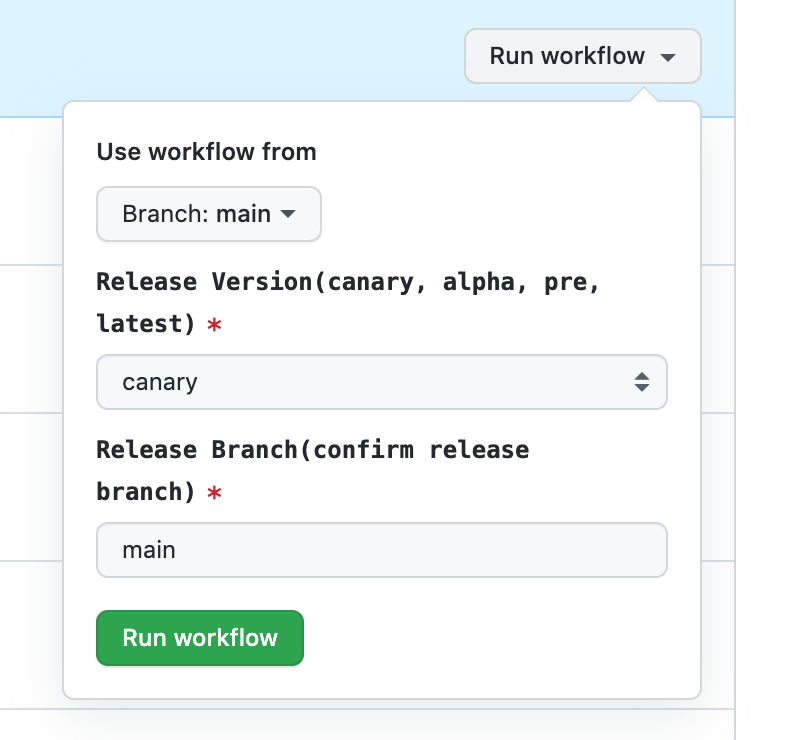
Select the branch name and release version type, and click the Run workflow button:
|
|
171
|
+
- Select the branch name and release version type, and click the Run workflow button:
|
|
172
172
|
|
|
173
173
|
|
|
174
174
|
|
|
175
|
-
Workflow will automatically complete the build and release to NPM process of the repository.
|
|
175
|
+
- Workflow will automatically complete the build and release to NPM process of the repository.
|
|
@@ -2,25 +2,25 @@
|
|
|
2
2
|
sidebar_position: 1
|
|
3
3
|
---
|
|
4
4
|
|
|
5
|
-
#
|
|
5
|
+
# Introducing Changesets
|
|
6
6
|
|
|
7
|
-
Modern.js integrates [changesets](https://github.com/changesets/changesets)
|
|
7
|
+
Modern.js integrates [changesets](https://github.com/changesets/changesets) for package version management in Npm Module and Monorepo project.
|
|
8
8
|
|
|
9
9
|
## Features
|
|
10
10
|
|
|
11
11
|
Changesets have the following features:
|
|
12
12
|
|
|
13
|
-
- During development, developers need to provide the package names
|
|
13
|
+
- During development, developers need to provide the package names, the type of version upgrade (`pathch`, `minor`, `major`), and change information involved in this change.
|
|
14
14
|
|
|
15
15
|
- When releasing a version, the version number of the corresponding package will be automatically upgraded based on the content of the changeset, and changelog information will be generated in the corresponding package.
|
|
16
16
|
|
|
17
|
-
- In the Monorepo
|
|
17
|
+
- In the Monorepo project, changesets will automatically generate a repository dependency graph, and only upgrade the version numbers of the changed packages and related dependent packages during upgrade.
|
|
18
18
|
|
|
19
19
|
## Initialization
|
|
20
20
|
|
|
21
|
-
The
|
|
21
|
+
The Npm Module and Monorepo project created by Modern.js have already initialized changesets. The `.changeset` directory and the configuration file `.changeset/config.json` will be automatically created in the project root directory.
|
|
22
22
|
|
|
23
|
-
In addition, Modern.js provides corresponding commands for changesets in its corresponding project
|
|
23
|
+
In addition, Modern.js provides corresponding commands for changesets in its corresponding project tools `@modern-js/module-tools` and `@modern-js/monorepo-tools`, and there is no need to manually install changeset-related dependencies.
|
|
24
24
|
|
|
25
25
|
The default configuration for changesets is as follows:
|
|
26
26
|
|
|
@@ -37,20 +37,20 @@ The default configuration for changesets is as follows:
|
|
|
37
37
|
}
|
|
38
38
|
```
|
|
39
39
|
|
|
40
|
-
The configuration file provides some basic configurations for generating changesets. For detailed field descriptions, please refer to
|
|
40
|
+
The configuration file provides some basic configurations for generating changesets. For detailed field descriptions, please refer to [Changesets configuration](/guides/topic-detail/changesets/config).
|
|
41
41
|
|
|
42
42
|
## Commands
|
|
43
43
|
|
|
44
|
-
- `change
|
|
44
|
+
- `change`: Creates a changeset. After running this command, a changeset file will be automatically generated in the `.changeset` directory.
|
|
45
45
|
|
|
46
|
-
- `bump
|
|
46
|
+
- `bump`: Upgrades the version of the corresponding package based on the current changeset.
|
|
47
47
|
|
|
48
|
-
- `pre
|
|
48
|
+
- `pre`: Marks entering and exiting `pre release` mode. When running the `bump` command in `pre release` mode, the version format will be `x.x.x-${pre-tag}.x`.
|
|
49
49
|
|
|
50
|
-
- `release
|
|
50
|
+
- `release`: Publishes the package to NPM.
|
|
51
51
|
|
|
52
|
-
- `status
|
|
52
|
+
- `status`: Views the current changeset status.
|
|
53
53
|
|
|
54
|
-
- `gen-release-note
|
|
54
|
+
- `gen-release-note`: Generates Release Note information based on the current chagneset status.
|
|
55
55
|
|
|
56
56
|
For specific command-supported parameters, please refer to the corresponding chapter introduction.
|
|
@@ -4,7 +4,7 @@ sidebar_position: 8
|
|
|
4
4
|
|
|
5
5
|
# Customizing Release Note Format
|
|
6
6
|
|
|
7
|
-
Modern.js provides the `modern gen-release-note` command, which supports automatically generating Release Note
|
|
7
|
+
Modern.js provides the `modern gen-release-note` command, which supports automatically generating Release Note through the current existing changeset and git commit information. Before running the release command, you can run this command to generate the Release Note for this release.
|
|
8
8
|
|
|
9
9
|
The default generated Release Note format is:
|
|
10
10
|
|
|
@@ -12,25 +12,23 @@ The default generated Release Note format is:
|
|
|
12
12
|
- fix: add missing type definitions by @zllkjc in https://github.com/web-infra-dev/modern.js/pull/3835
|
|
13
13
|
```
|
|
14
14
|
|
|
15
|
-
|
|
15
|
+
Get the Pull Request ID of the changeset through the commit information, and generate a Github link, which includes the changeset's changelog information and author information.
|
|
16
16
|
|
|
17
17
|
:::info
|
|
18
|
-
To
|
|
18
|
+
To get author information, you need to provide the Github Token environment variable, which is passed in through GITHUB_AUTH_TOKEN.
|
|
19
19
|
:::
|
|
20
20
|
|
|
21
21
|
When the default generated Release Note logic cannot meet the requirements, custom Release Note format is supported.
|
|
22
22
|
|
|
23
23
|
## Information
|
|
24
24
|
|
|
25
|
-
###
|
|
25
|
+
### getReleaseInfo
|
|
26
26
|
|
|
27
27
|
To generate Release Note information, some information needs to be collected, such as commit ID, Pull Request ID, commit message, etc.
|
|
28
28
|
|
|
29
29
|
This logic can be implemented through the `getReleaseInfo` function.
|
|
30
30
|
|
|
31
|
-
####
|
|
32
|
-
|
|
33
|
-
##### Params
|
|
31
|
+
#### Params
|
|
34
32
|
|
|
35
33
|
- commit
|
|
36
34
|
|
|
@@ -42,29 +40,37 @@ The result of executing `git log --pretty=format:%h--%s--%ae .changeset/${change
|
|
|
42
40
|
|
|
43
41
|
- commitObj
|
|
44
42
|
|
|
45
|
-
|
|
43
|
+
Basic information about commit.
|
|
46
44
|
|
|
47
45
|
```ts
|
|
46
|
+
export enum CommitType {
|
|
47
|
+
Performance = 'performance',
|
|
48
|
+
Features = 'features',
|
|
49
|
+
BugFix = 'bugFix',
|
|
50
|
+
Doc = 'doc',
|
|
51
|
+
Other = 'other',
|
|
52
|
+
}
|
|
53
|
+
|
|
48
54
|
interface Commit {
|
|
49
55
|
id: string; // commit id
|
|
50
|
-
type:
|
|
51
|
-
repository?: string; //
|
|
56
|
+
type: CommitType;
|
|
57
|
+
repository?: string; // Repo information passed in as a parameter or defined in package.json
|
|
52
58
|
pullRequestId?: string;
|
|
53
59
|
author?: string;
|
|
54
|
-
message: string; //
|
|
55
|
-
summary: string; //
|
|
56
|
-
summary_zh: string; //
|
|
60
|
+
message: string; // Commit message
|
|
61
|
+
summary: string; // Changeset summary
|
|
62
|
+
summary_zh: string; // Changeset summary in Chinese
|
|
57
63
|
[key: string]: string | undefined;
|
|
58
64
|
}
|
|
59
65
|
```
|
|
60
66
|
|
|
61
|
-
|
|
67
|
+
#### Returns
|
|
62
68
|
|
|
63
69
|
commitObj, the complete commit object after supplementation.
|
|
64
70
|
|
|
65
|
-
|
|
71
|
+
#### Default Implementation
|
|
66
72
|
|
|
67
|
-
The default implementation of Modern.js is to split out the Pull Request ID based on the commit information, and
|
|
73
|
+
The default implementation of Modern.js is to split out the Pull Request ID based on the commit information, and get the user information based on the commit ID and add it to the commitObj.
|
|
68
74
|
|
|
69
75
|
```ts
|
|
70
76
|
function getReleaseInfo(commit: string, commitObj: Commit) {
|
|
@@ -108,19 +114,17 @@ const commitRegex = /(.*)\(#(\d*)\)/;
|
|
|
108
114
|
}
|
|
109
115
|
```
|
|
110
116
|
|
|
111
|
-
###
|
|
117
|
+
### getReleaseNoteLine
|
|
112
118
|
|
|
113
|
-
Generate the corresponding Release Note based on the commit object information
|
|
119
|
+
Generate the corresponding Release Note based on the commit object information getted in `getReleaseInfo`.
|
|
114
120
|
|
|
115
121
|
This logic can be implemented through the `getReleaseNoteLine` function.
|
|
116
122
|
|
|
117
|
-
####
|
|
118
|
-
|
|
119
|
-
##### Params
|
|
123
|
+
#### Params
|
|
120
124
|
|
|
121
125
|
- commit
|
|
122
126
|
|
|
123
|
-
The type is the same as the above commitObj type.
|
|
127
|
+
The type is the same as the above `commitObj` type.
|
|
124
128
|
|
|
125
129
|
- lang
|
|
126
130
|
|
|
@@ -128,11 +132,11 @@ Type: string;
|
|
|
128
132
|
|
|
129
133
|
Get the Release Note information of the corresponding language, supporting `en` and `zh`, the default is `en`.
|
|
130
134
|
|
|
131
|
-
|
|
135
|
+
#### Returns
|
|
132
136
|
|
|
133
137
|
The generated Release Note.
|
|
134
138
|
|
|
135
|
-
|
|
139
|
+
#### Default Implementation
|
|
136
140
|
|
|
137
141
|
The default implementation of Modern.js is:
|
|
138
142
|
|
|
@@ -200,11 +204,11 @@ You can also define the command parameters directly in `package.json`:
|
|
|
200
204
|
|
|
201
205
|
Run the command `pnpm run gen-release-note` directly.
|
|
202
206
|
|
|
203
|
-
### Using Module
|
|
207
|
+
### Using NPM Module
|
|
204
208
|
|
|
205
|
-
Customizing release note can also be managed using the module project to provide a common solution.
|
|
209
|
+
Customizing release note can also be managed using the NPM module project to provide a common solution.
|
|
206
210
|
|
|
207
|
-
#### Use `npx @modern-js/create@latest` to create a module project
|
|
211
|
+
#### Use `npx @modern-js/create@latest` to create a module project
|
|
208
212
|
|
|
209
213
|
```md
|
|
210
214
|
? Please select the type of project you want to create: Npm Module
|
|
@@ -221,9 +225,9 @@ export function getReleaseInfo() {}
|
|
|
221
225
|
export function getReleaseNoteLine() {}
|
|
222
226
|
```
|
|
223
227
|
|
|
224
|
-
#### Publish the module to NPM
|
|
225
|
-
#### Install the corresponding module in the root directory of the target repository, such as `custom-release-note
|
|
226
|
-
#### Run the `gen-release-note` command with the `custom` parameter added
|
|
228
|
+
#### Publish the module to NPM
|
|
229
|
+
#### Install the corresponding module in the root directory of the target repository, such as `custom-release-note`
|
|
230
|
+
#### Run the `gen-release-note` command with the `custom` parameter added
|
|
227
231
|
|
|
228
232
|
```bash
|
|
229
233
|
pnpm run gen-release-note --custom custom-release-note
|
|
@@ -231,9 +235,9 @@ pnpm run gen-release-note --custom custom-release-note
|
|
|
231
235
|
|
|
232
236
|
### Using Monorepo Sub-Project
|
|
233
237
|
|
|
234
|
-
If your current repository is Monorepo, you can directly manage it using module sub-projects.
|
|
238
|
+
If your current repository is Monorepo, you can directly manage it using NPM module sub-projects.
|
|
235
239
|
|
|
236
|
-
#### Run `pnpm run new` to create a module sub-project
|
|
240
|
+
#### Run `pnpm run new` to create a module sub-project
|
|
237
241
|
|
|
238
242
|
```md
|
|
239
243
|
? Please select the type of project you want to create: Npm Module
|
|
@@ -250,7 +254,7 @@ export function getReleaseInfo() {}
|
|
|
250
254
|
export function getReleaseNoteLine() {}
|
|
251
255
|
```
|
|
252
256
|
|
|
253
|
-
#### Add the sub-project module dependency, such as `custom-release-note`, to the Monorepo root directory
|
|
257
|
+
#### Add the sub-project module dependency, such as `custom-release-note`, to the Monorepo root directory
|
|
254
258
|
|
|
255
259
|
```json title="package.json"
|
|
256
260
|
{
|
|
@@ -260,7 +264,7 @@ export function getReleaseNoteLine() {}
|
|
|
260
264
|
}
|
|
261
265
|
```
|
|
262
266
|
|
|
263
|
-
#### Run the `gen-release-note` command with the `custom` parameter added
|
|
267
|
+
#### Run the `gen-release-note` command with the `custom` parameter added
|
|
264
268
|
|
|
265
269
|
```bash
|
|
266
270
|
pnpm run gen-release-note --custom custom-release-note
|
|
@@ -2,17 +2,17 @@
|
|
|
2
2
|
sidebar_position: 4
|
|
3
3
|
---
|
|
4
4
|
|
|
5
|
-
# Publishing
|
|
5
|
+
# Publishing Pre-Release Version
|
|
6
6
|
|
|
7
7
|
Before doing an actual release, we also need to publish a pre-release version for internal testing and user use. Changesets also support publishing pre-release versions.
|
|
8
8
|
|
|
9
9
|
## Steps
|
|
10
10
|
|
|
11
11
|
:::info
|
|
12
|
-
The following example commands are all using pnpm
|
|
12
|
+
The following example commands are all using pnpm. If you need to use other package management tools, please replace them as needed.
|
|
13
13
|
:::
|
|
14
14
|
|
|
15
|
-
#### Run the
|
|
15
|
+
#### Run the bump command to upgrade the version of the pre-release
|
|
16
16
|
|
|
17
17
|
```bash
|
|
18
18
|
pnpm run bump --canary --preid <preid>
|
|
@@ -24,17 +24,17 @@ After using the `--canary` parameter, the `bump` command completes the following
|
|
|
24
24
|
|
|
25
25
|
- `changeset pre enter <preid>`: Enters pre-release mode.
|
|
26
26
|
|
|
27
|
-
- `changeset version`: Upgrades the version
|
|
27
|
+
- `changeset version`: Upgrades the version.
|
|
28
28
|
|
|
29
29
|
- `changeset pre exit`: Exits pre-release mode.
|
|
30
30
|
|
|
31
31
|
#### Check the changes and submit
|
|
32
32
|
|
|
33
|
-
Check whether the version
|
|
33
|
+
Check whether the version changes are correct and submit the changes.
|
|
34
34
|
|
|
35
35
|
It is recommended to perform pre-release operations not on the main branch and not merge them into the main branch. After the pre-release verification is completed, an actual version can be directly released based on the main branch.
|
|
36
36
|
|
|
37
|
-
#### Run the
|
|
37
|
+
#### Run the release command to publish the pre-release version:
|
|
38
38
|
|
|
39
39
|
```bash
|
|
40
40
|
pnpm run release --tag <tag>
|