@modern-js/main-doc 0.0.0-next-1686037191101 → 0.0.0-next-1686045734613
This diff represents the content of publicly available package versions that have been released to one of the supported registries. The information contained in this diff is provided for informational purposes only and reflects changes between package versions as they appear in their respective public registries.
- package/CHANGELOG.md +9 -4
- package/docs/en/components/debug-app.mdx +1 -1
- package/docs/en/components/deploy.mdx +1 -0
- package/docs/en/components/init-app.mdx +3 -7
- package/docs/en/components/release-note.mdx +1 -0
- package/docs/en/guides/get-started/glossary.mdx +12 -12
- package/docs/en/guides/get-started/introduction.mdx +17 -20
- package/docs/en/guides/get-started/quick-start.mdx +21 -37
- package/docs/en/guides/get-started/upgrade.mdx +15 -14
- package/docs/en/guides/topic-detail/changesets/add.mdx +16 -14
- package/docs/en/guides/topic-detail/changesets/changelog.mdx +28 -28
- package/docs/en/guides/topic-detail/changesets/commit.mdx +23 -23
- package/docs/en/guides/topic-detail/changesets/config.mdx +10 -10
- package/docs/en/guides/topic-detail/changesets/github.mdx +12 -12
- package/docs/en/guides/topic-detail/changesets/introduce.mdx +13 -13
- package/docs/en/guides/topic-detail/changesets/release-note.mdx +38 -34
- package/docs/en/guides/topic-detail/changesets/release-pre.mdx +6 -6
- package/docs/en/guides/topic-detail/changesets/release.mdx +42 -42
- package/docs/zh/community/blog/v2-release-note.mdx +1 -1
- package/docs/zh/components/init-app.mdx +5 -9
- package/docs/zh/guides/get-started/quick-start.mdx +7 -10
- package/docs/zh/guides/get-started/upgrade.mdx +1 -1
- package/docs/zh/guides/topic-detail/changesets/add.mdx +10 -8
- package/docs/zh/guides/topic-detail/changesets/changelog.mdx +9 -9
- package/docs/zh/guides/topic-detail/changesets/commit.mdx +10 -10
- package/docs/zh/guides/topic-detail/changesets/config.mdx +1 -1
- package/docs/zh/guides/topic-detail/changesets/github.mdx +9 -9
- package/docs/zh/guides/topic-detail/changesets/introduce.mdx +9 -9
- package/docs/zh/guides/topic-detail/changesets/release-note.mdx +28 -24
- package/docs/zh/guides/topic-detail/changesets/release-pre.mdx +5 -5
- package/docs/zh/guides/topic-detail/changesets/release.mdx +22 -22
- package/package.json +5 -5
package/CHANGELOG.md
CHANGED
|
@@ -1,18 +1,23 @@
|
|
|
1
1
|
# @modern-js/main-doc
|
|
2
2
|
|
|
3
|
-
## 0.0.0-next-
|
|
3
|
+
## 0.0.0-next-1686045734613
|
|
4
4
|
|
|
5
5
|
### Patch Changes
|
|
6
6
|
|
|
7
|
-
-
|
|
7
|
+
- 411d047d9: docs: fix reset command
|
|
8
8
|
|
|
9
9
|
docs: 修复 reset command 翻译问题
|
|
10
10
|
|
|
11
|
-
-
|
|
11
|
+
- aa250e277: docs(main): update start doc
|
|
12
|
+
|
|
13
|
+
docs(main): 更新开始文档
|
|
14
|
+
|
|
15
|
+
- 7267a1ae6: docs(main): update changeset doc
|
|
12
16
|
|
|
13
17
|
docs(main): 更新包版本管理文档
|
|
14
18
|
|
|
15
|
-
|
|
19
|
+
- Updated dependencies [aa250e277]
|
|
20
|
+
- @modern-js/builder-doc@0.0.0-next-1686045734613
|
|
16
21
|
|
|
17
22
|
## 2.22.0
|
|
18
23
|
|
|
@@ -0,0 +1 @@
|
|
|
1
|
+
After local verification, you can organize the artifacts in `dist/` into the structure required by the server for deployment.
|
|
@@ -1,12 +1,13 @@
|
|
|
1
|
-
|
|
1
|
+
`@modern-js/create` provides an interactive Q & A interface to initialize the project based on the results, with initialization performed according to the default settings:
|
|
2
2
|
|
|
3
3
|
```bash
|
|
4
4
|
? Please select the type of project you want to create: Web App
|
|
5
5
|
? Please select the programming language: TS
|
|
6
6
|
? Please select the package manager: pnpm
|
|
7
|
+
? Please select the bundler: webpack
|
|
7
8
|
```
|
|
8
9
|
|
|
9
|
-
After create the project, Modern.js automatically
|
|
10
|
+
After create the project, Modern.js will automatically install dependencies and create a git repository.
|
|
10
11
|
|
|
11
12
|
```bash
|
|
12
13
|
[INFO] dependencies are automatically installed
|
|
@@ -20,11 +21,6 @@ pnpm run lint # Run ESLint and automatically fix problems
|
|
|
20
21
|
pnpm run new # Enable optional features or add a new entry
|
|
21
22
|
```
|
|
22
23
|
|
|
23
|
-
:::note
|
|
24
|
-
In addition to working during project initialization, the Modern.js generator can also generate modules of the project in subsequent development, which is not thrown away as soon as it is used.
|
|
25
|
-
|
|
26
|
-
:::
|
|
27
|
-
|
|
28
24
|
Now, the project structure is as follows:
|
|
29
25
|
|
|
30
26
|
```
|
|
@@ -0,0 +1 @@
|
|
|
1
|
+
According to the [Release Note](https://github.com/web-infra-dev/modern.js/releases) on the official website, developers can also manually upgrade the project to the desired version.
|
|
@@ -6,9 +6,9 @@ sidebar_position: 4
|
|
|
6
6
|
|
|
7
7
|
## BFF
|
|
8
8
|
|
|
9
|
-
BFF
|
|
9
|
+
BFF is short for "Backend For Frontend". It is an architecture pattern that involves creating a backend service for frontend applications.
|
|
10
10
|
|
|
11
|
-
The BFF service acts as an intermediary between the frontend application and the
|
|
11
|
+
The BFF service acts as an intermediary between the frontend application and the server API, and can provide customized APIs for the frontend to use. This allows frontend developers to have more control over the data and functionality they need, without relying on the backend service to provide the corresponding capabilities.
|
|
12
12
|
|
|
13
13
|
## Bundler
|
|
14
14
|
|
|
@@ -24,15 +24,15 @@ import Builder from '@modern-js/builder-doc/docs/en/shared/builder.md';
|
|
|
24
24
|
|
|
25
25
|
## CSR
|
|
26
26
|
|
|
27
|
-
CSR stands for "Client-Side Rendering". It means that
|
|
27
|
+
CSR stands for "Client-Side Rendering". It means that the page is rendered in the browser using JavaScript, and logic such as data fetching, templates, and routing is completed on the client side rather than the server.
|
|
28
28
|
|
|
29
|
-
In CSR, the server sends an empty HTML shell
|
|
29
|
+
In CSR, the server sends an empty HTML shell and some JavaScript scripts to the browser, and the browser fetching data from the server's API and renders dynamic content to the page.
|
|
30
30
|
|
|
31
31
|
## Garfish
|
|
32
32
|
|
|
33
|
-
[Garfish](https://garfish.bytedance.net/) is a
|
|
33
|
+
[Garfish](https://garfish.bytedance.net/) is a micro-frontend solution mainly used to solve problems such as cross-team collaboration and diversified technology systems in web applications.
|
|
34
34
|
|
|
35
|
-
Starting from the
|
|
35
|
+
Starting from the architecture level, it combines multiple independently delivered frontend applications into a whole. These frontend applications can be developed, tested, and deployed independently, but in the user's perspective, they are still cohesive single products.
|
|
36
36
|
|
|
37
37
|
## Rspack
|
|
38
38
|
|
|
@@ -42,19 +42,19 @@ import Rspack from '@modern-js/builder-doc/docs/en/shared/rspack.md';
|
|
|
42
42
|
|
|
43
43
|
## SSR
|
|
44
44
|
|
|
45
|
-
SSR stands for "Server-Side Rendering". It
|
|
45
|
+
SSR stands for "Server-Side Rendering". It means that the HTML of the web page is generated by the server and sent to the client, rather than sending only an empty HTML shell and relying on JavaScript to generate the page content.
|
|
46
46
|
|
|
47
|
-
In traditional client-side rendering, the server sends an empty HTML shell
|
|
47
|
+
In traditional client-side rendering, the server sends an empty HTML shell and some JavaScript scripts to the client, and then fetching data from the server's API and fills the page with dynamic content. This leads to slow initial page loading times and is not conducive to user experience and SEO.
|
|
48
48
|
|
|
49
|
-
With SSR, the server generates
|
|
49
|
+
With SSR, the server generates HTML that already contains dynamic content and sends it to the client. This makes the initial page loading faster and more SEO-friendly, as search engines can crawl the rendered page.
|
|
50
50
|
|
|
51
51
|
## SSG
|
|
52
52
|
|
|
53
|
-
SSG stands for "Static Site Generation". It
|
|
53
|
+
SSG stands for "Static Site Generation". It means that web pages are pre-rendered as static HTML and served directly to the client, without the need for the server to generate HTML in real-time.
|
|
54
54
|
|
|
55
|
-
In traditional SSR, the server generates
|
|
55
|
+
In traditional SSR, the server generates HTML in real-time every time a user requests a page. With SSG, HTML can be generated in advance during the build process and hosted on a CDN or other static resource service.
|
|
56
56
|
|
|
57
|
-
SSG can provide faster
|
|
57
|
+
Compared to traditional SSR, SSG can provide faster loading speeds and less server-side overhead, as there is no need to maintain a server to generate HTML in real-time. However, SSG is not suitable for websites that require dynamic content, as the HTML is generated during the build process and does not support real-time updates.
|
|
58
58
|
|
|
59
59
|
## SWC
|
|
60
60
|
|
|
@@ -7,7 +7,7 @@ sidebar_position: 1
|
|
|
7
7
|
|
|
8
8
|
**Modern.js is an open source web engineering system from ByteDance**, which provides multiple solutions to help developers solve problems in different development scenarios.
|
|
9
9
|
|
|
10
|
-
Currently, Modern.js includes three solutions,
|
|
10
|
+
Currently, Modern.js includes three solutions, targeting web application development, npm package development, and document site development:
|
|
11
11
|
|
|
12
12
|
import { SolutionCards } from '@site/src/components/SolutionCards';
|
|
13
13
|
|
|
@@ -31,40 +31,37 @@ import { SolutionCards } from '@site/src/components/SolutionCards';
|
|
|
31
31
|
]}
|
|
32
32
|
/>
|
|
33
33
|
|
|
34
|
-
As
|
|
34
|
+
As part of the Modern.js engineering system, each of the above solutions can be used separately and has its own independent documentation site. Developers can choose one or more solutions as needed.
|
|
35
35
|
|
|
36
36
|
## About Documentation
|
|
37
37
|
|
|
38
|
-
**
|
|
38
|
+
**The current documentation site corresponds to the Modern.js framework**, which is used to developing web applications.
|
|
39
39
|
|
|
40
|
-
- If you
|
|
41
|
-
- If you
|
|
42
|
-
- If you
|
|
40
|
+
- If you need to develop an npm package, please refer to the [Modern.js Module](https://modernjs.dev/module-tools) documentation.
|
|
41
|
+
- If you need to develop a documentation site, please refer to the [Modern.js Doc](https://modernjs.dev/doc-tools/) documentation.
|
|
42
|
+
- If you need to implement a web development framework based on the Modern.js build engine, please refer to the [Modern.js Builder](https://modernjs.dev/builder) documentation.
|
|
43
43
|
|
|
44
44
|
:::tip
|
|
45
|
-
|
|
45
|
+
Since the Modern.js framework is the most widely used, in this documentation site, we will omit "framework" and directly refer to it as Modern.js.
|
|
46
46
|
:::
|
|
47
47
|
|
|
48
48
|
## Modern.js Framework
|
|
49
49
|
|
|
50
50
|
**The Modern.js framework is a progressive web framework based on React**. At ByteDance, we use Modern.js to build upper-level frameworks that have supported the development of thousands of web applications.
|
|
51
51
|
|
|
52
|
-
Modern.js can provide developers with
|
|
52
|
+
Modern.js can provide developers with an ultimate **Development Experience** and enable applications to have better **User Experience**.
|
|
53
53
|
|
|
54
|
-
In the process of developing React applications, developers
|
|
54
|
+
In the process of developing React applications, developers usually need to design implementation plans for certain features or use other libraries and frameworks to solve these problems. Modern.js supports all configurations and tools needed by React applications, and has built-in **additional features and optimizations**. Developers can use React to build the UI of the application, and then gradually adopt the features of Modern.js to solve common application requirements, such as routing, data acquisition, and state management.
|
|
55
55
|
|
|
56
|
-
|
|
56
|
+
It mainly includes the following features:
|
|
57
57
|
|
|
58
|
-
|
|
59
|
-
|
|
60
|
-
-
|
|
61
|
-
-
|
|
62
|
-
-
|
|
63
|
-
-
|
|
64
|
-
- 🌏 **Ecology**: Self-developed state management, micro frontend, module packaging, Monorepo solution and other peripheral requirements.
|
|
65
|
-
- 🕸 **Routing Modes**: Contains controlled routing, routing based on file conventions (nested routing), configurable routing, etc.
|
|
66
|
-
- 🚀 **Independently Build Core**: Support a variety of packaging tools, deep optimization bundle.
|
|
58
|
+
- 🚀 **Rust Bundler**: Provides support for dual bundlers, easily switch to the Rspack for faster build speed.
|
|
59
|
+
- 🪜 **Progressive**: Create projects with the most streamlined templates, gradually enable plugin features through the generator, and customize solutions.
|
|
60
|
+
- 🏠 **Integration**: Development and production environment web server are unique, CSR and SSR are isomorphic development, and API service calls are functions as interfaces.
|
|
61
|
+
- 📦 **Out Of The Box**: Default TS support, built-in build, ESLint, debugging tools, fully functional and testable.
|
|
62
|
+
- 🌏 **Ecology**: Self-developed state management, micro-frontend, module packaging, Monorepo solutions, and other peripheral needs.
|
|
63
|
+
- 🕸 **Routing Modes**: Includes self-controlled routing, file-convention-based routing (nested routing), etc.
|
|
67
64
|
|
|
68
65
|
## Next
|
|
69
66
|
|
|
70
|
-
If you want to
|
|
67
|
+
If you want to learn how to use the Modern.js framework, you can try to [create your first application](/tutorials/first-app/c01-start), or read the [Quick Start](/guides/get-started/quick-start) guide.
|
|
@@ -13,16 +13,16 @@ import Prerequisites from "@site-docs-en/components/prerequisites"
|
|
|
13
13
|
|
|
14
14
|
## Installation
|
|
15
15
|
|
|
16
|
-
Modern.js provides the `@modern-js/create` tool
|
|
16
|
+
Modern.js provides the `@modern-js/create` tool to create projects. Do not install it globally, use `npx` to run it.
|
|
17
17
|
|
|
18
|
-
You can create
|
|
18
|
+
You can create a project in an existing empty directory:
|
|
19
19
|
|
|
20
20
|
```bash
|
|
21
21
|
mkdir myapp && cd myapp
|
|
22
22
|
npx @modern-js/create@latest
|
|
23
23
|
```
|
|
24
24
|
|
|
25
|
-
You can also
|
|
25
|
+
You can also create a project directly in a new directory:
|
|
26
26
|
|
|
27
27
|
```bash
|
|
28
28
|
npx @modern-js/create@latest myapp
|
|
@@ -36,31 +36,15 @@ import InitApp from "@site-docs-en/components/init-app"
|
|
|
36
36
|
|
|
37
37
|
## Development
|
|
38
38
|
|
|
39
|
-
|
|
39
|
+
import DebugApp from "@site-docs-en/components/debug-app"
|
|
40
40
|
|
|
41
|
-
|
|
42
|
-
$ pnpm run dev
|
|
43
|
-
|
|
44
|
-
> modern dev
|
|
45
|
-
|
|
46
|
-
info Starting dev server...
|
|
47
|
-
info App running at:
|
|
48
|
-
|
|
49
|
-
> Local: http://localhost:8080/
|
|
50
|
-
> Network: http://192.168.0.1:8080/
|
|
51
|
-
|
|
52
|
-
Client ✔ done in 76.10ms
|
|
53
|
-
```
|
|
54
|
-
|
|
55
|
-
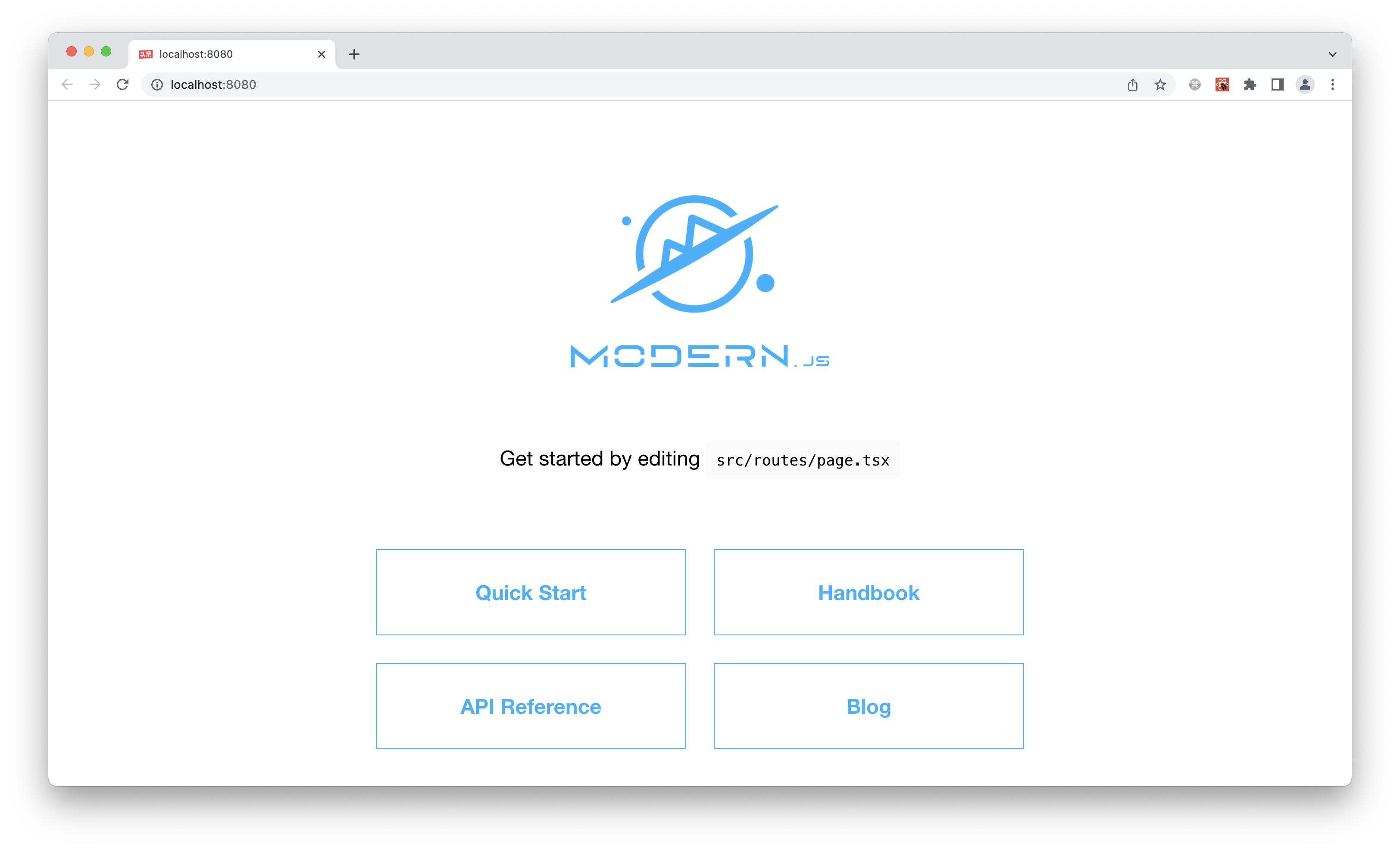
Open `http://localhost:8000/` in your browser and you will see the following:
|
|
56
|
-
|
|
57
|
-
|
|
41
|
+
<DebugApp />
|
|
58
42
|
|
|
59
43
|
## Configuration
|
|
60
44
|
|
|
61
|
-
|
|
45
|
+
In a Modern.js project created using `@modern-js/create`, a `modern.config.ts` file is generated by default.
|
|
62
46
|
|
|
63
|
-
|
|
47
|
+
You can modify the configuration through this file to override the default behavior of Modern.js. For example, to enable SSR, add the following configuration:
|
|
64
48
|
|
|
65
49
|
```ts
|
|
66
50
|
import { defineConfig } from '@modern-js/app-tools';
|
|
@@ -76,11 +60,11 @@ export default defineConfig({
|
|
|
76
60
|
});
|
|
77
61
|
```
|
|
78
62
|
|
|
79
|
-
|
|
63
|
+
After running `pnpm run dev` again, you can find that the project has completed page rendering on the server in the browser's Network menu.
|
|
80
64
|
|
|
81
|
-
## Build
|
|
65
|
+
## Build the project
|
|
82
66
|
|
|
83
|
-
|
|
67
|
+
To build the production artifacts of the project, run `pnpm run build` in the project:
|
|
84
68
|
|
|
85
69
|
```bash
|
|
86
70
|
$ pnpm run build
|
|
@@ -106,27 +90,25 @@ info File sizes after production build:
|
|
|
106
90
|
Client ✔ done in 3.57s
|
|
107
91
|
```
|
|
108
92
|
|
|
109
|
-
|
|
93
|
+
By default, the build artifacts are generated in `dist/`, with the following directory structure:
|
|
110
94
|
|
|
111
95
|
```
|
|
112
|
-
|
|
113
|
-
├── asset-manifest.json
|
|
96
|
+
dist
|
|
114
97
|
├── html
|
|
115
|
-
│
|
|
116
|
-
├── loader-routes
|
|
117
|
-
│ └── main
|
|
98
|
+
│ └── main
|
|
118
99
|
├── modern.config.json
|
|
119
100
|
├── route.json
|
|
101
|
+
├── routes-manifest.json
|
|
120
102
|
└── static
|
|
121
103
|
├── css
|
|
122
104
|
└── js
|
|
123
105
|
```
|
|
124
106
|
|
|
125
|
-
> If you
|
|
107
|
+
> If you need to customize the directory of the build artifacts, please refer to [Output files](https://modernjs.dev/builder/guide/basic/output-files.html).
|
|
126
108
|
|
|
127
109
|
## Verify
|
|
128
110
|
|
|
129
|
-
|
|
111
|
+
Run `pnpm run serve` in the project to verify whether the build artifacts run normally locally:
|
|
130
112
|
|
|
131
113
|
```bash
|
|
132
114
|
$ pnpm run serve
|
|
@@ -140,8 +122,10 @@ info App running at:
|
|
|
140
122
|
> Network: http://192.168.0.1:8080/
|
|
141
123
|
```
|
|
142
124
|
|
|
143
|
-
Open http://localhost:8000
|
|
125
|
+
Open `http://localhost:8000/` in the browser, and the content should be consistent with that of `pnpm run dev`.
|
|
126
|
+
|
|
127
|
+
## Deployment
|
|
144
128
|
|
|
145
|
-
|
|
129
|
+
import Deploy from "@site-docs-en/components/deploy"
|
|
146
130
|
|
|
147
|
-
|
|
131
|
+
<Deploy />
|
|
@@ -7,42 +7,43 @@ sidebar_position: 3
|
|
|
7
7
|
|
|
8
8
|
## Upgrade with command
|
|
9
9
|
|
|
10
|
-
Modern.js provides the `upgrade` command to support
|
|
10
|
+
Modern.js provides the `upgrade` command to support upgrading the project to the latest version of Modern.js.
|
|
11
11
|
|
|
12
|
-
|
|
12
|
+
Run `pnpm run upgrade` in the project:
|
|
13
13
|
|
|
14
14
|
```bash
|
|
15
15
|
$ pnpm run upgrade
|
|
16
16
|
|
|
17
17
|
> modern upgrade
|
|
18
18
|
|
|
19
|
-
[INFO] [Project Type]:
|
|
19
|
+
[INFO] [Project Type]: Web App
|
|
20
20
|
[INFO] [Modern.js Latest Version]: 2.0.0
|
|
21
21
|
[INFO] Upgrade Modern.js package version success!
|
|
22
22
|
```
|
|
23
23
|
|
|
24
|
-
You can see that the
|
|
24
|
+
You can see that the dependencies in the project's `package.json` have been updated to the latest version.
|
|
25
25
|
|
|
26
|
-
##
|
|
26
|
+
## Upgrade to a specified version
|
|
27
27
|
|
|
28
|
-
All packages of Modern.js are
|
|
28
|
+
All packages of Modern.js are currently released with a **uniform version number**.
|
|
29
29
|
|
|
30
|
-
|
|
30
|
+
import ReleaseNote from "@site-docs-en/components/release-note"
|
|
31
|
+
|
|
32
|
+
<ReleaseNote />
|
|
31
33
|
|
|
32
34
|
:::tip
|
|
33
|
-
When upgrading, you need to upgrade
|
|
35
|
+
When upgrading, you need to upgrade all packages provided by Modern.js, instead of upgrading a single dependency.
|
|
34
36
|
|
|
35
37
|
:::
|
|
36
38
|
|
|
37
39
|
## Lock nested dependency
|
|
38
40
|
|
|
39
|
-
When
|
|
41
|
+
When a nested dependency of the project has a problem and Modern.js cannot be updated immediately, you can use the package manager to lock the version of the nested dependency.
|
|
40
42
|
|
|
41
43
|
### pnpm
|
|
42
44
|
|
|
43
|
-
For projects using pnpm, add the following configuration to the `package.json` in the **
|
|
45
|
+
For projects using pnpm, add the following configuration to the `package.json` in the **root directory** of the project, and then run `pnpm install` again:
|
|
44
46
|
|
|
45
|
-
```json title="package.json"
|
|
46
47
|
{
|
|
47
48
|
"pnpm": {
|
|
48
49
|
"overrides": {
|
|
@@ -54,7 +55,7 @@ For projects using pnpm, add the following configuration to the `package.json` i
|
|
|
54
55
|
|
|
55
56
|
### Yarn
|
|
56
57
|
|
|
57
|
-
For projects using Yarn, add the following configuration to the `package.json` in the **
|
|
58
|
+
For projects using Yarn, add the following configuration to the `package.json` in the **root directory** of the project, and then run `yarn install` again:
|
|
58
59
|
|
|
59
60
|
```json title="package.json"
|
|
60
61
|
{
|
|
@@ -66,7 +67,7 @@ For projects using Yarn, add the following configuration to the `package.json` i
|
|
|
66
67
|
|
|
67
68
|
### Npm
|
|
68
69
|
|
|
69
|
-
For projects using Npm, add the following configuration to the `package.json` in the **
|
|
70
|
+
For projects using Npm, add the following configuration to the `package.json` in the **root directory** of the project, and then run `npm install` again:
|
|
70
71
|
|
|
71
72
|
```json title="package.json"
|
|
72
73
|
{
|
|
@@ -77,6 +78,6 @@ For projects using Npm, add the following configuration to the `package.json` in
|
|
|
77
78
|
```
|
|
78
79
|
|
|
79
80
|
:::info
|
|
80
|
-
For Monorepo repositories,
|
|
81
|
+
For Monorepo repositories, you can only lock dependency versions in the `package.json` in the root directory of the project, and it will affect all packages in the Monorepo.
|
|
81
82
|
|
|
82
83
|
:::
|
|
@@ -4,7 +4,7 @@ sidebar_position: 2
|
|
|
4
4
|
|
|
5
5
|
# Add Changesets
|
|
6
6
|
|
|
7
|
-
When we finish development, we need to add a changeset to declare the current changes for
|
|
7
|
+
When we finish development, we need to add a changeset to declare the current changes for version releases.
|
|
8
8
|
|
|
9
9
|
## Information
|
|
10
10
|
|
|
@@ -12,29 +12,29 @@ A changeset includes:
|
|
|
12
12
|
|
|
13
13
|
- Which packages are affected by this change.
|
|
14
14
|
|
|
15
|
-
- The type of version
|
|
15
|
+
- The type of version for this change, which complies with the [semver](https://semver.org/) specification.
|
|
16
16
|
|
|
17
17
|
- Changelog information for this change.
|
|
18
18
|
|
|
19
19
|
## Steps
|
|
20
20
|
|
|
21
21
|
:::info
|
|
22
|
-
The following example commands are all using pnpm
|
|
22
|
+
The following example commands are all using pnpm. If you need to use other package management tools, please replace them as needed.
|
|
23
23
|
:::
|
|
24
24
|
|
|
25
|
-
### Module
|
|
25
|
+
### NPM Module
|
|
26
26
|
|
|
27
|
-
#### Run the
|
|
27
|
+
#### Run the change command in the root directory:
|
|
28
28
|
|
|
29
29
|
```bash
|
|
30
30
|
pnpm run change
|
|
31
31
|
```
|
|
32
32
|
|
|
33
|
-
#### Select the type of version
|
|
33
|
+
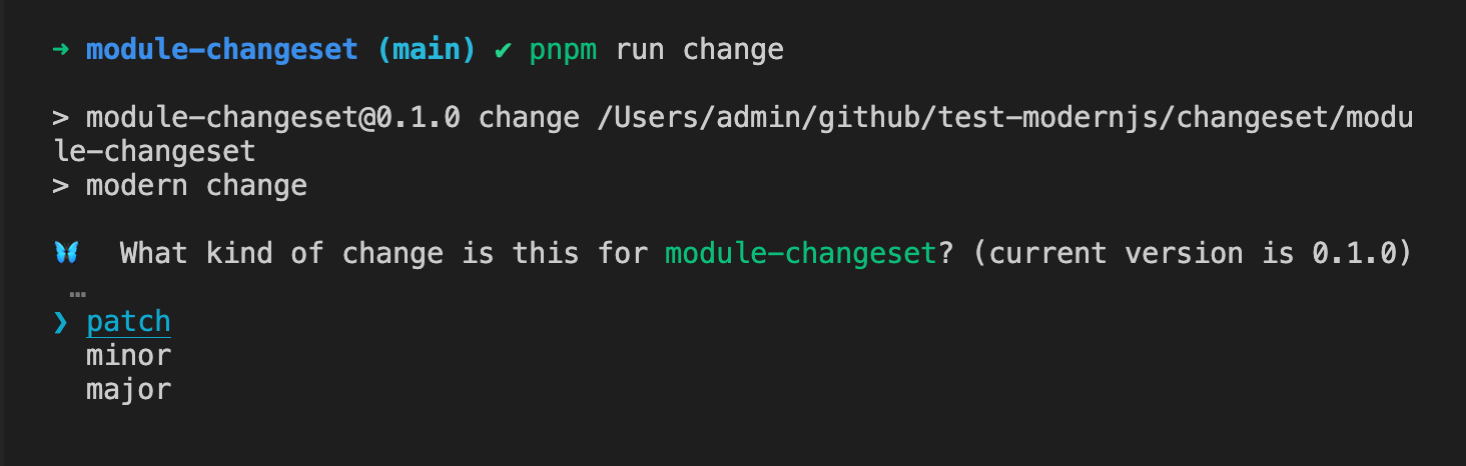
#### Select the type of version for this change
|
|
34
34
|
|
|
35
35
|
|
|
36
36
|
|
|
37
|
-
#### Fill in the changelog information
|
|
37
|
+
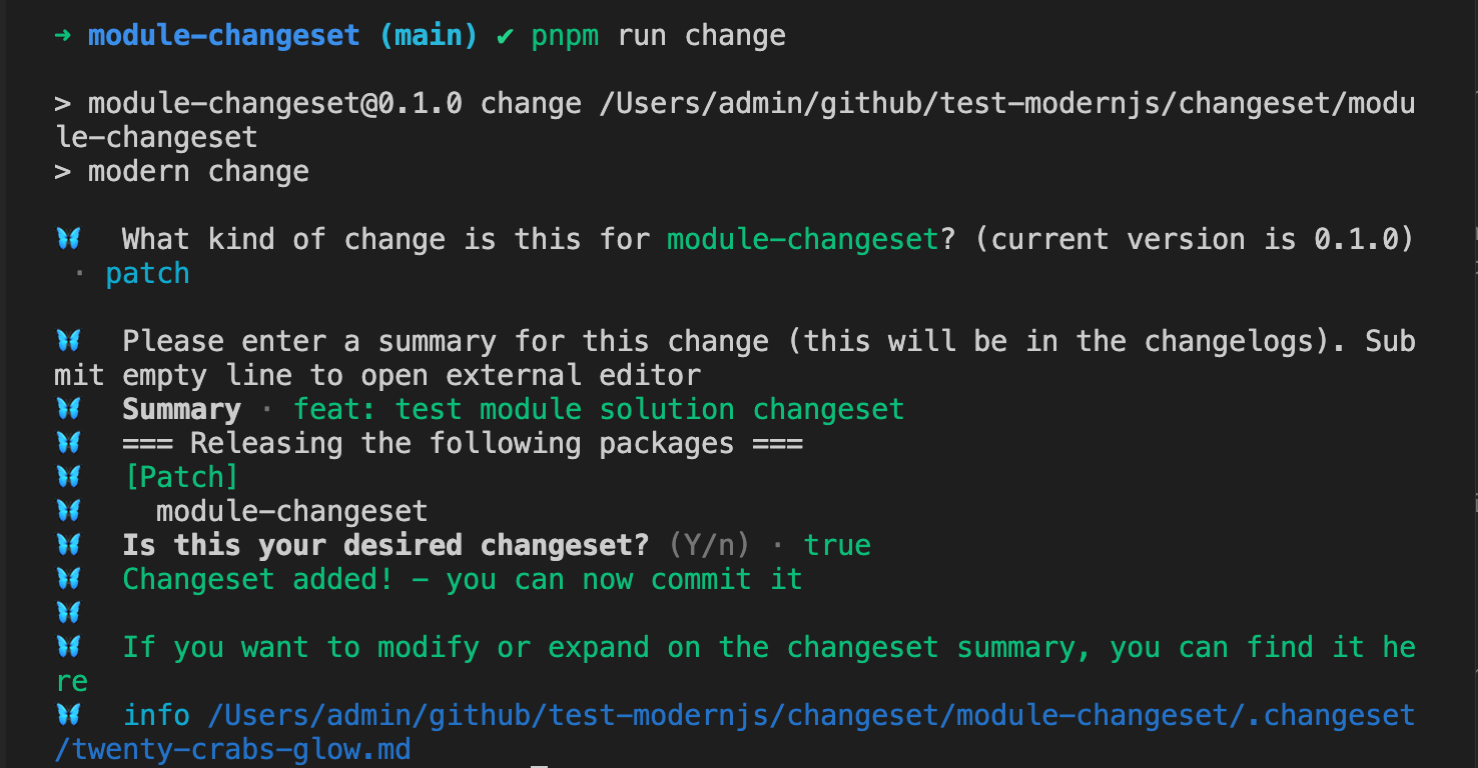
#### Fill in the changelog information
|
|
38
38
|
|
|
39
39
|
|
|
40
40
|
|
|
@@ -52,15 +52,15 @@ This file contains all the information of the changeset.
|
|
|
52
52
|
|
|
53
53
|
### Monorepo
|
|
54
54
|
|
|
55
|
-
|
|
55
|
+
There are three NPM module packages in the monorepo, `module-1`, `module-2`, and `module-3`.
|
|
56
56
|
|
|
57
|
-
#### Run the
|
|
57
|
+
#### Run the change command in the root directory
|
|
58
58
|
|
|
59
59
|
```bash
|
|
60
60
|
pnpm run change
|
|
61
61
|
```
|
|
62
62
|
|
|
63
|
-
#### Select the list of packages to upgrade for this change
|
|
63
|
+
#### Select the list of packages to upgrade for this change
|
|
64
64
|
|
|
65
65
|
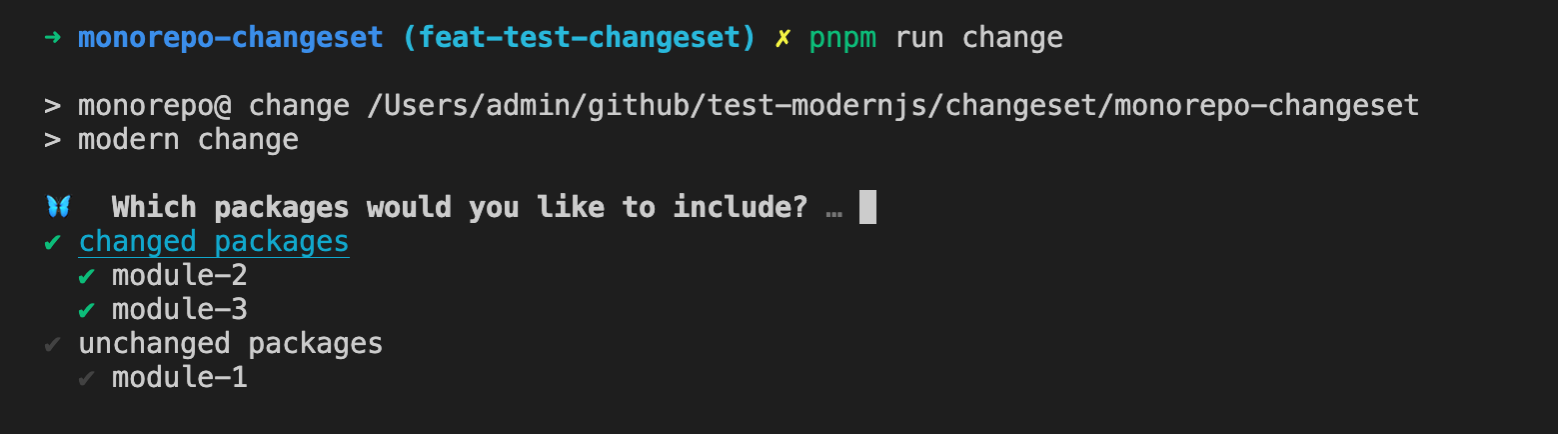
Changesets will categorize the packages in the Monorepo into two categories, `changed packages` and `unchanged packages`, based on the current code changes (`git diff Head...baseBranch`), making it easy for users to choose.
|
|
66
66
|
|
|
@@ -68,11 +68,13 @@ Use the space key to select the corresponding package or category, and then pres
|
|
|
68
68
|
|
|
69
69
|
|
|
70
70
|
|
|
71
|
-
#### Select the packages corresponding to different version types
|
|
71
|
+
#### Select the packages corresponding to different version types
|
|
72
|
+
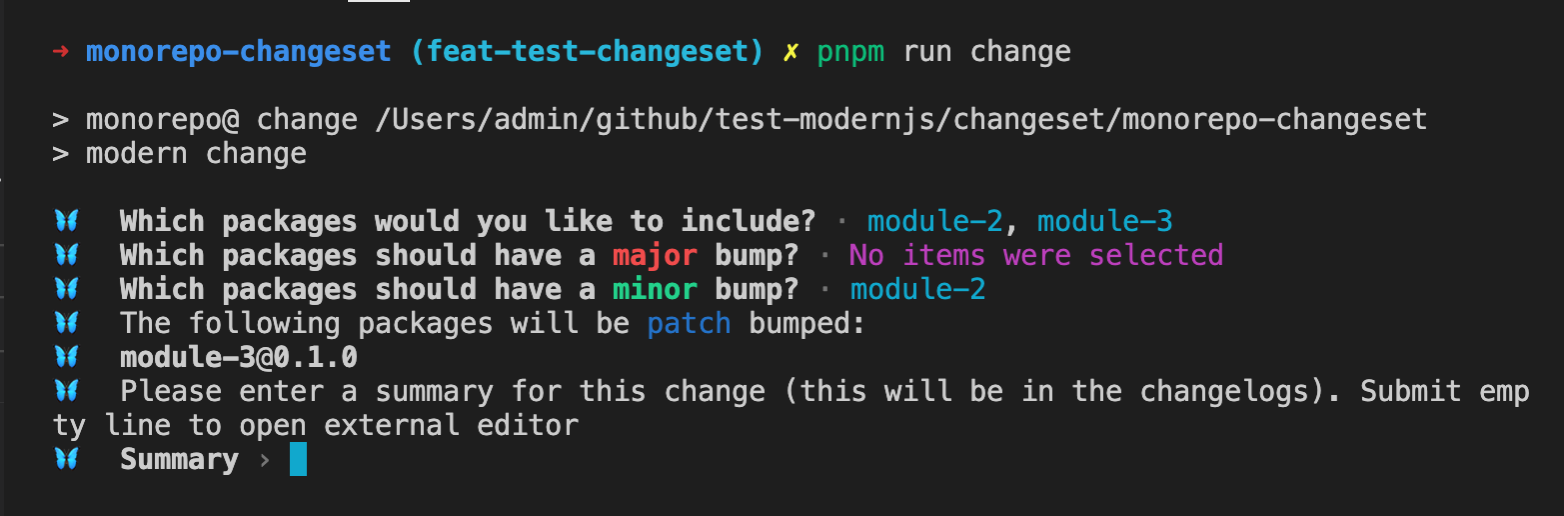
|
|
73
|
+
Changesets will ask about the `major` and `minor` types. If there are packages that have not selected these two types, the `patch` type will be used by default.
|
|
72
74
|
|
|
73
75
|
|
|
74
76
|
|
|
75
|
-
#### Fill in the changelog information
|
|
77
|
+
#### Fill in the changelog information
|
|
76
78
|
|
|
77
79
|
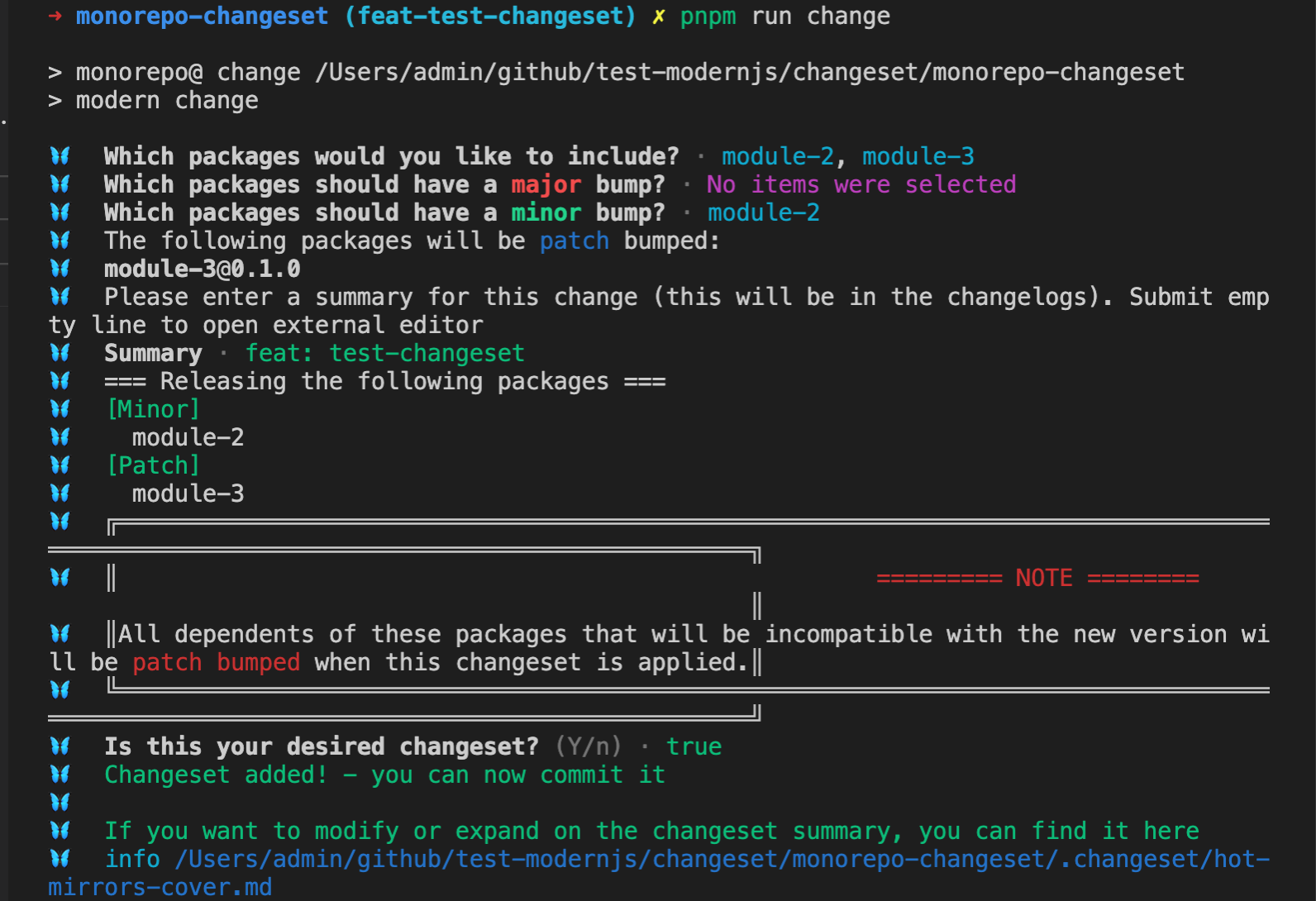
|
|
78
80
|
|
|
@@ -93,7 +95,7 @@ This file contains all the information of the changeset, and different packages
|
|
|
93
95
|
|
|
94
96
|
The `change` command supports the following parameters:
|
|
95
97
|
|
|
96
|
-
- `--empty
|
|
98
|
+
- `--empty`: Adds an empty changeset.
|
|
97
99
|
|
|
98
100
|
```bash
|
|
99
101
|
pnpm run change --empty
|
|
@@ -106,7 +108,7 @@ After running, an empty changeset file will be created in the `.changeset` direc
|
|
|
106
108
|
---
|
|
107
109
|
```
|
|
108
110
|
|
|
109
|
-
- `--open
|
|
111
|
+
- `--open`: When using this parameter, the system default editor will be opened for filling in the changelog.
|
|
110
112
|
|
|
111
113
|
## Notes
|
|
112
114
|
|
|
@@ -2,15 +2,15 @@
|
|
|
2
2
|
sidebar_position: 6
|
|
3
3
|
---
|
|
4
4
|
|
|
5
|
-
# Customizing Changelog
|
|
5
|
+
# Customizing Changelog
|
|
6
6
|
|
|
7
|
-
By default, Changesets will use `@changesets/cli/changelog` to generate changelog
|
|
7
|
+
By default, Changesets will use `@changesets/cli/changelog` to generate changelog. If the default changelog cannot meet the requirements, you can customize the generation of changelog.
|
|
8
8
|
|
|
9
9
|
## Customizing Changelog Content
|
|
10
10
|
|
|
11
|
-
Changelog
|
|
11
|
+
Changelog mainly includes the following two types of information:
|
|
12
12
|
|
|
13
|
-
- Changelog
|
|
13
|
+
- Changelog written in the changeset.
|
|
14
14
|
|
|
15
15
|
- Version change information of related packages in this version upgrade.
|
|
16
16
|
|
|
@@ -28,10 +28,10 @@ export type VersionType = 'major' | 'minor' | 'patch' | 'none';
|
|
|
28
28
|
export type Release = { name: string; type: VersionType };
|
|
29
29
|
|
|
30
30
|
export type Changeset = {
|
|
31
|
-
id: string; // changeset
|
|
32
|
-
commit?: string; // changeset
|
|
33
|
-
summary: string; // changeset
|
|
34
|
-
releases: Array<Release>; //
|
|
31
|
+
id: string; // changeset id
|
|
32
|
+
commit?: string; // changeset commit id
|
|
33
|
+
summary: string; // changeset summary content
|
|
34
|
+
releases: Array<Release>; // The name and type information of the current computed changeset upgrade package.
|
|
35
35
|
};
|
|
36
36
|
```
|
|
37
37
|
|
|
@@ -77,13 +77,13 @@ All associated changeset information, which is an array of `getReleaseLine` chan
|
|
|
77
77
|
|
|
78
78
|
```ts
|
|
79
79
|
type ModCompWithPackage = {
|
|
80
|
-
name: string; //
|
|
81
|
-
type: VersionType; //
|
|
82
|
-
oldVersion: string; //
|
|
83
|
-
newVersion: string; //
|
|
84
|
-
changesets: string[]; //
|
|
85
|
-
packageJson: PackageJSON; //
|
|
86
|
-
dir: string; //
|
|
80
|
+
name: string; // Name of the dependent module
|
|
81
|
+
type: VersionType; // Upgrade type of the dependent module
|
|
82
|
+
oldVersion: string; // Current version of the dependent module
|
|
83
|
+
newVersion: string; // New version of the dependent module
|
|
84
|
+
changesets: string[]; // List of associated changeset ids
|
|
85
|
+
packageJson: PackageJSON; // Complete package.json content of the dependent module
|
|
86
|
+
dir: string; // Path (absolute path) of the dependent module
|
|
87
87
|
};
|
|
88
88
|
|
|
89
89
|
type DependenciesUpdated = ModCompWithPackage[];
|
|
@@ -95,7 +95,7 @@ Changelog content.
|
|
|
95
95
|
|
|
96
96
|
#### Default Implementation
|
|
97
97
|
|
|
98
|
-
By default, `@changesets/cli/changelog` will display the corresponding `Updated dependencies + commit id` information of the changesets as a list. Then, based on the `dependenciesUpdated` information, it will display the package name and new version
|
|
98
|
+
By default, `@changesets/cli/changelog` will display the corresponding `Updated dependencies + commit id` information of the changesets as a list. Then, based on the `dependenciesUpdated` information, it will display the package name and new version of the corresponding dependency package as a child list item of the list.
|
|
99
99
|
|
|
100
100
|
```ts
|
|
101
101
|
async function getDependencyReleaseLine(changesets, dependenciesUpdated) {
|
|
@@ -128,11 +128,11 @@ It is displayed as follows:
|
|
|
128
128
|
|
|
129
129
|
## Configuration
|
|
130
130
|
|
|
131
|
-
The `changelog` field in the changesets configuration file is used to mark the way to
|
|
131
|
+
The `changelog` field in the changesets configuration file is used to mark the way to get changelog.
|
|
132
132
|
|
|
133
|
-
This configuration can be a string, directly declaring the module name or path of the changelog
|
|
133
|
+
This configuration can be a string, directly declaring the module name or path of the changelog module.
|
|
134
134
|
|
|
135
|
-
This configuration also supports configuring arrays. The first element in the array is the module name or path of the changelog
|
|
135
|
+
This configuration also supports configuring arrays. The first element in the array is the module name or path of the changelog module, and the second element is the parameter value passed to the corresponding function, which will be passed as the third parameter of the `getReleaseLine` and `getDependencyReleaseLine` functions.
|
|
136
136
|
|
|
137
137
|
### Configuring Relative Paths
|
|
138
138
|
|
|
@@ -160,9 +160,9 @@ Configure `changlog` as `./my-changelog-config.js`:
|
|
|
160
160
|
}
|
|
161
161
|
```
|
|
162
162
|
|
|
163
|
-
### Using Module
|
|
163
|
+
### Using Npm Module
|
|
164
164
|
|
|
165
|
-
Customizing changelog can also be managed using the module project to provide a common solution.
|
|
165
|
+
Customizing changelog can also be managed using the NPM module project to provide a common solution.
|
|
166
166
|
|
|
167
167
|
#### Use `npx @modern-js/create@latest` to create a module project.
|
|
168
168
|
|
|
@@ -181,11 +181,11 @@ export async function getReleaseLine() {}
|
|
|
181
181
|
export async function getDependencyReleaseLine() {}
|
|
182
182
|
```
|
|
183
183
|
|
|
184
|
-
#### Publish the module to NPM
|
|
184
|
+
#### Publish the module to NPM
|
|
185
185
|
|
|
186
|
-
#### Install the
|
|
186
|
+
#### Install the module in the root directory of the target repository, such as `custom-changelog`.
|
|
187
187
|
|
|
188
|
-
#### Configure the changelog configuration of
|
|
188
|
+
#### Configure the changelog configuration of changesets as the package name.
|
|
189
189
|
|
|
190
190
|
```json title=".changesets/config.json"
|
|
191
191
|
{
|
|
@@ -196,9 +196,9 @@ export async function getDependencyReleaseLine() {}
|
|
|
196
196
|
|
|
197
197
|
### Using Monorepo Sub-Project
|
|
198
198
|
|
|
199
|
-
If your current repository is Monorepo, you can directly manage it using module sub-projects.
|
|
199
|
+
If your current repository is Monorepo, you can directly manage it using NPM module sub-projects.
|
|
200
200
|
|
|
201
|
-
#### Run `pnpm run new` to create a module sub-project
|
|
201
|
+
#### Run `pnpm run new` to create a NPM module sub-project
|
|
202
202
|
|
|
203
203
|
```bash
|
|
204
204
|
? Please select the type of project you want to create: Npm Module
|
|
@@ -215,7 +215,7 @@ export async function getReleaseLine() {}
|
|
|
215
215
|
export async function getDependencyReleaseLine() {}
|
|
216
216
|
```
|
|
217
217
|
|
|
218
|
-
#### Add the sub-project module dependency, such as `custom-changelog`, to the Monorepo root directory
|
|
218
|
+
#### Add the sub-project module dependency, such as `custom-changelog`, to the Monorepo root directory
|
|
219
219
|
|
|
220
220
|
```json title="package.json"
|
|
221
221
|
{
|
|
@@ -226,7 +226,7 @@ export async function getDependencyReleaseLine() {}
|
|
|
226
226
|
}
|
|
227
227
|
```
|
|
228
228
|
|
|
229
|
-
#### Configure the changelog configuration of Changesets as the package name
|
|
229
|
+
#### Configure the changelog configuration of Changesets as the package name
|
|
230
230
|
|
|
231
231
|
```json title=".changesets/config.json"
|
|
232
232
|
{
|