@modern-js/main-doc 0.0.0-next-1686023023547 → 0.0.0-next-1686037191101
This diff represents the content of publicly available package versions that have been released to one of the supported registries. The information contained in this diff is provided for informational purposes only and reflects changes between package versions as they appear in their respective public registries.
- package/CHANGELOG.md +6 -2
- package/docs/en/configure/app/tools/swc.mdx +2 -16
- package/docs/en/guides/topic-detail/changesets/_category_.json +4 -0
- package/docs/en/guides/topic-detail/changesets/add.mdx +123 -0
- package/docs/en/guides/topic-detail/changesets/changelog.mdx +238 -0
- package/docs/en/guides/topic-detail/changesets/commit.mdx +269 -0
- package/docs/en/guides/topic-detail/changesets/config.mdx +147 -0
- package/docs/en/guides/topic-detail/changesets/github.mdx +175 -0
- package/docs/en/guides/topic-detail/changesets/introduce.mdx +56 -0
- package/docs/en/guides/topic-detail/changesets/release-note.mdx +269 -0
- package/docs/en/guides/topic-detail/changesets/release-pre.mdx +49 -0
- package/docs/en/guides/topic-detail/changesets/release.mdx +229 -0
- package/docs/zh/configure/app/tools/swc.mdx +2 -16
- package/docs/zh/guides/topic-detail/changesets/add.mdx +7 -7
- package/docs/zh/guides/topic-detail/changesets/changelog.mdx +11 -11
- package/docs/zh/guides/topic-detail/changesets/commit.mdx +2 -4
- package/docs/zh/guides/topic-detail/changesets/config.mdx +5 -5
- package/docs/zh/guides/topic-detail/changesets/github.mdx +30 -19
- package/docs/zh/guides/topic-detail/changesets/introduce.mdx +5 -5
- package/docs/zh/guides/topic-detail/changesets/release-note.mdx +59 -49
- package/docs/zh/guides/topic-detail/changesets/release-pre.mdx +4 -4
- package/docs/zh/guides/topic-detail/changesets/release.mdx +7 -7
- package/package.json +5 -5
package/CHANGELOG.md
CHANGED
|
@@ -1,6 +1,6 @@
|
|
|
1
1
|
# @modern-js/main-doc
|
|
2
2
|
|
|
3
|
-
## 0.0.0-next-
|
|
3
|
+
## 0.0.0-next-1686037191101
|
|
4
4
|
|
|
5
5
|
### Patch Changes
|
|
6
6
|
|
|
@@ -8,7 +8,11 @@
|
|
|
8
8
|
|
|
9
9
|
docs: 修复 reset command 翻译问题
|
|
10
10
|
|
|
11
|
-
|
|
11
|
+
- 7267a1ae6c: docs(main): update changeset doc
|
|
12
|
+
|
|
13
|
+
docs(main): 更新包版本管理文档
|
|
14
|
+
|
|
15
|
+
- @modern-js/builder-doc@0.0.0-next-1686037191101
|
|
12
16
|
|
|
13
17
|
## 2.22.0
|
|
14
18
|
|
|
@@ -19,23 +19,9 @@ When using Rspack as the bundler, SWC will be used for transpiling and compressi
|
|
|
19
19
|
|
|
20
20
|
## Install
|
|
21
21
|
|
|
22
|
-
|
|
22
|
+
import EnableSWC from '@modern-js/builder-doc/docs/en/shared/enable-swc.md';
|
|
23
23
|
|
|
24
|
-
|
|
25
|
-
? Please select the operation you want: Enable features
|
|
26
|
-
? Please select the feature name: Enable SWC Compile
|
|
27
|
-
```
|
|
28
|
-
|
|
29
|
-
After the installation, please register the SWC plugin in the `modern.config.ts` file, then the SWC compilation and compression will be enabled.
|
|
30
|
-
|
|
31
|
-
```ts title="modern.config.ts"
|
|
32
|
-
import appTools, { defineConfig } from '@modern-js/app-tools';
|
|
33
|
-
import swcPlugin from '@modern-js/plugin-swc';
|
|
34
|
-
|
|
35
|
-
export default defineConfig({
|
|
36
|
-
plugins: [appTools(), swcPlugin()],
|
|
37
|
-
});
|
|
38
|
-
```
|
|
24
|
+
<EnableSWC />
|
|
39
25
|
|
|
40
26
|
## Config
|
|
41
27
|
|
|
@@ -0,0 +1,123 @@
|
|
|
1
|
+
---
|
|
2
|
+
sidebar_position: 2
|
|
3
|
+
---
|
|
4
|
+
|
|
5
|
+
# Add Changesets
|
|
6
|
+
|
|
7
|
+
When we finish development, we need to add a changeset to declare the current changes for future version releases.
|
|
8
|
+
|
|
9
|
+
## Information
|
|
10
|
+
|
|
11
|
+
A changeset includes:
|
|
12
|
+
|
|
13
|
+
- Which packages are affected by this change.
|
|
14
|
+
|
|
15
|
+
- The type of version number upgrade needed for this change, which complies with the [semver](https://semver.org/) specification.
|
|
16
|
+
|
|
17
|
+
- Changelog information for this change.
|
|
18
|
+
|
|
19
|
+
## Steps
|
|
20
|
+
|
|
21
|
+
:::info
|
|
22
|
+
The following example commands are all using pnpm as the package management tool. If you need to use other package management tools, please replace them as needed.
|
|
23
|
+
:::
|
|
24
|
+
|
|
25
|
+
### Module project scheme
|
|
26
|
+
|
|
27
|
+
#### Run the following command in the root directory:
|
|
28
|
+
|
|
29
|
+
```bash
|
|
30
|
+
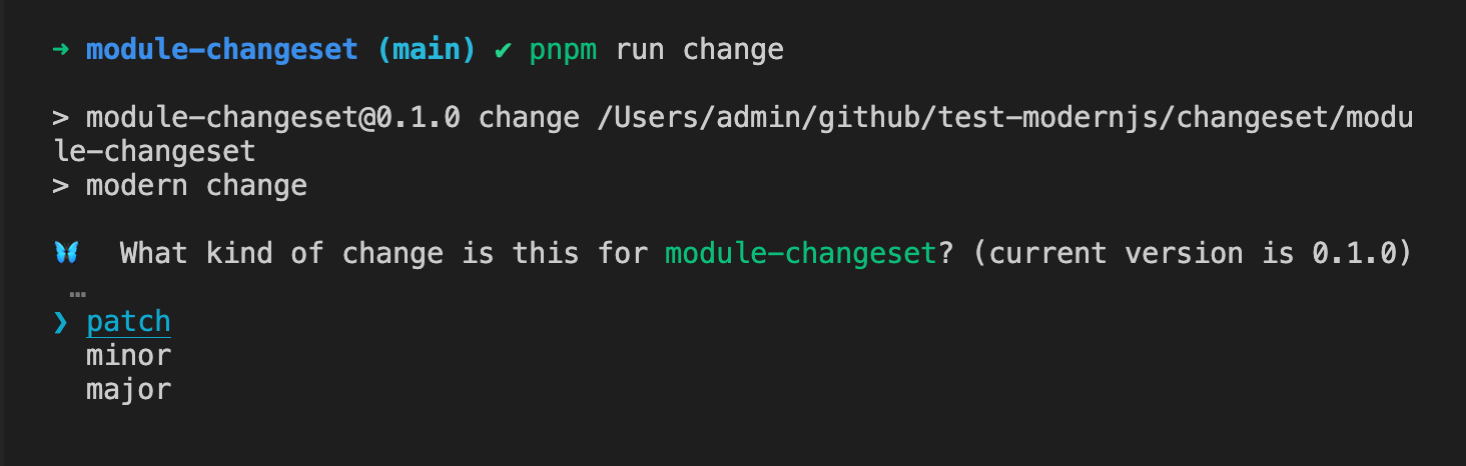
pnpm run change
|
|
31
|
+
```
|
|
32
|
+
|
|
33
|
+
#### Select the type of version number upgrade needed for this change and press Enter:
|
|
34
|
+
|
|
35
|
+
|
|
36
|
+
|
|
37
|
+
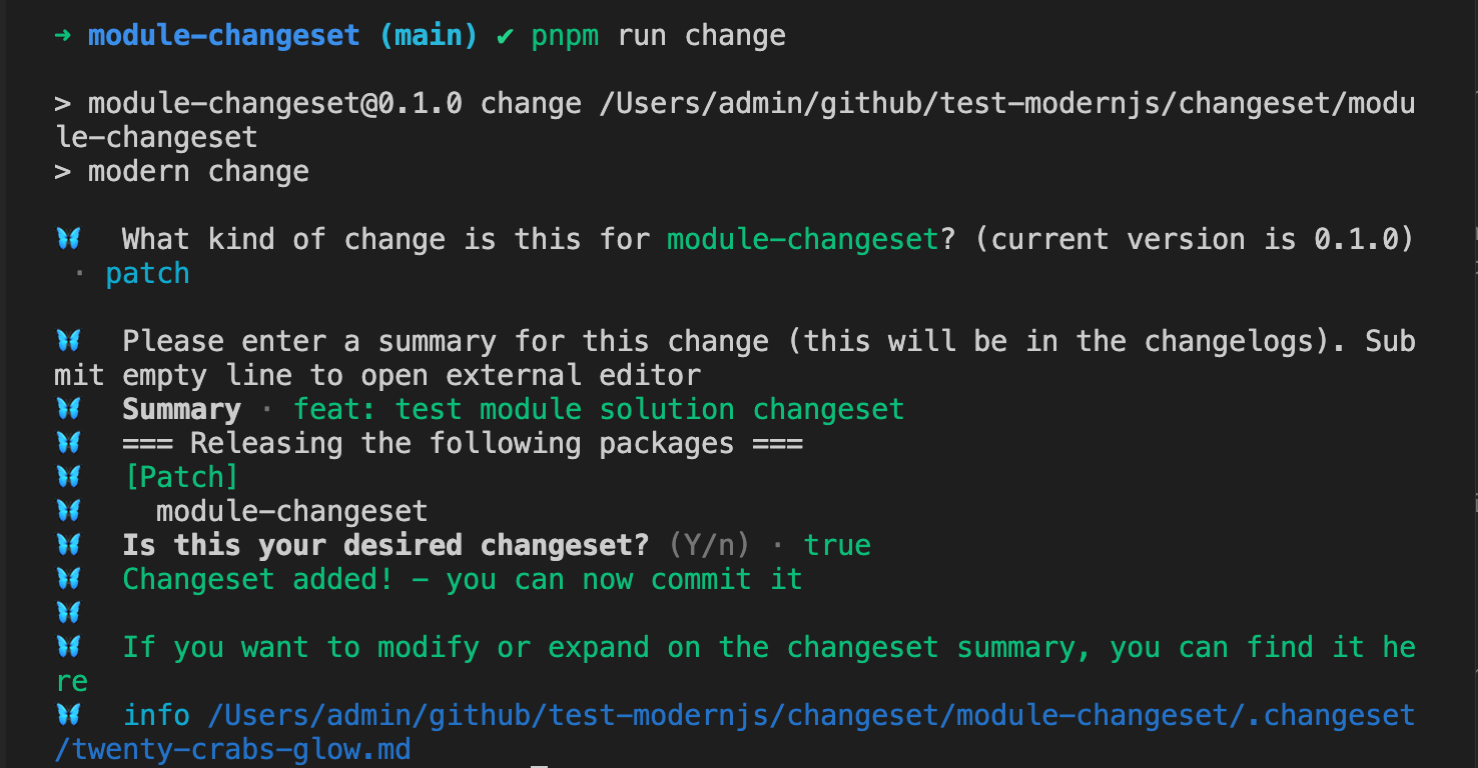
#### Fill in the changelog information and press Enter twice:
|
|
38
|
+
|
|
39
|
+
|
|
40
|
+
|
|
41
|
+
After running, a corresponding changeset file will be created in the `.changeset` directory of the project, and the file content is as follows:
|
|
42
|
+
|
|
43
|
+
```markdown
|
|
44
|
+
---
|
|
45
|
+
'module-changeset': patch
|
|
46
|
+
---
|
|
47
|
+
|
|
48
|
+
feat: test module solution changeset
|
|
49
|
+
```
|
|
50
|
+
|
|
51
|
+
This file contains all the information of the changeset.
|
|
52
|
+
|
|
53
|
+
### Monorepo
|
|
54
|
+
|
|
55
|
+
Assuming there are three module packages in the monorepo, `module-1`, `module-2`, and `module-3`.
|
|
56
|
+
|
|
57
|
+
#### Run the following command in the root directory:
|
|
58
|
+
|
|
59
|
+
```bash
|
|
60
|
+
pnpm run change
|
|
61
|
+
```
|
|
62
|
+
|
|
63
|
+
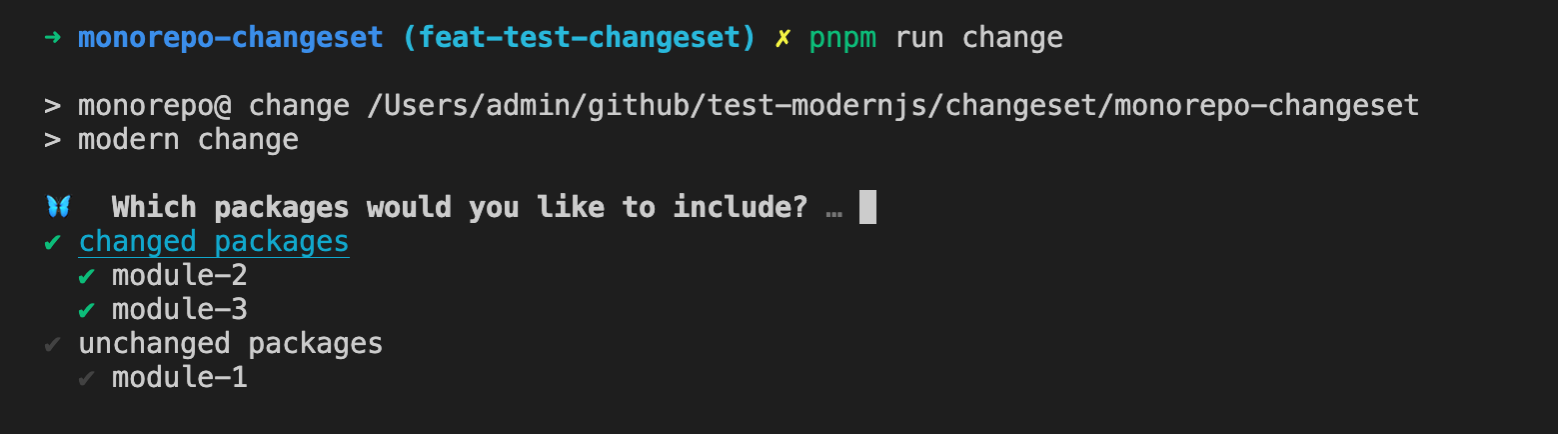
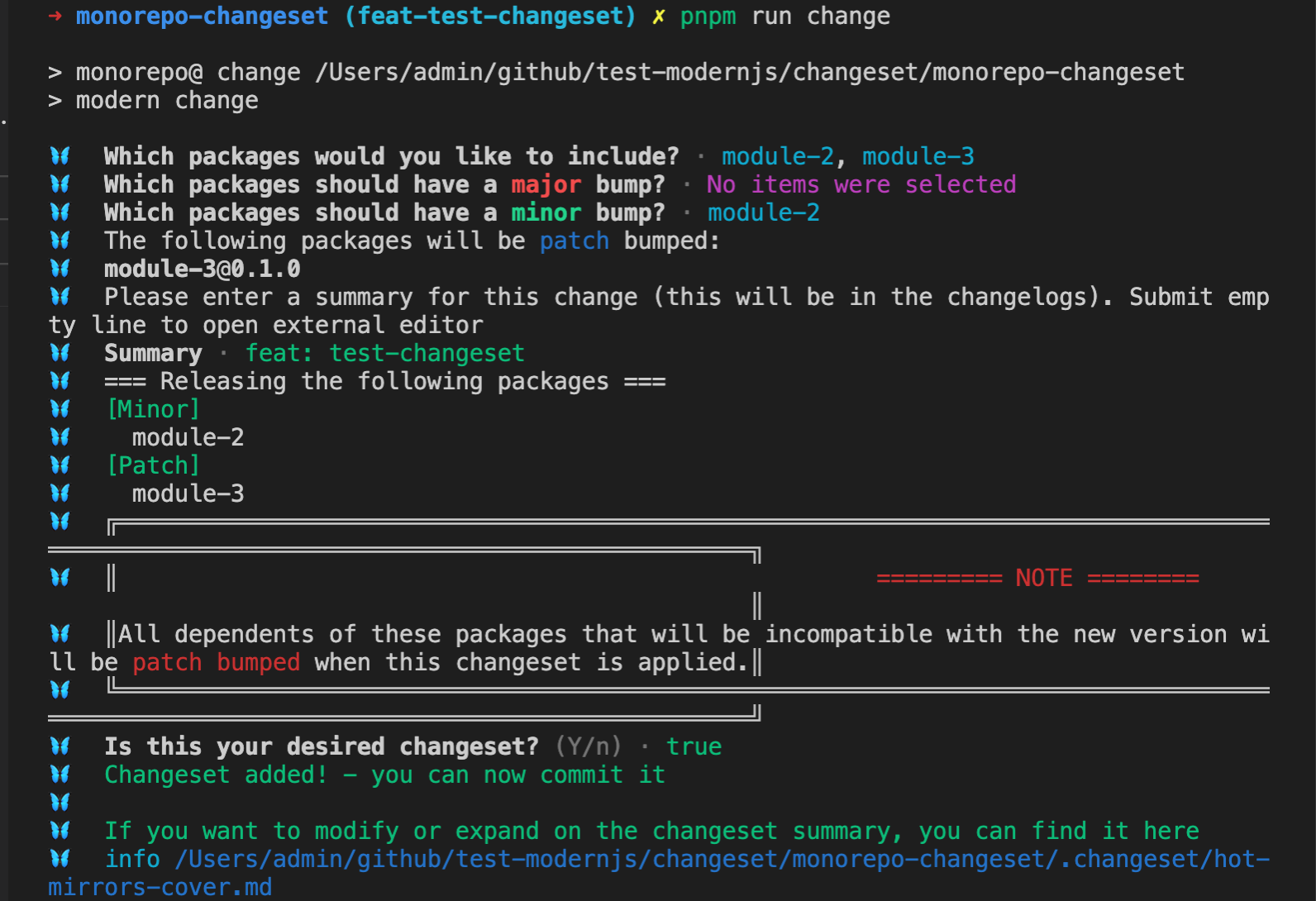
#### Select the list of packages to upgrade for this change:
|
|
64
|
+
|
|
65
|
+
Changesets will categorize the packages in the Monorepo into two categories, `changed packages` and `unchanged packages`, based on the current code changes (`git diff Head...baseBranch`), making it easy for users to choose.
|
|
66
|
+
|
|
67
|
+
Use the space key to select the corresponding package or category, and then press Enter after the selection is completed:
|
|
68
|
+
|
|
69
|
+
|
|
70
|
+
|
|
71
|
+
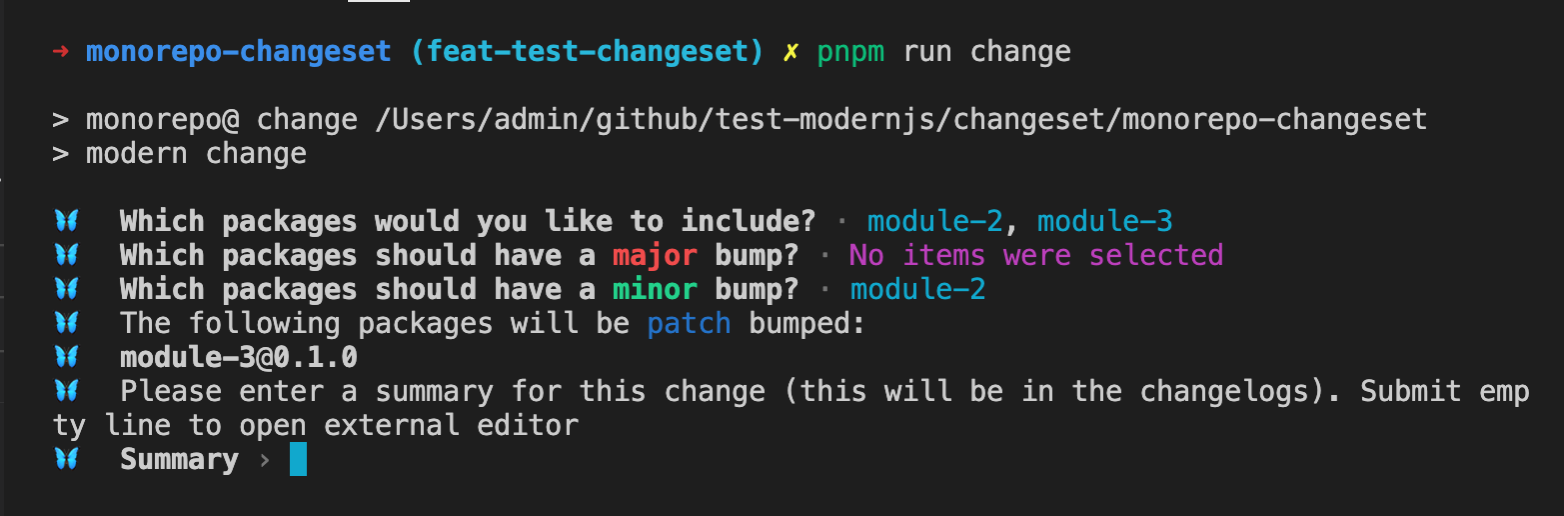
#### Select the packages corresponding to different version types. Changesets will ask about the `major` and `minor` types. If there are packages that have not selected these two types, the `patch` type will be used by default:
|
|
72
|
+
|
|
73
|
+
|
|
74
|
+
|
|
75
|
+
#### Fill in the changelog information and press Enter twice:
|
|
76
|
+
|
|
77
|
+
|
|
78
|
+
|
|
79
|
+
After running, a corresponding changeset file will be created in the `.changeset` directory of the project, and the file content is as follows:
|
|
80
|
+
|
|
81
|
+
```markdown
|
|
82
|
+
---
|
|
83
|
+
'module-2': minor
|
|
84
|
+
'module-3': patch
|
|
85
|
+
---
|
|
86
|
+
|
|
87
|
+
feat: test-changeset
|
|
88
|
+
```
|
|
89
|
+
|
|
90
|
+
This file contains all the information of the changeset, and different packages will be marked according to the selected version type.
|
|
91
|
+
|
|
92
|
+
## Parameters
|
|
93
|
+
|
|
94
|
+
The `change` command supports the following parameters:
|
|
95
|
+
|
|
96
|
+
- `--empty` Adds an empty changeset.
|
|
97
|
+
|
|
98
|
+
```bash
|
|
99
|
+
pnpm run change --empty
|
|
100
|
+
```
|
|
101
|
+
|
|
102
|
+
After running, an empty changeset file will be created in the `.changeset` directory of the project, and the file content is as follows:
|
|
103
|
+
|
|
104
|
+
```markdown
|
|
105
|
+
---
|
|
106
|
+
---
|
|
107
|
+
```
|
|
108
|
+
|
|
109
|
+
- `--open` When using this parameter, the system default editor will be opened for filling in the changelog.
|
|
110
|
+
|
|
111
|
+
## Notes
|
|
112
|
+
|
|
113
|
+
- Not all changes require changesets
|
|
114
|
+
|
|
115
|
+
If the current change is to modify some infrastructure of the repository, such as CI, testing, etc., there is no need to add changesets, or an empty changeset can be added.
|
|
116
|
+
|
|
117
|
+
- Multiple changesets can be submitted in one pull request
|
|
118
|
+
|
|
119
|
+
When a pull request has multiple feature developments or bug fixes, multiple `pnpm run change` commands can be executed to add multiple changeset files. Each file selects the corresponding packages for the feature and adds change information.
|
|
120
|
+
|
|
121
|
+
- When creating a changeset, all packages related to the feature need to be selected
|
|
122
|
+
|
|
123
|
+
When creating a changeset in a Monorepo, all related packages to the feature need to be selected to avoid some packages not being published when releasing.
|
|
@@ -0,0 +1,238 @@
|
|
|
1
|
+
---
|
|
2
|
+
sidebar_position: 6
|
|
3
|
+
---
|
|
4
|
+
|
|
5
|
+
# Customizing Changelog Generation
|
|
6
|
+
|
|
7
|
+
By default, Changesets will use `@changesets/cli/changelog` to generate changelog information. If the default changelog information cannot meet the requirements, you can customize the generation of changelog.
|
|
8
|
+
|
|
9
|
+
## Customizing Changelog Content
|
|
10
|
+
|
|
11
|
+
Changelog information mainly includes the following two types of information:
|
|
12
|
+
|
|
13
|
+
- Changelog information written in the changeset.
|
|
14
|
+
|
|
15
|
+
- Version change information of related packages in this version upgrade.
|
|
16
|
+
|
|
17
|
+
The custom logic mainly implements two functions, `getReleaseLine` and `getDependencyReleaseLine`, which are used to define the above two types of information, respectively.
|
|
18
|
+
|
|
19
|
+
### getReleaseLine
|
|
20
|
+
|
|
21
|
+
#### Params
|
|
22
|
+
|
|
23
|
+
- changeset
|
|
24
|
+
|
|
25
|
+
```ts
|
|
26
|
+
export type VersionType = 'major' | 'minor' | 'patch' | 'none';
|
|
27
|
+
|
|
28
|
+
export type Release = { name: string; type: VersionType };
|
|
29
|
+
|
|
30
|
+
export type Changeset = {
|
|
31
|
+
id: string; // changeset 的文件名称
|
|
32
|
+
commit?: string; // changeset 提交时的 commit id 信息
|
|
33
|
+
summary: string; // changeset 内容信息
|
|
34
|
+
releases: Array<Release>; // 当前计算出的 changeset 升级包名称及类型信息
|
|
35
|
+
};
|
|
36
|
+
```
|
|
37
|
+
|
|
38
|
+
- type
|
|
39
|
+
|
|
40
|
+
The upgraded version type corresponding to the current package, which is of type `VersionType` mentioned above.
|
|
41
|
+
|
|
42
|
+
#### Returns
|
|
43
|
+
|
|
44
|
+
Changelog content.
|
|
45
|
+
|
|
46
|
+
#### Default Implementation
|
|
47
|
+
|
|
48
|
+
The default processing logic of `@changesets/cli/changelog` is to split the `summary` information according to the newline `\n`, add `-` as the list header before the first line, and organize other content as the supplement of the first line below the list.
|
|
49
|
+
|
|
50
|
+
```ts
|
|
51
|
+
async function getReleaseLine(changeset, type) {
|
|
52
|
+
const [firstLine, ...futureLines] = changeset.summary
|
|
53
|
+
.split('\n')
|
|
54
|
+
.map(l => l.trimRight());
|
|
55
|
+
|
|
56
|
+
let returnVal = `- ${
|
|
57
|
+
changeset.commit ? `${changeset.commit}: ` : ''
|
|
58
|
+
}${firstLine}`;
|
|
59
|
+
|
|
60
|
+
if (futureLines.length > 0) {
|
|
61
|
+
returnVal += `\n${futureLines.map(l => ` ${l}`).join('\n')}`;
|
|
62
|
+
}
|
|
63
|
+
|
|
64
|
+
return returnVal;
|
|
65
|
+
}
|
|
66
|
+
```
|
|
67
|
+
|
|
68
|
+
### getDependencyReleaseLine
|
|
69
|
+
|
|
70
|
+
#### Params
|
|
71
|
+
|
|
72
|
+
- changesets
|
|
73
|
+
|
|
74
|
+
All associated changeset information, which is an array of `getReleaseLine` changeset types.
|
|
75
|
+
|
|
76
|
+
- dependenciesUpdated
|
|
77
|
+
|
|
78
|
+
```ts
|
|
79
|
+
type ModCompWithPackage = {
|
|
80
|
+
name: string; // 依赖模块名称
|
|
81
|
+
type: VersionType; // 依赖模块的升级类型
|
|
82
|
+
oldVersion: string; // 依赖模块当前版本号
|
|
83
|
+
newVersion: string; // 依赖模块新版本号
|
|
84
|
+
changesets: string[]; // 关联的 changeset id 列表
|
|
85
|
+
packageJson: PackageJSON; // 依赖模块完整的 package.json 内容
|
|
86
|
+
dir: string; // 依赖模块的路径(绝对路径)
|
|
87
|
+
};
|
|
88
|
+
|
|
89
|
+
type DependenciesUpdated = ModCompWithPackage[];
|
|
90
|
+
```
|
|
91
|
+
|
|
92
|
+
#### Returns
|
|
93
|
+
|
|
94
|
+
Changelog content.
|
|
95
|
+
|
|
96
|
+
#### Default Implementation
|
|
97
|
+
|
|
98
|
+
By default, `@changesets/cli/changelog` will display the corresponding `Updated dependencies + commit id` information of the changesets as a list. Then, based on the `dependenciesUpdated` information, it will display the package name and new version number of the corresponding dependency package as a child list item of the list.
|
|
99
|
+
|
|
100
|
+
```ts
|
|
101
|
+
async function getDependencyReleaseLine(changesets, dependenciesUpdated) {
|
|
102
|
+
console.log('getDependencyReleaseLine', changesets, dependenciesUpdated);
|
|
103
|
+
if (dependenciesUpdated.length === 0) return '';
|
|
104
|
+
|
|
105
|
+
const changesetLinks = changesets.map(
|
|
106
|
+
changeset =>
|
|
107
|
+
`- Updated dependencies${
|
|
108
|
+
changeset.commit ? ` [${changeset.commit}]` : ''
|
|
109
|
+
}`,
|
|
110
|
+
);
|
|
111
|
+
|
|
112
|
+
const updatedDepenenciesList = dependenciesUpdated.map(
|
|
113
|
+
dependency => ` - ${dependency.name}@${dependency.newVersion}`,
|
|
114
|
+
);
|
|
115
|
+
|
|
116
|
+
return [...changesetLinks, ...updatedDepenenciesList].join('\n');
|
|
117
|
+
}
|
|
118
|
+
```
|
|
119
|
+
|
|
120
|
+
It is displayed as follows:
|
|
121
|
+
|
|
122
|
+
```markdown
|
|
123
|
+
- Updated dependencies [f0438ab]
|
|
124
|
+
- Updated dependencies [f0438ab]
|
|
125
|
+
- module-3@2.0.0
|
|
126
|
+
- module-1@0.2.0
|
|
127
|
+
```
|
|
128
|
+
|
|
129
|
+
## Configuration
|
|
130
|
+
|
|
131
|
+
The `changelog` field in the changesets configuration file is used to mark the way to obtain changelog information.
|
|
132
|
+
|
|
133
|
+
This configuration can be a string, directly declaring the module name or path of the changelog information acquisition module.
|
|
134
|
+
|
|
135
|
+
This configuration also supports configuring arrays. The first element in the array is the module name or path of the changelog information acquisition module, and the second element is the parameter value passed to the corresponding function, which will be passed as the third parameter of the `getReleaseLine` and `getDependencyReleaseLine` functions.
|
|
136
|
+
|
|
137
|
+
### Configuring Relative Paths
|
|
138
|
+
|
|
139
|
+
If the changelog configuration is a relative path, it is a relative path under the `.changesets` directory.
|
|
140
|
+
|
|
141
|
+
For example, create the `.changeset/my-changelog-config.js` file and define the following content:
|
|
142
|
+
|
|
143
|
+
```ts title=".changeset/my-changelog-config.js"
|
|
144
|
+
async function getReleaseLine(changeset, type) {}
|
|
145
|
+
|
|
146
|
+
async function getDependencyReleaseLine(changesets, dependenciesUpdated) {}
|
|
147
|
+
|
|
148
|
+
module.exports = {
|
|
149
|
+
getReleaseLine,
|
|
150
|
+
getDependencyReleaseLine,
|
|
151
|
+
};
|
|
152
|
+
```
|
|
153
|
+
|
|
154
|
+
Configure `changlog` as `./my-changelog-config.js`:
|
|
155
|
+
|
|
156
|
+
```json title=".changesets/config.json"
|
|
157
|
+
{
|
|
158
|
+
"changelog": "./my-changelog-config.js",
|
|
159
|
+
...
|
|
160
|
+
}
|
|
161
|
+
```
|
|
162
|
+
|
|
163
|
+
### Using Module Project
|
|
164
|
+
|
|
165
|
+
Customizing changelog can also be managed using the module project to provide a common solution.
|
|
166
|
+
|
|
167
|
+
#### Use `npx @modern-js/create@latest` to create a module project.
|
|
168
|
+
|
|
169
|
+
```md
|
|
170
|
+
? Please select the type of project you want to create: Npm Module
|
|
171
|
+
? Please fill in the project name: custom-changelog
|
|
172
|
+
? Please select the programming language: TS
|
|
173
|
+
? Please select the package manager: pnpm
|
|
174
|
+
```
|
|
175
|
+
|
|
176
|
+
#### Implement Custom Content
|
|
177
|
+
|
|
178
|
+
```ts title="src/index.ts"
|
|
179
|
+
export async function getReleaseLine() {}
|
|
180
|
+
|
|
181
|
+
export async function getDependencyReleaseLine() {}
|
|
182
|
+
```
|
|
183
|
+
|
|
184
|
+
#### Publish the module to NPM.
|
|
185
|
+
|
|
186
|
+
#### Install the corresponding module in the root directory of the target repository, such as `custom-changelog`.
|
|
187
|
+
|
|
188
|
+
#### Configure the changelog configuration of Changesets as the package name.
|
|
189
|
+
|
|
190
|
+
```json title=".changesets/config.json"
|
|
191
|
+
{
|
|
192
|
+
"changelog": "custom-changelog",
|
|
193
|
+
...
|
|
194
|
+
}
|
|
195
|
+
```
|
|
196
|
+
|
|
197
|
+
### Using Monorepo Sub-Project
|
|
198
|
+
|
|
199
|
+
If your current repository is Monorepo, you can directly manage it using module sub-projects.
|
|
200
|
+
|
|
201
|
+
#### Run `pnpm run new` to create a module sub-project.
|
|
202
|
+
|
|
203
|
+
```bash
|
|
204
|
+
? Please select the type of project you want to create: Npm Module
|
|
205
|
+
? Please fill in the sub-project name: custom-changelog
|
|
206
|
+
? Please fill in the sub-project directory name: custom-changelog
|
|
207
|
+
? Please select the programming language: TS
|
|
208
|
+
```
|
|
209
|
+
|
|
210
|
+
#### Implement Custom Content
|
|
211
|
+
|
|
212
|
+
```ts title="src/index.ts"
|
|
213
|
+
export async function getReleaseLine() {}
|
|
214
|
+
|
|
215
|
+
export async function getDependencyReleaseLine() {}
|
|
216
|
+
```
|
|
217
|
+
|
|
218
|
+
#### Add the sub-project module dependency, such as `custom-changelog`, to the Monorepo root directory.
|
|
219
|
+
|
|
220
|
+
```json title="package.json"
|
|
221
|
+
{
|
|
222
|
+
"devDependencies": {
|
|
223
|
+
"custom-changelog": "workspace: *",
|
|
224
|
+
...
|
|
225
|
+
}
|
|
226
|
+
}
|
|
227
|
+
```
|
|
228
|
+
|
|
229
|
+
#### Configure the changelog configuration of Changesets as the package name.
|
|
230
|
+
|
|
231
|
+
```json title=".changesets/config.json"
|
|
232
|
+
{
|
|
233
|
+
"changelog": "custom-changelog",
|
|
234
|
+
...
|
|
235
|
+
}
|
|
236
|
+
```
|
|
237
|
+
|
|
238
|
+
After the module is published to NPM, it can still be used like a module type for other repositories.
|
|
@@ -0,0 +1,269 @@
|
|
|
1
|
+
---
|
|
2
|
+
sidebar_position: 7
|
|
3
|
+
---
|
|
4
|
+
|
|
5
|
+
# Customizing Commit Messages
|
|
6
|
+
|
|
7
|
+
Changesets supports configuring `commit` to automatically submit the current changes when executing the `change` and `bump` commands.
|
|
8
|
+
|
|
9
|
+
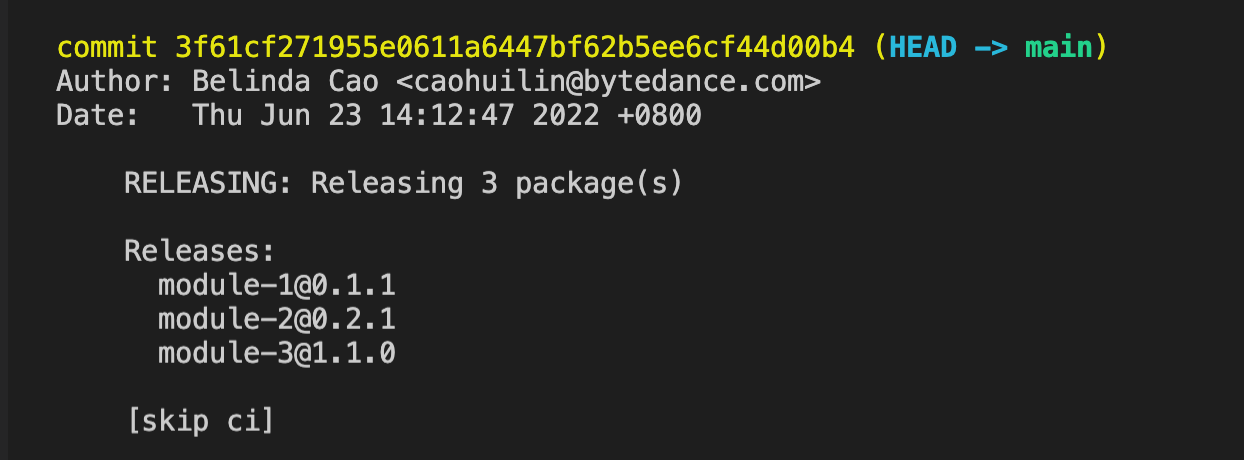
The default `commit` information is provided by `@changesets/cli/commit`, and the default information format is:
|
|
10
|
+
|
|
11
|
+

|
|
12
|
+
|
|
13
|
+
|
|
14
|
+
When the default commit information cannot meet the requirements, custom commit information is supported.
|
|
15
|
+
|
|
16
|
+
## Customizing Commit Message Content
|
|
17
|
+
|
|
18
|
+
Commit information is divided into two types:
|
|
19
|
+
|
|
20
|
+
- Commit information automatically generated when executing the `change` command.
|
|
21
|
+
- Commit information automatically generated when executing the `bump` command.
|
|
22
|
+
|
|
23
|
+
The custom logic mainly implements two functions, `getAddMessage` and `getVersionMessage`, which are used to define the above two types of information, respectively.
|
|
24
|
+
|
|
25
|
+
### getAddMessage
|
|
26
|
+
|
|
27
|
+
#### Params
|
|
28
|
+
|
|
29
|
+
- changeset
|
|
30
|
+
|
|
31
|
+
The current changeset information created.
|
|
32
|
+
|
|
33
|
+
```ts
|
|
34
|
+
type Release = {
|
|
35
|
+
name: string;
|
|
36
|
+
type: VersionType;
|
|
37
|
+
};
|
|
38
|
+
|
|
39
|
+
type Changeset = {
|
|
40
|
+
summary: string;
|
|
41
|
+
releases: Array<Release>;
|
|
42
|
+
};
|
|
43
|
+
```
|
|
44
|
+
|
|
45
|
+
- options
|
|
46
|
+
|
|
47
|
+
Configuration information when committing.
|
|
48
|
+
|
|
49
|
+
> When the commit configuration is an array, the second parameter supports passing in default configuration information, which will be used to pass this parameter.
|
|
50
|
+
|
|
51
|
+
#### Returns
|
|
52
|
+
|
|
53
|
+
Commit message content.
|
|
54
|
+
|
|
55
|
+
#### Default Implementation
|
|
56
|
+
|
|
57
|
+
The default processing logic of `@changesets/cli/commit` is to start with `docs(changeset):`, and the commit information is the `summary` of the changeset, and [skip ci] information is added according to the `skipCI` parameter configuration passed in.
|
|
58
|
+
|
|
59
|
+
```ts
|
|
60
|
+
type SkipCI = boolean | 'add' | 'version';
|
|
61
|
+
|
|
62
|
+
const getAddMessage = async (
|
|
63
|
+
changeset: Changeset,
|
|
64
|
+
options: { skipCI?: SkipCI } | null,
|
|
65
|
+
) => {
|
|
66
|
+
const skipCI = options?.skipCI === 'add' || options?.skipCI === true;
|
|
67
|
+
return outdent`docs(changeset): ${changeset.summary}${
|
|
68
|
+
skipCI ? `\n\n[skip ci]\n` : ''
|
|
69
|
+
}`;
|
|
70
|
+
};
|
|
71
|
+
```
|
|
72
|
+
|
|
73
|
+
> [outdent](https://www.npmjs.com/package/outdent) is used to remove the leading whitespace content of the template string to make the commit information more compliant with the specification.
|
|
74
|
+
|
|
75
|
+
### getVersionMessage
|
|
76
|
+
|
|
77
|
+
#### Params
|
|
78
|
+
|
|
79
|
+
- releasePlan
|
|
80
|
+
|
|
81
|
+
```ts
|
|
82
|
+
type VersionType = 'major' | 'minor' | 'patch' | 'none';
|
|
83
|
+
|
|
84
|
+
type Release = {
|
|
85
|
+
name: string;
|
|
86
|
+
type: VersionType;
|
|
87
|
+
};
|
|
88
|
+
|
|
89
|
+
type Changeset = {
|
|
90
|
+
id: string;
|
|
91
|
+
summary: string;
|
|
92
|
+
releases: Array<Release>;
|
|
93
|
+
};
|
|
94
|
+
|
|
95
|
+
type ComprehensiveRelease = {
|
|
96
|
+
name: string;
|
|
97
|
+
type: VersionType;
|
|
98
|
+
oldVersion: string;
|
|
99
|
+
newVersion: string;
|
|
100
|
+
changesets: string[];
|
|
101
|
+
};
|
|
102
|
+
|
|
103
|
+
type PreState = {
|
|
104
|
+
mode: 'pre' | 'exit'; // pre 模式当前状态
|
|
105
|
+
tag: string; // pre 的类型
|
|
106
|
+
initialVersions: {
|
|
107
|
+
[pkgName: string]: string; // 版本升级前包名及版本号信息,Map 格式
|
|
108
|
+
};
|
|
109
|
+
changesets: string[]; // 本次升级的 changeset id 列表
|
|
110
|
+
};
|
|
111
|
+
|
|
112
|
+
type ReleasePlan = {
|
|
113
|
+
changesets: Changeset[]; // 本次升级的 changeset 列表
|
|
114
|
+
releases: ComprehensiveRelease[]; // 当前升级的包信息,包含包名称、当前版本、升级后版本、升级类型等
|
|
115
|
+
preState: PreState | undefined; // 当前如果为 pre 发布,提供相关状态信息
|
|
116
|
+
};
|
|
117
|
+
```
|
|
118
|
+
|
|
119
|
+
- options
|
|
120
|
+
|
|
121
|
+
Configuration information when committing.
|
|
122
|
+
|
|
123
|
+
> When the commit configuration is an array, the second parameter supports passing in default configuration information, which will be used to pass this parameter.
|
|
124
|
+
|
|
125
|
+
#### Returns
|
|
126
|
+
|
|
127
|
+
Commit message content.
|
|
128
|
+
|
|
129
|
+
#### Default Implementation
|
|
130
|
+
|
|
131
|
+
The default processing logic of `@changesets/cli/commit` is to first display the number of packages that need to be released, then display the names and new version numbers of the released packages, and [skip ci] information is added according to the `skipCI` parameter configuration passed in.
|
|
132
|
+
|
|
133
|
+
```ts
|
|
134
|
+
const getVersionMessage = async (
|
|
135
|
+
releasePlan: ReleasePlan,
|
|
136
|
+
options: { skipCI?: SkipCI } | null,
|
|
137
|
+
) => {
|
|
138
|
+
const skipCI = options?.skipCI === 'version' || options?.skipCI === true;
|
|
139
|
+
const publishableReleases = releasePlan.releases.filter(
|
|
140
|
+
release => release.type !== 'none',
|
|
141
|
+
);
|
|
142
|
+
const numPackagesReleased = publishableReleases.length;
|
|
143
|
+
|
|
144
|
+
const releasesLines = publishableReleases
|
|
145
|
+
.map(release => ` ${release.name}@${release.newVersion}`)
|
|
146
|
+
.join('\n');
|
|
147
|
+
|
|
148
|
+
return outdent`
|
|
149
|
+
RELEASING: Releasing ${numPackagesReleased} package(s)
|
|
150
|
+
|
|
151
|
+
Releases:
|
|
152
|
+
${releasesLines}
|
|
153
|
+
${skipCI ? `\n[skip ci]\n` : ''}
|
|
154
|
+
`;
|
|
155
|
+
};
|
|
156
|
+
```
|
|
157
|
+
|
|
158
|
+
## Configuration
|
|
159
|
+
|
|
160
|
+
The `commit` field in the changesets configuration file is used to mark whether to submit commit information when executing the `change` and `bump` commands, and the way to obtain commit information.
|
|
161
|
+
|
|
162
|
+
This configuration can be a `boolean`. When it is `true`, the default `@changesets/cli/commit` formatting commit information will be used.
|
|
163
|
+
|
|
164
|
+
This configuration can be a string, directly declaring the module name or path of the commit information acquisition module.
|
|
165
|
+
|
|
166
|
+
This configuration also supports configuring arrays. The first element in the array is the module name or path of the commit information acquisition module, and the second element is the parameter value passed to the corresponding function, which will be passed as the second parameter of the `getAddMessage` and `getVersionMessage` functions.
|
|
167
|
+
|
|
168
|
+
### Configuring Relative Paths
|
|
169
|
+
|
|
170
|
+
If the commit configuration is a relative path, it is a relative path under the `.changesets` directory.
|
|
171
|
+
|
|
172
|
+
For example, create the `.changeset/my-commit-config.js` file and define the following content:
|
|
173
|
+
|
|
174
|
+
```js title=".changeset/my-commit-config.js"
|
|
175
|
+
async function getAddMessage(changeset, options) {}
|
|
176
|
+
|
|
177
|
+
async function getVersionMessage(releasePlan, options) {}
|
|
178
|
+
|
|
179
|
+
module.exports = {
|
|
180
|
+
getAddMessage,
|
|
181
|
+
getVersionMessage,
|
|
182
|
+
};
|
|
183
|
+
```
|
|
184
|
+
|
|
185
|
+
Configure `commit` as `./my-commit-config.js`:
|
|
186
|
+
|
|
187
|
+
```json title=".changesets/config.json"
|
|
188
|
+
{
|
|
189
|
+
"changelog": "./my-commit-config.js",
|
|
190
|
+
...
|
|
191
|
+
}
|
|
192
|
+
```
|
|
193
|
+
|
|
194
|
+
### Using Module Project
|
|
195
|
+
|
|
196
|
+
Customizing commit can also be managed using the module project to provide a common solution.
|
|
197
|
+
|
|
198
|
+
#### Use `npx @modern-js/create@latest` to create a module project.
|
|
199
|
+
|
|
200
|
+
```md
|
|
201
|
+
? Please select the type of project you want to create: Npm Module
|
|
202
|
+
? Please fill in the project name: custom-changelog
|
|
203
|
+
? Please select the programming language: TS
|
|
204
|
+
? Please select the package manager: pnpm
|
|
205
|
+
```
|
|
206
|
+
|
|
207
|
+
#### Implement Custom Content
|
|
208
|
+
|
|
209
|
+
```ts title="src/index.ts"
|
|
210
|
+
export async function getAddMessage() {}
|
|
211
|
+
|
|
212
|
+
export async function getVersionMessage() {}
|
|
213
|
+
```
|
|
214
|
+
|
|
215
|
+
#### Publish the module to NPM.
|
|
216
|
+
|
|
217
|
+
#### Install the corresponding module in the root directory of the target repository, such as `custom-commit`.
|
|
218
|
+
|
|
219
|
+
#### Configure the commit configuration of changesets as the package name.
|
|
220
|
+
|
|
221
|
+
```json title="package.json"
|
|
222
|
+
{
|
|
223
|
+
"commit": "custom-commit",
|
|
224
|
+
...
|
|
225
|
+
}
|
|
226
|
+
```
|
|
227
|
+
|
|
228
|
+
### Using Monorepo Sub-Project
|
|
229
|
+
|
|
230
|
+
If your current repository is Monorepo, you can directly manage it using module sub-projects.
|
|
231
|
+
|
|
232
|
+
#### Run `pnpm run new` to create a module sub-project.
|
|
233
|
+
|
|
234
|
+
```bash
|
|
235
|
+
? Please select the type of project you want to create: Npm Module
|
|
236
|
+
? Please fill in the sub-project name: custom-commit
|
|
237
|
+
? Please fill in the sub-project directory name: custom-commit
|
|
238
|
+
? Please select the programming language: TS
|
|
239
|
+
```
|
|
240
|
+
|
|
241
|
+
#### Implement Custom Content
|
|
242
|
+
|
|
243
|
+
```ts title="src/index.ts"
|
|
244
|
+
export async function getAddMessage() {}
|
|
245
|
+
|
|
246
|
+
export async function getVersionMessage() {}
|
|
247
|
+
```
|
|
248
|
+
|
|
249
|
+
Add the sub-project module dependency, such as `custom-commit`, to the Monorepo root directory.
|
|
250
|
+
|
|
251
|
+
```json title="package.json"
|
|
252
|
+
{
|
|
253
|
+
"devDependencies": {
|
|
254
|
+
"custom-commit": "workspace: *",
|
|
255
|
+
...
|
|
256
|
+
}
|
|
257
|
+
}
|
|
258
|
+
```
|
|
259
|
+
|
|
260
|
+
Configure the commit configuration of Changesets as the package name.
|
|
261
|
+
|
|
262
|
+
```json title=".changesets/config.json"
|
|
263
|
+
{
|
|
264
|
+
"commit": "custom-commit",
|
|
265
|
+
...
|
|
266
|
+
}
|
|
267
|
+
```
|
|
268
|
+
|
|
269
|
+
After the module is published to NPM, it can still be used like a module type for other repositories.
|