@modern-js/main-doc 0.0.0-next-1685988387703 → 0.0.0-next-1686037191101
This diff represents the content of publicly available package versions that have been released to one of the supported registries. The information contained in this diff is provided for informational purposes only and reflects changes between package versions as they appear in their respective public registries.
- package/CHANGELOG.md +7 -3
- package/docs/en/configure/app/tools/swc.mdx +2 -16
- package/docs/en/guides/topic-detail/changesets/_category_.json +4 -0
- package/docs/en/guides/topic-detail/changesets/add.mdx +123 -0
- package/docs/en/guides/topic-detail/changesets/changelog.mdx +238 -0
- package/docs/en/guides/topic-detail/changesets/commit.mdx +269 -0
- package/docs/en/guides/topic-detail/changesets/config.mdx +147 -0
- package/docs/en/guides/topic-detail/changesets/github.mdx +175 -0
- package/docs/en/guides/topic-detail/changesets/introduce.mdx +56 -0
- package/docs/en/guides/topic-detail/changesets/release-note.mdx +269 -0
- package/docs/en/guides/topic-detail/changesets/release-pre.mdx +49 -0
- package/docs/en/guides/topic-detail/changesets/release.mdx +229 -0
- package/docs/zh/configure/app/tools/swc.mdx +2 -16
- package/docs/zh/guides/topic-detail/changesets/add.mdx +7 -7
- package/docs/zh/guides/topic-detail/changesets/changelog.mdx +11 -11
- package/docs/zh/guides/topic-detail/changesets/commit.mdx +2 -4
- package/docs/zh/guides/topic-detail/changesets/config.mdx +5 -5
- package/docs/zh/guides/topic-detail/changesets/github.mdx +30 -19
- package/docs/zh/guides/topic-detail/changesets/introduce.mdx +5 -5
- package/docs/zh/guides/topic-detail/changesets/release-note.mdx +59 -49
- package/docs/zh/guides/topic-detail/changesets/release-pre.mdx +4 -4
- package/docs/zh/guides/topic-detail/changesets/release.mdx +7 -7
- package/package.json +5 -5
|
@@ -0,0 +1,229 @@
|
|
|
1
|
+
---
|
|
2
|
+
sidebar_position: 3
|
|
3
|
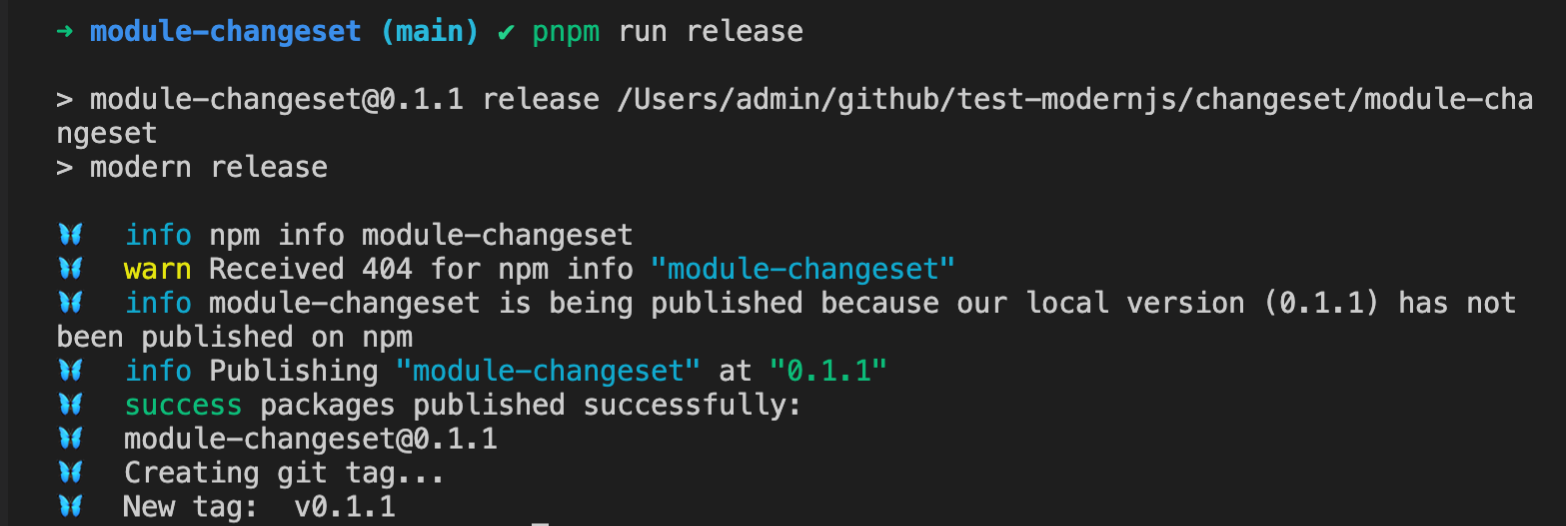
+
---
|
|
4
|
+
|
|
5
|
+
# Publishing version
|
|
6
|
+
|
|
7
|
+
When releasing a version, we need to upgrade the version numbers of the corresponding packages based on the changeset generated during development, and execute the publish command to publish them to NPM.
|
|
8
|
+
|
|
9
|
+
## Steps
|
|
10
|
+
|
|
11
|
+
:::info
|
|
12
|
+
The following example commands are all using pnpm as the package management tool. If you need to use other package management tools, please replace them as needed.
|
|
13
|
+
|
|
14
|
+
:::
|
|
15
|
+
|
|
16
|
+
### Npm Module
|
|
17
|
+
|
|
18
|
+
#### Run the following command in the root directory:
|
|
19
|
+
|
|
20
|
+
```bash
|
|
21
|
+
pnpm run bump
|
|
22
|
+
```
|
|
23
|
+
|
|
24
|
+

|
|
25
|
+
|
|
26
|
+
When running this command, changesets will automatically perform the following operations:
|
|
27
|
+
|
|
28
|
+
- Delete all changeset files under the `.changesets` directory.
|
|
29
|
+
|
|
30
|
+
- Upgrade the package version number based on the changeset information.
|
|
31
|
+
|
|
32
|
+
- Write Changelog information to the `CHANGELOG.md` file in the root directory. The file will be automatically created if it does not exist.
|
|
33
|
+
|
|
34
|
+
#### Confirm and submit the current changes:
|
|
35
|
+
|
|
36
|
+
```bash
|
|
37
|
+
git add .
|
|
38
|
+
git commit -m "release: bump package"
|
|
39
|
+
```
|
|
40
|
+
|
|
41
|
+
#### Run the following command in the root directory to publish the package to NPM:
|
|
42
|
+
|
|
43
|
+
```bash
|
|
44
|
+
pnpm run release
|
|
45
|
+
```
|
|
46
|
+
|
|
47
|
+
|
|
48
|
+
|
|
49
|
+
#### Push the corresponding tag information to the remote repository:
|
|
50
|
+
|
|
51
|
+
```bash
|
|
52
|
+
git push --follow-tags
|
|
53
|
+
```
|
|
54
|
+
|
|
55
|
+
### Monorepo
|
|
56
|
+
|
|
57
|
+
#### Run the following command in the root directory:
|
|
58
|
+
|
|
59
|
+
```bash
|
|
60
|
+
pnpm run bump
|
|
61
|
+
```
|
|
62
|
+
|
|
63
|
+

|
|
64
|
+
|
|
65
|
+
When running this command, changesets will automatically perform the following operations:
|
|
66
|
+
|
|
67
|
+
- Delete all changeset files under the `.changesets` directory.
|
|
68
|
+
|
|
69
|
+
- Upgrade the version numbers of the relevant packages based on the changeset information. In addition to the packages written in the changeset, changesets will also analyze the dependency relationships of all packages in the Monorepo during execution. If an upgrade is required, the version number will be automatically upgraded accordingly.
|
|
70
|
+
|
|
71
|
+
- Write Changelog information to the `CHANGELOG.md` file in the directory of the package that needs to be upgraded. The file will be automatically created if it does not exist.
|
|
72
|
+
|
|
73
|
+
#### Confirm and submit the current changes:
|
|
74
|
+
|
|
75
|
+
:::info
|
|
76
|
+
Make sure that the automatically upgraded version numbers meet the expected requirements. If you need to understand the version upgrade strategy, please refer to [Version Upgrade Strategy](/guides/topic-detail/changesets/release#version-upgrade-strategy).
|
|
77
|
+
:::
|
|
78
|
+
|
|
79
|
+
```bash
|
|
80
|
+
git add .
|
|
81
|
+
git commit -m "release: bump package"
|
|
82
|
+
```
|
|
83
|
+
|
|
84
|
+
#### Run the following command in the root directory to publish the package to NPM:
|
|
85
|
+
|
|
86
|
+
```bash
|
|
87
|
+
pnpm run release
|
|
88
|
+
```
|
|
89
|
+
|
|
90
|
+
When running this command, it will sequentially determine whether the versions of all packages in the Monorepo exist on NPM. If they do not exist, the `publish` command will be executed to publish them.
|
|
91
|
+
|
|
92
|
+
:::warning
|
|
93
|
+
When the dependencies between packages in the Monorepo are declared using workspace, do not directly execute `npm publish` to publish the package in the corresponding subdirectory of the package. Use the `release` command instead. When publishing, the workspace declaration will be automatically removed to ensure that the NPM package is available after publishing.
|
|
94
|
+
:::
|
|
95
|
+
|
|
96
|
+
#### Push the corresponding tag information to the remote repository:
|
|
97
|
+
|
|
98
|
+
```bash
|
|
99
|
+
git push --follow-tags
|
|
100
|
+
```
|
|
101
|
+
|
|
102
|
+
## Parameters
|
|
103
|
+
|
|
104
|
+
### Parameters for the `bump` command
|
|
105
|
+
|
|
106
|
+
- `--snapshot` Generates a timestamp-based version number.
|
|
107
|
+
|
|
108
|
+
```bash
|
|
109
|
+
pnpm run bump --snapshot canary
|
|
110
|
+
```
|
|
111
|
+
|
|
112
|
+
After running, the corresponding upgraded version number will become `0.0.0-canary-20220622092823`, and `canary` is the tag configured for snapshot. If not configured, it will directly generate the form of `0.0.0-20220622092823`.
|
|
113
|
+
|
|
114
|
+
This parameter is mainly used to publish temporary test versions for testing and does not require code submission.
|
|
115
|
+
|
|
116
|
+
- `--ignore` Manually ignore some packages during publishing.
|
|
117
|
+
|
|
118
|
+
For example, if you need to ignore the `module-2` package for this release:
|
|
119
|
+
|
|
120
|
+
```bash
|
|
121
|
+
pnpm run bump --ignore module-2
|
|
122
|
+
```
|
|
123
|
+
|
|
124
|
+
After executing the command, the update of the `module-2` package will be ignored. Note that if there are packages that depend on `module-2`, the corresponding packages also need to be added to the `ignore` parameter, otherwise the `bump` command will fail.
|
|
125
|
+
|
|
126
|
+
The usage for adding multiple packages is as follows:
|
|
127
|
+
|
|
128
|
+
```bash
|
|
129
|
+
pnpm run bump --ignore module-2 --ignore module-3
|
|
130
|
+
```
|
|
131
|
+
|
|
132
|
+
### Parameters for the `release` command
|
|
133
|
+
|
|
134
|
+
- `--otp` Uses `npm token` to execute the release command to publish the corresponding package.
|
|
135
|
+
|
|
136
|
+
```bash
|
|
137
|
+
pnpm run relese --otp <token>
|
|
138
|
+
```
|
|
139
|
+
|
|
140
|
+
- `--tag` Uses a specific tag for local publishing, and `latest` is used by default.
|
|
141
|
+
|
|
142
|
+
```bash
|
|
143
|
+
pnpm run release --tag <tag>
|
|
144
|
+
```
|
|
145
|
+
|
|
146
|
+
- `--ignore-scripts` Ignores npm scripts during publishing.
|
|
147
|
+
|
|
148
|
+
When executing the `publish` command, npm will automatically trigger many commands, such as `prepare` and `prepublish`. Using this parameter can ignore the execution of these commands. This parameter is only supported in Monorepo using pnpm.
|
|
149
|
+
|
|
150
|
+
```bash
|
|
151
|
+
pnpm run release --ignore-scripts
|
|
152
|
+
```
|
|
153
|
+
|
|
154
|
+
- `--no-git-checks` Ignores checking the current branch during publishing.
|
|
155
|
+
|
|
156
|
+
By default, when executing the publish command, it will automatically check whether the current branch is a release branch, whether there are uncommitted changes, etc. Using this parameter can ignore git-related checks.
|
|
157
|
+
|
|
158
|
+
```bash
|
|
159
|
+
pnpm run release --no-git-checks
|
|
160
|
+
```
|
|
161
|
+
|
|
162
|
+
## Version Upgrade Strategy
|
|
163
|
+
|
|
164
|
+
### dependencies or devDependencies dependencies
|
|
165
|
+
|
|
166
|
+
#### Only upgrade the patch version of the package itself for patch version dependencies
|
|
167
|
+
|
|
168
|
+
For example, the following scenario exists:
|
|
169
|
+
|
|
170
|
+
There are two packages in Monorepo, `module-1` and `module-2`, and `module-1` exists in the `dependencies` of `module-2`.
|
|
171
|
+
|
|
172
|
+
The current changeset is the patch version upgrade of `module-1`.
|
|
173
|
+
|
|
174
|
+
After executing the bump command, only the patch version number of `module-1` will be upgraded.
|
|
175
|
+
|
|
176
|
+
#### Upgrade the major or minor version number of the package itself for major/minor version upgrades, and upgrade the patch version number of the dependent packages
|
|
177
|
+
|
|
178
|
+
For example, the following scenario exists:
|
|
179
|
+
|
|
180
|
+
There are two packages in Monorepo, `module-1` and `module-2`, and `module-1` exists in the `dependencies` of `module-2`.
|
|
181
|
+
|
|
182
|
+
The current changeset is the minor version upgrade of `module-1`.
|
|
183
|
+
|
|
184
|
+
After executing the bump command, `module-1` will upgrade the `minor` version number, and `module-2` will upgrade the `patch` version number.
|
|
185
|
+
|
|
186
|
+
### peerDependencies dependencies
|
|
187
|
+
|
|
188
|
+
#### Upgrade the patch version number of the package itself and the dependent package for patch version dependencies
|
|
189
|
+
|
|
190
|
+
For example, the following scenario exists:
|
|
191
|
+
|
|
192
|
+
There are two packages in Monorepo, `module-1` and `module-2`, and `module-1` exists in the `peerDependencies` of `module-2`.
|
|
193
|
+
|
|
194
|
+
The current changeset is the patch version upgrade of `module-1`.
|
|
195
|
+
|
|
196
|
+
After executing the bump command, both `module-1` and `module-2` will upgrade the patch version number.
|
|
197
|
+
|
|
198
|
+
#### Upgrade the major version number of the dependent package for major/minor version upgrades of the package itself
|
|
199
|
+
|
|
200
|
+
For example, the following scenario exists:
|
|
201
|
+
|
|
202
|
+
There are two packages in Monorepo, `module-1` and `module-2`, and `module-1` exists in the `peerDependencies` of `module-2`.
|
|
203
|
+
|
|
204
|
+
The current changeset is the minor version upgrade of `module-1`.
|
|
205
|
+
|
|
206
|
+
After executing the bump command, `module-1` will upgrade the `minor` version number, and `module-2` will upgrade the `major` version number.
|
|
207
|
+
|
|
208
|
+
#### Modify the upgrade strategy for peerDependencies
|
|
209
|
+
|
|
210
|
+
The upgrade strategy of `peerDependencies` can be modified by configuring `onlyUpdatePeerDependentsWhenOutOfRange`. When only the declared version type range is exceeded, the corresponding `peerDependencies` will be upgraded.
|
|
211
|
+
|
|
212
|
+
```json
|
|
213
|
+
{
|
|
214
|
+
"___experimentalUnsafeOptions_WILL_CHANGE_IN_PATCH": {
|
|
215
|
+
"onlyUpdatePeerDependentsWhenOutOfRange": true
|
|
216
|
+
},
|
|
217
|
+
...
|
|
218
|
+
}
|
|
219
|
+
```
|
|
220
|
+
|
|
221
|
+
For example, the following scenario exists:
|
|
222
|
+
|
|
223
|
+
There are two packages in Monorepo, `module-1` and `module-2`, and `module-1` exists in the `peerDependencies` of `module-2`, and the version number of `module-1` is declared using `^`.
|
|
224
|
+
|
|
225
|
+
The current changeset is the patch or minor version upgrade of `module-1`.
|
|
226
|
+
|
|
227
|
+
After executing the `bump` command, only the version number of `module-1` will be upgraded.
|
|
228
|
+
|
|
229
|
+
Note that if the package version number is in the `0.x.x` range, upgrading the `minor` version number is also beyond the declared version type range.
|
|
@@ -19,23 +19,9 @@ import SWC from '@modern-js/builder-doc/docs/zh/shared/swc.md';
|
|
|
19
19
|
|
|
20
20
|
## 安装
|
|
21
21
|
|
|
22
|
-
|
|
22
|
+
import EnableSWC from '@modern-js/builder-doc/docs/zh/shared/enable-swc.md';
|
|
23
23
|
|
|
24
|
-
|
|
25
|
-
? 请选择你想要的操作 启用可选功能
|
|
26
|
-
? 请选择功能名称 启用「SWC 编译」
|
|
27
|
-
```
|
|
28
|
-
|
|
29
|
-
执行完成后,你只需在 `modern.config.ts` 文件中注册 SWC 插件,即可启用 SWC 编译和压缩能力。
|
|
30
|
-
|
|
31
|
-
```ts title="modern.config.ts"
|
|
32
|
-
import appTools, { defineConfig } from '@modern-js/app-tools';
|
|
33
|
-
import swcPlugin from '@modern-js/plugin-swc';
|
|
34
|
-
|
|
35
|
-
export default defineConfig({
|
|
36
|
-
plugins: [appTools(), swcPlugin()],
|
|
37
|
-
});
|
|
38
|
-
```
|
|
24
|
+
<EnableSWC />
|
|
39
25
|
|
|
40
26
|
## 配置项
|
|
41
27
|
|
|
@@ -2,9 +2,9 @@
|
|
|
2
2
|
sidebar_position: 2
|
|
3
3
|
---
|
|
4
4
|
|
|
5
|
-
#
|
|
5
|
+
# 添加 Changesets
|
|
6
6
|
|
|
7
|
-
|
|
7
|
+
当我们开发完成时,需要添加一个 changeset 声明当前变更,用于后续版本发布。
|
|
8
8
|
|
|
9
9
|
## 信息
|
|
10
10
|
|
|
@@ -14,7 +14,7 @@ sidebar_position: 2
|
|
|
14
14
|
|
|
15
15
|
- 本次变更需要升级的版本号类型,类型符合 [semver](https://semver.org/) 规范。
|
|
16
16
|
|
|
17
|
-
- 本次变更的
|
|
17
|
+
- 本次变更的 changelog 信息。
|
|
18
18
|
|
|
19
19
|
## 步骤
|
|
20
20
|
|
|
@@ -35,7 +35,7 @@ pnpm run change
|
|
|
35
35
|
|
|
36
36
|
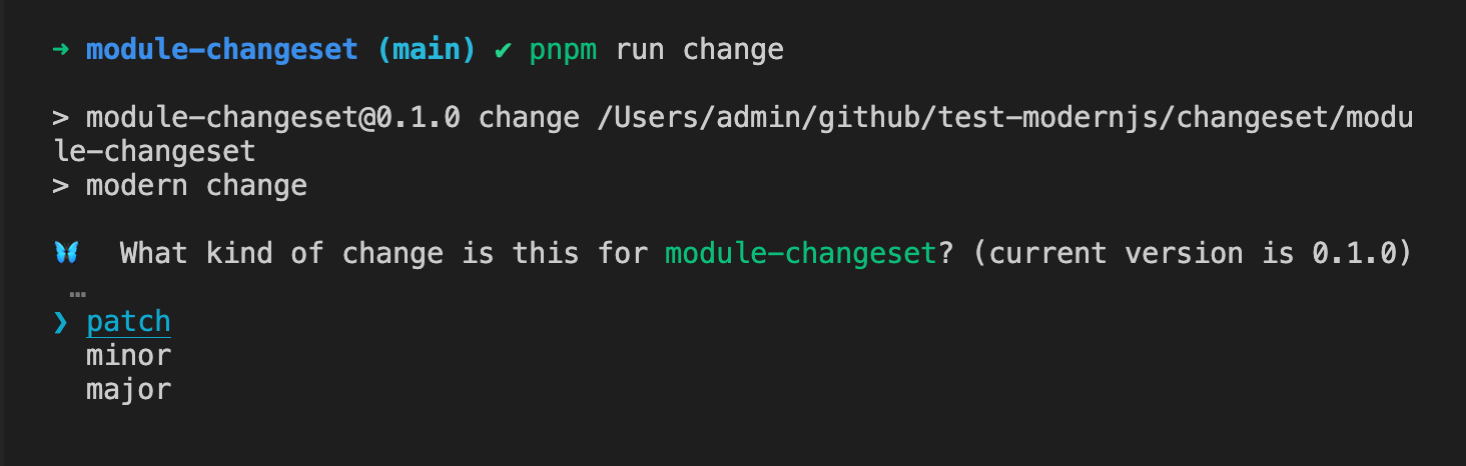
|
|
37
37
|
|
|
38
|
-
#### 填入
|
|
38
|
+
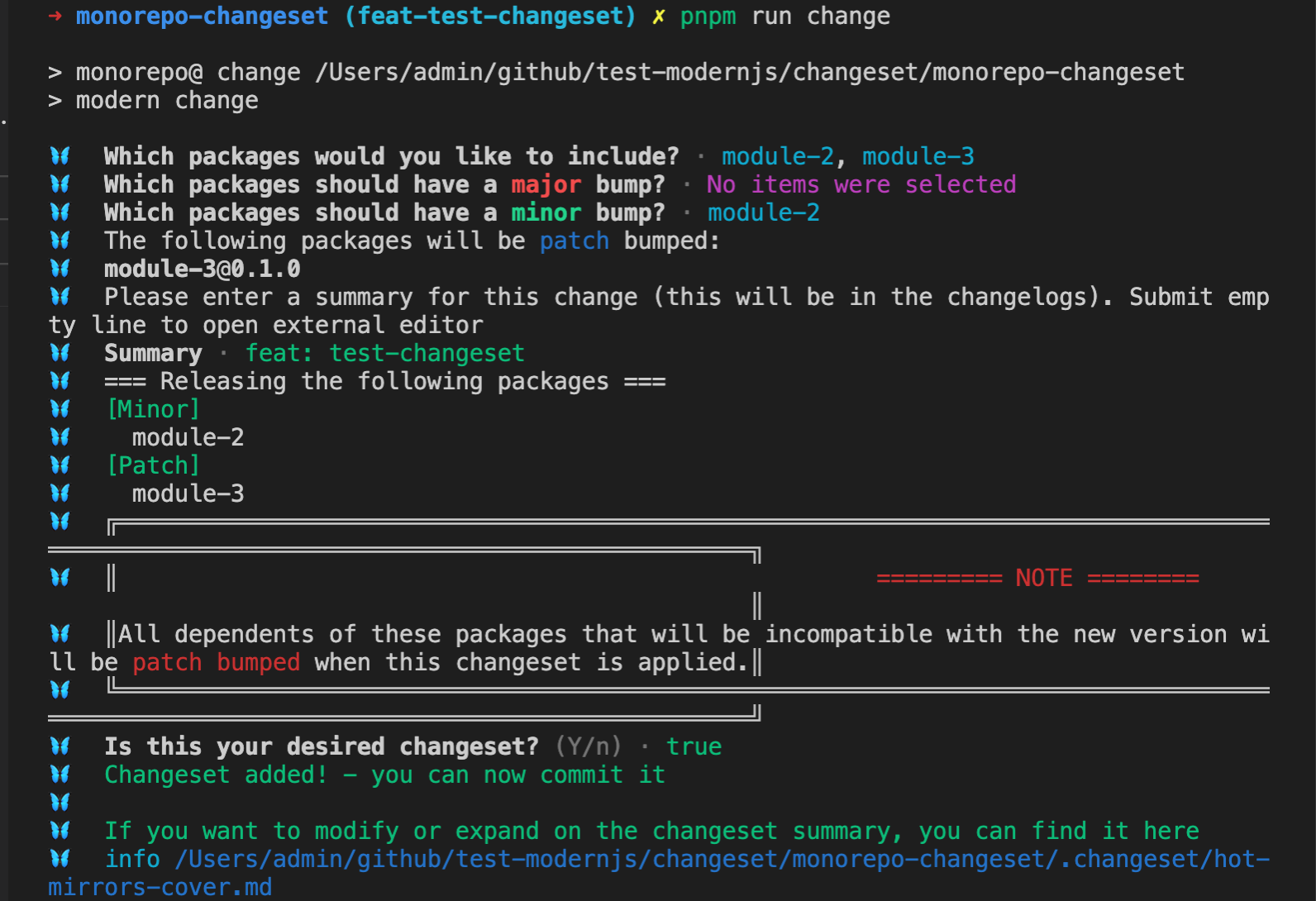
#### 填入 changelog 信息,并点击两次回车:
|
|
39
39
|
|
|
40
40
|
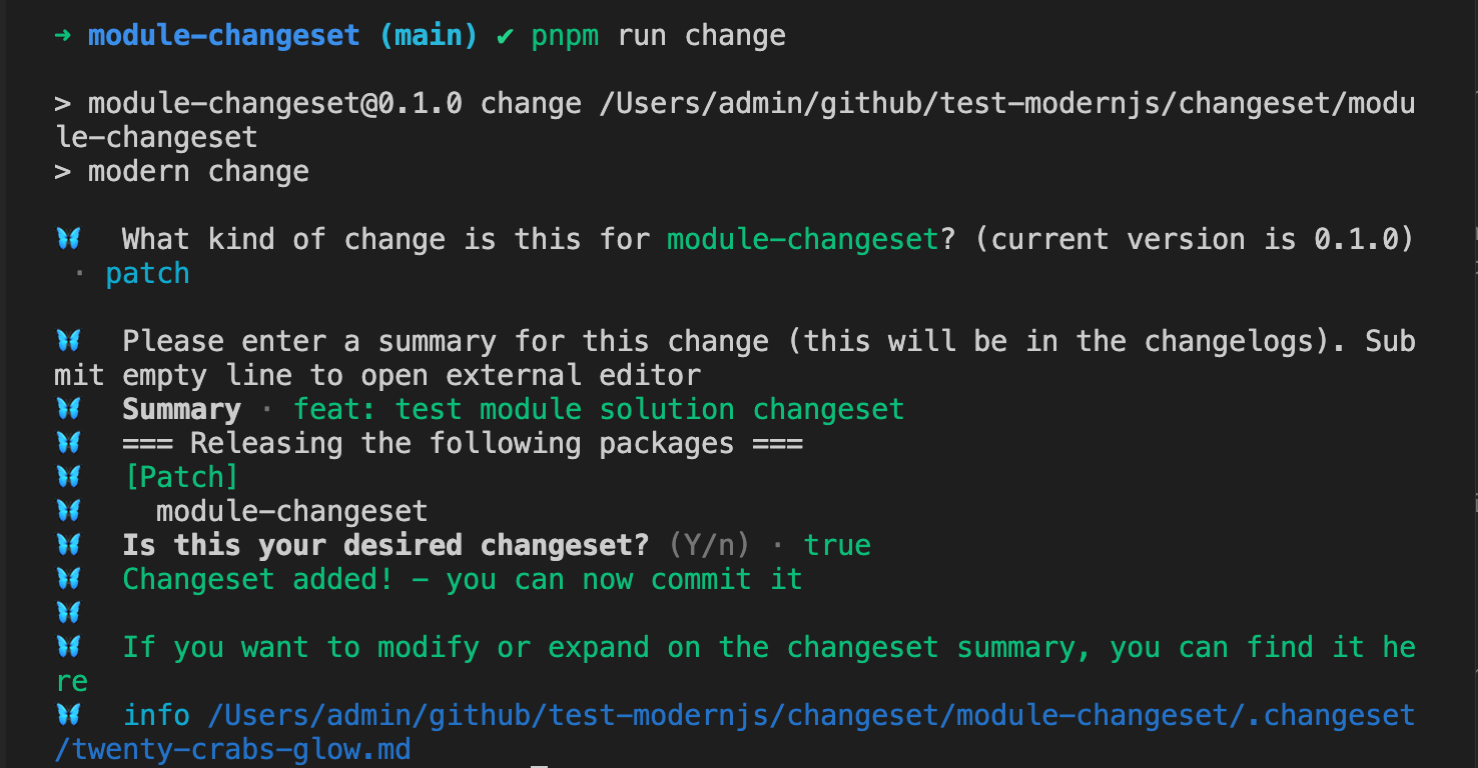
|
|
41
41
|
|
|
@@ -73,7 +73,7 @@ Changesets 会根据当前代码变更(`git diff Head...baseBranch`),将 Monor
|
|
|
73
73
|
|
|
74
74
|
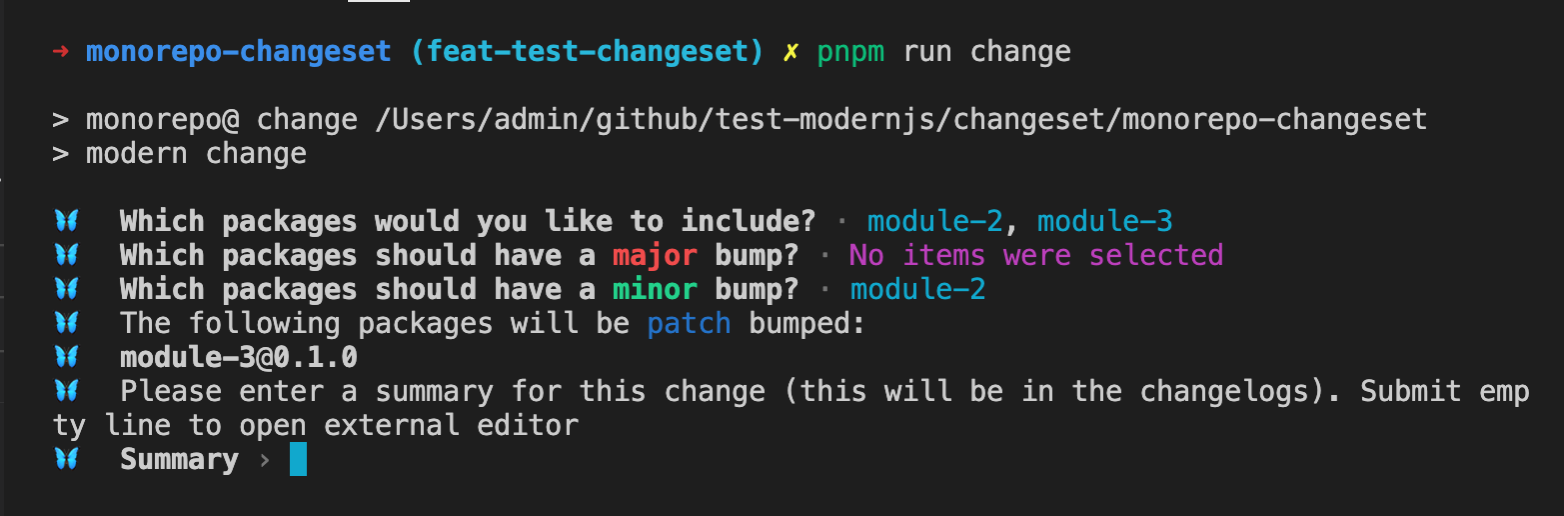
|
|
75
75
|
|
|
76
|
-
#### 填入
|
|
76
|
+
#### 填入 changelog 信息,并点击两次回车:
|
|
77
77
|
|
|
78
78
|
|
|
79
79
|
|
|
@@ -97,7 +97,7 @@ change 命令支持以下参数:
|
|
|
97
97
|
- `--empty` 添加一个空的 changeset。
|
|
98
98
|
|
|
99
99
|
```bash
|
|
100
|
-
pnpm run change --
|
|
100
|
+
pnpm run change --empty
|
|
101
101
|
```
|
|
102
102
|
|
|
103
103
|
执行完成后,将在项目的 `.changeset` 目录创建空的 changeset 文件,文件内容如下:
|
|
@@ -107,7 +107,7 @@ pnpm run change -- --empty
|
|
|
107
107
|
---
|
|
108
108
|
```
|
|
109
109
|
|
|
110
|
-
- `--open` 使用该参数时,在填写
|
|
110
|
+
- `--open` 使用该参数时,在填写 changelog 步骤会打开系统默认编辑器进行填写。
|
|
111
111
|
|
|
112
112
|
## 注意事项
|
|
113
113
|
|
|
@@ -2,15 +2,15 @@
|
|
|
2
2
|
sidebar_position: 6
|
|
3
3
|
---
|
|
4
4
|
|
|
5
|
-
# 自定义
|
|
5
|
+
# 自定义 changelog 生成
|
|
6
6
|
|
|
7
|
-
Changesets 默认会使用 `@changesets/cli/changelog` 生成 Changelog 信息,如果默认的
|
|
7
|
+
Changesets 默认会使用 `@changesets/cli/changelog` 生成 Changelog 信息,如果默认的 changelog 信息不能满足需求,可以自定义 changelog 的生成。
|
|
8
8
|
|
|
9
|
-
## 自定义
|
|
9
|
+
## 自定义 changelog 内容
|
|
10
10
|
|
|
11
|
-
|
|
11
|
+
changelog 信息主要包含以下两种信息:
|
|
12
12
|
|
|
13
|
-
- changeset 中写入的
|
|
13
|
+
- changeset 中写入的 changelog 信息。
|
|
14
14
|
|
|
15
15
|
- 本次版本升级关联包的版本变更信息。
|
|
16
16
|
|
|
@@ -41,7 +41,7 @@ export type Changeset = {
|
|
|
41
41
|
|
|
42
42
|
#### 返回值
|
|
43
43
|
|
|
44
|
-
|
|
44
|
+
changelog 内容。
|
|
45
45
|
|
|
46
46
|
#### 默认实现
|
|
47
47
|
|
|
@@ -91,7 +91,7 @@ type DependenciesUpdated = ModCompWithPackage[];
|
|
|
91
91
|
|
|
92
92
|
#### 返回值
|
|
93
93
|
|
|
94
|
-
|
|
94
|
+
changelog 内容。
|
|
95
95
|
|
|
96
96
|
#### 默认实现
|
|
97
97
|
|
|
@@ -128,11 +128,11 @@ async function getDependencyReleaseLine(changesets, dependenciesUpdated) {
|
|
|
128
128
|
|
|
129
129
|
## 配置
|
|
130
130
|
|
|
131
|
-
Changesets 配置文件中 `changelog`
|
|
131
|
+
Changesets 配置文件中 `changelog` 字段用于标记 changelog 信息的获取途径。
|
|
132
132
|
|
|
133
|
-
该配置可以为字符串,直接声明获取
|
|
133
|
+
该配置可以为字符串,直接声明获取 changelog 信息模块的模块名称或者路径。
|
|
134
134
|
|
|
135
|
-
该配置还支持配置数组,数组中第一个元素为获取
|
|
135
|
+
该配置还支持配置数组,数组中第一个元素为获取 changelog 信息模块的模块名称或者路径,第二个元素为传入对应函数的参数值,会作为 `getReleaseLine` 和 `getDependencyReleaseLine` 函数的第三个参数传入。
|
|
136
136
|
|
|
137
137
|
### 配置相对路径
|
|
138
138
|
|
|
@@ -162,7 +162,7 @@ module.exports = {
|
|
|
162
162
|
|
|
163
163
|
### 使用模块工程方案
|
|
164
164
|
|
|
165
|
-
自定义
|
|
165
|
+
自定义 changelog 还可以使用模块工程方案进行管理,提供通用方案。
|
|
166
166
|
|
|
167
167
|
#### 使用 `npx @modern-js/create@latest` 创建模块工程方案。
|
|
168
168
|
|
|
@@ -169,7 +169,7 @@ Changesets 配置文件中 `commit` 字段,该字段用于标记是否需要
|
|
|
169
169
|
|
|
170
170
|
commit 配置如果为相对路径为 `.changesets` 目录下的相对路径。
|
|
171
171
|
|
|
172
|
-
例如创建
|
|
172
|
+
例如创建 `.changeset/my-commit-config.js` 文件,定义如下内容:
|
|
173
173
|
|
|
174
174
|
```js title=".changeset/my-commit-config.js"
|
|
175
175
|
async function getAddMessage(changeset, options) {}
|
|
@@ -195,8 +195,6 @@ commit 配置为 ./my-commit-config.js 即可:
|
|
|
195
195
|
|
|
196
196
|
自定义 commit 还可以使用模块工程方案进行管理,提供通用方案。
|
|
197
197
|
|
|
198
|
-
自定义 Changelog 还可以使用模块工程方案进行管理,提供通用方案。
|
|
199
|
-
|
|
200
198
|
#### 使用 `npx @modern-js/create@latest` 创建模块工程方案。
|
|
201
199
|
|
|
202
200
|
```md
|
|
@@ -222,7 +220,7 @@ export async function getVersionMessage() {}
|
|
|
222
220
|
|
|
223
221
|
```json title="package.json"
|
|
224
222
|
{
|
|
225
|
-
"
|
|
223
|
+
"commit": "custom-commit",
|
|
226
224
|
...
|
|
227
225
|
}
|
|
228
226
|
```
|
|
@@ -4,7 +4,7 @@ sidebar_position: 5
|
|
|
4
4
|
|
|
5
5
|
# Changesets 配置文件
|
|
6
6
|
|
|
7
|
-
我们前面了解到,初始化 Modern.js 仓库时,会默认初始化
|
|
7
|
+
我们前面了解到,初始化 Modern.js 仓库时,会默认初始化 changesets 的配置文件,即 `.changeset/config.json` 文件,下面我们将详细了解一下该文件中支持哪些配置。
|
|
8
8
|
|
|
9
9
|
## 配置介绍
|
|
10
10
|
|
|
@@ -106,15 +106,15 @@ pkg-b @ version 1.0.0
|
|
|
106
106
|
|
|
107
107
|
默认值:`@changesets/cli/changelog`
|
|
108
108
|
|
|
109
|
-
生成
|
|
109
|
+
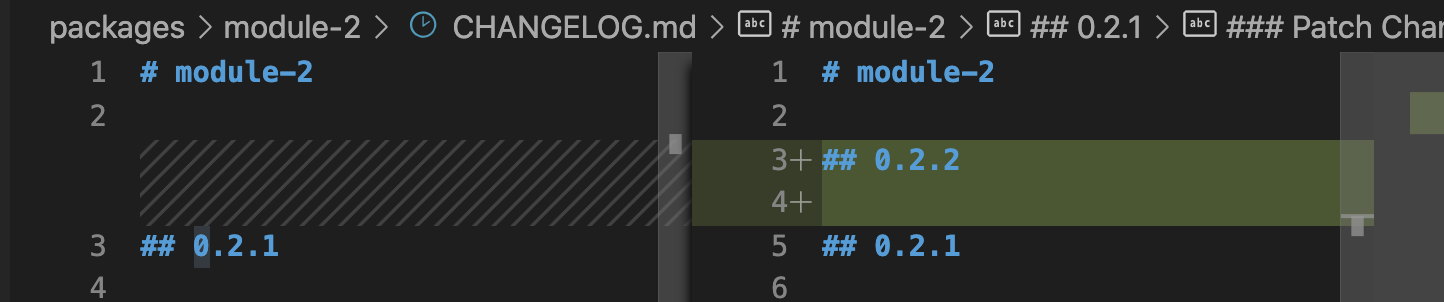
生成 changelog 规则。
|
|
110
110
|
|
|
111
|
-
配置为 `false` 时,执行 bump 命令时,在 `CHANGELOG.md` 文件中只声明版本号,不声明其他
|
|
111
|
+
配置为 `false` 时,执行 bump 命令时,在 `CHANGELOG.md` 文件中只声明版本号,不声明其他 changelog 信息。
|
|
112
112
|
|
|
113
113
|
|
|
114
114
|
|
|
115
|
-
配置为 `@changesets/cli/changelog` 将使用官方提供的 Changlog 生成规则,将 changeset 信息转换为
|
|
115
|
+
配置为 `@changesets/cli/changelog` 将使用官方提供的 Changlog 生成规则,将 changeset 信息转换为 changlog 内容。
|
|
116
116
|
|
|
117
|
-
配置为数组时,第一个参数为自定义 NPM 包或者路径,第二个参数为需要传入的默认参数配置,自定义格式我们将在后续[自定义
|
|
117
|
+
配置为数组时,第一个参数为自定义 NPM 包或者路径,第二个参数为需要传入的默认参数配置,自定义格式我们将在后续[自定义 changelog](/guides/topic-detail/changesets/changelog) 章节讲解。
|
|
118
118
|
|
|
119
119
|
### \_\_\_experimentalUnsafeOptions_WILL_CHANGE_IN_PATCH
|
|
120
120
|
|
|
@@ -6,7 +6,7 @@ sidebar_position: 9
|
|
|
6
6
|
|
|
7
7
|
## BOT
|
|
8
8
|
|
|
9
|
-
在 Github 上,
|
|
9
|
+
在 Github 上,changesets 提供了机器人用于检测当前 Pull Request 是否存在 changeset,并提供了 UI 界面添加和修改 changeset。
|
|
10
10
|
|
|
11
11
|
### 安装
|
|
12
12
|
|
|
@@ -46,7 +46,7 @@ sidebar_position: 9
|
|
|
46
46
|
|
|
47
47
|
Modern.js 提供了自动创建发版 Pull Request 的 Github Action,提供基于选择的分支自动执行 bump 操作,更新 lock 文件及创建 Pull Request 操作。
|
|
48
48
|
|
|
49
|
-
|
|
49
|
+
#### 使用
|
|
50
50
|
|
|
51
51
|
在仓库中创建 `.github/workflows/release-pull-request.yml` 文件,填入以下内容:
|
|
52
52
|
|
|
@@ -57,8 +57,15 @@ on:
|
|
|
57
57
|
workflow_dispatch:
|
|
58
58
|
inputs:
|
|
59
59
|
version:
|
|
60
|
-
|
|
60
|
+
type: choice
|
|
61
|
+
description: 'Release Type(canary, beta, alpha, latest)'
|
|
61
62
|
required: true
|
|
63
|
+
default: 'latest'
|
|
64
|
+
options:
|
|
65
|
+
- canary
|
|
66
|
+
- beta
|
|
67
|
+
- alpha
|
|
68
|
+
- latest
|
|
62
69
|
|
|
63
70
|
jobs:
|
|
64
71
|
release:
|
|
@@ -71,14 +78,17 @@ jobs:
|
|
|
71
78
|
# This makes Actions fetch only one branch to release
|
|
72
79
|
fetch-depth: 100
|
|
73
80
|
|
|
81
|
+
- ... # install dependencies and build repo package
|
|
74
82
|
- name: Create Release Pull Request
|
|
75
|
-
uses: web-infra-dev/actions@
|
|
83
|
+
uses: web-infra-dev/actions@v2
|
|
76
84
|
with:
|
|
77
|
-
|
|
78
|
-
versionNumber:
|
|
85
|
+
version: ${{ github.event.inputs.version }}
|
|
86
|
+
versionNumber: 'auto'
|
|
79
87
|
type: 'pull request'
|
|
88
|
+
tools: 'modern'
|
|
80
89
|
env:
|
|
81
|
-
GITHUB_TOKEN: ${{ secrets.
|
|
90
|
+
GITHUB_TOKEN: ${{ secrets.REPO_SCOPED_TOKEN }}
|
|
91
|
+
NPM_TOKEN: ${{ secrets.NPM_TOKEN }}
|
|
82
92
|
REPOSITORY: ${{ github.repository }}
|
|
83
93
|
REF: ${{ github.ref }}
|
|
84
94
|
```
|
|
@@ -87,17 +97,17 @@ jobs:
|
|
|
87
97
|
|
|
88
98
|
|
|
89
99
|
|
|
90
|
-
|
|
100
|
+
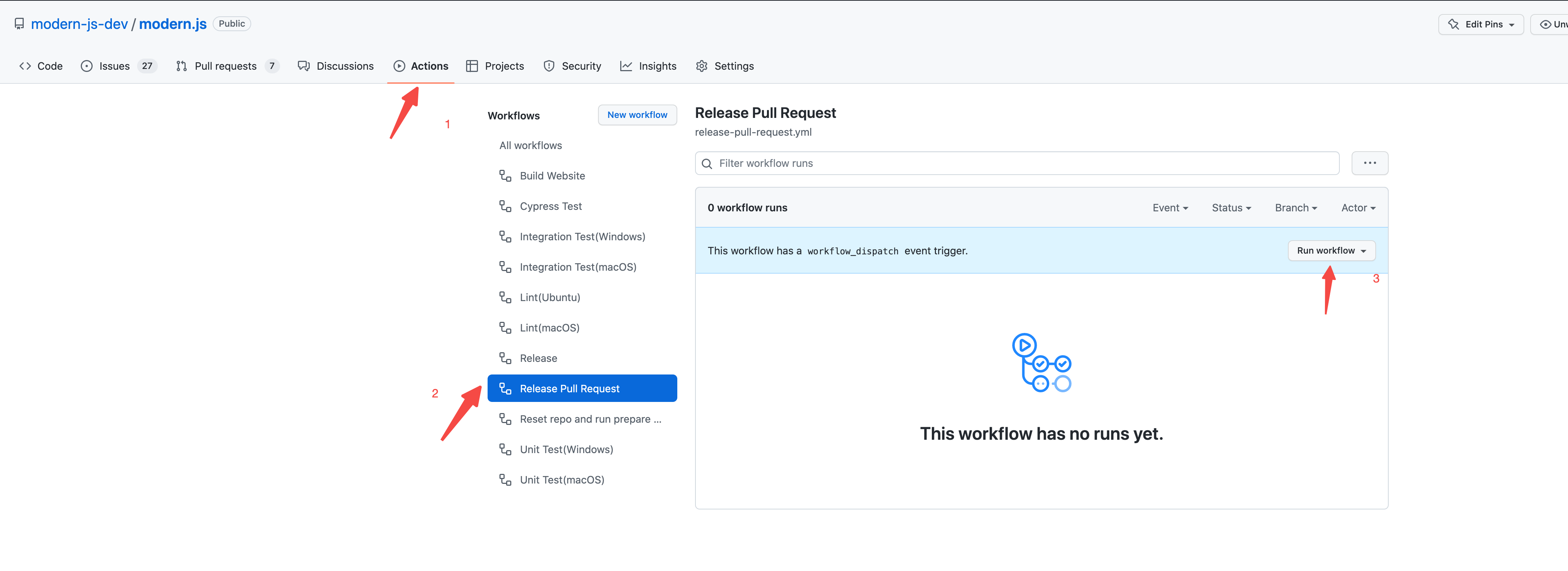
选择本次发布类型,点击 Run workflow 按钮:
|
|
91
101
|
|
|
92
|
-

|
|
93
103
|
|
|
94
104
|
workflow 运行完成后将自动创建 `Release-${version}` 的 Pull Request,自动完成 `bump` changeset 相关版本号并更新 lock 文件,Pull Request 的内容为执行 `gen-release-note` 命令自动生成的 Release Note。
|
|
95
105
|
|
|
96
|
-

|
|
97
107
|
|
|
98
108
|
### 自动 Release
|
|
99
109
|
|
|
100
|
-
Modern.js
|
|
110
|
+
Modern.js 提供了自动发布版本 的 Github Action,提供基于选择的分支自动执行 release 操作,将包发布到 NPM 上。
|
|
101
111
|
|
|
102
112
|
#### 使用
|
|
103
113
|
|
|
@@ -111,14 +121,14 @@ on:
|
|
|
111
121
|
inputs:
|
|
112
122
|
version:
|
|
113
123
|
type: choice
|
|
114
|
-
description: 'Release Version(canary,
|
|
124
|
+
description: 'Release Version(canary, beta, alpha, latest)'
|
|
115
125
|
required: true
|
|
116
|
-
default: '
|
|
126
|
+
default: 'next'
|
|
117
127
|
options:
|
|
118
|
-
|
|
119
|
-
|
|
120
|
-
|
|
121
|
-
|
|
128
|
+
- canary
|
|
129
|
+
- beta
|
|
130
|
+
- alpha
|
|
131
|
+
- latest
|
|
122
132
|
branch:
|
|
123
133
|
description: 'Release Branch(confirm release branch)'
|
|
124
134
|
required: true
|
|
@@ -135,13 +145,14 @@ jobs:
|
|
|
135
145
|
# This makes Actions fetch only one branch to release
|
|
136
146
|
fetch-depth: 1
|
|
137
147
|
|
|
148
|
+
- ... # install dependencies and build repo package
|
|
138
149
|
- name: Release
|
|
139
|
-
uses: web-infra-dev/actions@
|
|
150
|
+
uses: web-infra-dev/actions@v2
|
|
140
151
|
with:
|
|
141
|
-
# this expects you to have a script called release which does a build for your packages and calls changeset publish
|
|
142
152
|
version: ${{ github.event.inputs.version }}
|
|
143
153
|
branch: ${{ github.event.inputs.branch }}
|
|
144
154
|
type: 'release'
|
|
155
|
+
tools: 'modern'
|
|
145
156
|
env:
|
|
146
157
|
GITHUB_TOKEN: ${{ secrets.GITHUB_TOKEN }}
|
|
147
158
|
NPM_TOKEN: ${{ secrets.NPM_TOKEN }}
|
|
@@ -4,7 +4,7 @@ sidebar_position: 1
|
|
|
4
4
|
|
|
5
5
|
# 认识 Changesets
|
|
6
6
|
|
|
7
|
-
Modern.js 默认集成了 [
|
|
7
|
+
Modern.js 默认集成了 [changesets](https://github.com/changesets/changesets) 用于模块和 Monorepo 工程方案项目中的包版本管理。
|
|
8
8
|
|
|
9
9
|
## 特点
|
|
10
10
|
|
|
@@ -12,15 +12,15 @@ Changesets 具有以下几个特点:
|
|
|
12
12
|
|
|
13
13
|
- 在开发时,需要开发者提供本次变更涉及的包名称、升级版本类型(`pathch`、`minor`、`major`)及变更信息,即 changeset。
|
|
14
14
|
|
|
15
|
-
- 在发布版本时,会根据 changeset
|
|
15
|
+
- 在发布版本时,会根据 changeset 内容自动升级对应包的版本号,并在对应的包中生成 changelog 信息。
|
|
16
16
|
|
|
17
17
|
- 在 Monorepo 场景中,changeset 会自动生成仓库依赖图,升级时只会升级变更包及相关依赖包的版本号。
|
|
18
18
|
|
|
19
19
|
## 初始化
|
|
20
20
|
|
|
21
|
-
Modern.js 默认创建的模块和 Monorepo 工程方案项目已经初始化完成
|
|
21
|
+
Modern.js 默认创建的模块和 Monorepo 工程方案项目已经初始化完成 changesets,在项目根目录会自动创建 `.changeset` 目录,及 `.changeset/config.json` 的配置文件。
|
|
22
22
|
|
|
23
|
-
并且,Modern.js 在其对应的工程方案工具 `@modern-js/module-tools` 和 `@modern-js/monorepo-tools` 提供了
|
|
23
|
+
并且,Modern.js 在其对应的工程方案工具 `@modern-js/module-tools` 和 `@modern-js/monorepo-tools` 提供了 changesets 相应的命令,无需再手动安装 changesets 相关依赖。
|
|
24
24
|
|
|
25
25
|
Changesets 默认配置如下:
|
|
26
26
|
|
|
@@ -37,7 +37,7 @@ Changesets 默认配置如下:
|
|
|
37
37
|
}
|
|
38
38
|
```
|
|
39
39
|
|
|
40
|
-
配置文件提供了生成
|
|
40
|
+
配置文件提供了生成 changesets 的一些基本配置,字段详细介绍请参考后续章节: [changesets 配置文件](/guides/topic-detail/changesets/config)。
|
|
41
41
|
|
|
42
42
|
## 命令
|
|
43
43
|
|