@lark-project/meegle 0.0.17 → 1.0.1
This diff represents the content of publicly available package versions that have been released to one of the supported registries. The information contained in this diff is provided for informational purposes only and reflects changes between package versions as they appear in their respective public registries.
- package/CHANGELOG.md +40 -0
- package/README.md +396 -58
- package/README.zh-CN.md +374 -57
- package/bin/meegle-darwin-arm64 +0 -0
- package/bin/meegle-darwin-x64 +0 -0
- package/bin/meegle-linux-arm64 +0 -0
- package/bin/meegle-linux-x64 +0 -0
- package/bin/meegle-win32-arm64.exe +0 -0
- package/bin/meegle-win32-x64.exe +0 -0
- package/bin/meegle.js +24 -4
- package/package.json +11 -5
package/CHANGELOG.md
ADDED
|
@@ -0,0 +1,40 @@
|
|
|
1
|
+
# Changelog
|
|
2
|
+
|
|
3
|
+
All notable changes to this project will be documented in this file.
|
|
4
|
+
|
|
5
|
+
The format follows [Keep a Changelog](https://keepachangelog.com/en/1.1.0/);
|
|
6
|
+
post-release changes accumulate under `[Unreleased]` and graduate to a
|
|
7
|
+
versioned section on each npm release.
|
|
8
|
+
|
|
9
|
+
## [Unreleased]
|
|
10
|
+
|
|
11
|
+
## [v1.0.1] - 2026-04-28
|
|
12
|
+
|
|
13
|
+
### Added
|
|
14
|
+
|
|
15
|
+
- New `attachment` domain exposing Lark project's two-stage attachment protocol — basic `attachment prepare-upload` / `attachment prepare-download` for raw signed-URL preprocess payloads, and end-to-end shortcuts `attachment +upload` / `attachment +download` that chain the preprocess with the signed HTTP transfer client-side. Supports four resource types via `--resource-type`: `15` (workitem attachment field), `16` (rich-text field image), `13` (comment attachment), `14` (comment image); use `--work-item-id` for existing workitems and `--work-item-type` for the create-with-attachment path
|
|
16
|
+
- `meegle url decode` subcommand for parsing Meego URLs into structured fields, including trailing-wildcard URL rules and a `setting_other` fallback for unknown views
|
|
17
|
+
- `--params @file.json` syntax on every dynamic command so complex JSON payloads can be loaded from a file instead of a shell-escaped string
|
|
18
|
+
- `--refresh` global flag forces a fresh tool-schema discovery, bypassing the `~/.meegle/cache/tools.json` cache; `auth login` now also invalidates the cache so the next invocation picks up the new identity's command set
|
|
19
|
+
|
|
20
|
+
### Fixed
|
|
21
|
+
|
|
22
|
+
- Tool-schema cache now honors its 24h `DefaultTTL`. Previously `resolveTools` returned any cache hit regardless of age, so server-side schema changes (new flags, renamed parameters, new commands) only surfaced after manually deleting `~/.meegle/cache/tools.json`. A stale cache now triggers a fresh discovery, falling back to the stale snapshot only when the server is unreachable so offline users keep their last-known command set
|
|
23
|
+
- `meegle auth status` and the first-run auth check now route through the same `ResolveIdentity` path as runtime commands, so config-file tokens, env-var tokens, and store-backed tokens are treated consistently
|
|
24
|
+
- The OS-native credential store (macOS keychain, Linux `secret-tool`, Windows DPAPI) is now wrapped in a `FallbackStore` that transparently switches to the encrypted file store on the first runtime Save/Load failure — fixes the silent token-loss in sandboxed macOS, locked-keychain SSH sessions, and headless Linux containers reported in [larksuite/meegle-cli#3](https://github.com/larksuite/meegle-cli/issues/3) without writing a sentinel probe entry to the user's keychain on every CLI invocation
|
|
25
|
+
- `SecretToolStore.Load` no longer treats libsecret's "item absent from keyring" exit (exit 1, empty stdout, empty stderr) as a primary-store failure, so a fresh Linux user's first CLI run no longer permanently flips `FallbackStore` to the encrypted file store
|
|
26
|
+
- Failed token-store writes after a successful refresh are no longer silently dropped — a stderr warning is emitted so the next CLI invocation does not silently re-trigger a 401 / re-login loop
|
|
27
|
+
|
|
28
|
+
## [v1.0.0] - 2026-04-22
|
|
29
|
+
|
|
30
|
+
Initial public release of Meegle CLI, published on npm as `@lark-project/meegle`.
|
|
31
|
+
|
|
32
|
+
### Highlights
|
|
33
|
+
|
|
34
|
+
- **Broad coverage** — 12 business domains and 40+ commands across work items, workflow, subtasks, comments, work hours, relations, my-work, views, charts, team, user, and project
|
|
35
|
+
- **Agent-native** — bundled AI Agent Skill for Trae, Claude Code, Cursor, Windsurf, Gemini CLI, and Copilot; structured JSON output designed for both humans and agents
|
|
36
|
+
- **Two-layer parameters** — ergonomic `--flag-name` for everyday use, with a `--params <json>` fallback for complex payloads
|
|
37
|
+
- **Flexible output** — `json` / `table` / `ndjson` / `raw` formats, with `--select` dot-path projection for piping to other tools
|
|
38
|
+
- **Non-interactive auth** — OAuth browser login plus a `--device-code` flow for CI and agent shells
|
|
39
|
+
- **Dry-run previews** — `--dry-run` on mutation commands to inspect the exact payload before sending
|
|
40
|
+
- **Secure by default** — OS keychain credential storage, `${VAR}` env-var templating so secrets stay out of config files, and multi-profile switching for staging / production
|
package/README.md
CHANGED
|
@@ -1,22 +1,63 @@
|
|
|
1
1
|
# Meegle CLI
|
|
2
2
|
|
|
3
|
-
|
|
3
|
+
[](https://opensource.org/licenses/MIT)
|
|
4
|
+
[](https://nodejs.org/)
|
|
5
|
+
[](https://www.npmjs.com/package/@lark-project/meegle)
|
|
6
|
+
|
|
7
|
+
[English](./README.md) | [简体中文](./README.zh-CN.md)
|
|
4
8
|
|
|
5
9
|
Command-line tool for [Meegle](https://meegle.com?utm_source=github&utm_medium=readme&utm_campaign=meegle_cli) ([Lark Project](https://project.feishu.cn?utm_source=github&utm_medium=readme&utm_campaign=meegle_cli)). Manage work items, schedules, and data from your terminal — no browser needed.
|
|
6
10
|
|
|
11
|
+
[Install](#installation) · [Quick Start](#quick-start-human-users) · [Agent Skill](#ai-agent-skill) · [Commands](#commands) · [Auth](#authentication) · [Config](#configuration) · [Security](#security--risk-warnings) · [Contributing](#contributing)
|
|
12
|
+
|
|
13
|
+
## Why Meegle CLI?
|
|
14
|
+
|
|
15
|
+
- **Agent-Native** — Ships a bundled [AI Agent Skill](#ai-agent-skill) that teaches Trae, Claude Code, Cursor, Windsurf, Gemini CLI and other agents how to drive Meegle with one command. Every CLI command is designed for both humans and agents, with structured JSON output, `--dry-run` previews, and `--device-code` flows for non-TTY environments
|
|
16
|
+
- **Broad Coverage** — 12 business domains (work items, workflow, subtasks, comments, work hours, relations, my-work, views, charts, team, user, project) and 40+ commands mapping to Meegle's core capabilities
|
|
17
|
+
- **Two-Layer Parameters** — Ergonomic `--flag-name` for everyday use, fallback `--params <json>` for complex payloads like `fields[]` — pick the right granularity per call
|
|
18
|
+
- **Flexible Output** — `json` / `table` / `ndjson` / `raw`, with `--select` dot-path projection for piping to other tools
|
|
19
|
+
- **Secure by Default** — OS keychain credential storage, `${VAR}` env-var templating so secrets never land in config files, multi-profile switching for staging / prod
|
|
20
|
+
|
|
21
|
+
## Features
|
|
22
|
+
|
|
23
|
+
| Category | Capabilities |
|
|
24
|
+
| -------------------------------------------------- | ---------------------------------------------------------------------------------------------- |
|
|
25
|
+
| 📋 [Work Items](#workitem--work-items) | Create, read, update, batch-read, query (MQL), list operation records, inspect metadata |
|
|
26
|
+
| 🔀 [Workflow](#workflow--workflow) | Transition nodes & states, update node fields, list available transitions and required fields |
|
|
27
|
+
| ✅ [Subtasks](#subtask--subtasks) | Create, update, complete, rollback subtasks |
|
|
28
|
+
| 💬 [Comments](#comment--comments) | Add and list comments on work items |
|
|
29
|
+
| ⏱️ [Work Hours](#workhour--work-hours) | List work hour records, view team-member schedules |
|
|
30
|
+
| 🔗 [Relations](#relation--relations) | List related work items, inspect relation-type definitions |
|
|
31
|
+
| 📌 [My Work](#mywork--my-work) | View this week / overdue / completed to-dos |
|
|
32
|
+
| 👁️ [Views](#view--views) | Create and update fixed views, search views by name |
|
|
33
|
+
| 📊 [Charts](#chart--charts) | List charts under a view, fetch chart details |
|
|
34
|
+
| 👥 [Team & User](#team--user--people) | List teams, team members, search users, view current login |
|
|
35
|
+
| 🗂️ [Projects](#project--projects) | Search projects by keyword |
|
|
36
|
+
| 🔐 [Auth & Config](#authentication) | OAuth login, device-code flow, multi-profile config, env-var injection |
|
|
37
|
+
| 🔗 [URL Parsing](#url--url-parsing) | Offline decode of Meegle / Feishu Project URLs into `url_kind` + structured fields |
|
|
38
|
+
| 🤖 [Agent Skill](#ai-agent-skill) | Pre-built skill for Trae / Claude Code / Cursor / Windsurf / Gemini CLI / Copilot |
|
|
7
39
|
|
|
8
40
|
## Installation
|
|
9
41
|
|
|
42
|
+
### Requirements
|
|
43
|
+
|
|
44
|
+
- Node.js >= 16 (ships with `npm` / `npx`)
|
|
45
|
+
|
|
46
|
+
### Install
|
|
47
|
+
|
|
10
48
|
```bash
|
|
11
49
|
npm install -g @lark-project/meegle
|
|
12
50
|
```
|
|
13
51
|
|
|
14
|
-
|
|
52
|
+
## Quick Start (Human Users)
|
|
15
53
|
|
|
16
|
-
|
|
54
|
+
> **Note for AI assistants:** if you are an AI Agent helping the user set this up, jump directly to [Quick Start (AI Agent)](#quick-start-ai-agent--ci--headless) — it contains the non-interactive steps you need.
|
|
17
55
|
|
|
18
56
|
```bash
|
|
19
|
-
#
|
|
57
|
+
# (Optional) Persist the host so future logins skip the arrow-key picker
|
|
58
|
+
meegle config set host <host>
|
|
59
|
+
|
|
60
|
+
# 1. Log in (arrow-key host picker + browser OAuth)
|
|
20
61
|
meegle auth login
|
|
21
62
|
|
|
22
63
|
# 2. View this week's to-dos
|
|
@@ -30,27 +71,84 @@ meegle workitem --help
|
|
|
30
71
|
meegle inspect workitem.create
|
|
31
72
|
```
|
|
32
73
|
|
|
33
|
-
##
|
|
74
|
+
## Quick Start (AI Agent / CI / Headless)
|
|
34
75
|
|
|
35
|
-
`meegle auth login`
|
|
36
|
-
Authorization Code OAuth flow. Both require a real TTY and a local browser
|
|
37
|
-
callback, so they will fail or hang in environments such as CI runners,
|
|
38
|
-
pipes, or agent shells like Claude Code.
|
|
76
|
+
The default `meegle auth login` uses an arrow-key host picker plus a browser OAuth callback — both require a real TTY, so they will hang or fail in CI runners, pipes, and agent shells like Claude Code. Use the Device Code flow instead: it prints an authorization URL that the user opens in any browser.
|
|
39
77
|
|
|
40
|
-
|
|
41
|
-
that the operator opens in any browser to grant access:
|
|
78
|
+
**Step 1 — Install the CLI**
|
|
42
79
|
|
|
43
80
|
```bash
|
|
44
|
-
|
|
45
|
-
|
|
81
|
+
npm install -g @lark-project/meegle
|
|
82
|
+
```
|
|
46
83
|
|
|
47
|
-
|
|
84
|
+
**Step 2 — Persist the host**
|
|
85
|
+
|
|
86
|
+
```bash
|
|
48
87
|
meegle config set host <host>
|
|
88
|
+
```
|
|
89
|
+
|
|
90
|
+
Examples of `<host>`: `project.feishu.cn`, `meegle.com`, or your self-hosted tenant domain such as `your-tenant.example.com`.
|
|
91
|
+
|
|
92
|
+
**Step 3 — Log in with Device Code**
|
|
93
|
+
|
|
94
|
+
> Run this command in the background. It prints an authorization URL — extract it and send it to the user. The command exits automatically once the user completes authorization in the browser.
|
|
95
|
+
|
|
96
|
+
```bash
|
|
49
97
|
meegle auth login --device-code
|
|
50
98
|
```
|
|
51
99
|
|
|
52
|
-
|
|
53
|
-
|
|
100
|
+
Alternatively, pass the host inline each time without persisting it:
|
|
101
|
+
|
|
102
|
+
```bash
|
|
103
|
+
meegle auth login --device-code --host <host>
|
|
104
|
+
```
|
|
105
|
+
|
|
106
|
+
**Step 4 — Verify**
|
|
107
|
+
|
|
108
|
+
```bash
|
|
109
|
+
meegle auth status
|
|
110
|
+
```
|
|
111
|
+
|
|
112
|
+
For fully unattended CI (no human-in-the-loop), inject a token via environment variables instead — see [Sandbox / CI](#sandbox--ci-direct-environment-variable-injection).
|
|
113
|
+
|
|
114
|
+
## AI Agent Skill
|
|
115
|
+
|
|
116
|
+
`skills/meegle/` is a drop-in **skill** that teaches AI Agents — Trae, Claude Code, Cursor, Windsurf, Gemini CLI, GitHub Copilot CLI — how to operate Meegle through this CLI. It bundles the command catalog, MQL syntax, field-value conventions, rich-text Markdown rules, and standard operating procedures for common write flows.
|
|
117
|
+
|
|
118
|
+
### Install
|
|
119
|
+
|
|
120
|
+
```bash
|
|
121
|
+
# Install the CLI first (the skill calls `meegle` under the hood)
|
|
122
|
+
npm install -g @lark-project/meegle
|
|
123
|
+
|
|
124
|
+
# Then add the skill — auto-detects installed agents and registers in each
|
|
125
|
+
npx skills add larksuite/meegle-cli -y -g
|
|
126
|
+
```
|
|
127
|
+
|
|
128
|
+
`npx skills add` reads `skills/meegle/SKILL.md` from the repo and drops it into the skill directory of every agent CLI it finds on the machine. Re-run any time to pick up updates.
|
|
129
|
+
|
|
130
|
+
### What it covers
|
|
131
|
+
|
|
132
|
+
- **Command reference** — every `meegle` resource / method with required parameters and examples
|
|
133
|
+
- **MQL search** — syntax for `workitem query`, operators, scope keywords
|
|
134
|
+
- **Field values** — how to shape complex field payloads (arrays, nested JSON, date ranges)
|
|
135
|
+
- **Rich text** — Markdown subset supported by Meegle's rich-text editor
|
|
136
|
+
- **SOPs** — step-by-step playbooks for creating work items, transitioning nodes, transitioning states, and updating fields
|
|
137
|
+
- **Auth guard** — the skill refuses to run business commands until `meegle auth status` succeeds
|
|
138
|
+
|
|
139
|
+
See [skills/meegle/SKILL.md](./skills/meegle/SKILL.md) and [skills/meegle/references/](./skills/meegle/references/) for the full contents.
|
|
140
|
+
|
|
141
|
+
### Usage
|
|
142
|
+
|
|
143
|
+
Once installed, just ask the agent in natural language. For example, in Trae:
|
|
144
|
+
|
|
145
|
+
```
|
|
146
|
+
Show me this week's P0 stories in the PROJ space.
|
|
147
|
+
```
|
|
148
|
+
|
|
149
|
+
The agent consults the skill, picks the right `meegle` commands, and runs them for you. Pair with `--dry-run` (see [Security](#security--risk-warnings)) to preview side-effectful operations before the agent commits them.
|
|
150
|
+
|
|
151
|
+
> Heads up: the skill name `meegle` is the same string as the CLI binary. When documentation refers to "the **`meegle` skill**" it means the files in `skills/meegle/`; when it refers to "the **`meegle` CLI**" it means the `meegle` command on your PATH.
|
|
54
152
|
|
|
55
153
|
## Commands
|
|
56
154
|
|
|
@@ -60,6 +158,7 @@ self-hosted tenant domain such as `your-tenant.example.com`.
|
|
|
60
158
|
|---------|-------------|
|
|
61
159
|
| `workitem create` | Create a work item |
|
|
62
160
|
| `workitem get` | View work item details |
|
|
161
|
+
| `workitem +batch-get` | Batch-read work items by IDs (client-side fan-out over `workitem get`; `+` marks scenario/sugar commands) |
|
|
63
162
|
| `workitem update` | Update work item fields |
|
|
64
163
|
| `workitem query` | Search work items using MQL |
|
|
65
164
|
| `workitem list-op-records` | View operation records |
|
|
@@ -144,6 +243,15 @@ self-hosted tenant domain such as `your-tenant.example.com`.
|
|
|
144
243
|
|---------|-------------|
|
|
145
244
|
| `project search` | Search projects |
|
|
146
245
|
|
|
246
|
+
### attachment — Attachments
|
|
247
|
+
|
|
248
|
+
| Command | Description |
|
|
249
|
+
|---------|-------------|
|
|
250
|
+
| `attachment prepare-upload` | Upload preprocess — returns the signed object-storage URL and multipart plan |
|
|
251
|
+
| `attachment prepare-download` | Download preprocess — returns the signed object-storage URL and multipart plan |
|
|
252
|
+
| `attachment +upload` | End-to-end upload: preprocess + signed HTTP POST(s); returns the resulting `file_token` and file metadata |
|
|
253
|
+
| `attachment +download` | End-to-end download: preprocess + signed HTTP GET(s) + atomic write — for `file_url`s embedded in `workitem get` / `comment list` responses |
|
|
254
|
+
|
|
147
255
|
### auth — Authentication
|
|
148
256
|
|
|
149
257
|
| Command | Description |
|
|
@@ -162,6 +270,14 @@ self-hosted tenant domain such as `your-tenant.example.com`.
|
|
|
162
270
|
| `config get` | Get a configuration value |
|
|
163
271
|
| `config profile create\|list\|use\|current\|delete` | Manage configuration profiles |
|
|
164
272
|
|
|
273
|
+
### url — URL Parsing
|
|
274
|
+
|
|
275
|
+
Offline, no-network utility for parsing Meegle / Feishu Project URLs into structured fields. Skills and pipelines branch on the returned `url_kind` instead of guessing from raw paths.
|
|
276
|
+
|
|
277
|
+
| Command | Description |
|
|
278
|
+
|---------|-------------|
|
|
279
|
+
| `url decode --url <URL>` | Decode a URL into `url_kind` + `simple_name` / `work_item_type` / `work_item_id` / `view_id` / `chart_id` / `query` / `redirected_from` etc. Unrecognised URLs return `url_kind: "unknown"`. |
|
|
280
|
+
|
|
165
281
|
### Other Commands
|
|
166
282
|
|
|
167
283
|
| Command | Description |
|
|
@@ -195,18 +311,58 @@ meegle workitem get --work-item-id 12345
|
|
|
195
311
|
meegle workflow get-node --work-item-id 12345 --need-sub-task
|
|
196
312
|
```
|
|
197
313
|
|
|
314
|
+
### Batch Reading Work Items
|
|
315
|
+
|
|
316
|
+
`workitem +batch-get` fans out to `workitem get` for each ID and aggregates the
|
|
317
|
+
results into one response. Shared flags (e.g. `--project-key`) apply to every
|
|
318
|
+
per-item call. The `+` prefix marks it as a scenario/sugar command — the CLI
|
|
319
|
+
composes multiple `get` calls client-side instead of mapping to a single
|
|
320
|
+
backend endpoint.
|
|
321
|
+
|
|
322
|
+
```bash
|
|
323
|
+
# Comma-separated IDs in one invocation
|
|
324
|
+
meegle workitem +batch-get --project-key PROJ --work-item-ids "12345,12346,12347"
|
|
325
|
+
|
|
326
|
+
# Read IDs from a file (one per line; lines starting with '#' are comments)
|
|
327
|
+
meegle workitem +batch-get --project-key PROJ --ids-file ./ids.txt
|
|
328
|
+
|
|
329
|
+
# Stream one JSON row per item; summary row is emitted last
|
|
330
|
+
meegle workitem +batch-get --project-key PROJ --work-item-ids "12345,12346" -o ndjson
|
|
331
|
+
```
|
|
332
|
+
|
|
333
|
+
Response envelope (JSON):
|
|
334
|
+
|
|
335
|
+
```json
|
|
336
|
+
{
|
|
337
|
+
"summary": { "total": 3, "succeeded": 2, "failed": 1 },
|
|
338
|
+
"results": [
|
|
339
|
+
{ "work_item_id": 12345, "data": { /* ... */ } },
|
|
340
|
+
{ "work_item_id": 12346, "data": { /* ... */ } },
|
|
341
|
+
{ "work_item_id": 12347, "error": { "code": "...", "message": "..." } }
|
|
342
|
+
]
|
|
343
|
+
}
|
|
344
|
+
```
|
|
345
|
+
|
|
346
|
+
Constraints: up to 200 IDs per invocation, 3 concurrent workers (fixed).
|
|
347
|
+
Partial failures do **not** abort the batch — check `summary.failed` or the
|
|
348
|
+
per-item `error` field. A 401 from the server aborts the whole run.
|
|
349
|
+
|
|
198
350
|
### Creating Work Items
|
|
199
351
|
|
|
200
352
|
```bash
|
|
201
|
-
#
|
|
353
|
+
# Pass fields[] via --params (JSON)
|
|
202
354
|
meegle workitem create --project-key PROJ --work-item-type story \
|
|
203
|
-
--
|
|
204
|
-
|
|
355
|
+
--params '{"fields":[
|
|
356
|
+
{"field_key":"name","field_value":"Optimize login flow"},
|
|
357
|
+
{"field_key":"priority","field_value":"P1"}
|
|
358
|
+
]}'
|
|
205
359
|
|
|
206
|
-
#
|
|
360
|
+
# Complex field values (arrays, nested JSON) also go through --params
|
|
207
361
|
meegle workitem create --project-key PROJ --work-item-type story \
|
|
208
|
-
--
|
|
209
|
-
|
|
362
|
+
--params '{"fields":[
|
|
363
|
+
{"field_key":"name","field_value":"Scheduled task"},
|
|
364
|
+
{"field_key":"schedule","field_value":[1722182400000,1722355199999]}
|
|
365
|
+
]}'
|
|
210
366
|
```
|
|
211
367
|
|
|
212
368
|
### Updating Fields
|
|
@@ -214,14 +370,112 @@ meegle workitem create --project-key PROJ --work-item-type story \
|
|
|
214
370
|
```bash
|
|
215
371
|
# Update work item name
|
|
216
372
|
meegle workitem update --work-item-id 12345 \
|
|
217
|
-
--
|
|
373
|
+
--params '{"fields":[{"field_key":"name","field_value":"New title"}]}'
|
|
218
374
|
|
|
219
375
|
# Update multiple fields at once
|
|
220
376
|
meegle workitem update --work-item-id 12345 \
|
|
221
|
-
--
|
|
222
|
-
|
|
377
|
+
--params '{"fields":[
|
|
378
|
+
{"field_key":"name","field_value":"New title"},
|
|
379
|
+
{"field_key":"priority","field_value":"P0"}
|
|
380
|
+
]}'
|
|
381
|
+
```
|
|
382
|
+
|
|
383
|
+
### Attachments
|
|
384
|
+
|
|
385
|
+
The `attachment` domain exposes Lark project's two-stage attachment protocol
|
|
386
|
+
in two layers:
|
|
387
|
+
|
|
388
|
+
- **Basic commands** (`attachment prepare-upload`, `attachment prepare-download`)
|
|
389
|
+
return the raw signed-URL preprocess payload — handy for scripting your own
|
|
390
|
+
HTTP transfer or inspecting the multipart plan.
|
|
391
|
+
- **Shortcuts** (`attachment +upload`, `attachment +download`) chain the basic
|
|
392
|
+
preprocess with the signed HTTP POST/GET to object storage end-to-end. The
|
|
393
|
+
`+` prefix marks them as scenario commands — the CLI orchestrates the
|
|
394
|
+
preprocess output plus the out-of-band byte transfer client-side.
|
|
395
|
+
|
|
396
|
+
`--resource-type` tells the backend what the file will be attached to:
|
|
397
|
+
|
|
398
|
+
| `--resource-type` | Target |
|
|
399
|
+
|-------------------|--------|
|
|
400
|
+
| `15` | Workitem attachment field |
|
|
401
|
+
| `16` | Image embedded in a workitem rich-text field |
|
|
402
|
+
| `13` | Attachment on a comment |
|
|
403
|
+
| `14` | Image embedded in a comment |
|
|
404
|
+
|
|
405
|
+
**Scoping the preprocess**: every upload needs either `--work-item-id` or
|
|
406
|
+
`--work-item-type`. **Always prefer `--work-item-id`** when the target workitem
|
|
407
|
+
exists (update / comment scenarios); only use `--work-item-type` for the
|
|
408
|
+
create-with-attachment path where the workitem hasn't been created yet. If
|
|
409
|
+
both are supplied, `--work-item-id` wins and `--work-item-type` is ignored.
|
|
410
|
+
|
|
411
|
+
```bash
|
|
412
|
+
# Upload a file for a workitem attachment field (resource-type 15)
|
|
413
|
+
meegle attachment +upload ./a.pdf \
|
|
414
|
+
--resource-type 15 \
|
|
415
|
+
--project-key PROJ --work-item-id 12345 --field-key files_field
|
|
416
|
+
|
|
417
|
+
# Create-with-attachment path — workitem doesn't exist yet, pass --work-item-type
|
|
418
|
+
meegle attachment +upload ./a.pdf \
|
|
419
|
+
--resource-type 15 \
|
|
420
|
+
--project-key PROJ --work-item-type story --field-key files_field
|
|
421
|
+
|
|
422
|
+
# Upload an image for a rich-text field (resource-type 16)
|
|
423
|
+
meegle attachment +upload ./diagram.png \
|
|
424
|
+
--resource-type 16 \
|
|
425
|
+
--project-key PROJ --work-item-id 12345 --field-key spec_field
|
|
426
|
+
|
|
427
|
+
# Upload a comment attachment (resource-type 13)
|
|
428
|
+
meegle attachment +upload ./report.pdf \
|
|
429
|
+
--resource-type 13 \
|
|
430
|
+
--project-key PROJ --work-item-id 12345
|
|
431
|
+
|
|
432
|
+
# Upload a comment image (resource-type 14)
|
|
433
|
+
meegle attachment +upload ./screen.png \
|
|
434
|
+
--resource-type 14 \
|
|
435
|
+
--project-key PROJ --work-item-id 12345
|
|
436
|
+
|
|
437
|
+
# Download: pass the opaque file_url from another command's response.
|
|
438
|
+
URL=$(meegle workitem get --project-key PROJ --work-item-id 12345 \
|
|
439
|
+
--fields files_field --format json \
|
|
440
|
+
| jq -r '.fields.files_field[0].url')
|
|
441
|
+
meegle attachment +download "$URL" \
|
|
442
|
+
--project-key PROJ --work-item-id 12345 \
|
|
443
|
+
--output ./local.pdf --overwrite
|
|
444
|
+
```
|
|
445
|
+
|
|
446
|
+
`+upload` returns a JSON object with the file token and metadata:
|
|
447
|
+
|
|
448
|
+
```json
|
|
449
|
+
{
|
|
450
|
+
"file_token": "...",
|
|
451
|
+
"file_url": "https://...",
|
|
452
|
+
"name": "a.pdf",
|
|
453
|
+
"size": 12345,
|
|
454
|
+
"mime_type": "application/pdf"
|
|
455
|
+
}
|
|
456
|
+
```
|
|
457
|
+
|
|
458
|
+
To wire the result into a downstream command, parse the response with `jq`
|
|
459
|
+
or your scripting language of choice:
|
|
460
|
+
|
|
461
|
+
```bash
|
|
462
|
+
# Comment attachment — comment add takes file_token directly
|
|
463
|
+
TOKEN=$(meegle attachment +upload ./report.pdf --resource-type 13 \
|
|
464
|
+
--project-key PROJ --work-item-id 12345 | jq -r '.file_token')
|
|
465
|
+
meegle comment add --work-item-id 12345 --content "See attached" --file-token "$TOKEN"
|
|
223
466
|
```
|
|
224
467
|
|
|
468
|
+
**Field-level attachment formats** (how to assemble `--fields` payloads):
|
|
469
|
+
|
|
470
|
+
- **Workitem attachment field** (`--resource-type 15`) — `field_value` is a
|
|
471
|
+
JSON *string* whose parsed form is `[{"name","type","size","fileToken"}]`.
|
|
472
|
+
Note: `fileToken` is camelCase (other backend fields are snake_case) and
|
|
473
|
+
`size` is a string, not a number.
|
|
474
|
+
- **Rich-text field / comment image** (`--resource-type 16` / `14`) — embed
|
|
475
|
+
images as ` <!-- file_token -->`.
|
|
476
|
+
- **Comment attachment** (`--resource-type 13`) — `comment add --file-token`
|
|
477
|
+
takes `file_token` directly.
|
|
478
|
+
|
|
225
479
|
### MQL Search
|
|
226
480
|
|
|
227
481
|
```bash
|
|
@@ -255,19 +509,31 @@ Each command takes parameters via `--flag-name`:
|
|
|
255
509
|
meegle workitem get --work-item-id 12345 --project-key PROJ
|
|
256
510
|
```
|
|
257
511
|
|
|
258
|
-
###
|
|
512
|
+
### Writing `fields[]` (Write Commands)
|
|
513
|
+
|
|
514
|
+
`workitem create`, `workitem update`, `workflow update-node`, and `subtask update` expect the `fields[]` payload. Pass it through `--params`:
|
|
515
|
+
|
|
516
|
+
```bash
|
|
517
|
+
--params '{"fields":[
|
|
518
|
+
{"field_key":"name","field_value":"Title"},
|
|
519
|
+
{"field_key":"priority","field_value":"P1"}
|
|
520
|
+
]}'
|
|
521
|
+
```
|
|
522
|
+
|
|
523
|
+
### --set key=value (Generic)
|
|
259
524
|
|
|
260
|
-
`
|
|
525
|
+
`--set` is an alternate syntax for writing **top-level** parameters — `--set key=value` is equivalent to typing `--key value`. Useful when scripting with a uniform `key=value` form, or for writing nested top-level params via dot-path. Values are auto-typed (int / float / bool / string).
|
|
261
526
|
|
|
262
527
|
```bash
|
|
263
|
-
|
|
264
|
-
--
|
|
265
|
-
--set
|
|
266
|
-
|
|
267
|
-
|
|
528
|
+
# These two are equivalent:
|
|
529
|
+
meegle mywork todo --action this_week --page-num 1
|
|
530
|
+
meegle mywork todo --set action=this_week --set page_num=1
|
|
531
|
+
|
|
532
|
+
# Dot-path builds nested maps (rarely used in Meegle, but supported):
|
|
533
|
+
--set extra.flag=true # becomes {"extra":{"flag":true}}
|
|
268
534
|
```
|
|
269
535
|
|
|
270
|
-
`--set`
|
|
536
|
+
`--set` only writes **top-level** parameters. To write a work item's `fields[]`, use `--params '{"fields":[...]}'` (see below).
|
|
271
537
|
|
|
272
538
|
### --params JSON (Fallback)
|
|
273
539
|
|
|
@@ -278,12 +544,37 @@ meegle workitem create --project-key PROJ --work-item-type story \
|
|
|
278
544
|
--params '{"fields":[{"field_key":"name","field_value":"Title"}]}'
|
|
279
545
|
```
|
|
280
546
|
|
|
547
|
+
#### Reading from a file (`@file.json`)
|
|
548
|
+
|
|
549
|
+
Inline JSON is unergonomic on Windows because CMD requires `\"` escaping
|
|
550
|
+
and PowerShell mangles backslashes when forwarding native-command arguments.
|
|
551
|
+
Prefix the value with `@` to load the JSON from a file instead — works
|
|
552
|
+
identically on macOS, Linux, and Windows shells:
|
|
553
|
+
|
|
554
|
+
```bash
|
|
555
|
+
# body.json:
|
|
556
|
+
# {"fields":[{"field_key":"name","field_value":"Optimize login flow"}]}
|
|
557
|
+
|
|
558
|
+
meegle workitem create --project-key PROJ --work-item-type story \
|
|
559
|
+
--params @body.json
|
|
560
|
+
|
|
561
|
+
# Absolute path also works
|
|
562
|
+
meegle workitem update --work-item-id 12345 --params @/tmp/patch.json
|
|
563
|
+
|
|
564
|
+
# PowerShell — same syntax, no escaping headaches
|
|
565
|
+
meegle workitem create --project-key PROJ --work-item-type story --params '@body.json'
|
|
566
|
+
```
|
|
567
|
+
|
|
568
|
+
The path is read with the OS's default encoding; both relative and absolute
|
|
569
|
+
paths are accepted. A missing file fails with `PARAM_INVALID`; a file whose
|
|
570
|
+
contents are not valid JSON fails with `INVALID_PARAMS_JSON`.
|
|
571
|
+
|
|
281
572
|
### Priority
|
|
282
573
|
|
|
283
574
|
When `--set`, `--params`, and regular flags are used together:
|
|
284
575
|
|
|
285
|
-
1. `--
|
|
286
|
-
2.
|
|
576
|
+
1. Regular CLI flags beat `--params` / `--set` for the same top-level key
|
|
577
|
+
2. `--set` overrides the same top-level key from `--params`
|
|
287
578
|
|
|
288
579
|
### Array Parameters
|
|
289
580
|
|
|
@@ -306,55 +597,80 @@ meegle workflow get-node --work-item-id 12345 --need-sub-task
|
|
|
306
597
|
|
|
307
598
|
| Flag | Short | Description |
|
|
308
599
|
|------|-------|-------------|
|
|
309
|
-
| `--format` | `-o` | Output format: `json` (default), `table`, `ndjson`, `
|
|
600
|
+
| `--format` | `-o` | Output format: `json` (default), `table`, `ndjson`, `raw` |
|
|
310
601
|
| `--select` | | Field projection with dot paths |
|
|
311
602
|
| `--set` | | Set nested parameters (repeatable) |
|
|
312
|
-
| `--params` | `-P` | Full JSON parameter body |
|
|
603
|
+
| `--params` | `-P` | Full JSON parameter body; prefix with `@` to read from a file (e.g. `--params @body.json`) |
|
|
313
604
|
| `--dry-run` | | Render request without executing |
|
|
314
605
|
| `--verbose` | `-v` | Verbose output |
|
|
315
606
|
| `--profile` | | Use a specific configuration profile |
|
|
607
|
+
| `--refresh` | | Refresh cached commands from server (bypass the local 24 h cache) |
|
|
316
608
|
|
|
317
|
-
##
|
|
609
|
+
## Advanced Usage
|
|
610
|
+
|
|
611
|
+
### Output Formats
|
|
318
612
|
|
|
319
613
|
```bash
|
|
320
614
|
# JSON (default)
|
|
321
615
|
meegle workitem get --work-item-id 12345
|
|
322
616
|
|
|
323
|
-
# Select output properties (supports dot paths)
|
|
324
|
-
meegle workitem get --work-item-id 12345 --select "id,name,status"
|
|
325
|
-
meegle mywork todo --action done --page-num 1 --select "list.work_item_info.work_item_name"
|
|
326
|
-
|
|
327
617
|
# NDJSON (suitable for piping)
|
|
328
618
|
meegle mywork todo --action this_week --page-num 1 -o ndjson
|
|
329
619
|
|
|
330
620
|
# Table
|
|
331
621
|
meegle mywork todo --action this_week --page-num 1 -o table
|
|
622
|
+
```
|
|
623
|
+
|
|
624
|
+
### Field Projection with `--select`
|
|
625
|
+
|
|
626
|
+
`--select` projects fields using `.` notation. A segment after an array
|
|
627
|
+
broadcasts the remaining path over every record of the array and
|
|
628
|
+
collects the results while preserving the enclosing structure.
|
|
332
629
|
|
|
333
|
-
|
|
334
|
-
|
|
630
|
+
| Expression | Response | Projection |
|
|
631
|
+
|---|---|---|
|
|
632
|
+
| `list` | `{"list":[{"a":1}], "total":1}` | `{"list":[{"a":1}]}` |
|
|
633
|
+
| `list.a` | `{"list":[{"a":1,"b":2},{"a":3,"b":4}]}` | `{"list":[{"a":1},{"a":3}]}` |
|
|
634
|
+
| `list.a,list.b` | same as above | `{"list":[{"a":1,"b":2},{"a":3,"b":4}]}` (merged per index) |
|
|
635
|
+
| `list.work_item_info.work_item_name` | `{"list":[{"work_item_info":{"work_item_name":"x"}}]}` | `{"list":[{"work_item_info":{"work_item_name":"x"}}]}` |
|
|
636
|
+
| `nodes.0` | `{"nodes":[{"id":"a"},{"id":"b"}]}` | `{"nodes":{"0":{"id":"a"}}}` (numeric = index) |
|
|
335
637
|
|
|
336
|
-
|
|
337
|
-
|
|
638
|
+
```bash
|
|
639
|
+
# Top-level selection
|
|
640
|
+
meegle workitem get --work-item-id 12345 --select "id,name,status"
|
|
338
641
|
|
|
339
|
-
#
|
|
340
|
-
meegle
|
|
642
|
+
# Broadcast across arrays — extract fields from nested records
|
|
643
|
+
meegle mywork todo --action done --page-num 1 \
|
|
644
|
+
--select "list.work_item_info.work_item_name,list.state_info.end_state_key_name"
|
|
645
|
+
|
|
646
|
+
# Mix top-level metadata with broadcast — total is retained alongside projected list items
|
|
647
|
+
meegle mywork todo --action done --page-num 1 \
|
|
648
|
+
--select "total,list.work_item_info.work_item_name"
|
|
341
649
|
```
|
|
342
650
|
|
|
343
|
-
###
|
|
651
|
+
### Metadata preservation
|
|
344
652
|
|
|
345
|
-
|
|
653
|
+
The default render preserves the full response shape across every
|
|
654
|
+
`--format`: list endpoints return `{"list":[...], "total":N,
|
|
655
|
+
"pagination":{...}}` verbatim — you see `total` / `pagination` even
|
|
656
|
+
when you do not project them. Drill into records explicitly via
|
|
657
|
+
`--select` (and the broadcast syntax above). Under `--format table`
|
|
658
|
+
and `--format ndjson`, a single-key wrapper like `{"list":[...]}`
|
|
659
|
+
(no sibling metadata) is still peeled into rows — the peel is
|
|
660
|
+
loss-less.
|
|
346
661
|
|
|
347
|
-
|
|
348
|
-
# Extract fields from nested structures
|
|
349
|
-
--select "list.work_item_info.work_item_name,list.state_info.end_state_key_name"
|
|
662
|
+
### Dry Run
|
|
350
663
|
|
|
351
|
-
|
|
352
|
-
|
|
664
|
+
For commands with side effects, preview the rendered request with `--dry-run` before executing:
|
|
665
|
+
|
|
666
|
+
```bash
|
|
667
|
+
meegle workitem create --project-key PROJ --work-item-type story \
|
|
668
|
+
--params '{"fields":[{"field_key":"name","field_value":"Test"}]}' --dry-run
|
|
353
669
|
```
|
|
354
670
|
|
|
355
|
-
|
|
671
|
+
### Command Introspection
|
|
356
672
|
|
|
357
|
-
Use `inspect` to view full parameter information for
|
|
673
|
+
Use `inspect` to view full parameter information for any command:
|
|
358
674
|
|
|
359
675
|
```bash
|
|
360
676
|
# List all commands
|
|
@@ -419,6 +735,7 @@ Main config options:
|
|
|
419
735
|
| `host` | Site domain | `project.feishu.cn`, `meegle.com` |
|
|
420
736
|
| `user_access_token` | User access token; use `${VAR}` to read from an environment variable | `${CI_MEEGLE_TOKEN}` |
|
|
421
737
|
| `access_token_header` | Custom HTTP header name that carries the token; empty falls back to default `Authorization: Bearer <token>` | `x-meegle-auth` |
|
|
738
|
+
| `user_agent` | Caller suffix appended to the default `User-Agent` (form: `meegle-cli/<ver> <user_agent>`); supports `${VAR}` template; overridden by the `MEEGLE_USER_AGENT` env var | `my-service/1.0` |
|
|
422
739
|
|
|
423
740
|
### Sandbox / CI: Direct Environment-Variable Injection
|
|
424
741
|
|
|
@@ -427,7 +744,8 @@ Two well-known environment variables are read directly at CLI startup and overri
|
|
|
427
744
|
```bash
|
|
428
745
|
export MEEGLE_HOST=project.feishu.cn
|
|
429
746
|
export MEEGLE_USER_ACCESS_TOKEN=<your-user-token>
|
|
430
|
-
|
|
747
|
+
export MEEGLE_USER_AGENT=ci-runner # optional; appended to User-Agent, highest priority over config.user_agent
|
|
748
|
+
meegle workitem get --work-item-id 123
|
|
431
749
|
```
|
|
432
750
|
|
|
433
751
|
Either variable may be set independently. When this path is taken, the CLI bypasses the keychain and does not attempt to refresh on 401 — the caller is responsible for rotating the env value.
|
|
@@ -503,6 +821,26 @@ meegle auth login
|
|
|
503
821
|
|
|
504
822
|
The command list is cached automatically and refreshed silently in the background when expired.
|
|
505
823
|
|
|
824
|
+
## Security & Risk Warnings
|
|
825
|
+
|
|
826
|
+
This tool is designed to be called by AI Agents to automate Meegle operations, which carries inherent risks — model hallucinations, unpredictable execution, and prompt injection. Once you authorize Meegle permissions, the Agent will act under your user identity within the granted scope, and may perform high-impact actions (field updates, status transitions, work item creation) on your behalf. Use with care.
|
|
827
|
+
|
|
828
|
+
Recommended safeguards:
|
|
829
|
+
|
|
830
|
+
- Preview side-effectful commands with `--dry-run` before running them
|
|
831
|
+
- Use a dedicated profile (`meegle config profile create`) for Agent-driven sessions so you can audit and revoke independently
|
|
832
|
+
- For CI / shared environments, prefer short-lived env-var token injection (`MEEGLE_USER_ACCESS_TOKEN`) and rotate on 401 — do not relax default security settings
|
|
833
|
+
|
|
834
|
+
By using this tool you are deemed to voluntarily assume all related responsibilities.
|
|
835
|
+
|
|
836
|
+
## Star History
|
|
837
|
+
|
|
838
|
+
[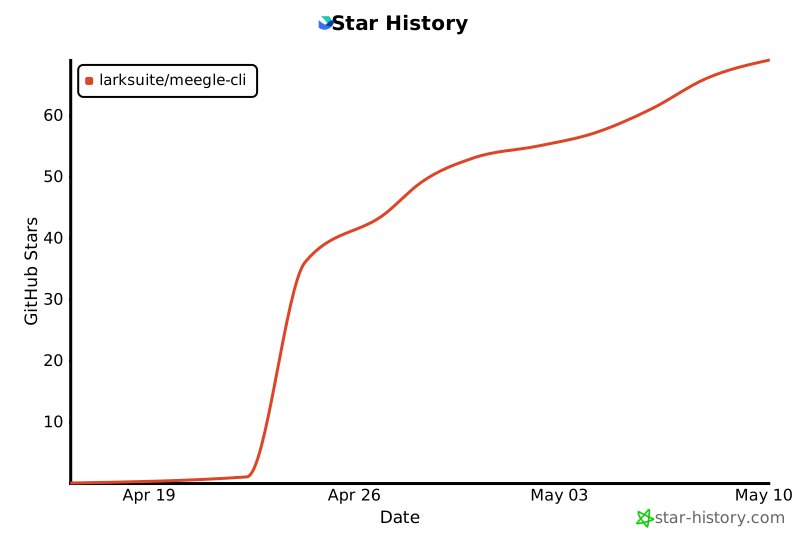](https://star-history.com/#larksuite/meegle-cli&Date)
|
|
839
|
+
|
|
840
|
+
## Contributing
|
|
841
|
+
|
|
842
|
+
Community contributions are welcome. For bugs and feature requests, open an [Issue](https://github.com/larksuite/meegle-cli/issues) or [Pull Request](https://github.com/larksuite/meegle-cli/pulls). For major changes, please start a discussion via an Issue first.
|
|
843
|
+
|
|
506
844
|
## License
|
|
507
845
|
|
|
508
846
|
This project is licensed under the **MIT License**.
|