@hunyed15/codecgc 0.1.12 → 0.2.1
This diff represents the content of publicly available package versions that have been released to one of the supported registries. The information contained in this diff is provided for informational purposes only and reflects changes between package versions as they appear in their respective public registries.
- package/README.md +53 -5
- package/bin/{cgc-install.js → cgc-init.js} +1 -1
- package/bin/codecgc.js +22 -27
- package/codecgc/cgc/SKILL.md +1 -1
- package/codecgc/cgc-arch/SKILL.md +1 -1
- package/codecgc/cgc-onboard/SKILL.md +1 -1
- package/codecgc/reference/README.md +2 -2
- package/codecgc/reference/mcp-tool-surface.md +1 -0
- package/codecgc/reference/onboarding.md +7 -7
- package/codecgc/reference/operation-guide.md +4 -4
- package/codecgc/reference/path-contract.md +1 -1
- package/codecgc/reference/policy-routing.md +2 -2
- package/codecgc/reference/project-structure.md +6 -5
- package/codecgc/reference/quickstart.md +3 -3
- package/codecgc/reference/real-workflow-loop.md +1 -1
- package/codecgc/reference/shared-conventions.md +8 -1
- package/codecgc/reference/troubleshooting.md +2 -10
- package/codecgc/roadmap/codecgc-release-maintenance/delivery-plan.md +2 -3
- package/codecgc/roadmap/codecgc-release-maintenance/overview.md +1 -1
- package/codecgc/roadmap/codecgc-release-maintenance/phases.md +1 -1
- package/codecgc/templates/project/claude/hooks/route-edit.ps1 +87 -0
- package/codecgc/templates/{claude → project/claude}/settings.local.json +1 -8
- package/codecgc/templates/project/model-routing.yaml +60 -0
- package/{codecgcmcp → mcp/codecgcmcp}/src/codecgcmcp/server.py +2 -9
- package/model-routing.yaml +0 -1
- package/package.json +12 -13
- package/scripts/audit_codecgc_external_capabilities.py +1 -1
- package/scripts/audit_codecgc_package_runtime.py +18 -16
- package/scripts/audit_codecgc_release_readiness.py +1 -1
- package/scripts/codecgc_runtime/executor_registry.py +2 -2
- package/scripts/codecgc_runtime/mcp_config.py +2 -2
- package/scripts/codecgc_runtime/routing_template.py +0 -1
- package/scripts/exercise_mcp_tools.py +2 -2
- package/scripts/install_codecgc.py +37 -292
- package/scripts/postinstall_codecgc.js +1 -1
- package/INSTALLATION.md +0 -211
- package/codexmcp/LICENSE +0 -21
- package/codexmcp/README.md +0 -294
- package/codexmcp/pyproject.toml +0 -37
- package/geminimcp/README.md +0 -258
- package/geminimcp/pyproject.toml +0 -15
- /package/codecgc/templates/{codex → project/codex}/codecgcrc.json +0 -0
- /package/codecgc/templates/{gemini → project/gemini/policies}/codecgc-policy.toml +0 -0
- /package/{codecgcmcp → mcp/codecgcmcp}/README.md +0 -0
- /package/{codecgcmcp → mcp/codecgcmcp}/pyproject.toml +0 -0
- /package/{codecgcmcp → mcp/codecgcmcp}/src/codecgcmcp/__init__.py +0 -0
- /package/{codecgcmcp → mcp/codecgcmcp}/src/codecgcmcp/cli.py +0 -0
- /package/{codexmcp → mcp/codexmcp}/src/codexmcp/__init__.py +0 -0
- /package/{codexmcp → mcp/codexmcp}/src/codexmcp/cli.py +0 -0
- /package/{codexmcp → mcp/codexmcp}/src/codexmcp/server.py +0 -0
- /package/{geminimcp → mcp/geminimcp}/src/geminimcp/__init__.py +0 -0
- /package/{geminimcp → mcp/geminimcp}/src/geminimcp/cli.py +0 -0
- /package/{geminimcp → mcp/geminimcp}/src/geminimcp/server.py +0 -0
package/INSTALLATION.md
DELETED
|
@@ -1,211 +0,0 @@
|
|
|
1
|
-
# CodeCGC 安装指南
|
|
2
|
-
|
|
3
|
-
本文说明如何从 npm 安装 CodeCGC,并把它接入到具体项目中。
|
|
4
|
-
|
|
5
|
-
## 环境要求
|
|
6
|
-
|
|
7
|
-
- Node.js >= 20
|
|
8
|
-
- npm >= 9
|
|
9
|
-
- Python >= 3.10
|
|
10
|
-
- 可选:Claude Code、Codex CLI、Gemini CLI
|
|
11
|
-
|
|
12
|
-
CodeCGC 的 npm 包提供 `cgc*` 命令;Python 运行时负责 MCP 编排器、执行器桥接、路由策略检查和工作流脚本。
|
|
13
|
-
|
|
14
|
-
## 1. 全局安装 CLI
|
|
15
|
-
|
|
16
|
-
```bash
|
|
17
|
-
npm install -g @hunyed15/codecgc --registry=https://registry.npmjs.org/
|
|
18
|
-
```
|
|
19
|
-
|
|
20
|
-
全局安装只注册命令,不会默认写入 `~/.claude`。这是当前主线设计:每个业务项目通过项目级安装生成自己的 `.mcp.json`、`.claude/` 和 `model-routing.yaml`。
|
|
21
|
-
|
|
22
|
-
验证命令:
|
|
23
|
-
|
|
24
|
-
```bash
|
|
25
|
-
cgc --help
|
|
26
|
-
cgc-install --help
|
|
27
|
-
cgc-doctor --help
|
|
28
|
-
```
|
|
29
|
-
|
|
30
|
-
## 2. 在目标项目执行项目级安装
|
|
31
|
-
|
|
32
|
-
进入你要使用 CodeCGC 的项目根目录:
|
|
33
|
-
|
|
34
|
-
```bash
|
|
35
|
-
cd your-project
|
|
36
|
-
cgc-install
|
|
37
|
-
```
|
|
38
|
-
|
|
39
|
-
默认安装模式是项目级安装,等价于:
|
|
40
|
-
|
|
41
|
-
```bash
|
|
42
|
-
cgc-install --mode local --workspace .
|
|
43
|
-
```
|
|
44
|
-
|
|
45
|
-
安装会创建或同步:
|
|
46
|
-
|
|
47
|
-
```text
|
|
48
|
-
.mcp.json
|
|
49
|
-
model-routing.yaml
|
|
50
|
-
.claude/
|
|
51
|
-
settings.local.json
|
|
52
|
-
hooks/
|
|
53
|
-
route-edit.ps1
|
|
54
|
-
commands/
|
|
55
|
-
cgc*.md
|
|
56
|
-
.codex/
|
|
57
|
-
codecgcrc.json
|
|
58
|
-
.gemini/
|
|
59
|
-
policies/
|
|
60
|
-
codecgc-policy.toml
|
|
61
|
-
codecgc/
|
|
62
|
-
START_HERE.md
|
|
63
|
-
features/
|
|
64
|
-
issues/
|
|
65
|
-
execution/
|
|
66
|
-
requirements/
|
|
67
|
-
architecture/
|
|
68
|
-
roadmap/
|
|
69
|
-
compound/
|
|
70
|
-
docs/
|
|
71
|
-
reference/
|
|
72
|
-
fixtures/
|
|
73
|
-
```
|
|
74
|
-
|
|
75
|
-
这些文件属于目标项目的 CodeCGC 集成面。不同电脑、不同项目的安装路径可能不同,因此应由 `cgc-install` 在本机生成,不应从 CodeCGC 源码仓库复制固定路径。
|
|
76
|
-
|
|
77
|
-
## 3. 首次启动和自检
|
|
78
|
-
|
|
79
|
-
安装后执行:
|
|
80
|
-
|
|
81
|
-
```bash
|
|
82
|
-
cgc-start
|
|
83
|
-
cgc-status
|
|
84
|
-
cgc-doctor
|
|
85
|
-
```
|
|
86
|
-
|
|
87
|
-
在 Claude 中也可以使用:
|
|
88
|
-
|
|
89
|
-
```text
|
|
90
|
-
/cgc-start
|
|
91
|
-
/cgc-status
|
|
92
|
-
/cgc-doctor
|
|
93
|
-
```
|
|
94
|
-
|
|
95
|
-
`cgc-start` 是只读的新手入口,会提示当前项目的最短使用路径。`cgc-status` 检查项目级集成文件是否齐全。`cgc-doctor` 检查 Python、MCP 运行时、执行器导入和项目集成状态。
|
|
96
|
-
|
|
97
|
-
## 4. 日常使用
|
|
98
|
-
|
|
99
|
-
推荐从一个入口开始:
|
|
100
|
-
|
|
101
|
-
```text
|
|
102
|
-
/cgc 新增一个登录页,放在 src/components/LoginForm.tsx
|
|
103
|
-
```
|
|
104
|
-
|
|
105
|
-
命令行回退路径:
|
|
106
|
-
|
|
107
|
-
```bash
|
|
108
|
-
cgc "新增一个登录页,放在 src/components/LoginForm.tsx"
|
|
109
|
-
```
|
|
110
|
-
|
|
111
|
-
CodeCGC 会根据工作流状态决定下一步是规划、执行、审核、继续还是收尾。只有在你明确知道当前阶段时,才需要直接使用子命令:
|
|
112
|
-
|
|
113
|
-
```bash
|
|
114
|
-
cgc-plan ...
|
|
115
|
-
cgc-build ...
|
|
116
|
-
cgc-fix ...
|
|
117
|
-
cgc-test ...
|
|
118
|
-
cgc-review ...
|
|
119
|
-
cgc-route ...
|
|
120
|
-
cgc-history ...
|
|
121
|
-
```
|
|
122
|
-
|
|
123
|
-
## 5. 角色与写入边界
|
|
124
|
-
|
|
125
|
-
CodeCGC 的默认协作边界是:
|
|
126
|
-
|
|
127
|
-
- Claude:需求、规划、设计、文档、审核、验收和工作流状态。
|
|
128
|
-
- Codex:后端代码和后端测试。
|
|
129
|
-
- Gemini:前端代码和前端测试。
|
|
130
|
-
|
|
131
|
-
`model-routing.yaml` 是项目内路由策略的唯一来源。Claude 的 hook 不承载业务规则,只把 `Edit`、`Write`、`MultiEdit` 写入请求交给同一套策略检查器,从而避免 Claude 绕过路由边界直接修改代码。
|
|
132
|
-
|
|
133
|
-
## 6. 用户级安装
|
|
134
|
-
|
|
135
|
-
用户级安装不是默认路径。只有在你明确希望同步 `~/.claude` 时才使用:
|
|
136
|
-
|
|
137
|
-
```bash
|
|
138
|
-
cgc-install --mode user-dry-run
|
|
139
|
-
cgc-install --mode user
|
|
140
|
-
```
|
|
141
|
-
|
|
142
|
-
建议先使用 `user-dry-run` 预览变更。普通项目接入场景应使用默认项目级安装。
|
|
143
|
-
|
|
144
|
-
## 7. 发布包维护者检查
|
|
145
|
-
|
|
146
|
-
维护 CodeCGC 包时,建议在源码仓库运行:
|
|
147
|
-
|
|
148
|
-
```bash
|
|
149
|
-
python -m pytest tests --basetemp D:\tmp\codecgc-pytest
|
|
150
|
-
python -m compileall -q scripts codecgcmcp\src codexmcp\src geminimcp\src
|
|
151
|
-
python scripts\audit_codecgc_package_runtime.py --format json
|
|
152
|
-
python scripts\audit_codecgc_release_readiness.py --format json
|
|
153
|
-
npm pack --dry-run --json
|
|
154
|
-
```
|
|
155
|
-
|
|
156
|
-
如果默认临时目录受限,可以指定发布探针目录:
|
|
157
|
-
|
|
158
|
-
```bash
|
|
159
|
-
set CODECGC_RELEASE_PROBE_ROOT=D:\tmp
|
|
160
|
-
python scripts\audit_codecgc_release_readiness.py --format json
|
|
161
|
-
```
|
|
162
|
-
|
|
163
|
-
## 8. 常见问题
|
|
164
|
-
|
|
165
|
-
### `cgc` 命令找不到
|
|
166
|
-
|
|
167
|
-
确认 npm 全局 bin 目录已经加入 `PATH`:
|
|
168
|
-
|
|
169
|
-
```bash
|
|
170
|
-
npm config get prefix
|
|
171
|
-
```
|
|
172
|
-
|
|
173
|
-
然后检查对应系统的全局 bin 路径是否在环境变量中。
|
|
174
|
-
|
|
175
|
-
### `cgc-doctor` 提示 Python 或 MCP 依赖缺失
|
|
176
|
-
|
|
177
|
-
先确认 Python 可用:
|
|
178
|
-
|
|
179
|
-
```bash
|
|
180
|
-
python --version
|
|
181
|
-
```
|
|
182
|
-
|
|
183
|
-
再安装核心依赖:
|
|
184
|
-
|
|
185
|
-
```bash
|
|
186
|
-
python -m pip install -r requirements.txt
|
|
187
|
-
```
|
|
188
|
-
|
|
189
|
-
如果是在源码开发环境中,可以按 `cgc-doctor` 输出的建议执行 editable install。
|
|
190
|
-
|
|
191
|
-
### 项目级集成缺失或过期
|
|
192
|
-
|
|
193
|
-
在目标项目根目录重新执行:
|
|
194
|
-
|
|
195
|
-
```bash
|
|
196
|
-
cgc-install
|
|
197
|
-
cgc-status
|
|
198
|
-
```
|
|
199
|
-
|
|
200
|
-
### 写入被 hook 拦截
|
|
201
|
-
|
|
202
|
-
检查 `model-routing.yaml`。如果目标路径属于 unknown 或 shared,应该先明确文件归属或拆分任务,而不是绕过 hook。
|
|
203
|
-
|
|
204
|
-
## 参考
|
|
205
|
-
|
|
206
|
-
- `README.md`
|
|
207
|
-
- `codecgc/reference/quickstart.md`
|
|
208
|
-
- `codecgc/reference/onboarding.md`
|
|
209
|
-
- `codecgc/reference/project-structure.md`
|
|
210
|
-
- `codecgc/reference/policy-routing.md`
|
|
211
|
-
- `codecgc/reference/troubleshooting.md`
|
package/codexmcp/LICENSE
DELETED
|
@@ -1,21 +0,0 @@
|
|
|
1
|
-
MIT License
|
|
2
|
-
|
|
3
|
-
Copyright (c) 2025 guda.studio
|
|
4
|
-
|
|
5
|
-
Permission is hereby granted, free of charge, to any person obtaining a copy
|
|
6
|
-
of this software and associated documentation files (the "Software"), to deal
|
|
7
|
-
in the Software without restriction, including without limitation the rights
|
|
8
|
-
to use, copy, modify, merge, publish, distribute, sublicense, and/or sell
|
|
9
|
-
copies of the Software, and to permit persons to whom the Software is
|
|
10
|
-
furnished to do so, subject to the following conditions:
|
|
11
|
-
|
|
12
|
-
The above copyright notice and this permission notice shall be included in all
|
|
13
|
-
copies or substantial portions of the Software.
|
|
14
|
-
|
|
15
|
-
THE SOFTWARE IS PROVIDED "AS IS", WITHOUT WARRANTY OF ANY KIND, EXPRESS OR
|
|
16
|
-
IMPLIED, INCLUDING BUT NOT LIMITED TO THE WARRANTIES OF MERCHANTABILITY,
|
|
17
|
-
FITNESS FOR A PARTICULAR PURPOSE AND NONINFRINGEMENT. IN NO EVENT SHALL THE
|
|
18
|
-
AUTHORS OR COPYRIGHT HOLDERS BE LIABLE FOR ANY CLAIM, DAMAGES OR OTHER
|
|
19
|
-
LIABILITY, WHETHER IN AN ACTION OF CONTRACT, TORT OR OTHERWISE, ARISING FROM,
|
|
20
|
-
OUT OF OR IN CONNECTION WITH THE SOFTWARE OR THE USE OR OTHER DEALINGS IN THE
|
|
21
|
-
SOFTWARE.
|
package/codexmcp/README.md
DELETED
|
@@ -1,294 +0,0 @@
|
|
|
1
|
-

|
|
2
|
-
|
|
3
|
-
<div align="center">
|
|
4
|
-
|
|
5
|
-
|
|
6
|
-
**让 Claude Code 与 Codex 无缝协作**
|
|
7
|
-
|
|
8
|
-
[](https://opensource.org/licenses/MIT) [](https://www.python.org/downloads/) [](https://modelcontextprotocol.io)[](https://x.com/intent/tweet?text=CodexMCP:让%20Claude%20Code%20与%20Codex%20无缝协作%20https://github.com/GuDaStudio/codexmcp%20%23AI%20%23Coding%20%23MCP) [](https://www.facebook.com/sharer/sharer.php?u=https://github.com/GuDaStudio/codexmcp) [](https://www.reddit.com/submit?title=CodexMCP:让%20Claude%20Code%20与%20Codex%20无缝协作&url=https://github.com/GuDaStudio/codexmcp) [](https://t.me/share/url?url=https://github.com/GuDaStudio/codexmcp&text=CodexMCP:让%20Claude%20Code%20与%20Codex%20无缝协作)
|
|
9
|
-
|
|
10
|
-
|
|
11
|
-
⭐ 在GitHub上给我们点星~您的支持对我们意义重大! 🙏😊
|
|
12
|
-
|
|
13
|
-
[English](./docs/README_EN.md) | 简体中文
|
|
14
|
-
|
|
15
|
-
</div>
|
|
16
|
-
|
|
17
|
-
---
|
|
18
|
-
|
|
19
|
-
## 一、项目简介
|
|
20
|
-
|
|
21
|
-
在当前 AI 辅助编程生态中,**Claude Code** 擅长架构设计与全局思考,而 **Codex** 在代码生成与细节优化上表现卓越。**CodexMCP** 作为两者之间的桥梁,通过 MCP 协议让它们优势互补:
|
|
22
|
-
|
|
23
|
-
- **Claude Code**:负责需求分析、架构规划、代码重构
|
|
24
|
-
- **Codex**:负责算法实现、bug 定位、代码审查
|
|
25
|
-
- **CodexMCP**:管理会话上下文,支持多轮对话与并行任务
|
|
26
|
-
|
|
27
|
-
相比官方 Codex MCP 实现,CodexMCP 引入了**会话持久化**、**并行执行**和**推理追踪**等企业级特性,让 AI 编程助手之间的协作更加智能高效。CodexMCP 与官方 Codex MCP 区别一览:
|
|
28
|
-
|
|
29
|
-
|
|
30
|
-
| 特性 | 官方版 | CodexMCP |
|
|
31
|
-
|------|--------|----------|
|
|
32
|
-
| 基本 Codex 调用 | √ | √ |
|
|
33
|
-
| 多轮对话 | × | √ |
|
|
34
|
-
| 推理详情追踪 | × | √ |
|
|
35
|
-
| 并行任务支持 | × | √ |
|
|
36
|
-
| 错误处理 | × | √ |
|
|
37
|
-
|
|
38
|
-
|
|
39
|
-
---
|
|
40
|
-
|
|
41
|
-
## 二、快速开始
|
|
42
|
-
|
|
43
|
-
### 0. 前置要求
|
|
44
|
-
|
|
45
|
-
请确保您已成功**安装**和**配置**claude code与codex两个编程工具。
|
|
46
|
-
- [Claude Code 安装指南](https://docs.claude.com/docs/claude-code)
|
|
47
|
-
- [Codex CLI 安装指南](https://developers.openai.com/codex/quickstart)
|
|
48
|
-
|
|
49
|
-
> [!IMPORTANT]
|
|
50
|
-
> 请确保您的claude code版本在v2.0.56以上;codex cli版本在v0.61.0以上!
|
|
51
|
-
|
|
52
|
-
请确保您已成功安装[uv工具](https://docs.astral.sh/uv/getting-started/installation/):
|
|
53
|
-
|
|
54
|
-
- Windows
|
|
55
|
-
在Powershell中运行以下命令:
|
|
56
|
-
```
|
|
57
|
-
powershell -ExecutionPolicy ByPass -c "irm https://astral.sh/uv/install.ps1 | iex"
|
|
58
|
-
```
|
|
59
|
-
|
|
60
|
-
- Linux/macOS
|
|
61
|
-
使用curl/wget下载并安装:
|
|
62
|
-
```
|
|
63
|
-
curl -LsSf https://astral.sh/uv/install.sh | sh #使用curl
|
|
64
|
-
|
|
65
|
-
wget -qO- https://astral.sh/uv/install.sh | sh #使用wget
|
|
66
|
-
```
|
|
67
|
-
|
|
68
|
-
**注意,我们极力推荐Windows用户在WSL中运行本项目!**
|
|
69
|
-
|
|
70
|
-
<!-- 如果您正在为订阅和配置而忧愁,我们非常欢迎您[积极联系我们](https://cc.guda.studio)。 -->
|
|
71
|
-
|
|
72
|
-
### 1. 安装步骤
|
|
73
|
-
|
|
74
|
-
**1.1** 移除官方 Codex MCP(如果已安装)。
|
|
75
|
-
|
|
76
|
-
```bash
|
|
77
|
-
claude mcp remove codex
|
|
78
|
-
```
|
|
79
|
-
|
|
80
|
-
**1.2** 安装 CodexMCP。
|
|
81
|
-
|
|
82
|
-
```bash
|
|
83
|
-
claude mcp add codex -s user --transport stdio -- uvx --from git+https://github.com/GuDaStudio/codexmcp.git codexmcp
|
|
84
|
-
```
|
|
85
|
-
|
|
86
|
-
**1.3** 验证安装。在 **终端** 中运行:
|
|
87
|
-
|
|
88
|
-
```
|
|
89
|
-
claude mcp list
|
|
90
|
-
```
|
|
91
|
-
|
|
92
|
-
> [!IMPORTANT]
|
|
93
|
-
> 如果看到如下描述,说明安装成功!
|
|
94
|
-
> `codex: uvx --from git+https://github.com/GuDaStudio/codexmcp.git codexmcp - ✓ Connected`
|
|
95
|
-
|
|
96
|
-
**1.4** 可选择默认允许claude code自动与codex交互,在`~/.claude/settings.json`添加 `mcp__codex__codex` allow项
|
|
97
|
-

|
|
98
|
-
|
|
99
|
-
### 2. 配置claude code提示词(可选)
|
|
100
|
-
|
|
101
|
-
为使claude code更好完成与codex的协同工作,我们**极力推荐您在 `~/.claude/CLAUDE.md`中添加以下内容**
|
|
102
|
-
|
|
103
|
-
<details>
|
|
104
|
-
<summary>展开查看prompt</summary>
|
|
105
|
-
|
|
106
|
-
|
|
107
|
-
```
|
|
108
|
-
## Core Instruction for CodeX MCP
|
|
109
|
-
|
|
110
|
-
在任何时刻,你必须思考当前过程可以如何与codex进行协作,如何调用Codex 为你提供的MCP工具作为你客观全面分析的保障。
|
|
111
|
-
其中你**务必执行**以下几个步骤:
|
|
112
|
-
**1** 在你对用户需求形成初步分析后,将用户需求、初始思路告知codex,并要求其完善需求分析和实施计划。
|
|
113
|
-
**2** 在实施具体编码任务前,**必须向codex索要代码实现原型(要求codex仅给出unified diff patch,严禁对代码做任何真实修改)**。在获取代码原型后,你**只能以此为逻辑参考,再次对代码修改进行重写**,形成企业生产级别、可读性极高、可维护性极高的代码后,才能实施具体编程修改任务。
|
|
114
|
-
**3** 无论何时,只要完成切实编码行为后,**必须立即使用codex review代码改动和对应需求完成程度**。
|
|
115
|
-
**4** codex只能给出参考,你**必须有自己的思考,甚至需要对codex的回答提出置疑**。尽信书则不如无书,你与codex的最终使命都是达成统一、全面、精准的意见,所以你们必须不断争辩已找到通向真理的唯一途径。
|
|
116
|
-
|
|
117
|
-
|
|
118
|
-
## Codex Tool Invocation Specification
|
|
119
|
-
|
|
120
|
-
1. 工具概述
|
|
121
|
-
|
|
122
|
-
codex MCP 提供了一个工具 `codex`,用于执行 AI 辅助的编码任务。该工具**通过 MCP 协议调用**,无需使用命令行。
|
|
123
|
-
|
|
124
|
-
2. 工具参数
|
|
125
|
-
|
|
126
|
-
**必选**参数:
|
|
127
|
-
- PROMPT (string): 发送给 codex 的任务指令
|
|
128
|
-
- cd (Path): codex 执行任务的工作目录根路径
|
|
129
|
-
|
|
130
|
-
可选参数:
|
|
131
|
-
- sandbox (string): 沙箱策略,可选值:
|
|
132
|
-
- "read-only" (默认): 只读模式,最安全
|
|
133
|
-
- "workspace-write": 允许在工作区写入
|
|
134
|
-
- "danger-full-access": 完全访问权限
|
|
135
|
-
- SESSION_ID (UUID | null): 用于继续之前的会话以与codex进行多轮交互,默认为 None(开启新会话)
|
|
136
|
-
- skip_git_repo_check (boolean): 是否允许在非 Git 仓库中运行,默认 False
|
|
137
|
-
- return_all_messages (boolean): 是否返回所有消息(包括推理、工具调用等),默认 False
|
|
138
|
-
- image (List[Path] | null): 附加一个或多个图片文件到初始提示词,默认为 None
|
|
139
|
-
- model (string | null): 指定使用的模型,默认为 None(使用用户默认配置)
|
|
140
|
-
- yolo (boolean | null): 无需审批运行所有命令(跳过沙箱),默认 False
|
|
141
|
-
- profile (string | null): 从 `~/.codex/config.toml` 加载的配置文件名称,默认为 None(使用用户默认配置)
|
|
142
|
-
|
|
143
|
-
返回值:
|
|
144
|
-
{
|
|
145
|
-
"success": true,
|
|
146
|
-
"SESSION_ID": "uuid-string",
|
|
147
|
-
"agent_messages": "agent回复的文本内容",
|
|
148
|
-
"all_messages": [] // 仅当 return_all_messages=True 时包含
|
|
149
|
-
}
|
|
150
|
-
或失败时:
|
|
151
|
-
{
|
|
152
|
-
"success": false,
|
|
153
|
-
"error": "错误信息"
|
|
154
|
-
}
|
|
155
|
-
|
|
156
|
-
3. 使用方式
|
|
157
|
-
|
|
158
|
-
开启新对话:
|
|
159
|
-
- 不传 SESSION_ID 参数(或传 None)
|
|
160
|
-
- 工具会返回新的 SESSION_ID 用于后续对话
|
|
161
|
-
|
|
162
|
-
继续之前的对话:
|
|
163
|
-
- 将之前返回的 SESSION_ID 作为参数传入
|
|
164
|
-
- 同一会话的上下文会被保留
|
|
165
|
-
|
|
166
|
-
4. 调用规范
|
|
167
|
-
|
|
168
|
-
**必须遵守**:
|
|
169
|
-
- 每次调用 codex 工具时,必须保存返回的 SESSION_ID,以便后续继续对话
|
|
170
|
-
- cd 参数必须指向存在的目录,否则工具会静默失败
|
|
171
|
-
- 严禁codex对代码进行实际修改,使用 sandbox="read-only" 以避免意外,并要求codex仅给出unified diff patch即可
|
|
172
|
-
|
|
173
|
-
推荐用法:
|
|
174
|
-
- 如需详细追踪 codex 的推理过程和工具调用,设置 return_all_messages=True
|
|
175
|
-
- 对于精准定位、debug、代码原型快速编写等任务,优先使用 codex 工具
|
|
176
|
-
|
|
177
|
-
5. 注意事项
|
|
178
|
-
|
|
179
|
-
- 会话管理:始终追踪 SESSION_ID,避免会话混乱
|
|
180
|
-
- 工作目录:确保 cd 参数指向正确且存在的目录
|
|
181
|
-
- 错误处理:检查返回值的 success 字段,处理可能的错误
|
|
182
|
-
|
|
183
|
-
```
|
|
184
|
-
|
|
185
|
-
</details>
|
|
186
|
-
|
|
187
|
-
|
|
188
|
-
|
|
189
|
-
---
|
|
190
|
-
|
|
191
|
-
## 三、工具说明
|
|
192
|
-
|
|
193
|
-
<details>
|
|
194
|
-
<summary>点击查看codex工具参数说明</summary>
|
|
195
|
-
|
|
196
|
-
| 参数 | 类型 | 必填 | 默认值 | 说明 |
|
|
197
|
-
|------|------|------|--------|------|
|
|
198
|
-
| `PROMPT` | `str` | ✅ | - | 发送给 Codex 的任务指令 |
|
|
199
|
-
| `cd` | `Path` | ✅ | - | Codex 工作目录根路径 |
|
|
200
|
-
| `sandbox` | `Literal` | ❌ | `"read-only"` | 沙箱策略:`read-only` / `workspace-write` / `danger-full-access` |
|
|
201
|
-
| `SESSION_ID` | `UUID \| None` | ❌ | `None` | 会话 ID(None 则开启新会话) |
|
|
202
|
-
| `skip_git_repo_check` | `bool` | ❌ | `False` | 是否允许在非 Git 仓库运行 |
|
|
203
|
-
| `return_all_messages` | `bool` | ❌ | `False` | 是否返回完整推理信息 |
|
|
204
|
-
| `image` | `List[Path] \| None` | ❌ | `None` | 附加图片文件到初始提示词 |
|
|
205
|
-
| `model` | `str \| None` | ❌ | `None` | 指定使用的模型(默认使用用户配置) |
|
|
206
|
-
| `yolo` | `bool \| None` | ❌ | `False` | 无需审批运行所有命令(跳过沙箱) |
|
|
207
|
-
| `profile` | `str \| None` | ❌ | `None` | 从 `~/.codex/config.toml` 加载的配置文件名称 |
|
|
208
|
-
|
|
209
|
-
</details>
|
|
210
|
-
|
|
211
|
-
<details>
|
|
212
|
-
<summary>点击查看codex工具返回值结构</summary>
|
|
213
|
-
|
|
214
|
-
**成功时:**
|
|
215
|
-
```json
|
|
216
|
-
{
|
|
217
|
-
"success": true,
|
|
218
|
-
"SESSION_ID": "550e8400-e29b-41d4-a716-446655440000",
|
|
219
|
-
"agent_messages": "Codex 的回复内容...",
|
|
220
|
-
"all_messages": [...] // 仅当 return_all_messages=True 时包含
|
|
221
|
-
}
|
|
222
|
-
```
|
|
223
|
-
|
|
224
|
-
**失败时:**
|
|
225
|
-
```json
|
|
226
|
-
{
|
|
227
|
-
"success": false,
|
|
228
|
-
"error": "错误信息描述"
|
|
229
|
-
}
|
|
230
|
-
```
|
|
231
|
-
|
|
232
|
-
</details>
|
|
233
|
-
|
|
234
|
-
---
|
|
235
|
-
|
|
236
|
-
## 四、FAQ
|
|
237
|
-
|
|
238
|
-
<details>
|
|
239
|
-
<summary>Q1: 是否需要额外付费?</summary>
|
|
240
|
-
|
|
241
|
-
**CodexMCP 本身完全免费开源,无需任何额外付费!**
|
|
242
|
-
|
|
243
|
-
</details>
|
|
244
|
-
|
|
245
|
-
<details>
|
|
246
|
-
<summary>Q2: 并行调用会冲突吗?</summary>
|
|
247
|
-
|
|
248
|
-
不会。每个调用使用独立的 `SESSION_ID`,完全隔离。
|
|
249
|
-
|
|
250
|
-
</details>
|
|
251
|
-
|
|
252
|
-
|
|
253
|
-
---
|
|
254
|
-
|
|
255
|
-
## 🤝 贡献指南
|
|
256
|
-
|
|
257
|
-
<details>
|
|
258
|
-
<summary>我们欢迎所有形式的贡献!</summary>
|
|
259
|
-
|
|
260
|
-
### 开发环境配置
|
|
261
|
-
|
|
262
|
-
```bash
|
|
263
|
-
# 克隆仓库
|
|
264
|
-
git clone https://github.com/GuDaStudio/codexmcp.git
|
|
265
|
-
cd codexmcp
|
|
266
|
-
|
|
267
|
-
# 安装依赖
|
|
268
|
-
uv sync
|
|
269
|
-
```
|
|
270
|
-
|
|
271
|
-
### 提交规范
|
|
272
|
-
|
|
273
|
-
- 遵循 [Conventional Commits](https://www.conventionalcommits.org/)
|
|
274
|
-
- 提交测试用例
|
|
275
|
-
- 更新文档
|
|
276
|
-
|
|
277
|
-
</details>
|
|
278
|
-
|
|
279
|
-
|
|
280
|
-
|
|
281
|
-
---
|
|
282
|
-
|
|
283
|
-
## 📄 许可证
|
|
284
|
-
|
|
285
|
-
本项目采用 [MIT License](LICENSE) 开源协议。
|
|
286
|
-
Copyright (c) 2025 [guda.studio](mailto:gudaclaude@gmail.com)
|
|
287
|
-
|
|
288
|
-
---
|
|
289
|
-
<div align="center">
|
|
290
|
-
|
|
291
|
-
## 用 🌟 为本项目助力~
|
|
292
|
-
[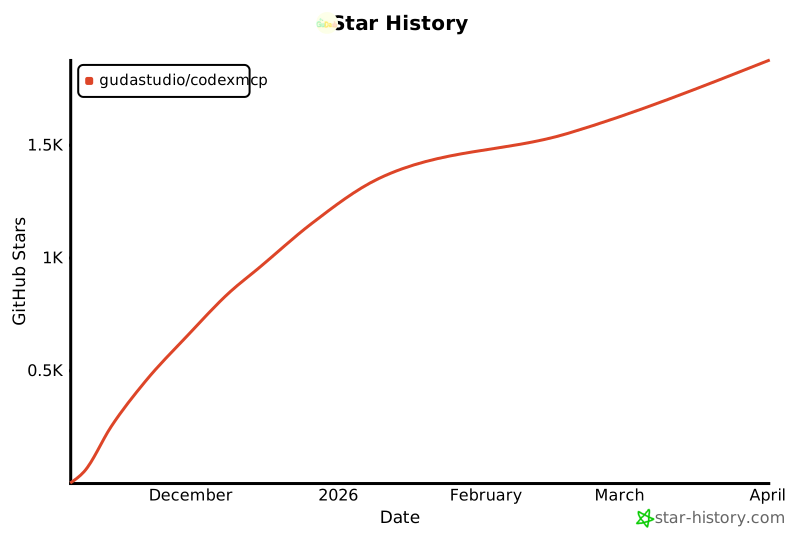](https://www.star-history.com/#GuDaStudio/codexmcp&type=date&legend=top-left)
|
|
293
|
-
|
|
294
|
-
</div>
|
package/codexmcp/pyproject.toml
DELETED
|
@@ -1,37 +0,0 @@
|
|
|
1
|
-
[build-system]
|
|
2
|
-
requires = ["hatchling>=1.25"]
|
|
3
|
-
build-backend = "hatchling.build"
|
|
4
|
-
|
|
5
|
-
[project]
|
|
6
|
-
name = "codexmcp"
|
|
7
|
-
version = "0.7.4"
|
|
8
|
-
description = "FastMCP server wrapping the Codex CLI."
|
|
9
|
-
readme = "README.md"
|
|
10
|
-
requires-python = ">=3.12"
|
|
11
|
-
dependencies = [
|
|
12
|
-
"mcp[cli]>=1.20.0",
|
|
13
|
-
"pydantic>=2.0",
|
|
14
|
-
]
|
|
15
|
-
authors = [
|
|
16
|
-
{ name = "guda.studio", email = "gudaclaude@gmail.com" },
|
|
17
|
-
]
|
|
18
|
-
license = { text = "MIT" }
|
|
19
|
-
keywords = ["mcp", "fastmcp", "codex"]
|
|
20
|
-
classifiers = [
|
|
21
|
-
"Programming Language :: Python :: 3",
|
|
22
|
-
"Programming Language :: Python :: 3.12",
|
|
23
|
-
"License :: OSI Approved :: MIT License",
|
|
24
|
-
"Operating System :: OS Independent",
|
|
25
|
-
]
|
|
26
|
-
|
|
27
|
-
[project.urls]
|
|
28
|
-
Homepage = "https://github.com/GuDaStudio/codexmcp"
|
|
29
|
-
|
|
30
|
-
[project.scripts]
|
|
31
|
-
codexmcp = "codexmcp.cli:main"
|
|
32
|
-
|
|
33
|
-
[tool.hatch.build.targets.wheel]
|
|
34
|
-
packages = ["src/codexmcp"]
|
|
35
|
-
|
|
36
|
-
[tool.hatch.build.targets.sdist]
|
|
37
|
-
include = ["src/codexmcp", "README.md", "LICENSE"]
|